Disclaimer: This presentation is prepared by trainees of
baabtra as a part of mentoring program. This is not official
document of baabtra –Mentoring Partner
Baabtra-Mentoring Partner is the mentoring division of baabte System Technologies Pvt .
Ltd
JOBS APPLIED = 0
RESPONSES = 0
Nithil.pp
nithilp@gmail.com
facebook.com/ nithil
padinare peediyekal
twitter.com/nithilpp
in.linkedin.com/in/nithil.pp
9995223505
DOM STRUCTURE
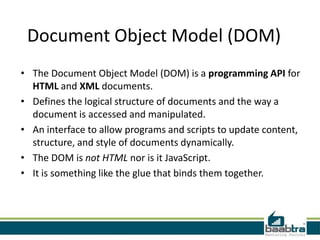
Document Object Model (DOM)
• The Document Object Model (DOM) is a programming API for
HTML and XML documents.
• Defines the logical structure of documents and the way a
document is accessed and manipulated.
• An interface to allow programs and scripts to update content,
structure, and style of documents dynamically.
• The DOM is not HTML nor is it JavaScript.
• It is something like the glue that binds them together.
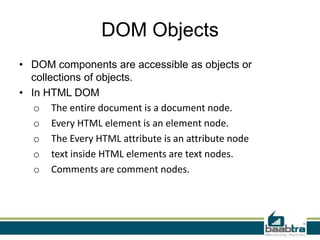
DOM Objects
• DOM components are accessible as objects or
collections of objects.
• In HTML DOM
o The entire document is a document node.
o Every HTML element is an element node.
o The Every HTML attribute is an attribute node
o text inside HTML elements are text nodes.
o Comments are comment nodes.
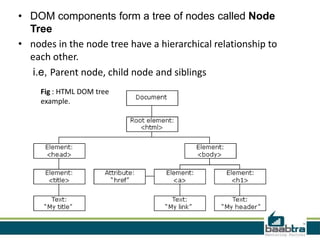
• DOM components form a tree of nodes called Node
Tree
• nodes in the node tree have a hierarchical relationship to
each other.
i.e, Parent node, child node and siblings
Fig : HTML DOM tree
example.
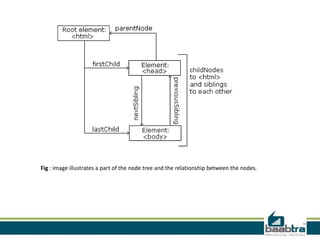
Fig : image illustrates a part of the node tree and the relationship between the nodes.
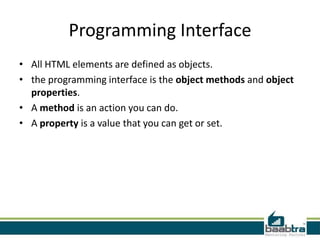
Programming Interface
• All HTML elements are defined as objects.
• the programming interface is the object methods and object
properties.
• A method is an action you can do.
• A property is a value that you can get or set.
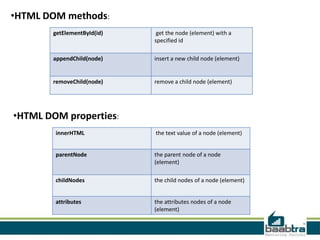
getElementById(id) get the node (element) with a
specified id
appendChild(node) insert a new child node (element)
removeChild(node) remove a child node (element)
•HTML DOM methods:
•HTML DOM properties:
innerHTML the text value of a node (element)
parentNode the parent node of a node
(element)
childNodes the child nodes of a node (element)
attributes the attributes nodes of a node
(element)
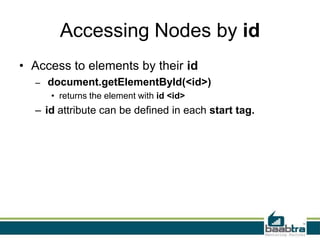
Accessing Nodes by id
• Access to elements by their id
– document.getElementById(<id>)
• returns the element with id <id>
– id attribute can be defined in each start tag.
Other Access Methods
• Access by elements' tag
– there are typically several elements with the same tag
– document.getElementsByTagName(<tag>)
– e.g.
• var li = document.getElementsByTagName(“li")[0];
//to get first li of ul.
• Access by elements' name attribute
– several elements can have the same name
– document.getElementsByName(<name>)
• returns the collection of elements with name <name>
Traversing DOM tree
• Traversal through node properties
– childNodes property
• the value is a collection of nodes
– has a length attribute
– an item can be reached by its index
• e.g. var body = html.childNodes[1];
– firstChild, lastChild properties
– nextSibling, previousSibling properties
– parentNode property
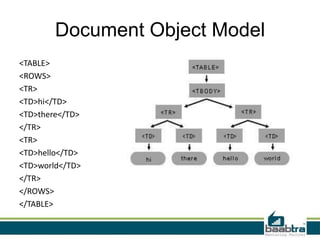
Document Object Model
<TABLE>
<ROWS>
<TR>
<TD>hi</TD>
<TD>there</TD>
</TR>
<TR>
<TD>hello</TD>
<TD>world</TD>
</TR>
</ROWS>
</TABLE>
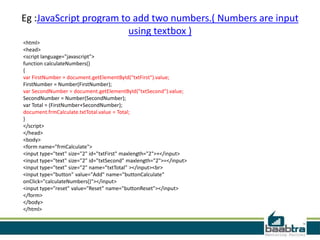
Eg :JavaScript program to add two numbers.( Numbers are input
using textbox )
<html>
<head>
<script language="javascript">
function calculateNumbers()
{
var FirstNumber = document.getElementById("txtFirst").value;
FirstNumber = Number(FirstNumber);
var SecondNumber = document.getElementById("txtSecond").value;
SecondNumber = Number(SecondNumber);
var Total = (FirstNumber+SecondNumber);
document.frmCalculate.txtTotal.value = Total;
}
</script>
</head>
<body>
<form name="frmCalculate">
<input type="text" size="2" id="txtFirst" maxlength="2">+</input>
<input type="text" size="2" id="txtSecond" maxlength="2">=</input>
<input type="text" size="2" name="txtTotal" ></input><br>
<input type="button" value="Add" name="buttonCalculate"
onClick="calculateNumbers()"></input>
<input type="reset" value="Reset" name="buttonReset"></input>
</form>
</body>
</html>
Thank you…
If this presentation helped you, please visit our
page facebook.com/baabtra and like it.
Thanks in advance.
www.baabtra.com | www.massbaab.com |www.baabte.com
Contact Us
Emarald Mall (Big Bazar Building)
Mavoor Road, Kozhikode,
Kerala, India.
Ph: + 91 – 495 40 25 550
NC Complex, Near Bus Stand
Mukkam, Kozhikode,
Kerala, India.
Ph: + 91 – 495 40 25 550
Start up Village
Eranakulam,
Kerala, India.
Email: info@baabtra.com

Dom structures

  • 2.
    Disclaimer: This presentationis prepared by trainees of baabtra as a part of mentoring program. This is not official document of baabtra –Mentoring Partner Baabtra-Mentoring Partner is the mentoring division of baabte System Technologies Pvt . Ltd
  • 4.
    JOBS APPLIED =0 RESPONSES = 0
  • 5.
  • 6.
    Document Object Model(DOM) • The Document Object Model (DOM) is a programming API for HTML and XML documents. • Defines the logical structure of documents and the way a document is accessed and manipulated. • An interface to allow programs and scripts to update content, structure, and style of documents dynamically. • The DOM is not HTML nor is it JavaScript. • It is something like the glue that binds them together.
  • 7.
    DOM Objects • DOMcomponents are accessible as objects or collections of objects. • In HTML DOM o The entire document is a document node. o Every HTML element is an element node. o The Every HTML attribute is an attribute node o text inside HTML elements are text nodes. o Comments are comment nodes.
  • 8.
    • DOM componentsform a tree of nodes called Node Tree • nodes in the node tree have a hierarchical relationship to each other. i.e, Parent node, child node and siblings Fig : HTML DOM tree example.
  • 9.
    Fig : imageillustrates a part of the node tree and the relationship between the nodes.
  • 10.
    Programming Interface • AllHTML elements are defined as objects. • the programming interface is the object methods and object properties. • A method is an action you can do. • A property is a value that you can get or set.
  • 11.
    getElementById(id) get thenode (element) with a specified id appendChild(node) insert a new child node (element) removeChild(node) remove a child node (element) •HTML DOM methods: •HTML DOM properties: innerHTML the text value of a node (element) parentNode the parent node of a node (element) childNodes the child nodes of a node (element) attributes the attributes nodes of a node (element)
  • 12.
    Accessing Nodes byid • Access to elements by their id – document.getElementById(<id>) • returns the element with id <id> – id attribute can be defined in each start tag.
  • 13.
    Other Access Methods •Access by elements' tag – there are typically several elements with the same tag – document.getElementsByTagName(<tag>) – e.g. • var li = document.getElementsByTagName(“li")[0]; //to get first li of ul. • Access by elements' name attribute – several elements can have the same name – document.getElementsByName(<name>) • returns the collection of elements with name <name>
  • 14.
    Traversing DOM tree •Traversal through node properties – childNodes property • the value is a collection of nodes – has a length attribute – an item can be reached by its index • e.g. var body = html.childNodes[1]; – firstChild, lastChild properties – nextSibling, previousSibling properties – parentNode property
  • 15.
  • 16.
    Eg :JavaScript programto add two numbers.( Numbers are input using textbox ) <html> <head> <script language="javascript"> function calculateNumbers() { var FirstNumber = document.getElementById("txtFirst").value; FirstNumber = Number(FirstNumber); var SecondNumber = document.getElementById("txtSecond").value; SecondNumber = Number(SecondNumber); var Total = (FirstNumber+SecondNumber); document.frmCalculate.txtTotal.value = Total; } </script> </head> <body> <form name="frmCalculate"> <input type="text" size="2" id="txtFirst" maxlength="2">+</input> <input type="text" size="2" id="txtSecond" maxlength="2">=</input> <input type="text" size="2" name="txtTotal" ></input><br> <input type="button" value="Add" name="buttonCalculate" onClick="calculateNumbers()"></input> <input type="reset" value="Reset" name="buttonReset"></input> </form> </body> </html>
  • 17.
  • 18.
    If this presentationhelped you, please visit our page facebook.com/baabtra and like it. Thanks in advance. www.baabtra.com | www.massbaab.com |www.baabte.com
  • 19.
    Contact Us Emarald Mall(Big Bazar Building) Mavoor Road, Kozhikode, Kerala, India. Ph: + 91 – 495 40 25 550 NC Complex, Near Bus Stand Mukkam, Kozhikode, Kerala, India. Ph: + 91 – 495 40 25 550 Start up Village Eranakulam, Kerala, India. Email: info@baabtra.com