+

         The
    Documentary:
       a basic
      overview

                   by ITF Jenny Kijowski

                   profkijowski@gmail.com
                   http://macaulay.cuny.edu/eportfolios/jkijowski/
                   http://macaulay.cuny.edu/eportfolios/brooklynitfs/
+
    documentary


       Fact-based film that depicts actual events and persons.
        Documentaries can deal with scientific or educational topics,
        can be a form of journalism or social commentary, or can be a
        conduit of propaganda or personal experience.(from the Concise Dictionary
        at http://www.merriam-webster.com/dictionary/documentary)
+
    The 3 Stages


       1) Pre-production: planning your film

       2) Production: shooting your footage

       3) Post-production: putting it all together
+
    Pre-production:
    the vision

       What story do you want to tell?
           Do some research to hone in on the particular angle you want to take.
           Fact check, find historical documents, download images for use in your
            film (remember to document your citations!)

       Watch some documentaries—get inspired!
           Feed Me a Story by local filmmaker Teresa Loong
           The National Parks: America’s Best Idea by Ken Burns (extended
            preview on PBS)
           Raising Adam Lanza by PBS’ Frontline series

       What are your limitations and constraints?
           Do you have the resources you need?
           You can rent equipment from Macaulay:
            http://macaulay.cuny.edu/community/doit/av-request-form/
+
    Pre-production:
    who, what, where, when & how

       Who are the main players?
           Set up interviews and get permissions
           Have your questions ready and practice them on people.

       What are the critical shots?

       Where are the main places?
           Scout your location(s) if possible.

       When are you going to get it done?
           What are your time constraints? Make a schedule.

       How are you going to get it done?
           Assign group members to particular tasks, such as director, primary
            videographer, interviewer, project manager, etc.
+
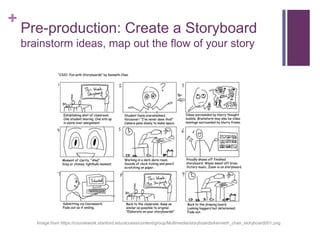
    Pre-production: Create a Storyboard
    brainstorm ideas, map out the flow of your story


       Image from https://coursework.stanford.edu/access/content/group/Multimedia/storyboards/kenneth_chan_storyboard001.png
+
    Production
    and…action!

       Shooting video
           Take more footage than you think you will need
           Don’t forget the value of “establishing shots” to situate your viewer
           What details might be useful?

       Conducting interviews
           Have your prepared questions, but don’t be afraid to ad lib
           Try to conduct your interviews in quiet places with natural lighting
           Go for consistency

       Taking photographs
           Still images can add dimension and texture

       Be mindful of production value
           Unless skillfully used, footage taken in poorly lit, noisy or busy environments can
            detract from, rather than add to, your documentary
+
    Post-production:
    revisit your initial vision

       Review/revise your storyboard
           Does your footage conform to the story you initially set out to tell, or
            is there a different story that emerges?
           Please be respectful of other people’s stories.
           Does your footage have a focus?

       Considerations of audience
           Who is your intended audience? Who else might see it?
           How will your film be interpreted?
           What are the limitations on your control over reception?
+
    Post-production:
    the rough cut

       Edit your footage in iMovie
           Use your storyboard as a guide
           Identify the most relevant clips and quotes
           Edit your footage down to your desired time limit
           Don’t use effects yet
           Focus focus focus!
+
    Post-production:
    the final cut

       Audio
           Write and record your voiceover script(s)
           add music & sound effects
           Ensure that your audio levels are equalized throughout the film

       Visual
           Use transitions to help ensure smooth flow between clips &/or images
           Add captions/text where necessary or desired
           Avoid overusing special effects

       Advanced iMovie tutorial
           http://macaulay.cuny.edu/eportfolios/alterman13/2013/03/31/advanced-
            imovie-presentation/
+
    Additional Tips

       Transcribe your interviews
           Make the text available for download

       Don’t create your film in a bubble
           Have an outside set of eyes to critique your documentary

       Copyright
           Everything belongs to somebody. There are rules to using music, images and
            videos you find online. See my tips for preventing copyright infringement at
            http://macaulay.cuny.edu/eportfolios/jkijowski/resources/using-music-images-
            videos/.

       Citations
           Professor Alterman has stated that all factual material must be fully sourced in
            footnote form, according to either Chicago Manual of Style or the Modern
            Language Association (MLA) guidelines.

Documentary

  • 1.
    + The Documentary: a basic overview by ITF Jenny Kijowski profkijowski@gmail.com http://macaulay.cuny.edu/eportfolios/jkijowski/ http://macaulay.cuny.edu/eportfolios/brooklynitfs/
  • 2.
    + documentary  Fact-based film that depicts actual events and persons. Documentaries can deal with scientific or educational topics, can be a form of journalism or social commentary, or can be a conduit of propaganda or personal experience.(from the Concise Dictionary at http://www.merriam-webster.com/dictionary/documentary)
  • 3.
    + The 3 Stages  1) Pre-production: planning your film  2) Production: shooting your footage  3) Post-production: putting it all together
  • 4.
    + Pre-production: the vision  What story do you want to tell?  Do some research to hone in on the particular angle you want to take.  Fact check, find historical documents, download images for use in your film (remember to document your citations!)  Watch some documentaries—get inspired!  Feed Me a Story by local filmmaker Teresa Loong  The National Parks: America’s Best Idea by Ken Burns (extended preview on PBS)  Raising Adam Lanza by PBS’ Frontline series  What are your limitations and constraints?  Do you have the resources you need?  You can rent equipment from Macaulay: http://macaulay.cuny.edu/community/doit/av-request-form/
  • 5.
    + Pre-production: who, what, where, when & how  Who are the main players?  Set up interviews and get permissions  Have your questions ready and practice them on people.  What are the critical shots?  Where are the main places?  Scout your location(s) if possible.  When are you going to get it done?  What are your time constraints? Make a schedule.  How are you going to get it done?  Assign group members to particular tasks, such as director, primary videographer, interviewer, project manager, etc.
  • 6.
    + Pre-production: Create a Storyboard brainstorm ideas, map out the flow of your story Image from https://coursework.stanford.edu/access/content/group/Multimedia/storyboards/kenneth_chan_storyboard001.png
  • 7.
    + Production and…action!  Shooting video  Take more footage than you think you will need  Don’t forget the value of “establishing shots” to situate your viewer  What details might be useful?  Conducting interviews  Have your prepared questions, but don’t be afraid to ad lib  Try to conduct your interviews in quiet places with natural lighting  Go for consistency  Taking photographs  Still images can add dimension and texture  Be mindful of production value  Unless skillfully used, footage taken in poorly lit, noisy or busy environments can detract from, rather than add to, your documentary
  • 8.
    + Post-production: revisit your initial vision  Review/revise your storyboard  Does your footage conform to the story you initially set out to tell, or is there a different story that emerges?  Please be respectful of other people’s stories.  Does your footage have a focus?  Considerations of audience  Who is your intended audience? Who else might see it?  How will your film be interpreted?  What are the limitations on your control over reception?
  • 9.
    + Post-production: the rough cut  Edit your footage in iMovie  Use your storyboard as a guide  Identify the most relevant clips and quotes  Edit your footage down to your desired time limit  Don’t use effects yet  Focus focus focus!
  • 10.
    + Post-production: the final cut  Audio  Write and record your voiceover script(s)  add music & sound effects  Ensure that your audio levels are equalized throughout the film  Visual  Use transitions to help ensure smooth flow between clips &/or images  Add captions/text where necessary or desired  Avoid overusing special effects  Advanced iMovie tutorial  http://macaulay.cuny.edu/eportfolios/alterman13/2013/03/31/advanced- imovie-presentation/
  • 11.
    + Additional Tips  Transcribe your interviews  Make the text available for download  Don’t create your film in a bubble  Have an outside set of eyes to critique your documentary  Copyright  Everything belongs to somebody. There are rules to using music, images and videos you find online. See my tips for preventing copyright infringement at http://macaulay.cuny.edu/eportfolios/jkijowski/resources/using-music-images- videos/.  Citations  Professor Alterman has stated that all factual material must be fully sourced in footnote form, according to either Chicago Manual of Style or the Modern Language Association (MLA) guidelines.