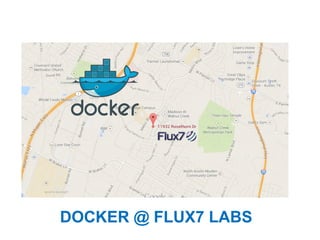
DOCKER @ FLUX7 LABS
DOCKER AUSTIN

FOR MORE DISCUSSIONS ON DOCKER!
Who am I?
● Aater Suleman
○ Part-time UT Professor
○ Geek, Architect, Developer, Ops, DevOps …

● Co-founder & CEO Flux7 Labs
○ DevOps Solutions
■ Deployments
■ Cost/performance optimized large scale
website (Ruby on rails, node.js, Django) and
Hadoop deployments
Four projects:
VyScale Dev Flow
Docker's impact on performance (whitepaper WIP)
Multi-tenancy
Live process migration using CRIU (criu.org)
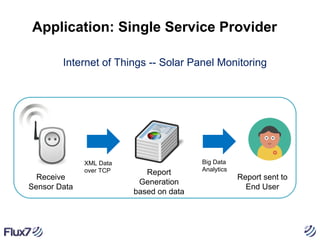
Application: Single Service Provider
Internet of Things -- Solar Panel Monitoring

Receive
Sensor Data

XML Data
over TCP

Report
Generation
based on data

Big Data
Analytics

Report sent to
End User
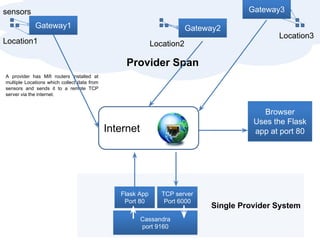
Gateway3

sensors
Gateway1

Gateway2

Location1

Location3

Location2

Provider Span
A provider has Mifi routers installed at
multiple Locations which collect data from
sensors and sends it to a remote TCP
server via the internet.

Browser
Uses the Flask
app at port 80

Internet

Flask App
Port 80

TCP server
Port 6000

Cassandra
port 9160

Single Provider System
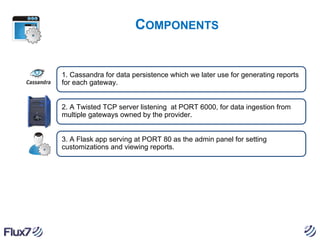
COMPONENTS

1. Cassandra for data persistence which we later use for generating reports
for each gateway.

2. A Twisted TCP server listening at PORT 6000, for data ingestion from
multiple gateways owned by the provider.

3. A Flask app serving at PORT 80 as the admin panel for setting
customizations and viewing reports.
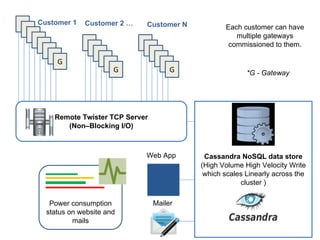
Customer 1

G

Customer 2 …

Customer N

G

G

G

Each customer can have
multiple gateways
commissioned to them.

*G - Gateway

Remote Twister TCP Server
(Non–Blocking I/O)

Web App

Power consumption
status on website and
mails

Mailer

Cassandra NoSQL data store
(High Volume High Velocity Write
which scales Linearly across the
cluster )
SINGLE PROVIDER LAUNCH
For launching the single provider version, the following was done:

1. nohup python tcp_server.py & # For firing up the TCP server.
2. nohup python flask_app.py &

# For firing up the admin panel

Both these code bases houses hard-coded Cassandra KEYSPACE

Success!
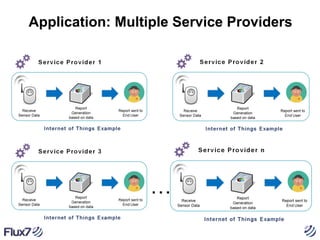
Application: Multiple Service Providers

…
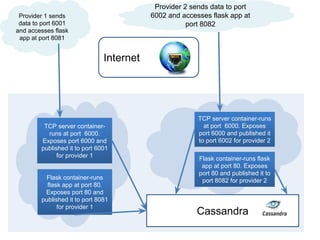
Provider 2 sends data to port
6002 and accesses flask app at
port 8082

Provider 1 sends
data to port 6001
and accesses flask
app at port 8081

Internet

TCP server containerruns at port 6000.
Exposes port 6000 and
published it to port 6001
for provider 1

Flask container-runs
flask app at port 80.
Exposes port 80 and
published it to port 8081
for provider 1

TCP server container-runs
at port 6000. Exposes
port 6000 and published it
to port 6002 for provider 2
Flask container-runs flask
app at port 80. Exposes
port 80 and published it to
port 8082 for provider 2

Cassandra
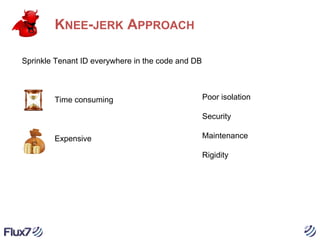
KNEE-JERK APPROACH
Sprinkle Tenant ID everywhere in the code and DB

Time consuming

Poor isolation
Security

Expensive

Maintenance
Rigidity
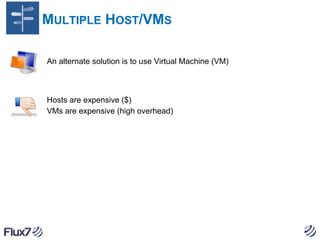
MULTIPLE HOST/VMS
An alternate solution is to use Virtual Machine (VM)

Hosts are expensive ($)
VMs are expensive (high overhead)
AND THE SOLUTION
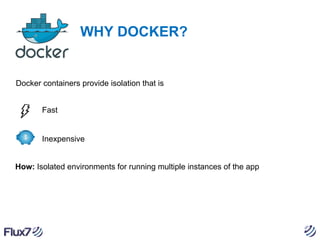
WHY DOCKER?

Docker containers provide isolation that is
Fast

Inexpensive

How: Isolated environments for running multiple instances of the app
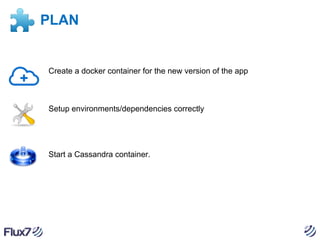
PLAN

Create a docker container for the new version of the app

Setup environments/dependencies correctly

Start a Cassandra container.
AUTOMATION
An automation was the next foreseeable step, and for that we found Docker-py
extremely useful. We used something like:
# Yes. We love Python!
def start_provider(provider_id, gateway_port, admin_port ):
docker_client = docker.Client(base_url='unix://var/run/docker.sock', version='1.6',
timeout=100)
# start a docker container for consuming gateway data at gateway_port
start_command = 'python software/remote_server.py ' + provider_id
remote_server = docker_client.create_container('flux7/labs', # docker image
command=start_command, # start command contains the keyspace parameter, keyspace is the
provider_id
name='remote_server_' + provider_id, # name the container, name is provider_id
ports=[(6000, 'tcp'),]) # open port for binding, remote_server.py listens at 6000
docker_client.start(remote_server, port_bindings={6000: ('0.0.0.0', gateway_port)},
links={'db': 'cassandra'})
# start a docker container for serving admin panel at admin_port
start_command = 'python software/flask_app.py ' + provider_id
remote_server = docker_client.create_container('flux7/labs', # docker image
command=start_command, # start command contains the keyspace parameter, keyspace is the
provider_id
name='admin_panel_' + provider_id, # name the container, name is provider_id
ports=[(80, 'tcp'),]) # open port for binding, remote_server.py listens at 6000
docker_client.start(remote_server, port_bindings={80: ('0.0.0.0',admin_port)}, links=
{'db': 'cassandra'})
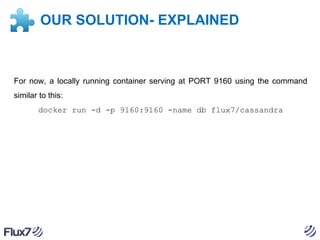
OUR SOLUTION- EXPLAINED

For now, a locally running container serving at PORT 9160 using the command
similar to this:
docker run -d -p 9160:9160 -name db flux7/cassandra
OUR SOLUTION- EXPLAINED
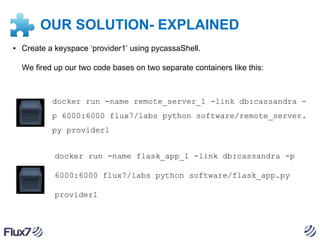
▪ Create a keyspace ‘provider1’ using pycassaShell.
We fired up our two code bases on two separate containers like this:

docker run -name remote_server_1 -link db:cassandra p 6000:6000 flux7/labs python software/remote_server.
py provider1
docker run -name flask_app_1 -link db:cassandra -p
6000:6000 flux7/labs python software/flask_app.py
provider1
DOCKER ISSUES DISCOVERED

Docker does not support multiple instances of Cassandra running on the
same machine.

Hosting multiple database instances on a single machine can quickly
cause resource shortages
OUR SOLUTION
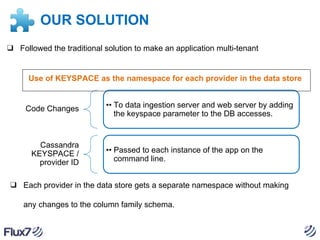
❑ Followed the traditional solution to make an application multi-tenant

Use of KEYSPACE as the namespace for each provider in the data store

Code Changes

Cassandra
KEYSPACE /
provider ID

•• To data ingestion server and web server by adding
the keyspace parameter to the DB accesses.

•• Passed to each instance of the app on the
command line.

❑ Each provider in the data store gets a separate namespace without making
any changes to the column family schema.
LESSONS WE LEARNED
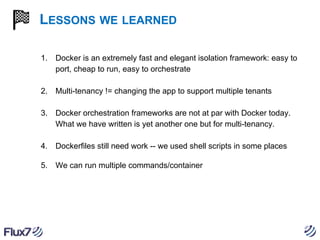
1.

Docker is an extremely fast and elegant isolation framework: easy to
port, cheap to run, easy to orchestrate

2.

Multi-tenancy != changing the app to support multiple tenants

3.

Docker orchestration frameworks are not at par with Docker today.
What we have written is yet another one but for multi-tenancy.

4.

Dockerfiles still need work -- we used shell scripts in some places

5.

We can run multiple commands/container
DOCKER AUSTIN

FOR MORE DISCUSSIONS ON DOCKER!

Docker at Flux7

  • 1.
  • 2.
    DOCKER AUSTIN FOR MOREDISCUSSIONS ON DOCKER!
  • 3.
    Who am I? ●Aater Suleman ○ Part-time UT Professor ○ Geek, Architect, Developer, Ops, DevOps … ● Co-founder & CEO Flux7 Labs ○ DevOps Solutions ■ Deployments ■ Cost/performance optimized large scale website (Ruby on rails, node.js, Django) and Hadoop deployments
  • 4.
    Four projects: VyScale DevFlow Docker's impact on performance (whitepaper WIP) Multi-tenancy Live process migration using CRIU (criu.org)
  • 5.
    Application: Single ServiceProvider Internet of Things -- Solar Panel Monitoring Receive Sensor Data XML Data over TCP Report Generation based on data Big Data Analytics Report sent to End User
  • 6.
    Gateway3 sensors Gateway1 Gateway2 Location1 Location3 Location2 Provider Span A providerhas Mifi routers installed at multiple Locations which collect data from sensors and sends it to a remote TCP server via the internet. Browser Uses the Flask app at port 80 Internet Flask App Port 80 TCP server Port 6000 Cassandra port 9160 Single Provider System
  • 7.
    COMPONENTS 1. Cassandra fordata persistence which we later use for generating reports for each gateway. 2. A Twisted TCP server listening at PORT 6000, for data ingestion from multiple gateways owned by the provider. 3. A Flask app serving at PORT 80 as the admin panel for setting customizations and viewing reports.
  • 8.
    Customer 1 G Customer 2… Customer N G G G Each customer can have multiple gateways commissioned to them. *G - Gateway Remote Twister TCP Server (Non–Blocking I/O) Web App Power consumption status on website and mails Mailer Cassandra NoSQL data store (High Volume High Velocity Write which scales Linearly across the cluster )
  • 9.
    SINGLE PROVIDER LAUNCH Forlaunching the single provider version, the following was done: 1. nohup python tcp_server.py & # For firing up the TCP server. 2. nohup python flask_app.py & # For firing up the admin panel Both these code bases houses hard-coded Cassandra KEYSPACE Success!
  • 10.
  • 11.
    Provider 2 sendsdata to port 6002 and accesses flask app at port 8082 Provider 1 sends data to port 6001 and accesses flask app at port 8081 Internet TCP server containerruns at port 6000. Exposes port 6000 and published it to port 6001 for provider 1 Flask container-runs flask app at port 80. Exposes port 80 and published it to port 8081 for provider 1 TCP server container-runs at port 6000. Exposes port 6000 and published it to port 6002 for provider 2 Flask container-runs flask app at port 80. Exposes port 80 and published it to port 8082 for provider 2 Cassandra
  • 12.
    KNEE-JERK APPROACH Sprinkle TenantID everywhere in the code and DB Time consuming Poor isolation Security Expensive Maintenance Rigidity
  • 13.
    MULTIPLE HOST/VMS An alternatesolution is to use Virtual Machine (VM) Hosts are expensive ($) VMs are expensive (high overhead)
  • 14.
  • 15.
    WHY DOCKER? Docker containersprovide isolation that is Fast Inexpensive How: Isolated environments for running multiple instances of the app
  • 16.
    PLAN Create a dockercontainer for the new version of the app Setup environments/dependencies correctly Start a Cassandra container.
  • 17.
    AUTOMATION An automation wasthe next foreseeable step, and for that we found Docker-py extremely useful. We used something like: # Yes. We love Python! def start_provider(provider_id, gateway_port, admin_port ): docker_client = docker.Client(base_url='unix://var/run/docker.sock', version='1.6', timeout=100) # start a docker container for consuming gateway data at gateway_port start_command = 'python software/remote_server.py ' + provider_id remote_server = docker_client.create_container('flux7/labs', # docker image command=start_command, # start command contains the keyspace parameter, keyspace is the provider_id name='remote_server_' + provider_id, # name the container, name is provider_id ports=[(6000, 'tcp'),]) # open port for binding, remote_server.py listens at 6000 docker_client.start(remote_server, port_bindings={6000: ('0.0.0.0', gateway_port)}, links={'db': 'cassandra'}) # start a docker container for serving admin panel at admin_port start_command = 'python software/flask_app.py ' + provider_id remote_server = docker_client.create_container('flux7/labs', # docker image command=start_command, # start command contains the keyspace parameter, keyspace is the provider_id name='admin_panel_' + provider_id, # name the container, name is provider_id ports=[(80, 'tcp'),]) # open port for binding, remote_server.py listens at 6000 docker_client.start(remote_server, port_bindings={80: ('0.0.0.0',admin_port)}, links= {'db': 'cassandra'})
  • 18.
    OUR SOLUTION- EXPLAINED Fornow, a locally running container serving at PORT 9160 using the command similar to this: docker run -d -p 9160:9160 -name db flux7/cassandra
  • 19.
    OUR SOLUTION- EXPLAINED ▪Create a keyspace ‘provider1’ using pycassaShell. We fired up our two code bases on two separate containers like this: docker run -name remote_server_1 -link db:cassandra p 6000:6000 flux7/labs python software/remote_server. py provider1 docker run -name flask_app_1 -link db:cassandra -p 6000:6000 flux7/labs python software/flask_app.py provider1
  • 20.
    DOCKER ISSUES DISCOVERED Dockerdoes not support multiple instances of Cassandra running on the same machine. Hosting multiple database instances on a single machine can quickly cause resource shortages
  • 21.
    OUR SOLUTION ❑ Followedthe traditional solution to make an application multi-tenant Use of KEYSPACE as the namespace for each provider in the data store Code Changes Cassandra KEYSPACE / provider ID •• To data ingestion server and web server by adding the keyspace parameter to the DB accesses. •• Passed to each instance of the app on the command line. ❑ Each provider in the data store gets a separate namespace without making any changes to the column family schema.
  • 22.
    LESSONS WE LEARNED 1. Dockeris an extremely fast and elegant isolation framework: easy to port, cheap to run, easy to orchestrate 2. Multi-tenancy != changing the app to support multiple tenants 3. Docker orchestration frameworks are not at par with Docker today. What we have written is yet another one but for multi-tenancy. 4. Dockerfiles still need work -- we used shell scripts in some places 5. We can run multiple commands/container
  • 23.
    DOCKER AUSTIN FOR MOREDISCUSSIONS ON DOCKER!