2014 © Trivadis 
BASEL BERN BRUGG LAUSANNE ZÜRICH DÜSSELDORF FRANKFURT A.M. FREIBURG I.BR. HAMBURG MÜNCHEN STUTTGART WIEN 
TrivadisOracle VM 3 
Creating and configuring Virtual Machines via command line 
Martin Bracher 
DOAG-Konferenz 2014 
OVM3: Creating VM's on command line 
1
2014 © Trivadis 
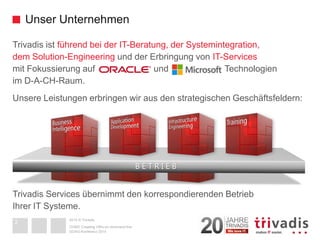
Trivadis ist führend bei der IT-Beratung, der Systemintegration, dem Solution-Engineering undder Erbringung von IT-Services mit Fokussierung auf und Technologien im D-A-CH-Raum. 
Unsere Leistungen erbringen wir aus den strategischen Geschäftsfeldern: Trivadis Services übernimmt den korrespondierenden BetriebIhrer IT Systeme. 
Unser Unternehmen 
DOAG-Konferenz 2014 
OVM3: Creating VM's on command line 
B E T R I E B 
2
2014 © Trivadis 
Mit über 600 IT-und Fachexperten bei Ihnen vor Ort 
3 
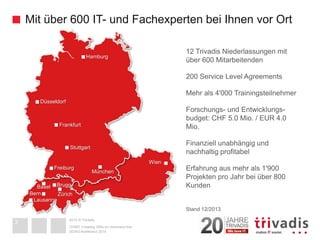
12 Trivadis Niederlassungen mitüber 600 Mitarbeitenden 
200 Service Level Agreements 
Mehr als 4'000 Trainingsteilnehmer 
Forschungs-und Entwicklungs- budget: CHF 5.0 Mio. / EUR 4.0 Mio. 
Finanziell unabhängig undnachhaltig profitabel 
Erfahrung aus mehr als 1'900 Projekten pro Jahr bei über 800 Kunden 
Stand 12/2013Hamburg 
Düsseldorf 
Frankfurt 
Freiburg 
München 
Wien 
BaselZürich 
Bern 
Lausanne 
3 
Stuttgart 
DOAG-Konferenz 2014 
OVM3: Creating VM's on command line 
3 
Brugg
2014 © Trivadis 
AGENDA 
1.What is ...? 
Virtual Machine 
Cloning 
Template 
2.Creating a Master VM or template 
3.Cloning 
4.Example, demo 
DOAG-Konferenz 2014 
OVM3: Creating VM's on command line 
4
2014 © Trivadis 
What is a Virtual Machine 
For the user / the application: it is like a physical server 
It is an operating system running onvirtual "hardware" 
The virtual hardware is a mapping to physical hardware 
Virtual disks/LUN's are mapped to block devices or files on the host 
Part of host's Memory, Network, CPU is used by the VM 
DOAG-Konferenz 2014 
OVM3: Creating VM's on command line 
5
2014 © Trivadis 
What is a Virtual Machine: XEN/OVM 
Virtual hardware: 
A configurationfile defining the "hardware" of the VM 
-CPU, memory, disks, console/graphics 
Virtual disks(on the host as file, disk(-partition), logical volume) 
DOAG-Konferenz 2014OVM3: Creating VM's on command line 
6 
bootloader= '/usr/bin/pygrub' 
memory= '1024' 
name = 'VM001' 
vcpus= 1 
on_crash= 'restart' 
on_reboot= 'restart' 
vfb= [type=vnc,vncunused=1,vnclisten=127.0.0.1,keymap=en-us] 
vif= [mac=00:21:f6:99:73:1d,bridge=0004fb00108e6b2] 
disk= ['file:/OVS/Repositories/004fb…/VirtualDisks/System.img,xvda,w', 
'file:/OVS/Repositories/004fb…/VirtualDisks/data.img,xvdb,w'] 
-rw-r--r--1 root root 6448619520 Aug 7 17:36 System.img 
-rw-r--r--1 root root 53694627840 Aug 7 17:36 data.img
2014 © TrivadisWhat is Cloning 
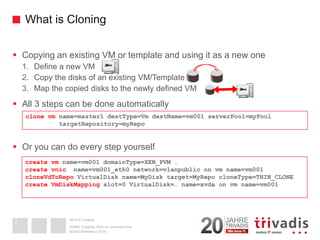
Copying an existing VM or template and using it as a new one 
1.Define a new VM 
2.Copy the disks of an existing VM/Template 
3.Map the copied disks to the newly defined VM 
All 3 steps can be done automatically 
Or you can do every step yourself 
DOAG-Konferenz 2014 
OVM3: Creating VM's on command line 
7clone vmname=master1 destType=VmdestName=vm001 serverPool=myPooltargetRepository=myRepocreate vmname=vm001 domainType=XEN_PVM … create vnicname=vm001_eth0 network=vlanpublicon vmname=vm001cloneVdToRepoVirtualDiskname=MyDisktarget=MyRepocloneType=THIN_CLONEcreate VmDiskMappingslot=0 VirtualDisk=… name=xvdaon vmname=vm001
2014 © TrivadisWhat is Cloning 
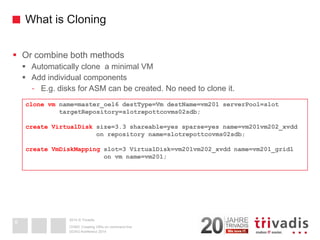
Or combine both methods 
Automatically clone a minimal VM 
Add individual components 
-E.g. disks for ASM can be created. No need to clone it. 
DOAG-Konferenz 2014 
OVM3: Creating VM's on command line 
8 
clone vmname=master_oel6 destType=VmdestName=vm201 serverPool=slot 
targetRepository=slotrepottcovms02sdb; 
create VirtualDisksize=3.3 shareable=yes sparse=yes name=vm201vm202_xvdd 
on repository name=slotrepottcovms02sdb; 
create VmDiskMappingslot=3 VirtualDisk=vm201vm202_xvdd name=vm201_grid1 
on vmname=vm201;
2014 © Trivadis 
What is a Template? 
Problem after cloning: 
Original and clone have the same configuration: hostname, IP, ... 
A templateis a virtual machine that 
Can not directly be booted in OVM 
Can be used for cloning (as described before) 
The new cloned VM individually configures at first boot 
-IP address 
-Hostname 
-New ssh host-keys 
-up2date UUID 
-... 
DOAG-Konferenz 2014 
OVM3: Creating VM's on command line9
2014 © TrivadisWhen to (re-)configure a VM at boot time 
How to detect if it is cloned and not yet configured? 
Use the approach of Oracle: 
-Variable RUN_TEMPLATE_CONF (YES|NO)(old approach) 
-Variable INITIAL_CONFIG (YES|NO)(new approach) 
-In a template, it must be set to YES 
-How to change it in a template (if forgotten to do it)? kpartx -av <uuid.img> mount /dev/mapper/loopXp2 /mnt; vi /mnt/...; umount /mntkpartx –dv <uuid.img> 
Based on MAC address: 
-In /etc/sysconfig/network-scripts/ifcfg-eth0 the MAC address is stored 
-If the current MAC address of eth0 is different, assume the machine was cloned and needs re-configuration 
-Caution: Newer RHEL/OEL versions will replace the configuration itself if the MAC address has changed (5.6 OK, 5.8 not OK) 
DOAG-Konferenz 2014 
OVM3: Creating VM's on command line 
10
2014 © Trivadis 
AGENDA 
1.What is ...? 
2.Creating a Master VM or template 
3.Cloning 
4.Example, demo 
DOAG-Konferenz 2014 
OVM3: Creating VM's on command line 
11
2014 © TrivadisCreating VM's from templates: Overview 
Initiallycreate a template or master VM 
Install the OS and software you need 
-Can be done interactively or via commandline 
-or- 
An existing VM or template can be used and adapted 
Add the software to configure a cloned VM 
Create new VM's via cloning 
Clone the template 
Configure the new VM during the 1stboot 
DOAG-Konferenz 2014 
OVM3: Creating VM's on command line 
12
2014 © TrivadisTemplates from Oracle 
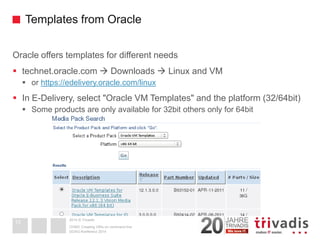
Oracle offers templates for different needs 
technet.oracle.com Downloads Linux and VM 
or https://edelivery.oracle.com/linux 
In E-Delivery, select "Oracle VM Templates" and the platform (32/64bit) 
Some products are only available for 32bit others only for 64bit 
DOAG-Konferenz 2014OVM3: Creating VM's on command line 
13
2014 © TrivadisTemplates from Oracle 
Some templates from Oracle are also supportedfor production environments, e.g. 
Template for RAC 11g Release 2 with special requirements 
Each node must run on a different Oracle VM server 
Shared disks must be configured as physical devices, not files 
-'phy:/dev/sdg,xvdb,w!' 
Shared disk must be on real shared storage between the OVM servers 
For non-production, the above restrictions do not apply 
DOAG-Konferenz 2014OVM3: Creating VM's on command line 
14
2014 © Trivadis 
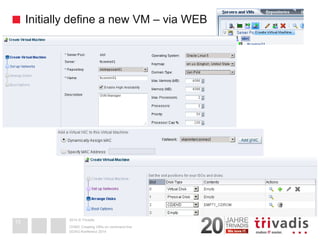
Initially define a new VM –via WEB 
- 
DOAG-Konferenz 2014OVM3: Creating VM's on command line15
2014 © Trivadis 
Initially define a new VM –via ovmcli 
Login to the OVM Manger Commandline interface (ovmcli) 
Define the virtual hardware 
DOAG-Konferenz 2014OVM3: Creating VM's on command line16 
ssh–p 10000 admin@ovmmanager 
OVM> 
create Vmname=slot011  
repository=slotreposan01  
domainType=XEN_PVM  
osType=OL_6  
bootOrder=DISK  
cpuCount=2  
memory=2048  
highAvailability=yes  
on ServerPoolname=slotHint:install it as XEN_HVM, then you can use CDROM as installation media. Afterwards change it to XEN_PVM
2014 © TrivadisInitially define a new VM –via ovmcli 
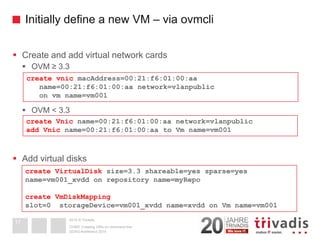
Create and add virtual network cards 
OVM ≥ 3.3 
OVM < 3.3 
Add virtual disks 
DOAG-Konferenz 2014 
OVM3: Creating VM's on command line 
17create vnicmacAddress=00:21:f6:01:00:aaname=00:21:f6:01:00:aa network=vlanpublicon vmname=vm001 create VirtualDisksize=3.3 shareable=yes sparse=yes name=vm001_xvdd on repository name=myRepocreate VmDiskMappingslot=0 storageDevice=vm001_xvdd name=xvddon Vmname=vm001create Vnicname=00:21:f6:01:00:aa network=vlanpublicadd Vnicname=00:21:f6:01:00:aa to Vmname=vm001
2014 © Trivadis 
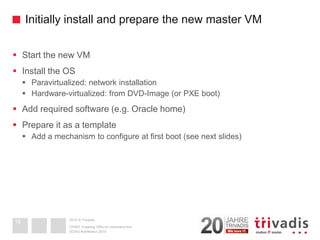
Initially install and prepare the new master VM 
Start the new VM 
Install the OS 
Paravirtualized: network installation 
Hardware-virtualized: from DVD-Image (or PXE boot) 
Add required software (e.g. Oracle home) 
Prepare it as a template 
Add a mechanism to configure at first boot (see next slides) 
DOAG-Konferenz 2014OVM3: Creating VM's on command line18
2014 © TrivadisAGENDA 
1.What is ...? 
2.Creating a Master VM or template 
3.Cloning 
4.Example, demo 
DOAG-Konferenz 2014OVM3: Creating VM's on command line19
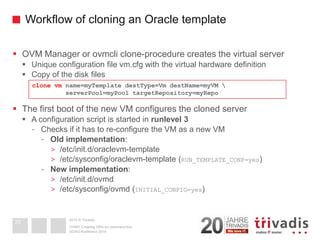
2014 © TrivadisWorkflow of cloning an Oracle template 
OVM Manager or ovmcliclone-procedure creates the virtual server 
Unique configuration file vm.cfg with the virtual hardware definition 
Copy of the disk files 
The first boot of the new VM configures the cloned server 
A configuration script is started in runlevel3 
-Checks if it has to re-configure the VM as a new VM 
-Old implementation: 
>/etc/init.d/oraclevm-template 
>/etc/sysconfig/oraclevm-template (RUN_TEMPLATE_CONF=yes) 
-New implementation: 
>/etc/init.d/ovmd 
>/etc/sysconfig/ovmd(INITIAL_CONFIG=yes) 
DOAG-Konferenz 2014OVM3: Creating VM's on command line20clone vmname=myTemplatedestType=VmdestName=myVM serverPool=myPooltargetRepository=myRepo
2014 © TrivadisInitial configuration of the VM: OLD implementationOLD implementation: ovm-template-config 
Provided as RPM package ovm-template-config.rpm 
A configuration script is started in runlevel3 
/etc/init.d/oraclevm-template 
This script evaluates the file /etc/sysconfig/oraclevm-template 
RUN_TEMPLATE_CONF (YES|NO) 
-YES: run the configuration: /usr/sbin/oraclevm-template --config 
TEMPLATE_CONFIG_SCRIPT 
-Individual script for configuration. If not specified: 
-oraclevm-template.sh on the 1stpartition of the 2nddisk will be run(mounted as /u01) 
-If also missing: default network configuration script will be run 
DOAG-Konferenz 2014OVM3: Creating VM's on command line21
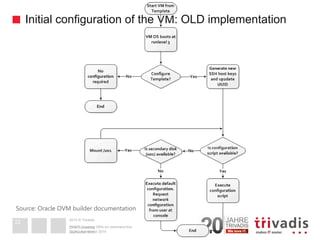
2014 © TrivadisInitial configuration of the VM: OLD implementationDOAG-Konferenz 2014OVM3: Creating VM's on command line22 
September 2011 
OVM Templates 
Source: Oracle OVM builder documentation
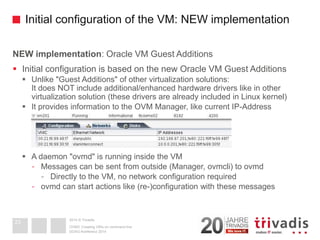
2014 © TrivadisInitial configuration of the VM: NEW implementationNEW implementation: Oracle VM Guest Additions 
Initial configuration is based on the new Oracle VM Guest Additions 
Unlike "Guest Additions" of other virtualization solutions: It does NOT include additional/enhanced hardware drivers like in other virtualization solution (these drivers are already included in Linux kernel) 
It provides information to the OVM Manager, like current IP-Address 
A daemon "ovmd" is running inside the VM 
-Messages can be sent from outside (Manager, ovmcli) to ovmd 
-Directly to the VM, no network configuration required 
-ovmdcan start actions like (re-)configuration with these messages 
DOAG-Konferenz 2014OVM3: Creating VM's on command line 
23
2014 © TrivadisInitial configuration of the VM: NEW implementation 
Oracle VM Guest Additions installation 
Provided as RPM packages: ovmdovm-template-config*.rpm 
-Not included on the installation ISO 
-Download the latest repository definition to /etc/yum.repos.d/ 
-wgethttp://public-yum.oracle.com/public-yum-ol6.repo 
-Enable the [ol6_addons] section (enabled=1) 
-Install the software and activate ovmd 
In current templates from Oracle it is already installed 
DOAG-Konferenz 2014 
OVM3: Creating VM's on command line 
24yum install libovmapi xenstoreprovider python-simplejson  ovmd ovm-template-config* chkconfigovmdon/etc/init.d/ovmdstart
2014 © TrivadisInitial configuration of the VM: NEW implementation 
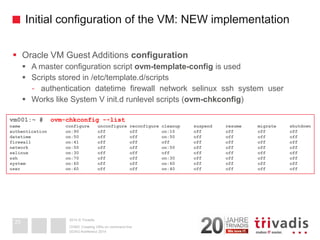
Oracle VM Guest Additions configuration 
A master configuration script ovm-template-configis used 
Scripts stored in /etc/template.d/scripts 
-authentication datetimefirewall network selinuxsshsystem user 
Works like System V init.drunlevelscripts (ovm-chkconfig) 
DOAG-Konferenz 2014OVM3: Creating VM's on command line 
25vm001:~ # ovm-chkconfig--listname configure unconfigurereconfigure cleanup suspend resume migrate shutdownauthentication on:90 off offon:10 off offoffoffdatetimeon:50 off offon:50 off offoffofffirewall on:41 off offoffoffoffoffoffnetwork on:50 off offon:50 off offoffoffselinuxon:30 off offoffoffoffoffoffsshon:70 off offon:30 off offoffoffsystem on:60 off offon:60 off offoffoffuser on:60 off offon:40 off offoffoff
2014 © TrivadisInitial configuration of the VM: NEW implementation 
Running the scripts 
Which parameters are expected? 
Running manually 
Running manually and interactive 
DOAG-Konferenz 2014 
OVM3: Creating VM's on command line 
26ovm-template-config –-stdin configure <<EOD{"com.oracle.linux.selinux.mode": "disabled"} {"com.oracle.linux.root-password": "ovsroot"} must be the last line! EODovm-template-config –-console-input configureovm-template-config--human-readable --enumerate configure --script selinux[('30', 'selinux', [{u'description': u'SELinuxmode: enforcing, permissive or disabled.', u'hidden': True, u'key': u'com.oracle.linux.selinux.mode'}])]
2014 © TrivadisInitial configuration of the VM: NEW implementation 
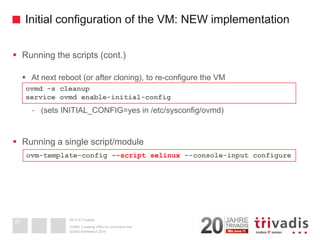
Running the scripts (cont.) 
At next reboot (or after cloning), to re-configure the VM 
-(sets INITIAL_CONFIG=yes in /etc/sysconfig/ovmd) 
Running a single script/module 
DOAG-Konferenz 2014OVM3: Creating VM's on command line27 
ovmd-s cleanup 
service ovmdenable-initial-config 
ovm-template-config--script selinux--console-input configure
2014 © TrivadisInitial configuration of the VM: NEW implementation 
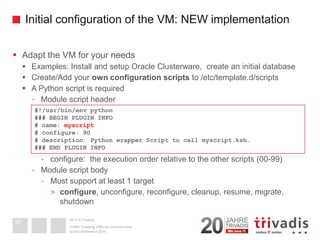
Adapt the VM for your needs 
Examples: Install and setup Oracle Clusterware, create an initial database 
Create/Add your own configuration scriptsto /etc/template.d/scripts 
A Python script is required 
-Module script header 
-configure: the execution order relative to the other scripts (00-99) 
-Module script body 
-Must support at least 1 target 
>configure, unconfigure, reconfigure, cleanup, resume, migrate, shutdown 
DOAG-Konferenz 2014OVM3: Creating VM's on command line28#!/usr/bin/env python### BEGIN PLUGIN INFO# name: myscript# configure: 90# description: Python wrapper Script to call myscript.ksh. ### END PLUGIN INFO
2014 © TrivadisInitial configuration of the VM: NEW implementation 
If you do not like Python: create a wrapper script to call a shell-script 
DOAG-Konferenz 2014 
OVM3: Creating VM's on command line 
29#!/usr/bin/env python### BEGIN PLUGIN INFO# name: myscript# configure: 90# description: Python wrapper Script to call myscript.ksh. ### END PLUGIN INFOtry: import jsonexcept ImportError: import simplejsonas jsonfrom templateconfig.cli import mainfrom templateconfig.commonimport run_cmddef do_enumerate(target): param= [] if target == 'configure': param+= [] return json.dumps(param) def do_configure(param): param= json.loads(param) run_cmd('/path/myscript.ksh') return json.dumps(param) if __name__ == '__main__': main(do_enumerate, {'configure': do_configure})
2014 © TrivadisInitial configuration of the VM: NEW implementation 
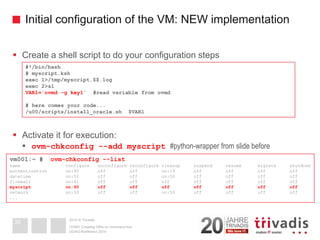
Create a shell script to do your configuration steps 
Activate it for execution: 
ovm-chkconfig--add myscript#python-wrapper from slide before 
DOAG-Konferenz 2014OVM3: Creating VM's on command line30#!/bin/bash# myscript.kshexec 1>/tmp/myscript.$$.logexec 2>&1VAR1=`ovmd-g key1`#read variable from ovmd# here comes your code... /u00/scripts/install_oracle.sh $VAR1vm001:~ # ovm-chkconfig--listname configure unconfigurereconfigure cleanup suspend resume migrate shutdownauthentication on:90 off offon:10 off offoffoffdatetimeon:50 off offon:50 off offoffofffirewall on:41 off offoffoffoffoffoffmyscript on:90 off off off off off off offnetwork on:50 off offon:50 off offoffoff...
2014 © TrivadisInitial configuration of the VM: NEW implementation 
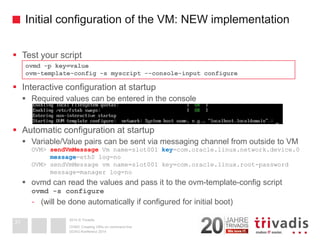
Test your script 
Interactive configuration at startup 
Required values can be entered in the console 
Automatic configuration at startup 
Variable/Value pairs can be sent via messaging channel from outside to VMOVM> sendVmMessageVmname=slot001 key=com.oracle.linux.network.device.0message=eth0 log=noOVM> sendVmMessagevmname=slot001 key=com.oracle.linux.root-password message=manager log=no 
ovmdcan read the values and pass it to the ovm-template-configscript ovmd-s configure 
-(will be done automatically if configured for initial boot) 
DOAG-Konferenz 2014 
OVM3: Creating VM's on command line31ovmd -p key=valueovm-template-config-s myscript--console-input configure
2014 © TrivadisAGENDA 
1.What is ...? 
2.Creating a Master VM or template 
3.Cloning 
4.Example, demo 
DOAG-Konferenz 2014OVM3: Creating VM's on command line32
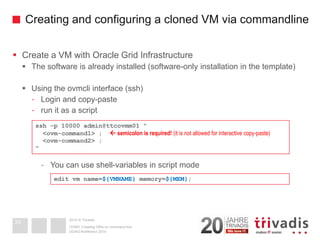
2014 © TrivadisCreating and configuring a cloned VM via commandline 
Create a VM with Oracle Grid Infrastructure 
The software is already installed (software-only installation in the template) 
Using the ovmcliinterface (ssh) 
-Login and copy-paste 
-run it as a script 
-You can use shell-variables in script mode 
DOAG-Konferenz 2014 
OVM3: Creating VM's on command line33ssh-p 10000 admin@ttcovmm01 " <ovm-command1> ; semicolon is required! (it is not allowed for interactive copy-paste) <ovm-command2> ; " edit vmname=${VMNAME}memory=${MEM};
2014 © TrivadisCreating and configuring a VM via commandline 
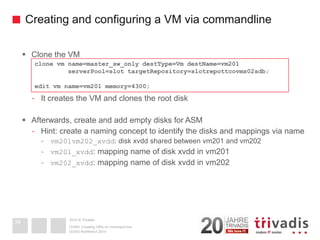
Clone the VM 
-It creates the VM and clones the root disk 
Afterwards, create and add empty disks for ASM 
-Hint: create a naming concept to identify the disks and mappings via name 
-vm201vm202_xvdd: disk xvddshared between vm201 and vm202 
-vm201_xvdd: mapping name of disk xvddin vm201 
-vm202_xvdd: mapping name of disk xvddin vm202 
DOAG-Konferenz 2014OVM3: Creating VM's on command line34clone vmname=master_sw_onlydestType=VmdestName=vm201 serverPool=slot targetRepository=slotrepottcovms02sdb; edit vmname=vm201 memory=4300;
2014 © Trivadis 
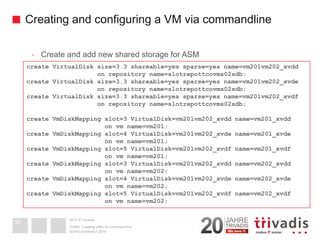
Creating and configuring a VM via commandline 
-Create and add new shared storage for ASM 
DOAG-Konferenz 2014OVM3: Creating VM's on command line35create VirtualDisksize=3.3 shareable=yes sparse=yes name=vm201vm202_xvddon repository name=slotrepottcovms02sdb; create VirtualDisksize=3.3 shareable=yes sparse=yes name=vm201vm202_xvdeon repository name=slotrepottcovms02sdb; create VirtualDisksize=3.3 shareable=yes sparse=yes name=vm201vm202_xvdfon repository name=slotrepottcovms02sdb; create VmDiskMappingslot=3 VirtualDisk=vm201vm202_xvdd name=vm201_xvddon vmname=vm201; create VmDiskMappingslot=4 VirtualDisk=vm201vm202_xvde name=vm201_xvdeon vmname=vm201; create VmDiskMappingslot=5 VirtualDisk=vm201vm202_xvdf name=vm201_xvdfon vmname=vm201; create VmDiskMappingslot=3 VirtualDisk=vm201vm202_xvdd name=vm202_xvddon vmname=vm202; create VmDiskMappingslot=4 VirtualDisk=vm201vm202_xvde name=vm202_xvdeon vmname=vm202; create VmDiskMappingslot=5 VirtualDisk=vm201vm202_xvdf name=vm202_xvdfon vmname=vm202;
2014 © TrivadisCreating and configuring a VM via commandline 
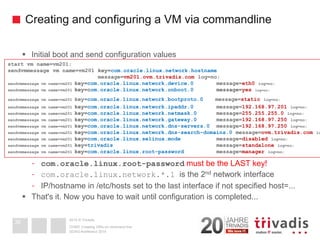
Initial boot and send configuration values 
-com.oracle.linux.root-passwordmust be the LAST key! 
-com.oracle.linux.network.*.1 is the 2ndnetwork interface 
-IP/hostname in /etc/hosts set to the last interface if not specified host=... 
That's it. Now you have to wait until configuration is completed... 
DOAG-Konferenz 2014OVM3: Creating VM's on command line36 
start vmname=vm201; 
sendvmmessagevmname=vm201 key=com.oracle.linux.network.hostname 
message=vm201.ovm.trivadis.comlog=no; 
sendvmmessagevmname=vm201 key=com.oracle.linux.network.device.0message=eth0log=no; 
sendvmmessagevmname=vm201 key=com.oracle.linux.network.onboot.0 message=yeslog=no; 
sendvmmessagevmname=vm201 key=com.oracle.linux.network.bootproto.0message=staticlog=no; 
sendvmmessagevmname=vm201 key=com.oracle.linux.network.ipaddr.0message=192.168.97.201log=no; 
sendvmmessagevmname=vm201 key=com.oracle.linux.network.netmask.0message=255.255.255.0log=no; 
sendvmmessagevmname=vm201 key=com.oracle.linux.network.gateway.0message=192.168.97.250log=no; 
sendvmmessagevmname=vm201 key=com.oracle.linux.network.dns-servers.0message=192.168.97.250log=no; 
sendvmmessagevmname=vm201 key=com.oracle.linux.network.dns-search-domains.0message=ovm.trivadis.comlog=sendvmmessagevmname=vm201 key=com.oracle.linux.selinux.modemessage=disabledlog=no; 
sendvmmessage vm name=vm201 key=trivadismessage=standalonelog=no; 
sendvmmessagevmname=vm201 key=com.oracle.linux.root-passwordmessage=managerlog=no;
2014 © TrivadisCreating and configuring a VM via commandline 
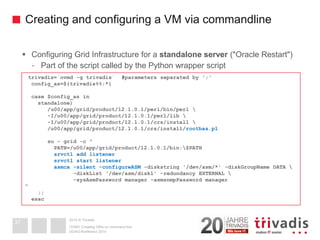
Configuring Grid Infrastructure for a standalone server("Oracle Restart") 
-Part of the script called by the Python wrapper script 
DOAG-Konferenz 2014OVM3: Creating VM's on command line37trivadis=`ovmd-g trivadis` #parameters separated by ';' config_as=${trivadis%%;*} case $config_asinstandalone) /u00/app/grid/product/12.1.0.1/perl/bin/perl -I/u00/app/grid/product/12.1.0.1/perl/lib  -I/u00/app/grid/product/12.1.0.1/crs/install  /u00/app/grid/product/12.1.0.1/crs/install/roothas.plsu-grid -c " PATH=/u00/app/grid/product/12.1.0.1/bin:$PATHsrvctladd listenersrvctlstart listenerasmca-silent -configureASM-diskstring'/dev/asm/*' -diskGroupNameDATA  -diskList'/dev/asm/disk1' -redundancy EXTERNAL  -sysAsmPasswordmanager -asmsnmpPasswordmanager" ;; esac
2014 © TrivadisCreating and configuring a VM via commandline 
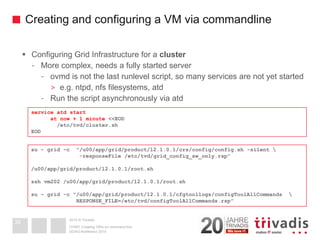
Configuring Grid Infrastructure for a cluster 
-More complex, needs a fully started server 
-ovmdis not the last runlevelscript, so many services are not yet started 
>e.g. ntpd, nfsfilesystems, atd 
-Run the script asynchronously via atd 
DOAG-Konferenz 2014OVM3: Creating VM's on command line 
38service atdstartat now + 1 minute <<EOD/etc/tvd/cluster.shEODsu-grid -c "/u00/app/grid/product/12.1.0.1/crs/config/config.sh -silent  -responseFile/etc/tvd/grid_config_sw_only.rsp" /u00/app/grid/product/12.1.0.1/root.shsshvm202 /u00/app/grid/product/12.1.0.1/root.shsu-grid -c "/u00/app/grid/product/12.1.0.1/cfgtoollogs/configToolAllCommands RESPONSE_FILE=/etc/tvd/configToolAllCommands.rsp"
2014 © Trivadis 
BASEL BERN BRUGG LAUSANNE ZÜRICH DÜSSELDORF FRANKFURT A.M. FREIBURG I.BR. HAMBURG MÜNCHEN STUTTGART WIEN 
Fragen und Antworten... 
Martin BracherSenior Consultant 
martin.bracher @ trivadis.comDOAG-Konferenz 2014 
OVM3: Creating VM's on command line 
39
2014 © Trivadis 
OVM3: Creating VM's on command line 
Trivadisan der DOAG 
Ebene 3 -gleich neben der Rolltreppe 
Wir freuen uns auf Ihren Besuch. 
Denn mit Trivadisgewinnen Sie immer. 
DOAG-Konferenz 2014 
40

Oracle VM3: Virtuelle Maschinen per Script erstellen

  • 1.
    2014 © Trivadis BASEL BERN BRUGG LAUSANNE ZÜRICH DÜSSELDORF FRANKFURT A.M. FREIBURG I.BR. HAMBURG MÜNCHEN STUTTGART WIEN TrivadisOracle VM 3 Creating and configuring Virtual Machines via command line Martin Bracher DOAG-Konferenz 2014 OVM3: Creating VM's on command line 1
  • 2.
    2014 © Trivadis Trivadis ist führend bei der IT-Beratung, der Systemintegration, dem Solution-Engineering undder Erbringung von IT-Services mit Fokussierung auf und Technologien im D-A-CH-Raum. Unsere Leistungen erbringen wir aus den strategischen Geschäftsfeldern: Trivadis Services übernimmt den korrespondierenden BetriebIhrer IT Systeme. Unser Unternehmen DOAG-Konferenz 2014 OVM3: Creating VM's on command line B E T R I E B 2
  • 3.
    2014 © Trivadis Mit über 600 IT-und Fachexperten bei Ihnen vor Ort 3 12 Trivadis Niederlassungen mitüber 600 Mitarbeitenden 200 Service Level Agreements Mehr als 4'000 Trainingsteilnehmer Forschungs-und Entwicklungs- budget: CHF 5.0 Mio. / EUR 4.0 Mio. Finanziell unabhängig undnachhaltig profitabel Erfahrung aus mehr als 1'900 Projekten pro Jahr bei über 800 Kunden Stand 12/2013Hamburg Düsseldorf Frankfurt Freiburg München Wien BaselZürich Bern Lausanne 3 Stuttgart DOAG-Konferenz 2014 OVM3: Creating VM's on command line 3 Brugg
  • 4.
    2014 © Trivadis AGENDA 1.What is ...? Virtual Machine Cloning Template 2.Creating a Master VM or template 3.Cloning 4.Example, demo DOAG-Konferenz 2014 OVM3: Creating VM's on command line 4
  • 5.
    2014 © Trivadis What is a Virtual Machine For the user / the application: it is like a physical server It is an operating system running onvirtual "hardware" The virtual hardware is a mapping to physical hardware Virtual disks/LUN's are mapped to block devices or files on the host Part of host's Memory, Network, CPU is used by the VM DOAG-Konferenz 2014 OVM3: Creating VM's on command line 5
  • 6.
    2014 © Trivadis What is a Virtual Machine: XEN/OVM Virtual hardware: A configurationfile defining the "hardware" of the VM -CPU, memory, disks, console/graphics Virtual disks(on the host as file, disk(-partition), logical volume) DOAG-Konferenz 2014OVM3: Creating VM's on command line 6 bootloader= '/usr/bin/pygrub' memory= '1024' name = 'VM001' vcpus= 1 on_crash= 'restart' on_reboot= 'restart' vfb= [type=vnc,vncunused=1,vnclisten=127.0.0.1,keymap=en-us] vif= [mac=00:21:f6:99:73:1d,bridge=0004fb00108e6b2] disk= ['file:/OVS/Repositories/004fb…/VirtualDisks/System.img,xvda,w', 'file:/OVS/Repositories/004fb…/VirtualDisks/data.img,xvdb,w'] -rw-r--r--1 root root 6448619520 Aug 7 17:36 System.img -rw-r--r--1 root root 53694627840 Aug 7 17:36 data.img
  • 7.
    2014 © TrivadisWhatis Cloning Copying an existing VM or template and using it as a new one 1.Define a new VM 2.Copy the disks of an existing VM/Template 3.Map the copied disks to the newly defined VM All 3 steps can be done automatically Or you can do every step yourself DOAG-Konferenz 2014 OVM3: Creating VM's on command line 7clone vmname=master1 destType=VmdestName=vm001 serverPool=myPooltargetRepository=myRepocreate vmname=vm001 domainType=XEN_PVM … create vnicname=vm001_eth0 network=vlanpublicon vmname=vm001cloneVdToRepoVirtualDiskname=MyDisktarget=MyRepocloneType=THIN_CLONEcreate VmDiskMappingslot=0 VirtualDisk=… name=xvdaon vmname=vm001
  • 8.
    2014 © TrivadisWhatis Cloning Or combine both methods Automatically clone a minimal VM Add individual components -E.g. disks for ASM can be created. No need to clone it. DOAG-Konferenz 2014 OVM3: Creating VM's on command line 8 clone vmname=master_oel6 destType=VmdestName=vm201 serverPool=slot targetRepository=slotrepottcovms02sdb; create VirtualDisksize=3.3 shareable=yes sparse=yes name=vm201vm202_xvdd on repository name=slotrepottcovms02sdb; create VmDiskMappingslot=3 VirtualDisk=vm201vm202_xvdd name=vm201_grid1 on vmname=vm201;
  • 9.
    2014 © Trivadis What is a Template? Problem after cloning: Original and clone have the same configuration: hostname, IP, ... A templateis a virtual machine that Can not directly be booted in OVM Can be used for cloning (as described before) The new cloned VM individually configures at first boot -IP address -Hostname -New ssh host-keys -up2date UUID -... DOAG-Konferenz 2014 OVM3: Creating VM's on command line9
  • 10.
    2014 © TrivadisWhento (re-)configure a VM at boot time How to detect if it is cloned and not yet configured? Use the approach of Oracle: -Variable RUN_TEMPLATE_CONF (YES|NO)(old approach) -Variable INITIAL_CONFIG (YES|NO)(new approach) -In a template, it must be set to YES -How to change it in a template (if forgotten to do it)? kpartx -av <uuid.img> mount /dev/mapper/loopXp2 /mnt; vi /mnt/...; umount /mntkpartx –dv <uuid.img> Based on MAC address: -In /etc/sysconfig/network-scripts/ifcfg-eth0 the MAC address is stored -If the current MAC address of eth0 is different, assume the machine was cloned and needs re-configuration -Caution: Newer RHEL/OEL versions will replace the configuration itself if the MAC address has changed (5.6 OK, 5.8 not OK) DOAG-Konferenz 2014 OVM3: Creating VM's on command line 10
  • 11.
    2014 © Trivadis AGENDA 1.What is ...? 2.Creating a Master VM or template 3.Cloning 4.Example, demo DOAG-Konferenz 2014 OVM3: Creating VM's on command line 11
  • 12.
    2014 © TrivadisCreatingVM's from templates: Overview Initiallycreate a template or master VM Install the OS and software you need -Can be done interactively or via commandline -or- An existing VM or template can be used and adapted Add the software to configure a cloned VM Create new VM's via cloning Clone the template Configure the new VM during the 1stboot DOAG-Konferenz 2014 OVM3: Creating VM's on command line 12
  • 13.
    2014 © TrivadisTemplatesfrom Oracle Oracle offers templates for different needs technet.oracle.com Downloads Linux and VM or https://edelivery.oracle.com/linux In E-Delivery, select "Oracle VM Templates" and the platform (32/64bit) Some products are only available for 32bit others only for 64bit DOAG-Konferenz 2014OVM3: Creating VM's on command line 13
  • 14.
    2014 © TrivadisTemplatesfrom Oracle Some templates from Oracle are also supportedfor production environments, e.g. Template for RAC 11g Release 2 with special requirements Each node must run on a different Oracle VM server Shared disks must be configured as physical devices, not files -'phy:/dev/sdg,xvdb,w!' Shared disk must be on real shared storage between the OVM servers For non-production, the above restrictions do not apply DOAG-Konferenz 2014OVM3: Creating VM's on command line 14
  • 15.
    2014 © Trivadis Initially define a new VM –via WEB - DOAG-Konferenz 2014OVM3: Creating VM's on command line15
  • 16.
    2014 © Trivadis Initially define a new VM –via ovmcli Login to the OVM Manger Commandline interface (ovmcli) Define the virtual hardware DOAG-Konferenz 2014OVM3: Creating VM's on command line16 ssh–p 10000 admin@ovmmanager OVM> create Vmname=slot011 repository=slotreposan01 domainType=XEN_PVM osType=OL_6 bootOrder=DISK cpuCount=2 memory=2048 highAvailability=yes on ServerPoolname=slotHint:install it as XEN_HVM, then you can use CDROM as installation media. Afterwards change it to XEN_PVM
  • 17.
    2014 © TrivadisInitiallydefine a new VM –via ovmcli Create and add virtual network cards OVM ≥ 3.3 OVM < 3.3 Add virtual disks DOAG-Konferenz 2014 OVM3: Creating VM's on command line 17create vnicmacAddress=00:21:f6:01:00:aaname=00:21:f6:01:00:aa network=vlanpublicon vmname=vm001 create VirtualDisksize=3.3 shareable=yes sparse=yes name=vm001_xvdd on repository name=myRepocreate VmDiskMappingslot=0 storageDevice=vm001_xvdd name=xvddon Vmname=vm001create Vnicname=00:21:f6:01:00:aa network=vlanpublicadd Vnicname=00:21:f6:01:00:aa to Vmname=vm001
  • 18.
    2014 © Trivadis Initially install and prepare the new master VM Start the new VM Install the OS Paravirtualized: network installation Hardware-virtualized: from DVD-Image (or PXE boot) Add required software (e.g. Oracle home) Prepare it as a template Add a mechanism to configure at first boot (see next slides) DOAG-Konferenz 2014OVM3: Creating VM's on command line18
  • 19.
    2014 © TrivadisAGENDA 1.What is ...? 2.Creating a Master VM or template 3.Cloning 4.Example, demo DOAG-Konferenz 2014OVM3: Creating VM's on command line19
  • 20.
    2014 © TrivadisWorkflowof cloning an Oracle template OVM Manager or ovmcliclone-procedure creates the virtual server Unique configuration file vm.cfg with the virtual hardware definition Copy of the disk files The first boot of the new VM configures the cloned server A configuration script is started in runlevel3 -Checks if it has to re-configure the VM as a new VM -Old implementation: >/etc/init.d/oraclevm-template >/etc/sysconfig/oraclevm-template (RUN_TEMPLATE_CONF=yes) -New implementation: >/etc/init.d/ovmd >/etc/sysconfig/ovmd(INITIAL_CONFIG=yes) DOAG-Konferenz 2014OVM3: Creating VM's on command line20clone vmname=myTemplatedestType=VmdestName=myVM serverPool=myPooltargetRepository=myRepo
  • 21.
    2014 © TrivadisInitialconfiguration of the VM: OLD implementationOLD implementation: ovm-template-config Provided as RPM package ovm-template-config.rpm A configuration script is started in runlevel3 /etc/init.d/oraclevm-template This script evaluates the file /etc/sysconfig/oraclevm-template RUN_TEMPLATE_CONF (YES|NO) -YES: run the configuration: /usr/sbin/oraclevm-template --config TEMPLATE_CONFIG_SCRIPT -Individual script for configuration. If not specified: -oraclevm-template.sh on the 1stpartition of the 2nddisk will be run(mounted as /u01) -If also missing: default network configuration script will be run DOAG-Konferenz 2014OVM3: Creating VM's on command line21
  • 22.
    2014 © TrivadisInitialconfiguration of the VM: OLD implementationDOAG-Konferenz 2014OVM3: Creating VM's on command line22 September 2011 OVM Templates Source: Oracle OVM builder documentation
  • 23.
    2014 © TrivadisInitialconfiguration of the VM: NEW implementationNEW implementation: Oracle VM Guest Additions Initial configuration is based on the new Oracle VM Guest Additions Unlike "Guest Additions" of other virtualization solutions: It does NOT include additional/enhanced hardware drivers like in other virtualization solution (these drivers are already included in Linux kernel) It provides information to the OVM Manager, like current IP-Address A daemon "ovmd" is running inside the VM -Messages can be sent from outside (Manager, ovmcli) to ovmd -Directly to the VM, no network configuration required -ovmdcan start actions like (re-)configuration with these messages DOAG-Konferenz 2014OVM3: Creating VM's on command line 23
  • 24.
    2014 © TrivadisInitialconfiguration of the VM: NEW implementation Oracle VM Guest Additions installation Provided as RPM packages: ovmdovm-template-config*.rpm -Not included on the installation ISO -Download the latest repository definition to /etc/yum.repos.d/ -wgethttp://public-yum.oracle.com/public-yum-ol6.repo -Enable the [ol6_addons] section (enabled=1) -Install the software and activate ovmd In current templates from Oracle it is already installed DOAG-Konferenz 2014 OVM3: Creating VM's on command line 24yum install libovmapi xenstoreprovider python-simplejson ovmd ovm-template-config* chkconfigovmdon/etc/init.d/ovmdstart
  • 25.
    2014 © TrivadisInitialconfiguration of the VM: NEW implementation Oracle VM Guest Additions configuration A master configuration script ovm-template-configis used Scripts stored in /etc/template.d/scripts -authentication datetimefirewall network selinuxsshsystem user Works like System V init.drunlevelscripts (ovm-chkconfig) DOAG-Konferenz 2014OVM3: Creating VM's on command line 25vm001:~ # ovm-chkconfig--listname configure unconfigurereconfigure cleanup suspend resume migrate shutdownauthentication on:90 off offon:10 off offoffoffdatetimeon:50 off offon:50 off offoffofffirewall on:41 off offoffoffoffoffoffnetwork on:50 off offon:50 off offoffoffselinuxon:30 off offoffoffoffoffoffsshon:70 off offon:30 off offoffoffsystem on:60 off offon:60 off offoffoffuser on:60 off offon:40 off offoffoff
  • 26.
    2014 © TrivadisInitialconfiguration of the VM: NEW implementation Running the scripts Which parameters are expected? Running manually Running manually and interactive DOAG-Konferenz 2014 OVM3: Creating VM's on command line 26ovm-template-config –-stdin configure <<EOD{"com.oracle.linux.selinux.mode": "disabled"} {"com.oracle.linux.root-password": "ovsroot"} must be the last line! EODovm-template-config –-console-input configureovm-template-config--human-readable --enumerate configure --script selinux[('30', 'selinux', [{u'description': u'SELinuxmode: enforcing, permissive or disabled.', u'hidden': True, u'key': u'com.oracle.linux.selinux.mode'}])]
  • 27.
    2014 © TrivadisInitialconfiguration of the VM: NEW implementation Running the scripts (cont.) At next reboot (or after cloning), to re-configure the VM -(sets INITIAL_CONFIG=yes in /etc/sysconfig/ovmd) Running a single script/module DOAG-Konferenz 2014OVM3: Creating VM's on command line27 ovmd-s cleanup service ovmdenable-initial-config ovm-template-config--script selinux--console-input configure
  • 28.
    2014 © TrivadisInitialconfiguration of the VM: NEW implementation Adapt the VM for your needs Examples: Install and setup Oracle Clusterware, create an initial database Create/Add your own configuration scriptsto /etc/template.d/scripts A Python script is required -Module script header -configure: the execution order relative to the other scripts (00-99) -Module script body -Must support at least 1 target >configure, unconfigure, reconfigure, cleanup, resume, migrate, shutdown DOAG-Konferenz 2014OVM3: Creating VM's on command line28#!/usr/bin/env python### BEGIN PLUGIN INFO# name: myscript# configure: 90# description: Python wrapper Script to call myscript.ksh. ### END PLUGIN INFO
  • 29.
    2014 © TrivadisInitialconfiguration of the VM: NEW implementation If you do not like Python: create a wrapper script to call a shell-script DOAG-Konferenz 2014 OVM3: Creating VM's on command line 29#!/usr/bin/env python### BEGIN PLUGIN INFO# name: myscript# configure: 90# description: Python wrapper Script to call myscript.ksh. ### END PLUGIN INFOtry: import jsonexcept ImportError: import simplejsonas jsonfrom templateconfig.cli import mainfrom templateconfig.commonimport run_cmddef do_enumerate(target): param= [] if target == 'configure': param+= [] return json.dumps(param) def do_configure(param): param= json.loads(param) run_cmd('/path/myscript.ksh') return json.dumps(param) if __name__ == '__main__': main(do_enumerate, {'configure': do_configure})
  • 30.
    2014 © TrivadisInitialconfiguration of the VM: NEW implementation Create a shell script to do your configuration steps Activate it for execution: ovm-chkconfig--add myscript#python-wrapper from slide before DOAG-Konferenz 2014OVM3: Creating VM's on command line30#!/bin/bash# myscript.kshexec 1>/tmp/myscript.$$.logexec 2>&1VAR1=`ovmd-g key1`#read variable from ovmd# here comes your code... /u00/scripts/install_oracle.sh $VAR1vm001:~ # ovm-chkconfig--listname configure unconfigurereconfigure cleanup suspend resume migrate shutdownauthentication on:90 off offon:10 off offoffoffdatetimeon:50 off offon:50 off offoffofffirewall on:41 off offoffoffoffoffoffmyscript on:90 off off off off off off offnetwork on:50 off offon:50 off offoffoff...
  • 31.
    2014 © TrivadisInitialconfiguration of the VM: NEW implementation Test your script Interactive configuration at startup Required values can be entered in the console Automatic configuration at startup Variable/Value pairs can be sent via messaging channel from outside to VMOVM> sendVmMessageVmname=slot001 key=com.oracle.linux.network.device.0message=eth0 log=noOVM> sendVmMessagevmname=slot001 key=com.oracle.linux.root-password message=manager log=no ovmdcan read the values and pass it to the ovm-template-configscript ovmd-s configure -(will be done automatically if configured for initial boot) DOAG-Konferenz 2014 OVM3: Creating VM's on command line31ovmd -p key=valueovm-template-config-s myscript--console-input configure
  • 32.
    2014 © TrivadisAGENDA 1.What is ...? 2.Creating a Master VM or template 3.Cloning 4.Example, demo DOAG-Konferenz 2014OVM3: Creating VM's on command line32
  • 33.
    2014 © TrivadisCreatingand configuring a cloned VM via commandline Create a VM with Oracle Grid Infrastructure The software is already installed (software-only installation in the template) Using the ovmcliinterface (ssh) -Login and copy-paste -run it as a script -You can use shell-variables in script mode DOAG-Konferenz 2014 OVM3: Creating VM's on command line33ssh-p 10000 admin@ttcovmm01 " <ovm-command1> ; semicolon is required! (it is not allowed for interactive copy-paste) <ovm-command2> ; " edit vmname=${VMNAME}memory=${MEM};
  • 34.
    2014 © TrivadisCreatingand configuring a VM via commandline Clone the VM -It creates the VM and clones the root disk Afterwards, create and add empty disks for ASM -Hint: create a naming concept to identify the disks and mappings via name -vm201vm202_xvdd: disk xvddshared between vm201 and vm202 -vm201_xvdd: mapping name of disk xvddin vm201 -vm202_xvdd: mapping name of disk xvddin vm202 DOAG-Konferenz 2014OVM3: Creating VM's on command line34clone vmname=master_sw_onlydestType=VmdestName=vm201 serverPool=slot targetRepository=slotrepottcovms02sdb; edit vmname=vm201 memory=4300;
  • 35.
    2014 © Trivadis Creating and configuring a VM via commandline -Create and add new shared storage for ASM DOAG-Konferenz 2014OVM3: Creating VM's on command line35create VirtualDisksize=3.3 shareable=yes sparse=yes name=vm201vm202_xvddon repository name=slotrepottcovms02sdb; create VirtualDisksize=3.3 shareable=yes sparse=yes name=vm201vm202_xvdeon repository name=slotrepottcovms02sdb; create VirtualDisksize=3.3 shareable=yes sparse=yes name=vm201vm202_xvdfon repository name=slotrepottcovms02sdb; create VmDiskMappingslot=3 VirtualDisk=vm201vm202_xvdd name=vm201_xvddon vmname=vm201; create VmDiskMappingslot=4 VirtualDisk=vm201vm202_xvde name=vm201_xvdeon vmname=vm201; create VmDiskMappingslot=5 VirtualDisk=vm201vm202_xvdf name=vm201_xvdfon vmname=vm201; create VmDiskMappingslot=3 VirtualDisk=vm201vm202_xvdd name=vm202_xvddon vmname=vm202; create VmDiskMappingslot=4 VirtualDisk=vm201vm202_xvde name=vm202_xvdeon vmname=vm202; create VmDiskMappingslot=5 VirtualDisk=vm201vm202_xvdf name=vm202_xvdfon vmname=vm202;
  • 36.
    2014 © TrivadisCreatingand configuring a VM via commandline Initial boot and send configuration values -com.oracle.linux.root-passwordmust be the LAST key! -com.oracle.linux.network.*.1 is the 2ndnetwork interface -IP/hostname in /etc/hosts set to the last interface if not specified host=... That's it. Now you have to wait until configuration is completed... DOAG-Konferenz 2014OVM3: Creating VM's on command line36 start vmname=vm201; sendvmmessagevmname=vm201 key=com.oracle.linux.network.hostname message=vm201.ovm.trivadis.comlog=no; sendvmmessagevmname=vm201 key=com.oracle.linux.network.device.0message=eth0log=no; sendvmmessagevmname=vm201 key=com.oracle.linux.network.onboot.0 message=yeslog=no; sendvmmessagevmname=vm201 key=com.oracle.linux.network.bootproto.0message=staticlog=no; sendvmmessagevmname=vm201 key=com.oracle.linux.network.ipaddr.0message=192.168.97.201log=no; sendvmmessagevmname=vm201 key=com.oracle.linux.network.netmask.0message=255.255.255.0log=no; sendvmmessagevmname=vm201 key=com.oracle.linux.network.gateway.0message=192.168.97.250log=no; sendvmmessagevmname=vm201 key=com.oracle.linux.network.dns-servers.0message=192.168.97.250log=no; sendvmmessagevmname=vm201 key=com.oracle.linux.network.dns-search-domains.0message=ovm.trivadis.comlog=sendvmmessagevmname=vm201 key=com.oracle.linux.selinux.modemessage=disabledlog=no; sendvmmessage vm name=vm201 key=trivadismessage=standalonelog=no; sendvmmessagevmname=vm201 key=com.oracle.linux.root-passwordmessage=managerlog=no;
  • 37.
    2014 © TrivadisCreatingand configuring a VM via commandline Configuring Grid Infrastructure for a standalone server("Oracle Restart") -Part of the script called by the Python wrapper script DOAG-Konferenz 2014OVM3: Creating VM's on command line37trivadis=`ovmd-g trivadis` #parameters separated by ';' config_as=${trivadis%%;*} case $config_asinstandalone) /u00/app/grid/product/12.1.0.1/perl/bin/perl -I/u00/app/grid/product/12.1.0.1/perl/lib -I/u00/app/grid/product/12.1.0.1/crs/install /u00/app/grid/product/12.1.0.1/crs/install/roothas.plsu-grid -c " PATH=/u00/app/grid/product/12.1.0.1/bin:$PATHsrvctladd listenersrvctlstart listenerasmca-silent -configureASM-diskstring'/dev/asm/*' -diskGroupNameDATA -diskList'/dev/asm/disk1' -redundancy EXTERNAL -sysAsmPasswordmanager -asmsnmpPasswordmanager" ;; esac
  • 38.
    2014 © TrivadisCreatingand configuring a VM via commandline Configuring Grid Infrastructure for a cluster -More complex, needs a fully started server -ovmdis not the last runlevelscript, so many services are not yet started >e.g. ntpd, nfsfilesystems, atd -Run the script asynchronously via atd DOAG-Konferenz 2014OVM3: Creating VM's on command line 38service atdstartat now + 1 minute <<EOD/etc/tvd/cluster.shEODsu-grid -c "/u00/app/grid/product/12.1.0.1/crs/config/config.sh -silent -responseFile/etc/tvd/grid_config_sw_only.rsp" /u00/app/grid/product/12.1.0.1/root.shsshvm202 /u00/app/grid/product/12.1.0.1/root.shsu-grid -c "/u00/app/grid/product/12.1.0.1/cfgtoollogs/configToolAllCommands RESPONSE_FILE=/etc/tvd/configToolAllCommands.rsp"
  • 39.
    2014 © Trivadis BASEL BERN BRUGG LAUSANNE ZÜRICH DÜSSELDORF FRANKFURT A.M. FREIBURG I.BR. HAMBURG MÜNCHEN STUTTGART WIEN Fragen und Antworten... Martin BracherSenior Consultant martin.bracher @ trivadis.comDOAG-Konferenz 2014 OVM3: Creating VM's on command line 39
  • 40.
    2014 © Trivadis OVM3: Creating VM's on command line Trivadisan der DOAG Ebene 3 -gleich neben der Rolltreppe Wir freuen uns auf Ihren Besuch. Denn mit Trivadisgewinnen Sie immer. DOAG-Konferenz 2014 40