SENSING THE PRESENT. SECURING THE FUTURE
PostgreSQL	
  on	
  ZFS
‣ Replica(on,	
  Backup,	
  Human-­‐disaster	
  Recovery,
and	
  More...
‣ Keith	
  Paske>
‣ Keith@Paske>.org
‣ @klpaske>
Monday, September 23, 13
Agenda
‣ Introduc-on
‣ Defining	
  the	
  Problem	
  (Opportunity)
‣ ZFS	
  Advantages	
  for	
  your	
  Postgres	
  instance
‣ What	
  ZFS	
  is	
  and	
  where	
  you	
  can	
  get	
  it
‣ ZFS	
  snapshots—where	
  the	
  magic	
  happens
‣ Cloning	
  for	
  Valida-on,	
  Tes-ng	
  and	
  Recovery
‣ Adding	
  ZFS	
  to	
  Log/Streaming	
  Replica-on
‣ Beyond	
  the	
  database
‣ Summary	
  and	
  Demo
Postgres	
  on	
  ZFS	
  -­‐	
  Keith	
  Paske5
2
Monday, September 23, 13
Introduc-on
Postgres	
  on	
  ZFS	
  -­‐	
  Keith	
  Paske5
3
Text
Monday, September 23, 13
Postgres	
  on	
  ZFS	
  -­‐	
  Keith	
  Paske5
4
Trouble	
  lurks
Where	
  you	
  least	
  expect	
  it
Monday, September 23, 13
And	
  comes
in	
  all	
  sizes
Postgres	
  on	
  ZFS	
  -­‐	
  Keith	
  Paske5
5
Monday, September 23, 13
Backup	
  &	
  Recovery	
  Disconnect
‣ Less	
  likely	
  disaster	
  scenarios
• Server	
  failure
• Mul(ple	
  drive	
  failures	
  in	
  a	
  raid	
  array
• Data	
  center	
  fla>ened	
  by	
  (choose	
  your	
  disaster)
‣ Common	
  'human'	
  disaster	
  scenarios
• Dropped	
  table
• Deleted	
  data
• Altered	
  data
‣ Many	
  backup	
  solu-ons	
  focus	
  on	
  the	
  least	
  likely	
  disaster
‣ ZFS	
  helps	
  protect	
  against	
  more	
  common	
  disasters
Postgres	
  on	
  ZFS	
  -­‐	
  Keith	
  Paske5
6
Monday, September 23, 13
I	
  Wish	
  I	
  Could...
‣ Test	
  an	
  upgrade	
  script	
  on	
  a	
  mul--­‐terabyte	
  database	
  without	
  
having	
  to	
  set	
  up	
  a	
  separate	
  server	
  with	
  terabytes	
  of	
  storage
‣ Quickly	
  roll	
  back	
  from	
  an	
  upgrade	
  if	
  things	
  go	
  badly
‣ Have	
  point-­‐in-­‐-me	
  access	
  to	
  a	
  large	
  database	
  without	
  having	
  to	
  
do	
  a	
  restore	
  then	
  replay	
  a	
  week’s	
  worth	
  of	
  transac-on	
  logs
Postgres	
  on	
  ZFS	
  -­‐	
  Keith	
  Paske5
7
Monday, September 23, 13
ZFS	
  Advantages	
  for	
  Databases
‣ Fast	
  efficient	
  replica-on	
  (one-­‐way	
  periodic	
  update)
‣ Low/no-­‐impact	
  snapshots
‣ Read/write	
  access	
  to	
  snapshots	
  via	
  clones
‣ Pool	
  physical	
  devices
‣ Send/receive	
  snapshots	
  
‣ Bidirec-onal	
  incremental	
  send/receive
‣ Solid	
  state	
  cache	
  drives
‣ Upgrade	
  to	
  larger	
  physical	
  drives	
  with	
  zero	
  down-me
‣ Con-nuous	
  integrity	
  checking	
  and	
  automa-c	
  repair
‣ Built	
  in	
  compression—can	
  actually	
  improve	
  performance
Postgres	
  on	
  ZFS	
  -­‐	
  Keith	
  Paske5
8
Monday, September 23, 13
What
‣ ZFS	
   	
  ZeZabyte	
  File	
  System.
‣ Not	
  just	
  a	
  file	
  system.	
  It’s	
  a	
  storage	
  infrastructure.
‣ Transac-onal,	
  Copy-­‐on-­‐write
‣ Always	
  consistent	
  on	
  disk.
‣ Fully	
  checksummed.
‣ Loves	
  memory	
  and	
  SSD,	
  and	
  it	
  knows	
  how	
  to	
  use	
  them.
‣ It’s	
  easy!	
  There	
  are	
  only	
  two	
  commands.
Postgres	
  on	
  ZFS	
  -­‐	
  Keith	
  Paske5
9
Monday, September 23, 13
Where
‣ IllumOS
• OmniOS
• OpenIndiana
• SmartOS	
  (No	
  OS	
  drive.	
  Really.)
‣ FreeBSD
‣ Linux	
  -­‐	
  Yes	
  it	
  is	
  produc-on	
  ready
‣ OS	
  X
‣ That	
  other	
  OS	
  that	
  helps	
  fund	
  the	
  purchase	
  of	
  tropical	
  islands
Postgres	
  on	
  ZFS	
  -­‐	
  Keith	
  Paske5
10
Monday, September 23, 13
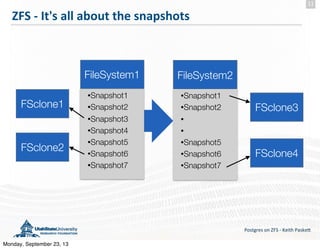
ZFS	
  -­‐	
  It's	
  all	
  about	
  the	
  snapshots
Postgres	
  on	
  ZFS	
  -­‐	
  Keith	
  Paske5
11
•Snapshot1
•Snapshot2
•Snapshot3
•Snapshot4
•Snapshot5
•Snapshot6
•Snapshot7
FileSystem1 FileSystem2
•Snapshot1
•Snapshot2
•
•
•Snapshot5
•Snapshot6
•Snapshot7
FSclone3
FSclone4
FSclone1
FSclone2
Monday, September 23, 13
Send	
  &	
  Receive
Postgres	
  on	
  ZFS	
  -­‐	
  Keith	
  Paske5
12
•Snapshot1
DataDir1 DataDir2
•Snapshot1
•Snapshot3
DB Updates
•Snapshot2
DB Updates
•Snapshot2
•Snapshot3
Monday, September 23, 13
Accessing	
  Snapshot	
  Contents
‣ .zfs	
  directory
• 'cd	
  .zfs/snapshot/snapname'	
  from	
  base	
  ZFS	
  directory
• 'ls	
  -­‐a'	
  in	
  base	
  directory	
  won't	
  show	
  the	
  .zfs	
  directory
• Snapshot	
  directories	
  are	
  read	
  only
• Tape	
  backup	
  of	
  snapshot	
  directory	
  will	
  be	
  consistent
‣ Create	
  a	
  clone	
  from	
  a	
  snapshot
• zfs	
  clone	
  fsname@snapshotname	
  clonename
• Clones	
  are	
  writable
• Only	
  take	
  addi-onal	
  disk	
  space	
  as	
  data	
  is	
  changed
• Simply	
  awesome	
  for	
  replica-ng	
  a	
  TB	
  database	
  in	
  seconds
Postgres	
  on	
  ZFS	
  -­‐	
  Keith	
  Paske5
13
Monday, September 23, 13
Clone	
  &	
  Recover
Postgres	
  on	
  ZFS	
  -­‐	
  Keith	
  Paske5
14
•Snapshot1
•Snapshot2
•Snapshot3
DataDir1
DataDir1
clone
pg_dump of
table and data
Drop
Table
Monday, September 23, 13
Snapshots	
  &	
  Transac-on	
  Logs
Postgres	
  on	
  ZFS	
  -­‐	
  Keith	
  Paske5
15
421 3
xlog1
xlog2
...
xlog1
xlog2
...
xlog1
xlog2
...
xlog1
xlog2
...
Transaction log archive
Monday, September 23, 13
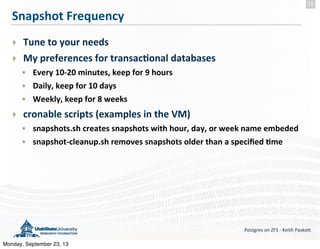
Snapshot	
  Frequency
‣ Tune	
  to	
  your	
  needs
‣ My	
  preferences	
  for	
  transac-onal	
  databases
• Every	
  10-­‐20	
  minutes,	
  keep	
  for	
  9	
  hours
• Daily,	
  keep	
  for	
  10	
  days
• Weekly,	
  keep	
  for	
  8	
  weeks
‣ cronable	
  scripts	
  (examples	
  in	
  the	
  VM)
• snapshots.sh	
  creates	
  snapshots	
  with	
  hour,	
  day,	
  or	
  week	
  name	
  embeded
• snapshot-­‐cleanup.sh	
  removes	
  snapshots	
  older	
  than	
  a	
  specified	
  -me
Postgres	
  on	
  ZFS	
  -­‐	
  Keith	
  Paske5
16
Monday, September 23, 13
ZFS	
  Compression
‣ Can	
  improve	
  performance	
  especially	
  for	
  streaming	
  data	
  sets
‣ Turning	
  on	
  only	
  compresses	
  subsequent	
  writes
‣ Check	
  out	
  test	
  results	
  from	
  citusdata
• hZp://citusdata.com/blog/64-­‐zfs-­‐compression
‣ Commands
• zfs	
  set	
  compression=on	
  fs/name	
  (LZJB)
• zfs	
  set	
  compression=gzip	
  fs/name
• zfs	
  set	
  compression=gzip-­‐9	
  fs/name
Postgres	
  on	
  ZFS	
  -­‐	
  Keith	
  Paske5
17
Monday, September 23, 13
Beyond	
  the	
  Database
‣ For	
  Solaris	
  and	
  its	
  deriva-ves	
  
• Replicate	
  the	
  OS	
  drive
• Simple	
  bare-­‐metal	
  restore
‣ OS	
  files	
  with	
  metadata	
  in	
  the	
  DB
• Snapshot	
  both	
  for	
  a	
  full	
  consistent	
  test/recovery	
  environment
‣ Using	
  Postgres	
  FDW	
  with	
  non-­‐DB	
  files
• Same	
  story—snapshots,	
  replica-on,	
  and	
  clones
Postgres	
  on	
  ZFS	
  -­‐	
  Keith	
  Paske5
18
Monday, September 23, 13
Demo
Postgres	
  on	
  ZFS	
  -­‐	
  Keith	
  Paske5
19
Monday, September 23, 13
Summary	
  &	
  Caveats
‣ Great	
  for	
  quick	
  duplica-on	
  of	
  very	
  large	
  databases
‣ Very	
  efficient	
  for	
  periodic	
  updates	
  of	
  replicas
‣ Combine	
  snapshots	
  with	
  transac-on	
  log	
  archives	
  for	
  faster	
  
access	
  to	
  point-­‐in-­‐-me	
  data
‣ Disk	
  space	
  is	
  only	
  freed	
  when	
  files	
  and	
  snapshots	
  are	
  deleted
‣ Have	
  to	
  shut	
  down	
  the	
  ‘receiving’	
  DB	
  during	
  the	
  update
‣ If	
  your	
  backup	
  sooware	
  finds	
  the	
  .zfs	
  directory	
  you	
  will	
  
experience	
  an--­‐deduplica-on
‣ Recursive	
  snapshots	
  vs	
  snapshots	
  on	
  separate	
  file	
  systems
Postgres	
  on	
  ZFS	
  -­‐	
  Keith	
  Paske5
20
Monday, September 23, 13
PostgreSQL	
  and	
  ZFS
Postgres	
  on	
  ZFS	
  -­‐	
  Keith	
  Paske5
21
They	
  may	
  not	
  have	
  been	
  designed	
  to	
  work	
  together,	
  
but	
  they	
  do	
  nonetheless
Monday, September 23, 13
Postgres	
  on	
  ZFS	
  -­‐	
  Keith	
  Paske5
Go	
  ahead.	
  
It	
  doesn’t	
  hurt
22
Monday, September 23, 13
VM	
  Setup
‣ Before	
  you	
  import	
  the	
  VM	
  into	
  VirtualBox
• VirtualBox	
  4.2.12	
  with	
  VirtualBox	
  Extension	
  Pack
• VT-­‐x/AMD-­‐V	
  accelera-on	
  (may	
  need	
  to	
  enable	
  in	
  BIOS)
• Enough	
  memory	
  to	
  allocate	
  2GB	
  to	
  the	
  VM
• PuTTY	
  or	
  other	
  terminal	
  to	
  access	
  the	
  VM's	
  zones	
  via	
  ssh
• Add	
  a	
  Host-­‐Only	
  Ethernet	
  adapter	
  
with	
  an	
  IPv4	
  address	
  of	
  192.168.68.1	
  and	
  a	
  netmask	
  of	
  255.255.255.0
‣ Import	
  the	
  OmniOS	
  VM	
  and	
  start	
  it	
  up
‣ More	
  detailed	
  instruc-ons	
  and	
  the	
  VM	
  are	
  at:
hZp://sta-c4.usurf.usu.edu/vms
‣ You	
  may	
  get	
  a	
  message	
  about	
  modifying	
  the	
  network	
  seqngs	
  on	
  import
‣ From	
  your	
  host’s	
  shell	
  or	
  PuTTY	
  connect	
  to	
  192.168.68.10
‣ log	
  in	
  as	
  user:	
  admin	
  password:	
  nimda
Postgres	
  on	
  ZFS	
  -­‐	
  Keith	
  Paske5
23
Monday, September 23, 13
VM	
  Explora-on
‣ Root	
  privileges
• pfexec	
  executes	
  the	
  following	
  command	
  with	
  root	
  privileges
• prash	
  assumes	
  root	
  status
‣ List,	
  start,	
  access	
  and	
  stop	
  zones
• zoneadm	
  list	
  -­‐cv
• pfexec	
  bin/start-­‐zones.sh
• ssh	
  to	
  admin@192.168.68.(11,12,	
  13,	
  or	
  14)	
  password	
  nimda
• pfexec	
  bin/stop-­‐zones.sh
‣ List	
  and	
  explore	
  zfs	
  filesystems
• zfs	
  list
• zfs	
  list	
  -­‐t	
  all
• zfs	
  list	
  -­‐t	
  all	
  -­‐r	
  rpool/space
• zfs	
  get	
  all	
  rpool/space
Postgres	
  on	
  ZFS	
  -­‐	
  Keith	
  Paske5
24
Monday, September 23, 13
ZFS	
  Prac-ce
‣ Create	
  a	
  filesystem	
  and	
  add	
  some	
  content
• zfs	
  create	
  rpool/myfs;	
  	
  cp	
  -­‐r	
  Downloads	
  /rpool/myfs/	
  
‣ Create	
  a	
  snapshot	
  and	
  replicate	
  from	
  it
• zfs	
  snapshot	
  rpool/myfs@rep1
• zfs	
  send	
  rpool/myfs@rep1	
  |	
  zfs	
  recv	
  rpool/myfs-­‐copy@rep1	
  
‣ Add	
  more	
  content
• cp	
  PGrep*	
  /rpool/myfs/
‣ Explore	
  .zfs	
  directories
• cd	
  /rpool/myfs/.zfs/snapshot/rep1
‣ Destroy	
  the	
  file	
  systems
• zfs	
  destroy	
  -­‐r	
  rpool/myfs
• zfs	
  destroy	
  -­‐r	
  rpool/myfs-­‐copy
Postgres	
  on	
  ZFS	
  -­‐	
  Keith	
  Paske5
25
Monday, September 23, 13
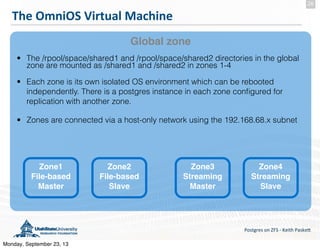
The	
  OmniOS	
  Virtual	
  Machine
Postgres	
  on	
  ZFS	
  -­‐	
  Keith	
  Paske5
26
Global zone
Zone2
File-based
Slave
• The /rpool/space/shared1 and /rpool/space/shared2 directories in the global
zone are mounted as /shared1 and /shared2 in zones 1-4
• Each zone is its own isolated OS environment which can be rebooted
independently. There is a postgres instance in each zone configured for
replication with another zone.
• Zones are connected via a host-only network using the 192.168.68.x subnet
Zone1
File-based
Master
Zone3
Streaming
Master
Zone4
Streaming
Slave
Monday, September 23, 13
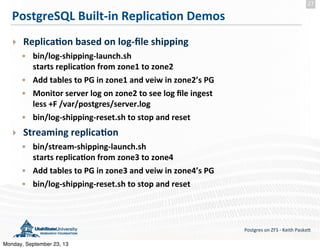
PostgreSQL	
  Built-­‐in	
  Replica-on	
  Demos
‣ Replica-on	
  based	
  on	
  log-­‐file	
  shipping
• bin/log-­‐shipping-­‐launch.sh
starts	
  replica-on	
  from	
  zone1	
  to	
  zone2
• Add	
  tables	
  to	
  PG	
  in	
  zone1	
  and	
  veiw	
  in	
  zone2’s	
  PG
• Monitor	
  server	
  log	
  on	
  zone2	
  to	
  see	
  log	
  file	
  ingest
less	
  +F	
  /var/postgres/server.log
• bin/log-­‐shipping-­‐reset.sh	
  to	
  stop	
  and	
  reset	
  
‣ Streaming	
  replica-on
• bin/stream-­‐shipping-­‐launch.sh
starts	
  replica-on	
  from	
  zone3	
  to	
  zone4
• Add	
  tables	
  to	
  PG	
  in	
  zone3	
  and	
  veiw	
  in	
  zone4’s	
  PG
• bin/log-­‐shipping-­‐reset.sh	
  to	
  stop	
  and	
  reset
Postgres	
  on	
  ZFS	
  -­‐	
  Keith	
  Paske5
27
Monday, September 23, 13

Keith Paskett - Postgres on ZFS @ Postgres Open

  • 1.
    SENSING THE PRESENT.SECURING THE FUTURE PostgreSQL  on  ZFS ‣ Replica(on,  Backup,  Human-­‐disaster  Recovery, and  More... ‣ Keith  Paske> ‣ Keith@Paske>.org ‣ @klpaske> Monday, September 23, 13
  • 2.
    Agenda ‣ Introduc-on ‣ Defining  the  Problem  (Opportunity) ‣ ZFS  Advantages  for  your  Postgres  instance ‣ What  ZFS  is  and  where  you  can  get  it ‣ ZFS  snapshots—where  the  magic  happens ‣ Cloning  for  Valida-on,  Tes-ng  and  Recovery ‣ Adding  ZFS  to  Log/Streaming  Replica-on ‣ Beyond  the  database ‣ Summary  and  Demo Postgres  on  ZFS  -­‐  Keith  Paske5 2 Monday, September 23, 13
  • 3.
    Introduc-on Postgres  on  ZFS  -­‐  Keith  Paske5 3 Text Monday, September 23, 13
  • 4.
    Postgres  on  ZFS  -­‐  Keith  Paske5 4 Trouble  lurks Where  you  least  expect  it Monday, September 23, 13
  • 5.
    And  comes in  all  sizes Postgres  on  ZFS  -­‐  Keith  Paske5 5 Monday, September 23, 13
  • 6.
    Backup  &  Recovery  Disconnect ‣ Less  likely  disaster  scenarios • Server  failure • Mul(ple  drive  failures  in  a  raid  array • Data  center  fla>ened  by  (choose  your  disaster) ‣ Common  'human'  disaster  scenarios • Dropped  table • Deleted  data • Altered  data ‣ Many  backup  solu-ons  focus  on  the  least  likely  disaster ‣ ZFS  helps  protect  against  more  common  disasters Postgres  on  ZFS  -­‐  Keith  Paske5 6 Monday, September 23, 13
  • 7.
    I  Wish  I  Could... ‣ Test  an  upgrade  script  on  a  mul--­‐terabyte  database  without   having  to  set  up  a  separate  server  with  terabytes  of  storage ‣ Quickly  roll  back  from  an  upgrade  if  things  go  badly ‣ Have  point-­‐in-­‐-me  access  to  a  large  database  without  having  to   do  a  restore  then  replay  a  week’s  worth  of  transac-on  logs Postgres  on  ZFS  -­‐  Keith  Paske5 7 Monday, September 23, 13
  • 8.
    ZFS  Advantages  for  Databases ‣ Fast  efficient  replica-on  (one-­‐way  periodic  update) ‣ Low/no-­‐impact  snapshots ‣ Read/write  access  to  snapshots  via  clones ‣ Pool  physical  devices ‣ Send/receive  snapshots   ‣ Bidirec-onal  incremental  send/receive ‣ Solid  state  cache  drives ‣ Upgrade  to  larger  physical  drives  with  zero  down-me ‣ Con-nuous  integrity  checking  and  automa-c  repair ‣ Built  in  compression—can  actually  improve  performance Postgres  on  ZFS  -­‐  Keith  Paske5 8 Monday, September 23, 13
  • 9.
    What ‣ ZFS    ZeZabyte  File  System. ‣ Not  just  a  file  system.  It’s  a  storage  infrastructure. ‣ Transac-onal,  Copy-­‐on-­‐write ‣ Always  consistent  on  disk. ‣ Fully  checksummed. ‣ Loves  memory  and  SSD,  and  it  knows  how  to  use  them. ‣ It’s  easy!  There  are  only  two  commands. Postgres  on  ZFS  -­‐  Keith  Paske5 9 Monday, September 23, 13
  • 10.
    Where ‣ IllumOS • OmniOS •OpenIndiana • SmartOS  (No  OS  drive.  Really.) ‣ FreeBSD ‣ Linux  -­‐  Yes  it  is  produc-on  ready ‣ OS  X ‣ That  other  OS  that  helps  fund  the  purchase  of  tropical  islands Postgres  on  ZFS  -­‐  Keith  Paske5 10 Monday, September 23, 13
  • 11.
    ZFS  -­‐  It's  all  about  the  snapshots Postgres  on  ZFS  -­‐  Keith  Paske5 11 •Snapshot1 •Snapshot2 •Snapshot3 •Snapshot4 •Snapshot5 •Snapshot6 •Snapshot7 FileSystem1 FileSystem2 •Snapshot1 •Snapshot2 • • •Snapshot5 •Snapshot6 •Snapshot7 FSclone3 FSclone4 FSclone1 FSclone2 Monday, September 23, 13
  • 12.
    Send  &  Receive Postgres  on  ZFS  -­‐  Keith  Paske5 12 •Snapshot1 DataDir1 DataDir2 •Snapshot1 •Snapshot3 DB Updates •Snapshot2 DB Updates •Snapshot2 •Snapshot3 Monday, September 23, 13
  • 13.
    Accessing  Snapshot  Contents ‣.zfs  directory • 'cd  .zfs/snapshot/snapname'  from  base  ZFS  directory • 'ls  -­‐a'  in  base  directory  won't  show  the  .zfs  directory • Snapshot  directories  are  read  only • Tape  backup  of  snapshot  directory  will  be  consistent ‣ Create  a  clone  from  a  snapshot • zfs  clone  fsname@snapshotname  clonename • Clones  are  writable • Only  take  addi-onal  disk  space  as  data  is  changed • Simply  awesome  for  replica-ng  a  TB  database  in  seconds Postgres  on  ZFS  -­‐  Keith  Paske5 13 Monday, September 23, 13
  • 14.
    Clone  &  Recover Postgres  on  ZFS  -­‐  Keith  Paske5 14 •Snapshot1 •Snapshot2 •Snapshot3 DataDir1 DataDir1 clone pg_dump of table and data Drop Table Monday, September 23, 13
  • 15.
    Snapshots  &  Transac-on  Logs Postgres  on  ZFS  -­‐  Keith  Paske5 15 421 3 xlog1 xlog2 ... xlog1 xlog2 ... xlog1 xlog2 ... xlog1 xlog2 ... Transaction log archive Monday, September 23, 13
  • 16.
    Snapshot  Frequency ‣ Tune  to  your  needs ‣ My  preferences  for  transac-onal  databases • Every  10-­‐20  minutes,  keep  for  9  hours • Daily,  keep  for  10  days • Weekly,  keep  for  8  weeks ‣ cronable  scripts  (examples  in  the  VM) • snapshots.sh  creates  snapshots  with  hour,  day,  or  week  name  embeded • snapshot-­‐cleanup.sh  removes  snapshots  older  than  a  specified  -me Postgres  on  ZFS  -­‐  Keith  Paske5 16 Monday, September 23, 13
  • 17.
    ZFS  Compression ‣ Can  improve  performance  especially  for  streaming  data  sets ‣ Turning  on  only  compresses  subsequent  writes ‣ Check  out  test  results  from  citusdata • hZp://citusdata.com/blog/64-­‐zfs-­‐compression ‣ Commands • zfs  set  compression=on  fs/name  (LZJB) • zfs  set  compression=gzip  fs/name • zfs  set  compression=gzip-­‐9  fs/name Postgres  on  ZFS  -­‐  Keith  Paske5 17 Monday, September 23, 13
  • 18.
    Beyond  the  Database ‣For  Solaris  and  its  deriva-ves   • Replicate  the  OS  drive • Simple  bare-­‐metal  restore ‣ OS  files  with  metadata  in  the  DB • Snapshot  both  for  a  full  consistent  test/recovery  environment ‣ Using  Postgres  FDW  with  non-­‐DB  files • Same  story—snapshots,  replica-on,  and  clones Postgres  on  ZFS  -­‐  Keith  Paske5 18 Monday, September 23, 13
  • 19.
    Demo Postgres  on  ZFS  -­‐  Keith  Paske5 19 Monday, September 23, 13
  • 20.
    Summary  &  Caveats ‣Great  for  quick  duplica-on  of  very  large  databases ‣ Very  efficient  for  periodic  updates  of  replicas ‣ Combine  snapshots  with  transac-on  log  archives  for  faster   access  to  point-­‐in-­‐-me  data ‣ Disk  space  is  only  freed  when  files  and  snapshots  are  deleted ‣ Have  to  shut  down  the  ‘receiving’  DB  during  the  update ‣ If  your  backup  sooware  finds  the  .zfs  directory  you  will   experience  an--­‐deduplica-on ‣ Recursive  snapshots  vs  snapshots  on  separate  file  systems Postgres  on  ZFS  -­‐  Keith  Paske5 20 Monday, September 23, 13
  • 21.
    PostgreSQL  and  ZFS Postgres  on  ZFS  -­‐  Keith  Paske5 21 They  may  not  have  been  designed  to  work  together,   but  they  do  nonetheless Monday, September 23, 13
  • 22.
    Postgres  on  ZFS  -­‐  Keith  Paske5 Go  ahead.   It  doesn’t  hurt 22 Monday, September 23, 13
  • 23.
    VM  Setup ‣ Before  you  import  the  VM  into  VirtualBox • VirtualBox  4.2.12  with  VirtualBox  Extension  Pack • VT-­‐x/AMD-­‐V  accelera-on  (may  need  to  enable  in  BIOS) • Enough  memory  to  allocate  2GB  to  the  VM • PuTTY  or  other  terminal  to  access  the  VM's  zones  via  ssh • Add  a  Host-­‐Only  Ethernet  adapter   with  an  IPv4  address  of  192.168.68.1  and  a  netmask  of  255.255.255.0 ‣ Import  the  OmniOS  VM  and  start  it  up ‣ More  detailed  instruc-ons  and  the  VM  are  at: hZp://sta-c4.usurf.usu.edu/vms ‣ You  may  get  a  message  about  modifying  the  network  seqngs  on  import ‣ From  your  host’s  shell  or  PuTTY  connect  to  192.168.68.10 ‣ log  in  as  user:  admin  password:  nimda Postgres  on  ZFS  -­‐  Keith  Paske5 23 Monday, September 23, 13
  • 24.
    VM  Explora-on ‣ Root  privileges • pfexec  executes  the  following  command  with  root  privileges • prash  assumes  root  status ‣ List,  start,  access  and  stop  zones • zoneadm  list  -­‐cv • pfexec  bin/start-­‐zones.sh • ssh  to  admin@192.168.68.(11,12,  13,  or  14)  password  nimda • pfexec  bin/stop-­‐zones.sh ‣ List  and  explore  zfs  filesystems • zfs  list • zfs  list  -­‐t  all • zfs  list  -­‐t  all  -­‐r  rpool/space • zfs  get  all  rpool/space Postgres  on  ZFS  -­‐  Keith  Paske5 24 Monday, September 23, 13
  • 25.
    ZFS  Prac-ce ‣ Create  a  filesystem  and  add  some  content • zfs  create  rpool/myfs;    cp  -­‐r  Downloads  /rpool/myfs/   ‣ Create  a  snapshot  and  replicate  from  it • zfs  snapshot  rpool/myfs@rep1 • zfs  send  rpool/myfs@rep1  |  zfs  recv  rpool/myfs-­‐copy@rep1   ‣ Add  more  content • cp  PGrep*  /rpool/myfs/ ‣ Explore  .zfs  directories • cd  /rpool/myfs/.zfs/snapshot/rep1 ‣ Destroy  the  file  systems • zfs  destroy  -­‐r  rpool/myfs • zfs  destroy  -­‐r  rpool/myfs-­‐copy Postgres  on  ZFS  -­‐  Keith  Paske5 25 Monday, September 23, 13
  • 26.
    The  OmniOS  Virtual  Machine Postgres  on  ZFS  -­‐  Keith  Paske5 26 Global zone Zone2 File-based Slave • The /rpool/space/shared1 and /rpool/space/shared2 directories in the global zone are mounted as /shared1 and /shared2 in zones 1-4 • Each zone is its own isolated OS environment which can be rebooted independently. There is a postgres instance in each zone configured for replication with another zone. • Zones are connected via a host-only network using the 192.168.68.x subnet Zone1 File-based Master Zone3 Streaming Master Zone4 Streaming Slave Monday, September 23, 13
  • 27.
    PostgreSQL  Built-­‐in  Replica-on  Demos ‣ Replica-on  based  on  log-­‐file  shipping • bin/log-­‐shipping-­‐launch.sh starts  replica-on  from  zone1  to  zone2 • Add  tables  to  PG  in  zone1  and  veiw  in  zone2’s  PG • Monitor  server  log  on  zone2  to  see  log  file  ingest less  +F  /var/postgres/server.log • bin/log-­‐shipping-­‐reset.sh  to  stop  and  reset   ‣ Streaming  replica-on • bin/stream-­‐shipping-­‐launch.sh starts  replica-on  from  zone3  to  zone4 • Add  tables  to  PG  in  zone3  and  veiw  in  zone4’s  PG • bin/log-­‐shipping-­‐reset.sh  to  stop  and  reset Postgres  on  ZFS  -­‐  Keith  Paske5 27 Monday, September 23, 13