| 1
Edward Lewis
APRICOT 2019
25 February 2019
DNSSEC Validation Tutorial
How it is done
| 2| 2
Agenda
• Why does DNSSEC exist?
• What are digital signatures?
• How validation happens in theory
• A look at an example
• How negative answers are validated?
• What does it take to run a validating server?
• Some common configuration examples
| 3| 3
Why do we have DNS?
• The Domain Name System
– Global lightweight database
– Holds information about named things
– Used to find network addresses for servers
• Works well because
– Scale: many independent managers
| 4| 4
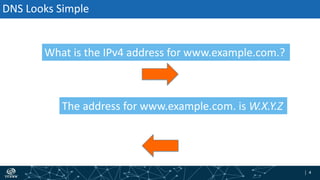
What is the IPv4 address for www.example.com.?
The address for www.example.com. is W.X.Y.Z
DNS Looks Simple
| 5| 5
Information
Source
Information
Source
Information
Source
Information
Source
IntermediaryIntermediaryIntermediary
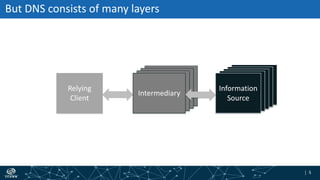
But DNS consists of many layers
Relying
Client
Intermediary
Information
Source
| 6| 6
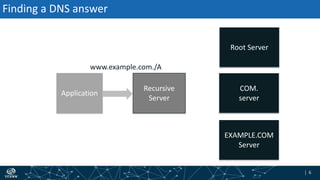
Finding a DNS answer
Root Server
EXAMPLE.COM
Server
Application
Recursive
Server
COM.
server
www.example.com./A
| 7| 7
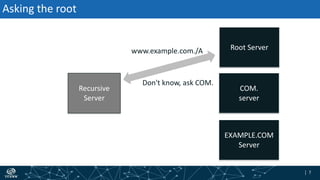
Asking the root
Recursive
Server
www.example.com./A
Don't know, ask COM.
Root Server
EXAMPLE.COM
Server
COM.
server
| 8| 8
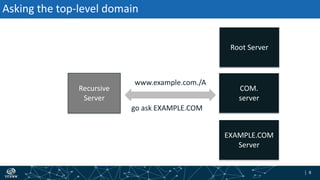
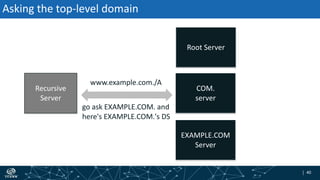
Asking the top-level domain
Recursive
Server
www.example.com./A
go ask EXAMPLE.COM
Root Server
EXAMPLE.COM
Server
COM.
server
| 9| 9
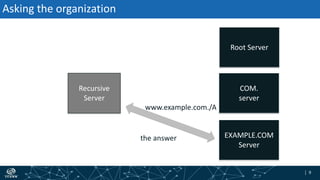
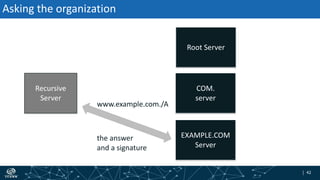
Asking the organization
Recursive
Server
www.example.com./A
the answer
Root Server
EXAMPLE.COM
Server
COM.
server
| 10| 10
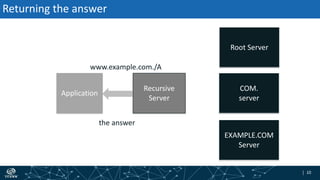
Returning the answer
Application
Recursive
Server
www.example.com./A
the answer
Root Server
EXAMPLE.COM
Server
COM.
server
| 11| 11
Information
Source
Information
Source
Information
Source
Information
Source
IntermediaryIntermediaryIntermediary
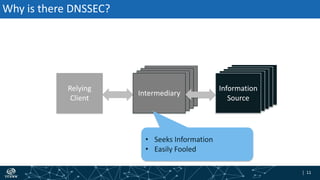
Why is there DNSSEC?
Relying
Client
Intermediary
Information
Source
• Seeks Information
• Easily Fooled
| 12| 12
DNSSEC
• Approach: Use of digital signatures
• Scaling
– The DNS is a "tree", each part of the tree digitally signs the next
(somehow)
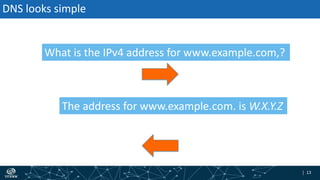
| 13| 13
What is the IPv4 address for www.example.com,?
The address for www.example.com. is W.X.Y.Z
DNS looks simple
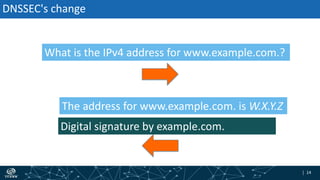
| 14| 14
Digital signature by example.com.
DNSSEC's change
What is the IPv4 address for www.example.com.?
The address for www.example.com. is W.X.Y.Z
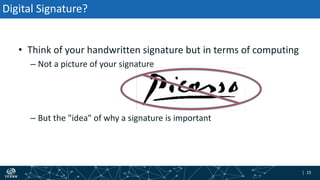
| 15| 15
Digital Signature?
• Think of your handwritten signature but in terms of computing
– Not a picture of your signature
– But the "idea" of why a signature is important
| 16| 16
Digital Signatures in Theory
Key Pair
| 17| 17
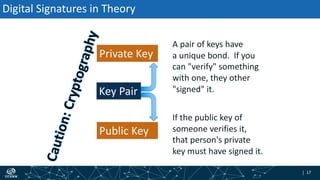
Digital Signatures in Theory
Private Key
Key Pair
Public Key
A pair of keys have
a unique bond. If you
can "verify" something
with one, they other
"signed" it.
If the public key of
someone verifies it,
that person's private
key must have signed it.
| 18| 18
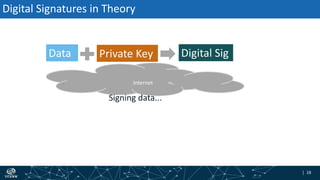
Internet
Digital Signatures in Theory
Data Digital SigPrivate Key
Signing data...
| 19| 19
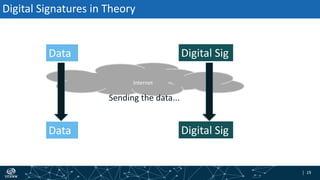
Internet
Digital Signatures in Theory
Data Digital Sig
Data Digital Sig
Sending the data...
| 20| 20
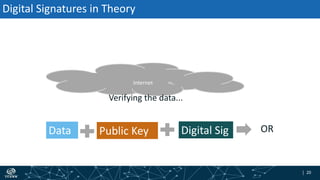
Internet
Digital Signatures in Theory
Data Digital SigPublic Key OR
Verifying the data...
| 21| 21
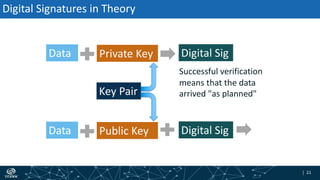
Digital Signatures in Theory
Data Private Key
Key Pair
Data Digital SigPublic Key
Successful verification
means that the data
arrived "as planned"
Digital Sig
| 22| 22
Could Anything Go Wrong?
• Yes
– The holder of the private key might "leak" it
– Someone might "abuse" the key or cryptography
• With care and attention, like guarding your house keys, you can
rely on the checks
| 23| 23
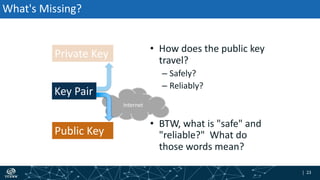
Internet
What's Missing?
• How does the public key
travel?
– Safely?
– Reliably?
• BTW, what is "safe" and
"reliable?" What do
those words mean?
Private Key
Key Pair
Public Key
| 24| 24
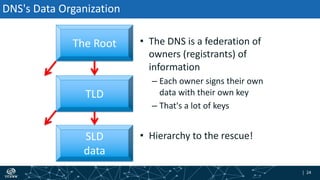
DNS's Data Organization
• The DNS is a federation of
owners (registrants) of
information
– Each owner signs their own
data with their own key
– That's a lot of keys
• Hierarchy to the rescue!
The Root
TLD
SLD
data
| 25| 25
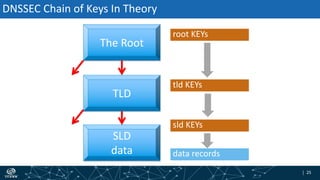
DNSSEC Chain of Keys In Theory
The Root
TLD
SLD
data
sld KEYs
tld KEYs
root KEYs
data records
| 26| 26
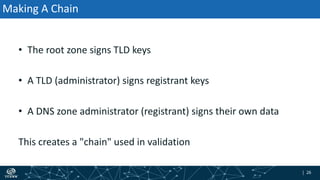
Making A Chain
• The root zone signs TLD keys
• A TLD (administrator) signs registrant keys
• A DNS zone administrator (registrant) signs their own data
This creates a "chain" used in validation
| 27| 27
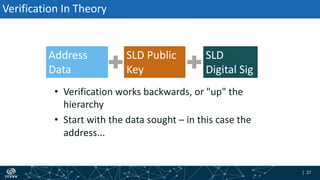
Verification In Theory
• Verification works backwards, or "up" the
hierarchy
• Start with the data sought – in this case the
address...
Address
Data
SLD
Digital Sig
SLD Public
Key
| 28| 28
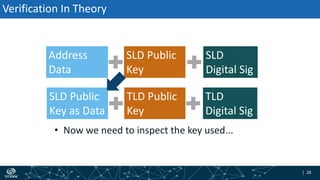
Verification In Theory
• Now we need to inspect the key used...
Address
Data
SLD
Digital Sig
SLD Public
Key
SLD Public
Key as Data
TLD
Digital Sig
TLD Public
Key
| 29| 29
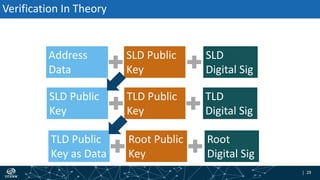
Verification In Theory
Address
Data
SLD
Digital Sig
SLD Public
Key
SLD Public
Key
TLD
Digital Sig
TLD Public
Key
TLD Public
Key as Data
Root
Digital Sig
Root Public
Key
| 30| 30
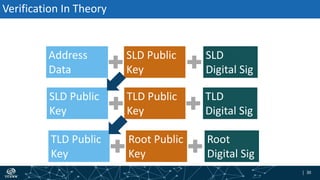
Verification In Theory
Address
Data
SLD
Digital Sig
SLD Public
Key
SLD Public
Key
TLD
Digital Sig
TLD Public
Key
TLD Public
Key
Root
Digital Sig
Root Public
Key
| 31| 31
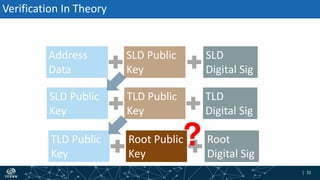
Verification In Theory
Address
Data
SLD
Digital Sig
SLD Public
Key
SLD Public
Key
TLD
Digital Sig
TLD Public
Key
TLD Public
Key
Root
Digital Sig
Root Public
Key
?
| 32| 32
Trust Anchors
• Within DNSSEC, the "top" key used in a chain
• Trust anchor hygiene is important
| 33| 33
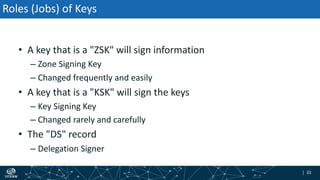
Roles (Jobs) of Keys
• A key that is a "ZSK" will sign information
– Zone Signing Key
– Changed frequently and easily
• A key that is a "KSK" will sign the keys
– Key Signing Key
– Changed rarely and carefully
• The "DS" record
– Delegation Signer
| 34| 34
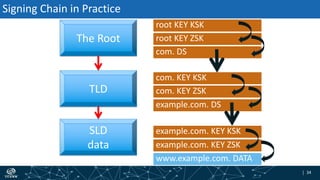
The Root
TLD
SLD
data example.com. KEY ZSK
example.com. KEY KSK
example.com. DS
com. KEY ZSK
com. KEY KSK
com. DS
root KEY ZSK
root KEY KSK
www.example.com. DATA
Signing Chain in Practice
| 35| 35
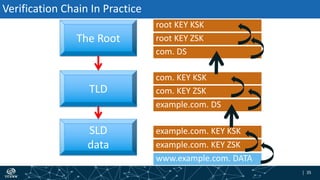
Verification Chain In Practice
The Root
TLD
SLD
data example.com. KEY ZSK
example.com. KEY KSK
example.com. DS
com. KEY ZSK
com. KEY KSK
com. DS
root KEY ZSK
root KEY KSK
www.example.com. DATA
| 36| 36
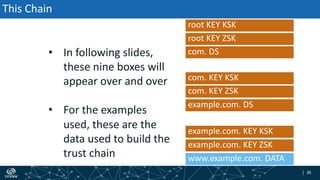
This Chain
• In following slides,
these nine boxes will
appear over and over
• For the examples
used, these are the
data used to build the
trust chain
example.com. KEY ZSK
example.com. KEY KSK
example.com. DS
com. KEY ZSK
com. KEY KSK
com. DS
root KEY ZSK
root KEY KSK
www.example.com. DATA
| 37| 37
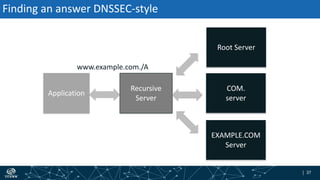
Finding an answer DNSSEC-style
Application
Recursive
Server
www.example.com./A
Root Server
EXAMPLE.COM
Server
COM.
server
| 38| 38
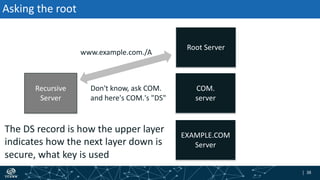
Asking the root
Recursive
Server
Don't know, ask COM.
and here's COM.'s "DS"
The DS record is how the upper layer
indicates how the next layer down is
secure, what key is used
www.example.com./A
Root Server
EXAMPLE.COM
Server
COM.
server
| 39| 39
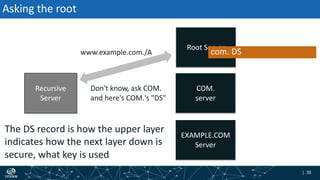
Asking the root
Recursive
Server
Don't know, ask COM.
and here's COM.'s "DS"
The DS record is how the upper layer
indicates how the next layer down is
secure, what key is used
www.example.com./A
Root Server
EXAMPLE.COM
Server
COM.
server
com. DS
| 40| 40
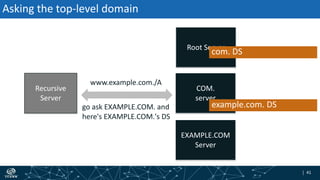
Asking the top-level domain
Recursive
Server
go ask EXAMPLE.COM. and
here's EXAMPLE.COM.'s DS
www.example.com./A
Root Server
EXAMPLE.COM
Server
COM.
server
| 41| 41
Recursive
Server
go ask EXAMPLE.COM. and
here's EXAMPLE.COM.'s DS
www.example.com./A
Root Server
EXAMPLE.COM
Server
COM.
server
Asking the top-level domain
example.com. DS
com. DS
| 42| 42
Asking the organization
Recursive
Server
the answer
and a signature
www.example.com./A
Root Server
EXAMPLE.COM
Server
COM.
server
| 43| 43
Recursive
Server
the answer
and a signature
www.example.com./A
Root Server
EXAMPLE.COM
Server
COM.
server
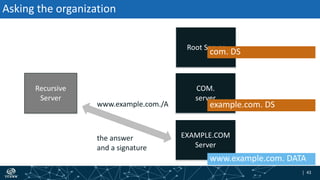
Asking the organization
example.com. DS
com. DS
www.example.com. DATA
| 44| 44
Still Need More Information
• The keys are not normally sent with an answer because the set
is large and the keys may have been cached already
• The validator will "walk" up the tree to get needed records
| 45| 45
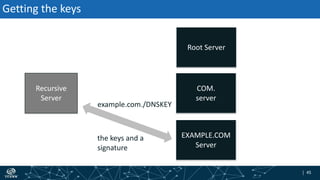
Getting the keys
Recursive
Server
example.com./DNSKEY
the keys and a
signature
Root Server
EXAMPLE.COM
Server
COM.
server
| 46| 46
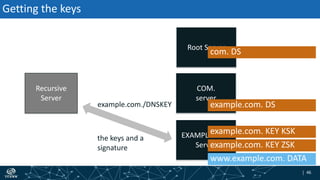
Getting the keys
Recursive
Server
example.com./DNSKEY
the keys and a
signature
Root Server
EXAMPLE.COM
Server
COM.
server
example.com. KEY ZSK
example.com. KEY KSK
example.com. DS
com. DS
www.example.com. DATA
| 47| 47
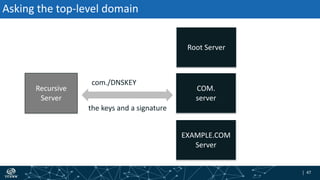
Asking the top-level domain
Recursive
Server
com./DNSKEY
the keys and a signature
Root Server
EXAMPLE.COM
Server
COM.
server
| 48| 48
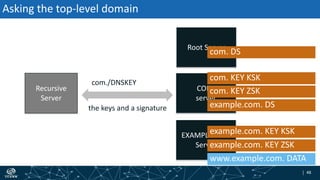
Asking the top-level domain
Recursive
Server
com./DNSKEY
the keys and a signature
Root Server
EXAMPLE.COM
Server
COM.
server
example.com. KEY ZSK
example.com. KEY KSK
example.com. DS
com. KEY ZSK
com. KEY KSK
com. DS
www.example.com. DATA
| 49| 49
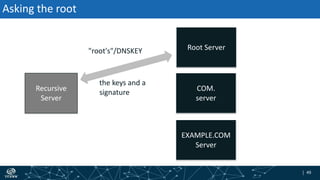
Asking the root
Recursive
Server
"root's"/DNSKEY
the keys and a
signature
Root Server
EXAMPLE.COM
Server
COM.
server
| 50| 50
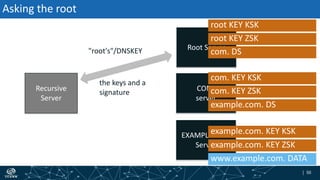
Asking the root
Recursive
Server
"root's"/DNSKEY
the keys and a
signature
Root Server
EXAMPLE.COM
Server
COM.
server
example.com. KEY ZSK
example.com. KEY KSK
example.com. DS
com. KEY ZSK
com. KEY KSK
com. DS
root KEY ZSK
root KEY KSK
www.example.com. DATA
| 51| 51
The root key signature
• As we climb back up, looking for keys
– validating the keys with what's one level up
• Eventually get to the very top of the DNS hierarchy
– now what?
– magically, we trust the root key
– seriously, we have to already put faith in the root's key
| 52| 52
Validation
• Having collected all of the needed records, all the signatures
can be validated
• If all the checks succeed, then the answer is valid and returned
to the application that asked
| 53| 53
Looking at a validation in DNS record syntax
• Using a query for www.example.com.'s IPv4 address
– On February 8th, 2019 at about 1200 UTC
– Using a Root Zone KSK #20326 as my trust anchor
| 54| 54
Ordinarily...
• In coming slides, I'll retrieve the DS record at times
• A DNS cache would have gotten them while finding the final
answer and cache them
• In debugging, you won't rely on that, you'll probably query as
the slides show...
| 55| 55
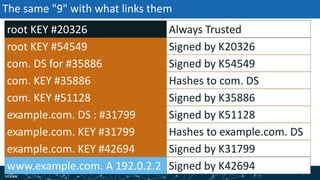
The same "9" with what links them
root KEY #54549
com. KEY #35886
com. KEY #51128
example.com. KEY #31799
example.com. KEY #42694
root KEY #20326
www.example.com. A 192.0.2.2
com. DS for #35886
example.com. DS : #31799
Signed by K20326
Hashes to com. DS
Signed by K35886
Signed by K31799
Always Trusted
Signed by K42694
Signed by K54549
Signed by K51128
Hashes to example.com. DS
| 56| 56
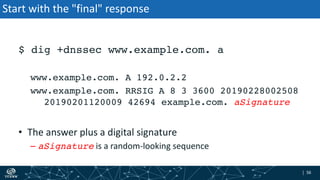
Start with the "final" response
$ dig +dnssec www.example.com. a
www.example.com. A 192.0.2.2
www.example.com. RRSIG A 8 3 3600 20190228002508
20190201120009 42694 example.com. aSignature
• The answer plus a digital signature
– aSignature is a random-looking sequence
| 57| 57
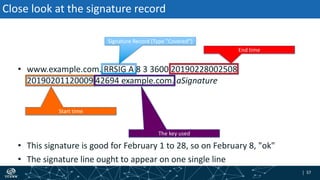
Close look at the signature record
• www.example.com. RRSIG A 8 3 3600 20190228002508
20190201120009 42694 example.com. aSignature
Signature Record (Type "Covered")
Start time
End time
The key used
• This signature is good for February 1 to 28, so on February 8, "ok"
• The signature line ought to appear on one single line
| 58| 58
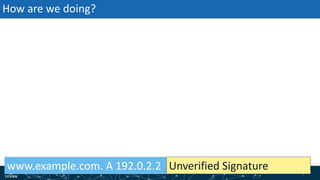
How are we doing?
www.example.com. A 192.0.2.2 Unverified Signature
| 59| 59
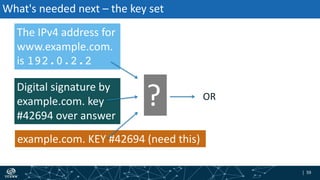
What's needed next – the key set
The IPv4 address for
www.example.com.
is 192.0.2.2
Digital signature by
example.com. key
#42694 over answer
example.com. KEY #42694 (need this)
? OR
| 60| 60
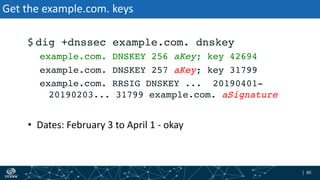
Get the example.com. keys
$ dig +dnssec example.com. dnskey
example.com. DNSKEY 256 aKey; key 42694
example.com. DNSKEY 257 aKey; key 31799
example.com. RRSIG DNSKEY ... 20190401-
20190203... 31799 example.com. aSignature
• Dates: February 3 to April 1 - okay
| 61| 61
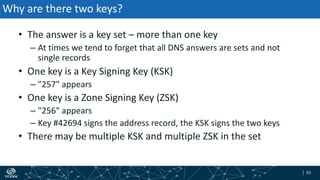
Why are there two keys?
• The answer is a key set – more than one key
– At times we tend to forget that all DNS answers are sets and not
single records
• One key is a Key Signing Key (KSK)
– "257" appears
• One key is a Zone Signing Key (ZSK)
– "256" appears
– Key #42694 signs the address record, the KSK signs the two keys
• There may be multiple KSK and multiple ZSK in the set
| 62| 62
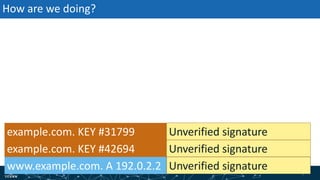
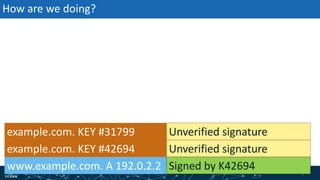
How are we doing?
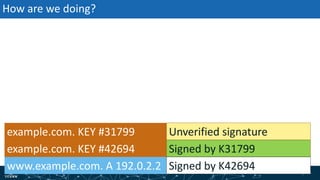
example.com. KEY #31799
example.com. KEY #42694
www.example.com. A 192.0.2.2 Unverified signature
Unverified signature
| 63| 63
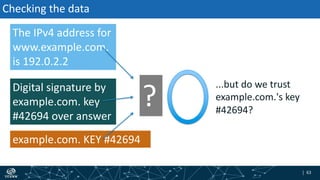
Checking the data
The IPv4 address for
www.example.com.
is 192.0.2.2
Digital signature by
example.com. key
#42694 over answer
example.com. KEY #42694
?
...but do we trust
example.com.'s key
#42694?
| 64| 64
How are we doing?
example.com. KEY #31799
example.com. KEY #42694
www.example.com. A 192.0.2.2 Signed by K42694
Unverified signature
| 65| 65
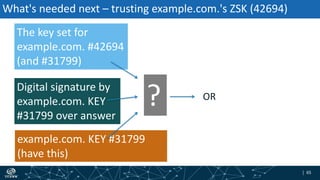
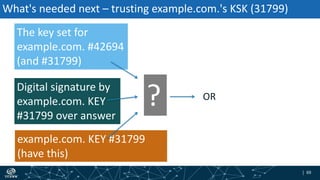
What's needed next – trusting example.com.'s ZSK (42694)
The key set for
example.com. #42694
(and #31799)
Digital signature by
example.com. KEY
#31799 over answer
example.com. KEY #31799
(have this)
? OR
| 66| 66
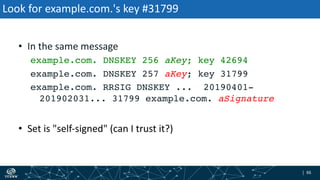
Look for example.com.'s key #31799
• In the same message
example.com. DNSKEY 256 aKey; key 42694
example.com. DNSKEY 257 aKey; key 31799
example.com. RRSIG DNSKEY ... 20190401-
201902031... 31799 example.com. aSignature
• Set is "self-signed" (can I trust it?)
| 67| 67
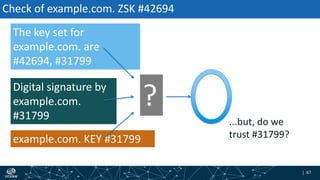
Check of example.com. ZSK #42694
The key set for
example.com. are
#42694, #31799
Digital signature by
example.com.
#31799
example.com. KEY #31799
?
...but, do we
trust #31799?
| 68| 68
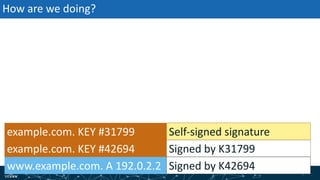
How are we doing?
example.com. KEY #31799
example.com. KEY #42694
www.example.com. A 192.0.2.2
Signed by K31799
Signed by K42694
Unverified signature
| 69| 69
What's needed next – trusting example.com.'s KSK (31799)
The key set for
example.com. #42694
(and #31799)
Digital signature by
example.com. KEY
#31799 over answer
example.com. KEY #31799
(have this)
? OR
| 70| 70
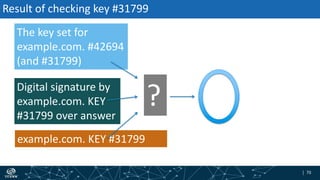
Result of checking key #31799
The key set for
example.com. #42694
(and #31799)
Digital signature by
example.com. KEY
#31799 over answer
example.com. KEY #31799
?
| 71| 71
How are we doing?
example.com. KEY #31799
example.com. KEY #42694
www.example.com. A 192.0.2.2
Signed by K31799
Signed by K42694
Self-signed signature
| 72| 72
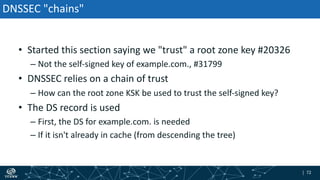
DNSSEC "chains"
• Started this section saying we "trust" a root zone key #20326
– Not the self-signed key of example.com., #31799
• DNSSEC relies on a chain of trust
– How can the root zone KSK be used to trust the self-signed key?
• The DS record is used
– First, the DS for example.com. is needed
– If it isn't already in cache (from descending the tree)
| 73| 73
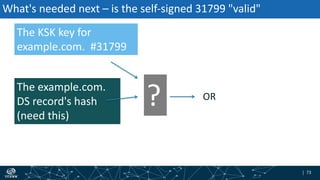
What's needed next – is the self-signed 31799 "valid"
The KSK key for
example.com. #31799
The example.com.
DS record's hash
(need this)
? OR
| 74| 74
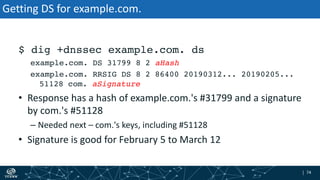
Getting DS for example.com.
$ dig +dnssec example.com. ds
example.com. DS 31799 8 2 aHash
example.com. RRSIG DS 8 2 86400 20190312... 20190205...
51128 com. aSignature
• Response has a hash of example.com.'s #31799 and a signature
by com.'s #51128
– Needed next – com.'s keys, including #51128
• Signature is good for February 5 to March 12
| 75| 75
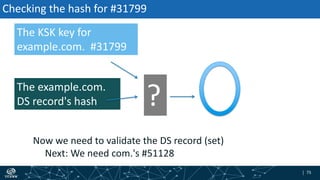
Checking the hash for #31799
Now we need to validate the DS record (set)
Next: We need com.'s #51128
The KSK key for
example.com. #31799
The example.com.
DS record's hash ?
| 76| 76
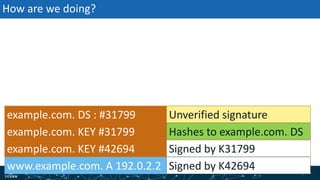
How are we doing?
example.com. KEY #31799
example.com. KEY #42694
www.example.com. A 192.0.2.2
example.com. DS : #31799
Signed by K31799
Signed by K42694
Hashes to example.com. DS
Unverified signature
| 77| 77
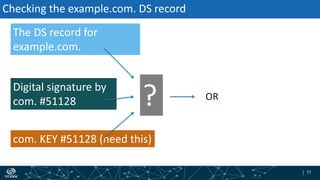
Checking the example.com. DS record
The DS record for
example.com.
Digital signature by
com. #51128
com. KEY #51128 (need this)
? OR
| 78| 78
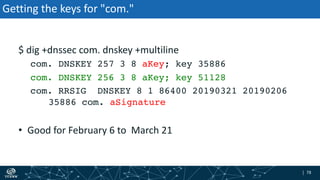
Getting the keys for "com."
$ dig +dnssec com. dnskey +multiline
com. DNSKEY 257 3 8 aKey; key 35886
com. DNSKEY 256 3 8 aKey; key 51128
com. RRSIG DNSKEY 8 1 86400 20190321 20190206
35886 com. aSignature
• Good for February 6 to March 21
| 79| 79
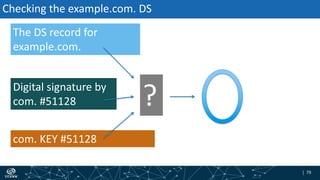
Checking the example.com. DS
The DS record for
example.com.
Digital signature by
com. #51128
com. KEY #51128
?
| 80| 80
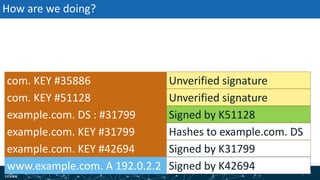
How are we doing?
com. KEY #35886
com. KEY #51128
example.com. DS : #31799
Signed by K31799
Signed by K42694
Signed by K51128
Hashes to example.com. DSexample.com. KEY #31799
example.com. KEY #42694
www.example.com. A 192.0.2.2
Unverified signature
| 81| 81
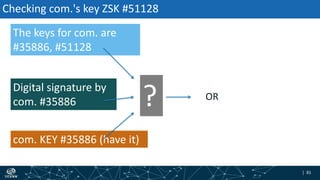
Checking com.'s key ZSK #51128
The keys for com. are
#35886, #51128
Digital signature by
com. #35886
com. KEY #35886 (have it)
? OR
| 82| 82
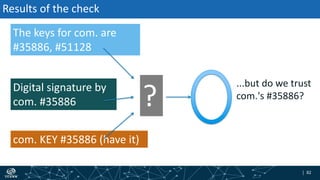
Results of the check
The keys for com. are
#35886, #51128
Digital signature by
com. #35886
com. KEY #35886 (have it)
?
...but do we trust
com.'s #35886?
| 83| 83
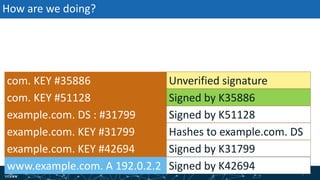
How are we doing?
com. KEY #35886
com. KEY #51128
example.com. DS : #31799
Signed by K31799
Signed by K42694
Signed by K51128
Hashes to example.com. DSexample.com. KEY #31799
example.com. KEY #42694
www.example.com. A 192.0.2.2
Unverified signature
Signed by K35886
| 84| 84
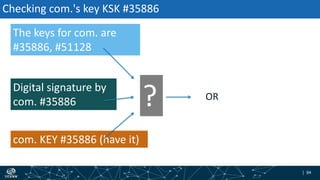
Checking com.'s key KSK #35886
The keys for com. are
#35886, #51128
Digital signature by
com. #35886
com. KEY #35886 (have it)
? OR
| 85| 85
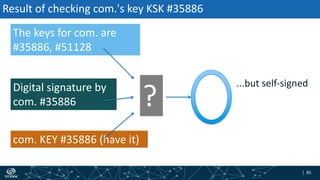
Result of checking com.'s key KSK #35886
The keys for com. are
#35886, #51128
Digital signature by
com. #35886
com. KEY #35886 (have it)
?
...but self-signed
| 86| 86
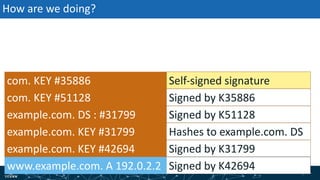
How are we doing?
com. KEY #35886
com. KEY #51128
example.com. DS : #31799
Signed by K31799
Signed by K42694
Signed by K51128
Hashes to example.com. DSexample.com. KEY #31799
example.com. KEY #42694
www.example.com. A 192.0.2.2
Self-signed signature
Signed by K35886
| 87| 87
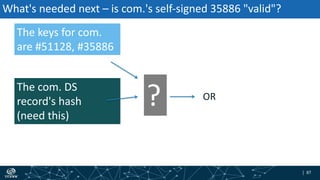
What's needed next – is com.'s self-signed 35886 "valid"?
The keys for com.
are #51128, #35886
The com. DS
record's hash
(need this)
? OR
| 88| 88
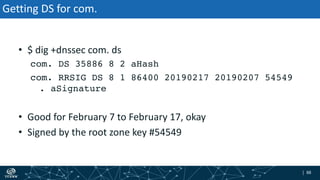
Getting DS for com.
• $ dig +dnssec com. ds
com. DS 35886 8 2 aHash
com. RRSIG DS 8 1 86400 20190217 20190207 54549
. aSignature
• Good for February 7 to February 17, okay
• Signed by the root zone key #54549
| 89| 89
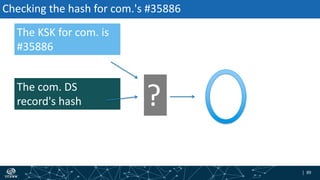
Checking the hash for com.'s #35886
The KSK for com. is
#35886
The com. DS
record's hash ?
| 90| 90
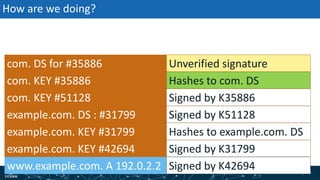
How are we doing?
com. KEY #35886
com. KEY #51128
example.com. KEY #31799
example.com. KEY #42694
www.example.com. A 192.0.2.2
com. DS for #35886
example.com. DS : #31799
Hashes to com. DS
Signed by K35886
Signed by K31799
Signed by K42694
Unverified signature
Signed by K51128
Hashes to example.com. DS
| 91| 91
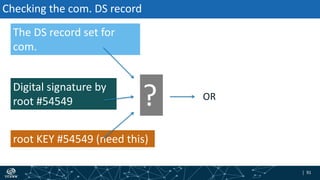
Checking the com. DS record
The DS record set for
com.
Digital signature by
root #54549
root KEY #54549 (need this)
? OR
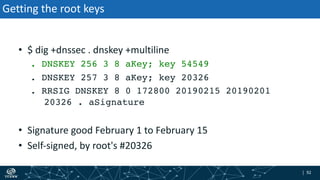
| 92| 92
Getting the root keys
• $ dig +dnssec . dnskey +multiline
. DNSKEY 256 3 8 aKey; key 54549
. DNSKEY 257 3 8 aKey; key 20326
. RRSIG DNSKEY 8 0 172800 20190215 20190201
20326 . aSignature
• Signature good February 1 to February 15
• Self-signed, by root's #20326
| 93| 93
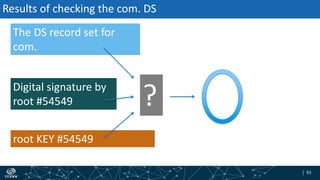
Results of checking the com. DS
The DS record set for
com.
Digital signature by
root #54549
root KEY #54549
?
| 94| 94
How are we doing?
root KEY #54549
com. KEY #35886
com. KEY #51128
example.com. KEY #31799
example.com. KEY #42694
root KEY #20326
www.example.com. A 192.0.2.2
com. DS for #35886
example.com. DS : #31799
Unverified signature
Hashes to com. DS
Signed by K35886
Signed by K31799
Signed by K42694
Signed by K54549
Signed by K51128
Hashes to example.com. DS
Unverified signature
| 95| 95
Checking root's KSK #54549?
The keys for . (root) are
#20326, #54549
Digital signature by
root #20326
root KEY #20326
? OR
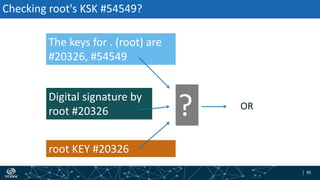
| 96| 96
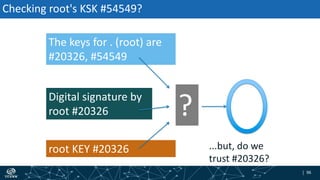
Checking root's KSK #54549?
The keys for . (root) are
#20326, #54549
Digital signature by
root #20326
root KEY #20326
?
...but, do we
trust #20326?
| 97| 97
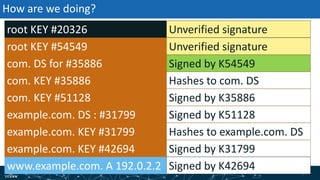
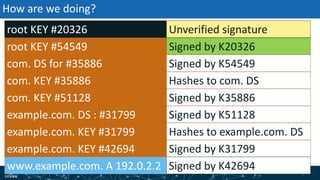
How are we doing?
root KEY #54549
com. KEY #35886
com. KEY #51128
example.com. KEY #31799
example.com. KEY #42694
root KEY #20326
www.example.com. A 192.0.2.2
com. DS for #35886
example.com. DS : #31799
Signed by K20326
Hashes to com. DS
Signed by K35886
Signed by K31799
Signed by K42694
Signed by K54549
Signed by K51128
Hashes to example.com. DS
Unverified signature
| 98| 98
But wait!
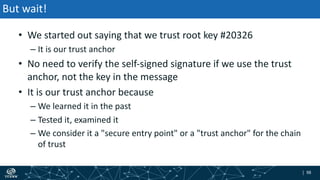
• We started out saying that we trust root key #20326
– It is our trust anchor
• No need to verify the self-signed signature if we use the trust
anchor, not the key in the message
• It is our trust anchor because
– We learned it in the past
– Tested it, examined it
– We consider it a "secure entry point" or a "trust anchor" for the chain
of trust
| 99| 99
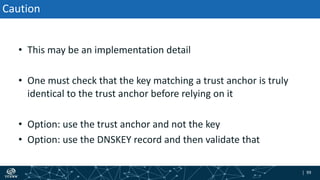
• This may be an implementation detail
• One must check that the key matching a trust anchor is truly
identical to the trust anchor before relying on it
• Option: use the trust anchor and not the key
• Option: use the DNSKEY record and then validate that
Caution
| 100| 100
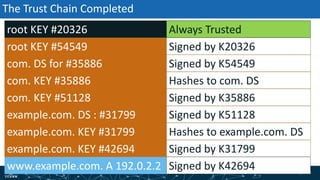
The Trust Chain Completed
root KEY #54549
com. KEY #35886
com. KEY #51128
example.com. KEY #31799
example.com. KEY #42694
root KEY #20326
www.example.com. A 192.0.2.2
com. DS for #35886
example.com. DS : #31799
Signed by K20326
Hashes to com. DS
Signed by K35886
Signed by K31799
Always Trusted
Signed by K42694
Signed by K54549
Signed by K51128
Hashes to example.com. DS
| 101| 101
Complicated?
• Yes
• Good thing we have computers
• And caching (remembering) of records
• And this was a simple case
| 102| 102
"no" answers
• What if we mistyped "wwww.example.com?"
• DNSSEC has two ways to say "no"
– "Original" NSEC
– NSEC3
| 103| 103
• NSEC's approach to "no" is:
– Sort all records in order
– Show the record before and after the query
– The response "implies" the data is not there
– E.g. "wwww.example.com" does not exist
– But www.example.com and wwwz.example.com do
NSEC
| 104| 104
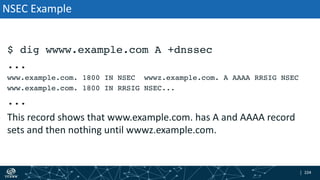
$ dig wwww.example.com A +dnssec
...
www.example.com. 1800 IN NSEC wwwz.example.com. A AAAA RRSIG NSEC
www.example.com. 1800 IN RRSIG NSEC...
...
This record shows that www.example.com. has A and AAAA record
sets and then nothing until wwwz.example.com.
NSEC Example
| 105| 105
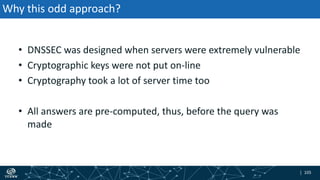
• DNSSEC was designed when servers were extremely vulnerable
• Cryptographic keys were not put on-line
• Cryptography took a lot of server time too
• All answers are pre-computed, thus, before the query was
made
Why this odd approach?
| 106| 106
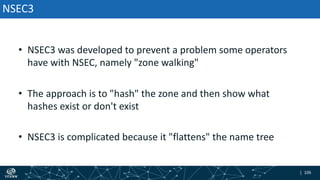
• NSEC3 was developed to prevent a problem some operators
have with NSEC, namely "zone walking"
• The approach is to "hash" the zone and then show what
hashes exist or don't exist
• NSEC3 is complicated because it "flattens" the name tree
NSEC3
| 107| 107
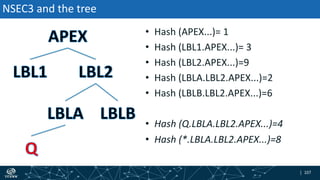
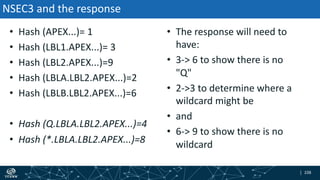
• Hash (APEX...)= 1
• Hash (LBL1.APEX...)= 3
• Hash (LBL2.APEX...)=9
• Hash (LBLA.LBL2.APEX...)=2
• Hash (LBLB.LBL2.APEX...)=6
• Hash (Q.LBLA.LBL2.APEX...)=4
• Hash (*.LBLA.LBL2.APEX...)=8
NSEC3 and the tree
| 108| 108
• Hash (APEX...)= 1
• Hash (LBL1.APEX...)= 3
• Hash (LBL2.APEX...)=9
• Hash (LBLA.LBL2.APEX...)=2
• Hash (LBLB.LBL2.APEX...)=6
• Hash (Q.LBLA.LBL2.APEX...)=4
• Hash (*.LBLA.LBL2.APEX...)=8
NSEC3 and the response
• The response will need to
have:
• 3-> 6 to show there is no
"Q"
• 2->3 to determine where a
wildcard might be
• and
• 6-> 9 to show there is no
wildcard
| 109| 109
Is that clear?
• The answer is meant to be obscure
– NSEC3 is trying to hide as much as possible
• Few DNSSEC experts can get this right
| 110| 110
What does it take to do Validation?
• Configure a recursive name server to do DNSSEC
– Configure, build, install with cryptographic support
• Proper trust anchor management
• Time-of-day (wall clock) accuracy
• A look at these in reverse order...
| 111| 111
Time (of Day)
• Since validation checks dates and times on signatures, keep the
host clock "right"
• This used to be a big issue but now everyone has Network
Time Protocol running
– Still, check the server does have it running
• But, it's a first step
| 112| 112
Managing Trust Anchors
• A main ingredient in DNSSEC validation is having a starting
point, a trust anchor
– A key that is verified via other means to be "honest-to-goodness the
right key"
– Trust anchors can belong to any name in the DNS tree
| 113| 113
Trusting Trust Anchors
• It is up to you, the operator, to determine trust
– You can rely on simply downloading code
– You can retrieve and verify the keys from various sources and
compare
– You can use automated management tools
– You can perform steps manually
• There is no one single, right answer
| 114| 114
Manual versus Automatic
• Manual
– You find, analyze, trust, "hard" configure
– Implementation dependent
– Time consuming, needs to be updated – or else!
• Automatic
– Automated Updates of DNSSEC Trust Anchors (RFC 5011), IETF Full
Standard
– Learns updates to existing trust anchors
| 115| 115
The case for the Root Zone KSK
• The public Internet DNS has a root zone
• The root zone used on the Internet is signed with DNSSEC, has
a KSK and a ZSK
• The root zone implements Automated Updates (RFC 5011) for
those who want to use it
| 116| 116
Where to get Root Zone keys
• In the DNS
– Caution: relying solely on what you see in the DNS is risky
– If the DNS is attacked, you could trust the wrong key
• Via the web
– http://www.iana.org/dnssec/files
• Other sources
– Embedded in software distributions
| 117| 117
Why would you need more?
• In an ideal, complete world, there's no need to have more than
just the root trust anchor
• But that is not this world
– Not all TLDs are signed
– Not all operators are trusted
| 118| 118
Negative Trust Anchors
• Sometimes someone else makes a DNSSEC mistake
– All responses from their zone file
– Negative Trust Anchors are used to stop validation from reporting
failures
– Good and bad – stops complaints, but need to be removed once
problems are corrected
• Definition and Use of DNSSEC Negative Trust Anchors (RFC
7646)
| 119| 119
The Case of "nasa.gov"
• Comcast, a US cable TV provider/ISP turned on DNSSEC
• nasa.gov added DNSSEC
• On the day of a US Congressional hearing related to Comast,
nasa.gov went "dark"
• Outraged customers thought Comcast was making a political
statement
• In truth it was a DNSSEC error made by NASA
| 120| 120
Things Learned That Day
• Twitter is faster than ISP monitoring systems when it comes to
reporting a failure
• Validation sometimes has a reason to ignore DNSSEC results
– Which led to Negative Trust Anchors
| 121| 121
How to Set Up Validation
• Software known to do validation
– BIND
– Unbound
– Windows
– Nominum Vantio (now part of Akamai)
– Knot Resolver
– DNSMASQ
– Secure64 DNS Cache
– PowerDNS Recursor
| 122| 122
ISC's BIND
• http://isc.org/
• BIND
– Authoritative server and cache all-in-one
– Current version 9.11.5 and 9.12.3
– https://www.isc.org/downloads/bind/
• Longest track record in DNSSEC
| 123| 123
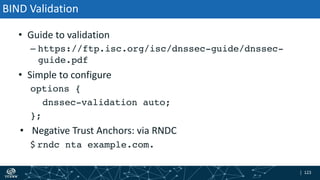
BIND Validation
• Guide to validation
– https://ftp.isc.org/isc/dnssec-guide/dnssec-
guide.pdf
• Simple to configure
options {
dnssec-validation auto;
};
• Negative Trust Anchors: via RNDC
$ rndc nta example.com.
| 124| 124
NLnetLab's unbound
• Has it's own website
– http://www.unbound.net/
• unbound is a caching-only name server with DNSSEC built in
– "unbound" is a play on the word "bind"
• Tools for trust anchor management
– unbound-anchor
| 125| 125
Enabling Validation
• Before starting the server
– run unbound-anchor
– Will retrieve and verify the root zone keys, comparing to embedded
keys and certificates
• Add the following options to the configuration file
– auto-trust-anchor-file: <filename>
– filename is determined by unbound-anchor
| 126| 126
Negative Trust Anchors
• Configuration file option
– domain-insecure: <zone>
• Run-time commanding via unbound-control
– unbound-control insecure_add <zone>
– unbound-control insecure_remove <zone>
– (Upon restart these are forgotten)
| 127| 127
• PowerDNS
– https://doc.powerdns.com/md/recursor/dnssec/
• Knot Resolver
– https://knot-
resolver.readthedocs.io/en/stable/daemon.html#enabling-dnssec
Other Open Source DNS
| 128| 128
Microsoft's Windows Server 2012 R2
• Caution: my info on Microsoft may be out of date
• DNSSEC is enabled by default but Trust Anchors need to be
configured
• DNSSEC Tutorial
– https://technet.microsoft.com/library/hh831411
• Another resource
– http://strotmann.de/roller/dnsworkshop/entry/dnssec_validation_in_micr
osoft_dns
| 129| 129
Management Interfaces
• Microsoft offers different administrative interfaces
– UI (dnsmgmt.mmc)
– Powershell (recommended)
– DnsCmd
• All have feature parity, same default settings
| 130| 130
Enabling Validation
• Enabling DNSSEC Validation
– Default settings
$a = Get-DNSServerSetting -all
$a.EnableDnsSec
• Need to load trust anchors
– Add-DnsServerTrustAnchor –Root
– Other trust anchors can be added
• https://technet.microsoft.com/en-
us/library/jj649932.aspx
| 131| 131
Managing Trust Anchors
• On standalone DNS servers
– stored in a file named TrustAnchors.dns
• Windows Server 2012 or Windows Server 2012 R2
– DNS Manager console tree, Trust Points container
• Viewing trust anchors
– Windows PowerShell or Dnscmd.exe
| 132| 132
Questions?
• DNSSEC Validation is one step to protecting your interests
– Goal is to protect against in-DNS attacks
– The "business case" for it is much like that for automobile seat belts
(i.e., hard to make)
• Other layers of defense are needed
| 133| 133
Reach me at:
Email: edward.lewis@icann.org
Website: icann.org
ThankYou and Questions
gplus.to/icann
weibo.com/ICANNorg
flickr.com/photos/icann
slideshare.net/icannpresentations
twitter.com/icann
facebook.com/icannorg
linkedin.com/company/icann
youtube.com/user/icannnews
Engage with ICANN

DNSSEC Validation Tutorial

  • 1.
    | 1 Edward Lewis APRICOT2019 25 February 2019 DNSSEC Validation Tutorial How it is done
  • 2.
    | 2| 2 Agenda •Why does DNSSEC exist? • What are digital signatures? • How validation happens in theory • A look at an example • How negative answers are validated? • What does it take to run a validating server? • Some common configuration examples
  • 3.
    | 3| 3 Whydo we have DNS? • The Domain Name System – Global lightweight database – Holds information about named things – Used to find network addresses for servers • Works well because – Scale: many independent managers
  • 4.
    | 4| 4 Whatis the IPv4 address for www.example.com.? The address for www.example.com. is W.X.Y.Z DNS Looks Simple
  • 5.
  • 6.
    | 6| 6 Findinga DNS answer Root Server EXAMPLE.COM Server Application Recursive Server COM. server www.example.com./A
  • 7.
    | 7| 7 Askingthe root Recursive Server www.example.com./A Don't know, ask COM. Root Server EXAMPLE.COM Server COM. server
  • 8.
    | 8| 8 Askingthe top-level domain Recursive Server www.example.com./A go ask EXAMPLE.COM Root Server EXAMPLE.COM Server COM. server
  • 9.
    | 9| 9 Askingthe organization Recursive Server www.example.com./A the answer Root Server EXAMPLE.COM Server COM. server
  • 10.
    | 10| 10 Returningthe answer Application Recursive Server www.example.com./A the answer Root Server EXAMPLE.COM Server COM. server
  • 11.
    | 11| 11 Information Source Information Source Information Source Information Source IntermediaryIntermediaryIntermediary Whyis there DNSSEC? Relying Client Intermediary Information Source • Seeks Information • Easily Fooled
  • 12.
    | 12| 12 DNSSEC •Approach: Use of digital signatures • Scaling – The DNS is a "tree", each part of the tree digitally signs the next (somehow)
  • 13.
    | 13| 13 Whatis the IPv4 address for www.example.com,? The address for www.example.com. is W.X.Y.Z DNS looks simple
  • 14.
    | 14| 14 Digitalsignature by example.com. DNSSEC's change What is the IPv4 address for www.example.com.? The address for www.example.com. is W.X.Y.Z
  • 15.
    | 15| 15 DigitalSignature? • Think of your handwritten signature but in terms of computing – Not a picture of your signature – But the "idea" of why a signature is important
  • 16.
    | 16| 16 DigitalSignatures in Theory Key Pair
  • 17.
    | 17| 17 DigitalSignatures in Theory Private Key Key Pair Public Key A pair of keys have a unique bond. If you can "verify" something with one, they other "signed" it. If the public key of someone verifies it, that person's private key must have signed it.
  • 18.
    | 18| 18 Internet DigitalSignatures in Theory Data Digital SigPrivate Key Signing data...
  • 19.
    | 19| 19 Internet DigitalSignatures in Theory Data Digital Sig Data Digital Sig Sending the data...
  • 20.
    | 20| 20 Internet DigitalSignatures in Theory Data Digital SigPublic Key OR Verifying the data...
  • 21.
    | 21| 21 DigitalSignatures in Theory Data Private Key Key Pair Data Digital SigPublic Key Successful verification means that the data arrived "as planned" Digital Sig
  • 22.
    | 22| 22 CouldAnything Go Wrong? • Yes – The holder of the private key might "leak" it – Someone might "abuse" the key or cryptography • With care and attention, like guarding your house keys, you can rely on the checks
  • 23.
    | 23| 23 Internet What'sMissing? • How does the public key travel? – Safely? – Reliably? • BTW, what is "safe" and "reliable?" What do those words mean? Private Key Key Pair Public Key
  • 24.
    | 24| 24 DNS'sData Organization • The DNS is a federation of owners (registrants) of information – Each owner signs their own data with their own key – That's a lot of keys • Hierarchy to the rescue! The Root TLD SLD data
  • 25.
    | 25| 25 DNSSECChain of Keys In Theory The Root TLD SLD data sld KEYs tld KEYs root KEYs data records
  • 26.
    | 26| 26 MakingA Chain • The root zone signs TLD keys • A TLD (administrator) signs registrant keys • A DNS zone administrator (registrant) signs their own data This creates a "chain" used in validation
  • 27.
    | 27| 27 VerificationIn Theory • Verification works backwards, or "up" the hierarchy • Start with the data sought – in this case the address... Address Data SLD Digital Sig SLD Public Key
  • 28.
    | 28| 28 VerificationIn Theory • Now we need to inspect the key used... Address Data SLD Digital Sig SLD Public Key SLD Public Key as Data TLD Digital Sig TLD Public Key
  • 29.
    | 29| 29 VerificationIn Theory Address Data SLD Digital Sig SLD Public Key SLD Public Key TLD Digital Sig TLD Public Key TLD Public Key as Data Root Digital Sig Root Public Key
  • 30.
    | 30| 30 VerificationIn Theory Address Data SLD Digital Sig SLD Public Key SLD Public Key TLD Digital Sig TLD Public Key TLD Public Key Root Digital Sig Root Public Key
  • 31.
    | 31| 31 VerificationIn Theory Address Data SLD Digital Sig SLD Public Key SLD Public Key TLD Digital Sig TLD Public Key TLD Public Key Root Digital Sig Root Public Key ?
  • 32.
    | 32| 32 TrustAnchors • Within DNSSEC, the "top" key used in a chain • Trust anchor hygiene is important
  • 33.
    | 33| 33 Roles(Jobs) of Keys • A key that is a "ZSK" will sign information – Zone Signing Key – Changed frequently and easily • A key that is a "KSK" will sign the keys – Key Signing Key – Changed rarely and carefully • The "DS" record – Delegation Signer
  • 34.
    | 34| 34 TheRoot TLD SLD data example.com. KEY ZSK example.com. KEY KSK example.com. DS com. KEY ZSK com. KEY KSK com. DS root KEY ZSK root KEY KSK www.example.com. DATA Signing Chain in Practice
  • 35.
    | 35| 35 VerificationChain In Practice The Root TLD SLD data example.com. KEY ZSK example.com. KEY KSK example.com. DS com. KEY ZSK com. KEY KSK com. DS root KEY ZSK root KEY KSK www.example.com. DATA
  • 36.
    | 36| 36 ThisChain • In following slides, these nine boxes will appear over and over • For the examples used, these are the data used to build the trust chain example.com. KEY ZSK example.com. KEY KSK example.com. DS com. KEY ZSK com. KEY KSK com. DS root KEY ZSK root KEY KSK www.example.com. DATA
  • 37.
    | 37| 37 Findingan answer DNSSEC-style Application Recursive Server www.example.com./A Root Server EXAMPLE.COM Server COM. server
  • 38.
    | 38| 38 Askingthe root Recursive Server Don't know, ask COM. and here's COM.'s "DS" The DS record is how the upper layer indicates how the next layer down is secure, what key is used www.example.com./A Root Server EXAMPLE.COM Server COM. server
  • 39.
    | 39| 39 Askingthe root Recursive Server Don't know, ask COM. and here's COM.'s "DS" The DS record is how the upper layer indicates how the next layer down is secure, what key is used www.example.com./A Root Server EXAMPLE.COM Server COM. server com. DS
  • 40.
    | 40| 40 Askingthe top-level domain Recursive Server go ask EXAMPLE.COM. and here's EXAMPLE.COM.'s DS www.example.com./A Root Server EXAMPLE.COM Server COM. server
  • 41.
    | 41| 41 Recursive Server goask EXAMPLE.COM. and here's EXAMPLE.COM.'s DS www.example.com./A Root Server EXAMPLE.COM Server COM. server Asking the top-level domain example.com. DS com. DS
  • 42.
    | 42| 42 Askingthe organization Recursive Server the answer and a signature www.example.com./A Root Server EXAMPLE.COM Server COM. server
  • 43.
    | 43| 43 Recursive Server theanswer and a signature www.example.com./A Root Server EXAMPLE.COM Server COM. server Asking the organization example.com. DS com. DS www.example.com. DATA
  • 44.
    | 44| 44 StillNeed More Information • The keys are not normally sent with an answer because the set is large and the keys may have been cached already • The validator will "walk" up the tree to get needed records
  • 45.
    | 45| 45 Gettingthe keys Recursive Server example.com./DNSKEY the keys and a signature Root Server EXAMPLE.COM Server COM. server
  • 46.
    | 46| 46 Gettingthe keys Recursive Server example.com./DNSKEY the keys and a signature Root Server EXAMPLE.COM Server COM. server example.com. KEY ZSK example.com. KEY KSK example.com. DS com. DS www.example.com. DATA
  • 47.
    | 47| 47 Askingthe top-level domain Recursive Server com./DNSKEY the keys and a signature Root Server EXAMPLE.COM Server COM. server
  • 48.
    | 48| 48 Askingthe top-level domain Recursive Server com./DNSKEY the keys and a signature Root Server EXAMPLE.COM Server COM. server example.com. KEY ZSK example.com. KEY KSK example.com. DS com. KEY ZSK com. KEY KSK com. DS www.example.com. DATA
  • 49.
    | 49| 49 Askingthe root Recursive Server "root's"/DNSKEY the keys and a signature Root Server EXAMPLE.COM Server COM. server
  • 50.
    | 50| 50 Askingthe root Recursive Server "root's"/DNSKEY the keys and a signature Root Server EXAMPLE.COM Server COM. server example.com. KEY ZSK example.com. KEY KSK example.com. DS com. KEY ZSK com. KEY KSK com. DS root KEY ZSK root KEY KSK www.example.com. DATA
  • 51.
    | 51| 51 Theroot key signature • As we climb back up, looking for keys – validating the keys with what's one level up • Eventually get to the very top of the DNS hierarchy – now what? – magically, we trust the root key – seriously, we have to already put faith in the root's key
  • 52.
    | 52| 52 Validation •Having collected all of the needed records, all the signatures can be validated • If all the checks succeed, then the answer is valid and returned to the application that asked
  • 53.
    | 53| 53 Lookingat a validation in DNS record syntax • Using a query for www.example.com.'s IPv4 address – On February 8th, 2019 at about 1200 UTC – Using a Root Zone KSK #20326 as my trust anchor
  • 54.
    | 54| 54 Ordinarily... •In coming slides, I'll retrieve the DS record at times • A DNS cache would have gotten them while finding the final answer and cache them • In debugging, you won't rely on that, you'll probably query as the slides show...
  • 55.
    | 55| 55 Thesame "9" with what links them root KEY #54549 com. KEY #35886 com. KEY #51128 example.com. KEY #31799 example.com. KEY #42694 root KEY #20326 www.example.com. A 192.0.2.2 com. DS for #35886 example.com. DS : #31799 Signed by K20326 Hashes to com. DS Signed by K35886 Signed by K31799 Always Trusted Signed by K42694 Signed by K54549 Signed by K51128 Hashes to example.com. DS
  • 56.
    | 56| 56 Startwith the "final" response $ dig +dnssec www.example.com. a www.example.com. A 192.0.2.2 www.example.com. RRSIG A 8 3 3600 20190228002508 20190201120009 42694 example.com. aSignature • The answer plus a digital signature – aSignature is a random-looking sequence
  • 57.
    | 57| 57 Closelook at the signature record • www.example.com. RRSIG A 8 3 3600 20190228002508 20190201120009 42694 example.com. aSignature Signature Record (Type "Covered") Start time End time The key used • This signature is good for February 1 to 28, so on February 8, "ok" • The signature line ought to appear on one single line
  • 58.
    | 58| 58 Howare we doing? www.example.com. A 192.0.2.2 Unverified Signature
  • 59.
    | 59| 59 What'sneeded next – the key set The IPv4 address for www.example.com. is 192.0.2.2 Digital signature by example.com. key #42694 over answer example.com. KEY #42694 (need this) ? OR
  • 60.
    | 60| 60 Getthe example.com. keys $ dig +dnssec example.com. dnskey example.com. DNSKEY 256 aKey; key 42694 example.com. DNSKEY 257 aKey; key 31799 example.com. RRSIG DNSKEY ... 20190401- 20190203... 31799 example.com. aSignature • Dates: February 3 to April 1 - okay
  • 61.
    | 61| 61 Whyare there two keys? • The answer is a key set – more than one key – At times we tend to forget that all DNS answers are sets and not single records • One key is a Key Signing Key (KSK) – "257" appears • One key is a Zone Signing Key (ZSK) – "256" appears – Key #42694 signs the address record, the KSK signs the two keys • There may be multiple KSK and multiple ZSK in the set
  • 62.
    | 62| 62 Howare we doing? example.com. KEY #31799 example.com. KEY #42694 www.example.com. A 192.0.2.2 Unverified signature Unverified signature Unverified signature
  • 63.
    | 63| 63 Checkingthe data The IPv4 address for www.example.com. is 192.0.2.2 Digital signature by example.com. key #42694 over answer example.com. KEY #42694 ? ...but do we trust example.com.'s key #42694?
  • 64.
    | 64| 64 Howare we doing? example.com. KEY #31799 example.com. KEY #42694 www.example.com. A 192.0.2.2 Signed by K42694 Unverified signature Unverified signature
  • 65.
    | 65| 65 What'sneeded next – trusting example.com.'s ZSK (42694) The key set for example.com. #42694 (and #31799) Digital signature by example.com. KEY #31799 over answer example.com. KEY #31799 (have this) ? OR
  • 66.
    | 66| 66 Lookfor example.com.'s key #31799 • In the same message example.com. DNSKEY 256 aKey; key 42694 example.com. DNSKEY 257 aKey; key 31799 example.com. RRSIG DNSKEY ... 20190401- 201902031... 31799 example.com. aSignature • Set is "self-signed" (can I trust it?)
  • 67.
    | 67| 67 Checkof example.com. ZSK #42694 The key set for example.com. are #42694, #31799 Digital signature by example.com. #31799 example.com. KEY #31799 ? ...but, do we trust #31799?
  • 68.
    | 68| 68 Howare we doing? example.com. KEY #31799 example.com. KEY #42694 www.example.com. A 192.0.2.2 Signed by K31799 Signed by K42694 Unverified signature
  • 69.
    | 69| 69 What'sneeded next – trusting example.com.'s KSK (31799) The key set for example.com. #42694 (and #31799) Digital signature by example.com. KEY #31799 over answer example.com. KEY #31799 (have this) ? OR
  • 70.
    | 70| 70 Resultof checking key #31799 The key set for example.com. #42694 (and #31799) Digital signature by example.com. KEY #31799 over answer example.com. KEY #31799 ?
  • 71.
    | 71| 71 Howare we doing? example.com. KEY #31799 example.com. KEY #42694 www.example.com. A 192.0.2.2 Signed by K31799 Signed by K42694 Self-signed signature
  • 72.
    | 72| 72 DNSSEC"chains" • Started this section saying we "trust" a root zone key #20326 – Not the self-signed key of example.com., #31799 • DNSSEC relies on a chain of trust – How can the root zone KSK be used to trust the self-signed key? • The DS record is used – First, the DS for example.com. is needed – If it isn't already in cache (from descending the tree)
  • 73.
    | 73| 73 What'sneeded next – is the self-signed 31799 "valid" The KSK key for example.com. #31799 The example.com. DS record's hash (need this) ? OR
  • 74.
    | 74| 74 GettingDS for example.com. $ dig +dnssec example.com. ds example.com. DS 31799 8 2 aHash example.com. RRSIG DS 8 2 86400 20190312... 20190205... 51128 com. aSignature • Response has a hash of example.com.'s #31799 and a signature by com.'s #51128 – Needed next – com.'s keys, including #51128 • Signature is good for February 5 to March 12
  • 75.
    | 75| 75 Checkingthe hash for #31799 Now we need to validate the DS record (set) Next: We need com.'s #51128 The KSK key for example.com. #31799 The example.com. DS record's hash ?
  • 76.
    | 76| 76 Howare we doing? example.com. KEY #31799 example.com. KEY #42694 www.example.com. A 192.0.2.2 example.com. DS : #31799 Signed by K31799 Signed by K42694 Hashes to example.com. DS Unverified signature
  • 77.
    | 77| 77 Checkingthe example.com. DS record The DS record for example.com. Digital signature by com. #51128 com. KEY #51128 (need this) ? OR
  • 78.
    | 78| 78 Gettingthe keys for "com." $ dig +dnssec com. dnskey +multiline com. DNSKEY 257 3 8 aKey; key 35886 com. DNSKEY 256 3 8 aKey; key 51128 com. RRSIG DNSKEY 8 1 86400 20190321 20190206 35886 com. aSignature • Good for February 6 to March 21
  • 79.
    | 79| 79 Checkingthe example.com. DS The DS record for example.com. Digital signature by com. #51128 com. KEY #51128 ?
  • 80.
    | 80| 80 Howare we doing? com. KEY #35886 com. KEY #51128 example.com. DS : #31799 Signed by K31799 Signed by K42694 Signed by K51128 Hashes to example.com. DSexample.com. KEY #31799 example.com. KEY #42694 www.example.com. A 192.0.2.2 Unverified signature Unverified signature
  • 81.
    | 81| 81 Checkingcom.'s key ZSK #51128 The keys for com. are #35886, #51128 Digital signature by com. #35886 com. KEY #35886 (have it) ? OR
  • 82.
    | 82| 82 Resultsof the check The keys for com. are #35886, #51128 Digital signature by com. #35886 com. KEY #35886 (have it) ? ...but do we trust com.'s #35886?
  • 83.
    | 83| 83 Howare we doing? com. KEY #35886 com. KEY #51128 example.com. DS : #31799 Signed by K31799 Signed by K42694 Signed by K51128 Hashes to example.com. DSexample.com. KEY #31799 example.com. KEY #42694 www.example.com. A 192.0.2.2 Unverified signature Signed by K35886
  • 84.
    | 84| 84 Checkingcom.'s key KSK #35886 The keys for com. are #35886, #51128 Digital signature by com. #35886 com. KEY #35886 (have it) ? OR
  • 85.
    | 85| 85 Resultof checking com.'s key KSK #35886 The keys for com. are #35886, #51128 Digital signature by com. #35886 com. KEY #35886 (have it) ? ...but self-signed
  • 86.
    | 86| 86 Howare we doing? com. KEY #35886 com. KEY #51128 example.com. DS : #31799 Signed by K31799 Signed by K42694 Signed by K51128 Hashes to example.com. DSexample.com. KEY #31799 example.com. KEY #42694 www.example.com. A 192.0.2.2 Self-signed signature Signed by K35886
  • 87.
    | 87| 87 What'sneeded next – is com.'s self-signed 35886 "valid"? The keys for com. are #51128, #35886 The com. DS record's hash (need this) ? OR
  • 88.
    | 88| 88 GettingDS for com. • $ dig +dnssec com. ds com. DS 35886 8 2 aHash com. RRSIG DS 8 1 86400 20190217 20190207 54549 . aSignature • Good for February 7 to February 17, okay • Signed by the root zone key #54549
  • 89.
    | 89| 89 Checkingthe hash for com.'s #35886 The KSK for com. is #35886 The com. DS record's hash ?
  • 90.
    | 90| 90 Howare we doing? com. KEY #35886 com. KEY #51128 example.com. KEY #31799 example.com. KEY #42694 www.example.com. A 192.0.2.2 com. DS for #35886 example.com. DS : #31799 Hashes to com. DS Signed by K35886 Signed by K31799 Signed by K42694 Unverified signature Signed by K51128 Hashes to example.com. DS
  • 91.
    | 91| 91 Checkingthe com. DS record The DS record set for com. Digital signature by root #54549 root KEY #54549 (need this) ? OR
  • 92.
    | 92| 92 Gettingthe root keys • $ dig +dnssec . dnskey +multiline . DNSKEY 256 3 8 aKey; key 54549 . DNSKEY 257 3 8 aKey; key 20326 . RRSIG DNSKEY 8 0 172800 20190215 20190201 20326 . aSignature • Signature good February 1 to February 15 • Self-signed, by root's #20326
  • 93.
    | 93| 93 Resultsof checking the com. DS The DS record set for com. Digital signature by root #54549 root KEY #54549 ?
  • 94.
    | 94| 94 Howare we doing? root KEY #54549 com. KEY #35886 com. KEY #51128 example.com. KEY #31799 example.com. KEY #42694 root KEY #20326 www.example.com. A 192.0.2.2 com. DS for #35886 example.com. DS : #31799 Unverified signature Hashes to com. DS Signed by K35886 Signed by K31799 Signed by K42694 Signed by K54549 Signed by K51128 Hashes to example.com. DS Unverified signature
  • 95.
    | 95| 95 Checkingroot's KSK #54549? The keys for . (root) are #20326, #54549 Digital signature by root #20326 root KEY #20326 ? OR
  • 96.
    | 96| 96 Checkingroot's KSK #54549? The keys for . (root) are #20326, #54549 Digital signature by root #20326 root KEY #20326 ? ...but, do we trust #20326?
  • 97.
    | 97| 97 Howare we doing? root KEY #54549 com. KEY #35886 com. KEY #51128 example.com. KEY #31799 example.com. KEY #42694 root KEY #20326 www.example.com. A 192.0.2.2 com. DS for #35886 example.com. DS : #31799 Signed by K20326 Hashes to com. DS Signed by K35886 Signed by K31799 Signed by K42694 Signed by K54549 Signed by K51128 Hashes to example.com. DS Unverified signature
  • 98.
    | 98| 98 Butwait! • We started out saying that we trust root key #20326 – It is our trust anchor • No need to verify the self-signed signature if we use the trust anchor, not the key in the message • It is our trust anchor because – We learned it in the past – Tested it, examined it – We consider it a "secure entry point" or a "trust anchor" for the chain of trust
  • 99.
    | 99| 99 •This may be an implementation detail • One must check that the key matching a trust anchor is truly identical to the trust anchor before relying on it • Option: use the trust anchor and not the key • Option: use the DNSKEY record and then validate that Caution
  • 100.
    | 100| 100 TheTrust Chain Completed root KEY #54549 com. KEY #35886 com. KEY #51128 example.com. KEY #31799 example.com. KEY #42694 root KEY #20326 www.example.com. A 192.0.2.2 com. DS for #35886 example.com. DS : #31799 Signed by K20326 Hashes to com. DS Signed by K35886 Signed by K31799 Always Trusted Signed by K42694 Signed by K54549 Signed by K51128 Hashes to example.com. DS
  • 101.
    | 101| 101 Complicated? •Yes • Good thing we have computers • And caching (remembering) of records • And this was a simple case
  • 102.
    | 102| 102 "no"answers • What if we mistyped "wwww.example.com?" • DNSSEC has two ways to say "no" – "Original" NSEC – NSEC3
  • 103.
    | 103| 103 •NSEC's approach to "no" is: – Sort all records in order – Show the record before and after the query – The response "implies" the data is not there – E.g. "wwww.example.com" does not exist – But www.example.com and wwwz.example.com do NSEC
  • 104.
    | 104| 104 $dig wwww.example.com A +dnssec ... www.example.com. 1800 IN NSEC wwwz.example.com. A AAAA RRSIG NSEC www.example.com. 1800 IN RRSIG NSEC... ... This record shows that www.example.com. has A and AAAA record sets and then nothing until wwwz.example.com. NSEC Example
  • 105.
    | 105| 105 •DNSSEC was designed when servers were extremely vulnerable • Cryptographic keys were not put on-line • Cryptography took a lot of server time too • All answers are pre-computed, thus, before the query was made Why this odd approach?
  • 106.
    | 106| 106 •NSEC3 was developed to prevent a problem some operators have with NSEC, namely "zone walking" • The approach is to "hash" the zone and then show what hashes exist or don't exist • NSEC3 is complicated because it "flattens" the name tree NSEC3
  • 107.
    | 107| 107 •Hash (APEX...)= 1 • Hash (LBL1.APEX...)= 3 • Hash (LBL2.APEX...)=9 • Hash (LBLA.LBL2.APEX...)=2 • Hash (LBLB.LBL2.APEX...)=6 • Hash (Q.LBLA.LBL2.APEX...)=4 • Hash (*.LBLA.LBL2.APEX...)=8 NSEC3 and the tree
  • 108.
    | 108| 108 •Hash (APEX...)= 1 • Hash (LBL1.APEX...)= 3 • Hash (LBL2.APEX...)=9 • Hash (LBLA.LBL2.APEX...)=2 • Hash (LBLB.LBL2.APEX...)=6 • Hash (Q.LBLA.LBL2.APEX...)=4 • Hash (*.LBLA.LBL2.APEX...)=8 NSEC3 and the response • The response will need to have: • 3-> 6 to show there is no "Q" • 2->3 to determine where a wildcard might be • and • 6-> 9 to show there is no wildcard
  • 109.
    | 109| 109 Isthat clear? • The answer is meant to be obscure – NSEC3 is trying to hide as much as possible • Few DNSSEC experts can get this right
  • 110.
    | 110| 110 Whatdoes it take to do Validation? • Configure a recursive name server to do DNSSEC – Configure, build, install with cryptographic support • Proper trust anchor management • Time-of-day (wall clock) accuracy • A look at these in reverse order...
  • 111.
    | 111| 111 Time(of Day) • Since validation checks dates and times on signatures, keep the host clock "right" • This used to be a big issue but now everyone has Network Time Protocol running – Still, check the server does have it running • But, it's a first step
  • 112.
    | 112| 112 ManagingTrust Anchors • A main ingredient in DNSSEC validation is having a starting point, a trust anchor – A key that is verified via other means to be "honest-to-goodness the right key" – Trust anchors can belong to any name in the DNS tree
  • 113.
    | 113| 113 TrustingTrust Anchors • It is up to you, the operator, to determine trust – You can rely on simply downloading code – You can retrieve and verify the keys from various sources and compare – You can use automated management tools – You can perform steps manually • There is no one single, right answer
  • 114.
    | 114| 114 Manualversus Automatic • Manual – You find, analyze, trust, "hard" configure – Implementation dependent – Time consuming, needs to be updated – or else! • Automatic – Automated Updates of DNSSEC Trust Anchors (RFC 5011), IETF Full Standard – Learns updates to existing trust anchors
  • 115.
    | 115| 115 Thecase for the Root Zone KSK • The public Internet DNS has a root zone • The root zone used on the Internet is signed with DNSSEC, has a KSK and a ZSK • The root zone implements Automated Updates (RFC 5011) for those who want to use it
  • 116.
    | 116| 116 Whereto get Root Zone keys • In the DNS – Caution: relying solely on what you see in the DNS is risky – If the DNS is attacked, you could trust the wrong key • Via the web – http://www.iana.org/dnssec/files • Other sources – Embedded in software distributions
  • 117.
    | 117| 117 Whywould you need more? • In an ideal, complete world, there's no need to have more than just the root trust anchor • But that is not this world – Not all TLDs are signed – Not all operators are trusted
  • 118.
    | 118| 118 NegativeTrust Anchors • Sometimes someone else makes a DNSSEC mistake – All responses from their zone file – Negative Trust Anchors are used to stop validation from reporting failures – Good and bad – stops complaints, but need to be removed once problems are corrected • Definition and Use of DNSSEC Negative Trust Anchors (RFC 7646)
  • 119.
    | 119| 119 TheCase of "nasa.gov" • Comcast, a US cable TV provider/ISP turned on DNSSEC • nasa.gov added DNSSEC • On the day of a US Congressional hearing related to Comast, nasa.gov went "dark" • Outraged customers thought Comcast was making a political statement • In truth it was a DNSSEC error made by NASA
  • 120.
    | 120| 120 ThingsLearned That Day • Twitter is faster than ISP monitoring systems when it comes to reporting a failure • Validation sometimes has a reason to ignore DNSSEC results – Which led to Negative Trust Anchors
  • 121.
    | 121| 121 Howto Set Up Validation • Software known to do validation – BIND – Unbound – Windows – Nominum Vantio (now part of Akamai) – Knot Resolver – DNSMASQ – Secure64 DNS Cache – PowerDNS Recursor
  • 122.
    | 122| 122 ISC'sBIND • http://isc.org/ • BIND – Authoritative server and cache all-in-one – Current version 9.11.5 and 9.12.3 – https://www.isc.org/downloads/bind/ • Longest track record in DNSSEC
  • 123.
    | 123| 123 BINDValidation • Guide to validation – https://ftp.isc.org/isc/dnssec-guide/dnssec- guide.pdf • Simple to configure options { dnssec-validation auto; }; • Negative Trust Anchors: via RNDC $ rndc nta example.com.
  • 124.
    | 124| 124 NLnetLab'sunbound • Has it's own website – http://www.unbound.net/ • unbound is a caching-only name server with DNSSEC built in – "unbound" is a play on the word "bind" • Tools for trust anchor management – unbound-anchor
  • 125.
    | 125| 125 EnablingValidation • Before starting the server – run unbound-anchor – Will retrieve and verify the root zone keys, comparing to embedded keys and certificates • Add the following options to the configuration file – auto-trust-anchor-file: <filename> – filename is determined by unbound-anchor
  • 126.
    | 126| 126 NegativeTrust Anchors • Configuration file option – domain-insecure: <zone> • Run-time commanding via unbound-control – unbound-control insecure_add <zone> – unbound-control insecure_remove <zone> – (Upon restart these are forgotten)
  • 127.
    | 127| 127 •PowerDNS – https://doc.powerdns.com/md/recursor/dnssec/ • Knot Resolver – https://knot- resolver.readthedocs.io/en/stable/daemon.html#enabling-dnssec Other Open Source DNS
  • 128.
    | 128| 128 Microsoft'sWindows Server 2012 R2 • Caution: my info on Microsoft may be out of date • DNSSEC is enabled by default but Trust Anchors need to be configured • DNSSEC Tutorial – https://technet.microsoft.com/library/hh831411 • Another resource – http://strotmann.de/roller/dnsworkshop/entry/dnssec_validation_in_micr osoft_dns
  • 129.
    | 129| 129 ManagementInterfaces • Microsoft offers different administrative interfaces – UI (dnsmgmt.mmc) – Powershell (recommended) – DnsCmd • All have feature parity, same default settings
  • 130.
    | 130| 130 EnablingValidation • Enabling DNSSEC Validation – Default settings $a = Get-DNSServerSetting -all $a.EnableDnsSec • Need to load trust anchors – Add-DnsServerTrustAnchor –Root – Other trust anchors can be added • https://technet.microsoft.com/en- us/library/jj649932.aspx
  • 131.
    | 131| 131 ManagingTrust Anchors • On standalone DNS servers – stored in a file named TrustAnchors.dns • Windows Server 2012 or Windows Server 2012 R2 – DNS Manager console tree, Trust Points container • Viewing trust anchors – Windows PowerShell or Dnscmd.exe
  • 132.
    | 132| 132 Questions? •DNSSEC Validation is one step to protecting your interests – Goal is to protect against in-DNS attacks – The "business case" for it is much like that for automobile seat belts (i.e., hard to make) • Other layers of defense are needed
  • 133.
    | 133| 133 Reachme at: Email: edward.lewis@icann.org Website: icann.org ThankYou and Questions gplus.to/icann weibo.com/ICANNorg flickr.com/photos/icann slideshare.net/icannpresentations twitter.com/icann facebook.com/icannorg linkedin.com/company/icann youtube.com/user/icannnews Engage with ICANN