Annex 2B.6 to Dep Ed Order No. 42, s. 2016
GRADES 1 TO 12
DAILY LESSON LOG
School DEL CARMEN NATIONALHIGH SCHOOL Grade Level 11
Teacher ROLAN L. BELTRAN LearningArea EmpowermentTechnologies
TeachingDate and Time November14-18, 2016 Quarter 3rd
Monday Tuesday Wednesday Thursday Friday
I. OBJECTIVES
A. Content Standards The learnersdemonstrate anunderstandingof:ICTinthe contextof global communicationforspecificprofessionaltrack
B. Performance Standards The learnersshall be able to:at the endof the 2-weekperiodindependentlycompose aninsightfulreflectionpaperonthe nature of ICT
inthe contextof theirlives,society,andprofessional tracks(Arts,TechVoc,Sports,Academic)
C. Learning Competencies/Objectives
Write the LCCode for each
CS_ICT11/12-ICTPT-Ia-b-
1
CS_ICT11/12-ICTPT-Ia-b-
1
CS_ICT11/12-ICTPT-Ia-b-1 CS_ICT11/12-ICTPT-Ia-b-
1
II. CONTENT
The current state of ICT
technologies(i.e.,Web
2.0, 3.0, convergent
technologies,social,
mobile,and assistive
media)
The current state of ICT
technologies (i.e., Web
2.0, 3.0, convergent
technologies, social,
mobile, and assistive
media)
The current state of ICT
technologies (i.e., Web
2.0, 3.0, convergent
technologies, social,
mobile, and assistive
media)
The current state of ICT
technologies(i.e.,Web
2.0, 3.0, convergent
technologies,social,
mobile,andassistive
media)
Cluster Technolympics
2016
III. LEARNING RESOURCES
A. References
1. Teacher’s guide pages
2. Learner’s material pages What is Information and
Communications
Technology (ICT)?
pp: 3-7
What is Information and
Communications
Technology (ICT)?
pp: 3-7
What isInformationand
Communications
Technology(ICT)?
pp: 3-7
What isInformationand
Communications
Technology(ICT)?
pp: 3-7
3. Textbook pages
4. Additional Materials from
Learning Resources(LR) portal
B. Other Learning Resources
IV. PROCEDURES
A. Reviewing previous lesson or
presenting the new lesson
Recapitulate previous
discussion
Recapitulate previous
discussion
Recapitulate previous
discussion
B. Establishing a purpose for the Orientthe students
lesson aboutthe importance of
knowingthe current
state of ICT
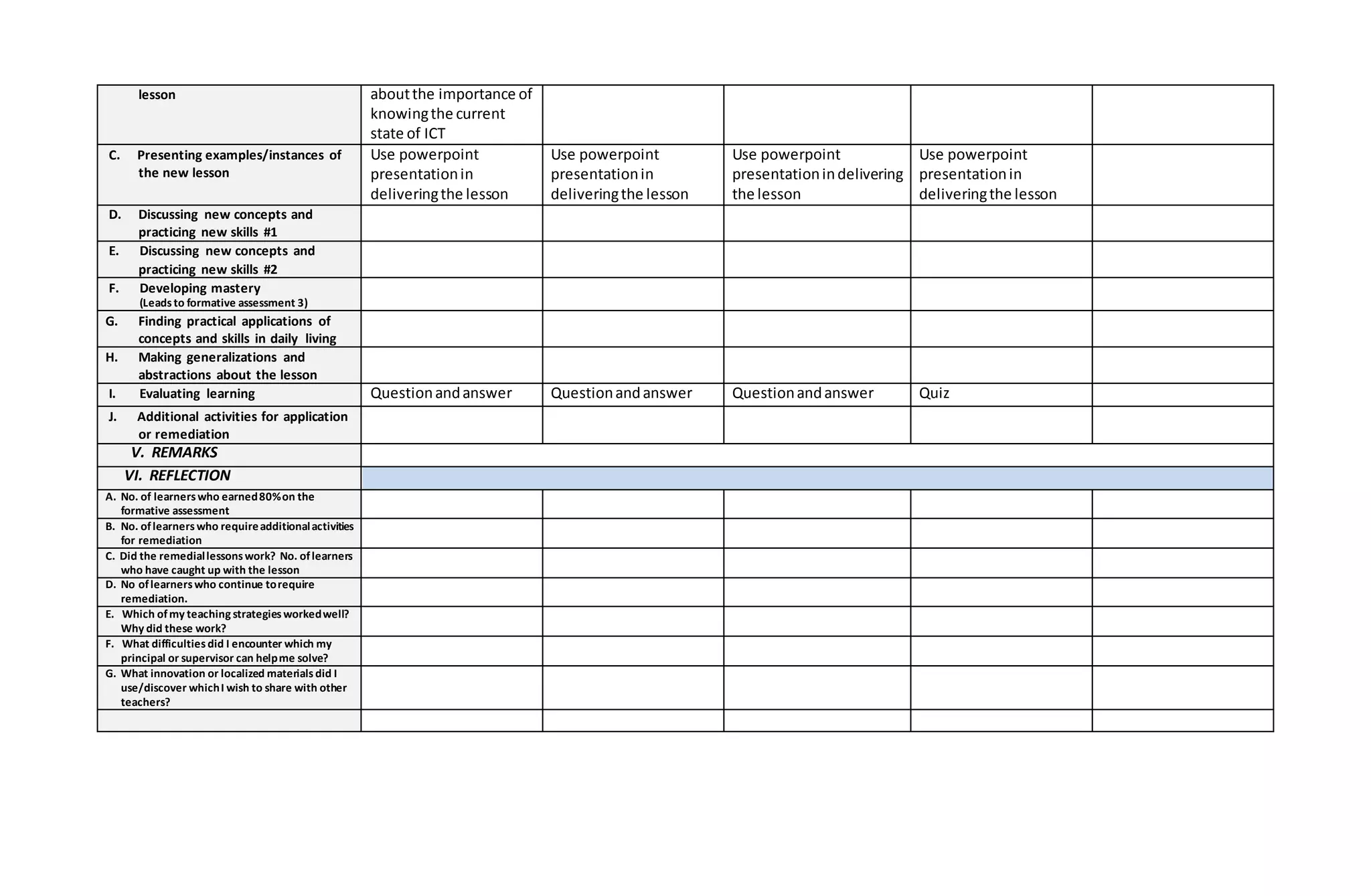
C. Presenting examples/instances of
the new lesson
Use powerpoint
presentationin
deliveringthe lesson
Use powerpoint
presentationin
deliveringthe lesson
Use powerpoint
presentationindelivering
the lesson
Use powerpoint
presentationin
deliveringthe lesson
D. Discussing new concepts and
practicing new skills #1
E. Discussing new concepts and
practicing new skills #2
F. Developing mastery
(Leadsto formative assessment 3)
G. Finding practical applications of
concepts and skills in daily living
H. Making generalizations and
abstractions about the lesson
I. Evaluating learning Questionandanswer Questionandanswer Questionandanswer Quiz
J. Additional activities for application
or remediation
V. REMARKS
VI. REFLECTION
A. No. of learnerswho earned80%on the
formative assessment
B. No. oflearnerswho requireadditionalactivities
for remediation
C. Did the remediallessonswork? No. oflearners
who have caught up with the lesson
D. No oflearnerswho continue torequire
remediation.
E. Which ofmy teaching strategiesworkedwell?
Why did these work?
F. What difficultiesdid I encounter which my
principal or supervisor can helpme solve?
G. What innovation or localized materialsdid I
use/discover whichI wish to share with other
teachers?
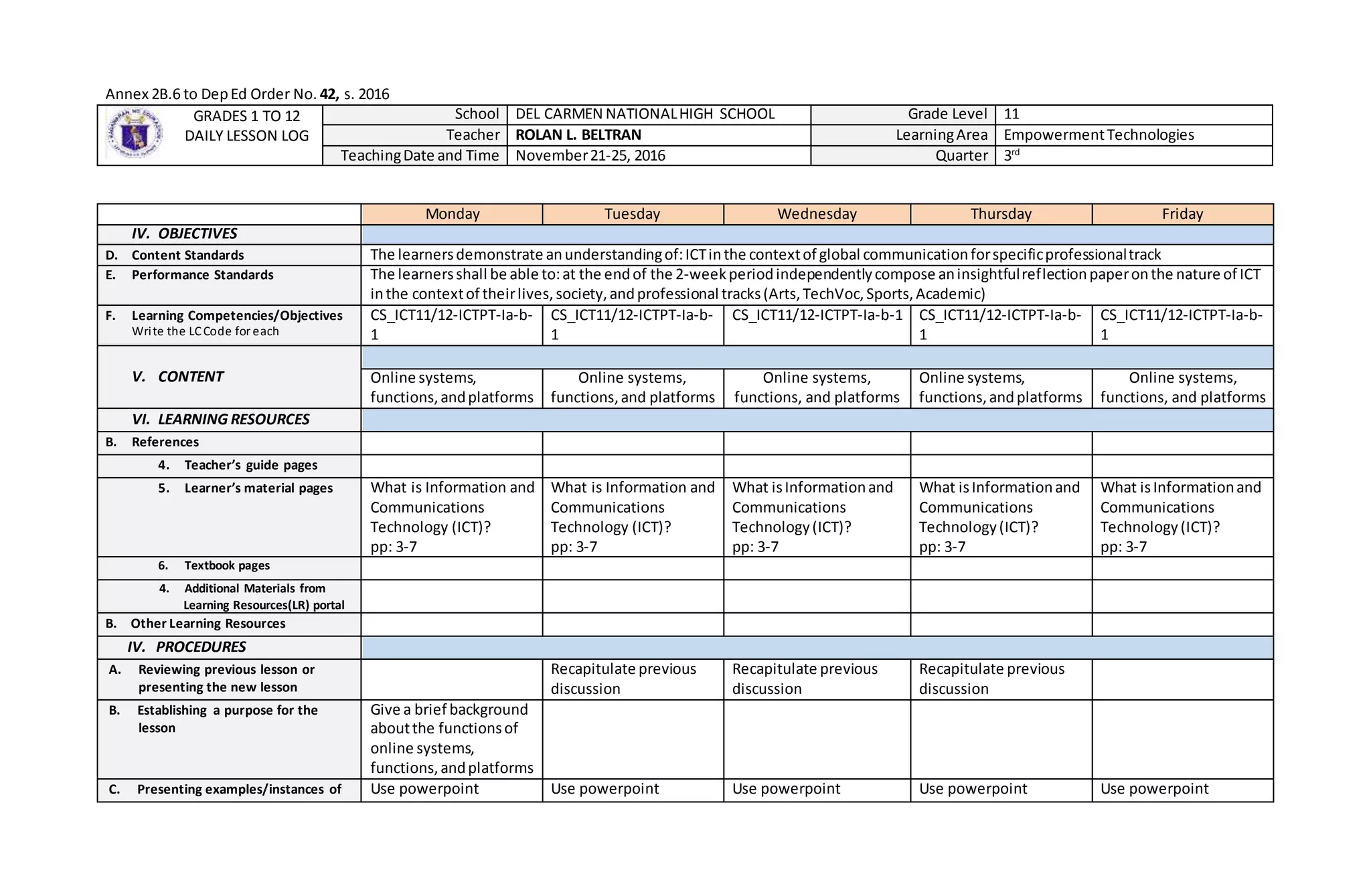
Annex 2B.6 to DepEd Order No. 42, s. 2016
GRADES 1 TO 12
DAILY LESSON LOG
School DEL CARMEN NATIONALHIGH SCHOOL Grade Level 11
Teacher ROLAN L. BELTRAN LearningArea EmpowermentTechnologies
TeachingDate and Time November21-25, 2016 Quarter 3rd
Monday Tuesday Wednesday Thursday Friday
IV. OBJECTIVES
D. Content Standards The learnersdemonstrate anunderstandingof:ICTinthe contextof global communicationforspecificprofessionaltrack
E. Performance Standards The learnersshall be able to:at the endof the 2-weekperiodindependentlycompose aninsightfulreflectionpaperonthe nature of ICT
inthe contextof theirlives,society,andprofessional tracks(Arts,TechVoc,Sports,Academic)
F. Learning Competencies/Objectives
Write the LCCode for each
CS_ICT11/12-ICTPT-Ia-b-
1
CS_ICT11/12-ICTPT-Ia-b-
1
CS_ICT11/12-ICTPT-Ia-b-1 CS_ICT11/12-ICTPT-Ia-b-
1
CS_ICT11/12-ICTPT-Ia-b-
1
V. CONTENT Online systems,
functions,andplatforms
Online systems,
functions,and platforms
Online systems,
functions, and platforms
Online systems,
functions,andplatforms
Online systems,
functions, and platforms
VI. LEARNING RESOURCES
B. References
4. Teacher’s guide pages
5. Learner’s material pages What is Information and
Communications
Technology (ICT)?
pp: 3-7
What is Information and
Communications
Technology (ICT)?
pp: 3-7
What isInformationand
Communications
Technology(ICT)?
pp: 3-7
What isInformationand
Communications
Technology(ICT)?
pp: 3-7
What isInformationand
Communications
Technology(ICT)?
pp: 3-7
6. Textbook pages
4. Additional Materials from
Learning Resources(LR) portal
B. Other Learning Resources
IV. PROCEDURES
A. Reviewing previous lesson or
presenting the new lesson
Recapitulate previous
discussion
Recapitulate previous
discussion
Recapitulate previous
discussion
B. Establishing a purpose for the
lesson
Give a brief background
aboutthe functionsof
online systems,
functions,andplatforms
C. Presenting examples/instances of Use powerpoint Use powerpoint Use powerpoint Use powerpoint Use powerpoint
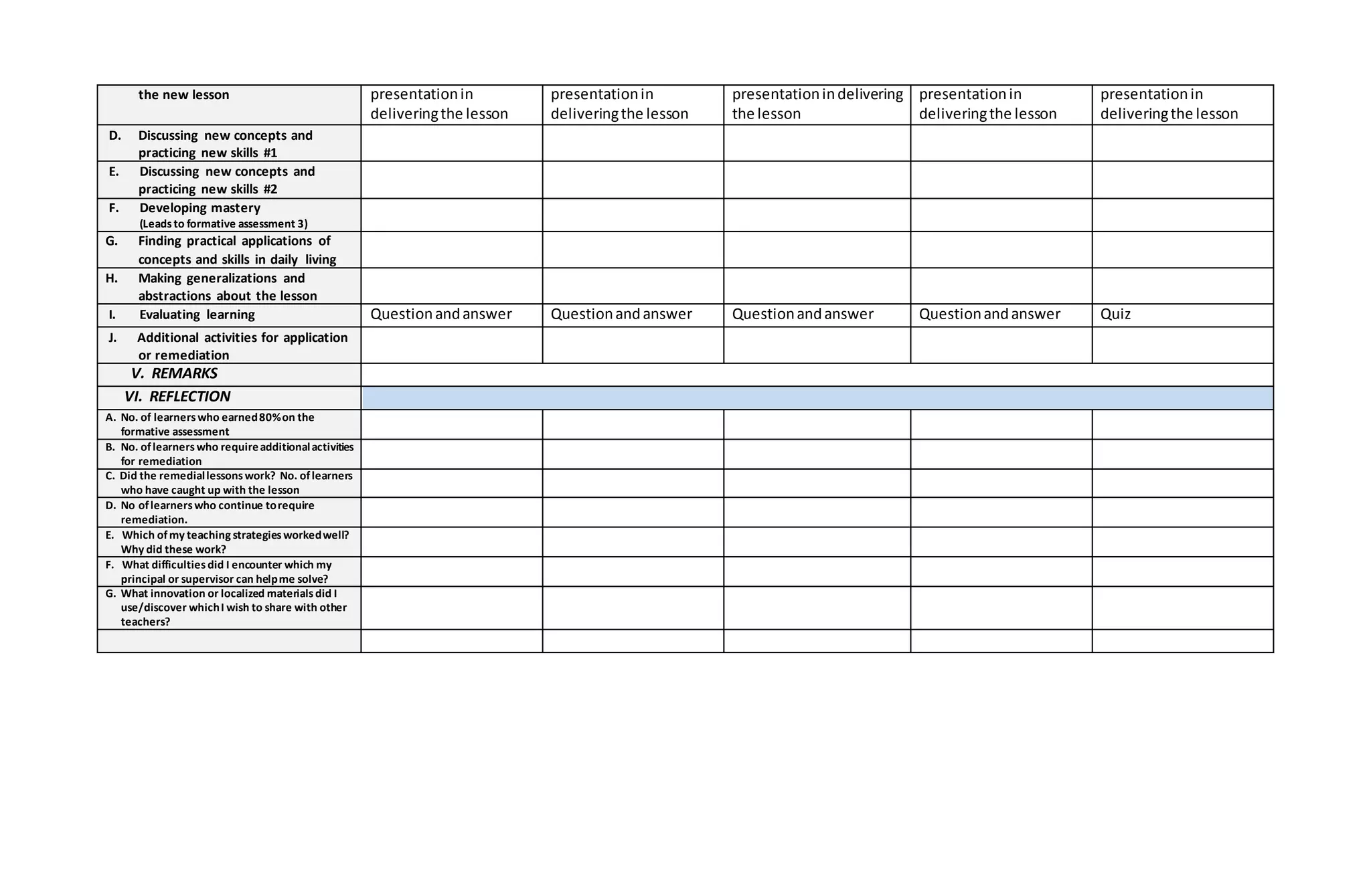
the new lesson presentationin
deliveringthe lesson
presentationin
deliveringthe lesson
presentationindelivering
the lesson
presentationin
deliveringthe lesson
presentationin
deliveringthe lesson
D. Discussing new concepts and
practicing new skills #1
E. Discussing new concepts and
practicing new skills #2
F. Developing mastery
(Leadsto formative assessment 3)
G. Finding practical applications of
concepts and skills in daily living
H. Making generalizations and
abstractions about the lesson
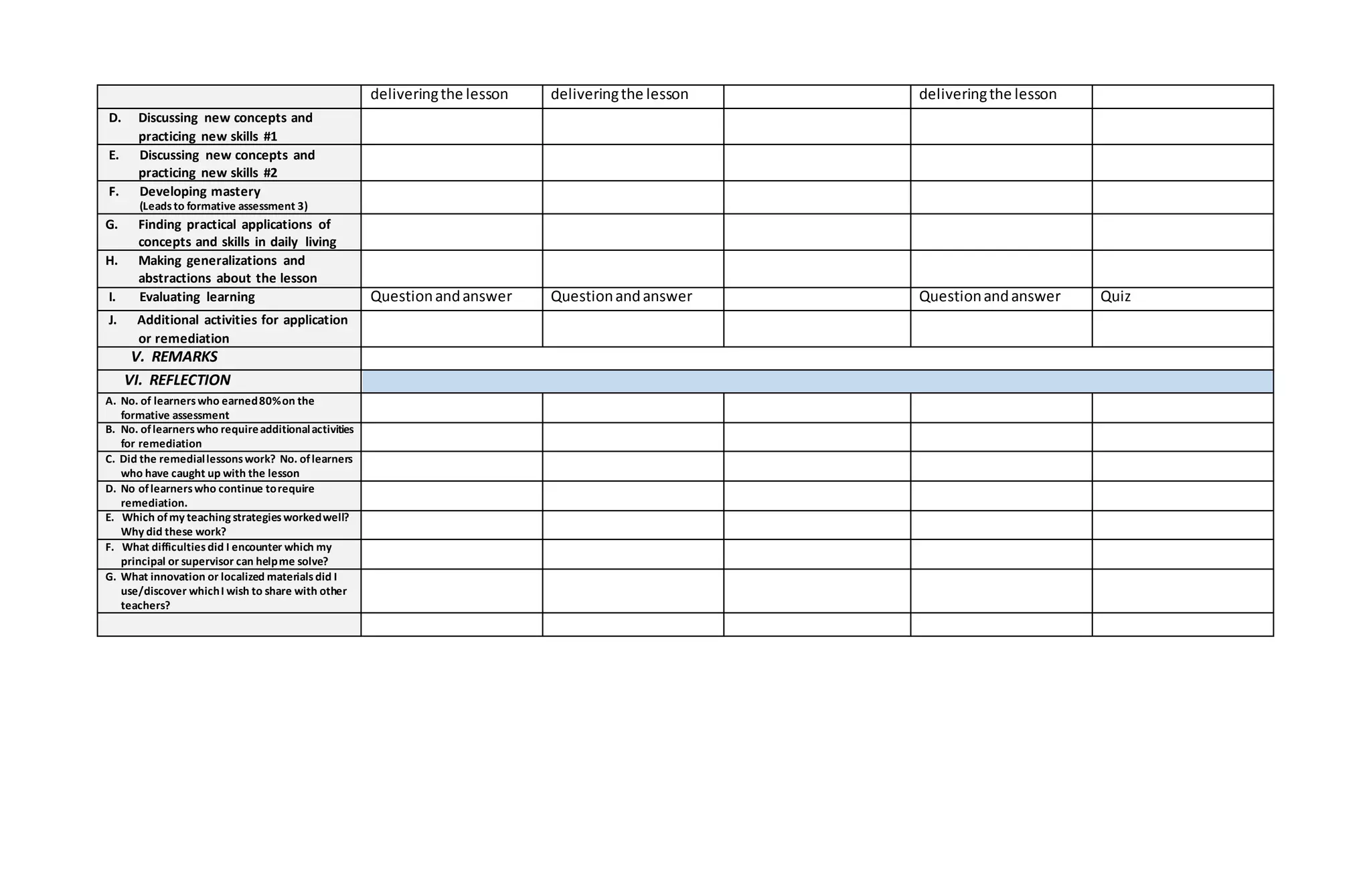
I. Evaluating learning Questionandanswer Questionandanswer Questionandanswer Questionandanswer Quiz
J. Additional activities for application
or remediation
V. REMARKS
VI. REFLECTION
A. No. of learnerswho earned80%on the
formative assessment
B. No. oflearnerswho requireadditionalactivities
for remediation
C. Did the remediallessonswork? No. oflearners
who have caught up with the lesson
D. No oflearnerswho continue torequire
remediation.
E. Which ofmy teaching strategiesworkedwell?
Why did these work?
F. What difficultiesdid I encounter which my
principal or supervisor can helpme solve?
G. What innovation or localized materialsdid I
use/discover whichI wish to share with other
teachers?
Annex 2B.6 to DepEd Order No. 42, s. 2016
GRADES 1 TO 12
DAILY LESSON LOG
School DEL CARMEN NATIONALHIGH SCHOOL Grade Level 11
Teacher ROLAN L. BELTRAN LearningArea EmpowermentTechnologies
TeachingDate and Time November28-December02, 2016 Quarter 3rd
Monday Tuesday Wednesday Thursday Friday
VII. OBJECTIVES
G. Content Standards The learnersdemonstrate anunderstandingof:ICTinthe contextof global communicationforspecificprofessionaltrack
H. Performance Standards The learnersshall be able to:at the endof the 2-weekperiodindependentlycompose aninsightfulreflectionpaperonthe nature of ICT
inthe contextof theirlives,society,andprofessional tracks(Arts,TechVoc,Sports,Academic)
I. Learning Competencies/Objectives
Write the LCCode for each
CS_ICT11/12-ICTPT-Ia-b-
2
CS_ICT11/12-ICTPT-Ia-b-
2
CS_ICT11/12-ICTPT-Ia-b-2 CS_ICT11/12-ICTPT-Ia-b-
2
CS_ICT11/12-ICTPT-Ia-b-
2
VIII. CONTENT Online safety,security,
ethics,andetiquette
Online safety, security,
ethics, and etiquette
No Classes
Online safety,security,
ethics,andetiquette
Division Technolympics
IX. LEARNING RESOURCES
C. References
7. Teacher’s guide pages
8. Learner’s material pages Online safety, security,
ethics, and etiquette
Pp: 8-12
Online safety, security,
ethics, and etiquette
Pp: 8-12
Online safety, security,
ethics, and etiquette
Pp: 8-12
9. Textbook pages
4. Additional Materials from
Learning Resources(LR) portal
B. Other Learning Resources
IV. PROCEDURES
A. Reviewing previous lesson or
presenting the new lesson
Recapitulate previous
discussion
Recapitulate previous
discussion
Recapitulate previous
discussion
B. Establishing a purpose for the
lesson
Ensure students
appreciationof online
safety,security, ethics,
and etiquette
C. Presenting examples/instances of
the new lesson
Use powerpoint
presentationin
Use powerpoint
presentationin
Use powerpoint
presentationin
deliveringthe lesson deliveringthe lesson deliveringthe lesson
D. Discussing new concepts and
practicing new skills #1
E. Discussing new concepts and
practicing new skills #2
F. Developing mastery
(Leadsto formative assessment 3)
G. Finding practical applications of
concepts and skills in daily living
H. Making generalizations and
abstractions about the lesson
I. Evaluating learning Questionandanswer Questionandanswer Questionandanswer Quiz
J. Additional activities for application
or remediation
V. REMARKS
VI. REFLECTION
A. No. of learnerswho earned80%on the
formative assessment
B. No. oflearnerswho requireadditionalactivities
for remediation
C. Did the remediallessonswork? No. oflearners
who have caught up with the lesson
D. No oflearnerswho continue torequire
remediation.
E. Which ofmy teaching strategiesworkedwell?
Why did these work?
F. What difficultiesdid I encounter which my
principal or supervisor can helpme solve?
G. What innovation or localized materialsdid I
use/discover whichI wish to share with other
teachers?
Annex 2B.6 to DepEd Order No. 42, s. 2016
GRADES 1 TO 12
DAILY LESSON LOG
School DEL CARMEN NATIONALHIGH SCHOOL Grade Level 11
Teacher ROLAN L. BELTRAN LearningArea EmpowermentTechnologies
TeachingDate and Time December05-09, 2016 Quarter 3rd
Monday Tuesday Wednesday Thursday Friday
X. OBJECTIVES
J. Content Standards The learnersdemonstrate anunderstandingof:ICTinthe contextof global communicationforspecific professionaltrack
K. Performance Standards The learnersshall be able to:at the endof the 2-weekperiodindependentlycompose aninsightfulreflectionpaperonthe nature of ICT
inthe contextof theirlives,society,andprofessional tracks(Arts,TechVoc,Sports,Academic)
L. Learning Competencies/Objectives
Write the LCCode for each
CS_ICT11/12-ICTPT-Ia-b-
3
CS_ICT11/12-ICTPT-Ia-b-
3
CS_ICT11/12-ICTPT-Ia-b-3 CS_ICT11/12-ICTPT-Ia-b-
3
CS_ICT11/12-ICTPT-Ia-b-
3
XI. CONTENT
Contextualizedonline
searchand research
skills
Contextualizedonline
searchand research
skills
Contextualizedonline
searchand researchskills
Contextualizedonline
searchand research
skills
Contextualizedonline
searchand research
skills
XII. LEARNING RESOURCES
D. References
10. Teacher’s guide pages
11. Learner’s material pages Contextualizedonline
searchand research
skills
pp: 16-21
Contextualizedonline
searchand research
skills
pp: 16-21
Contextualizedonline
searchand research skills
pp: 16-21
Contextualizedonline
searchand research
skills
pp: 16-21
Contextualizedonline
searchand research
skills
pp: 16-21
12. Textbook pages
4. Additional Materials from
Learning Resources(LR) portal
B. Other Learning Resources
IV. PROCEDURES
A. Reviewing previous lesson or
presenting the new lesson
Recapitulate previous
discussion
Recapitulate previous
discussion
Recapitulate previous
discussion
Recapitulate previous
discussion
Recapitulate previous
discussion
B. Establishing a purpose for the
lesson
Orientthe students
aboutthe importance of
contextualizedonline
searchand research
skills
C. Presenting examples/instances of
the new lesson
Opendiscussion Opendiscussion Opendiscussion Opendiscussion Opendiscussion
D. Discussing new concepts and
practicing new skills #1
E. Discussing new concepts and
practicing new skills #2
F. Developing mastery
(Leadsto formative assessment 3)
G. Finding practical applications of
concepts and skills in daily living
H. Making generalizations and
abstractions about the lesson
I. Evaluating learning Questionandanswer Questionandanswer Questionandanswer Questionandanswer Quiz
J. Additional activities for application
or remediation
V. REMARKS
VI. REFLECTION
A. No. of learnerswho earned80%on the
formative assessment
B. No. oflearnerswho requireadditionalactivities
for remediation
C. Did the remediallessonswork? No. oflearners
who have caught up with the lesson
D. No oflearnerswho continue torequire
remediation.
E. Which ofmy teaching strategiesworkedwell?
Why did these work?
F. What difficultiesdid I encounter which my
principal or supervisor can helpme solve?
G. What innovation or localized materialsdid I
use/discover whichI wish to share with other
teachers?
Annex 2B.6 to DepEd Order No. 42, s. 2016
GRADES 1 TO 12
DAILY LESSON LOG
School DEL CARMEN NATIONALHIGH SCHOOL Grade Level 11
Teacher ROLAN L. BELTRAN LearningArea EmpowermentTechnologies
TeachingDate and Time January03-06, 2017 Quarter 3rd
Monday Tuesday Wednesday Thursday Friday
XIII.OBJECTIVES
M. Content Standards The learnersdemonstrate anunderstandingof the use of advancedtoolsandtechniquesfoundincommonproductivityandsoftware
applicationsindevelopingICTcontentforspecific professional tracks.
N. Performance Standards Ther learnersusescommonproductivitytoolseffectivelybymaximizingadvancedapplicationtechniques.
O. Learning Competencies/Objectives
Write the LCCode for each
CS_ICT11/12-ICTPT-Ic-d-
4
CS_ICT11/12-ICTPT-Ic-d-4 CS_ICT11/12-ICTPT-Ic-d-
4
CS_ICT11/12-ICTPT-Ic-d-
4
XIV. CONTENT
Mail Merge - Advanced
Word ProcessingSkill
IntegratingImagesand
External Materialsin
Word Processors
CustomAnimationsand
TiminginPowerPoint
Presentations
Hyperlinkingin
PowerPoint
Presentations
XV. LEARNING RESOURCES
E. References
13. Teacher’s guide pages
14. Learner’s material pages Empowerment
Technologies
pp.22-25
Empowerment
Technologies
pp.22-25
Empowerment
Technologies
pp.22-25
Empowerment
Technologies
pp.22-25
Empowerment
Technologies
pp.22-25
15. Textbook pages
4. Additional Materials from
Learning Resources(LR) portal
B. Other Learning Resources
IV. PROCEDURES
A. Reviewing previous lesson or
presenting the new lesson
Askthe studentsthe
differentwaysin
conductingonline
research.discussion
Askthe studentsthe
processof creatingmail
merge.
Askthe studentsthe
stepsinintegrating
imagesandexternal
materials.
Askthe studentsthe
importance of wraptext
and timingeffects.
B. Establishing a purpose for the
lesson
Let the studentsmake
an invitationletterand
challenge themif they
Presentdifferentdesigns
and art worksthensolicit
theirideasonhowto
Let the classviewan
automaticslideshowof
theirindividual pictures
Let the classviewa
slideshowlinktoamovie
clipand explore their
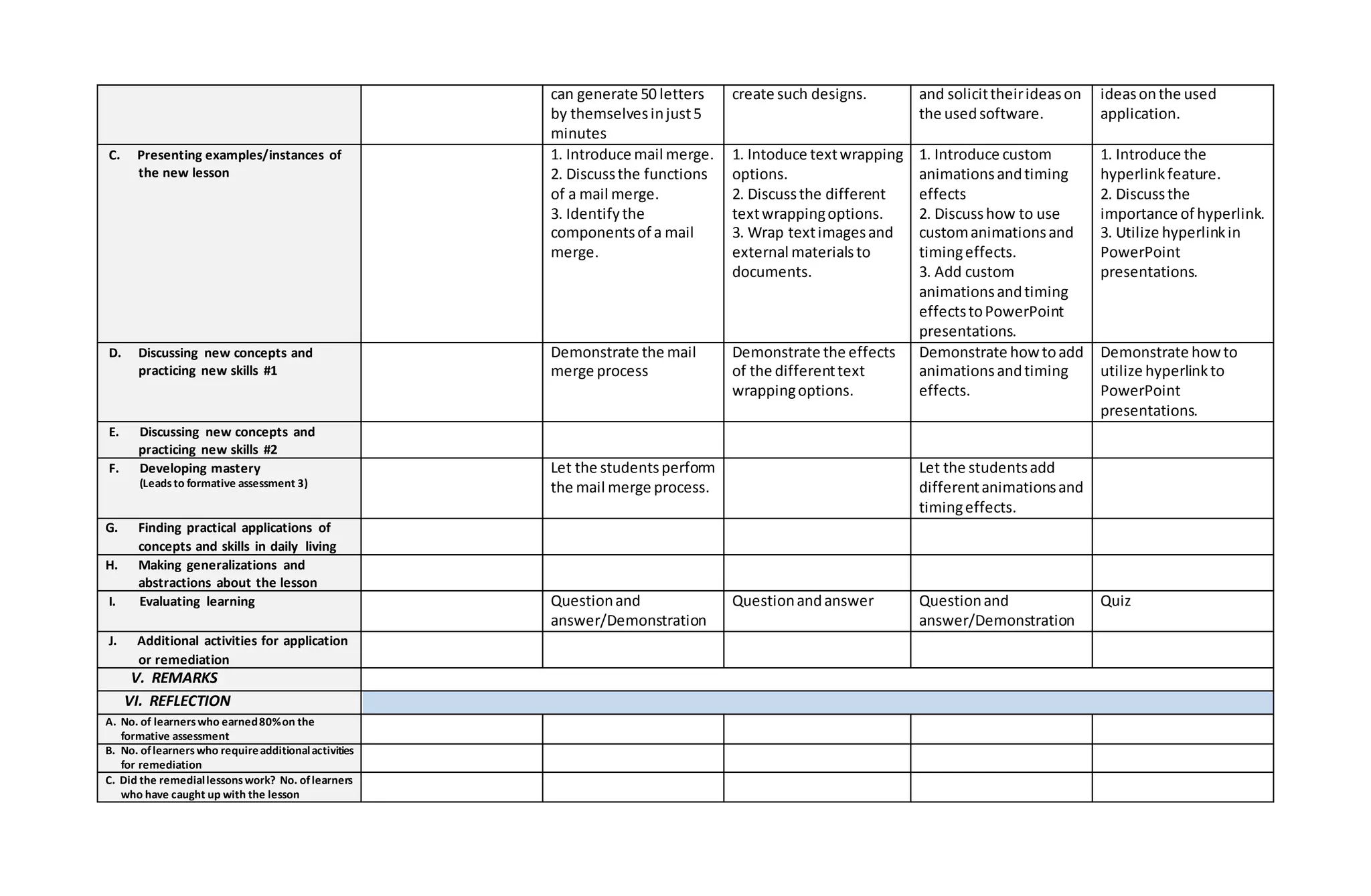
can generate 50 letters
by themselvesinjust5
minutes
create such designs. and solicittheirideason
the usedsoftware.
ideasonthe used
application.
C. Presenting examples/instances of
the new lesson
1. Introduce mail merge.
2. Discussthe functions
of a mail merge.
3. Identifythe
componentsof a mail
merge.
1. Intoduce textwrapping
options.
2. Discussthe different
textwrappingoptions.
3. Wrap textimagesand
external materials to
documents.
1. Introduce custom
animationsandtiming
effects
2. Discusshow to use
customanimationsand
timingeffects.
3. Add custom
animationsandtiming
effectstoPowerPoint
presentations.
1. Introduce the
hyperlinkfeature.
2. Discussthe
importance of hyperlink.
3. Utilize hyperlinkin
PowerPoint
presentations.
D. Discussing new concepts and
practicing new skills #1
Demonstrate the mail
merge process
Demonstrate the effects
of the differenttext
wrappingoptions.
Demonstrate howtoadd
animationsandtiming
effects.
Demonstrate howto
utilize hyperlinkto
PowerPoint
presentations.
E. Discussing new concepts and
practicing new skills #2
F. Developing mastery
(Leadsto formative assessment 3)
Let the studentsperform
the mail merge process.
Let the studentsadd
differentanimationsand
timingeffects.
G. Finding practical applications of
concepts and skills in daily living
H. Making generalizations and
abstractions about the lesson
I. Evaluating learning Questionand
answer/Demonstration
Questionandanswer Questionand
answer/Demonstration
Quiz
J. Additional activities for application
or remediation
V. REMARKS
VI. REFLECTION
A. No. of learnerswho earned80%on the
formative assessment
B. No. oflearnerswho requireadditionalactivities
for remediation
C. Did the remediallessonswork? No. oflearners
who have caught up with the lesson
D. No oflearnerswho continue torequire
remediation.
E. Which ofmy teaching strategiesworkedwell?
Why did these work?
F. What difficultiesdid I encounter which my
principal or supervisor can helpme solve?
G. What innovation or localized materialsdid I
use/discover whichI wish to share with other
teachers?
Annex 2B.6 to DepEd Order No. 42, s. 2016
GRADES 1 TO 12
DAILY LESSON LOG
School DEL CARMEN NATIONALHIGH SCHOOL Grade Level 11
Teacher ROLAN L. BELTRAN LearningArea EmpowermentTechnologies
TeachingDate and Time January09-13, 2017 Quarter 3rd
Monday Tuesday Wednesday Thursday Friday
XVI. OBJECTIVES
P. Content Standards The learners demonstrate anunderstandingof the use of advancedtoolsandtechniquesfoundincommonproductivityandsoftware
applicationsindevelopingICTcontentforspecificprofessional tracks.
Q. Performance Standards Ther learnersusescommonproductivitytools effectivelybymaximizingadvancedapplicationtechniques.
R. Learning Competencies/Objectives
Write the LCCode for each
CS_ICT11/12-ICTPT-Ic-d-
5
CS_ICT11/12-ICTPT-Ic-d-
5
XVII. CONTENT
ADVANCEDAND
COMPLEX FORMULAS
ANDCOMPUTATIONS
EMBEDDED FILES AND
DATA
Hands-On Hands-On Hands-On
XVIII. LEARNING
RESOURCES
F. References
16. Teacher’s guide pages
17. Learner’s material pages Empowerment
Technologies
pp.22-25
Empowerment
Technologies
pp.22-25
18. Textbook pages
4. Additional Materials from
Learning Resources(LR) portal
B. Other Learning Resources http://www.excel-
easy.com/introduction/for
mulas-functions.html
https://www.youtube.com
/watch?v=Ukwu5xfMR3M
http://www.gcflearnfree.or
g/powerpoint2013/embed
ding-an-excel-chart/1/
IV. PROCEDURES
A. Reviewing previous lesson or
presenting the new lesson
Askthe learnersif they
have useda
Videopresentation
aboutembeddingfiles
spreadsheet.Didthey
have difficultyindoing
it?
and data.
B. Establishing a purpose for the
lesson
To make the gathering
and processingof data
easierintroduce to
learnersthe use of
formulasand
computationsin
electronicspreadsheets.
C. Presenting examples/instances of
the new lesson
Powerpointpresentation
aboutformulasand
computationsin
electronicspreadsheet
Powerpointpresentation
aboutembeddingan
excel chart.
D. Discussing new concepts and
practicing new skills #1
Presentexamplesand
ask the learnersto
create theirown
formulasand
computationinan
electronicspreadsheet.
E. Discussing new concepts and
practicing new skills #2
F. Developing mastery
(Leadsto formative assessment 3)
G. Finding practical applications of
concepts and skills in daily living
H. Making generalizations and
abstractions about the lesson
I. Evaluating learning
J. Additional activities for application
or remediation
V. REMARKS
VI. REFLECTION
A. No. of learnerswho earned80%on the
formative assessment
B. No. oflearnerswho requireadditionalactivities
for remediation
C. Did the remediallessonswork? No. oflearners
who have caught up with the lesson
D. No oflearnerswho continue torequire
remediation.
E. Which ofmy teaching strategiesworkedwell?
Why did these work?
F. What difficultiesdid I encounter which my
principal or supervisor can helpme solve?
G. What innovation or localized materialsdid I
use/discover whichI wish to share with other
teachers?
Annex 2B.6 to DepEd Order No. 42, s. 2016
GRADES 1 TO 12
DAILY LESSON LOG
School DEL CARMEN NATIONALHIGH SCHOOL Grade Level 11
Teacher ROLAN L. BELTRAN LearningArea EmpowermentTechnologies
TeachingDate and Time January16-20, 2017 Quarter 3rd
Monday Tuesday Wednesday Thursday Friday
XIX.OBJECTIVES
S. Content Standards The learners demonstrate anunderstandingof the use of advancedtoolsandtechniquesfoundincommonproductivityandsoftware
applicationsindevelopingICTcontentforspecificprofessional tracks.
T. Performance Standards Ther learnersusescommonproductivitytoolseffectivelybymaximizingadvancedapplicationtechniques.
U. Learning Competencies/Objectives
Write the LCCode for each
CS_ICT11/12-ICTPT-Ic-d-
5
CS_ICT11/12-ICTPT-Ic-d-
5
XX. CONTENT
ADVANCEDAND
COMPLEX FORMULAS
ANDCOMPUTATIONS
EMBEDDED FILES AND
DATA
Review PeriodicExamination PeriodicExamination
XXI.LEARNING RESOURCES
G. References
19. Teacher’s guide pages
20. Learner’s material pages Empowerment
Technologies
by: Innovative Training
Works,Inc.
pp.41-48
Empowerment
Technologies
by: Innovative Training
Works,Inc.
pp.49-58
21. Textbook pages
4. Additional Materials from
Learning Resources(LR) portal
B. Other Learning Resources http://www.excel-
easy.com/introduction/for
mulas-functions.html
https://www.youtube.com
/watch?v=Ukwu5xfMR3M
http://www.gcflearnfree.or
g/powerpoint2013/embed
ding-an-excel-chart/1/
IV. PROCEDURES
A. Reviewing previous lesson or
presenting the new lesson
Askthe learnersif they
have useda
spreadsheet.Didthey
have difficultyindoing
it?
Videopresentation
aboutembeddingfiles
and data.
B. Establishing a purpose for the
lesson
To make the gathering
and processingof data
easierintroduce to
learnersthe use of
formulasand
computationsin
electronicspreadsheets.
C. Presenting examples/instances of
the new lesson
Powerpointpresentation
aboutformulasand
computationsin
electronicspreadsheet
Powerpointpresentation
aboutembeddingan
excel chart.
D. Discussing new concepts and
practicing new skills #1
Presentexamplesand
ask the learnersto
create theirown
formulasand
computationinan
electronicspreadsheet.
E. Discussing new concepts and
practicing new skills #2
F. Developing mastery
(Leadsto formative assessment 3)
G. Finding practical applications of
concepts and skills in daily living
H. Making generalizations and
abstractions about the lesson
I. Evaluating learning
J. Additional activities for application
or remediation
V. REMARKS
VI. REFLECTION
A. No. of learnerswho earned80%on the
formative assessment
B. No. oflearnerswho requireadditionalactivities
for remediation
C. Did the remediallessonswork? No. oflearners
who have caught up with the lesson
D. No oflearnerswho continue torequire
remediation.
E. Which ofmy teaching strategiesworkedwell?
Why did these work?
F. What difficultiesdid I encounter which my
principal or supervisor can helpme solve?
G. What innovation or localized materialsdid I
use/discover whichI wish to share with other
teachers?
Annex 2B.6 to DepEd Order No. 42, s. 2016
GRADES 1 TO 12
DAILY LESSON LOG
School DEL CARMEN NATIONALHIGH SCHOOL Grade Level 11
Teacher ROLAN L. BELTRAN LearningArea EmpowermentTechnologies
TeachingDate and Time January 23-27, 2017 Quarter 4th
Monday Tuesday Wednesday Thursday Friday
XXII. OBJECTIVES
V. Content Standards
W. Performance Standards
X. Learning Competencies/Objectives
Write the LCCode for each
XXIII. CONTENT Checkingof TestPapers
and ItemAnalysis
Remediation Remediation Completionof
Requirements
Completionof
Requirements
XXIV. LEARNING
RESOURCES
H. References
22. Teacher’s guide pages
23. Learner’s material pages
24. Textbook pages
4. Additional Materials from
Learning Resources(LR) portal
B. Other Learning Resources
IV. PROCEDURES
A. Reviewing previous lesson or
presenting the new lesson
B. Establishing a purpose for the
lesson
C. Presenting examples/instances of
the new lesson
D. Discussing new concepts and
practicing new skills #1
E. Discussing new concepts and
practicing new skills #2
F. Developing mastery
(Leadsto formative assessment 3)
G. Finding practical applications of
concepts and skills in daily living
H. Making generalizations and
abstractions about the lesson
I. Evaluating learning
J. Additional activities for application
or remediation
V. REMARKS
VI. REFLECTION
A. No. of learnerswho earned80%on the
formative assessment
B. No. oflearnerswho requireadditionalactivities
for remediation
C. Did the remediallessonswork? No. oflearners
who have caught up with the lesson
D. No oflearnerswho continue torequire
remediation.
E. Which ofmy teaching strategiesworkedwell?
Why did these work?
F. What difficultiesdid I encounter which my
principal or supervisor can helpme solve?
G. What innovation or localized materialsdid I
use/discover whichI wish to share with other
teachers?
Annex 2B.6 to DepEd Order No. 42, s. 2016
GRADES 1 TO 12
DAILY LESSON LOG
School DEL CARMEN NATIONALHIGH SCHOOL Grade Level 11
Teacher ROLAN L. BELTRAN LearningArea EmpowermentTechnologies
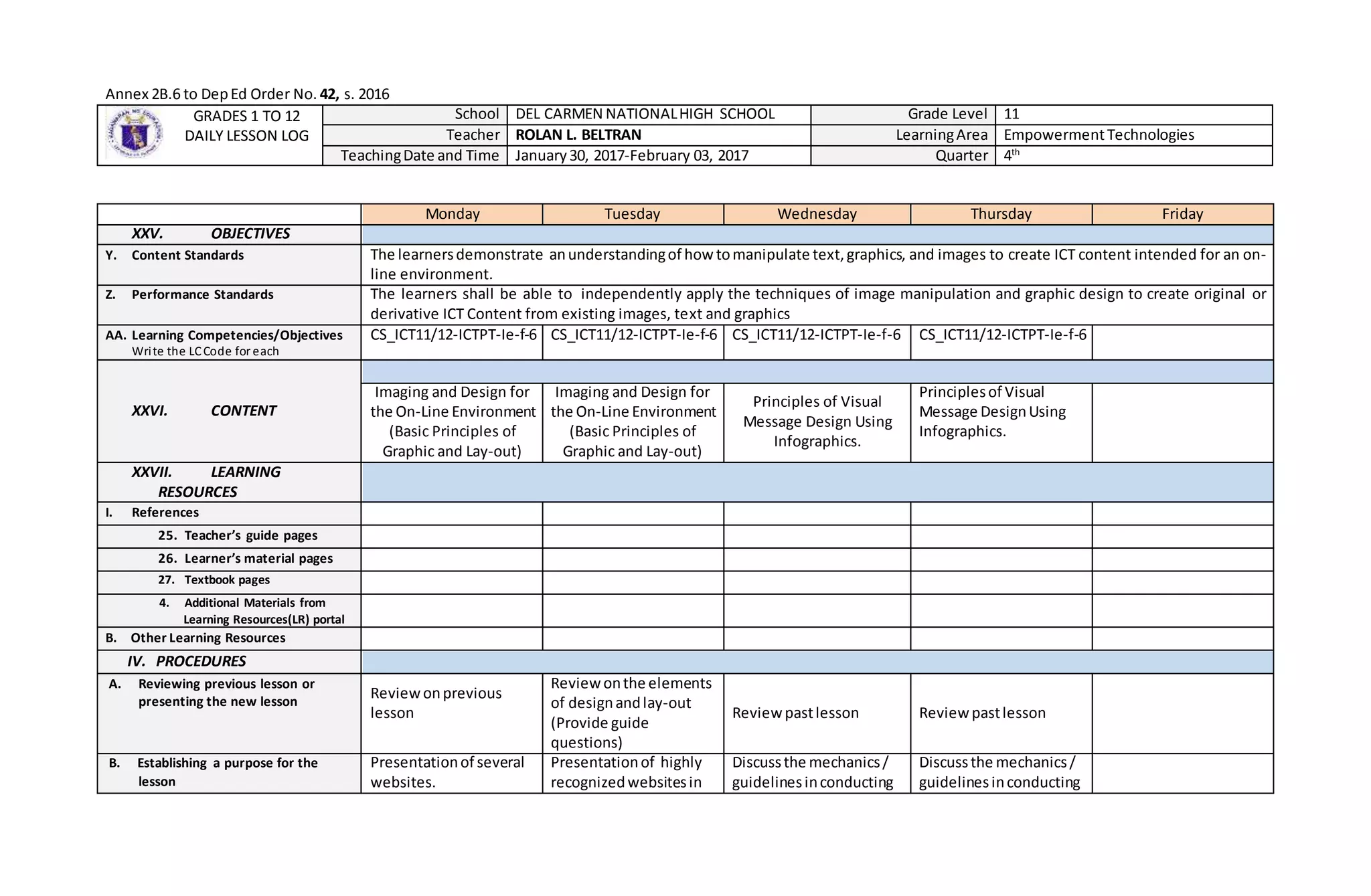
TeachingDate and Time January30, 2017-February 03, 2017 Quarter 4th
Monday Tuesday Wednesday Thursday Friday
XXV. OBJECTIVES
Y. Content Standards The learnersdemonstrate anunderstandingof howtomanipulate text,graphics, and images to create ICT content intended for an on-
line environment.
Z. Performance Standards The learners shall be able to independently apply the techniques of image manipulation and graphic design to create original or
derivative ICT Content from existing images, text and graphics
AA. Learning Competencies/Objectives
Write the LCCode for each
CS_ICT11/12-ICTPT-Ie-f-6 CS_ICT11/12-ICTPT-Ie-f-6 CS_ICT11/12-ICTPT-Ie-f-6 CS_ICT11/12-ICTPT-Ie-f-6
XXVI. CONTENT
Imaging and Design for
the On-Line Environment
(Basic Principles of
Graphic and Lay-out)
Imaging and Design for
the On-Line Environment
(Basic Principles of
Graphic and Lay-out)
Principles of Visual
Message Design Using
Infographics.
Principlesof Visual
Message DesignUsing
Infographics.
XXVII. LEARNING
RESOURCES
I. References
25. Teacher’s guide pages
26. Learner’s material pages
27. Textbook pages
4. Additional Materials from
Learning Resources(LR) portal
B. Other Learning Resources
IV. PROCEDURES
A. Reviewing previous lesson or
presenting the new lesson
Reviewonprevious
lesson
Reviewonthe elements
of designandlay-out
(Provide guide
questions)
Reviewpastlesson Reviewpastlesson
B. Establishing a purpose for the
lesson
Presentationof several
websites.
Presentationof highly
recognizedwebsitesin
Discussthe mechanics/
guidelinesinconducting
Discussthe mechanics/
guidelinesinconducting
the local marketor
websitesdone by
InformationTechnology
student.
The teacherwill present
and explainhowtheir
works will be evaluated
througha set of
criterion.
the group workincluding
the rubric.
the group workincluding
the rubric.
C. Presenting examples/instances of
the new lesson
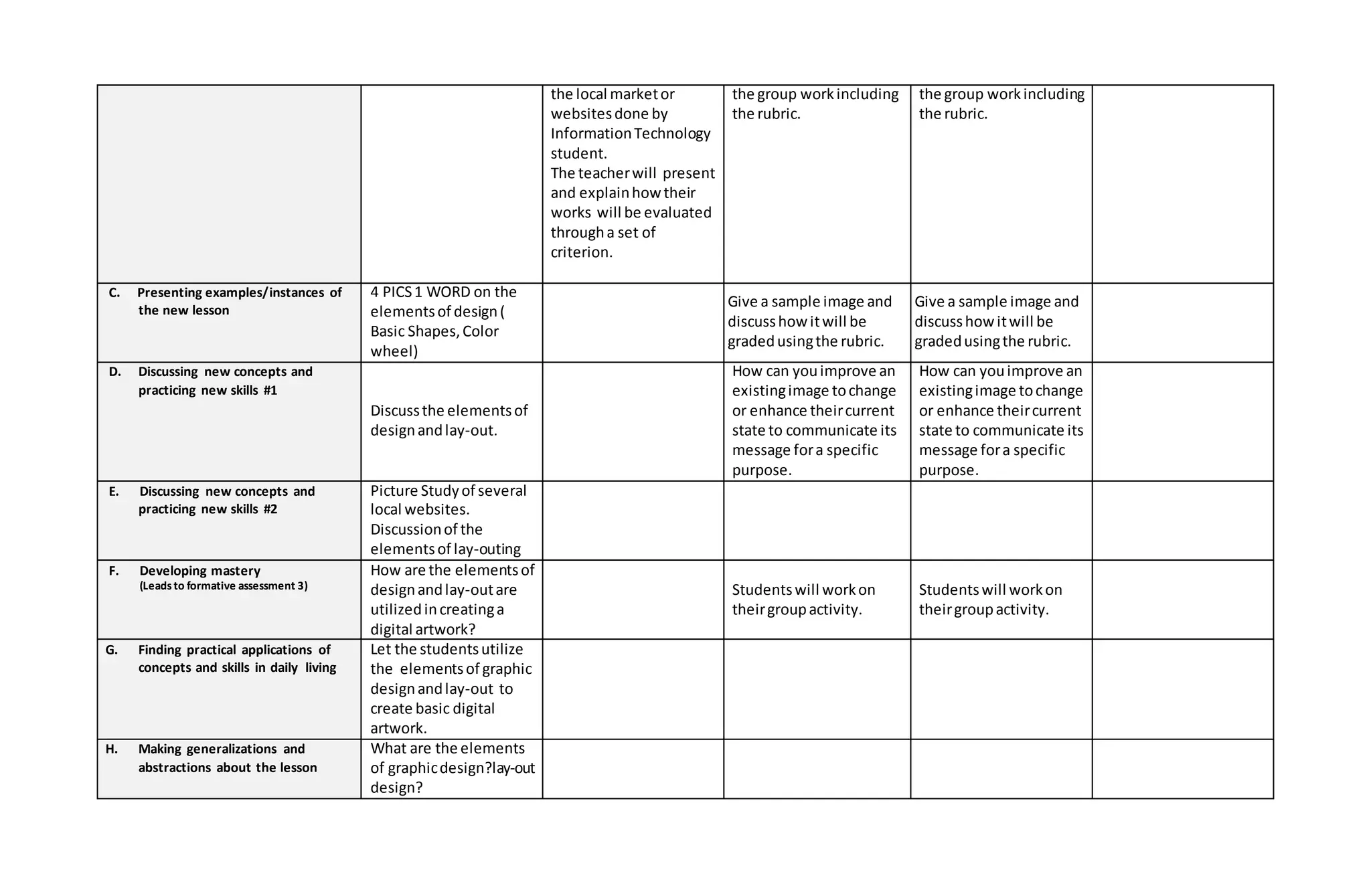
4 PICS1 WORD on the
elementsof design(
Basic Shapes,Color
wheel)
Give a sample image and
discusshowitwill be
gradedusingthe rubric.
Give a sample image and
discusshowitwill be
gradedusingthe rubric.
D. Discussing new concepts and
practicing new skills #1
Discussthe elementsof
designandlay-out.
How can youimprove an
existingimage tochange
or enhance theircurrent
state to communicate its
message fora specific
purpose.
How can youimprove an
existingimage tochange
or enhance theircurrent
state to communicate its
message fora specific
purpose.
E. Discussing new concepts and
practicing new skills #2
Picture Studyof several
local websites.
Discussionof the
elementsof lay-outing
F. Developing mastery
(Leadsto formative assessment 3)
How are the elementsof
designandlay-outare
utilizedincreatinga
digital artwork?
Studentswill workon
theirgroupactivity.
Studentswill workon
theirgroupactivity.
G. Finding practical applications of
concepts and skills in daily living
Let the studentsutilize
the elementsof graphic
designandlay-out to
create basic digital
artwork.
H. Making generalizations and
abstractions about the lesson
What are the elements
of graphicdesign?lay-out
design?
I. Evaluating learning
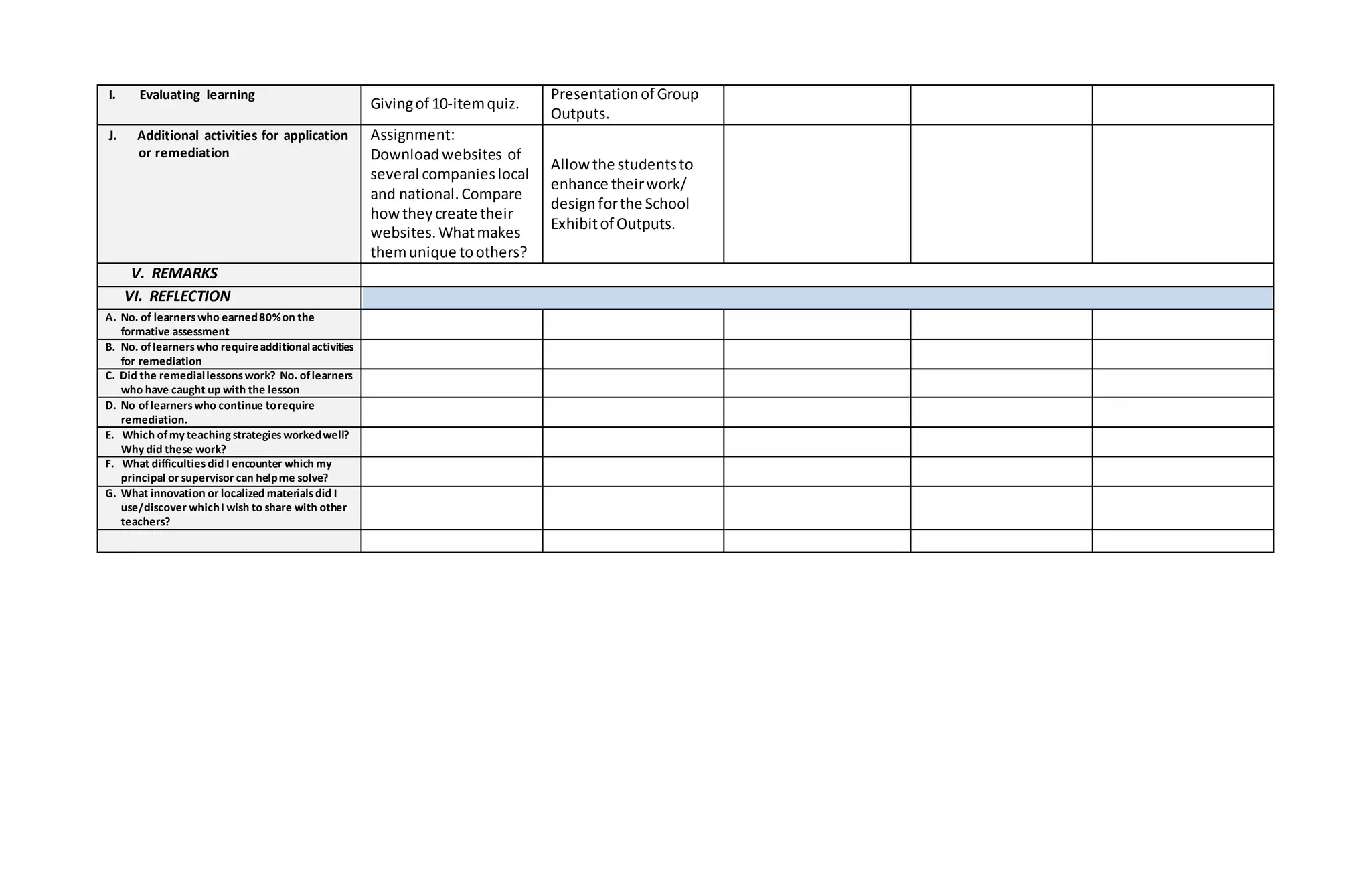
Givingof 10-itemquiz.
Presentationof Group
Outputs.
J. Additional activities for application
or remediation
Assignment:
Downloadwebsites of
several companieslocal
and national.Compare
howtheycreate their
websites.Whatmakes
themunique toothers?
Allowthe studentsto
enhance theirwork/
designforthe School
Exhibitof Outputs.
V. REMARKS
VI. REFLECTION
A. No. of learnerswho earned80%on the
formative assessment
B. No. oflearnerswho requireadditionalactivities
for remediation
C. Did the remediallessonswork? No. oflearners
who have caught up with the lesson
D. No oflearnerswho continue torequire
remediation.
E. Which ofmy teaching strategiesworkedwell?
Why did these work?
F. What difficultiesdid I encounter which my
principal or supervisor can helpme solve?
G. What innovation or localized materialsdid I
use/discover whichI wish to share with other
teachers?
Annex 2B.6 to DepEd Order No. 42, s. 2016
GRADES 1 TO 12
DAILY LESSON LOG
School DEL CARMEN NATIONALHIGH SCHOOL Grade Level 11
Teacher ROLAN L. BELTRAN LearningArea EmpowermentTechnologies
TeachingDate and Time February06, 2017-February10, 2017 Quarter 4th
Monday Tuesday Wednesday Thursday Friday
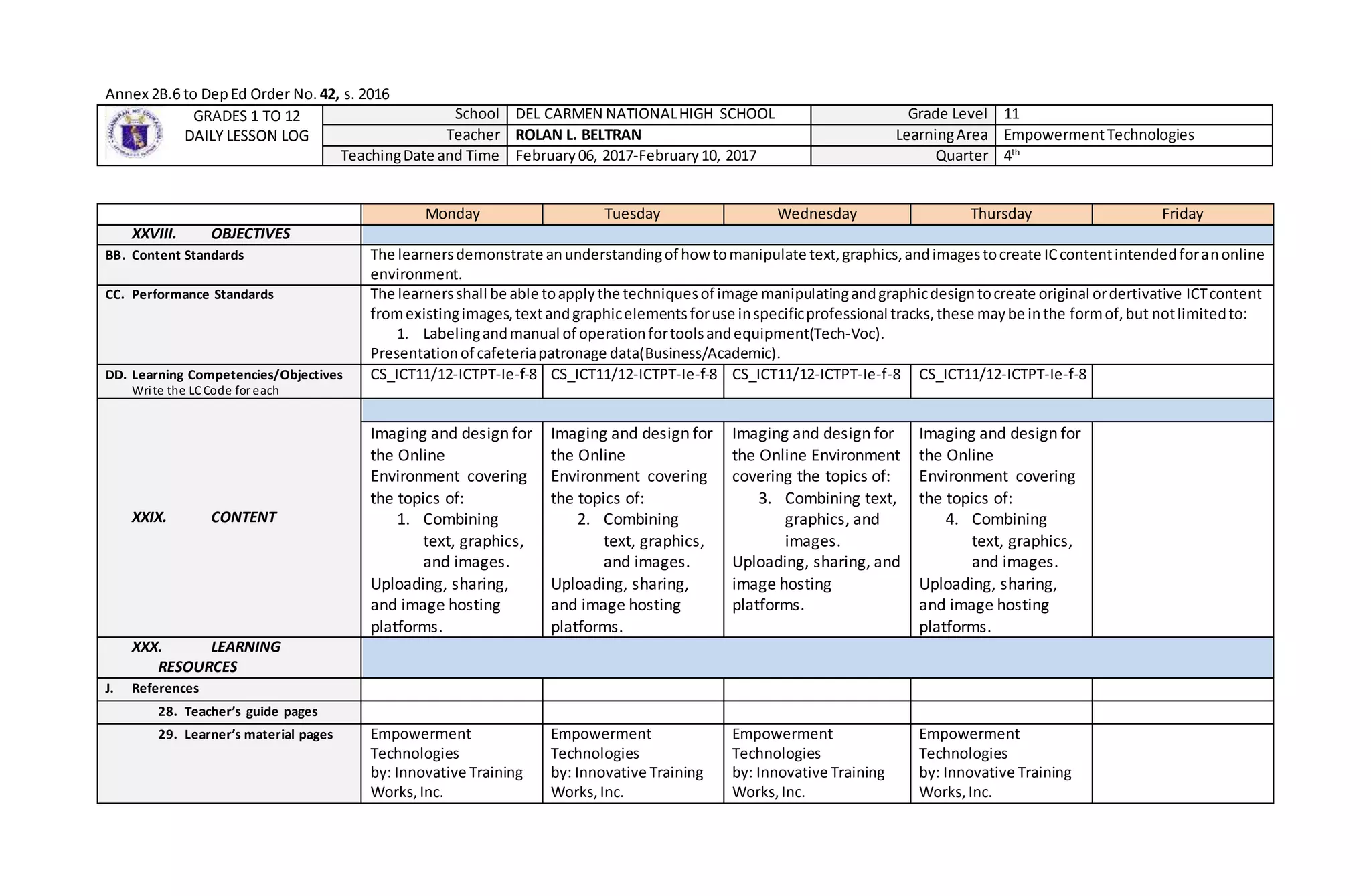
XXVIII. OBJECTIVES
BB. Content Standards The learnersdemonstrate anunderstandingof howtomanipulate text,graphics,andimagestocreate ICcontentintendedforanonline
environment.
CC. Performance Standards The learnersshall be able toapplythe techniquesof image manipulatingandgraphicdesigntocreate original ordertivative ICTcontent
fromexistingimages,textandgraphicelementsforuse inspecificprofessional tracks,these maybe inthe formof,but notlimitedto:
1. Labelingandmanual of operationfortoolsandequipment(Tech-Voc).
Presentationof cafeteriapatronage data(Business/Academic).
DD. Learning Competencies/Objectives
Write the LCCode for each
CS_ICT11/12-ICTPT-Ie-f-8 CS_ICT11/12-ICTPT-Ie-f-8 CS_ICT11/12-ICTPT-Ie-f-8 CS_ICT11/12-ICTPT-Ie-f-8
XXIX. CONTENT
Imaging and design for
the Online
Environment covering
the topics of:
1. Combining
text, graphics,
and images.
Uploading, sharing,
and image hosting
platforms.
Imaging and design for
the Online
Environment covering
the topics of:
2. Combining
text, graphics,
and images.
Uploading, sharing,
and image hosting
platforms.
Imaging and design for
the Online Environment
covering the topics of:
3. Combining text,
graphics, and
images.
Uploading, sharing, and
image hosting
platforms.
Imaging and design for
the Online
Environment covering
the topics of:
4. Combining
text, graphics,
and images.
Uploading, sharing,
and image hosting
platforms.
XXX. LEARNING
RESOURCES
J. References
28. Teacher’s guide pages
29. Learner’s material pages Empowerment
Technologies
by: Innovative Training
Works,Inc.
Empowerment
Technologies
by: Innovative Training
Works,Inc.
Empowerment
Technologies
by: Innovative Training
Works,Inc.
Empowerment
Technologies
by: Innovative Training
Works,Inc.
pp. 26-30 pp.26-30 pp.26-30 pp.26-30
30. Textbook pages
4. Additional Materials from
Learning Resources(LR) portal
B. Other Learning Resources
IV. PROCEDURES
A. Reviewing previous lesson or
presenting the new lesson
Reviewprinciplesand
basictechniquesof
image manipulation
Recall the mainfeature
of the photoscape.
Who amongyou here
have facebookaccount?
The teacherwill conduct
fishbowl througha
horse game.
B. Establishing a purpose for the
lesson
Can we combine text
graphicsand images
usingcomputer
applicationorusable
platforms?
1. How do we usedthe
followingfeaturesin
combining:text,
graphics,and images.
2. Batch editor,edit
Have your tried
uploading,sharing,
inserting,sharingimages
overthe internet?
In Aside fromthe photo
bucket,whatare the
otherapplicationcanbe
useduploading,sharing,
inserting,sharingimages
C. Presenting examples/instances of
the new lesson
What computer
applicationcanbe used
textgraphicsand
images?
The teacherpresentthe
processesand
proceduresinusing
editoreditandbatch
edit
How didyou uploading,
sharing,inserting,sharing
imagesoverthe internet.
Aside fromfacebook
whatare the other
applicationthatyou
utilizedinuploading,
sharing,inserting,sharing
imagesoverthe internet.
D. Discussing new concepts and
practicing new skills #1
The teachersdiscusses
creatingand
manipulatingimages
usingphotoescape.
Presentationof the
photoescape
The studentstry outthe
featuresaspresentedby
the teacher.
The teacherpresentsthe
photobucket.
Studentswill tryout
photobucket
application.The students
will explainthe process
and the teacherwill
evaluate.
E. Discussing new concepts and
practicing new skills #2
Studentstryout the
differentfeatures.
Studentswill dothe
same processbut
differentcomputer
applicationsuchas
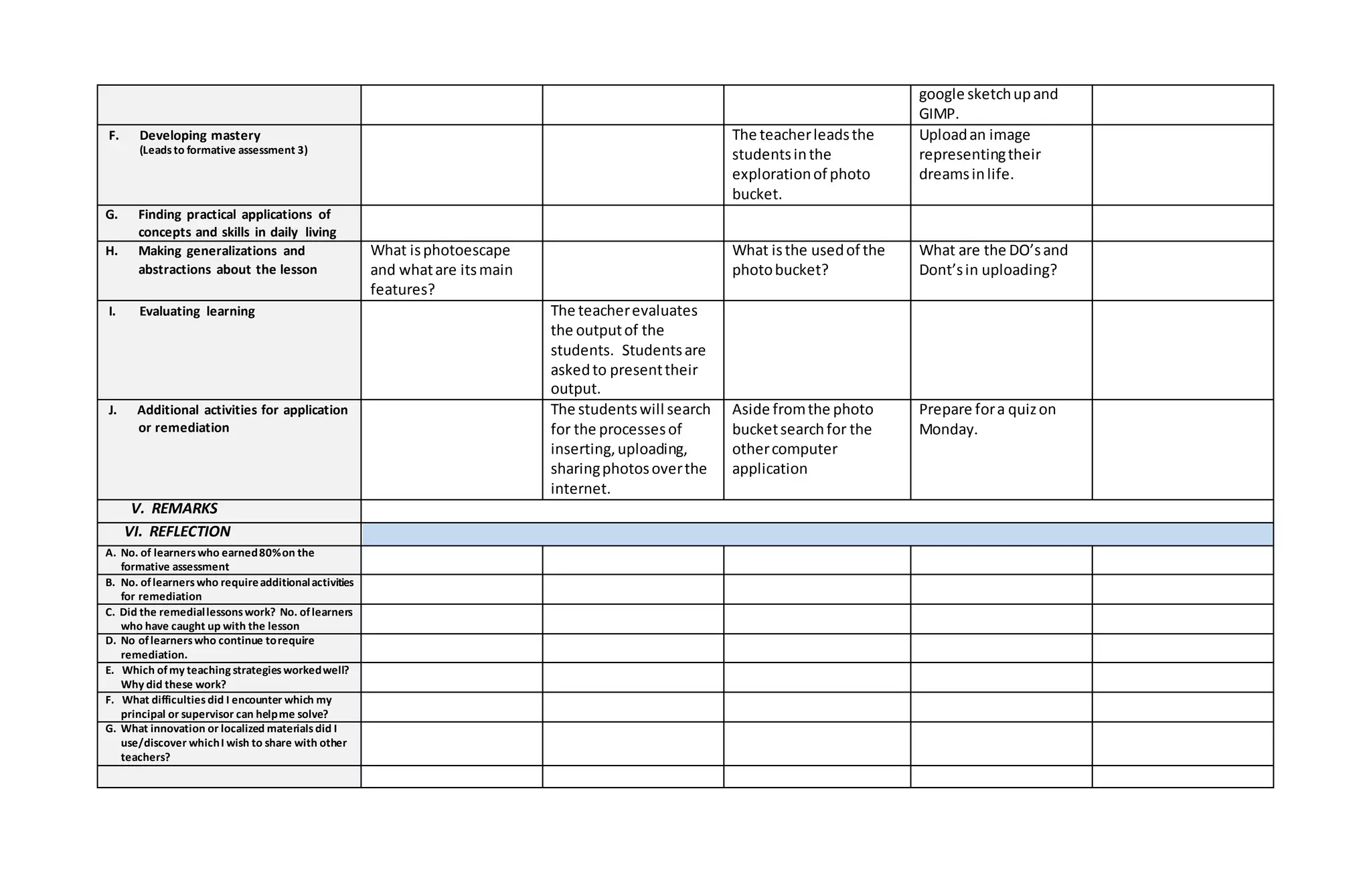
google sketchupand
GIMP.
F. Developing mastery
(Leadsto formative assessment 3)
The teacherleadsthe
studentsinthe
explorationof photo
bucket.
Uploadan image
representingtheir
dreamsinlife.
G. Finding practical applications of
concepts and skills in daily living
H. Making generalizations and
abstractions about the lesson
What isphotoescape
and whatare itsmain
features?
What isthe usedof the
photobucket?
What are the DO’sand
Dont’sin uploading?
I. Evaluating learning The teacherevaluates
the outputof the
students. Studentsare
askedto presenttheir
output.
J. Additional activities for application
or remediation
The studentswill search
for the processesof
inserting,uploading,
sharingphotosoverthe
internet.
Aside fromthe photo
bucketsearchfor the
othercomputer
application
Prepare fora quizon
Monday.
V. REMARKS
VI. REFLECTION
A. No. of learnerswho earned80%on the
formative assessment
B. No. oflearnerswho requireadditionalactivities
for remediation
C. Did the remediallessonswork? No. oflearners
who have caught up with the lesson
D. No oflearnerswho continue torequire
remediation.
E. Which ofmy teaching strategiesworkedwell?
Why did these work?
F. What difficultiesdid I encounter which my
principal or supervisor can helpme solve?
G. What innovation or localized materialsdid I
use/discover whichI wish to share with other
teachers?
Annex 2B.6 to DepEd Order No. 42, s. 2016
GRADES 1 TO 12
DAILY LESSON LOG
School DEL CARMEN NATIONALHIGH SCHOOL Grade Level 11
Teacher ROLAN L. BELTRAN LearningArea EmpowermentTechnologies
TeachingDate and Time February13, 2017-February17, 2017 Quarter 4th
Monday Tuesday Wednesday Thursday Friday
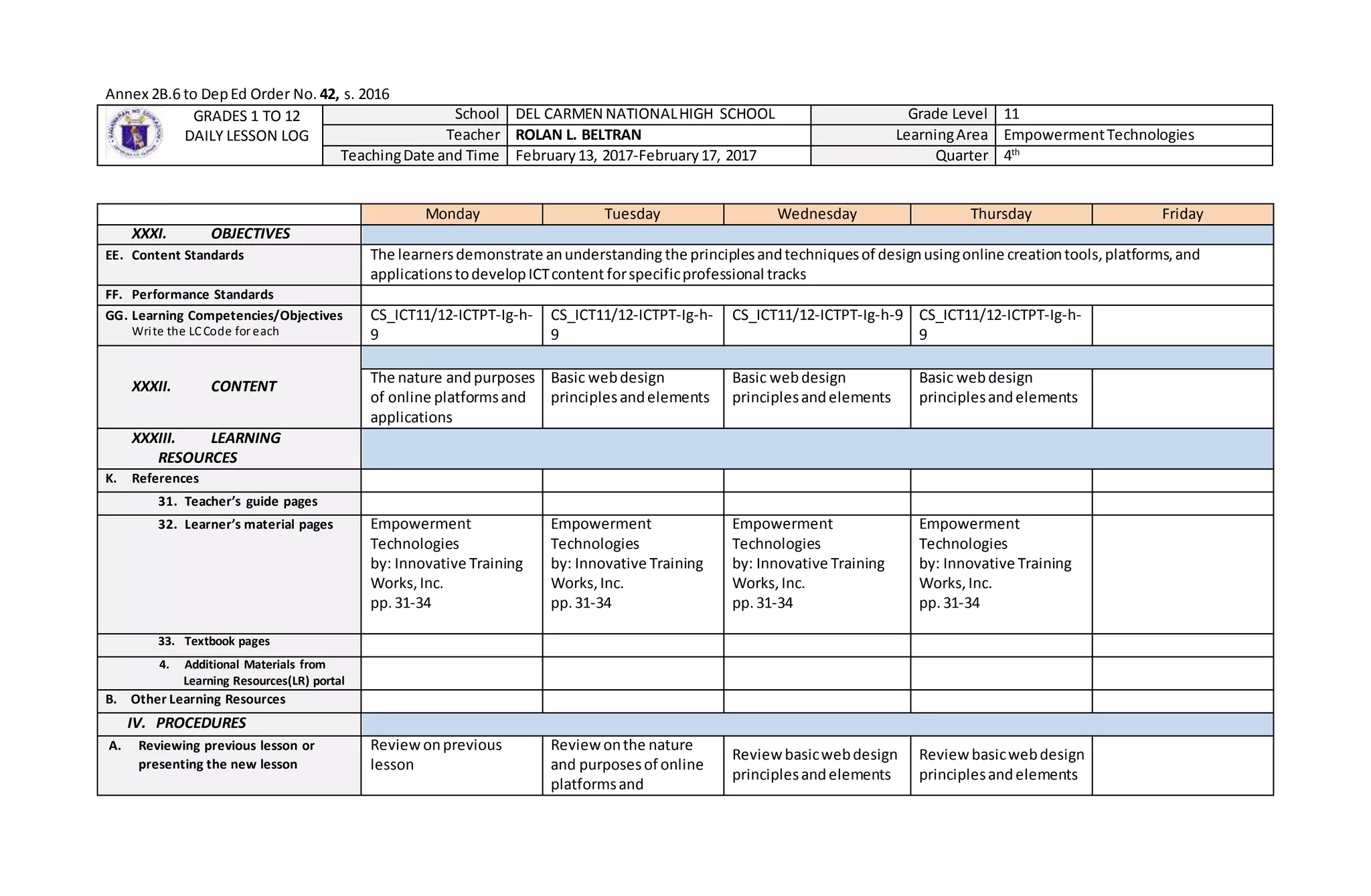
XXXI. OBJECTIVES
EE. Content Standards The learnersdemonstrate anunderstanding the principlesandtechniquesof designusingonline creationtools,platforms,and
applicationstodevelopICTcontent forspecificprofessional tracks
FF. Performance Standards
GG. Learning Competencies/Objectives
Write the LCCode for each
CS_ICT11/12-ICTPT-Ig-h-
9
CS_ICT11/12-ICTPT-Ig-h-
9
CS_ICT11/12-ICTPT-Ig-h-9 CS_ICT11/12-ICTPT-Ig-h-
9
XXXII. CONTENT
The nature andpurposes
of online platformsand
applications
Basic webdesign
principlesandelements
Basic webdesign
principlesandelements
Basic webdesign
principlesandelements
XXXIII. LEARNING
RESOURCES
K. References
31. Teacher’s guide pages
32. Learner’s material pages Empowerment
Technologies
by: Innovative Training
Works,Inc.
pp. 31-34
Empowerment
Technologies
by: Innovative Training
Works,Inc.
pp.31-34
Empowerment
Technologies
by: Innovative Training
Works,Inc.
pp.31-34
Empowerment
Technologies
by: Innovative Training
Works,Inc.
pp.31-34
33. Textbook pages
4. Additional Materials from
Learning Resources(LR) portal
B. Other Learning Resources
IV. PROCEDURES
A. Reviewing previous lesson or
presenting the new lesson
Review onprevious
lesson
Reviewonthe nature
and purposesof online
platformsand
Reviewbasicwebdesign
principlesandelements
Reviewbasicwebdesign
principlesandelements
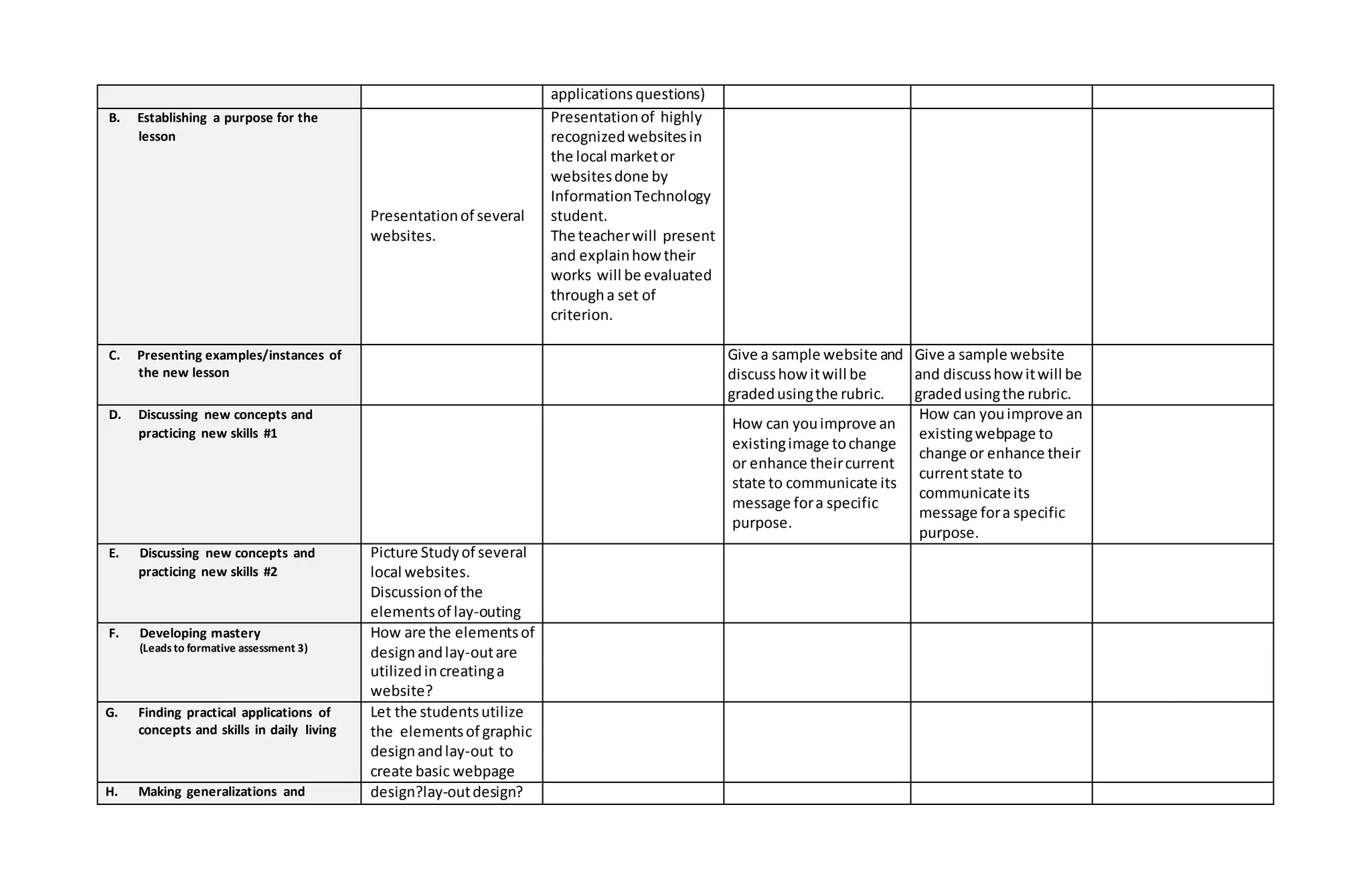
applications questions)
B. Establishing a purpose for the
lesson
Presentationof several
websites.
Presentationof highly
recognizedwebsitesin
the local marketor
websitesdone by
InformationTechnology
student.
The teacherwill present
and explainhowtheir
works will be evaluated
througha set of
criterion.
C. Presenting examples/instances of
the new lesson
Give a sample website and
discusshowitwill be
gradedusingthe rubric.
Give a sample website
and discusshowitwill be
gradedusingthe rubric.
D. Discussing new concepts and
practicing new skills #1
How can youimprove an
existingimage tochange
or enhance theircurrent
state to communicate its
message fora specific
purpose.
How can youimprove an
existingwebpage to
change or enhance their
currentstate to
communicate its
message fora specific
purpose.
E. Discussing new concepts and
practicing new skills #2
Picture Studyof several
local websites.
Discussionof the
elementsof lay-outing
F. Developing mastery
(Leadsto formative assessment 3)
How are the elementsof
designandlay-outare
utilizedincreatinga
website?
G. Finding practical applications of
concepts and skills in daily living
Let the studentsutilize
the elementsof graphic
designandlay-out to
create basic webpage
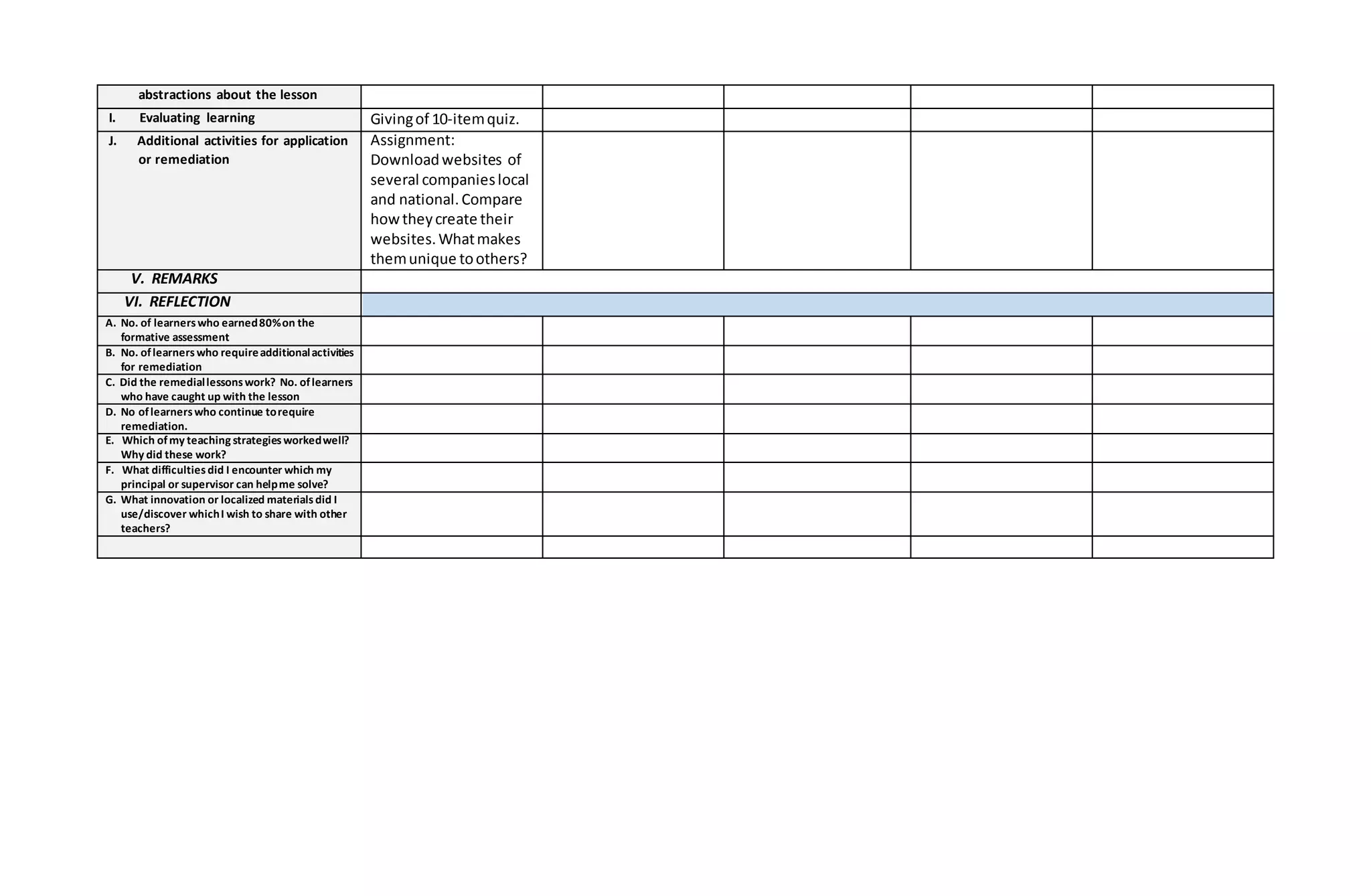
H. Making generalizations and design?lay-outdesign?
abstractions about the lesson
I. Evaluating learning Givingof 10-itemquiz.
J. Additional activities for application
or remediation
Assignment:
Downloadwebsites of
several companieslocal
and national.Compare
howtheycreate their
websites.Whatmakes
themunique toothers?
V. REMARKS
VI. REFLECTION
A. No. of learnerswho earned80%on the
formative assessment
B. No. oflearnerswho requireadditionalactivities
for remediation
C. Did the remediallessonswork? No. oflearners
who have caught up with the lesson
D. No oflearnerswho continue torequire
remediation.
E. Which ofmy teaching strategiesworkedwell?
Why did these work?
F. What difficultiesdid I encounter which my
principal or supervisor can helpme solve?
G. What innovation or localized materialsdid I
use/discover whichI wish to share with other
teachers?
Annex 2B.6 to DepEd Order No. 42, s. 2016
GRADES 1 TO 12
DAILY LESSON LOG
School DEL CARMEN NATIONALHIGH SCHOOL Grade Level 11
Teacher ROLAN L. BELTRAN LearningArea EmpowermentTechnologies
TeachingDate and Time February20, 2017-February24, 2017 Quarter 4th
Monday Tuesday Wednesday Thursday Friday
XXXIV. OBJECTIVES
HH. Content Standards The learner demonstrate an understanding the principles and techniques of design using online creation tools, platforms, and applications
to develop ICT content for specific professional tracks.
II. Performance Standards The learner shall beableto independently apply the principles and techniques of design usingonlinecreation tools,platfor ms,and applicationsto
create original or derivativeICTcontent for use in specific professional tracks.
JJ. Learning Competencies/Objectives
Write the LCCode for each
CS_ICT11/12-ICTPT-Ig-h-
11
CS_ICT11/12-ICTPT-Ig-h-
11
CS_ICT11/12-ICTPT-Ig-h-
11
Preparation for
Foundation Day
Foundation Day
XXXV. CONTENT
Workingwith
Prezi/Slideshare
Working with
Google drive/Google
Map
Working with Google
drive/Google Map
XXXVI. LEARNING
RESOURCES
L. References
34. Teacher’s guide pages
35. Learner’s material pages
36. Textbook pages Empowerment
Technologiesby
Innovative Training
Works,Inc. pp.34-40
Empowerment
Technologiesby
Innovative Training
Works,Inc. pp.34-40
Empowerment
Technologiesby
Innovative Training
Works,Inc. pp.34-40
4. Additional Materials from
Learning Resources(LR) portal
B. Other Learning Resources
IV. PROCEDURES
A. Reviewing previous lesson or
presenting the new lesson
Presentthe activityto
the learners
Presentthe activityto
the learners
Presentthe activitytothe
learners
B. Establishing a purpose for the
lesson
C. Presenting examples/instances of
the new lesson
D. Discussing new concepts and
practicing new skills #1
Sudentswill create a
presentationusing
Prezi/Slideshare
Studentswill uploada
file toGoogle drive and
explore Google map.
Studentswill uploadafile
to Google drive and
explore Google map.
E. Discussing new concepts and
practicing new skills #2
F. Developing mastery
(Leadsto formative assessment 3)
Do the activity Do the activity Do the activity
G. Finding practical applications of
concepts and skills in daily living
H. Making generalizations and
abstractions about the lesson
Studentswill explain
howtheyaccomplished
theiractivity
Studentswill explain
howtheyaccomplished
theiractivity
Studentswill explainhow
theyaccomplishedtheir
activity
I. Evaluating learning Grade theiractivityusing
rubric
Grade theiractivityusing
rubric
Grade theiractivityusing
rubric
J. Additional activities for application
or remediation
Take home exercises Take home exercises Take home exercises
V. REMARKS
VI. REFLECTION
A. No. of learnerswho earned80%on the
formative assessment
B. No. oflearnerswho requireadditionalactivities
for remediation
C. Did the remediallessonswork? No. oflearners
who have caught up with the lesson
D. No oflearnerswho continue torequire
remediation.
E. Which ofmy teaching strategiesworkedwell?
Why did these work?
F. What difficultiesdid I encounter which my
principal or supervisor can helpme solve?
G. What innovation or localized materialsdid I
use/discover whichI wish to share with other
teachers?
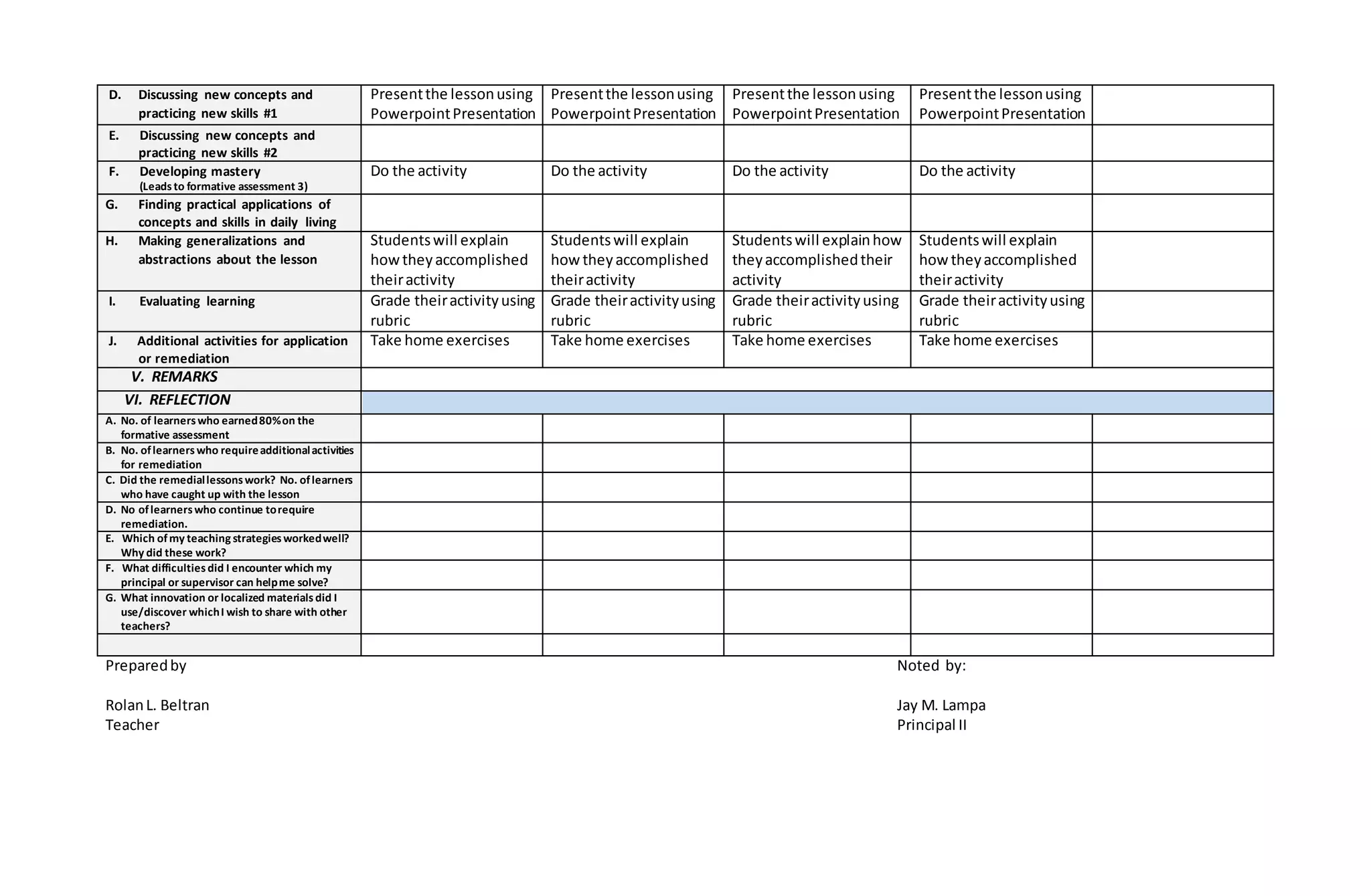
Preparedby Noted by:
RolanL. Beltran Jay M. Lampa
Teacher Principal II
Annex 2B.6 to DepEd Order No. 42, s. 2016
GRADES 1 TO 12
DAILY LESSON LOG
School DEL CARMEN NATIONALHIGH SCHOOL Grade Level 11
Teacher ROLAN L. BELTRAN LearningArea EmpowermentTechnologies
TeachingDate and Time February27, 2017-March 03, 2017 Quarter 4th
Monday Tuesday Wednesday Thursday Friday
XXXVII. OBJECTIVES
KK. Content Standards The learner demonstrate an understanding the principles and techniques of design using online creation tools, platforms, and applications
to develop ICT content for specific professional tracks.
LL. Performance Standards The learner shall beableto independently apply the principles and techniques of design usingonlinecreation tools,platfor ms,and applicationsto
create original or derivativeICTcontent for use in specific professional tracks.
MM. Learning
Competencies/Objectives
Write the LCCode for each
CS_ICT11/12-ICTPT-Ig-h-
11
CS_ICT11/12-ICTPT-Ig-h-
11
NAT CS_ICT11/12-ICTPT-Ig-h-
11
CS_ICT11/12-ICTPT-Ig-h-
11
XXXVIII. CONTENT
Stepby stepprocedure
indesigningwebsite
usingMicrosoftWord
Savingdocumentsas
html file
Stepby stepprocedure
indesigningwebsite
usingMicrosoftWord
Savingdocumentsas
html file
Stepby stepprocedure
inuploadinghtml file to
a webhostingsite
Stepby stepprocedure
inuploadinghtml file to
a webhostingsite
XXXIX. LEARNING
RESOURCES
M. References
37. Teacher’s guide pages
38. Learner’s material pages
39. Textbook pages Empowerment
Technologiesby
Innovative Training
Works,Inc. pp.34-40
Empowerment
Technologiesby
Innovative Training
Works,Inc. pp.34-40
Empowerment
Technologiesby
Innovative Training
Works,Inc. pp.34-40
Empowerment
Technologiesby
Innovative Training
Works,Inc. pp.34-40
4. Additional Materials from
Learning Resources(LR) portal
B. Other Learning Resources
IV. PROCEDURES
A. Reviewing previous lesson or
presenting the new lesson
Presentthe activityto
the learners
Presentthe activity to
the learners
Presentthe activityto
the learners
Presentthe activityto
the learners
B. Establishing a purpose for the
lesson
C. Presenting examples/instances of
the new lesson
D. Discussing new concepts and
practicing new skills #1
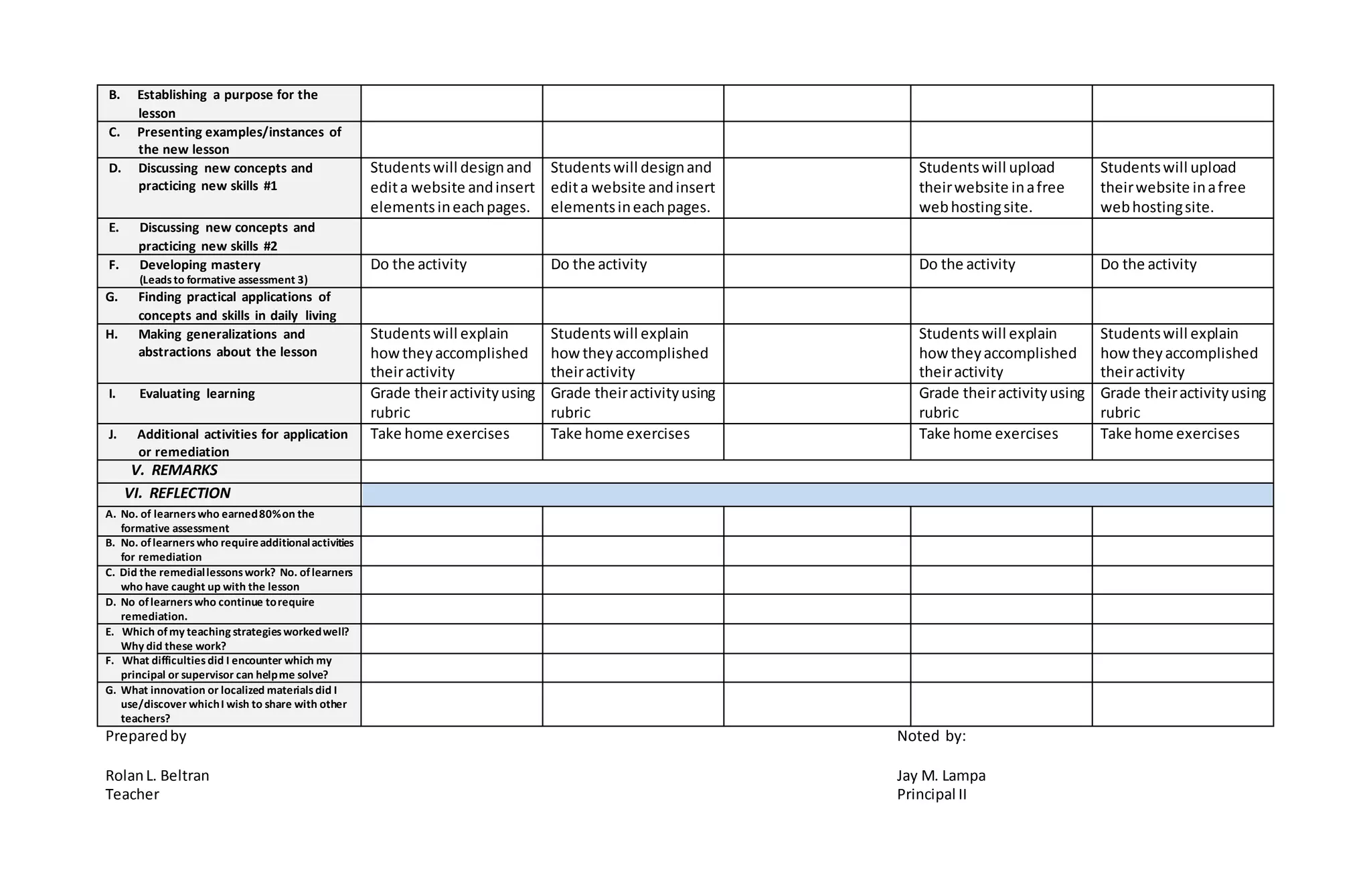
Studentswill designand
edita website andinsert
elementsineachpages.
Studentswill designand
edita website andinsert
elementsineachpages.
Studentswill upload
theirwebsite inafree
webhostingsite.
Studentswill upload
theirwebsite inafree
webhostingsite.
E. Discussing new concepts and
practicing new skills #2
F. Developing mastery
(Leadsto formative assessment 3)
Do the activity Do the activity Do the activity Do the activity
G. Finding practical applications of
concepts and skills in daily living
H. Making generalizations and
abstractions about the lesson
Studentswill explain
howtheyaccomplished
theiractivity
Studentswill explain
howtheyaccomplished
theiractivity
Studentswill explain
howtheyaccomplished
theiractivity
Studentswill explain
howtheyaccomplished
theiractivity
I. Evaluating learning Grade theiractivityusing
rubric
Grade theiractivityusing
rubric
Grade theiractivityusing
rubric
Grade theiractivityusing
rubric
J. Additional activities for application
or remediation
Take home exercises Take home exercises Take home exercises Take home exercises
V. REMARKS
VI. REFLECTION
A. No. of learnerswho earned80%on the
formative assessment
B. No. oflearnerswho requireadditionalactivities
for remediation
C. Did the remediallessonswork? No. oflearners
who have caught up with the lesson
D. No oflearnerswho continue torequire
remediation.
E. Which ofmy teaching strategiesworkedwell?
Why did these work?
F. What difficultiesdid I encounter which my
principal or supervisor can helpme solve?
G. What innovation or localized materialsdid I
use/discover whichI wish to share with other
teachers?
Preparedby Noted by:
RolanL. Beltran Jay M. Lampa
Teacher Principal II
Annex 2B.6 to DepEd Order No. 42, s. 2016
GRADES 1 TO 12
DAILY LESSON LOG
School DEL CARMEN NATIONALHIGH SCHOOL Grade Level 11
Teacher ROLAN L. BELTRAN LearningArea EmpowermentTechnologies
TeachingDate and Time March 06, 2017-March 10, 2017 Quarter 4th
Monday Tuesday Wednesday Thursday Friday
XL. OBJECTIVES
NN. Content Standards The learner demonstrate an understanding of the key learnings from the previous weeks, which they will synthesize into an integrated
ICT content through collaboration with classmate and teacher as both peer and partner.
OO. Performance Standards The learners collaboratively develop an onlineportal or website to showcaseand shareexistingand previously developed content These may be in
the form of, but not limited to: 1. Onlinenewsletter 2. Blog 3. Issu u online“magazine
PP. Learning Competencies/Objectives
Write the LCCode for each
CS_ICT11/12-ICTPT-Ii-j-
12
CS_ICT11/12-ICTPT-Ii-j-
12
CS_ICT11/12-ICTPT-Ii-j-12 CS_ICT11/12-ICTPT-Ii-j-
12
XLI.CONTENT Team structure and
dynamicsforICT content
Online collaborative
toolsand processes
Projectmanagementfor
ICT content
Curatingexistingcontent
for use onthe web
XLII. LEARNING
RESOURCES
N. References
40. Teacher’s guide pages
41. Learner’s material pages
42. Textbook pages Empowerment
Technologiesby
Innovative Training
Works, Inc. pp.36-42
Empowerment
Technologiesby
Innovative Training
Works, Inc. pp. 36-42
Empowerment
Technologiesby
Innovative Training
Works,Inc. pp.36-42
Empowerment
Technologiesby
Innovative Training
Works,Inc. pp.36-42
4. Additional Materials from
Learning Resources(LR) portal
B. Other Learning Resources
IV. PROCEDURES
A. Reviewing previous lesson or
presenting the new lesson
Recapitulate Previous
Lessons
Recapitulate Previous
Lessons
Recapitulate Previous
Lessons
Recapitulate Previous
Lessons
B. Establishing a purpose for the
lesson
Presentthe activityto
the learners
Presentthe activityto
the learners
Presentthe activitytothe
learners
Presentthe activityto
the learners
C. Presenting examples/instances of
the new lesson
D. Discussing new concepts and
practicing new skills #1
Presentthe lessonusing
PowerpointPresentation
Presentthe lessonusing
PowerpointPresentation
Presentthe lessonusing
PowerpointPresentation
Presentthe lessonusing
PowerpointPresentation
E. Discussing new concepts and
practicing new skills #2
F. Developing mastery
(Leadsto formative assessment 3)
Do the activity Do the activity Do the activity Do the activity
G. Finding practical applications of
concepts and skills in daily living
H. Making generalizations and
abstractions about the lesson
Studentswill explain
howtheyaccomplished
theiractivity
Studentswill explain
howtheyaccomplished
theiractivity
Studentswill explainhow
theyaccomplishedtheir
activity
Studentswill explain
howtheyaccomplished
theiractivity
I. Evaluating learning Grade theiractivityusing
rubric
Grade theiractivityusing
rubric
Grade theiractivityusing
rubric
Grade theiractivityusing
rubric
J. Additional activities for application
or remediation
Take home exercises Take home exercises Take home exercises Take home exercises
V. REMARKS
VI. REFLECTION
A. No. of learnerswho earned80%on the
formative assessment
B. No. oflearnerswho requireadditionalactivities
for remediation
C. Did the remediallessonswork? No. oflearners
who have caught up with the lesson
D. No oflearnerswho continue torequire
remediation.
E. Which ofmy teaching strategiesworkedwell?
Why did these work?
F. What difficultiesdid I encounter which my
principal or supervisor can helpme solve?
G. What innovation or localized materialsdid I
use/discover whichI wish to share with other
teachers?
Preparedby Noted by:
RolanL. Beltran Jay M. Lampa
Teacher Principal II

Dll_empowerment_technologies.docx

  • 1.
    Annex 2B.6 toDep Ed Order No. 42, s. 2016 GRADES 1 TO 12 DAILY LESSON LOG School DEL CARMEN NATIONALHIGH SCHOOL Grade Level 11 Teacher ROLAN L. BELTRAN LearningArea EmpowermentTechnologies TeachingDate and Time November14-18, 2016 Quarter 3rd Monday Tuesday Wednesday Thursday Friday I. OBJECTIVES A. Content Standards The learnersdemonstrate anunderstandingof:ICTinthe contextof global communicationforspecificprofessionaltrack B. Performance Standards The learnersshall be able to:at the endof the 2-weekperiodindependentlycompose aninsightfulreflectionpaperonthe nature of ICT inthe contextof theirlives,society,andprofessional tracks(Arts,TechVoc,Sports,Academic) C. Learning Competencies/Objectives Write the LCCode for each CS_ICT11/12-ICTPT-Ia-b- 1 CS_ICT11/12-ICTPT-Ia-b- 1 CS_ICT11/12-ICTPT-Ia-b-1 CS_ICT11/12-ICTPT-Ia-b- 1 II. CONTENT The current state of ICT technologies(i.e.,Web 2.0, 3.0, convergent technologies,social, mobile,and assistive media) The current state of ICT technologies (i.e., Web 2.0, 3.0, convergent technologies, social, mobile, and assistive media) The current state of ICT technologies (i.e., Web 2.0, 3.0, convergent technologies, social, mobile, and assistive media) The current state of ICT technologies(i.e.,Web 2.0, 3.0, convergent technologies,social, mobile,andassistive media) Cluster Technolympics 2016 III. LEARNING RESOURCES A. References 1. Teacher’s guide pages 2. Learner’s material pages What is Information and Communications Technology (ICT)? pp: 3-7 What is Information and Communications Technology (ICT)? pp: 3-7 What isInformationand Communications Technology(ICT)? pp: 3-7 What isInformationand Communications Technology(ICT)? pp: 3-7 3. Textbook pages 4. Additional Materials from Learning Resources(LR) portal B. Other Learning Resources IV. PROCEDURES A. Reviewing previous lesson or presenting the new lesson Recapitulate previous discussion Recapitulate previous discussion Recapitulate previous discussion B. Establishing a purpose for the Orientthe students
  • 2.
    lesson aboutthe importanceof knowingthe current state of ICT C. Presenting examples/instances of the new lesson Use powerpoint presentationin deliveringthe lesson Use powerpoint presentationin deliveringthe lesson Use powerpoint presentationindelivering the lesson Use powerpoint presentationin deliveringthe lesson D. Discussing new concepts and practicing new skills #1 E. Discussing new concepts and practicing new skills #2 F. Developing mastery (Leadsto formative assessment 3) G. Finding practical applications of concepts and skills in daily living H. Making generalizations and abstractions about the lesson I. Evaluating learning Questionandanswer Questionandanswer Questionandanswer Quiz J. Additional activities for application or remediation V. REMARKS VI. REFLECTION A. No. of learnerswho earned80%on the formative assessment B. No. oflearnerswho requireadditionalactivities for remediation C. Did the remediallessonswork? No. oflearners who have caught up with the lesson D. No oflearnerswho continue torequire remediation. E. Which ofmy teaching strategiesworkedwell? Why did these work? F. What difficultiesdid I encounter which my principal or supervisor can helpme solve? G. What innovation or localized materialsdid I use/discover whichI wish to share with other teachers?
  • 3.
    Annex 2B.6 toDepEd Order No. 42, s. 2016 GRADES 1 TO 12 DAILY LESSON LOG School DEL CARMEN NATIONALHIGH SCHOOL Grade Level 11 Teacher ROLAN L. BELTRAN LearningArea EmpowermentTechnologies TeachingDate and Time November21-25, 2016 Quarter 3rd Monday Tuesday Wednesday Thursday Friday IV. OBJECTIVES D. Content Standards The learnersdemonstrate anunderstandingof:ICTinthe contextof global communicationforspecificprofessionaltrack E. Performance Standards The learnersshall be able to:at the endof the 2-weekperiodindependentlycompose aninsightfulreflectionpaperonthe nature of ICT inthe contextof theirlives,society,andprofessional tracks(Arts,TechVoc,Sports,Academic) F. Learning Competencies/Objectives Write the LCCode for each CS_ICT11/12-ICTPT-Ia-b- 1 CS_ICT11/12-ICTPT-Ia-b- 1 CS_ICT11/12-ICTPT-Ia-b-1 CS_ICT11/12-ICTPT-Ia-b- 1 CS_ICT11/12-ICTPT-Ia-b- 1 V. CONTENT Online systems, functions,andplatforms Online systems, functions,and platforms Online systems, functions, and platforms Online systems, functions,andplatforms Online systems, functions, and platforms VI. LEARNING RESOURCES B. References 4. Teacher’s guide pages 5. Learner’s material pages What is Information and Communications Technology (ICT)? pp: 3-7 What is Information and Communications Technology (ICT)? pp: 3-7 What isInformationand Communications Technology(ICT)? pp: 3-7 What isInformationand Communications Technology(ICT)? pp: 3-7 What isInformationand Communications Technology(ICT)? pp: 3-7 6. Textbook pages 4. Additional Materials from Learning Resources(LR) portal B. Other Learning Resources IV. PROCEDURES A. Reviewing previous lesson or presenting the new lesson Recapitulate previous discussion Recapitulate previous discussion Recapitulate previous discussion B. Establishing a purpose for the lesson Give a brief background aboutthe functionsof online systems, functions,andplatforms C. Presenting examples/instances of Use powerpoint Use powerpoint Use powerpoint Use powerpoint Use powerpoint
  • 4.
    the new lessonpresentationin deliveringthe lesson presentationin deliveringthe lesson presentationindelivering the lesson presentationin deliveringthe lesson presentationin deliveringthe lesson D. Discussing new concepts and practicing new skills #1 E. Discussing new concepts and practicing new skills #2 F. Developing mastery (Leadsto formative assessment 3) G. Finding practical applications of concepts and skills in daily living H. Making generalizations and abstractions about the lesson I. Evaluating learning Questionandanswer Questionandanswer Questionandanswer Questionandanswer Quiz J. Additional activities for application or remediation V. REMARKS VI. REFLECTION A. No. of learnerswho earned80%on the formative assessment B. No. oflearnerswho requireadditionalactivities for remediation C. Did the remediallessonswork? No. oflearners who have caught up with the lesson D. No oflearnerswho continue torequire remediation. E. Which ofmy teaching strategiesworkedwell? Why did these work? F. What difficultiesdid I encounter which my principal or supervisor can helpme solve? G. What innovation or localized materialsdid I use/discover whichI wish to share with other teachers?
  • 5.
    Annex 2B.6 toDepEd Order No. 42, s. 2016 GRADES 1 TO 12 DAILY LESSON LOG School DEL CARMEN NATIONALHIGH SCHOOL Grade Level 11 Teacher ROLAN L. BELTRAN LearningArea EmpowermentTechnologies TeachingDate and Time November28-December02, 2016 Quarter 3rd Monday Tuesday Wednesday Thursday Friday VII. OBJECTIVES G. Content Standards The learnersdemonstrate anunderstandingof:ICTinthe contextof global communicationforspecificprofessionaltrack H. Performance Standards The learnersshall be able to:at the endof the 2-weekperiodindependentlycompose aninsightfulreflectionpaperonthe nature of ICT inthe contextof theirlives,society,andprofessional tracks(Arts,TechVoc,Sports,Academic) I. Learning Competencies/Objectives Write the LCCode for each CS_ICT11/12-ICTPT-Ia-b- 2 CS_ICT11/12-ICTPT-Ia-b- 2 CS_ICT11/12-ICTPT-Ia-b-2 CS_ICT11/12-ICTPT-Ia-b- 2 CS_ICT11/12-ICTPT-Ia-b- 2 VIII. CONTENT Online safety,security, ethics,andetiquette Online safety, security, ethics, and etiquette No Classes Online safety,security, ethics,andetiquette Division Technolympics IX. LEARNING RESOURCES C. References 7. Teacher’s guide pages 8. Learner’s material pages Online safety, security, ethics, and etiquette Pp: 8-12 Online safety, security, ethics, and etiquette Pp: 8-12 Online safety, security, ethics, and etiquette Pp: 8-12 9. Textbook pages 4. Additional Materials from Learning Resources(LR) portal B. Other Learning Resources IV. PROCEDURES A. Reviewing previous lesson or presenting the new lesson Recapitulate previous discussion Recapitulate previous discussion Recapitulate previous discussion B. Establishing a purpose for the lesson Ensure students appreciationof online safety,security, ethics, and etiquette C. Presenting examples/instances of the new lesson Use powerpoint presentationin Use powerpoint presentationin Use powerpoint presentationin
  • 6.
    deliveringthe lesson deliveringthelesson deliveringthe lesson D. Discussing new concepts and practicing new skills #1 E. Discussing new concepts and practicing new skills #2 F. Developing mastery (Leadsto formative assessment 3) G. Finding practical applications of concepts and skills in daily living H. Making generalizations and abstractions about the lesson I. Evaluating learning Questionandanswer Questionandanswer Questionandanswer Quiz J. Additional activities for application or remediation V. REMARKS VI. REFLECTION A. No. of learnerswho earned80%on the formative assessment B. No. oflearnerswho requireadditionalactivities for remediation C. Did the remediallessonswork? No. oflearners who have caught up with the lesson D. No oflearnerswho continue torequire remediation. E. Which ofmy teaching strategiesworkedwell? Why did these work? F. What difficultiesdid I encounter which my principal or supervisor can helpme solve? G. What innovation or localized materialsdid I use/discover whichI wish to share with other teachers?
  • 7.
    Annex 2B.6 toDepEd Order No. 42, s. 2016 GRADES 1 TO 12 DAILY LESSON LOG School DEL CARMEN NATIONALHIGH SCHOOL Grade Level 11 Teacher ROLAN L. BELTRAN LearningArea EmpowermentTechnologies TeachingDate and Time December05-09, 2016 Quarter 3rd Monday Tuesday Wednesday Thursday Friday X. OBJECTIVES J. Content Standards The learnersdemonstrate anunderstandingof:ICTinthe contextof global communicationforspecific professionaltrack K. Performance Standards The learnersshall be able to:at the endof the 2-weekperiodindependentlycompose aninsightfulreflectionpaperonthe nature of ICT inthe contextof theirlives,society,andprofessional tracks(Arts,TechVoc,Sports,Academic) L. Learning Competencies/Objectives Write the LCCode for each CS_ICT11/12-ICTPT-Ia-b- 3 CS_ICT11/12-ICTPT-Ia-b- 3 CS_ICT11/12-ICTPT-Ia-b-3 CS_ICT11/12-ICTPT-Ia-b- 3 CS_ICT11/12-ICTPT-Ia-b- 3 XI. CONTENT Contextualizedonline searchand research skills Contextualizedonline searchand research skills Contextualizedonline searchand researchskills Contextualizedonline searchand research skills Contextualizedonline searchand research skills XII. LEARNING RESOURCES D. References 10. Teacher’s guide pages 11. Learner’s material pages Contextualizedonline searchand research skills pp: 16-21 Contextualizedonline searchand research skills pp: 16-21 Contextualizedonline searchand research skills pp: 16-21 Contextualizedonline searchand research skills pp: 16-21 Contextualizedonline searchand research skills pp: 16-21 12. Textbook pages 4. Additional Materials from Learning Resources(LR) portal B. Other Learning Resources IV. PROCEDURES A. Reviewing previous lesson or presenting the new lesson Recapitulate previous discussion Recapitulate previous discussion Recapitulate previous discussion Recapitulate previous discussion Recapitulate previous discussion B. Establishing a purpose for the lesson Orientthe students aboutthe importance of contextualizedonline searchand research
  • 8.
    skills C. Presenting examples/instancesof the new lesson Opendiscussion Opendiscussion Opendiscussion Opendiscussion Opendiscussion D. Discussing new concepts and practicing new skills #1 E. Discussing new concepts and practicing new skills #2 F. Developing mastery (Leadsto formative assessment 3) G. Finding practical applications of concepts and skills in daily living H. Making generalizations and abstractions about the lesson I. Evaluating learning Questionandanswer Questionandanswer Questionandanswer Questionandanswer Quiz J. Additional activities for application or remediation V. REMARKS VI. REFLECTION A. No. of learnerswho earned80%on the formative assessment B. No. oflearnerswho requireadditionalactivities for remediation C. Did the remediallessonswork? No. oflearners who have caught up with the lesson D. No oflearnerswho continue torequire remediation. E. Which ofmy teaching strategiesworkedwell? Why did these work? F. What difficultiesdid I encounter which my principal or supervisor can helpme solve? G. What innovation or localized materialsdid I use/discover whichI wish to share with other teachers?
  • 9.
    Annex 2B.6 toDepEd Order No. 42, s. 2016 GRADES 1 TO 12 DAILY LESSON LOG School DEL CARMEN NATIONALHIGH SCHOOL Grade Level 11 Teacher ROLAN L. BELTRAN LearningArea EmpowermentTechnologies TeachingDate and Time January03-06, 2017 Quarter 3rd Monday Tuesday Wednesday Thursday Friday XIII.OBJECTIVES M. Content Standards The learnersdemonstrate anunderstandingof the use of advancedtoolsandtechniquesfoundincommonproductivityandsoftware applicationsindevelopingICTcontentforspecific professional tracks. N. Performance Standards Ther learnersusescommonproductivitytoolseffectivelybymaximizingadvancedapplicationtechniques. O. Learning Competencies/Objectives Write the LCCode for each CS_ICT11/12-ICTPT-Ic-d- 4 CS_ICT11/12-ICTPT-Ic-d-4 CS_ICT11/12-ICTPT-Ic-d- 4 CS_ICT11/12-ICTPT-Ic-d- 4 XIV. CONTENT Mail Merge - Advanced Word ProcessingSkill IntegratingImagesand External Materialsin Word Processors CustomAnimationsand TiminginPowerPoint Presentations Hyperlinkingin PowerPoint Presentations XV. LEARNING RESOURCES E. References 13. Teacher’s guide pages 14. Learner’s material pages Empowerment Technologies pp.22-25 Empowerment Technologies pp.22-25 Empowerment Technologies pp.22-25 Empowerment Technologies pp.22-25 Empowerment Technologies pp.22-25 15. Textbook pages 4. Additional Materials from Learning Resources(LR) portal B. Other Learning Resources IV. PROCEDURES A. Reviewing previous lesson or presenting the new lesson Askthe studentsthe differentwaysin conductingonline research.discussion Askthe studentsthe processof creatingmail merge. Askthe studentsthe stepsinintegrating imagesandexternal materials. Askthe studentsthe importance of wraptext and timingeffects. B. Establishing a purpose for the lesson Let the studentsmake an invitationletterand challenge themif they Presentdifferentdesigns and art worksthensolicit theirideasonhowto Let the classviewan automaticslideshowof theirindividual pictures Let the classviewa slideshowlinktoamovie clipand explore their
  • 10.
    can generate 50letters by themselvesinjust5 minutes create such designs. and solicittheirideason the usedsoftware. ideasonthe used application. C. Presenting examples/instances of the new lesson 1. Introduce mail merge. 2. Discussthe functions of a mail merge. 3. Identifythe componentsof a mail merge. 1. Intoduce textwrapping options. 2. Discussthe different textwrappingoptions. 3. Wrap textimagesand external materials to documents. 1. Introduce custom animationsandtiming effects 2. Discusshow to use customanimationsand timingeffects. 3. Add custom animationsandtiming effectstoPowerPoint presentations. 1. Introduce the hyperlinkfeature. 2. Discussthe importance of hyperlink. 3. Utilize hyperlinkin PowerPoint presentations. D. Discussing new concepts and practicing new skills #1 Demonstrate the mail merge process Demonstrate the effects of the differenttext wrappingoptions. Demonstrate howtoadd animationsandtiming effects. Demonstrate howto utilize hyperlinkto PowerPoint presentations. E. Discussing new concepts and practicing new skills #2 F. Developing mastery (Leadsto formative assessment 3) Let the studentsperform the mail merge process. Let the studentsadd differentanimationsand timingeffects. G. Finding practical applications of concepts and skills in daily living H. Making generalizations and abstractions about the lesson I. Evaluating learning Questionand answer/Demonstration Questionandanswer Questionand answer/Demonstration Quiz J. Additional activities for application or remediation V. REMARKS VI. REFLECTION A. No. of learnerswho earned80%on the formative assessment B. No. oflearnerswho requireadditionalactivities for remediation C. Did the remediallessonswork? No. oflearners who have caught up with the lesson
  • 11.
    D. No oflearnerswhocontinue torequire remediation. E. Which ofmy teaching strategiesworkedwell? Why did these work? F. What difficultiesdid I encounter which my principal or supervisor can helpme solve? G. What innovation or localized materialsdid I use/discover whichI wish to share with other teachers?
  • 12.
    Annex 2B.6 toDepEd Order No. 42, s. 2016 GRADES 1 TO 12 DAILY LESSON LOG School DEL CARMEN NATIONALHIGH SCHOOL Grade Level 11 Teacher ROLAN L. BELTRAN LearningArea EmpowermentTechnologies TeachingDate and Time January09-13, 2017 Quarter 3rd Monday Tuesday Wednesday Thursday Friday XVI. OBJECTIVES P. Content Standards The learners demonstrate anunderstandingof the use of advancedtoolsandtechniquesfoundincommonproductivityandsoftware applicationsindevelopingICTcontentforspecificprofessional tracks. Q. Performance Standards Ther learnersusescommonproductivitytools effectivelybymaximizingadvancedapplicationtechniques. R. Learning Competencies/Objectives Write the LCCode for each CS_ICT11/12-ICTPT-Ic-d- 5 CS_ICT11/12-ICTPT-Ic-d- 5 XVII. CONTENT ADVANCEDAND COMPLEX FORMULAS ANDCOMPUTATIONS EMBEDDED FILES AND DATA Hands-On Hands-On Hands-On XVIII. LEARNING RESOURCES F. References 16. Teacher’s guide pages 17. Learner’s material pages Empowerment Technologies pp.22-25 Empowerment Technologies pp.22-25 18. Textbook pages 4. Additional Materials from Learning Resources(LR) portal B. Other Learning Resources http://www.excel- easy.com/introduction/for mulas-functions.html https://www.youtube.com /watch?v=Ukwu5xfMR3M http://www.gcflearnfree.or g/powerpoint2013/embed ding-an-excel-chart/1/ IV. PROCEDURES A. Reviewing previous lesson or presenting the new lesson Askthe learnersif they have useda Videopresentation aboutembeddingfiles
  • 13.
    spreadsheet.Didthey have difficultyindoing it? and data. B.Establishing a purpose for the lesson To make the gathering and processingof data easierintroduce to learnersthe use of formulasand computationsin electronicspreadsheets. C. Presenting examples/instances of the new lesson Powerpointpresentation aboutformulasand computationsin electronicspreadsheet Powerpointpresentation aboutembeddingan excel chart. D. Discussing new concepts and practicing new skills #1 Presentexamplesand ask the learnersto create theirown formulasand computationinan electronicspreadsheet. E. Discussing new concepts and practicing new skills #2 F. Developing mastery (Leadsto formative assessment 3) G. Finding practical applications of concepts and skills in daily living H. Making generalizations and abstractions about the lesson I. Evaluating learning J. Additional activities for application or remediation V. REMARKS VI. REFLECTION A. No. of learnerswho earned80%on the formative assessment B. No. oflearnerswho requireadditionalactivities for remediation C. Did the remediallessonswork? No. oflearners
  • 14.
    who have caughtup with the lesson D. No oflearnerswho continue torequire remediation. E. Which ofmy teaching strategiesworkedwell? Why did these work? F. What difficultiesdid I encounter which my principal or supervisor can helpme solve? G. What innovation or localized materialsdid I use/discover whichI wish to share with other teachers?
  • 15.
    Annex 2B.6 toDepEd Order No. 42, s. 2016 GRADES 1 TO 12 DAILY LESSON LOG School DEL CARMEN NATIONALHIGH SCHOOL Grade Level 11 Teacher ROLAN L. BELTRAN LearningArea EmpowermentTechnologies TeachingDate and Time January16-20, 2017 Quarter 3rd Monday Tuesday Wednesday Thursday Friday XIX.OBJECTIVES S. Content Standards The learners demonstrate anunderstandingof the use of advancedtoolsandtechniquesfoundincommonproductivityandsoftware applicationsindevelopingICTcontentforspecificprofessional tracks. T. Performance Standards Ther learnersusescommonproductivitytoolseffectivelybymaximizingadvancedapplicationtechniques. U. Learning Competencies/Objectives Write the LCCode for each CS_ICT11/12-ICTPT-Ic-d- 5 CS_ICT11/12-ICTPT-Ic-d- 5 XX. CONTENT ADVANCEDAND COMPLEX FORMULAS ANDCOMPUTATIONS EMBEDDED FILES AND DATA Review PeriodicExamination PeriodicExamination XXI.LEARNING RESOURCES G. References 19. Teacher’s guide pages 20. Learner’s material pages Empowerment Technologies by: Innovative Training Works,Inc. pp.41-48 Empowerment Technologies by: Innovative Training Works,Inc. pp.49-58 21. Textbook pages 4. Additional Materials from Learning Resources(LR) portal B. Other Learning Resources http://www.excel- easy.com/introduction/for mulas-functions.html https://www.youtube.com /watch?v=Ukwu5xfMR3M http://www.gcflearnfree.or g/powerpoint2013/embed ding-an-excel-chart/1/ IV. PROCEDURES
  • 16.
    A. Reviewing previouslesson or presenting the new lesson Askthe learnersif they have useda spreadsheet.Didthey have difficultyindoing it? Videopresentation aboutembeddingfiles and data. B. Establishing a purpose for the lesson To make the gathering and processingof data easierintroduce to learnersthe use of formulasand computationsin electronicspreadsheets. C. Presenting examples/instances of the new lesson Powerpointpresentation aboutformulasand computationsin electronicspreadsheet Powerpointpresentation aboutembeddingan excel chart. D. Discussing new concepts and practicing new skills #1 Presentexamplesand ask the learnersto create theirown formulasand computationinan electronicspreadsheet. E. Discussing new concepts and practicing new skills #2 F. Developing mastery (Leadsto formative assessment 3) G. Finding practical applications of concepts and skills in daily living H. Making generalizations and abstractions about the lesson I. Evaluating learning J. Additional activities for application or remediation V. REMARKS VI. REFLECTION A. No. of learnerswho earned80%on the formative assessment
  • 17.
    B. No. oflearnerswhorequireadditionalactivities for remediation C. Did the remediallessonswork? No. oflearners who have caught up with the lesson D. No oflearnerswho continue torequire remediation. E. Which ofmy teaching strategiesworkedwell? Why did these work? F. What difficultiesdid I encounter which my principal or supervisor can helpme solve? G. What innovation or localized materialsdid I use/discover whichI wish to share with other teachers?
  • 18.
    Annex 2B.6 toDepEd Order No. 42, s. 2016 GRADES 1 TO 12 DAILY LESSON LOG School DEL CARMEN NATIONALHIGH SCHOOL Grade Level 11 Teacher ROLAN L. BELTRAN LearningArea EmpowermentTechnologies TeachingDate and Time January 23-27, 2017 Quarter 4th Monday Tuesday Wednesday Thursday Friday XXII. OBJECTIVES V. Content Standards W. Performance Standards X. Learning Competencies/Objectives Write the LCCode for each XXIII. CONTENT Checkingof TestPapers and ItemAnalysis Remediation Remediation Completionof Requirements Completionof Requirements XXIV. LEARNING RESOURCES H. References 22. Teacher’s guide pages 23. Learner’s material pages 24. Textbook pages 4. Additional Materials from Learning Resources(LR) portal B. Other Learning Resources IV. PROCEDURES A. Reviewing previous lesson or presenting the new lesson B. Establishing a purpose for the lesson C. Presenting examples/instances of the new lesson D. Discussing new concepts and practicing new skills #1 E. Discussing new concepts and practicing new skills #2 F. Developing mastery (Leadsto formative assessment 3)
  • 19.
    G. Finding practicalapplications of concepts and skills in daily living H. Making generalizations and abstractions about the lesson I. Evaluating learning J. Additional activities for application or remediation V. REMARKS VI. REFLECTION A. No. of learnerswho earned80%on the formative assessment B. No. oflearnerswho requireadditionalactivities for remediation C. Did the remediallessonswork? No. oflearners who have caught up with the lesson D. No oflearnerswho continue torequire remediation. E. Which ofmy teaching strategiesworkedwell? Why did these work? F. What difficultiesdid I encounter which my principal or supervisor can helpme solve? G. What innovation or localized materialsdid I use/discover whichI wish to share with other teachers?
  • 20.
    Annex 2B.6 toDepEd Order No. 42, s. 2016 GRADES 1 TO 12 DAILY LESSON LOG School DEL CARMEN NATIONALHIGH SCHOOL Grade Level 11 Teacher ROLAN L. BELTRAN LearningArea EmpowermentTechnologies TeachingDate and Time January30, 2017-February 03, 2017 Quarter 4th Monday Tuesday Wednesday Thursday Friday XXV. OBJECTIVES Y. Content Standards The learnersdemonstrate anunderstandingof howtomanipulate text,graphics, and images to create ICT content intended for an on- line environment. Z. Performance Standards The learners shall be able to independently apply the techniques of image manipulation and graphic design to create original or derivative ICT Content from existing images, text and graphics AA. Learning Competencies/Objectives Write the LCCode for each CS_ICT11/12-ICTPT-Ie-f-6 CS_ICT11/12-ICTPT-Ie-f-6 CS_ICT11/12-ICTPT-Ie-f-6 CS_ICT11/12-ICTPT-Ie-f-6 XXVI. CONTENT Imaging and Design for the On-Line Environment (Basic Principles of Graphic and Lay-out) Imaging and Design for the On-Line Environment (Basic Principles of Graphic and Lay-out) Principles of Visual Message Design Using Infographics. Principlesof Visual Message DesignUsing Infographics. XXVII. LEARNING RESOURCES I. References 25. Teacher’s guide pages 26. Learner’s material pages 27. Textbook pages 4. Additional Materials from Learning Resources(LR) portal B. Other Learning Resources IV. PROCEDURES A. Reviewing previous lesson or presenting the new lesson Reviewonprevious lesson Reviewonthe elements of designandlay-out (Provide guide questions) Reviewpastlesson Reviewpastlesson B. Establishing a purpose for the lesson Presentationof several websites. Presentationof highly recognizedwebsitesin Discussthe mechanics/ guidelinesinconducting Discussthe mechanics/ guidelinesinconducting
  • 21.
    the local marketor websitesdoneby InformationTechnology student. The teacherwill present and explainhowtheir works will be evaluated througha set of criterion. the group workincluding the rubric. the group workincluding the rubric. C. Presenting examples/instances of the new lesson 4 PICS1 WORD on the elementsof design( Basic Shapes,Color wheel) Give a sample image and discusshowitwill be gradedusingthe rubric. Give a sample image and discusshowitwill be gradedusingthe rubric. D. Discussing new concepts and practicing new skills #1 Discussthe elementsof designandlay-out. How can youimprove an existingimage tochange or enhance theircurrent state to communicate its message fora specific purpose. How can youimprove an existingimage tochange or enhance theircurrent state to communicate its message fora specific purpose. E. Discussing new concepts and practicing new skills #2 Picture Studyof several local websites. Discussionof the elementsof lay-outing F. Developing mastery (Leadsto formative assessment 3) How are the elementsof designandlay-outare utilizedincreatinga digital artwork? Studentswill workon theirgroupactivity. Studentswill workon theirgroupactivity. G. Finding practical applications of concepts and skills in daily living Let the studentsutilize the elementsof graphic designandlay-out to create basic digital artwork. H. Making generalizations and abstractions about the lesson What are the elements of graphicdesign?lay-out design?
  • 22.
    I. Evaluating learning Givingof10-itemquiz. Presentationof Group Outputs. J. Additional activities for application or remediation Assignment: Downloadwebsites of several companieslocal and national.Compare howtheycreate their websites.Whatmakes themunique toothers? Allowthe studentsto enhance theirwork/ designforthe School Exhibitof Outputs. V. REMARKS VI. REFLECTION A. No. of learnerswho earned80%on the formative assessment B. No. oflearnerswho requireadditionalactivities for remediation C. Did the remediallessonswork? No. oflearners who have caught up with the lesson D. No oflearnerswho continue torequire remediation. E. Which ofmy teaching strategiesworkedwell? Why did these work? F. What difficultiesdid I encounter which my principal or supervisor can helpme solve? G. What innovation or localized materialsdid I use/discover whichI wish to share with other teachers?
  • 23.
    Annex 2B.6 toDepEd Order No. 42, s. 2016 GRADES 1 TO 12 DAILY LESSON LOG School DEL CARMEN NATIONALHIGH SCHOOL Grade Level 11 Teacher ROLAN L. BELTRAN LearningArea EmpowermentTechnologies TeachingDate and Time February06, 2017-February10, 2017 Quarter 4th Monday Tuesday Wednesday Thursday Friday XXVIII. OBJECTIVES BB. Content Standards The learnersdemonstrate anunderstandingof howtomanipulate text,graphics,andimagestocreate ICcontentintendedforanonline environment. CC. Performance Standards The learnersshall be able toapplythe techniquesof image manipulatingandgraphicdesigntocreate original ordertivative ICTcontent fromexistingimages,textandgraphicelementsforuse inspecificprofessional tracks,these maybe inthe formof,but notlimitedto: 1. Labelingandmanual of operationfortoolsandequipment(Tech-Voc). Presentationof cafeteriapatronage data(Business/Academic). DD. Learning Competencies/Objectives Write the LCCode for each CS_ICT11/12-ICTPT-Ie-f-8 CS_ICT11/12-ICTPT-Ie-f-8 CS_ICT11/12-ICTPT-Ie-f-8 CS_ICT11/12-ICTPT-Ie-f-8 XXIX. CONTENT Imaging and design for the Online Environment covering the topics of: 1. Combining text, graphics, and images. Uploading, sharing, and image hosting platforms. Imaging and design for the Online Environment covering the topics of: 2. Combining text, graphics, and images. Uploading, sharing, and image hosting platforms. Imaging and design for the Online Environment covering the topics of: 3. Combining text, graphics, and images. Uploading, sharing, and image hosting platforms. Imaging and design for the Online Environment covering the topics of: 4. Combining text, graphics, and images. Uploading, sharing, and image hosting platforms. XXX. LEARNING RESOURCES J. References 28. Teacher’s guide pages 29. Learner’s material pages Empowerment Technologies by: Innovative Training Works,Inc. Empowerment Technologies by: Innovative Training Works,Inc. Empowerment Technologies by: Innovative Training Works,Inc. Empowerment Technologies by: Innovative Training Works,Inc.
  • 24.
    pp. 26-30 pp.26-30pp.26-30 pp.26-30 30. Textbook pages 4. Additional Materials from Learning Resources(LR) portal B. Other Learning Resources IV. PROCEDURES A. Reviewing previous lesson or presenting the new lesson Reviewprinciplesand basictechniquesof image manipulation Recall the mainfeature of the photoscape. Who amongyou here have facebookaccount? The teacherwill conduct fishbowl througha horse game. B. Establishing a purpose for the lesson Can we combine text graphicsand images usingcomputer applicationorusable platforms? 1. How do we usedthe followingfeaturesin combining:text, graphics,and images. 2. Batch editor,edit Have your tried uploading,sharing, inserting,sharingimages overthe internet? In Aside fromthe photo bucket,whatare the otherapplicationcanbe useduploading,sharing, inserting,sharingimages C. Presenting examples/instances of the new lesson What computer applicationcanbe used textgraphicsand images? The teacherpresentthe processesand proceduresinusing editoreditandbatch edit How didyou uploading, sharing,inserting,sharing imagesoverthe internet. Aside fromfacebook whatare the other applicationthatyou utilizedinuploading, sharing,inserting,sharing imagesoverthe internet. D. Discussing new concepts and practicing new skills #1 The teachersdiscusses creatingand manipulatingimages usingphotoescape. Presentationof the photoescape The studentstry outthe featuresaspresentedby the teacher. The teacherpresentsthe photobucket. Studentswill tryout photobucket application.The students will explainthe process and the teacherwill evaluate. E. Discussing new concepts and practicing new skills #2 Studentstryout the differentfeatures. Studentswill dothe same processbut differentcomputer applicationsuchas
  • 25.
    google sketchupand GIMP. F. Developingmastery (Leadsto formative assessment 3) The teacherleadsthe studentsinthe explorationof photo bucket. Uploadan image representingtheir dreamsinlife. G. Finding practical applications of concepts and skills in daily living H. Making generalizations and abstractions about the lesson What isphotoescape and whatare itsmain features? What isthe usedof the photobucket? What are the DO’sand Dont’sin uploading? I. Evaluating learning The teacherevaluates the outputof the students. Studentsare askedto presenttheir output. J. Additional activities for application or remediation The studentswill search for the processesof inserting,uploading, sharingphotosoverthe internet. Aside fromthe photo bucketsearchfor the othercomputer application Prepare fora quizon Monday. V. REMARKS VI. REFLECTION A. No. of learnerswho earned80%on the formative assessment B. No. oflearnerswho requireadditionalactivities for remediation C. Did the remediallessonswork? No. oflearners who have caught up with the lesson D. No oflearnerswho continue torequire remediation. E. Which ofmy teaching strategiesworkedwell? Why did these work? F. What difficultiesdid I encounter which my principal or supervisor can helpme solve? G. What innovation or localized materialsdid I use/discover whichI wish to share with other teachers?
  • 26.
    Annex 2B.6 toDepEd Order No. 42, s. 2016 GRADES 1 TO 12 DAILY LESSON LOG School DEL CARMEN NATIONALHIGH SCHOOL Grade Level 11 Teacher ROLAN L. BELTRAN LearningArea EmpowermentTechnologies TeachingDate and Time February13, 2017-February17, 2017 Quarter 4th Monday Tuesday Wednesday Thursday Friday XXXI. OBJECTIVES EE. Content Standards The learnersdemonstrate anunderstanding the principlesandtechniquesof designusingonline creationtools,platforms,and applicationstodevelopICTcontent forspecificprofessional tracks FF. Performance Standards GG. Learning Competencies/Objectives Write the LCCode for each CS_ICT11/12-ICTPT-Ig-h- 9 CS_ICT11/12-ICTPT-Ig-h- 9 CS_ICT11/12-ICTPT-Ig-h-9 CS_ICT11/12-ICTPT-Ig-h- 9 XXXII. CONTENT The nature andpurposes of online platformsand applications Basic webdesign principlesandelements Basic webdesign principlesandelements Basic webdesign principlesandelements XXXIII. LEARNING RESOURCES K. References 31. Teacher’s guide pages 32. Learner’s material pages Empowerment Technologies by: Innovative Training Works,Inc. pp. 31-34 Empowerment Technologies by: Innovative Training Works,Inc. pp.31-34 Empowerment Technologies by: Innovative Training Works,Inc. pp.31-34 Empowerment Technologies by: Innovative Training Works,Inc. pp.31-34 33. Textbook pages 4. Additional Materials from Learning Resources(LR) portal B. Other Learning Resources IV. PROCEDURES A. Reviewing previous lesson or presenting the new lesson Review onprevious lesson Reviewonthe nature and purposesof online platformsand Reviewbasicwebdesign principlesandelements Reviewbasicwebdesign principlesandelements
  • 27.
    applications questions) B. Establishinga purpose for the lesson Presentationof several websites. Presentationof highly recognizedwebsitesin the local marketor websitesdone by InformationTechnology student. The teacherwill present and explainhowtheir works will be evaluated througha set of criterion. C. Presenting examples/instances of the new lesson Give a sample website and discusshowitwill be gradedusingthe rubric. Give a sample website and discusshowitwill be gradedusingthe rubric. D. Discussing new concepts and practicing new skills #1 How can youimprove an existingimage tochange or enhance theircurrent state to communicate its message fora specific purpose. How can youimprove an existingwebpage to change or enhance their currentstate to communicate its message fora specific purpose. E. Discussing new concepts and practicing new skills #2 Picture Studyof several local websites. Discussionof the elementsof lay-outing F. Developing mastery (Leadsto formative assessment 3) How are the elementsof designandlay-outare utilizedincreatinga website? G. Finding practical applications of concepts and skills in daily living Let the studentsutilize the elementsof graphic designandlay-out to create basic webpage H. Making generalizations and design?lay-outdesign?
  • 28.
    abstractions about thelesson I. Evaluating learning Givingof 10-itemquiz. J. Additional activities for application or remediation Assignment: Downloadwebsites of several companieslocal and national.Compare howtheycreate their websites.Whatmakes themunique toothers? V. REMARKS VI. REFLECTION A. No. of learnerswho earned80%on the formative assessment B. No. oflearnerswho requireadditionalactivities for remediation C. Did the remediallessonswork? No. oflearners who have caught up with the lesson D. No oflearnerswho continue torequire remediation. E. Which ofmy teaching strategiesworkedwell? Why did these work? F. What difficultiesdid I encounter which my principal or supervisor can helpme solve? G. What innovation or localized materialsdid I use/discover whichI wish to share with other teachers?
  • 29.
    Annex 2B.6 toDepEd Order No. 42, s. 2016 GRADES 1 TO 12 DAILY LESSON LOG School DEL CARMEN NATIONALHIGH SCHOOL Grade Level 11 Teacher ROLAN L. BELTRAN LearningArea EmpowermentTechnologies TeachingDate and Time February20, 2017-February24, 2017 Quarter 4th Monday Tuesday Wednesday Thursday Friday XXXIV. OBJECTIVES HH. Content Standards The learner demonstrate an understanding the principles and techniques of design using online creation tools, platforms, and applications to develop ICT content for specific professional tracks. II. Performance Standards The learner shall beableto independently apply the principles and techniques of design usingonlinecreation tools,platfor ms,and applicationsto create original or derivativeICTcontent for use in specific professional tracks. JJ. Learning Competencies/Objectives Write the LCCode for each CS_ICT11/12-ICTPT-Ig-h- 11 CS_ICT11/12-ICTPT-Ig-h- 11 CS_ICT11/12-ICTPT-Ig-h- 11 Preparation for Foundation Day Foundation Day XXXV. CONTENT Workingwith Prezi/Slideshare Working with Google drive/Google Map Working with Google drive/Google Map XXXVI. LEARNING RESOURCES L. References 34. Teacher’s guide pages 35. Learner’s material pages 36. Textbook pages Empowerment Technologiesby Innovative Training Works,Inc. pp.34-40 Empowerment Technologiesby Innovative Training Works,Inc. pp.34-40 Empowerment Technologiesby Innovative Training Works,Inc. pp.34-40 4. Additional Materials from Learning Resources(LR) portal B. Other Learning Resources IV. PROCEDURES A. Reviewing previous lesson or presenting the new lesson Presentthe activityto the learners Presentthe activityto the learners Presentthe activitytothe learners B. Establishing a purpose for the lesson C. Presenting examples/instances of
  • 30.
    the new lesson D.Discussing new concepts and practicing new skills #1 Sudentswill create a presentationusing Prezi/Slideshare Studentswill uploada file toGoogle drive and explore Google map. Studentswill uploadafile to Google drive and explore Google map. E. Discussing new concepts and practicing new skills #2 F. Developing mastery (Leadsto formative assessment 3) Do the activity Do the activity Do the activity G. Finding practical applications of concepts and skills in daily living H. Making generalizations and abstractions about the lesson Studentswill explain howtheyaccomplished theiractivity Studentswill explain howtheyaccomplished theiractivity Studentswill explainhow theyaccomplishedtheir activity I. Evaluating learning Grade theiractivityusing rubric Grade theiractivityusing rubric Grade theiractivityusing rubric J. Additional activities for application or remediation Take home exercises Take home exercises Take home exercises V. REMARKS VI. REFLECTION A. No. of learnerswho earned80%on the formative assessment B. No. oflearnerswho requireadditionalactivities for remediation C. Did the remediallessonswork? No. oflearners who have caught up with the lesson D. No oflearnerswho continue torequire remediation. E. Which ofmy teaching strategiesworkedwell? Why did these work? F. What difficultiesdid I encounter which my principal or supervisor can helpme solve? G. What innovation or localized materialsdid I use/discover whichI wish to share with other teachers? Preparedby Noted by: RolanL. Beltran Jay M. Lampa Teacher Principal II
  • 31.
    Annex 2B.6 toDepEd Order No. 42, s. 2016 GRADES 1 TO 12 DAILY LESSON LOG School DEL CARMEN NATIONALHIGH SCHOOL Grade Level 11 Teacher ROLAN L. BELTRAN LearningArea EmpowermentTechnologies TeachingDate and Time February27, 2017-March 03, 2017 Quarter 4th Monday Tuesday Wednesday Thursday Friday XXXVII. OBJECTIVES KK. Content Standards The learner demonstrate an understanding the principles and techniques of design using online creation tools, platforms, and applications to develop ICT content for specific professional tracks. LL. Performance Standards The learner shall beableto independently apply the principles and techniques of design usingonlinecreation tools,platfor ms,and applicationsto create original or derivativeICTcontent for use in specific professional tracks. MM. Learning Competencies/Objectives Write the LCCode for each CS_ICT11/12-ICTPT-Ig-h- 11 CS_ICT11/12-ICTPT-Ig-h- 11 NAT CS_ICT11/12-ICTPT-Ig-h- 11 CS_ICT11/12-ICTPT-Ig-h- 11 XXXVIII. CONTENT Stepby stepprocedure indesigningwebsite usingMicrosoftWord Savingdocumentsas html file Stepby stepprocedure indesigningwebsite usingMicrosoftWord Savingdocumentsas html file Stepby stepprocedure inuploadinghtml file to a webhostingsite Stepby stepprocedure inuploadinghtml file to a webhostingsite XXXIX. LEARNING RESOURCES M. References 37. Teacher’s guide pages 38. Learner’s material pages 39. Textbook pages Empowerment Technologiesby Innovative Training Works,Inc. pp.34-40 Empowerment Technologiesby Innovative Training Works,Inc. pp.34-40 Empowerment Technologiesby Innovative Training Works,Inc. pp.34-40 Empowerment Technologiesby Innovative Training Works,Inc. pp.34-40 4. Additional Materials from Learning Resources(LR) portal B. Other Learning Resources IV. PROCEDURES A. Reviewing previous lesson or presenting the new lesson Presentthe activityto the learners Presentthe activity to the learners Presentthe activityto the learners Presentthe activityto the learners
  • 32.
    B. Establishing apurpose for the lesson C. Presenting examples/instances of the new lesson D. Discussing new concepts and practicing new skills #1 Studentswill designand edita website andinsert elementsineachpages. Studentswill designand edita website andinsert elementsineachpages. Studentswill upload theirwebsite inafree webhostingsite. Studentswill upload theirwebsite inafree webhostingsite. E. Discussing new concepts and practicing new skills #2 F. Developing mastery (Leadsto formative assessment 3) Do the activity Do the activity Do the activity Do the activity G. Finding practical applications of concepts and skills in daily living H. Making generalizations and abstractions about the lesson Studentswill explain howtheyaccomplished theiractivity Studentswill explain howtheyaccomplished theiractivity Studentswill explain howtheyaccomplished theiractivity Studentswill explain howtheyaccomplished theiractivity I. Evaluating learning Grade theiractivityusing rubric Grade theiractivityusing rubric Grade theiractivityusing rubric Grade theiractivityusing rubric J. Additional activities for application or remediation Take home exercises Take home exercises Take home exercises Take home exercises V. REMARKS VI. REFLECTION A. No. of learnerswho earned80%on the formative assessment B. No. oflearnerswho requireadditionalactivities for remediation C. Did the remediallessonswork? No. oflearners who have caught up with the lesson D. No oflearnerswho continue torequire remediation. E. Which ofmy teaching strategiesworkedwell? Why did these work? F. What difficultiesdid I encounter which my principal or supervisor can helpme solve? G. What innovation or localized materialsdid I use/discover whichI wish to share with other teachers? Preparedby Noted by: RolanL. Beltran Jay M. Lampa Teacher Principal II
  • 33.
    Annex 2B.6 toDepEd Order No. 42, s. 2016 GRADES 1 TO 12 DAILY LESSON LOG School DEL CARMEN NATIONALHIGH SCHOOL Grade Level 11 Teacher ROLAN L. BELTRAN LearningArea EmpowermentTechnologies TeachingDate and Time March 06, 2017-March 10, 2017 Quarter 4th Monday Tuesday Wednesday Thursday Friday XL. OBJECTIVES NN. Content Standards The learner demonstrate an understanding of the key learnings from the previous weeks, which they will synthesize into an integrated ICT content through collaboration with classmate and teacher as both peer and partner. OO. Performance Standards The learners collaboratively develop an onlineportal or website to showcaseand shareexistingand previously developed content These may be in the form of, but not limited to: 1. Onlinenewsletter 2. Blog 3. Issu u online“magazine PP. Learning Competencies/Objectives Write the LCCode for each CS_ICT11/12-ICTPT-Ii-j- 12 CS_ICT11/12-ICTPT-Ii-j- 12 CS_ICT11/12-ICTPT-Ii-j-12 CS_ICT11/12-ICTPT-Ii-j- 12 XLI.CONTENT Team structure and dynamicsforICT content Online collaborative toolsand processes Projectmanagementfor ICT content Curatingexistingcontent for use onthe web XLII. LEARNING RESOURCES N. References 40. Teacher’s guide pages 41. Learner’s material pages 42. Textbook pages Empowerment Technologiesby Innovative Training Works, Inc. pp.36-42 Empowerment Technologiesby Innovative Training Works, Inc. pp. 36-42 Empowerment Technologiesby Innovative Training Works,Inc. pp.36-42 Empowerment Technologiesby Innovative Training Works,Inc. pp.36-42 4. Additional Materials from Learning Resources(LR) portal B. Other Learning Resources IV. PROCEDURES A. Reviewing previous lesson or presenting the new lesson Recapitulate Previous Lessons Recapitulate Previous Lessons Recapitulate Previous Lessons Recapitulate Previous Lessons B. Establishing a purpose for the lesson Presentthe activityto the learners Presentthe activityto the learners Presentthe activitytothe learners Presentthe activityto the learners C. Presenting examples/instances of the new lesson
  • 34.
    D. Discussing newconcepts and practicing new skills #1 Presentthe lessonusing PowerpointPresentation Presentthe lessonusing PowerpointPresentation Presentthe lessonusing PowerpointPresentation Presentthe lessonusing PowerpointPresentation E. Discussing new concepts and practicing new skills #2 F. Developing mastery (Leadsto formative assessment 3) Do the activity Do the activity Do the activity Do the activity G. Finding practical applications of concepts and skills in daily living H. Making generalizations and abstractions about the lesson Studentswill explain howtheyaccomplished theiractivity Studentswill explain howtheyaccomplished theiractivity Studentswill explainhow theyaccomplishedtheir activity Studentswill explain howtheyaccomplished theiractivity I. Evaluating learning Grade theiractivityusing rubric Grade theiractivityusing rubric Grade theiractivityusing rubric Grade theiractivityusing rubric J. Additional activities for application or remediation Take home exercises Take home exercises Take home exercises Take home exercises V. REMARKS VI. REFLECTION A. No. of learnerswho earned80%on the formative assessment B. No. oflearnerswho requireadditionalactivities for remediation C. Did the remediallessonswork? No. oflearners who have caught up with the lesson D. No oflearnerswho continue torequire remediation. E. Which ofmy teaching strategiesworkedwell? Why did these work? F. What difficultiesdid I encounter which my principal or supervisor can helpme solve? G. What innovation or localized materialsdid I use/discover whichI wish to share with other teachers? Preparedby Noted by: RolanL. Beltran Jay M. Lampa Teacher Principal II