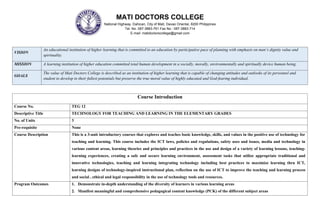
VISION
An educational institution of higher learning that is committed to an education by participative pace of planning with emphasis on man’s dignity value and
spirituality.
MISSION A learning institution of higher education committed total human development in a socially, morally, environmentally and spiritually device human being.
GOALS
The value of Mati Doctors College is described as an institution of higher learning that is capable of changing attitudes and outlooks of its personnel and
student to develop to their fullest potentials but preserve the true moral value of highly educated and God-fearing individual.
Course Introduction
Course No. TEG 12
Descriptive Title TECHNOLOGY FOR TEACHING AND LEARNING IN THE ELEMENTARY GRADES
No. of Units 3
Pre-requisite None
Course Description This is a 3-unit introductory courses that explores and teaches basic knowledge, skills, and values in the positive use of technology for
teaching and learning. This course includes the ICT laws, policies and regulations, safety uses and issues, media and technology in
various content areas, learning theories and principles and practices in the use and design of a variety of learning lessons, teaching-
learning experiences, creating a safe and secure learning environment, assessment tasks that utilize appropriate traditional and
innovative technologies, teaching and learning integrating technology including best practices to maximize learning thru ICT,
learning designs of technology-inspired instructional plan, reflection on the use of ICT to improve the teaching and learning process
and social , ethical and legal responsibility in the use of technology tools and resources.
Program Outcomes 1. Demonstrate in-depth understanding of the diversity of learners in various learning areas
2. Manifest meaningful and comprehensive pedagogical content knowledge (PCK) of the different subject areas
MATI DOCTORS COLLEGE
National Highway, Dahican, City of Mati, Davao Oriental, 8200 Philippines
Tel. No. 087-3883-761 Fax No.: 087-3883-714
E-mail: matidoctorscollege@gmail.com
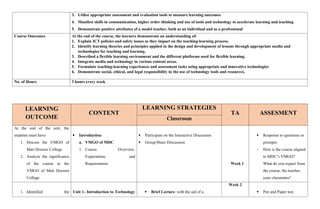
3. Utilize appropriate assessment and evaluation tools to measure learning outcomes
4. Manifest skills in communication, higher order thinking and use of tools and technology to accelerate learning and teaching
5. Demonstrate positive attributes of a model teacher, both as an individual and as a professional
Course Outcomes At the end of the course, the learners demonstrate an understanding of:
1. Explain ICT policies and safety issues as they impact on the teaching-learning process.
2. Identify learning theories and principles applied in the design and development of lessons through appropriate media and
technologies for teaching and learning.
3. Described a flexible learning environment and the different platforms used for flexible learning.
4. Integrate media and technology in various content areas.
5. Formulate teaching-learning experiences and assessment tasks using appropriate and innovative technologies
6. Demonstrate social, ethical, and legal responsibility in the use of technology tools and resources.
No. of Hours 3 hours every week
LEARNING
OUTCOME
CONTENT
LEARNING STRATEGIES
TA ASSESMENT
Classroom
At the end of the unit, the
students must have:
1. Discuss the VMGO of
Mati Doctors College
2. Analyze the significance
of the course to the
VMGO of Mati Doctors
College
 Introduction
a. VMGO of MDC
1. Course Overview,
Expectation, and
Requirements
 Participate on the Interactive Discussion
 Group/Share Discussion
Week 1
 Response to questions or
prompts:
- How is the course aligned
to MDC’s VMGO?
What do you expect from
the course, the teacher,
your classmates?
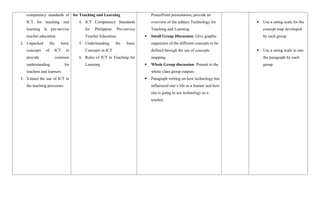
1. Identified the Unit 1- Introduction to Technology  Brief Lecture: with the aid of a
Week 2
 Pen and Paper test.
competency standards of
ICT for teaching and
learning in pre-service
teacher education
2. Unpacked the basic
concepts of ICT to
provide common
understanding for
teachers and learners
3. Valued the use of ICT in
the teaching processes
for Teaching and Learning
4. ICT Competency Standards
for Philippine Pre-service
Teacher Education
5. Understanding the basic
Concepts in ICT
6. Roles of ICT in Teaching for
Learning
PowerPoint presentation, provide an
overview of the subject Technology for
Teaching and Learning
 Small Group Discussion: Give graphic
organizers of the different concepts to be
defined through the use of concepts
mapping.
 Whole Group discussion: Present to the
whole class group outputs.
 Paragraph writing on how technology has
influenced one’s life as a learner and how
one is going to use technology as a
teacher.
 Use a rating scale for the
concept map developed
by each group
 Use a rating scale to rate
the paragraph by each
group
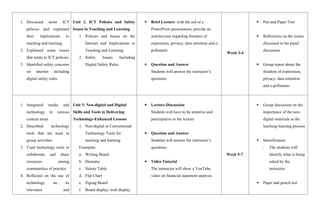
1. Discussed some ICT
policies and explained
their implications to
teaching and learning.
2. Explained some issues
that relate to ICT policies
3. Identified safety concerns
on internet including
digital safety rules.
Unit 2. ICT Policies and Safety
Issues in Teaching and Learning
1. Policies and Issues on the
Internet and Implications to
Teaching and Learning
2. Safety Issues Including
Digital Safety Rules
 Brief Lecture: with the aid of a
PowerPoint presentation, provide an
articles/case regarding freedom of
expression, privacy, data retention and e-
pollutants.
 Question and Answer
Students will answer the instructor’s
questions
Week 3-4
 Pen and Paper Test
 Reflections on the issues
discussed in the panel
discussion
 Group report about the
freedom of expression,
privacy, data retention
and e-pollutants
1. Integrated media and
technology in various
content areas
2. Described technology
tools that are used in
group activities
3. Used technology tools to
collaborate and share
resources among
communities of practice
4. Reflected on the use of
technology on its
relevance and
Unit 3: Non-digital and Digital
Skills and Tools in Delivering
Technology-Enhanced Lessons
1. Non-digital or Conventional
Technology Tools for
teaching and learning
Examples:
a. Writing Board
b. Diorama
c. Nature Table
d. Flip Chart
e. Zigzag Board
f. Board display/ wall display
 Lecture-Discussion
Students will have to be attentive and
participative in the lecture
 Question and Answer
Students will answer the instructor’s
questions
 Video Tutorial
The instructor will show a YouTube
video on financial statement analysis
Week 5-7
 Group discussion on the
importance of the non-
digital materials in the
leaching-learning process
 Identification
- The students will
identify what is being
asked by the
instructor
 Paper and pencil test
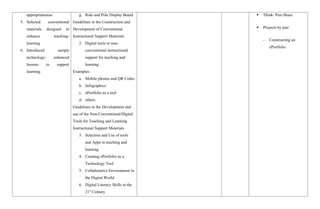
appropriateness
5. Selected conventional
materials designed to
enhance teaching-
learning
6. Introduced sample
technology- enhanced
lessons to support
learning.
g. Role and Pole Display Board
Guidelines in the Construction and
Development of Conventional
Instructional Support Materials
2. Digital tools or non-
conventional instructional
support for teaching and
learning.
Examples:
a. Mobile phones and QR Codes
b. Infographics
c. ePortfolio as a tool
d. others
Guidelines in the Development and
use of the Non-Conventional/Digital
Tools for Teaching and Learning
Instructional Support Materials
3. Selection and Use of tools
and Apps in teaching and
learning
4. Creating ePortfolio as a
Technology Tool
5. Collaborative Environment in
the Digital World
6. Digital Literacy Skills in the
21st
Century
 Think- Pair-Share
 Projects by pair
- Constructing an
ePortfolio
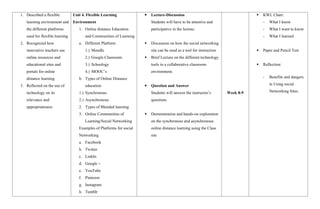
1. Described a flexible
learning environment and
the different platforms
used for flexible learning
2. Recognized how
innovative teachers use
online resources and
educational sites and
portals for online
distance learning
3. Reflected on the use of
technology on its
relevance and
appropriateness
Unit 4. Flexible Learning
Environment
1. Online distance Education
and Communities of Learning
a. Different Platform
1.) Moodle
2.) Google Classroom
3.) Schoology
4.) MOOC’s
b. Types of Online Distance
education
1.) Synchronous
2.) Asynchronous
2. Types of Blended learning
3. Online Communities of
Learning/Social Networking
Examples of Platforms for social
Networking
a. Facebook
b. Twitter
c. LinkIn
d. Google +
e. YouTube
f. Pinterest
g. Instagram
h. Tumblr
 Lecture-Discussion
Students will have to be attentive and
participative in the lecture.
 Discussion on how the social networking
site can be used as a tool for instruction
 Brief Lecture on the different technology
tools in a collaborative classroom
environment.
 Question and Answer
Students will answer the instructor’s
questions
 Demonstration and hands-on exploration
on the synchronous and asynchronous
online distance learning using the Class
site
Week 8-9
 KWL Chart:
- What I know
- What I want to know
- What I learned
 Paper and Pencil Test
 Reflection:
- Benefits and dangers
in Using social
Networking Sites
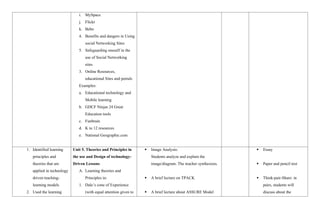
i. MySpace
j. Flickr
k. Bebo
4. Benefits and dangers in Using
social Networking Sites
5. Safeguarding oneself in the
use of Social Networking
sites
3. Online Resources,
educational Sites and portals
Examples:
a. Educational technology and
Mobile learning
b. GDCF Ninjas 24 Great
Education tools
c. Funbrain
d. K to 12 resources
e. National Geographic.com
1. Identified learning
principles and
theories that are
applied in technology
driven teaching-
learning models
2. Used the learning
Unit 5. Theories and Principles in
the use and Design of technology-
Driven Lessons
A. Learning theories and
Principles in:
1. Dale’s cone of Experience
(with equal attention given to
 Image Analysis:
Students analyze and explain the
image/diagram. The teacher synthesizes.
 A brief lecture on TPACK
 A brief lecture about ASSURE Model
 Essay
 Paper and pencil test
 Think-pair-Share: in
pairs, students will
discuss about the
principles and
theories as basis in
the development of
the teaching plans
and selection of
instructional
materials.
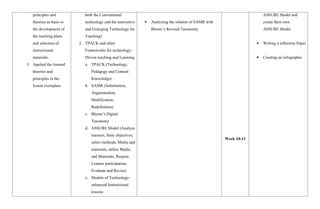
3. Applied the learned
theories and
principles in the
lesson exemplars
both the Conventional
technology and the innovative
and Emerging Technology for
Teaching)
2. TPACK and other
Frameworks for technology-
Driven teaching and Learning
a. TPACK (Technology,
Pedagogy and Content
Knowledge)
b. SAMR (Substitution,
Augmentation,
Modification,
Redefinition)
c. Bloom’s Digital
Taxonomy
d. ASSURE Model (Analyze
learners, State objectives,
select methods, Media and
materials, utilize Media
and Materials, Require
Learner participation,
Evaluate and Revise)
e. Models of Technology-
enhanced Instructional
lessons
 Analyzing the relation of SAMR with
Bloom’s Revised Taxonomy
Week 10-13
ASSURE Model and
create their own
ASSURE Model
 Writing a reflection Paper
 Creating an infographic
1. Explained the use of ICT
in assessment in learning
2. Explored various digital
online and offline
assessment alternatives
available
3. Described the current
trends in technology-
based assessment
practices in schools
4. Selected appropriate
assessment tools
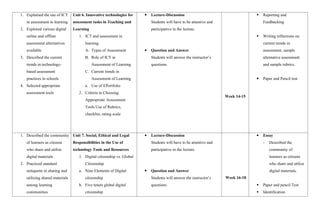
Unit 6. Innovative technologies for
assessment tasks in Teaching and
Learning
1. ICT and assessment in
learning
A. Types of Assessment
B. Role of ICT in
Assessment of Learning
C. Current trends in
Assessment of Learning
a. Use of EPortfolio
2. Criteria in Choosing
Appropriate Assessment
Tools Use of Rubrics,
checklist, rating scale
 Lecture-Discussion
Students will have to be attentive and
participative in the lecture.
 Question and Answer
Students will answer the instructor’s
questions
Week 14-15
 Reporting and
Feedbacking
 Writing reflections on
current trends in
assessment, sample
alternative assessment
and sample rubrics.
 Paper and Pencil test
1. Described the community
of learners as citizens
who share and utilize
digital materials
2. Practiced standard
netiquette in sharing and
utilizing shared materials
among learning
communities
Unit 7. Social, Ethical and Legal
Responsibilities in the Use of
technology Tools and Resources
1. Digital citizenship vs. Global
Citizenship
a. Nine Elements of Digital
citizenship
b. Five tenets global digital
citizenship
 Lecture-Discussion
Students will have to be attentive and
participative in the lecture.
 Question and Answer
Students will answer the instructor’s
questions
Week 16-18
 Essay
- Described the
community of
learners as citizens
who share and utilize
digital materials.
 Paper and pencil Test
 Identification
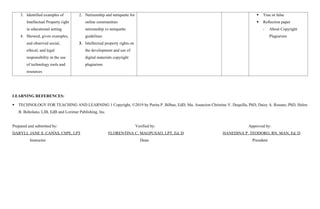
3. Identified examples of
Intellectual Property right
in educational setting
4. Showed, given examples,
and observed social,
ethical, and legal
responsibility in the use
of technology tools and
resources
2. Netizenship and netiquette for
online communities
netizenship vs netiquette
guidelines
3. Intellectual property rights on
the development and use of
digital materials copyright
plagiarism
 True or false
 Reflection paper
- About Copyright
Plagiarism
LEARNING REFERENCES:
 TECHNOLOGY FOR TEACHING AND LEARNING 1 Copyright, ©2019 by Purita P. Bilbao, EdD, Ma. Asuncion Christine V. Dequilla, PhD, Daisy A. Rosano, PhD, Helen
B. Boholano, LIB, EdB and Lorimar Publishing, Inc.
Prepared and submitted by: Verified by: Approved by:
DARYLL JANE S. CA AS, CSPE, LPT
N᷉ FLORENTINA C. MAGPUSAO, LPT, Ed. D HANEDINA P. TEODORO, RN, MAN, Ed. D
Instructor Dean President

TEG12 COURSE SYLLABUS WITH PROGRAM OUTCOMES

  • 1.
    VISION An educational institutionof higher learning that is committed to an education by participative pace of planning with emphasis on man’s dignity value and spirituality. MISSION A learning institution of higher education committed total human development in a socially, morally, environmentally and spiritually device human being. GOALS The value of Mati Doctors College is described as an institution of higher learning that is capable of changing attitudes and outlooks of its personnel and student to develop to their fullest potentials but preserve the true moral value of highly educated and God-fearing individual. Course Introduction Course No. TEG 12 Descriptive Title TECHNOLOGY FOR TEACHING AND LEARNING IN THE ELEMENTARY GRADES No. of Units 3 Pre-requisite None Course Description This is a 3-unit introductory courses that explores and teaches basic knowledge, skills, and values in the positive use of technology for teaching and learning. This course includes the ICT laws, policies and regulations, safety uses and issues, media and technology in various content areas, learning theories and principles and practices in the use and design of a variety of learning lessons, teaching- learning experiences, creating a safe and secure learning environment, assessment tasks that utilize appropriate traditional and innovative technologies, teaching and learning integrating technology including best practices to maximize learning thru ICT, learning designs of technology-inspired instructional plan, reflection on the use of ICT to improve the teaching and learning process and social , ethical and legal responsibility in the use of technology tools and resources. Program Outcomes 1. Demonstrate in-depth understanding of the diversity of learners in various learning areas 2. Manifest meaningful and comprehensive pedagogical content knowledge (PCK) of the different subject areas MATI DOCTORS COLLEGE National Highway, Dahican, City of Mati, Davao Oriental, 8200 Philippines Tel. No. 087-3883-761 Fax No.: 087-3883-714 E-mail: matidoctorscollege@gmail.com
  • 2.
    3. Utilize appropriateassessment and evaluation tools to measure learning outcomes 4. Manifest skills in communication, higher order thinking and use of tools and technology to accelerate learning and teaching 5. Demonstrate positive attributes of a model teacher, both as an individual and as a professional Course Outcomes At the end of the course, the learners demonstrate an understanding of: 1. Explain ICT policies and safety issues as they impact on the teaching-learning process. 2. Identify learning theories and principles applied in the design and development of lessons through appropriate media and technologies for teaching and learning. 3. Described a flexible learning environment and the different platforms used for flexible learning. 4. Integrate media and technology in various content areas. 5. Formulate teaching-learning experiences and assessment tasks using appropriate and innovative technologies 6. Demonstrate social, ethical, and legal responsibility in the use of technology tools and resources. No. of Hours 3 hours every week LEARNING OUTCOME CONTENT LEARNING STRATEGIES TA ASSESMENT Classroom At the end of the unit, the students must have: 1. Discuss the VMGO of Mati Doctors College 2. Analyze the significance of the course to the VMGO of Mati Doctors College  Introduction a. VMGO of MDC 1. Course Overview, Expectation, and Requirements  Participate on the Interactive Discussion  Group/Share Discussion Week 1  Response to questions or prompts: - How is the course aligned to MDC’s VMGO? What do you expect from the course, the teacher, your classmates? 1. Identified the Unit 1- Introduction to Technology  Brief Lecture: with the aid of a Week 2  Pen and Paper test.
  • 3.
    competency standards of ICTfor teaching and learning in pre-service teacher education 2. Unpacked the basic concepts of ICT to provide common understanding for teachers and learners 3. Valued the use of ICT in the teaching processes for Teaching and Learning 4. ICT Competency Standards for Philippine Pre-service Teacher Education 5. Understanding the basic Concepts in ICT 6. Roles of ICT in Teaching for Learning PowerPoint presentation, provide an overview of the subject Technology for Teaching and Learning  Small Group Discussion: Give graphic organizers of the different concepts to be defined through the use of concepts mapping.  Whole Group discussion: Present to the whole class group outputs.  Paragraph writing on how technology has influenced one’s life as a learner and how one is going to use technology as a teacher.  Use a rating scale for the concept map developed by each group  Use a rating scale to rate the paragraph by each group
  • 4.
    1. Discussed someICT policies and explained their implications to teaching and learning. 2. Explained some issues that relate to ICT policies 3. Identified safety concerns on internet including digital safety rules. Unit 2. ICT Policies and Safety Issues in Teaching and Learning 1. Policies and Issues on the Internet and Implications to Teaching and Learning 2. Safety Issues Including Digital Safety Rules  Brief Lecture: with the aid of a PowerPoint presentation, provide an articles/case regarding freedom of expression, privacy, data retention and e- pollutants.  Question and Answer Students will answer the instructor’s questions Week 3-4  Pen and Paper Test  Reflections on the issues discussed in the panel discussion  Group report about the freedom of expression, privacy, data retention and e-pollutants 1. Integrated media and technology in various content areas 2. Described technology tools that are used in group activities 3. Used technology tools to collaborate and share resources among communities of practice 4. Reflected on the use of technology on its relevance and Unit 3: Non-digital and Digital Skills and Tools in Delivering Technology-Enhanced Lessons 1. Non-digital or Conventional Technology Tools for teaching and learning Examples: a. Writing Board b. Diorama c. Nature Table d. Flip Chart e. Zigzag Board f. Board display/ wall display  Lecture-Discussion Students will have to be attentive and participative in the lecture  Question and Answer Students will answer the instructor’s questions  Video Tutorial The instructor will show a YouTube video on financial statement analysis Week 5-7  Group discussion on the importance of the non- digital materials in the leaching-learning process  Identification - The students will identify what is being asked by the instructor  Paper and pencil test
  • 5.
    appropriateness 5. Selected conventional materialsdesigned to enhance teaching- learning 6. Introduced sample technology- enhanced lessons to support learning. g. Role and Pole Display Board Guidelines in the Construction and Development of Conventional Instructional Support Materials 2. Digital tools or non- conventional instructional support for teaching and learning. Examples: a. Mobile phones and QR Codes b. Infographics c. ePortfolio as a tool d. others Guidelines in the Development and use of the Non-Conventional/Digital Tools for Teaching and Learning Instructional Support Materials 3. Selection and Use of tools and Apps in teaching and learning 4. Creating ePortfolio as a Technology Tool 5. Collaborative Environment in the Digital World 6. Digital Literacy Skills in the 21st Century  Think- Pair-Share  Projects by pair - Constructing an ePortfolio
  • 6.
    1. Described aflexible learning environment and the different platforms used for flexible learning 2. Recognized how innovative teachers use online resources and educational sites and portals for online distance learning 3. Reflected on the use of technology on its relevance and appropriateness Unit 4. Flexible Learning Environment 1. Online distance Education and Communities of Learning a. Different Platform 1.) Moodle 2.) Google Classroom 3.) Schoology 4.) MOOC’s b. Types of Online Distance education 1.) Synchronous 2.) Asynchronous 2. Types of Blended learning 3. Online Communities of Learning/Social Networking Examples of Platforms for social Networking a. Facebook b. Twitter c. LinkIn d. Google + e. YouTube f. Pinterest g. Instagram h. Tumblr  Lecture-Discussion Students will have to be attentive and participative in the lecture.  Discussion on how the social networking site can be used as a tool for instruction  Brief Lecture on the different technology tools in a collaborative classroom environment.  Question and Answer Students will answer the instructor’s questions  Demonstration and hands-on exploration on the synchronous and asynchronous online distance learning using the Class site Week 8-9  KWL Chart: - What I know - What I want to know - What I learned  Paper and Pencil Test  Reflection: - Benefits and dangers in Using social Networking Sites
  • 7.
    i. MySpace j. Flickr k.Bebo 4. Benefits and dangers in Using social Networking Sites 5. Safeguarding oneself in the use of Social Networking sites 3. Online Resources, educational Sites and portals Examples: a. Educational technology and Mobile learning b. GDCF Ninjas 24 Great Education tools c. Funbrain d. K to 12 resources e. National Geographic.com 1. Identified learning principles and theories that are applied in technology driven teaching- learning models 2. Used the learning Unit 5. Theories and Principles in the use and Design of technology- Driven Lessons A. Learning theories and Principles in: 1. Dale’s cone of Experience (with equal attention given to  Image Analysis: Students analyze and explain the image/diagram. The teacher synthesizes.  A brief lecture on TPACK  A brief lecture about ASSURE Model  Essay  Paper and pencil test  Think-pair-Share: in pairs, students will discuss about the
  • 8.
    principles and theories asbasis in the development of the teaching plans and selection of instructional materials. 3. Applied the learned theories and principles in the lesson exemplars both the Conventional technology and the innovative and Emerging Technology for Teaching) 2. TPACK and other Frameworks for technology- Driven teaching and Learning a. TPACK (Technology, Pedagogy and Content Knowledge) b. SAMR (Substitution, Augmentation, Modification, Redefinition) c. Bloom’s Digital Taxonomy d. ASSURE Model (Analyze learners, State objectives, select methods, Media and materials, utilize Media and Materials, Require Learner participation, Evaluate and Revise) e. Models of Technology- enhanced Instructional lessons  Analyzing the relation of SAMR with Bloom’s Revised Taxonomy Week 10-13 ASSURE Model and create their own ASSURE Model  Writing a reflection Paper  Creating an infographic
  • 9.
    1. Explained theuse of ICT in assessment in learning 2. Explored various digital online and offline assessment alternatives available 3. Described the current trends in technology- based assessment practices in schools 4. Selected appropriate assessment tools Unit 6. Innovative technologies for assessment tasks in Teaching and Learning 1. ICT and assessment in learning A. Types of Assessment B. Role of ICT in Assessment of Learning C. Current trends in Assessment of Learning a. Use of EPortfolio 2. Criteria in Choosing Appropriate Assessment Tools Use of Rubrics, checklist, rating scale  Lecture-Discussion Students will have to be attentive and participative in the lecture.  Question and Answer Students will answer the instructor’s questions Week 14-15  Reporting and Feedbacking  Writing reflections on current trends in assessment, sample alternative assessment and sample rubrics.  Paper and Pencil test 1. Described the community of learners as citizens who share and utilize digital materials 2. Practiced standard netiquette in sharing and utilizing shared materials among learning communities Unit 7. Social, Ethical and Legal Responsibilities in the Use of technology Tools and Resources 1. Digital citizenship vs. Global Citizenship a. Nine Elements of Digital citizenship b. Five tenets global digital citizenship  Lecture-Discussion Students will have to be attentive and participative in the lecture.  Question and Answer Students will answer the instructor’s questions Week 16-18  Essay - Described the community of learners as citizens who share and utilize digital materials.  Paper and pencil Test  Identification
  • 10.
    3. Identified examplesof Intellectual Property right in educational setting 4. Showed, given examples, and observed social, ethical, and legal responsibility in the use of technology tools and resources 2. Netizenship and netiquette for online communities netizenship vs netiquette guidelines 3. Intellectual property rights on the development and use of digital materials copyright plagiarism  True or false  Reflection paper - About Copyright Plagiarism LEARNING REFERENCES:  TECHNOLOGY FOR TEACHING AND LEARNING 1 Copyright, ©2019 by Purita P. Bilbao, EdD, Ma. Asuncion Christine V. Dequilla, PhD, Daisy A. Rosano, PhD, Helen B. Boholano, LIB, EdB and Lorimar Publishing, Inc. Prepared and submitted by: Verified by: Approved by: DARYLL JANE S. CA AS, CSPE, LPT N᷉ FLORENTINA C. MAGPUSAO, LPT, Ed. D HANEDINA P. TEODORO, RN, MAN, Ed. D Instructor Dean President