













DIY Scriptable Cache
    Guy	
  Podjarny,	
  CTO	
  
     guypo@blaze.io	
  
    twi;er:	
  @guypod	
  
Agenda
•  Caching 101
•  Mobile & Desktop Scriptable Cache
        –  Concept
        –  6 Steps to Building a Scriptable Cache
        –  Advanced Optimizations
•  Q&A


2	
  
The Value of a Scriptable Cache
•  A dedicated cache, not affected by other sites
•  A robust cache, not cleared by power cycles
•  Better file consolidation
        –  Works in more cases
        –  Cache Friendly
        –  Less requests without more bytes
•  Enable Advanced Optimizations
        –  Robust Prefetching, Async CSS/JS…
•  The Secret to Eternal Youth

3	
  
Not For The Faint of Heart!
•  DIY Scriptable Cache isn’t simple
        –  No magic 3 lines of code
•  Requires HTML & Resource modifications
        –  Some of each
•  The code samples are pseudo-code
        –  They don’t cover all edge cases
        –  They’re not optimized
        –  They probably have syntax errors


4	
  
Caching 101
What is a Cache?
•  Storage of previously seen data

•  Reduces costs
•  Accelerates results

•  Sample savings:
        –  Computation costs (avoid regenerating
           content)
        –  Network costs (avoid retransmitting content)


6	
  
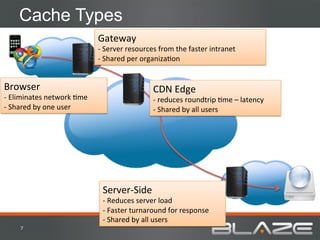
Cache Types
                                          Gateway	
  
                                          -­‐	
  Server	
  resources	
  from	
  the	
  faster	
  intranet	
  
                                          -­‐	
  Shared	
  per	
  organizaHon	


Browser	
                                                           CDN	
  Edge	
  
-­‐	
  Eliminates	
  network	
  Hme	
                               -­‐	
  reduces	
  roundtrip	
  Hme	
  –	
  latency	
  
-­‐	
  Shared	
  by	
  one	
  user	
                                -­‐	
  Shared	
  by	
  all	
  users	


                                            Server-­‐Side	
  
                                            -­‐	
  Reduces	
  server	
  load	
  
                                            -­‐	
  Faster	
  turnaround	
  for	
  response	
  
                                            -­‐	
  Shared	
  by	
  all	
  users	
  
       7	
  
Caching - Expiry
•  Cache Expiry Controlled by Headers
        –  HTTP/1.0: Expires
        –  HTTP/1.1: Cache-Control


•  ETAG/Last-Modified Enables Conditional GET
        –  Fetch Resource “If-Modified-Since”


•  CDN/Server Cache can be manually purged


8	
  
Stale Cache
•  Outdated data in cache
            –  Affects Browser Cache the most
•  Versioning
            –  Add a version number to the filename
            –  Change the version when the file changes
            –  Unique filename = long caching – stale cache

        file.v1.js	
                            file.v2.js	
  
        var	
  today	
  =	
  “11/10/26”	
     var	
  today	
  =	
  “11/10/27”	


9	
  
Cache Sizes - Desktop
•  Ranges from 75MB to 250MB
•  Fits about 90-300 pages
         –  Average desktop page size is ~800 KB
•  Cycles fully every 1-4 days
         –  Average user browses 88 pages/day


10	
  
Cache Sizes - Mobile
•  Ranges from 0 MB to 25MB
•  Fits about 0-60 pages (Average size ~400KB)
•  Memory Cache a bit bigger, but volatile


11	
  
Conclusion
         •  Caching is useful and important
         •  Cache sizes are too small
           –  Especially on Mobile
         •  Cache hasn’t evolved with the times
           –  Stopped evolving with HTTP/1.1 in 2004
         •  Browser Cache evolved least of all
           –  Browsers adding smart eviction only now
           –  Still no script interfaces for smart
              caching


12	
  
Scriptable Cache
Scriptable Browser Cache - Concept
•  A cache accessible via JavaScript
         –  Get/Put/Delete Actions
•  What is it good for?
         –  Cache parts of a page/resource
         –  Adapt to cache state
         –  Load resources in different ways
•  Why don’t browsers support it today?
         –  Most likely never saw the need
         –  Useful only for advanced websites
         –  Not due to security concerns (at least not good
            ones)


14	
  
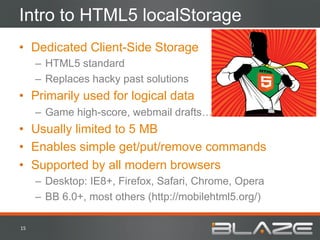
Intro to HTML5 localStorage
•  Dedicated Client-Side Storage
         –  HTML5 standard
         –  Replaces hacky past solutions
•  Primarily used for logical data
         –  Game high-score, webmail drafts…
•  Usually limited to 5 MB
•  Enables simple get/put/remove commands
•  Supported by all modern browsers
         –  Desktop: IE8+, Firefox, Safari, Chrome, Opera
         –  BB 6.0+, most others (http://mobilehtml5.org/)

15	
  
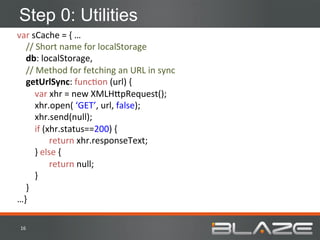
Step 0: Utilities
var	
  sCache	
  =	
  {	
  …	


  //	
  Short	
  name	
  for	
  localStorage	


  db:	
  localStorage,	


  //	
  Method	
  for	
  fetching	
  an	
  URL	
  in	
  sync	


  getUrlSync:	
  funcHon	
  (url)	
  {	


  var	
  xhr	
  =	
  new	
  XMLH;pRequest();	


  xhr.open(	
  ‘GET’,	
  url,	
  false);	


  xhr.send(null);	


  if	
  (xhr.status==200)	
  {	
  
                                       	
  return	
  xhr.responseText;	


  }	
  else	
  {	
  
                                       	
  return	
  null;	


  }	


  }	
  
…}	
  

 16	
  
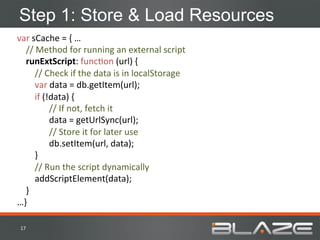
Step 1: Store & Load Resources
var	
  sCache	
  =	
  {	
  …	


  //	
  Method	
  for	
  running	
  an	
  external	
  script	


  runExtScript:	
  funcHon	
  (url)	
  {	


  //	
  Check	
  if	
  the	
  data	
  is	
  in	
  localStorage	


  var	
  data	
  =	
  db.getItem(url);	


  if	
  (!data)	
  {	
  
                                        	
  //	
  If	
  not,	
  fetch	
  it	


  data	
  =	
  getUrlSync(url);	


  //	
  Store	
  it	
  for	
  later	
  use	
  
                                        	
  db.setItem(url,	
  data);	


  }	


  //	
  Run	
  the	
  script	
  dynamically	


  addScriptElement(data);	


  }	
  
…}	
  

 17	
  
Step 2: Recover on error
var	
  sCache	
  =	
  {	
  …	


  runExtScript:	
  funcHon	
  (url)	
  {	


  //	
  Check	
  if	
  the	
  data	
  is	
  in	
  localStorage	


  var	
  data	
  =	
  db	
  &&	
  db.getItem(url);	


  if	
  (!data)	
  {	
  
                                       	
  //	
  If	
  not,	
  fetch	
  it	


  data	
  =	
  $.get(url);	
  
                                       	
  //	
  Store	
  it	
  for	
  later	
  use	
  
                                       	
  try	
  {	
  db.setItem(url,	
  data)	
  }	
  catch(e)	
  {	
  }	


  }	


  //	
  Run	
  the	
  script	
  dynamically	


  addScriptElement(data);	


  }	
  
…}	
  

 18	
  
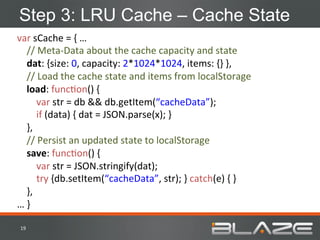
Step 3: LRU Cache – Cache State
var	
  sCache	
  =	
  {	
  …	


  //	
  Meta-­‐Data	
  about	
  the	
  cache	
  capacity	
  and	
  state	


  dat:	
  {size:	
  0,	
  capacity:	
  2*1024*1024,	
  items:	
  {}	
  },	


  //	
  Load	
  the	
  cache	
  state	
  and	
  items	
  from	
  localStorage	


  load:	
  funcHon()	
  {	


  var	
  str	
  =	
  db	
  &&	
  db.getItem(“cacheData”);	


  if	
  (data)	
  {	
  dat	
  =	
  JSON.parse(x);	
  }	


  },	


  //	
  Persist	
  an	
  updated	
  state	
  to	
  localStorage	


  save:	
  funcHon()	
  {	


  var	
  str	
  =	
  JSON.stringify(dat);	


  try	
  {db.setItem(“cacheData”,	
  str);	
  }	
  catch(e)	
  {	
  }	


  },	
  
…	
  }	
  

 19	
  
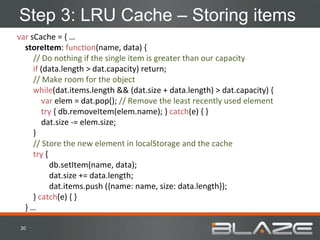
Step 3: LRU Cache – Storing items
var	
  sCache	
  =	
  {	
  …	


  storeItem:	
  funcHon(name,	
  data)	
  {	


  //	
  Do	
  nothing	
  if	
  the	
  single	
  item	
  is	
  greater	
  than	
  our	
  capacity	


  if	
  (data.length	
  >	
  dat.capacity)	
  return;	


  //	
  Make	
  room	
  for	
  the	
  object	


  while(dat.items.length	
  &&	
  (dat.size	
  +	
  data.length)	
  >	
  dat.capacity)	
  {	


  var	
  elem	
  =	
  dat.pop();	
  //	
  Remove	
  the	
  least	
  recently	
  used	
  element	


  try	
  {	
  db.removeItem(elem.name);	
  }	
  catch(e)	
  {	
  }	


  dat.size	
  -­‐=	
  elem.size;	


  }	


  //	
  Store	
  the	
  new	
  element	
  in	
  localStorage	
  and	
  the	
  cache	


  try	
  {	


  db.setItem(name,	
  data);	
  
                                                  	
  dat.size	
  +=	
  data.length;	
  
                                                  	
  dat.items.push	
  ({name:	
  name,	
  size:	
  data.length});	


  }	
  catch(e)	
  {	
  }	


  }	
  …	


 20	
  
Step 3: LRU Cache – Getting items
var	
  sCache	
  =	
  {	
  …	


  getItem:	
  funcHon(name)	
  {	


  //	
  Try	
  to	
  get	
  the	
  item	


  var	
  data	
  =	
  db	
  &&	
  db.getItem(name);	


  if	
  (!data)	
  return	
  null;	


  //	
  Move	
  the	
  element	
  to	
  the	
  top	
  of	
  the	
  array,	
  marking	
  it	
  as	
  used	


  for(var	
  i=0;i<dat.items.length;i++)	
  {	
  
                                        	
  if	
  (dat.items[i].name	
  ===	
  name)	
  {	


  dat.items.unshiw(dat.items.splice(i,-­‐1));	


  break;	
  
                                        	
  }	


  }	


  return	
  data;	


  }	
  
…}	
  

 21	
  
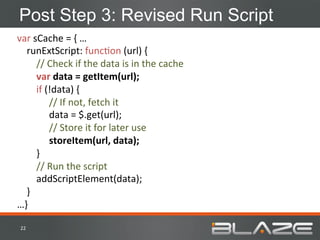
Post Step 3: Revised Run Script
var	
  sCache	
  =	
  {	
  …	


  runExtScript:	
  funcHon	
  (url)	
  {	


  //	
  Check	
  if	
  the	
  data	
  is	
  in	
  the	
  cache	


  var	
  data	
  =	
  getItem(url);	


  if	
  (!data)	
  {	
  
                                       	
  //	
  If	
  not,	
  fetch	
  it	


  data	
  =	
  $.get(url);	
  
                                       	
  //	
  Store	
  it	
  for	
  later	
  use	
  
                                       	
  storeItem(url,	
  data);	


  }	


  //	
  Run	
  the	
  script	


  addScriptElement(data);	


  }	
  
…}	
  

 22	
  
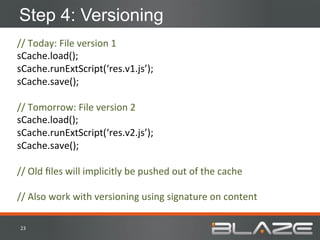
Step 4: Versioning
//	
  Today:	
  File	
  version	
  1	
  
sCache.load();	
  
sCache.runExtScript(‘res.v1.js’);	
  
sCache.save();	


//	
  Tomorrow:	
  File	
  version	
  2	
  
sCache.load();	
  
sCache.runExtScript(‘res.v2.js’);	
  
sCache.save();	


//	
  Old	
  files	
  will	
  implicitly	
  be	
  pushed	
  out	
  of	
  the	
  cache	


//	
  Also	
  work	
  with	
  versioning	
  using	
  signature	
  on	
  content	
  

 23	
  
What Have We Created So Far?
•  Scriptable LRU Cache
         –  Enforces size limits
         –  Recovers from errors
•  Dedicated Cache
         –  Not affected by browsing other sites
•  Robust Cache
         –  Not affected by Mobile Cache Sizes
         –  Survives Power Cycle and Process Reset
•  Still Has Limitations:
         –  Only works on same domain
         –  Resources fetched sequentially


24	
  
Step 5: Cross-Domain Resources
•  Why Cross Domain?
         –  Enables Domain Sharding
         –  Various Architecture Reasons
•  Solution: Self-Registering Scripts
         –  Scripts load themselves into the cache
         –  Added to the page as standard scripts
         –  Note that one URL stores data as another URL
   h;p://1.foo.com/res.v1.js	
      h;p://1.foo.com/store.res.v1.js	
  
   alert(1);	
                      sCache.storeItem(	
  
                                    ‘h;p://1.foo.com/res.v1.js’,	
  
                                    ’alert(1)’);	


25	
  
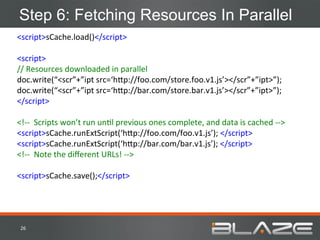
Step 6: Fetching Resources In Parallel
<script>sCache.load()</script>	


<script>	
  
//	
  Resources	
  downloaded	
  in	
  parallel	
  
doc.write(“<scr”+”ipt	
  src=‘h;p://foo.com/store.foo.v1.js’></scr”+”ipt>”);	
  
doc.write(“<scr”+”ipt	
  src=‘h;p://bar.com/store.bar.v1.js’></scr”+”ipt>”);	
  
</script>	


<!-­‐-­‐	
  	
  Scripts	
  won’t	
  run	
  unHl	
  previous	
  ones	
  complete,	
  and	
  data	
  is	
  cached	
  -­‐-­‐>	
  
<script>sCache.runExtScript(‘h;p://foo.com/foo.v1.js’);	
  </script>	
  
<script>sCache.runExtScript(‘h;p://bar.com/bar.v1.js’);	
  </script>	
  
<!-­‐-­‐	
  	
  Note	
  the	
  different	
  URLs!	
  -­‐-­‐>	


<script>sCache.save();</script>	


 26	
  
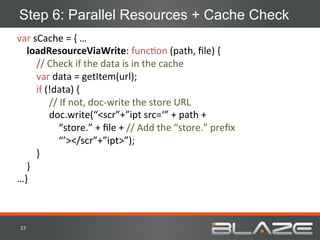
Step 6: Parallel Resources + Cache Check
var	
  sCache	
  =	
  {	
  …	


  loadResourceViaWrite:	
  funcHon	
  (path,	
  file)	
  {	


  //	
  Check	
  if	
  the	
  data	
  is	
  in	
  the	
  cache	


  var	
  data	
  =	
  getItem(url);	


  if	
  (!data)	
  {	
  
                                       	
  //	
  If	
  not,	
  doc-­‐write	
  the	
  store	
  URL	
  
                                       	
  doc.write(“<scr”+”ipt	
  src=‘”	
  +	
  path	
  +	


  “store.”	
  +	
  file	
  +	
  //	
  Add	
  the	
  “store.”	
  prefix	


  “’></scr”+”ipt>”);	


  }	


  }	
  
…}	


 27	
  
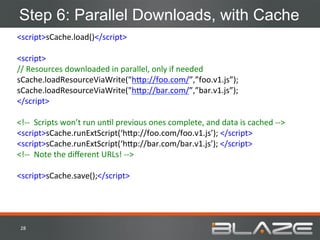
Step 6: Parallel Downloads, with Cache
<script>sCache.load()</script>	


<script>	
  
//	
  Resources	
  downloaded	
  in	
  parallel,	
  only	
  if	
  needed	
  
sCache.loadResourceViaWrite("h;p://foo.com/”,”foo.v1.js”);	
  
sCache.loadResourceViaWrite("h;p://bar.com/”,”bar.v1.js”);	
  
</script>	


<!-­‐-­‐	
  	
  Scripts	
  won’t	
  run	
  unHl	
  previous	
  ones	
  complete,	
  and	
  data	
  is	
  cached	
  -­‐-­‐>	
  
<script>sCache.runExtScript(‘h;p://foo.com/foo.v1.js’);	
  </script>	
  
<script>sCache.runExtScript(‘h;p://bar.com/bar.v1.js’);	
  </script>	
  
<!-­‐-­‐	
  	
  Note	
  the	
  different	
  URLs!	
  -­‐-­‐>	


<script>sCache.save();</script>	


 28	
  
What Have We Created?
•  Scriptable LRU Cache
         –  Enforces size limits
         –  Recovers from errors
•  Dedicated Cache
         –  Not affected by browsing other sites
•  Robust Cache
         –  Not affected by Mobile Cache Sizes
         –  Survives Power Cycle and Process Reset
•  Works across domains
•  Resources downloaded in parallel

29	
  
Understanding localStorage Quota
•  Many browsers use UTF-16 for characters
         –  Effectively halves the storage space
         –  Safest to limit capacity to 2 MB
•  Best value: Cache CSS & JavaScript
         –  Biggest byte-for-byte impact on page load
         –  Lowest variation allows for longest caching
         –  Images are borderline too big for capacity
•  Remember: Quotas are per top-level-domain
         –  *.foo.com share the same quota


30	
  
Advanced Optimizations
Adaptive Consolidation
•  Fetch Several Resources with One Request
         –  Store them as Fragments
•  Adapt to Browser Cache State
         –  If resources aren’t in cache, fetch them as one file
         –  If some resources are in cache, fetch separate files
         –  Optionally consolidate missing pieces
   h;p://1.foo.com/foo.v1.js	
        h;p://1.foo.com/store.res.v1.js	
  
   alert(1);	
                        sCache.storeItem(‘/foo.v1.js’,	
  
                                      ’alert(1)’);	
  
   h;p://1.foo.com/bar.v1.js	
        sCache.storeItem(‘/bar.v1.js’,	
  
                                      ’alert(2)’);	
  
   alert(2);	


32	
  
Adaptive vs. Simple Consolidation - #2

•  User browsers Page A, then Page B
         –  Assume each JS file is 20KB in Size

   OpGmizaGon	
                          Total	
  JS	
  Requests	
                Total	
  JS	
  Bytes	
  
   None	
                                            3	
                                 60KB	
  
   Simple	
  ConsolidaHon	
                          2	
                                100KB	
  
   AdapHve	
  ConsolidaHon	
                         1	
                                 60KB	


   Page	
  A	
                                                Page	
  B	
  
   <script	
  src=“a.js”></script>	
                          <script	
  src=“a.js”></script>	
  
   <script	
  src=“b.js”></script>	
                          <script	
  src=“b.js”></script>	
  
   <script	
  src=“c.js”></script>	


33	
  
Adaptive vs. Simple Consolidation - #2

•  User browsers Page A, then Page B
         –  Assume each JS file is 20KB in Size

   OpGmizaGon	
                          Total	
  JS	
  Requests	
                Total	
  JS	
  Bytes	
  
   None	
                                            4	
                                 80KB	
  
   Simple	
  ConsolidaHon	
                          2	
                                140KB	
  
   AdapHve	
  ConsolidaHon	
                         2	
                                 80KB	
  

   Page	
  A	
                                                Page	
  B	
  
   <script	
  src=“a.js”></script>	
                          <script	
  src=“a.js”></script>	
  
   <script	
  src=“b.js”></script>	
                          <script	
  src=“b.js”></script>	
  
   <script	
  src=“c.js”></script>	
                          <script	
  src=“c.js”></script>	
  
                                                              <script	
  src=“d.js”></script>	


34	
  
Adaptive vs. Simple Consolidation - #3
           •  External & Inline Scripts are often related
           •  Breaks Simple Consolidation
           •  Doesn’t break Adaptive Consolidation
                                                                       StoreAll.js	
  
a.js	
              var	
  mode=1;	
  
                                                                       sCache.storeItem(‘a.js’,’var	
  mode=1;’)	
  
                                                                       sCache.storeItem(‘b.js’,’alert(userType);’)	
  
b.js	
              alert(userType);	
  
                                                                       OpHmized	
  Page:	
  
Page:	
   <script	
  src=“a.js”></script>	
                            <script>sCache.runExtScript(‘a.js’)</script>	
  
                    <script>	
                                         <script>	
  
                    var	
  userType	
  =	
  “user”;	
                  var	
  userType	
  =	
  “user”;	
  
                    If	
  (mode==1)	
  userType	
  =	
  “admin”;	
     If	
  (mode==1)	
  userType	
  =	
  “admin”;	
  
                    </script>	
                                        </script>	
  
                    <script	
  src=“b.js”></script>	
                  <script>sCache.runExtScript(‘b.js’)</script>	
  

           35	
  
Robust Prefetching
•  In-Page Prefetching
         –  Fetch CSS/JS Resources at top of page, to be
            used later
•  Next-Page Prefetching
         –  Fetch resources for future pages
•  Robust and Predictable
         –  Not invalidated due to content type change in FF
         –  Not invalided by cookies set in IE
         –  Not reloaded when entering same URL in Safari
         –  …


36	
  
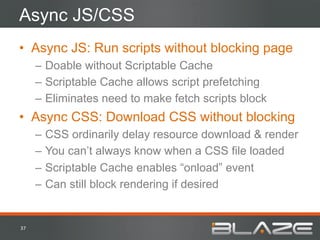
Async JS/CSS
•  Async JS: Run scripts without blocking page
         –  Doable without Scriptable Cache
         –  Scriptable Cache allows script prefetching
         –  Eliminates need to make fetch scripts block
•  Async CSS: Download CSS without blocking
         –  CSS ordinarily delay resource download & render
         –  You can’t always know when a CSS file loaded
         –  Scriptable Cache enables “onload” event
         –  Can still block rendering if desired


37	
  
Summary
•  Caching is good – you should use it!
•  Scriptable Cache is better
         –  More robust
         –  More reasonably sized on Mobile
         –  Enables important optimizations
•  The two aren’t mutually exclusive
         –  “store” files should be cacheable
         –  Images should likely keep using regular cache


38	
  
Or… Use the Blaze Scriptable Cache!
•  Blaze automates Front-End Optimization
          –  No Software, Hardware or Code Changes needed
          –  All the pitfalls and complexities taken care of
•  Blaze optimizes Mobile & Desktop Websites
          –  Applying the right optimizations for each client


See how much faster Blaze
can make your site with our
Free Report: www.blaze.io
Contact Us: contact@blaze.io


 39	
  
QuesGons?	


DIY Scriptable Cache
   Guy Podjarny, CTO
     guypo@blaze.io
    twitter: @guypod

Mobile & Desktop Cache 2.0: How To Create A Scriptable Cache

  • 1.
    DIY Scriptable Cache Guy  Podjarny,  CTO   guypo@blaze.io   twi;er:  @guypod  
  • 2.
    Agenda •  Caching 101 • Mobile & Desktop Scriptable Cache –  Concept –  6 Steps to Building a Scriptable Cache –  Advanced Optimizations •  Q&A 2  
  • 3.
    The Value ofa Scriptable Cache •  A dedicated cache, not affected by other sites •  A robust cache, not cleared by power cycles •  Better file consolidation –  Works in more cases –  Cache Friendly –  Less requests without more bytes •  Enable Advanced Optimizations –  Robust Prefetching, Async CSS/JS… •  The Secret to Eternal Youth 3  
  • 4.
    Not For TheFaint of Heart! •  DIY Scriptable Cache isn’t simple –  No magic 3 lines of code •  Requires HTML & Resource modifications –  Some of each •  The code samples are pseudo-code –  They don’t cover all edge cases –  They’re not optimized –  They probably have syntax errors 4  
  • 5.
  • 6.
    What is aCache? •  Storage of previously seen data •  Reduces costs •  Accelerates results •  Sample savings: –  Computation costs (avoid regenerating content) –  Network costs (avoid retransmitting content) 6  
  • 7.
    Cache Types Gateway   -­‐  Server  resources  from  the  faster  intranet   -­‐  Shared  per  organizaHon   Browser   CDN  Edge   -­‐  Eliminates  network  Hme   -­‐  reduces  roundtrip  Hme  –  latency   -­‐  Shared  by  one  user   -­‐  Shared  by  all  users   Server-­‐Side   -­‐  Reduces  server  load   -­‐  Faster  turnaround  for  response   -­‐  Shared  by  all  users   7  
  • 8.
    Caching - Expiry • Cache Expiry Controlled by Headers –  HTTP/1.0: Expires –  HTTP/1.1: Cache-Control •  ETAG/Last-Modified Enables Conditional GET –  Fetch Resource “If-Modified-Since” •  CDN/Server Cache can be manually purged 8  
  • 9.
    Stale Cache •  Outdateddata in cache –  Affects Browser Cache the most •  Versioning –  Add a version number to the filename –  Change the version when the file changes –  Unique filename = long caching – stale cache file.v1.js   file.v2.js   var  today  =  “11/10/26”   var  today  =  “11/10/27”   9  
  • 10.
    Cache Sizes -Desktop •  Ranges from 75MB to 250MB •  Fits about 90-300 pages –  Average desktop page size is ~800 KB •  Cycles fully every 1-4 days –  Average user browses 88 pages/day 10  
  • 11.
    Cache Sizes -Mobile •  Ranges from 0 MB to 25MB •  Fits about 0-60 pages (Average size ~400KB) •  Memory Cache a bit bigger, but volatile 11  
  • 12.
    Conclusion •  Caching is useful and important •  Cache sizes are too small –  Especially on Mobile •  Cache hasn’t evolved with the times –  Stopped evolving with HTTP/1.1 in 2004 •  Browser Cache evolved least of all –  Browsers adding smart eviction only now –  Still no script interfaces for smart caching 12  
  • 13.
  • 14.
    Scriptable Browser Cache- Concept •  A cache accessible via JavaScript –  Get/Put/Delete Actions •  What is it good for? –  Cache parts of a page/resource –  Adapt to cache state –  Load resources in different ways •  Why don’t browsers support it today? –  Most likely never saw the need –  Useful only for advanced websites –  Not due to security concerns (at least not good ones) 14  
  • 15.
    Intro to HTML5localStorage •  Dedicated Client-Side Storage –  HTML5 standard –  Replaces hacky past solutions •  Primarily used for logical data –  Game high-score, webmail drafts… •  Usually limited to 5 MB •  Enables simple get/put/remove commands •  Supported by all modern browsers –  Desktop: IE8+, Firefox, Safari, Chrome, Opera –  BB 6.0+, most others (http://mobilehtml5.org/) 15  
  • 16.
    Step 0: Utilities var  sCache  =  {  …          //  Short  name  for  localStorage          db:  localStorage,          //  Method  for  fetching  an  URL  in  sync          getUrlSync:  funcHon  (url)  {                  var  xhr  =  new  XMLH;pRequest();                  xhr.open(  ‘GET’,  url,  false);                  xhr.send(null);                  if  (xhr.status==200)  {    return  xhr.responseText;                  }  else  {    return  null;                  }          }   …}   16  
  • 17.
    Step 1: Store& Load Resources var  sCache  =  {  …          //  Method  for  running  an  external  script          runExtScript:  funcHon  (url)  {                  //  Check  if  the  data  is  in  localStorage                  var  data  =  db.getItem(url);                  if  (!data)  {    //  If  not,  fetch  it      data  =  getUrlSync(url);      //  Store  it  for  later  use    db.setItem(url,  data);                  }                  //  Run  the  script  dynamically                  addScriptElement(data);          }   …}   17  
  • 18.
    Step 2: Recoveron error var  sCache  =  {  …          runExtScript:  funcHon  (url)  {                  //  Check  if  the  data  is  in  localStorage                  var  data  =  db  &&  db.getItem(url);                  if  (!data)  {    //  If  not,  fetch  it      data  =  $.get(url);    //  Store  it  for  later  use    try  {  db.setItem(url,  data)  }  catch(e)  {  }                  }                  //  Run  the  script  dynamically                  addScriptElement(data);          }   …}   18  
  • 19.
    Step 3: LRUCache – Cache State var  sCache  =  {  …          //  Meta-­‐Data  about  the  cache  capacity  and  state            dat:  {size:  0,  capacity:  2*1024*1024,  items:  {}  },          //  Load  the  cache  state  and  items  from  localStorage          load:  funcHon()  {                  var  str  =  db  &&  db.getItem(“cacheData”);                  if  (data)  {  dat  =  JSON.parse(x);  }          },            //  Persist  an  updated  state  to  localStorage          save:  funcHon()  {                  var  str  =  JSON.stringify(dat);                  try  {db.setItem(“cacheData”,  str);  }  catch(e)  {  }          },   …  }   19  
  • 20.
    Step 3: LRUCache – Storing items var  sCache  =  {  …          storeItem:  funcHon(name,  data)  {                  //  Do  nothing  if  the  single  item  is  greater  than  our  capacity                  if  (data.length  >  dat.capacity)  return;                  //  Make  room  for  the  object                  while(dat.items.length  &&  (dat.size  +  data.length)  >  dat.capacity)  {                          var  elem  =  dat.pop();  //  Remove  the  least  recently  used  element                          try  {  db.removeItem(elem.name);  }  catch(e)  {  }                          dat.size  -­‐=  elem.size;                    }                  //  Store  the  new  element  in  localStorage  and  the  cache                  try  {      db.setItem(name,  data);    dat.size  +=  data.length;    dat.items.push  ({name:  name,  size:  data.length});                  }  catch(e)  {  }          }  …     20  
  • 21.
    Step 3: LRUCache – Getting items var  sCache  =  {  …          getItem:  funcHon(name)  {                  //  Try  to  get  the  item                  var  data  =  db  &&  db.getItem(name);                  if  (!data)  return  null;                  //  Move  the  element  to  the  top  of  the  array,  marking  it  as  used                  for(var  i=0;i<dat.items.length;i++)  {    if  (dat.items[i].name  ===  name)  {              dat.items.unshiw(dat.items.splice(i,-­‐1));              break;    }                  }                  return  data;          }   …}   21  
  • 22.
    Post Step 3:Revised Run Script var  sCache  =  {  …          runExtScript:  funcHon  (url)  {                  //  Check  if  the  data  is  in  the  cache                  var  data  =  getItem(url);                  if  (!data)  {    //  If  not,  fetch  it      data  =  $.get(url);    //  Store  it  for  later  use    storeItem(url,  data);                  }                  //  Run  the  script                  addScriptElement(data);          }   …}   22  
  • 23.
    Step 4: Versioning //  Today:  File  version  1   sCache.load();   sCache.runExtScript(‘res.v1.js’);   sCache.save();     //  Tomorrow:  File  version  2   sCache.load();   sCache.runExtScript(‘res.v2.js’);   sCache.save();     //  Old  files  will  implicitly  be  pushed  out  of  the  cache     //  Also  work  with  versioning  using  signature  on  content   23  
  • 24.
    What Have WeCreated So Far? •  Scriptable LRU Cache –  Enforces size limits –  Recovers from errors •  Dedicated Cache –  Not affected by browsing other sites •  Robust Cache –  Not affected by Mobile Cache Sizes –  Survives Power Cycle and Process Reset •  Still Has Limitations: –  Only works on same domain –  Resources fetched sequentially 24  
  • 25.
    Step 5: Cross-DomainResources •  Why Cross Domain? –  Enables Domain Sharding –  Various Architecture Reasons •  Solution: Self-Registering Scripts –  Scripts load themselves into the cache –  Added to the page as standard scripts –  Note that one URL stores data as another URL h;p://1.foo.com/res.v1.js   h;p://1.foo.com/store.res.v1.js   alert(1);   sCache.storeItem(   ‘h;p://1.foo.com/res.v1.js’,   ’alert(1)’);   25  
  • 26.
    Step 6: FetchingResources In Parallel <script>sCache.load()</script>     <script>   //  Resources  downloaded  in  parallel   doc.write(“<scr”+”ipt  src=‘h;p://foo.com/store.foo.v1.js’></scr”+”ipt>”);   doc.write(“<scr”+”ipt  src=‘h;p://bar.com/store.bar.v1.js’></scr”+”ipt>”);   </script>     <!-­‐-­‐    Scripts  won’t  run  unHl  previous  ones  complete,  and  data  is  cached  -­‐-­‐>   <script>sCache.runExtScript(‘h;p://foo.com/foo.v1.js’);  </script>   <script>sCache.runExtScript(‘h;p://bar.com/bar.v1.js’);  </script>   <!-­‐-­‐    Note  the  different  URLs!  -­‐-­‐>     <script>sCache.save();</script>   26  
  • 27.
    Step 6: ParallelResources + Cache Check var  sCache  =  {  …          loadResourceViaWrite:  funcHon  (path,  file)  {                  //  Check  if  the  data  is  in  the  cache                  var  data  =  getItem(url);                  if  (!data)  {    //  If  not,  doc-­‐write  the  store  URL    doc.write(“<scr”+”ipt  src=‘”  +  path  +              “store.”  +  file  +  //  Add  the  “store.”  prefix            “’></scr”+”ipt>”);                  }          }   …}   27  
  • 28.
    Step 6: ParallelDownloads, with Cache <script>sCache.load()</script>     <script>   //  Resources  downloaded  in  parallel,  only  if  needed   sCache.loadResourceViaWrite("h;p://foo.com/”,”foo.v1.js”);   sCache.loadResourceViaWrite("h;p://bar.com/”,”bar.v1.js”);   </script>     <!-­‐-­‐    Scripts  won’t  run  unHl  previous  ones  complete,  and  data  is  cached  -­‐-­‐>   <script>sCache.runExtScript(‘h;p://foo.com/foo.v1.js’);  </script>   <script>sCache.runExtScript(‘h;p://bar.com/bar.v1.js’);  </script>   <!-­‐-­‐    Note  the  different  URLs!  -­‐-­‐>     <script>sCache.save();</script>   28  
  • 29.
    What Have WeCreated? •  Scriptable LRU Cache –  Enforces size limits –  Recovers from errors •  Dedicated Cache –  Not affected by browsing other sites •  Robust Cache –  Not affected by Mobile Cache Sizes –  Survives Power Cycle and Process Reset •  Works across domains •  Resources downloaded in parallel 29  
  • 30.
    Understanding localStorage Quota • Many browsers use UTF-16 for characters –  Effectively halves the storage space –  Safest to limit capacity to 2 MB •  Best value: Cache CSS & JavaScript –  Biggest byte-for-byte impact on page load –  Lowest variation allows for longest caching –  Images are borderline too big for capacity •  Remember: Quotas are per top-level-domain –  *.foo.com share the same quota 30  
  • 31.
  • 32.
    Adaptive Consolidation •  FetchSeveral Resources with One Request –  Store them as Fragments •  Adapt to Browser Cache State –  If resources aren’t in cache, fetch them as one file –  If some resources are in cache, fetch separate files –  Optionally consolidate missing pieces h;p://1.foo.com/foo.v1.js   h;p://1.foo.com/store.res.v1.js   alert(1);   sCache.storeItem(‘/foo.v1.js’,   ’alert(1)’);   h;p://1.foo.com/bar.v1.js   sCache.storeItem(‘/bar.v1.js’,   ’alert(2)’);   alert(2);     32  
  • 33.
    Adaptive vs. SimpleConsolidation - #2 •  User browsers Page A, then Page B –  Assume each JS file is 20KB in Size OpGmizaGon   Total  JS  Requests   Total  JS  Bytes   None   3   60KB   Simple  ConsolidaHon   2   100KB   AdapHve  ConsolidaHon   1   60KB   Page  A   Page  B   <script  src=“a.js”></script>   <script  src=“a.js”></script>   <script  src=“b.js”></script>   <script  src=“b.js”></script>   <script  src=“c.js”></script>   33  
  • 34.
    Adaptive vs. SimpleConsolidation - #2 •  User browsers Page A, then Page B –  Assume each JS file is 20KB in Size OpGmizaGon   Total  JS  Requests   Total  JS  Bytes   None   4   80KB   Simple  ConsolidaHon   2   140KB   AdapHve  ConsolidaHon   2   80KB   Page  A   Page  B   <script  src=“a.js”></script>   <script  src=“a.js”></script>   <script  src=“b.js”></script>   <script  src=“b.js”></script>   <script  src=“c.js”></script>   <script  src=“c.js”></script>   <script  src=“d.js”></script>   34  
  • 35.
    Adaptive vs. SimpleConsolidation - #3 •  External & Inline Scripts are often related •  Breaks Simple Consolidation •  Doesn’t break Adaptive Consolidation StoreAll.js   a.js   var  mode=1;   sCache.storeItem(‘a.js’,’var  mode=1;’)   sCache.storeItem(‘b.js’,’alert(userType);’)   b.js   alert(userType);   OpHmized  Page:   Page:   <script  src=“a.js”></script>   <script>sCache.runExtScript(‘a.js’)</script>   <script>   <script>   var  userType  =  “user”;   var  userType  =  “user”;   If  (mode==1)  userType  =  “admin”;   If  (mode==1)  userType  =  “admin”;   </script>   </script>   <script  src=“b.js”></script>   <script>sCache.runExtScript(‘b.js’)</script>   35  
  • 36.
    Robust Prefetching •  In-PagePrefetching –  Fetch CSS/JS Resources at top of page, to be used later •  Next-Page Prefetching –  Fetch resources for future pages •  Robust and Predictable –  Not invalidated due to content type change in FF –  Not invalided by cookies set in IE –  Not reloaded when entering same URL in Safari –  … 36  
  • 37.
    Async JS/CSS •  AsyncJS: Run scripts without blocking page –  Doable without Scriptable Cache –  Scriptable Cache allows script prefetching –  Eliminates need to make fetch scripts block •  Async CSS: Download CSS without blocking –  CSS ordinarily delay resource download & render –  You can’t always know when a CSS file loaded –  Scriptable Cache enables “onload” event –  Can still block rendering if desired 37  
  • 38.
    Summary •  Caching isgood – you should use it! •  Scriptable Cache is better –  More robust –  More reasonably sized on Mobile –  Enables important optimizations •  The two aren’t mutually exclusive –  “store” files should be cacheable –  Images should likely keep using regular cache 38  
  • 39.
    Or… Use theBlaze Scriptable Cache! •  Blaze automates Front-End Optimization –  No Software, Hardware or Code Changes needed –  All the pitfalls and complexities taken care of •  Blaze optimizes Mobile & Desktop Websites –  Applying the right optimizations for each client See how much faster Blaze can make your site with our Free Report: www.blaze.io Contact Us: contact@blaze.io 39  
  • 40.
    QuesGons?   DIY ScriptableCache Guy Podjarny, CTO guypo@blaze.io twitter: @guypod