The Server Side Symposium 2009


Selenium XPath Performance
Problems In Internet Explorer

Frank Cohen, CEO, (408) 871-0122, fcohen@pushtotest.com
March 18, 2009
Open Source Test Automation


About PushToTest
‣Our Mission: Test, To Make A More Reliable World
‣Make It Easier To Move From Manual To Automated Testing
‣Support Advanced Testing, including Agile, Load, Integration
‣Open Source Testing (OST) For Everyone


2
Open Source Test Automation


    Next let’s talk about


    Performance Anxiety

    ‣The Perfect Storm: IE 7, Selenium, Appcelerator
    ‣Mitigation
      Research Prepared By
      Luis Carlos Lara, llara@pushtotest.com
3     William Martinez, william@pushtotest.com
Open Source Test Automation


The Problem


    30 s   Ajax App, Selenium RC, TestMaker,
           Firefox 3


    30 m      Ajax App, Selenium RC, TestMaker,
              Internet Explorer 7


4
Open Source Test Automation


How Bad?
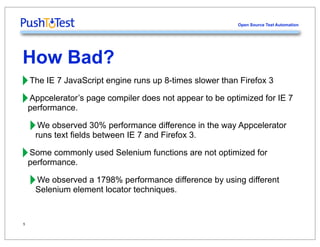
‣The IE 7 JavaScript engine runs up 8-times slower than Firefox 3
‣performance. page compiler does not appear to be optimized for IE 7
 Appcelerator’s


 ‣runsobserved 30% performance difference in the way Appcelerator
   We
        text fields between IE 7 and Firefox 3.

‣performance. used Selenium functions are not optimized for
 Some commonly


 ‣Selenium element locator techniques.difference by using different
   We observed a 1798% performance


5
Open Source Test Automation


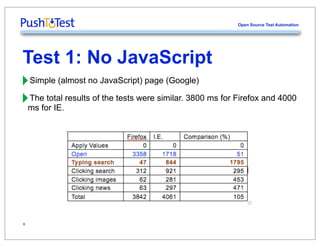
Test 1: No JavaScript
‣Simple (almost no JavaScript) page (Google)
‣ms for IE. results of the tests were similar. 3800 ms for Firefox and 4000
 The total


6
Open Source Test Automation


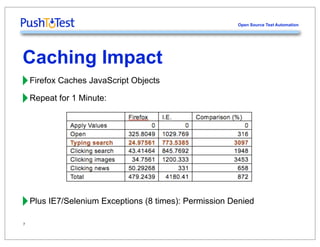
Caching Impact
‣Firefox Caches JavaScript Objects
‣Repeat for 1 Minute:


‣Plus IE7/Selenium Exceptions (8 times): Permission Denied
7
Open Source Test Automation


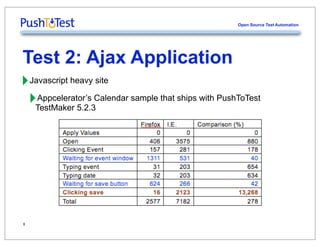
Test 2: Ajax Application
‣Javascript heavy site
 ‣TestMaker 5.2.3Calendar sample that ships with PushToTest
   Appcelerator’s


8
Open Source Test Automation


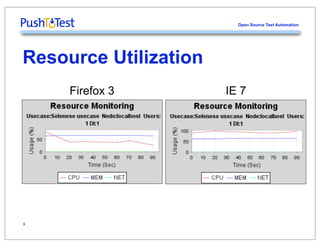
Resource Utilization
     Firefox 3         IE 7


9
Open Source Test Automation


Element Locator
‣Selenium Type Command using various element locator functions


‣This may be because of:
 ‣Slow JavaScript engine in IE.
 ‣Selenium not optimized for IE.
 ‣Slow xpath system engine (if any) in IE.
10
Open Source Test Automation


DOM API Performance
‣DOM Performance on IE 7
 ‣Dom Index is 6250 ms to 6750 ms in Link locator.


11
Open Source Test Automation


Mitigation
‣functional test times. in Selenium RC with IE 7 and expect very long
  Run functional tests


 ‣The test will complete eventually.
 ‣browsers. the performance to the same test running on other
    Do not compare


‣Run functional tests using HTMLUnit with an Internet Explorer profile.
 ‣engine provided in HTMLUnit. using the faster Rhino JavaScript
    Simulates IE functionality while


‣http://selenium.pushtotest.com. for Selenium are found at
  Details on PushToTest support


12
Open Source Test Automation


Where To Go From Here
‣Watch A Screencast and Tutorial
 ‣http://www.pushtotest.com/screencastcentral
‣Attend An Open Source Test Workshop
 ‣http://workshop.pushtotest.com
‣Ask For A Proposal on Licenses, Training, Support, Consulting
 ‣Call +01 408 871 0122, sales@pushtotest.com

13

Selenium XPath Performance Problems in IE

  • 1.
    The Server SideSymposium 2009 Selenium XPath Performance Problems In Internet Explorer Frank Cohen, CEO, (408) 871-0122, fcohen@pushtotest.com March 18, 2009
  • 2.
    Open Source TestAutomation About PushToTest ‣Our Mission: Test, To Make A More Reliable World ‣Make It Easier To Move From Manual To Automated Testing ‣Support Advanced Testing, including Agile, Load, Integration ‣Open Source Testing (OST) For Everyone 2
  • 3.
    Open Source TestAutomation Next let’s talk about Performance Anxiety ‣The Perfect Storm: IE 7, Selenium, Appcelerator ‣Mitigation Research Prepared By Luis Carlos Lara, llara@pushtotest.com 3 William Martinez, william@pushtotest.com
  • 4.
    Open Source TestAutomation The Problem 30 s Ajax App, Selenium RC, TestMaker, Firefox 3 30 m Ajax App, Selenium RC, TestMaker, Internet Explorer 7 4
  • 5.
    Open Source TestAutomation How Bad? ‣The IE 7 JavaScript engine runs up 8-times slower than Firefox 3 ‣performance. page compiler does not appear to be optimized for IE 7 Appcelerator’s ‣runsobserved 30% performance difference in the way Appcelerator We text fields between IE 7 and Firefox 3. ‣performance. used Selenium functions are not optimized for Some commonly ‣Selenium element locator techniques.difference by using different We observed a 1798% performance 5
  • 6.
    Open Source TestAutomation Test 1: No JavaScript ‣Simple (almost no JavaScript) page (Google) ‣ms for IE. results of the tests were similar. 3800 ms for Firefox and 4000 The total 6
  • 7.
    Open Source TestAutomation Caching Impact ‣Firefox Caches JavaScript Objects ‣Repeat for 1 Minute: ‣Plus IE7/Selenium Exceptions (8 times): Permission Denied 7
  • 8.
    Open Source TestAutomation Test 2: Ajax Application ‣Javascript heavy site ‣TestMaker 5.2.3Calendar sample that ships with PushToTest Appcelerator’s 8
  • 9.
    Open Source TestAutomation Resource Utilization Firefox 3 IE 7 9
  • 10.
    Open Source TestAutomation Element Locator ‣Selenium Type Command using various element locator functions ‣This may be because of: ‣Slow JavaScript engine in IE. ‣Selenium not optimized for IE. ‣Slow xpath system engine (if any) in IE. 10
  • 11.
    Open Source TestAutomation DOM API Performance ‣DOM Performance on IE 7 ‣Dom Index is 6250 ms to 6750 ms in Link locator. 11
  • 12.
    Open Source TestAutomation Mitigation ‣functional test times. in Selenium RC with IE 7 and expect very long Run functional tests ‣The test will complete eventually. ‣browsers. the performance to the same test running on other Do not compare ‣Run functional tests using HTMLUnit with an Internet Explorer profile. ‣engine provided in HTMLUnit. using the faster Rhino JavaScript Simulates IE functionality while ‣http://selenium.pushtotest.com. for Selenium are found at Details on PushToTest support 12
  • 13.
    Open Source TestAutomation Where To Go From Here ‣Watch A Screencast and Tutorial ‣http://www.pushtotest.com/screencastcentral ‣Attend An Open Source Test Workshop ‣http://workshop.pushtotest.com ‣Ask For A Proposal on Licenses, Training, Support, Consulting ‣Call +01 408 871 0122, sales@pushtotest.com 13