DISCUS
for
In-Process Inspection Planning
January 2014

March 11, 2006
© 2014 DISCUS Software Company
Emerging Industry Demands
 Renewed emphasis on affordability with Model Based
Enterprise
 Need to associate each part characteristics with
specific operation on job routing
 Provide operation-specific work instructions that
include illustrations and 3D views
 Leverage the Bill of Characteristics for both First
Article Inspection as well as In-process Inspection

2
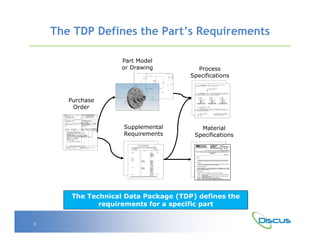
The TDP Defines the Part’s Requirements
Part Model
or Drawing

Process
Specifications

Purchase
Order
Supplemental
Requirements

Material
Specifications

The Technical Data Package (TDP) defines the
requirements for a specific part
3
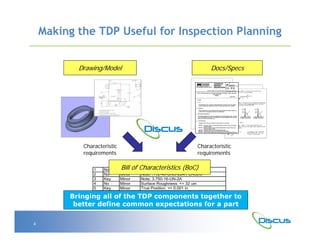
Making the TDP Useful for Inspection Planning
Drawing/Model

Characteristic
requirements
1
2
3
4
5
6
7

No
No
Key
No
Key
No
No

Docs/Specs

Characteristic
requirements

Bill of Characteristics (BoC)
Profile of a Surface: <= 0.01 in

Minor
Minor
Minor
Minor
Minor
Minor
Major

Note: .112-40-UNC-2B4 PLACES
Note: 3.750-16-UN-2A
Surface Roughness: <= 32 uin
True Position: <= 0.001 in
Weld IAW Spec PS1280
Parallelism: <= 0.0005 in

Bringing all of the TDP components together to
better define common expectations for a part
4
TDP and the Associated Business Processes

Tech Data Package
(TDP)

Producibility
Design for Manufacturing

CMM
Coordinate Measuring Machines

FAI
First Article Inspection

CAPP
Computer-Aided Process Planning

Many manufacturing and quality-related
business processes are dependent upon the TDP

5
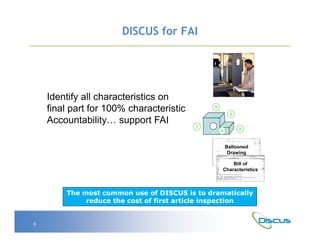
DISCUS for FAI

Identify all characteristics on
final part for 100% characteristic
Accountability… support FAI

5
2
1
4

3

Ballooned
Drawing
Bill of
Characteristics

The most common use of DISCUS is to dramatically
reduce the cost of first article inspection

6
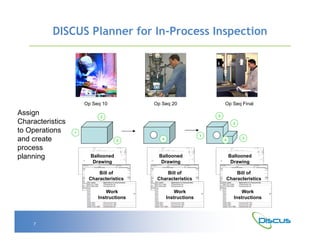
DISCUS Planner for In-Process Inspection

Op Seq 10

Assign
Characteristics
to Operations
and create
process
planning

Op Seq 20
5

2

2
1
3

Ballooned
Drawing
Bill of
Characteristics
Work
Instructions

7

Op Seq Final

1

4

4

Ballooned
Drawing
Bill of
Characteristics
Work
Instructions

3

Ballooned
Drawing
Bill of
Characteristics
Work
Instructions
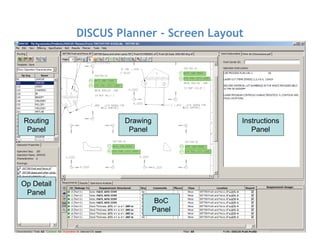
DISCUS Planner - Screen Layout

Routing
Panel

Drawing
Panel

Instructions
Panel

Op Detail
Panel
BoC
Panel
8
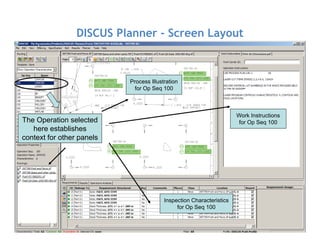
DISCUS Planner - Screen Layout

Process Illustration
for Op Seq 100

Work Instructions
for Op Seq 100

The Operation selected
here establishes
context for other panels

Inspection Characteristics
for Op Seq 100
9
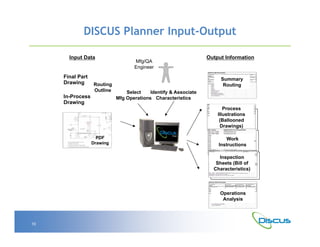
DISCUS Planner Input-Output
Input Data

Final Part
Drawing

Routing
Outline

In-Process
Drawing

Mfg/QA
Engineer

Output Information

Summary
Routing
Select
Identify & Associate
Mfg Operations Characteristics
Process
Illustrations
(Ballooned
Drawings)

PDF
Drawing

Work
Instructions
Inspection
Sheets (Bill of
Characteristics)

Operations
Analysis

10
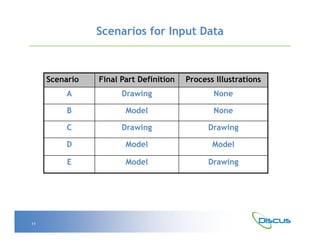
Scenarios for Input Data

Scenario

Process Illustrations

A

Drawing

None

B

Model

None

C

Drawing

Drawing

D

Model

Model

E

11

Final Part Definition

Model

Drawing
Scenario A – Final Part Drawing
Final Part
Definition Drawing
A view of final
for this op
A view of final
for this op

Op Seq 10

Op Seq 20

Op Seq 999
5

2

2
1
3

4

1
4

Process
Illustrations
(Ballooned
Drawings)

Process
Illustrations
(Ballooned
Drawings)

Work
Instructions

Work
Instructions

Work
Instructions

Inspection
Sheets (Bill of
Characteristics)

12

Process
Illustrations
(Ballooned
Drawings)

Inspection
Sheets (Bill of
Characteristics)

Inspection
Sheets (Bill of
Characteristics)

3
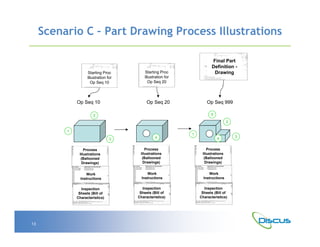
Scenario C – Part Drawing Process Illustrations

Starting Proc
Illustration for
Op Seq 10

Op Seq 10

Final Part
Definition Drawing

Starting Proc
Illustration for
Op Seq 20

Op Seq 20

Op Seq 999
5

2

2
1
3

4

1
4

Process
Illustrations
(Ballooned
Drawings)

Process
Illustrations
(Ballooned
Drawings)

Work
Instructions

Work
Instructions

Work
Instructions

Inspection
Sheets (Bill of
Characteristics)

13

Process
Illustrations
(Ballooned
Drawings)

Inspection
Sheets (Bill of
Characteristics)

Inspection
Sheets (Bill of
Characteristics)

3
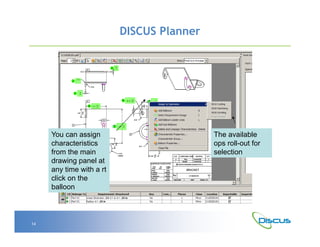
DISCUS Planner

You can assign
characteristics
from the main
drawing panel at
any time with a rt
click on the
balloon

14

The available
ops roll-out for
selection
DISCUS Planner

Export Process Plan is
much more granular
where you can define
the operations you
want to export. You can
define the items and
format uniquely for
each operation

15
Benefits of DISCUS
1.

Focused Tools – DISCUS was specifically created for the Manufacturing
Engineers and Quality Engineers and the tasks that they must
address. It focuses on the labor-intensive and error-prone work
involved in using a TDP.

2.

Cost Effective – DISCUS doesn’t require the cost or complexity of
learning a CAD tool or consuming a CAD license for ballooning and
characteristic identification.

3.

Modular Licensing – DISCUS is based on an architecture that enables a
company to get only what is needed, and then add functionality later
when ready.

4.

Market Leader – DISCUS is the most used tool for characteristic
identification in the aerospace industry, where companies have
actually acquired the suite of tools for their own use and experienced
tangible business benefits.

16
Benefits of DISCUS
5.

Comprehensive Requirements – DISCUS addresses and consolidates
the requirements of the entire TDP, including material and process
specifications.

6.

Consistent Operation – DISCUS provides a common user interface and
operation for both 2D and 3D, and it works with many different 3D
CAD formats, allowing support of multiple customers with one tool.

7.

Complete Solution – DISCUS provides a software suite with a shared
database, from ballooning and illustrations to reporting and
dashboards. DISCUS provides a single source of the truth.

8.

Integration Capability – DISCUS enables integration of the
characteristic management system with other internal computer
systems such as ERP and PDM.

9.

Flexible Deployment – DISCUS is based on an technology
infrastructure that allows the solution to be externally hosted or
installed behind a firewall.

17
614-360-2424
www.DISCUSsoftware.com

Discus In-Process Inspection Planning

  • 1.
    DISCUS for In-Process Inspection Planning January2014 March 11, 2006 © 2014 DISCUS Software Company
  • 2.
    Emerging Industry Demands Renewed emphasis on affordability with Model Based Enterprise  Need to associate each part characteristics with specific operation on job routing  Provide operation-specific work instructions that include illustrations and 3D views  Leverage the Bill of Characteristics for both First Article Inspection as well as In-process Inspection 2
  • 3.
    The TDP Definesthe Part’s Requirements Part Model or Drawing Process Specifications Purchase Order Supplemental Requirements Material Specifications The Technical Data Package (TDP) defines the requirements for a specific part 3
  • 4.
    Making the TDPUseful for Inspection Planning Drawing/Model Characteristic requirements 1 2 3 4 5 6 7 No No Key No Key No No Docs/Specs Characteristic requirements Bill of Characteristics (BoC) Profile of a Surface: <= 0.01 in Minor Minor Minor Minor Minor Minor Major Note: .112-40-UNC-2B4 PLACES Note: 3.750-16-UN-2A Surface Roughness: <= 32 uin True Position: <= 0.001 in Weld IAW Spec PS1280 Parallelism: <= 0.0005 in Bringing all of the TDP components together to better define common expectations for a part 4
  • 5.
    TDP and theAssociated Business Processes Tech Data Package (TDP) Producibility Design for Manufacturing CMM Coordinate Measuring Machines FAI First Article Inspection CAPP Computer-Aided Process Planning Many manufacturing and quality-related business processes are dependent upon the TDP 5
  • 6.
    DISCUS for FAI Identifyall characteristics on final part for 100% characteristic Accountability… support FAI 5 2 1 4 3 Ballooned Drawing Bill of Characteristics The most common use of DISCUS is to dramatically reduce the cost of first article inspection 6
  • 7.
    DISCUS Planner forIn-Process Inspection Op Seq 10 Assign Characteristics to Operations and create process planning Op Seq 20 5 2 2 1 3 Ballooned Drawing Bill of Characteristics Work Instructions 7 Op Seq Final 1 4 4 Ballooned Drawing Bill of Characteristics Work Instructions 3 Ballooned Drawing Bill of Characteristics Work Instructions
  • 8.
    DISCUS Planner -Screen Layout Routing Panel Drawing Panel Instructions Panel Op Detail Panel BoC Panel 8
  • 9.
    DISCUS Planner -Screen Layout Process Illustration for Op Seq 100 Work Instructions for Op Seq 100 The Operation selected here establishes context for other panels Inspection Characteristics for Op Seq 100 9
  • 10.
    DISCUS Planner Input-Output InputData Final Part Drawing Routing Outline In-Process Drawing Mfg/QA Engineer Output Information Summary Routing Select Identify & Associate Mfg Operations Characteristics Process Illustrations (Ballooned Drawings) PDF Drawing Work Instructions Inspection Sheets (Bill of Characteristics) Operations Analysis 10
  • 11.
    Scenarios for InputData Scenario Process Illustrations A Drawing None B Model None C Drawing Drawing D Model Model E 11 Final Part Definition Model Drawing
  • 12.
    Scenario A –Final Part Drawing Final Part Definition Drawing A view of final for this op A view of final for this op Op Seq 10 Op Seq 20 Op Seq 999 5 2 2 1 3 4 1 4 Process Illustrations (Ballooned Drawings) Process Illustrations (Ballooned Drawings) Work Instructions Work Instructions Work Instructions Inspection Sheets (Bill of Characteristics) 12 Process Illustrations (Ballooned Drawings) Inspection Sheets (Bill of Characteristics) Inspection Sheets (Bill of Characteristics) 3
  • 13.
    Scenario C –Part Drawing Process Illustrations Starting Proc Illustration for Op Seq 10 Op Seq 10 Final Part Definition Drawing Starting Proc Illustration for Op Seq 20 Op Seq 20 Op Seq 999 5 2 2 1 3 4 1 4 Process Illustrations (Ballooned Drawings) Process Illustrations (Ballooned Drawings) Work Instructions Work Instructions Work Instructions Inspection Sheets (Bill of Characteristics) 13 Process Illustrations (Ballooned Drawings) Inspection Sheets (Bill of Characteristics) Inspection Sheets (Bill of Characteristics) 3
  • 14.
    DISCUS Planner You canassign characteristics from the main drawing panel at any time with a rt click on the balloon 14 The available ops roll-out for selection
  • 15.
    DISCUS Planner Export ProcessPlan is much more granular where you can define the operations you want to export. You can define the items and format uniquely for each operation 15
  • 16.
    Benefits of DISCUS 1. FocusedTools – DISCUS was specifically created for the Manufacturing Engineers and Quality Engineers and the tasks that they must address. It focuses on the labor-intensive and error-prone work involved in using a TDP. 2. Cost Effective – DISCUS doesn’t require the cost or complexity of learning a CAD tool or consuming a CAD license for ballooning and characteristic identification. 3. Modular Licensing – DISCUS is based on an architecture that enables a company to get only what is needed, and then add functionality later when ready. 4. Market Leader – DISCUS is the most used tool for characteristic identification in the aerospace industry, where companies have actually acquired the suite of tools for their own use and experienced tangible business benefits. 16
  • 17.
    Benefits of DISCUS 5. ComprehensiveRequirements – DISCUS addresses and consolidates the requirements of the entire TDP, including material and process specifications. 6. Consistent Operation – DISCUS provides a common user interface and operation for both 2D and 3D, and it works with many different 3D CAD formats, allowing support of multiple customers with one tool. 7. Complete Solution – DISCUS provides a software suite with a shared database, from ballooning and illustrations to reporting and dashboards. DISCUS provides a single source of the truth. 8. Integration Capability – DISCUS enables integration of the characteristic management system with other internal computer systems such as ERP and PDM. 9. Flexible Deployment – DISCUS is based on an technology infrastructure that allows the solution to be externally hosted or installed behind a firewall. 17
  • 18.