“Discover Windows Phone”
development series
05. Application Bar
Yasmine Abdelhady
@yasabdelhady
Yasmine.Abdelhady@Hotmail.com

© Yasmine Abdelhady | MEA DPE Intern
 What is an application bar?

 Adding an application bar
 Making the buttons work

Agenda

 Text-based menu items
 Other appBar properties
 appBar best practices

© Yasmine Abdelhady | MEA DPE Intern
What is an
appBar?

© Yasmine Abdelhady | MEA DPE Intern

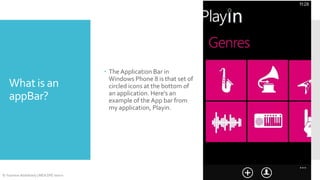
 The Application Bar in
Windows Phone 8 is that set of
circled icons at the bottom of
an application. Here's an
example of the App bar from
my application, Playin.
 Let’s open the project that we’ve created through out the previous
post

Adding the
Application bar

 1. Open MainPage.xaml
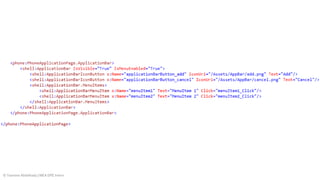
 2. Add your application bar ( xaml code in the next slide ) at the
very end of the page but before
</phone:PhoneApplicationPage>

© Yasmine Abdelhady | MEA DPE Intern
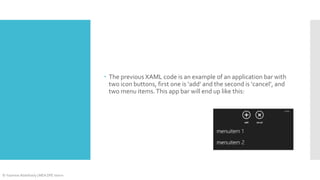
 The previous XAML code is an example of an application bar with
two icon buttons, first one is ‘add’ and the second is ‘cancel’, and
two menu items. This app bar will end up like this:

© Yasmine Abdelhady | MEA DPE Intern
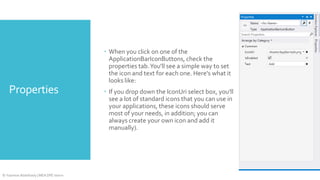
 When you click on one of the
ApplicationBarIconButtons, check the
properties tab. You'll see a simple way to set
the icon and text for each one. Here's what it
looks like:

Properties

© Yasmine Abdelhady | MEA DPE Intern

 If you drop down the IconUri select box, you'll
see a lot of standard icons that you can use in
your applications, these icons should serve
most of your needs, in addition; you can
always create your own icon and add it
manually).
 AppBar buttons are like anything in your XAML file. They just need
a Click event, and an event handler in the code behind.

Making these
buttons work

© Yasmine Abdelhady | MEA DPE Intern

 So to do this:
1. Select the 'add' button from the design view
2. Go to the properties windows
3. You'll find another tab for event handlers, click on it
4. Change the name of the button, and double tap on the textbox
that is corresponding to the event 'Click'.
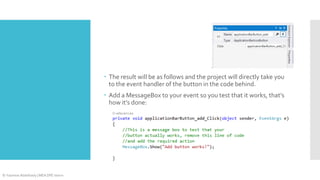
 The result will be as follows and the project will directly take you
to the event handler of the button in the code behind.
 Add a MessageBox to your event so you test that it works, that’s
how it’s done:

© Yasmine Abdelhady | MEA DPE Intern
What are textbased menu
items?

© Yasmine Abdelhady | MEA DPE Intern

When you run your application, you may have noticed that by
clicking on the ellipsis icon (…), the application bar slides up to
reveal a list of another menu options. If you used the default code
from above, they still say “MenuItem 1″ and “MenuItem 2″. These
work just like the IconButtons, where you can rig up event handlers
for when your users click on them.
Can you
minimize the
app bar?

© Yasmine Abdelhady | MEA DPE Intern

Yes you can! you can have an application bar that doesn’t show any
of the ApplicationBarIconButtons by default. To do this, you simply
need to change the Mode property of the ApplicationBar to be
“Minimized”.
Other appBar
properties

 You can change the opacity of the appBar, expected values are
between 0.0 and 1.0, from totally transparent to completely
opaque respectively.
 The background and the foreground colors can be changed as a
property in the XAML element. Also the visibility and enabling the
appBar is possible.
 To know more about ApplicationBar best practices click here.

© Yasmine Abdelhady | MEA DPE Intern
@yasabdelhady

yasmine.Abdelhady@Hotmail.com

Thank you 
yasabdelhady.wordpress.com

Facebook.com/yasabdelhady

© Yasmine Abdelhady | MEA DPE Intern

"Discover windows phone" 05. Application Bar

  • 1.
    “Discover Windows Phone” developmentseries 05. Application Bar Yasmine Abdelhady @yasabdelhady Yasmine.Abdelhady@Hotmail.com © Yasmine Abdelhady | MEA DPE Intern
  • 2.
     What isan application bar?  Adding an application bar  Making the buttons work Agenda  Text-based menu items  Other appBar properties  appBar best practices © Yasmine Abdelhady | MEA DPE Intern
  • 3.
    What is an appBar? ©Yasmine Abdelhady | MEA DPE Intern  The Application Bar in Windows Phone 8 is that set of circled icons at the bottom of an application. Here's an example of the App bar from my application, Playin.
  • 4.
     Let’s openthe project that we’ve created through out the previous post Adding the Application bar  1. Open MainPage.xaml  2. Add your application bar ( xaml code in the next slide ) at the very end of the page but before </phone:PhoneApplicationPage> © Yasmine Abdelhady | MEA DPE Intern
  • 5.
    © Yasmine Abdelhady| MEA DPE Intern
  • 6.
     The previousXAML code is an example of an application bar with two icon buttons, first one is ‘add’ and the second is ‘cancel’, and two menu items. This app bar will end up like this: © Yasmine Abdelhady | MEA DPE Intern
  • 7.
     When youclick on one of the ApplicationBarIconButtons, check the properties tab. You'll see a simple way to set the icon and text for each one. Here's what it looks like: Properties © Yasmine Abdelhady | MEA DPE Intern  If you drop down the IconUri select box, you'll see a lot of standard icons that you can use in your applications, these icons should serve most of your needs, in addition; you can always create your own icon and add it manually).
  • 8.
     AppBar buttonsare like anything in your XAML file. They just need a Click event, and an event handler in the code behind. Making these buttons work © Yasmine Abdelhady | MEA DPE Intern  So to do this: 1. Select the 'add' button from the design view 2. Go to the properties windows 3. You'll find another tab for event handlers, click on it 4. Change the name of the button, and double tap on the textbox that is corresponding to the event 'Click'.
  • 9.
     The resultwill be as follows and the project will directly take you to the event handler of the button in the code behind.  Add a MessageBox to your event so you test that it works, that’s how it’s done: © Yasmine Abdelhady | MEA DPE Intern
  • 10.
    What are textbasedmenu items? © Yasmine Abdelhady | MEA DPE Intern When you run your application, you may have noticed that by clicking on the ellipsis icon (…), the application bar slides up to reveal a list of another menu options. If you used the default code from above, they still say “MenuItem 1″ and “MenuItem 2″. These work just like the IconButtons, where you can rig up event handlers for when your users click on them.
  • 11.
    Can you minimize the appbar? © Yasmine Abdelhady | MEA DPE Intern Yes you can! you can have an application bar that doesn’t show any of the ApplicationBarIconButtons by default. To do this, you simply need to change the Mode property of the ApplicationBar to be “Minimized”.
  • 12.
    Other appBar properties  Youcan change the opacity of the appBar, expected values are between 0.0 and 1.0, from totally transparent to completely opaque respectively.  The background and the foreground colors can be changed as a property in the XAML element. Also the visibility and enabling the appBar is possible.  To know more about ApplicationBar best practices click here. © Yasmine Abdelhady | MEA DPE Intern
  • 13.