Digital Workflow
Introduction
Twitter: @AdamSLowe
Instagram: AdamShawnLowe
Email: Adam@AdamLoweCreative.com
Web: www.AdamLoweCreative.com
Address: 657 Southlawn Dr, Rockville, MD 20850
Photography | Videography| Education | Art Direction
Class Outline
• Introductions
• Setting yourself up for success
• Systems & Services
• Gizmos & Gadgets
• Backup Systems
• Color Calibration
• Introduction to Lightroom
• Interface tour
• Image management
• Importing / Exporting Images
• Round trip to Photoshop
• Editing(culling) images
• Global adjustments
• Cropping and resizing for print
• Local adjustments
Background
• Background in management consulting, business process optimization
• Started my photography business part-time in 2010
• Went full-time in early 2013
• Re-branded in Summer of 2016
Enough about me…
• Name
• Background on your business
• Focus of your business
• What do you do well?
• Where do you struggle?
A few notes
• Do what works best for you!
• Eat the elephant one bite at a time
• Systems don’t have to be complicated or expensive
• Remember: No debt is better than debt!
Stuff I love
(No, I don’t get paid by any of these companies)
• Google apps for work
https://gsuite.google.com/
• Office 360
http://office.microsoft.com
• Pixifi Studio Management Software
www.Pixifi.com
• Quickbooks Online
https://quickbooks.intuit.com
• Wordpress
https://wordpress.org/
• Sytist
https://www.picturespro.com/sytist
• Zapier
http://www.zapier.com
• Evernote
http://www.evernote.com
• OmniFocus
https://www.omnigroup.com/omnifocus
• Dropbox
http://www.dropbox.com
• Lightroom & Capture One (yes, both!)
http://lightroom.adobe.com
https://www.phaseone.com
• Photo Mechanic
http://www.camerabits.com/
• ProSelect
http://timeexposure.com/
• ProShow Producer (or web)
http://www.photodex.com/
• Fundy Designer
http://fundydesigner.com/
• Resilio Sync
https://getsync.com
• CrashPlan
https://www.crashplan.com
• FullContact
http://www.fullcontact.com
• Mvelopes
http://www.mvelopes.com
Why are we in business?
• To make money, of course!
• Time is money
• Time is a finite resource
• We waste time on unimportant things
• How do you regain time and make more money?
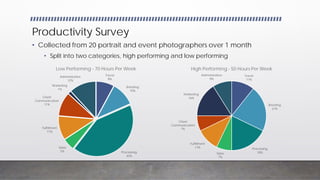
Productivity Survey
• Collected from 20 portrait and event photographers over 1 month
• Split into two categories, high performing and low performing
Travel
8%
Shooting
10%
Processing
42%
Sales
5%
Fulfillment
11%
Client
Communication
11%
Marketing
1%
Administrative
12%
Low Performing - 70 Hours Per Week
Travel
11%
Shooting
21%
Processing
18%Sales
7%
Fulfillment
11%
Client
Communication
7%
Marketing
16%
Administrative
9%
High Performing - 50 Hours Per Week
The bottom line
• Activities that add to the bottom line:
• Shooting
• Marketing
• We need to focus on those activities and streamline everything else!
Systems and Services
• Email
• G Suite
• Office 365
• Website
• Squarespace, Wordpress, Zenfolio
• Image Hosting
• Zenfolio, Smugmug
• Accounting
• Quickbooks, Xero, Gnucash
• Backups
• Studio Management (Later)
• Sales Software (Later)
Gizmos and Gadgets
• Camera gear
• Grey Card or Color Checker
• Full frame vs crop sensor
• Where to start investing
• Computer Gear
• Laptop or desktop?
• Specs and storage
• Wacom Tablet (Cintiq pro)
• Monitor calibration device
• Print or Lab?
Backup Systems
• 3-2-1 Method – Best practice
• Have at least 3 copies of your data
• Keep these backups on 2 different media
• Store 1 backup offsite
• RAID & NAS
• Raid is not backup!
• A copy of your data is not a backup!
RGB & CMYK
Color Wheel
Primary Secondary
Red Cyan
Green Magenta
Blue Yellow
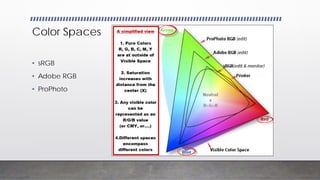
Color Spaces
• sRGB
• Adobe RGB
• ProPhoto
Monitor Calibration
Color Management Workflow
• Start big -> End Small
• Delivery for web – sRGB
• Delivery for print (typical lab) – sRGB
• Delivery for print (high-end labs and printers) – Adobe RGB
• Embed your color profile
Printing Your Work
• Calibrate your monitor
• Temperature 6500k Gamma 2.2 is standard
• Select your lab
• Pilot Imaging
• WHCC
• Bay Photo
• Millers
• Nations Photo
• Convert to proper color space and embed your profile when you export
• Order test prints from the lab and make corrections as necessary!

Digital workflow

  • 1.
  • 2.
    Introduction Twitter: @AdamSLowe Instagram: AdamShawnLowe Email:Adam@AdamLoweCreative.com Web: www.AdamLoweCreative.com Address: 657 Southlawn Dr, Rockville, MD 20850 Photography | Videography| Education | Art Direction
  • 3.
    Class Outline • Introductions •Setting yourself up for success • Systems & Services • Gizmos & Gadgets • Backup Systems • Color Calibration • Introduction to Lightroom • Interface tour • Image management • Importing / Exporting Images • Round trip to Photoshop • Editing(culling) images • Global adjustments • Cropping and resizing for print • Local adjustments
  • 4.
    Background • Background inmanagement consulting, business process optimization • Started my photography business part-time in 2010 • Went full-time in early 2013 • Re-branded in Summer of 2016
  • 5.
    Enough about me… •Name • Background on your business • Focus of your business • What do you do well? • Where do you struggle?
  • 6.
    A few notes •Do what works best for you! • Eat the elephant one bite at a time • Systems don’t have to be complicated or expensive • Remember: No debt is better than debt!
  • 7.
    Stuff I love (No,I don’t get paid by any of these companies) • Google apps for work https://gsuite.google.com/ • Office 360 http://office.microsoft.com • Pixifi Studio Management Software www.Pixifi.com • Quickbooks Online https://quickbooks.intuit.com • Wordpress https://wordpress.org/ • Sytist https://www.picturespro.com/sytist • Zapier http://www.zapier.com • Evernote http://www.evernote.com • OmniFocus https://www.omnigroup.com/omnifocus • Dropbox http://www.dropbox.com • Lightroom & Capture One (yes, both!) http://lightroom.adobe.com https://www.phaseone.com • Photo Mechanic http://www.camerabits.com/ • ProSelect http://timeexposure.com/ • ProShow Producer (or web) http://www.photodex.com/ • Fundy Designer http://fundydesigner.com/ • Resilio Sync https://getsync.com • CrashPlan https://www.crashplan.com • FullContact http://www.fullcontact.com • Mvelopes http://www.mvelopes.com
  • 8.
    Why are wein business? • To make money, of course! • Time is money • Time is a finite resource • We waste time on unimportant things • How do you regain time and make more money?
  • 9.
    Productivity Survey • Collectedfrom 20 portrait and event photographers over 1 month • Split into two categories, high performing and low performing Travel 8% Shooting 10% Processing 42% Sales 5% Fulfillment 11% Client Communication 11% Marketing 1% Administrative 12% Low Performing - 70 Hours Per Week Travel 11% Shooting 21% Processing 18%Sales 7% Fulfillment 11% Client Communication 7% Marketing 16% Administrative 9% High Performing - 50 Hours Per Week
  • 10.
    The bottom line •Activities that add to the bottom line: • Shooting • Marketing • We need to focus on those activities and streamline everything else!
  • 11.
    Systems and Services •Email • G Suite • Office 365 • Website • Squarespace, Wordpress, Zenfolio • Image Hosting • Zenfolio, Smugmug • Accounting • Quickbooks, Xero, Gnucash • Backups • Studio Management (Later) • Sales Software (Later)
  • 12.
    Gizmos and Gadgets •Camera gear • Grey Card or Color Checker • Full frame vs crop sensor • Where to start investing • Computer Gear • Laptop or desktop? • Specs and storage • Wacom Tablet (Cintiq pro) • Monitor calibration device • Print or Lab?
  • 13.
    Backup Systems • 3-2-1Method – Best practice • Have at least 3 copies of your data • Keep these backups on 2 different media • Store 1 backup offsite • RAID & NAS • Raid is not backup! • A copy of your data is not a backup!
  • 14.
  • 15.
    Color Wheel Primary Secondary RedCyan Green Magenta Blue Yellow
  • 16.
    Color Spaces • sRGB •Adobe RGB • ProPhoto
  • 17.
  • 18.
    Color Management Workflow •Start big -> End Small • Delivery for web – sRGB • Delivery for print (typical lab) – sRGB • Delivery for print (high-end labs and printers) – Adobe RGB • Embed your color profile
  • 19.
    Printing Your Work •Calibrate your monitor • Temperature 6500k Gamma 2.2 is standard • Select your lab • Pilot Imaging • WHCC • Bay Photo • Millers • Nations Photo • Convert to proper color space and embed your profile when you export • Order test prints from the lab and make corrections as necessary!