Ed Fay London School of Economics EMAIL:  e.fay@lse.ac.uk TWITTER:  @digitalfay Digital Preservation In Practice
We do not have a long-term digital preservation strategy
… and we’re perfectly ok with that! We do not have a long-term digital preservation strategy
This  does  mean…. That we are agnostic about the ‘final’ solution That we are happy to investigate, experiment and change what we are doing (We don’t even necessarily think there is/has to be one…)
This  doesn’t  mean… We are doing nothing!
We have: Decided we want to be preserving digital stuff We are: Starting to take the first steps
Long-term means  long -term Digital preservation is about preserving  access  at a given point in time Right now we have no critical collections but, given time, we will
Long-term means  long -term We don’t need: a ‘complete solution’; right now We do need: to start thinking, getting clear about the problem, and talking about it We also need to start doing something so it doesn’t become too late
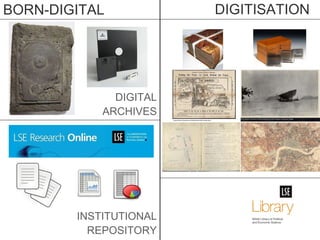
BORN-DIGITAL DIGITISATION DIGITAL ARCHIVES INSTITUTIONAL REPOSITORY
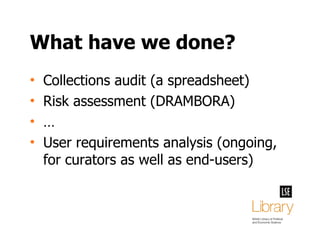
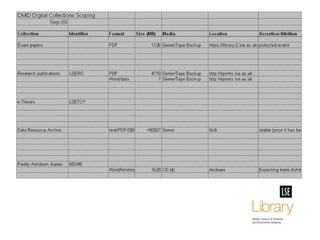
What have we done? Collections audit (a spreadsheet) Risk assessment (DRAMBORA) … User requirements analysis (ongoing, for curators as well as end-users)
 
 
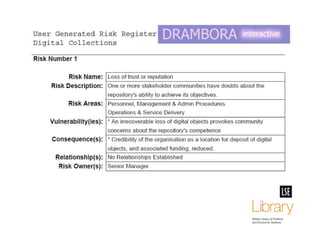
Tools: DRAMBORA Risk assessment Why? Start the conversation Make the problems clear to all stakeholders (curators, technical specialists, senior managers) Not for detailed functional analysis http://repositoryaudit.eu/
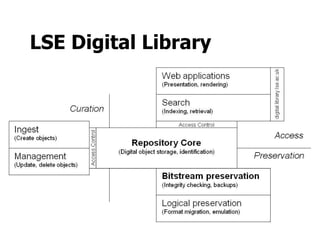
What are we doing? Creating a place to store our digital objects ‘ repository core’ for object storage (redundancy, backups) and identification Creating a way to ingest/accession objects workflow for object characterisation, checksums, quarantine/virus check
Tools: Archivematica Workflow tool Why? For ‘ingesting’ digital objects Bundles tools for: quarantine/virus check (filesystem, ClamAV) checksum creation/verification (MD5) format characterisation/validation (FITS which packages DROID, JHOVE, NZ Metadata Extractor …) http://archivematica.org/
What will we be doing? Building management interfaces Building access interfaces Developing a logical preservation approach strategy and policies Building logical preservation functionality implementing tools for migration or emulation
LSE Digital Library
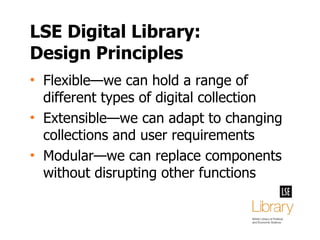
LSE Digital Library: Design Principles Flexible—we can hold a range of different types of digital collection Extensible—we can adapt to changing collections and user requirements Modular—we can replace components without disrupting other functions
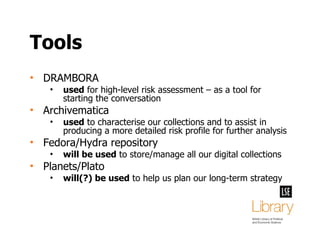
Tools DRAMBORA used  for high-level risk assessment – as a tool for starting the conversation Archivematica used  to characterise our collections and to assist in producing a more detailed risk profile for further analysis Fedora/Hydra repository will be used  to store/manage all our digital collections Planets/Plato will(?) be used  to help us plan our long-term strategy
Guiding principles Openness: standards, technologies Transparency: clear, documented decisions and processes Engagement: bringing everyone along with us (senior managers, depositors, colleagues across the library)
The  problems … …you’ve heard about The  solutions … … are complex Digital Preservation is HARD!
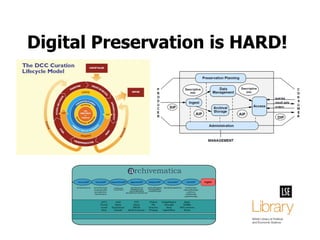
Digital Preservation is HARD!
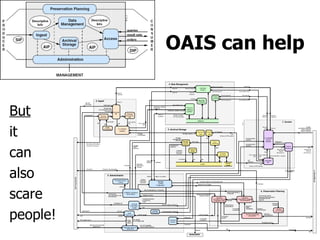
OAIS can help But it can also scare people!
Digital Preservation is HARD! Shorter summary of DP:  know what you have and value ,  assess risk , take action to avoid risk, repeat. Problem: people don't do it  Steve Hitchcock JISC KeepIt Project Manager http://twitter.com/#!/jisckeepit/status/25530206525591552
Small steps now… … save big(ger) problems later Learn by doing  – you (should) always have originals Focus on: “ ingest ” = capture, identify “ bit-preservation ” = redundancy, backups Use this as the basis for more  thorough risk assessment Use that as basis to  make the case for investment Then think about the long-term (policy and tech)
That’s it! Ed Fay London School of Economics EMAIL:  e.fay@lse.ac.uk TWITTER:  @digitalfay
Image credits Egosiliqua malusymphonicus Guts ©  Christopher Locke  (used with permission) http://heartlessmachine.com/ Simple Globe  (CC-BY-SA) Tokyoship http://commons.wikimedia.org/wiki/File:Simple_Globe.svg 8” floppy disk  (Public Domain) Pamporoff http://commons.wikimedia.org/wiki/File:8%60%60_floppy_disk.jpg [Various Gnome icons] (GPL) Gnome icon artists Curation Lifecycle Model  © DCC  (used with permission) http://www.dcc.ac.uk/resources/curation-lifecycle-model Reference Model for an Open Archival Information System  © CCSDS http://public.ccsds.org/publications/archive/650x0b1.pdf Archivematica Overview  (CC-BY-SA) Artefactual Systems http://archivematica.org/ All other images (CC-BY-NC-SA) LSE Library

Digital Preservation in Practice

  • 1.
    Ed Fay LondonSchool of Economics EMAIL: e.fay@lse.ac.uk TWITTER: @digitalfay Digital Preservation In Practice
  • 2.
    We do nothave a long-term digital preservation strategy
  • 3.
    … and we’reperfectly ok with that! We do not have a long-term digital preservation strategy
  • 4.
    This does mean…. That we are agnostic about the ‘final’ solution That we are happy to investigate, experiment and change what we are doing (We don’t even necessarily think there is/has to be one…)
  • 5.
    This doesn’t mean… We are doing nothing!
  • 6.
    We have: Decidedwe want to be preserving digital stuff We are: Starting to take the first steps
  • 7.
    Long-term means long -term Digital preservation is about preserving access at a given point in time Right now we have no critical collections but, given time, we will
  • 8.
    Long-term means long -term We don’t need: a ‘complete solution’; right now We do need: to start thinking, getting clear about the problem, and talking about it We also need to start doing something so it doesn’t become too late
  • 9.
    BORN-DIGITAL DIGITISATION DIGITALARCHIVES INSTITUTIONAL REPOSITORY
  • 10.
    What have wedone? Collections audit (a spreadsheet) Risk assessment (DRAMBORA) … User requirements analysis (ongoing, for curators as well as end-users)
  • 11.
  • 12.
  • 13.
    Tools: DRAMBORA Riskassessment Why? Start the conversation Make the problems clear to all stakeholders (curators, technical specialists, senior managers) Not for detailed functional analysis http://repositoryaudit.eu/
  • 14.
    What are wedoing? Creating a place to store our digital objects ‘ repository core’ for object storage (redundancy, backups) and identification Creating a way to ingest/accession objects workflow for object characterisation, checksums, quarantine/virus check
  • 15.
    Tools: Archivematica Workflowtool Why? For ‘ingesting’ digital objects Bundles tools for: quarantine/virus check (filesystem, ClamAV) checksum creation/verification (MD5) format characterisation/validation (FITS which packages DROID, JHOVE, NZ Metadata Extractor …) http://archivematica.org/
  • 16.
    What will webe doing? Building management interfaces Building access interfaces Developing a logical preservation approach strategy and policies Building logical preservation functionality implementing tools for migration or emulation
  • 17.
  • 18.
    LSE Digital Library:Design Principles Flexible—we can hold a range of different types of digital collection Extensible—we can adapt to changing collections and user requirements Modular—we can replace components without disrupting other functions
  • 19.
    Tools DRAMBORA used for high-level risk assessment – as a tool for starting the conversation Archivematica used to characterise our collections and to assist in producing a more detailed risk profile for further analysis Fedora/Hydra repository will be used to store/manage all our digital collections Planets/Plato will(?) be used to help us plan our long-term strategy
  • 20.
    Guiding principles Openness:standards, technologies Transparency: clear, documented decisions and processes Engagement: bringing everyone along with us (senior managers, depositors, colleagues across the library)
  • 21.
    The problems… …you’ve heard about The solutions … … are complex Digital Preservation is HARD!
  • 22.
  • 23.
    OAIS can helpBut it can also scare people!
  • 24.
    Digital Preservation isHARD! Shorter summary of DP: know what you have and value , assess risk , take action to avoid risk, repeat. Problem: people don't do it Steve Hitchcock JISC KeepIt Project Manager http://twitter.com/#!/jisckeepit/status/25530206525591552
  • 25.
    Small steps now…… save big(ger) problems later Learn by doing – you (should) always have originals Focus on: “ ingest ” = capture, identify “ bit-preservation ” = redundancy, backups Use this as the basis for more thorough risk assessment Use that as basis to make the case for investment Then think about the long-term (policy and tech)
  • 26.
    That’s it! EdFay London School of Economics EMAIL: e.fay@lse.ac.uk TWITTER: @digitalfay
  • 27.
    Image credits Egosiliquamalusymphonicus Guts © Christopher Locke (used with permission) http://heartlessmachine.com/ Simple Globe (CC-BY-SA) Tokyoship http://commons.wikimedia.org/wiki/File:Simple_Globe.svg 8” floppy disk (Public Domain) Pamporoff http://commons.wikimedia.org/wiki/File:8%60%60_floppy_disk.jpg [Various Gnome icons] (GPL) Gnome icon artists Curation Lifecycle Model © DCC (used with permission) http://www.dcc.ac.uk/resources/curation-lifecycle-model Reference Model for an Open Archival Information System © CCSDS http://public.ccsds.org/publications/archive/650x0b1.pdf Archivematica Overview (CC-BY-SA) Artefactual Systems http://archivematica.org/ All other images (CC-BY-NC-SA) LSE Library