


Ed Fay
Head of Digital Scholarship and Innovation
e.fay@lse.ac.uk | @digitalfay
User Experience in
Innovative Library Services
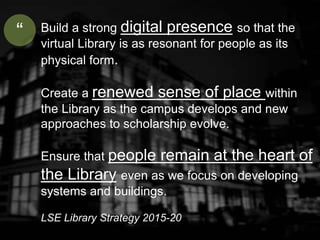
Build a strong digital presence so that the
virtual Library is as resonant for people as its
physical form.
Create a renewed sense of place within
the Library as the campus develops and new
approaches to scholarship evolve.
Ensure that people remain at the heart of
the Library even as we focus on developing
systems and buildings.
LSE Library Strategy 2015-20
“
digital presence
sense of place
people
(UX) User
Experience
What is UX?
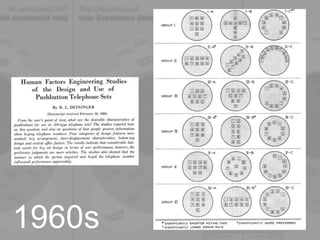
1960s
1960s
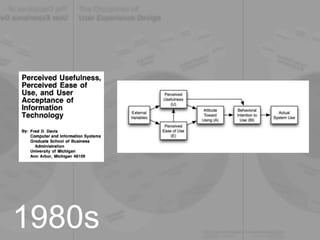
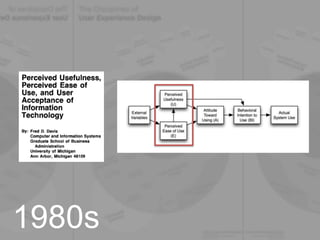
1980s
1980s
Usability
“the extent to which a product can
be used by specified users to
achieve specified goals with
effectiveness, efficiency and
satisfaction in a specified context
of use”
1990s
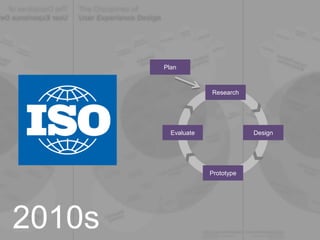
2010s
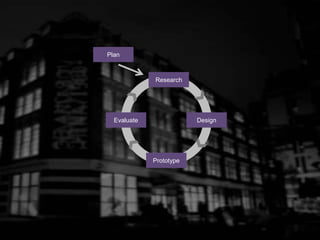
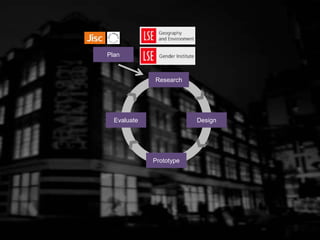
Research
Plan
Design
Prototype
Evaluate
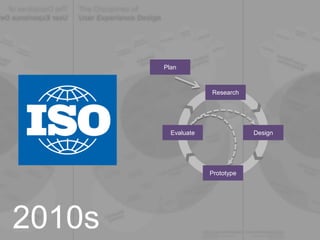
2010s
Research
Plan
Design
Prototype
Evaluate
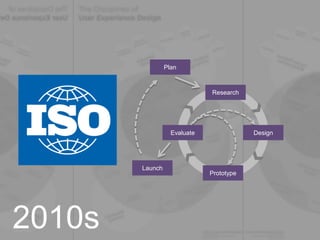
2010s
Research
Plan
Design
Prototype
Evaluate
Launch
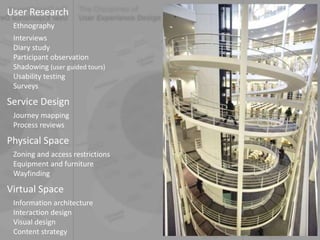
User Research
Ethnography
Interviews
Diary study
Participant observation
Shadowing (user guided tours)
Usability testing
Surveys
Service Design
Journey mapping
Process reviews
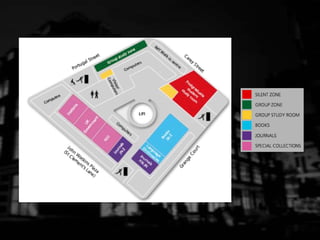
Physical Space
Zoning and access restrictions
Equipment and furniture
Wayfinding
Virtual Space
Information architecture
Interaction design
Visual design
Content strategy
Case studies
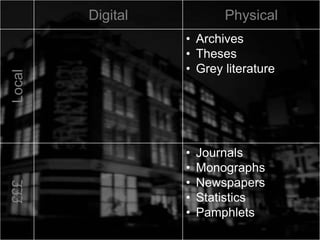
Digital PhysicalLocal
• Archives
• Theses
• Grey literature
£££
• Journals
• Monographs
• Newspapers
• Statistics
• Pamphlets
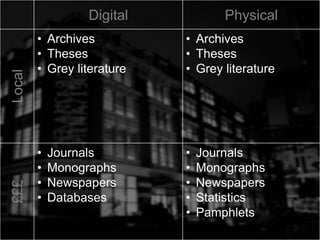
Digital PhysicalLocal
• Archives
• Theses
• Grey literature
• Archives
• Theses
• Grey literature
£££
• Journals
• Monographs
• Newspapers
• Databases
• Journals
• Monographs
• Newspapers
• Statistics
• Pamphlets
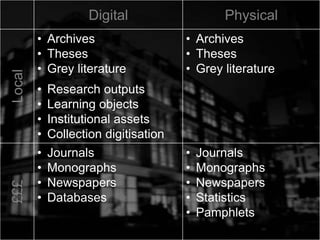
Digital PhysicalLocal
• Archives
• Theses
• Grey literature
• Research outputs
• Learning objects
• Institutional assets
• Collection digitisation
• Archives
• Theses
• Grey literature
£££
• Journals
• Monographs
• Newspapers
• Databases
• Journals
• Monographs
• Newspapers
• Statistics
• Pamphlets
Digital PhysicalLocal
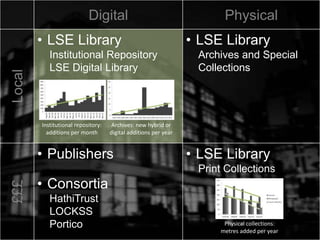
• LSE Library
Institutional Repository
LSE Digital Library
• LSE Library
Archives and Special
Collections
£££
• Publishers
• Consortia
HathiTrust
LOCKSS
Portico
• LSE Library
Print Collections
• Consortia
OCLC
UK Research Reserve
Digital PhysicalLocal
• LSE Library
Institutional Repository
LSE Digital Library
• LSE Library
Archives and Special
Collections
£££
• Publishers
• Consortia
HathiTrust
LOCKSS
Portico
• LSE Library
Print Collections
• Consortia
OCLC
UK Research Reserve
Digital PhysicalLocal
• LSE Library
Institutional Repository
LSE Digital Library
• LSE Library
Archives and Special
Collections
£££
• Publishers
• Consortia
HathiTrust
LOCKSS
Portico
• LSE Library
Print Collections
Institutional repository:
additions per month
Archives: new hybrid or
digital additions per year
Physical collections:
metres added per year
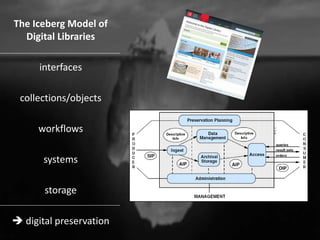
The Iceberg Model of
Digital Libraries
interfaces
collections/objects
workflows
systems
storage
 digital preservation
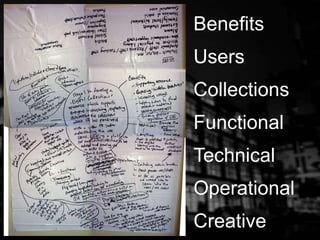
Benefits
Users
Collections
Functional
Technical
Operational
Creative
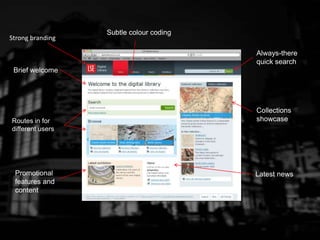
Strong branding
Brief welcome
Routes in for
different users
Subtle colour coding
Always-there
quick search
Collections
showcase
Promotional
features and
content
Latest news
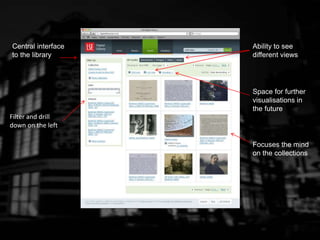
Filter and drill
down on the left
Central interface
to the library
Ability to see
different views
Space for further
visualisations in
the future
Focuses the mind
on the collections
Research
Plan
Design
Prototype
Evaluate
Research
Plan
Design
Prototype
Evaluate
Research
Plan
Design
Prototype
Evaluate
Research
Plan
Design
Prototype
Evaluate
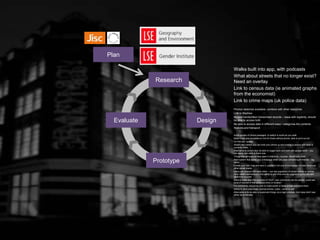
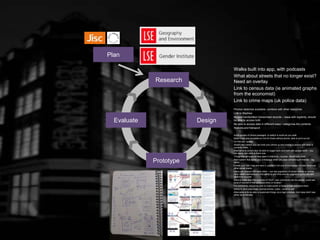
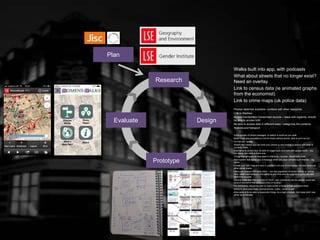
Walks built into app, with podcasts
What about streets that no longer exist?
Need an overlay
Link to census data (ie animated graphs
from the economist)
Link to crime maps (uk police data)
Photos/ sketches available, combine with other resources
Link to Mayhew
Access handwritten/ transcribed records – issue with legibility, should
be able to access both
Be able to access data in different ways / categorise the contents
Stations and transport
Audio quotes of choice passages, to switch to audio as you walk
Make maps also available on line for those without phone, able to print out etc
‘on this day’ quotes
Street view (where you can hold your phone up and overlay a picture with what is
currently there…)
Alternative to street view, be able to toggle back and forth with google earth – you
can easily see what is there now
Things that still exist as they were in that time – ie pubs –Booth pub crawl
Alert system that sends you a message when you pass something of interest – tag
alerts
Create your own map and save it, publish it not only to homepage but also facebook,
other social media
Users can interact with each other – can see popularity of certain places or entries,
other users comments and the ability to add links and etc augmenting the info with
additional sources
Second class used the example of YELP, user comments can be pasted, could see
level of interest of that particular entry or location
For comments, should be able to make public or keep private and save them
Ability to save your maps, journal entries, notes – email to self
Alternative is to be able to bookmark things via a login process, 2nd class didn’t see
either as preferable
Research
Plan
Design
Prototype
Evaluate
Walks built into app, with podcasts
What about streets that no longer exist?
Need an overlay
Link to census data (ie animated graphs
from the economist)
Link to crime maps (uk police data)
Photos/ sketches available, combine with other resources
Link to Mayhew
Access handwritten/ transcribed records – issue with legibility, should
be able to access both
Be able to access data in different ways / categorise the contents
Stations and transport
Audio quotes of choice passages, to switch to audio as you walk
Make maps also available on line for those without phone, able to print out etc
‘on this day’ quotes
Street view (where you can hold your phone up and overlay a picture with what is
currently there…)
Alternative to street view, be able to toggle back and forth with google earth – you
can easily see what is there now
Things that still exist as they were in that time – ie pubs –Booth pub crawl
Alert system that sends you a message when you pass something of interest – tag
alerts
Create your own map and save it, publish it not only to homepage but also facebook,
other social media
Users can interact with each other – can see popularity of certain places or entries,
other users comments and the ability to add links and etc augmenting the info with
additional sources
Second class used the example of YELP, user comments can be pasted, could see
level of interest of that particular entry or location
For comments, should be able to make public or keep private and save them
Ability to save your maps, journal entries, notes – email to self
Alternative is to be able to bookmark things via a login process, 2nd class didn’t see
either as preferable
Research
Plan
Design
Prototype
Evaluate
Walks built into app, with podcasts
What about streets that no longer exist?
Need an overlay
Link to census data (ie animated graphs
from the economist)
Link to crime maps (uk police data)
Photos/ sketches available, combine with other resources
Link to Mayhew
Access handwritten/ transcribed records – issue with legibility, should
be able to access both
Be able to access data in different ways / categorise the contents
Stations and transport
Audio quotes of choice passages, to switch to audio as you walk
Make maps also available on line for those without phone, able to print out etc
‘on this day’ quotes
Street view (where you can hold your phone up and overlay a picture with what is
currently there…)
Alternative to street view, be able to toggle back and forth with google earth – you
can easily see what is there now
Things that still exist as they were in that time – ie pubs –Booth pub crawl
Alert system that sends you a message when you pass something of interest – tag
alerts
Create your own map and save it, publish it not only to homepage but also facebook,
other social media
Users can interact with each other – can see popularity of certain places or entries,
other users comments and the ability to add links and etc augmenting the info with
additional sources
Second class used the example of YELP, user comments can be pasted, could see
level of interest of that particular entry or location
For comments, should be able to make public or keep private and save them
Ability to save your maps, journal entries, notes – email to self
Alternative is to be able to bookmark things via a login process, 2nd class didn’t see
either as preferable
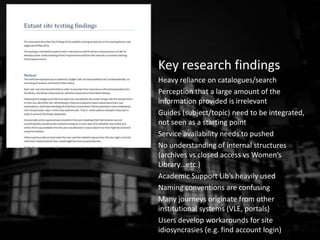
Key research findings
Heavy reliance on catalogues/search
Perception that a large amount of the
information provided is irrelevant
Guides (subject/topic) need to be integrated,
not seen as a starting point
Service availability needs to pushed
No understanding of internal structures
(archives vs closed access vs Women’s
Library…etc.)
Academic Support Lib’s heavily used
Naming conventions are confusing
Many journeys originate from other
institutional systems (VLE, portals)
Users develop workarounds for site
idiosyncrasies (e.g. find account login)
Our response
Search: all options available in one place, with
clear descriptions + further research into
discovery behaviours
Content pruning: led by need not contingency
(1,200 pages to c. 250)
Guides: revised structure for topic, introduced
user guides for self-id
Service info: first screen on homepage, plus
hero for time-limited promotions
New structure not based on internal
departments but on library services, revised
terminology for all services
Multiple entry points and designed consistent
horizontal cross-linking
Provided always-there MyAccount login
Research
Plan
Design
Prototype
Evaluate
?
?
?
?
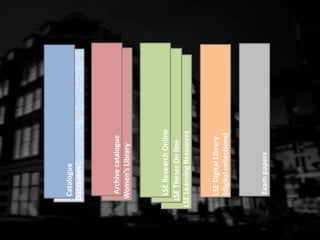
Databases
Exampapers
Women’sLibrary
LSELearningResources
LSEThesesOnline
Catalogue
LSEResearchOnline
Archivecatalogue
LSEDigitalLibrary
(digitalcollections)
Databases
Exampapers
Women’sLibrary
LSELearningResources
LSEThesesOnline
Catalogue
LSEResearchOnline
Archivecatalogue
LSEDigitalLibrary
(digitalcollections)
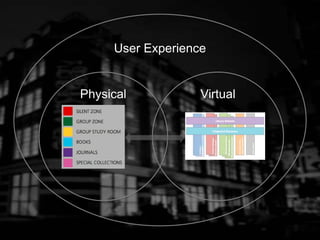
Integrated Discovery
Library Website
Physical Virtual
User Experience
Ed Fay
Head of Digital Scholarship and Innovation
e.fay@lse.ac.uk | @digitalfay
?

User Experience in Innovative Library Services

  • 1.
    Ed Fay Head ofDigital Scholarship and Innovation e.fay@lse.ac.uk | @digitalfay User Experience in Innovative Library Services
  • 3.
    Build a strongdigital presence so that the virtual Library is as resonant for people as its physical form. Create a renewed sense of place within the Library as the campus develops and new approaches to scholarship evolve. Ensure that people remain at the heart of the Library even as we focus on developing systems and buildings. LSE Library Strategy 2015-20 “
  • 4.
    digital presence sense ofplace people (UX) User Experience
  • 5.
  • 7.
  • 8.
  • 9.
  • 10.
  • 11.
    Usability “the extent towhich a product can be used by specified users to achieve specified goals with effectiveness, efficiency and satisfaction in a specified context of use” 1990s
  • 12.
  • 13.
  • 14.
  • 15.
    User Research Ethnography Interviews Diary study Participantobservation Shadowing (user guided tours) Usability testing Surveys Service Design Journey mapping Process reviews Physical Space Zoning and access restrictions Equipment and furniture Wayfinding Virtual Space Information architecture Interaction design Visual design Content strategy
  • 17.
  • 18.
    Digital PhysicalLocal • Archives •Theses • Grey literature £££ • Journals • Monographs • Newspapers • Statistics • Pamphlets
  • 19.
    Digital PhysicalLocal • Archives •Theses • Grey literature • Archives • Theses • Grey literature £££ • Journals • Monographs • Newspapers • Databases • Journals • Monographs • Newspapers • Statistics • Pamphlets
  • 20.
    Digital PhysicalLocal • Archives •Theses • Grey literature • Research outputs • Learning objects • Institutional assets • Collection digitisation • Archives • Theses • Grey literature £££ • Journals • Monographs • Newspapers • Databases • Journals • Monographs • Newspapers • Statistics • Pamphlets
  • 21.
    Digital PhysicalLocal • LSELibrary Institutional Repository LSE Digital Library • LSE Library Archives and Special Collections £££ • Publishers • Consortia HathiTrust LOCKSS Portico • LSE Library Print Collections • Consortia OCLC UK Research Reserve
  • 22.
    Digital PhysicalLocal • LSELibrary Institutional Repository LSE Digital Library • LSE Library Archives and Special Collections £££ • Publishers • Consortia HathiTrust LOCKSS Portico • LSE Library Print Collections • Consortia OCLC UK Research Reserve
  • 23.
    Digital PhysicalLocal • LSELibrary Institutional Repository LSE Digital Library • LSE Library Archives and Special Collections £££ • Publishers • Consortia HathiTrust LOCKSS Portico • LSE Library Print Collections Institutional repository: additions per month Archives: new hybrid or digital additions per year Physical collections: metres added per year
  • 25.
    The Iceberg Modelof Digital Libraries interfaces collections/objects workflows systems storage  digital preservation
  • 27.
  • 35.
    Strong branding Brief welcome Routesin for different users Subtle colour coding Always-there quick search Collections showcase Promotional features and content Latest news
  • 36.
    Filter and drill downon the left Central interface to the library Ability to see different views Space for further visualisations in the future Focuses the mind on the collections
  • 42.
  • 43.
  • 45.
  • 46.
    Research Plan Design Prototype Evaluate Walks built intoapp, with podcasts What about streets that no longer exist? Need an overlay Link to census data (ie animated graphs from the economist) Link to crime maps (uk police data) Photos/ sketches available, combine with other resources Link to Mayhew Access handwritten/ transcribed records – issue with legibility, should be able to access both Be able to access data in different ways / categorise the contents Stations and transport Audio quotes of choice passages, to switch to audio as you walk Make maps also available on line for those without phone, able to print out etc ‘on this day’ quotes Street view (where you can hold your phone up and overlay a picture with what is currently there…) Alternative to street view, be able to toggle back and forth with google earth – you can easily see what is there now Things that still exist as they were in that time – ie pubs –Booth pub crawl Alert system that sends you a message when you pass something of interest – tag alerts Create your own map and save it, publish it not only to homepage but also facebook, other social media Users can interact with each other – can see popularity of certain places or entries, other users comments and the ability to add links and etc augmenting the info with additional sources Second class used the example of YELP, user comments can be pasted, could see level of interest of that particular entry or location For comments, should be able to make public or keep private and save them Ability to save your maps, journal entries, notes – email to self Alternative is to be able to bookmark things via a login process, 2nd class didn’t see either as preferable
  • 47.
    Research Plan Design Prototype Evaluate Walks built intoapp, with podcasts What about streets that no longer exist? Need an overlay Link to census data (ie animated graphs from the economist) Link to crime maps (uk police data) Photos/ sketches available, combine with other resources Link to Mayhew Access handwritten/ transcribed records – issue with legibility, should be able to access both Be able to access data in different ways / categorise the contents Stations and transport Audio quotes of choice passages, to switch to audio as you walk Make maps also available on line for those without phone, able to print out etc ‘on this day’ quotes Street view (where you can hold your phone up and overlay a picture with what is currently there…) Alternative to street view, be able to toggle back and forth with google earth – you can easily see what is there now Things that still exist as they were in that time – ie pubs –Booth pub crawl Alert system that sends you a message when you pass something of interest – tag alerts Create your own map and save it, publish it not only to homepage but also facebook, other social media Users can interact with each other – can see popularity of certain places or entries, other users comments and the ability to add links and etc augmenting the info with additional sources Second class used the example of YELP, user comments can be pasted, could see level of interest of that particular entry or location For comments, should be able to make public or keep private and save them Ability to save your maps, journal entries, notes – email to self Alternative is to be able to bookmark things via a login process, 2nd class didn’t see either as preferable
  • 48.
    Research Plan Design Prototype Evaluate Walks built intoapp, with podcasts What about streets that no longer exist? Need an overlay Link to census data (ie animated graphs from the economist) Link to crime maps (uk police data) Photos/ sketches available, combine with other resources Link to Mayhew Access handwritten/ transcribed records – issue with legibility, should be able to access both Be able to access data in different ways / categorise the contents Stations and transport Audio quotes of choice passages, to switch to audio as you walk Make maps also available on line for those without phone, able to print out etc ‘on this day’ quotes Street view (where you can hold your phone up and overlay a picture with what is currently there…) Alternative to street view, be able to toggle back and forth with google earth – you can easily see what is there now Things that still exist as they were in that time – ie pubs –Booth pub crawl Alert system that sends you a message when you pass something of interest – tag alerts Create your own map and save it, publish it not only to homepage but also facebook, other social media Users can interact with each other – can see popularity of certain places or entries, other users comments and the ability to add links and etc augmenting the info with additional sources Second class used the example of YELP, user comments can be pasted, could see level of interest of that particular entry or location For comments, should be able to make public or keep private and save them Ability to save your maps, journal entries, notes – email to self Alternative is to be able to bookmark things via a login process, 2nd class didn’t see either as preferable
  • 51.
    Key research findings Heavyreliance on catalogues/search Perception that a large amount of the information provided is irrelevant Guides (subject/topic) need to be integrated, not seen as a starting point Service availability needs to pushed No understanding of internal structures (archives vs closed access vs Women’s Library…etc.) Academic Support Lib’s heavily used Naming conventions are confusing Many journeys originate from other institutional systems (VLE, portals) Users develop workarounds for site idiosyncrasies (e.g. find account login)
  • 52.
    Our response Search: alloptions available in one place, with clear descriptions + further research into discovery behaviours Content pruning: led by need not contingency (1,200 pages to c. 250) Guides: revised structure for topic, introduced user guides for self-id Service info: first screen on homepage, plus hero for time-limited promotions New structure not based on internal departments but on library services, revised terminology for all services Multiple entry points and designed consistent horizontal cross-linking Provided always-there MyAccount login
  • 55.
  • 56.
  • 57.
  • 59.
  • 63.
    Ed Fay Head ofDigital Scholarship and Innovation e.fay@lse.ac.uk | @digitalfay ?

Editor's Notes

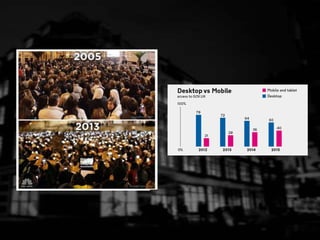
  • #3 Reason for showing this: physical and virtual space EXPLAIN BLUERAIN making the virtual tangible UX is about designing experience in a digital world many of the techniques emerge from the physical world, and we use them in that context as well UX is relevant in both physical and virtual spaces…
  • #8 Malinowski: “the final goal is to grasp the native’s point of view, his relation to life, to realise his vision of the world” (Andy Priestner) -> the user’s point of view -> their relation to scholarly life -> their vision of the library service
  • #10 System-centred criteria assess the operations of the digital library and in the repository context include the human and technological aspects of functional competence defined in ISO TRAC and discussed above as organisational ability. User-centred criteria can be separated into usability or user experience, and impact or the value derived for an individual or community. This aligns with the separation in technology acceptance models between two determinants of user acceptance: perceived ease of use—comprising objective measures of the outcome of interactions and subjective impressions of effort—and perceived usefulness —the benefit derived by the user (Davis, 1989; Venkatesh et al., 2003)
  • #11 System-centred criteria assess the operations of the digital library and in the repository context include the human and technological aspects of functional competence defined in ISO TRAC and discussed above as organisational ability. User-centred criteria can be separated into usability or user experience, and impact or the value derived for an individual or community. This aligns with the separation in technology acceptance models between two determinants of user acceptance: perceived ease of use—comprising objective measures of the outcome of interactions and subjective impressions of effort—and perceived usefulness —the benefit derived by the user (Davis, 1989; Venkatesh et al., 2003)
  • #12 ISO 9241-11
  • #13 ISO 9241-210
  • #14 ISO 9241-210
  • #15 ISO 9241-210
  • #22 Responsibilities for preservation and long-term access
  • #23 Responsibilities for preservation and long-term access
  • #55 Brooke (1986) System Usability Scale
  • #57 When you change floors in a physical library, you don’t speak a different language and change how you navigate the space… So why do we allow this to happen in the digital environment?!
  • #58 When you change floors in a physical library, you don’t speak a different language and change how you navigate the space… So why do we allow this to happen in the digital environment?!
  • #59 When you change floors in a physical library, you don’t speak a different language and change how you navigate the space… So why do we allow this to happen in the digital environment?!
  • #60 When you change floors in a physical library, you don’t speak a different language and change how you navigate the space… So why do we allow this to happen in the digital environment?!
  • #62 Visitor When in Visitor mode, individuals decide on the task they wish to undertake. For example, discovering a particular piece of information online, completing the task and then going offline or moving on to another task. In visitor mode individuals do not leave any social trace online. Much online activity is undertaken in this mode as illustrated by our research participants. Resident When in resident mode the individual is going online to connect to, or to be with, other people. This mode is about social presence. Resident behaviour has a certain degree of social visibility: for example, posting to the wall in Facebook, tweeting, blogging, or posting comments on blogs. This type of online behaviour leaves a persistent social trace which could be within a closed group such as a cohort of students in a Virtual Learning Environment (VLE)/Learning Management System (LMS) or on the open web. In information-seeking, Resident behaviour is more relevant in cases where individuals are going online to seek out other people for information. This might be by asking a direct question online or by asking for advice on trusted sources. In this case the provenance of information shared is partly related to the person who shared it, and also in how trusted they are in assessing the validity of a source. They are vouching for the course and are bringing a social dimension to the information-seeking process. The other significant factor in Resident behaviour is the production of non-traditional sources such as blog posts, which are in turn used by learners.