Floyd, Digital Fundamentals, 10th ed
Slide 1
Digital
Fundamentals
Tenth Edition
Floyd
© 2008 Pearson Education
Chapter 1
Floyd, Digital Fundamentals, 10th ed
Slide 2
Most natural quantities that we see are analog and vary
continuously. Analog systems can generally handle higher
power than digital systems.
Summary
Digital systems can process, store, and transmit data more
efficiently but can only assign discrete values to each point.
Analog Quantities
1
100
A .M.
95
90
85
80
75
2 3 4 5 6 7 8 9 10 11 12 1 2 3 4 5 6 7 8 9 10 11 12
P.M.
Temperature
(°F)
70
Time of day
Floyd, Digital Fundamentals, 10th ed
Slide 3
Many systems use a mix of analog and digital electronics to
take advantage of each technology. A typical CD player
accepts digital data from the CD drive and converts it to an
analog signal for amplification.
Summary
Analog and Digital Systems
Digital data
CD drive
10110011101
Analog
reproduction
of musicaudio
signal
Speaker
Sound
waves
Digital-to-analog
converter
Linear amplifier
Floyd, Digital Fundamentals, 10th ed
Slide 4
Digital electronics uses circuits that have two states, which
are represented by two different voltage levels called HIGH
and LOW. The voltages represent numbers in the binary
system.
Summary
Binary Digits and Logic Levels
In binary, a single number is
called a bit (for binary digit). A
bit can have the value of either
a 0 or a 1, depending on if the
voltage is HIGH or LOW.
HIGH
LOW
VH(max)
VH(min)
VL(max)
VL(min)
Invalid
Floyd, Digital Fundamentals, 10th ed
Slide 5
Digital waveforms change between the LOW and HIGH
levels. A positive going pulse is one that goes from a
normally LOW logic level to a HIGH level and then back
again. Digital waveforms are made up of a series of pulses.
Summary
Digital Waveforms
Falling or
leading edge
(b) Negative–going pulse
HIGH
Rising or
trailing edge
LOW
(a) Positive–going pulse
HIGH
Rising or
leading edge
Falling or
trailing edge
LOW
t0
t1
t0
t1
Floyd, Digital Fundamentals, 10th ed
Slide 6
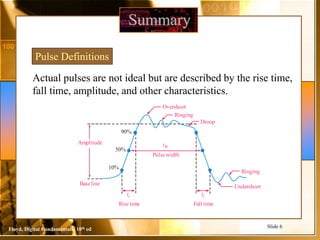
Actual pulses are not ideal but are described by the rise time,
fall time, amplitude, and other characteristics.
Summary
Pulse Definitions
90%
50%
10%
Baseline
Pulsewidth
Risetime Fall time
Amplitude tW
tr tf
Undershoot
Ringing
Overshoot
Ringing
Droop
Floyd, Digital Fundamentals, 10th ed
Slide 7
Periodic pulse waveforms are composed of pulses that repeats
in a fixed interval called the period. The frequency is the rate
it repeats and is measured in hertz.
Summary
Periodic Pulse Waveforms
T
f
1

f
T
1

The clock is a basic timing signal that is an example of a
periodic wave.
What is the period of a repetitive wave if f = 3.2 GHz?



GHz
2
.
3
1
1
f
T 313 ps
Floyd, Digital Fundamentals, 10th ed
Slide 8
Summary
 8 bits = 1 byte
 1024 Bytes = 1 KB (kilobyte)
 1024 Kilobytes = 1 MB (megabyte)
 1024 Megabytes = 1 GB (gigabyte)
 1024 Gigabytes = 1 TB (Terabyte)
103 Hz =1 kHz (kilohertz)
106 Hz =1 MHz (megahertz)
109 Hz =1 GHz (gigahertz)
1012 Hz =1 THz (terahertz)
A picosecond is 10−12 of a second
10−3 s =1 ms (millisecond)
103 s =1 ks (kilosecond)
10−6 s=1 µs (microsecond)
106 s =1 Ms (megasecond)
 10−9 s=1 ns (nanosecond)
109 s =1 Gs (gigasecond)
10−12 s=1 ps (picosecond)
 1012 s =1Ts (terasecond)
Floyd, Digital Fundamentals, 10th ed
Slide 9
Summary
Pulse Definitions
In addition to frequency and period, repetitive pulse waveforms
are described by the amplitude (A), pulse width (tW) and duty
cycle. Duty cycle is the ratio of tW to T.
Volts
Time
Amplitude (A)
Pulse
width
(tW)
Period, T
Floyd, Digital Fundamentals, 10th ed
Slide 10
A timing diagram is used to show the relationship between
two or more digital waveforms,
Summary
Timing Diagrams
Clock
A
B
C
Floyd, Digital Fundamentals, 10th ed
Slide 11
Data can be transmitted by either serial transfer or parallel
transfer.
Summary
Serial and Parallel Data
Computer Modem
1 0 1 1 0 0 1 0
t0 t1 t2 t3 t4 t5 t6 t7
Computer Printer
0
t0 t1
1
0
0
1
1
0
1
Floyd, Digital Fundamentals, 10th ed
Slide 12
Summary
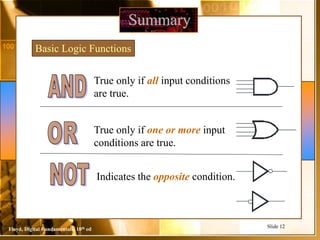
Basic Logic Functions
True only if all input conditions
are true.
True only if one or more input
conditions are true.
Indicates the opposite condition.
Floyd, Digital Fundamentals, 10th ed
Slide 13
Summary
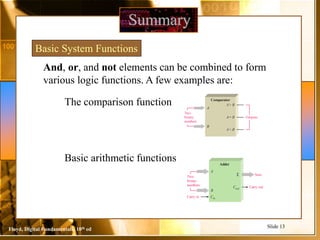
Basic System Functions
And, or, and not elements can be combined to form
various logic functions. A few examples are:
The comparison function
Basic arithmetic functions Adder
Two
binary
numbers Carry out
A
B
Cout
Cin
Carry in
Sum
Σ
Two
binary
numbers
Outputs
A
B
A< B
A= B
A> B
Comparator
Floyd, Digital Fundamentals, 10th ed
Slide 14
Summary
Basic System Functions
The encoding function
The decoding function
Decoder
Binary input
7-segment display
Encoder
9
8 9
4 5 6
1 2 3
0 . +/–
7
Calculator keypad
8
7
6
5
4
3
2
1
0
HIGH
Binary code
for 9 used for
storage and/or
computation
Floyd, Digital Fundamentals, 10th ed
Slide 15
Summary
Basic System Functions
The data selection function
Multiplexer
A
Switching
sequence
control input
B
C
∆t2
∆t3
∆t1
∆t2
∆t3
∆t1
Demultiplexer
D
E
F
Data from
Ato D
Data from
Bto E
Data from
Cto F
Data from
Ato D
∆t1 ∆t2 ∆t3 ∆t1
Switching
sequence
control input
Floyd, Digital Fundamentals, 10th ed
Slide 16
Summary
Basic System Functions
The counting function
…and other functions such as code conversion
and storage.
Input pulses
1
Counter Parallel
output lines Binary
code
for 1
Binary
code
for 2
Binary
code
for 3
Binary
code
for 4
Binary
code
for 5
Sequence of binary codes that represent
the number of input pulses counted.
2 3 4 5
Floyd, Digital Fundamentals, 10th ed
Slide 17
Summary
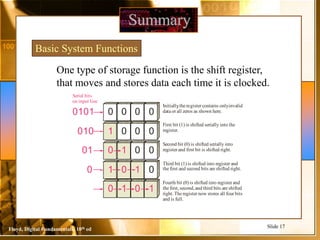
Basic System Functions
One type of storage function is the shift register,
that moves and stores data each time it is clocked.
0 0 0 0
0101
Initially
,theregister contains onlyinvalid
data or all zeros as shown here.
1 0 0 0
010
First bit (1) is shifted serially into the
register.
0 1 0 0
01
Second bit (0) is shifted serially into
register and first bit is shifted right.
1 0 1 0
0
Third bit (1) is shifted into register and
thefirst and second bits are shifted right.
0 1 0 1
Fourth bit (0) is shifted into register and
thefirst,second,and third bits are shifted
right.Theregister now stores all four bits
and is full.
Serial bits
on input line
Floyd, Digital Fundamentals, 10th ed
Slide 18
Summary
Integrated Circuits
Plastic
case
Pins
Chip
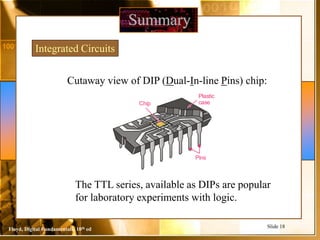
Cutaway view of DIP (Dual-In-line Pins) chip:
The TTL series, available as DIPs are popular
for laboratory experiments with logic.
Floyd, Digital Fundamentals, 10th ed
Slide 19
Summary
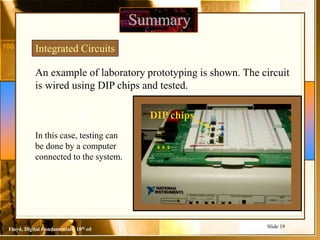
An example of laboratory prototyping is shown. The circuit
is wired using DIP chips and tested.
Integrated Circuits
In this case, testing can
be done by a computer
connected to the system.
DIP chips
Floyd, Digital Fundamentals, 10th ed
Slide 20
Summary
Integrated Circuits
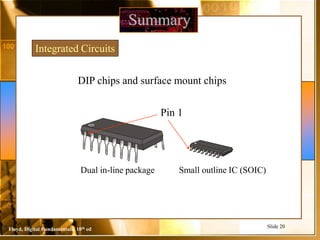
DIP chips and surface mount chips
Pin 1
Dual in-line package Small outline IC (SOIC)

Digital Logic Design

  • 1.
    Floyd, Digital Fundamentals,10th ed Slide 1 Digital Fundamentals Tenth Edition Floyd © 2008 Pearson Education Chapter 1
  • 2.
    Floyd, Digital Fundamentals,10th ed Slide 2 Most natural quantities that we see are analog and vary continuously. Analog systems can generally handle higher power than digital systems. Summary Digital systems can process, store, and transmit data more efficiently but can only assign discrete values to each point. Analog Quantities 1 100 A .M. 95 90 85 80 75 2 3 4 5 6 7 8 9 10 11 12 1 2 3 4 5 6 7 8 9 10 11 12 P.M. Temperature (°F) 70 Time of day
  • 3.
    Floyd, Digital Fundamentals,10th ed Slide 3 Many systems use a mix of analog and digital electronics to take advantage of each technology. A typical CD player accepts digital data from the CD drive and converts it to an analog signal for amplification. Summary Analog and Digital Systems Digital data CD drive 10110011101 Analog reproduction of musicaudio signal Speaker Sound waves Digital-to-analog converter Linear amplifier
  • 4.
    Floyd, Digital Fundamentals,10th ed Slide 4 Digital electronics uses circuits that have two states, which are represented by two different voltage levels called HIGH and LOW. The voltages represent numbers in the binary system. Summary Binary Digits and Logic Levels In binary, a single number is called a bit (for binary digit). A bit can have the value of either a 0 or a 1, depending on if the voltage is HIGH or LOW. HIGH LOW VH(max) VH(min) VL(max) VL(min) Invalid
  • 5.
    Floyd, Digital Fundamentals,10th ed Slide 5 Digital waveforms change between the LOW and HIGH levels. A positive going pulse is one that goes from a normally LOW logic level to a HIGH level and then back again. Digital waveforms are made up of a series of pulses. Summary Digital Waveforms Falling or leading edge (b) Negative–going pulse HIGH Rising or trailing edge LOW (a) Positive–going pulse HIGH Rising or leading edge Falling or trailing edge LOW t0 t1 t0 t1
  • 6.
    Floyd, Digital Fundamentals,10th ed Slide 6 Actual pulses are not ideal but are described by the rise time, fall time, amplitude, and other characteristics. Summary Pulse Definitions 90% 50% 10% Baseline Pulsewidth Risetime Fall time Amplitude tW tr tf Undershoot Ringing Overshoot Ringing Droop
  • 7.
    Floyd, Digital Fundamentals,10th ed Slide 7 Periodic pulse waveforms are composed of pulses that repeats in a fixed interval called the period. The frequency is the rate it repeats and is measured in hertz. Summary Periodic Pulse Waveforms T f 1  f T 1  The clock is a basic timing signal that is an example of a periodic wave. What is the period of a repetitive wave if f = 3.2 GHz?    GHz 2 . 3 1 1 f T 313 ps
  • 8.
    Floyd, Digital Fundamentals,10th ed Slide 8 Summary  8 bits = 1 byte  1024 Bytes = 1 KB (kilobyte)  1024 Kilobytes = 1 MB (megabyte)  1024 Megabytes = 1 GB (gigabyte)  1024 Gigabytes = 1 TB (Terabyte) 103 Hz =1 kHz (kilohertz) 106 Hz =1 MHz (megahertz) 109 Hz =1 GHz (gigahertz) 1012 Hz =1 THz (terahertz) A picosecond is 10−12 of a second 10−3 s =1 ms (millisecond) 103 s =1 ks (kilosecond) 10−6 s=1 µs (microsecond) 106 s =1 Ms (megasecond)  10−9 s=1 ns (nanosecond) 109 s =1 Gs (gigasecond) 10−12 s=1 ps (picosecond)  1012 s =1Ts (terasecond)
  • 9.
    Floyd, Digital Fundamentals,10th ed Slide 9 Summary Pulse Definitions In addition to frequency and period, repetitive pulse waveforms are described by the amplitude (A), pulse width (tW) and duty cycle. Duty cycle is the ratio of tW to T. Volts Time Amplitude (A) Pulse width (tW) Period, T
  • 10.
    Floyd, Digital Fundamentals,10th ed Slide 10 A timing diagram is used to show the relationship between two or more digital waveforms, Summary Timing Diagrams Clock A B C
  • 11.
    Floyd, Digital Fundamentals,10th ed Slide 11 Data can be transmitted by either serial transfer or parallel transfer. Summary Serial and Parallel Data Computer Modem 1 0 1 1 0 0 1 0 t0 t1 t2 t3 t4 t5 t6 t7 Computer Printer 0 t0 t1 1 0 0 1 1 0 1
  • 12.
    Floyd, Digital Fundamentals,10th ed Slide 12 Summary Basic Logic Functions True only if all input conditions are true. True only if one or more input conditions are true. Indicates the opposite condition.
  • 13.
    Floyd, Digital Fundamentals,10th ed Slide 13 Summary Basic System Functions And, or, and not elements can be combined to form various logic functions. A few examples are: The comparison function Basic arithmetic functions Adder Two binary numbers Carry out A B Cout Cin Carry in Sum Σ Two binary numbers Outputs A B A< B A= B A> B Comparator
  • 14.
    Floyd, Digital Fundamentals,10th ed Slide 14 Summary Basic System Functions The encoding function The decoding function Decoder Binary input 7-segment display Encoder 9 8 9 4 5 6 1 2 3 0 . +/– 7 Calculator keypad 8 7 6 5 4 3 2 1 0 HIGH Binary code for 9 used for storage and/or computation
  • 15.
    Floyd, Digital Fundamentals,10th ed Slide 15 Summary Basic System Functions The data selection function Multiplexer A Switching sequence control input B C ∆t2 ∆t3 ∆t1 ∆t2 ∆t3 ∆t1 Demultiplexer D E F Data from Ato D Data from Bto E Data from Cto F Data from Ato D ∆t1 ∆t2 ∆t3 ∆t1 Switching sequence control input
  • 16.
    Floyd, Digital Fundamentals,10th ed Slide 16 Summary Basic System Functions The counting function …and other functions such as code conversion and storage. Input pulses 1 Counter Parallel output lines Binary code for 1 Binary code for 2 Binary code for 3 Binary code for 4 Binary code for 5 Sequence of binary codes that represent the number of input pulses counted. 2 3 4 5
  • 17.
    Floyd, Digital Fundamentals,10th ed Slide 17 Summary Basic System Functions One type of storage function is the shift register, that moves and stores data each time it is clocked. 0 0 0 0 0101 Initially ,theregister contains onlyinvalid data or all zeros as shown here. 1 0 0 0 010 First bit (1) is shifted serially into the register. 0 1 0 0 01 Second bit (0) is shifted serially into register and first bit is shifted right. 1 0 1 0 0 Third bit (1) is shifted into register and thefirst and second bits are shifted right. 0 1 0 1 Fourth bit (0) is shifted into register and thefirst,second,and third bits are shifted right.Theregister now stores all four bits and is full. Serial bits on input line
  • 18.
    Floyd, Digital Fundamentals,10th ed Slide 18 Summary Integrated Circuits Plastic case Pins Chip Cutaway view of DIP (Dual-In-line Pins) chip: The TTL series, available as DIPs are popular for laboratory experiments with logic.
  • 19.
    Floyd, Digital Fundamentals,10th ed Slide 19 Summary An example of laboratory prototyping is shown. The circuit is wired using DIP chips and tested. Integrated Circuits In this case, testing can be done by a computer connected to the system. DIP chips
  • 20.
    Floyd, Digital Fundamentals,10th ed Slide 20 Summary Integrated Circuits DIP chips and surface mount chips Pin 1 Dual in-line package Small outline IC (SOIC)