Digital
                     Citizenship


By: Andayah D. Sams, Rachel N. Brown, and
Emily J. Herman
http://www.turbointernet.com/gui/images/slides/browsers.png
Outline
1.   Digital Access
2.   Digital Commerce
3.   Digital Communication
4.   Digital Literacy
5.   Digital Etiquette
6.   Digital Law
7.   Digital Rights and Responsibilities
8.   Digital Health and Wellness
9.   Digital Security

******There are pictures for all nine
elements in separate slides
then the information
Digital Access

• This is when all users need to:
  o be aware of technology
  o be supportive of electronic access.
• Everyone should have access to the
  internet no matter who they are.
• This will make them productive citizens.
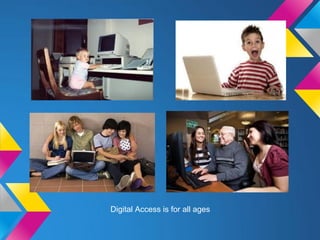
• Ex: The library has multiple computers for
  the community to use!!!!
Digital Access is for all ages
Digital Commerce
• Many forms of commerce are going on
    digitally now
    o such as buying stocks and legal exchanges.
• People also buy things such as toys and
    clothing online.
    o They buy these things on websites such as
      amazon.
• Conflicts about laws and morals in
    countries are surfacing now through the
    internet.
    o These might include activities such as
      illegally downloading and gambling.
•   Ex: I buy shoes on amazon
Example: Amazon, Ebay, Online version of stores
Digital Communication
• Variety of Methods:
• Email, texting, calling, instant messaging
• Can constantly communicate with other
  people from anywhere at anytime

• Ex: facebook, twitter, AIM
Digital Literacy
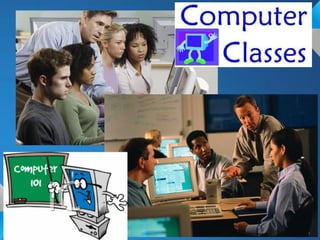
• This is the process of learning about
  technology or teaching technology.
• Schools such as ours teach children
  about technology.
• Ex: This class!!!!!
Digital Etiquette
•   Most people do not learn digital etiquette before they
    start using technology
•   Bans, rules, and different policies have been created to
    control inappropriate behavior in technology
•   Necessary to teach everyone how to be a responsible
    digital citizen
     o Because technology has become such a big and
        important part of our society
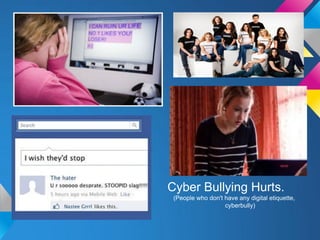
•   Ex: Cyberbullying is a huge issue in today's community.
    Some schools have programs to prevent cyberbullying
    from starting.
Cyber Bullying Hurts.
 (People who don't have any digital etiquette,
                   cyberbully)
Digital Law
•   Digital Law: ethics of technology in a society
•   Unethical Uses: theft, crime
     o Online Crimes:
         stealing work, property, or identity
         downloading illegal music
         creating worms or viruses
         sending spam
•   Ethical Uses: obeying laws of the society & using
    technology for its beneficial purposes
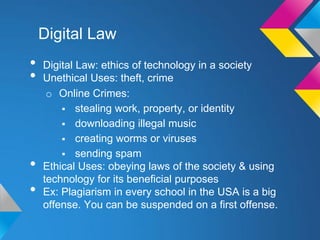
•   Ex: Plagiarism in every school in the USA is a big
    offense. You can be suspended on a first offense.
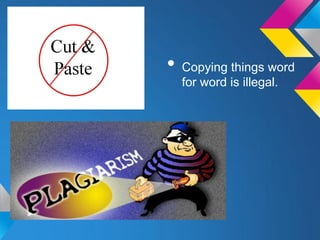
• Copying things word
  for word is illegal.
Digital Rights and
Responsibility
• Basic set of rights:
  o Privacy
  o Free Speech (etc.)
  o Must be understood, addressed & discussed
• Responsibilities
  o Using technology in appropriate ways


• Ex: In the USA, everyone has the
  freedom and right to use technology
  freely.
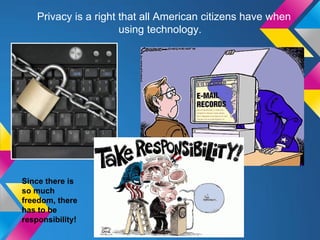
Privacy is a right that all American citizens have when
                       using technology.


Since there is
so much
freedom, there
has to be
responsibility!
Digital Health and Wellness
•   Physical & Psychological issues can be caused by
    technology
     o Eye Safety
     o Repetitive Stress Syndrome
     o Internet Addiciton
         Becoming more common in technology users
•   Users need to be taught how to protect themselves
•   Ex: Turning the light on before you use the computer at
    night. Sitting in a good position when using the
    computer.
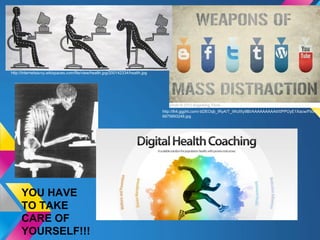
http://internetsavvy.wikispaces.com/file/view/health.jpg/200142334/health.jpg


                                                                                http://lh4.ggpht.com/-bDEOqb_IRyA/T_iWufXy9BI/AAAAAAAAAII/0PPOyE1Xacw/Flickr-
                                                                                6875893248.jpg


     YOU HAVE
     TO TAKE
     CARE OF
     YOURSELF!!!
Digital Security (Self-
Protection)
• Must have...
  o Virus protection
  o Backups of Data
  o Surge Control of Equipment
• MUST protect our information from harm
  or disruption
• Ex: My dad put a password on our
  internet connection at home. Only the
  people that live in my house know the
  password.
SECURITY PICTURES!
Bibliography
   •    http://digitalcitizenship.net/Nine_Elements.html

PICTURES:
   •  http://www.lostintechnology.com/browsers/ultimate-freeware-list-web-browsers/
   •  http://www.google.com/imgres?um=1&hl=en&client=firefox-a&rls=org.mozilla:en-
      US:official&biw=1440&bih=796&tbm=isch&tbnid=FXBVgGJ5baROLM:&imgrefurl=http://techiesupports.blogspot.com/2011/11/are-teens-too-
      dependent-on-technology.html&docid=dzz37cCTNkR3BM&imgurl=http://4.bp.blogspot.com/-
      qtYR9JptI5A/TsoZIyECwSI/AAAAAAAAAEk/wF2FTDRqKzE/s1600/Teens%252BOn%252BLaptop.jpg&w=425&h=270&ei=Uw2YUJPlE8uD0QHa6IA
      Q&zoom=1&iact=rc&dur=758&sig=115947961783076734685&page=1&tbnh=139&tbnw=227&start=0&ndsp=25&ved=1t:429,r:0,s:20,i:131&tx=172&ty
      =26
   •  http://www.google.com/imgres?start=59&num=10&um=1&hl=en&client=firefox-a&rls=org.mozilla:en-
      US:official&biw=1440&bih=796&tbm=isch&tbnid=37hH_lj6KuPrXM:&imgrefurl=http://www.childline.org.uk/explore/bullying/pages/cyberbullying.aspx&
      docid=vPV40Yktfvsy8M&imgurl=http://www.childline.org.uk/SiteCollectionImages/Issue%252520images/FB_cyberbullying_281.jpg&w=281&h=210&ei
      =Yw6YUKpRqvjSAanqgegH&zoom=1&iact=hc&vpx=440&vpy=314&dur=1342&hovh=168&hovw=224&tx=61&ty=121&sig=115947961783076734685
      &page=3&tbnh=155&tbnw=212&ndsp=32&ved=1t:429,r:46,s:20,i:142
   •  http://cdn.ientry.com/sites/webpronews/pictures/walmart-online_616.jpg
   •  http://juantornoe.blogs.com/.a/6a00d834518cf769e20115706da8ff970b-800wi
   •  http://i.telegraph.co.uk/multimedia/archive/01796/facebook-front_1796837b.jpg
   •  http://blogs.independent.co.uk/wp-content/uploads/2012/08/twitter-logo.png
   •  http://www.fredmckinnon.com/myblog/wp-content/uploads/2012/03/aim_logo_2.png
   •  http://www.atlcomputerman.com/wp-content/uploads/2009/12/Computer-Training-Class.jpg
   •  http://www.washingtonkylibrary.org/wp-content/uploads/2012/09/computer101.jpg
   •  http://www.ashland.lib.oh.us/AdultServices/Computer%20Classes.jpg
   •  http://marketingtochina.com/wp-content/uploads/2012/05/Weibo-fight-against-copior.jpg
   •  http://library.austincc.edu/gen-info/plagiarism_theft.jpg
   •  http://itthing.com/wp-content/uploads/privacy1.jpg
   •  http://wafcreview.files.wordpress.com/2011/09/internet-privacy.gif
   •  http://manifestationyoga.files.wordpress.com/2012/04/take_responsibility.gif
   •  http://2.bp.blogspot.com/_zGoERjYswqo/SsVbxpow7cI/AAAAAAAAAAk/BU7zPtHSsUA/s320/bone.jpg
   •  http://www.healthmedia.com/img/products/overview-bg.jpg
   •  http://speedreply.com/wp-content/uploads/2012/09/Computer-Virus-Protection-Software1.jpg
   •  http://www.compucay.ky/images/productimages/AVG.jpg
   •  http://now-static.norton.com/now/en/pu/images/Product_Family/NAV/Norton_AntiVirus_2013/Boxes/BX_NAV_Y13_r_r_EN_342.png
   •  http://www.for3tech.com/wp-content/uploads/2011/08/72.computer-virus-protection.jpg
Thank You
                                                   For Watching!
http://www.jeffreyritter.com/picts/Professors-Privacy-and-Preparing-
Law-Stu_C657/Digital-Information.png

Digital citizenship andayah & rachel & emily

  • 1.
    Digital Citizenship By: Andayah D. Sams, Rachel N. Brown, and Emily J. Herman http://www.turbointernet.com/gui/images/slides/browsers.png
  • 2.
    Outline 1. Digital Access 2. Digital Commerce 3. Digital Communication 4. Digital Literacy 5. Digital Etiquette 6. Digital Law 7. Digital Rights and Responsibilities 8. Digital Health and Wellness 9. Digital Security ******There are pictures for all nine elements in separate slides then the information
  • 3.
    Digital Access • Thisis when all users need to: o be aware of technology o be supportive of electronic access. • Everyone should have access to the internet no matter who they are. • This will make them productive citizens. • Ex: The library has multiple computers for the community to use!!!!
  • 4.
    Digital Access isfor all ages
  • 5.
    Digital Commerce • Manyforms of commerce are going on digitally now o such as buying stocks and legal exchanges. • People also buy things such as toys and clothing online. o They buy these things on websites such as amazon. • Conflicts about laws and morals in countries are surfacing now through the internet. o These might include activities such as illegally downloading and gambling. • Ex: I buy shoes on amazon
  • 6.
    Example: Amazon, Ebay,Online version of stores
  • 7.
    Digital Communication • Varietyof Methods: • Email, texting, calling, instant messaging • Can constantly communicate with other people from anywhere at anytime • Ex: facebook, twitter, AIM
  • 9.
    Digital Literacy • Thisis the process of learning about technology or teaching technology. • Schools such as ours teach children about technology. • Ex: This class!!!!!
  • 11.
    Digital Etiquette • Most people do not learn digital etiquette before they start using technology • Bans, rules, and different policies have been created to control inappropriate behavior in technology • Necessary to teach everyone how to be a responsible digital citizen o Because technology has become such a big and important part of our society • Ex: Cyberbullying is a huge issue in today's community. Some schools have programs to prevent cyberbullying from starting.
  • 12.
    Cyber Bullying Hurts. (People who don't have any digital etiquette, cyberbully)
  • 13.
    Digital Law • Digital Law: ethics of technology in a society • Unethical Uses: theft, crime o Online Crimes:  stealing work, property, or identity  downloading illegal music  creating worms or viruses  sending spam • Ethical Uses: obeying laws of the society & using technology for its beneficial purposes • Ex: Plagiarism in every school in the USA is a big offense. You can be suspended on a first offense.
  • 14.
    • Copying thingsword for word is illegal.
  • 15.
    Digital Rights and Responsibility •Basic set of rights: o Privacy o Free Speech (etc.) o Must be understood, addressed & discussed • Responsibilities o Using technology in appropriate ways • Ex: In the USA, everyone has the freedom and right to use technology freely.
  • 16.
    Privacy is aright that all American citizens have when using technology. Since there is so much freedom, there has to be responsibility!
  • 17.
    Digital Health andWellness • Physical & Psychological issues can be caused by technology o Eye Safety o Repetitive Stress Syndrome o Internet Addiciton  Becoming more common in technology users • Users need to be taught how to protect themselves • Ex: Turning the light on before you use the computer at night. Sitting in a good position when using the computer.
  • 18.
    http://internetsavvy.wikispaces.com/file/view/health.jpg/200142334/health.jpg http://lh4.ggpht.com/-bDEOqb_IRyA/T_iWufXy9BI/AAAAAAAAAII/0PPOyE1Xacw/Flickr- 6875893248.jpg YOU HAVE TO TAKE CARE OF YOURSELF!!!
  • 19.
    Digital Security (Self- Protection) •Must have... o Virus protection o Backups of Data o Surge Control of Equipment • MUST protect our information from harm or disruption • Ex: My dad put a password on our internet connection at home. Only the people that live in my house know the password.
  • 20.
  • 21.
    Bibliography • http://digitalcitizenship.net/Nine_Elements.html PICTURES: • http://www.lostintechnology.com/browsers/ultimate-freeware-list-web-browsers/ • http://www.google.com/imgres?um=1&hl=en&client=firefox-a&rls=org.mozilla:en- US:official&biw=1440&bih=796&tbm=isch&tbnid=FXBVgGJ5baROLM:&imgrefurl=http://techiesupports.blogspot.com/2011/11/are-teens-too- dependent-on-technology.html&docid=dzz37cCTNkR3BM&imgurl=http://4.bp.blogspot.com/- qtYR9JptI5A/TsoZIyECwSI/AAAAAAAAAEk/wF2FTDRqKzE/s1600/Teens%252BOn%252BLaptop.jpg&w=425&h=270&ei=Uw2YUJPlE8uD0QHa6IA Q&zoom=1&iact=rc&dur=758&sig=115947961783076734685&page=1&tbnh=139&tbnw=227&start=0&ndsp=25&ved=1t:429,r:0,s:20,i:131&tx=172&ty =26 • http://www.google.com/imgres?start=59&num=10&um=1&hl=en&client=firefox-a&rls=org.mozilla:en- US:official&biw=1440&bih=796&tbm=isch&tbnid=37hH_lj6KuPrXM:&imgrefurl=http://www.childline.org.uk/explore/bullying/pages/cyberbullying.aspx& docid=vPV40Yktfvsy8M&imgurl=http://www.childline.org.uk/SiteCollectionImages/Issue%252520images/FB_cyberbullying_281.jpg&w=281&h=210&ei =Yw6YUKpRqvjSAanqgegH&zoom=1&iact=hc&vpx=440&vpy=314&dur=1342&hovh=168&hovw=224&tx=61&ty=121&sig=115947961783076734685 &page=3&tbnh=155&tbnw=212&ndsp=32&ved=1t:429,r:46,s:20,i:142 • http://cdn.ientry.com/sites/webpronews/pictures/walmart-online_616.jpg • http://juantornoe.blogs.com/.a/6a00d834518cf769e20115706da8ff970b-800wi • http://i.telegraph.co.uk/multimedia/archive/01796/facebook-front_1796837b.jpg • http://blogs.independent.co.uk/wp-content/uploads/2012/08/twitter-logo.png • http://www.fredmckinnon.com/myblog/wp-content/uploads/2012/03/aim_logo_2.png • http://www.atlcomputerman.com/wp-content/uploads/2009/12/Computer-Training-Class.jpg • http://www.washingtonkylibrary.org/wp-content/uploads/2012/09/computer101.jpg • http://www.ashland.lib.oh.us/AdultServices/Computer%20Classes.jpg • http://marketingtochina.com/wp-content/uploads/2012/05/Weibo-fight-against-copior.jpg • http://library.austincc.edu/gen-info/plagiarism_theft.jpg • http://itthing.com/wp-content/uploads/privacy1.jpg • http://wafcreview.files.wordpress.com/2011/09/internet-privacy.gif • http://manifestationyoga.files.wordpress.com/2012/04/take_responsibility.gif • http://2.bp.blogspot.com/_zGoERjYswqo/SsVbxpow7cI/AAAAAAAAAAk/BU7zPtHSsUA/s320/bone.jpg • http://www.healthmedia.com/img/products/overview-bg.jpg • http://speedreply.com/wp-content/uploads/2012/09/Computer-Virus-Protection-Software1.jpg • http://www.compucay.ky/images/productimages/AVG.jpg • http://now-static.norton.com/now/en/pu/images/Product_Family/NAV/Norton_AntiVirus_2013/Boxes/BX_NAV_Y13_r_r_EN_342.png • http://www.for3tech.com/wp-content/uploads/2011/08/72.computer-virus-protection.jpg
  • 22.
    Thank You For Watching! http://www.jeffreyritter.com/picts/Professors-Privacy-and-Preparing- Law-Stu_C657/Digital-Information.png