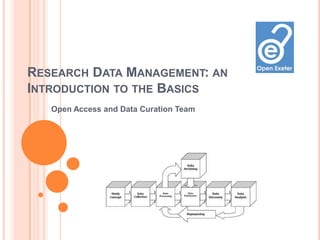
RESEARCH DATA MANAGEMENT: AN
INTRODUCTION TO THE BASICS
   Open Access and Data Curation Team
WHY MANAGE DATA?

Short-term:
 Increase efficiency.

 Save time.

 Simplify your life.

 Meet funder and institutional requirements.

Long-term:
 Preserve your data.

 Easier sharing and collaboration.

 Allow others to build on your research.

 Raise your visibility and research profile.
Download our research data management survival guide
DATA STORAGE
 Accessibility of data:
    Where will you be working: at home; in the office
     or lab; both?
    Will you be working collaboratively?
 U Drive – up to 20GBs allowance.
 Cloud storage (but not for sensitive or confidential
  data).
 Computer hard drive.
 External hard drives & memory sticks.
 DVDs/CDs.
 There may be local College solutions – ask your
  CDOs.
 Advice   from Exeter IT.
DATA BACK UP
 Why back up?
    Security and integrity of information.
    Reduce the risk of accidental or malicious data
     loss.
    Makes data recovery easier.
 Back up in more than one place – store external
  devices in different places.
 Back up after major changes to data.
 Make sure you know which version is the most up to
  date.
 Get into the habit of backing up regularly.
 Advice from Exeter IT and UK Data Archive.
SELECTION AND APPRAISAL
You don’t have to back up everything – storing data is
costly, get into the habit of reviewing and deleting data.
When to retain data - criteria include:
 Uniqueness.
 Non-replicability.
 Significant to current and future research.
 Scientific, social or cultural significance.
 Underpins published research.
 Important in relation to other data/research.
 Specific funder (legal or contract) requirement.
Advice on disposal of confidential data from Records
Management or email Caroline Dominey.
ORGANISING YOUR FILES AND FOLDERS
 Label your files and folders consistently and
  meaningfully so they can easily be found – choose
  a system and stick to it (yyyymmdd for dates).
 Make sure you know which is the latest version of
  your work, especially if working collaboratively:
– use a version control table in the document.

– name files accordingly, e.g., V01 & V02 – major
  changes; V02.01 – minor changes to version 2.
 Enables efficient working – don’t waste time trying
  to find a file or folder later in your studies.
 Advice from Cambridge University Library.
DOCUMENT DATA CREATION & COLLECTION
(METADATA)
 Where did you collect your data?
 How did you collect your data?
 What equipment did you use?
 What formats are your data in?
 Needed for:
   Long-term discoverability of your data online
    (and articles, working papers, etc.).
   Understanding, sharing and reuse.
   Replication.
   Validation.


Tips from MIT and Cambridge or ask your Subject
Librarian.
BE AWARE OF COPYRIGHT ISSUES
When you put research papers or data online that
include third-party copyrighted material you must be
sure you have permission to do so.
This includes journal articles, conference
papers, reports, chapters, theses, and so on.
 Get the correct copyright permissions early on in
your research – it could hold you up later.
 Images are a particular problem – see JISC Digital
Media for advice on using images.
 Read one PhD student’s experience of handling
copyright issues.
ETHICS & SENSITIVE DATA
 Follow the University’s Ethics Policy & subject-
  specific procedures.
 Be aware of relevant legislation, e.g., Data
  Protection Act
 Stringent control of access to data: password
  protection; encryption; lock and key.
 Store personal information, keys, codes, consent
  forms, etc., separately.
 Share with caution – use encryption.

 Good advice from UKDA.
DATA MANAGEMENT PLANNING (DMP)
Bids to most major funders now require a DMP
outlining:
 Roles and responsibilities
 What data will be created and how
 Data formats
 Documentation of data
 Storage and back up
 Data sharing
 Long-term preservation and access...


Get support from RKT or the Open Access & Data
Curation Team
SUPPORT OPEN ACCESS
What is it?
 International movement to open up access to
research knowledge.
 Publicly-funded research should be openly and
freely available.
 No restrictions on access or use.
 Most funders now require funded research to be
made OA.
 Get used to putting your papers and data on OA –
use our repository.
 Find out more from the Library Open Access Team.
KNOW YOUR FUNDER’S POLICY ON OA

 RCUK Policy on Open Access
 Wellcome Trust Policy Statement

 Overview of Funders’ Policies on Open Data

 UoE policy: due for ratification by early 2013.
DISSEMINATING DATA
 Usually a funder requirement.
 Store in a repository:
    Exeter’s data repository
    A subject repository (e.g., Archaeology Data
     Service).
    A national repository (e.g., UK Data Archive)
Advantages:
         Security.
         Permanence.

         Visibility.
         Citability.

         Opportunity.

         Someone else looks after it for you.

List of repositories at OpenDOAR
HELPFUL LINKS
    Contact us: openaccess@exeter.ac.uk
    Open Exeter Project
    Open Access web site
    RKT Contact Details
    Digital Curation Centre
    Draft UoE Research Data Management Policies
    Appraise & Select Research Data – DCC
    Exeter IT Governance and Compliance

Download a copy of this presentation from:
https://eric.exeter.ac.uk/repository/handle/10036/3885

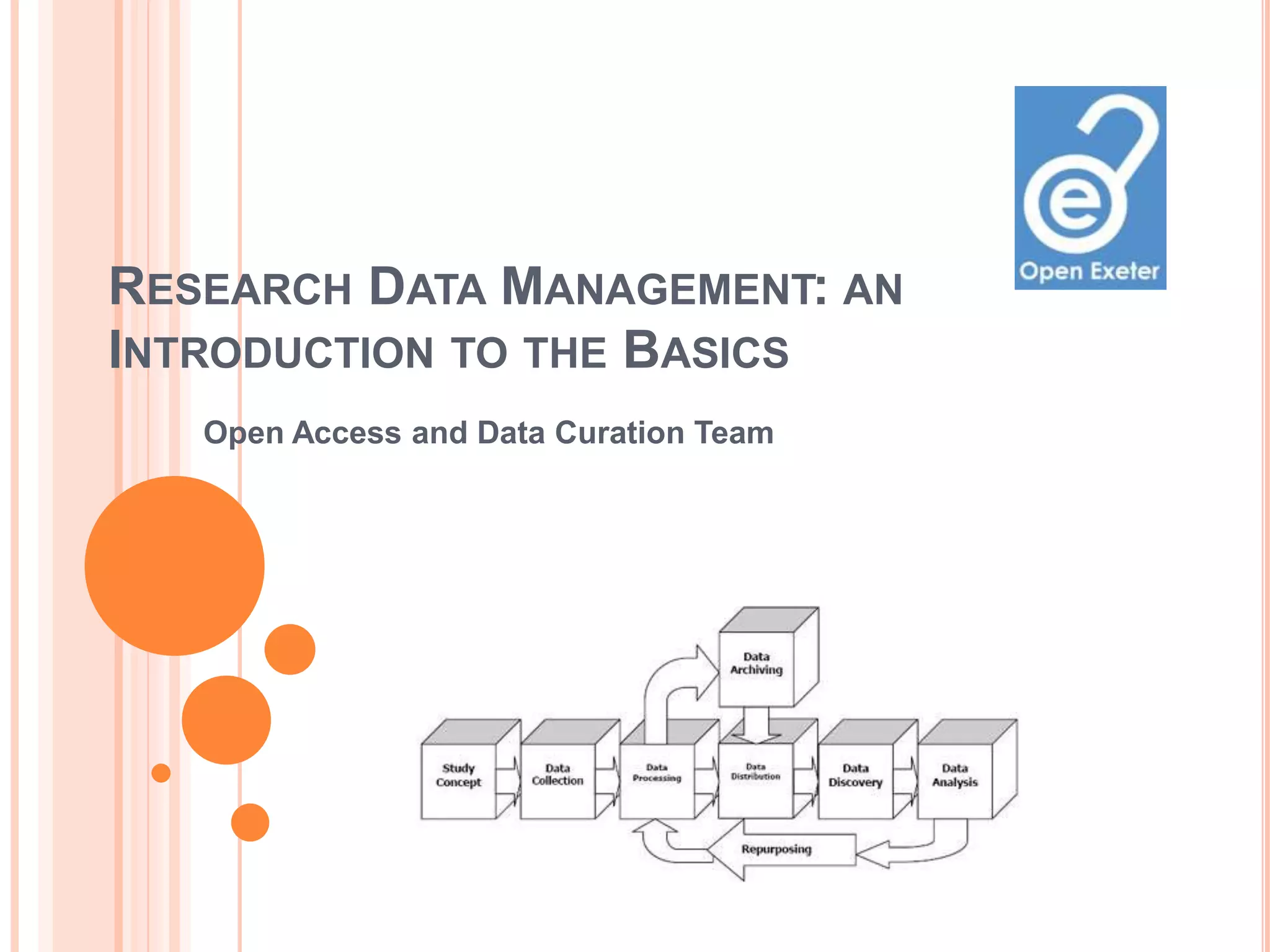
Image on opening slide © DDI and MIT:
http://libraries.mit.edu/guides/subjects/data-management/cycle.html

Research Data Management: An Introduction to the Basics

  • 1.
    RESEARCH DATA MANAGEMENT:AN INTRODUCTION TO THE BASICS Open Access and Data Curation Team
  • 2.
    WHY MANAGE DATA? Short-term: Increase efficiency.  Save time.  Simplify your life.  Meet funder and institutional requirements. Long-term:  Preserve your data.  Easier sharing and collaboration.  Allow others to build on your research.  Raise your visibility and research profile. Download our research data management survival guide
  • 3.
    DATA STORAGE  Accessibilityof data:  Where will you be working: at home; in the office or lab; both?  Will you be working collaboratively?  U Drive – up to 20GBs allowance.  Cloud storage (but not for sensitive or confidential data).  Computer hard drive.  External hard drives & memory sticks.  DVDs/CDs.  There may be local College solutions – ask your CDOs.  Advice from Exeter IT.
  • 4.
    DATA BACK UP Why back up?  Security and integrity of information.  Reduce the risk of accidental or malicious data loss.  Makes data recovery easier.  Back up in more than one place – store external devices in different places.  Back up after major changes to data.  Make sure you know which version is the most up to date.  Get into the habit of backing up regularly.  Advice from Exeter IT and UK Data Archive.
  • 5.
    SELECTION AND APPRAISAL Youdon’t have to back up everything – storing data is costly, get into the habit of reviewing and deleting data. When to retain data - criteria include:  Uniqueness.  Non-replicability.  Significant to current and future research.  Scientific, social or cultural significance.  Underpins published research.  Important in relation to other data/research.  Specific funder (legal or contract) requirement. Advice on disposal of confidential data from Records Management or email Caroline Dominey.
  • 6.
    ORGANISING YOUR FILESAND FOLDERS  Label your files and folders consistently and meaningfully so they can easily be found – choose a system and stick to it (yyyymmdd for dates).  Make sure you know which is the latest version of your work, especially if working collaboratively: – use a version control table in the document. – name files accordingly, e.g., V01 & V02 – major changes; V02.01 – minor changes to version 2.  Enables efficient working – don’t waste time trying to find a file or folder later in your studies.  Advice from Cambridge University Library.
  • 7.
    DOCUMENT DATA CREATION& COLLECTION (METADATA)  Where did you collect your data?  How did you collect your data?  What equipment did you use?  What formats are your data in?  Needed for:  Long-term discoverability of your data online (and articles, working papers, etc.).  Understanding, sharing and reuse.  Replication.  Validation. Tips from MIT and Cambridge or ask your Subject Librarian.
  • 8.
    BE AWARE OFCOPYRIGHT ISSUES When you put research papers or data online that include third-party copyrighted material you must be sure you have permission to do so. This includes journal articles, conference papers, reports, chapters, theses, and so on.  Get the correct copyright permissions early on in your research – it could hold you up later.  Images are a particular problem – see JISC Digital Media for advice on using images.  Read one PhD student’s experience of handling copyright issues.
  • 9.
    ETHICS & SENSITIVEDATA  Follow the University’s Ethics Policy & subject- specific procedures.  Be aware of relevant legislation, e.g., Data Protection Act  Stringent control of access to data: password protection; encryption; lock and key.  Store personal information, keys, codes, consent forms, etc., separately.  Share with caution – use encryption.  Good advice from UKDA.
  • 10.
    DATA MANAGEMENT PLANNING(DMP) Bids to most major funders now require a DMP outlining:  Roles and responsibilities  What data will be created and how  Data formats  Documentation of data  Storage and back up  Data sharing  Long-term preservation and access... Get support from RKT or the Open Access & Data Curation Team
  • 11.
    SUPPORT OPEN ACCESS Whatis it?  International movement to open up access to research knowledge.  Publicly-funded research should be openly and freely available.  No restrictions on access or use.  Most funders now require funded research to be made OA.  Get used to putting your papers and data on OA – use our repository.  Find out more from the Library Open Access Team.
  • 12.
    KNOW YOUR FUNDER’SPOLICY ON OA  RCUK Policy on Open Access  Wellcome Trust Policy Statement  Overview of Funders’ Policies on Open Data  UoE policy: due for ratification by early 2013.
  • 13.
    DISSEMINATING DATA  Usuallya funder requirement.  Store in a repository:  Exeter’s data repository  A subject repository (e.g., Archaeology Data Service).  A national repository (e.g., UK Data Archive) Advantages:  Security.  Permanence.  Visibility.  Citability.  Opportunity.  Someone else looks after it for you. List of repositories at OpenDOAR
  • 14.
    HELPFUL LINKS  Contact us: openaccess@exeter.ac.uk  Open Exeter Project  Open Access web site  RKT Contact Details  Digital Curation Centre  Draft UoE Research Data Management Policies  Appraise & Select Research Data – DCC  Exeter IT Governance and Compliance Download a copy of this presentation from: https://eric.exeter.ac.uk/repository/handle/10036/3885 Image on opening slide © DDI and MIT: http://libraries.mit.edu/guides/subjects/data-management/cycle.html