DIGGING INTO DATA
ANALYSIS AND VISUALISATION IN 3D
Alex Henderson
University of Manchester
SurfaceSpectra Ltd
http://about.me/henderson.alex
Twitter: @AlexHenderson00
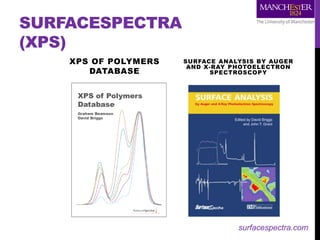
SURFACESPECTRA
(XPS)
XPS OF POLYMERS
DATABASE
SURFACE ANALYSIS BY AUGER
AND X-RAY PHOTOELECTRON
SPECTROSCOPY
surfacespectra.com
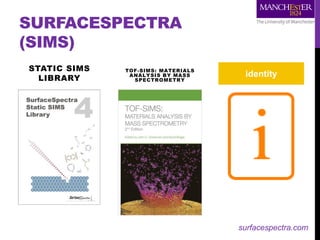
SURFACESPECTRA
(SIMS)
STATIC SIMS
LIBRARY
TOF-SIMS: MATERIALS
ANALYSIS BY MASS
SPECTROMETRY
identity
surfacespectra.com
FALSE COLOUR
Colour is used to represent different aspects of our data
• Nominal data (no implied order)
• cancer / non-cancer, clustering etc.
• Numeric data
• intensity of peak X in counts
• Bimodal data
• ratios or PCA scores
• Surface data
• 3D rendering
Different colour scales (colormaps) are required for each type
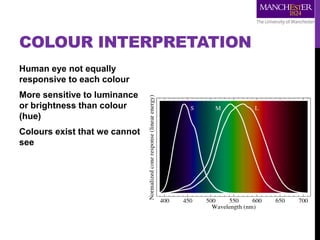
COLOUR INTERPRETATION
Human eye not equally
responsive to each colour
More sensitive to luminance
or brightness than colour
(hue)
Colours exist that we cannot
see
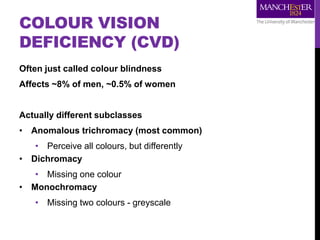
COLOUR VISION
DEFICIENCY (CVD)
Often just called colour blindness
Affects ~8% of men, ~0.5% of women
Actually different subclasses
• Anomalous trichromacy (most common)
• Perceive all colours, but differently
• Dichromacy
• Missing one colour
• Monochromacy
• Missing two colours - greyscale
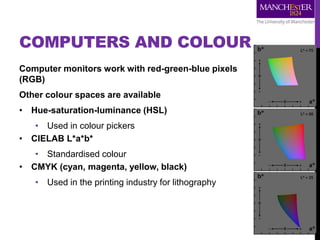
COMPUTERS AND COLOUR
Computer monitors work with red-green-blue pixels
(RGB)
Other colour spaces are available
• Hue-saturation-luminance (HSL)
• Used in colour pickers
• CIELAB L*a*b*
• Standardised colour
• CMYK (cyan, magenta, yellow, black)
• Used in the printing industry for lithography
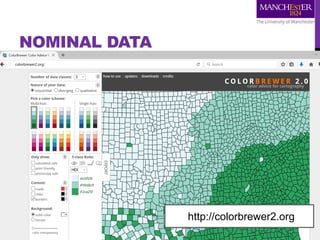
NOMINAL DATA
http://colorbrewer2.org
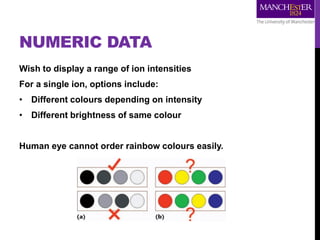
NUMERIC DATA
Wish to display a range of ion intensities
For a single ion, options include:
• Different colours depending on intensity
• Different brightness of same colour
Human eye cannot order rainbow colours easily.
Ratio Image: m/z 23 / 39
0
2
4
6
8
10
12
14
16
18
20
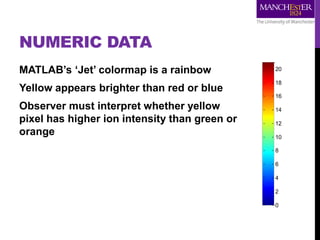
NUMERIC DATA
MATLAB’s ‘Jet’ colormap is a rainbow
Yellow appears brighter than red or blue
Observer must interpret whether yellow
pixel has higher ion intensity than green or
orange
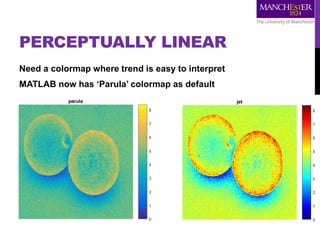
PERCEPTUALLY LINEAR
Need a colormap where trend is easy to interpret
MATLAB now has ‘Parula’ colormap as default
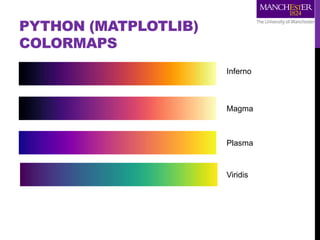
PYTHON (MATPLOTLIB)
COLORMAPS
Inferno
Magma
Plasma
Viridis
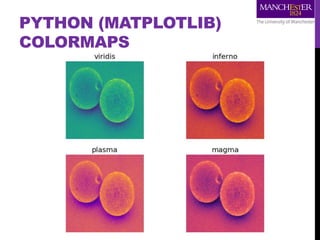
PYTHON (MATPLOTLIB)
COLORMAPS
BIMODAL DATA
Principal component scores are bidirectional
Large positive values and large negative values are important
Values around zero are not important
Ideally want black at zero point with different colours for
positive and negative score
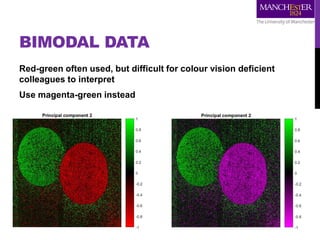
BIMODAL DATA
Red-green often used, but difficult for colour vision deficient
colleagues to interpret
Use magenta-green instead
RATIO DATA
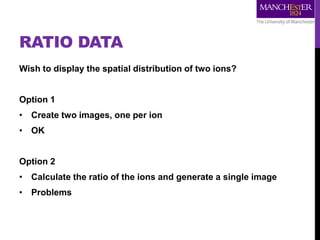
Wish to display the spatial distribution of two ions?
Option 1
• Create two images, one per ion
• OK
Option 2
• Calculate the ratio of the ions and generate a single image
• Problems
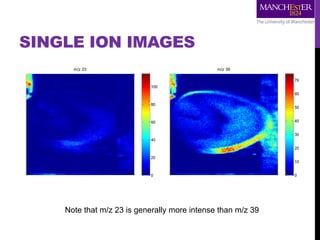
SINGLE ION IMAGES
m/z 23
0
20
40
60
80
100
m/z 39
0
10
20
30
40
50
60
70
Note that m/z 23 is generally more intense than m/z 39
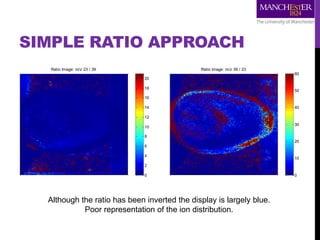
SIMPLE RATIO APPROACH
Ratio Image: m/z 23 / 39
0
2
4
6
8
10
12
14
16
18
20
Ratio Image: m/z 39 / 23
0
10
20
30
40
50
60
Although the ratio has been inverted the display is largely blue.
Poor representation of the ion distribution.
Ratio Image: m/z 23 / 39
0
2
4
6
8
10
12
14
16
18
20
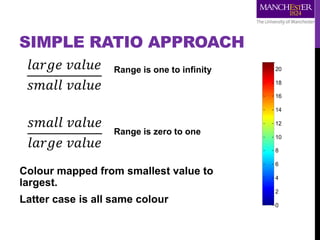
SIMPLE RATIO APPROACH
Colour mapped from smallest value to
largest.
Latter case is all same colour
Range is one to infinity
Range is zero to one
𝑙𝑎𝑟𝑔𝑒 𝑣𝑎𝑙𝑢𝑒
𝑠𝑚𝑎𝑙𝑙 𝑣𝑎𝑙𝑢𝑒
𝑠𝑚𝑎𝑙𝑙 𝑣𝑎𝑙𝑢𝑒
𝑙𝑎𝑟𝑔𝑒 𝑣𝑎𝑙𝑢𝑒
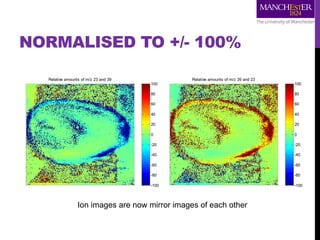
NORMALISED TO +/- 100%
Relative amounts of m/z 23 and 39
-100
-80
-60
-40
-20
0
20
40
60
80
100
Relative amounts of m/z 39 and 23
-100
-80
-60
-40
-20
0
20
40
60
80
100
Ion images are now mirror images of each other
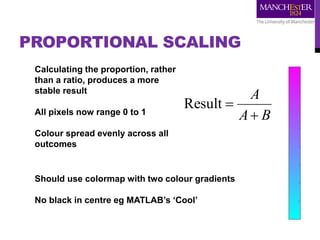
PROPORTIONAL SCALING
BA
A

Result
Calculating the proportion, rather
than a ratio, produces a more
stable result
All pixels now range 0 to 1
Colour spread evenly across all
outcomes
Should use colormap with two colour gradients
No black in centre eg MATLAB’s ‘Cool’
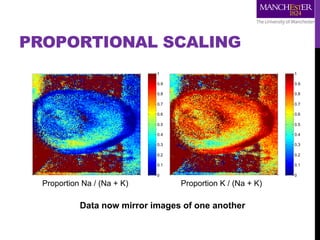
JCV ratio: m/z 39/(23+39)
0
0.1
0.2
0.3
0.4
0.5
0.6
0.7
0.8
0.9
1
JCV ratio: m/z 23/(23+39)
0
0.1
0.2
0.3
0.4
0.5
0.6
0.7
0.8
0.9
1
PROPORTIONAL SCALING
Proportion Na / (Na + K) Proportion K / (Na + K)
Data now mirror images of one another
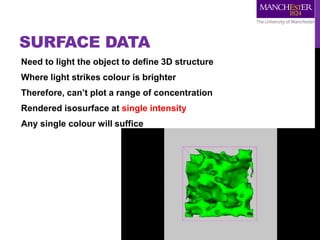
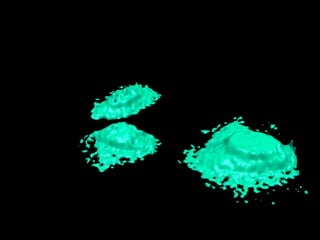
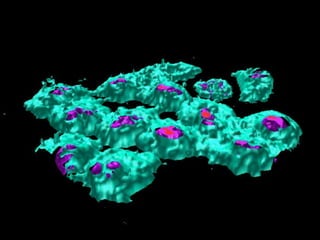
SURFACE DATA
Need to light the object to define 3D structure
Where light strikes colour is brighter
Therefore, can’t plot a range of concentration
Rendered isosurface at single intensity
Any single colour will suffice
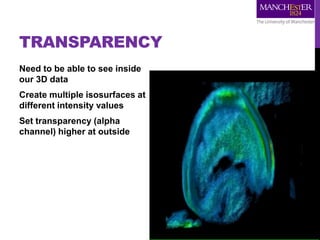
TRANSPARENCY
Need to be able to see inside
our 3D data
Create multiple isosurfaces at
different intensity values
Set transparency (alpha
channel) higher at outside
REPORTING REQUIREMENTS
Sharing 3D data is difficult
Need to record parameters:
• Orientation (top-left-front, bottom-right-back)
• Direction of ion beam erosion (L-R, flyback or meander)
• Angles of incidence and detection
• Intensity values for isosurfaces (including alpha channel)
• Interpolation / smoothing parameters (helps to prevent
isosurface disconnect)
• Shift correction (layers, direction, amount etc.)
• ‘Stretching’ of z-dimension for visualisation (voxel
dimensions)
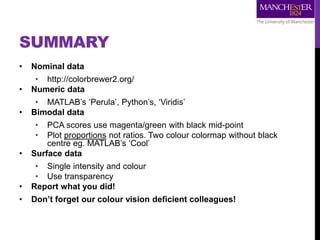
SUMMARY
• Nominal data
• http://colorbrewer2.org/
• Numeric data
• MATLAB’s ‘Perula’, Python’s, ‘Viridis’
• Bimodal data
• PCA scores use magenta/green with black mid-point
• Plot proportions not ratios. Two colour colormap without black
centre eg. MATLAB’s ‘Cool’
• Surface data
• Single intensity and colour
• Use transparency
• Report what you did!
• Don’t forget our colour vision deficient colleagues!
ACKNOWLEDGEMENTS
Bead data – Nick Winograd
Frog egg data – John Fletcher
HeLa cell data – John Fletcher, Sadia (Rabbani) Sheraz
Rendered isosurface – Greg Fisher
More detailed background – Alan Race and Josephine Bunch’s review: Anal Bioanal
Chem (2015) 407:2047–2054
Movies available from http://www.sarc.manchester.ac.uk/gallery/
Image credits
SurfaceSpectra products: http://surfacespectra.com
Human eye spectral response: https://en.wikipedia.org/wiki/Color_vision
CIELAB colour space: https://en.wikipedia.org/wiki/Lab_color_space
Colour ordering: http://medvis.org/2012/08/21/rainbow-colormaps-what-are-they-good-for-
absolutely-nothing/
Matplotlib colormaps: http://medvis.org/2016/02/23/better-than-the-rainbow-the-matplotlib-
alternative-colormaps/

Digging into Data: Analysis and Visualisation in 3D

  • 1.
    DIGGING INTO DATA ANALYSISAND VISUALISATION IN 3D Alex Henderson University of Manchester SurfaceSpectra Ltd http://about.me/henderson.alex Twitter: @AlexHenderson00
  • 2.
    SURFACESPECTRA (XPS) XPS OF POLYMERS DATABASE SURFACEANALYSIS BY AUGER AND X-RAY PHOTOELECTRON SPECTROSCOPY surfacespectra.com
  • 3.
    SURFACESPECTRA (SIMS) STATIC SIMS LIBRARY TOF-SIMS: MATERIALS ANALYSISBY MASS SPECTROMETRY identity surfacespectra.com
  • 4.
    FALSE COLOUR Colour isused to represent different aspects of our data • Nominal data (no implied order) • cancer / non-cancer, clustering etc. • Numeric data • intensity of peak X in counts • Bimodal data • ratios or PCA scores • Surface data • 3D rendering Different colour scales (colormaps) are required for each type
  • 5.
    COLOUR INTERPRETATION Human eyenot equally responsive to each colour More sensitive to luminance or brightness than colour (hue) Colours exist that we cannot see
  • 6.
    COLOUR VISION DEFICIENCY (CVD) Oftenjust called colour blindness Affects ~8% of men, ~0.5% of women Actually different subclasses • Anomalous trichromacy (most common) • Perceive all colours, but differently • Dichromacy • Missing one colour • Monochromacy • Missing two colours - greyscale
  • 7.
    COMPUTERS AND COLOUR Computermonitors work with red-green-blue pixels (RGB) Other colour spaces are available • Hue-saturation-luminance (HSL) • Used in colour pickers • CIELAB L*a*b* • Standardised colour • CMYK (cyan, magenta, yellow, black) • Used in the printing industry for lithography
  • 8.
  • 9.
    NUMERIC DATA Wish todisplay a range of ion intensities For a single ion, options include: • Different colours depending on intensity • Different brightness of same colour Human eye cannot order rainbow colours easily.
  • 10.
    Ratio Image: m/z23 / 39 0 2 4 6 8 10 12 14 16 18 20 NUMERIC DATA MATLAB’s ‘Jet’ colormap is a rainbow Yellow appears brighter than red or blue Observer must interpret whether yellow pixel has higher ion intensity than green or orange
  • 11.
    PERCEPTUALLY LINEAR Need acolormap where trend is easy to interpret MATLAB now has ‘Parula’ colormap as default
  • 12.
  • 13.
  • 14.
    BIMODAL DATA Principal componentscores are bidirectional Large positive values and large negative values are important Values around zero are not important Ideally want black at zero point with different colours for positive and negative score
  • 15.
    BIMODAL DATA Red-green oftenused, but difficult for colour vision deficient colleagues to interpret Use magenta-green instead
  • 16.
    RATIO DATA Wish todisplay the spatial distribution of two ions? Option 1 • Create two images, one per ion • OK Option 2 • Calculate the ratio of the ions and generate a single image • Problems
  • 17.
    SINGLE ION IMAGES m/z23 0 20 40 60 80 100 m/z 39 0 10 20 30 40 50 60 70 Note that m/z 23 is generally more intense than m/z 39
  • 18.
    SIMPLE RATIO APPROACH RatioImage: m/z 23 / 39 0 2 4 6 8 10 12 14 16 18 20 Ratio Image: m/z 39 / 23 0 10 20 30 40 50 60 Although the ratio has been inverted the display is largely blue. Poor representation of the ion distribution.
  • 19.
    Ratio Image: m/z23 / 39 0 2 4 6 8 10 12 14 16 18 20 SIMPLE RATIO APPROACH Colour mapped from smallest value to largest. Latter case is all same colour Range is one to infinity Range is zero to one 𝑙𝑎𝑟𝑔𝑒 𝑣𝑎𝑙𝑢𝑒 𝑠𝑚𝑎𝑙𝑙 𝑣𝑎𝑙𝑢𝑒 𝑠𝑚𝑎𝑙𝑙 𝑣𝑎𝑙𝑢𝑒 𝑙𝑎𝑟𝑔𝑒 𝑣𝑎𝑙𝑢𝑒
  • 20.
    NORMALISED TO +/-100% Relative amounts of m/z 23 and 39 -100 -80 -60 -40 -20 0 20 40 60 80 100 Relative amounts of m/z 39 and 23 -100 -80 -60 -40 -20 0 20 40 60 80 100 Ion images are now mirror images of each other
  • 21.
    PROPORTIONAL SCALING BA A  Result Calculating theproportion, rather than a ratio, produces a more stable result All pixels now range 0 to 1 Colour spread evenly across all outcomes Should use colormap with two colour gradients No black in centre eg MATLAB’s ‘Cool’
  • 22.
    JCV ratio: m/z39/(23+39) 0 0.1 0.2 0.3 0.4 0.5 0.6 0.7 0.8 0.9 1 JCV ratio: m/z 23/(23+39) 0 0.1 0.2 0.3 0.4 0.5 0.6 0.7 0.8 0.9 1 PROPORTIONAL SCALING Proportion Na / (Na + K) Proportion K / (Na + K) Data now mirror images of one another
  • 23.
    SURFACE DATA Need tolight the object to define 3D structure Where light strikes colour is brighter Therefore, can’t plot a range of concentration Rendered isosurface at single intensity Any single colour will suffice
  • 24.
    TRANSPARENCY Need to beable to see inside our 3D data Create multiple isosurfaces at different intensity values Set transparency (alpha channel) higher at outside
  • 27.
    REPORTING REQUIREMENTS Sharing 3Ddata is difficult Need to record parameters: • Orientation (top-left-front, bottom-right-back) • Direction of ion beam erosion (L-R, flyback or meander) • Angles of incidence and detection • Intensity values for isosurfaces (including alpha channel) • Interpolation / smoothing parameters (helps to prevent isosurface disconnect) • Shift correction (layers, direction, amount etc.) • ‘Stretching’ of z-dimension for visualisation (voxel dimensions)
  • 28.
    SUMMARY • Nominal data •http://colorbrewer2.org/ • Numeric data • MATLAB’s ‘Perula’, Python’s, ‘Viridis’ • Bimodal data • PCA scores use magenta/green with black mid-point • Plot proportions not ratios. Two colour colormap without black centre eg. MATLAB’s ‘Cool’ • Surface data • Single intensity and colour • Use transparency • Report what you did! • Don’t forget our colour vision deficient colleagues!
  • 29.
    ACKNOWLEDGEMENTS Bead data –Nick Winograd Frog egg data – John Fletcher HeLa cell data – John Fletcher, Sadia (Rabbani) Sheraz Rendered isosurface – Greg Fisher More detailed background – Alan Race and Josephine Bunch’s review: Anal Bioanal Chem (2015) 407:2047–2054 Movies available from http://www.sarc.manchester.ac.uk/gallery/ Image credits SurfaceSpectra products: http://surfacespectra.com Human eye spectral response: https://en.wikipedia.org/wiki/Color_vision CIELAB colour space: https://en.wikipedia.org/wiki/Lab_color_space Colour ordering: http://medvis.org/2012/08/21/rainbow-colormaps-what-are-they-good-for- absolutely-nothing/ Matplotlib colormaps: http://medvis.org/2016/02/23/better-than-the-rainbow-the-matplotlib- alternative-colormaps/