Visit WWW.SOFLODREAMIN.COM to register and for more info
• Networking opportunities
• Trailhead Bootcamp
• Free Certifications for first timers,
50% discount for old timers
• 20+ breakout sessions
• Sponsor expo and demo jam
• BOAT CRUISE!
LOOK FOR A DISCOUNT CODE IN OUR CHATTER GROUP
REGISTRATION OPEN!
Salesforce Developers
Deliver Continuous Innovation with
the Customer 360 Platform
#LivingTheDream #TrailblazerCommunity
Dreamforce 2019 Global Gatherings
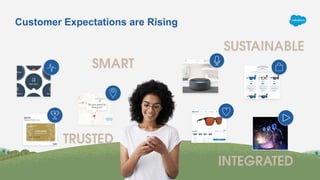
Customer Expectations are Rising
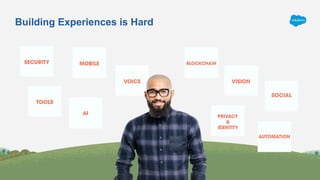
Building Experiences is Hard
Build
Deliver Continuous Innovation with
the Customer 360 Platform
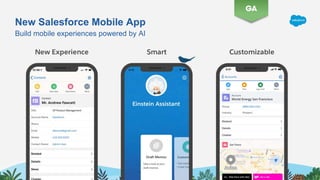
New Salesforce Mobile App
Build mobile experiences powered by AI
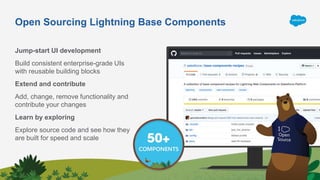
Open Sourcing Lightning Base Components
Jump-start UI development
Build consistent enterprise-grade UIs
with reusable building blocks
Extend and contribute
Add, change, remove functionality and
contribute your changes
Learn by exploring
Explore source code and see how they
are built for speed and scale
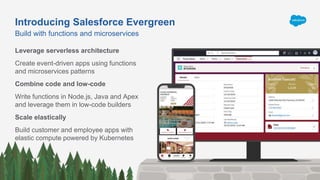
Introducing Salesforce Evergreen
Leverage serverless architecture
Create event-driven apps using functions
and microservices patterns
Combine code and low-code
Write functions in Node.js, Java and Apex
and leverage them in low-code builders
Scale elastically
Build customer and employee apps with
elastic compute powered by Kubernetes
Build with functions and microservices
Connect
Deliver Continuous Innovation with
the Customer 360 Platform
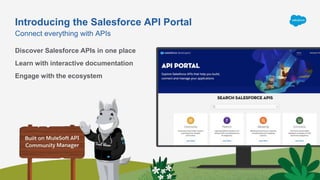
Introducing the Salesforce API Portal
​Discover Salesforce APIs in one place
​Learn with interactive documentation
Engage with the ecosystem
Connect everything with APIs
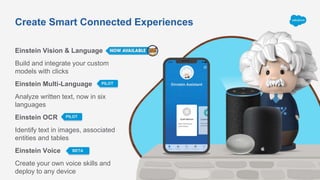
Create Smart Connected Experiences
Einstein Vision & Language
Build and integrate your custom
models with clicks
Einstein Multi-Language
Analyze written text, now in six
languages
Einstein OCR
Identify text in images, associated
entities and tables
Einstein Voice
Create your own voice skills and
deploy to any device
PILOT
PILOT
BETA
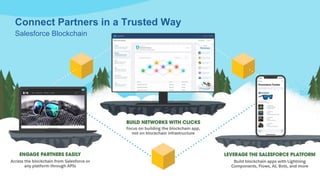
Connect Partners in a Trusted Way
Salesforce Blockchain
Manage
Deliver Continuous Innovation with
the Customer 360 Platform
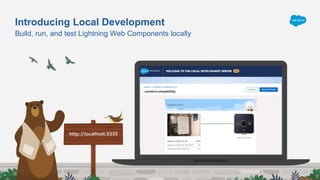
Build, run, and test Lightning Web Components locally
Introducing Local Development
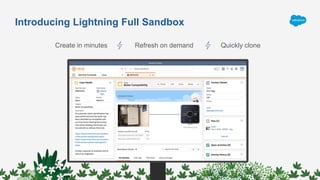
Introducing Lightning Full Sandbox
Create in minutes Refresh on demand Quickly clone
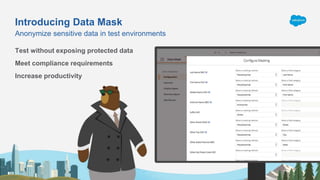
Introducing Data Mask
Anonymize sensitive data in test environments
Test without exposing protected data
Meet compliance requirements
Increase productivity
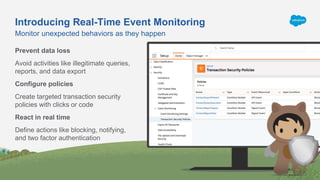
Monitor unexpected behaviors as they happen
Introducing Real-Time Event Monitoring
Prevent data loss
Avoid activities like illegitimate queries,
reports, and data export
Configure policies
Create targeted transaction security
policies with clicks or code
React in real time
Define actions like blocking, notifying,
and two factor authentication
Dreamforce ‘19 Highlights
for Salesforce Admins
#AwesomeAdmin
01/09/2020
Cynthia Thomas
Cynthia.thomas@trailblazercgl.com
@cynthiathomasbr
Sarah Epting
sarahepting@gmail.com
Agenda
1. Admin Keynote Highlights
2. 2 Top Admin Breakout Session Highlights
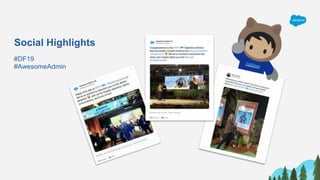
Social Highlights
#DF19
#AwesomeAdmin
#AwesomeAdmin Trivia
Salesforce has 3 releases each year, which
seasons are they based on?
A. Fall, Spring, Summer
C. Spring, Summer, Winter
B. Winter, Summer, Autumn
D. Winter, Spring, Fall
#AwesomeAdmin Trivia
How do you grant user access to the new Salesforce Mobile App?
A. Profile
C. Magic Wand
B. Permission Set
D. User Checkbox
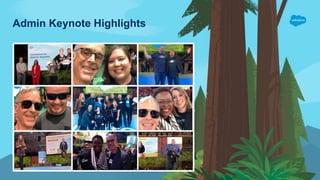
Admin Keynote Highlights
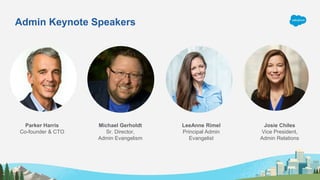
Admin Keynote Speakers
Michael Gerholdt
Sr. Director,
Admin Evangelism
LeeAnne Rimel
Principal Admin
Evangelist
Josie Chiles
Vice President,
Admin Relations
Parker Harris
Co-founder & CTO
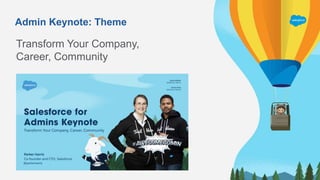
Admin Keynote: Theme
Transform Your Company,
Career, Community
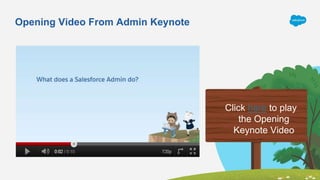
Opening Video From Admin Keynote
Click here to play
the Opening
Keynote Video
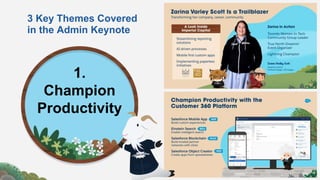
3 Key Themes Covered
in the Admin Keynote
1.
Champion
Productivity
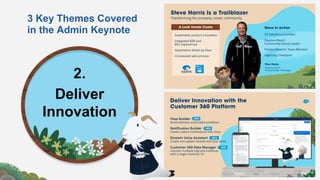
3 Key Themes Covered
in the Admin Keynote
2.
Deliver
Innovation
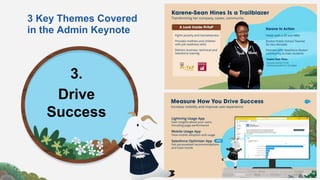
3 Key Themes Covered
in the Admin Keynote
3.
Drive
Success
#AwesomeAdmin Trivia
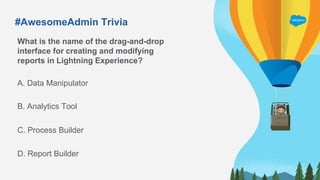
What is the name of the drag-and-drop
interface for creating and modifying
reports in Lightning Experience?
A. Data Manipulator
C. Process Builder
B. Analytics Tool
D. Report Builder
#AwesomeAdmin Trivia
This is an example of a standard Lightning Component:
A. Journey
C. Survey Says
B. Highlights Panel
D. Related Trends
What is a group of components, customizations, and
applications that are made available to other
organizations through the AppExchange.
#AwesomeAdmin Trivia
A. App
C. Parcel
B. Package
D. Component
#AwesomeAdmin Trivia
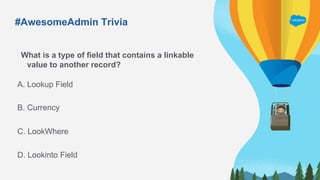
What is a type of field that contains a linkable
value to another record?
A. Lookup Field
C. LookWhere
B. Currency
D. Lookinto Field
Top Breakout Session Highlights
Highlights From 2 Top Breakout Sessions for Admins
Advanced Reporting Tips & Tricks
for New Admins
Aaron Crear | @aaroncrear
Hat-Trick Consulting
Automate Repetitive Tasks with
Salesforce Macros
David Palmquist |@DavidPalmquist
Vlocity
Make Your Job Easier with
Powerful Features
Cross Filters
Quickly identify records with or without
related records
Power of One
Allow objects to count themselves, use in
other formulas
Custom Report Types
Used for more complex reports on related
objects
Advanced Reporting Tips &
Tricks for New Admins
Make Visualizing the Data Simpler
Buckets
Categorize a group of values
Custom Summary Formulas
Summarize numeric values
Joined Reports
Show blocks of different data
points & objects in one screen
Aaron Crear
@aaroncrear
acrear@hat-trickconsulting.com
Learn About New Report Features
Field-to-Field Filters
Filter reports based on comparisons to other
fields. E.g. Show Campaigns with actual cost >
budgeted cost
Unique Values
Quickly see how many unique objects are in
your report. E.g. Show how many Accounts are
in an Opportunity Pipeline
Row-Level Formulas
Reduces the need for formulas fields on objects
E.g. Days to Close = Close Date –
DATEVALUE(Created Date)
Helpful Resources
Watch Session Online
https://www.salesforce.com/video/7790761/
Trailhead
https://sforce.co/2pna6Sg
Blog
Reportforce.Blog
Advanced Reporting Tips &
Tricks for New Admins
Aaron Crear
@aaroncrear
acrear@hat-trickconsulting.com
#AwesomeAdmin Trivia
What tool would you use to create an interactive interface for your users?
A. Report Builder
C. Formula Editor
B. Process Builder
D. Flow Builder
#AwesomeAdmin Trivia
To prevent a user from entering incorrect data, you should use...
A. Medium
C. Validation Rules
B. Carrots
D. Campaigns
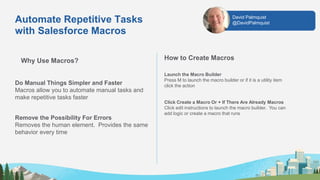
Automate Repetitive Tasks
with Salesforce Macros
Why Use Macros?
Do Manual Things Simpler and Faster
Macros allow you to automate manual tasks and
make repetitive tasks faster
Remove the Possibility For Errors
Removes the human element. Provides the same
behavior every time
How to Create Macros
Launch the Macro Builder
Press M to launch the macro builder or if it is a utility item
click the action
Click Create a Macro Or + If There Are Already Macros
Click edit instructions to launch the macro builder. You can
add logic or create a macro that runs
David Palmquist
@DavidPalmquist
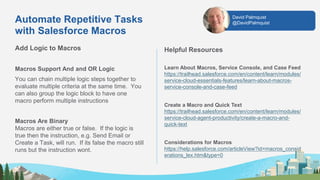
Add Logic to Macros
Macros Support And and OR Logic
You can chain multiple logic steps together to
evaluate multiple criteria at the same time. You
can also group the logic block to have one
macro perform multiple instructions
Macros Are Binary
Macros are either true or false. If the logic is
true then the instruction, e.g. Send Email or
Create a Task, will run. If its false the macro still
runs but the instruction wont.
Helpful Resources
Learn About Macros, Service Console, and Case Feed
https://trailhead.salesforce.com/en/content/learn/modules/
service-cloud-essentials-features/learn-about-macros-
service-console-and-case-feed
Create a Macro and Quick Text
https://trailhead.salesforce.com/en/content/learn/modules/
service-cloud-agent-productivity/create-a-macro-and-
quick-text
Considerations for Macros
https://help.salesforce.com/articleView?id=macros_consid
erations_lex.htm&type=0
Automate Repetitive Tasks
with Salesforce Macros
David Palmquist
@DavidPalmquist
What custom Field type can you put automatic
calculations into?
A. Currency
C. Formula
B. Date
D. Text
#AwesomeAdmin Trivia
CTI stands for…
A. Cloudy Technology Imagination
C. Computer Telephone Integration
B. Computer Telephony Innovation
D. Computer Telephony Integration
Keep Blazing Trails!
Salesforce Admins Website
admin.salesforce.com
Access to blogs, podcasts, webinars & more
Take the #DF19 Keynote Trailmix
​sforce.co/ParkersTrailmix
Leverage the power of the Salesforce Customer 360 Platform to
drive impact at your company, in your career, and in your community
Trailblazer Community
sforce.co/AdminTrailblazerGroup
Join thousands of peers in the Admin Trailblazers Chatter Group
Watch the Full DF19 Admin Keynote
https://www.youtube.com/watch?v=PsWaWMpvMw0
Join us January 24, 2020 for
Release Readiness Live: Admin Preview
to Learn MOAR
DF19 South-East Florida Global Gathering

DF19 South-East Florida Global Gathering

  • 2.
    Visit WWW.SOFLODREAMIN.COM toregister and for more info • Networking opportunities • Trailhead Bootcamp • Free Certifications for first timers, 50% discount for old timers • 20+ breakout sessions • Sponsor expo and demo jam • BOAT CRUISE! LOOK FOR A DISCOUNT CODE IN OUR CHATTER GROUP REGISTRATION OPEN!
  • 3.
    Salesforce Developers Deliver ContinuousInnovation with the Customer 360 Platform #LivingTheDream #TrailblazerCommunity Dreamforce 2019 Global Gatherings
  • 4.
  • 5.
  • 7.
    Build Deliver Continuous Innovationwith the Customer 360 Platform
  • 8.
    New Salesforce MobileApp Build mobile experiences powered by AI
  • 9.
    Open Sourcing LightningBase Components Jump-start UI development Build consistent enterprise-grade UIs with reusable building blocks Extend and contribute Add, change, remove functionality and contribute your changes Learn by exploring Explore source code and see how they are built for speed and scale
  • 10.
    Introducing Salesforce Evergreen Leverageserverless architecture Create event-driven apps using functions and microservices patterns Combine code and low-code Write functions in Node.js, Java and Apex and leverage them in low-code builders Scale elastically Build customer and employee apps with elastic compute powered by Kubernetes Build with functions and microservices
  • 11.
    Connect Deliver Continuous Innovationwith the Customer 360 Platform
  • 12.
    Introducing the SalesforceAPI Portal ​Discover Salesforce APIs in one place ​Learn with interactive documentation Engage with the ecosystem Connect everything with APIs
  • 13.
    Create Smart ConnectedExperiences Einstein Vision & Language Build and integrate your custom models with clicks Einstein Multi-Language Analyze written text, now in six languages Einstein OCR Identify text in images, associated entities and tables Einstein Voice Create your own voice skills and deploy to any device PILOT PILOT BETA
  • 14.
    Connect Partners ina Trusted Way Salesforce Blockchain
  • 15.
    Manage Deliver Continuous Innovationwith the Customer 360 Platform
  • 16.
    Build, run, andtest Lightning Web Components locally Introducing Local Development
  • 17.
    Introducing Lightning FullSandbox Create in minutes Refresh on demand Quickly clone
  • 18.
    Introducing Data Mask Anonymizesensitive data in test environments Test without exposing protected data Meet compliance requirements Increase productivity
  • 19.
    Monitor unexpected behaviorsas they happen Introducing Real-Time Event Monitoring Prevent data loss Avoid activities like illegitimate queries, reports, and data export Configure policies Create targeted transaction security policies with clicks or code React in real time Define actions like blocking, notifying, and two factor authentication
  • 21.
    Dreamforce ‘19 Highlights forSalesforce Admins #AwesomeAdmin 01/09/2020 Cynthia Thomas Cynthia.thomas@trailblazercgl.com @cynthiathomasbr Sarah Epting sarahepting@gmail.com
  • 23.
    Agenda 1. Admin KeynoteHighlights 2. 2 Top Admin Breakout Session Highlights
  • 24.
  • 26.
    #AwesomeAdmin Trivia Salesforce has3 releases each year, which seasons are they based on? A. Fall, Spring, Summer C. Spring, Summer, Winter B. Winter, Summer, Autumn D. Winter, Spring, Fall
  • 27.
    #AwesomeAdmin Trivia How doyou grant user access to the new Salesforce Mobile App? A. Profile C. Magic Wand B. Permission Set D. User Checkbox
  • 28.
  • 29.
    Admin Keynote Speakers MichaelGerholdt Sr. Director, Admin Evangelism LeeAnne Rimel Principal Admin Evangelist Josie Chiles Vice President, Admin Relations Parker Harris Co-founder & CTO
  • 30.
    Admin Keynote: Theme TransformYour Company, Career, Community
  • 31.
    Opening Video FromAdmin Keynote Click here to play the Opening Keynote Video
  • 32.
    3 Key ThemesCovered in the Admin Keynote 1. Champion Productivity
  • 33.
    3 Key ThemesCovered in the Admin Keynote 2. Deliver Innovation
  • 34.
    3 Key ThemesCovered in the Admin Keynote 3. Drive Success
  • 37.
    #AwesomeAdmin Trivia What isthe name of the drag-and-drop interface for creating and modifying reports in Lightning Experience? A. Data Manipulator C. Process Builder B. Analytics Tool D. Report Builder
  • 38.
    #AwesomeAdmin Trivia This isan example of a standard Lightning Component: A. Journey C. Survey Says B. Highlights Panel D. Related Trends
  • 40.
    What is agroup of components, customizations, and applications that are made available to other organizations through the AppExchange. #AwesomeAdmin Trivia A. App C. Parcel B. Package D. Component
  • 41.
    #AwesomeAdmin Trivia What isa type of field that contains a linkable value to another record? A. Lookup Field C. LookWhere B. Currency D. Lookinto Field
  • 42.
  • 43.
    Highlights From 2Top Breakout Sessions for Admins Advanced Reporting Tips & Tricks for New Admins Aaron Crear | @aaroncrear Hat-Trick Consulting Automate Repetitive Tasks with Salesforce Macros David Palmquist |@DavidPalmquist Vlocity
  • 44.
    Make Your JobEasier with Powerful Features Cross Filters Quickly identify records with or without related records Power of One Allow objects to count themselves, use in other formulas Custom Report Types Used for more complex reports on related objects Advanced Reporting Tips & Tricks for New Admins Make Visualizing the Data Simpler Buckets Categorize a group of values Custom Summary Formulas Summarize numeric values Joined Reports Show blocks of different data points & objects in one screen Aaron Crear @aaroncrear acrear@hat-trickconsulting.com
  • 45.
    Learn About NewReport Features Field-to-Field Filters Filter reports based on comparisons to other fields. E.g. Show Campaigns with actual cost > budgeted cost Unique Values Quickly see how many unique objects are in your report. E.g. Show how many Accounts are in an Opportunity Pipeline Row-Level Formulas Reduces the need for formulas fields on objects E.g. Days to Close = Close Date – DATEVALUE(Created Date) Helpful Resources Watch Session Online https://www.salesforce.com/video/7790761/ Trailhead https://sforce.co/2pna6Sg Blog Reportforce.Blog Advanced Reporting Tips & Tricks for New Admins Aaron Crear @aaroncrear acrear@hat-trickconsulting.com
  • 46.
    #AwesomeAdmin Trivia What toolwould you use to create an interactive interface for your users? A. Report Builder C. Formula Editor B. Process Builder D. Flow Builder
  • 47.
    #AwesomeAdmin Trivia To preventa user from entering incorrect data, you should use... A. Medium C. Validation Rules B. Carrots D. Campaigns
  • 48.
    Automate Repetitive Tasks withSalesforce Macros Why Use Macros? Do Manual Things Simpler and Faster Macros allow you to automate manual tasks and make repetitive tasks faster Remove the Possibility For Errors Removes the human element. Provides the same behavior every time How to Create Macros Launch the Macro Builder Press M to launch the macro builder or if it is a utility item click the action Click Create a Macro Or + If There Are Already Macros Click edit instructions to launch the macro builder. You can add logic or create a macro that runs David Palmquist @DavidPalmquist
  • 49.
    Add Logic toMacros Macros Support And and OR Logic You can chain multiple logic steps together to evaluate multiple criteria at the same time. You can also group the logic block to have one macro perform multiple instructions Macros Are Binary Macros are either true or false. If the logic is true then the instruction, e.g. Send Email or Create a Task, will run. If its false the macro still runs but the instruction wont. Helpful Resources Learn About Macros, Service Console, and Case Feed https://trailhead.salesforce.com/en/content/learn/modules/ service-cloud-essentials-features/learn-about-macros- service-console-and-case-feed Create a Macro and Quick Text https://trailhead.salesforce.com/en/content/learn/modules/ service-cloud-agent-productivity/create-a-macro-and- quick-text Considerations for Macros https://help.salesforce.com/articleView?id=macros_consid erations_lex.htm&type=0 Automate Repetitive Tasks with Salesforce Macros David Palmquist @DavidPalmquist
  • 50.
    What custom Fieldtype can you put automatic calculations into? A. Currency C. Formula B. Date D. Text #AwesomeAdmin Trivia
  • 51.
    #AwesomeAdmin Trivia CTI standsfor… A. Cloudy Technology Imagination C. Computer Telephone Integration B. Computer Telephony Innovation D. Computer Telephony Integration
  • 52.
    Keep Blazing Trails! SalesforceAdmins Website admin.salesforce.com Access to blogs, podcasts, webinars & more Take the #DF19 Keynote Trailmix ​sforce.co/ParkersTrailmix Leverage the power of the Salesforce Customer 360 Platform to drive impact at your company, in your career, and in your community Trailblazer Community sforce.co/AdminTrailblazerGroup Join thousands of peers in the Admin Trailblazers Chatter Group Watch the Full DF19 Admin Keynote https://www.youtube.com/watch?v=PsWaWMpvMw0
  • 53.
    Join us January24, 2020 for Release Readiness Live: Admin Preview to Learn MOAR

Editor's Notes

  • #4 Presentation description: Today we’ll review all the great announcements from the Dreamforce 2019 Salesforce Developers Keynote. The theme from this year was all around how we can deliver continuous innovation with the Customer 360 Platform, from building apps fast, to connecting to the right data, apps, and services, and finally how we can streamline our application lifecycle management, followed by a couple demos we’re excited to show you today.
  • #5 Talking points: Customer expectations are rising. Apps are everywhere and becoming ambient. They are getting smarter and more integrated. Today you can talk to your smart television and thermostat. Using your phone, you can send directions to your car, and then use your car’s Autopilot app to drive you there. This is happening! Users expect these smart, connected, and integrated experiences everywhere, in their personal lives and in their professional lives.
  • #6 Talking points: But these experiences are hard to build We need to bring together the latest innovations like AI, Voice, Vision and Blockchain into a cohesive experience These experiences need to be trusted and guarantee data privacy We need ALM workflows to deliver that innovation continuously That’s hard. That’s a lot of infrastructure to implement and to wire together And while we’re doing that, we’re not delivering innovation to our businesses To solve these problems, and make it easy to create trusted, smart and flexible experiences...
  • #7 Talking points: ... Salesforce provides the Salesforce Customer 360 Platform The Salesforce Customer 360 Platform brings together all the pieces we need to build modern apps in one integrated platform It’s the same platform we use to build the Customer 360 apps, like Sales, Service, Marketing, and Commerce. And we can use that platform to build our own apps! [Transition] Let’s look at what Salesforce is doing to help us Build, Connect, and Manage our apps to deliver continuous innovation
  • #8 Talking points: First, let’s go over some amazing new features that will allow us to build innovative apps faster than ever.
  • #9 Talking points: … to help us build engaging and smart mobile experiences. Salesforce announced the general availability of the new Salesforce mobile app. The Salesforce Mobile app has a brand new experience. It has an app launcher that allows us to load and use the same apps we use on the desktop It’s smart: We can use Einstein Voice Assistant (which is in Pilot) and Einstein Analytics And it’s customizable with clicks and code: we can now have Lightning Web Components everywhere, including on the record home page [Transition] Let’s talk about Lightning Web Components...
  • #10 Talking points: Lightning Web Components allows us to build engaging experiences with modern Web Standards. That’s great for our apps, and it’s also great for us developers, because we get to work with the latest and greatest technologies Salesforce launched Lightning Web Components earlier this year, and at TDX they open sourced the LWC framework And as part of their continuous support for open source, they announced that they are open sourcing the Base Lightning Components, which is the component library built on top of Lightning Web Components. This means that we can jump start our existing UI development with UI building blocks; and they launched with over 50 Base Lightning Components We can extend existing components and contribute our code And we can learn or develop best practices by exploring the source code [Transition] To build engaging experiences it’s helpful to have a common framework like LWC. It is also helpful to have a common platform to build these experiences on...
  • #11 Talking points: … Which is why Salesforce is introducing Salesforce Evergreen Evergreen will bring together the best of the Lightning and Heroku platforms With Evergreen we can build contextual experiences with Salesforce Data at scale We can build these experiences using microservices or functions using familiar languages like Node.js, Java and Apex And we can build these experiences with code or clicks. For example, we could invoke an Evergreen function written in Node.js from a Flow, from a process, and the ability to innovate with even more open source libraries.
  • #12 Talking points: Next, we’re to explore how we can leverage the platform to create connected experiences with applications that connect everything. As developers we need to make all these connections come to life in the apps we build. But how do we create apps that connect everything? [Transition] Of course, we use APIs!
  • #13 Talking points: Now Salesforce has a lot of APIs So many, that it’s sometimes difficult to keep track To help us with that, they’re introducing to the Salesforce API Portal It allows us to discover all the Salesforce APIs in one place To learn about all these APIs with interactive documentation We can try mock and production endpoints in-place, from within the portal And we can engage with the ecosystem through forums Stay tuned for more information in 2020 regarding when the Salesforce API Portal will be available [Transition] When we create connected experiences, we want them to be smart…
  • #14 Talking points: And to help us create smart connected experiences, Salesforce has added new Einstein UI and APIs There’s the Einstein Vision and Language app available now on AppExchange which we can use to build and integrate models with clicks Einstein Multi-Language is now Pilot and allows you to analyze text in six languages (intent and sentiment) Einstein OCR allows you to identify text in images Einstein Voice allows you to create your own skills that you can deploy to any device [Transition] But there’s even more new technology out there to help us build connections
  • #15 Talking points: You can also connect partners in a new way: Using Blockchain! Blockchain allows you to create networks of partners who can use a distributed data model to record digital transactions in a trusted, immutable way Blockchain is a great technology but it can be hard to implement That’s why we introduced Salesforce Blockchain at TrailheaDX and it’s now Developer Preview! Salesforce Blockchain makes it easy to build networks with clicks. That means you can focus on building your blockchain app, not on implementing blockchain infrastructure Because blockchain objects are exposed as regular Salesforce objects, you can leverage the Salesforce platform: you can build blockchain apps with LWC, Flow, Einstein, Bots, and more. And because the Salesforce Blockchain can be accessed from Salesforce or any other platform through APIs, it is easy to engage partners and connect applications whether they are on platform or not
  • #16 Talking points: Building innovation is great. But delivering it to our users is better. Let’s talk about how Salesforce is making it easier for us to manage our application lifecycle and deliver innovation continuously As we all know, an application is never really “done” We need great tools to deliver innovation continuously [Transition] Development starts with us, the developers, behind our laptops writing code.
  • #17 Talking points: … and to help us build, run, and test our Lightning Web Components locally, Salesforce recently introduced the Local Development Server. With the Local Development Server, we can iterate quickly when developing Lightning Web Components No need to deploy our changes to an org. We can run them locally on the local server running on localhost It’s super exciting and I can’t wait to show it to you in the demo [Transition] of course, when you are done with local changes, you probably want to test them in a sandbox with all your data...
  • #18 Talking points: … and to create these flexible test environments, Salesforce announced a new type of Sandbox: the Lightning Full Sandbox. Lightning Full Sandboxes can be created in minutes with a full copy of your data And they will feature refresh on demand, as often as you want… and it only takes minutes It’s a great step forward towards more flexible development environments [Transition] Testing your app with all data in a sandbox is great, but there is data you may not want to expose to everybody testing your application in the sandbox...
  • #19 Talking points: … That’s why, they introduced Salesforce Data Mask, a new feature that allows us to anonymize sensitive data. With Data Mask, we can build, test, customize our apps with all data and without exposing sensitive data This helps us to meet compliance requirements and it helps us increase productivity by removing what is usually a tedious process: with Data Mask, you can anonymize data automatically on Sandbox Creation and Refresh, or manually in an existing sandbox [Transition] Protecting data in your sandbox is great...
  • #20 Talking points: … but we need a way to prevent unexpected activities in production, like let’s say exporting contacts or opportunities. Salesforce announced new Real-Time Event Monitoring features, so we can create targeted transaction security policies to avoid data loss We can configure these policies declaratively (using Condition Builder), or programmatically using Apex And we can define actions that we want to take place when these conditions happen. For example, you can block the user, notify admins, or even require two factor authentication. [Transition] That sums up the announcements, let's cut to a couple of demos. One on LWC Local Development, and another that will make your Apex more secure.
  • #23 Talk Track: Today’s Global Gathering is one of hundreds of events being held all around the world for Admins. Thank you for taking the time to learn and connect with your local Salesforce community!
  • #24 Talk Track: Here is the agenda for today. First, we’re going to share some highlights from the Admin Keynote – the main event for Admins at Dreamforce. Last we’re going to give you a high level overview of 2 of the top breakout sessions for Admins. We’ve also got some FUN trivia sprinkled throughout the presentation!
  • #25 Talk Track: Like any Salesforce event, the Twitterverse was on fire! Lots of tweets about how Admins were learning and connecting to the community! Check out these hashtags on Twitter to see some of the action! #DF19 #AwesomeAdmin
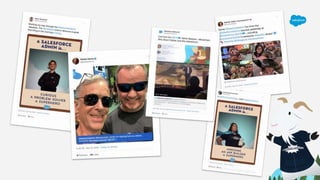
  • #26 Talk Track: And MOAR Tweets here!
  • #27 Correct Answer: C. Spring, Summer, Winter
  • #28 Correct Answer: B. Permission Set
  • #29 Talk Track: - Let’s now talk about the Admin Keynote – which was the very last keynote at Dreamforce 2019!
  • #30 Talk Track: The keynote was hosted by Parker Harris, the co-founder and CTO of Salesforce. Other speakers included Mike Gerholdt, LeeAnne Rimel and Josie Chiles. Several customers were also featured throughout the keynote, and were interviewed by Parker Harris.
  • #31 Talk Track: The overarching theme of the Admin Keynote was “Transform your company, career, community” – and how Admins are creating impact in these areas. As Admins, we have the opportunity be the leaders of innovation at our company, while at the same time driving success in our careers and in our communities.
  • #32 Talk Track: The Admin Keynote kicked off with a fun “crowdsourced” video featuring #AwesomeAdmins from all around the world talking about their role as an Admin. Let’s now take a look at the video – you may even spot some familiar faces!
  • #33 Talk Track: The keynote addressed how Admins are empowered to: Champion Productivity Deliver Innovation, and Drive Success Each of the above sections featured a story about an #AwesomeAdmin and how they are transforming their career, company and community. Additionally, there was a also a demo to showcase some of the features available to Admins to allow them to achieve success using Salesforce. Let’s now take a look at some of the key takeaways from each of these sections, starting with Champion Productivity, which was presented by Mike Gerholdt, Senior Director of Admin Evangelism at Salesforce. In this section, Mike introduced Zarina Varley Scott, an #AwesomeAdmin based in Toronto, Canada: At her company, Imperial Capital, Zarina uses Salesforce to champion productivity by streamlining reporting solutions, creating AI driven processes and building mobile first custom apps. Zarina started using Salesforce in 2017 - she now has 160 badges and is a Trailhead Ranger. She believes that with hard work and dedication, it’s possible for anyone to build a successful career in technology. She is also doing amazing things in the community, she’s the Toronto Women in Tech Community Group Leader, a True North Dreamin’ Event Organizer, and also a Lightning Champion, helping to empower others to succeed. - In this section, Mike also spoke about some of the amazing tools you can use to champion productivity and make it easier for your users to get the job done - like the new Salesforce Mobile App, Einstein Search, Salesforce Blockchain and Salesforce Object Creator. He then presented a demo to deep dive into these features, among others.
  • #34 Talk Track: Let’s now take a look at some of the content covered in the Deliver Innovation section which was presented by LeeAnne Rimel, Principal Admin Evangelist at Salesforce. In this section, LeeAnne introduced Steve Harris, an #AwesomeAdmin based in Daytona Beach, Florida At his company, Costa, he uses Salesforce to deliver innovation by integrating B2B and B2C customer experiences, building automation driven by flow and creating a sales process that is powered by artificial intelligence. With his dedication and passion for learning, Steve has built a successful career in technology - he has more than 550 badges on Trailhead and is 5 times Salesforce Certified! Steve is also doing amazing things in the community, he’s the Daytona Beach Community Group Leader, and also a Florida Dreamin’ Team Member. - In this section, LeeAnne also spoke about some of the amazing tools you can use to deliver innovation. - like Flow Builder, Notification Builder, Einstein Voice Assistant, and Customer 350 Data Manager. She then presented a demo to deep dive into these features, among others.
  • #35 Talk Track: Let’s now take a look at some of the content covered in the Drive Success section which was presented by Josie Chiles, VP of Admin Relations at Salesforce. In this section, Josie introduced Karene-Sean Hines, a Trailblazer based in Boston: Karene-Sean Hines is the executive director and founder of Pi-Tap, an organization based in Boston that is helping fight poverty and end homelessness by teaching mothers and their teenage children in-demand Salesforce skills. Josie spoke about how Karene is helping others to transform their careers in the Salesforce eco-system - In his section, Josie also spoke about some of the amazing tools you can use to drive success at your company – like the Lightning Usage App, Mobile Usage App and Salesforce Optimizer App. She then presented a demo to deep dive into these features, among others.
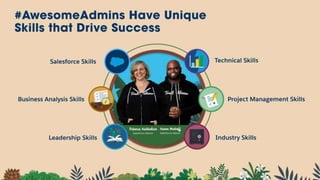
  • #36 Talk Track: Josie also spoke about how #AwesomeAdmins are building successful careers in technology - and how they are doing this by building a skill set that is in high demand - a skill set consisting of both business and technical skills. When #AwesomeAdmins bring together their Salesforce skills, with their business skills, with their technical skills, with their communication skills and industry expertise - this creates a really unique profile that is helping them build a successful career in technology.
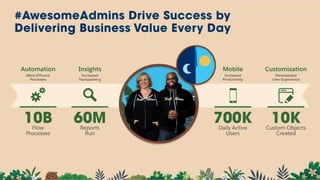
  • #37 Talk Track: Josie also spoke about how #AwesomeAdmins are driving results and delivering business value every day: Admins are automating processes, making them more efficient. In fact, each day on the platform there are 10 billion flow processes. Admins are building powerful reports and dashboards to drive insights and provide increased transparency. These reports are run 60 million times each day. And with mobile, Admins help give users the freedom and flexibility to do their job wherever they are. There are now more than 700K daily active users on the Salesforce mobile app.
  • #38 Correct Answer: B. Report Builder
  • #39 Correct Answer: B. Highlights Panel
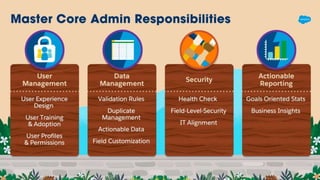
  • #40 Talk Track: There are also some core Admin responsibilities that all Salesforce Admins should work to master, including: User Management Data Management Security Actionable Reporting
  • #42 Correct Answer: A. Lookup Field
  • #44 Talk Track: - Now we are going to give you a very quick overview of 2 of the top Breakout sessions for Admins at Dreamforce ‘19.
  • #45 Talk Track: Aaron Crear gave a presentation on Advanced Reporting Tips & Tricks for New Admins, here are a few key takeaways from his session: 1. Make Your Job Easier with Powerful Features: Cross Filters - Quickly identify records with or without related records Power of One - Allow objects to count themselves, use in other ways Custom Report Types - Used for more complex reports on related objects 2. Make Visualizing the Data Simpler - Buckets - Categorize a group of values - Custom Summary Formulas - Summarize numeric values - Joined Reports - Show blocks of different data points & objects in one screen
  • #46 Talk Track: 3. Learn About New Report Features: - Field-to-Field Filters - Filter reports based on comparisons to other fields - Eg. Show Campaigns with actual cost > budgeted cost - Unique Values - Quickly see how many unique objects are in your report - Eg. How many Accounts are in an Opportunity Pipeline - Row-Level Formulas - Reduces the need for formulas fields on objects - Eg. Days to Close = Closed Date – DATEVALUE(Created Date) Resources Talk Track: Here are a bunch of resources Aaron suggests to learn more about sharing records and Lightning Flow, please check them out.
  • #47 Correct Answer: D Flow Builder
  • #48 Correct Answer: C Validation Rules
  • #49 Talk Track: David Palmquist gave a presentation about how to Automate Repetitive Tasks with Salesforce Macros: 1. Why Use Macros? Macros are good for manual tasks that can be completed via a process builder or a work flow. Macros are an Ad Hoc process and require an initial human decision to run. 2. How to Create Macros Macros easy to create and modify. You can modify any field that has a dashed border on is blue when you mouse over it
  • #50 Talk Track: 3. Add Logic to Macros A macro is basically a formula that if it evaluates to true then the instructions will run. If there is no logic then the instruction will run. Resources Talk Track: Here are a bunch of resources David suggests to learn more.
  • #51 Correct Answer: C- Formulas
  • #53 Talk Track: - Here are some way that you can keep blazing trails to learn more: 1. Visit the Salesforce Admins Website admin.salesforce.com Access to blogs, podcasts, webinars & more 2. Take the #DF19 Keynote Trailmix ​sforce.co/ParkersTrailmix Leverage the power of the Salesforce Customer 360 Platform to drive impact at your company, in your career, and in your community 3. Visit the Trailblazer Community sforce.co/AdminTrailblazerGroup Join thousands of peers in the Admin Trailblazers Chatter Group 4. Watch the Full DF19 Admin Keynote https://www.youtube.com/watch?v=PsWaWMpvMw0
  • #54 Talk Track: Spring ‘20 is just around the corner! Follow @SalesforceAdmins on Twitter or visit admin.salesforce.com to get more information about the upcoming release and the Admin Preview that is happening on January 24.
  • #55 Thank you so much!