Sending Values
         Manually


Pengaturcaraan PHP


Pengaturcaraan PHP
In the examples so far, all of the data received in the PHP script came from
what the user entered in a form. There are, however, two different ways
you can pass variables and values to a PHP script, both worth knowing.

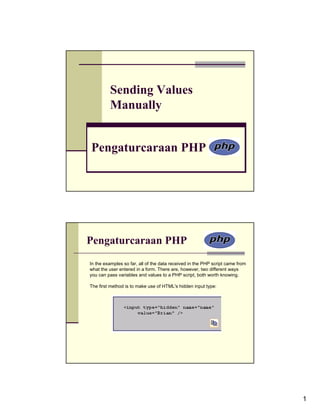
The first method is to make use of HTML's hidden input type:


                                                                               1
Pengaturcaraan PHP

The second method is to append a value to the PHP script's URL:


This technique emulates the GET method of an HTML form. With this
specific example, page.php receives a variable called $_GET['name'] with a
value of Brian.

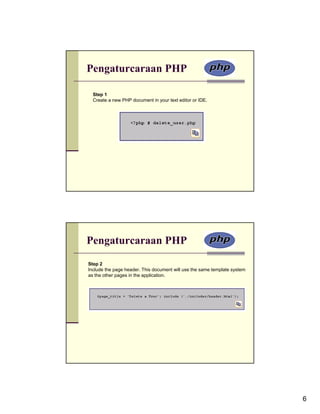
To demonstrate this GET method trick, a new version of the view_users.php
script will be written. This one will provide links to edit or delete an existing
user. The links will pass the user's ID to the handling pages, both of which
will be written subsequently.


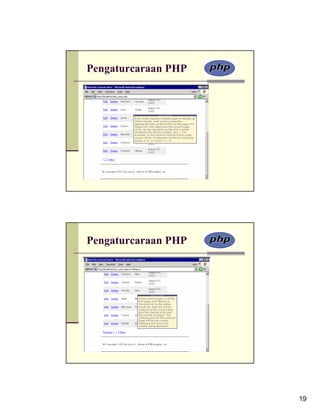
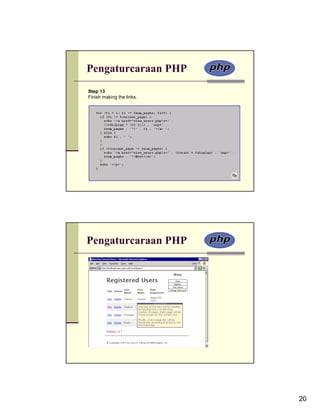
                                                                                    2
Pengaturcaraan PHP

Step 2
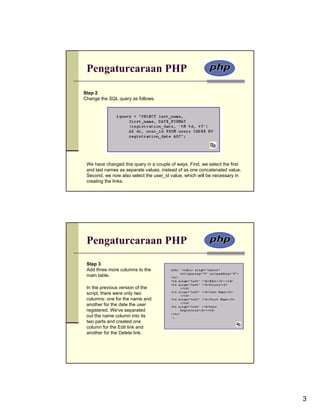
Change the SQL query as follows.


 We have changed this query in a couple of ways. First, we select the first
 and last names as separate values, instead of as one concatenated value.
 Second, we now also select the user_id value, which will be necessary in
 creating the links.


 Pengaturcaraan PHP
 Step 3
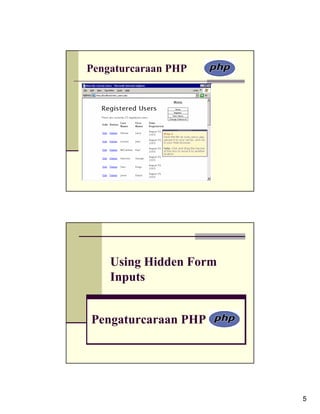
 Add three more columns to the
 main table.

 In the previous version of the
 script, there were only two
 columns: one for the name and
 another for the date the user
 registered. We've separated
 out the name column into its
 two parts and created one
 column for the Edit link and
 another for the Delete link.


                                                                              3
Pengaturcaraan PHP
Step 4
Change the echo statement within
the while loop to match the table's
new structure.


For each record returned from
the database, this line will print
out a row with five columns. The
last three columns are obvious
and easy to create: just refer to
the returned column name.


 Pengaturcaraan PHP

For the first two columns,
which provide links to edit or
delete the user, the syntax is
slightly more complicated. The
desired end result is HTML
code like <a
href="edit_user.php?id=X">Edi
t</a>, where X is the user's ID.
Having established this, all we
have to do is print
$row['user_id'] for X, being
mindful of the quotation marks
to avoid parse errors.


                                      4
Pengaturcaraan PHP


    Using Hidden Form
    Inputs


Pengaturcaraan PHP


                        5
Pengaturcaraan PHP

  Step 1
  Create a new PHP document in your text editor or IDE.


Pengaturcaraan PHP
Step 2
Include the page header. This document will use the same template system
as the other pages in the application.


                                                                           6
Pengaturcaraan PHP
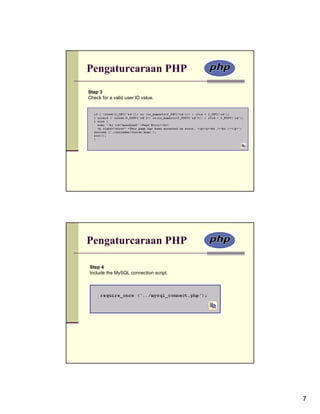
Step 3
Check for a valid user ID value.


Pengaturcaraan PHP

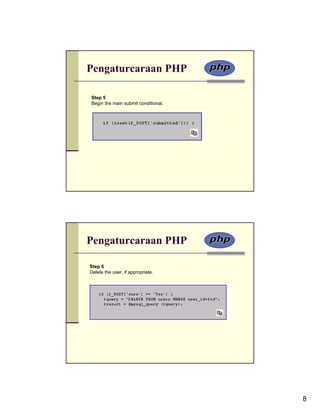
Step 4
Include the MySQL connection script.


                                       7
Pengaturcaraan PHP

Step 5
Begin the main submit conditional.


Pengaturcaraan PHP

Step 6
Delete the user, if appropriate.


                                     8
Pengaturcaraan PHP


Pengaturcaraan PHP

Step 7
Check if the deletion worked and respond accordingly.


                                                        9
Pengaturcaraan PHP
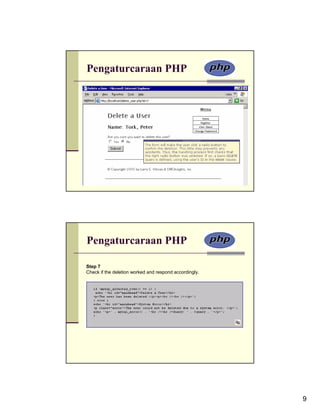
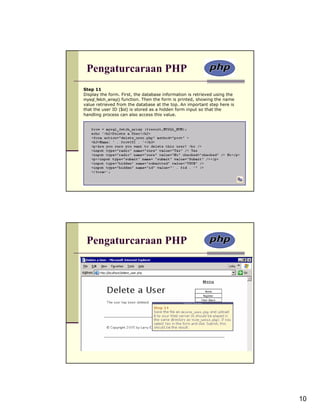
Step 11
Display the form. First, the database information is retrieved using the
mysql_fetch_array() function. Then the form is printed, showing the name
value retrieved from the database at the top. An important step here is
that the user ID ($id) is stored as a hidden form input so that the
handling process can also access this value.


 Pengaturcaraan PHP


                                                                           10
Editing Existing
          Records


 Pengaturcaraan PHP


Pengaturcaraan PHP
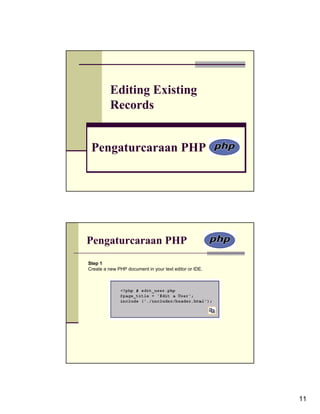
Step 1
Create a new PHP document in your text editor or IDE.


                                                        11
Pengaturcaraan PHP
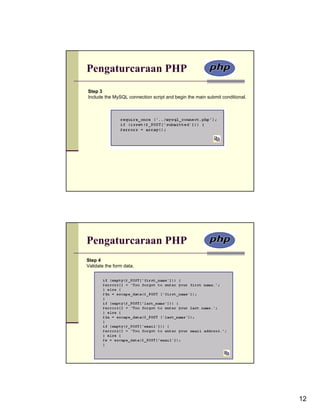
Step 3
Include the MySQL connection script and begin the main submit conditional.


Pengaturcaraan PHP
Step 4
Validate the form data.


                                                                             12
Pengaturcaraan PHP


Pengaturcaraan PHP
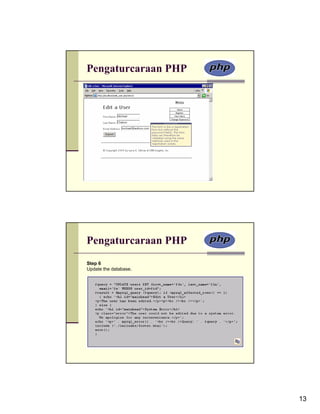
Step 6
Update the database.


                       13
Pengaturcaraan PHP
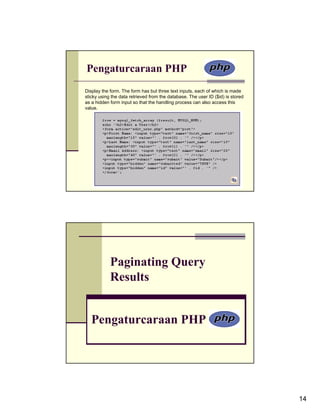
Display the form. The form has but three text inputs, each of which is made
sticky using the data retrieved from the database. The user ID ($id) is stored
as a hidden form input so that the handling process can also access this
value.


            Paginating Query
            Results


   Pengaturcaraan PHP


                                                                                 14
Pengaturcaraan PHP


Pengaturcaraan PHP
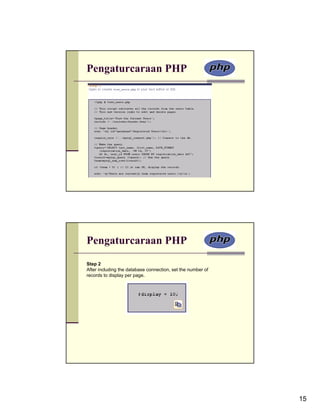
Step 2
After including the database connection, set the number of
records to display per page.


                                                             15
Pengaturcaraan PHP

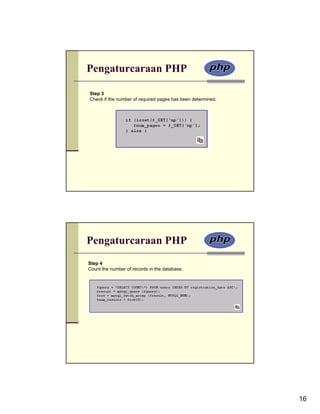
Step 3
Check if the number of required pages has been determined.


Pengaturcaraan PHP
Step 4
Count the number of records in the database.


                                                             16
Pengaturcaraan PHP

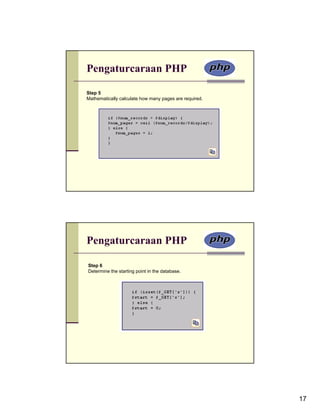
Step 5
Mathematically calculate how many pages are required.


Pengaturcaraan PHP

Step 6
Determine the starting point in the database.


                                                        17
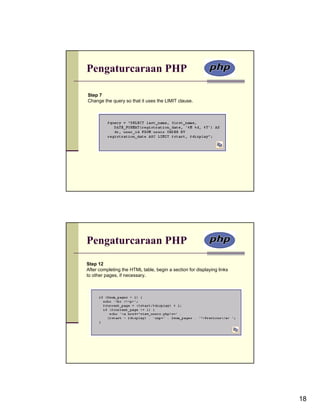
Pengaturcaraan PHP

Step 7
Change the query so that it uses the LIMIT clause.


Pengaturcaraan PHP
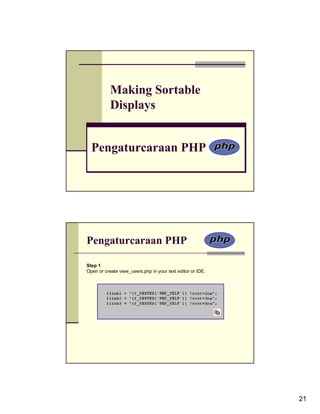
Step 12
After completing the HTML table, begin a section for displaying links
to other pages, if necessary.


                                                                        18
Pengaturcaraan PHP


Pengaturcaraan PHP


                     19
Pengaturcaraan PHP
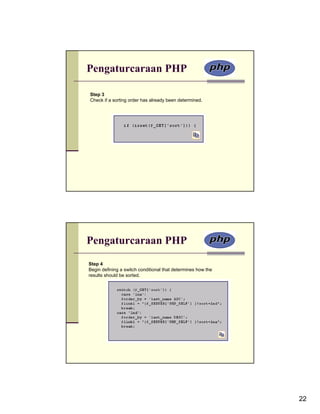
Step 13
Finish making the links.


Pengaturcaraan PHP


                           20
Making Sortable
           Displays


  Pengaturcaraan PHP


Pengaturcaraan PHP

Step 1
Open or create view_users.php in your text editor or IDE.


                                                            21
Pengaturcaraan PHP

Step 3
Check if a sorting order has already been determined.


Pengaturcaraan PHP
Step 4
Begin defining a switch conditional that determines how the
results should be sorted.


                                                              22
Pengaturcaraan PHP
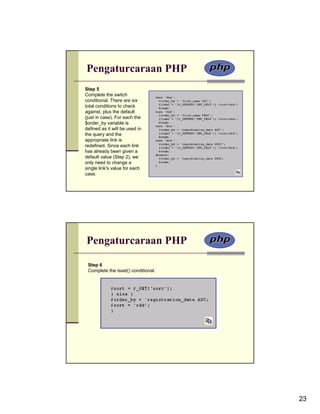
Step 5
Complete the switch
conditional. There are six
total conditions to check
against, plus the default
(just in case). For each the
$order_by variable is
defined as it will be used in
the query and the
appropriate link is
redefined. Since each link
has already been given a
default value (Step 2), we
only need to change a
single link's value for each
case.


Pengaturcaraan PHP

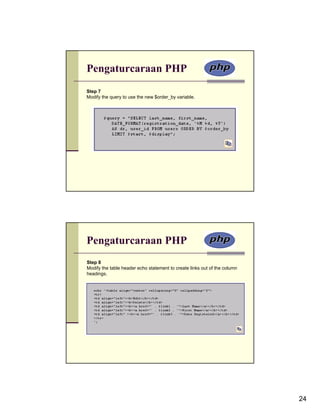
 Step 6
 Complete the isset() conditional.


                                     23
Pengaturcaraan PHP
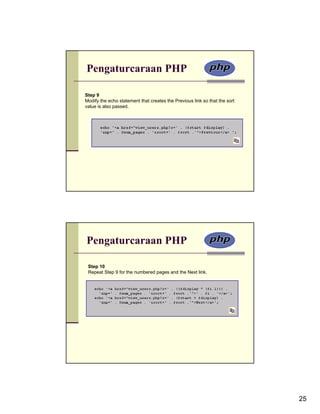
Step 7
Modify the query to use the new $order_by variable.


Pengaturcaraan PHP
Step 8
Modify the table header echo statement to create links out of the column
headings.


                                                                           24
Pengaturcaraan PHP

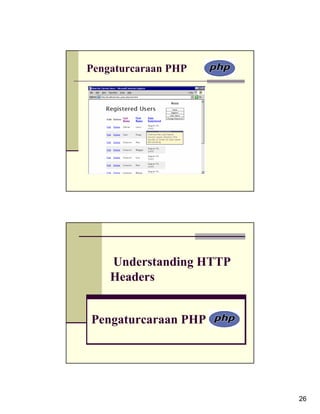
Step 9
Modify the echo statement that creates the Previous link so that the sort
value is also passed.


Pengaturcaraan PHP

 Step 10
 Repeat Step 9 for the numbered pages and the Next link.


                                                                            25
Pengaturcaraan PHP


    Understanding HTTP
    Headers


Pengaturcaraan PHP


                         26
Pengaturcaraan PHP
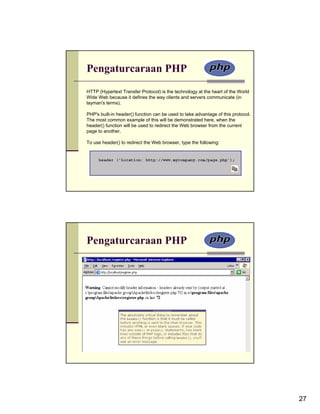
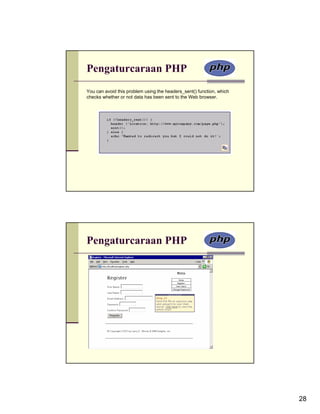
HTTP (Hypertext Transfer Protocol) is the technology at the heart of the World
Wide Web because it defines the way clients and servers communicate (in
layman's terms).

PHP's built-in header() function can be used to take advantage of this protocol.
The most common example of this will be demonstrated here, when the
header() function will be used to redirect the Web browser from the current
page to another.

To use header() to redirect the Web browser, type the following:


Pengaturcaraan PHP


                                                                                   27
Pengaturcaraan PHP
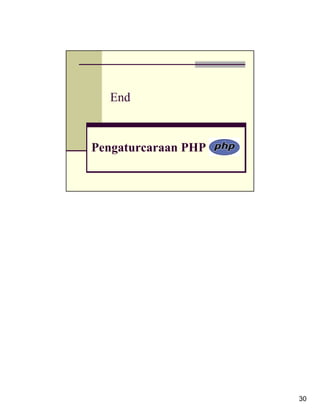
You can avoid this problem using the headers_sent() function, which
checks whether or not data has been sent to the Web browser.


Pengaturcaraan PHP


                                                                      28
Pengaturcaraan PHP
Step 6
Dynamically determine the redirection URL and then call the header() function.


 header ('Location: http://' . $_SERVER['HTTP_HOST'] .
  dirname($_SERVER['PHP_SELF']) . '/newpage.php');


Pengaturcaraan PHP

Passing values
You can add name=value pairs to the URL in a header() call to pass
values to the target page. In this example, if you added this line to the
script, prior to redirection:

$url .= '?name=' . urlencode ("$fn $ln");

then the thanks.php page could greet the user by $_GET['name'].


                                                                                 29
End


Pengaturcaraan PHP


                     30

Developing web applications

  • 1.
    Sending Values Manually Pengaturcaraan PHP Pengaturcaraan PHP In the examples so far, all of the data received in the PHP script came from what the user entered in a form. There are, however, two different ways you can pass variables and values to a PHP script, both worth knowing. The first method is to make use of HTML's hidden input type: 1
  • 2.
    Pengaturcaraan PHP The secondmethod is to append a value to the PHP script's URL: This technique emulates the GET method of an HTML form. With this specific example, page.php receives a variable called $_GET['name'] with a value of Brian. To demonstrate this GET method trick, a new version of the view_users.php script will be written. This one will provide links to edit or delete an existing user. The links will pass the user's ID to the handling pages, both of which will be written subsequently. 2
  • 3.
    Pengaturcaraan PHP Step 2 Changethe SQL query as follows. We have changed this query in a couple of ways. First, we select the first and last names as separate values, instead of as one concatenated value. Second, we now also select the user_id value, which will be necessary in creating the links. Pengaturcaraan PHP Step 3 Add three more columns to the main table. In the previous version of the script, there were only two columns: one for the name and another for the date the user registered. We've separated out the name column into its two parts and created one column for the Edit link and another for the Delete link. 3
  • 4.
    Pengaturcaraan PHP Step 4 Changethe echo statement within the while loop to match the table's new structure. For each record returned from the database, this line will print out a row with five columns. The last three columns are obvious and easy to create: just refer to the returned column name. Pengaturcaraan PHP For the first two columns, which provide links to edit or delete the user, the syntax is slightly more complicated. The desired end result is HTML code like <a href="edit_user.php?id=X">Edi t</a>, where X is the user's ID. Having established this, all we have to do is print $row['user_id'] for X, being mindful of the quotation marks to avoid parse errors. 4
  • 5.
    Pengaturcaraan PHP Using Hidden Form Inputs Pengaturcaraan PHP 5
  • 6.
    Pengaturcaraan PHP Step 1 Create a new PHP document in your text editor or IDE. Pengaturcaraan PHP Step 2 Include the page header. This document will use the same template system as the other pages in the application. 6
  • 7.
    Pengaturcaraan PHP Step 3 Checkfor a valid user ID value. Pengaturcaraan PHP Step 4 Include the MySQL connection script. 7
  • 8.
    Pengaturcaraan PHP Step 5 Beginthe main submit conditional. Pengaturcaraan PHP Step 6 Delete the user, if appropriate. 8
  • 9.
    Pengaturcaraan PHP Pengaturcaraan PHP Step7 Check if the deletion worked and respond accordingly. 9
  • 10.
    Pengaturcaraan PHP Step 11 Displaythe form. First, the database information is retrieved using the mysql_fetch_array() function. Then the form is printed, showing the name value retrieved from the database at the top. An important step here is that the user ID ($id) is stored as a hidden form input so that the handling process can also access this value. Pengaturcaraan PHP 10
  • 11.
    Editing Existing Records Pengaturcaraan PHP Pengaturcaraan PHP Step 1 Create a new PHP document in your text editor or IDE. 11
  • 12.
    Pengaturcaraan PHP Step 3 Includethe MySQL connection script and begin the main submit conditional. Pengaturcaraan PHP Step 4 Validate the form data. 12
  • 13.
  • 14.
    Pengaturcaraan PHP Display theform. The form has but three text inputs, each of which is made sticky using the data retrieved from the database. The user ID ($id) is stored as a hidden form input so that the handling process can also access this value. Paginating Query Results Pengaturcaraan PHP 14
  • 15.
    Pengaturcaraan PHP Pengaturcaraan PHP Step2 After including the database connection, set the number of records to display per page. 15
  • 16.
    Pengaturcaraan PHP Step 3 Checkif the number of required pages has been determined. Pengaturcaraan PHP Step 4 Count the number of records in the database. 16
  • 17.
    Pengaturcaraan PHP Step 5 Mathematicallycalculate how many pages are required. Pengaturcaraan PHP Step 6 Determine the starting point in the database. 17
  • 18.
    Pengaturcaraan PHP Step 7 Changethe query so that it uses the LIMIT clause. Pengaturcaraan PHP Step 12 After completing the HTML table, begin a section for displaying links to other pages, if necessary. 18
  • 19.
  • 20.
    Pengaturcaraan PHP Step 13 Finishmaking the links. Pengaturcaraan PHP 20
  • 21.
    Making Sortable Displays Pengaturcaraan PHP Pengaturcaraan PHP Step 1 Open or create view_users.php in your text editor or IDE. 21
  • 22.
    Pengaturcaraan PHP Step 3 Checkif a sorting order has already been determined. Pengaturcaraan PHP Step 4 Begin defining a switch conditional that determines how the results should be sorted. 22
  • 23.
    Pengaturcaraan PHP Step 5 Completethe switch conditional. There are six total conditions to check against, plus the default (just in case). For each the $order_by variable is defined as it will be used in the query and the appropriate link is redefined. Since each link has already been given a default value (Step 2), we only need to change a single link's value for each case. Pengaturcaraan PHP Step 6 Complete the isset() conditional. 23
  • 24.
    Pengaturcaraan PHP Step 7 Modifythe query to use the new $order_by variable. Pengaturcaraan PHP Step 8 Modify the table header echo statement to create links out of the column headings. 24
  • 25.
    Pengaturcaraan PHP Step 9 Modifythe echo statement that creates the Previous link so that the sort value is also passed. Pengaturcaraan PHP Step 10 Repeat Step 9 for the numbered pages and the Next link. 25
  • 26.
    Pengaturcaraan PHP Understanding HTTP Headers Pengaturcaraan PHP 26
  • 27.
    Pengaturcaraan PHP HTTP (HypertextTransfer Protocol) is the technology at the heart of the World Wide Web because it defines the way clients and servers communicate (in layman's terms). PHP's built-in header() function can be used to take advantage of this protocol. The most common example of this will be demonstrated here, when the header() function will be used to redirect the Web browser from the current page to another. To use header() to redirect the Web browser, type the following: Pengaturcaraan PHP 27
  • 28.
    Pengaturcaraan PHP You canavoid this problem using the headers_sent() function, which checks whether or not data has been sent to the Web browser. Pengaturcaraan PHP 28
  • 29.
    Pengaturcaraan PHP Step 6 Dynamicallydetermine the redirection URL and then call the header() function. header ('Location: http://' . $_SERVER['HTTP_HOST'] . dirname($_SERVER['PHP_SELF']) . '/newpage.php'); Pengaturcaraan PHP Passing values You can add name=value pairs to the URL in a header() call to pass values to the target page. In this example, if you added this line to the script, prior to redirection: $url .= '?name=' . urlencode ("$fn $ln"); then the thanks.php page could greet the user by $_GET['name']. 29
  • 30.