Developing Reusable Workflow Features

        SharePoint Saturday Richmond
                Mike Oryszak
            http://www.mikeoryszak.com

               November 5, 2011
About Me


 •   Practice Manager with Intellinet
 •   Microsoft SharePoint Server MVP
 •   Dev and Architect with MS stack since 1996
 •   Working with SharePoint since 2002
 •   Raleigh-Durham, NC Area since 1998
Session Overview


 •   Approach and Goals
 •   Overview on Creating Custom Actions
 •   Example 1 – Budget Approval Limits
 •   Example 2 – Out of Office Delegation
 •   Additional Examples
 •   Wrap-up and Questions
Developing Reusable Workflow Features

APPROACH AND GOALS
Approach and Goals
Common Workflow Limitations


 • Common Workflow Limitations
     – Workflows developed one at a time
     – Config and Admin content is localized – Silos
     – Maintaining data difficult, and process admin focused
Approach and Goals
Workflow Reuse Goals


 • Reuse Goals
     –   Centralize common configuration data
     –   Leverage central farm services
     –   Make it easier for users to maintain their data
     –   Reduce time to create new workflows
     –   Improve efficiency of managing workflows
Approach and Goals
Recommended Approaches


 • Approaches
     – Take a “Portfolio Approach” to process design
     – Change data lookup sources from local to central
        • Budget Approval Limit example
        • Out of Office Delegation example
     – Group common functions or calls into Actions or Services
        • Out of Office Delegation example
        • Check Request example
     – Leverage central services like User Profiles, BCS
        • Budget Approval example
        • Out of Office Delegation example
     – Link workflows together; start workflow from another
        • Check Request example
Developing Reusable Workflow Features

CREATING CUSTOM ACTIONS
Creating Custom Actions
Full Trust Actions


  • Approaches
      – Leverage central services like User Profiles, BCS
           • Budget Approval example
           • Out of Office Delegation example


      – Link workflows together; start workflow from another
           • Check Request example
Creating Custom Actions
Farm Solution Implementation


 • Important Namespaces
     – System.Workflow.ComponentModel
     – Microsoft.SharePoint.Workflow
     – Microsoft.SharePoint.WorkflowActions
 • Key Dev Tasks
     – Change Class Def to “public partial class <Name> :
       Activity”
     – Define Properties
     – Override ActivityExecutionStatus Execute
     – Override ActivityExecutionStatus HandleFault
     – Create WorkflowActions definition in Elements.xml
     – Register Type in web.config
Creating Custom Actions
Sandboxed Actions


 •   Developed in Visual Studio
 •   Limited to Site Collection boundaries
 •   Does not require server admin to deploy; O365
 •   Provides a way to create simple reusable features
Creating Custom Actions
Sandboxed Solution Imlementation


 • Important Namespaces
     – Microsoft.SharePoint.Workflow
     – Microsoft.SharePoint.UserCode


 • Key Dev Tasks
     – Action must return a Hashtable
     – Action must accept a SPUserCodeWorkflowContext as
       the first argument
     – Create WorkflowActions definition in Elements.xml
Developing Reusable Workflow Features

BUDGET APPROVAL LIMITS
Budget Approval Limits
Overview


 • A common example of data needed to support an
   approval workflow

 • Centralize the data so that it is available for
   multiple processes

 • Leverage services like User Profile and BCS
Budget Approval Limits
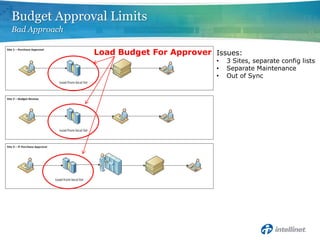
Bad Approach

               Load Budget For Approver Issues:
                                         •   3 Sites, separate config lists
                                         •   Separate Maintenance
                                         •   Out of Sync
Budget Approval Limits
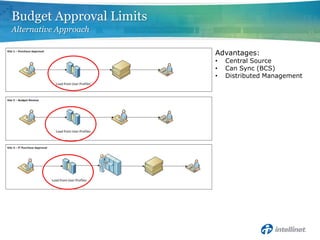
Alternative Approach

                         Advantages:
                         •   Central Source
                         •   Can Sync (BCS)
                         •   Distributed Management
Budget Approval Limits


                 Demo
Developing Reusable Workflow Features

OUT OF OFFICE DELEGATION
Out of Office Delegation
Overview


 • SharePoint has no built-in Out of Office
   Delegation

 • Great example of User Maintained config data

 • Great example of leveraging User Profiles
Out of Office Delegation
Bad Approach


 • Building it into each process, with localized data
   stored in a list on the workflow site
     – Process Admin Maintains it
     – Data stored in multiple places
     – Workflow steps maintained in multiple places
Out of Office Delegation
Alternative Approach


 • Out of Office Delegation Feature
      – User Profile Custom Attributes
          • Out of Office Start Date
          • Out of Office End Date
          • Out of Office Delegation
      – Custom Workflow Action
          • Simplifies check from SPD workflows
Out of Office Delegation


                  Demo
Developing Reusable Workflow Features

ADDITIONAL EXAMPLES
Additional Examples


 • Standard Feature Requests
   –   Escalations
   –   Task Reminders
   –   Out of Office Delegation
   –   Role Based Assignments (CFO, Ops Mgr, etc)


 • Frequent Re-usable Processes
   – Check Request
   – Compliance Activity Logging
Additional Examples
Initiating Another Workflow


  • Create Reusable Sub-Processes

  • Use Standard Events
      – New Item
      – Edit Item


  • Can use Full Trust Actions to add/edit items
    between site collections
Check Request Workflow
Overview


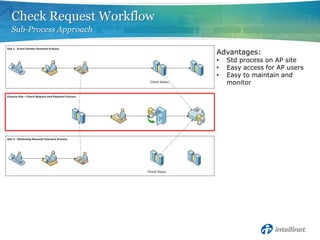
 • Check Request is an example of a process that
   may be initiated from multiple processes

 • Could be built into each process, or separated
   into a separate “sub-process” for reuse
Check Request Workflow
Bad Approach

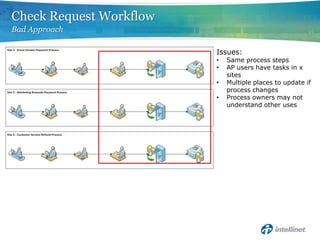
                         Issues:
                         •   Same process steps
                         •   AP users have tasks in x
                             sites
                         •   Multiple places to update if
                             process changes
                         •   Process owners may not
                             understand other uses
Check Request Workflow
Sub-Process Approach

                         Advantages:
                         •   Std process on AP site
                         •   Easy access for AP users
                         •   Easy to maintain and
                             monitor
Developing Reusable Workflow Features

WRAP-UP
Wrap-up
Recommended Approach


 • Recommended Approaches
     –   Take a “Portfolio Approach” to process design
     –   Change data lookup sources from local to central
     –   Group common functions or calls into Actions or Services
     –   Leverage central services like User Profiles, BCS
     –   Link workflows together; start workflow from another
Additional Resources

 • MSDN – Create a Sandbox Workflow Action
    –   http://msdn.microsoft.com/en-us/library/ff798499.aspx


 • MSDN – Reference Implementation Workflow Activities
    –   http://msdn.microsoft.com/en-us/library/ff798330.aspx


 • User Profiles – Creating Custom Properties
    –   http://www.mikeoryszak.com/sharepoint/user-profiles-%e2%80%93-creating-
        custom-properties


 • User Profiles – Driving Business Process
    –   http://www.mikeoryszak.com/sharepoint/user-profiles-%e2%80%93-driving-business-
        process


 • Workflow Posts
    –   http://www.mikeoryszak.com/tag/workflow
Questions?
Contact Info

•   Blog - http://www.mikeoryszak.com
•   Twitter - @Next_Connect
•   Email – nextconnect@live.com
•   LinkedIn - http://www.linkedin.com/in/michaeloryszak
Special Thanks to Our Sponsors
SharePint
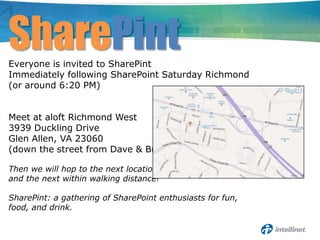
Everyone is invited to SharePint
Immediately following SharePoint Saturday Richmond
(or around 6:20 PM)


Meet at aloft Richmond West
3939 Duckling Drive
Glen Allen, VA 23060
(down the street from Dave & Buster’s)

Then we will hop to the next location
and the next within walking distance!

SharePint: a gathering of SharePoint enthusiasts for fun,
food, and drink.

Developing Reusable Workflow Features (SPS Richmond)

  • 1.
    Developing Reusable WorkflowFeatures SharePoint Saturday Richmond Mike Oryszak http://www.mikeoryszak.com November 5, 2011
  • 2.
    About Me • Practice Manager with Intellinet • Microsoft SharePoint Server MVP • Dev and Architect with MS stack since 1996 • Working with SharePoint since 2002 • Raleigh-Durham, NC Area since 1998
  • 3.
    Session Overview • Approach and Goals • Overview on Creating Custom Actions • Example 1 – Budget Approval Limits • Example 2 – Out of Office Delegation • Additional Examples • Wrap-up and Questions
  • 4.
    Developing Reusable WorkflowFeatures APPROACH AND GOALS
  • 5.
    Approach and Goals CommonWorkflow Limitations • Common Workflow Limitations – Workflows developed one at a time – Config and Admin content is localized – Silos – Maintaining data difficult, and process admin focused
  • 6.
    Approach and Goals WorkflowReuse Goals • Reuse Goals – Centralize common configuration data – Leverage central farm services – Make it easier for users to maintain their data – Reduce time to create new workflows – Improve efficiency of managing workflows
  • 7.
    Approach and Goals RecommendedApproaches • Approaches – Take a “Portfolio Approach” to process design – Change data lookup sources from local to central • Budget Approval Limit example • Out of Office Delegation example – Group common functions or calls into Actions or Services • Out of Office Delegation example • Check Request example – Leverage central services like User Profiles, BCS • Budget Approval example • Out of Office Delegation example – Link workflows together; start workflow from another • Check Request example
  • 8.
    Developing Reusable WorkflowFeatures CREATING CUSTOM ACTIONS
  • 9.
    Creating Custom Actions FullTrust Actions • Approaches – Leverage central services like User Profiles, BCS • Budget Approval example • Out of Office Delegation example – Link workflows together; start workflow from another • Check Request example
  • 10.
    Creating Custom Actions FarmSolution Implementation • Important Namespaces – System.Workflow.ComponentModel – Microsoft.SharePoint.Workflow – Microsoft.SharePoint.WorkflowActions • Key Dev Tasks – Change Class Def to “public partial class <Name> : Activity” – Define Properties – Override ActivityExecutionStatus Execute – Override ActivityExecutionStatus HandleFault – Create WorkflowActions definition in Elements.xml – Register Type in web.config
  • 11.
    Creating Custom Actions SandboxedActions • Developed in Visual Studio • Limited to Site Collection boundaries • Does not require server admin to deploy; O365 • Provides a way to create simple reusable features
  • 12.
    Creating Custom Actions SandboxedSolution Imlementation • Important Namespaces – Microsoft.SharePoint.Workflow – Microsoft.SharePoint.UserCode • Key Dev Tasks – Action must return a Hashtable – Action must accept a SPUserCodeWorkflowContext as the first argument – Create WorkflowActions definition in Elements.xml
  • 13.
    Developing Reusable WorkflowFeatures BUDGET APPROVAL LIMITS
  • 14.
    Budget Approval Limits Overview • A common example of data needed to support an approval workflow • Centralize the data so that it is available for multiple processes • Leverage services like User Profile and BCS
  • 15.
    Budget Approval Limits BadApproach Load Budget For Approver Issues: • 3 Sites, separate config lists • Separate Maintenance • Out of Sync
  • 16.
    Budget Approval Limits AlternativeApproach Advantages: • Central Source • Can Sync (BCS) • Distributed Management
  • 17.
  • 18.
    Developing Reusable WorkflowFeatures OUT OF OFFICE DELEGATION
  • 19.
    Out of OfficeDelegation Overview • SharePoint has no built-in Out of Office Delegation • Great example of User Maintained config data • Great example of leveraging User Profiles
  • 20.
    Out of OfficeDelegation Bad Approach • Building it into each process, with localized data stored in a list on the workflow site – Process Admin Maintains it – Data stored in multiple places – Workflow steps maintained in multiple places
  • 21.
    Out of OfficeDelegation Alternative Approach • Out of Office Delegation Feature – User Profile Custom Attributes • Out of Office Start Date • Out of Office End Date • Out of Office Delegation – Custom Workflow Action • Simplifies check from SPD workflows
  • 22.
    Out of OfficeDelegation Demo
  • 23.
    Developing Reusable WorkflowFeatures ADDITIONAL EXAMPLES
  • 24.
    Additional Examples •Standard Feature Requests – Escalations – Task Reminders – Out of Office Delegation – Role Based Assignments (CFO, Ops Mgr, etc) • Frequent Re-usable Processes – Check Request – Compliance Activity Logging
  • 25.
    Additional Examples Initiating AnotherWorkflow • Create Reusable Sub-Processes • Use Standard Events – New Item – Edit Item • Can use Full Trust Actions to add/edit items between site collections
  • 26.
    Check Request Workflow Overview • Check Request is an example of a process that may be initiated from multiple processes • Could be built into each process, or separated into a separate “sub-process” for reuse
  • 27.
    Check Request Workflow BadApproach Issues: • Same process steps • AP users have tasks in x sites • Multiple places to update if process changes • Process owners may not understand other uses
  • 28.
    Check Request Workflow Sub-ProcessApproach Advantages: • Std process on AP site • Easy access for AP users • Easy to maintain and monitor
  • 29.
  • 30.
    Wrap-up Recommended Approach •Recommended Approaches – Take a “Portfolio Approach” to process design – Change data lookup sources from local to central – Group common functions or calls into Actions or Services – Leverage central services like User Profiles, BCS – Link workflows together; start workflow from another
  • 31.
    Additional Resources •MSDN – Create a Sandbox Workflow Action – http://msdn.microsoft.com/en-us/library/ff798499.aspx • MSDN – Reference Implementation Workflow Activities – http://msdn.microsoft.com/en-us/library/ff798330.aspx • User Profiles – Creating Custom Properties – http://www.mikeoryszak.com/sharepoint/user-profiles-%e2%80%93-creating- custom-properties • User Profiles – Driving Business Process – http://www.mikeoryszak.com/sharepoint/user-profiles-%e2%80%93-driving-business- process • Workflow Posts – http://www.mikeoryszak.com/tag/workflow
  • 32.
  • 33.
    Contact Info • Blog - http://www.mikeoryszak.com • Twitter - @Next_Connect • Email – nextconnect@live.com • LinkedIn - http://www.linkedin.com/in/michaeloryszak
  • 34.
    Special Thanks toOur Sponsors
  • 35.
    SharePint Everyone is invitedto SharePint Immediately following SharePoint Saturday Richmond (or around 6:20 PM) Meet at aloft Richmond West 3939 Duckling Drive Glen Allen, VA 23060 (down the street from Dave & Buster’s) Then we will hop to the next location and the next within walking distance! SharePint: a gathering of SharePoint enthusiasts for fun, food, and drink.