Defining Business Process
and Workflows


          Office Business Applications Workshop
Lesson 3 – Windows Workflow Foundation
 Introducing workflows and the Windows Workflow
 Foundation
 The WF Runtime Engine and Services
 Workflow Basics and Terminology


                Office Business Applications Workshop
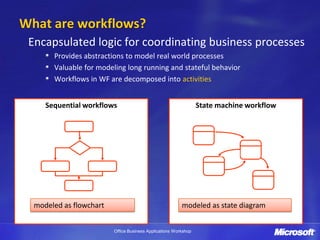
What are workflows?
 Encapsulated logic for coordinating business processes
       Provides abstractions to model real world processes
       Valuable for modeling long running and stateful behavior
       Workflows in WF are decomposed into activities


     Sequential workflows                                        State machine workflow


  modeled as flowchart                                   modeled as state diagram


                         Office Business Applications Workshop
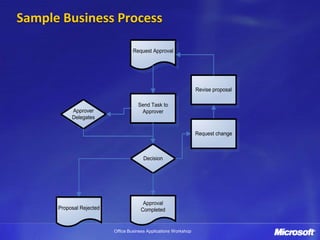
Sample Business Process

                                   Request Approval


                                                                  Revise proposal

                                     Send Task to
           Approver                   Approver
           Delegates

                                                                  Request change


                                        Decision


                                       Approval
      Proposal Rejected               Completed


                          Office Business Applications Workshop
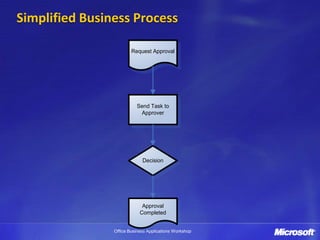
Simplified Business Process

                        Request Approval


                          Send Task to
                           Approver


                             Decision


                             Approval
                            Completed


                Office Business Applications Workshop
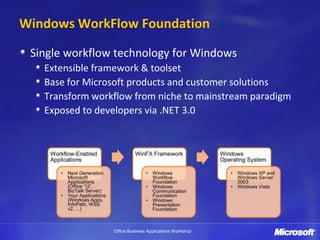
Windows WorkFlow Foundation

 Single workflow technology for Windows
   Extensible framework & toolset
   Base for Microsoft products and customer solutions
   Transform workflow from niche to mainstream paradigm
   Exposed to developers via .NET 3.0


                 Office Business Applications Workshop
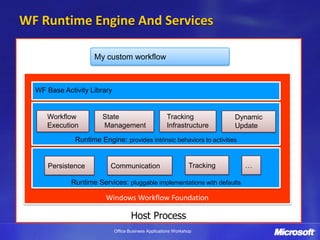
WF Runtime Engine And Services

                    My custom workflow


  WF Base Activity Library


     Workflow          State                          Tracking             Dynamic
     Execution         Management                     Infrastructure       Update
              Runtime Engine: provides intrinsic behaviors to activities


     Persistence          Communication                         Tracking     …

             Runtime Services: pluggable implementations with defaults

                         Windows Workflow Foundation

                                     Host Process
                             Office Business Applications Workshop
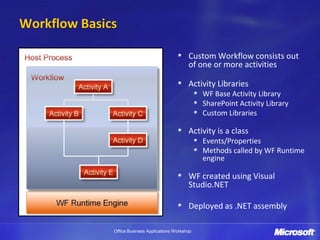
Workflow Basics

                                                 Custom Workflow consists out
                                                 of one or more activities

                                                 Activity Libraries
                                                      WF Base Activity Library
                                                      SharePoint Activity Library
                                                      Custom Libraries

                                                 Activity is a class
                                                      Events/Properties
                                                      Methods called by WF Runtime
                                                      engine

                                                 WF created using Visual
                                                 Studio.NET

                                                 Deployed as .NET assembly

              Office Business Applications Workshop
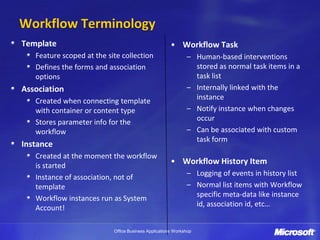
Workflow Terminology
Template                                              • Workflow Task
   Feature scoped at the site collection                     – Human-based interventions
   Defines the forms and association                           stored as normal task items in a
   options                                                     task list
Association                                                  – Internally linked with the
   Created when connecting template                            instance
   with container or content type                            – Notify instance when changes
   Stores parameter info for the                               occur
   workflow                                                  – Can be associated with custom
                                                               task form
Instance
   Created at the moment the workflow
   is started
                                                      • Workflow History Item
   Instance of association, not of                           – Logging of events in history list
   template                                                  – Normal list items with Workflow
   Workflow instances run as System                            specific meta-data like instance
   Account!                                                    id, association id, etc…


                           Office Business Applications Workshop
Workflow in SharePoint and the Office Clients


               Office Business Applications Workshop
Lesson 4 – Building Custom Workflows
 Workflow Life Cycle
 Your Options for Creating Custom Workflows
 Custom Workflows with the Microsoft Office SharePoint
 Designer 2007
 Custom Workflows with Visual Studio 2005


                 Office Business Applications Workshop
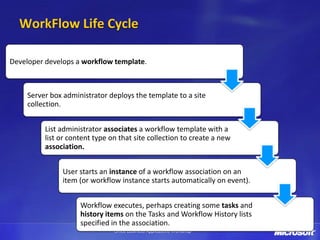
WorkFlow Life Cycle

Developer develops a workflow template.


     Server box administrator deploys the template to a site
     collection.


          List administrator associates a workflow template with a
          list or content type on that site collection to create a new
          association.


               User starts an instance of a workflow association on an
               item (or workflow instance starts automatically on event).


                     Workflow executes, perhaps creating some tasks and
                     history items on the Tasks and Workflow History lists
                     specified in the association.
                                Office Business Applications Workshop
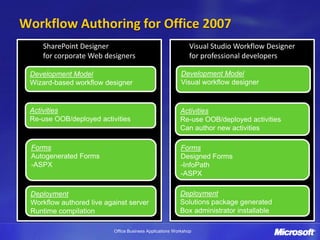
Workflow Authoring for Office 2007
    SharePoint Designer                                        Visual Studio Workflow Designer
    for corporate Web designers                                for professional developers

 Development Model                                         Development Model
 Wizard-based workflow designer                            Visual workflow designer


 Activities                                               Activities
 Re-use OOB/deployed activities                           Re-use OOB/deployed activities
                                                          Can author new activities

 Forms                                                    Forms
 Autogenerated Forms                                      Designed Forms
 -ASPX                                                    -InfoPath
                                                          -ASPX

 Deployment                                               Deployment
 Workflow authored live against server                    Solutions package generated
 Runtime compilation                                      Box administrator installable

                           Office Business Applications Workshop
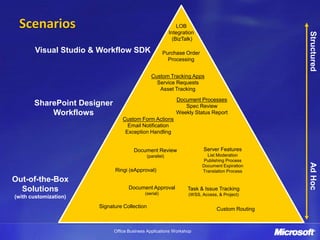
Scenarios                                                     LOB
                                                           Integration


                                                                                                 Structured
                                                             (BizTalk)

       Visual Studio & Workflow SDK                    Purchase Order
                                                         Processing


                                                Custom Tracking Apps
                                                  Service Requests
                                                   Asset Tracking
                                                              Document Processes
       SharePoint Designer                                       Spec Review
           Workflows                                          Weekly Status Report
                                 Custom Form Actions
                                   Email Notification
                                  Exception Handling


                                      Document Review                     Server Features
                                              (parallel)                   List Moderation
                                                                          Publishing Process


                                                                                                 Ad Hoc
                                                                         Document Expiration
                             Ringi (eApproval)                           Translation Process

Out-of-the-Box
  Solutions                        Document Approval               Task & Issue Tracking
                                           (serial)                (WSS, Access, & Project)
(with customization)
                       Signature Collection                                     Custom Routing


                             Office Business Applications Workshop
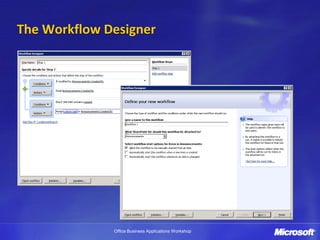
The Workflow Designer


              Office Business Applications Workshop
Workflows with the Microsoft Office
SharePoint Designer 2007


               Office Business Applications Workshop
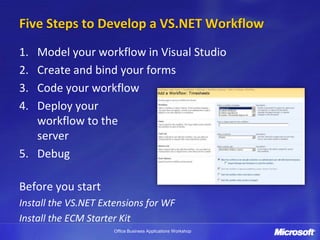
Five Steps to Develop a VS.NET Workflow
1. Model your workflow in Visual Studio
2. Create and bind your forms
3. Code your workflow
4. Deploy your
   workflow to the
   server
5. Debug

Before you start
Install the VS.NET Extensions for WF
Install the ECM Starter Kit
                     Office Business Applications Workshop
Custom Workflows with Visual Studio 2005


              Office Business Applications Workshop
What you have learned
• Workflow definition
• Workflows in OBA applications are running with the help
  of the Windows Workflow Foundation
• Custom workflows can be build with Microsoft products
  but don’t forget that there are some very good third-
  party products that built on top of everything you saw


                   Office Business Applications Workshop
Office Business Applications Workshop

Defining business process and workflows

  • 1.
    Defining Business Process andWorkflows Office Business Applications Workshop
  • 2.
    Lesson 3 –Windows Workflow Foundation Introducing workflows and the Windows Workflow Foundation The WF Runtime Engine and Services Workflow Basics and Terminology Office Business Applications Workshop
  • 3.
    What are workflows? Encapsulated logic for coordinating business processes Provides abstractions to model real world processes Valuable for modeling long running and stateful behavior Workflows in WF are decomposed into activities Sequential workflows State machine workflow modeled as flowchart modeled as state diagram Office Business Applications Workshop
  • 4.
    Sample Business Process Request Approval Revise proposal Send Task to Approver Approver Delegates Request change Decision Approval Proposal Rejected Completed Office Business Applications Workshop
  • 5.
    Simplified Business Process Request Approval Send Task to Approver Decision Approval Completed Office Business Applications Workshop
  • 6.
    Windows WorkFlow Foundation Single workflow technology for Windows Extensible framework & toolset Base for Microsoft products and customer solutions Transform workflow from niche to mainstream paradigm Exposed to developers via .NET 3.0 Office Business Applications Workshop
  • 7.
    WF Runtime EngineAnd Services My custom workflow WF Base Activity Library Workflow State Tracking Dynamic Execution Management Infrastructure Update Runtime Engine: provides intrinsic behaviors to activities Persistence Communication Tracking … Runtime Services: pluggable implementations with defaults Windows Workflow Foundation Host Process Office Business Applications Workshop
  • 8.
    Workflow Basics Custom Workflow consists out of one or more activities Activity Libraries WF Base Activity Library SharePoint Activity Library Custom Libraries Activity is a class Events/Properties Methods called by WF Runtime engine WF created using Visual Studio.NET Deployed as .NET assembly Office Business Applications Workshop
  • 9.
    Workflow Terminology Template • Workflow Task Feature scoped at the site collection – Human-based interventions Defines the forms and association stored as normal task items in a options task list Association – Internally linked with the Created when connecting template instance with container or content type – Notify instance when changes Stores parameter info for the occur workflow – Can be associated with custom task form Instance Created at the moment the workflow is started • Workflow History Item Instance of association, not of – Logging of events in history list template – Normal list items with Workflow Workflow instances run as System specific meta-data like instance Account! id, association id, etc… Office Business Applications Workshop
  • 10.
    Workflow in SharePointand the Office Clients Office Business Applications Workshop
  • 11.
    Lesson 4 –Building Custom Workflows Workflow Life Cycle Your Options for Creating Custom Workflows Custom Workflows with the Microsoft Office SharePoint Designer 2007 Custom Workflows with Visual Studio 2005 Office Business Applications Workshop
  • 12.
    WorkFlow Life Cycle Developerdevelops a workflow template. Server box administrator deploys the template to a site collection. List administrator associates a workflow template with a list or content type on that site collection to create a new association. User starts an instance of a workflow association on an item (or workflow instance starts automatically on event). Workflow executes, perhaps creating some tasks and history items on the Tasks and Workflow History lists specified in the association. Office Business Applications Workshop
  • 13.
    Workflow Authoring forOffice 2007 SharePoint Designer Visual Studio Workflow Designer for corporate Web designers for professional developers Development Model Development Model Wizard-based workflow designer Visual workflow designer Activities Activities Re-use OOB/deployed activities Re-use OOB/deployed activities Can author new activities Forms Forms Autogenerated Forms Designed Forms -ASPX -InfoPath -ASPX Deployment Deployment Workflow authored live against server Solutions package generated Runtime compilation Box administrator installable Office Business Applications Workshop
  • 14.
    Scenarios LOB Integration Structured (BizTalk) Visual Studio & Workflow SDK Purchase Order Processing Custom Tracking Apps Service Requests Asset Tracking Document Processes SharePoint Designer Spec Review Workflows Weekly Status Report Custom Form Actions Email Notification Exception Handling Document Review Server Features (parallel) List Moderation Publishing Process Ad Hoc Document Expiration Ringi (eApproval) Translation Process Out-of-the-Box Solutions Document Approval Task & Issue Tracking (serial) (WSS, Access, & Project) (with customization) Signature Collection Custom Routing Office Business Applications Workshop
  • 15.
    The Workflow Designer Office Business Applications Workshop
  • 16.
    Workflows with theMicrosoft Office SharePoint Designer 2007 Office Business Applications Workshop
  • 17.
    Five Steps toDevelop a VS.NET Workflow 1. Model your workflow in Visual Studio 2. Create and bind your forms 3. Code your workflow 4. Deploy your workflow to the server 5. Debug Before you start Install the VS.NET Extensions for WF Install the ECM Starter Kit Office Business Applications Workshop
  • 18.
    Custom Workflows withVisual Studio 2005 Office Business Applications Workshop
  • 19.
    What you havelearned • Workflow definition • Workflows in OBA applications are running with the help of the Windows Workflow Foundation • Custom workflows can be build with Microsoft products but don’t forget that there are some very good third- party products that built on top of everything you saw Office Business Applications Workshop
  • 20.