National
ICT & Education
Strategy
Huntington Ventures Ltd.
The Business of Identity Management
July 2016
This Deck…
• Reviews current problems in many countries with “ghost”
students
• Presents a high level framework for an education strategy
leveraging a national identity and authentication
infrastructure which will eliminate “ghost” students
• Shows how to create a student management system which
stays with the student their entire life
• Also shows how to create a system where parents and
legal guardians of students are kept informed of their daily
homework and if the student is in class via their cell or
smartphone
• So who am I?
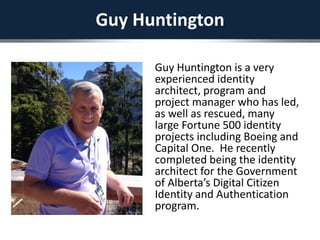
Guy Huntington
Guy Huntington is a very
experienced identity
architect, program and
project manager who has led,
as well as rescued, many
large Fortune 500 identity
projects including Boeing and
Capital One. He recently
completed being the identity
architect for the Government
of Alberta’s Digital Citizen
Identity and Authentication
program.
Ghost Students
• Many government currently facing significant monetary problem
where people who aren’t students are claiming money from the
government as if they were students,
• In the “identity world” these are call “ghost identities”
• Most countries don’t have a national education management system
which stays with the student through their entire life
• It also doesn’t have a system which can keep students parents/legal
guardians electronically informed, via their cell or smartphone, of
their student’s daily homework and if they are in class
Technology Citizens Have
• Most citizens in Africa DON’T have internet
access
• What they do have is:
– Cell phone
– e-wallets
• Some have debit and credit cards
Solution: Leverage Identity & Cell
• Create a national identity strategy leveraging citizens use of cell
phones using their voice to authenticate
• The architecture behind this has been used by large global
enterprises and a few countries like Estonia since the late
1990’s….so it’s nothing new
• It also leverages interactive voice response, which has been
used in industry for the last 20 years as well
• It provides a seamless user experience when the citizen
acquires a smart phone, tablet or laptop
• It leverages the same infrastructure that ALL government
ministries will use
• Additionally, the same infrastructure can be used by crown
corporations, municipalities and third parties like banks, telcos
and insurance companies
• It also leverages a similar system in Estonia called “iSchool”
Before We Get To Education…
• I will show you how other countries are using a
similar infrastructure to create more than 1,000
online services for their citizens (Estonia)
• To begin, let me first talk about the lifecycle of a
citizen’s identity
It Starts When A Citizen Is Born…
• When you are born, in addition to the traditional
information being captured, the health worker will also
take a biometric from you, e.g. a finger scan and/or a
retina scan
• As well, the health worker will also obtain your parents
national identities from their national ID card
• There is one important addition to the national ID….it now
captures the citizen’s cell number in the national ID
directory
• So, in the national directory, your electronic identity
begins at birth. There is also a relationship between you
and your parents or legal guardians
• Let’s look “behind the scenes” at how this will work by
first understanding a bit about the architecture...
Nearly 20 Years Ago…
• Many Fortune 500 companies and only a few governments realized that
single identity was a critical cornerstone piece of their digital strategies
• Without this, no SOA and portal strategy would work, since having
multiple identities for the same person would not allow for seamless
digital and in-person services
• Further, they also realized that having a common access service is
dependent upon having a unified identity
• In my own case, at Boeing, in the early 2000’s, we implemented a
unified identity and access management infrastructure and then
integrated into this several large portals with more than one million
users as well as 1,500 applications. In parallel, they then developed a
SOA architecture based on the identity infrastructure
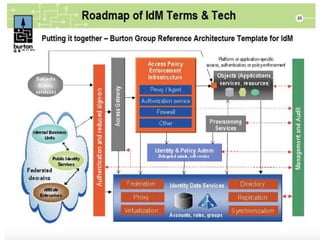
• To illustrate this, the next slide is an old Burton Group target identity
architecture, now nearly 20 years old, showing the basic components of
an identity and access management system
• An old Burton group target architecture from
nearly 20 years ago illustrates this showing
identity, provisioning and access management
all running as web services
The Point I Am Making…
• For the last 20 years, all identity and access
management systems have the following
components:
– Identity Management Server
• In today’s world this is a combination of the Provisioning and
Identity & Policy Admin from the previous slide
– Directory
• This is the large box at the bottom entitled “Identity Data
Services
– Access Manager
• This is the box titled Access Policy Enforcement Infrastructure
– API/Internet Gateway server
• This didn’t exist 20 years ago
• You will see this in some slides in this deck
Estonia…
• In Estonia, in the late 1990’s they too realized
that identity is the key component
• They realized that a common identity for each
citizen was required
• They also realized that citizen event life triggers
were also important to streamline government
services
• Finally, they too also adopted a SOA web services
architecture
Single Citizen Identity
• One identity per citizen
• Any changes to the identity are then shared with
other apps/services consuming them
– One place for a citizen to change things like addresses
and phone numbers
– Citizens don’t have to fill in the same information
over and over in forms for different apps/services
• Same identity used for access management
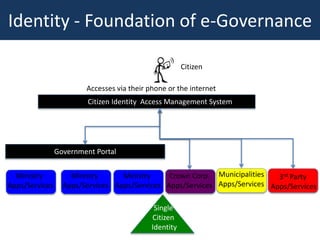
Single
Citizen
Identity
Citizen
Accesses via their phone or the internet
Government Portal
Ministry
Apps/Services
Ministry
Apps/Services
Ministry
Apps/Services
Municipalities
Apps/Services
3rd Party
Apps/Services
Crown Corp.
Apps/Services
Citizen Identity Access Management System
Identity - Foundation of e-Governance
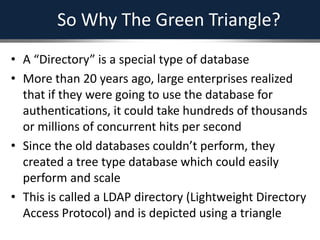
So Why The Green Triangle?
• A “Directory” is a special type of database
• More than 20 years ago, large enterprises realized
that if they were going to use the database for
authentications, it could take hundreds of thousands
or millions of concurrent hits per second
• Since the old databases couldn’t perform, they
created a tree type database which could easily
perform and scale
• This is called a LDAP directory (Lightweight Directory
Access Protocol) and is depicted using a triangle
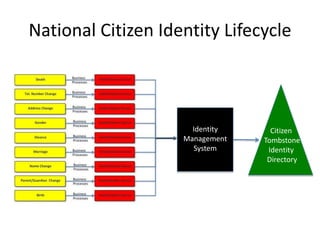
Now Let’s Look At Authoritative Sources
• In the lifecycle of an identity, there are several main
identity “trigger” points
– These are depicted in the yellow boxes in the next slide
• For each one of these, there are associated business
processes, usually determined by laws
– These are depicted by the red boxes in the next slide
• Once the data is entered into the authoritative source for
the identity lifecycle, it then flows to the national identity
management server
– The black box in the next slide
– This is the smart brains of the identity management system
• It then creates or modifies an identity in the citizen
tombstone identity directory
National Citizen Identity Lifecycle
Citizen
Tombstone
Identity
Directory
Identity
Management
System
Why Is It Called “Tombstone”?
• The national identity and access management
infrastructure only stores high level “tombstone”
identity information
– Similar to what is often entered on a person’s tombstone
• This includes things like legal name, place of birth,
gender, address AND CELL NUMBER
• The directory is not the “mother of all identity
databases”
– So sensitive information such as tax numbers, etc. stays in
the respective ministries databases
• This is good privacy design
Leverage Open Source Software
• The strategy leverages open source software identity
and access management from a company called
“ForgeRock”
• Governments using this around the world include
Canada, Norway, New Zealand, Australia and the
Province of Alberta
• Large companies like Toyota also use it
• So this is proven and you won’t be the first to use it
• Let me show you what really happens “underneath
the hood”…
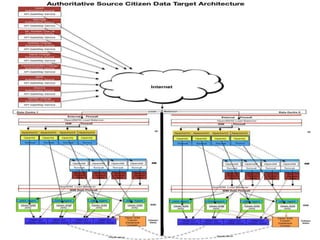
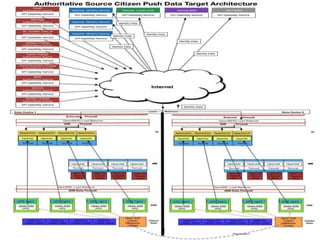
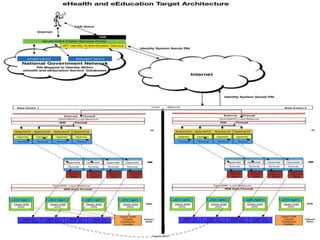
The Actual Architecture…
• The following slide shows the actual architecture used
• To simplify this let’s pretend that you’ve just been born
• The birth registration, including your biometric, plus your
parents identity information is sent from one of the red boxes
on the left titled “Birth Authoritative Source”
• It flows out via an API (Application Programming Interface),
securely through the internet (3 types of encryption used) and
into one of your national data centres
• It then flows to a box called “Open IG”. This is the internet
gateway server mentioned previously
• Open IG then passes the information to the Open IDM server
(this is the identity management server mentioned previously)
• Open IDM then realizes you are a new entry and then creates a
new identity in the directory with links to your parent’s/legal
guardian (this is the LDAP directory mentioned previously)
So Why Am I Showing You This?
• You are about to see how the same underlying
national identity management and
authentication infrastructure can be used to
create new accounts in open source healthcare
and education management software
• It will also be used to authenticate against
Automatically Create A
Healthcare Account For The Infant
• The identity management server can be used to
send your new birth entry, along with your
parents/legal guardian information to a open
source health care software (which also exists
today)
• Included in this is your parents/legal guardians
cell phone information
• Here’s how this happens “underneath the
hood”…
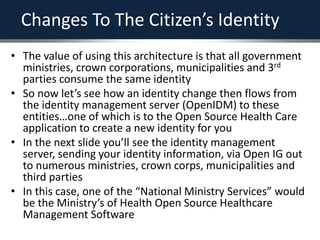
Changes To The Citizen’s Identity
• The value of using this architecture is that all government
ministries, crown corporations, municipalities and 3rd
parties consume the same identity
• So now let’s see how an identity change then flows from
the identity management server (OpenIDM) to these
entities…one of which is to the Open Source Health Care
application to create a new identity for you
• In the next slide you’ll see the identity management
server, sending your identity information, via Open IG out
to numerous ministries, crown corps, municipalities and
third parties
• In this case, one of the “National Ministry Services” would
be the Ministry’s of Health Open Source Healthcare
Management Software
When You’re Vaccinated
Your Biometrics Are Updated…
• Since your finger biometric changes, the
vaccination point in your lifecycle is an excellent
opportunity for the local health care worker to
update it
What Happens When
There’s No Connectivity?
• In certain parts of your country there may be no or poor
connectivity
• You, the infant, will also have a national identity card
– Malaysia creates youth identity cards MyKid
• http://www.malaysiacentral.com/information-directory/mykid-
identity-card-of-malaysia-for-children-below-12-years-
old/#sthash.ZXp3bJOb.dpbs
• On the card will securely be stored some of your medical
information
• If your parents are in a remote area, the health care
worker will scan the card using a portable unit, treat or
vaccinate you and then update the card
• When the healthcare worker reaches connectivity, they
will upload the information to the healthcare system
When You Need A Vaccination…
• The open source eHealth software has your
parents/legal guardian’s cell numbers from the
national identity and authentication infrastructure
• So…it will be able to send them a SMS message
telling them you need a vaccination
• This leverages what the citizens have in their pockets
and the national identity and authentication
infrastructure
• You, the citizen, have to go to only one place to
change things like your address and your phone
number so the information is up to date in all the
different services you interact with
It’s Your First Day At School…
• Each school will be connected to the internet
• Remote schools will also be given smartphones
• When you show up, your parents/legal guardians
will provide one or two biometrics
• This will be checked against the national
directory and you, the infant will be found to be
their offspring or under their guardianship
• More biometrics will now be taken from you
including your finger scans, face, retina and voice
Each Subsequent School Year…
• The student will have their face, voice and finger
scans all updated because they change with
aging
A Student Record Will Be
Automatically Created For You…
• The identity management server will send your
citizen identity information along with your
parents to an open source education
management software (which also exists today)
• This will be used your entire life as you move
between schools, regions, and take courses
throughout your life
• There’s also something else that can be done…
Students Can Logon To
School Networks Using Their Voice…
• Schools will leverage the national identity and
authentication service using their voice to
authenticate
• The voice is authenticated by the national
authentication service and then a persistent
anonymous identifier (“PAI”) will be sent to the
open source education management system
• This will then take the PAI and map it to the
student’s identity granting the student access to
apps and services they are entitled to
Why Use A PAI?
• The architecture values a citizen’s privacy
• Therefore, it mitigates against the risk that a malicious
person, who has access to a ministry server can then
obtain your unique ID and then masquerade as you on
another ministry’s server
• So, let’s use an example…
• You the citizen are interacting with two different ministry
services “A” and “B”
• When you successfully authenticate, Ministry A gets a PAI
of ABCDE for you, which they then map to your identity
within the database
• Ministry B gets a PAI of MNOPQ
• So a person who maliciously obtains ABCDE can’t use this
on other different ministries databases
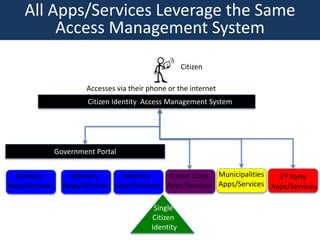
Single
Citizen
Identity
Citizen
Accesses via their phone or the internet
Government Portal
Ministry
Apps/Services
Ministry
Apps/Services
Ministry
Apps/Services
Municipalities
Apps/Services
3rd Party
Apps/Services
Crown Corp.
Apps/Services
Citizen Identity Access Management System
All Apps/Services Leverage the Same
Access Management System
Let’s Follow The Electrons…
• The student uses their voice to authenticate using either
technology provided in the school or, by using own
smartphone to log on to the school’s systems
• The IVR takes the voice and then passes it, via the internet
to the same infrastructure you saw before in previous
slides
• It goes through the Internet Gateway server and on to the
Open AM (access manager server)
• This then verifies the voice against the directory or a
related biometric server
• If successful, the Open AM server then generates the PAI
which is then sent, via Open IG to the Education portal
• The portal then maps the PAI to your identity and the
open school management system then takes over
iSchool…
• At a recent conference, I was with a lady from the Estonian
government who has worked on their identity system
since 2000
• As we were sitting together in Kigali, she was looking at
her children’s homework assignments and if they were in
classes using her smartphone
• In Estonia, this is called “iSchool”
• This is something which today isn’t possible in most North
American public schools
• I want to modify this to leverage SMS for people who only
have a cell phone
• This will leapfrog your country ahead of most other
countries
Here’s How It Happens…
• Each student’s parents/legal guardian phone
information in the national student management
system is kept up to date by the national identity
and authentication infrastructure
• The open source education management
software then sends SMS messages to the
parents/legal guardians
• It will leverage iSchool used in Estonia
This System Prevents “Ghost Students”
• When a person enrolls in a school, trade school
or post secondary, they will have to provide
some biometrics to validate who they are
• Each term or year, the student will have to
provide their biometrics
• This effectively precludes people claiming to be a
student, attending education institutions and
then making financial claims to the government
• It will save your government much money every
year
You’re Grown Up…
• Now you need to get things like a driver’s license
and passport
• So you go to their office
• You provide some biometrics
• These are verified against the national identity and
access management system
• Your tombstone level information is then
automatically sent from the identity management
server to the driver’s license or passport system
• You don’t have to fill in any forms with your
tombstone level identity information
What About Your Existing
National ID Card?
• You will already had a National ID Card for kids (like the
previously referred to MyKid in Malaysia)
• When you reach the age of 16, the identity management
server will send you a SMS message telling you to replace
your youth ID card with an adult one
• You go to a government office and provide some
biometrics
• These are then verified against the national identity and
access management system
• The counter person sees you are you and then prints an
adult card for you
• You medical information is transferred from the youth card
to the adult one
What Happens When A Citizen Dies?
• The citizen is confirmed to be who others claim them to
be via biometrics
– E.g. fingerprints
• The business process then leads to an entry into the
death registry
• The registry automatically notifies the national identity
directory
• The national identity directory then automatically
notifies all the government ministries/services
• This mitigates the risk of people using dead people’s
identities to masquerade as others
Leverage ICT Identity Investments
• By leveraging the national citizen ICT identity and
authentication infrastructure, your government can
re-think the way services are delivered to citizens,
including students
• It eliminates “Ghost students”
• Provides parents/legal guardians with up to date,
daily reports on their children in school via SMS or
via smartphone
• Enables the government to effectively manage a
student THROUGH THEIR WHOLE LIFE
• Leverages the national identity and authentication
infrastructure
In Estonia…
• They went from a GDP per capita of $2000 in the
late 1990’s to today approximately $26,000!
• They did this by adopting the internet
• As well, they:
– Connected all their schools to the internet
– Created “iSchool”
– Changed curriculum such that primary students learn
to code
– Companies like Skype began in Estonia
Education
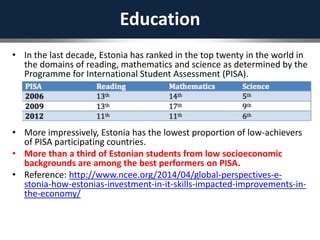
• In the last decade, Estonia has ranked in the top twenty in the world in
the domains of reading, mathematics and science as determined by the
Programme for International Student Assessment (PISA).
• More impressively, Estonia has the lowest proportion of low-achievers
of PISA participating countries.
• More than a third of Estonian students from low socioeconomic
backgrounds are among the best performers on PISA.
• Reference: http://www.ncee.org/2014/04/global-perspectives-e-
stonia-how-estonias-investment-in-it-skills-impacted-improvements-in-
the-economy/
This Could Be Your Country…
• You can become a digital leader in Africa
• HOWEVER, to do this requires all Ministries to
work together leveraging the same underlying
national identity and authentication
infrastructure
• Finance, Education and Health should be
involved in the creation of this infrastructure in
addition to the traditional ministries who look
after identity lifecycle events
Summary
• Your country could
become the Estonia of
Africa – a innovative
nation that leveraged
the digital world to
rethink itself
• Please contact me:
– 1-604-861-6804
– guy@hvl.net
– www.hvl.net

National ICT & Education Strategy July 2016

  • 1.
    National ICT & Education Strategy HuntingtonVentures Ltd. The Business of Identity Management July 2016
  • 2.
    This Deck… • Reviewscurrent problems in many countries with “ghost” students • Presents a high level framework for an education strategy leveraging a national identity and authentication infrastructure which will eliminate “ghost” students • Shows how to create a student management system which stays with the student their entire life • Also shows how to create a system where parents and legal guardians of students are kept informed of their daily homework and if the student is in class via their cell or smartphone • So who am I?
  • 3.
    Guy Huntington Guy Huntingtonis a very experienced identity architect, program and project manager who has led, as well as rescued, many large Fortune 500 identity projects including Boeing and Capital One. He recently completed being the identity architect for the Government of Alberta’s Digital Citizen Identity and Authentication program.
  • 4.
    Ghost Students • Manygovernment currently facing significant monetary problem where people who aren’t students are claiming money from the government as if they were students, • In the “identity world” these are call “ghost identities” • Most countries don’t have a national education management system which stays with the student through their entire life • It also doesn’t have a system which can keep students parents/legal guardians electronically informed, via their cell or smartphone, of their student’s daily homework and if they are in class
  • 5.
    Technology Citizens Have •Most citizens in Africa DON’T have internet access • What they do have is: – Cell phone – e-wallets • Some have debit and credit cards
  • 6.
    Solution: Leverage Identity& Cell • Create a national identity strategy leveraging citizens use of cell phones using their voice to authenticate • The architecture behind this has been used by large global enterprises and a few countries like Estonia since the late 1990’s….so it’s nothing new • It also leverages interactive voice response, which has been used in industry for the last 20 years as well • It provides a seamless user experience when the citizen acquires a smart phone, tablet or laptop • It leverages the same infrastructure that ALL government ministries will use • Additionally, the same infrastructure can be used by crown corporations, municipalities and third parties like banks, telcos and insurance companies • It also leverages a similar system in Estonia called “iSchool”
  • 7.
    Before We GetTo Education… • I will show you how other countries are using a similar infrastructure to create more than 1,000 online services for their citizens (Estonia) • To begin, let me first talk about the lifecycle of a citizen’s identity
  • 8.
    It Starts WhenA Citizen Is Born… • When you are born, in addition to the traditional information being captured, the health worker will also take a biometric from you, e.g. a finger scan and/or a retina scan • As well, the health worker will also obtain your parents national identities from their national ID card • There is one important addition to the national ID….it now captures the citizen’s cell number in the national ID directory • So, in the national directory, your electronic identity begins at birth. There is also a relationship between you and your parents or legal guardians • Let’s look “behind the scenes” at how this will work by first understanding a bit about the architecture...
  • 9.
    Nearly 20 YearsAgo… • Many Fortune 500 companies and only a few governments realized that single identity was a critical cornerstone piece of their digital strategies • Without this, no SOA and portal strategy would work, since having multiple identities for the same person would not allow for seamless digital and in-person services • Further, they also realized that having a common access service is dependent upon having a unified identity • In my own case, at Boeing, in the early 2000’s, we implemented a unified identity and access management infrastructure and then integrated into this several large portals with more than one million users as well as 1,500 applications. In parallel, they then developed a SOA architecture based on the identity infrastructure • To illustrate this, the next slide is an old Burton Group target identity architecture, now nearly 20 years old, showing the basic components of an identity and access management system
  • 10.
    • An oldBurton group target architecture from nearly 20 years ago illustrates this showing identity, provisioning and access management all running as web services
  • 11.
    The Point IAm Making… • For the last 20 years, all identity and access management systems have the following components: – Identity Management Server • In today’s world this is a combination of the Provisioning and Identity & Policy Admin from the previous slide – Directory • This is the large box at the bottom entitled “Identity Data Services – Access Manager • This is the box titled Access Policy Enforcement Infrastructure – API/Internet Gateway server • This didn’t exist 20 years ago • You will see this in some slides in this deck
  • 12.
    Estonia… • In Estonia,in the late 1990’s they too realized that identity is the key component • They realized that a common identity for each citizen was required • They also realized that citizen event life triggers were also important to streamline government services • Finally, they too also adopted a SOA web services architecture
  • 13.
    Single Citizen Identity •One identity per citizen • Any changes to the identity are then shared with other apps/services consuming them – One place for a citizen to change things like addresses and phone numbers – Citizens don’t have to fill in the same information over and over in forms for different apps/services • Same identity used for access management
  • 14.
    Single Citizen Identity Citizen Accesses via theirphone or the internet Government Portal Ministry Apps/Services Ministry Apps/Services Ministry Apps/Services Municipalities Apps/Services 3rd Party Apps/Services Crown Corp. Apps/Services Citizen Identity Access Management System Identity - Foundation of e-Governance
  • 15.
    So Why TheGreen Triangle? • A “Directory” is a special type of database • More than 20 years ago, large enterprises realized that if they were going to use the database for authentications, it could take hundreds of thousands or millions of concurrent hits per second • Since the old databases couldn’t perform, they created a tree type database which could easily perform and scale • This is called a LDAP directory (Lightweight Directory Access Protocol) and is depicted using a triangle
  • 16.
    Now Let’s LookAt Authoritative Sources • In the lifecycle of an identity, there are several main identity “trigger” points – These are depicted in the yellow boxes in the next slide • For each one of these, there are associated business processes, usually determined by laws – These are depicted by the red boxes in the next slide • Once the data is entered into the authoritative source for the identity lifecycle, it then flows to the national identity management server – The black box in the next slide – This is the smart brains of the identity management system • It then creates or modifies an identity in the citizen tombstone identity directory
  • 17.
    National Citizen IdentityLifecycle Citizen Tombstone Identity Directory Identity Management System
  • 18.
    Why Is ItCalled “Tombstone”? • The national identity and access management infrastructure only stores high level “tombstone” identity information – Similar to what is often entered on a person’s tombstone • This includes things like legal name, place of birth, gender, address AND CELL NUMBER • The directory is not the “mother of all identity databases” – So sensitive information such as tax numbers, etc. stays in the respective ministries databases • This is good privacy design
  • 19.
    Leverage Open SourceSoftware • The strategy leverages open source software identity and access management from a company called “ForgeRock” • Governments using this around the world include Canada, Norway, New Zealand, Australia and the Province of Alberta • Large companies like Toyota also use it • So this is proven and you won’t be the first to use it • Let me show you what really happens “underneath the hood”…
  • 20.
    The Actual Architecture… •The following slide shows the actual architecture used • To simplify this let’s pretend that you’ve just been born • The birth registration, including your biometric, plus your parents identity information is sent from one of the red boxes on the left titled “Birth Authoritative Source” • It flows out via an API (Application Programming Interface), securely through the internet (3 types of encryption used) and into one of your national data centres • It then flows to a box called “Open IG”. This is the internet gateway server mentioned previously • Open IG then passes the information to the Open IDM server (this is the identity management server mentioned previously) • Open IDM then realizes you are a new entry and then creates a new identity in the directory with links to your parent’s/legal guardian (this is the LDAP directory mentioned previously)
  • 22.
    So Why AmI Showing You This? • You are about to see how the same underlying national identity management and authentication infrastructure can be used to create new accounts in open source healthcare and education management software • It will also be used to authenticate against
  • 23.
    Automatically Create A HealthcareAccount For The Infant • The identity management server can be used to send your new birth entry, along with your parents/legal guardian information to a open source health care software (which also exists today) • Included in this is your parents/legal guardians cell phone information • Here’s how this happens “underneath the hood”…
  • 24.
    Changes To TheCitizen’s Identity • The value of using this architecture is that all government ministries, crown corporations, municipalities and 3rd parties consume the same identity • So now let’s see how an identity change then flows from the identity management server (OpenIDM) to these entities…one of which is to the Open Source Health Care application to create a new identity for you • In the next slide you’ll see the identity management server, sending your identity information, via Open IG out to numerous ministries, crown corps, municipalities and third parties • In this case, one of the “National Ministry Services” would be the Ministry’s of Health Open Source Healthcare Management Software
  • 26.
    When You’re Vaccinated YourBiometrics Are Updated… • Since your finger biometric changes, the vaccination point in your lifecycle is an excellent opportunity for the local health care worker to update it
  • 27.
    What Happens When There’sNo Connectivity? • In certain parts of your country there may be no or poor connectivity • You, the infant, will also have a national identity card – Malaysia creates youth identity cards MyKid • http://www.malaysiacentral.com/information-directory/mykid- identity-card-of-malaysia-for-children-below-12-years- old/#sthash.ZXp3bJOb.dpbs • On the card will securely be stored some of your medical information • If your parents are in a remote area, the health care worker will scan the card using a portable unit, treat or vaccinate you and then update the card • When the healthcare worker reaches connectivity, they will upload the information to the healthcare system
  • 28.
    When You NeedA Vaccination… • The open source eHealth software has your parents/legal guardian’s cell numbers from the national identity and authentication infrastructure • So…it will be able to send them a SMS message telling them you need a vaccination • This leverages what the citizens have in their pockets and the national identity and authentication infrastructure • You, the citizen, have to go to only one place to change things like your address and your phone number so the information is up to date in all the different services you interact with
  • 29.
    It’s Your FirstDay At School… • Each school will be connected to the internet • Remote schools will also be given smartphones • When you show up, your parents/legal guardians will provide one or two biometrics • This will be checked against the national directory and you, the infant will be found to be their offspring or under their guardianship • More biometrics will now be taken from you including your finger scans, face, retina and voice
  • 30.
    Each Subsequent SchoolYear… • The student will have their face, voice and finger scans all updated because they change with aging
  • 31.
    A Student RecordWill Be Automatically Created For You… • The identity management server will send your citizen identity information along with your parents to an open source education management software (which also exists today) • This will be used your entire life as you move between schools, regions, and take courses throughout your life • There’s also something else that can be done…
  • 32.
    Students Can LogonTo School Networks Using Their Voice… • Schools will leverage the national identity and authentication service using their voice to authenticate • The voice is authenticated by the national authentication service and then a persistent anonymous identifier (“PAI”) will be sent to the open source education management system • This will then take the PAI and map it to the student’s identity granting the student access to apps and services they are entitled to
  • 33.
    Why Use APAI? • The architecture values a citizen’s privacy • Therefore, it mitigates against the risk that a malicious person, who has access to a ministry server can then obtain your unique ID and then masquerade as you on another ministry’s server • So, let’s use an example… • You the citizen are interacting with two different ministry services “A” and “B” • When you successfully authenticate, Ministry A gets a PAI of ABCDE for you, which they then map to your identity within the database • Ministry B gets a PAI of MNOPQ • So a person who maliciously obtains ABCDE can’t use this on other different ministries databases
  • 34.
    Single Citizen Identity Citizen Accesses via theirphone or the internet Government Portal Ministry Apps/Services Ministry Apps/Services Ministry Apps/Services Municipalities Apps/Services 3rd Party Apps/Services Crown Corp. Apps/Services Citizen Identity Access Management System All Apps/Services Leverage the Same Access Management System
  • 35.
    Let’s Follow TheElectrons… • The student uses their voice to authenticate using either technology provided in the school or, by using own smartphone to log on to the school’s systems • The IVR takes the voice and then passes it, via the internet to the same infrastructure you saw before in previous slides • It goes through the Internet Gateway server and on to the Open AM (access manager server) • This then verifies the voice against the directory or a related biometric server • If successful, the Open AM server then generates the PAI which is then sent, via Open IG to the Education portal • The portal then maps the PAI to your identity and the open school management system then takes over
  • 37.
    iSchool… • At arecent conference, I was with a lady from the Estonian government who has worked on their identity system since 2000 • As we were sitting together in Kigali, she was looking at her children’s homework assignments and if they were in classes using her smartphone • In Estonia, this is called “iSchool” • This is something which today isn’t possible in most North American public schools • I want to modify this to leverage SMS for people who only have a cell phone • This will leapfrog your country ahead of most other countries
  • 38.
    Here’s How ItHappens… • Each student’s parents/legal guardian phone information in the national student management system is kept up to date by the national identity and authentication infrastructure • The open source education management software then sends SMS messages to the parents/legal guardians • It will leverage iSchool used in Estonia
  • 39.
    This System Prevents“Ghost Students” • When a person enrolls in a school, trade school or post secondary, they will have to provide some biometrics to validate who they are • Each term or year, the student will have to provide their biometrics • This effectively precludes people claiming to be a student, attending education institutions and then making financial claims to the government • It will save your government much money every year
  • 40.
    You’re Grown Up… •Now you need to get things like a driver’s license and passport • So you go to their office • You provide some biometrics • These are verified against the national identity and access management system • Your tombstone level information is then automatically sent from the identity management server to the driver’s license or passport system • You don’t have to fill in any forms with your tombstone level identity information
  • 41.
    What About YourExisting National ID Card? • You will already had a National ID Card for kids (like the previously referred to MyKid in Malaysia) • When you reach the age of 16, the identity management server will send you a SMS message telling you to replace your youth ID card with an adult one • You go to a government office and provide some biometrics • These are then verified against the national identity and access management system • The counter person sees you are you and then prints an adult card for you • You medical information is transferred from the youth card to the adult one
  • 42.
    What Happens WhenA Citizen Dies? • The citizen is confirmed to be who others claim them to be via biometrics – E.g. fingerprints • The business process then leads to an entry into the death registry • The registry automatically notifies the national identity directory • The national identity directory then automatically notifies all the government ministries/services • This mitigates the risk of people using dead people’s identities to masquerade as others
  • 43.
    Leverage ICT IdentityInvestments • By leveraging the national citizen ICT identity and authentication infrastructure, your government can re-think the way services are delivered to citizens, including students • It eliminates “Ghost students” • Provides parents/legal guardians with up to date, daily reports on their children in school via SMS or via smartphone • Enables the government to effectively manage a student THROUGH THEIR WHOLE LIFE • Leverages the national identity and authentication infrastructure
  • 44.
    In Estonia… • Theywent from a GDP per capita of $2000 in the late 1990’s to today approximately $26,000! • They did this by adopting the internet • As well, they: – Connected all their schools to the internet – Created “iSchool” – Changed curriculum such that primary students learn to code – Companies like Skype began in Estonia
  • 45.
    Education • In thelast decade, Estonia has ranked in the top twenty in the world in the domains of reading, mathematics and science as determined by the Programme for International Student Assessment (PISA). • More impressively, Estonia has the lowest proportion of low-achievers of PISA participating countries. • More than a third of Estonian students from low socioeconomic backgrounds are among the best performers on PISA. • Reference: http://www.ncee.org/2014/04/global-perspectives-e- stonia-how-estonias-investment-in-it-skills-impacted-improvements-in- the-economy/
  • 46.
    This Could BeYour Country… • You can become a digital leader in Africa • HOWEVER, to do this requires all Ministries to work together leveraging the same underlying national identity and authentication infrastructure • Finance, Education and Health should be involved in the creation of this infrastructure in addition to the traditional ministries who look after identity lifecycle events
  • 47.
    Summary • Your countrycould become the Estonia of Africa – a innovative nation that leveraged the digital world to rethink itself • Please contact me: – 1-604-861-6804 – guy@hvl.net – www.hvl.net