Who is CodeScience?
● Founding partner of the Salesforce Product
Development Outsourcer (PDO) Program
● We partner with clients to build solutions on
the Salesforce AppExchange
● Named first Master PDO in 2017
● From design to build to implementation, we
support our clients through the full lifecycle
Client success: 300+ Builds
Today’s Presenter
Shazib Mahmood
Technical Architect
CodeScience
Agenda
● Introduction to Platform Events
● Benefits
● Limitations
● Design considerations
Introduction
Introduction
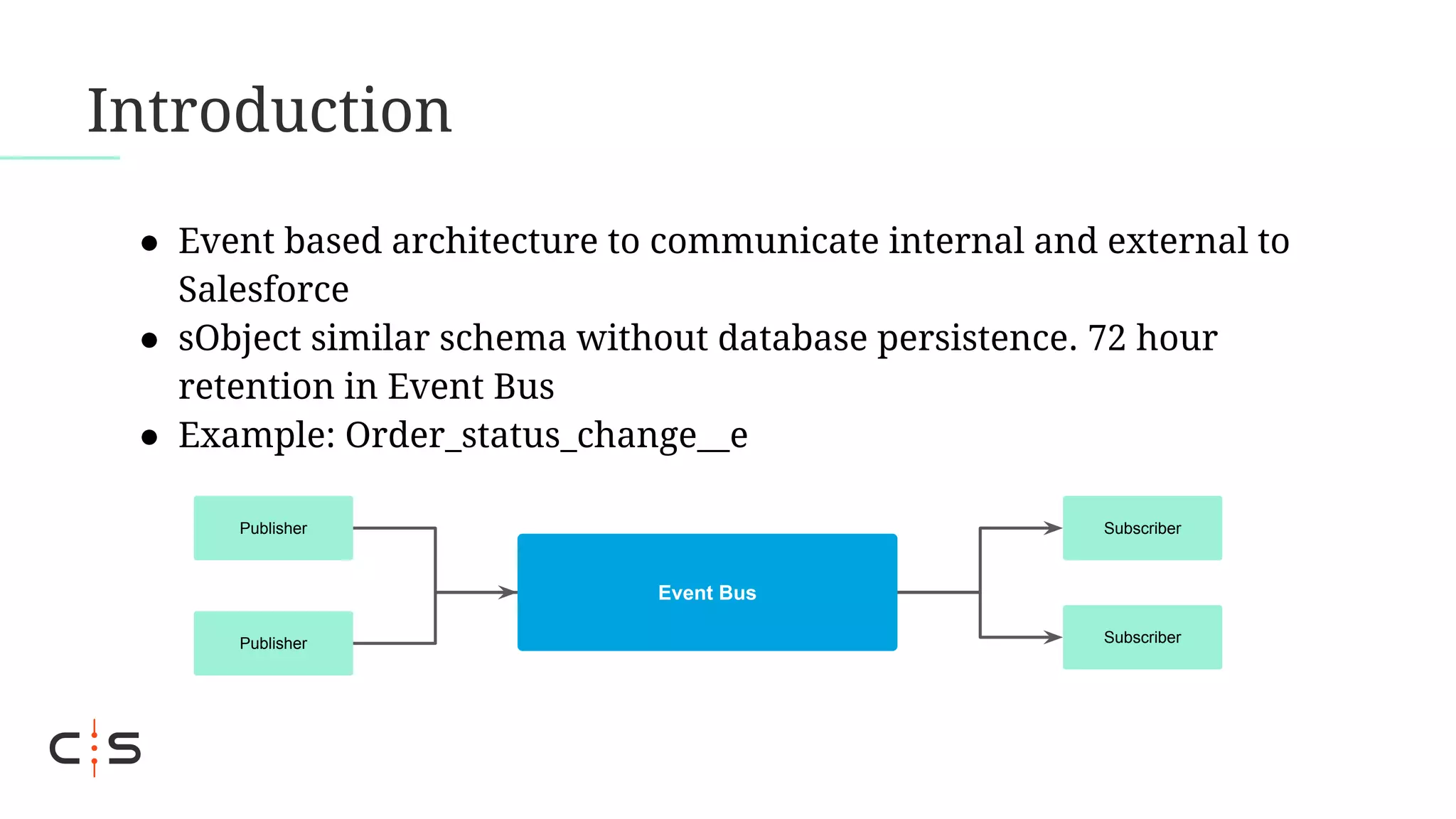
● Event based architecture to communicate internal and external to
Salesforce
● sObject similar schema without database persistence. 72 hour
retention in Event Bus
● Example: Order_status_change__e
Event Bus
Publisher
Publisher
Subscriber
Subscriber
Introduction
● Publish via processes, flows, Apex or Salesforce APIs
● Subscriber via processes, flows, Apex triggers or CometD clients
● In comparison to other event messaging options such as Change
Data Capture or PushTopics:
○ Extensive publish/subscribe options
○ Flexible schema & transformation control
Benefits
Benefits
● Decoupled integration pattern that is consumer agnostic &
reusable. Minimize APIs calls by publishing to bus.
● Subscribe & publish via config based features as well, e.g.
processes & flows
● Pre-built connectors available with stream processing
middlewares, e.g Kafka, MuleSoft & Boomi
Benefits
● Asynchronous thread with additional controls as compared to
sObjects:
○ Set batch size of upto 2000 (via Metadata API)
○ Set running user (via Metadata API)
○ Set an Apex checkpoint for trigger resumption in case of error to
start a new trigger execution on remaining batch
○ Replay lost events from event bus (via CometD client)
Limits
Limits
● Supported editions - Professional (requires API add-on) & above
● CometD delivery limit
● CometD subscribers count Limit
● Definitions limit
● Event publish limit
● 1 MB Event message size limit
● Limited field types
● Details & more limits in Salesforce Guide for Platform Events
Design Considerations
● Publish behavior - “Publish immediately” vs “Publish after
Commit”. Latter one waits for the transaction to finish & hence
supports rollback abilities.
● Use to communicate across packages
● Balance resource & limits consumption of an org, instead of
using all the async allowance, we can use platform event
allowance for applicable use cases
Design Considerations
● Be mindful of execution order - design so that automations
re-invocation do not create multiple events
● Monitor usage limits via Apex limits class & REST limits endpoint
● In external subscribers, build error handling capabilities to read
through Event bus with replayID
Design Considerations
● Limit number of fields & data to stay under 1MB message size
limit or keep a check, e.g. JSON serialize and check byte size
● Define number of platform events while balancing across limits:
■ Have specific definitions for each use case:
● Could hit the platform events max definitions limit
■ Have generic definitions to reuse for many use cases:
● Less granularity in what external subscriber receives,
potentially hitting the max delivery & subscribers limits
Mission:
Ensure that no company
navigates Salesforce alone
Thank you!
Questions? Feel free to contact us at info@codescience.com.

Designing Salesforce Platform Events

  • 2.
    Who is CodeScience? ●Founding partner of the Salesforce Product Development Outsourcer (PDO) Program ● We partner with clients to build solutions on the Salesforce AppExchange ● Named first Master PDO in 2017 ● From design to build to implementation, we support our clients through the full lifecycle
  • 3.
  • 4.
  • 5.
    Agenda ● Introduction toPlatform Events ● Benefits ● Limitations ● Design considerations
  • 6.
  • 7.
    Introduction ● Event basedarchitecture to communicate internal and external to Salesforce ● sObject similar schema without database persistence. 72 hour retention in Event Bus ● Example: Order_status_change__e Event Bus Publisher Publisher Subscriber Subscriber
  • 8.
    Introduction ● Publish viaprocesses, flows, Apex or Salesforce APIs ● Subscriber via processes, flows, Apex triggers or CometD clients ● In comparison to other event messaging options such as Change Data Capture or PushTopics: ○ Extensive publish/subscribe options ○ Flexible schema & transformation control
  • 9.
  • 10.
    Benefits ● Decoupled integrationpattern that is consumer agnostic & reusable. Minimize APIs calls by publishing to bus. ● Subscribe & publish via config based features as well, e.g. processes & flows ● Pre-built connectors available with stream processing middlewares, e.g Kafka, MuleSoft & Boomi
  • 11.
    Benefits ● Asynchronous threadwith additional controls as compared to sObjects: ○ Set batch size of upto 2000 (via Metadata API) ○ Set running user (via Metadata API) ○ Set an Apex checkpoint for trigger resumption in case of error to start a new trigger execution on remaining batch ○ Replay lost events from event bus (via CometD client)
  • 12.
  • 13.
    Limits ● Supported editions- Professional (requires API add-on) & above ● CometD delivery limit ● CometD subscribers count Limit ● Definitions limit ● Event publish limit ● 1 MB Event message size limit ● Limited field types ● Details & more limits in Salesforce Guide for Platform Events
  • 14.
  • 15.
    Design Considerations ● Publishbehavior - “Publish immediately” vs “Publish after Commit”. Latter one waits for the transaction to finish & hence supports rollback abilities. ● Use to communicate across packages ● Balance resource & limits consumption of an org, instead of using all the async allowance, we can use platform event allowance for applicable use cases
  • 16.
    Design Considerations ● Bemindful of execution order - design so that automations re-invocation do not create multiple events ● Monitor usage limits via Apex limits class & REST limits endpoint ● In external subscribers, build error handling capabilities to read through Event bus with replayID
  • 17.
    Design Considerations ● Limitnumber of fields & data to stay under 1MB message size limit or keep a check, e.g. JSON serialize and check byte size ● Define number of platform events while balancing across limits: ■ Have specific definitions for each use case: ● Could hit the platform events max definitions limit ■ Have generic definitions to reuse for many use cases: ● Less granularity in what external subscriber receives, potentially hitting the max delivery & subscribers limits
  • 18.
    Mission: Ensure that nocompany navigates Salesforce alone
  • 19.
    Thank you! Questions? Feelfree to contact us at info@codescience.com.