Ghulam Mohayyudin
6x Certified Salesforce Developer at TEKHQS
mohayyudinuaf@gmail.com
Agenda
What I Will Share
● What is Platform Event
● Architecture of event driven software
● What is Salesforce Platform Event
● Ways To Publish Salesforce Platform Event
● Ways To Subscribe Salesforce Platform Events
● Real time use case of Platform Events
● Demo
What is Platform Event
● Platform events are secure and scalable messages that contain data
● Use platform events to connect business processes in Salesforce and
external apps through the exchange of real-time event data
● Publishers publish event messages that subscribers receive in real time
● To customize the data published, define platform event fields
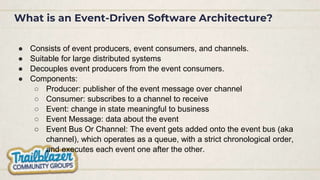
What is an Event-Driven Software Architecture?
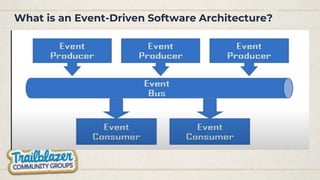
● Consists of event producers, event consumers, and channels.
● Suitable for large distributed systems
● Decouples event producers from the event consumers.
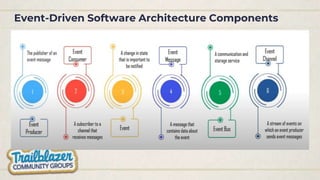
● Components:
○ Producer: publisher of the event message over channel
○ Consumer: subscribes to a channel to receive
○ Event: change in state meaningful to business
○ Event Message: data about the event
○ Event Bus Or Channel: The event gets added onto the event bus (aka
channel), which operates as a queue, with a strict chronological order,
and executes each event one after the other.
What is an Event-Driven Software Architecture?
Event-Driven Software Architecture Components
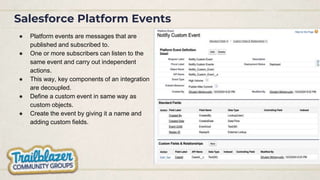
Salesforce Platform Events
● Platform events are messages that are
published and subscribed to.
● One or more subscribers can listen to the
same event and carry out independent
actions.
● This way, key components of an integration
are decoupled.
● Define a custom event in same way as
custom objects.
● Create the event by giving it a name and
adding custom fields.
Ways To Publish Salesforce Platform Event
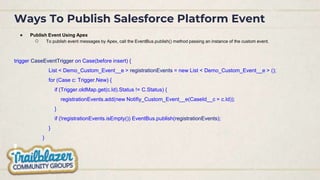
● Publish Event Using Apex
○ To publish event messages by Apex, call the EventBus.publish() method passing an instance of the custom event.
trigger CaseEventTrigger on Case(before insert) {
List < Demo_Custom_Event__e > registrationEvents = new List < Demo_Custom_Event__e > ();
for (Case c: Trigger.New) {
if (Trigger.oldMap.get(c.Id).Status != C.Status) {
registrationEvents.add(new Notifiy_Custom_Event__e(CaseId__c = c.Id));
}
if (!registrationEvents.isEmpty()) EventBus.publish(registrationEvents);
}
}
Ways To Publish Salesforce Platform Event
● API Published Events
○ External applications use an API to publish event messages.
○ You can use any Salesforce API to create events in same way as you
would insert sObjects.
● REST endpoint:
/services/data/v47.0/sobjects/Registration_Notification_e
● Request body:
{
"CaseId__c": "5005j00000mUQUvAAO”,
“Jirra_Status__c” : “High Periority”
}
● REST response:
{
"id": "e00xx0000000001AAA",
"success": true,
"errors": [
{
"statusCode": "OPERATION_ENQUEUED",
"message": "411c1c7c-51cd-4595-b45a-c12b32e799c9",
"fields": []
}
]
}
Ways To Subscribe Salesforce Platform Events
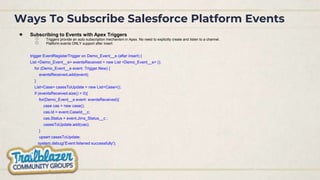
● Subscribing to Events with Apex Triggers
○ Triggers provide an auto subscription mechanism in Apex. No need to explicitly create and listen to a channel.
○ Platform events ONLY support after insert
trigger EventRegisterTrigger on Demo_Event__e (after insert) {
List <Demo_Event__e> eventsReceived = new List <Demo_Event__e> ();
for (Demo_Event__e event: Trigger.New) {
eventsReceived.add(event);
}
List<Case> casesToUpdate = new List<Case>();
if (eventsReceived.size() > 0){
for(Demo_Event__e event: eventsReceived){
case cas = new case();
cas.Id = event.CaseId__c;
cas.Status = event.Jirra_Status__c ;
casesToUpdate.add(cas);
}
upsert casesToUpdate;
system.debug('Event listened successfully');
}
}
Ways To Subscribe Salesforce Platform Events
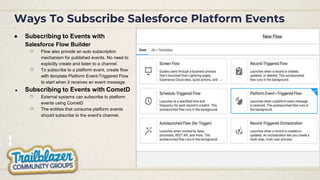
● Subscribing to Events with
Salesforce Flow Builder
○ Flow also provide an auto subscription
mechanism for published events. No need to
explicitly create and listen to a channel.
○ To subscribe to a platform event, create flow
with template Platform Event-Triggered Flow
to start when it receives an event message.
● Subscribing to Events with CometD
○ External systems can subscribe to platform
events using CometD
○ The entities that consume platform events
should subscribe to the event's channel.
Ways To Subscribe Salesforce Platform Events
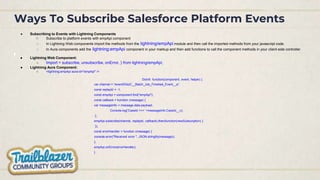
● Subscribing to Events with Lightning Components
○ Subscribe to platform events with empApi component
○ In Lightning Web components import the methods from the lightning/empApi module and then call the imported methods from your javascript code.
○ In Aura components add the lightning:empApi component in your markup and then add functions to call the component methods in your client-side controller.
● Lightning Web Component:
○ Import < subscribe, unsubscribe, onError, } from lightning/empApi;
● Lightning Aura Component:
○ <lightning:empApi aura:id="empApi" />
DoInIt: function(component, event, helper) {
var channel = '/event/EbizC__Batch_Job_Finished_Event__e';
const replayId = -1;
const empApi = component.find("empApi");
const callback = function (message) {
var messageInfo = message.data.payload;
Console.log(‘CaseId >>> ’+messageInfo.CaseId__c);
};
empApi.subscribe(channel, replayId, callback).then(function(newSubscription) {
});
const errorHandler = function (message) {
console.error("Received error ", JSON.stringify(message));
};
empApi.onError(errorHandler);
}
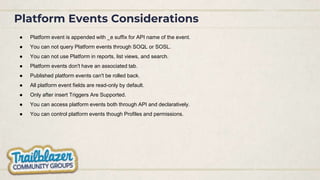
Platform Events Considerations
● Platform event is appended with _e suffix for API name of the event.
● You can not query Platform events through SOQL or SOSL.
● You can not use Platform in reports, list views, and search.
● Platform events don't have an associated tab.
● Published platform events can't be rolled back.
● All platform event fields are read-only by default.
● Only after insert Triggers Are Supported.
● You can access platform events both through API and declaratively.
● You can control platform events though Profiles and permissions.
References
● https://developer.salesforce.com/docs/atlas.en-us.platform_events.meta/platform_events/platform_events_intro.htm
● https://www.salesforceben.com/salesforce-platform-events/
● https://trailhead.salesforce.com/content/learn/modules/platform_events_basics
● https://www.slideshare.net/ChristineSmith33/platform-events-by-tim-taylor
● https://www.youtube.com/playlist?list=PLFe2L4qdtVpZl3TDEtPE6L023ZoZSx1EY
Ghulam Ghaus
4x Certified Salesforce Developer at Logic Mount
g.ghaus001@gmail.com
Agenda
What I Will Share
● What is Apex Replay Debugger
● Key Features
● How does it work?
● Best Practices for Effective Debugging
● Live Demo in Visual Studio Code
What is Apex Replay Debugger
● Apex Replay Debugger is a free tool that allows us to debug the Apex code
by inspecting debug logs using Visual Studio Code
● We can view variables, set checkpoints, and hover over variables to see their
current value
● We no longer need to parse through thousands of log lines manually or
sprinkle your code with System.debug statements to see variable values or
track the code execution path.
Key Features
● Real-time debugging
● Step-by-step execution
● Variable inspection
How does it work?
● Setting checkpoints in the code
● Run Apex and Get Debug Logs
● Replay of code execution from checkpoints
● Real-time inspection of variables Step-by-step execution
and analysis
Setting Check Points in the code
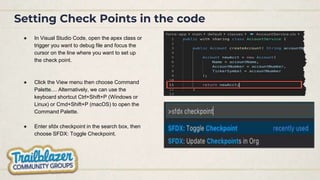
● In Visual Studio Code, open the apex class or
trigger you want to debug file and focus the
cursor on the line where you want to set up
the check point.
● Click the View menu then choose Command
Palette.... Alternatively, we can use the
keyboard shortcut Ctrl+Shift+P (Windows or
Linux) or Cmd+Shift+P (macOS) to open the
Command Palette.
● Enter sfdx checkpoint in the search box, then
choose SFDX: Toggle Checkpoint.
Setting Check Points in the code
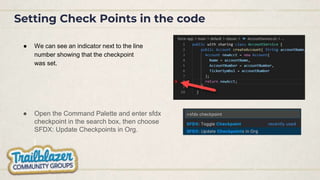
● We can see an indicator next to the line
number showing that the checkpoint
was set.
● Open the Command Palette and enter sfdx
checkpoint in the search box, then choose
SFDX: Update Checkpoints in Org.
Run Apex and Get Debug Logs
● With our breakpoints and checkpoints set, it’s time
to rerun our Apex test to generate a replay-
enabled debug log.
● Run the Apex Code
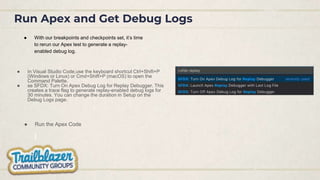
● In Visual Studio Code,use the keyboard shortcut Ctrl+Shift+P
(Windows or Linux) or Cmd+Shift+P (macOS) to open the
Command Palette.
● se SFDX: Turn On Apex Debug Log for Replay Debugger. This
creates a trace flag to generate replay-enabled debug logs for
30 minutes. You can change the duration in Setup on the
Debug Logs page.
Run Apex and Get Debug Logs
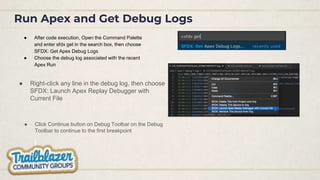
● After code execution, Open the Command Palette
and enter sfdx get in the search box, then choose
SFDX: Get Apex Debug Logs
● Choose the debug log associated with the recent
Apex Run
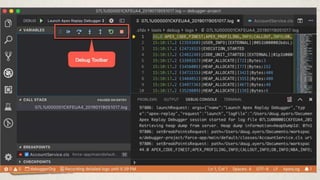
● Click Continue button on Debug Toolbar on the Debug
Toolbar to continue to the first breakpoint
● Right-click any line in the debug log, then choose
SFDX: Launch Apex Replay Debugger with
Current File
Run Apex and Get Debug Logs
● Benefits
● Faster issue resolution
● Improved code quality
● Time-saving
● Considerations
● Only one debug log at a time
● You can’t replay a debug log generated by scheduled Apex.
● We can’t expand a collection
● Best Practices for Effective Debugging
● Set meaningful checkpoints
● Use logging statements
● Practice regularly
● Live Demo in Visual Studio Code
● Walkthrough of setting checkpoints
● Initiating debugging sessions
● Stepping through code execution
● Inspecting variables
● Q&A
Any Questions?
Apex Replay Debugger and Salesforce Platform Events.pptx

Apex Replay Debugger and Salesforce Platform Events.pptx

  • 3.
    Ghulam Mohayyudin 6x CertifiedSalesforce Developer at TEKHQS mohayyudinuaf@gmail.com
  • 4.
    Agenda What I WillShare ● What is Platform Event ● Architecture of event driven software ● What is Salesforce Platform Event ● Ways To Publish Salesforce Platform Event ● Ways To Subscribe Salesforce Platform Events ● Real time use case of Platform Events ● Demo
  • 5.
    What is PlatformEvent ● Platform events are secure and scalable messages that contain data ● Use platform events to connect business processes in Salesforce and external apps through the exchange of real-time event data ● Publishers publish event messages that subscribers receive in real time ● To customize the data published, define platform event fields
  • 6.
    What is anEvent-Driven Software Architecture? ● Consists of event producers, event consumers, and channels. ● Suitable for large distributed systems ● Decouples event producers from the event consumers. ● Components: ○ Producer: publisher of the event message over channel ○ Consumer: subscribes to a channel to receive ○ Event: change in state meaningful to business ○ Event Message: data about the event ○ Event Bus Or Channel: The event gets added onto the event bus (aka channel), which operates as a queue, with a strict chronological order, and executes each event one after the other.
  • 7.
    What is anEvent-Driven Software Architecture?
  • 8.
  • 9.
    Salesforce Platform Events ●Platform events are messages that are published and subscribed to. ● One or more subscribers can listen to the same event and carry out independent actions. ● This way, key components of an integration are decoupled. ● Define a custom event in same way as custom objects. ● Create the event by giving it a name and adding custom fields.
  • 10.
    Ways To PublishSalesforce Platform Event ● Publish Event Using Apex ○ To publish event messages by Apex, call the EventBus.publish() method passing an instance of the custom event. trigger CaseEventTrigger on Case(before insert) { List < Demo_Custom_Event__e > registrationEvents = new List < Demo_Custom_Event__e > (); for (Case c: Trigger.New) { if (Trigger.oldMap.get(c.Id).Status != C.Status) { registrationEvents.add(new Notifiy_Custom_Event__e(CaseId__c = c.Id)); } if (!registrationEvents.isEmpty()) EventBus.publish(registrationEvents); } }
  • 11.
    Ways To PublishSalesforce Platform Event ● API Published Events ○ External applications use an API to publish event messages. ○ You can use any Salesforce API to create events in same way as you would insert sObjects. ● REST endpoint: /services/data/v47.0/sobjects/Registration_Notification_e ● Request body: { "CaseId__c": "5005j00000mUQUvAAO”, “Jirra_Status__c” : “High Periority” } ● REST response: { "id": "e00xx0000000001AAA", "success": true, "errors": [ { "statusCode": "OPERATION_ENQUEUED", "message": "411c1c7c-51cd-4595-b45a-c12b32e799c9", "fields": [] } ] }
  • 12.
    Ways To SubscribeSalesforce Platform Events ● Subscribing to Events with Apex Triggers ○ Triggers provide an auto subscription mechanism in Apex. No need to explicitly create and listen to a channel. ○ Platform events ONLY support after insert trigger EventRegisterTrigger on Demo_Event__e (after insert) { List <Demo_Event__e> eventsReceived = new List <Demo_Event__e> (); for (Demo_Event__e event: Trigger.New) { eventsReceived.add(event); } List<Case> casesToUpdate = new List<Case>(); if (eventsReceived.size() > 0){ for(Demo_Event__e event: eventsReceived){ case cas = new case(); cas.Id = event.CaseId__c; cas.Status = event.Jirra_Status__c ; casesToUpdate.add(cas); } upsert casesToUpdate; system.debug('Event listened successfully'); } }
  • 13.
    Ways To SubscribeSalesforce Platform Events ● Subscribing to Events with Salesforce Flow Builder ○ Flow also provide an auto subscription mechanism for published events. No need to explicitly create and listen to a channel. ○ To subscribe to a platform event, create flow with template Platform Event-Triggered Flow to start when it receives an event message. ● Subscribing to Events with CometD ○ External systems can subscribe to platform events using CometD ○ The entities that consume platform events should subscribe to the event's channel.
  • 14.
    Ways To SubscribeSalesforce Platform Events ● Subscribing to Events with Lightning Components ○ Subscribe to platform events with empApi component ○ In Lightning Web components import the methods from the lightning/empApi module and then call the imported methods from your javascript code. ○ In Aura components add the lightning:empApi component in your markup and then add functions to call the component methods in your client-side controller. ● Lightning Web Component: ○ Import < subscribe, unsubscribe, onError, } from lightning/empApi; ● Lightning Aura Component: ○ <lightning:empApi aura:id="empApi" /> DoInIt: function(component, event, helper) { var channel = '/event/EbizC__Batch_Job_Finished_Event__e'; const replayId = -1; const empApi = component.find("empApi"); const callback = function (message) { var messageInfo = message.data.payload; Console.log(‘CaseId >>> ’+messageInfo.CaseId__c); }; empApi.subscribe(channel, replayId, callback).then(function(newSubscription) { }); const errorHandler = function (message) { console.error("Received error ", JSON.stringify(message)); }; empApi.onError(errorHandler); }
  • 15.
    Platform Events Considerations ●Platform event is appended with _e suffix for API name of the event. ● You can not query Platform events through SOQL or SOSL. ● You can not use Platform in reports, list views, and search. ● Platform events don't have an associated tab. ● Published platform events can't be rolled back. ● All platform event fields are read-only by default. ● Only after insert Triggers Are Supported. ● You can access platform events both through API and declaratively. ● You can control platform events though Profiles and permissions.
  • 16.
    References ● https://developer.salesforce.com/docs/atlas.en-us.platform_events.meta/platform_events/platform_events_intro.htm ● https://www.salesforceben.com/salesforce-platform-events/ ●https://trailhead.salesforce.com/content/learn/modules/platform_events_basics ● https://www.slideshare.net/ChristineSmith33/platform-events-by-tim-taylor ● https://www.youtube.com/playlist?list=PLFe2L4qdtVpZl3TDEtPE6L023ZoZSx1EY
  • 17.
    Ghulam Ghaus 4x CertifiedSalesforce Developer at Logic Mount g.ghaus001@gmail.com
  • 18.
    Agenda What I WillShare ● What is Apex Replay Debugger ● Key Features ● How does it work? ● Best Practices for Effective Debugging ● Live Demo in Visual Studio Code
  • 19.
    What is ApexReplay Debugger ● Apex Replay Debugger is a free tool that allows us to debug the Apex code by inspecting debug logs using Visual Studio Code ● We can view variables, set checkpoints, and hover over variables to see their current value ● We no longer need to parse through thousands of log lines manually or sprinkle your code with System.debug statements to see variable values or track the code execution path.
  • 20.
    Key Features ● Real-timedebugging ● Step-by-step execution ● Variable inspection
  • 21.
    How does itwork? ● Setting checkpoints in the code ● Run Apex and Get Debug Logs ● Replay of code execution from checkpoints ● Real-time inspection of variables Step-by-step execution and analysis
  • 22.
    Setting Check Pointsin the code ● In Visual Studio Code, open the apex class or trigger you want to debug file and focus the cursor on the line where you want to set up the check point. ● Click the View menu then choose Command Palette.... Alternatively, we can use the keyboard shortcut Ctrl+Shift+P (Windows or Linux) or Cmd+Shift+P (macOS) to open the Command Palette. ● Enter sfdx checkpoint in the search box, then choose SFDX: Toggle Checkpoint.
  • 23.
    Setting Check Pointsin the code ● We can see an indicator next to the line number showing that the checkpoint was set. ● Open the Command Palette and enter sfdx checkpoint in the search box, then choose SFDX: Update Checkpoints in Org.
  • 24.
    Run Apex andGet Debug Logs ● With our breakpoints and checkpoints set, it’s time to rerun our Apex test to generate a replay- enabled debug log. ● Run the Apex Code ● In Visual Studio Code,use the keyboard shortcut Ctrl+Shift+P (Windows or Linux) or Cmd+Shift+P (macOS) to open the Command Palette. ● se SFDX: Turn On Apex Debug Log for Replay Debugger. This creates a trace flag to generate replay-enabled debug logs for 30 minutes. You can change the duration in Setup on the Debug Logs page.
  • 25.
    Run Apex andGet Debug Logs ● After code execution, Open the Command Palette and enter sfdx get in the search box, then choose SFDX: Get Apex Debug Logs ● Choose the debug log associated with the recent Apex Run ● Click Continue button on Debug Toolbar on the Debug Toolbar to continue to the first breakpoint ● Right-click any line in the debug log, then choose SFDX: Launch Apex Replay Debugger with Current File
  • 26.
    Run Apex andGet Debug Logs
  • 27.
    ● Benefits ● Fasterissue resolution ● Improved code quality ● Time-saving
  • 28.
    ● Considerations ● Onlyone debug log at a time ● You can’t replay a debug log generated by scheduled Apex. ● We can’t expand a collection
  • 29.
    ● Best Practicesfor Effective Debugging ● Set meaningful checkpoints ● Use logging statements ● Practice regularly
  • 30.
    ● Live Demoin Visual Studio Code ● Walkthrough of setting checkpoints ● Initiating debugging sessions ● Stepping through code execution ● Inspecting variables
  • 31.