Salesforce Platform Events
PRESENTED BY
:
Custom Platform Event
• Platform events are message that are published
and subscribed.
• One or more subscribers can listen to the
same event and carry out independent action.
• Define a custom event in same way as custom
object.
• We can also add custom fields in event.
• There is limitation of data type in custom event.
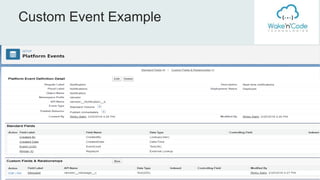
Custom Event Example
Publishing
Platform Event
You can publish platform event by
• Apex code
• Point and click tools such as process
builder and flow.
• Any salesforce API from external
Application ( Soap, Rest, Bulk)
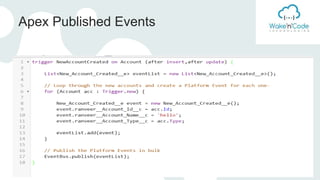
Apex Published Events
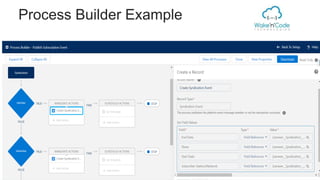
Process Builder Published
Event
• Add a create record action
• For the record type, select the platform event
name
• Populating the fields of the platform event
Process Builder Example
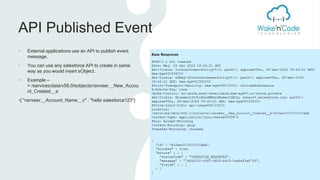
API Published Event
• External applications use an API to publish event
message.
• You can use any salesforce API to create in same
way as you would insert sObject.
• Example --
> /services/data/v56.0/sobjects/ranveer__New_Accou
nt_Created__e
•{ "ranveer__Account_Name__c" : "hello salesforce123"}
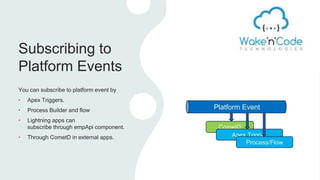
Subscribing to
Platform Events
You can subscribe to platform event by
• Apex Triggers.
• Process Builder and flow
• Lightning apps can
subscribe through empApi component.
• Through CometD in external apps.
Subscribing to Events
with Apex triggers
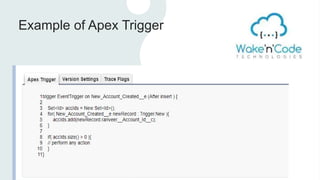
• Triggers provide an auto subscription
mechanism in Apex. No need to explicitly
create and listen to a channel.
• Platform events only support AFTER
INSERT triggers.
Example of Apex Trigger
Subscribing to
Events with
Process
Subscribing to Events
with Lightning
Components
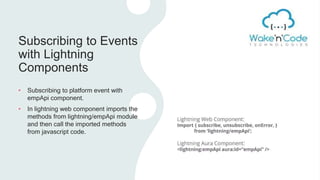
• Subscribing to platform event with
empApi component.
• In lightning web component imports the
methods from lightning/empApi module
and then call the imported methods
from javascript code.
Automatic Retry
Capabilities When Error
Occur
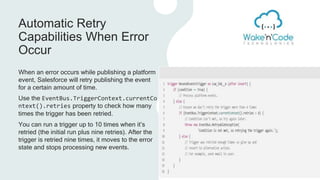
When an error occurs while publishing a platform
event, Salesforce will retry publishing the event
for a certain amount of time.
Use the EventBus.TriggerContext.currentCo
ntext().retries property to check how many
times the trigger has been retried.
You can run a trigger up to 10 times when it’s
retried (the initial run plus nine retries). After the
trigger is retried nine times, it moves to the error
state and stops processing new events.
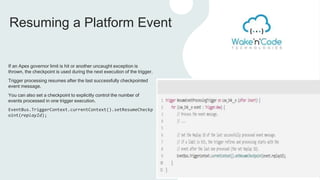
Resuming a Platform Event
If an Apex governor limit is hit or another uncaught exception is
thrown, the checkpoint is used during the next execution of the trigger.
Trigger processing resumes after the last successfully checkpointed
event message.
You can also set a checkpoint to explicitly control the number of
events processed in one trigger execution.
EventBus.TriggerContext.currentContext().setResumeCheckp
oint(replayId);
PlatForm Event.pptx

PlatForm Event.pptx

  • 1.
  • 3.
    Custom Platform Event •Platform events are message that are published and subscribed. • One or more subscribers can listen to the same event and carry out independent action. • Define a custom event in same way as custom object. • We can also add custom fields in event. • There is limitation of data type in custom event.
  • 4.
  • 5.
    Publishing Platform Event You canpublish platform event by • Apex code • Point and click tools such as process builder and flow. • Any salesforce API from external Application ( Soap, Rest, Bulk)
  • 6.
  • 7.
    Process Builder Published Event •Add a create record action • For the record type, select the platform event name • Populating the fields of the platform event
  • 8.
  • 9.
    API Published Event •External applications use an API to publish event message. • You can use any salesforce API to create in same way as you would insert sObject. • Example -- > /services/data/v56.0/sobjects/ranveer__New_Accou nt_Created__e •{ "ranveer__Account_Name__c" : "hello salesforce123"}
  • 10.
    Subscribing to Platform Events Youcan subscribe to platform event by • Apex Triggers. • Process Builder and flow • Lightning apps can subscribe through empApi component. • Through CometD in external apps.
  • 11.
    Subscribing to Events withApex triggers • Triggers provide an auto subscription mechanism in Apex. No need to explicitly create and listen to a channel. • Platform events only support AFTER INSERT triggers.
  • 12.
  • 13.
  • 14.
    Subscribing to Events withLightning Components • Subscribing to platform event with empApi component. • In lightning web component imports the methods from lightning/empApi module and then call the imported methods from javascript code.
  • 15.
    Automatic Retry Capabilities WhenError Occur When an error occurs while publishing a platform event, Salesforce will retry publishing the event for a certain amount of time. Use the EventBus.TriggerContext.currentCo ntext().retries property to check how many times the trigger has been retried. You can run a trigger up to 10 times when it’s retried (the initial run plus nine retries). After the trigger is retried nine times, it moves to the error state and stops processing new events.
  • 16.
    Resuming a PlatformEvent If an Apex governor limit is hit or another uncaught exception is thrown, the checkpoint is used during the next execution of the trigger. Trigger processing resumes after the last successfully checkpointed event message. You can also set a checkpoint to explicitly control the number of events processed in one trigger execution. EventBus.TriggerContext.currentContext().setResumeCheckp oint(replayId);