Design Thinking: Online Assessment
By: Believers (Group 5)
Utkarsh Mishra
Vaibhav Arora
Vicky Parmar
Vrinda Maheshwari
Shashwat Yadav
Yogesh Sharma
The Phases of Design Thinking:
1.
Final Problem
Statement Stakeholder
Mapping.
How to define the actual problem? And decide
who are the stakeholder?
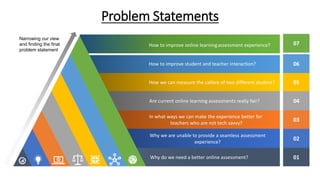
Problem Statements
Narrowing our view
and finding the final
problem statement
07
06
05
04
03
02
01
How to improve online learningassessment experience?
How to improve student and teacher interaction?
How we can measure the calibre of two different student?
Are current online learning assessments really fair?
In what ways we can make the experience better for
teachers who are not tech savvy?
Why we are unable to provide a seamless assessment
experience?
Why do we need a better online assessment?
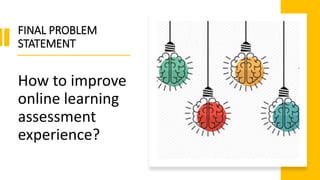
FINAL PROBLEM
STATEMENT
How to improve
online learning
assessment
experience?
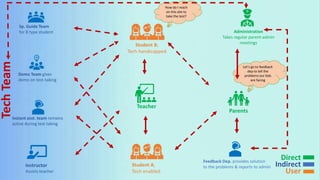
Student B;
Tech handicapped
Administration
Takes regular parent-admin
meetings
Parents
Teacher
Feedback Dep. provides solution
to the problems & reports to admin
Student A;
Tech enabled
Sp. Guide Team
for B type student
Demo Team gives
demo on test-taking
Instant asst. team remains
active during test taking
Instructor
Assists teacher
How do I reach
on this site to
take the test?
Let’s go to feedback
dep to tell the
problems our kids
are facing
Tech
Team
Direct
Indirect
User
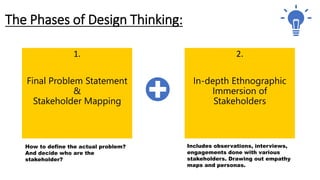
The Phases of Design Thinking:
1.
Final Problem Statement
&
Stakeholder Mapping
How to define the actual problem?
And decide who are the
stakeholder?
2.
In-depth Ethnographic
Immersion of
Stakeholders
Includes observations, interviews,
engagements done with various
stakeholders. Drawing out empathy
maps and personas.
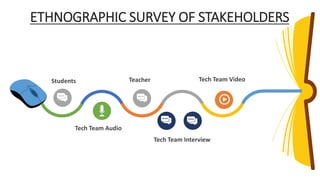
ETHNOGRAPHIC SURVEY OF STAKEHOLDERS
Tech Team Audio
Students
Tech Team Interview
Tech Team Video
Teacher
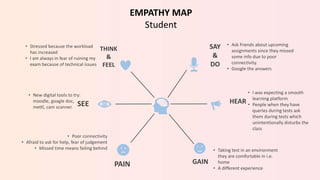
SAY
&
DO
HEAR
GAIN
THINK
&
FEEL
SEE
PAIN
• I was expecting a smooth
learning platform
• People when they have
queries during tests ask
them during tests which
unintentionally disturbs the
class
• Ask friends about upcoming
assignments since they missed
some info due to poor
connectivity.
• Google the answers
• Taking test in an environment
they are comfortable in i.e.
home
• A different experience
• Poor connectivity
• Afraid to ask for help, fear of judgement
• Missed time means failing behind
EMPATHY MAP
Student
• New digital tools to try:
moodle, google doc,
mettl, cam scanner.
• Stressed because the workload
has increased
• I am always in fear of ruining my
exam because of technical issues
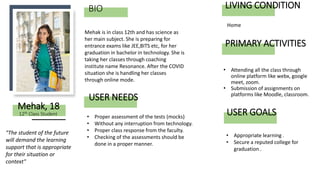
BIO
• Attending all the class through
online platform like webx, google
meet, zoom.
• Submission of assignments on
platforms like Moodle, classroom.
Mehak is in class 12th and has science as
her main subject. She is preparing for
entrance exams like JEE,BITS etc, for her
graduation in bachelor in technology. She is
taking her classes through coaching
institute name Resonance. After the COVID
situation she is handling her classes
through online mode.
Mehak, 18
USER NEEDS
"The student of the future
will demand the learning
support that is appropriate
for their situation or
context"
• Proper assessment of the tests (mocks)
• Without any interruption from technology.
• Proper class response from the faculty.
• Checking of the assessments should be
done in a proper manner.
12th Class Student
PRIMARY ACTIVITIES
LIVING CONDITION
Home
• Appropriate learning .
• Secure a reputed college for
graduation .
USER GOALS
SAY
&
DO
HEAR
GAIN
THINK
&
FEEL
SEE
PAIN
.
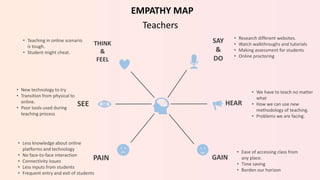
• Less knowledge about online
platforms and technology
• No face-to-face interaction
• Connectivity issues
• Less inputs from students
• Frequent entry and exit of students
• New technology to try
• Transition from physical to
online.
• Poor tools used during
teaching process
• Teaching in online scenario
is tough.
• Student might cheat.
EMPATHY MAP
Teachers
• We have to teach no matter
what
• How we can use new
methodology of teaching.
• Problems we are facing.
• Research different websites.
• Watch walkthroughs and tutorials
• Making assessment for students
• Online proctoring
• Ease of accessing class from
any place.
• Time saving
• Borden our horizon
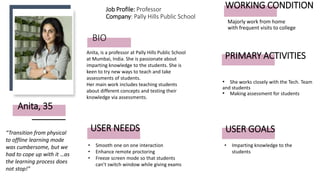
BIO
• She works closely with the Tech. Team
and students
• Making assessment for students
Anita, is a professor at Pally Hills Public School
at Mumbai, India. She is passionate about
imparting knowledge to the students. She is
keen to try new ways to teach and take
assessments of students.
Her main work includes teaching students
about different concepts and testing their
knowledge via assessments.
Anita, 35
USER NEEDS
“Transition from physical
to offline learning mode
was cumbersome, but we
had to cope up with it …as
the learning process does
not stop!”
• Smooth one on one interaction
• Enhance remote proctoring
• Freeze screen mode so that students
can’t switch window while giving exams
Job Profile: Professor
Company: Pally Hills Public School
PRIMARY ACTIVITIES
WORKING CONDITION
Majorly work from home
with frequent visits to college
• Imparting knowledge to the
students
USER GOALS
SAY
&
DO
HEAR
GAIN
THINK
&
FEEL
SEE
PAIN
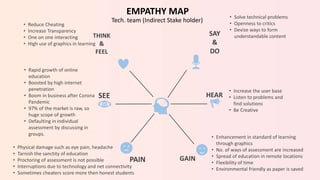
• Increase the user base
• Listen to problems and
find solutions
• Be Creative
• Enhancement in standard of learning
through graphics
• No. of ways of assessment are increased
• Spread of education in remote locations
• Flexibility of time
• Environmental friendly as paper is saved
• Physical damage such as eye pain, headache
• Tarnish the sanctity of education
• Proctoring of assessment is not possible
• Interruptions due to technology and net connectivity
• Sometimes cheaters score more then honest students
• Rapid growth of online
education
• Boosted by high internet
penetration
• Boom in business after Corona
Pandemic
• 97% of the market is raw, so
huge scope of growth
• Defaulting in individual
assessment by discussing in
groups.
• Reduce Cheating
• Increase Transparency
• One on one interacting
• High use of graphics in learning
EMPATHY MAP
Tech. team (Indirect Stake holder)
• Solve technical problems
• Openness to critics
• Devise ways to form
understandable content
BIO
• To be in regular touch with other
stakeholders like students and
teachers and respond to their
queries.
• To design the interface and tutorials
of the company.
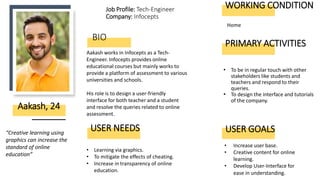
Aakash works in Infocepts as a Tech-
Engineer. Infocepts provides online
educational courses but mainly works to
provide a platform of assessment to various
universities and schools.
His role is to design a user-friendly
interface for both teacher and a student
and resolve the queries related to online
assessment.
Aakash, 24
USER NEEDS
“Creative learning using
graphics can increase the
standard of online
education”
• Learning via graphics.
• To mitigate the effects of cheating.
• Increase in transparency of online
education.
Job Profile: Tech-Engineer
Company: Infocepts
PRIMARY ACTIVITIES
WORKING CONDITION
Home
• Increase user base.
• Creative content for online
learning.
• Develop User-Interface for
ease in understanding.
USER GOALS
BIO
• Works as bridge between teachers,
students, parents and technical
team
• Responsible for smooth flow of
business with rapid expansion of
the business
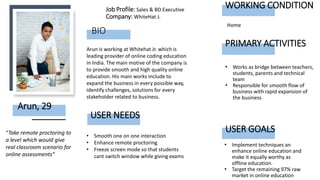
Arun is working at Whitehat Jr. which is
leading provider of online coding education
in India. The main motive of the company is
to provide smooth and high quality online
education. His main works include to
expand the business in every possible way,
identify challenges, solutions for every
stakeholder related to business.
Arun, 29
USER NEEDS
“Take remote proctoring to
a level which would give
real classroom scenario for
online assessments”
• Smooth one on one interaction
• Enhance remote proctoring
• Freeze screen mode so that students
cant switch window while giving exams
Job Profile: Sales & BD Executive
Company: WhiteHat Jr.
PRIMARY ACTIVITIES
WORKING CONDITION
Home
• Implement techniques an
enhance online education and
make it equally worthy as
offline education.
• Target the remaining 97% raw
market in online education
USER GOALS
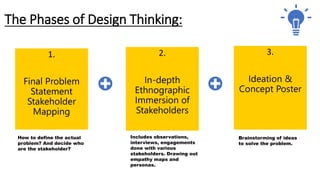
The Phases of Design Thinking:
1.
Final Problem
Statement
Stakeholder
Mapping
How to define the actual
problem? And decide who
are the stakeholder?
2.
In-depth
Ethnographic
Immersion of
Stakeholders
Includes observations,
interviews, engagements
done with various
stakeholders. Drawing out
empathy maps and
personas.
3.
Ideation &
Concept Poster
Brainstorming of ideas
to solve the problem.
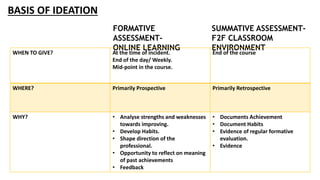
BASIS OF IDEATION
FORMATIVE
ASSESSMENT-
ONLINE LEARNING
SUMMATIVE ASSESSMENT-
F2F CLASSROOM
ENVIRONMENT
WHEN TO GIVE? At the time of incident.
End of the day/ Weekly.
Mid-point in the course.
End of the course
WHERE? Primarily Prospective Primarily Retrospective
WHY? • Analyse strengths and weaknesses
towards improving.
• Develop Habits.
• Shape direction of the
professional.
• Opportunity to reflect on meaning
of past achievements
• Feedback
• Documents Achievement
• Document Habits
• Evidence of regular formative
evaluation.
• Evidence
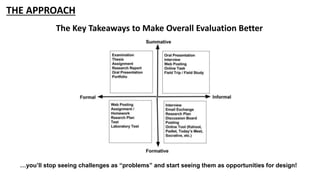
THE APPROACH
The Key Takeaways to Make Overall Evaluation Better
…you’ll stop seeing challenges as “problems” and start seeing them as opportunities for design!
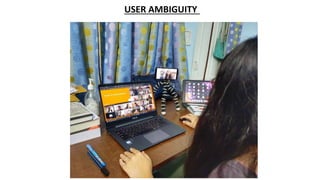
USER AMBIGUITY
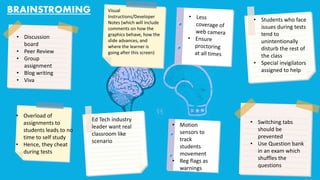
• Discussion
board
• Peer Review
• Group
assignment
• Blog writing
• Viva
Visual
Instructions/Developer
Notes (which will include
comments on how the
graphics behave, how the
slide advances, and
where the learner is
going after this screen)
• Overload of
assignments to
students leads to no
time to self study
• Hence, they cheat
during tests
Ed Tech industry
leader want real
classroom like
scenario
• Motion
sensors to
track
students
movement
• Reg flags as
warnings
• Students who face
issues during tests
tend to
unintentionally
disturb the rest of
the class
• Special invigilators
assigned to help
• Switching tabs
should be
prevented
• Use Question bank
in an exam which
shuffles the
questions
BRAINSTROMING
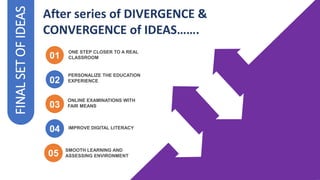
FINAL
SET
OF
IDEAS
02
02
PERSONALIZE THE EDUCATION
EXPERIENCE
04
ONLINE EXAMINATIONS WITH
FAIR MEANS
ONE STEP CLOSER TO A REAL
CLASSROOM
01
03
After series of DIVERGENCE &
CONVERGENCE of IDEAS…….
04
05 SMOOTH LEARNING AND
ASSESSING ENVIRONMENT
IMPROVE DIGITAL LITERACY
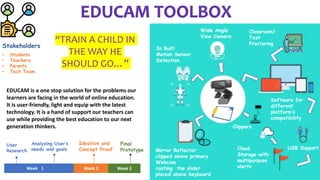
Week 11 Week 2 Week 3
Stakeholders
• Students
• Teachers
• Parents
• Tech Team
Wide Angle
View Camera
In Built
Motion Sensor
Detection
Classroom/
Test
Proctoring
Clippers
Mirror Reflector
clipped above primary
Webcam
casting the slider
placed above keyboard
Cloud
Storage with
multipurpose
alerts
Software for
different
platform’s
compatibility
USB Support
User
Research
Analyzing User’s
needs and goals
Ideation and
Concept Proof
Final
Prototype
“TRAIN A CHILD IN
THE WAY HE
SHOULD GO…”
EDUCAM is a one stop solution for the problems our
learners are facing in the world of online education.
It is user-friendly, light and equip with the latest
technology. It is a hand of support our teachers can
use while providing the best education to our next
generation thinkers.
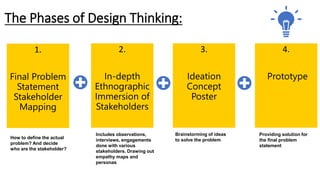
The Phases of Design Thinking:
1.
Final Problem
Statement
Stakeholder
Mapping
How to define the actual
problem? And decide
who are the stakeholder?
2.
In-depth
Ethnographic
Immersion of
Stakeholders
Includes observations,
interviews, engagements
done with various
stakeholders. Drawing out
empathy maps and
personas
3.
Ideation
Concept
Poster
Brainstorming of ideas
to solve the problem
4.
Prototype
Providing solution for
the final problem
statement
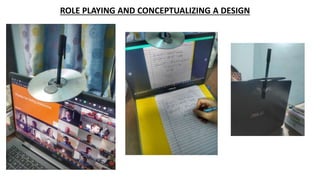
ROLE PLAYING AND CONCEPTUALIZING A DESIGN
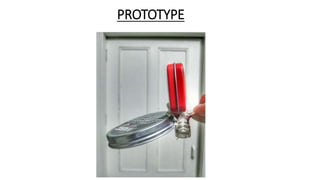
PROTOTYPE
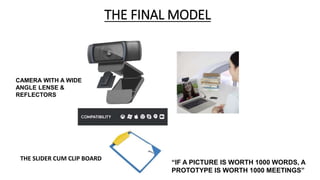
THE FINAL MODEL
“IF A PICTURE IS WORTH 1000 WORDS, A
PROTOTYPE IS WORTH 1000 MEETINGS”
CAMERA WITH A WIDE
ANGLE LENSE &
REFLECTORS
THE SLIDER CUM CLIP BOARD
Hardware
Software
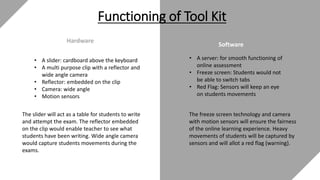
Functioning of Tool Kit
• A slider: cardboard above the keyboard
• A multi purpose clip with a reflector and
wide angle camera
• Reflector: embedded on the clip
• Camera: wide angle
• Motion sensors
The slider will act as a table for students to write
and attempt the exam. The reflector embedded
on the clip would enable teacher to see what
students have been writing. Wide angle camera
would capture students movements during the
exams.
• A server: for smooth functioning of
online assessment
• Freeze screen: Students would not
be able to switch tabs
• Red Flag: Sensors will keep an eye
on students movements
The freeze screen technology and camera
with motion sensors will ensure the fairness
of the online learning experience. Heavy
movements of students will be captured by
sensors and will allot a red flag (warning).
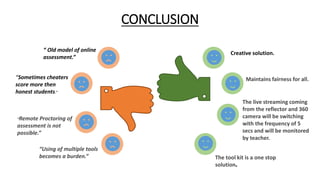
CONCLUSION
“ Old model of online
assessment.”
“Sometimes cheaters
score more then
honest students.”
“Remote Proctoring of
assessment is not
possible.”
“Using of multiple tools
becomes a burden.”
Creative solution.
Maintains fairness for all.
The live streaming coming
from the reflector and 360
camera will be switching
with the frequency of 5
secs and will be monitored
by teacher.
The tool kit is a one stop
solution.
THANK YOU !!

Design Thinking Online Assessment

  • 1.
    Design Thinking: OnlineAssessment By: Believers (Group 5) Utkarsh Mishra Vaibhav Arora Vicky Parmar Vrinda Maheshwari Shashwat Yadav Yogesh Sharma
  • 2.
    The Phases ofDesign Thinking: 1. Final Problem Statement Stakeholder Mapping. How to define the actual problem? And decide who are the stakeholder?
  • 3.
    Problem Statements Narrowing ourview and finding the final problem statement 07 06 05 04 03 02 01 How to improve online learningassessment experience? How to improve student and teacher interaction? How we can measure the calibre of two different student? Are current online learning assessments really fair? In what ways we can make the experience better for teachers who are not tech savvy? Why we are unable to provide a seamless assessment experience? Why do we need a better online assessment?
  • 4.
    FINAL PROBLEM STATEMENT How toimprove online learning assessment experience?
  • 5.
    Student B; Tech handicapped Administration Takesregular parent-admin meetings Parents Teacher Feedback Dep. provides solution to the problems & reports to admin Student A; Tech enabled Sp. Guide Team for B type student Demo Team gives demo on test-taking Instant asst. team remains active during test taking Instructor Assists teacher How do I reach on this site to take the test? Let’s go to feedback dep to tell the problems our kids are facing Tech Team Direct Indirect User
  • 6.
    The Phases ofDesign Thinking: 1. Final Problem Statement & Stakeholder Mapping How to define the actual problem? And decide who are the stakeholder? 2. In-depth Ethnographic Immersion of Stakeholders Includes observations, interviews, engagements done with various stakeholders. Drawing out empathy maps and personas.
  • 7.
    ETHNOGRAPHIC SURVEY OFSTAKEHOLDERS Tech Team Audio Students Tech Team Interview Tech Team Video Teacher
  • 8.
    SAY & DO HEAR GAIN THINK & FEEL SEE PAIN • I wasexpecting a smooth learning platform • People when they have queries during tests ask them during tests which unintentionally disturbs the class • Ask friends about upcoming assignments since they missed some info due to poor connectivity. • Google the answers • Taking test in an environment they are comfortable in i.e. home • A different experience • Poor connectivity • Afraid to ask for help, fear of judgement • Missed time means failing behind EMPATHY MAP Student • New digital tools to try: moodle, google doc, mettl, cam scanner. • Stressed because the workload has increased • I am always in fear of ruining my exam because of technical issues
  • 9.
    BIO • Attending allthe class through online platform like webx, google meet, zoom. • Submission of assignments on platforms like Moodle, classroom. Mehak is in class 12th and has science as her main subject. She is preparing for entrance exams like JEE,BITS etc, for her graduation in bachelor in technology. She is taking her classes through coaching institute name Resonance. After the COVID situation she is handling her classes through online mode. Mehak, 18 USER NEEDS "The student of the future will demand the learning support that is appropriate for their situation or context" • Proper assessment of the tests (mocks) • Without any interruption from technology. • Proper class response from the faculty. • Checking of the assessments should be done in a proper manner. 12th Class Student PRIMARY ACTIVITIES LIVING CONDITION Home • Appropriate learning . • Secure a reputed college for graduation . USER GOALS
  • 10.
    SAY & DO HEAR GAIN THINK & FEEL SEE PAIN . • Less knowledgeabout online platforms and technology • No face-to-face interaction • Connectivity issues • Less inputs from students • Frequent entry and exit of students • New technology to try • Transition from physical to online. • Poor tools used during teaching process • Teaching in online scenario is tough. • Student might cheat. EMPATHY MAP Teachers • We have to teach no matter what • How we can use new methodology of teaching. • Problems we are facing. • Research different websites. • Watch walkthroughs and tutorials • Making assessment for students • Online proctoring • Ease of accessing class from any place. • Time saving • Borden our horizon
  • 11.
    BIO • She worksclosely with the Tech. Team and students • Making assessment for students Anita, is a professor at Pally Hills Public School at Mumbai, India. She is passionate about imparting knowledge to the students. She is keen to try new ways to teach and take assessments of students. Her main work includes teaching students about different concepts and testing their knowledge via assessments. Anita, 35 USER NEEDS “Transition from physical to offline learning mode was cumbersome, but we had to cope up with it …as the learning process does not stop!” • Smooth one on one interaction • Enhance remote proctoring • Freeze screen mode so that students can’t switch window while giving exams Job Profile: Professor Company: Pally Hills Public School PRIMARY ACTIVITIES WORKING CONDITION Majorly work from home with frequent visits to college • Imparting knowledge to the students USER GOALS
  • 12.
    SAY & DO HEAR GAIN THINK & FEEL SEE PAIN • Increase theuser base • Listen to problems and find solutions • Be Creative • Enhancement in standard of learning through graphics • No. of ways of assessment are increased • Spread of education in remote locations • Flexibility of time • Environmental friendly as paper is saved • Physical damage such as eye pain, headache • Tarnish the sanctity of education • Proctoring of assessment is not possible • Interruptions due to technology and net connectivity • Sometimes cheaters score more then honest students • Rapid growth of online education • Boosted by high internet penetration • Boom in business after Corona Pandemic • 97% of the market is raw, so huge scope of growth • Defaulting in individual assessment by discussing in groups. • Reduce Cheating • Increase Transparency • One on one interacting • High use of graphics in learning EMPATHY MAP Tech. team (Indirect Stake holder) • Solve technical problems • Openness to critics • Devise ways to form understandable content
  • 13.
    BIO • To bein regular touch with other stakeholders like students and teachers and respond to their queries. • To design the interface and tutorials of the company. Aakash works in Infocepts as a Tech- Engineer. Infocepts provides online educational courses but mainly works to provide a platform of assessment to various universities and schools. His role is to design a user-friendly interface for both teacher and a student and resolve the queries related to online assessment. Aakash, 24 USER NEEDS “Creative learning using graphics can increase the standard of online education” • Learning via graphics. • To mitigate the effects of cheating. • Increase in transparency of online education. Job Profile: Tech-Engineer Company: Infocepts PRIMARY ACTIVITIES WORKING CONDITION Home • Increase user base. • Creative content for online learning. • Develop User-Interface for ease in understanding. USER GOALS
  • 14.
    BIO • Works asbridge between teachers, students, parents and technical team • Responsible for smooth flow of business with rapid expansion of the business Arun is working at Whitehat Jr. which is leading provider of online coding education in India. The main motive of the company is to provide smooth and high quality online education. His main works include to expand the business in every possible way, identify challenges, solutions for every stakeholder related to business. Arun, 29 USER NEEDS “Take remote proctoring to a level which would give real classroom scenario for online assessments” • Smooth one on one interaction • Enhance remote proctoring • Freeze screen mode so that students cant switch window while giving exams Job Profile: Sales & BD Executive Company: WhiteHat Jr. PRIMARY ACTIVITIES WORKING CONDITION Home • Implement techniques an enhance online education and make it equally worthy as offline education. • Target the remaining 97% raw market in online education USER GOALS
  • 15.
    The Phases ofDesign Thinking: 1. Final Problem Statement Stakeholder Mapping How to define the actual problem? And decide who are the stakeholder? 2. In-depth Ethnographic Immersion of Stakeholders Includes observations, interviews, engagements done with various stakeholders. Drawing out empathy maps and personas. 3. Ideation & Concept Poster Brainstorming of ideas to solve the problem.
  • 16.
    BASIS OF IDEATION FORMATIVE ASSESSMENT- ONLINELEARNING SUMMATIVE ASSESSMENT- F2F CLASSROOM ENVIRONMENT WHEN TO GIVE? At the time of incident. End of the day/ Weekly. Mid-point in the course. End of the course WHERE? Primarily Prospective Primarily Retrospective WHY? • Analyse strengths and weaknesses towards improving. • Develop Habits. • Shape direction of the professional. • Opportunity to reflect on meaning of past achievements • Feedback • Documents Achievement • Document Habits • Evidence of regular formative evaluation. • Evidence
  • 17.
    THE APPROACH The KeyTakeaways to Make Overall Evaluation Better …you’ll stop seeing challenges as “problems” and start seeing them as opportunities for design!
  • 18.
  • 19.
    • Discussion board • PeerReview • Group assignment • Blog writing • Viva Visual Instructions/Developer Notes (which will include comments on how the graphics behave, how the slide advances, and where the learner is going after this screen) • Overload of assignments to students leads to no time to self study • Hence, they cheat during tests Ed Tech industry leader want real classroom like scenario • Motion sensors to track students movement • Reg flags as warnings • Students who face issues during tests tend to unintentionally disturb the rest of the class • Special invigilators assigned to help • Switching tabs should be prevented • Use Question bank in an exam which shuffles the questions BRAINSTROMING
  • 20.
    FINAL SET OF IDEAS 02 02 PERSONALIZE THE EDUCATION EXPERIENCE 04 ONLINEEXAMINATIONS WITH FAIR MEANS ONE STEP CLOSER TO A REAL CLASSROOM 01 03 After series of DIVERGENCE & CONVERGENCE of IDEAS……. 04 05 SMOOTH LEARNING AND ASSESSING ENVIRONMENT IMPROVE DIGITAL LITERACY
  • 21.
    Week 11 Week2 Week 3 Stakeholders • Students • Teachers • Parents • Tech Team Wide Angle View Camera In Built Motion Sensor Detection Classroom/ Test Proctoring Clippers Mirror Reflector clipped above primary Webcam casting the slider placed above keyboard Cloud Storage with multipurpose alerts Software for different platform’s compatibility USB Support User Research Analyzing User’s needs and goals Ideation and Concept Proof Final Prototype “TRAIN A CHILD IN THE WAY HE SHOULD GO…” EDUCAM is a one stop solution for the problems our learners are facing in the world of online education. It is user-friendly, light and equip with the latest technology. It is a hand of support our teachers can use while providing the best education to our next generation thinkers.
  • 22.
    The Phases ofDesign Thinking: 1. Final Problem Statement Stakeholder Mapping How to define the actual problem? And decide who are the stakeholder? 2. In-depth Ethnographic Immersion of Stakeholders Includes observations, interviews, engagements done with various stakeholders. Drawing out empathy maps and personas 3. Ideation Concept Poster Brainstorming of ideas to solve the problem 4. Prototype Providing solution for the final problem statement
  • 23.
    ROLE PLAYING ANDCONCEPTUALIZING A DESIGN
  • 24.
  • 25.
    THE FINAL MODEL “IFA PICTURE IS WORTH 1000 WORDS, A PROTOTYPE IS WORTH 1000 MEETINGS” CAMERA WITH A WIDE ANGLE LENSE & REFLECTORS THE SLIDER CUM CLIP BOARD
  • 26.
    Hardware Software Functioning of ToolKit • A slider: cardboard above the keyboard • A multi purpose clip with a reflector and wide angle camera • Reflector: embedded on the clip • Camera: wide angle • Motion sensors The slider will act as a table for students to write and attempt the exam. The reflector embedded on the clip would enable teacher to see what students have been writing. Wide angle camera would capture students movements during the exams. • A server: for smooth functioning of online assessment • Freeze screen: Students would not be able to switch tabs • Red Flag: Sensors will keep an eye on students movements The freeze screen technology and camera with motion sensors will ensure the fairness of the online learning experience. Heavy movements of students will be captured by sensors and will allot a red flag (warning).
  • 27.
    CONCLUSION “ Old modelof online assessment.” “Sometimes cheaters score more then honest students.” “Remote Proctoring of assessment is not possible.” “Using of multiple tools becomes a burden.” Creative solution. Maintains fairness for all. The live streaming coming from the reflector and 360 camera will be switching with the frequency of 5 secs and will be monitored by teacher. The tool kit is a one stop solution.
  • 28.