Design Patterns and Refactoring
COMPOSING METHODS
Chapter 6
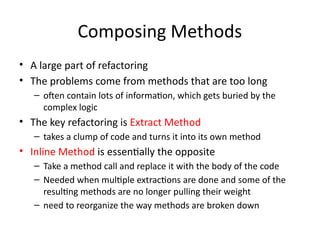
Composing Methods
• A large part of refactoring
• The problems come from methods that are too long
– often contain lots of information, which gets buried by the
complex logic
• The key refactoring is Extract Method
– takes a clump of code and turns it into its own method
• Inline Method is essentially the opposite
– Take a method call and replace it with the body of the code
– Needed when multiple extractions are done and some of the
resulting methods are no longer pulling their weight
– need to reorganize the way methods are broken down
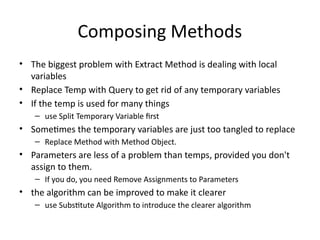
Composing Methods
• The biggest problem with Extract Method is dealing with local
variables
• Replace Temp with Query to get rid of any temporary variables
• If the temp is used for many things
– use Split Temporary Variable first
• Sometimes the temporary variables are just too tangled to replace
– Replace Method with Method Object.
• Parameters are less of a problem than temps, provided you don't
assign to them.
– If you do, you need Remove Assignments to Parameters
• the algorithm can be improved to make it clearer
– use Substitute Algorithm to introduce the clearer algorithm
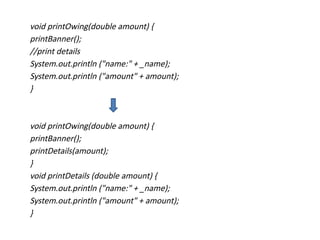
Extract Method
• You have a code fragment that can be grouped
together.
• Turn the fragment into a method whose name
explains the purpose of the method.
void printOwing(double amount) {
printBanner();
//print details
System.out.println ("name:" + _name);
System.out.println ("amount" + amount);
}
void printOwing(double amount) {
printBanner();
printDetails(amount);
}
void printDetails (double amount) {
System.out.println ("name:" + _name);
System.out.println ("amount" + amount);
}
Motivation
• one of the most common refactorings
• method that is too long or
• code that needs a comment to understand its purpose
– turn that fragment of code into its own method
• short, well-named methods
– increases the chances that other methods can use a method
– allows the higher-level methods to read more like a series of
comments
– Overriding also is easier
Mechanics
• Create a new method, and name it after the intention of the
method
– name it by what it does, not by how it does it
• Copy the extracted code from the source method into the
new target method
• Scan the extracted code for references to any variables that
are local in scope to the source method
– These are local variables and parameters to the method
• See whether any temporary variables are used only within
this extracted code
– If so, declare them in the target method as temporary variables
Mechanics
• Look to see whether any of these local-scope variables are modified by
the extracted code
– If one variable is modified, see whether you can treat the extracted code as a
query and assign the result to the variable concerned
– If this is awkward, or if there is more than one such variable, you can't extract the
method as it stands. You may need to use Split Temporary Variable and try again
– You can eliminate temporary variables with Replace Temp with Query
• Pass into the target method as parameters local-scope variables that are
read from the extracted code
• Compile when you have dealt with all the locally-scoped variables
• Replace the extracted code in the source method with a call to the target
method
• Compile and test
If the code you want to extract is very simple, such as a
single message or function call, you should extract it if
the name of the new method will reveal the intention
of the code in a better way. If you can‘t come up with a
more meaningful name, don't extract the code.
If you have moved any temporary variables over to
the target method, look to see whether they were
declared outside of the extracted code. If so, you
can now remove the declaration.
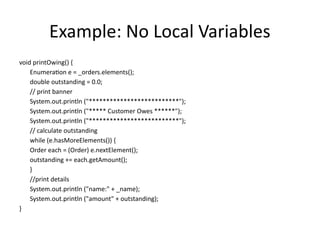
Example: No Local Variables
void printOwing() {
Enumeration e = _orders.elements();
double outstanding = 0.0;
// print banner
System.out.println ("**************************");
System.out.println ("***** Customer Owes ******");
System.out.println ("**************************");
// calculate outstanding
while (e.hasMoreElements()) {
Order each = (Order) e.nextElement();
outstanding += each.getAmount();
}
//print details
System.out.println ("name:" + _name);
System.out.println ("amount" + outstanding);
}
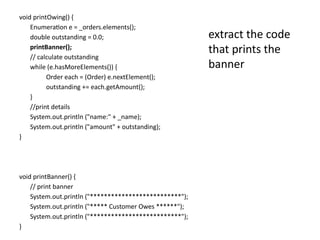
void printOwing() {
Enumeration e = _orders.elements();
double outstanding = 0.0;
printBanner();
// calculate outstanding
while (e.hasMoreElements()) {
Order each = (Order) e.nextElement();
outstanding += each.getAmount();
}
//print details
System.out.println ("name:" + _name);
System.out.println ("amount" + outstanding);
}
void printBanner() {
// print banner
System.out.println ("**************************");
System.out.println ("***** Customer Owes ******");
System.out.println ("**************************");
}
extract the code
that prints the
banner
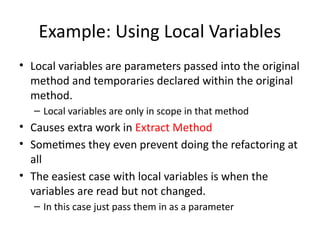
Example: Using Local Variables
• Local variables are parameters passed into the original
method and temporaries declared within the original
method.
– Local variables are only in scope in that method
• Causes extra work in Extract Method
• Sometimes they even prevent doing the refactoring at
all
• The easiest case with local variables is when the
variables are read but not changed.
– In this case just pass them in as a parameter
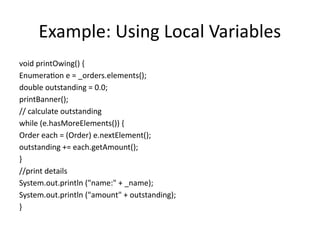
Example: Using Local Variables
void printOwing() {
Enumeration e = _orders.elements();
double outstanding = 0.0;
printBanner();
// calculate outstanding
while (e.hasMoreElements()) {
Order each = (Order) e.nextElement();
outstanding += each.getAmount();
}
//print details
System.out.println ("name:" + _name);
System.out.println ("amount" + outstanding);
}
void printOwing() {
Enumeration e = _orders.elements();
double outstanding = 0.0;
printBanner();
// calculate outstanding
while (e.hasMoreElements()) {
Order each = (Order) e.nextElement();
outstanding += each.getAmount();
}
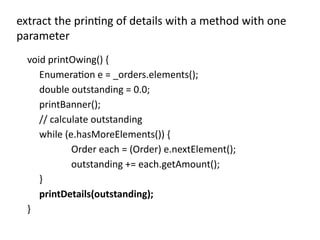
printDetails(outstanding);
}
extract the printing of details with a method with one
parameter
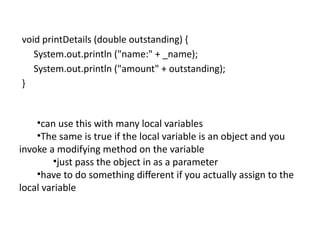
void printDetails (double outstanding) {
System.out.println ("name:" + _name);
System.out.println ("amount" + outstanding);
}
•can use this with many local variables
•The same is true if the local variable is an object and you
invoke a modifying method on the variable
•just pass the object in as a parameter
•have to do something different if you actually assign to the
local variable
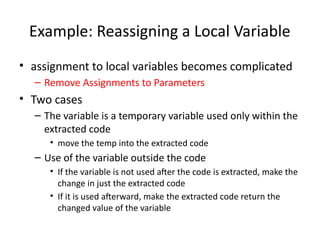
Example: Reassigning a Local Variable
• assignment to local variables becomes complicated
– Remove Assignments to Parameters
• Two cases
– The variable is a temporary variable used only within the
extracted code
• move the temp into the extracted code
– Use of the variable outside the code
• If the variable is not used after the code is extracted, make the
change in just the extracted code
• If it is used afterward, make the extracted code return the
changed value of the variable
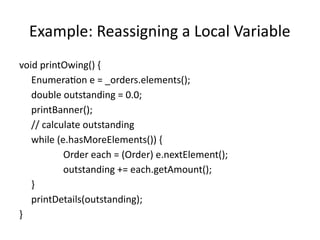
Example: Reassigning a Local Variable
void printOwing() {
Enumeration e = _orders.elements();
double outstanding = 0.0;
printBanner();
// calculate outstanding
while (e.hasMoreElements()) {
Order each = (Order) e.nextElement();
outstanding += each.getAmount();
}
printDetails(outstanding);
}
void printOwing() {
printBanner();
double outstanding = getOutstanding();
printDetails(outstanding);
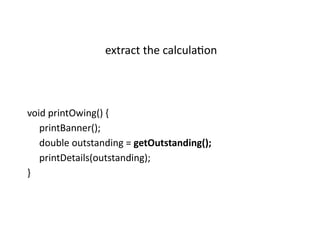
}
extract the calculation
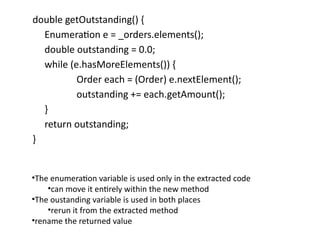
double getOutstanding() {
Enumeration e = _orders.elements();
double outstanding = 0.0;
while (e.hasMoreElements()) {
Order each = (Order) e.nextElement();
outstanding += each.getAmount();
}
return outstanding;
}
•The enumeration variable is used only in the extracted code
•can move it entirely within the new method
•The oustanding variable is used in both places
•rerun it from the extracted method
•rename the returned value
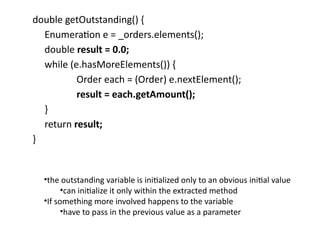
double getOutstanding() {
Enumeration e = _orders.elements();
double result = 0.0;
while (e.hasMoreElements()) {
Order each = (Order) e.nextElement();
result = each.getAmount();
}
return result;
}
•the outstanding variable is initialized only to an obvious initial value
•can initialize it only within the extracted method
•If something more involved happens to the variable
•have to pass in the previous value as a parameter
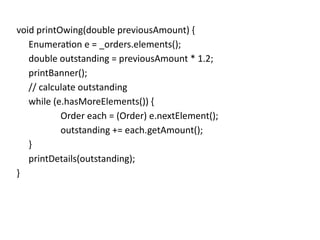
void printOwing(double previousAmount) {
Enumeration e = _orders.elements();
double outstanding = previousAmount * 1.2;
printBanner();
// calculate outstanding
while (e.hasMoreElements()) {
Order each = (Order) e.nextElement();
outstanding += each.getAmount();
}
printDetails(outstanding);
}
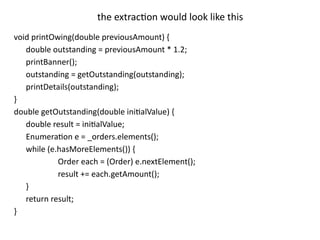
void printOwing(double previousAmount) {
double outstanding = previousAmount * 1.2;
printBanner();
outstanding = getOutstanding(outstanding);
printDetails(outstanding);
}
double getOutstanding(double initialValue) {
double result = initialValue;
Enumeration e = _orders.elements();
while (e.hasMoreElements()) {
Order each = (Order) e.nextElement();
result += each.getAmount();
}
return result;
}
the extraction would look like this
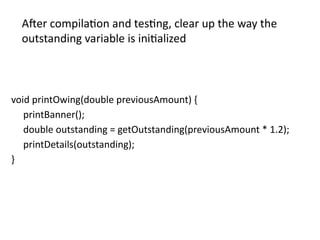
void printOwing(double previousAmount) {
printBanner();
double outstanding = getOutstanding(previousAmount * 1.2);
printDetails(outstanding);
}
After compilation and testing, clear up the way the
outstanding variable is initialized
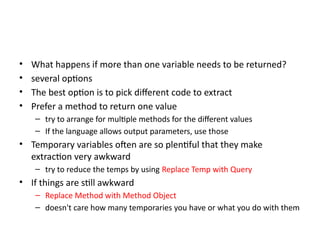
• What happens if more than one variable needs to be returned?
• several options
• The best option is to pick different code to extract
• Prefer a method to return one value
– try to arrange for multiple methods for the different values
– If the language allows output parameters, use those
• Temporary variables often are so plentiful that they make
extraction very awkward
– try to reduce the temps by using Replace Temp with Query
• If things are still awkward
– Replace Method with Method Object
– doesn't care how many temporaries you have or what you do with them
INLINE METHOD
Inline Method
• A method's body is just as clear as its name.
• Put the method's body into the body of its
callers and remove the method.
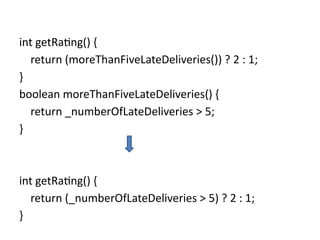
int getRating() {
return (moreThanFiveLateDeliveries()) ? 2 : 1;
}
boolean moreThanFiveLateDeliveries() {
return _numberOfLateDeliveries > 5;
}
int getRating() {
return (_numberOfLateDeliveries > 5) ? 2 : 1;
}
Motivation
• You come across a method in which the body is as
clear as the name.
– Or you refactor the body of the code into something that
is just as clear as the name.
– get rid of the method
• Indirection can be helpful
– but needless indirection is irritating
• a group of methods that seem badly factored
– inline them all into one big method and then reextract
the methods
Mechanics
• Check that the method is not polymorphic
• Find all calls to the method
• Replace each call with the method body
• Compile and test
• Remove the method definition
• Inline Method is not simple
– Handling recursion, multiple return points, inlining into
another object when you don't have accessors, and the like.
– if you encounter these complexities, you shouldn't do this
refactoring
Don't inline if subclasses override the method;
they cannot override a method that isn't there.
INLINE TEMP
Inline Temp
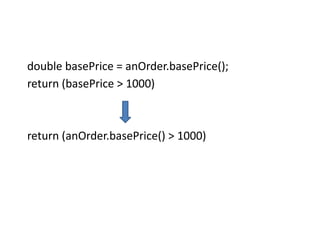
• You have a temp that is assigned to once with
a simple expression, and the temp is getting in
the way of other refactorings.
• Replace all references to that temp with the
expression.
double basePrice = anOrder.basePrice();
return (basePrice > 1000)
return (anOrder.basePrice() > 1000)
Motivation
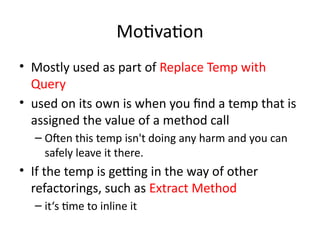
• Mostly used as part of Replace Temp with
Query
• used on its own is when you find a temp that is
assigned the value of a method call
– Often this temp isn't doing any harm and you can
safely leave it there.
• If the temp is getting in the way of other
refactorings, such as Extract Method
– it‘s time to inline it
Mechanics
• Declare the temp as final if it isn't already, and
compile
– This checks that the temp is really only assigned to once
• Find all references to the temp and replace them
with the right-hand side of the assignment
• Compile and test after each change
• Remove the declaration and the assignment of the
temp
• Compile and test
REPLACE TEMP WITH QUERY
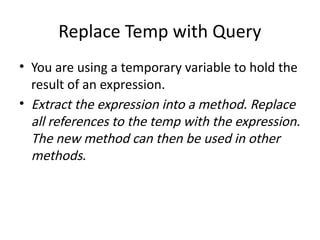
Replace Temp with Query
• You are using a temporary variable to hold the
result of an expression.
• Extract the expression into a method. Replace
all references to the temp with the expression.
The new method can then be used in other
methods.
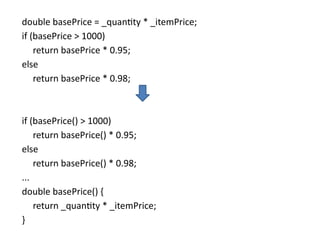
double basePrice = _quantity * _itemPrice;
if (basePrice > 1000)
return basePrice * 0.95;
else
return basePrice * 0.98;
if (basePrice() > 1000)
return basePrice() * 0.95;
else
return basePrice() * 0.98;
...
double basePrice() {
return _quantity * _itemPrice;
}
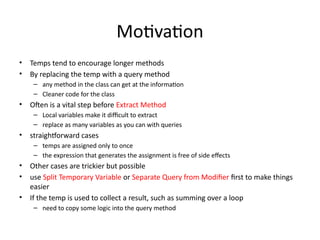
Motivation
• Temps tend to encourage longer methods
• By replacing the temp with a query method
– any method in the class can get at the information
– Cleaner code for the class
• Often is a vital step before Extract Method
– Local variables make it difficult to extract
– replace as many variables as you can with queries
• straightforward cases
– temps are assigned only to once
– the expression that generates the assignment is free of side effects
• Other cases are trickier but possible
• use Split Temporary Variable or Separate Query from Modifier first to make things
easier
• If the temp is used to collect a result, such as summing over a loop
– need to copy some logic into the query method
Mechanics
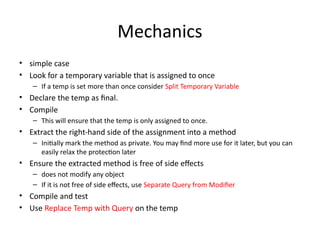
• simple case
• Look for a temporary variable that is assigned to once
– If a temp is set more than once consider Split Temporary Variable
• Declare the temp as final.
• Compile
– This will ensure that the temp is only assigned to once.
• Extract the right-hand side of the assignment into a method
– Initially mark the method as private. You may find more use for it later, but you can
easily relax the protection later
• Ensure the extracted method is free of side effects
– does not modify any object
– If it is not free of side effects, use Separate Query from Modifier
• Compile and test
• Use Replace Temp with Query on the temp
Mechanics
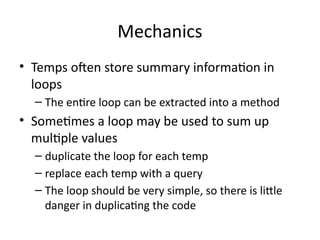
• Temps often store summary information in
loops
– The entire loop can be extracted into a method
• Sometimes a loop may be used to sum up
multiple values
– duplicate the loop for each temp
– replace each temp with a query
– The loop should be very simple, so there is little
danger in duplicating the code
Example
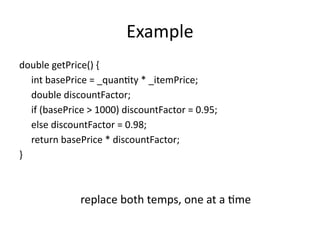
double getPrice() {
int basePrice = _quantity * _itemPrice;
double discountFactor;
if (basePrice > 1000) discountFactor = 0.95;
else discountFactor = 0.98;
return basePrice * discountFactor;
}
replace both temps, one at a time
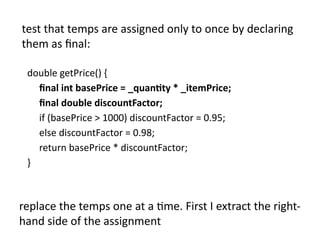
double getPrice() {
final int basePrice = _quantity * _itemPrice;
final double discountFactor;
if (basePrice > 1000) discountFactor = 0.95;
else discountFactor = 0.98;
return basePrice * discountFactor;
}
test that temps are assigned only to once by declaring
them as final:
replace the temps one at a time. First I extract the right-
hand side of the assignment
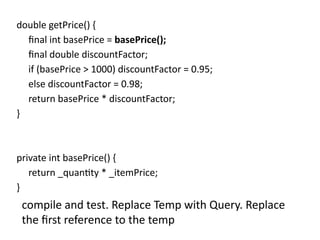
double getPrice() {
final int basePrice = basePrice();
final double discountFactor;
if (basePrice > 1000) discountFactor = 0.95;
else discountFactor = 0.98;
return basePrice * discountFactor;
}
private int basePrice() {
return _quantity * _itemPrice;
}
compile and test. Replace Temp with Query. Replace
the first reference to the temp
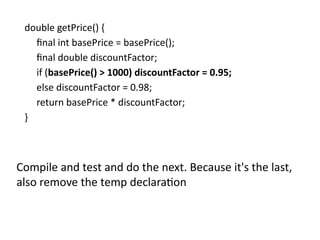
double getPrice() {
final int basePrice = basePrice();
final double discountFactor;
if (basePrice() > 1000) discountFactor = 0.95;
else discountFactor = 0.98;
return basePrice * discountFactor;
}
Compile and test and do the next. Because it's the last,
also remove the temp declaration
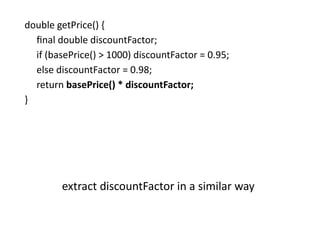
double getPrice() {
final double discountFactor;
if (basePrice() > 1000) discountFactor = 0.95;
else discountFactor = 0.98;
return basePrice() * discountFactor;
}
extract discountFactor in a similar way
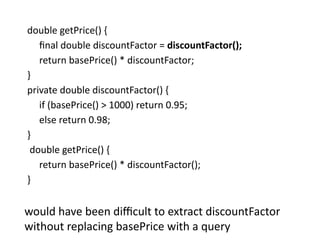
double getPrice() {
final double discountFactor = discountFactor();
return basePrice() * discountFactor;
}
private double discountFactor() {
if (basePrice() > 1000) return 0.95;
else return 0.98;
}
double getPrice() {
return basePrice() * discountFactor();
}
would have been difficult to extract discountFactor
without replacing basePrice with a query
INTRODUCE EXPLAINING VARIABLE
Introduce Explaining Variable
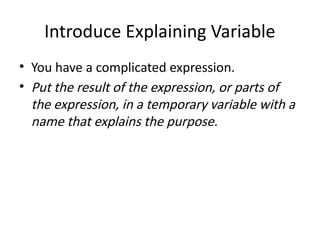
• You have a complicated expression.
• Put the result of the expression, or parts of
the expression, in a temporary variable with a
name that explains the purpose.
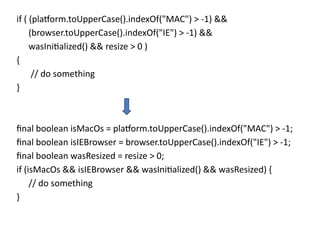
if ( (platform.toUpperCase().indexOf("MAC") > -1) &&
(browser.toUpperCase().indexOf("IE") > -1) &&
wasInitialized() && resize > 0 )
{
// do something
}
final boolean isMacOs = platform.toUpperCase().indexOf("MAC") > -1;
final boolean isIEBrowser = browser.toUpperCase().indexOf("IE") > -1;
final boolean wasResized = resize > 0;
if (isMacOs && isIEBrowser && wasInitialized() && wasResized) {
// do something
}
Motivation
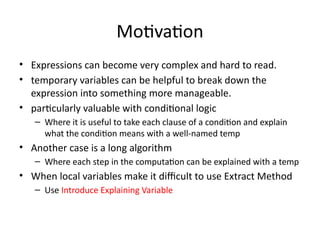
• Expressions can become very complex and hard to read.
• temporary variables can be helpful to break down the
expression into something more manageable.
• particularly valuable with conditional logic
– Where it is useful to take each clause of a condition and explain
what the condition means with a well-named temp
• Another case is a long algorithm
– Where each step in the computation can be explained with a temp
• When local variables make it difficult to use Extract Method
– Use Introduce Explaining Variable
Mechanics
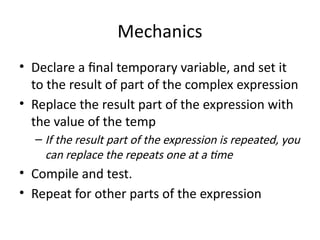
• Declare a final temporary variable, and set it
to the result of part of the complex expression
• Replace the result part of the expression with
the value of the temp
– If the result part of the expression is repeated, you
can replace the repeats one at a time
• Compile and test.
• Repeat for other parts of the expression
Example
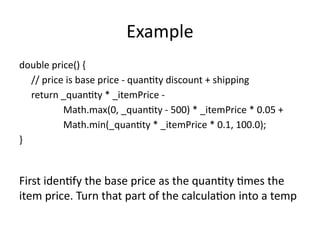
double price() {
// price is base price - quantity discount + shipping
return _quantity * _itemPrice -
Math.max(0, _quantity - 500) * _itemPrice * 0.05 +
Math.min(_quantity * _itemPrice * 0.1, 100.0);
}
First identify the base price as the quantity times the
item price. Turn that part of the calculation into a temp
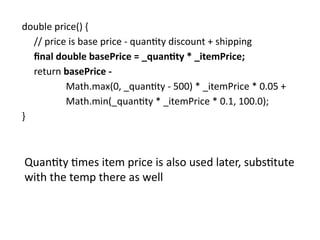
double price() {
// price is base price - quantity discount + shipping
final double basePrice = _quantity * _itemPrice;
return basePrice -
Math.max(0, _quantity - 500) * _itemPrice * 0.05 +
Math.min(_quantity * _itemPrice * 0.1, 100.0);
}
Quantity times item price is also used later, substitute
with the temp there as well
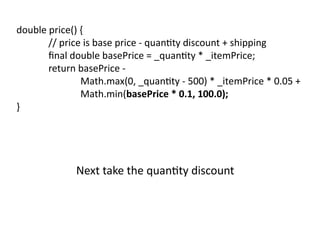
double price() {
// price is base price - quantity discount + shipping
final double basePrice = _quantity * _itemPrice;
return basePrice -
Math.max(0, _quantity - 500) * _itemPrice * 0.05 +
Math.min(basePrice * 0.1, 100.0);
}
Next take the quantity discount
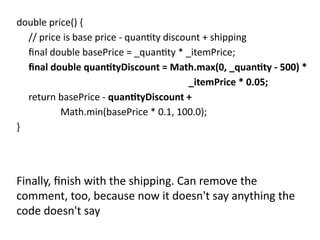
double price() {
// price is base price - quantity discount + shipping
final double basePrice = _quantity * _itemPrice;
final double quantityDiscount = Math.max(0, _quantity - 500) *
_itemPrice * 0.05;
return basePrice - quantityDiscount +
Math.min(basePrice * 0.1, 100.0);
}
Finally, finish with the shipping. Can remove the
comment, too, because now it doesn't say anything the
code doesn't say
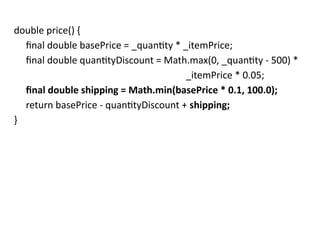
double price() {
final double basePrice = _quantity * _itemPrice;
final double quantityDiscount = Math.max(0, _quantity - 500) *
_itemPrice * 0.05;
final double shipping = Math.min(basePrice * 0.1, 100.0);
return basePrice - quantityDiscount + shipping;
}
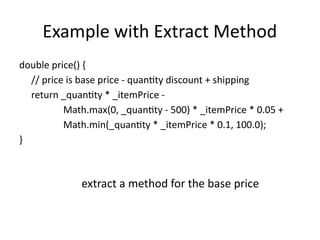
Example with Extract Method
double price() {
// price is base price - quantity discount + shipping
return _quantity * _itemPrice -
Math.max(0, _quantity - 500) * _itemPrice * 0.05 +
Math.min(_quantity * _itemPrice * 0.1, 100.0);
}
extract a method for the base price
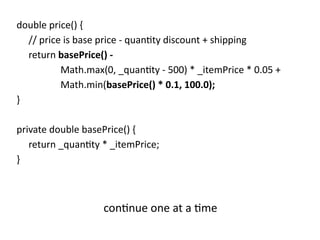
double price() {
// price is base price - quantity discount + shipping
return basePrice() -
Math.max(0, _quantity - 500) * _itemPrice * 0.05 +
Math.min(basePrice() * 0.1, 100.0);
}
private double basePrice() {
return _quantity * _itemPrice;
}
continue one at a time
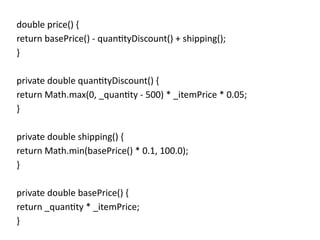
double price() {
return basePrice() - quantityDiscount() + shipping();
}
private double quantityDiscount() {
return Math.max(0, _quantity - 500) * _itemPrice * 0.05;
}
private double shipping() {
return Math.min(basePrice() * 0.1, 100.0);
}
private double basePrice() {
return _quantity * _itemPrice;
}
Discussion
• Prefer Extract Method
– Methods are available to any other part of the object
– Initially make them private
• Use Introduce Explaining Variable when Extract
Method is more effort
• An algorithm with a lot of local variables
– May not easy to use Extract Method
– Use Introduce Explaining Variable
• The temp also is valuable with Replace Method with
Method Object

Design patterns and refactoring series 1

  • 1.
  • 2.
  • 3.
    Composing Methods • Alarge part of refactoring • The problems come from methods that are too long – often contain lots of information, which gets buried by the complex logic • The key refactoring is Extract Method – takes a clump of code and turns it into its own method • Inline Method is essentially the opposite – Take a method call and replace it with the body of the code – Needed when multiple extractions are done and some of the resulting methods are no longer pulling their weight – need to reorganize the way methods are broken down
  • 4.
    Composing Methods • Thebiggest problem with Extract Method is dealing with local variables • Replace Temp with Query to get rid of any temporary variables • If the temp is used for many things – use Split Temporary Variable first • Sometimes the temporary variables are just too tangled to replace – Replace Method with Method Object. • Parameters are less of a problem than temps, provided you don't assign to them. – If you do, you need Remove Assignments to Parameters • the algorithm can be improved to make it clearer – use Substitute Algorithm to introduce the clearer algorithm
  • 5.
    Extract Method • Youhave a code fragment that can be grouped together. • Turn the fragment into a method whose name explains the purpose of the method.
  • 6.
    void printOwing(double amount){ printBanner(); //print details System.out.println ("name:" + _name); System.out.println ("amount" + amount); } void printOwing(double amount) { printBanner(); printDetails(amount); } void printDetails (double amount) { System.out.println ("name:" + _name); System.out.println ("amount" + amount); }
  • 7.
    Motivation • one ofthe most common refactorings • method that is too long or • code that needs a comment to understand its purpose – turn that fragment of code into its own method • short, well-named methods – increases the chances that other methods can use a method – allows the higher-level methods to read more like a series of comments – Overriding also is easier
  • 8.
    Mechanics • Create anew method, and name it after the intention of the method – name it by what it does, not by how it does it • Copy the extracted code from the source method into the new target method • Scan the extracted code for references to any variables that are local in scope to the source method – These are local variables and parameters to the method • See whether any temporary variables are used only within this extracted code – If so, declare them in the target method as temporary variables
  • 9.
    Mechanics • Look tosee whether any of these local-scope variables are modified by the extracted code – If one variable is modified, see whether you can treat the extracted code as a query and assign the result to the variable concerned – If this is awkward, or if there is more than one such variable, you can't extract the method as it stands. You may need to use Split Temporary Variable and try again – You can eliminate temporary variables with Replace Temp with Query • Pass into the target method as parameters local-scope variables that are read from the extracted code • Compile when you have dealt with all the locally-scoped variables • Replace the extracted code in the source method with a call to the target method • Compile and test
  • 10.
    If the codeyou want to extract is very simple, such as a single message or function call, you should extract it if the name of the new method will reveal the intention of the code in a better way. If you can‘t come up with a more meaningful name, don't extract the code.
  • 11.
    If you havemoved any temporary variables over to the target method, look to see whether they were declared outside of the extracted code. If so, you can now remove the declaration.
  • 12.
    Example: No LocalVariables void printOwing() { Enumeration e = _orders.elements(); double outstanding = 0.0; // print banner System.out.println ("**************************"); System.out.println ("***** Customer Owes ******"); System.out.println ("**************************"); // calculate outstanding while (e.hasMoreElements()) { Order each = (Order) e.nextElement(); outstanding += each.getAmount(); } //print details System.out.println ("name:" + _name); System.out.println ("amount" + outstanding); }
  • 13.
    void printOwing() { Enumeratione = _orders.elements(); double outstanding = 0.0; printBanner(); // calculate outstanding while (e.hasMoreElements()) { Order each = (Order) e.nextElement(); outstanding += each.getAmount(); } //print details System.out.println ("name:" + _name); System.out.println ("amount" + outstanding); } void printBanner() { // print banner System.out.println ("**************************"); System.out.println ("***** Customer Owes ******"); System.out.println ("**************************"); } extract the code that prints the banner
  • 14.
    Example: Using LocalVariables • Local variables are parameters passed into the original method and temporaries declared within the original method. – Local variables are only in scope in that method • Causes extra work in Extract Method • Sometimes they even prevent doing the refactoring at all • The easiest case with local variables is when the variables are read but not changed. – In this case just pass them in as a parameter
  • 15.
    Example: Using LocalVariables void printOwing() { Enumeration e = _orders.elements(); double outstanding = 0.0; printBanner(); // calculate outstanding while (e.hasMoreElements()) { Order each = (Order) e.nextElement(); outstanding += each.getAmount(); } //print details System.out.println ("name:" + _name); System.out.println ("amount" + outstanding); }
  • 16.
    void printOwing() { Enumeratione = _orders.elements(); double outstanding = 0.0; printBanner(); // calculate outstanding while (e.hasMoreElements()) { Order each = (Order) e.nextElement(); outstanding += each.getAmount(); } printDetails(outstanding); } extract the printing of details with a method with one parameter
  • 17.
    void printDetails (doubleoutstanding) { System.out.println ("name:" + _name); System.out.println ("amount" + outstanding); } •can use this with many local variables •The same is true if the local variable is an object and you invoke a modifying method on the variable •just pass the object in as a parameter •have to do something different if you actually assign to the local variable
  • 18.
    Example: Reassigning aLocal Variable • assignment to local variables becomes complicated – Remove Assignments to Parameters • Two cases – The variable is a temporary variable used only within the extracted code • move the temp into the extracted code – Use of the variable outside the code • If the variable is not used after the code is extracted, make the change in just the extracted code • If it is used afterward, make the extracted code return the changed value of the variable
  • 19.
    Example: Reassigning aLocal Variable void printOwing() { Enumeration e = _orders.elements(); double outstanding = 0.0; printBanner(); // calculate outstanding while (e.hasMoreElements()) { Order each = (Order) e.nextElement(); outstanding += each.getAmount(); } printDetails(outstanding); }
  • 20.
    void printOwing() { printBanner(); doubleoutstanding = getOutstanding(); printDetails(outstanding); } extract the calculation
  • 21.
    double getOutstanding() { Enumeratione = _orders.elements(); double outstanding = 0.0; while (e.hasMoreElements()) { Order each = (Order) e.nextElement(); outstanding += each.getAmount(); } return outstanding; } •The enumeration variable is used only in the extracted code •can move it entirely within the new method •The oustanding variable is used in both places •rerun it from the extracted method •rename the returned value
  • 22.
    double getOutstanding() { Enumeratione = _orders.elements(); double result = 0.0; while (e.hasMoreElements()) { Order each = (Order) e.nextElement(); result = each.getAmount(); } return result; } •the outstanding variable is initialized only to an obvious initial value •can initialize it only within the extracted method •If something more involved happens to the variable •have to pass in the previous value as a parameter
  • 23.
    void printOwing(double previousAmount){ Enumeration e = _orders.elements(); double outstanding = previousAmount * 1.2; printBanner(); // calculate outstanding while (e.hasMoreElements()) { Order each = (Order) e.nextElement(); outstanding += each.getAmount(); } printDetails(outstanding); }
  • 24.
    void printOwing(double previousAmount){ double outstanding = previousAmount * 1.2; printBanner(); outstanding = getOutstanding(outstanding); printDetails(outstanding); } double getOutstanding(double initialValue) { double result = initialValue; Enumeration e = _orders.elements(); while (e.hasMoreElements()) { Order each = (Order) e.nextElement(); result += each.getAmount(); } return result; } the extraction would look like this
  • 25.
    void printOwing(double previousAmount){ printBanner(); double outstanding = getOutstanding(previousAmount * 1.2); printDetails(outstanding); } After compilation and testing, clear up the way the outstanding variable is initialized
  • 26.
    • What happensif more than one variable needs to be returned? • several options • The best option is to pick different code to extract • Prefer a method to return one value – try to arrange for multiple methods for the different values – If the language allows output parameters, use those • Temporary variables often are so plentiful that they make extraction very awkward – try to reduce the temps by using Replace Temp with Query • If things are still awkward – Replace Method with Method Object – doesn't care how many temporaries you have or what you do with them
  • 27.
  • 28.
    Inline Method • Amethod's body is just as clear as its name. • Put the method's body into the body of its callers and remove the method.
  • 29.
    int getRating() { return(moreThanFiveLateDeliveries()) ? 2 : 1; } boolean moreThanFiveLateDeliveries() { return _numberOfLateDeliveries > 5; } int getRating() { return (_numberOfLateDeliveries > 5) ? 2 : 1; }
  • 30.
    Motivation • You comeacross a method in which the body is as clear as the name. – Or you refactor the body of the code into something that is just as clear as the name. – get rid of the method • Indirection can be helpful – but needless indirection is irritating • a group of methods that seem badly factored – inline them all into one big method and then reextract the methods
  • 31.
    Mechanics • Check thatthe method is not polymorphic • Find all calls to the method • Replace each call with the method body • Compile and test • Remove the method definition • Inline Method is not simple – Handling recursion, multiple return points, inlining into another object when you don't have accessors, and the like. – if you encounter these complexities, you shouldn't do this refactoring
  • 32.
    Don't inline ifsubclasses override the method; they cannot override a method that isn't there.
  • 33.
  • 34.
    Inline Temp • Youhave a temp that is assigned to once with a simple expression, and the temp is getting in the way of other refactorings. • Replace all references to that temp with the expression.
  • 35.
    double basePrice =anOrder.basePrice(); return (basePrice > 1000) return (anOrder.basePrice() > 1000)
  • 36.
    Motivation • Mostly usedas part of Replace Temp with Query • used on its own is when you find a temp that is assigned the value of a method call – Often this temp isn't doing any harm and you can safely leave it there. • If the temp is getting in the way of other refactorings, such as Extract Method – it‘s time to inline it
  • 37.
    Mechanics • Declare thetemp as final if it isn't already, and compile – This checks that the temp is really only assigned to once • Find all references to the temp and replace them with the right-hand side of the assignment • Compile and test after each change • Remove the declaration and the assignment of the temp • Compile and test
  • 38.
  • 39.
    Replace Temp withQuery • You are using a temporary variable to hold the result of an expression. • Extract the expression into a method. Replace all references to the temp with the expression. The new method can then be used in other methods.
  • 40.
    double basePrice =_quantity * _itemPrice; if (basePrice > 1000) return basePrice * 0.95; else return basePrice * 0.98; if (basePrice() > 1000) return basePrice() * 0.95; else return basePrice() * 0.98; ... double basePrice() { return _quantity * _itemPrice; }
  • 41.
    Motivation • Temps tendto encourage longer methods • By replacing the temp with a query method – any method in the class can get at the information – Cleaner code for the class • Often is a vital step before Extract Method – Local variables make it difficult to extract – replace as many variables as you can with queries • straightforward cases – temps are assigned only to once – the expression that generates the assignment is free of side effects • Other cases are trickier but possible • use Split Temporary Variable or Separate Query from Modifier first to make things easier • If the temp is used to collect a result, such as summing over a loop – need to copy some logic into the query method
  • 42.
    Mechanics • simple case •Look for a temporary variable that is assigned to once – If a temp is set more than once consider Split Temporary Variable • Declare the temp as final. • Compile – This will ensure that the temp is only assigned to once. • Extract the right-hand side of the assignment into a method – Initially mark the method as private. You may find more use for it later, but you can easily relax the protection later • Ensure the extracted method is free of side effects – does not modify any object – If it is not free of side effects, use Separate Query from Modifier • Compile and test • Use Replace Temp with Query on the temp
  • 43.
    Mechanics • Temps oftenstore summary information in loops – The entire loop can be extracted into a method • Sometimes a loop may be used to sum up multiple values – duplicate the loop for each temp – replace each temp with a query – The loop should be very simple, so there is little danger in duplicating the code
  • 44.
    Example double getPrice() { intbasePrice = _quantity * _itemPrice; double discountFactor; if (basePrice > 1000) discountFactor = 0.95; else discountFactor = 0.98; return basePrice * discountFactor; } replace both temps, one at a time
  • 45.
    double getPrice() { finalint basePrice = _quantity * _itemPrice; final double discountFactor; if (basePrice > 1000) discountFactor = 0.95; else discountFactor = 0.98; return basePrice * discountFactor; } test that temps are assigned only to once by declaring them as final: replace the temps one at a time. First I extract the right- hand side of the assignment
  • 46.
    double getPrice() { finalint basePrice = basePrice(); final double discountFactor; if (basePrice > 1000) discountFactor = 0.95; else discountFactor = 0.98; return basePrice * discountFactor; } private int basePrice() { return _quantity * _itemPrice; } compile and test. Replace Temp with Query. Replace the first reference to the temp
  • 47.
    double getPrice() { finalint basePrice = basePrice(); final double discountFactor; if (basePrice() > 1000) discountFactor = 0.95; else discountFactor = 0.98; return basePrice * discountFactor; } Compile and test and do the next. Because it's the last, also remove the temp declaration
  • 48.
    double getPrice() { finaldouble discountFactor; if (basePrice() > 1000) discountFactor = 0.95; else discountFactor = 0.98; return basePrice() * discountFactor; } extract discountFactor in a similar way
  • 49.
    double getPrice() { finaldouble discountFactor = discountFactor(); return basePrice() * discountFactor; } private double discountFactor() { if (basePrice() > 1000) return 0.95; else return 0.98; } double getPrice() { return basePrice() * discountFactor(); } would have been difficult to extract discountFactor without replacing basePrice with a query
  • 50.
  • 51.
    Introduce Explaining Variable •You have a complicated expression. • Put the result of the expression, or parts of the expression, in a temporary variable with a name that explains the purpose.
  • 52.
    if ( (platform.toUpperCase().indexOf("MAC")> -1) && (browser.toUpperCase().indexOf("IE") > -1) && wasInitialized() && resize > 0 ) { // do something } final boolean isMacOs = platform.toUpperCase().indexOf("MAC") > -1; final boolean isIEBrowser = browser.toUpperCase().indexOf("IE") > -1; final boolean wasResized = resize > 0; if (isMacOs && isIEBrowser && wasInitialized() && wasResized) { // do something }
  • 53.
    Motivation • Expressions canbecome very complex and hard to read. • temporary variables can be helpful to break down the expression into something more manageable. • particularly valuable with conditional logic – Where it is useful to take each clause of a condition and explain what the condition means with a well-named temp • Another case is a long algorithm – Where each step in the computation can be explained with a temp • When local variables make it difficult to use Extract Method – Use Introduce Explaining Variable
  • 54.
    Mechanics • Declare afinal temporary variable, and set it to the result of part of the complex expression • Replace the result part of the expression with the value of the temp – If the result part of the expression is repeated, you can replace the repeats one at a time • Compile and test. • Repeat for other parts of the expression
  • 55.
    Example double price() { //price is base price - quantity discount + shipping return _quantity * _itemPrice - Math.max(0, _quantity - 500) * _itemPrice * 0.05 + Math.min(_quantity * _itemPrice * 0.1, 100.0); } First identify the base price as the quantity times the item price. Turn that part of the calculation into a temp
  • 56.
    double price() { //price is base price - quantity discount + shipping final double basePrice = _quantity * _itemPrice; return basePrice - Math.max(0, _quantity - 500) * _itemPrice * 0.05 + Math.min(_quantity * _itemPrice * 0.1, 100.0); } Quantity times item price is also used later, substitute with the temp there as well
  • 57.
    double price() { //price is base price - quantity discount + shipping final double basePrice = _quantity * _itemPrice; return basePrice - Math.max(0, _quantity - 500) * _itemPrice * 0.05 + Math.min(basePrice * 0.1, 100.0); } Next take the quantity discount
  • 58.
    double price() { //price is base price - quantity discount + shipping final double basePrice = _quantity * _itemPrice; final double quantityDiscount = Math.max(0, _quantity - 500) * _itemPrice * 0.05; return basePrice - quantityDiscount + Math.min(basePrice * 0.1, 100.0); } Finally, finish with the shipping. Can remove the comment, too, because now it doesn't say anything the code doesn't say
  • 59.
    double price() { finaldouble basePrice = _quantity * _itemPrice; final double quantityDiscount = Math.max(0, _quantity - 500) * _itemPrice * 0.05; final double shipping = Math.min(basePrice * 0.1, 100.0); return basePrice - quantityDiscount + shipping; }
  • 60.
    Example with ExtractMethod double price() { // price is base price - quantity discount + shipping return _quantity * _itemPrice - Math.max(0, _quantity - 500) * _itemPrice * 0.05 + Math.min(_quantity * _itemPrice * 0.1, 100.0); } extract a method for the base price
  • 61.
    double price() { //price is base price - quantity discount + shipping return basePrice() - Math.max(0, _quantity - 500) * _itemPrice * 0.05 + Math.min(basePrice() * 0.1, 100.0); } private double basePrice() { return _quantity * _itemPrice; } continue one at a time
  • 62.
    double price() { returnbasePrice() - quantityDiscount() + shipping(); } private double quantityDiscount() { return Math.max(0, _quantity - 500) * _itemPrice * 0.05; } private double shipping() { return Math.min(basePrice() * 0.1, 100.0); } private double basePrice() { return _quantity * _itemPrice; }
  • 63.
    Discussion • Prefer ExtractMethod – Methods are available to any other part of the object – Initially make them private • Use Introduce Explaining Variable when Extract Method is more effort • An algorithm with a lot of local variables – May not easy to use Extract Method – Use Introduce Explaining Variable • The temp also is valuable with Replace Method with Method Object