COMPOSING
METHOD
Outline










Extract Method
Inline Method
Inline Temp
Replace Temp with Query
Introduce Explaining Variable
Split Temporary Variable
Remove Assignments to Parameters
Replace Method with Method Object
Substitute Algorithm
Extract Method


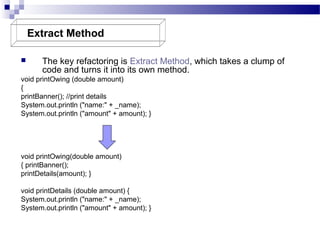
The key refactoring is Extract Method, which takes a clump of
code and turns it into its own method.

void printOwing (double amount)
{
printBanner(); //print details
System.out.println ("name:" + _name);
System.out.println ("amount" + amount); }

void printOwing(double amount)
{ printBanner();
printDetails(amount); }
void printDetails (double amount) {
System.out.println ("name:" + _name);
System.out.println ("amount" + amount); }
Extract Method

Motivation
Motivation

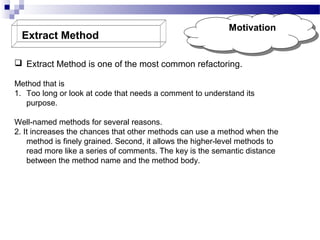
 Extract Method is one of the most common refactoring.
Method that is
1. Too long or look at code that needs a comment to understand its
purpose.
Well-named methods for several reasons.
2. It increases the chances that other methods can use a method when the
method is finely grained. Second, it allows the higher-level methods to
read more like a series of comments. The key is the semantic distance
between the method name and the method body.
Extract Method

Mechanics
Mechanics

 Create a new method, and name it after the intention of the method
 Scan the extracted code for references to any variables that are local in
scope to the source method. These are local variables and parameters to the
method.
 See whether any temporary variables are used only within this extracted code.
 Look to see whether any of these local-scope variables are modified
by the extracted code. Pass into the target method as parameters local-scope
variables that are read from the extracted code.
 Compile when you have dealt with all the locally-scoped variables.
 Replace the extracted code in the source method with a call to the target
method.
 Compile and test.
Extract Method

Example: No
Example: No
Local Variables
Local Variables

In the simplest case, Extract Method is trivially easy.
Take the following method:
void printOwing() {
Enumeration e = _orders.elements();
double outstanding = 0.0
; // print banner
System.out.println ("**************************");
System.out.println ("***** Customer Owes ******");
System.out.println ("**************************");
// calculate outstanding while (e.hasMoreElements())
{ Order each = (Order) e.nextElement();
outstanding += each.getAmount(); } //print details
System.out.println ("name:" + _name);
System.out.println ("amount" + outstanding); }
Extract Method

Example: No
Example: No
Local Variables
Local Variables

void printOwing()
{ Enumeration e = _orders.elements();
double outstanding = 0.0;
printBanner();
// calculate outstanding
while (e.hasMoreElements())
{ Order each = (Order) e.nextElement();
outstanding += each.getAmount(); }
//print details System.out.println ("name:" + _name);
System.out.println ("amount" + outstanding); }
void printBanner() { // print banner
System.out.println ("**************************");
System.out.println ("***** Customer Owes ******");
System.out.println ("**************************"); }
Extract Method

Using Local
Using Local
Variables
Variables

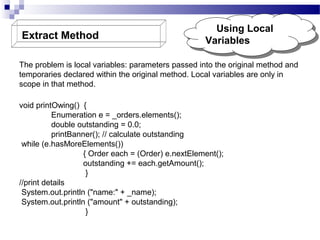
The problem is local variables: parameters passed into the original method and
temporaries declared within the original method. Local variables are only in
scope in that method.
void printOwing() {
Enumeration e = _orders.elements();
double outstanding = 0.0;
printBanner(); // calculate outstanding
while (e.hasMoreElements())
{ Order each = (Order) e.nextElement();
outstanding += each.getAmount();
}
//print details
System.out.println ("name:" + _name);
System.out.println ("amount" + outstanding);
}
Extract Method

Using Local
Using Local
Variables
Variables

Extract the printing of details with a method with one parameter:
void printOwing()
{
Enumeration e = _orders.elements();
double outstanding = 0.0;
printBanner();
// calculate outstanding while
(e.hasMoreElements())
{ Order each = (Order) e.nextElement();
outstanding += each.getAmount(); }
printDetails(outstanding); }
void printDetails (double outstanding)
{ System.out.println ("name:" + _name);
System.out.println ("amount" + outstanding); }
Extract Method

Example: Reassigning aa
Example: Reassigning
Local Variable
Local Variable

It's the assignment to local variables that becomes complicated. In this
case we're only talking about temps. If you see an assignment to a
parameter, you should immediately use
Remove Assignments to Parameters.
void printOwing()
{ Enumeration e = _orders.elements();
double outstanding = 0.0;
printBanner();
// calculate outstanding
while (e.hasMoreElements()) {
Order each = (Order) e.nextElement();
outstanding += each.getAmount();
}
printDetails(outstanding); }
Inline Method



Motivation
Motivation

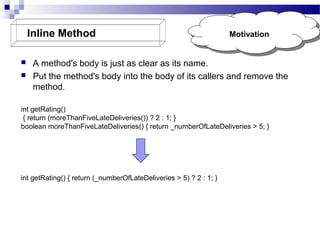
A method's body is just as clear as its name.
Put the method's body into the body of its callers and remove the
method.

int getRating()
{ return (moreThanFiveLateDeliveries()) ? 2 : 1; }
boolean moreThanFiveLateDeliveries() { return _numberOfLateDeliveries > 5; }

int getRating() { return (_numberOfLateDeliveries > 5) ? 2 : 1; }
Inline Method







Check that the method is not polymorphic.
Find all calls to the method.
Replace each call with the method body.
Compile and test.
Remove the method definition.

Mechanics
Mechanics
Inline Temp




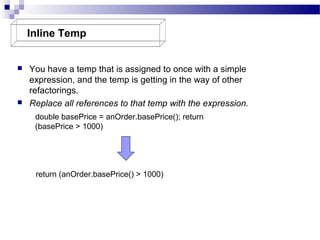
You have a temp that is assigned to once with a simple
expression, and the temp is getting in the way of other
refactorings.
Replace all references to that temp with the expression.
double basePrice = anOrder.basePrice(); return
(basePrice > 1000)

return (anOrder.basePrice() > 1000)
Inline Temp



Motivation
Motivation

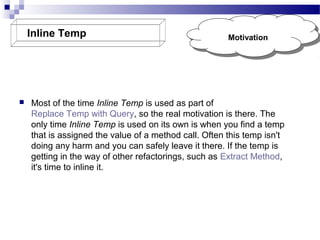
Most of the time Inline Temp is used as part of
Replace Temp with Query, so the real motivation is there. The
only time Inline Temp is used on its own is when you find a temp
that is assigned the value of a method call. Often this temp isn't
doing any harm and you can safely leave it there. If the temp is
getting in the way of other refactorings, such as Extract Method,
it's time to inline it.
Inline Temp

Mechanics
Mechanics

Declare the temp as final if it isn't already, and compile.
? This checks that the temp is really only assigned to once.
 Find all references to the temp and replace them with the righthand side of the assignment.
 Compile and test after each change.
 Remove the declaration and the assignment of the temp.
 Compile and test.

Replace Temp with
Query



You are using a temporary variable to hold the result of an expression.
Extract the expression into a method. Replace all references to the temp
with the expression. The new method can then be used in other methods.

double basePrice = _quantity * _itemPrice;
if (basePrice > 1000) return basePrice * 0.95;
else return basePrice * 0.98;

if (basePrice() > 1000)

return basePrice() * 0.95;
else return basePrice() * 0.98; ...
double basePrice() { return _quantity * _itemPrice; }
Replace Temp with Query

Motivation
Motivation

Replace Temp with Query often is a vital step before Extract Method. Local
variables make it difficult to extract, so replace as many variables as you
can with queries.
You may need to use Split Temporary Variable or
Separate Query from Modifier first to make things easier. If the temp is used
to collect a result (such as summing over a loop), you need to copy some
logic into the query method.
Replace Temp with Query

Mechanics
Mechanics

 Look for a temporary variable that is assigned to once.
? If a temp is set more than once consider Split Temporary Variable.
 Declare the temp as final.
 Compile.
? This will ensure that the temp is only assigned to once.
 Extract the right-hand side of the assignment into a method.
? Initially mark the method as private. You may find more use for it later, but
you can easily relax the protection later.
? Ensure the extracted method is free of side effects, that is, it does not
modify any object. If it is not free of side effects, use
Separate Query from Modifier.
 Compile and test.
 Use Replace Temp with Query on the temp.
Replace Temp with Query

Example
Example

Simple method:
double getPrice()
{ int basePrice = _quantity * _itemPrice;
double discountFactor;
if (basePrice > 1000) discountFactor = 0.95;
else discountFactor = 0.98;
return basePrice * discountFactor; }

See how it would have been difficult to extract discountFactor if I had not replaced basePrice
with a query.
The getPrice method ends up as follows:

double getPrice() { return basePrice() *
discountFactor(); }
Introduce Explaining Variable

Motivation
Motivation

Introduce Explaining Variable is particularly valuable with
conditional logic in which it is useful to take each clause of a
condition and explain what the condition means with a wellnamed temp.
 Introduce Explaining Variable is a very common refactoring.
A method is useable throughout the object and to other objects.
There are times, however, when local variables make it difficult
to use Extract Method. That's when use
Introduce Explaining Variable.

Remove Assignments to
Parameters
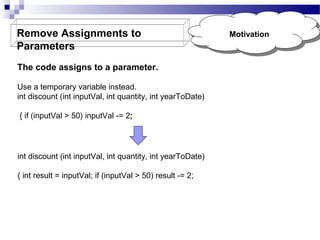
The code assigns to a parameter.
Use a temporary variable instead.
int discount (int inputVal, int quantity, int yearToDate)
{ if (inputVal > 50) inputVal -= 2;

int discount (int inputVal, int quantity, int yearToDate)
{ int result = inputVal; if (inputVal > 50) result -= 2;

Motivation
Motivation
Remove Assignments to
Parameters



Motivation
Motivation

We are clear on the phrase "assigns to a parameter." This means
that if you pass in an object named foo, in the parameter, assigning
to the parameter means to change foo to refer to a different object.

void aMethod(Object foo)
{ foo.modifyInSomeWay(); // that's OK
foo = anotherObject; // trouble and despair will follow you
Remove Assignments to
Parameters

Mechanics
Mechanics

 Create a temporary variable for the parameter.
 Replace all references to the parameter, made after the assignment,
to the temporary variable.
 Change the assignment to assign to the temporary variable.
 Compile and test.
Replace Method with Method
Object




Motivation
Motivation

The difficulty in decomposing a method lies in local variables. If
they are rampant, decomposition can be difficult. Using Replace
Temp with Query helps to reduce this burden, but occasionally
you may find you cannot break down a method that needs
breaking. In this case you reach deep into the tool bag and get
out your method object [Beck].
Applying Replace Method with Method Object turns all these
local variables into fields on the method object. You can then
use Extract Method on this new object to create additional
methods that break down the original method.
Replace Method with Method
Object









Motivation
Motivation

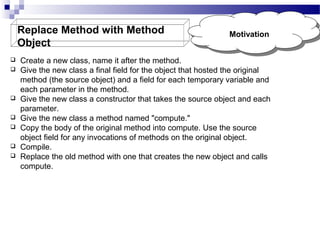
Create a new class, name it after the method.
Give the new class a final field for the object that hosted the original
method (the source object) and a field for each temporary variable and
each parameter in the method.
Give the new class a constructor that takes the source object and each
parameter.
Give the new class a method named "compute."
Copy the body of the original method into compute. Use the source
object field for any invocations of methods on the original object.
Compile.
Replace the old method with one that creates the new object and calls
compute.
Substitute Algorithm

Motivation
Motivation

It is with algorithms. If you find a clearer way to do something, you should
replace the complicated way with the clearer way.
Refactoring can break down something complex into simpler pieces, but
sometimes you just reach the point at which you have to remove the whole
algorithm and replace it with something simpler.
Sometimes when you want to change the algorithm to do something slightly
different, it is easier to subtitute the algorithm first into something easier
for the change you need to make.
Substituting a large, complex algorithm is very difficult; only by making it
simple can you make the substitution tractable
Substitute Algorithm





Mechanics
Mechanics

Prepare your alternative algorithm. Get it so that it
compiles.
Run the new algorithm against your tests. If the results are
the same, you're finished.
If the results aren't the same, use the old algorithm for
comparison in testing and debugging.

Composing method

  • 1.
  • 2.
    Outline          Extract Method Inline Method InlineTemp Replace Temp with Query Introduce Explaining Variable Split Temporary Variable Remove Assignments to Parameters Replace Method with Method Object Substitute Algorithm
  • 3.
    Extract Method  The keyrefactoring is Extract Method, which takes a clump of code and turns it into its own method. void printOwing (double amount) { printBanner(); //print details System.out.println ("name:" + _name); System.out.println ("amount" + amount); } void printOwing(double amount) { printBanner(); printDetails(amount); } void printDetails (double amount) { System.out.println ("name:" + _name); System.out.println ("amount" + amount); }
  • 4.
    Extract Method Motivation Motivation  ExtractMethod is one of the most common refactoring. Method that is 1. Too long or look at code that needs a comment to understand its purpose. Well-named methods for several reasons. 2. It increases the chances that other methods can use a method when the method is finely grained. Second, it allows the higher-level methods to read more like a series of comments. The key is the semantic distance between the method name and the method body.
  • 5.
    Extract Method Mechanics Mechanics  Createa new method, and name it after the intention of the method  Scan the extracted code for references to any variables that are local in scope to the source method. These are local variables and parameters to the method.  See whether any temporary variables are used only within this extracted code.  Look to see whether any of these local-scope variables are modified by the extracted code. Pass into the target method as parameters local-scope variables that are read from the extracted code.  Compile when you have dealt with all the locally-scoped variables.  Replace the extracted code in the source method with a call to the target method.  Compile and test.
  • 6.
    Extract Method Example: No Example:No Local Variables Local Variables In the simplest case, Extract Method is trivially easy. Take the following method: void printOwing() { Enumeration e = _orders.elements(); double outstanding = 0.0 ; // print banner System.out.println ("**************************"); System.out.println ("***** Customer Owes ******"); System.out.println ("**************************"); // calculate outstanding while (e.hasMoreElements()) { Order each = (Order) e.nextElement(); outstanding += each.getAmount(); } //print details System.out.println ("name:" + _name); System.out.println ("amount" + outstanding); }
  • 7.
    Extract Method Example: No Example:No Local Variables Local Variables void printOwing() { Enumeration e = _orders.elements(); double outstanding = 0.0; printBanner(); // calculate outstanding while (e.hasMoreElements()) { Order each = (Order) e.nextElement(); outstanding += each.getAmount(); } //print details System.out.println ("name:" + _name); System.out.println ("amount" + outstanding); } void printBanner() { // print banner System.out.println ("**************************"); System.out.println ("***** Customer Owes ******"); System.out.println ("**************************"); }
  • 8.
    Extract Method Using Local UsingLocal Variables Variables The problem is local variables: parameters passed into the original method and temporaries declared within the original method. Local variables are only in scope in that method. void printOwing() { Enumeration e = _orders.elements(); double outstanding = 0.0; printBanner(); // calculate outstanding while (e.hasMoreElements()) { Order each = (Order) e.nextElement(); outstanding += each.getAmount(); } //print details System.out.println ("name:" + _name); System.out.println ("amount" + outstanding); }
  • 9.
    Extract Method Using Local UsingLocal Variables Variables Extract the printing of details with a method with one parameter: void printOwing() { Enumeration e = _orders.elements(); double outstanding = 0.0; printBanner(); // calculate outstanding while (e.hasMoreElements()) { Order each = (Order) e.nextElement(); outstanding += each.getAmount(); } printDetails(outstanding); } void printDetails (double outstanding) { System.out.println ("name:" + _name); System.out.println ("amount" + outstanding); }
  • 10.
    Extract Method Example: Reassigningaa Example: Reassigning Local Variable Local Variable It's the assignment to local variables that becomes complicated. In this case we're only talking about temps. If you see an assignment to a parameter, you should immediately use Remove Assignments to Parameters. void printOwing() { Enumeration e = _orders.elements(); double outstanding = 0.0; printBanner(); // calculate outstanding while (e.hasMoreElements()) { Order each = (Order) e.nextElement(); outstanding += each.getAmount(); } printDetails(outstanding); }
  • 11.
    Inline Method   Motivation Motivation A method'sbody is just as clear as its name. Put the method's body into the body of its callers and remove the method. int getRating() { return (moreThanFiveLateDeliveries()) ? 2 : 1; } boolean moreThanFiveLateDeliveries() { return _numberOfLateDeliveries > 5; } int getRating() { return (_numberOfLateDeliveries > 5) ? 2 : 1; }
  • 12.
    Inline Method      Check thatthe method is not polymorphic. Find all calls to the method. Replace each call with the method body. Compile and test. Remove the method definition. Mechanics Mechanics
  • 13.
    Inline Temp   You havea temp that is assigned to once with a simple expression, and the temp is getting in the way of other refactorings. Replace all references to that temp with the expression. double basePrice = anOrder.basePrice(); return (basePrice > 1000) return (anOrder.basePrice() > 1000)
  • 14.
    Inline Temp  Motivation Motivation Most ofthe time Inline Temp is used as part of Replace Temp with Query, so the real motivation is there. The only time Inline Temp is used on its own is when you find a temp that is assigned the value of a method call. Often this temp isn't doing any harm and you can safely leave it there. If the temp is getting in the way of other refactorings, such as Extract Method, it's time to inline it.
  • 15.
    Inline Temp Mechanics Mechanics Declare thetemp as final if it isn't already, and compile. ? This checks that the temp is really only assigned to once.  Find all references to the temp and replace them with the righthand side of the assignment.  Compile and test after each change.  Remove the declaration and the assignment of the temp.  Compile and test. 
  • 16.
    Replace Temp with Query   Youare using a temporary variable to hold the result of an expression. Extract the expression into a method. Replace all references to the temp with the expression. The new method can then be used in other methods. double basePrice = _quantity * _itemPrice; if (basePrice > 1000) return basePrice * 0.95; else return basePrice * 0.98; if (basePrice() > 1000) return basePrice() * 0.95; else return basePrice() * 0.98; ... double basePrice() { return _quantity * _itemPrice; }
  • 17.
    Replace Temp withQuery Motivation Motivation Replace Temp with Query often is a vital step before Extract Method. Local variables make it difficult to extract, so replace as many variables as you can with queries. You may need to use Split Temporary Variable or Separate Query from Modifier first to make things easier. If the temp is used to collect a result (such as summing over a loop), you need to copy some logic into the query method.
  • 18.
    Replace Temp withQuery Mechanics Mechanics  Look for a temporary variable that is assigned to once. ? If a temp is set more than once consider Split Temporary Variable.  Declare the temp as final.  Compile. ? This will ensure that the temp is only assigned to once.  Extract the right-hand side of the assignment into a method. ? Initially mark the method as private. You may find more use for it later, but you can easily relax the protection later. ? Ensure the extracted method is free of side effects, that is, it does not modify any object. If it is not free of side effects, use Separate Query from Modifier.  Compile and test.  Use Replace Temp with Query on the temp.
  • 19.
    Replace Temp withQuery Example Example Simple method: double getPrice() { int basePrice = _quantity * _itemPrice; double discountFactor; if (basePrice > 1000) discountFactor = 0.95; else discountFactor = 0.98; return basePrice * discountFactor; } See how it would have been difficult to extract discountFactor if I had not replaced basePrice with a query. The getPrice method ends up as follows: double getPrice() { return basePrice() * discountFactor(); }
  • 20.
    Introduce Explaining Variable Motivation Motivation IntroduceExplaining Variable is particularly valuable with conditional logic in which it is useful to take each clause of a condition and explain what the condition means with a wellnamed temp.  Introduce Explaining Variable is a very common refactoring. A method is useable throughout the object and to other objects. There are times, however, when local variables make it difficult to use Extract Method. That's when use Introduce Explaining Variable. 
  • 21.
    Remove Assignments to Parameters Thecode assigns to a parameter. Use a temporary variable instead. int discount (int inputVal, int quantity, int yearToDate) { if (inputVal > 50) inputVal -= 2; int discount (int inputVal, int quantity, int yearToDate) { int result = inputVal; if (inputVal > 50) result -= 2; Motivation Motivation
  • 22.
    Remove Assignments to Parameters  Motivation Motivation Weare clear on the phrase "assigns to a parameter." This means that if you pass in an object named foo, in the parameter, assigning to the parameter means to change foo to refer to a different object. void aMethod(Object foo) { foo.modifyInSomeWay(); // that's OK foo = anotherObject; // trouble and despair will follow you
  • 23.
    Remove Assignments to Parameters Mechanics Mechanics Create a temporary variable for the parameter.  Replace all references to the parameter, made after the assignment, to the temporary variable.  Change the assignment to assign to the temporary variable.  Compile and test.
  • 24.
    Replace Method withMethod Object   Motivation Motivation The difficulty in decomposing a method lies in local variables. If they are rampant, decomposition can be difficult. Using Replace Temp with Query helps to reduce this burden, but occasionally you may find you cannot break down a method that needs breaking. In this case you reach deep into the tool bag and get out your method object [Beck]. Applying Replace Method with Method Object turns all these local variables into fields on the method object. You can then use Extract Method on this new object to create additional methods that break down the original method.
  • 25.
    Replace Method withMethod Object        Motivation Motivation Create a new class, name it after the method. Give the new class a final field for the object that hosted the original method (the source object) and a field for each temporary variable and each parameter in the method. Give the new class a constructor that takes the source object and each parameter. Give the new class a method named "compute." Copy the body of the original method into compute. Use the source object field for any invocations of methods on the original object. Compile. Replace the old method with one that creates the new object and calls compute.
  • 26.
    Substitute Algorithm Motivation Motivation It iswith algorithms. If you find a clearer way to do something, you should replace the complicated way with the clearer way. Refactoring can break down something complex into simpler pieces, but sometimes you just reach the point at which you have to remove the whole algorithm and replace it with something simpler. Sometimes when you want to change the algorithm to do something slightly different, it is easier to subtitute the algorithm first into something easier for the change you need to make. Substituting a large, complex algorithm is very difficult; only by making it simple can you make the substitution tractable
  • 27.
    Substitute Algorithm    Mechanics Mechanics Prepare youralternative algorithm. Get it so that it compiles. Run the new algorithm against your tests. If the results are the same, you're finished. If the results aren't the same, use the old algorithm for comparison in testing and debugging.