1


Design Pattern –
Composite
Presented by Joncash
4/13/2012
2


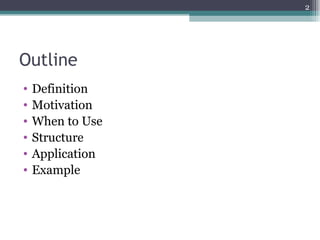
Outline
•   Definition
•   Motivation
•   When to Use
•   Structure
•   Application
•   Example
3


Definition
• The composite pattern describes that a group of
  objects are to be treated in the same way as a
  single instance of an object.
• The intent of a composite is to "compose" objects
  into tree structures to represent part-whole
  hierarchies.
4


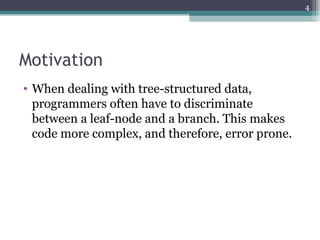
Motivation
• When dealing with tree-structured data,
  programmers often have to discriminate
  between a leaf-node and a branch. This makes
  code more complex, and therefore, error prone.
5


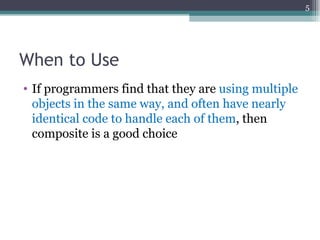
When to Use
• If programmers find that they are using multiple
  objects in the same way, and often have nearly
  identical code to handle each of them, then
  composite is a good choice
6


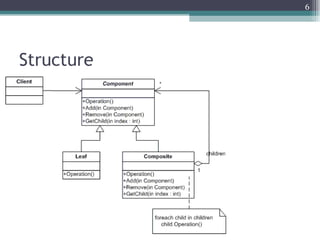
Structure
7


Classic Composite application
• ASP.NET
 ▫ TreeView
 ▫ System.Web.UI.Control
8


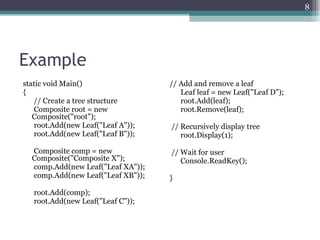
Example
static void Main()                 // Add and remove a leaf
{                                     Leaf leaf = new Leaf("Leaf D");
   // Create a tree structure         root.Add(leaf);
   Composite root = new               root.Remove(leaf);
   Composite("root");
   root.Add(new Leaf("Leaf A"));   // Recursively display tree
   root.Add(new Leaf("Leaf B"));      root.Display(1);

  Composite comp = new             // Wait for user
  Composite("Composite X");           Console.ReadKey();
  comp.Add(new Leaf("Leaf XA"));
  comp.Add(new Leaf("Leaf XB"));   }
   root.Add(comp);
   root.Add(new Leaf("Leaf C"));
9


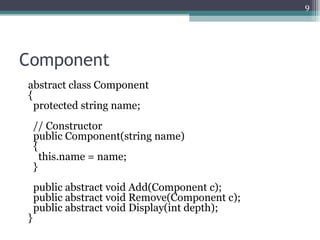
Component
abstract class Component
{
  protected string name;
    // Constructor
    public Component(string name)
    {
      this.name = name;
    }
    public abstract void Add(Component c);
    public abstract void Remove(Component c);
    public abstract void Display(int depth);
}
10


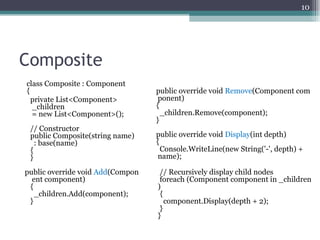
Composite
class Composite : Component
{                                 public override void Remove(Component com
  private List<Component>          ponent)
  _children                       {
  = new List<Component>();          _children.Remove(component);
                                  }
 // Constructor
 public Composite(string name)    public override void Display(int depth)
   : base(name)                   {
 {                                  Console.WriteLine(new String('-', depth) +
 }                                 name);

public override void Add(Compon    // Recursively display child nodes
  ent component)                   foreach (Component component in _children
 {                                )
   _children.Add(component);       {
 }                                   component.Display(depth + 2);
                                   }
                                  }
11


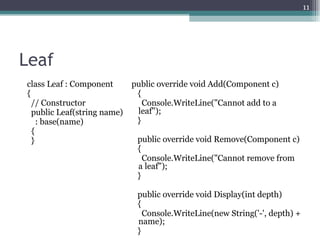
Leaf
class Leaf : Component       public override void Add(Component c)
{                             {
  // Constructor                Console.WriteLine("Cannot add to a
  public Leaf(string name)    leaf");
    : base(name)              }
  {
  }                           public override void Remove(Component c)
                              {
                                Console.WriteLine("Cannot remove from
                              a leaf");
                              }

                              public override void Display(int depth)
                              {
                                Console.WriteLine(new String('-', depth) +
                              name);
                              }
12


Reference
• wiki/Composite_pattern
• dofactory.com/Patterns/PatternComposite

Design pattern composite 20120413 joncash 01

  • 1.
  • 2.
    2 Outline • Definition • Motivation • When to Use • Structure • Application • Example
  • 3.
    3 Definition • The compositepattern describes that a group of objects are to be treated in the same way as a single instance of an object. • The intent of a composite is to "compose" objects into tree structures to represent part-whole hierarchies.
  • 4.
    4 Motivation • When dealingwith tree-structured data, programmers often have to discriminate between a leaf-node and a branch. This makes code more complex, and therefore, error prone.
  • 5.
    5 When to Use •If programmers find that they are using multiple objects in the same way, and often have nearly identical code to handle each of them, then composite is a good choice
  • 6.
  • 7.
    7 Classic Composite application •ASP.NET ▫ TreeView ▫ System.Web.UI.Control
  • 8.
    8 Example static void Main() // Add and remove a leaf { Leaf leaf = new Leaf("Leaf D"); // Create a tree structure root.Add(leaf); Composite root = new root.Remove(leaf); Composite("root"); root.Add(new Leaf("Leaf A")); // Recursively display tree root.Add(new Leaf("Leaf B")); root.Display(1); Composite comp = new // Wait for user Composite("Composite X"); Console.ReadKey(); comp.Add(new Leaf("Leaf XA")); comp.Add(new Leaf("Leaf XB")); } root.Add(comp); root.Add(new Leaf("Leaf C"));
  • 9.
    9 Component abstract class Component { protected string name; // Constructor public Component(string name) { this.name = name; } public abstract void Add(Component c); public abstract void Remove(Component c); public abstract void Display(int depth); }
  • 10.
    10 Composite class Composite :Component { public override void Remove(Component com private List<Component> ponent) _children { = new List<Component>(); _children.Remove(component); } // Constructor public Composite(string name) public override void Display(int depth) : base(name) { { Console.WriteLine(new String('-', depth) + } name); public override void Add(Compon // Recursively display child nodes ent component) foreach (Component component in _children { ) _children.Add(component); { } component.Display(depth + 2); } }
  • 11.
    11 Leaf class Leaf :Component public override void Add(Component c) { { // Constructor Console.WriteLine("Cannot add to a public Leaf(string name) leaf"); : base(name) } { } public override void Remove(Component c) { Console.WriteLine("Cannot remove from a leaf"); } public override void Display(int depth) { Console.WriteLine(new String('-', depth) + name); }
  • 12.

Editor's Notes

  • #4 Implementing the composite pattern lets clients treat individual objects and compositions uniformly 組合模式 : 將物件組合成樹形結再以表示「部份 - 整體」的層次結構 組合模式使得用戶對單個物件和組合物件的使用具有一致性。
  • #6 Composite can be used when clients should ignore the difference between compositions of objects and individual objects.