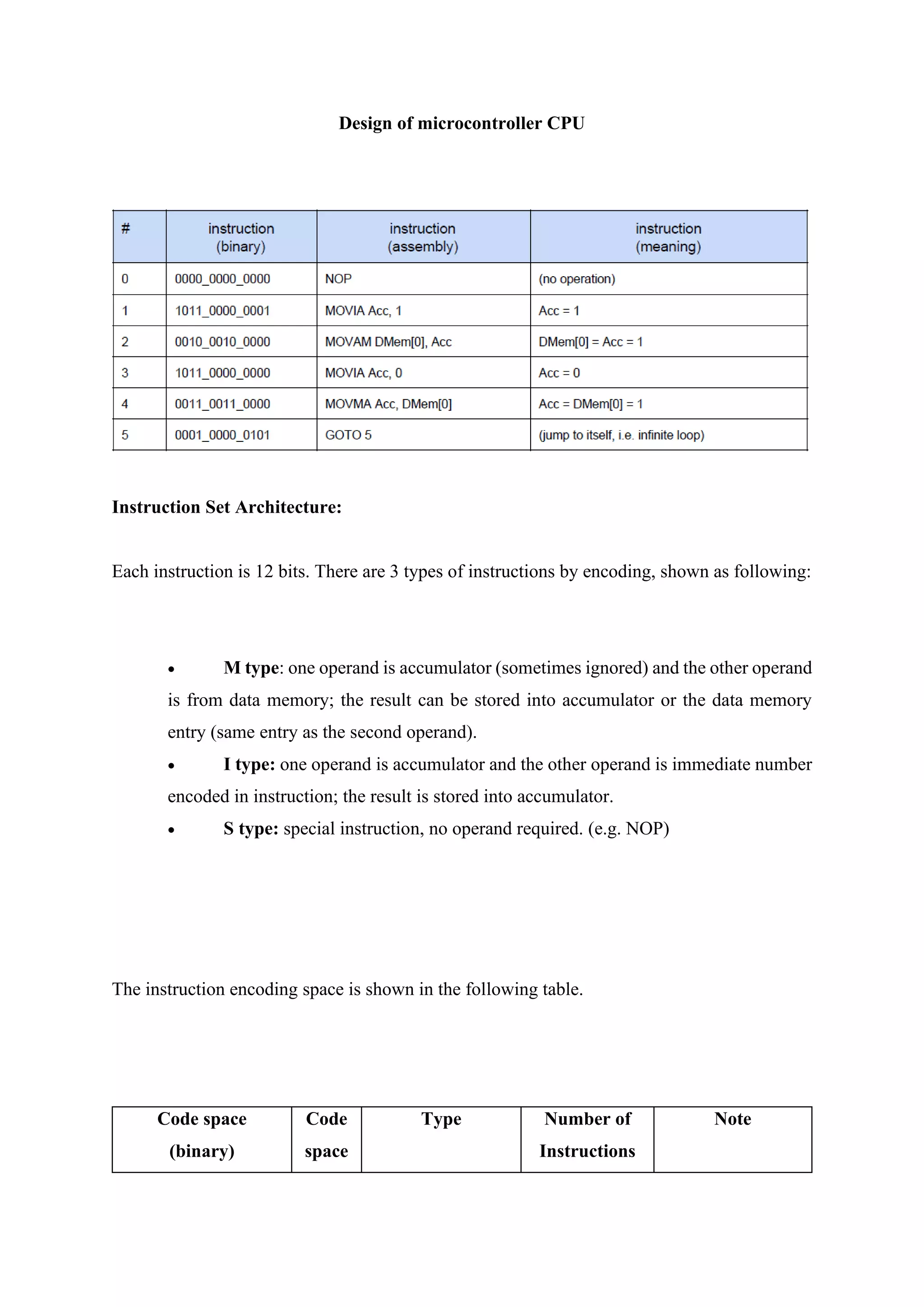
Design of microcontroller CPU
Instruction Set Architecture:
Each instruction is 12 bits. There are 3 types of instructions by encoding, shown as following:
• M type: one operand is accumulator (sometimes ignored) and the other operand
is from data memory; the result can be stored into accumulator or the data memory
entry (same entry as the second operand).
• I type: one operand is accumulator and the other operand is immediate number
encoded in instruction; the result is stored into accumulator.
• S type: special instruction, no operand required. (e.g. NOP)
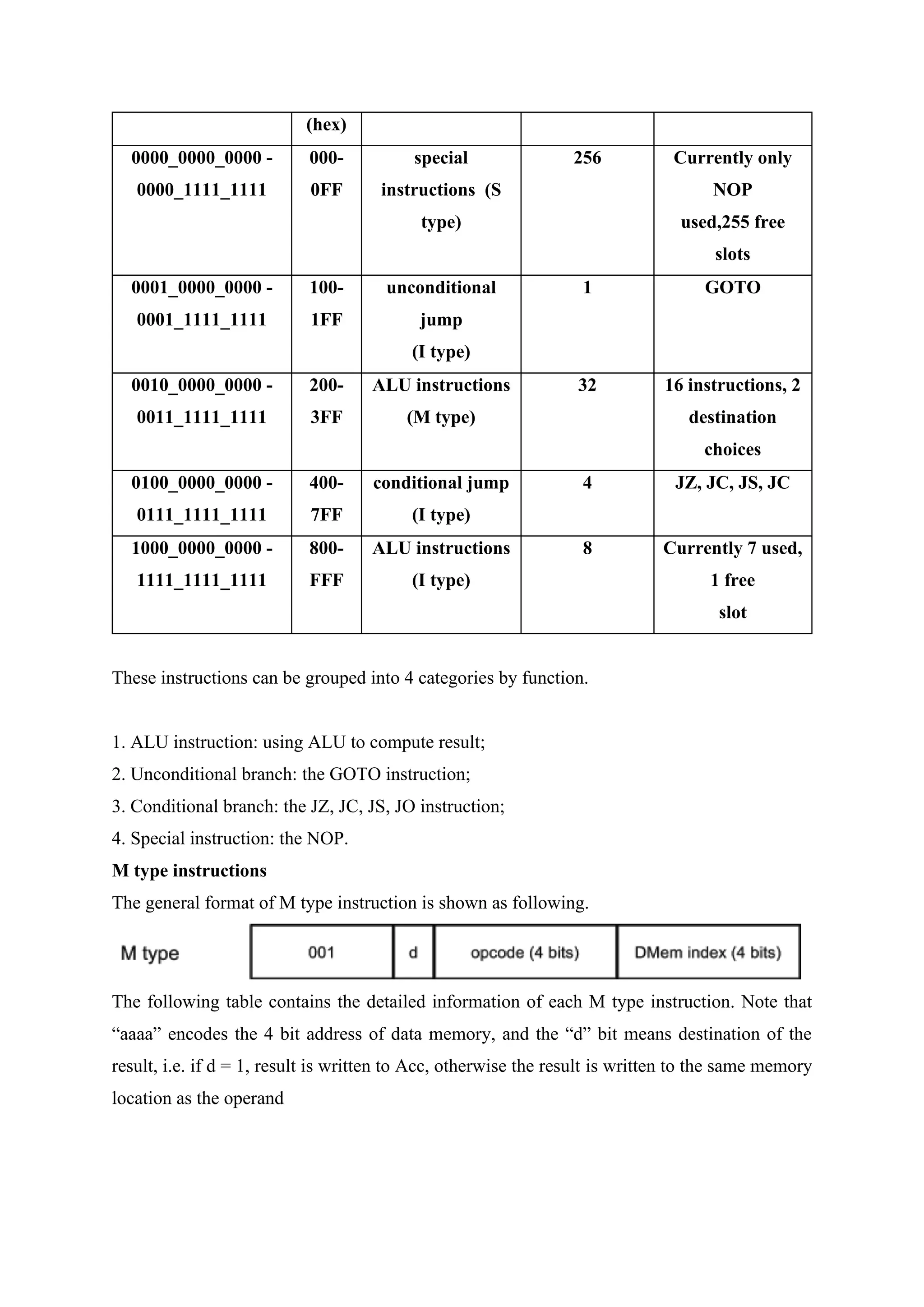
The instruction encoding space is shown in the following table.
Code space
(binary)
Code
space
Type Number of
Instructions
Note
(hex)
0000_0000_0000 -
0000_1111_1111
000-
0FF
special
instructions (S
type)
256 Currently only
NOP
used,255 free
slots
0001_0000_0000 -
0001_1111_1111
100-
1FF
unconditional
jump
(I type)
1 GOTO
0010_0000_0000 -
0011_1111_1111
200-
3FF
ALU instructions
(M type)
32 16 instructions, 2
destination
choices
0100_0000_0000 -
0111_1111_1111
400-
7FF
conditional jump
(I type)
4 JZ, JC, JS, JC
1000_0000_0000 -
1111_1111_1111
800-
FFF
ALU instructions
(I type)
8 Currently 7 used,
1 free
slot
These instructions can be grouped into 4 categories by function.
1. ALU instruction: using ALU to compute result;
2. Unconditional branch: the GOTO instruction;
3. Conditional branch: the JZ, JC, JS, JO instruction;
4. Special instruction: the NOP.
M type instructions
The general format of M type instruction is shown as following.
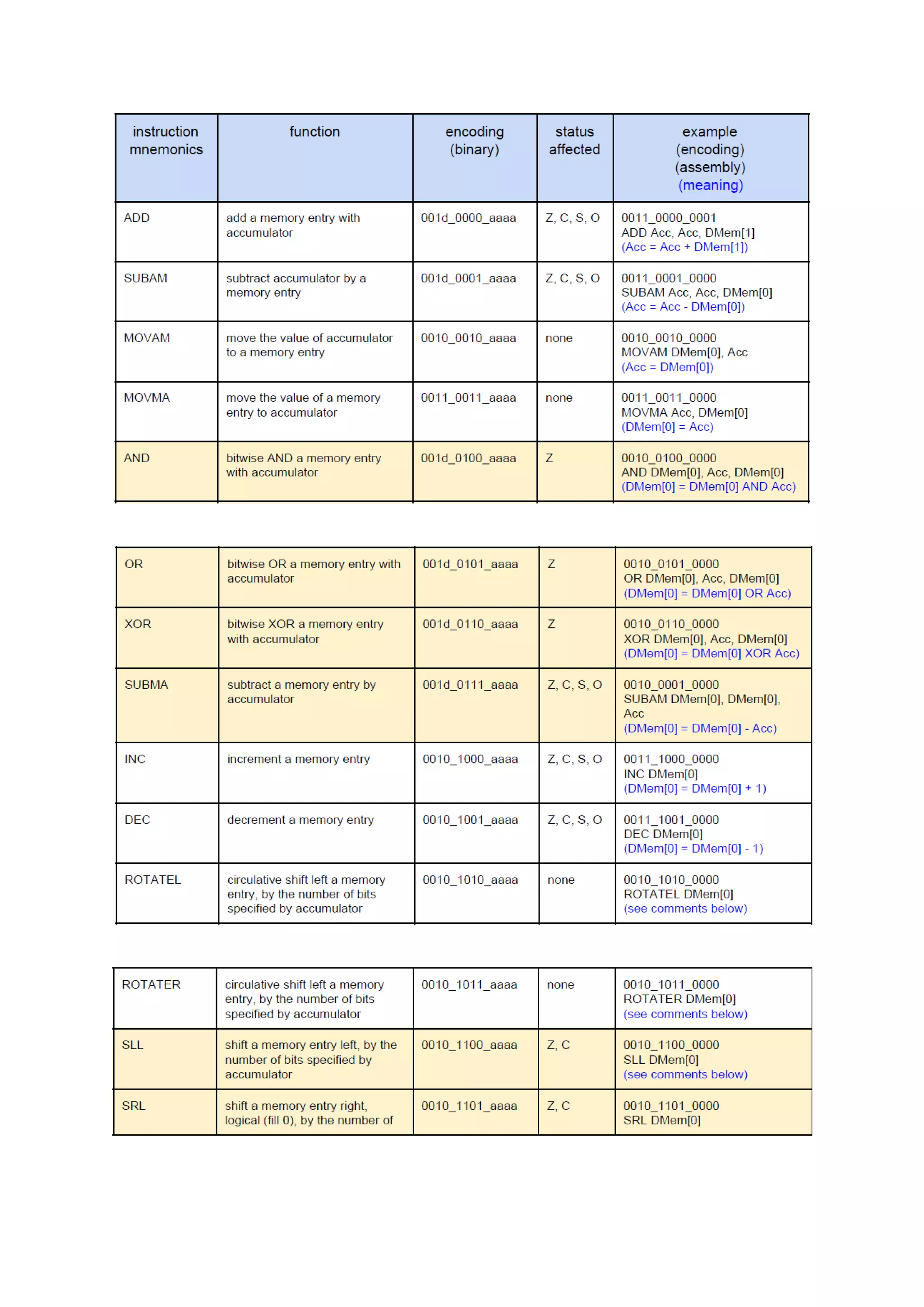
The following table contains the detailed information of each M type instruction. Note that
“aaaa” encodes the 4 bit address of data memory, and the “d” bit means destination of the
result, i.e. if d = 1, result is written to Acc, otherwise the result is written to the same memory
location as the operand
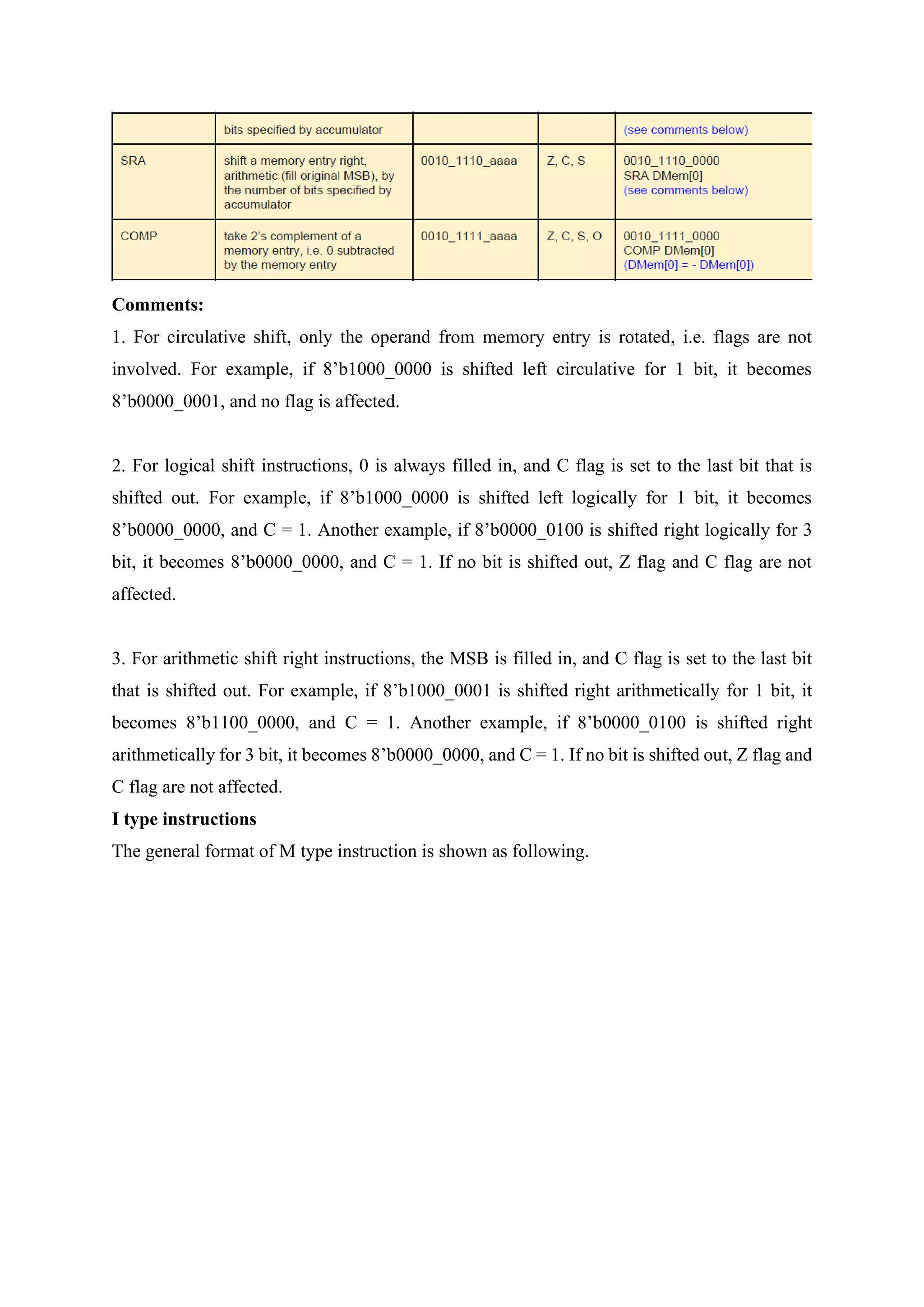
Comments:
1. For circulative shift, only the operand from memory entry is rotated, i.e. flags are not
involved. For example, if 8’b1000_0000 is shifted left circulative for 1 bit, it becomes
8’b0000_0001, and no flag is affected.
2. For logical shift instructions, 0 is always filled in, and C flag is set to the last bit that is
shifted out. For example, if 8’b1000_0000 is shifted left logically for 1 bit, it becomes
8’b0000_0000, and C = 1. Another example, if 8’b0000_0100 is shifted right logically for 3
bit, it becomes 8’b0000_0000, and C = 1. If no bit is shifted out, Z flag and C flag are not
affected.
3. For arithmetic shift right instructions, the MSB is filled in, and C flag is set to the last bit
that is shifted out. For example, if 8’b1000_0001 is shifted right arithmetically for 1 bit, it
becomes 8’b1100_0000, and C = 1. Another example, if 8’b0000_0100 is shifted right
arithmetically for 3 bit, it becomes 8’b0000_0000, and C = 1. If no bit is shifted out, Z flag and
C flag are not affected.
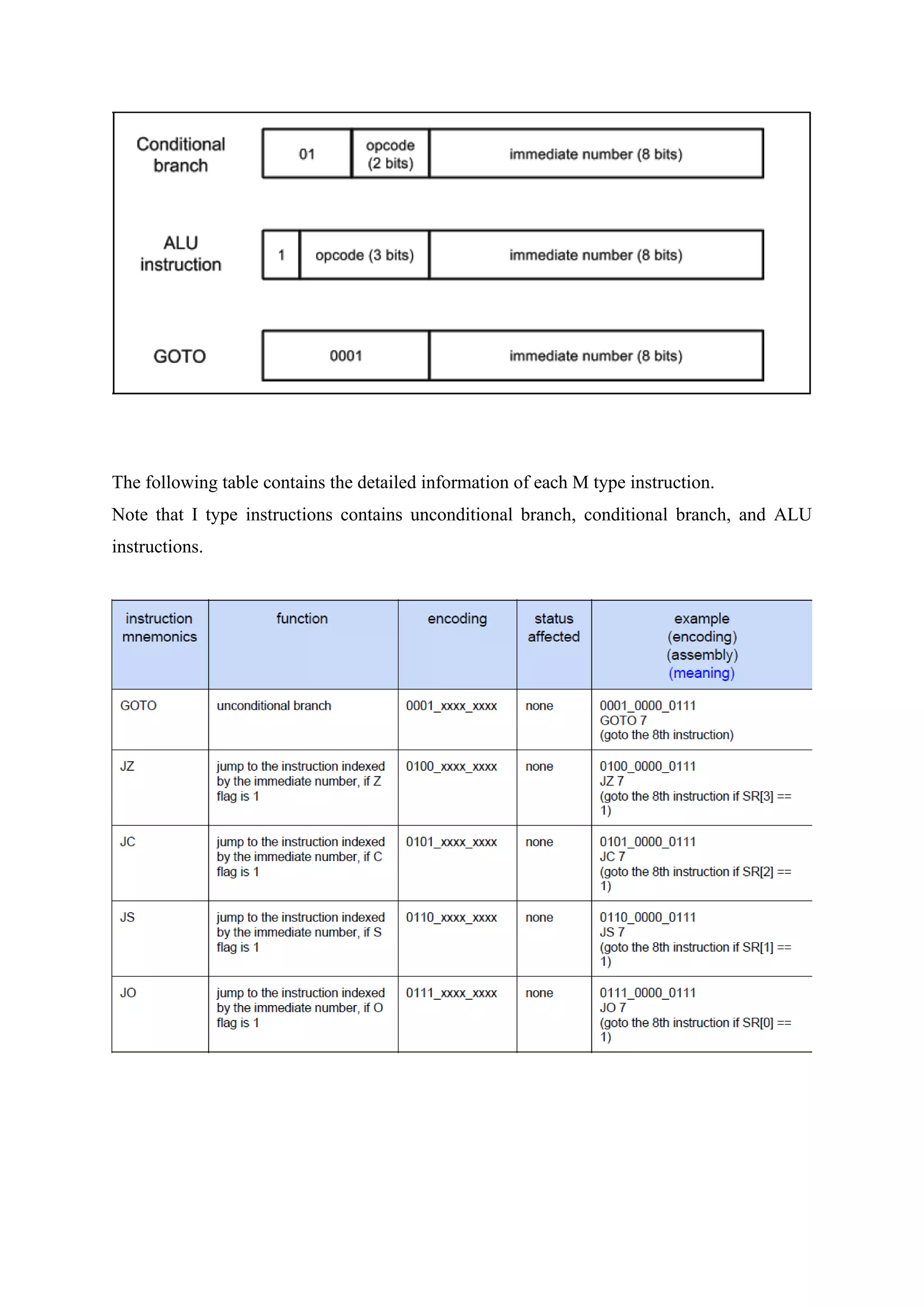
I type instructions
The general format of M type instruction is shown as following.
The following table contains the detailed information of each M type instruction.
Note that I type instructions contains unconditional branch, conditional branch, and ALU
instructions.
S type instructions
The general format of S type instruction is shown as following.
There is only one S type instruction, i.e. the NOP instruction.
Sample Testing Program
After completion the hardware implementation of the MCU, you need to write testbench and
load instructions to verify the design by simulation. Below is some testing programs to verify
the MCU.
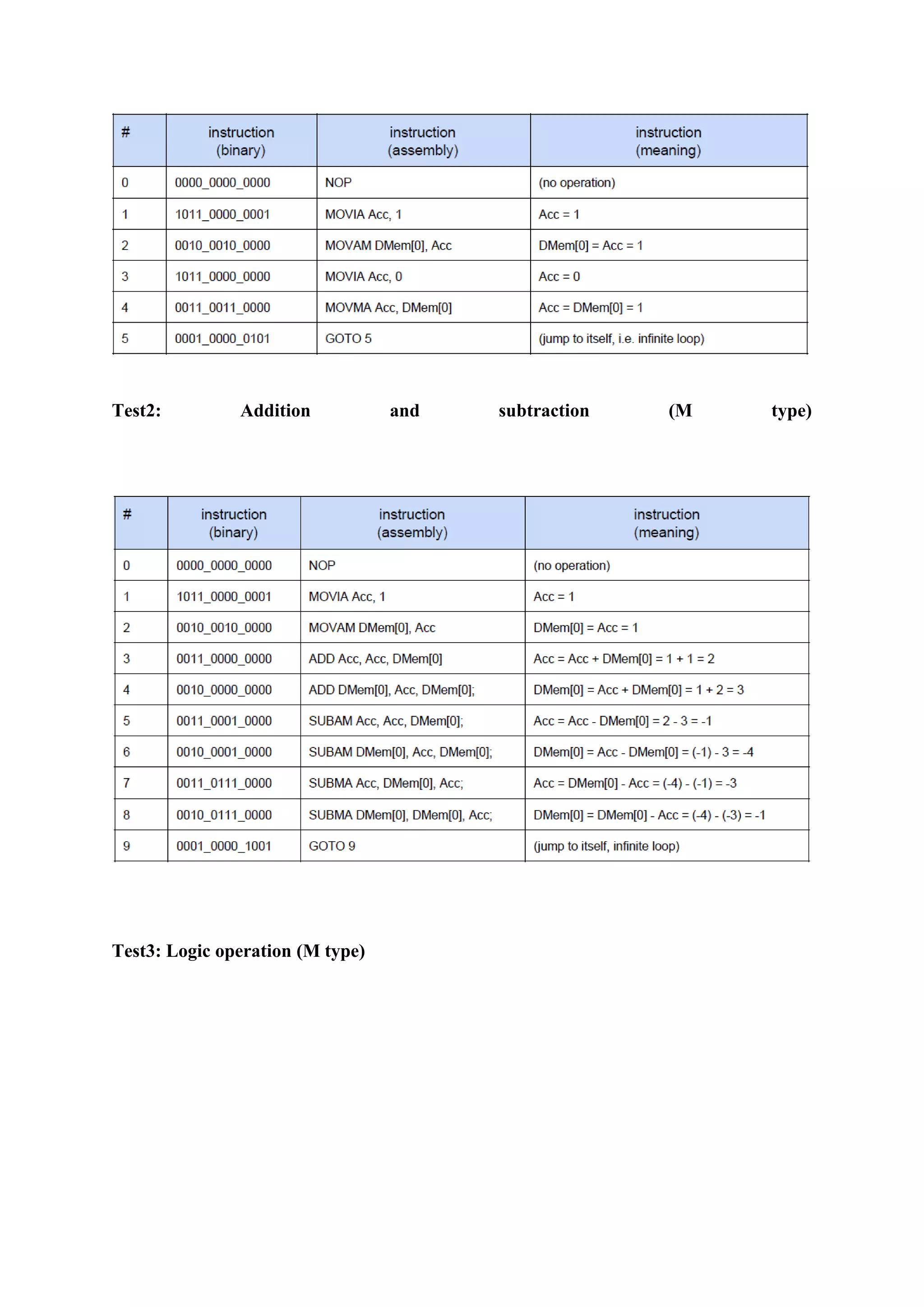
Test1: Program loading, accumulator, and memory loading, GOTO
Test2: Addition and subtraction (M type)
Test3: Logic operation (M type)
Test4: Addition, subtraction, logic operation (I type)
he following diagram is the architecture of the microcontroller. The datapath is shown as
black arrows, and control signals are red arrows.
The following two type of components holds programming context.
• Program counter, program memory, data memory, accumulator, status register
(green boxes). They are programmer visible registers and memories.
• Instruction register and data register (purple boxes). They are programmer
invisible registers.
The following two type of components is Boolean logics that do the actual computation
work. They are stateless
• ALU, MUX1, MUX2, Adder (blue boxes), used as a functional unit.
• Control Logic (yellow box), used to denote all control signals (red signal)
The timing and state transition are shown in the following diagram.
Each instruction needs 3 clock cycles to finish, i.e. FETCH stage, DECODE stage, and
EXECUTE stage. Note that it is not pipelined. Together with the initial LOAD state, it can be
considered as an FSM of 3 states (technically 4 states).
States:
1. LOAD (initial state): load program to program memory, which takes 1 cycle per instruction
loaded;
2. FETCH (first cycle): fetch current instruction from program memory;
3. DECODE (second cycle): decode instruction to generate control logic, read data memory
for operand;
4. EXECUTE (of the third cycle): execute instruction
Transitions:
1. LOAD → FETCH (initialization finish):
a. Clear content of PC, IR, DR, Acc, SR; DMem is not required to be
cleared.
2. FETCH → DECODE (rising edge of second cycle) :
. IR = PMem [ PC ]
3. DECODE → EXECUTE
. DR = DMem [ IR[3:0] ];
4. EXECUTE → FETCH (rising edge of first cycle and fourth cycle)
. For non-branch instruction, PC = PC + 1; for branch instruction, if
branch is taken, PC = IR [7:0], otherwise PC = PC + 1;
a. For ALU instruction, if the result destination is accumulator, Acc =
ALU.Out; if the result destination is data memory, DMem [ IR[3:0] ] =
ALU.Out.
b. For ALU instruction, SR = ALU.Status;
The transitions can be simplified using enable port of corresponding registers, e.g. assign
ALU.Out to Acc at every clock rising edge if Acc.E is set to 1. Such control signals as Acc.E
are generated as a boolean function of both current state and the current instruction.
Components
Registers
The microcontroller has 3 programmer visible register:
1. Program Counter (8 bit, denoted as PC): contains the index of current
executing instruction.
2. Accumulator (8 bit, denoted as Acc): holds result and 1 operand of the
arithmetic or logic calculation.
3. Status Register (4 bit, denoted as SR): holds 4 status bit, i.e. Z, C, S, O.
a. Z (zero flag, SR[3]): 1 if result is zero, 0 otherwise.
b. C (carry flag, SR[2]): 1 if carry is generated, 0 otherwise.
c. S (sign flag, SR[1]): 1 if result is negative (as 2’s complement), 0
otherwise.
d. O (overflow flag, SR[0]): 1 if result generates overflow, 0 otherwise.
Each of these registers has an enable port, as a flag for whether the value of the register should
be updated in state transition. They are denoted as PC.E, Acc.E, and SR.E.
The microcontroller has 2 programmer invisible registers (i.e. they can not be manipulated by
programmer):
1. Instruction Register (12 bit, denoted as IR): contains the current executing
instruction.
2. Data Register (8 bit, denoted as DR): contains the operand read from data
memory.
Similarly, each of these registers has an enable port as a flag for whether the value of the
register should be updated in state transition. They are denoted as IR.E and DR.E.
Program memory
The microcontroller has a 256 entry program memory that stores program instructions, denoted
as PMem. Each entry is 12 bits, the ith entry is denoted as PMem[i]. The program memory has
the following input/output ports.
• Enable port (1 bit, input, denoted as PMem.E): enable the device, i.e. if it is 1,
then the entry specified by the address port will be read out, otherwise, nothing is read
out.
• Address port (8 bit, input, denoted as PMem.Addr): specify which instruction
entry is read out, connected to PC.
• Instruction port (12 bit, output, denoted as PMem.I): the instruction entry that
is read out, connected to IR.
• 3 special ports are used to load program to the memory, not used for executing
instructions.
• Load enable port (1 bit, input, denoted as PMem.LE): enable the load, i.e. if it
is 1, then the entry specified by the address port will be load with the value specified
by the load instruction input port and the instruction port is supplied with the same
value; otherwise, the entry specified by the address port will be read out on instruction
port, and value on instruction load port is ignored.
• Load address port (8 bit, input, denoted as PMem.LA): specify which
instruction entry is loaded.
• Load instruction port (12 bit, input, denoted as PMem.LI): the instruction that
is loaded.
For example, if the address point is supplied with 8’b0000_0011 and enable is set to 1, the
fourth entry is read out on instruction port.
Note that program load only takes effect on clock rising edge, while instruction read out
happens all the time.
Data memory
The microcontroller has a 16 entry data memory, denoted as DMem. Each entry is 8 bits, the
ith entry is denoted as DMem[i]. The program memory has the following input/output ports.
• Enable port (1 bit, input, denoted as DMem.E): enable the device, i.e. if it is 1,
then the entry specified by the address port will be read out or written in; otherwise
nothing is read out or written in.
• Write enable port(1 bit, input, denoted as DMem.WE): enable the write, i.e.
if it is 1, then the entry specified by the address port will be written with the value
specified by the data input port and the data output port is supplied with the same value;
otherwise, the entry specified by the address port will be read out on data output port,
and value on data input port is ignored.
• Address port (4 bit, input, denoted as DMem.Addr): specify which data
entry is read out, connected to IR[3:0].
• Data input port (8 bit, input, denoted as DMem.DI): the value that is written
in, connected to ALU.Out.
• Data output port (8 bit, output, denoted as DMem.DO): the data entry that
is read out, connected to MUX2.In1.
For example, if the address point is supplied with 8’0000_0011, data input port is supplied with
8’0000_0000, enable is set to 1, and write enable is set to 1, the fourth entry of the data memory
is written with value 0 and the data output port shows 8’0000_0000.
As another example, if the address point is supplied with 8’0000_0011, data input port is
supplied with 8’0000_0000, enable is set to 1, while write enable is set to 0, the fourth entry of
the data memory is read out on data output port.
Note that write only takes effect on clock rising edge, while read happens all the time, similar
to program memory.
PC adder
PC adder is used to add PC by 1, i.e. move to the next instruction. This component is pure
combinational. It has the following port.
• Adder input port (8 bit, input, denoted as Adder.In): connected to PC.
• Adder output port (8 bit, output, denoted as Adder.Out): connected to
MUX1.In2.
MUX1
MUX1 is used to choose the source for updating PC. If the current instruction is not a branch
or it is a branch but the branch is not taken, PC is incremented by 1; otherwise PC is set to the
jumping target, i.e. IR [7:0]. It has the following port.
• MUX1 input 1 port (8 bit, input, denoted as MUX1.In1): connected to IR [7:0].
• MUX1 input 2 port (8 bit, input, denoted as MUX1.In2): connected to
Adder.Out.
• MUX1 selection port (1 bit, input, denoted as MUX1.Sel): connected to control
logic.
• MUX1 output port (8 bit, output, denoted as MUX1.Out): connected to PC.
ALU
ALU is used to do the actual computation for the current instruction. This component is pure
combinational. It has the following port. The mode of ALU is listed in the following table.
• ALU operand 1 port (8 bit, input, denoted as ALU.Operand1): connected to
Acc.
• ALU operand 2 port (8 bit, input, denoted as ALU.Operand2): connected to
MUX2.Out.
• ALU enable port (1 bit, input, denoted as ALU.E): connected to control logic.
• ALU mode port (4 bit, input, denoted as ALU.Mode): connected to control
logic.
• Current flags port (4 bit, input, denoted as ALU.CFlags): connected to SR.
• ALU output port (8 bit, output, denoted as ALU.Out): connected to DMem.DI.
• ALU flags port (4 bit, output, denoted as ALU.Flags): the Z (zero), C (carry),
S (sign), O (overflow) bits, from MSB to LSB, connected to status register.
MUX2
MUX2 is used to choose the source for operand 2 of ALU. If the current instruction is M type,
operand 2 of ALU comes from data memory; if the current instruction is I type, operand 2 of
ALU comes from the instruction, i.e. IR [7:0]. It has the following port.
• MUX2 input 1 port (8 bit, input, denoted as MUX2.In1): connected to IR [7:0].
• MUX2 input 2 port (8 bit, input, denoted as MUX2.In2): connected to DR.
• MUX2 selection port (1 bit, input, denoted as MUX2.Sel): connected to control
logic.
• MUX2 output port (8 bit, output, denoted as MUX2.Out): connected to
ALU.Operand2.
Control unit design
Control signal is derived from the current state and current instruction. The control logic
component is purely combinational. There are in total 12 control signals, listed as follows.
• PC.E: enable port of program counter (PC);
• Acc.E: enable port of accumulator (Acc);
• SR.E: enable port of status register (SR);
• IR.E: enable port of instruction register (IR);
• DR.E: enable port of data register (DR);
• PMem.E: enable port of program memory (PMem);
• DMem.E: enable port of data memory (DMem);
• DMem.WE: write enable port of data memory (DMem);
• ALU.E: enable port of ALU;
• ALU.Mode: mode selection port of ALU;
• MUX1.Sel: selection port of MUX1;
• MUX2.Sel: selection port of MUX2;
The following table documents the detail of how these control signals are generated important
signals are marked in red.
Comments:
1. Note that in EXECUTE state of conditional branch instructions, the value of MUX1.Sel is
actually SR[ IR [9:8] ];
2. Note that in EXECUTE stage of ALU I type instruction, the value of ALU.Mode is actually
{0, IR[10:8]}. In the table above, 0 extension is assumed.
3. Be careful that PMem.LE is not shown in this table. If the processor is not in LOAD state,
PMem.LE is always set to 0.
The type and category of instruction can be identified by the first 4 bits of the instruction, i.e.
IR[11:8], as denoted in the first column of the above table.
Besides, when loading the program, the control signal is generated as below.
If the processor is in LOAD state, PMem.LE is always set to 1.
First is the Verilog code for ALU unit:
// fpga4student.com: FPGA project, Verilog project, VHDL project
// Verilog project: Verilog code for Microcontroller
// Verilog code for ALU
module ALU( input [7:0] Operand1,Operand2,
input E,
input [3:0] Mode,
input [3:0] CFlags,
output [7:0] Out,
output [3:0] Flags
// the Z (zero), C (carry), S (sign),O (overflow) bits, from MSB to LSB, connected to status
register
);
wire Z,S,O;
reg CarryOut;
reg [7:0] Out_ALU;
always @(*)
begin
case(Mode)
4'b0000: {CarryOut,Out_ALU} = Operand1 + Operand2;
4'b0001: begin Out_ALU = Operand1 - Operand2;
CarryOut = !Out_ALU[7];
end
4'b0010: Out_ALU = Operand1;
4'b0011: Out_ALU = Operand2;
4'b0100: Out_ALU = Operand1 & Operand2;
4'b0101: Out_ALU = Operand1 | Operand2;
4'b0110: Out_ALU = Operand1 ^ Operand2;
4'b0111: begin
Out_ALU = Operand2 - Operand1;
CarryOut = !Out_ALU[7];
end
4'b1000: {CarryOut,Out_ALU} = Operand2 + 8'h1;
4'b1001: begin
Out_ALU = Operand2 - 8'h1;
CarryOut = !Out_ALU[7];
end
4'b1010: Out_ALU = (Operand2 << Operand1[2:0])| ( Operand2 >> Operand1[2:0]);
4'b1011: Out_ALU = (Operand2 >> Operand1[2:0])| ( Operand2 << Operand1[2:0]);
4'b1100: Out_ALU = Operand2 << Operand1[2:0];
4'b1101: Out_ALU = Operand2 >> Operand1[2:0];
4'b1110: Out_ALU = Operand2 >>> Operand1[2:0];
4'b1111: begin
Out_ALU = 8'h0 - Operand2;
CarryOut = !Out_ALU[7];
end
default: Out_ALU = Operand2;
endcase
end
assign O = Out_ALU[7] ^ Out_ALU[6];
assign Z = (Out_ALU == 0)? 1'b1 : 1'b0;
assign S = Out_ALU[7];
assign Flags = {Z,CarryOut,S,O};
assign Out = Out_ALU;
// fpga4student.com: FPGA project, Verilog project, VHDL project
endmodule
Next is the Verilog code for data memory:
// fpga4student.com: FPGA project, Verilog project, VHDL project
// Verilog project: Verilog code for Microcontroller
// Verilog code for data memory
module DMem( input clk,
input E, // Enable port
input WE, // Write enable port
input [3:0] Addr, // Address port
input [7:0] DI, // Data input port
output [7:0] DO // Data output port
);
reg [7:0] data_mem [255:0];
// fpga4student.com: FPGA project, Verilog project, VHDL project
always @(posedge clk)
begin
if(E==1 && WE ==1)
data_mem[Addr] <= DI;
end
assign DO = (E ==1 )? data_mem[Addr]:0;
endmodule
Verilog code for adder and MUX1:
// Verilog project: Verilog code for microcontroller
// Submodule: Verilog code for Adder and MUXs
module adder( input [7:0] In,
output [7:0] Out
);
assign Out = In + 1;
endmodule
module MUX1( input [7:0] In1,In2,
input Sel,
output [7:0] Out
);
assign Out = (Sel==1)? In1: In2;
endmodule
Continue on the Verilog code for program memory:
// Verilog project: Verilog code for microcontroller
// Submodule: Verilog code for Adder and MUXs// fpga4student.com: FPGA project, Verilog
project, VHDL project
// Verilog project: Verilog code for microcontroller
module PMem( input clk,
input E, // Enable port
input [7:0] Addr, // Address port
output [11:0] I, // Instruction port
// 3 special ports are used to load program to the memory
input LE, // Load enable port
input[7:0] LA, // Load address port
input [11:0] LI//Load instruction port
);
reg [11:0] Prog_Mem[255:0] ;
// fpga4student.com: FPGA project, Verilog project, VHDL project
always @(posedge clk)
begin
if(LE == 1) begin
Prog_Mem[LA] <= LI;
end
end
assign I = (E == 1) ? Prog_Mem[Addr]: 0 ;
endmodule
module adder( input [7:0] In,
output [7:0] Out
);
assign Out = In + 1;
endmodule
module MUX1( input [7:0] In1,In2,
input Sel,
output [7:0] Out
);
assign Out = (Sel==1)? In1: In2;
endmodule
Next, the Verilog code for Control unit:
// fpga4student.com: FPGA project, Verilog project, VHDL project
// Verilog project: Verilog code for microcontroller
// Control unit in Verilog
module Control_Logic( input[1:0] stage,
input [11:0] IR,
input [3:0] SR,
output reg
PC_E,Acc_E,SR_E,IR_E,DR_E,PMem_E,DMem_E,DMem_WE,ALU_E,MUX1_Sel,M
UX2_Sel,PMem_LE,
output reg [3:0] ALU_Mode
);
parameter LOAD = 2'b00,FETCH = 2'b01, DECODE = 2'b10, EXECUTE = 2'b11;
always @(*)
begin
PMem_LE = 0;
PC_E = 0;
Acc_E = 0;
SR_E = 0;
IR_E = 0;
DR_E = 0;
PMem_E = 0;
DMem_E = 0;
DMem_WE = 0;
ALU_E =0;
ALU_Mode = 4'd0;
MUX1_Sel = 0;
MUX2_Sel = 0;
if(stage== LOAD )
begin
PMem_LE = 1;
PMem_E = 1;
end
else if(stage== FETCH ) begin
IR_E = 1;
PMem_E = 1;
end
else if(stage== DECODE ) begin
if( IR[11:9] == 3'b001)
begin
DR_E = 1;
DMem_E = 1;
end
else
begin
DR_E = 0;
DMem_E = 0;
end
end
else if(stage== EXECUTE )
begin
if(IR[11]==1) begin // ALU I-type
PC_E = 1;
Acc_E = 1;
SR_E = 1;
ALU_E = 1;
ALU_Mode = IR[10:8];
MUX1_Sel = 1;
MUX2_Sel = 0;
end
else if(IR[10]==1) // JZ, JC,JS, JO
begin
PC_E = 1;
MUX1_Sel = SR[IR[9:8]];
end
else if(IR[9]==1)
begin
PC_E = 1;
Acc_E = IR[8];
SR_E = 1;
DMem_E = !IR[8];
DMem_WE = !IR[8];
ALU_E = 1;
ALU_Mode = IR[7:4];
MUX1_Sel = 1;
MUX2_Sel = 1;
end
else if(IR[8]==0)
begin
PC_E = 1;
MUX1_Sel = 1;
end
else
begin
PC_E = 1;
MUX1_Sel = 0;
end
end
end
endmodule
Finally, the Verilog code for microcontroller:
// The microcontroller (similar to Microchip PIC12, simplified extensively, not
compatible in
// instruction set) in this project is a 3 cycle nonpipeline
// 8 bit Harvard structure microcontroller, illustrated as the following block diagram
// fpga4student.com: FPGA project, Verilog project, VHDL project
// Verilog project: Verilog code for microcontroller
module MicroController(input clk,rst
);
parameter LOAD = 2'b00,FETCH = 2'b01, DECODE = 2'b10, EXECUTE = 2'b11;
reg [1:0] current_state,next_state;
reg [11:0] program_mem[9:0];
reg load_done;
reg[7:0] load_addr;
wire[11:0] load_instr;
reg[7:0] PC, DR, Acc;
reg [11:0] IR;
reg [3:0] SR;
wire PC_E,Acc_E,SR_E,DR_E,IR_E;
reg PC_clr,Acc_clr,SR_clr,DR_clr,IR_clr;
wire [7:0] PC_updated,DR_updated;
wire[11:0] IR_updated;
wire[3:0] SR_updated;
wire PMem_E,DMem_E,DMem_WE,ALU_E,PMem_LE,MUX1_Sel,MUX2_Sel;
wire [3:0] ALU_Mode;
wire [7:0] Adder_Out;
wire [7:0] ALU_Out,ALU_Oper2;
// LOAD instruction memory
initial
begin
$readmemb("program_mem.dat", program_mem,0,9);
end
// ALU
ALU ALU_unit( .Operand1(Acc),
.Operand2(ALU_Oper2),
.E(ALU_E),
.Mode(ALU_Mode),
.CFlags(SR),
.Out(ALU_Out),
.Flags(SR_updated) // the Z (zero), C (carry), S (sign),O (overflow) bits, from MSB to
LSB, connected to status register
);
// MUX2
MUX1 MUX2_unit( .In2(IR[7:0]),.In1(DR),
.Sel(MUX2_Sel),
.Out(ALU_Oper2)
);
// Data Memory
DMem DMem_unit( .clk(clk),
.E(DMem_E), // Enable port
.WE(DMem_WE), // Write enable port
.Addr(IR[3:0]), // Address port
.DI(ALU_Out), // Data input port
.DO(DR_updated) // Data output port
);
// Program memory
PMem PMem_unit( .clk(clk),
.E(PMem_E), // Enable port
.Addr(PC), // Address port
.I(IR_updated), // Instruction port
// 3 special ports are used to load program to the memory
.LE(PMem_LE), // Load enable port
.LA(load_addr), // Load address port
.LI(load_instr)//Load instruction port
);
// PC ADder
adder PC_Adder_unit( .In(PC),
.Out(Adder_Out)
);
// fpga4student.com: FPGA project, Verilog project, VHDL project
// MUX1
MUX1 MUX1_unit( .In2(IR[7:0]),.In1(Adder_Out),
.Sel(MUX1_Sel),
.Out(PC_updated)
);
// Control logic
Control_Logic Control_Logic_Unit( .stage(current_state),
.IR(IR),
.SR(SR),
.PC_E(PC_E),
.Acc_E(Acc_E),
.SR_E(SR_E),
.IR_E(IR_E),
.DR_E(DR_E),
.PMem_E(PMem_E),
.DMem_E(DMem_E),
.DMem_WE(DMem_WE),
.ALU_E(ALU_E),
.MUX1_Sel(MUX1_Sel),
.MUX2_Sel(MUX2_Sel),
.PMem_LE(PMem_LE),
.ALU_Mode(ALU_Mode)
);
// fpga4student.com: FPGA project, Verilog project, VHDL project
// LOAD
always @(posedge clk)
begin
if(rst==1) begin
load_addr <= 0;
load_done <= 1'b0;
end
else if(PMem_LE==1)
begin
load_addr <= load_addr + 8'd1;
if(load_addr == 8'd9)
begin
load_addr <= 8'd0;
load_done <= 1'b1;
end
else
begin
load_done <= 1'b0;
end
end
end
// fpga4student.com: FPGA project, Verilog project, VHDL project
assign load_instr = program_mem[load_addr];
// next state
always @(posedge clk)
begin
if(rst==1)
current_state <= LOAD;
else
current_state <= next_state;
end
always @(*)
begin
PC_clr = 0;
Acc_clr = 0;
SR_clr = 0;
DR_clr = 0;
IR_clr = 0;
case(current_state)
LOAD: begin
if(load_done==1) begin
next_state = FETCH;
PC_clr = 1;
Acc_clr = 1;
SR_clr = 1;
DR_clr = 1;
IR_clr = 1;
end
else
next_state = LOAD;
end
FETCH: begin
next_state = DECODE;
end
DECODE: begin
next_state = EXECUTE;
end
EXECUTE: begin
next_state = FETCH;
end
endcase
end
// fpga4student.com: FPGA project, Verilog project, VHDL project
// 3 programmer visible register
always @(posedge clk)
begin
if(rst==1)
begin
PC <= 8'd0;
Acc <= 8'd0;
SR <= 4'd0;
end
else
begin
if(PC_E==1'd1)
PC <= PC_updated;
else if (PC_clr==1)
PC <= 8'd0;
if(Acc_E==1'd1)
Acc <= ALU_Out;
else if (Acc_clr==1)
Acc <= 8'd0;
if(SR_E==1'd1)
SR <= SR_updated;
else if (SR_clr==1)
SR <= 4'd0;
end
end
// fpga4student.com: FPGA project, Verilog project, VHDL project
// 2 programmer invisible register
always @(posedge clk)
begin
if(DR_E==1'd1)
DR <= DR_updated;
else if (DR_clr==1)
DR <= 8'd0;
if(IR_E==1'd1)
IR <= IR_updated;
else if(IR_clr==1)
IR <= 12'd0;
end
endmodule
Verilog testbench code to verify the microcontroller:
module MCU_tb;
// fpga4student.com: FPGA project, Verilog project, VHDL project
// Verilog project: Verilog code for microcontroller
// Inputs
reg clk;
reg rst;
// Instantiate the Unit Under Test (UUT)
MicroController uut (
.clk(clk),
.rst(rst)
);
initial begin
// Initialize Inputs
rst = 1;
// Wait 100 ns for global reset to finish
#100;
rst = 0;
end
initial begin
clk = 0;
forever #10 clk = ~clk;
end
endmodule
Test program 1:
0000_0000_0000
1011_0000_0001
0010_0010_0000
1011_0000_0000
0011_0011_0000
0001_0000_0101
0000_0000_0000
0000_0000_0000
0000_0000_0000
0000_0000_0000
Test program 2:
0000_0000_0000
1011_0000_0001
0010_0010_0000
0011_0000_0000
0010_0000_0000
0011_0001_0000
0010_0001_0000
0011_0111_0000
0010_0111_0000
0001_0000_1001
Test program 3:
0000_0000_0000
1011_0000_0101
0010_0010_0000
0010_0010_0001
0010_0010_0010
1011_0000_0011
0010_0100_0000
0010_0101_0001
0010_0110_0010
0001_0000_1001
Test program 4:
0000_0000_0000
1011_0000_0101
1010_0000_0000
1000_0000_0111
1001_0000_0110
1111_0000_0111
1100_0000_0011
1101_0000_0101
1110_0000_0011
0001_0000_1001
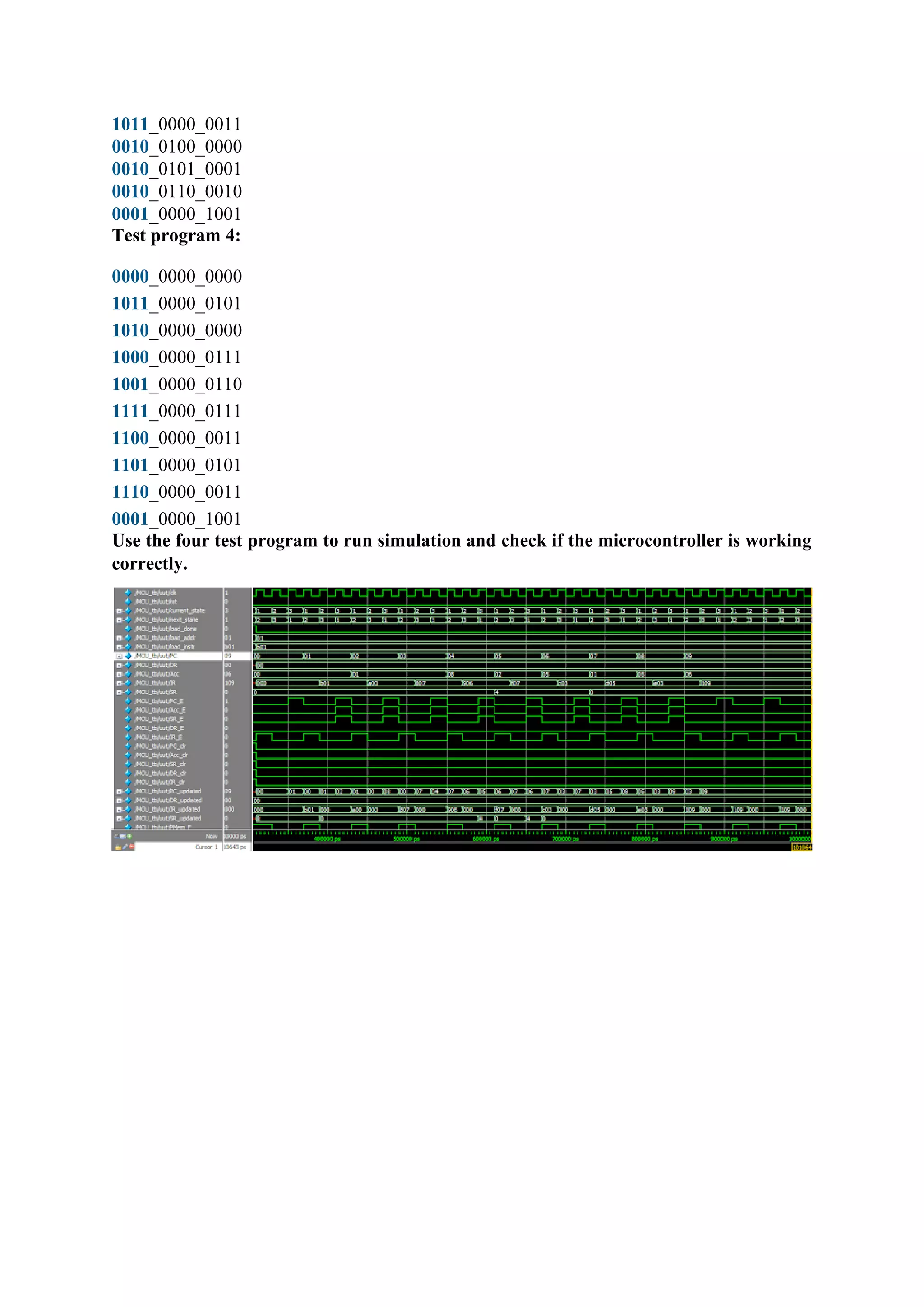
Use the four test program to run simulation and check if the microcontroller is working
correctly.

Design of microcontroller CPU.pdf

  • 1.
    Design of microcontrollerCPU Instruction Set Architecture: Each instruction is 12 bits. There are 3 types of instructions by encoding, shown as following: • M type: one operand is accumulator (sometimes ignored) and the other operand is from data memory; the result can be stored into accumulator or the data memory entry (same entry as the second operand). • I type: one operand is accumulator and the other operand is immediate number encoded in instruction; the result is stored into accumulator. • S type: special instruction, no operand required. (e.g. NOP) The instruction encoding space is shown in the following table. Code space (binary) Code space Type Number of Instructions Note
  • 2.
    (hex) 0000_0000_0000 - 0000_1111_1111 000- 0FF special instructions (S type) 256Currently only NOP used,255 free slots 0001_0000_0000 - 0001_1111_1111 100- 1FF unconditional jump (I type) 1 GOTO 0010_0000_0000 - 0011_1111_1111 200- 3FF ALU instructions (M type) 32 16 instructions, 2 destination choices 0100_0000_0000 - 0111_1111_1111 400- 7FF conditional jump (I type) 4 JZ, JC, JS, JC 1000_0000_0000 - 1111_1111_1111 800- FFF ALU instructions (I type) 8 Currently 7 used, 1 free slot These instructions can be grouped into 4 categories by function. 1. ALU instruction: using ALU to compute result; 2. Unconditional branch: the GOTO instruction; 3. Conditional branch: the JZ, JC, JS, JO instruction; 4. Special instruction: the NOP. M type instructions The general format of M type instruction is shown as following. The following table contains the detailed information of each M type instruction. Note that “aaaa” encodes the 4 bit address of data memory, and the “d” bit means destination of the result, i.e. if d = 1, result is written to Acc, otherwise the result is written to the same memory location as the operand
  • 4.
    Comments: 1. For circulativeshift, only the operand from memory entry is rotated, i.e. flags are not involved. For example, if 8’b1000_0000 is shifted left circulative for 1 bit, it becomes 8’b0000_0001, and no flag is affected. 2. For logical shift instructions, 0 is always filled in, and C flag is set to the last bit that is shifted out. For example, if 8’b1000_0000 is shifted left logically for 1 bit, it becomes 8’b0000_0000, and C = 1. Another example, if 8’b0000_0100 is shifted right logically for 3 bit, it becomes 8’b0000_0000, and C = 1. If no bit is shifted out, Z flag and C flag are not affected. 3. For arithmetic shift right instructions, the MSB is filled in, and C flag is set to the last bit that is shifted out. For example, if 8’b1000_0001 is shifted right arithmetically for 1 bit, it becomes 8’b1100_0000, and C = 1. Another example, if 8’b0000_0100 is shifted right arithmetically for 3 bit, it becomes 8’b0000_0000, and C = 1. If no bit is shifted out, Z flag and C flag are not affected. I type instructions The general format of M type instruction is shown as following.
  • 5.
    The following tablecontains the detailed information of each M type instruction. Note that I type instructions contains unconditional branch, conditional branch, and ALU instructions.
  • 6.
    S type instructions Thegeneral format of S type instruction is shown as following. There is only one S type instruction, i.e. the NOP instruction. Sample Testing Program After completion the hardware implementation of the MCU, you need to write testbench and load instructions to verify the design by simulation. Below is some testing programs to verify the MCU. Test1: Program loading, accumulator, and memory loading, GOTO
  • 7.
    Test2: Addition andsubtraction (M type) Test3: Logic operation (M type)
  • 8.
    Test4: Addition, subtraction,logic operation (I type)
  • 9.
    he following diagramis the architecture of the microcontroller. The datapath is shown as black arrows, and control signals are red arrows. The following two type of components holds programming context. • Program counter, program memory, data memory, accumulator, status register (green boxes). They are programmer visible registers and memories. • Instruction register and data register (purple boxes). They are programmer invisible registers. The following two type of components is Boolean logics that do the actual computation work. They are stateless • ALU, MUX1, MUX2, Adder (blue boxes), used as a functional unit. • Control Logic (yellow box), used to denote all control signals (red signal) The timing and state transition are shown in the following diagram.
  • 10.
    Each instruction needs3 clock cycles to finish, i.e. FETCH stage, DECODE stage, and EXECUTE stage. Note that it is not pipelined. Together with the initial LOAD state, it can be considered as an FSM of 3 states (technically 4 states). States: 1. LOAD (initial state): load program to program memory, which takes 1 cycle per instruction loaded; 2. FETCH (first cycle): fetch current instruction from program memory; 3. DECODE (second cycle): decode instruction to generate control logic, read data memory for operand; 4. EXECUTE (of the third cycle): execute instruction Transitions: 1. LOAD → FETCH (initialization finish): a. Clear content of PC, IR, DR, Acc, SR; DMem is not required to be cleared. 2. FETCH → DECODE (rising edge of second cycle) : . IR = PMem [ PC ] 3. DECODE → EXECUTE . DR = DMem [ IR[3:0] ]; 4. EXECUTE → FETCH (rising edge of first cycle and fourth cycle) . For non-branch instruction, PC = PC + 1; for branch instruction, if branch is taken, PC = IR [7:0], otherwise PC = PC + 1; a. For ALU instruction, if the result destination is accumulator, Acc = ALU.Out; if the result destination is data memory, DMem [ IR[3:0] ] = ALU.Out. b. For ALU instruction, SR = ALU.Status;
  • 11.
    The transitions canbe simplified using enable port of corresponding registers, e.g. assign ALU.Out to Acc at every clock rising edge if Acc.E is set to 1. Such control signals as Acc.E are generated as a boolean function of both current state and the current instruction. Components Registers The microcontroller has 3 programmer visible register: 1. Program Counter (8 bit, denoted as PC): contains the index of current executing instruction. 2. Accumulator (8 bit, denoted as Acc): holds result and 1 operand of the arithmetic or logic calculation. 3. Status Register (4 bit, denoted as SR): holds 4 status bit, i.e. Z, C, S, O. a. Z (zero flag, SR[3]): 1 if result is zero, 0 otherwise. b. C (carry flag, SR[2]): 1 if carry is generated, 0 otherwise. c. S (sign flag, SR[1]): 1 if result is negative (as 2’s complement), 0 otherwise. d. O (overflow flag, SR[0]): 1 if result generates overflow, 0 otherwise. Each of these registers has an enable port, as a flag for whether the value of the register should be updated in state transition. They are denoted as PC.E, Acc.E, and SR.E. The microcontroller has 2 programmer invisible registers (i.e. they can not be manipulated by programmer): 1. Instruction Register (12 bit, denoted as IR): contains the current executing instruction. 2. Data Register (8 bit, denoted as DR): contains the operand read from data memory. Similarly, each of these registers has an enable port as a flag for whether the value of the register should be updated in state transition. They are denoted as IR.E and DR.E. Program memory The microcontroller has a 256 entry program memory that stores program instructions, denoted as PMem. Each entry is 12 bits, the ith entry is denoted as PMem[i]. The program memory has the following input/output ports. • Enable port (1 bit, input, denoted as PMem.E): enable the device, i.e. if it is 1, then the entry specified by the address port will be read out, otherwise, nothing is read out. • Address port (8 bit, input, denoted as PMem.Addr): specify which instruction entry is read out, connected to PC. • Instruction port (12 bit, output, denoted as PMem.I): the instruction entry that is read out, connected to IR. • 3 special ports are used to load program to the memory, not used for executing instructions.
  • 12.
    • Load enableport (1 bit, input, denoted as PMem.LE): enable the load, i.e. if it is 1, then the entry specified by the address port will be load with the value specified by the load instruction input port and the instruction port is supplied with the same value; otherwise, the entry specified by the address port will be read out on instruction port, and value on instruction load port is ignored. • Load address port (8 bit, input, denoted as PMem.LA): specify which instruction entry is loaded. • Load instruction port (12 bit, input, denoted as PMem.LI): the instruction that is loaded. For example, if the address point is supplied with 8’b0000_0011 and enable is set to 1, the fourth entry is read out on instruction port. Note that program load only takes effect on clock rising edge, while instruction read out happens all the time. Data memory The microcontroller has a 16 entry data memory, denoted as DMem. Each entry is 8 bits, the ith entry is denoted as DMem[i]. The program memory has the following input/output ports. • Enable port (1 bit, input, denoted as DMem.E): enable the device, i.e. if it is 1, then the entry specified by the address port will be read out or written in; otherwise nothing is read out or written in. • Write enable port(1 bit, input, denoted as DMem.WE): enable the write, i.e. if it is 1, then the entry specified by the address port will be written with the value specified by the data input port and the data output port is supplied with the same value; otherwise, the entry specified by the address port will be read out on data output port, and value on data input port is ignored. • Address port (4 bit, input, denoted as DMem.Addr): specify which data entry is read out, connected to IR[3:0]. • Data input port (8 bit, input, denoted as DMem.DI): the value that is written in, connected to ALU.Out. • Data output port (8 bit, output, denoted as DMem.DO): the data entry that is read out, connected to MUX2.In1. For example, if the address point is supplied with 8’0000_0011, data input port is supplied with 8’0000_0000, enable is set to 1, and write enable is set to 1, the fourth entry of the data memory is written with value 0 and the data output port shows 8’0000_0000. As another example, if the address point is supplied with 8’0000_0011, data input port is supplied with 8’0000_0000, enable is set to 1, while write enable is set to 0, the fourth entry of the data memory is read out on data output port. Note that write only takes effect on clock rising edge, while read happens all the time, similar to program memory. PC adder PC adder is used to add PC by 1, i.e. move to the next instruction. This component is pure combinational. It has the following port. • Adder input port (8 bit, input, denoted as Adder.In): connected to PC.
  • 13.
    • Adder outputport (8 bit, output, denoted as Adder.Out): connected to MUX1.In2. MUX1 MUX1 is used to choose the source for updating PC. If the current instruction is not a branch or it is a branch but the branch is not taken, PC is incremented by 1; otherwise PC is set to the jumping target, i.e. IR [7:0]. It has the following port. • MUX1 input 1 port (8 bit, input, denoted as MUX1.In1): connected to IR [7:0]. • MUX1 input 2 port (8 bit, input, denoted as MUX1.In2): connected to Adder.Out. • MUX1 selection port (1 bit, input, denoted as MUX1.Sel): connected to control logic. • MUX1 output port (8 bit, output, denoted as MUX1.Out): connected to PC. ALU ALU is used to do the actual computation for the current instruction. This component is pure combinational. It has the following port. The mode of ALU is listed in the following table. • ALU operand 1 port (8 bit, input, denoted as ALU.Operand1): connected to Acc. • ALU operand 2 port (8 bit, input, denoted as ALU.Operand2): connected to MUX2.Out. • ALU enable port (1 bit, input, denoted as ALU.E): connected to control logic. • ALU mode port (4 bit, input, denoted as ALU.Mode): connected to control logic. • Current flags port (4 bit, input, denoted as ALU.CFlags): connected to SR. • ALU output port (8 bit, output, denoted as ALU.Out): connected to DMem.DI. • ALU flags port (4 bit, output, denoted as ALU.Flags): the Z (zero), C (carry), S (sign), O (overflow) bits, from MSB to LSB, connected to status register.
  • 14.
    MUX2 MUX2 is usedto choose the source for operand 2 of ALU. If the current instruction is M type, operand 2 of ALU comes from data memory; if the current instruction is I type, operand 2 of ALU comes from the instruction, i.e. IR [7:0]. It has the following port. • MUX2 input 1 port (8 bit, input, denoted as MUX2.In1): connected to IR [7:0]. • MUX2 input 2 port (8 bit, input, denoted as MUX2.In2): connected to DR. • MUX2 selection port (1 bit, input, denoted as MUX2.Sel): connected to control logic. • MUX2 output port (8 bit, output, denoted as MUX2.Out): connected to ALU.Operand2. Control unit design Control signal is derived from the current state and current instruction. The control logic component is purely combinational. There are in total 12 control signals, listed as follows. • PC.E: enable port of program counter (PC); • Acc.E: enable port of accumulator (Acc); • SR.E: enable port of status register (SR);
  • 15.
    • IR.E: enableport of instruction register (IR); • DR.E: enable port of data register (DR); • PMem.E: enable port of program memory (PMem); • DMem.E: enable port of data memory (DMem); • DMem.WE: write enable port of data memory (DMem); • ALU.E: enable port of ALU; • ALU.Mode: mode selection port of ALU; • MUX1.Sel: selection port of MUX1; • MUX2.Sel: selection port of MUX2; The following table documents the detail of how these control signals are generated important signals are marked in red. Comments: 1. Note that in EXECUTE state of conditional branch instructions, the value of MUX1.Sel is actually SR[ IR [9:8] ]; 2. Note that in EXECUTE stage of ALU I type instruction, the value of ALU.Mode is actually {0, IR[10:8]}. In the table above, 0 extension is assumed. 3. Be careful that PMem.LE is not shown in this table. If the processor is not in LOAD state, PMem.LE is always set to 0.
  • 16.
    The type andcategory of instruction can be identified by the first 4 bits of the instruction, i.e. IR[11:8], as denoted in the first column of the above table. Besides, when loading the program, the control signal is generated as below. If the processor is in LOAD state, PMem.LE is always set to 1. First is the Verilog code for ALU unit: // fpga4student.com: FPGA project, Verilog project, VHDL project // Verilog project: Verilog code for Microcontroller // Verilog code for ALU module ALU( input [7:0] Operand1,Operand2, input E, input [3:0] Mode, input [3:0] CFlags, output [7:0] Out, output [3:0] Flags // the Z (zero), C (carry), S (sign),O (overflow) bits, from MSB to LSB, connected to status register ); wire Z,S,O; reg CarryOut; reg [7:0] Out_ALU; always @(*) begin case(Mode) 4'b0000: {CarryOut,Out_ALU} = Operand1 + Operand2; 4'b0001: begin Out_ALU = Operand1 - Operand2; CarryOut = !Out_ALU[7]; end 4'b0010: Out_ALU = Operand1; 4'b0011: Out_ALU = Operand2; 4'b0100: Out_ALU = Operand1 & Operand2; 4'b0101: Out_ALU = Operand1 | Operand2; 4'b0110: Out_ALU = Operand1 ^ Operand2; 4'b0111: begin Out_ALU = Operand2 - Operand1;
  • 17.
    CarryOut = !Out_ALU[7]; end 4'b1000:{CarryOut,Out_ALU} = Operand2 + 8'h1; 4'b1001: begin Out_ALU = Operand2 - 8'h1; CarryOut = !Out_ALU[7]; end 4'b1010: Out_ALU = (Operand2 << Operand1[2:0])| ( Operand2 >> Operand1[2:0]); 4'b1011: Out_ALU = (Operand2 >> Operand1[2:0])| ( Operand2 << Operand1[2:0]); 4'b1100: Out_ALU = Operand2 << Operand1[2:0]; 4'b1101: Out_ALU = Operand2 >> Operand1[2:0]; 4'b1110: Out_ALU = Operand2 >>> Operand1[2:0]; 4'b1111: begin Out_ALU = 8'h0 - Operand2; CarryOut = !Out_ALU[7]; end default: Out_ALU = Operand2; endcase end assign O = Out_ALU[7] ^ Out_ALU[6]; assign Z = (Out_ALU == 0)? 1'b1 : 1'b0; assign S = Out_ALU[7]; assign Flags = {Z,CarryOut,S,O}; assign Out = Out_ALU; // fpga4student.com: FPGA project, Verilog project, VHDL project endmodule Next is the Verilog code for data memory: // fpga4student.com: FPGA project, Verilog project, VHDL project // Verilog project: Verilog code for Microcontroller // Verilog code for data memory module DMem( input clk, input E, // Enable port input WE, // Write enable port input [3:0] Addr, // Address port input [7:0] DI, // Data input port output [7:0] DO // Data output port ); reg [7:0] data_mem [255:0]; // fpga4student.com: FPGA project, Verilog project, VHDL project always @(posedge clk)
  • 18.
    begin if(E==1 && WE==1) data_mem[Addr] <= DI; end assign DO = (E ==1 )? data_mem[Addr]:0; endmodule Verilog code for adder and MUX1: // Verilog project: Verilog code for microcontroller // Submodule: Verilog code for Adder and MUXs module adder( input [7:0] In, output [7:0] Out ); assign Out = In + 1; endmodule module MUX1( input [7:0] In1,In2, input Sel, output [7:0] Out ); assign Out = (Sel==1)? In1: In2; endmodule Continue on the Verilog code for program memory: // Verilog project: Verilog code for microcontroller // Submodule: Verilog code for Adder and MUXs// fpga4student.com: FPGA project, Verilog project, VHDL project // Verilog project: Verilog code for microcontroller module PMem( input clk, input E, // Enable port input [7:0] Addr, // Address port output [11:0] I, // Instruction port // 3 special ports are used to load program to the memory input LE, // Load enable port input[7:0] LA, // Load address port input [11:0] LI//Load instruction port ); reg [11:0] Prog_Mem[255:0] ; // fpga4student.com: FPGA project, Verilog project, VHDL project always @(posedge clk)
  • 19.
    begin if(LE == 1)begin Prog_Mem[LA] <= LI; end end assign I = (E == 1) ? Prog_Mem[Addr]: 0 ; endmodule module adder( input [7:0] In, output [7:0] Out ); assign Out = In + 1; endmodule module MUX1( input [7:0] In1,In2, input Sel, output [7:0] Out ); assign Out = (Sel==1)? In1: In2; endmodule Next, the Verilog code for Control unit: // fpga4student.com: FPGA project, Verilog project, VHDL project // Verilog project: Verilog code for microcontroller // Control unit in Verilog module Control_Logic( input[1:0] stage, input [11:0] IR, input [3:0] SR, output reg PC_E,Acc_E,SR_E,IR_E,DR_E,PMem_E,DMem_E,DMem_WE,ALU_E,MUX1_Sel,M UX2_Sel,PMem_LE, output reg [3:0] ALU_Mode ); parameter LOAD = 2'b00,FETCH = 2'b01, DECODE = 2'b10, EXECUTE = 2'b11; always @(*) begin PMem_LE = 0; PC_E = 0; Acc_E = 0; SR_E = 0;
  • 20.
    IR_E = 0; DR_E= 0; PMem_E = 0; DMem_E = 0; DMem_WE = 0; ALU_E =0; ALU_Mode = 4'd0; MUX1_Sel = 0; MUX2_Sel = 0; if(stage== LOAD ) begin PMem_LE = 1; PMem_E = 1; end else if(stage== FETCH ) begin IR_E = 1; PMem_E = 1; end else if(stage== DECODE ) begin if( IR[11:9] == 3'b001) begin DR_E = 1; DMem_E = 1; end else begin DR_E = 0; DMem_E = 0; end end else if(stage== EXECUTE ) begin if(IR[11]==1) begin // ALU I-type PC_E = 1; Acc_E = 1; SR_E = 1; ALU_E = 1; ALU_Mode = IR[10:8]; MUX1_Sel = 1; MUX2_Sel = 0;
  • 21.
    end else if(IR[10]==1) //JZ, JC,JS, JO begin PC_E = 1; MUX1_Sel = SR[IR[9:8]]; end else if(IR[9]==1) begin PC_E = 1; Acc_E = IR[8]; SR_E = 1; DMem_E = !IR[8]; DMem_WE = !IR[8]; ALU_E = 1; ALU_Mode = IR[7:4]; MUX1_Sel = 1; MUX2_Sel = 1; end else if(IR[8]==0) begin PC_E = 1; MUX1_Sel = 1; end else begin PC_E = 1; MUX1_Sel = 0; end end end endmodule Finally, the Verilog code for microcontroller: // The microcontroller (similar to Microchip PIC12, simplified extensively, not compatible in // instruction set) in this project is a 3 cycle nonpipeline // 8 bit Harvard structure microcontroller, illustrated as the following block diagram // fpga4student.com: FPGA project, Verilog project, VHDL project // Verilog project: Verilog code for microcontroller module MicroController(input clk,rst );
  • 22.
    parameter LOAD =2'b00,FETCH = 2'b01, DECODE = 2'b10, EXECUTE = 2'b11; reg [1:0] current_state,next_state; reg [11:0] program_mem[9:0]; reg load_done; reg[7:0] load_addr; wire[11:0] load_instr; reg[7:0] PC, DR, Acc; reg [11:0] IR; reg [3:0] SR; wire PC_E,Acc_E,SR_E,DR_E,IR_E; reg PC_clr,Acc_clr,SR_clr,DR_clr,IR_clr; wire [7:0] PC_updated,DR_updated; wire[11:0] IR_updated; wire[3:0] SR_updated; wire PMem_E,DMem_E,DMem_WE,ALU_E,PMem_LE,MUX1_Sel,MUX2_Sel; wire [3:0] ALU_Mode; wire [7:0] Adder_Out; wire [7:0] ALU_Out,ALU_Oper2; // LOAD instruction memory initial begin $readmemb("program_mem.dat", program_mem,0,9); end // ALU ALU ALU_unit( .Operand1(Acc), .Operand2(ALU_Oper2), .E(ALU_E), .Mode(ALU_Mode), .CFlags(SR), .Out(ALU_Out), .Flags(SR_updated) // the Z (zero), C (carry), S (sign),O (overflow) bits, from MSB to LSB, connected to status register ); // MUX2 MUX1 MUX2_unit( .In2(IR[7:0]),.In1(DR), .Sel(MUX2_Sel), .Out(ALU_Oper2) ); // Data Memory DMem DMem_unit( .clk(clk),
  • 23.
    .E(DMem_E), // Enableport .WE(DMem_WE), // Write enable port .Addr(IR[3:0]), // Address port .DI(ALU_Out), // Data input port .DO(DR_updated) // Data output port ); // Program memory PMem PMem_unit( .clk(clk), .E(PMem_E), // Enable port .Addr(PC), // Address port .I(IR_updated), // Instruction port // 3 special ports are used to load program to the memory .LE(PMem_LE), // Load enable port .LA(load_addr), // Load address port .LI(load_instr)//Load instruction port ); // PC ADder adder PC_Adder_unit( .In(PC), .Out(Adder_Out) ); // fpga4student.com: FPGA project, Verilog project, VHDL project // MUX1 MUX1 MUX1_unit( .In2(IR[7:0]),.In1(Adder_Out), .Sel(MUX1_Sel), .Out(PC_updated) ); // Control logic Control_Logic Control_Logic_Unit( .stage(current_state), .IR(IR), .SR(SR), .PC_E(PC_E), .Acc_E(Acc_E), .SR_E(SR_E), .IR_E(IR_E), .DR_E(DR_E), .PMem_E(PMem_E), .DMem_E(DMem_E), .DMem_WE(DMem_WE), .ALU_E(ALU_E), .MUX1_Sel(MUX1_Sel),
  • 24.
    .MUX2_Sel(MUX2_Sel), .PMem_LE(PMem_LE), .ALU_Mode(ALU_Mode) ); // fpga4student.com: FPGAproject, Verilog project, VHDL project // LOAD always @(posedge clk) begin if(rst==1) begin load_addr <= 0; load_done <= 1'b0; end else if(PMem_LE==1) begin load_addr <= load_addr + 8'd1; if(load_addr == 8'd9) begin load_addr <= 8'd0; load_done <= 1'b1; end else begin load_done <= 1'b0; end end end // fpga4student.com: FPGA project, Verilog project, VHDL project assign load_instr = program_mem[load_addr]; // next state always @(posedge clk) begin if(rst==1) current_state <= LOAD; else current_state <= next_state; end always @(*) begin PC_clr = 0; Acc_clr = 0;
  • 25.
    SR_clr = 0; DR_clr= 0; IR_clr = 0; case(current_state) LOAD: begin if(load_done==1) begin next_state = FETCH; PC_clr = 1; Acc_clr = 1; SR_clr = 1; DR_clr = 1; IR_clr = 1; end else next_state = LOAD; end FETCH: begin next_state = DECODE; end DECODE: begin next_state = EXECUTE; end EXECUTE: begin next_state = FETCH; end endcase end // fpga4student.com: FPGA project, Verilog project, VHDL project // 3 programmer visible register always @(posedge clk) begin if(rst==1) begin PC <= 8'd0; Acc <= 8'd0; SR <= 4'd0; end else begin if(PC_E==1'd1)
  • 26.
    PC <= PC_updated; elseif (PC_clr==1) PC <= 8'd0; if(Acc_E==1'd1) Acc <= ALU_Out; else if (Acc_clr==1) Acc <= 8'd0; if(SR_E==1'd1) SR <= SR_updated; else if (SR_clr==1) SR <= 4'd0; end end // fpga4student.com: FPGA project, Verilog project, VHDL project // 2 programmer invisible register always @(posedge clk) begin if(DR_E==1'd1) DR <= DR_updated; else if (DR_clr==1) DR <= 8'd0; if(IR_E==1'd1) IR <= IR_updated; else if(IR_clr==1) IR <= 12'd0; end endmodule Verilog testbench code to verify the microcontroller: module MCU_tb; // fpga4student.com: FPGA project, Verilog project, VHDL project // Verilog project: Verilog code for microcontroller // Inputs reg clk; reg rst; // Instantiate the Unit Under Test (UUT) MicroController uut ( .clk(clk), .rst(rst) );
  • 27.
    initial begin // InitializeInputs rst = 1; // Wait 100 ns for global reset to finish #100; rst = 0; end initial begin clk = 0; forever #10 clk = ~clk; end endmodule Test program 1: 0000_0000_0000 1011_0000_0001 0010_0010_0000 1011_0000_0000 0011_0011_0000 0001_0000_0101 0000_0000_0000 0000_0000_0000 0000_0000_0000 0000_0000_0000 Test program 2: 0000_0000_0000 1011_0000_0001 0010_0010_0000 0011_0000_0000 0010_0000_0000 0011_0001_0000 0010_0001_0000 0011_0111_0000 0010_0111_0000 0001_0000_1001 Test program 3: 0000_0000_0000 1011_0000_0101 0010_0010_0000 0010_0010_0001 0010_0010_0010
  • 28.