Computer Room
Requirements for High
Density Rack Mounted
Servers
Rhys Newman
Oxford University
Outline
• Why do we need computer rooms?
– Why in the past.
– Why in the future.

• Design of the environment.
– Cooling
– Humidity
– Power

• Proposal at Oxford Physics
• Conclusion
Why do we need them (Past)
• Security
– Equipment is valuable.

• Convenience
– Specialist Knowledge is needed to look after them.
– Networking was relatively difficult.

• Bulk
– A single (useful) installation was large
Why we need them (future)
• Specialist Environmental Requirements
– High density implies more sensitive.

• Convenience
– Human time cost of software maintenance.

Will be needed for the immediate future,
but the Grid will reduce the need long
term.
Cooling - Then
• Rack mounting designed to get high CPU
density – optimise space usage given the
effort needed to allocate secure facility.
– Until recently, maximum power usage was
about 2-3kw per rack.
– Air cooling sufficient, cool air taken directly
from under the floor.
– Even conventional air conditioning on the
ceiling was often enough.
Cooling Now: too much Success!
• Modern 1U servers are 300W heaters =>
12KW per rack (18KW for blade servers).
• Rule of thumb: 1000 litres/sec of cool air
can handle 12KW.
– In detail a Dell 1750 uses 1200 l/min.

• For 40 racks, this is 32000 l/sec which in a
typical 600mm duct is a wind speed of
320km/hr!
Cooling - Solutions
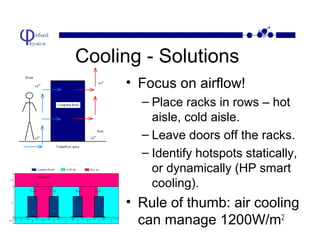
• Focus on airflow!
– Place racks in rows – hot
aisle, cold aisle.
– Leave doors off the racks.
– Identify hotspots statically,
or dynamically (HP smart
cooling).

• Rule of thumb: air cooling
can manage 1200W/m2
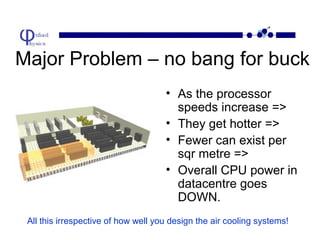
Major Problem – no bang for buck
• As the processor
speeds increase =>
• They get hotter =>
• Fewer can exist per
sqr metre =>
• Overall CPU power in
datacentre goes
DOWN.
All this irrespective of how well you design the air cooling systems!
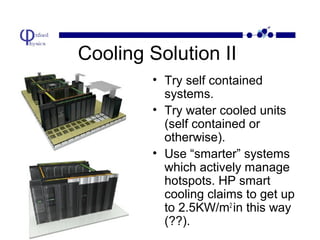
Cooling Solution II
• Try self contained
systems.
• Try water cooled units
(self contained or
otherwise).
• Use “smarter” systems
which actively manage
hotspots. HP smart
cooling claims to get up
to 2.5KW/m2 in this way
(??).
Humidity
• Computers (in a datacentre) have tighter
tolerances than humans – 45%-55% (despite
manufacturer limits of 8%-80%).
– Too low, risks static eletricity (fans in the computers
themselves cause this).
– Too high, localised condensation, corrosion and
electrical short. Note: Zinc in floor tiles!

• Air conditioning units must be better than for
normal offices – how many rooms use
conventional units?
No magic bullet of simply importing external air and venting it to the outside!!!
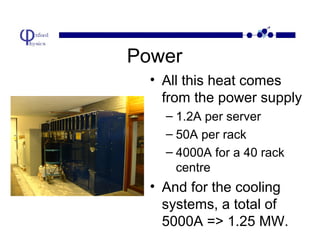
Power
• All this heat comes
from the power supply
– 1.2A per server
– 50A per rack
– 4000A for a 40 rack
centre

• And for the cooling
systems, a total of
5000A => 1.25 MW.
Summary so far….
• Modern machines need a well designed physical
environment to get the most out of them. Most
current facilities are no longer well suited (a
recent thing).
– Intel scrapped 2 chip lines to concentrate on lower
power chips, rather than simply faster.
– Sun (and others) are working on chips with multiple
cores and lower clock speeds (good for internet
servers, not so good for physics!).

• The cost of the surrounding room is a
substantial cost of the entire facility.
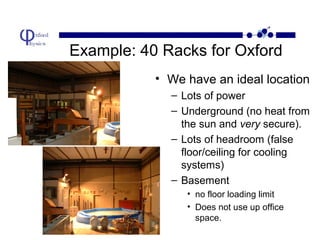
Example: 40 Racks for Oxford
• We have an ideal location
– Lots of power
– Underground (no heat from
the sun and very secure).
– Lots of headroom (false
floor/ceiling for cooling
systems)
– Basement
• no floor loading limit
• Does not use up office
space.
Bottom Line
• The very basic estimate for the room,
given the shell, is £80k.
• Adding fully loaded cooling, UPS, power
conditioning, fire protection etc will
probably take this to £400k over time.
• Cost of 40 racks ~ £1.6 million
• Infrastructure costs: 25% of setup and up
to 50% of running costs.
Hang on!
• There are about 50000
computers already in Oxford
university alone.
• Assume 20000 are OK.
• Already have a major data
centre, with essentially no
infrastructure problems!
• The problem is software –
the Grid will exploit these
resources and thereby save
millions in datacentre costs –
medium term!
Thank you!

• Sun has a detailed paper at:
http://www.sun.com/servers/white-papers/dc-p
• APC has a number of useful white papers:
http://www.apc.com/tools/mytools/

Design computerroom

  • 1.
    Computer Room Requirements forHigh Density Rack Mounted Servers Rhys Newman Oxford University
  • 2.
    Outline • Why dowe need computer rooms? – Why in the past. – Why in the future. • Design of the environment. – Cooling – Humidity – Power • Proposal at Oxford Physics • Conclusion
  • 3.
    Why do weneed them (Past) • Security – Equipment is valuable. • Convenience – Specialist Knowledge is needed to look after them. – Networking was relatively difficult. • Bulk – A single (useful) installation was large
  • 4.
    Why we needthem (future) • Specialist Environmental Requirements – High density implies more sensitive. • Convenience – Human time cost of software maintenance. Will be needed for the immediate future, but the Grid will reduce the need long term.
  • 5.
    Cooling - Then •Rack mounting designed to get high CPU density – optimise space usage given the effort needed to allocate secure facility. – Until recently, maximum power usage was about 2-3kw per rack. – Air cooling sufficient, cool air taken directly from under the floor. – Even conventional air conditioning on the ceiling was often enough.
  • 6.
    Cooling Now: toomuch Success! • Modern 1U servers are 300W heaters => 12KW per rack (18KW for blade servers). • Rule of thumb: 1000 litres/sec of cool air can handle 12KW. – In detail a Dell 1750 uses 1200 l/min. • For 40 racks, this is 32000 l/sec which in a typical 600mm duct is a wind speed of 320km/hr!
  • 7.
    Cooling - Solutions •Focus on airflow! – Place racks in rows – hot aisle, cold aisle. – Leave doors off the racks. – Identify hotspots statically, or dynamically (HP smart cooling). • Rule of thumb: air cooling can manage 1200W/m2
  • 8.
    Major Problem –no bang for buck • As the processor speeds increase => • They get hotter => • Fewer can exist per sqr metre => • Overall CPU power in datacentre goes DOWN. All this irrespective of how well you design the air cooling systems!
  • 9.
    Cooling Solution II •Try self contained systems. • Try water cooled units (self contained or otherwise). • Use “smarter” systems which actively manage hotspots. HP smart cooling claims to get up to 2.5KW/m2 in this way (??).
  • 10.
    Humidity • Computers (ina datacentre) have tighter tolerances than humans – 45%-55% (despite manufacturer limits of 8%-80%). – Too low, risks static eletricity (fans in the computers themselves cause this). – Too high, localised condensation, corrosion and electrical short. Note: Zinc in floor tiles! • Air conditioning units must be better than for normal offices – how many rooms use conventional units? No magic bullet of simply importing external air and venting it to the outside!!!
  • 11.
    Power • All thisheat comes from the power supply – 1.2A per server – 50A per rack – 4000A for a 40 rack centre • And for the cooling systems, a total of 5000A => 1.25 MW.
  • 12.
    Summary so far…. •Modern machines need a well designed physical environment to get the most out of them. Most current facilities are no longer well suited (a recent thing). – Intel scrapped 2 chip lines to concentrate on lower power chips, rather than simply faster. – Sun (and others) are working on chips with multiple cores and lower clock speeds (good for internet servers, not so good for physics!). • The cost of the surrounding room is a substantial cost of the entire facility.
  • 13.
    Example: 40 Racksfor Oxford • We have an ideal location – Lots of power – Underground (no heat from the sun and very secure). – Lots of headroom (false floor/ceiling for cooling systems) – Basement • no floor loading limit • Does not use up office space.
  • 14.
    Bottom Line • Thevery basic estimate for the room, given the shell, is £80k. • Adding fully loaded cooling, UPS, power conditioning, fire protection etc will probably take this to £400k over time. • Cost of 40 racks ~ £1.6 million • Infrastructure costs: 25% of setup and up to 50% of running costs.
  • 15.
    Hang on! • Thereare about 50000 computers already in Oxford university alone. • Assume 20000 are OK. • Already have a major data centre, with essentially no infrastructure problems! • The problem is software – the Grid will exploit these resources and thereby save millions in datacentre costs – medium term!
  • 16.
    Thank you! • Sunhas a detailed paper at: http://www.sun.com/servers/white-papers/dc-p • APC has a number of useful white papers: http://www.apc.com/tools/mytools/