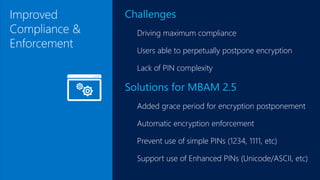
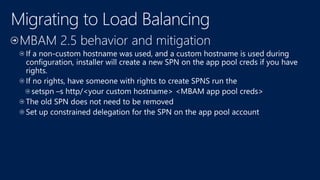
Improved
Compliance &
Enforcement
Challenges
Driving maximum compliance
Users able to perpetually postpone encryption
Lack of PIN complexity
Solutions for MBAM 2.5
Added grace period for encryption postponement
Automatic encryption enforcement
Prevent use of simple PINs (1234, 1111, etc)
Support use of Enhanced PINs (Unicode/ASCII, etc)
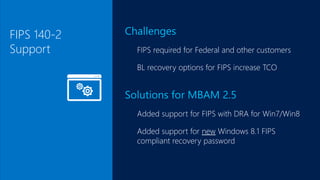
FIPS 140-2
Support
Challenges
FIPS required for Federal and other customers
BL recovery options for FIPS increase TCO
Solutions for MBAM 2.5
Added support for FIPS with DRA for Win7/Win8
Added support for new Windows 8.1 FIPS
compliant recovery password
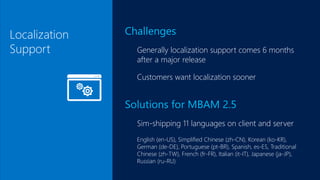
Localization
Support
Challenges
Generally localization support comes 6 months
after a major release
Customers want localization sooner
Solutions for MBAM 2.5
Sim-shipping 11 languages on client and server
English (en-US), Simplified Chinese (zh-CN), Korean (ko-KR),
German (de-DE), Portuguese (pt-BR), Spanish, es-ES, Traditional
Chinese (zh-TW), French (fr-FR), Italian (it-IT), Japanese (ja-JP),
Russian (ru-RU)
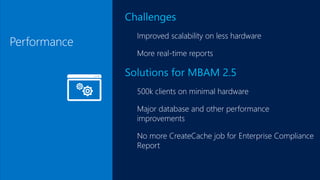
Performance
Challenges
Improved scalability on less hardware
More real-time reports
Solutions for MBAM 2.5
500k clients on minimal hardware
Major database and other performance
improvements
No more CreateCache job for Enterprise Compliance
Report
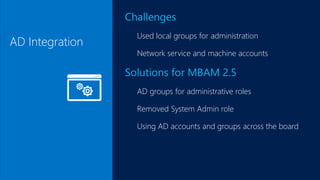
AD Integration
Challenges
Used local groups for administration
Network service and machine accounts
Solutions for MBAM 2.5
AD groups for administrative roles
Removed System Admin role
Using AD accounts and groups across the board
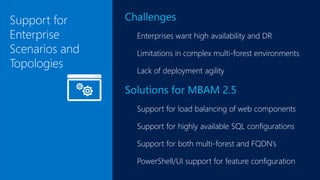
Support for
Enterprise
Scenarios and
Topologies
Challenges
Enterprises want high availability and DR
Limitations in complex multi-forest environments
Lack of deployment agility
Solutions for MBAM 2.5
Support for load balancing of web components
Support for highly available SQL configurations
Support for both multi-forest and FQDN’s
PowerShell/UI support for feature configuration
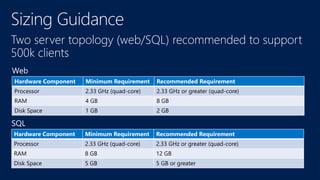
Two server topology (web/SQL) recommended to support
500k clients
Hardware Component Minimum Requirement Recommended Requirement
Processor 2.33 GHz (quad-core) 2.33 GHz or greater (quad-core)
RAM 4 GB 8 GB
Disk Space 1 GB 2 GB
Hardware Component Minimum Requirement Recommended Requirement
Processor 2.33 GHz (quad-core) 2.33 GHz or greater (quad-core)
RAM 8 GB 12 GB
Disk Space 5 GB 5 GB or greater
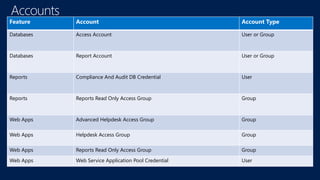
Feature Account Account Type
Databases Access Account User or Group
Databases Report Account User or Group
Reports Compliance And Audit DB Credential User
Reports Reports Read Only Access Group Group
Web Apps Advanced Helpdesk Access Group Group
Web Apps Helpdesk Access Group Group
Web Apps Reports Read Only Access Group Group
Web Apps Web Service Application Pool Credential User
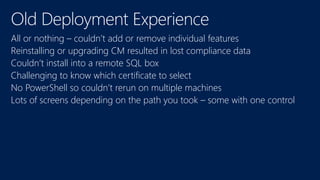
All or nothing – couldn’t add or remove individual features
Reinstalling or upgrading CM resulted in lost compliance data
Couldn’t install into a remote SQL box
Challenging to know which certificate to select
No PowerShell so couldn’t rerun on multiple machines
Lots of screens depending on the path you took – some with one control
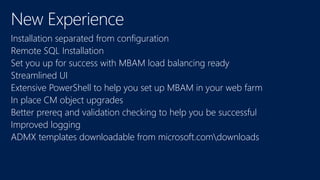
Installation separated from configuration
Remote SQL Installation
Set you up for success with MBAM load balancing ready
Streamlined UI
Extensive PowerShell to help you set up MBAM in your web farm
In place CM object upgrades
Better prereq and validation checking to help you be successful
Improved logging
ADMX templates downloadable from microsoft.comdownloads
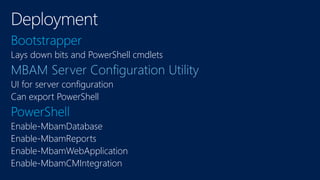
Lays down bits and PowerShell cmdlets
UI for server configuration
Can export PowerShell
Enable-MbamDatabase
Enable-MbamReports
Enable-MbamWebApplication
Enable-MbamCMIntegration
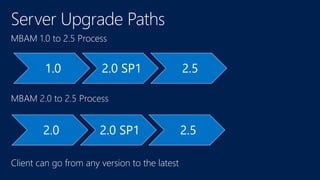
MBAM 1.0 to 2.5 Process
1.0 2.0 SP1 2.5
MBAM 2.0 to 2.5 Process
Client can go from any version to the latest
2.0 2.0 SP1 2.5
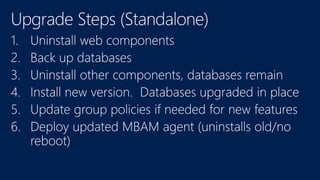
1.
2.
3.
4.
5.
6.
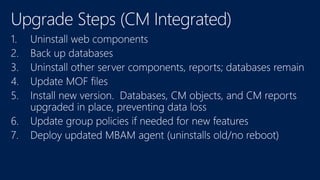
1.
2.
3.
4.
5.
6.
7.
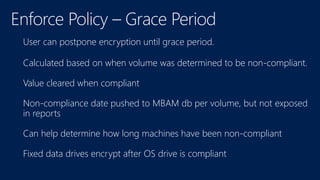
User can postpone encryption until grace period.
Calculated based on when volume was determined to be non-compliant.
Value cleared when compliant
Non-compliance date pushed to MBAM db per volume, but not exposed
in reports
Can help determine how long machines have been non-compliant
Fixed data drives encrypt after OS drive is compliant
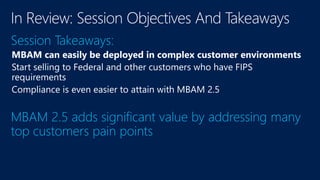
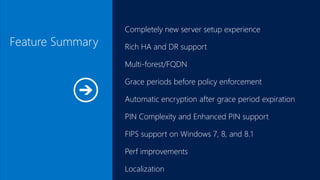
Feature Summary
Completely new server setup experience
Rich HA and DR support
Multi-forest/FQDN
Grace periods before policy enforcement
Automatic encryption after grace period expiration
PIN Complexity and Enhanced PIN support
FIPS support on Windows 7, 8, and 8.1
Perf improvements
Localization
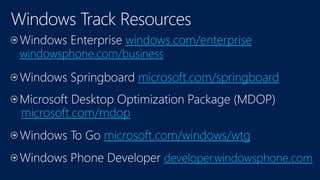
windows.com/enterprise
windowsphone.com/business
microsoft.com/springboard
microsoft.com/mdop
microsoft.com/windows/wtg
developer.windowsphone.com
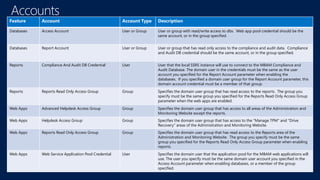
Feature Account Account Type Description
Databases Access Account User or Group User or group with read/write access to dbs. Web app pool credential should be the
same account, or in the group specified.
Databases Report Account User or Group User or group that has read only access to the compliance and audit data. Compliance
and Audit DB credential should be the same account, or in the group specified.
Reports Compliance And Audit DB Credential User User that the local SSRS instance will use to connect to the MBAM Compliance and
Audit Database. The domain user in the credentials must be the same as the user
account you specified for the Report Account parameter when enabling the
databases. If you specified a domain user group for the Report Account parameter, this
domain account credential must be a member of that group.
Reports Reports Read Only Access Group Group Specifies the domain user group that has read access to the reports. The group you
specify must be the same group you specified for the Reports Read Only Access Group
parameter when the web apps are enabled.
Web Apps Advanced Helpdesk Access Group Group Specifies the domain user group that has access to all areas of the Administration and
Monitoring Website except the reports.
Web Apps Helpdesk Access Group Group Specifies the domain user group that has access to the "Manage TPM" and "Drive
Recovery" areas of the Administration and Monitoring Website.
Web Apps Reports Read Only Access Group Group Specifies the domain user group that has read access to the Reports area of the
Administration and Monitoring Website. The group you specify must be the same
group you specified for the Reports Read Only Access Group parameter when enabling
reports.
Web Apps Web Service Application Pool Credential User Specifies the domain user that the application pool for the MBAM web applications will
use. The user you specify must be the same domain user account you specified in the
Access Account parameter when enabling databases, or a member of the group
specified.
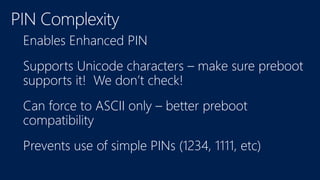
Enables Enhanced PIN
Supports Unicode characters – make sure preboot
supports it! We don’t check!
Can force to ASCII only – better preboot
compatibility
Prevents use of simple PINs (1234, 1111, etc)
www.microsoft.com/learning
http://microsoft.com/msdnhttp://microsoft.com/technet
http://channel9.msdn.com/Events/TechEd
Deploying Microsoft BitLocker

Deploying Microsoft BitLocker

  • 12.
    Improved Compliance & Enforcement Challenges Driving maximumcompliance Users able to perpetually postpone encryption Lack of PIN complexity Solutions for MBAM 2.5 Added grace period for encryption postponement Automatic encryption enforcement Prevent use of simple PINs (1234, 1111, etc) Support use of Enhanced PINs (Unicode/ASCII, etc)
  • 13.
    FIPS 140-2 Support Challenges FIPS requiredfor Federal and other customers BL recovery options for FIPS increase TCO Solutions for MBAM 2.5 Added support for FIPS with DRA for Win7/Win8 Added support for new Windows 8.1 FIPS compliant recovery password
  • 14.
    Localization Support Challenges Generally localization supportcomes 6 months after a major release Customers want localization sooner Solutions for MBAM 2.5 Sim-shipping 11 languages on client and server English (en-US), Simplified Chinese (zh-CN), Korean (ko-KR), German (de-DE), Portuguese (pt-BR), Spanish, es-ES, Traditional Chinese (zh-TW), French (fr-FR), Italian (it-IT), Japanese (ja-JP), Russian (ru-RU)
  • 15.
    Performance Challenges Improved scalability onless hardware More real-time reports Solutions for MBAM 2.5 500k clients on minimal hardware Major database and other performance improvements No more CreateCache job for Enterprise Compliance Report
  • 16.
    AD Integration Challenges Used localgroups for administration Network service and machine accounts Solutions for MBAM 2.5 AD groups for administrative roles Removed System Admin role Using AD accounts and groups across the board
  • 17.
    Support for Enterprise Scenarios and Topologies Challenges Enterpriseswant high availability and DR Limitations in complex multi-forest environments Lack of deployment agility Solutions for MBAM 2.5 Support for load balancing of web components Support for highly available SQL configurations Support for both multi-forest and FQDN’s PowerShell/UI support for feature configuration
  • 21.
    Two server topology(web/SQL) recommended to support 500k clients Hardware Component Minimum Requirement Recommended Requirement Processor 2.33 GHz (quad-core) 2.33 GHz or greater (quad-core) RAM 4 GB 8 GB Disk Space 1 GB 2 GB Hardware Component Minimum Requirement Recommended Requirement Processor 2.33 GHz (quad-core) 2.33 GHz or greater (quad-core) RAM 8 GB 12 GB Disk Space 5 GB 5 GB or greater
  • 26.
    Feature Account AccountType Databases Access Account User or Group Databases Report Account User or Group Reports Compliance And Audit DB Credential User Reports Reports Read Only Access Group Group Web Apps Advanced Helpdesk Access Group Group Web Apps Helpdesk Access Group Group Web Apps Reports Read Only Access Group Group Web Apps Web Service Application Pool Credential User
  • 27.
    All or nothing– couldn’t add or remove individual features Reinstalling or upgrading CM resulted in lost compliance data Couldn’t install into a remote SQL box Challenging to know which certificate to select No PowerShell so couldn’t rerun on multiple machines Lots of screens depending on the path you took – some with one control
  • 28.
    Installation separated fromconfiguration Remote SQL Installation Set you up for success with MBAM load balancing ready Streamlined UI Extensive PowerShell to help you set up MBAM in your web farm In place CM object upgrades Better prereq and validation checking to help you be successful Improved logging ADMX templates downloadable from microsoft.comdownloads
  • 29.
    Lays down bitsand PowerShell cmdlets UI for server configuration Can export PowerShell Enable-MbamDatabase Enable-MbamReports Enable-MbamWebApplication Enable-MbamCMIntegration
  • 31.
    MBAM 1.0 to2.5 Process 1.0 2.0 SP1 2.5 MBAM 2.0 to 2.5 Process Client can go from any version to the latest 2.0 2.0 SP1 2.5
  • 32.
  • 33.
  • 35.
    User can postponeencryption until grace period. Calculated based on when volume was determined to be non-compliant. Value cleared when compliant Non-compliance date pushed to MBAM db per volume, but not exposed in reports Can help determine how long machines have been non-compliant Fixed data drives encrypt after OS drive is compliant
  • 38.
    Feature Summary Completely newserver setup experience Rich HA and DR support Multi-forest/FQDN Grace periods before policy enforcement Automatic encryption after grace period expiration PIN Complexity and Enhanced PIN support FIPS support on Windows 7, 8, and 8.1 Perf improvements Localization
  • 43.
  • 45.
    Feature Account AccountType Description Databases Access Account User or Group User or group with read/write access to dbs. Web app pool credential should be the same account, or in the group specified. Databases Report Account User or Group User or group that has read only access to the compliance and audit data. Compliance and Audit DB credential should be the same account, or in the group specified. Reports Compliance And Audit DB Credential User User that the local SSRS instance will use to connect to the MBAM Compliance and Audit Database. The domain user in the credentials must be the same as the user account you specified for the Report Account parameter when enabling the databases. If you specified a domain user group for the Report Account parameter, this domain account credential must be a member of that group. Reports Reports Read Only Access Group Group Specifies the domain user group that has read access to the reports. The group you specify must be the same group you specified for the Reports Read Only Access Group parameter when the web apps are enabled. Web Apps Advanced Helpdesk Access Group Group Specifies the domain user group that has access to all areas of the Administration and Monitoring Website except the reports. Web Apps Helpdesk Access Group Group Specifies the domain user group that has access to the "Manage TPM" and "Drive Recovery" areas of the Administration and Monitoring Website. Web Apps Reports Read Only Access Group Group Specifies the domain user group that has read access to the Reports area of the Administration and Monitoring Website. The group you specify must be the same group you specified for the Reports Read Only Access Group parameter when enabling reports. Web Apps Web Service Application Pool Credential User Specifies the domain user that the application pool for the MBAM web applications will use. The user you specify must be the same domain user account you specified in the Access Account parameter when enabling databases, or a member of the group specified.
  • 46.
    Enables Enhanced PIN SupportsUnicode characters – make sure preboot supports it! We don’t check! Can force to ASCII only – better preboot compatibility Prevents use of simple PINs (1234, 1111, etc)
  • 47.