Django Project Directory Structure
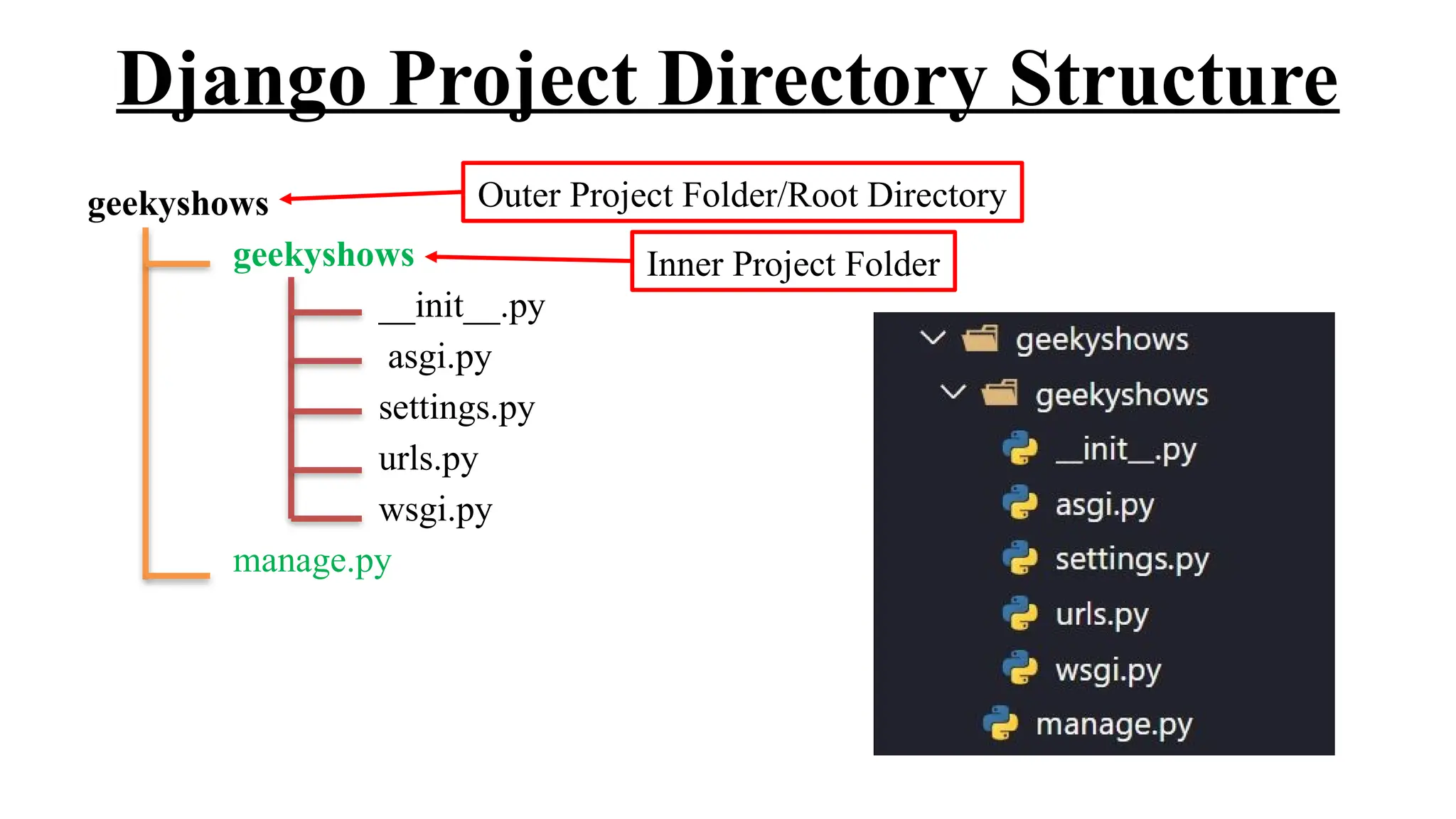
geekyshows
geekyshows
__init__.py
asgi.py
settings.py
urls.py
wsgi.py
manage.py
Outer Project Folder/Root Directory
Inner Project Folder
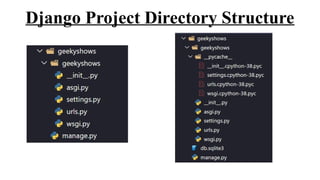
Django Project Directory Structure
__init__.py – The folder which contains __init__.py file is considered as python package.
wsgi.py – WSGI (Web Server Gateway Interface) is a specification that describes how a web server
communicates with web applications, and how web applications can be chained together to process one request.
WSGI provided a standard for synchronous Python apps.
asgi.py – ASGI (Asynchronous Server Gateway Interface) is a spiritual successor to WSGI, intended to provide a
standard interface between async-capable Python web servers, frameworks, and applications. ASGI provides
standard for both asynchronous and synchronous apps.
settings.py – This file contains all the information or data about project settings.
E.g.:- Database Config information, Template, Installed Application, Validators etc.
urls.py – This file contains information of url attached with application.
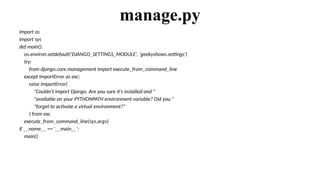
manage.py – manage.py is automatically created in each Django project. It is Django’s command-line utility also
sets the DJANGO_SETTINGS_MODULE environment variable so that it points to your project’s settings.py file.
Generally, when working on a single Django project, it’s easier to use manage.py than django-admin.
Django Project Directory Structure
__init__.py
The folder which contains __init__.py file is considered as python package.
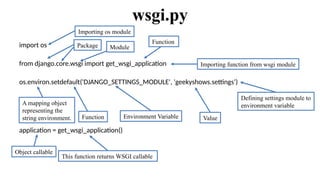
wsgi.py
import os
from django.core.wsgi import get_wsgi_application
os.environ.setdefault('DJANGO_SETTINGS_MODULE', 'geekyshows.settings’)
application = get_wsgi_application()
Importing os module
Importing function from wsgi module
Package Module
Function
A mapping object
representing the
string environment. Function Environment Variable Value
Object callable
This function returns WSGI callable
Defining settings module to
environment variable
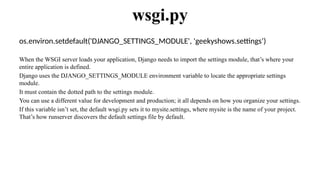
os.environ.setdefault('DJANGO_SETTINGS_MODULE', 'geekyshows.settings’)
When the WSGI server loads your application, Django needs to import the settings module, that’s where your
entire application is defined.
Django uses the DJANGO_SETTINGS_MODULE environment variable to locate the appropriate settings
module.
It must contain the dotted path to the settings module.
You can use a different value for development and production; it all depends on how you organize your settings.
If this variable isn’t set, the default wsgi.py sets it to mysite.settings, where mysite is the name of your project.
That’s how runserver discovers the default settings file by default.
wsgi.py
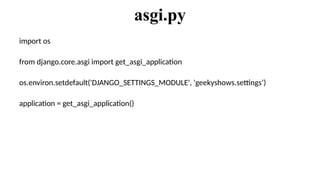
import os
from django.core.asgi import get_asgi_application
os.environ.setdefault('DJANGO_SETTINGS_MODULE', 'geekyshows.settings’)
application = get_asgi_application()
asgi.py
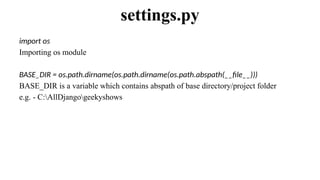
import os
Importing os module
BASE_DIR = os.path.dirname(os.path.dirname(os.path.abspath(__file__)))
BASE_DIR is a variable which contains abspath of base directory/project folder
e.g. - C:AllDjangogeekyshows
settings.py
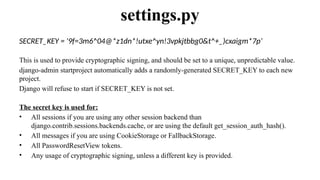
SECRET_KEY = '9f=3m6^04@*z1dn*!utxe^yn!3vpkjtbbg0&t^+_)cxaigm*7p’
This is used to provide cryptographic signing, and should be set to a unique, unpredictable value.
django-admin startproject automatically adds a randomly-generated SECRET_KEY to each new
project.
Django will refuse to start if SECRET_KEY is not set.
The secret key is used for:
• All sessions if you are using any other session backend than
django.contrib.sessions.backends.cache, or are using the default get_session_auth_hash().
• All messages if you are using CookieStorage or FallbackStorage.
• All PasswordResetView tokens.
• Any usage of cryptographic signing, unless a different key is provided.
settings.py
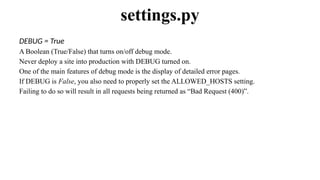
DEBUG = True
A Boolean (True/False) that turns on/off debug mode.
Never deploy a site into production with DEBUG turned on.
One of the main features of debug mode is the display of detailed error pages.
If DEBUG is False, you also need to properly set the ALLOWED_HOSTS setting.
Failing to do so will result in all requests being returned as “Bad Request (400)”.
settings.py
ALLOWED_HOSTS = [ ]
A list of strings representing the host/domain names that this Django site can serve. Values in this
list can be fully qualified names (e.g. 'www.example.com'), in which case they will be matched
against the request’s Host header exactly (case-insensitive, not including port).
A value beginning with a period can be used as a subdomain wildcard: '.example.com' will match
example.com, www.example.com, and any other subdomain of example.com.
A value of '*' will match anything; in this case you are responsible to provide your own validation
of the Host header.
settings.py
INSTALLED_APPS = [
'django.contrib.admin',
'django.contrib.auth',
'django.contrib.contenttypes',
'django.contrib.sessions',
'django.contrib.messages',
'django.contrib.staticfiles’,
]
A list of strings designating all applications that are enabled in this Django installation. Each string should be a
dotted Python path to an application configuration class (preferred) or a package containing an application.
Application names and labels must be unique in INSTALLED_APPS.
Application names – The dotted Python path to the application package must be unique. There is no way to
include the same application twice, short of duplicating its code under another name.
Application labels – By default the final part of the name must be unique too. For example, you can’t include
both django.contrib.auth and myproject.auth.
settings.py
Built-in Applications
MIDDLEWARE = [
'django.middleware.security.SecurityMiddleware',
'django.contrib.sessions.middleware.SessionMiddleware',
'django.middleware.common.CommonMiddleware',
'django.middleware.csrf.CsrfViewMiddleware',
'django.contrib.auth.middleware.AuthenticationMiddleware',
'django.contrib.messages.middleware.MessageMiddleware',
'django.middleware.clickjacking.XFrameOptionsMiddleware’,
]
A list of middleware to use.
settings.py
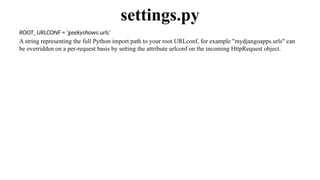
ROOT_URLCONF = 'geekyshows.urls’
A string representing the full Python import path to your root URLconf, for example "mydjangoapps.urls" can
be overridden on a per-request basis by setting the attribute urlconf on the incoming HttpRequest object.
settings.py
TEMPLATES = [
{
'BACKEND': 'django.template.backends.django.DjangoTemplates',
'DIRS’: [ ],
'APP_DIRS': True,
'OPTIONS': {
'context_processors': [
'django.template.context_processors.debug',
'django.template.context_processors.request',
'django.contrib.auth.context_processors.auth',
'django.contrib.messages.context_processors.messages',
],
},
},
]
A list containing the settings for all template engines to be used with Django. Each item of the list is a dictionary containing the
options for an individual engine.
settings.py
Directories where the engine should look for template source files, in search order.
Whether the engine should look for template source files inside installed applications.
Extra parameters to pass to the template backend. Available
parameters vary depending on the template backend.
The template backend to use.
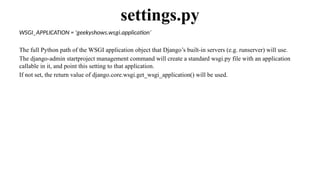
WSGI_APPLICATION = 'geekyshows.wsgi.application’
The full Python path of the WSGI application object that Django’s built-in servers (e.g. runserver) will use.
The django-admin startproject management command will create a standard wsgi.py file with an application
callable in it, and point this setting to that application.
If not set, the return value of django.core.wsgi.get_wsgi_application() will be used.
settings.py
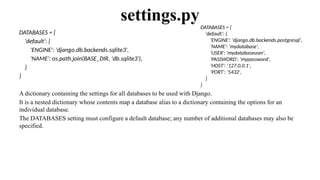
DATABASES = {
'default': {
'ENGINE': 'django.db.backends.sqlite3',
'NAME': os.path.join(BASE_DIR, 'db.sqlite3'),
}
}
A dictionary containing the settings for all databases to be used with Django.
It is a nested dictionary whose contents map a database alias to a dictionary containing the options for an
individual database.
The DATABASES setting must configure a default database; any number of additional databases may also be
specified.
settings.pyDATABASES = {
'default': {
'ENGINE': 'django.db.backends.postgresql',
'NAME': 'mydatabase',
'USER': 'mydatabaseuser',
'PASSWORD': 'mypassword',
'HOST': '127.0.0.1',
'PORT': '5432',
}
}
AUTH_PASSWORD_VALIDATORS = [
{
'NAME': 'django.contrib.auth.password_validation.UserAttributeSimilarityValidator',
},
{
'NAME': 'django.contrib.auth.password_validation.MinimumLengthValidator',
},
{
'NAME': 'django.contrib.auth.password_validation.CommonPasswordValidator',
},
{
'NAME': 'django.contrib.auth.password_validation.NumericPasswordValidator',
},
]
The list of validators that are used to check the strength of user’s passwords.
settings.py
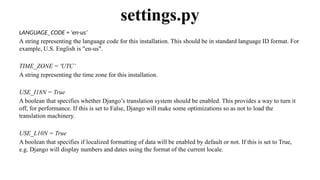
LANGUAGE_CODE = 'en-us’
A string representing the language code for this installation. This should be in standard language ID format. For
example, U.S. English is "en-us".
TIME_ZONE = 'UTC’
A string representing the time zone for this installation.
USE_I18N = True
A boolean that specifies whether Django’s translation system should be enabled. This provides a way to turn it
off, for performance. If this is set to False, Django will make some optimizations so as not to load the
translation machinery.
USE_L10N = True
A boolean that specifies if localized formatting of data will be enabled by default or not. If this is set to True,
e.g. Django will display numbers and dates using the format of the current locale.
settings.py
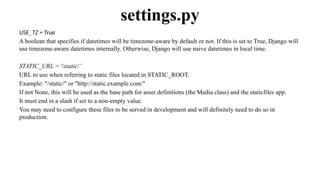
USE_TZ = True
A boolean that specifies if datetimes will be timezone-aware by default or not. If this is set to True, Django will
use timezone-aware datetimes internally. Otherwise, Django will use naive datetimes in local time.
STATIC_URL = '/static/’
URL to use when referring to static files located in STATIC_ROOT.
Example: "/static/" or "http://static.example.com/"
If not None, this will be used as the base path for asset definitions (the Media class) and the staticfiles app.
It must end in a slash if set to a non-empty value.
You may need to configure these files to be served in development and will definitely need to do so in
production.
settings.py
from django.contrib import admin
from django.urls import path
urlpatterns = [
path('admin/', admin.site.urls),
]
urls.py
import os
import sys
def main():
os.environ.setdefault('DJANGO_SETTINGS_MODULE', 'geekyshows.settings')
try:
from django.core.management import execute_from_command_line
except ImportError as exc:
raise ImportError(
"Couldn't import Django. Are you sure it's installed and "
"available on your PYTHONPATH environment variable? Did you "
"forget to activate a virtual environment?"
) from exc
execute_from_command_line(sys.argv)
if __name__ == '__main__':
main()
manage.py

7. Project Directory Structure and..pptx

  • 1.
    Django Project DirectoryStructure geekyshows geekyshows __init__.py asgi.py settings.py urls.py wsgi.py manage.py Outer Project Folder/Root Directory Inner Project Folder
  • 2.
    Django Project DirectoryStructure __init__.py – The folder which contains __init__.py file is considered as python package. wsgi.py – WSGI (Web Server Gateway Interface) is a specification that describes how a web server communicates with web applications, and how web applications can be chained together to process one request. WSGI provided a standard for synchronous Python apps. asgi.py – ASGI (Asynchronous Server Gateway Interface) is a spiritual successor to WSGI, intended to provide a standard interface between async-capable Python web servers, frameworks, and applications. ASGI provides standard for both asynchronous and synchronous apps. settings.py – This file contains all the information or data about project settings. E.g.:- Database Config information, Template, Installed Application, Validators etc. urls.py – This file contains information of url attached with application. manage.py – manage.py is automatically created in each Django project. It is Django’s command-line utility also sets the DJANGO_SETTINGS_MODULE environment variable so that it points to your project’s settings.py file. Generally, when working on a single Django project, it’s easier to use manage.py than django-admin.
  • 3.
  • 4.
    __init__.py The folder whichcontains __init__.py file is considered as python package.
  • 5.
    wsgi.py import os from django.core.wsgiimport get_wsgi_application os.environ.setdefault('DJANGO_SETTINGS_MODULE', 'geekyshows.settings’) application = get_wsgi_application() Importing os module Importing function from wsgi module Package Module Function A mapping object representing the string environment. Function Environment Variable Value Object callable This function returns WSGI callable Defining settings module to environment variable
  • 6.
    os.environ.setdefault('DJANGO_SETTINGS_MODULE', 'geekyshows.settings’) When theWSGI server loads your application, Django needs to import the settings module, that’s where your entire application is defined. Django uses the DJANGO_SETTINGS_MODULE environment variable to locate the appropriate settings module. It must contain the dotted path to the settings module. You can use a different value for development and production; it all depends on how you organize your settings. If this variable isn’t set, the default wsgi.py sets it to mysite.settings, where mysite is the name of your project. That’s how runserver discovers the default settings file by default. wsgi.py
  • 7.
    import os from django.core.asgiimport get_asgi_application os.environ.setdefault('DJANGO_SETTINGS_MODULE', 'geekyshows.settings’) application = get_asgi_application() asgi.py
  • 8.
    import os Importing osmodule BASE_DIR = os.path.dirname(os.path.dirname(os.path.abspath(__file__))) BASE_DIR is a variable which contains abspath of base directory/project folder e.g. - C:AllDjangogeekyshows settings.py
  • 9.
    SECRET_KEY = '9f=3m6^04@*z1dn*!utxe^yn!3vpkjtbbg0&t^+_)cxaigm*7p’ Thisis used to provide cryptographic signing, and should be set to a unique, unpredictable value. django-admin startproject automatically adds a randomly-generated SECRET_KEY to each new project. Django will refuse to start if SECRET_KEY is not set. The secret key is used for: • All sessions if you are using any other session backend than django.contrib.sessions.backends.cache, or are using the default get_session_auth_hash(). • All messages if you are using CookieStorage or FallbackStorage. • All PasswordResetView tokens. • Any usage of cryptographic signing, unless a different key is provided. settings.py
  • 10.
    DEBUG = True ABoolean (True/False) that turns on/off debug mode. Never deploy a site into production with DEBUG turned on. One of the main features of debug mode is the display of detailed error pages. If DEBUG is False, you also need to properly set the ALLOWED_HOSTS setting. Failing to do so will result in all requests being returned as “Bad Request (400)”. settings.py
  • 11.
    ALLOWED_HOSTS = [] A list of strings representing the host/domain names that this Django site can serve. Values in this list can be fully qualified names (e.g. 'www.example.com'), in which case they will be matched against the request’s Host header exactly (case-insensitive, not including port). A value beginning with a period can be used as a subdomain wildcard: '.example.com' will match example.com, www.example.com, and any other subdomain of example.com. A value of '*' will match anything; in this case you are responsible to provide your own validation of the Host header. settings.py
  • 12.
    INSTALLED_APPS = [ 'django.contrib.admin', 'django.contrib.auth', 'django.contrib.contenttypes', 'django.contrib.sessions', 'django.contrib.messages', 'django.contrib.staticfiles’, ] Alist of strings designating all applications that are enabled in this Django installation. Each string should be a dotted Python path to an application configuration class (preferred) or a package containing an application. Application names and labels must be unique in INSTALLED_APPS. Application names – The dotted Python path to the application package must be unique. There is no way to include the same application twice, short of duplicating its code under another name. Application labels – By default the final part of the name must be unique too. For example, you can’t include both django.contrib.auth and myproject.auth. settings.py Built-in Applications
  • 13.
  • 14.
    ROOT_URLCONF = 'geekyshows.urls’ Astring representing the full Python import path to your root URLconf, for example "mydjangoapps.urls" can be overridden on a per-request basis by setting the attribute urlconf on the incoming HttpRequest object. settings.py
  • 15.
    TEMPLATES = [ { 'BACKEND':'django.template.backends.django.DjangoTemplates', 'DIRS’: [ ], 'APP_DIRS': True, 'OPTIONS': { 'context_processors': [ 'django.template.context_processors.debug', 'django.template.context_processors.request', 'django.contrib.auth.context_processors.auth', 'django.contrib.messages.context_processors.messages', ], }, }, ] A list containing the settings for all template engines to be used with Django. Each item of the list is a dictionary containing the options for an individual engine. settings.py Directories where the engine should look for template source files, in search order. Whether the engine should look for template source files inside installed applications. Extra parameters to pass to the template backend. Available parameters vary depending on the template backend. The template backend to use.
  • 16.
    WSGI_APPLICATION = 'geekyshows.wsgi.application’ Thefull Python path of the WSGI application object that Django’s built-in servers (e.g. runserver) will use. The django-admin startproject management command will create a standard wsgi.py file with an application callable in it, and point this setting to that application. If not set, the return value of django.core.wsgi.get_wsgi_application() will be used. settings.py
  • 17.
    DATABASES = { 'default':{ 'ENGINE': 'django.db.backends.sqlite3', 'NAME': os.path.join(BASE_DIR, 'db.sqlite3'), } } A dictionary containing the settings for all databases to be used with Django. It is a nested dictionary whose contents map a database alias to a dictionary containing the options for an individual database. The DATABASES setting must configure a default database; any number of additional databases may also be specified. settings.pyDATABASES = { 'default': { 'ENGINE': 'django.db.backends.postgresql', 'NAME': 'mydatabase', 'USER': 'mydatabaseuser', 'PASSWORD': 'mypassword', 'HOST': '127.0.0.1', 'PORT': '5432', } }
  • 18.
    AUTH_PASSWORD_VALIDATORS = [ { 'NAME':'django.contrib.auth.password_validation.UserAttributeSimilarityValidator', }, { 'NAME': 'django.contrib.auth.password_validation.MinimumLengthValidator', }, { 'NAME': 'django.contrib.auth.password_validation.CommonPasswordValidator', }, { 'NAME': 'django.contrib.auth.password_validation.NumericPasswordValidator', }, ] The list of validators that are used to check the strength of user’s passwords. settings.py
  • 19.
    LANGUAGE_CODE = 'en-us’ Astring representing the language code for this installation. This should be in standard language ID format. For example, U.S. English is "en-us". TIME_ZONE = 'UTC’ A string representing the time zone for this installation. USE_I18N = True A boolean that specifies whether Django’s translation system should be enabled. This provides a way to turn it off, for performance. If this is set to False, Django will make some optimizations so as not to load the translation machinery. USE_L10N = True A boolean that specifies if localized formatting of data will be enabled by default or not. If this is set to True, e.g. Django will display numbers and dates using the format of the current locale. settings.py
  • 20.
    USE_TZ = True Aboolean that specifies if datetimes will be timezone-aware by default or not. If this is set to True, Django will use timezone-aware datetimes internally. Otherwise, Django will use naive datetimes in local time. STATIC_URL = '/static/’ URL to use when referring to static files located in STATIC_ROOT. Example: "/static/" or "http://static.example.com/" If not None, this will be used as the base path for asset definitions (the Media class) and the staticfiles app. It must end in a slash if set to a non-empty value. You may need to configure these files to be served in development and will definitely need to do so in production. settings.py
  • 21.
    from django.contrib importadmin from django.urls import path urlpatterns = [ path('admin/', admin.site.urls), ] urls.py
  • 22.
    import os import sys defmain(): os.environ.setdefault('DJANGO_SETTINGS_MODULE', 'geekyshows.settings') try: from django.core.management import execute_from_command_line except ImportError as exc: raise ImportError( "Couldn't import Django. Are you sure it's installed and " "available on your PYTHONPATH environment variable? Did you " "forget to activate a virtual environment?" ) from exc execute_from_command_line(sys.argv) if __name__ == '__main__': main() manage.py