Configure Python + WSGI


                            Sitthykun LY
                             @sitthykun
                ly.sitthykun@gmail.com
We will talk
●   What is Python Language??
●   How to set up Python??
●   How to run??
●   What is WSGI??
●   How to set up WSGI??
●   How to run??
What is Python Language??
●   Python is an interpreted, general-purpose high-level programming
    language whose design philosophy emphasizes code readability. Python
    aims to combine "remarkable power with very clear syntax", and its
    standard library is large and comprehensive. Its use of indentation for
    block delimiters is unique among popular programming languages.
●


●   Python supports multiple programming paradigms, primarily but not
    limited to object oriented, imperative and, to a lesser extent, functional
    programming styles. It features a fully dynamic type system and
    automatic memory management, similar to that of Scheme, Ruby, Perl,
    and Tcl. Like other dynamic languages, Python is often used as a
    scripting language, but is also used in a wide range of non-scripting
    contexts.
●   http://en.wikipedia.org/wiki/Python_language
●
What is WSGI??
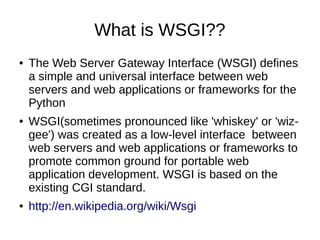
●   The Web Server Gateway Interface (WSGI) defines
    a simple and universal interface between web
    servers and web applications or frameworks for the
    Python
●   WSGI(sometimes pronounced like 'whiskey' or 'wiz-
    gee') was created as a low-level interface between
    web servers and web applications or frameworks to
    promote common ground for portable web
    application development. WSGI is based on the
    existing CGI standard.
●   http://en.wikipedia.org/wiki/Wsgi
How to set up WSGI??
●   Assuming you have Apache2, installed, you'll
    need to install the WSGI module:
    ●   sudo apt-get install libapache2-mod-wsgi
●   This should install the module. Now to activate
    it:
    ●   sudo a2enmod mod-wsgi
●   Now to restart Apache2:
    ●   sudo /etc/init.d/apache2 restart
How to set up WSGI??
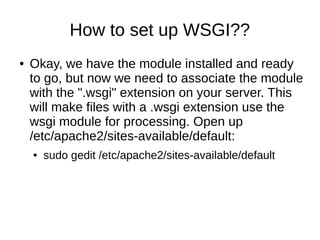
●   Okay, we have the module installed and ready
    to go, but now we need to associate the module
    with the ".wsgi" extension on your server. This
    will make files with a .wsgi extension use the
    wsgi module for processing. Open up
    /etc/apache2/sites-available/default:
    ●   sudo gedit /etc/apache2/sites-available/default
How to set up WSGI??
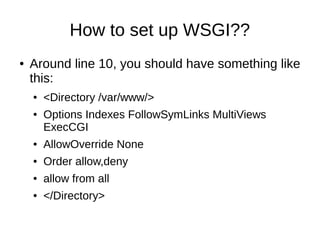
●   Around line 10, you should have something like
    this:
    ●   <Directory /var/www/>
    ●   Options Indexes FollowSymLinks MultiViews
        ExecCGI
    ●   AllowOverride None
    ●   Order allow,deny
    ●   allow from all
    ●   </Directory>
How to set up WSGI??
●   Replace it with this:
    ●   <Directory /var/www/>
    ●   Options Indexes FollowSymLinks MultiViews ExecCGI
    ●


    ●   AddHandler cgi-script .cgi
    ●   AddHandler wsgi-script .wsgi
    ●


    ●   AllowOverride None
    ●   Order allow,deny
    ●   allow from all
    ●   </Directory>
How to set up WSGI??
●   If you don't want to replace the whole thing, all
    you need to do is add "ExecCGI" to the Options
    list, and add the handlers cgi-script and wsgi-
    script (shown above).
●   That's it. Restart Apache:
    ●   sudo /etc/init.d/apache2 restart
How to set up WSGI??
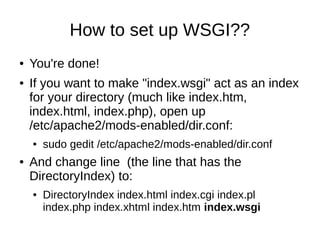
●   You're done!
●   If you want to make "index.wsgi" act as an index
    for your directory (much like index.htm,
    index.html, index.php), open up
    /etc/apache2/mods-enabled/dir.conf:
    ●   sudo gedit /etc/apache2/mods-enabled/dir.conf
●   And change line (the line that has the
    DirectoryIndex) to:
    ●   DirectoryIndex index.html index.cgi index.pl
        index.php index.xhtml index.htm index.wsgi
How to set up run WSGI??
●   Create index.wsgi:
    ●   def application(environ, start_response):
    ●    status = '200 OK'
    ●    output = 'Hello World!'
    ●


    ●    response_headers = [('Content-type', 'text/plain'),
    ●                  ('Content-Length', str(len(output)))]
    ●    start_response(status, response_headers)
    ●


    ●    return [output]
●   Go to http://localhost/index.wsgi

Configure python and wsgi

  • 1.
    Configure Python +WSGI Sitthykun LY @sitthykun ly.sitthykun@gmail.com
  • 2.
    We will talk ● What is Python Language?? ● How to set up Python?? ● How to run?? ● What is WSGI?? ● How to set up WSGI?? ● How to run??
  • 3.
    What is PythonLanguage?? ● Python is an interpreted, general-purpose high-level programming language whose design philosophy emphasizes code readability. Python aims to combine "remarkable power with very clear syntax", and its standard library is large and comprehensive. Its use of indentation for block delimiters is unique among popular programming languages. ● ● Python supports multiple programming paradigms, primarily but not limited to object oriented, imperative and, to a lesser extent, functional programming styles. It features a fully dynamic type system and automatic memory management, similar to that of Scheme, Ruby, Perl, and Tcl. Like other dynamic languages, Python is often used as a scripting language, but is also used in a wide range of non-scripting contexts. ● http://en.wikipedia.org/wiki/Python_language ●
  • 4.
    What is WSGI?? ● The Web Server Gateway Interface (WSGI) defines a simple and universal interface between web servers and web applications or frameworks for the Python ● WSGI(sometimes pronounced like 'whiskey' or 'wiz- gee') was created as a low-level interface between web servers and web applications or frameworks to promote common ground for portable web application development. WSGI is based on the existing CGI standard. ● http://en.wikipedia.org/wiki/Wsgi
  • 5.
    How to setup WSGI?? ● Assuming you have Apache2, installed, you'll need to install the WSGI module: ● sudo apt-get install libapache2-mod-wsgi ● This should install the module. Now to activate it: ● sudo a2enmod mod-wsgi ● Now to restart Apache2: ● sudo /etc/init.d/apache2 restart
  • 6.
    How to setup WSGI?? ● Okay, we have the module installed and ready to go, but now we need to associate the module with the ".wsgi" extension on your server. This will make files with a .wsgi extension use the wsgi module for processing. Open up /etc/apache2/sites-available/default: ● sudo gedit /etc/apache2/sites-available/default
  • 7.
    How to setup WSGI?? ● Around line 10, you should have something like this: ● <Directory /var/www/> ● Options Indexes FollowSymLinks MultiViews ExecCGI ● AllowOverride None ● Order allow,deny ● allow from all ● </Directory>
  • 8.
    How to setup WSGI?? ● Replace it with this: ● <Directory /var/www/> ● Options Indexes FollowSymLinks MultiViews ExecCGI ● ● AddHandler cgi-script .cgi ● AddHandler wsgi-script .wsgi ● ● AllowOverride None ● Order allow,deny ● allow from all ● </Directory>
  • 9.
    How to setup WSGI?? ● If you don't want to replace the whole thing, all you need to do is add "ExecCGI" to the Options list, and add the handlers cgi-script and wsgi- script (shown above). ● That's it. Restart Apache: ● sudo /etc/init.d/apache2 restart
  • 10.
    How to setup WSGI?? ● You're done! ● If you want to make "index.wsgi" act as an index for your directory (much like index.htm, index.html, index.php), open up /etc/apache2/mods-enabled/dir.conf: ● sudo gedit /etc/apache2/mods-enabled/dir.conf ● And change line (the line that has the DirectoryIndex) to: ● DirectoryIndex index.html index.cgi index.pl index.php index.xhtml index.htm index.wsgi
  • 11.
    How to setup run WSGI?? ● Create index.wsgi: ● def application(environ, start_response): ● status = '200 OK' ● output = 'Hello World!' ● ● response_headers = [('Content-type', 'text/plain'), ● ('Content-Length', str(len(output)))] ● start_response(status, response_headers) ● ● return [output] ● Go to http://localhost/index.wsgi