Clive CareyMatt Bowler
@MattB_LT
Michelle Capes
@MichelleC_LT
Simon Bowler
@BowlingForTech
A college-wide digital approach
Delivering RARPA
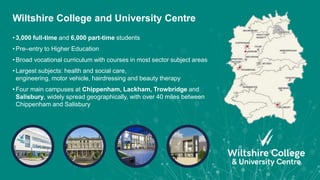
• 3,000 full-time and 6,000 part-time students
• Pre–entry to Higher Education
• Broad vocational curriculum with courses in most sector subject areas
• Largest subjects: health and social care,
engineering, motor vehicle, hairdressing and beauty therapy
• Four main campuses at Chippenham, Lackham, Trowbridge and
Salisbury, widely spread geographically, with over 40 miles between
Chippenham and Salisbury
Wiltshire College and University Centre
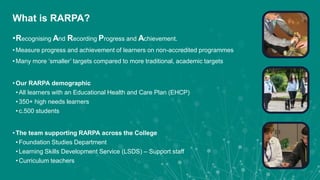
•Recognising And Recording Progress and Achievement.
• Measure progress and achievement of learners on non-accredited programmes
• Many more ‘smaller’ targets compared to more traditional, academic targets
• Our RARPA demographic
• All learners with an Educational Health and Care Plan (EHCP)
• 350+ high needs learners
• c.500 students
• The team supporting RARPA across the College
• Foundation Studies Department
• Learning Skills Development Service (LSDS) – Support staff
• Curriculum teachers
What is RARPA?
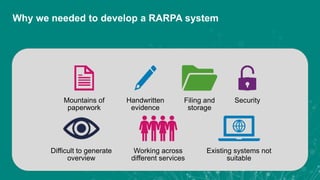
Mountains of
paperwork
Handwritten
evidence
Filing and
storage
Security
Difficult to generate
overview
Working across
different services
Existing systems not
suitable
Why we needed to develop a RARPA system
Before the RARPA system
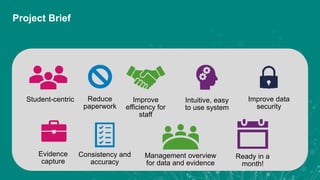
Student-centric Reduce
paperwork
Improve
efficiency for
staff
Intuitive, easy
to use system
Improve data
security
Evidence
capture
Consistency and
accuracy
Management overview
for data and evidence
Ready in a
month!
Project Brief
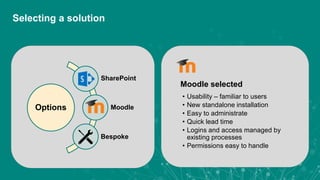
• Usability – familiar to users
• New standalone installation
• Easy to administrate
• Quick lead time
• Logins and access managed by
existing processes
• Permissions easy to handle
Moodle selected
Options
SharePoint
Moodle
Bespoke
Selecting a solution
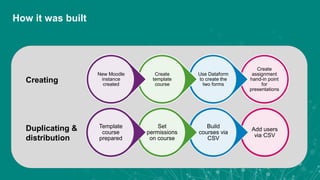
Add users
via CSV
Build
courses via
CSV
Set
permissions
on course
Template
course
prepared
Duplicating &
distribution
Create
assignment
hand-in point
for
presentations
Use Dataform
to create the
two forms
Create
template
course
New Moodle
instance
created
Creating
How it was built
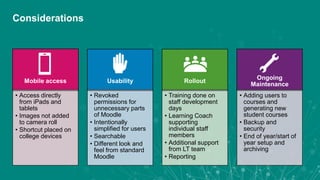
Mobile access
• Access directly
from iPads and
tablets
• Images not added
to camera roll
• Shortcut placed on
college devices
Usability
• Revoked
permissions for
unnecessary parts
of Moodle
• Intentionally
simplified for users
• Searchable
• Different look and
feel from standard
Moodle
Rollout
• Training done on
staff development
days
• Learning Coach
supporting
individual staff
members
• Additional support
from LT team
• Reporting
Ongoing
Maintenance
• Adding users to
courses and
generating new
student courses
• Backup and
security
• End of year/start of
year setup and
archiving
Considerations
Live Demo
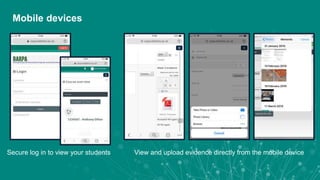
View and upload evidence directly from the mobile deviceSecure log in to view your students
Mobile devices
User Feedback and Impact – Staff View
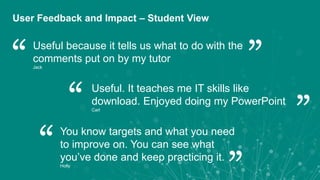
You know targets and what you need
to improve on. You can see what
you’ve done and keep practicing it.
Holly
“ “
Useful. It teaches me IT skills like
download. Enjoyed doing my PowerPoint
Carl
“
“
Useful because it tells us what to do with the
comments put on by my tutor
Jack
“
“User Feedback and Impact – Student View
I would like to explore the opportunities of sharing what
we’ve developed with other colleges and other communities
involved with EHCP learners to see if it could have a wider
remit to make the same kind of impact on other learners that
it has made with ours here at Wiltshire College.
Tony Green, Head of Foundation Studies
“ “
• User import / course creation
• Permission authorisation / processes
• Single sign-on (on premise)
• Sharing with RARPA Community
Lessons Learned and Future Developments
Clive CareyMatt BowlerMichelle CapesSimon Bowler
ILT@wiltshire.ac.uk
@LT_WiltsColl
Any questions?
customerservices@jisc.ac.uk
jisc.ac.uk
Thank you
Wiltshire College and
University Centre
Delivering RARPA
A college-wide digital approach
1
8

Delivering RARPA: a college-wide digital approach

  • 1.
    Clive CareyMatt Bowler @MattB_LT MichelleCapes @MichelleC_LT Simon Bowler @BowlingForTech A college-wide digital approach Delivering RARPA
  • 2.
    • 3,000 full-timeand 6,000 part-time students • Pre–entry to Higher Education • Broad vocational curriculum with courses in most sector subject areas • Largest subjects: health and social care, engineering, motor vehicle, hairdressing and beauty therapy • Four main campuses at Chippenham, Lackham, Trowbridge and Salisbury, widely spread geographically, with over 40 miles between Chippenham and Salisbury Wiltshire College and University Centre
  • 3.
    •Recognising And RecordingProgress and Achievement. • Measure progress and achievement of learners on non-accredited programmes • Many more ‘smaller’ targets compared to more traditional, academic targets • Our RARPA demographic • All learners with an Educational Health and Care Plan (EHCP) • 350+ high needs learners • c.500 students • The team supporting RARPA across the College • Foundation Studies Department • Learning Skills Development Service (LSDS) – Support staff • Curriculum teachers What is RARPA?
  • 4.
    Mountains of paperwork Handwritten evidence Filing and storage Security Difficultto generate overview Working across different services Existing systems not suitable Why we needed to develop a RARPA system
  • 5.
  • 7.
    Student-centric Reduce paperwork Improve efficiency for staff Intuitive,easy to use system Improve data security Evidence capture Consistency and accuracy Management overview for data and evidence Ready in a month! Project Brief
  • 8.
    • Usability –familiar to users • New standalone installation • Easy to administrate • Quick lead time • Logins and access managed by existing processes • Permissions easy to handle Moodle selected Options SharePoint Moodle Bespoke Selecting a solution
  • 9.
    Add users via CSV Build coursesvia CSV Set permissions on course Template course prepared Duplicating & distribution Create assignment hand-in point for presentations Use Dataform to create the two forms Create template course New Moodle instance created Creating How it was built
  • 10.
    Mobile access • Accessdirectly from iPads and tablets • Images not added to camera roll • Shortcut placed on college devices Usability • Revoked permissions for unnecessary parts of Moodle • Intentionally simplified for users • Searchable • Different look and feel from standard Moodle Rollout • Training done on staff development days • Learning Coach supporting individual staff members • Additional support from LT team • Reporting Ongoing Maintenance • Adding users to courses and generating new student courses • Backup and security • End of year/start of year setup and archiving Considerations
  • 11.
  • 12.
    View and uploadevidence directly from the mobile deviceSecure log in to view your students Mobile devices
  • 13.
    User Feedback andImpact – Staff View
  • 15.
    You know targetsand what you need to improve on. You can see what you’ve done and keep practicing it. Holly “ “ Useful. It teaches me IT skills like download. Enjoyed doing my PowerPoint Carl “ “ Useful because it tells us what to do with the comments put on by my tutor Jack “ “User Feedback and Impact – Student View
  • 16.
    I would liketo explore the opportunities of sharing what we’ve developed with other colleges and other communities involved with EHCP learners to see if it could have a wider remit to make the same kind of impact on other learners that it has made with ours here at Wiltshire College. Tony Green, Head of Foundation Studies “ “ • User import / course creation • Permission authorisation / processes • Single sign-on (on premise) • Sharing with RARPA Community Lessons Learned and Future Developments
  • 17.
    Clive CareyMatt BowlerMichelleCapesSimon Bowler ILT@wiltshire.ac.uk @LT_WiltsColl Any questions?
  • 18.
    customerservices@jisc.ac.uk jisc.ac.uk Thank you Wiltshire Collegeand University Centre Delivering RARPA A college-wide digital approach 1 8

Editor's Notes

  • #5 Lots of paper, handwritten, inefficient Challenges with storage, access (and security) Difficult to generate high-level view Collaborative work across different services (Curriculum, LSDS etc.) Other College systems (ProMonitor) not appropriate to record detailed targets (but EHCP outcomes were entered)
  • #8 Student-centric: Generate own evidence Update progress Panel presentation Improve efficiency for staff Reduce paperwork An intuitive system Improve security of data/storage Evidence capture Consistency and accuracy Management access to data and evidence And ready in a month…
  • #11 Mobile access Access directly from iPads and tablets Images not added to camera roll Shortcut on college devices Branded and streamlined Revoked permissions for parts of Moodle that weren’t needed Intentionally simplified for users Searchable for easy use Rollout Training done on staff development day Learning Coach supporting individual staff members Additional support from LT team Ongoing Maintenance Adding users to courses Backup and security End of year/start of year setup and lockdown
  • #14 (Clive) 10 mins
  • #16 (Clive) 10 mins
  • #17 (Michelle) 5 mins