



Delicious vs. Diigo
Karen Brooks
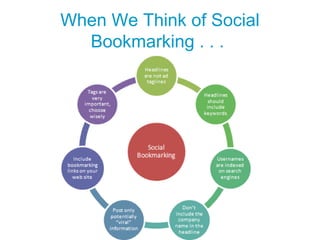
When We Think of Social
Bookmarking . . .
Social Bookmarking in Plain English
http://www.commoncraft.com/bookmarking-plain-english 3:22M
English text transcript for the video
Social Bookmarking in Plain English
Link:
http://www.masternewmedia.org/knowledge_management/social-bookmarking/social-boo
• It's just too much.
– Did you know that there are over 15 billion web
pages? To make sense of it all, we need to
pluck out the best pages and save them for
later.
• We have choices.
– We could bookmark or add to favorites in our
web browser. Nah, it quickly becomes messy.
Plus, these bookmarks are tied to only one
computer. This is the old way.
• There's a new way that doesn't use a
browser. It uses a website.
– This is called a social bookmarking site, and
the one we'll use today is called Delicious. It
makes bookmarking more useful and fun.
• We'll focus on three things:
– a) How to get started with bookmarking,
– b) How bookmarks are organized by tags, and
– c) Why this kind of bookmarking is social.
• First, go to delicious to sign up for a free
account.
– While you're signing up, you'll see an easy to add a
couple of buttons to your browser.
– These are important. The Tag button is how you'll
add new bookmarks to the website. On any
website, you can click Tag to save that site as a
delicious bookmark. Easy!
– Consider this example: you are a teacher who
often uses the web to find math lessons for 8th
graders. You're overwhelmed by all the sites.
There are just too many to remember. Using
delicious, remembering sites is as easy as tagging
them. Here's one. Oh nice, perfect.
• Here's what happens when you tag a site: a new
window opens and asks for more information.
– You can add keywords or tags that describe the
site. These will help you find bookmarks later. You
might tag this site, algebra, bestof, tutorial, math,
and homework, then click save to save it on the
delicious website.
– When you save a page like this, two things happen.
•
First, the site is saved with all your other
bookmarks on delicious.
• Second, the tags are saved in a list of all your
tags. You just repeat this process for every site
you want to save. This is bookmarking.
• Why Tags are so Important
– Let's fast forward two months to
make our second point:
Why tags are so important.
– Let's say you now have a hundred
bookmarked sites. Chaos, right?
Well, since your added tags, you
have a way to sort the bookmarks by
the tags you assigned.
– To find all your sites about algebra,
you click the algebra tag, and voilà,
one hundred becomes three. All your
bookmarks are now
more findable thanks to tags.
– But that's only part of the fun.
• The Social Aspect of Bookmarking
– Now, let's look at the social part of
bookmarking to make our third
point.
– Think about your fellow teachers.
Couldn't they benefit from seeing
your bookmarks?
– Well, they can. Delicious bookmarks
are public. This means your friends
and peers can see your bookmarks
and use your tags just like you.
That's why this is called social
bookmarking. Your bookmarks can
benefit other people.
– Think about it this way. You start
bookmarking algebra sites, and your
peers can see the interesting sites
you find. Then, they start
bookmarking too. Within a few
weeks, a group of teachers are all
bookmarking their favorite math
websites, and because they're all
public, everyone discovers new and
relevant material.
– Together you create a network that
produces a steady stream of
interesting and useful websites, all
organized by tags on the delicious
website. The lesson is that social
bookmarking sites take a world of
chaos and make it orderly.
• Review
– Remember there are
three steps to get started.
– 1) First go to delicious to
sign up and add the
buttons to your browser.
– 2) Second, start
bookmarking sites with
tags.
– 3) And third, be social.
Notice how useful and
fun other people's
bookmarks can be.
• Learn, explore and
discover what new
media social
technologies are all
about by checking out
the CommonCraft Show
.
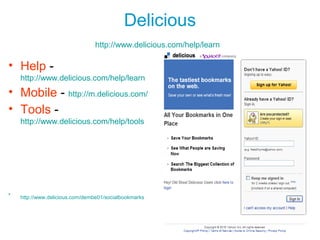
Delicious
http://www.delicious.com/help/learn
• Help -
http://www.delicious.com/help/learn
• Mobile - http://m.delicious.com/
• Tools -
http://www.delicious.com/help/tools
•
http://www.delicious.com/dembe01/socialbookmarks
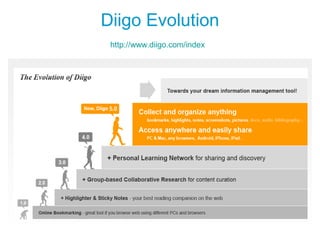
Diigo Evolution
http://www.diigo.com/index
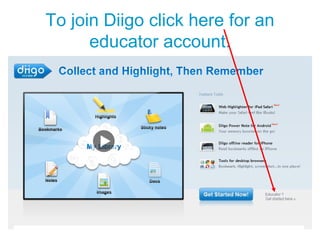
To join Diigo click here for an
educator account.
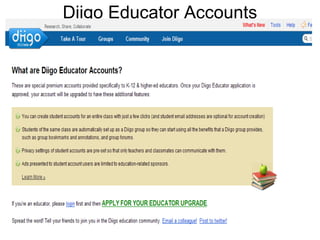
Diigo Educator Accounts
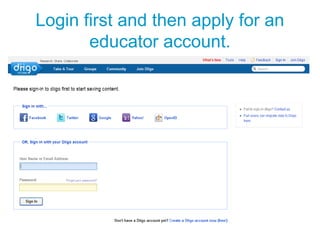
Login first and then apply for an
educator account.
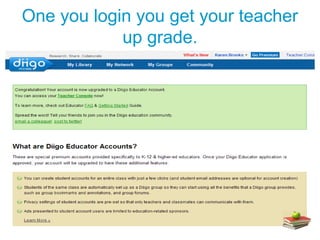
One you login you get your teacher
up grade.
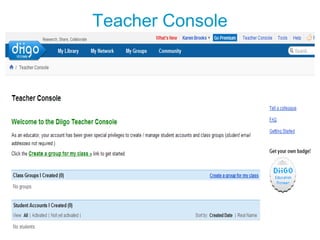
Teacher Console
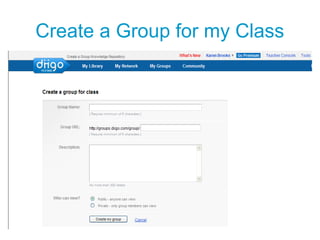
Create a Group for my Class
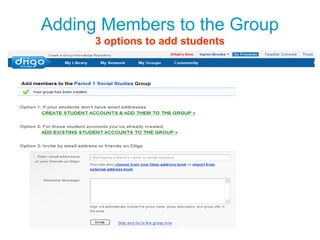
Adding Members to the Group
3 options to add students
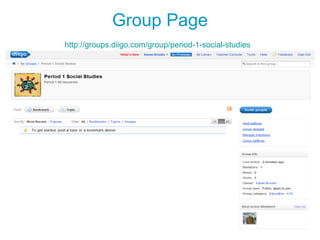
Group Page
http://groups.diigo.com/group/period-1-social-studies
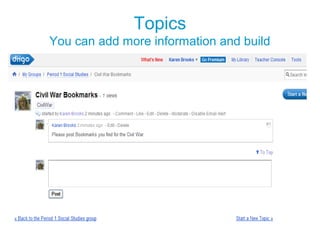
Topics
You can add more information and build
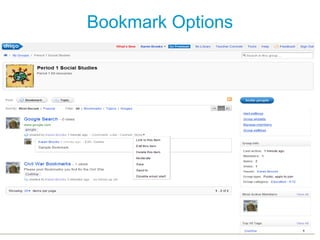
Bookmark Options
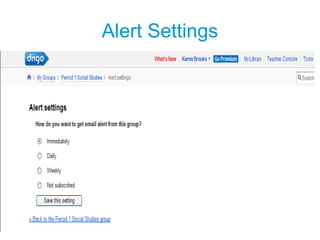
Alert Settings
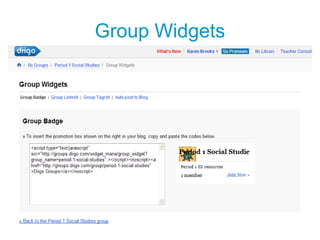
Group Widgets
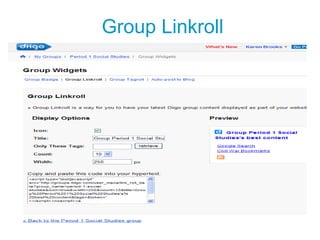
Group Linkroll
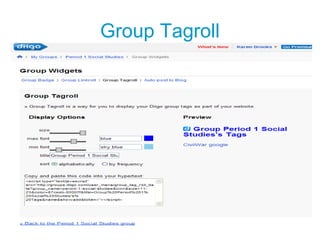
Group Tagroll
Auto Post to Blog
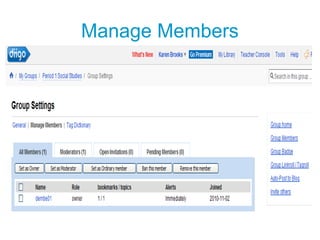
Manage Members
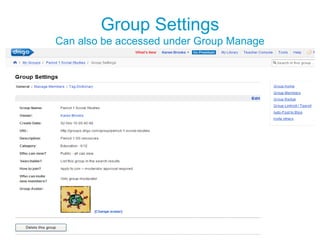
Group Settings
Can also be accessed under Group Manage
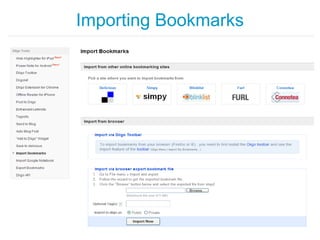
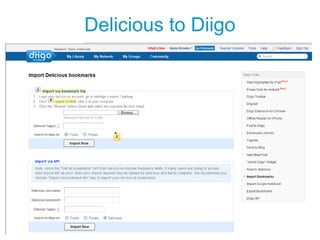
Importing Bookmarks
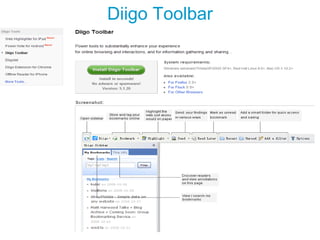
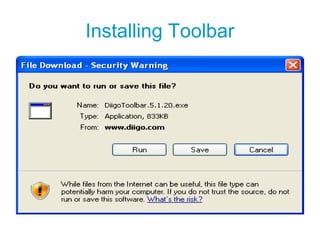
Diigo Toolbar
Installing Toolbar
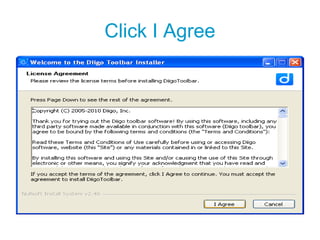
Click I Agree
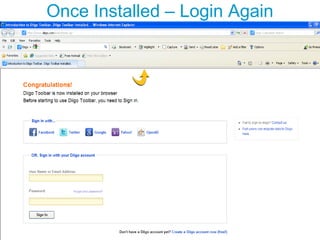
Once Installed – Login Again
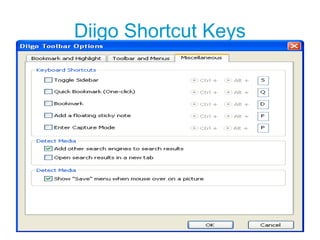
Diigo Shortcut Keys
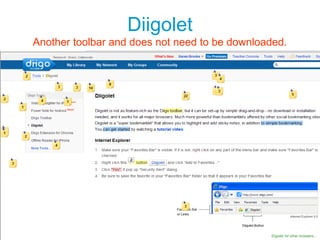
Diigolet
Another toolbar and does not need to be downloaded.
Delicious to Diigo
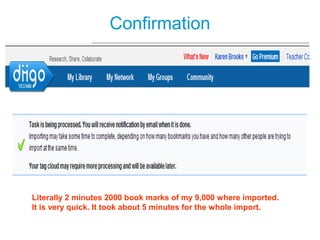
Confirmation
Literally 2 minutes 2000 book marks of my 9,000 where imported.
It is very quick. It took about 5 minutes for the whole import.
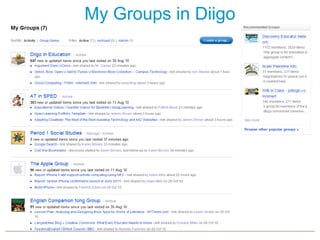
My Groups in Diigo
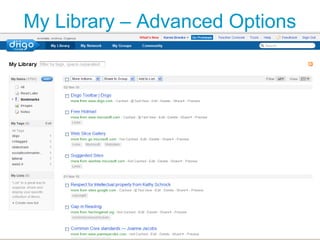
My Library – Advanced Options
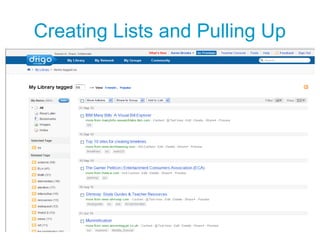
Creating Lists and Pulling Up
Diigo Educator Pioneer
http://www.diigo.com/teacher_entry/get_badge
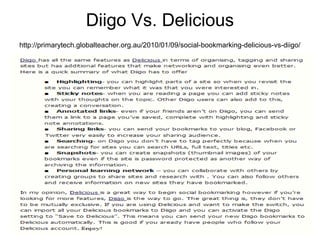
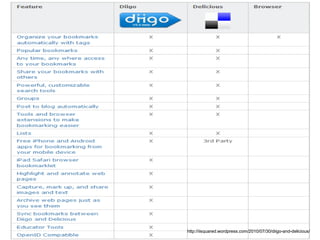
Diigo Vs. Delicious
http://primarytech.globalteacher.org.au/2010/01/09/social-bookmarking-delicious-vs-diigo/
http://iisquared.wordpress.com/2010/07/30/diigo-and-delicious/
Resources
• http://www.delicious.com
• http://www.diigo.com
• http://www.diigo.com/help/why_diigo
• http://primarytech.globalteacher.org.au/2010/01/09/social
-bookmarking-delicious-vs-diigo/
• http://www.makeuseof.com/tag/7-reasons-diigo-tastes-
better-than-delicious/
• http://www.commoncraft.com/bookmarking-plain-english
• http://www.masternewmedia.org/knowledge_managemen
t/social-bookmarking/social-bookarking-what-is-it-video-
tutorial-20070808.htm#ixzz148wHkvq9
• http://iisquared.wordpress.com/2010/07/30/diigo-and-
delicious/
Karen Brooks
• kbrooks@ulsterboces.org
• http://www.delicious.com/dembe01
• http://www.diigo.com/user/Dembe01

Delicious vs diigo

  • 1.
  • 2.
    When We Thinkof Social Bookmarking . . .
  • 3.
    Social Bookmarking inPlain English http://www.commoncraft.com/bookmarking-plain-english 3:22M
  • 4.
    English text transcriptfor the video Social Bookmarking in Plain English Link: http://www.masternewmedia.org/knowledge_management/social-bookmarking/social-boo • It's just too much. – Did you know that there are over 15 billion web pages? To make sense of it all, we need to pluck out the best pages and save them for later. • We have choices. – We could bookmark or add to favorites in our web browser. Nah, it quickly becomes messy. Plus, these bookmarks are tied to only one computer. This is the old way. • There's a new way that doesn't use a browser. It uses a website. – This is called a social bookmarking site, and the one we'll use today is called Delicious. It makes bookmarking more useful and fun. • We'll focus on three things: – a) How to get started with bookmarking, – b) How bookmarks are organized by tags, and – c) Why this kind of bookmarking is social. • First, go to delicious to sign up for a free account. – While you're signing up, you'll see an easy to add a couple of buttons to your browser. – These are important. The Tag button is how you'll add new bookmarks to the website. On any website, you can click Tag to save that site as a delicious bookmark. Easy! – Consider this example: you are a teacher who often uses the web to find math lessons for 8th graders. You're overwhelmed by all the sites. There are just too many to remember. Using delicious, remembering sites is as easy as tagging them. Here's one. Oh nice, perfect. • Here's what happens when you tag a site: a new window opens and asks for more information. – You can add keywords or tags that describe the site. These will help you find bookmarks later. You might tag this site, algebra, bestof, tutorial, math, and homework, then click save to save it on the delicious website. – When you save a page like this, two things happen. • First, the site is saved with all your other bookmarks on delicious. • Second, the tags are saved in a list of all your tags. You just repeat this process for every site you want to save. This is bookmarking.
  • 5.
    • Why Tagsare so Important – Let's fast forward two months to make our second point: Why tags are so important. – Let's say you now have a hundred bookmarked sites. Chaos, right? Well, since your added tags, you have a way to sort the bookmarks by the tags you assigned. – To find all your sites about algebra, you click the algebra tag, and voilà, one hundred becomes three. All your bookmarks are now more findable thanks to tags. – But that's only part of the fun. • The Social Aspect of Bookmarking – Now, let's look at the social part of bookmarking to make our third point. – Think about your fellow teachers. Couldn't they benefit from seeing your bookmarks? – Well, they can. Delicious bookmarks are public. This means your friends and peers can see your bookmarks and use your tags just like you. That's why this is called social bookmarking. Your bookmarks can benefit other people. – Think about it this way. You start bookmarking algebra sites, and your peers can see the interesting sites you find. Then, they start bookmarking too. Within a few weeks, a group of teachers are all bookmarking their favorite math websites, and because they're all public, everyone discovers new and relevant material. – Together you create a network that produces a steady stream of interesting and useful websites, all organized by tags on the delicious website. The lesson is that social bookmarking sites take a world of chaos and make it orderly.
  • 6.
    • Review – Rememberthere are three steps to get started. – 1) First go to delicious to sign up and add the buttons to your browser. – 2) Second, start bookmarking sites with tags. – 3) And third, be social. Notice how useful and fun other people's bookmarks can be. • Learn, explore and discover what new media social technologies are all about by checking out the CommonCraft Show .
  • 7.
    Delicious http://www.delicious.com/help/learn • Help - http://www.delicious.com/help/learn •Mobile - http://m.delicious.com/ • Tools - http://www.delicious.com/help/tools • http://www.delicious.com/dembe01/socialbookmarks
  • 8.
  • 9.
    To join Diigoclick here for an educator account.
  • 10.
  • 11.
    Login first andthen apply for an educator account.
  • 12.
    One you loginyou get your teacher up grade.
  • 13.
  • 14.
    Create a Groupfor my Class
  • 15.
    Adding Members tothe Group 3 options to add students
  • 16.
  • 17.
    Topics You can addmore information and build
  • 18.
  • 19.
  • 20.
  • 21.
  • 22.
  • 23.
  • 24.
  • 25.
    Group Settings Can alsobe accessed under Group Manage
  • 26.
  • 27.
  • 28.
  • 29.
  • 30.
    Once Installed –Login Again
  • 31.
  • 32.
    Diigolet Another toolbar anddoes not need to be downloaded.
  • 33.
  • 34.
    Confirmation Literally 2 minutes2000 book marks of my 9,000 where imported. It is very quick. It took about 5 minutes for the whole import.
  • 35.
  • 36.
    My Library –Advanced Options
  • 37.
  • 38.
  • 39.
  • 40.
  • 41.
    Resources • http://www.delicious.com • http://www.diigo.com •http://www.diigo.com/help/why_diigo • http://primarytech.globalteacher.org.au/2010/01/09/social -bookmarking-delicious-vs-diigo/ • http://www.makeuseof.com/tag/7-reasons-diigo-tastes- better-than-delicious/ • http://www.commoncraft.com/bookmarking-plain-english • http://www.masternewmedia.org/knowledge_managemen t/social-bookmarking/social-bookarking-what-is-it-video- tutorial-20070808.htm#ixzz148wHkvq9 • http://iisquared.wordpress.com/2010/07/30/diigo-and- delicious/
  • 42.
    Karen Brooks • kbrooks@ulsterboces.org •http://www.delicious.com/dembe01 • http://www.diigo.com/user/Dembe01