Improving Web Vulnerability Scanning   1


Daniel Zulla
Introduction
Hey!                                           2


  ■ Hi there!
  ■ I’m Dan. This is my first year at DEFCON.
  ■ I do programming and security start-ups.
  ■ I do some penetration testing as well
More Introduction                                           3


 ■ Today I’m going to talk about vulnerability scanning
 ■ Primary on the web
 ■ “The cloud” is involved as well
 ■ Network security too
 ■ I’ll show some things, so there is plenty of demo time
 ■ Have fun, thanks for being here!
Some Facts                                                                  4


 ■ There are a lot of web vulnerability scanners, fuzzers and penetration
    testing tools out there already

 ■ Some of them work, some of them do not
 ■ But basically all of them have one thing in common:
    They actually don’t attack web applications on the application layer

 ■ They mostly fuzz HTTP and sometimes perform injection attacks
Some more facts                                                       5


 ■ The fundamental design of web scanners has not changed in over a
    decade

 ■ But: The web has changed.
 ■ So there seems to be a problem.
Software Architecture
What web vulnerability scanners and fuzzers look like                            6


                                                               Plugins
                      A HTTP Library

                                                        RXSS   BSQLI     EVAL
                        The Core

                                                        PXSS    LFI      OSC
                                Multithreading /
             Output Engine
                                    Forking
                                                        SQL     RFI      [...]
A pentesters point of view                          7


■ Javascript/Ajax rich applications are still not
    supported

■ Authenticated scanning is still incredibly
    challenging / not reliable

■ Exploitation techniques are mostly poor

■ “I don’t know which scanner will work for
    foo.com and which one for bar.com, so I
    use toolchains”
A developers point of view                                                                                 8


                                                    ■ HTTP Libraries don’t support JS -
■ Javascript/Ajax rich applications are still not       Scanners are based on an HTTP
    supported                                           Libraries

■ Authenticated scanning is still incredibly        ■ Web Logins are not standarized -
    challenging / not reliable                          So how should they be detected

■ Exploitation techniques are mostly poor           ■ No time for exploits
                                                        (Already spent 100000 lines [and nights] of code
                                                        making the crawler immune to encoding issues,
■ “I don’t know which scanner will work for             malformed HTML, redirects and binary content!)

    foo.com and which one for bar.com, so I
    use toolchains”
                                                    ■ A false positive is better than a
                                                        false negative
How I see it                                                                                    9


■ Both of them are right.

■ The web is a mess. Nobody cares about RFCs anymore. (Especially these SEO guys!)

■ 10 years ago, you would have expected a Query String at the end of a URL like
   https://foo.com/xxx/yyy?foo=bar

■ Nowadays, https://foo.com/something.ext/foo/bar is good practice

■ The result: It’s incredibly hard for scanner developers to figure out the dynamic components
   of an HTTP request. Because of that, we feel overhelmed and fuzz nearly everything.

■ Header Keys, Header Values, VHost, Cookie, Method, Path, Version, ...
How I see it                                                                                     10


■ Fuzzing HTTP is incredibly important. You never know if you are talking to an apache2, nginx
    or some hidden application server upstream

■ But it has nothing to-do with web vulnerability scanning

■ So - developers are struggling with websites because they use HTTP to crawl and attack
    them. Things like flash, images, javascript seems to be an unsolveable problem

■ Redirects are hard to handle sometimes (wait there is more)

■ Javascript redirects (after 10 seconds!) and of course: onmouseover, onclick, onfocus, ...

■ Flash isn’t helpful either
Web 2.0                                                                                         11


■ But - WE DO SECURITY

■ Is it really our job to make sure that our software executed all the JS and grabbed all the
    links?

■ When we spend 100 hours on the crawler, and 5 hours on the actual payloads (that’s how it
    looks right now) something, somewhere, went terribly wrong

■ So - Is there a (open source?) piece of software that we could use instead of the HTTP
    library? Something that has prooven its mastery in handling unpredictably broken web
    content already? There is.
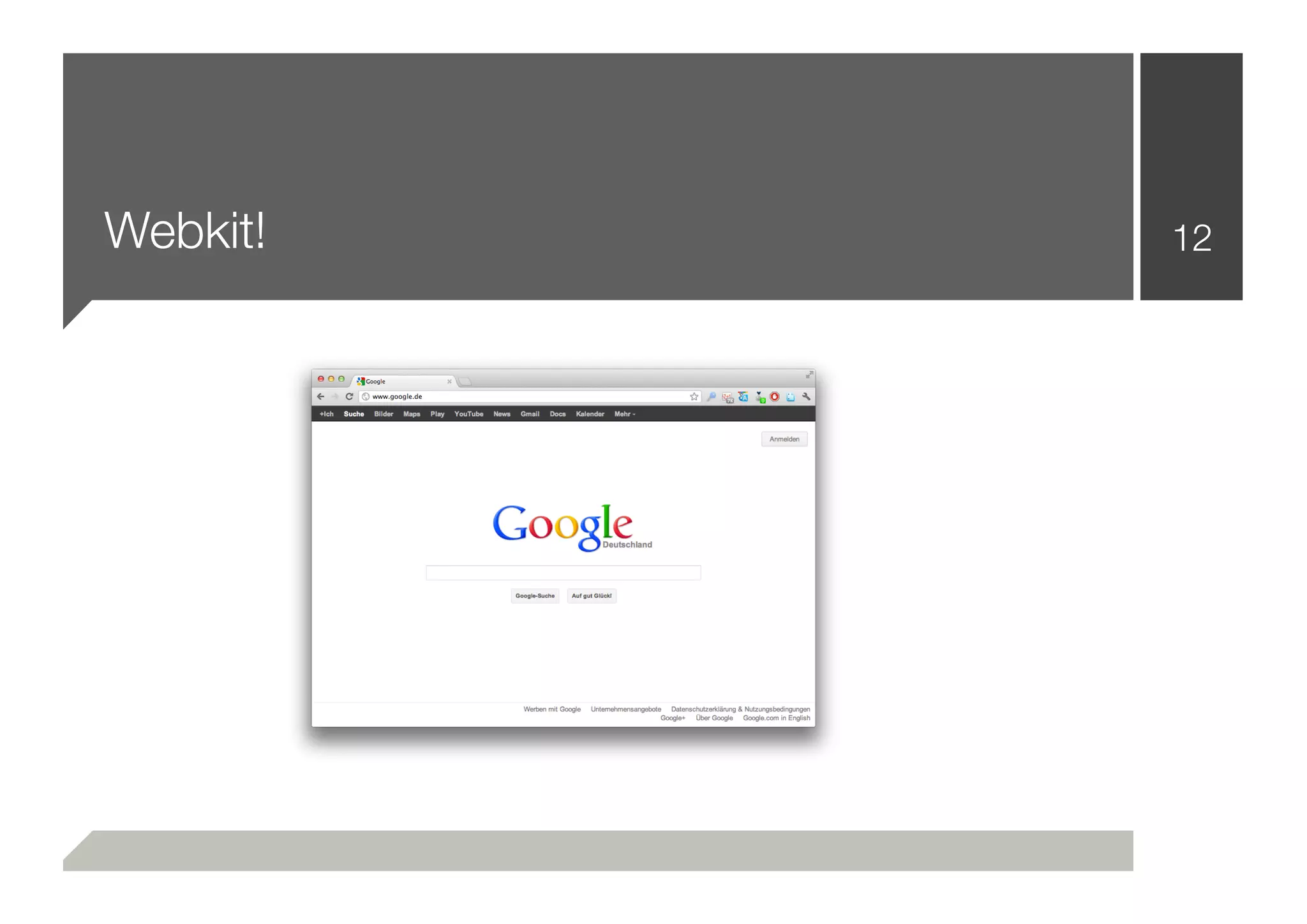
Webkit!   12
Webkit knows                                            13


■   Javascript          ■   CSS Rendering

■   Javascript events   ■   Binary Downloads

■   Redirects           ■   Broken HTML

■   Flash               ■   Broken CSS

■   Images              ■   Performance

■   Websockets          ■   Forking / Multiprocessing

■   WebGL               ■   [...]
Software Architecture
What it should look like                                             14


                               The Front-End


          A HTTP                            RXSS     BSQLI   EVAL
                       The Core
          Library
                                            PXSS      LFI    OSC

            Reporting Engine                 SQL      RFI    [...]


                           The Exploitation Engine
Changes? Improvments?                                                15


 ■ Replacing the HTTP library by a Webkit Engine
 ■ Less code (A lot less code)
 ■ 100% support for JS/Ajax/Broken HTML/JS Events/Crazy Redirects
    and all kinds of things

 ■ The ability to simulate human user behaviour
 ■ CSS Renderings (Two text fields beside each other: 10px - one of
    them is a input[type=password]) - May be a login!
Making it scale (heavily)                                                 16


 ■ Webkit is slow (Website rendering, Executing JS, ... - compared to -
    Speaking Plaintext HTTP)

 ■ Downloading Images is slow
 ■ Waiting for delayed JS events is slow
 ■ Flash is even slower
Making it scale (heavily)
Bad news: Qt / PyQt / PySide                                             17


  ■ QtWebkit does not support multithreading
  ■ It tends to SEGFAULT from time to time :(
  ■ Multiple QApplication instances are almost impossible to handle in
     one Python namespace
Making it scale (heavily)
Good news: Building a preforking TCP Server                                  18


  ■ Spawning a pool of processes works quite well (one QApplication
     +one Browser instance per Process)

  ■ Simultaneous downloads
  ■ Better accessibility inside the scanner (multiprocessing insides loops
     to increase performance)
Missing pieces                                            19


 ■ Mastering Authentication
 ■ Exploitation & Privilege Escalation
 ■ Geographically distributed scanning: Using the cloud
 ■ Reporting
Mastering Authentication                                                      20


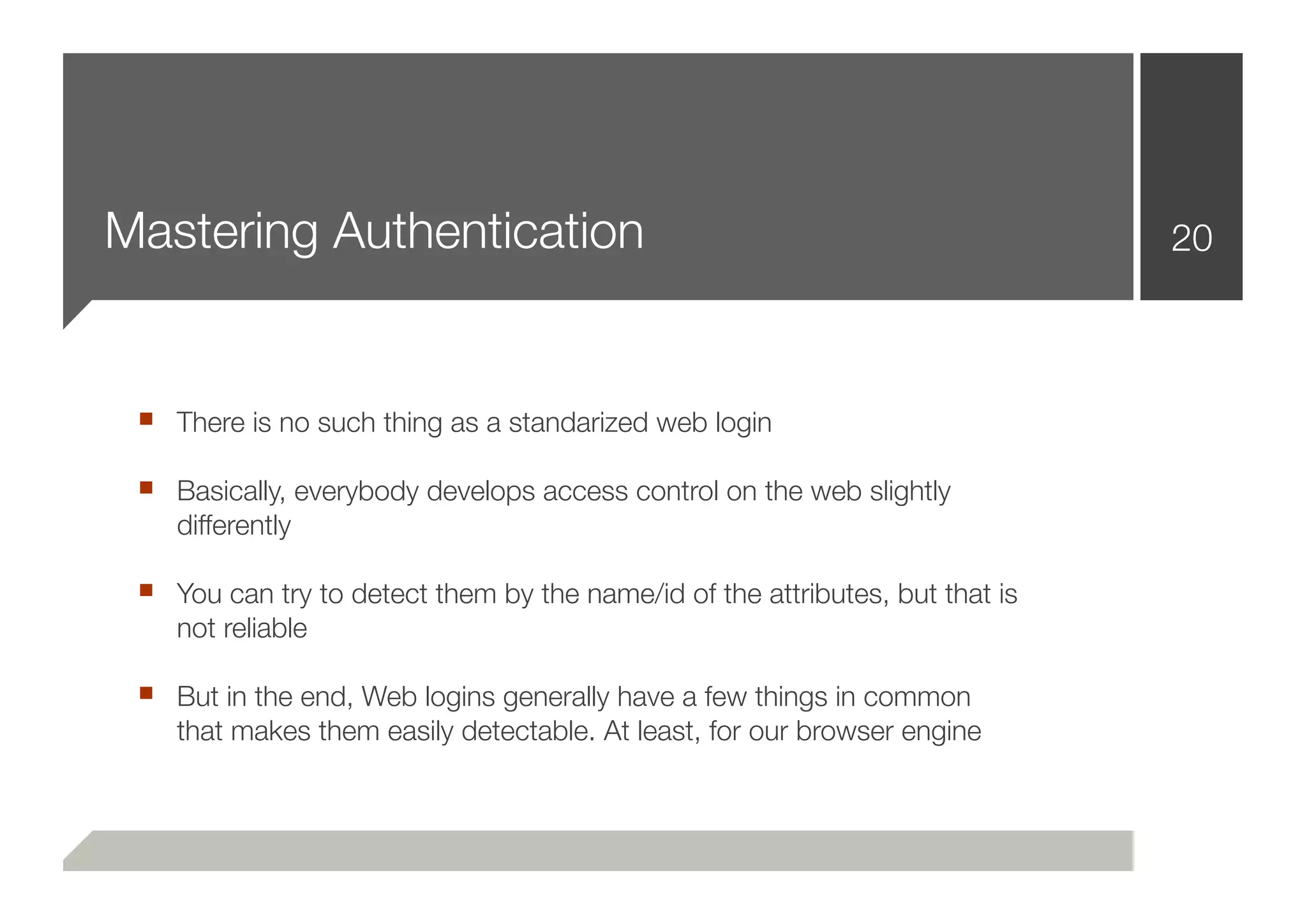
 ■ There is no such thing as a standarized web login
 ■ Basically, everybody develops access control on the web slightly
    differently

 ■ You can try to detect them by the name/id of the attributes, but that is
    not reliable

 ■ But in the end, Web logins generally have a few things in common
    that makes them easily detectable. At least, for our browser engine
Mastering Authentication
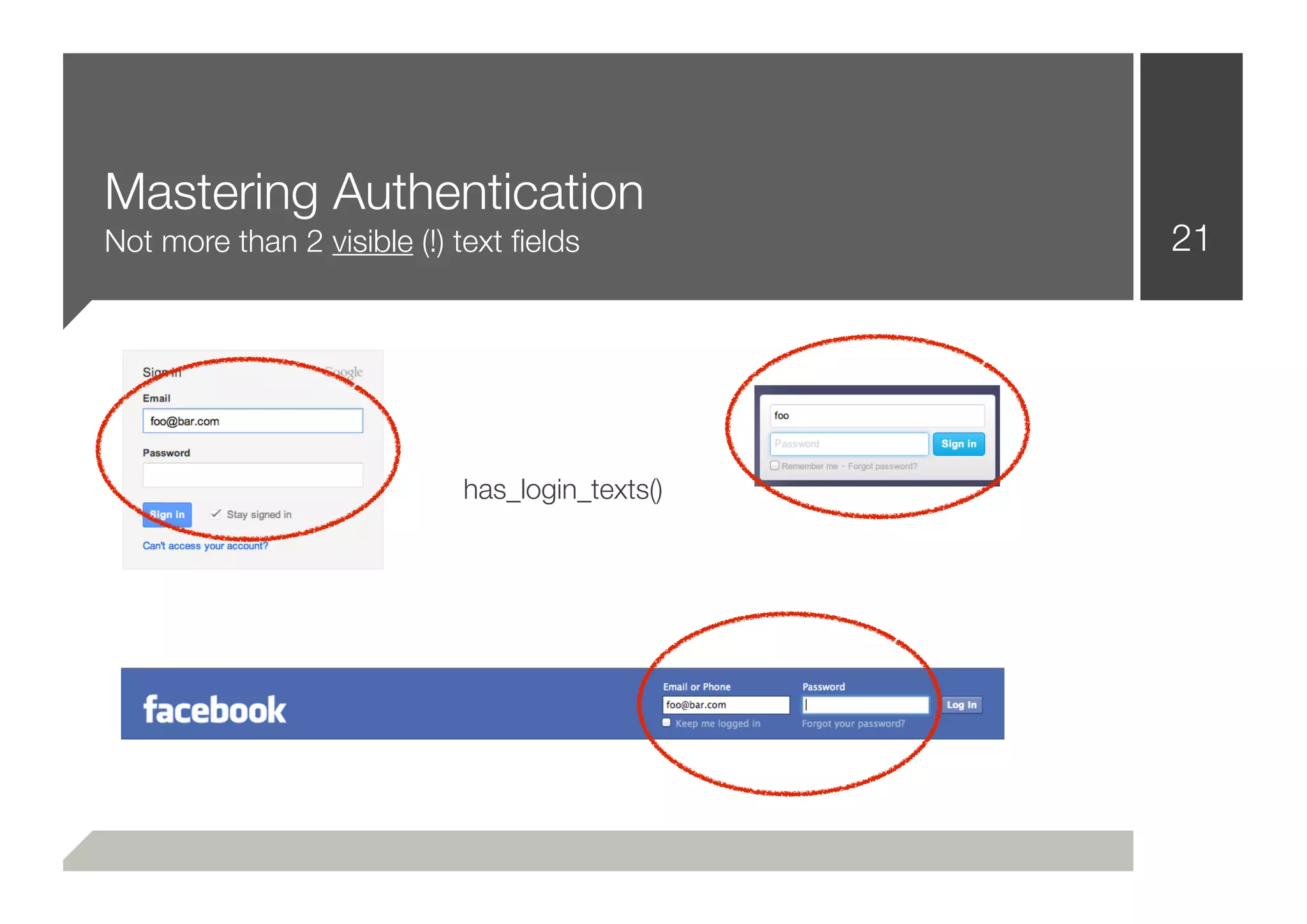
Not more than 2 visible (!) text fields          21


                            has_login_texts()
Mastering Authentication
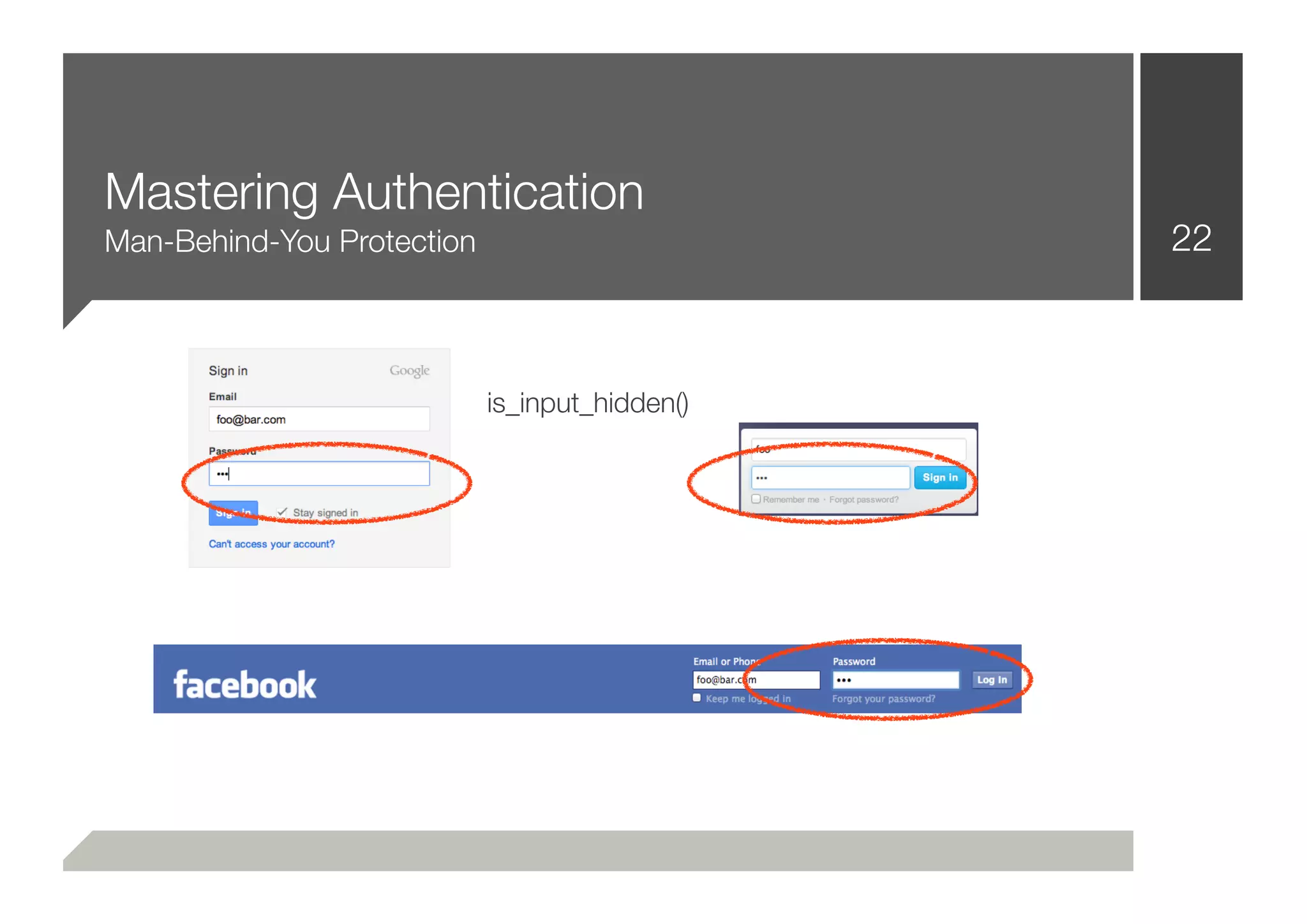
Man-Behind-You Protection                       22


                            is_input_hidden()
Mastering Authentication
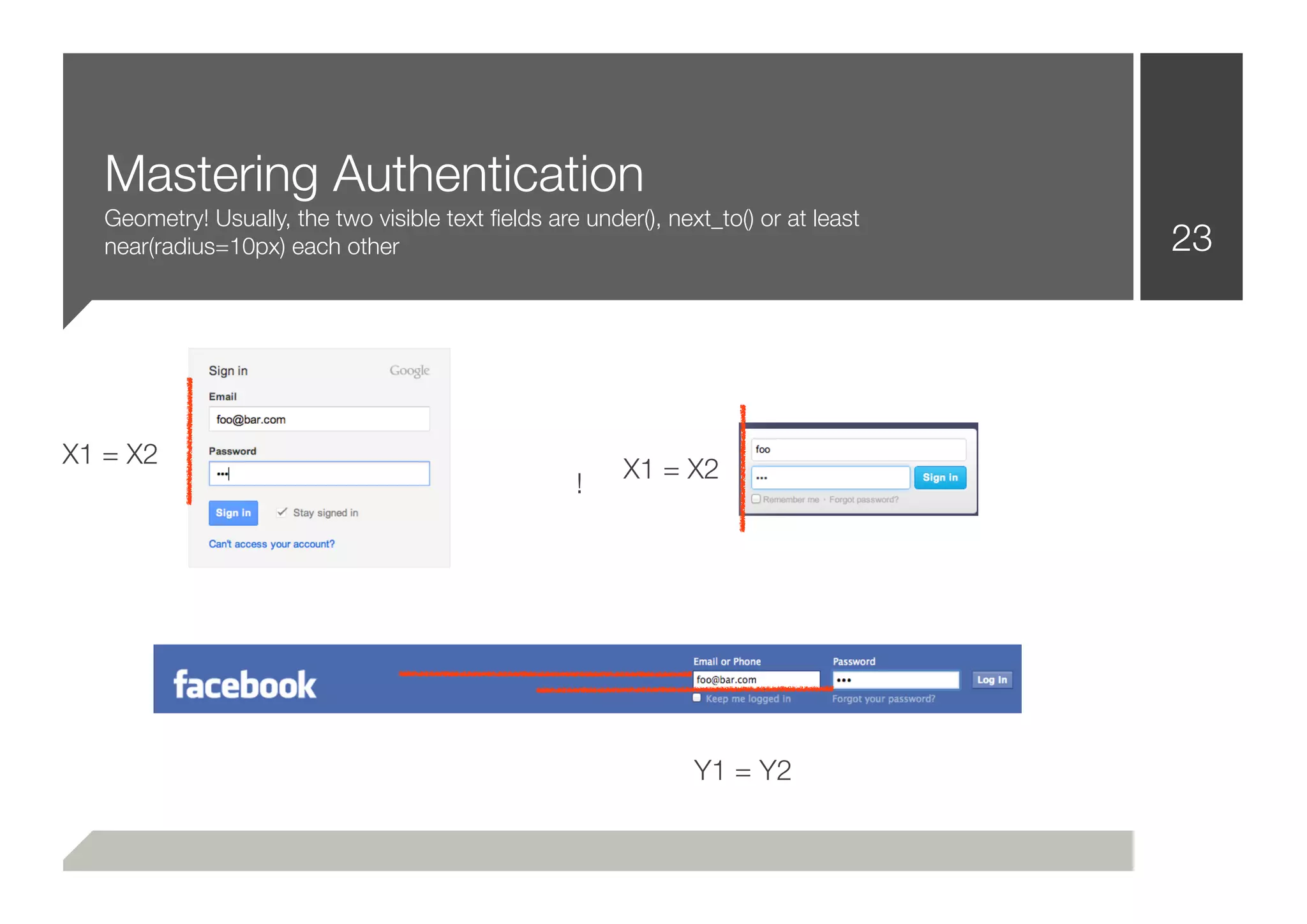
   Geometry! Usually, the two visible text fields are under(), next_to() or at least
   near(radius=10px) each other                                                       23


X1 = X2
                                                         X1 = X2
                                                    !


                                                                 Y1 = Y2
Mastering Authentication                                                  24


 ■ That was easy!
 ■ The common way to solve that problem, is to iterate through a
    wordlist (login, auth, signin, [...]) while checking the input[id],
    input[name] attributes

 ■ That’s not necessarily wrong or bad practice
 ■ After putting the pieces together:
 ■ .login(“username”, “password”)
Mastering Authentication
Demo Time                                                              25


 ■ Proof Of Concept 1: Twitter (Some Javascript)
 ■ Proof Of Concept 2: Facebook (More Javascript)
 ■ Proof Of Concept 3: Google Plus (Most Javascript + Browser Hacks)
Mastering Authentication
When we are signed in                                                26


  ■ New problems occur: How can we let the scanner check if we are
     indeed signed in?

  ■ Common practive: Looking for a /logout/i String
  ■ The problem: Inefficient. Likely to cause false positives
  ■ There has to be a better way:
  ■ Introduction “Strategies”
Strategy.Authentication
Step 1: Identification                                                 27


  ■ Identifying a login form (3-way approach, input[type=password],
     geometry, [...])
Strategy.Authentication
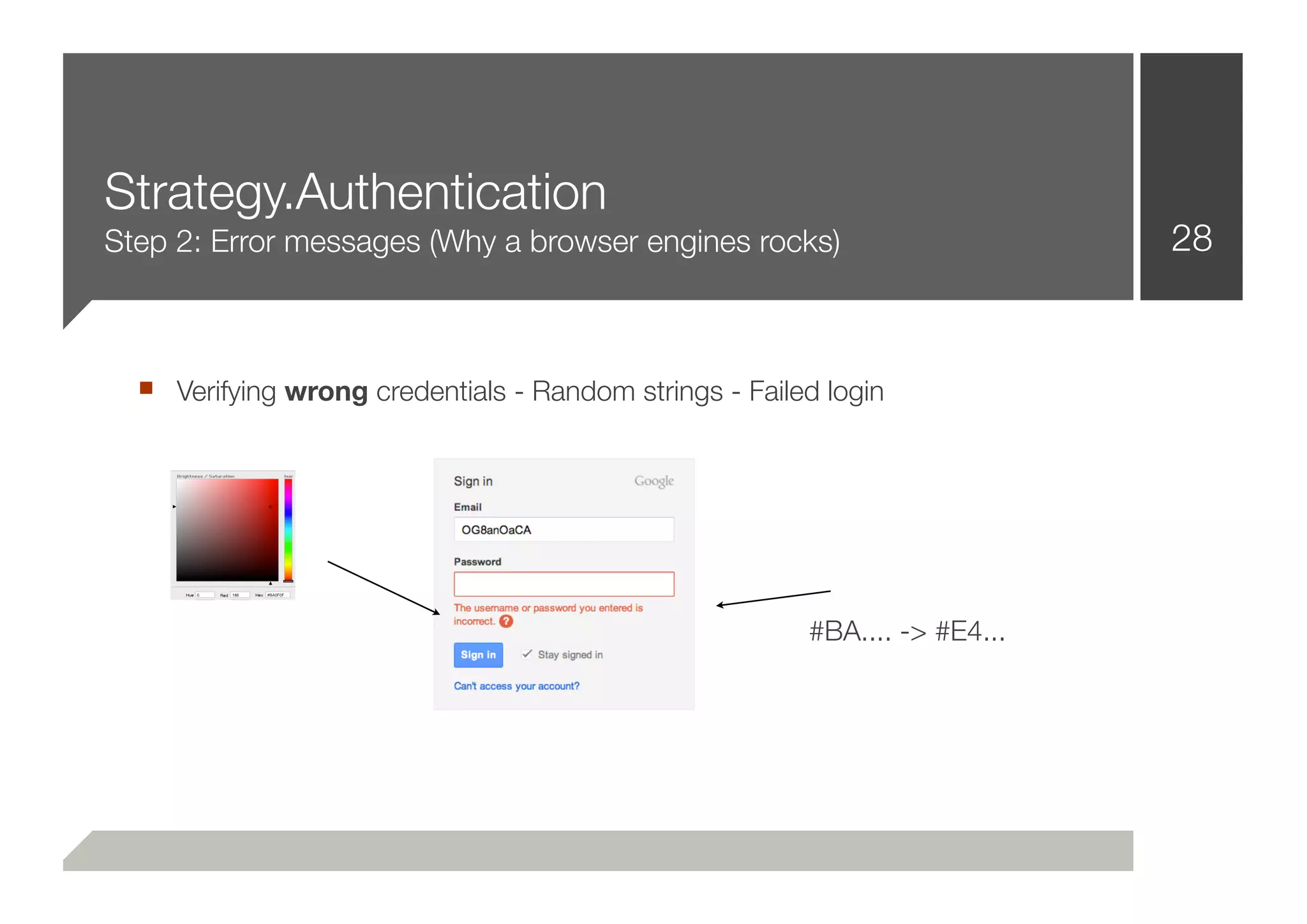
Step 2: Error messages (Why a browser engines rocks)                        28


  ■ Verifying wrong credentials - Random strings - Failed login


                                                        #BA.... -> #E4...
Strategy.Authentication
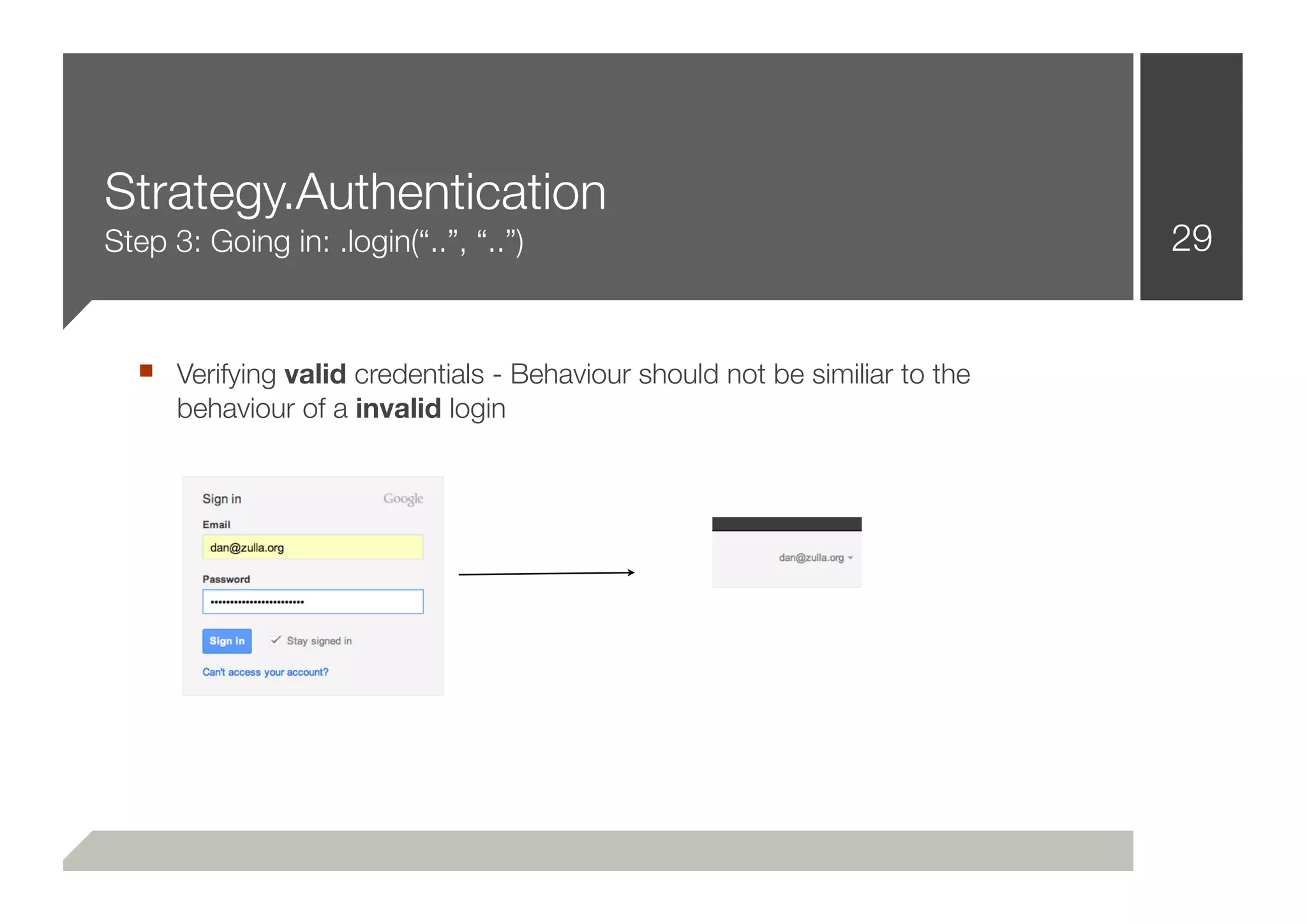
Step 3: Going in: .login(“..”, “..”)                                        29


  ■ Verifying valid credentials - Behaviour should not be similiar to the
      behaviour of a invalid login
Strategy.Authentication
Step 4: Going out. .logout()                                             30


  ■ Doing similiar work again for .logout() function seems obsolote
  ■ But it really isn’t.
  ■ It is the basis to a .is_still_loggedin() function
  ■ Which is really important to stay logged in during crawling
  ■ And if the scanner logged itself out, it can simply .login() again
  ■ That’s cool. :-)
Exploitation and Privilege Escalation                                           31


■ There is a whole universe besides injection vulnerabilities
■ Usually, scanners don’t detect them
■ But they should
■ And now they can: .login(“user1”, “...”); .logout(); .login(“user2”, “...”)
■ => Demo Time: Privilege Escalation, Multi-User Systems
Geographically distributed scanning:
Using the cloud                                                               32


 ■ When (injection) vulnerabilities are getting complicated:
 ■ Scenario 1: The backend of a website creates a log entry for every
    new IP address. It logs the USERAGENT. The log entries are kept in a
    SQL database. The function that creates the log entries, is vulnerable.
    The User-Agent is injectable. The problem is:

 ■ It only works once. As soon as the IP is in the database, the function
    won’t be executed anymore :-(

 ■ ==> SQLMap (and every other tool) will fail.
Geographically distributed scanning:
Using the cloud                                                33


 ■ But they shouldn’t!
 ■ The limitation is totally detectable
 ■ And a new IP is just as far away as a single EC2 API call
Geographically distributed scanning:
Using the cloud                                             34

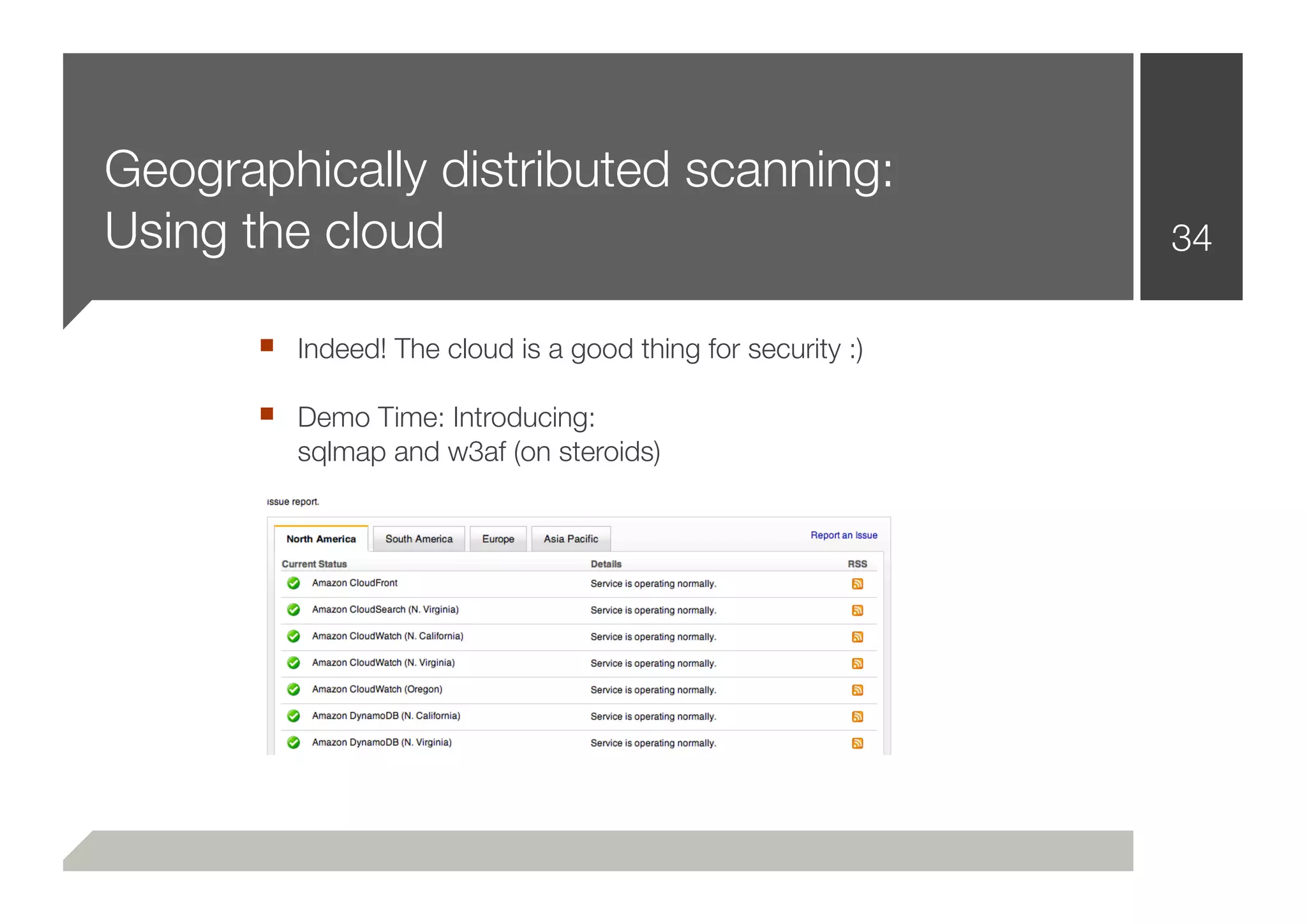
      ■ Indeed! The cloud is a good thing for security :)
      ■ Demo Time: Introducing:
         sqlmap and w3af (on steroids)
Combining “Strategies” and the
distributed scanning                                    35


 ■ Introducing next generation vulnerability scanning
 ■ Exploiting a really amazingly hard SQL Injection


 ■ Demo Time
Further Research & Additional Ideas                                      36


 ■ Country specific restrictions can be by-passed in a fully automatic
    manner

 ■ (Error) messages can be parsed and interpreted: Wolfram Alpha
 ■ Bloomfilters should be integrated
 ■ Other “Strategies” should be implemented (the limitations are gone)
More Live Demos                                                       37


 ■ Demonstrating a logical layer beyond Authentication:
    .pay(“0000111122223333”, CVV=121, type=VISA)
    .search(“search query”)
    .sort(“DESC UNION SELECT [...]”)

 ■ Interpreting error messages
 ■ Pivoting on penetrated hosts - Spawning another scanner instance
 ■ And finally: Reporting!
Thanks!   38

Defcon 20-zulla-improving-web-vulnerability-scanning

  • 1.
    Improving Web VulnerabilityScanning 1 Daniel Zulla
  • 2.
    Introduction Hey! 2 ■ Hi there! ■ I’m Dan. This is my first year at DEFCON. ■ I do programming and security start-ups. ■ I do some penetration testing as well
  • 3.
    More Introduction 3 ■ Today I’m going to talk about vulnerability scanning ■ Primary on the web ■ “The cloud” is involved as well ■ Network security too ■ I’ll show some things, so there is plenty of demo time ■ Have fun, thanks for being here!
  • 4.
    Some Facts 4 ■ There are a lot of web vulnerability scanners, fuzzers and penetration testing tools out there already ■ Some of them work, some of them do not ■ But basically all of them have one thing in common: They actually don’t attack web applications on the application layer ■ They mostly fuzz HTTP and sometimes perform injection attacks
  • 5.
    Some more facts 5 ■ The fundamental design of web scanners has not changed in over a decade ■ But: The web has changed. ■ So there seems to be a problem.
  • 6.
    Software Architecture What webvulnerability scanners and fuzzers look like 6 Plugins A HTTP Library RXSS BSQLI EVAL The Core PXSS LFI OSC Multithreading / Output Engine Forking SQL RFI [...]
  • 7.
    A pentesters pointof view 7 ■ Javascript/Ajax rich applications are still not supported ■ Authenticated scanning is still incredibly challenging / not reliable ■ Exploitation techniques are mostly poor ■ “I don’t know which scanner will work for foo.com and which one for bar.com, so I use toolchains”
  • 8.
    A developers pointof view 8 ■ HTTP Libraries don’t support JS - ■ Javascript/Ajax rich applications are still not Scanners are based on an HTTP supported Libraries ■ Authenticated scanning is still incredibly ■ Web Logins are not standarized - challenging / not reliable So how should they be detected ■ Exploitation techniques are mostly poor ■ No time for exploits (Already spent 100000 lines [and nights] of code making the crawler immune to encoding issues, ■ “I don’t know which scanner will work for malformed HTML, redirects and binary content!) foo.com and which one for bar.com, so I use toolchains” ■ A false positive is better than a false negative
  • 9.
    How I seeit 9 ■ Both of them are right. ■ The web is a mess. Nobody cares about RFCs anymore. (Especially these SEO guys!) ■ 10 years ago, you would have expected a Query String at the end of a URL like https://foo.com/xxx/yyy?foo=bar ■ Nowadays, https://foo.com/something.ext/foo/bar is good practice ■ The result: It’s incredibly hard for scanner developers to figure out the dynamic components of an HTTP request. Because of that, we feel overhelmed and fuzz nearly everything. ■ Header Keys, Header Values, VHost, Cookie, Method, Path, Version, ...
  • 10.
    How I seeit 10 ■ Fuzzing HTTP is incredibly important. You never know if you are talking to an apache2, nginx or some hidden application server upstream ■ But it has nothing to-do with web vulnerability scanning ■ So - developers are struggling with websites because they use HTTP to crawl and attack them. Things like flash, images, javascript seems to be an unsolveable problem ■ Redirects are hard to handle sometimes (wait there is more) ■ Javascript redirects (after 10 seconds!) and of course: onmouseover, onclick, onfocus, ... ■ Flash isn’t helpful either
  • 11.
    Web 2.0 11 ■ But - WE DO SECURITY ■ Is it really our job to make sure that our software executed all the JS and grabbed all the links? ■ When we spend 100 hours on the crawler, and 5 hours on the actual payloads (that’s how it looks right now) something, somewhere, went terribly wrong ■ So - Is there a (open source?) piece of software that we could use instead of the HTTP library? Something that has prooven its mastery in handling unpredictably broken web content already? There is.
  • 12.
  • 13.
    Webkit knows 13 ■ Javascript ■ CSS Rendering ■ Javascript events ■ Binary Downloads ■ Redirects ■ Broken HTML ■ Flash ■ Broken CSS ■ Images ■ Performance ■ Websockets ■ Forking / Multiprocessing ■ WebGL ■ [...]
  • 14.
    Software Architecture What itshould look like 14 The Front-End A HTTP RXSS BSQLI EVAL The Core Library PXSS LFI OSC Reporting Engine SQL RFI [...] The Exploitation Engine
  • 15.
    Changes? Improvments? 15 ■ Replacing the HTTP library by a Webkit Engine ■ Less code (A lot less code) ■ 100% support for JS/Ajax/Broken HTML/JS Events/Crazy Redirects and all kinds of things ■ The ability to simulate human user behaviour ■ CSS Renderings (Two text fields beside each other: 10px - one of them is a input[type=password]) - May be a login!
  • 16.
    Making it scale(heavily) 16 ■ Webkit is slow (Website rendering, Executing JS, ... - compared to - Speaking Plaintext HTTP) ■ Downloading Images is slow ■ Waiting for delayed JS events is slow ■ Flash is even slower
  • 17.
    Making it scale(heavily) Bad news: Qt / PyQt / PySide 17 ■ QtWebkit does not support multithreading ■ It tends to SEGFAULT from time to time :( ■ Multiple QApplication instances are almost impossible to handle in one Python namespace
  • 18.
    Making it scale(heavily) Good news: Building a preforking TCP Server 18 ■ Spawning a pool of processes works quite well (one QApplication +one Browser instance per Process) ■ Simultaneous downloads ■ Better accessibility inside the scanner (multiprocessing insides loops to increase performance)
  • 19.
    Missing pieces 19 ■ Mastering Authentication ■ Exploitation & Privilege Escalation ■ Geographically distributed scanning: Using the cloud ■ Reporting
  • 20.
    Mastering Authentication 20 ■ There is no such thing as a standarized web login ■ Basically, everybody develops access control on the web slightly differently ■ You can try to detect them by the name/id of the attributes, but that is not reliable ■ But in the end, Web logins generally have a few things in common that makes them easily detectable. At least, for our browser engine
  • 21.
    Mastering Authentication Not morethan 2 visible (!) text fields 21 has_login_texts()
  • 22.
  • 23.
    Mastering Authentication Geometry! Usually, the two visible text fields are under(), next_to() or at least near(radius=10px) each other 23 X1 = X2 X1 = X2 ! Y1 = Y2
  • 24.
    Mastering Authentication 24 ■ That was easy! ■ The common way to solve that problem, is to iterate through a wordlist (login, auth, signin, [...]) while checking the input[id], input[name] attributes ■ That’s not necessarily wrong or bad practice ■ After putting the pieces together: ■ .login(“username”, “password”)
  • 25.
    Mastering Authentication Demo Time 25 ■ Proof Of Concept 1: Twitter (Some Javascript) ■ Proof Of Concept 2: Facebook (More Javascript) ■ Proof Of Concept 3: Google Plus (Most Javascript + Browser Hacks)
  • 26.
    Mastering Authentication When weare signed in 26 ■ New problems occur: How can we let the scanner check if we are indeed signed in? ■ Common practive: Looking for a /logout/i String ■ The problem: Inefficient. Likely to cause false positives ■ There has to be a better way: ■ Introduction “Strategies”
  • 27.
    Strategy.Authentication Step 1: Identification 27 ■ Identifying a login form (3-way approach, input[type=password], geometry, [...])
  • 28.
    Strategy.Authentication Step 2: Errormessages (Why a browser engines rocks) 28 ■ Verifying wrong credentials - Random strings - Failed login #BA.... -> #E4...
  • 29.
    Strategy.Authentication Step 3: Goingin: .login(“..”, “..”) 29 ■ Verifying valid credentials - Behaviour should not be similiar to the behaviour of a invalid login
  • 30.
    Strategy.Authentication Step 4: Goingout. .logout() 30 ■ Doing similiar work again for .logout() function seems obsolote ■ But it really isn’t. ■ It is the basis to a .is_still_loggedin() function ■ Which is really important to stay logged in during crawling ■ And if the scanner logged itself out, it can simply .login() again ■ That’s cool. :-)
  • 31.
    Exploitation and PrivilegeEscalation 31 ■ There is a whole universe besides injection vulnerabilities ■ Usually, scanners don’t detect them ■ But they should ■ And now they can: .login(“user1”, “...”); .logout(); .login(“user2”, “...”) ■ => Demo Time: Privilege Escalation, Multi-User Systems
  • 32.
    Geographically distributed scanning: Usingthe cloud 32 ■ When (injection) vulnerabilities are getting complicated: ■ Scenario 1: The backend of a website creates a log entry for every new IP address. It logs the USERAGENT. The log entries are kept in a SQL database. The function that creates the log entries, is vulnerable. The User-Agent is injectable. The problem is: ■ It only works once. As soon as the IP is in the database, the function won’t be executed anymore :-( ■ ==> SQLMap (and every other tool) will fail.
  • 33.
    Geographically distributed scanning: Usingthe cloud 33 ■ But they shouldn’t! ■ The limitation is totally detectable ■ And a new IP is just as far away as a single EC2 API call
  • 34.
    Geographically distributed scanning: Usingthe cloud 34 ■ Indeed! The cloud is a good thing for security :) ■ Demo Time: Introducing: sqlmap and w3af (on steroids)
  • 35.
    Combining “Strategies” andthe distributed scanning 35 ■ Introducing next generation vulnerability scanning ■ Exploiting a really amazingly hard SQL Injection ■ Demo Time
  • 36.
    Further Research &Additional Ideas 36 ■ Country specific restrictions can be by-passed in a fully automatic manner ■ (Error) messages can be parsed and interpreted: Wolfram Alpha ■ Bloomfilters should be integrated ■ Other “Strategies” should be implemented (the limitations are gone)
  • 37.
    More Live Demos 37 ■ Demonstrating a logical layer beyond Authentication: .pay(“0000111122223333”, CVV=121, type=VISA) .search(“search query”) .sort(“DESC UNION SELECT [...]”) ■ Interpreting error messages ■ Pivoting on penetrated hosts - Spawning another scanner instance ■ And finally: Reporting!
  • 38.