thagikura
Deep Dive Into LayoutManager 

for RecyclerView
$ whoami
Takeshi Hagikura
@thagikura


Developer Relations

@Google
RecyclerView
RecyclerView
Adapter
Recycler
LayoutManager
ItemDecoration
ItemAnimator
RecycledViewPool
TouchHelper
DiffUtil


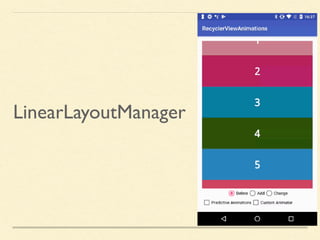
LinearLayoutManager
GridLayoutManager
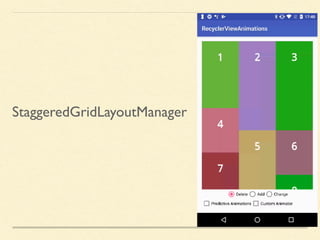
StaggeredGridLayoutManager
Is it possible to add a
custom LayoutManager?
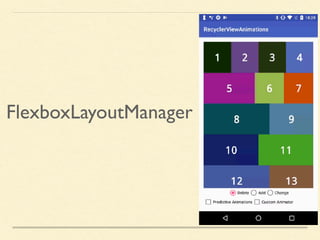
FlexboxLayoutManager
github.com/google/flexbox-layout
Ports Flexbox in CSS to Android
How to create a
custom LayoutManager?
Think before you build it
Much harder than custom view
Gives you much flexibility
on top of RecyclerView features
At the bare minimum,
need to override…
onLayoutChildren
Called on:
- initial layout
- adapter changes
Lay out all relevant child views
If this isViewGroup
(except RecyclerView)
All child views on memory
In RecyclerView +
LayoutManager
Only visible views should
be on memory
onLayoutChildren
1. Find the anchor position
Anchor position
Starting position to put views.
Start with 0 on initial layout.


Remember the first visible view to
restore the state
onLayoutChildren
1. Find the anchor position
2. Calculate how many items

should be in visible portion
onLayoutChildren
1. Find the anchor position
2. Calculate how many items

should be in visible portion
3. Fill toward end
private int fill(RecyclerView.Recycler recycler,
RecyclerView.State state,
LayoutState layoutState) {
int start = layoutState.mAvailable;
int remainingSpace = layoutState.mAvailable;
int consumed = 0;
while (remainingSpace > 0 &&
layoutState.hasMore(state, mFlexLines)) {
FlexLine flexLine =
mFlexLines.get(layoutState.mFlexLinePosition);
layoutState.mPosition = flexLine.mFirstIndex;
consumed += layoutFlexLine(flexLine, layoutState);
remainingSpace -= flexLine.getCrossSize();
}
layoutState.mAvailable -= consumed;
return start - layoutState.mAvailable;
}
Simplified version of fill
private int fill(RecyclerView.Recycler recycler,
RecyclerView.State state,
LayoutState layoutState) {
int start = layoutState.mAvailable;
int remainingSpace = layoutState.mAvailable;
int consumed = 0;
while (remainingSpace > 0 &&
layoutState.hasMore(state, mFlexLines)) {
FlexLine flexLine =
mFlexLines.get(layoutState.mFlexLinePosition);
layoutState.mPosition = flexLine.mFirstIndex;
consumed += layoutFlexLine(flexLine, layoutState);
remainingSpace -= flexLine.getCrossSize();
}
layoutState.mAvailable -= consumed;
return start - layoutState.mAvailable;
}
mAvailable: Amount of pixels need to be filled
mDirection: START | END
private int fill(RecyclerView.Recycler recycler,
RecyclerView.State state,
LayoutState layoutState) {
int start = layoutState.mAvailable;
int remainingSpace = layoutState.mAvailable;
int consumed = 0;
while (remainingSpace > 0 &&
layoutState.hasMore(state, mFlexLines)) {
FlexLine flexLine =
mFlexLines.get(layoutState.mFlexLinePosition);
layoutState.mPosition = flexLine.mFirstIndex;
consumed += layoutFlexLine(flexLine, layoutState);
remainingSpace -= flexLine.getCrossSize();
}
layoutState.mAvailable -= consumed;
return start - layoutState.mAvailable;
}
Put views and
loop until mAvailable < 0
onLayoutChildren
1. Find the anchor position
2. Calculate how many items

should be in visible portion
3. Fill toward end
4. Fill toward start
Why fill toward both directions?
In some cases anchor position may
be at the bottom
1 2
3
4 5
6 7
8 9
10
11
scrollToPosition(50)
42 43
44
45
46 47
48
49 50
Anchor position
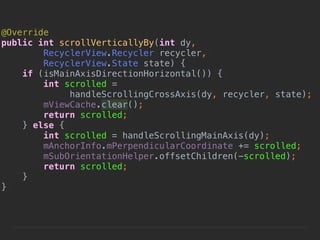
scrollVerticallyBy
Interact with scroll by the user
@Override
public boolean canScrollVertically() {
return true;
}
Could be false depending on attributes.
E.g. Orientation in LinearLayoutManager
@Override
public int scrollVerticallyBy(int dy, 

RecyclerView.Recycler recycler,
RecyclerView.State state) {
if (isMainAxisDirectionHorizontal()) {
int scrolled = 

handleScrollingCrossAxis(dy, recycler, state);
mViewCache.clear();
return scrolled;
} else {
int scrolled = handleScrollingMainAxis(dy);
mAnchorInfo.mPerpendicularCoordinate += scrolled;
mSubOrientationHelper.offsetChildren(-scrolled);
return scrolled;
}
}
@Override
public int scrollVerticallyBy(int dy, 

RecyclerView.Recycler recycler,
RecyclerView.State state) {
if (isMainAxisDirectionHorizontal()) {
int scrolled = 

handleScrollingCrossAxis(dy, recycler, state);
mViewCache.clear();
return scrolled;
} else {
int scrolled = handleScrollingMainAxis(dy);
mAnchorInfo.mPerpendicularCoordinate += scrolled;
mSubOrientationHelper.offsetChildren(-scrolled);
return scrolled;
}
}
Distance to scroll in pixels
@Override
public int scrollVerticallyBy(int dy, 

RecyclerView.Recycler recycler,
RecyclerView.State state) {
if (isMainAxisDirectionHorizontal()) {
int scrolled = 

handleScrollingCrossAxis(dy, recycler, state);
mViewCache.clear();
return scrolled;
} else {
int scrolled = handleScrollingMainAxis(dy);
mAnchorInfo.mPerpendicularCoordinate += scrolled;
mSubOrientationHelper.offsetChildren(-scrolled);
return scrolled;
}
}
The actual distance scrolled
Small dy
Only shift existing views
mRecyclerView.offsetChildrenVertical(dy);
Large dy
Large dy
Recycle views no
longer visible
Large dy
Fill appearing views
What does Recycle mean?
Two types of cache
in RecyclerView
1. Recycle
2. Scrap
Recycler
RecycledViewPool
1. Recycle
Recycler
RecycledViewPool
LayoutManager
recycler.recycleView(View)
1. Recycle
Recycler
RecycledViewPool
LayoutManager
recycler.recycleView(View)
1. Recycle
Considered as dirty
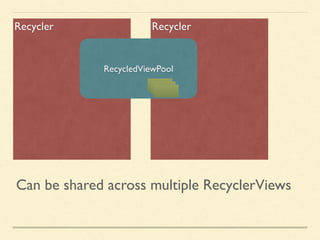
RecyclerRecycler
RecycledViewPool
Can be shared across multiple RecyclerViews
Recycler
Scrap Heap
2. Scrap
Recycler
Scrap Heap
LayoutManager
recycler.scrapView(View)
2. Scrap
Recycler
Scrap Heap
LayoutManager
detachAndScrapAttachedViews
RecyclerView
recycler.scrapView(View)
2. Scrap
How to retrieve aView?
LayoutManager Adapter
Recycler
recycler.getViewForPosition(int)
Case1. Found in scrap
Case2. Found in Recycled Pool
Case3. Not found in cache
LayoutManager Adapter
Recycler
Case1. Found in scrap
LayoutManager Adapter
Recycler
Case2. Found in Recycled Pool
adapter.bindViewHolder
LayoutManager Adapter
Recycler
Case2. Found in Recycled Pool
LayoutManager Adapter
Recycler
Case3. Not found in cache
adapter.createViewHolder
LayoutManager Adapter
Recycler
Case3. Not found in cache
Use scrap if you re-attach in a
same layout pass
Use recycle for views no longer
needed
scrollHorizontallyBy
Same with vertical except for the
direction
Now you implement basic functions.
Is it enough?
Could be useable... but NO.
scrollTo(position)
smoothScrollTo(position)
Fast Scrolling
Item Decorations
Item prefetch
Predictive Animations
There are a lot more…
scrollTo(position)
smoothScrollTo(position)
Fast Scrolling
Item Decorations
Item prefetch
Predictive Animations
There are a lot more…
Predictive Animations
Off OnAdd aView
Off OnDelete aView
@Override
public boolean supportsPredictiveItemAnimations() {
return true;
}
onLayoutChildren
Real Layout
Pre-layout
In pre-layout
Lay out all the views currently visible and
additional views that are appearing (or
disappearing) after the animation
Pre-layout
Remaining
Appearing
Disappearing
To be inserted
at this positionVisible area
Real-layout
Remaining
Appearing
Disappearing
Visible area
Pre-layout
Remaining
Appearing
Disappearing
To be deletedVisible area
Real layout
Remaining
Appearing
Disappearing
Visible area
Now you know the basics of
building a custom LayoutManager
Resources
Source of default LayoutManagers


github.com/google/flexbox-layout


wiresareobsolete.com/2014/09/building-a-recyclerview-
layoutmanager-part-1/

Thank you!
Takeshi Hagikura
@thagikura

Deep Dive Into LayoutManager for RecyclerView