










James
Montemagno
Developer Evangelist, Xamarin
james@xamarin.com http://motzcod.es @JamesMontemagno
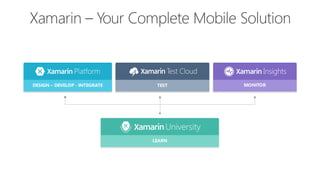
DESIGN – DEVELOP -‐ INTEGRATE TEST MONITOR
LEARN
Native User Interfaces Native API Access Native Performance
? ? ?
-John Gruber
http://daringfireball.net/2015/05/facebook_instant_articles
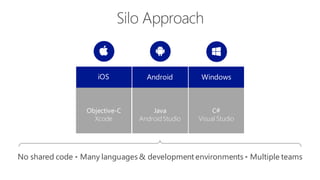
iOS WindowsAndroid
Objective-C
Xcode
C#
Visual Studio
Java
AndroidStudio
No shared code • Many languages & development environments • Multiple teams
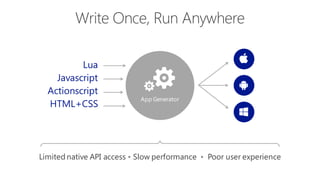
App Generator
Lua
Javascript
Actionscript
HTML+CSS
Limited native API access • Slow performance • Poor user experience
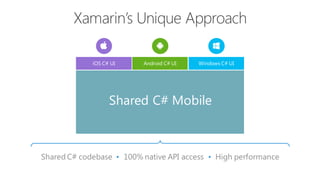
Shared C# codebase • 100% native API access • High performance
iOS C# UI Windows C# UIAndroid C# UI
Shared C# Mobile
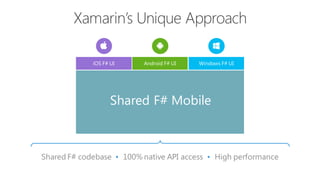
Shared F# codebase • 100% native API access • High performance
iOS F# UI Windows F# UIAndroid F# UI
Shared F# Mobile
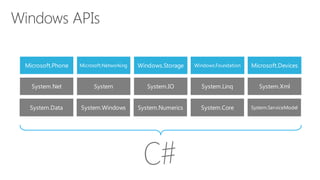
Microsoft.Phone Microsoft.Networking Windows.Storage Windows.Foundation Microsoft.Devices
System.Data System.Windows System.Numerics System.Core System.ServiceModel
System.Net System System.IO System.Linq System.Xml
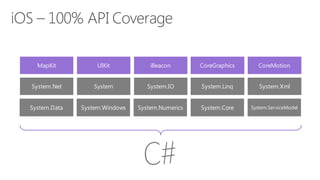
MapKit UIKit iBeacon CoreGraphics CoreMotion
System.Data System.Windows System.Numerics System.Core System.ServiceModel
System.Net System System.IO System.Linq System.Xml
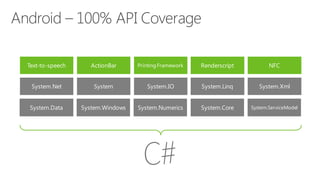
Text-to-speech ActionBar Printing Framework Renderscript NFC
System.Data System.Windows System.Numerics System.Core System.ServiceModel
System.Net System System.IO System.Linq System.Xml
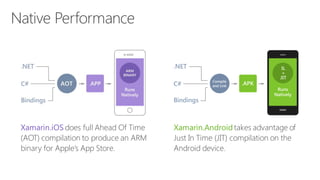
Xamarin.iOS does full Ahead Of Time
(AOT) compilation to produce an ARM
binary for Apple’s App Store.
Xamarin.Android takes advantage of
Just In Time (JIT) compilation on the
Android device.
.NET
C#
Compile
and Link
.APK
Bindings
Runs
Natively
IL
+
JIT
✓Always Up-to-Date
•
•
•
•
•
•
•
•
•
•
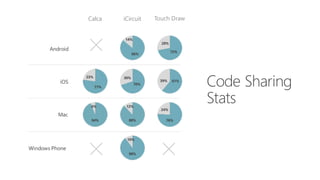
Mac
iOS
Android
Windows Phone
Calca iCircuit Touch Draw
86%
14%
72%
28%
77%
23%
70%
30%
61%39%
94%
6%
88%
12%
76%
24%
90%
10%
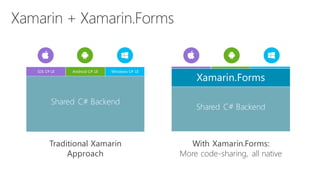
Traditional Xamarin
Approach
With Xamarin.Forms:
More code-sharing, all native
iOS C# UI Windows C# UIAndroid C# UI
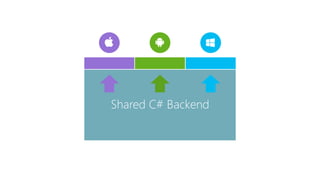
Shared C# Backend
Xamarin.Forms
Shared C# Backend
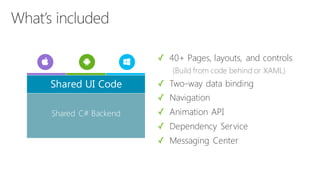
✓ 40+ Pages, layouts, and controls
(Build from code behind or XAML)
✓ Two-way data binding
✓ Navigation
✓ Animation API
✓ Dependency Service
✓ Messaging Center
Shared C# Backend
Shared UI Code
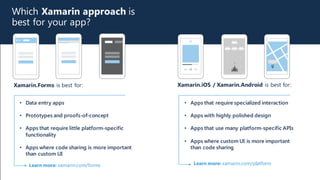
Which Xamarin approach is
best for your app?
Xamarin.Forms is best for: Xamarin.iOS / Xamarin.Android is best for:
• Data entry apps
• Prototypes and proofs-of-concept
• Apps that require little platform-specific
functionality
• Apps where code sharing is more important
than custom UI
Learn more: xamarin.com/forms Learn more: xamarin.com/platform
• Apps that require specialized interaction
• Apps with highly polished design
• Apps that use many platform-specific APIs
• Apps where custom UI is more important
than code sharing
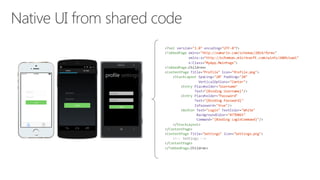
<?xml version="1.0"  encoding="UTF-­‐8"?>
<TabbedPage xmlns="http://xamarin.com/schemas/2014/forms"
xmlns:x="http://schemas.microsoft.com/winfx/2009/xaml"
x:Class="MyApp.MainPage">
<TabbedPage.Children>
<ContentPage Title="Profile"  Icon="Profile.png">
<StackLayout Spacing="20" Padding="20"
VerticalOptions="Center">
<Entry Placeholder="Username"
Text="{Binding  Username}"/>
<Entry Placeholder="Password"
Text="{Binding  Password}"
IsPassword="true"/>
<Button Text="Login"  TextColor="White"
BackgroundColor="#77D065"
Command="{Binding  LoginCommand}"/>
</StackLayout>
</ContentPage>
<ContentPage Title="Settings"  Icon="Settings.png">
<!-­‐-­‐ Settings -­‐-­‐>
</ContentPage>
</TabbedPage.Children>
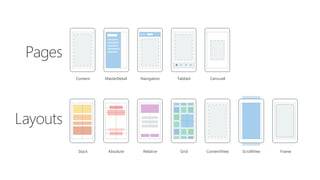
Layouts
Pages
Stack Absolute Relative Grid ContentView ScrollView Frame
Content MasterDetail Navigation Tabbed Carousel
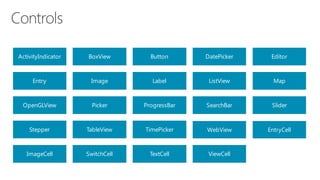
ActivityIndicator BoxView Button DatePicker Editor
Entry Image Label ListView Map
OpenGLView Picker ProgressBar SearchBar Slider
Stepper TableView TimePicker WebView EntryCell
ImageCell SwitchCell TextCell ViewCell
Xamarin.Forms Ecosystem
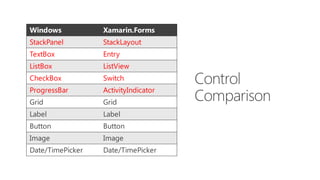
Windows Xamarin.Forms
StackPanel StackLayout
TextBox Entry
ListBox ListView
CheckBox Switch
ProgressBar ActivityIndicator
Grid Grid
Label Label
Button Button
Image Image
Date/TimePicker Date/TimePicker
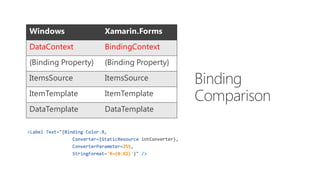
Windows Xamarin.Forms
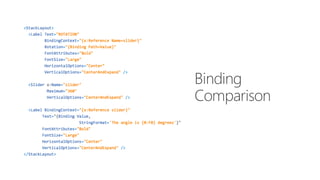
DataContext BindingContext
{Binding Property} {Binding Property}
ItemsSource ItemsSource
ItemTemplate ItemTemplate
DataTemplate DataTemplate
Shared C# Backend
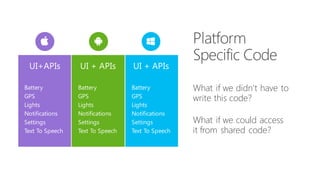
What if we didn’t have to
write this code?
What if we could access
it from shared code?
UI+APIs UI + APIsUI + APIs
Battery
GPS
Lights
Notifications
Settings
Text To Speech
Battery
GPS
Lights
Notifications
Settings
Text To Speech
Battery
GPS
Lights
Notifications
Settings
Text To Speech
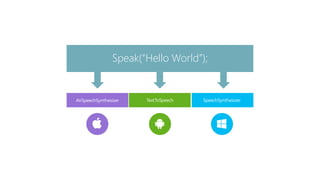
TextToSpeech
Speak(“Hello World”);
AVSpeechSynthesizer SpeechSynthesizer
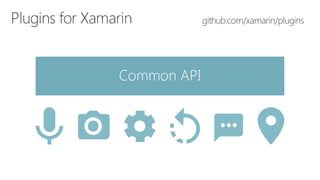
Common API
Get Started Today
xamarin.com
xamarin.com/university
Unrivaled Mobile
Development
Training
Live unlimited mobile development training from
mobile experts, in your time-zone, on your
schedule, and as often as you'd like.
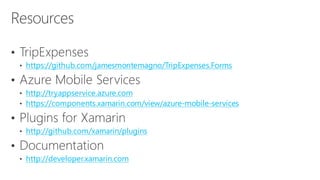
https://github.com/jamesmontemagno/TripExpenses.Forms
http://tryappservice.azure.com
https://components.xamarin.com/view/azure-mobile-services
http://github.com/xamarin/plugins
http://developer.xamarin.com
Thank you.
James
Montemagno
Developer Evangelist, Xamarin
james@xamarin.com http://motzcod.es @JamesMontemagno
Questions?

Deep Dive in Xamarin.Forms