Xamarin.Forms
Hi!
Marcel de Vries
• @marcelv
• marcel.devries@infosupport.com
Marco Kuiper
• @marcofolio
• marco.kuiper@infosupport.com
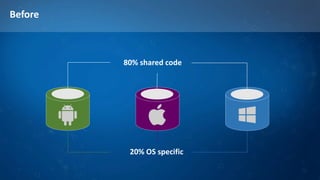
Before
80% shared code
20% OS specific
Meet Xamarin.Forms
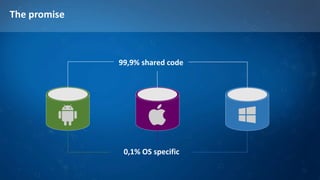
The promise
99,9% shared code
0,1% OS specific
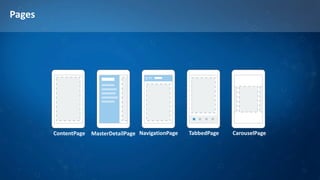
Pages
ContentPage MasterDetailPage NavigationPage TabbedPage CarouselPage
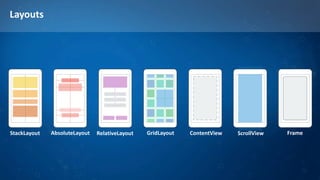
Layouts
AbsoluteLayoutStackLayout RelativeLayout GridLayout ContentView ScrollView Frame
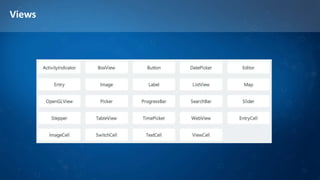
Views
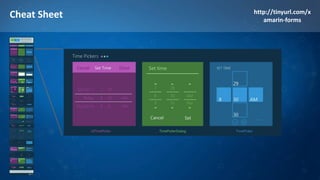
Cheat Sheet http://tinyurl.com/x
amarin-forms
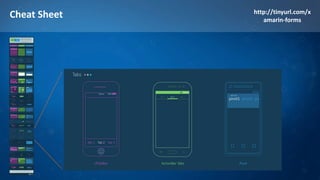
Cheat Sheet http://tinyurl.com/x
amarin-forms
Cheat Sheet http://tinyurl.com/x
amarin-forms
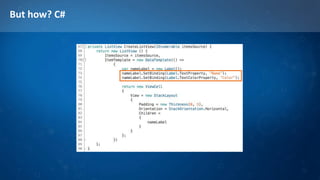
But how? C#
But how? XAML
ViewModel
Data binding
Case Study
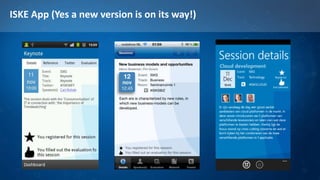
ISKE App (Yes a new version is on its way!)
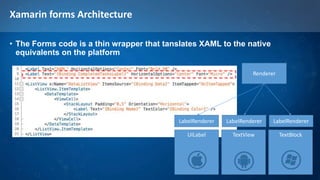
Xamarin forms Architecture
• The Forms code is a thin wrapper that tanslates XAML to the native
equivalents on the platform
Renderer
UILabel TextView TextBlock
LabelRendererLabelRendererLabelRenderer
Xamarin forms Architecture
• The Forms code is a thin wrapper that tanslates XAML to the native
equivalents on the platform
Renderer
UITableView ListView LongListSelector
ListViewRendererListViewRenderer ListViewRenderer
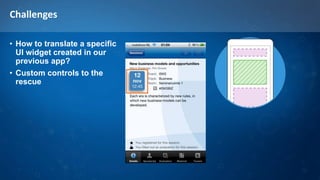
Challenges
• How to translate a specific
UI widget created in our
previous app?
• Custom controls to the
rescue
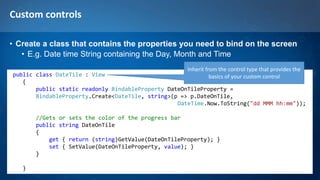
Custom controls
• Create a class that contains the properties you need to bind on the screen
• E.g. Date time String containing the Day, Month and Time
public class DateTile : View
{
public static readonly BindableProperty DateOnTileProperty =
BindableProperty.Create<DateTile, string>(p => p.DateOnTile,
DateTime.Now.ToString("dd MMM hh:mm"));
//Gets or sets the color of the progress bar
public string DateOnTile
{
get { return (string)GetValue(DateOnTileProperty); }
set { SetValue(DateOnTileProperty, value); }
}
}
Inherit from the control type that provides the
basics of your custom control
Custom controls
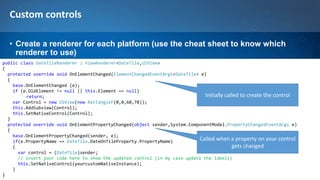
• Create a renderer for each platform (use the cheat sheet to know which
renderer to use)
public class DateTileRenderer : ViewRenderer<DateTile,UIView>
{
protected override void OnElementChanged(ElementChangedEventArgs<DateTile> e)
{
base.OnElementChanged (e);
if (e.OldElement != null || this.Element == null)
return;
var Control = new UIView(new RectangleF(0,0,60,78));
this.AddSubview(Control);
this.SetNativeControl(Control);
}
protected override void OnElementPropertyChanged(object sender,System.ComponentModel.PropertyChangedEventArgs e)
{
base.OnElementPropertyChanged(sender, e);
if(e.PropertyName == DateTile.DateOnTileProperty.PropertyName)
{
var control = (DateTile)sender;
// insert your code here to show the updated control (in my case update the labels)
this.SetNativeControl(yourcustomNativeInstance);
}
}
Initially called to create the control
Called when a property on your control
gets changed
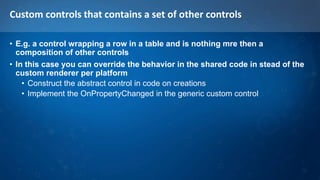
Custom controls that contains a set of other controls
• E.g. a control wrapping a row in a table and is nothing mre then a
composition of other controls
• In this case you can override the behavior in the shared code in stead of the
custom renderer per platform
• Construct the abstract control in code on creations
• Implement the OnPropertyChanged in the generic custom control
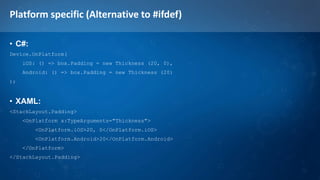
Platform specific (Alternative to #ifdef)
• C#:
Device.OnPlatform(
iOS: () => box.Padding = new Thickness (20, 0),
Android: () => box.Padding = new Thickness (20)
);
• XAML:
<StackLayout.Padding>
<OnPlatform x:TypeArguments="Thickness">
<OnPlatform.iOS>20, 0</OnPlatform.iOS>
<OnPlatform.Android>20</OnPlatform.Android>
</OnPlatform>
</StackLayout.Padding>
More than forms
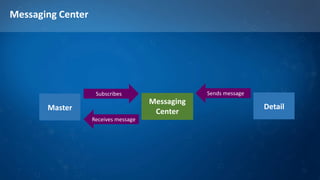
Messaging Center
Messaging
CenterMaster
Subscribes
Receives message
Detail
Sends message
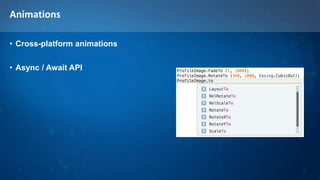
Animations
• Cross-platform animations
• Async / Await API
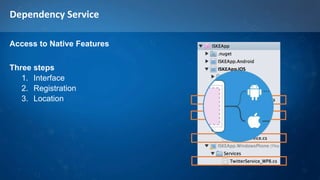
Dependency Service
Access to Native Features
Three steps
1. Interface
2. Registration
3. Location
Conclusion
Visual Studio vs Xamarin Studio
• Windows Phone support only in visual studio
and only Windows 8 Silverlight (no universal apps)
• Xamarin studio will not load Windows Phone apps
• Sometimes visual studio injects 2013 version in SLN
header -> Will render solution unusable in Xamarin Studio
• Xamarin studio now also supports NuGet
Arguably better implemented then in VS
• On Pull from GIT, Xamarin studio does not update the
solution, you need to manually Unload and reload
• Visual studio linker sometimes operated more aggressive
resulting in runtime error on missing libraries
• Image suffers from this problem at the moment
• Assembly redirects do not solve the issue, neither do the
auto generate redirects
• Shared Libraries are not implemented consistent cross
Ide’s
• Xamarin studio allows more-> results in crashed of VS
XAML
• Is not a 1:1 translation, since you need to work with new concepts
• StackPanel -> StackLayout
• TextBlock -> Label
• Etc.
• No UI editor
• XAML intellisense is non existent
• I first code in C# with Intellisense, then I translate it to Xaml
PCL vs Shared
• Shared projects are great but:
• They are clearly a 1.0 version
• No feature parity between VS and Xamarin studio
• Lot of stuff is allowed in Xamarin studio, that will break VS
• After a couple of tries, I moved to PCL
• Way more mature at the moment
• Did not hit any nasty issues yet
• When to use what (When it works eventualy)?
• In theory I would propose: Use Share Libs for the stuff you want to share
between platforms but you don’t want to reuse cross projects
• Use PCL when you create stuff that you would share cross projects
• Better, also bundle it as NuGet package in your build
Silver bullet ?
• At first we where very skeptical about this solution
• We always believed the Native UI on each platform is a key thing to good
apps
• Xamarin seems to have found a way to get best of both worlds
• Share cross platforms, but translate to native device equivalents
• This gives us both the native feel and the best performance
• The 99% looks nice, but:
• Remember the experience is counts not the % of code sharing you got!
• You will need (at least at the moment) custom renderers to fix UI things on
different platforms (e.g. set transparent color so you can have an image
background)
Thank you!

Xamarin.Forms

  • 1.
  • 2.
    Hi! Marcel de Vries •@marcelv • marcel.devries@infosupport.com Marco Kuiper • @marcofolio • marco.kuiper@infosupport.com
  • 3.
  • 4.
  • 5.
    The promise 99,9% sharedcode 0,1% OS specific
  • 6.
  • 7.
  • 8.
  • 9.
  • 10.
  • 11.
  • 12.
  • 13.
  • 15.
  • 16.
    ISKE App (Yesa new version is on its way!)
  • 17.
    Xamarin forms Architecture •The Forms code is a thin wrapper that tanslates XAML to the native equivalents on the platform Renderer UILabel TextView TextBlock LabelRendererLabelRendererLabelRenderer
  • 18.
    Xamarin forms Architecture •The Forms code is a thin wrapper that tanslates XAML to the native equivalents on the platform Renderer UITableView ListView LongListSelector ListViewRendererListViewRenderer ListViewRenderer
  • 19.
    Challenges • How totranslate a specific UI widget created in our previous app? • Custom controls to the rescue
  • 20.
    Custom controls • Createa class that contains the properties you need to bind on the screen • E.g. Date time String containing the Day, Month and Time public class DateTile : View { public static readonly BindableProperty DateOnTileProperty = BindableProperty.Create<DateTile, string>(p => p.DateOnTile, DateTime.Now.ToString("dd MMM hh:mm")); //Gets or sets the color of the progress bar public string DateOnTile { get { return (string)GetValue(DateOnTileProperty); } set { SetValue(DateOnTileProperty, value); } } } Inherit from the control type that provides the basics of your custom control
  • 21.
    Custom controls • Createa renderer for each platform (use the cheat sheet to know which renderer to use) public class DateTileRenderer : ViewRenderer<DateTile,UIView> { protected override void OnElementChanged(ElementChangedEventArgs<DateTile> e) { base.OnElementChanged (e); if (e.OldElement != null || this.Element == null) return; var Control = new UIView(new RectangleF(0,0,60,78)); this.AddSubview(Control); this.SetNativeControl(Control); } protected override void OnElementPropertyChanged(object sender,System.ComponentModel.PropertyChangedEventArgs e) { base.OnElementPropertyChanged(sender, e); if(e.PropertyName == DateTile.DateOnTileProperty.PropertyName) { var control = (DateTile)sender; // insert your code here to show the updated control (in my case update the labels) this.SetNativeControl(yourcustomNativeInstance); } } Initially called to create the control Called when a property on your control gets changed
  • 22.
    Custom controls thatcontains a set of other controls • E.g. a control wrapping a row in a table and is nothing mre then a composition of other controls • In this case you can override the behavior in the shared code in stead of the custom renderer per platform • Construct the abstract control in code on creations • Implement the OnPropertyChanged in the generic custom control
  • 23.
    Platform specific (Alternativeto #ifdef) • C#: Device.OnPlatform( iOS: () => box.Padding = new Thickness (20, 0), Android: () => box.Padding = new Thickness (20) ); • XAML: <StackLayout.Padding> <OnPlatform x:TypeArguments="Thickness"> <OnPlatform.iOS>20, 0</OnPlatform.iOS> <OnPlatform.Android>20</OnPlatform.Android> </OnPlatform> </StackLayout.Padding>
  • 25.
  • 26.
  • 27.
  • 28.
    Dependency Service Access toNative Features Three steps 1. Interface 2. Registration 3. Location
  • 30.
  • 31.
    Visual Studio vsXamarin Studio • Windows Phone support only in visual studio and only Windows 8 Silverlight (no universal apps) • Xamarin studio will not load Windows Phone apps • Sometimes visual studio injects 2013 version in SLN header -> Will render solution unusable in Xamarin Studio • Xamarin studio now also supports NuGet Arguably better implemented then in VS • On Pull from GIT, Xamarin studio does not update the solution, you need to manually Unload and reload • Visual studio linker sometimes operated more aggressive resulting in runtime error on missing libraries • Image suffers from this problem at the moment • Assembly redirects do not solve the issue, neither do the auto generate redirects • Shared Libraries are not implemented consistent cross Ide’s • Xamarin studio allows more-> results in crashed of VS
  • 32.
    XAML • Is nota 1:1 translation, since you need to work with new concepts • StackPanel -> StackLayout • TextBlock -> Label • Etc. • No UI editor • XAML intellisense is non existent • I first code in C# with Intellisense, then I translate it to Xaml
  • 33.
    PCL vs Shared •Shared projects are great but: • They are clearly a 1.0 version • No feature parity between VS and Xamarin studio • Lot of stuff is allowed in Xamarin studio, that will break VS • After a couple of tries, I moved to PCL • Way more mature at the moment • Did not hit any nasty issues yet • When to use what (When it works eventualy)? • In theory I would propose: Use Share Libs for the stuff you want to share between platforms but you don’t want to reuse cross projects • Use PCL when you create stuff that you would share cross projects • Better, also bundle it as NuGet package in your build
  • 34.
    Silver bullet ? •At first we where very skeptical about this solution • We always believed the Native UI on each platform is a key thing to good apps • Xamarin seems to have found a way to get best of both worlds • Share cross platforms, but translate to native device equivalents • This gives us both the native feel and the best performance • The 99% looks nice, but: • Remember the experience is counts not the % of code sharing you got! • You will need (at least at the moment) custom renderers to fix UI things on different platforms (e.g. set transparent color so you can have an image background)
  • 35.