



Sponsored & Brought to you by
Cross Platform Mobile Applications
in C# with
Sivanraj M
Senior Software Engineer, BizTalk360
https://twitter.com/sivanrajm
https://in.linkedin.com/in/sivanrajm
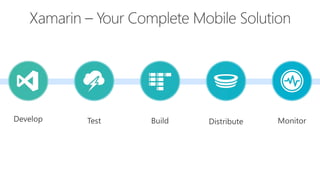
Xamarin – Your Complete Mobile Solution
Develop
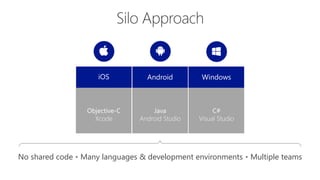
Silo Approach
iOS WindowsAndroid
Objective-C
Xcode
C#
Visual Studio
Java
Android Studio
No shared code • Many languages & development environments • Multiple teams
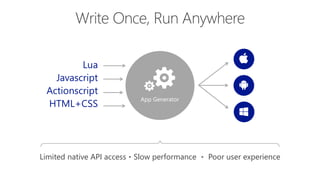
Write Once, Run Anywhere
App Generator
Lua
Javascript
Actionscript
HTML+CSS
Limited native API access • Slow performance • Poor user experience
Xamarin’s Unique Approach
Shared C# codebase • 100% native API access • High performance
iOS C# UI Windows C# UIAndroid C# UI
Shared C# Mobile
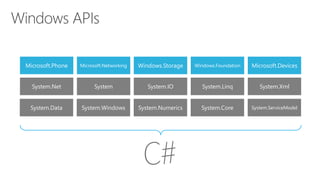
Windows APIs
Microsoft.Phone Microsoft.Networking Windows.Storage Windows.Foundation Microsoft.Devices
System.Data System.Windows System.Numerics System.Core System.ServiceModel
System.Net System System.IO System.Linq System.Xml
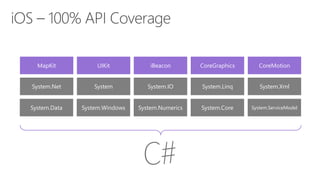
iOS – 100% API Coverage
MapKit UIKit iBeacon CoreGraphics CoreMotion
System.Data System.Windows System.Numerics System.Core System.ServiceModel
System.Net System System.IO System.Linq System.Xml
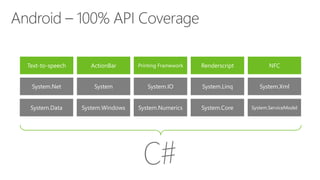
Android – 100% API Coverage
Text-to-speech ActionBar Printing Framework Renderscript NFC
System.Data System.Windows System.Numerics System.Core System.ServiceModel
System.Net System System.IO System.Linq System.Xml
TextToSpeech
Speak(“Hello World”);
AVSpeechSynthesizer SpeechSynthesizer
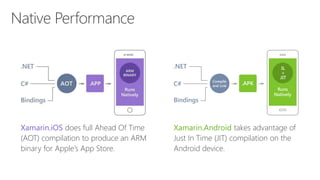
Native Performance
Xamarin.iOS does full Ahead Of Time
(AOT) compilation to produce an ARM
binary for Apple’s App Store.
Xamarin.Android takes advantage of Just In
Time (JIT) compilation on the Android
device.
Extensibility
Embed Custom Views
Anywhere
Not only are Xamarin.Forms
pages mixable with custom
screens, you can embed
custom views built directly
against Xamarin.iOS and
Xamarin.Android into
Xamarin.Forms pages.
Call Platform APIs via Shared
Services
Need platform-specific functionality
within a Xamarin.Forms page, such
as querying the accelerometer?
We’ve included services that quickly
and easily abstract platform-specific
API calls to keep you writing as much
shared code as possible.
Easy migration to the Xamarin
Platform
When your native platform
integration requirements outgrow
Xamarin.Forms, your shared code
is easily migrated to Xamarin.iOS
and Xamarin.Android using the full
Xamarin platform.
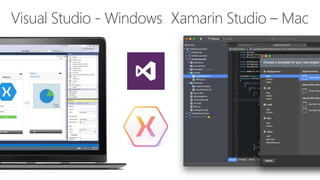
Visual Studio - Windows Xamarin Studio – Mac
Visual Studio Integration
Let’s take a look
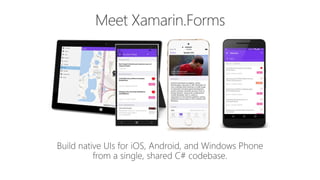
Meet Xamarin.Forms
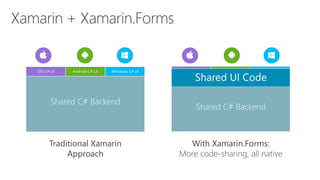
Xamarin + Xamarin.Forms
Traditional Xamarin
Approach
With Xamarin.Forms:
More code-sharing, all native
iOS C# UI Windows C# UIAndroid C# UI
Shared C# Backend
Shared UI Code
Shared C# Backend
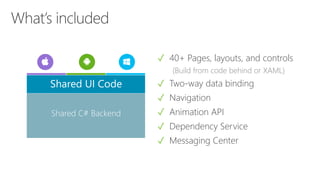
What’s included
✓ 40+ Pages, layouts, and controls
(Build from code behind or XAML)
✓ Two-way data binding
✓ Navigation
✓ Animation API
✓ Dependency Service
✓ Messaging Center
Shared C# Backend
Shared UI Code
ActivityIndicator BoxView Button DatePicker Editor
Entry Image Label ListView Map
OpenGLView Picker ProgressBar SearchBar Slider
Stepper TableView TimePicker WebView EntryCell
ImageCell SwitchCell TextCell ViewCell
Controls
Windows Xamarin.Forms
StackPanel StackLayout
TextBox Entry
ListBox ListView
CheckBox Switch
ProgressBar ActivityIndicator
Grid Grid
Label Label
Button Button
Image Image
Date/TimePicker Date/TimePicker
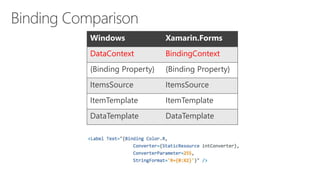
Control Comparison
Windows Xamarin.Forms
DataContext BindingContext
{Binding Property} {Binding Property}
ItemsSource ItemsSource
ItemTemplate ItemTemplate
DataTemplate DataTemplate
Binding Comparison
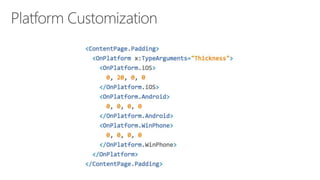
Platform Customization
<TabbedPage xmlns="http://xamarin.com/schemas/2014/forms"
xmlns:x="http://schemas.microsoft.com/winfx/2009/xaml"
x:Class="MyApp.MainPage">
<TabbedPage.Children>
<ContentPage Title="Profile" Icon="Profile.png">
<StackLayout Spacing="20" Padding="20“ VerticalOptions="Center">
<Entry Placeholder="Username" Text="{Binding Username}"/>
<Entry Placeholder="Password"
Text="{Binding Password}"
IsPassword="true"/>
<Button Text="Login" TextColor="White"
BackgroundColor="#77D065"
Command="{Binding LoginCommand}"/>
</StackLayout>
</ContentPage>
<ContentPage Title="Settings" Icon="Settings.png">
<!-- Settings -->
</ContentPage>
</TabbedPage.Children>
Native UI from shared code
Let’s Take a Look
Test
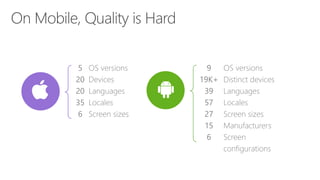
On Mobile, Quality is Hard
5
20
20
35
6
OS
versions
Devices
Languages
Locales
Screen
sizes
9
19K
+
39
57
27
15
6
OS versions
Distinct devices
Languages
Locales
Screen sizes
Manufacturers
Screen
configurations
Tap Scroll Swipe Pinch Multi
Finger
Text Entry Rotation GPS
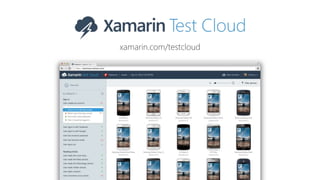
xamarin.com/testcloud
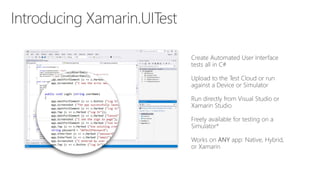
Introducing Xamarin.UITest
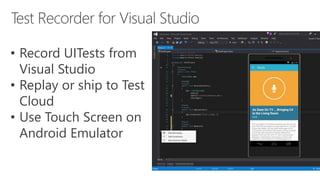
Test Recorder for Visual Studio
• Record UITests from Visual
Studio
• Replay or ship to Test Cloud
• Use Touch Screen on Android
Emulator
Test Recorder for Mac
• Record UITests for iOS and Android apps
• Replay or ship to Test Cloud
Device Remoting
Tests are performed one at the
time, which consumes more time
and delays bugs detection
Automated Testing
Test on thousands of devices simultaneously,
saving lots of time and detecting
bugs more quickly
Approaches to Mobile Testing
Build
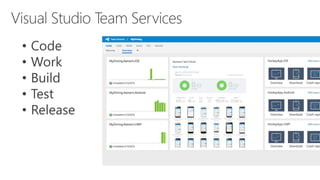
Visual Studio Team Services
• Code
• Work
• Build
• Test
• Release
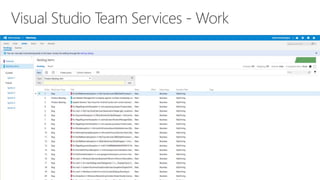
Visual Studio Team Services - Work
Visual Studio Team Services - Build
Visual Studio Team Services - Test
Visual Studio Team Services - Release
Distribute & Monitor
Xamarin Insights Dashboard
Get Started
Today
xamarin.com
Free 30 Day Trial - xamarin.com/university
Unrivaled Mobile
Development
Training
Live unlimited mobile development training
from mobile experts, in your time-zone, on your
schedule, and as often as you'd like.
Code Samples - https://developer.xamarin.com/samples-all
Get up to speed
with Xamarin with
our Resources
Learn how to build iOS, Android, and Windows
Mobile apps with our web resources like
webinars, code samples and videos.
Webinars - https://www.xamarin.com/resources/webinars
Videos - https://developer.xamarin.com/videos
Thank You
Follow us @
https://twitter.com/biztalk360
https://linkedin.com/company/biztalk360
https://facebook.com/biztalk360
Twitter : #techmeet360
Website: http://www.biztalk360.com/techmeet360

Introduction to Cross Platform Mobile Apps (Xamarin)

Editor's Notes

  • #4 Xamarin is your complete mobile solution. Xamarin Platform is usually what you hear about which is building native iOS, Android, Mac, and Windows Apps all in C# However Xamarin offers a wide range of products for developers to go mobile including Test Cloud, Hockey App, and a way to learn all of mobile with University.
  • #7 UI build natively per platform, leveraging C# C# + XAML C# + XML C# + XIB One shared app logic code base, iOS, Android, Mac, Windows Phone, Windows Store, Windows
  • #8 If you have ever developed for a Windows Platform before these .NET namespaces might look familiar. However, if we go to a new platform such as Windows Phone or Store we have a new SDK to use and a new set of namespaces.
  • #9 You can think of iOS and Android development the same with Xamarin. You can see we have all of our .NET namespaces and libraries, but Xamarin give us 100% api coverage of each iOS API in it’s SDK that we access view C#.
  • #10 The same is true for Android as well.
  • #11 For instance text to speech, what if we could just say “Speak” and it would speak text with the underlying API.
  • #14 Single Solution for iOS, Android, and Windows Leverage Entire Microsoft Ecosystem: ReSharper Team Foundation Server Azure ASP.NET Favorite Code Coverage and Profiling Tools Starter Compatible Visual Studio 2012, 2013, and 2015 including Community Edition
  • #15 Xamarin Studio on Mac offers: Android, iOS and Mac development World Class IDE with great features: Code Analysis Upload to Test Flight Git & Subversion Integration Code Completion Code Navigation Easy transition from Visual Studio The same Solution & Projects open in BOTH Xamarin Studio and Visual Studio!
  • #17 Xamarin Forms is a new set of APIs allowing you to quickly and easily write shared User Interface code that is still rendered natively on each platform, while still providing direct access to the underlying SDKs if you need it.
  • #18 We see here the Xamarin approach we talked about earlier This enables you to be highly productive, share code, but build out UI on each platform and access platform APIs With Xamarin.Forms you now have a nice Shared UI Code layer, but still access to platform APIs You can start from native, pick a few screens, or start with forms, and replace with native later
  • #19 Xamarin.Forms is much more that just a framework and includes everything you need to get up and running to build out full native applications. If you are used to MVVM type of development you will feel right at home.
  • #20 You have more than 40 controls, layouts, and pages to mix and match from. These are all of the controls you have out of the box, you can of course create your own. What is unique is you get the native control and have access to it. Consider an Entry Field On iOS it is mapped to UITextField Android it is EditText Windows Phone it is a TextBox
  • #24 Here is a quick example of a login page: Notice the data binding on the Entries Text fields. Additionally, there is a LoginCommand. Each has a native user interface
  • #26 Xamarin is your complete mobile solution. Xamarin Platform is usually what you hear about which is building native iOS, Android, Mac, and Windows Apps all in C# However Xamarin offers a wide range of products for developers to go mobile including Test Cloud, Hockey App, and a way to learn all of mobile with University.
  • #27 First let’s take a look at the shear number of configurations there are between iOS and Android. As iOS progresses this number is only set to increase, and on Android it is already a HUGE number of configurations to even think about testing. iOS: 7, 7.1, 8, 8.1, 8.2
  • #28 With a simple command you can simulate all of your users interactions to build out a great test suite that can be run over and over again.
  • #29 Take test scripts and test again thousands of physical devices! All Xamarin subscribers get free device time! Check store.xamarin.com for details.
  • #30 This is where Xamarin.UITest comes in to help with this shift. Xamarin.UITest is a framework that ties in directly to the Nunit testing framework to write the UI tests. You can even run them directly against a simulator for free to do regression tests on your applications. Freely available for testing on a Simulator*
  • #33 Approaches to Mobile Testing
  • #34 Xamarin is your complete mobile solution. Xamarin Platform is usually what you hear about which is building native iOS, Android, Mac, and Windows Apps all in C# However Xamarin offers a wide range of products for developers to go mobile including Test Cloud, Hockey App, and a way to learn all of mobile with University.
  • #40 Xamarin is your complete mobile solution. Xamarin Platform is usually what you hear about which is building native iOS, Android, Mac, and Windows Apps all in C# However Xamarin offers a wide range of products for developers to go mobile including Test Cloud, Hockey App, and a way to learn all of mobile with University.
  • #41 Anything Else! App Insights Google Analytics Flurry
  • #43 Get started today with free 30 day trial of Xamarin at xamarin.com