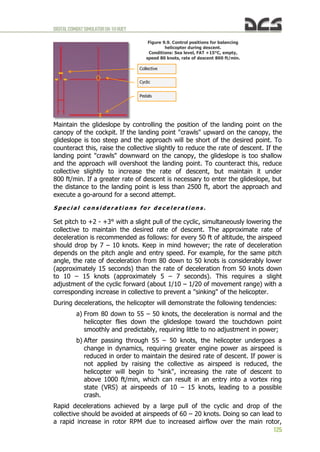
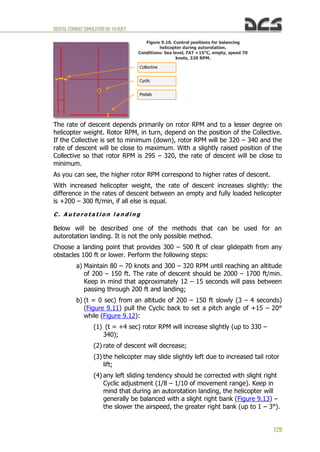
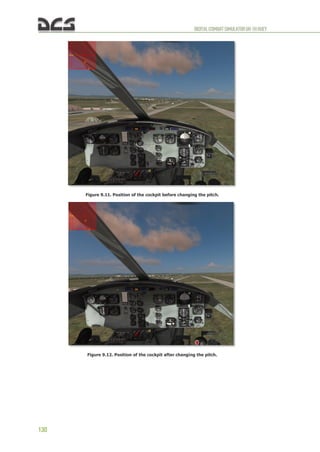
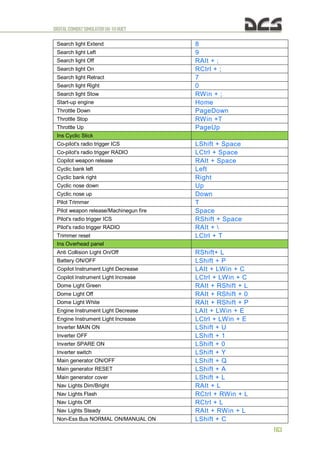
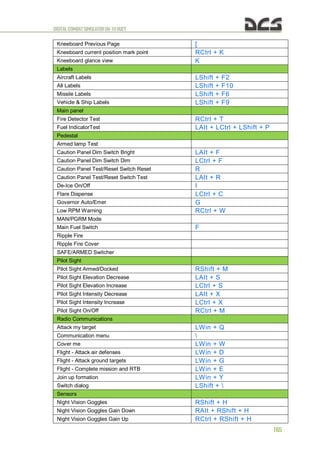
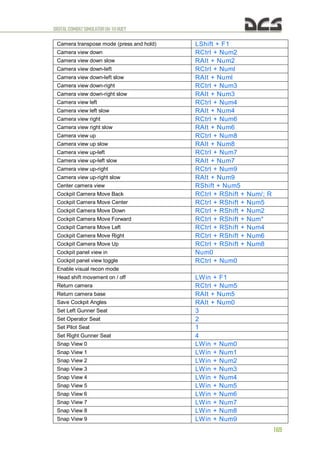
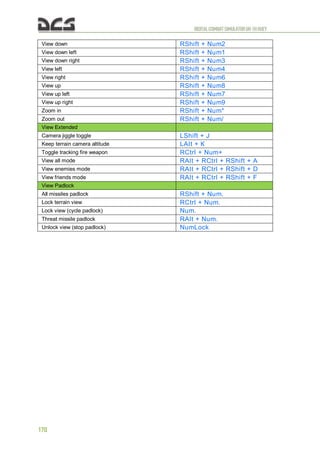
DIGITALCOMBATSIMULATORUH-1HHUEY
1
DIGITALCOMBATSIMULATORUH-1HHUEY
0
DIGITALCOMBATSIMULATORUH-1HHUEY
1
TABLEOF CONTENTS
1. HELICOPTER HISTORY..........................................................................................7
2. GENERAL DESIGN AND MISSION OVERVIEW.......................................................9
2.1. GENERAL DESCRIPTION AND MISSION OVERVIEW............................................................9
2.2. PRIMARY SPECIFICATIONS UH-1H ........................................................................... 10
2.2.1. Specifications table.................................................................................. 10
2.3. GENERAL ASSEMBLY DIAGRAM................................................................................ 12
2.4. ENGINE AND RELATED SYSTEMS.............................................................................. 14
2.4.1. Description of the engine ......................................................................... 14
2.4.2. Engine Fuel Control System...................................................................... 16
A. Engine Mounted Components....................................................................................... 16
B. Power Controls (Throttles)........................................................................................... 18
C. Governor switch......................................................................................................... 18
2.4.3. Engine Oil Supply System......................................................................... 19
2.4.4. Governor RPM Switch .............................................................................. 19
2.4.5. Droop Compensator................................................................................. 19
2.4.6. Engine Instrument and Indicators ............................................................. 19
2.5. POWER TRAIN SYSTEM......................................................................................... 21
A. Transmission............................................................................................................. 21
B. Gearboxes................................................................................................................. 23
C. Driveshafts................................................................................................................ 23
D. Indicators and Caution Lights ...................................................................................... 23
2.6. COCKPIT LAYOUT................................................................................................ 24
NOTES ...................................................................................................................... 25
3. HELICOPTER AERODYNAMICS............................................................................27
3.1.1. The Forces That Act On a Helicopter ......................................................... 27
3.1.2. Controls ................................................................................................. 27
3.1.3. Velocity.................................................................................................. 28
3.1.4. Torque................................................................................................... 28
3.1.5. Anti-torque Rotor .................................................................................... 28
3.1.6. Gyroscopic Precession.............................................................................. 29
3.1.7. Dissymmetry of Lift ................................................................................. 29
3.1.8. Retreating Blade Stall .............................................................................. 30
3.1.9. Settling With Power (Vortex Ring State)..................................................... 31
3.1.10. Hovering ................................................................................................ 33
3.1.11. Ground Effect ......................................................................................... 33
3.1.12. Translational Lift ..................................................................................... 34
3.1.13. Autorotation ........................................................................................... 35
3.1.14. Summary ............................................................................................... 36
4. FLIGHT CONTROL SYSTEM..................................................................................39
4.1. CYCLIC CONTROL SYSTEM ..................................................................................... 39
4.2. COLLECTIVE CONTROL SYSTEM ............................................................................... 41
4.3. TAIL ROTOR CONTROL SYSTEM............................................................................... 42
4.4. FORCE TRIM SYSTEM ........................................................................................... 42
5. COCKPIT INSTRUMENTS AND CONTROLS..........................................................45
5.1. INSTRUMENT PANEL ............................................................................................ 46
5.1.1. Master Caution System ............................................................................ 47
5.1.2. RPM High-Low Limit Warning System (4, Figure 5.1)................................... 48
Bell, UH-1H Huey, emblems, logos, and body designs are trademarks of Textron
Innovations Inc. and are used under license by Sky Jet International LLC ©
DIGITALCOMBATSIMULATORUH-1HHUEY
2
5.1.3. Fire Detector Warning System (5, 6, Figure 5.1). ........................................ 49
5.1.4. Airspeed indicator (8, Figure 5.1).............................................................. 50
5.1.5. Attitude Indicators (9, 12, Figure 5.1)........................................................ 50
A. Copilot Attitude Indicator ............................................................................................ 50
B. Pilot Attitude Indicator................................................................................................ 51
5.1.6. Dual tachometer (10, Figure 5.1) .............................................................. 51
5.1.7. Altimeter Indicator (AAU-31/A)(11, Figure 5.1)........................................... 52
A. Description ............................................................................................................... 52
B. Normal operation....................................................................................................... 52
C. Abnormal operation.................................................................................................... 52
5.1.8. Radio compass indicator (copilot) (12, Figure 5.1)....................................... 52
5.1.9. Radio Compass Indicator (41, Figure 5.1) .................................................. 53
A. Description ............................................................................................................... 53
B. Operation ................................................................................................................. 53
C. Inflight operation....................................................................................................... 53
5.1.10. Altimeter indicator (AAU-32/A) (14, Figure 5.1)........................................... 54
A. Description ............................................................................................................... 54
B. Normal Operation ...................................................................................................... 54
C. Abnormal Operation................................................................................................... 54
5.1.11. Vertical velocity indicator (15, 42, Figure 5.1)............................................. 55
5.1.12. Fuel Pressure Indicator (17, Figure 5.1)..................................................... 55
5.1.13. IFF code hold switch................................................................................ 56
5.1.14. IFF code hold light................................................................................... 56
5.1.15. Transmission oil pressure (20, Figure 5.1).................................................. 56
5.1.16. DC Loadmeters (Main and Standby) (21, 22, Figure 5.1).............................. 56
5.1.17. Engine oil pressure indicator (23, Figure 5.1).............................................. 57
5.1.18. AC voltmeter (24, Figure 5.1) ................................................................... 57
5.1.19. Compass slaving switch (25, Figure 5.1) .................................................... 57
5.1.20. DC voltmeter (26, Figure 5.1) ................................................................... 58
5.1.21. Transmission oil temperature indicator (27, Figure 5.1) ............................... 58
5.1.22. Engine oil temperature (28, Figure 5.1) ..................................................... 59
5.1.23. Fuel Quantity Indicator (29, Figure 5.1) ..................................................... 59
5.1.24. Exhaust gas temperature indicator (30, Figure 5.1)..................................... 59
5.1.25. Gas Producer Tachometer Indicator (31, Figure 5.1) ................................... 60
5.1.26. Turn and slip indicator (32, Figure 5.1)...................................................... 60
5.1.27. Torquemeter Indicator (33, Figure 5.1)..................................................... 61
5.1.28. Marker beacon volume control.................................................................. 61
5.1.29. Marker beacon sensing switch (35, Figure 5.1) ........................................... 61
5.1.30. Cargo release armed light (36, Figure 5.1) ................................................. 61
5.1.31. Clock (37, Figure 5.1) .............................................................................. 61
5.1.32. Marker beacon light................................................................................. 62
5.1.33. Course deviation indicator (39, Figure 5.1)................................................. 62
A. Description. .............................................................................................................. 62
B. Controls and Functions. .............................................................................................. 62
C. Operation. ................................................................................................................ 63
5.1.34. Standby magnetic compass (40, Figure 5.1)............................................... 63
5.1.35. Radar Altimeter - AN/APN-209 (43, Figure 5.1. UH-1H instrument panel........ 64
A. Description. .............................................................................................................. 64
B. Controls and Functions. .............................................................................................. 64
C. Operation. ................................................................................................................ 65
5.2. PEDESTAL CONTROL PANELS .................................................................................. 65
5.2.1. Miscellaneous Control Panel...................................................................... 65
5.2.2. Caution Lights Panel................................................................................ 65
5.2.3. Engine Control Panel ............................................................................... 67
5.3. OVERHEAD CONSOLE ........................................................................................... 68
NOTES ...................................................................................................................... 69
6. HELICOPTER SYSTEMS .......................................................................................71
6.1. HELICOPTER FUEL SYSTEM..................................................................................... 71
6.1.1. Controls and Indicators............................................................................ 71
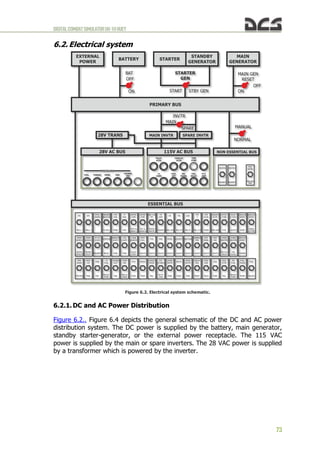
6.2. ELECTRICAL SYSTEM ............................................................................................ 73
DIGITALCOMBATSIMULATORUH-1HHUEY
3
6.2.1. DC and AC Power Distribution................................................................... 73
6.2.2. DC Power Supply System ......................................................................... 75
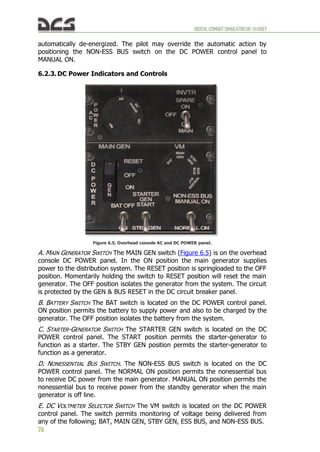
6.2.3. DC Power Indicators and Controls ............................................................. 76
6.2.4. AC Power Supply System.......................................................................... 77
6.2.5. AC Power Indicators and Controls ............................................................. 77
6.3. HYDRAULIC SYSTEM............................................................................................. 78
6.4. DE-ICE .......................................................................................................... 79
6.5. GAME AUTOPILOT ............................................................................................... 79
NOTES ...................................................................................................................... 81
7. RADIO COMMUNICATIONS AND NAVIGATION EQUIPMENT..............................83
7.1. RADIO COMMUNICATIONS EQUIPMENT....................................................................... 83
7.1.1. C-1611/AIC Signal Distribution Panel ......................................................... 83
A. Description................................................................................................................ 83
B. Operation ................................................................................................................. 83
7.1.2. AN/ARC-51BX UHF Radio Set.................................................................... 84
A. Description................................................................................................................ 84
B. Operation ................................................................................................................. 85
C. Emergency Operation ................................................................................................. 85
7.1.3. AN/ARC-134 VHF Radio Set...................................................................... 86
A. Description................................................................................................................ 86
B. Operation ................................................................................................................. 86
C. Emergency Operation ................................................................................................. 86
7.1.4. AN/ARC-131 FM Radio Set........................................................................ 87
A. Description................................................................................................................ 87
B. Operation ................................................................................................................. 87
C. Retransmit Operation.................................................................................................. 88
D. Stopping Procedure.................................................................................................... 88
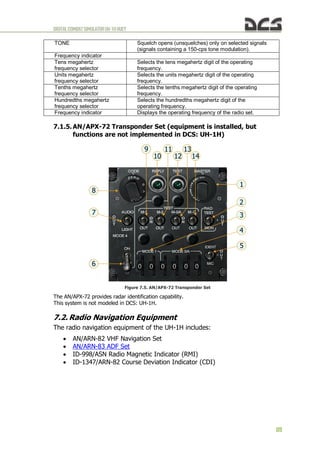
7.1.5. AN/APX-72 Transponder Set (equipment is installed, but functions are not
implemented in DCS: UH-1H)................................................................................... 89
7.2. RADIO NAVIGATION EQUIPMENT ............................................................................. 89
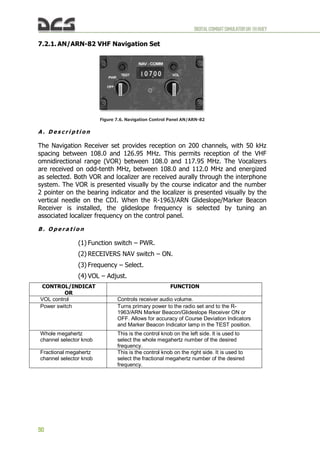
7.2.1. AN/ARN-82 VHF Navigation Set................................................................. 90
A. Description................................................................................................................ 90
B. Operation ................................................................................................................. 90
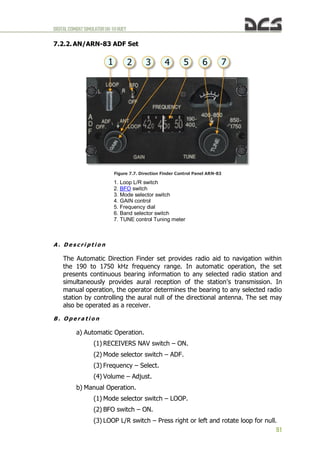
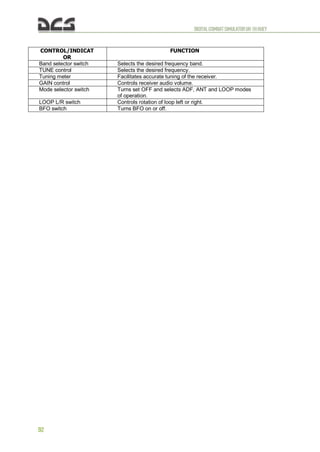
7.2.2. AN/ARN-83 ADF Set................................................................................. 91
A. Description................................................................................................................ 91
B. Operation ................................................................................................................. 91
8. ARMAMENT AND MISSION AVIONICS................................................................94
8.1. M23 ARMAMENT SUBSYSTEM ................................................................................. 94
8.1.1. M23 Armament Subsystem Description ...................................................... 94
8.1.2. M23 Armament Subsystem Firing Procedures ............................................. 95
8.2. XM93 ARMAMENT SUBSYSTEM ............................................................................... 95
8.3. M21 ARMAMENT SUBSYSTEM DESCRIPTION................................................................ 96
8.3.1. High rate of fire M134 7.62 automatic machine guns................................... 96
8.3.2. 2.75-inch folding fin aerial rockets (FFAR) M158 ......................................... 97
8.3.3. The weapon subsystem data .................................................................... 99
8.3.4. M21 armament controls ........................................................................... 99
8.4. M21 ARMAMENT SUBSYSTEM PROCEDURES .............................................................. 102
8.4.1. Automatic gun Firing Procedures............................................................. 102
8.4.2. Rocket Firing Procedures........................................................................ 104
8.4.3. Rocket Emergency Procedures................................................................ 106
8.5. FLARE DISPENSER M130 .................................................................................... 106
8.5.1. Dispenser Control Panel. ........................................................................ 107
8.5.2. Flare Dispense Button............................................................................ 108
8.6. GUNNER ARTIFICIAL INTELLIGENCE (AI) CONTROL ..................................................... 108
9. FLIGHT PREPARATION AND FLIGHT................................................................ 111
9.1. STARTING ENGINE ............................................................................................ 111
9.1.1. Before Starting Engine........................................................................... 111
9.1.2. Starting Engine ..................................................................................... 112
DIGITALCOMBATSIMULATORUH-1HHUEY
4
9.1.3. Engine Runup ....................................................................................... 113
9.2. TAKE-OFF AND HOVER........................................................................................ 114
9.2.1. Before Take-off..................................................................................... 114
9.2.2. Takeoff to hover ................................................................................... 114
A. Required .................................................................................................................114
B. Recommendations for aircraft control during takeoff ......................................................114
9.2.3. Hovering turns...................................................................................... 116
A. Required .................................................................................................................116
B. Recommendations for implementation .........................................................................116
9.2.4. Sideward flight...................................................................................... 118
A. Required .................................................................................................................118
B. Recommendations for implementation .........................................................................118
9.2.5. Rearward flight ..................................................................................... 119
1. Required..................................................................................................................119
2. Recommendations for implementation..........................................................................119
9.2.6. Landing from hover ............................................................................... 119
A. Required .................................................................................................................119
B. Recommendations for aircraft control during landing......................................................120
9.2.7. Normal takeoff...................................................................................... 121
9.3. CLIMB ........................................................................................................... 123
9.4. CRUISE.......................................................................................................... 123
9.5. DESCENT AND LANDING ...................................................................................... 124
Descent.......................................................................................................................124
Special considerations for decelerations. ..........................................................................125
Landing from a Hover (see 9.2.6)....................................................................................126
Run-on Landing............................................................................................................126
9.6. ENGINE SHUTDOWN .......................................................................................... 126
9.7. AUTOROTATION. PRACTICAL PART ......................................................................... 127
A. Transitioning to autorotation ......................................................................................127
B. Autorotation descent .................................................................................................128
C. Autorotation landing..................................................................................................129
NOTES .................................................................................................................... 132
10. COMBAT EMPLOYMENT................................................................................ 134
A. Flight control............................................................................................................135
B. Cockpit procedures ...................................................................................................135
C. Lining up, aiming, and firing.......................................................................................137
D. Attack completion.....................................................................................................138
E. Gunners artificial intelligence control............................................................................138
11. PERFORM SPECIAL TASKS ........................................................................... 140
11.1. SLING LOAD USAGE ........................................................................................... 140
11.1.1. Flight mission preparation for a Sling Load usage...................................... 140
11.1.2. Inflight usage (cargo selection, hooking and unhooking)............................ 141
Selection of cargo.........................................................................................................142
Hooking the cargo ........................................................................................................143
Take off with a sling load...............................................................................................146
Flight to the unhooked area ...........................................................................................146
Approach to the area of the load detachment, detachment of load (cargo unhook).................147
11.2. HELICOPTER ASSAULT (AIRLIFT DELIVERY)................................................................ 147
12. EMERGENCY PROCEDURES .......................................................................... 149
12.1.1. Definition Of Emergency Terms............................................................... 149
12.1.2. Engine Malfunction – Partial or Complete Power Loss ................................ 149
A. Indications...............................................................................................................149
B. Flight characteristics..................................................................................................150
C. Partial power condition ..............................................................................................150
D. Complete power loss.................................................................................................150
12.1.3. Engine Restart – During Flight ................................................................ 151
12.1.4. Engine Overspeed ................................................................................. 152
12.1.5. Transmission Oil – Hot or Low Pressure ................................................... 152
12.1.6. Tail Rotor Malfunctions .......................................................................... 152
DIGITALCOMBATSIMULATORUH-1HHUEY
5
12.1.7. Complete Loss of Tail Rotor Thrust.......................................................... 152
A. Indications...............................................................................................................153
B. Procedures...............................................................................................................153
12.1.8. Loss of Tail Rotor Effectiveness............................................................... 153
A. Indications...............................................................................................................154
B. Procedures...............................................................................................................154
12.1.9. Main Driveshaft Failure .......................................................................... 154
12.1.10. Fire During Flight .................................................................................. 154
12.1.11. Hydraulic Power Failure.......................................................................... 154
12.1.12. Control Stiffness.................................................................................... 155
12.1.13. Flight Control Servo Hardover................................................................. 155
12.1.14. Flight Control/Main Rotor System Malfunctions ......................................... 156
12.1.15. Mast Bumping....................................................................................... 156
12.1.16. Electrical System................................................................................... 156
12.1.17. Main Generator Malfunction.................................................................... 156
12.1.18. Landing and Ditching............................................................................. 156
12.1.19. Landing in Trees ................................................................................... 156
12.1.20. Ditching – Power On.............................................................................. 157
12.1.21. Ditching – Power Off.............................................................................. 157
13. KEY COMMAND LIST .................................................................................... 159
14. ABBREVIATIONS AND TERMS...................................................................... 172
15. THE METRIC SYSTEM AND EQUIVALENTS, CONVERSION FACTORS ........... 176
15.1.1. The Metric System and Equivalents ......................................................... 176
15.1.2. Approximate Conversion Factors ............................................................. 177
NOTES .................................................................................................................... 178
16. DEVELOPERS ................................................................................................ 180
BELSIMTEK .............................................................................................................. 180
MANAGEMENT ......................................................................................................... 180
PROGRAMMERS ....................................................................................................... 180
DESIGNERS ............................................................................................................. 180
SCIENCE SUPPORT ................................................................................................... 180
TESTER STAFF ......................................................................................................... 181
IT AND CUSTOMER SUPPORT MISSION AND CAMPAIGNS.............................................. 181
ARTISTS AND SOUND ............................................................................................... 181
TRAINING ............................................................................................................... 181
THIRD PARTIES........................................................................................................ 182
SPECIAL THANKS TO................................................................................................. 182
17. BIBLIOGRAPHY AND SOURCES.................................................................... 184
NOTES .................................................................................................................... 185
NOTES .................................................................................................................... 186
DIGITALCOMBATSIMULATORUH-1HHUEY
6
HELICOPTER
HISTORY
1
DIGITALCOMBATSIMULATORUH-1HHUEY
7
1. HELICOPTERHISTORY
Note. This section is under construction
In our game you can carry out performances missions on model UH-1H.
DIGITALCOMBATSIMULATORUH-1HHUEY
8
GENERALDESIGN AND
MISSIONOVERVIEW
2
DIGITALCOMBATSIMULATORUH-1HHUEY
9
2. GENERAL DESIGN ANDMISSIONOVERVIEW
2.1. General Description and mission overview
The UH-1H is a single engine, single rotor helicopter. Primary mission capability
of the helicopter is air movement of supplies and personnel. Secondary missions
include SASO1
, air assault, and C22
operations under day, night, visual, and
instrument conditions.
In DCS: UH-1H Huey, the helicopter can be operated in the following variants:
a) Combat transport – delivery of troops and/or materiel. Up to 11
combat troops can be transported and deployed.
b) Air assault – armed air assault employing a variety of weapon
systems (see chapter 8).
The helicopter can be employed either from prepared airfields or Forward Area
Rearming/Refueling Point (FARP) helipads.
The crew includes the pilot in the right-hand seat, copilot in the left-hand seat
and one or two door gunners.
1
SASO – stability and support operations – military activities during peacetime and conflict that do not
necessarily involve armed clashes between two organized forces.
2
C2
– command and control
DIGITALCOMBATSIMULATORUH-1HHUEY
10
2.2. Primary specifications UH-1H
2.2.1. Specifications table
A. AIRCRAFT UNIT UH-1H
В. NORMAL CREW per acft 2
C. OPERATIONAL CHARACTERISTICS
(1) Max allowable gross lbs / kg 9.500 / 4.309
(2) Basic weight lbs / kg 5.914 / 2.683
(3) Useful load lbs / kg 4.368 / 1.981
(4) Payload/Normal mission lbs / kg 2.900 / 1.315
(5) Fuel capacity internal lbs/gal // kg/l 1.358/204 // 616/770
(6) Fuel consumption rate
lbs/gal/h //
kg/l/h
550/84 // 250/318
(7) Normal cruise speed kts / km/h 90–120 / 160–220
(8) Endurance at cruise (Plus 30 min
reserve)
hrs+min 2+15
(9) Grade of fuel octane JP 4/5
D. PASSENGER CAPACITY
(1) Troops seats ea 11
(2) Total capacity with crew ea 13
(3) Litters and ambulatory ea 13
E. EXTERNAL CARGO
(1) Maximum recommended lbs / kg 4.000 / 1.814
(2) Rescue hoist capacity lbs / kg 300 / 136
F. DIMENSIONS
(1) Length — fuselage ft-in / m 40'7" / 12,38
(2) Length — blades unfolded ft-in / m 57'1" / 17,41
(3) Length — blades folded ft-in / m NA
(4) Width — blades folded ft-in / m 8'7" / 2,62
(5) Width — tread ft-in / m 8'7" / 2,62
(6) Height — extreme ft-in / m 14'6" / 4,42
(7) Diameter — main rotor ft-in / m 48'3" / 14,71
(8) Diameter — tail rotor ft-in / m 8'6" / 2,59
(9) Wing span ft-in / m NA
G. CARGO DOOR
(1) Dimensions — width x height ft-in / m 74"x48" / 1,88x1,22
(2) Location — side of fuselage side of fus. left & right
H. CARGO COMPARTMENT
(1) Floor — above ground in / m 24 / 0,61
(2) Usable length in / m 92 / 2,34
(3) Floor width in / m 96 / 2,44
(4) Height (clear of obstructions) in / m 49 / 1,24
(5) Maximum cargo space cu ft / cu m 220 / 6,24
I. WEAPONS M21
Note. The composite rotor blades provide a 6% improvement in the UH-1H's hovering capability
and a 5 to 8 percent reduction in fuel flow in forward flight.
DIGITALCOMBATSIMULATORUH-1HHUEY
11
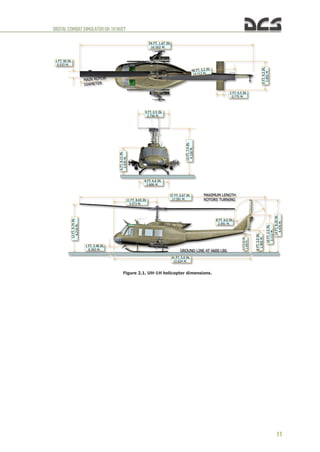
Figure 2.1. UH-1H helicopter dimensions.
DIGITALCOMBATSIMULATORUH-1HHUEY
12
2.3. General Assembly Diagram
1. Radio compartment and fwd battery
location access door
2. Wire-Strike Protection System (WSPS)
upper cutter
3. VHF/UHF antenna
4. Transmission fairing
5. Engine intake fairing
6. Engine cowling
7. Tailpipe fairing
8. Driveshaft covers
9. 90 degree gearbox
10. FM communications antenna No.1
11. Aft position light (NVG)
12. Tail skid
13. 42 degree gearbox
14. Synchronized elevator
15. Tail boom
16. Electrical compartment access door
17. Aft radio compartment access doors
18. M21 armament sub-system
19. Position light (NVG)
20. Sliding cargo door
21. Position light (Red)
22. Landing gear
23. Copilot door
24. WSPS windshield deflector
Figure 2.2. General assembly of the UH-1H (top-left-front).
DIGITALCOMBATSIMULATORUH-1HHUEY
13
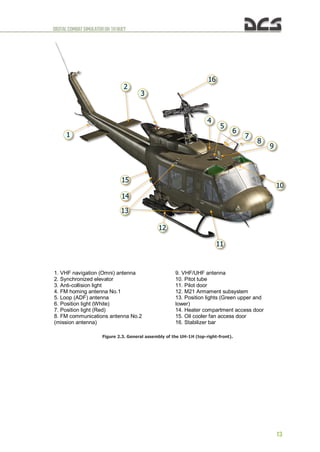
Figure 2.3. General assembly of the UH-1H (top-right-front).
1. VHF navigation (Omni) antenna
2. Synchronized elevator
3. Anti-collision light
4. FM homing antenna No.1
5. Loop (ADF) antenna
6. Position light (White)
7. Position light (Red)
8. FM communications antenna No.2
(mission antenna)
9. VHF/UHF antenna
10. Pitot tube
11. Pilot door
12. M21 Armament subsystem
13. Position lights (Green upper and
lower)
14. Heater compartment access door
15. Oil cooler fan access door
16. Stabilizer bar
DIGITALCOMBATSIMULATORUH-1HHUEY
14
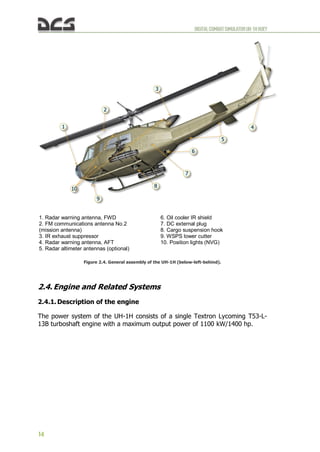
Figure 2.4. General assembly of the UH-1H (below-left-behind).
2.4. Engine and Related Systems
2.4.1. Description of the engine
The power system of the UH-1H consists of a single Textron Lycoming T53-L-
13B turboshaft engine with a maximum output power of 1100 kW/1400 hp.
1. Radar warning antenna, FWD
2. FM communications antenna No.2
(mission antenna)
3. IR exhaust suppressor
4. Radar warning antenna, AFT
5. Radar altimeter antennas (optional)
6. Oil cooler IR shield
7. DC external plug
8. Cargo suspension hook
9. WSPS lower cutter
10. Position lights (NVG)
DIGITALCOMBATSIMULATORUH-1HHUEY
15
Figure 2.5. The T53-L-13B engine.
1. Rotation of output gearshaft
2. Air inlet
3. Air inlet section
4. Rotation of compressor rotor
5. Hot air solenoid valve
6. Rotation of gas producer turbine rotors
7. Rotation of power turbine rotors
8. Accessory drive gearbox
9. Compressor section
10. Diffuser section
11. Combustion section
12. Exhaust section
13. Rear exhaust
Figure 2.6. Internal layout of the T53-L-13B engine (1 of 2).
DIGITALCOMBATSIMULATORUH-1HHUEY
16
Figure 2.7. Internal layout of the T53-L-13B engine (2 of 2).
Lycoming T53-L-13B specifications:
Power Rating, shp 1400
Air consumption,
lbs/s
kg/s
13
6
Compression Ratio 7,2:1 @ 25,600 rpm
Specific Fuel Consumption, lbs/shp/h
kg/shp/h
0.58
0,263
Burner: reverse flow annular, fuel
nozzles
22
Dimensions Engine, inch / mm
diameter 22.99 / 584
length 47.6 / 1209
Weight lbs / kg 549 / 249
Rated revolutions power turbine, /min 22.000
Rated revolutions driveshaft, /min 6600
Rated Torque Output at full power
1,200 lb/ft @ 6,640
rpm
Peak Torque Output
1,700 lb/ft @ 1,800
rpm
Turbine entry temperature, °C 938
Compressor
axial 5 stage
centrifugal 1 stage
2.4.2. Engine Fuel Control System
A . E n g i n e M o u n t e d C o m p o n e n t s
The fuel control assembly is mounted on the engine. It consists of a metering
section, a computer section and an overspeed governor.
(1) The METERING SECTION (#4 in Figure 2.8) is driven at a speed
proportional to N1 speed. It pumps fuel to the engine through
DIGITALCOMBATSIMULATORUH-1HHUEY
17
the main metering valve or if the main system falls through
the emergency metering valve which is positioned directly by
the twist grip throttle.
Figure 2.8. Engine Mounted Components.
1. Droop Compensator
2. Governor Actuator
3. Overspeed Governor
4. Metering and Computer Section (Fuel Control Unit or
FCU)
(2) The COMPUTER SECTION (also #4 in Figure 2.8) determines the
rate of main fuel delivery by biasing main metering valve
opening for N1 speed, inlet air temperature and pressure, and
throttle position. It also controls the operation of the
compressor air bleed and operation of the variable inlet guide
vanes.
(3) The OVERSPEED GOVERNOR (#3 in Figure 2.8) is driven at a speed
proportional to N2 speed. It biases the main metering valve
opening to maintain a constant selected N2 rpm.
DIGITALCOMBATSIMULATORUH-1HHUEY
18
B . P o w e r C o n t r o l s ( T h r o t t l e s )
Rotating the pilot or copilot twist grip-type throttle to the full open position
(Figure 2.9) allows the overspeed governor to maintain a constant rpm.
Figure 2.9. FCU. Throttle full open position. Figure 2.10. FCU. Throttle closed position (idle).
Rotating the throttle toward the closed position (Figure 2.10) will cause the rpm
to be manually selected instead of automatically selected by the overspeed
governor. Rotating the throttle to the fully closed position (Figure 2.11) shuts
off the fuel.
Figure 2.11. FCU. Throttle full closed position.
An idle stop is incorporated in the throttle to prevent inadvertent throttle
closure. To bypass the idle detent, press the IDLE REL switch and close the
throttle.
C . G o v e r n o r s w i t c h
The GOV switch is located on the ENGINE control panel. AUTO position permits
the overspeed governor to automatically control the engine rpm with the
throttle in the full open position. The EMER position permits the pilot or copilot
to manually control the rpm. Because automatic acceleration, deceleration, and
overspeed control are not provided with the GOV switch in the EMER position,
DIGITALCOMBATSIMULATORUH-1HHUEY
19
control movements must be smooth to prevent compressor stall, overspeed,
over-temperature, or engine failure.
Note. If GOV switch is in EMER position and throttle is full opened, main rotor rpm can exceed
the limit, so pilot should control engine and rotor rpm manually by rotating the throttle twist
grip.
2.4.3. Engine Oil Supply System
The system consists of an engine oil tank with deaeration provisions,
thermostatically controlled oil cooler with bypass valve, pressure transmitter and
pressure indicator, low pressure warning switch and indicator (see Caution
Lights Panel), sight gauges and oil supply return vent and breather lines.
Pressure for engine lubrication and scavenging of return oil are provided by the
engine mounted and engine driven oil pump.
2.4.4. Governor RPM Switch
The pilot and copilot GOV RPM INCR/DECR switches are mounted on a switch
box attached to the end of the collective pitch control lever (Figure 4.6). The
switches are a three-position momentary type and are held in INCR (up)
position to increase the power turbine (N2) speed or DECR (down) position to
decrease the power turbine (N2) speed. Electrical power for the circuit is
supplied from the 28 VDC essential bus and is protected by a circuit breaker
marked GOV CONT.
2.4.5. Droop Compensator
A droop compensator (#1 in Figure 2.8) maintains engine rpm (N2) as power
demand is increased by the pilot. The compensator is a direct mechanical
linkage between the collective stick and the speed selector lever on the N2
governor. No crew controls are provided or required. The compensator will hold
N2 rpm to 6600 rpm when properly rigged. Droop is defined as the speed
change in engine rpm (N2) as power is increased from a no-load condition. It is
an inherent characteristic designed into the governor system. Without this
characteristic instability would develop as engine output is increased resulting in
N1 speed overshooting or hunting the value necessary to satisfy the new power
condition.
2.4.6. Engine Instrument and Indicators
All engine instruments and indicators are mounted in the instrument panel and
the pedestal.
a) Torquemeter Indicator. The torquemeter indicator is located in the
center area of the instrument panel and is marked TORQUE PRESS.
b) Exhaust Gas Temperature Indicator. The exhaust gas temperature
indicator is located in the center area of the instrument panel and is
marked EXH TEMP.
c) Dual Tachometer. The dual tachometer is located in the center area
of the instrument panel and indicates both the engine and main rotor
rpm.
DIGITALCOMBATSIMULATORUH-1HHUEY
20
d) Gas Producer Tachometer. The gas producer indicator is located in
the right center area of the instrument panel and is marked
PERCENT.
e) Oil Temperature Indicator. The engine oil temperature indicator is
located in the center area of the instrument panel and is marked
ENGINE OIL.
f) Oil Pressure Indicator. The engine oil pressure indicator is located in
the center area of the instrument panel and is marked OIL.
g) Oil Pressure Caution Light. The ENGINE OIL PRESS caution light is
located in the pedestal mounted CAUTION panel. The light is
connected to a low pressure switch. When pressure drops below
approximately 25 psi, the switch closes an electrical circuit causing
the caution light to illuminate. The circuit receives power from the 28
VDC essential bus and is protected by the circuit breaker marked
CAUTION LIGHTS.
h) Engine Chip Detector Caution Light. A magnetic plug is installed in
the engine. When sufficient metal particles accumulate on the
magnetic plug to complete the circuit, the ENGINE CHIP DET
segment illuminates. The circuit receives power from the 28 VDC
essential bus and is protected by the circuit breaker marked
CAUTION LIGHTS. On helicopters equipped with ODDS, the chip
detector which is connected to the caution light is part of the
external oil separator.
i) Engine Ice Detector. The ice detector system (ENGINE ICE DET
caution light) is not connected.
j) Engine Icing Caution Light. The ENGINE ICING segment of the
caution panel.
k) Engine Inlet Air Caution Light. The ENGINE INLET AIR segment of
the caution panel will illuminate when the inlet air filter becomes
clogged. Power is supplied from the 28 VDC bus and protection is
provided by the CAUTION LIGHT circuit breaker. Not implemented in
DCS: UH-1H.
l) Failure of either fuel pump element will close an electrical circuit
illuminating the caution light. The system receives power from the 28
VDC essential bus and is protected by a circuit breaker marked
CAUTION LIGHTS. One type of switch used on some aircraft will
illuminate the caution light until normal operating pressure is
reached. This momentary lighting does not indicate a pump element
failure.
m) Emergency Fuel Control Caution Light. The emergency fuel control
caution light is located in the pedestal-mounted caution panel. The
illumination of the worded segment GOV EMER is a reminder to the
pilot that the GOV switch is in the EMER position. Electrical power for
the circuit is supplied from the 28 VDC bus and is protected by a
circuit breaker marked CAUTION LIGHTS.
DIGITALCOMBATSIMULATORUH-1HHUEY
21
n) Fuel Filter Caution Light. The FUEL FILTER caution light is located in
the pedestal-mounted caution panel or a press to test light is located
on the instrument panel. A differential pressure switch is mounted in
the fuel line across the filter. When the filter becomes clogged, the
pressure switch senses this and closes contacts to energize the
caution light circuit. If clogging continues, the fuel bypass opens to
allow fuel to flow around the filter. The circuit receives power from
the 28 VDC essential bus and is protected by a circuit breaker
marked CAUTION LIGHTS. Not implemented in DCS: UH-1H.
2.5. Power Train System
The power train is a system of shafts and gearboxes through which the engine
drives the main rotor, tail rotor, and accessories, such as the DC generator and
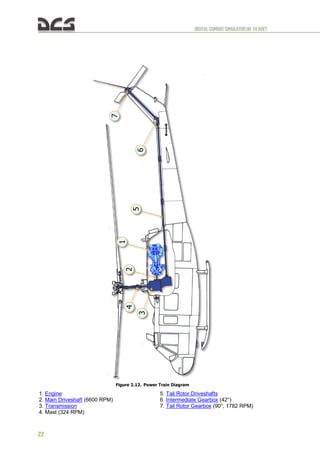
the hydraulic pump. The system consists of (Figure 2.12) a main driveshaft, a
main transmission, which includes input and output drives, and the main rotor
mast, and a series of driveshafts with two gearboxes through which the tail
rotor is driven.
A . T r a n s m i s s i o n
The main transmission is mounted forward of the engine and coupled to the
power turbine shaft at the cool end of the engine by the main driveshaft. The
transmission is basically a reduction gearbox, used to transmit engine power at
a reduced rpm to the rotor system. A freewheeling unit is incorporated in the
transmission to provide a quick-disconnect from the engine if a power failure
occurs. This permits the main rotor and tail rotor to rotate in order to
accomplish a safe auto-rotational landing. The tail rotor drive is on the lower aft
section of the transmission. Power is transmitted to the tail rotor through a
series of driveshaft and gearboxes. The rotor tachometer generator, hydraulic
pump, and main DC generator are mounted on and driven by the transmission.
A self-contained pressure oil system is incorporated in the transmission. The oil
is cooled by an oil cooler and turbine fan. The engine and transmission oil
coolers use the same fan. The oil system has a thermal bypass capability. An oil
level sight glass, filler cap, and magnetic chip detector are provided. A
transmission oil filter is mounted in a pocket in the upper right aft corner of
sump case, with inlet and outlet ports through internal passages. The filter
incorporates a bypass valve for continued oil flow if screens become clogged.
The transmission external oil filter is located in the cargo-sling compartment on
the right side wall, and is connected into the external oil line. On helicopters
equipped with ODDS1
, a full flow debris monitor with integral chip detector
replaces the integral oil filter. A bypass valve is incorporated, set to open at a
set differential pressure to assure oil flow if filter element should become
clogged.
Normal revolution (min-1
): main rotor (mast): 324, tail rotor: 1782.
1
ODDS – Oil Debris Detection System – ODDS improves oil filtration and reduces nuisance chip
indications caused by normal wear particles on detector gaps. When a chip gap is bridged by conductive
particles, a power module provides an electrical pulse which burns away normal wear particles.
DIGITALCOMBATSIMULATORUH-1HHUEY
22
Figure 2.12. Power Train Diagram
1. Engine
2. Main Driveshaft (6600 RPM)
3. Transmission
4. Mast (324 RPM)
5. Tail Rotor Driveshafts
6. Intermediate Gearbox (42°)
7. Tail Rotor Gearbox (90°, 1782 RPM)
DIGITALCOMBATSIMULATORUH-1HHUEY
23
B . G e a r b o x e s
INTERMEDIATE GEARBOX 42 DEGREE. The 42 degree gearbox is located at the base
of the vertical fin. It provides 42 degree change of direction of the tail rotor
driveshaft. The gearbox has a self-contained wet sump oil system. An oil level
sight glass, filler cap, vent and magnetic chip detector are provided.
TAIL ROTOR GEARBOX 90 DEGREE. The 90 degree gearbox is located at the top of
the vertical fin. It provides a 90 degree change of direction and gear reduction
of the tail rotor driveshaft. The gearbox has a self-contained wet sump oil
system. An oil level sight glass, vented filler cap and magnetic chip detector are
provided.
C . D r i v e s h a f t s
MAIN DRIVESHAFT. The main driveshaft connects the engine output shaft to the
transmission input drive quill.
TAIL ROTOR DRIVESHAFT. The tail rotor driveshaft consists of six driveshaft and
four hanger bearing assemblies. The assemblies and the 42 degree and 90
degree gearboxes connect the transmission tail rotor drive quill to the tail rotor.
To Figure 2.12. Power Train Diagram
D . I n d i c a t o r s a n d C a u t i o n L i g h t s
a) Transmission Oil Pressure Indicator. The TRANS OIL pressure
indicator is located in the center area of the instrument panel. It
displays the transmission oil pressure in psi. Electrical power for the
circuit is supplied from the 28 VAC bus and is protected by the XMSN
circuit breaker in the AC circuit breaker panel.
b) Transmission Oil Pressure Low Caution Light. The XMSN OIL PRESS
segment in the CAUTION panel will illuminate when the transmission
oil pressure drops below about 30 psi. The circuit receives power
from the essential bus. Circuit protection is supplied by the CAUTION
LIGHTS circuit breaker.
c) Transmission Oil Temperature Indicator. The transmission oil
temperature indicator is located in the center area of the instrument
panel. The indicator displays the temperature of the transmission oil
in degrees Celsius. The electrical circuit receives power from the
essential bus and is protected by the TEMP IND ENG XMSN circuit
breaker in the DC breaker panel. This is a wet bulb system
dependent on fluid for valid indication.
d) Transmission Oil Hot Caution Light. The XMSN OIL HOT segment in
the CAUTION panel will illuminate when the transmission oil
temperature is above 110°C (230°F). The circuit receives power from
the essential bus and is protected by the CAUTION LIGHTS circuit
breaker. This is a wet bulb system dependent on fluid for valid
indication.
e) Transmission and Gearbox Chip Detector:
DIGITALCOMBATSIMULATORUH-1HHUEY
24
(1) Chip Detector Caution Light. Magnetic inserts are installed in
the drain plugs of the transmission sump, 42 degree gearbox
and the 90 degree gearbox. On helicopters equipped with
ODDS, the transmission chip gap is integral to a full-flow
debris monitor. When sufficient metal particles collect on the
plugs to close the electrical circuit, the CHIP DETECTOR
segment in the CAUTION panel will illuminate. A self-closing,
spring-loaded valve in the chip detectors permits the magnetic
probes to be removed without the loss of oil. The circuit is
powered by the essential bus and protected by the CAUTION
LIGHTS circuit breaker.
(2) Chip Detector Switch. A CHIP DET switch is installed on a
pedestal mounted panel. The switch is labeled BOTH, XMSN,
and TAIL ROTOR and is spring-loaded to the BOTH position.
When the CHIP DETECTOR segment in the CAUTION panel
lights up, position the switch to XMSN, then TAIL ROTOR to
determine the trouble area. CHIP DET caution light will remain
on when a contaminated component is selected. The light will
go out if the non-contaminated component is selected.
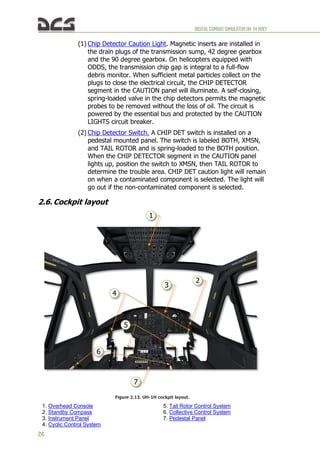
2.6. Cockpit layout
Figure 2.13. UH-1H cockpit layout.
1. Overhead Console
2. Standby Compass
3. Instrument Panel
4. Cyclic Control System
5. Tail Rotor Control System
6. Collective Control System
7. Pedestal Panel
DIGITALCOMBATSIMULATORUH-1HHUEY
25
NOTES
DIGITALCOMBATSIMULATORUH-1HHUEY
26
HELICOPTER
AERODYNAMICS
3
DIGITALCOMBATSIMULATORUH-1HHUEY
27
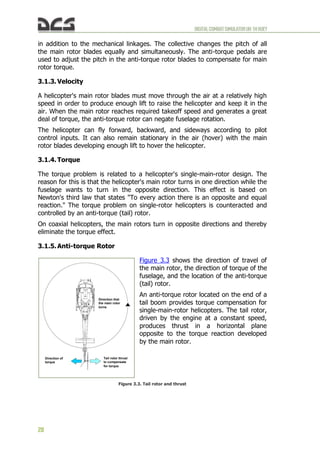
Figure 3.2. Helicopter Controls
3. HELICOPTERAERODYNAMICS
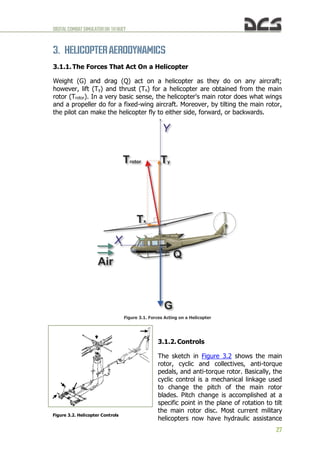
3.1.1. The Forces That Act On a Helicopter
Weight (G) and drag (Q) act on a helicopter as they do on any aircraft;
however, lift (Ty) and thrust (Tx) for a helicopter are obtained from the main
rotor (Trotor). In a very basic sense, the helicopter's main rotor does what wings
and a propeller do for a fixed-wing aircraft. Moreover, by tilting the main rotor,
the pilot can make the helicopter fly to either side, forward, or backwards.
Figure 3.1. Forces Acting on a Helicopter
3.1.2. Controls
The sketch in Figure 3.2 shows the main
rotor, cyclic and collectives, anti-torque
pedals, and anti-torque rotor. Basically, the
cyclic control is a mechanical linkage used
to change the pitch of the main rotor
blades. Pitch change is accomplished at a
specific point in the plane of rotation to tilt
the main rotor disc. Most current military
helicopters now have hydraulic assistance
DIGITALCOMBATSIMULATORUH-1HHUEY
28
in addition to the mechanical linkages. The collective changes the pitch of all
the main rotor blades equally and simultaneously. The anti-torque pedals are
used to adjust the pitch in the anti-torque rotor blades to compensate for main
rotor torque.
3.1.3. Velocity
A helicopter's main rotor blades must move through the air at a relatively high
speed in order to produce enough lift to raise the helicopter and keep it in the
air. When the main rotor reaches required takeoff speed and generates a great
deal of torque, the anti-torque rotor can negate fuselage rotation.
The helicopter can fly forward, backward, and sideways according to pilot
control inputs. It can also remain stationary in the air (hover) with the main
rotor blades developing enough lift to hover the helicopter.
3.1.4. Torque
The torque problem is related to a helicopter's single-main-rotor design. The
reason for this is that the helicopter's main rotor turns in one direction while the
fuselage wants to turn in the opposite direction. This effect is based on
Newton's third law that states "To every action there is an opposite and equal
reaction." The torque problem on single-rotor helicopters is counteracted and
controlled by an anti-torque (tail) rotor.
On coaxial helicopters, the main rotors turn in opposite directions and thereby
eliminate the torque effect.
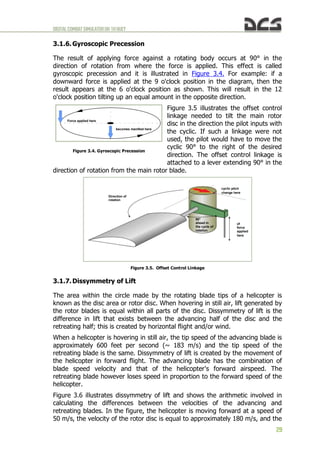
3.1.5. Anti-torque Rotor
Figure 3.3 shows the direction of travel of
the main rotor, the direction of torque of the
fuselage, and the location of the anti-torque
(tail) rotor.
An anti-torque rotor located on the end of a
tail boom provides torque compensation for
single-main-rotor helicopters. The tail rotor,
driven by the engine at a constant speed,
produces thrust in a horizontal plane
opposite to the torque reaction developed
by the main rotor.
Figure 3.3. Tail rotor and thrust
Figure 3.3. Tail Rotor Thrust
to Compensate for Torque
Direction that
the main rotor
turns
Direction of
torque
Tail rotor thrust
to compensate
for torque
DIGITALCOMBATSIMULATORUH-1HHUEY
29
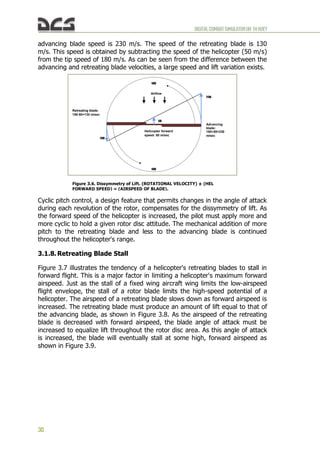
3.1.6. Gyroscopic Precession
The result of applying force against a rotating body occurs at 90° in the
direction of rotation from where the force is applied. This effect is called
gyroscopic precession and it is illustrated in Figure 3.4. For example: if a
downward force is applied at the 9 o'clock position in the diagram, then the
result appears at the 6 o'clock position as shown. This will result in the 12
o'clock position tilting up an equal amount in the opposite direction.
Figure 3.5 illustrates the offset control
linkage needed to tilt the main rotor
disc in the direction the pilot inputs with
the cyclic. If such a linkage were not
used, the pilot would have to move the
cyclic 90° to the right of the desired
direction. The offset control linkage is
attached to a lever extending 90° in the
direction of rotation from the main rotor blade.
Figure 3.5. Offset Control Linkage
3.1.7. Dissymmetry of Lift
The area within the circle made by the rotating blade tips of a helicopter is
known as the disc area or rotor disc. When hovering in still air, lift generated by
the rotor blades is equal within all parts of the disc. Dissymmetry of lift is the
difference in lift that exists between the advancing half of the disc and the
retreating half; this is created by horizontal flight and/or wind.
When a helicopter is hovering in still air, the tip speed of the advancing blade is
approximately 600 feet per second (~ 183 m/s) and the tip speed of the
retreating blade is the same. Dissymmetry of lift is created by the movement of
the helicopter in forward flight. The advancing blade has the combination of
blade speed velocity and that of the helicopter's forward airspeed. The
retreating blade however loses speed in proportion to the forward speed of the
helicopter.
Figure 3.6 illustrates dissymmetry of lift and shows the arithmetic involved in
calculating the differences between the velocities of the advancing and
retreating blades. In the figure, the helicopter is moving forward at a speed of
50 m/s, the velocity of the rotor disc is equal to approximately 180 m/s, and the
Figure 3.4. Gyroscopic Precession
Force applied here
becomes manifest here
Direction of
rotation
90°
ahead in
the cycle of
rotation
of
force
applied
here
cyclic pitch
change here
DIGITALCOMBATSIMULATORUH-1HHUEY
30
advancing blade speed is 230 m/s. The speed of the retreating blade is 130
m/s. This speed is obtained by subtracting the speed of the helicopter (50 m/s)
from the tip speed of 180 m/s. As can be seen from the difference between the
advancing and retreating blade velocities, a large speed and lift variation exists.
Cyclic pitch control, a design feature that permits changes in the angle of attack
during each revolution of the rotor, compensates for the dissymmetry of lift. As
the forward speed of the helicopter is increased, the pilot must apply more and
more cyclic to hold a given rotor disc attitude. The mechanical addition of more
pitch to the retreating blade and less to the advancing blade is continued
throughout the helicopter's range.
3.1.8. Retreating Blade Stall
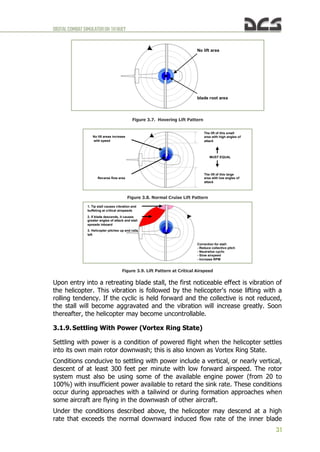
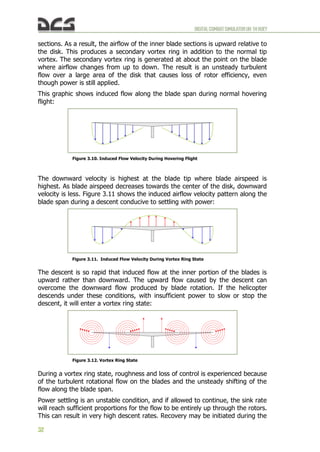
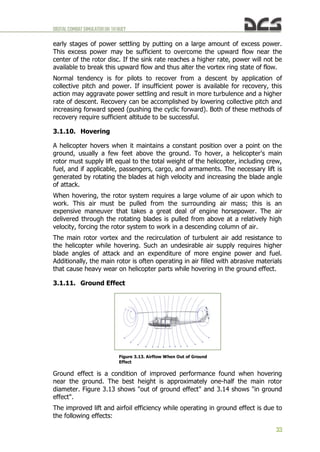
Figure 3.7 illustrates the tendency of a helicopter's retreating blades to stall in
forward flight. This is a major factor in limiting a helicopter's maximum forward
airspeed. Just as the stall of a fixed wing aircraft wing limits the low-airspeed
flight envelope, the stall of a rotor blade limits the high-speed potential of a
helicopter. The airspeed of a retreating blade slows down as forward airspeed is
increased. The retreating blade must produce an amount of lift equal to that of
the advancing blade, as shown in Figure 3.8. As the airspeed of the retreating
blade is decreased with forward airspeed, the blade angle of attack must be
increased to equalize lift throughout the rotor disc area. As this angle of attack
is increased, the blade will eventually stall at some high, forward airspeed as
shown in Figure 3.9.
Figure 3.6. Dissymmetry of Lift. (ROTATIONAL VELOCITY) ± (HEL
FORWARD SPEED) = (AIRSPEED OF BLADE).
Retreating blade:
180-50=130 m/sec
Advancing
blade:
180+50=230
m/sec
Helicopter forward
speed: 50 m/sec
130
230
50
180
180
Airflow
DIGITALCOMBATSIMULATORUH-1HHUEY
31
Upon entry into a retreating blade stall, the first noticeable effect is vibration of
the helicopter. This vibration is followed by the helicopter's nose lifting with a
rolling tendency. If the cyclic is held forward and the collective is not reduced,
the stall will become aggravated and the vibration will increase greatly. Soon
thereafter, the helicopter may become uncontrollable.
3.1.9. Settling With Power (Vortex Ring State)
Settling with power is a condition of powered flight when the helicopter settles
into its own main rotor downwash; this is also known as Vortex Ring State.
Conditions conducive to settling with power include a vertical, or nearly vertical,
descent of at least 300 feet per minute with low forward airspeed. The rotor
system must also be using some of the available engine power (from 20 to
100%) with insufficient power available to retard the sink rate. These conditions
occur during approaches with a tailwind or during formation approaches when
some aircraft are flying in the downwash of other aircraft.
Under the conditions described above, the helicopter may descend at a high
rate that exceeds the normal downward induced flow rate of the inner blade
Figure 3.7. Hovering Lift Pattern
No lift area
blade root area
Figure 3.8. Normal Cruise Lift Pattern
Reverse flow area
No lift areas increase
with speed
The lift of this small
area with high angles of
attack
The lift of this large
area with low angles of
attack
MUST EQUAL
Figure 3.9. Lift Pattern at Critical Airspeed
1. Tip stall causes vibration and
buffeting at critical airspeeds
2. If blade descends, it causes
greater angles of attack and stall
spreads inboard
3. Helicopter pitches up and rolls
left
Correction for stall:
- Reduce collective pitch
- Neutralize cyclic
- Slow airspeed
- Increase RPM
DIGITALCOMBATSIMULATORUH-1HHUEY
32
sections. As a result, the airflow of the inner blade sections is upward relative to
the disk. This produces a secondary vortex ring in addition to the normal tip
vortex. The secondary vortex ring is generated at about the point on the blade
where airflow changes from up to down. The result is an unsteady turbulent
flow over a large area of the disk that causes loss of rotor efficiency, even
though power is still applied.
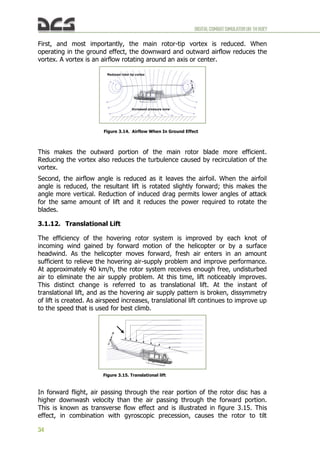
This graphic shows induced flow along the blade span during normal hovering
flight:
The downward velocity is highest at the blade tip where blade airspeed is
highest. As blade airspeed decreases towards the center of the disk, downward
velocity is less. Figure 3.11 shows the induced airflow velocity pattern along the
blade span during a descent conducive to settling with power:
The descent is so rapid that induced flow at the inner portion of the blades is
upward rather than downward. The upward flow caused by the descent can
overcome the downward flow produced by blade rotation. If the helicopter
descends under these conditions, with insufficient power to slow or stop the
descent, it will enter a vortex ring state:
During a vortex ring state, roughness and loss of control is experienced because
of the turbulent rotational flow on the blades and the unsteady shifting of the
flow along the blade span.
Power settling is an unstable condition, and if allowed to continue, the sink rate
will reach sufficient proportions for the flow to be entirely up through the rotors.
This can result in very high descent rates. Recovery may be initiated during the
Figure 3.10. Induced Flow Velocity During Hovering Flight
Figure 3.11. Induced Flow Velocity During Vortex Ring State
Figure 3.12. Vortex Ring State
DIGITALCOMBATSIMULATORUH-1HHUEY
33
early stages of power settling by putting on a large amount of excess power.
This excess power may be sufficient to overcome the upward flow near the
center of the rotor disc. If the sink rate reaches a higher rate, power will not be
available to break this upward flow and thus alter the vortex ring state of flow.
Normal tendency is for pilots to recover from a descent by application of
collective pitch and power. If insufficient power is available for recovery, this
action may aggravate power settling and result in more turbulence and a higher
rate of descent. Recovery can be accomplished by lowering collective pitch and
increasing forward speed (pushing the cyclic forward). Both of these methods of
recovery require sufficient altitude to be successful.
3.1.10. Hovering
A helicopter hovers when it maintains a constant position over a point on the
ground, usually a few feet above the ground. To hover, a helicopter's main
rotor must supply lift equal to the total weight of the helicopter, including crew,
fuel, and if applicable, passengers, cargo, and armaments. The necessary lift is
generated by rotating the blades at high velocity and increasing the blade angle
of attack.
When hovering, the rotor system requires a large volume of air upon which to
work. This air must be pulled from the surrounding air mass; this is an
expensive maneuver that takes a great deal of engine horsepower. The air
delivered through the rotating blades is pulled from above at a relatively high
velocity, forcing the rotor system to work in a descending column of air.
The main rotor vortex and the recirculation of turbulent air add resistance to
the helicopter while hovering. Such an undesirable air supply requires higher
blade angles of attack and an expenditure of more engine power and fuel.
Additionally, the main rotor is often operating in air filled with abrasive materials
that cause heavy wear on helicopter parts while hovering in the ground effect.
3.1.11. Ground Effect
Ground effect is a condition of improved performance found when hovering
near the ground. The best height is approximately one-half the main rotor
diameter. Figure 3.13 shows "out of ground effect" and 3.14 shows "in ground
effect".
The improved lift and airfoil efficiency while operating in ground effect is due to
the following effects:
Figure 3.13. Airflow When Out of Ground
Effect
DIGITALCOMBATSIMULATORUH-1HHUEY
34
First, and most importantly, the main rotor-tip vortex is reduced. When
operating in the ground effect, the downward and outward airflow reduces the
vortex. A vortex is an airflow rotating around an axis or center.
This makes the outward portion of the main rotor blade more efficient.
Reducing the vortex also reduces the turbulence caused by recirculation of the
vortex.
Second, the airflow angle is reduced as it leaves the airfoil. When the airfoil
angle is reduced, the resultant lift is rotated slightly forward; this makes the
angle more vertical. Reduction of induced drag permits lower angles of attack
for the same amount of lift and it reduces the power required to rotate the
blades.
3.1.12. Translational Lift
The efficiency of the hovering rotor system is improved by each knot of
incoming wind gained by forward motion of the helicopter or by a surface
headwind. As the helicopter moves forward, fresh air enters in an amount
sufficient to relieve the hovering air-supply problem and improve performance.
At approximately 40 km/h, the rotor system receives enough free, undisturbed
air to eliminate the air supply problem. At this time, lift noticeably improves.
This distinct change is referred to as translational lift. At the instant of
translational lift, and as the hovering air supply pattern is broken, dissymmetry
of lift is created. As airspeed increases, translational lift continues to improve up
to the speed that is used for best climb.
In forward flight, air passing through the rear portion of the rotor disc has a
higher downwash velocity than the air passing through the forward portion.
This is known as transverse flow effect and is illustrated in figure 3.15. This
effect, in combination with gyroscopic precession, causes the rotor to tilt
Figure 3.14. Airflow When In Ground Effect
Increased pressure zone
Reduced rotor tip vortex
Figure 3.15. Translational lift
DIGITALCOMBATSIMULATORUH-1HHUEY
35
sideward and results in vibration that is most noticeable on entry into effective
translation.
3.1.13. Autorotation
If engine power fails, or other emergencies occur, autorotation is a means of
safely landing a helicopter. The transmission in a helicopter is designed to allow
the main rotor to turn freely in its original direction when the engine stops.
Figure 3.16 illustrates how the helicopter is allowed to glide to earth and by
using the main rotor rpm, make a soft landing.
The rotor blade autorotative driving region is the portion of the blade between
25 to 70 percent radius, as shown in Figure 3.17, blade element B. Because this
region operates at a comparatively high angle of attack, the result is a slight but
important forward inclination of aerodynamic forces. This inclination supplies
thrust slightly ahead of the rotating axis and tends to speed up this portion of
the blade during autorotation.
The blade area outboard of the 70
percent circle is known as the
propeller or driven region. Analysis
of blade element A: the
aerodynamic force inclines slightly
behind the rotating axis. This
inclination causes a small drag force
that tends to slow the tip portion of
the blade. Rotor rpm stabilizes, or
achieves equilibrium, when
autorotative force and
antiautorotative force are equal.
The blade area inboard of the 25% circle is known as the stall region because it
operates above its maximum angle of attack. This region contributes
considerable drag that tends to slow the blade.
Figure 3.16. Approach to Landing, Power Off
3. COLLECTIVE PITCH CONTROL –
Adjust to maintain required
autorotational RPM
4. FLARE – Execute flare as
necessary to reduce forward speed
and land in a near level attitude.
1. COLLECTIVE PITCH CONTROL – Reduce
as required to establish autorotational RPM
2. AUTOROTATIVE GLIDE – Establish at an
IAS to 120-140 km/h (65-77 knots) for normal
rate of descent. Greater IAS up to 170 km/h
(95 knots) will extend the gliding distance.
Figure 3.17. The Rotor Blade Autorotative Regions
Driven region
Driving region
Stall region
DIGITALCOMBATSIMULATORUH-1HHUEY
36
All helicopters carry an operator's manual that has an airspeed versus altitude
chart similar to the one shown in Figure 3.19. The shaded areas on this chart
must be avoided. This area is referred to as the "dead man's curve" and "avoid
curve". The proper maneuvers for a safe landing during engine failure cannot
be accomplished in these areas.
3.1.14. Summary
Weight, lift, thrust, and drag are the four forces acting on a helicopter. The
cyclic for directional control, the collective pitch for altitude control, and the
anti-torque pedals to compensate for main rotor torque are the three main
controls used in a helicopter.
Torque is an inherent problem with single-main-rotor helicopters. Gyroscopic
precession occurs at approximately 90° in the direction of rotation from the
point where the force is applied. Dissymmetry of lift is the difference in lift that
exists between the advancing and retreating halves of the rotor disc.
Settling with power can occur when the main rotor system is using from 20 to
100 percent of the available engine power, and the horizontal velocity is under
10 knots. At a hover, the rotor system requires a great volume of air upon
Figure 3.18. Autorotation Blade Forces
Axis of
Rotation
In driving or autorotative area In driven or propeller area
а а
VTA VTA
Rate of
descent
Rate of
descent
Resultant Resultant
Autorotative
force Anti-autorotative
force
Figure 3.19. Height-Velocity Diagram
Speed [km/h]
Height [m]
NOTE
Avoid continuous operation in indicated
areas. however, if the aircraft is operated in
the indicated areas, emergency procedures
relating to engine failures – low altitude,
low airspeed should be observed.
DIGITALCOMBATSIMULATORUH-1HHUEY
37
which to generate lift. This air must be pulled from the surrounding air mass.
This is a costly maneuver that takes a great amount of engine power.
Ground effect provides improved performance when hovering near the ground
at a height of no more than approximately one-half the main rotor diameter.
Translational lift is achieved at approximately 18 knots, and the rotor system
receives enough free, undisturbed air to improve performance. At the instant
translational lift is in effect and the hovering air-supply pattern is broken,
dissymmetry of lift is created. Autorotation is a means of safely landing a
helicopter after engine failure or other emergencies. A helicopter transmission is
designed to allow the main rotor to turn freely in its original direction if the
engine fails.
DIGITALCOMBATSIMULATORUH-1HHUEY
38
FLIGHT CONTROL SYSTEM
4
DIGITALCOMBATSIMULATORUH-1HHUEY
39
4. FLIGHTCONTROLSYSTEM
The flight control system is a hydraulically-assisted positive mechanical type,
actuated by conventional helicopter controls. Complete controls are provided for
both pilot and copilot. The system includes a cyclic system, collective control
system, tail rotor system, force trim system, synchronized elevator, and a
stabilizer bar.
4.1. Cyclic Control System
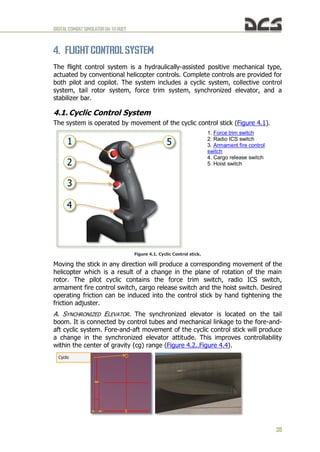
The system is operated by movement of the cyclic control stick (Figure 4.1).
1. Force trim switch
2. Radio ICS switch
3. Armament fire control
switch
4. Cargo release switch
5. Hoist switch
Figure 4.1. Cyclic Control stick.
Moving the stick in any direction will produce a corresponding movement of the
helicopter which is a result of a change in the plane of rotation of the main
rotor. The pilot cyclic contains the force trim switch, radio ICS switch,
armament fire control switch, cargo release switch and the hoist switch. Desired
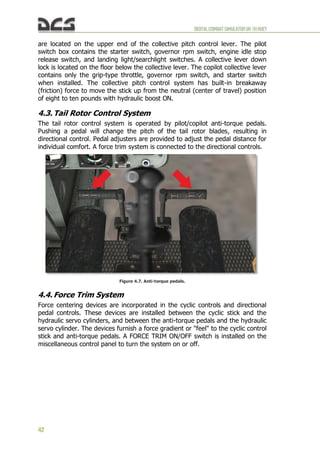
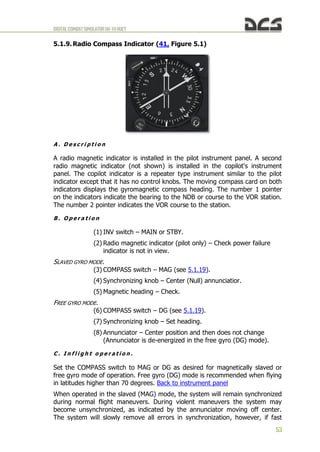
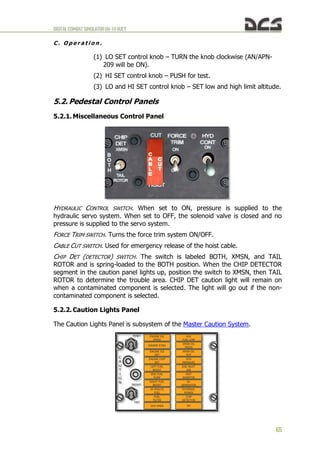
operating friction can be induced into the control stick by hand tightening the
friction adjuster.
A. SYNCHRONIZED ELEVATOR. The synchronized elevator is located on the tail
boom. It is connected by control tubes and mechanical linkage to the fore-and-
aft cyclic system. Fore-and-aft movement of the cyclic control stick will produce
a change in the synchronized elevator attitude. This improves controllability
within the center of gravity (cg) range (Figure 4.2..Figure 4.4).
Cyclic
DIGITALCOMBATSIMULATORUH-1HHUEY
40
Figure 4.2. Position of the synchronized elevator when cyclic is fully forward (angle +5.40 degrees
regarding the construction line of helicopter).
Figure 4.3. Position of the synchronized elevator when cyclic is neutral (angle -4.70 degrees).
Figure 4.4. Position of the synchronized elevator when cyclic is fully back (angle +1.28 degrees).
Position of the synchronized elevator with respect to the longitudinal axis of the
fuselage:
Cyclic Position Angle
mm rad degree
-163,8 (fully back) 0,0224 1,28
-152,5 0,0174 1,00
-127,0 0,0 0,00
-101,6 -
0,0192
-1,10
-76,2 -
0,0384
-2,20
-50,8 -
0,0541
-3,10
-25,4 -0,069 -3,95
0,0 -
0,0820
-4,70
25,4 -
0,0850
-4,87
50,8 -
0,0803
-4,60
76,2 -
0,0628
-3,60
101,6 -0,03 -1,72
127,0 0,0035 0,20
152,5 0,0593 3,40
163,8 (fully
forward)
0,0942 5,40
B. STABILIZER BAR. The stabilizer bar is mounted on the main rotor hub trunnion
assembly in a parallel plane, above and at 90 degrees to the main rotor blades
(Figure 4.5).
DIGITALCOMBATSIMULATORUH-1HHUEY
41
Figure 4.5. Stabilizer bar.
The gyroscopic and inertial effect of the stabilizer bar will produce a damping
force in the rotor rotating control system and thus the rotor. When an angular
displacement of the helicopter/mast occurs, the bar tends to remain in its trim
plane. The rate at which the bar rotational plane tends to return to a position
perpendicular to the mast is controlled by the hydraulic dampers. By adjusting
the dampers, positive dynamic stability can be achieved, and still allow the pilot
complete responsive control of the helicopter.
4.2. Collective Control System
The collective pitch control lever controls vertical flight (Figure 4.6).
1. Searchlight switch
2. Governor RPM switch
3. Throttle friction adjuster
4. Throttle
5. Landing light ON/OFF switch
6. Landing light extend/retract
switch
7. Engine idle stop release
pushbutton switch
Figure 4.6. Collective Control stick.
The amount of lever movement determines the angle of attack and lift
developed by the main rotor, and results in ascent or descent of the helicopter:
When the lever is in the full down position, the main rotor is at minimum pitch.
When the lever is in the full up position, the main rotor is at maximum pitch.
Desired operating friction can be induced into the control lever by hand-
tightening the friction adjuster. A grip-type throttle and a switch box assembly
DIGITALCOMBATSIMULATORUH-1HHUEY
42
are located on the upper end of the collective pitch control lever. The pilot
switch box contains the starter switch, governor rpm switch, engine idle stop
release switch, and landing light/searchlight switches. A collective lever down
lock is located on the floor below the collective lever. The copilot collective lever
contains only the grip-type throttle, governor rpm switch, and starter switch
when installed. The collective pitch control system has built-in breakaway
(friction) force to move the stick up from the neutral (center of travel) position
of eight to ten pounds with hydraulic boost ON.
4.3. Tail Rotor Control System
The tail rotor control system is operated by pilot/copilot anti-torque pedals.
Pushing a pedal will change the pitch of the tail rotor blades, resulting in
directional control. Pedal adjusters are provided to adjust the pedal distance for
individual comfort. A force trim system is connected to the directional controls.
Figure 4.7. Anti-torque pedals.
4.4. Force Trim System
Force centering devices are incorporated in the cyclic controls and directional
pedal controls. These devices are installed between the cyclic stick and the
hydraulic servo cylinders, and between the anti-torque pedals and the hydraulic
servo cylinder. The devices furnish a force gradient or "feel" to the cyclic control
stick and anti-torque pedals. A FORCE TRIM ON/OFF switch is installed on the
miscellaneous control panel to turn the system on or off.
DIGITALCOMBATSIMULATORUH-1HHUEY
43
Figure 4.8. FORCE TRIM ON/OFF switch.
These forces can be reduced to zero by pressing and holding the force trim
push-button switch on the cyclic stick grip (Figure 4.9) or moving the force trim
switch to OFF.
Figure 4.9. Force trim push-button switch on the cyclic stick grip.
DIGITALCOMBATSIMULATORUH-1HHUEY
44
COCKPIT INSTRUMENTS&
CONTROLS
5
DIGITALCOMBATSIMULATORUH-1HHUEY
45
5. COCKPIT INSTRUMENTSAND CONTROLS
DIGITALCOMBATSIMULATORUH-1HHUEY
46
5.1. Instrument Panel
Figure 5.1. UH-1H instrument panel.
DIGITALCOMBATSIMULATORUH-1HHUEY
47
Figure 5.1. UH-1H instrument panel description.
5.1.1. Master Caution System
a) Master Caution Indicator. The master caution indicator light on the
instrument panel will illuminate when fault conditions occur. This
illumination alerts the pilot and copilot to check the caution panel for
the specific fault condition.
b) Caution panel. The CAUTION panel is located on the pilot side of the
pedestal (Figure 5.2). Worded segments illuminate to identify specific
fault conditions. The worded segments are readable only when the
light illuminates. When a light illuminates, flickers or full illumination,
it indicates a fault condition. Refer to Caution Lights Panel for
explanation of the fault conditions.
1. Glareshield
2. Secondary lights
3. Master caution
4. RPM warning light
5. Fire detector test
switch
6. Fire warning indicator
light
7. Fuel gauge test
switch
8. Airspeed indicator
9. Attitude indicator
10. Dual tachometer
11. Altimeter indicator
(AAU-31/A)
12. Attitude indicator
13. Radio compass
indicator
14. Altimeter indicator
(AAU-32/A)
15. Vertical velocity
indicator
16. Compass correction
card holder
17. Fuel pressure
indicator
18. IFF code hold
switch
19. IFF code hold light
20. Transmission oil
pressure indicator
21. Main generator
loadmeter
22. Standby generator
loadmeter
23. Engine oil
pressure indicator
24. AC voltmeter
25. Compass slaving
switch
26. DC voltmeter
27. Transmission oil
temperature indicator
28. Engine oil
temperature
29. Fuel quantity
indicator
30. Exhaust gas
temperature indicator
31. Gas producer
tachometer indicator
32. Turn and slip
indicator
33. Torquemeter
indicator
34. Marker beacon
volume control
35. Marker beacon
Sensing Switch
36. Cargo release
armed light
37. Clock
38. Marker beacon
light
39. Course deviation
indicator
40. Magnetic compass
41. Radio compass
indicator
42. Vertical velocity
indicator
43. Radar altimeter
DIGITALCOMBATSIMULATORUH-1HHUEY
48
Figure 5.2. CAUTION panel location.
c) Electrical Power. Electric power for the master caution system is
supplied from the essential bus. Circuit protection is provided by the
CAUTION LIGHTS circuit breakers.
5.1.2. RPM High-Low Limit Warning System (4, Figure 5.1)
The rpm high-low limit warning system provides the pilot with an immediate
warning of high and low rotor or engine rpm. Main components of the system
are a detector unit, warning light and audio signal circuit, low RPM AUDIO/OFF
switch, and electrical wiring and connectors. The warning light and audio
warning signal systems are activated when any one of the following rpm
conditions exist:
a) Warning light only:
(1) For rotor rpm of 329-339 (High Warning).
(2) For rotor rpm of 300-310 (Low Warning).
(3) For engine rpm of 6100-6300 (Low Warning).
(4) Loss of signal (circuit failure) from either rotor tachometer
generator or power turbine tachometer generator.
b) Warning light and audio warning signal combination:
DIGITALCOMBATSIMULATORUH-1HHUEY
49
(1) For rotor rpm of 300-310 and engine rpm of 6100-6300 (Low
Warning).
(2) Loss of signal (circuit failure) from both rotor tachometer
generator and power turbine tachometer generator.
c) Rotor Tachometer Generator and Power Turbine Tachometer
Generator. The rotor tachometer generator and power turbine
tachometer generator both send signals to the high-low rpm warning
light and audio warning circuits. When only the warning light is
energized, determine the cause of indication by checking the
torquemeter and cross referencing other engine instruments. A
normal indication signifies that the engine is functioning properly and
that there is a tachometer generator failure or an open circuit to the
warning system rather than an actual engine failure. Electrical power
for system operation is supplied by the 28 VDC essential bus.
d) High-Low Limit RPM Warning Light. The high-low warning light is
located on the instrument panel. This light illuminates to provide a
visual warning of low rotor rpm, low engine rpm or high rotor rpm.
e) LOW RPM AUDIO/OFF Switch. The LOW RPM AUDIO/OFF switch is
on the engine control panel. When in the OFF position, the switch
prevents the audio warning signal from functioning during engine
starting. Current production helicopters use a spring-loaded switch.
When the switch has been manually turned off for engine starting, it
will automatically return to the AUDIO position when normal
operating range is reached.
5.1.3. Fire Detector Warning System (5, 6, Figure 5.1).
A FIRE warning light is located in the upper right section of the instrument
panel. The FIRE DETECTOR TEST switch (press to test) is located to the left of
the fire warning light.
Excessive heat in the engine compartment causes the FIRE light to illuminate.
Pressing the press-to-test switch also causes the light to illuminate. Electric
power for the circuit is supplied from the 28 VDC essential bus and is protected
by the FIRE DET circuit breaker. Back to instrument panel
DIGITALCOMBATSIMULATORUH-1HHUEY
50
5.1.4. Airspeed indicator (8, Figure 5.1)
The pilot and copilot airspeed indicators display indicated airspeed (IAS) in
knots. The gauge is graduated from 0 to 150 knots in either 5 or 10 knot
increments depending on the airspeed. The indicator is red lined at 124 knots.
Note. Indicated airspeeds are unreliable below 20 knots due to rotor downwash
5.1.5. Attitude Indicators (9, 12, Figure 5.1)
Figure 5.3. Attitude Indicator (AI) copilot (left) and pilot (right).
The Attitude Indicator (AI) provides your primary instrument indication of
aircraft pitch, roll and yaw in relation to an artificial horizon represented on a
sphere. Back to instrument panel
A . C o p i l o t A t t i t u d e I n d i c a t o r
The copilot attitude indicator is located in the copilot section of the instrument
panel. It is operated by 115 VAC power supplied by the inverter. Circuit
protection is provided by the COPILOT ATTD circuit breakers in the AC circuit
breaker panel. In a climb or dive exceeding 27 degrees of pitch, the horizontal
bar will stop at the top or bottom of the case and the sphere then becomes the
DIGITALCOMBATSIMULATORUH-1HHUEY
51
reference. The copilot attitude indicator may be caged manually by pulling the
PULL TO CAGE knob smoothly away from the face of the instrument to the limit
of its travel and then releasing quickly.
Note. The copilot attitude indicator shall be caged only in a straight and level attitude. The
caging knob shall never be pulled violently.
B . P i l o t A t t i t u d e I n d i c a t o r .
The pilot attitude indicator is located on the pilot section of the instrument
panel. The indicator displays the pitch and roll attitude of the helicopter. An
OFF warning flag in the indicator is exposed when electrical power to the
system is removed. However, the OFF flag will not indicate internal system
failure. The attitude indicator has an electrical trim in the roll axis in addition to
the standard pitch trim. The attitude indicator is operated by 115 VAC power,
supplied by the inverter. Circuit protection is provided by the PILOT ATTD
circuit breakers in the AC circuit breaker panel.
5.1.6. Dual tachometer (10, Figure 5.1)
The dual tachometer is located in the center area of the instrument panel and
indicates both the engine and main rotor rpm. The tachometer inner scale (2) is
marked ROTOR and the outer scale (1) is marked ENGINE. Synchronization of
the ENGINE and ROTOR needles indicates normal operation of helicopter. The
indicator receives power from the tachometer generators mounted on the
engine and transmission. Connection to the helicopter electrical system is not
required. Back to instrument panel
Back to Engine Instrument and Indicators
11. Revolutions of power
turbine
(outer scale, x100)
22. Revolutions of main rotor
(inner scale, x10)
DIGITALCOMBATSIMULATORUH-1HHUEY
52
5.1.7. Altimeter Indicator (AAU-31/A)(11, Figure 5.1)
A . D e s c r i p t i o n
The AAU-31/A pneumatic counter-drum-pointer altimeter is a precision pressure
altimeter. Pressure altitude is displayed by a 100-foot drum and a single pointer
indicating hundreds of feet on a circular scale, with 50' center markings. Below
an altitude of 10,000 feet, a diagonal warning symbol will appear on the
10,000-foot counter.
A barometric pressure setting knob is provided to set the desired altimeter
setting in inches of Mercury (inHg). A DC powered vibrator operates inside the
altimeter whenever aircraft power is on.
B . N o r m a l o p e r a t i o n
The altimeter indicates pneumatic altitude reference to the barometric pressure
level as selected by the pilot. A vibrator, powered by the DC essential bus, is
contained in the altimeter and requires a minimum of one minute warmup prior
to checking or setting the altimeter.
C . A b n o r m a l o p e r a t i o n
If the altimeter's internal vibrator becomes inoperative due to internal failure or
DC power failure, the pointer and drum may momentarily hang up when
passing from "9" through "0" (climbing) or from "0" through "9" (descending).
This hang-up will cause lag, the magnitude of which will depend on the vertical
velocity of the aircraft and the friction in the altimeter. Pilots should be
especially watchful for this type of failure when the minimum approach altitude
lies within the "8" – "1" part of the scale (800-1100, 1800-2100, etc.).
Back to instrument panel
5.1.8. Radio compass indicator (copilot) (12, Figure 5.1)
The copilot's Radio Compass Indicator is a repeater of the pilot's indicator,
described below.
DIGITALCOMBATSIMULATORUH-1HHUEY
53
5.1.9. Radio Compass Indicator (41, Figure 5.1)
A . D e s c r i p t i o n
A radio magnetic indicator is installed in the pilot instrument panel. A second
radio magnetic indicator (not shown) is installed in the copilot's instrument
panel. The copilot indicator is a repeater type instrument similar to the pilot
indicator except that it has no control knobs. The moving compass card on both
indicators displays the gyromagnetic compass heading. The number 1 pointer
on the indicators indicate the bearing to the NDB or course to the VOR station.
The number 2 pointer indicates the VOR course to the station.
B . O p e r a t i o n
(1) INV switch – MAIN or STBY.
(2) Radio magnetic indicator (pilot only) – Check power failure
indicator is not in view.
SLAVED GYRO MODE.
(3) COMPASS switch – MAG (see 5.1.19).
(4) Synchronizing knob – Center (Null) annunciatior.
(5) Magnetic heading – Check.
FREE GYRO MODE.
(6) COMPASS switch – DG (see 5.1.19).
(7) Synchronizing knob – Set heading.
(8) Annunciator – Center position and then does not change
(Annunciator is de-energized in the free gyro (DG) mode).
C . I n f l i g h t o p e r a t i o n .
Set the COMPASS switch to MAG or DG as desired for magnetically slaved or
free gyro mode of operation. Free gyro (DG) mode is recommended when flying
in latitudes higher than 70 degrees. Back to instrument panel
When operated in the slaved (MAG) mode, the system will remain synchronized
during normal flight maneuvers. During violent maneuvers the system may
become unsynchronized, as indicated by the annunciator moving off center.
The system will slowly remove all errors in synchronization, however, if fast
DIGITALCOMBATSIMULATORUH-1HHUEY
54
synchronization is desired, turn the synchronizing knob in the direction
indicated by the annunciator until the annunciator is centered again.
When operating in the free gyro (DG) mode, periodically update the heading to
a known reference by rotating the synchronizing knob.
Back to instrument panel
5.1.10. Altimeter indicator (AAU-32/A) (14, Figure 5.1)
A . D e s c r i p t i o n
The AAU-32/A pneumatic counter-drum-pointer altimeter is a self-contained
unit which consists of a precision pressure altimeter combined with an altitude
encoder. The display indicates and the encoder transmits. Simultaneously,
pressure altitude is displayed on the altimeter by a 10,000-foot counter, a
1,000-foot counter and a 100-foot drum. A single pointer indicates hundreds of
feet on a circular scale, with 50-foot center markings. Below an altitude of
10,000 feet, a diagonal warning system will appear on the 10,000-foot counter.
A barometric pressure setting knob is provided to set the desired altimeter
setting in inches of Mercury (inHg).
B . N o r m a l O p e r a t i o n
The AIMS altimeter circuit breaker should be closed prior to flight. The AAU-
32/A altimeter indicates pneumatic altitude reference to the barometric
pressure level as selected by the pilot. At ambient pressure, altimeters should
agree with ±70 feet of the field elevation when the proper barometric pressure
setting is set in the altimeter. A red flag marked CODE OFF is located in the
upper left portion of the altimeters face. In order to supply Mode C information
to the IFF transponder, the CODE OFF flag must not be visible. A vibrator,
powered by the DC essential bus, is contained in the altimeter and requires a
minimum of one minute warm-up prior to checking or setting the altimeter.
C . A b n o r m a l O p e r a t i o n
If the altimeter's internal vibrator becomes inoperative due to internal failure or
DC power failure, the pointer and drum may momentarily hang up when
passing from "9" through "0" (climbing) or from "0" through "9" (descending).
This hang-up will cause lag, the magnitude of which will depend on the vertical
velocity of the aircraft and the friction in the altimeter. Pilots should be
DIGITALCOMBATSIMULATORUH-1HHUEY
55
especially watchful for this type failure when the minimum approach altitude
lies within the "8" – "1" part of the scale (800-1100, 1800-2100, etc).
If the CODE OFF flag is visible, the DC power is not available, the circuit breaker is not in, or
there is an internal altimeter encoder failure.
It the altimeter indicator does not correspond within 70 feet of the field
elevation (with proper local barometric setting) the altimeter needs rezeroing or
there has been an internal failure.
If the baroset knob binds or sticks, abnormal force should not be used to make
the setting as this may cause internal gear failure resulting in altitude errors.
Settings can sometimes be made by backing off and turning at a slower rate.
Back to instrument panel
5.1.11. Vertical velocity indicator (15, 42, Figure 5.1)
The VVI displays rate of climb or descent in increments of feet per minute. The
scale is in increments of 1000 feet per min.
Back to instrument panel
5.1.12. Fuel Pressure Indicator (17, Figure 5.1)
Reading of the instrument: 5 to 35 PSI normal.
DIGITALCOMBATSIMULATORUH-1HHUEY
56
The Fuel Pressure indicator displays the pounds per square inch (PSI) pressure
of the fuel being delivered by the boost pumps from the fuel cells to the engine.
The indicator is graduated from 0 to 50 PSI in single PSI increments.
The circuit receives power from the 28 VAC bus and is protected by the FUEL
PRESSURE circuit breaker in the AC circuit breaker panel.
5.1.13. IFF code hold switch
Not implemented in DCS: UH-1H Huey.
5.1.14. IFF code hold light
Not implemented in DCS: UH-1H Huey.
5.1.15. Transmission oil pressure (20, Figure 5.1)
Reading of the instrument: 30 PSI minimum, 40-60 PSI continuous, 70 PSI
maximum.
The TRANS OIL pressure indicator is located in the center area of the
instrument panel. It displays the transmission oil pressure in pounds per square
inch (PSI).
Electrical power for the circuit is supplied from the 28 VAC bus and is protected
by the XMSN circuit breaker in the AC circuit breaker panel.
Back to instrument panel
5.1.16. DC Loadmeters (Main and Standby) (21, 22, Figure 5.1)
Two direct current loadmeters are mounted in the lower center area of the
instrument panel. The MAIN GEN loadmeter indicates the percentage of main
generator rated capacity being used. The STBY GEN loadmeter indicates the
DIGITALCOMBATSIMULATORUH-1HHUEY
57
percentage of standby generator rated capacity being used. The loadmeters will
not indicate percentage when the generators are not operating.
Reading of the instrument: Main generator 1.0 to 1.25 transient, standby
generator 1.0 maximum (red).
5.1.17. Engine oil pressure indicator (23, Figure 5.1)
Back to Engine Instrument and Indicators
The Engine Oil Pressure indicator is located in the center area of the instrument
panel and is marked OIL PRESS. The indicator receives pressure indications
from the engine oil pressure transmitter and provides readings in pounds per
square inch (PSI).
The circuit receives electrical power from the 28 VAC bus and circuit protection
is provided by the ENG circuit breaker in the AC circuit breaker panel.
Reading of the instrument: 25 PSI minimum – engine idle (red), 80 to 100 PSI
normal (green), 100 PSI maximum (red).
5.1.18. AC voltmeter (24, Figure 5.1)
Back to instrument panel
The AC voltmeter is mounted on the center area of the instrument panel. The
AC voltage output from the inverter (main or spare) is indicated on this
instrument. The voltage indicated on any of the three selected positions should
be 112 to 118 VAC.
5.1.19. Compass slaving switch (25, Figure 5.1)
COMPASS switch – DG / MAG:
DG – providing Free gyro mode, MAG – providing Slaved gyro mode.
DIGITALCOMBATSIMULATORUH-1HHUEY
58
5.1.20. DC voltmeter (26, Figure 5.1)
The DC voltmeter is located in the center area of the instrument panel and is
labeled VOLT DC. Direct current voltage is indicated on the voltmeter as
selected by the VM switch in the overhead console.
5.1.21. Transmission oil temperature indicator (27, Figure 5.1)
Transmission oil temperature: maximum 110°C.
The transmission oil temperature indicator is located in the center area of the
instrument panel. The indicator displays the temperature of the transmission oil
in degrees Celsius.
The electrical circuit receives power from the essential bus and is protected by
the TEMP IND ENG & XMSN circuit breaker in the DC circuit breaker panel. This
is a wet bulb system dependent on fluid for valid indication.
Back to instrument panel
(see 5.1.9)
DIGITALCOMBATSIMULATORUH-1HHUEY
59
5.1.22. Engine oil temperature (28, Figure 5.1)
Back to Engine Instrument and Indicators
The Engine Oil Temperature indicator is located in the center area of the
instrument panel and is marked ENGINE OIL. The temperature of the engine oil
at the engine oil inlet is indicated in degrees Celsius.
The maximum temperature is 93°C below 30°C FAT, 100°C at 30°C FAT and
above.
Power to operate the circuit is supplied from the 28 VDC essential bus. Circuit
protection is provided by the TEMP IND ENG & XMSN circuit breaker.
5.1.23. Fuel Quantity Indicator (29, Figure 5.1)
The Fuel Quantity indicator is located in the upper center area of the instrument
panel. This instrument continuously indicates the quantity of fuel in pounds.
The indicator is connected to three fuel transmitters mounted in the fuel cells.
Two are mounted in the right forward cell and one in the center aft cell.
Indicator readings shall be multiplied by 100 to obtain fuel quantity in pounds.
Electrical power for operation is supplied from the 115 VAC system and is
protected by circuit breaker FUEL QTY in the AC circuit breaker panel.
5.1.24. Exhaust gas temperature indicator (30, Figure 5.1)
Back to instrument panel
Back to Engine Instrument and Indicators
DIGITALCOMBATSIMULATORUH-1HHUEY
60
The exhaust gas temperature indicator is located in the center area of the
instrument panel and is marked EXH TEMP. The indicator receives temperature
indications from the thermocouple probes mounted in the engine exhaust
diffuser section. The temperature indications are in degrees celsius. The system
is electrically self-generating.
The indicator is marked as follows:
 400°C to 610°С Continuous (green)
 610°С to 625°С 30 Minutes (red)
 625°С maximum 30 Minutes
 625°C to 675°С 10 Second Limit for Starting and Acceleration
 675°C to 760°C 5 Second Limit for Starting and Acceleration
 760°C Maximum gas temperature (red)
5.1.25. Gas Producer Tachometer Indicator (31, Figure 5.1)
The maximum rpm of the gas producer turbine speed is 101.5 percent (red).
Back to Engine Instrument and Indicators
The gas producer indicator is located in the right center area of the instrument
panel and is marked RPM GAS PRODUCER. The indicator displays the rpm of
the gas producer turbine speed in percent. This system receives power from a
tachometer generator which is geared to the engine compressor. A connection
to the helicopter electrical system is not required.
5.1.26. Turn and slip indicator (32, Figure 5.1)
Back to instrument panel
The turn and slip indicator displays the helicopter slip condition, direction of
turn and rate of turn. The ball displays the slip condition. The pointer displays
the direction and rate of the turn.
DIGITALCOMBATSIMULATORUH-1HHUEY
61
To maintain coordinated flight, the pilot uses the pointer to maintain heading,
while using the anti-torque pedals to counteract any slip and keep the ball
centered. Remember, to maintain coordinated flight, "step on the ball."
5.1.27. Torquemeter Indicator (33, Figure 5.1)
Back to Engine Instrument and Indicators
The torquemeter indicator is located in the center area of the instrument panel
and is marked OIL PRESS. The indicator is connected to a transmitter which is
part of the engine oil system. The torquemeter indicates torque in pounds per
square inch (PSI) of torque imposed upon the engine output shaft. The
indicator is marked with the maximum torque limit for each engine as reflected
by the individual engine Data Plate Torque (50 PSI in this case).
The torquemeter receives power from the 28 VAC bus and is protected by a
circuit breaker marked TORQUE in the AC circuit breaker panel.
5.1.28. Marker beacon volume control
Turns the set on/off and adjusts audio signal volume.
5.1.29. Marker beacon sensing switch (35, Figure 5.1)
The marker beacon sensing switch controls the sensitivity of the marker beacon
receiver between HIGH and LOW settings.
5.1.30. Cargo release armed light (36, Figure 5.1)
This light illuminates when the CARGO RELEASE switch is set to ARM.
5.1.31. Clock (37, Figure 5.1)
Back to instrument panel
Standard clock. The time can be adjusted by left-clicking over the adjust knob
to pull it out and rotating the mouse wheel over it to set the time.
DIGITALCOMBATSIMULATORUH-1HHUEY
62
5.1.32. Marker beacon light
The marker beacon light flashes when the marker beacon receiver is operating
and the aircraft is passing over a ground marker transmitter.
5.1.33. Course deviation indicator (39, Figure 5.1)
Course pointer
Vertical pointer
Horizontal pointer
Reciprocal pointer
Course selector knob
A . D e s c r i p t i o n .
The Navigation Receiver set provides reception on 200 channels, with 50 kHz
spacing between 108.0 and 126.95 MHz. This permits reception of the VHF
omnidirectional range (VOR) between 108.0 and 117.95 MHz. The Localizers
are received on odd-tenth MHz, between 108.0 and 112.0 MHz and energized
as selected. Both VOR and Localizer are received aurally through the interphone
system. The VOR is presented visually by the course indicator and the number
2 pointer on the bearing indicator and the localizer is presented visually by the
vertical needle on the course deviation indicator (CDI). When the R-1963/ARN
Glideslope/Marker Beacon Receiver is installed, the glide slope frequency is
selected by tuning an associated localizer frequency on the control panel.
B . C o n t r o l s a n d F u n c t i o n s .
CONTROL/INDICATOR FUNCTION
VOL control Controls receiver audio volume.
Power switch Turns primary power to the radio set and to the R-
1963/ARN Marker Beacon/Glideslope Receiver
ON or OFF. Allows for accuracy of Course
Deviation Indicators and Marker Beacon indicator
lamp in the TEST position.
Whole megahertz channel
selector knob
This is the control knob on the left side. It is used
to select the whole megahertz number of the
desired frequency.
Fractional megahertz
channel selector knob
This is the control knob on the right side. It is used
to select the fractional megahertz number of the
desired frequency.
Back to instrument panel
DIGITALCOMBATSIMULATORUH-1HHUEY
63
C . O p e r a t i o n .
(1) Function switch – PWR.
(2) RECEIVERS NAV switch – ON.
(3) Frequency – Select.
(4) VOL – Adjust.
INDICATOR FUNCTION
OFF
vertical
Disappears when FM homing circuits are functioning properly.
Remains in view when FM homing circuits are not functioning
properly.
OFF
horizontal
flag
Disappears when homing circuits are functioning properly.
Remains in view when FM homing circuits are not functioning
properly.
NOTE: Do not use if either OFF flag is in view.
Horizontal
pointer
Indicates strength of FM homing signal being received.
Deflects downward as signal strength decreases.
Vertical
(reciprocal)
pointer
Indicates when pointer is centered that helicopter is flying
directly toward or away from the station. Deflection of the
pointer indicates the direction (right or left) to turn to fly to the
station.
5.1.34. Standby magnetic compass (40, Figure 5.1)
The standby (magnetic) compass is mounted in a bracket at the center right
edge of the instrument panel. A deviation in magnetic compass indications will
occur when the landing light, searchlights, or pitot heat are turned on.
Back to instrument panel
DIGITALCOMBATSIMULATORUH-1HHUEY
64
5.1.35. Radar Altimeter - AN/APN-209 (43, Figure 5.1. UH-1H
instrument panel.
1. LO set bug
2. LO warning lamp
3. LO altitude bug
4. HI warning lamp
5. HI altitude bug
6. OFF flag
7. HI set bug
Figure 5.4. AN/APN-209 radar altimeter
A . D e s c r i p t i o n .
The radar altimeter is a short pulse, terrain tracking and altitude sensing radar
system that measures and visually indicates by pointer and digital display actual
clearance in feet between the helicopter and terrain over a range from 0 to
1500 feet. The system provides an accurate indication of altitude of the aircraft
over all types of terrain surfaces such as foliage, deep snow, water, and land.
The indicator provides precise altitude indications with a manually set low-level
and high-level warning flag to warn when a predetermined low or high altitude
limit has been reached.
For altitudes up to 250 feet, theaccuracy of the AN/APN-209 is plus or minus 3
feet plus 3% of true altitude. The AN/APN-209 operates within a frequency
range of 4200 MHz to 4400 MHz and will provide reliable operation at all speeds
up to 300 knots on the ground over any terrain. Input power requirement is
27.5 volts DC at 2amperes maximum.
B . C o n t r o l s a n d F u n c t i o n s .
CONTROL/INDICATOR FUNCTION
1. LO SET control knob Turns facility on and off, and sets low limit index.
2. LO level warning flag
Indicates LO when altitude pointer indicates below low
limit index.
3. Low limit index
Indicates low altitude limit index setting. Actuates LO level
warning flag when limit is reached.
4. Hi level warning flag
Indicates HI when altitude pointer indicates above high
limit index.
5. High limit index
Indicates high altitude limit index. Actuates HI level
warning flag when limit is reached.
6. Altitude pointer
Indicates actual altitude in feet from helicopter to terrain
( zero to 1500 feet ).
7. HI SET control knob Sets high altitude limit index and actuates self-test mode.
DIGITALCOMBATSIMULATORUH-1HHUEY
65
C . O p e r a t i o n .
(1) LO SET control knob – TURN the knob clockwise (AN/APN-
209 will be ON).
(2) HI SET control knob – PUSH for test.
(3) LO and HI SET control knob – SET low and high limit altitude.
5.2. Pedestal Control Panels
5.2.1. Miscellaneous Control Panel
HYDRAULIC CONTROL SWITCH. When set to ON, pressure is supplied to the
hydraulic servo system. When set to OFF, the solenoid valve is closed and no
pressure is supplied to the servo system.
FORCE TRIM SWITCH. Turns the force trim system ON/OFF.
CABLE CUT SWITCH. Used for emergency release of the hoist cable.
CHIP DET (DETECTOR) SWITCH. The switch is labeled BOTH, XMSN, and TAIL
ROTOR and is spring-loaded to the BOTH position. When the CHIP DETECTOR
segment in the caution panel lights up, position the switch to XMSN, then TAIL
ROTOR to determine the trouble area. CHIP DET caution light will remain on
when a contaminated component is selected. The light will go out if the non-
contaminated component is selected.
5.2.2. Caution Lights Panel
The Caution Lights Panel is subsystem of the Master Caution System.
DIGITALCOMBATSIMULATORUH-1HHUEY
66
ENGINE OIL
PRESS
Engine oil pressure below 25 psi
*ENGINE ICING Engine Icing detected
*ENGINE ICE
DET
Not connected
ENGINE CHIP
DET
Metal particle in engine oil
LEFT FUEL
BOOST
Left fuel boost pump inoperative
RIGHT FUEL
BOOST
Right fuel boost pump inoperative
ENG FUEL
PUMP
Engine fuel pump inoperative
20 MINUTE Fuel quantity about 170 Ibs
FUEL FILTER
Fuel filter Impending bypass
not implemented in DCS: UH-1H
*GOV EMER
Governor switch in emergency
position
AUX FUEL LOW Auxiliary fuel tank empty
XMSN OIL
PRESS
Transmission oil pressure below 30
psi
XMSN OIL HOT
Transmission oil temperature above
110C
HYD
PRESSURE
Hydraulic pressure Low
*ENGINE INLET
AIR
Engine air filter clogged
not implemented in DCS: UH-1H
INST INVERTER Failure of inverter
DC
GENERATOR
DC Generator failure
EXTERNAL
POWER
External power access door open
CHIP
DETECTOR
Metal particles present in 42° or 90°
gearbox or main transmission
*IFF IFF System inoperative
Back to Engine Instrument and Indicators
A. BRIGHT-DIM SWITCH. The BRIGHT-DIM switch on the CAUTION panel permits
the pilot to manually select a bright or dimmed condition for all the individual
worded segments and the master caution indicator. The dimming switch
position will work only when the pilot instrument lights are on. The master
caution system lights will be in bright illumination after each initial application of
electrical power, when the pilot instrument lights are turned OFF, or a loss of
power from the DC essential bus occurs.
B. RESET-TEST SWITCH. The RESET-TEST switch on the CAUTION panel enables
the pilot to manually reset and test the master caution system. Momentarily
placing the switch in the RESET position, extinguishes and resets the master
caution indicator light so it will again illuminate should another fault condition
occur. Momentarily placing the switch in TEST position will cause the
illumination of all the individually worded segments and the master caution
indicator. Only the lamp circuitry is tested; the condition circuitry is not. Testing
of the system will not change any particular combination of fault indications
which might exist prior to testing. The worded segments will remain illuminated
as long as fault condition or conditions exist, unless the segment is rotated.
DIGITALCOMBATSIMULATORUH-1HHUEY
67
5.2.3. Engine Control Panel
MAIN FUEL SWITCH. The switch is protected from accidental operation by a
spring-loaded toggle head that must be pulled up before switch movement can
be accomplished. When the switch is in the ON position, the fuel valve opens,
the electric boost pump(s) are energized and fuel flows to the engine. When
the switch is in the OFF position, the fuel valve closes and the electric boost
pump(s) are de-energized (see also 6.1.1).
Electrical power for circuit operation is supplied by the 28 VDC essential bus
and is protected by circuit breakers FUEL VALVES, LH BOOST PUMP and RH
BOOST PUMP.
LOW RPM AUDIO SWITCH. This switch enables/disables the Low RPM audio
warning tone, which operates in conjunction with the Low RPM warning light.
When enabled, the audio tone is heard under the following conditions:
a) For rotor rpm of 300-310 and engine rpm of 6100-6300 (Low
Warning).
b) Loss of signal (circuit failure) from both rotor tachometer generator
and power turbine tachometer generator.
GOV (GOVERNOR) SWITCH. AUTO position permits the overspeed governor to
automatically control the engine rpm with the throttle in the full open position.
The EMER position permits the pilot or copilot to manually control the rpm (see
Engine Fuel Control System). To CAUTION LIGHTS PANEL
The governor circuit receives power from the 28 VDC essential bus and is
protected by the GOV CONT circuit breaker.
ENGINE DE-ICE SWITCH. Engine de-ice is a bleed air system. In the ON position,
bleed air is directed through the engine inlet to provide protection. Use of this
system will result in reduced available engine power. In the event of DC
electrical failure or when the DE-ICE ENG circuit breaker is out, de-ice is
automatically ON.
System power is provided by the DC essential bus and protected by the ANTI-
ICE ENG circuit breaker.
INTERNAL FUEL TRANSFER SWITCHES. (NOT IMPLEMENTED IN DCS: UH-1H) Two switches
marked INT AUX FUEL LEFT/RIGHT are mounted on the ENGINE control panel.
Placing the switches to the forward position energizes the auxiliary fuel system.
Fuel is transferred to the main fuel cells. An overfill limit switch is installed in
DIGITALCOMBATSIMULATORUH-1HHUEY
68
the main fuel tank to prevent the auxiliary fuel pumps from overfilling the main
fuel cells.
Power is supplied by the DC essential bus and protected by the FUEL TRANS
PUMP circuit breaker.
5.3. Overhead Console
The location of the controls and circuit breakers installed in the overhead
console is depicted in Figure 5.5.
Figure 5.5. Overhead Console.
DIGITALCOMBATSIMULATORUH-1HHUEY
69
NOTES
DIGITALCOMBATSIMULATORUH-1HHUEY
70
HELICOPTERSYSTEMS
6
DIGITALCOMBATSIMULATORUH-1HHUEY
71
6. HELICOPTERSYSTEMS
6.1. Helicopter fuel system
Figure 6.1. Fuel system schematic.
6.1.1. Controls and Indicators
A. FUEL SWITCHES. The fuel system switches consist of a main fuel switch:
a) Main Fuel Switch. The FUEL MAIN ON/OFF switch is located on the
pedestal-mounted ENGINE panel. The switch is protected from
accidental operation by a spring-loaded toggle head that must be
pulled up before switch movement can be accomplished. When the
switch is in the ON position, the fuel valve opens, the electric boost
pump(s) are energized and fuel flows to the engine. When the switch
DIGITALCOMBATSIMULATORUH-1HHUEY
72
is in the OFF position, the fuel valve closes and the electric boost
pump(s) are de-energized. Electrical power for circuit operation is
supplied by the 28 VDC essential bus and is protected by circuit
breakers FUEL VALVES, LH BOOST PUMP and RH BOOST PUMP.
b) Fuel Control. Fuel flow and mode of operation is controlled by
switches on the pedestal-mounted engine control panel. The panel
contains the MAIN FUEL ON/OFF and GOV AUTO/EMER switch. The
switch over to emergency mode is accomplished by retarding the
throttle to idle or off position and positioning the GOV AUTO/EMER
switch to the EMER position. In the EMER position fuel is manually
metered to the engine, with no automatic control features, by
rotating the throttle twist grip.
B. FUEL QUANTITY INDICATOR. The fuel quantity indicator is located in the upper
center area of the instrument panel. This instrument is a transistorized electrical
receiver which continuously indicates the quantity of fuel in pounds. The
indicator is connected to three fuel transmitters mounted in the fuel cells. Two
are mounted in the right forward cell and one in the center aft cell. Indicator
readings shall be multiplied by 100 to obtain fuel quantity in pounds. Electrical
power for operation is supplied from the 115 VAC system and is protected by
circuit breaker FUEL QTY in the AC circuit breaker panel.
C. FUEL GAUGE TEST SWITCH. The FUEL GAUGE TEST switch (7, Figure 5.1) is used
to test the fuel quantity indicator operation. Pressing the switch will cause the
indicator pointer to move from the actual reading to a lesser reading. Releasing
the switch will cause the pointer to return to the actual reading. The circuit
receives power from the 115 VAC system and is protected by a circuit breaker
marked FUEL QTY in the AC circuit breaker panel.
D. FUEL PRESSURE INDICATOR. The fuel pressure indicator displays the PSI pressure
of the fuel being delivered by the boost pumps from the fuel cells to the engine.
The circuit receives power from the 28 VAC bus and is protected by the FUEL
PRESSURE circuit breaker in the AC circuit breaker panel.
E. FUEL QUANTITY LOW CAUTION LIGHT. The 20 MINUTE FUEL caution light will
illuminate when there is approximately 185 (130 to 240) pounds remaining. The
illumination of this light does not mean a fixed time period remains before fuel
exhaustion, but is an indication that a low fuel condition exists. Electrical power
is supplied from the 28 VDC essential bus. The CAUTION LIGHTS circuit breaker
protects the circuit.
F. FUEL BOOST PUMP CAUTION LIGHTS. The LEFT FUEL BOOST and RIGHT FUEL
BOOST caution lights will illuminate when the left/right fuel boost pumps fail to
pump fuel. The circuits receive power from the 28 VDC essential bus. Circuit
protection is provided by the CAUTION LIGHTS, RH FUEL BOOST PUMP and LH
FUEL BOOST PUMP circuit breakers.
DIGITALCOMBATSIMULATORUH-1HHUEY
73
6.2. Electrical system
Figure 6.2. Electrical system schematic.
6.2.1. DC and AC Power Distribution
Figure 6.2.. Figure 6.4 depicts the general schematic of the DC and AC power
distribution system. The DC power is supplied by the battery, main generator,
standby starter-generator, or the external power receptacle. The 115 VAC
power is supplied by the main or spare inverters. The 28 VAC power is supplied
by a transformer which is powered by the inverter.
DIGITALCOMBATSIMULATORUH-1HHUEY
74
Figure 6.3. Electrical Schematic Diagram.
DIGITALCOMBATSIMULATORUH-1HHUEY
75
Figure 6.4. DC and AC Power Distribution Diagram.
6.2.2. DC Power Supply System
The DC power supply system is a single conductor system with the negative
leads of the generator grounded in the helicopter fuselage structure. The main
generator voltage will vary from 27 to 28.5 depending on the average ambient
temperature. In the event of a generator failure the nonessential bus is
DIGITALCOMBATSIMULATORUH-1HHUEY
76
automatically de-energized. The pilot may override the automatic action by
positioning the NON-ESS BUS switch on the DC POWER control panel to
MANUAL ON.
6.2.3. DC Power Indicators and Controls
Figure 6.5. Overhead console AC and DC POWER panel.
A. MAIN GENERATOR SWITCH The MAIN GEN switch (Figure 6.5) is on the overhead
console DC POWER panel. In the ON position the main generator supplies
power to the distribution system. The RESET position is springloaded to the OFF
position. Momentarily holding the switch to RESET position will reset the main
generator. The OFF position isolates the generator from the system. The circuit
is protected by the GEN & BUS RESET in the DC circuit breaker panel.
B. BATTERY SWITCH The BAT switch is located on the DC POWER control panel.
ON position permits the battery to supply power and also to be charged by the
generator. The OFF position isolates the battery from the system.
C. STARTER-GENERATOR SWITCH The STARTER GEN switch is located on the DC
POWER control panel. The START position permits the starter-generator to
function as a starter. The STBY GEN position permits the starter-generator to
function as a generator.
D. NONESSENTIAL BUS SWITCH. The NON-ESS BUS switch is located on the DC
POWER control panel. The NORMAL ON position permits the nonessential bus
to receive DC power from the main generator. MANUAL ON position permits the
nonessential bus to receive power from the standby generator when the main
generator is off line.
E. DC VOLTMETER SELECTOR SWITCH The VM switch is located on the DC POWER
control panel. The switch permits monitoring of voltage being delivered from
any of the following; BAT, MAIN GEN, STBY GEN, ESS BUS, and NON-ESS BUS.
DIGITALCOMBATSIMULATORUH-1HHUEY
77
F. DC VOLTMETER. The DC voltmeter is located in the center area of the
instrument panel and is labeled VOLT DC. Direct current voltage is indicated on
the voltmeter as selected by the VM switch in the overhead console.
G. DC LOADMETERS-MAIN AND STANDBY. Two direct current loadmeters are
mounted in the lower center area of the instrument panel. The MAIN GEN
loadmeter indicates the percentage of main generator rated capacity being
used. The STBY GEN loadmeter indicates the percentage of standby generator
rated capacity being used. The loadmeters will not indicate percentage when
the generators are not operating.
H. DC CIRCUIT BREAKER PANEL. The DC circuit breaker panel is located in the
overhead console. In the "pushed in" position the circuit breakers provide
circuit protection for DC equipment. In the "pulled out” position the circuit
breakers deenergize the circuit. In the event of an overload the circuit breaker
protecting that circuit will "pop out". Each breaker is labeled for the particular
circuit it protects. Each applicable breaker is listed in the paragraph descanting
the equipment it protects.
6.2.4. AC Power Supply System
Alternating current is supplied by two inverters (Figure 6.2). They receive
power from the essential bus and are controlled from the AC POWER control
panel (Figure 6.5).
INVERTERS. Either the main or spare inverter (at the pilots option) will supply the
necessary 115 VAC to the distribution system. The inverters also supply 115
VAC to the 28 Volt AC transformer which in turn supplies 28 VAC to the
necessary equipment. Circuit protection for the inverters is provided by the
MAIN INVTR PWR and SPARE INVTR PWR circuit breakers.
6.2.5. AC Power Indicators and Controls
A. INVERTER SWITCH. The INVTR switch is located on the AC POWER control
panel in the overhead console. The switch is normally in the MAIN ON position,
to energize the main inverter. In the event of a main inverter failure, the switch
can be positioned to SPARE ON to energize the spare inverter. Electrical power
to the INVTR switch is supplied from the essential bus. Circuit protection is
provided by the INVTR CONT circuit breaker.
B. AC FAILURE CAUTION LIGHT. The INST INVERTER caution light will illuminate
when the inverter in use fails or when the INVTR switch is in the OFF position.
C. AC VOLTMETER SELECTOR SWITCH. The AC PHASE VM switch is located on the AC
POWER control panel. The switch is used to select any one of the three phases
of the 115 VAC three-phase current for monitoring on the AC voltmeter. The
three positions on the switch are: AB, AC, and BC. Each position indicates that
respective phase of the 115 VAC on the AC voltmeter.
D. AC VOLTMETER. The AC voltmeter is mounted on the center area of the
instrument panel (Figure 5.1). The AC voltage output from the inverter (main or
spare) is indicated on this instrument. The voltage indicated on any of the three
selected positions should be 112 to 118 VAC.
DIGITALCOMBATSIMULATORUH-1HHUEY
78
E. AC CIRCUIT BREAKER PANEL. The AC circuit breaker panel is located on the right
side of the pedestal panel. The circuit breakers in the "pushed in" position
provide circuit protection for the equipment. The breakers in the "pulled out"
position de-energize the circuit. The breakers will pop out automatically in the
event of a circuit overload. Each breaker is labeled for the particular circuit it
protects. Each applicable breaker is listed in the paragraph describing the
equipment it protects.
6.3. Hydraulic system
DESCRIPTION. The hydraulic system is used to minimize the force required by the
pilot to move the cyclic, collective and pedal controls. A hydraulic pump,
mounted on and driven by the transmission supplies pressure to the hydraulic
servos. The hydraulic servos are connected into the mechanical linkage of the
helicopter flight control system. Movement of the controls in any direction
causes a valve, in the appropriate system, to open and admit hydraulic pressure
which actuates the cylinder, thereby reducing the force-load required for control
movement. Irreversible valves are installed on the cyclic and collective hydraulic
servo cylinders to prevent main rotor feedback to the cyclic and collective in the
event of hydraulic system malfunction.
Figure 6.6. Hydraulic system schematic.
CONTROL SWITCH. The hydraulic control switch is located on the miscellaneous
panel. The switch is a two-position toggle type labeled HYD CONTROL ON/OFF.
When the switch is in the ON position, pressure is supplied to the servo system.
When the switch is in the OFF position, the solenoid valve is closed and no
pressure is supplied to the system. The switch is a fail-safe type. Electrical
power is required to turn the switch off.
HYDRAULIC PRESSURE CAUTION LIGHT. Low hydraulic system pressure will be
indicated by the illumination of HYD PRESSURE segment on the caution panel.
Moderate feedback forces will be noticed in the controls when moved.
DIGITALCOMBATSIMULATORUH-1HHUEY
79
Electrical power for hydraulic system control is supplied by the 28 VDC essential
bus. The circuit is protected by the HYD CONT circuit breaker.
6.4. DE-ICE
Engine de-ice is a bleed air system activated by the DE-ICE switch on the
ENGINE control panel. In the ON position bleed air is directed through the
engine inlet to provide the protection. Power losses caused when the system is
on (auto increase rpm gas producer at 3..5%). In the event of DC electrical
failure or when the DE-ICE ENG circuit breaker is out, de-ice is automatically
ON. System power is provided by the DC essential bus and protected by the
ANTI-ICE ENG circuit breaker.
6.5. Game autopilot
Note. To simplify the use of helicopter-carried weapons when occupying other crew members'
positions (copilot, door gunners), helicopter is under control of a virtual pilot. This mode is
implemented as an autopilot. The game autopilot has three operation modes: ATTITUDE HOLD,
LEVEL FLIGHT, ORBIT.
ATTITUDE HOLD – autopilot maintains all flight parameters that have been
established right before turning on the autopilot (roll, pitch, direction, without
stabilization of altitude and speed);
LEVEL FLIGHT – autopilot maintains speed, direction and altitude. If on
autopilot start time there was non-zero bank angle, it gets reduced to zero;
ORBIT – autopilot maintains constant turns with a roll of 13° at a constant
speed without descending. If on autopilot start time there was a greater bank
angle – it gets reduced down to 13°. If existing speed does not allow for such
turn without descend, then speed gets lowered to the maximum speed at which
the helicopter flies without descending.
DCS: UH-1H includes a special weapon systems and autopilot status indicator
on the right side of the screen to help quickly assess the status of your weapon
systems and autopilot modes, as well as get quick hints of the keyboard
commands required to operate them. The display can be turned on and off by
pressing [LCTRL+LSHIFT+H]. See Figure 6.7, Figure 6.8.
Figure 6.7. Location of autopilot and weapon status indicators on screen.
DIGITALCOMBATSIMULATORUH-1HHUEY
80
Figure 6.8. Autopilot status indicator
 AUTOPILOT MODE. Displays the currently selected autopilot mode
(ATTITUDE HOLD/LEVEL FLIGHT/ORBIT).
 AUTOPILOT STATUS. Displays the status of the autopilot (ON/OFF)
and the default keyboard command used to change it.
 ATTITUDE HOLD hint. Displays the default keyboard commands used
to selected ATTITUDE HOLD autopilot mode.
 LEVEL FLIGHT hint. Displays the default keyboard commands used to
selected LEVEL FLIGHT autopilot mode.
 ORBIT hint. Displays the default keyboard commands used to selected
ORBIT autopilot mode.
When autopilot is ON, a white mark indicates the position of the autopilot's
control stick (virtual second pilot), see Figure 6.9.
Figure 6.9 Indication of autopilot's control stick position.
Autopilot status
Autopilot mode
Attitude Hold hint
Level Flight hint
Orbit hint
White mark
DIGITALCOMBATSIMULATORUH-1HHUEY
81
NOTES
DIGITALCOMBATSIMULATORUH-1HHUEY
82
RADIOCOMMUNICATIONS
&NAVIGATION EQUIPMENT
7
DIGITALCOMBATSIMULATORUH-1HHUEY
83
7. RADIO COMMUNICATIONS ANDNAVIGATIONEQUIPMENT
7.1. Radio communications equipment
The radio communications equipment of the UH-1H includes:
 C-1611/AIC Signal Distribution Panel
 AN/ARC-51BX UHF Radio Set
 AN/ARC-134 VHF Radio Set
 AN/ARC-131 FM Radio Set
 AN/APX-72 Transponder Set
7.1.1. C-1611/AIC Signal Distribution Panel
Figure 7.1.C-1611/AIC Signal Distribution Panel
A . D e s c r i p t i o n
The Signal Distribution Panel amplifies and controls the distribution of audio
signals applied to or from each headset-microphone, to or from communication
receivers and transmitters, from navigation receivers, intercommunication
between crewmembers, and for monitoring the communication and navigation
receivers singly or in combination. In addition the C-1611/AIC panel permits the
operator to control four receiver-transmitters. A private interphone line is also
provided.
When the selector switch is in the PVT (private) position, it provides a hot line
(no external switch is used) to any station in the helicopter which also has PVT
selected. A HOT MIC switch is also provided on the C-1611/AIC control panel at
the medical attendant's station to permit hand-free intercommunications with
Transmit-Interphone Selector in any position. Up to four C-1611/AIC units may
be installed. One each of the units are installed for the pilot and copilot, and
two are installed in the crew/passenger compartment of the crew. All four of
the C-1611/AIC units are wired to provide interphone operations for the crew,
and full transmit and receive facilities for all communication and navigation
equipment.
B . O p e r a t i o n
(1) Transmit interphone selector switch – as desired.
(2) RECEIVERS switches – as desired.
Transmit-
Interphone Selector
switch
RECEIVERS switches
DIGITALCOMBATSIMULATORUH-1HHUEY
84
(3) Microphone switches – as desired.
(4) VOL control – Adjust.
CONTROL FUNCTION
RECEIVERS switches:
1 (FM) – AN/ARC-131 FM radio set
2 (UHF) – AN/ARC-51BX UHF radio
set
3 (VHF) – AN/ARC-134 VHF radio set
4 (#2 FM/HF)
Turns audio from associated receiver
ON or OFF.
IN GAME POSITION "2" IS DEFAULT
INT switch ON position enables operator to hear
audio from the interphone.
NAV switch ON position enables operator to
monitor audio from the navigation
receiver.
VOL control Adjusts audio on receivers except NAV
receivers.
Transmit-interphone selector switch Positions 1 (FM), 2 (UHF), 3 (VHF), 4
(#2 FM/HF) and INT permits INT or
selected receiver-transmitter to transmit
and receive. The cyclic stick switch or
foot switch must be used to transmit.
PVT position keys interphone for
transmission.
7.1.2. AN/ARC-51BX UHF Radio Set
Figure 7.2. UHF Control Panel C-6287/ARC-51BX
1. Preset channel control
2. Mode selector
3. Function select switch
4. 10 Megahertz control
5. 0.05 Megahertz control
6. 1 Megahertz control
A . D e s c r i p t i o n
The Radio Set provides two way communications in the UHF (225.0 to 399.9
MHz) band. The set located at the left side of the pedestal, tunes in 0.05
DIGITALCOMBATSIMULATORUH-1HHUEY
85
MHz increments and provides 3500 channels. The set also permits 20 preset
channels and monitoring of the guard channel. Transmission and reception
are conducted on the same frequency.
B . O p e r a t i o n
(1) UHF function select switch – T/R (T/R+G as desired).
(2) UHF mode selector switch – PRESET CHAN.
(3) RECEIVERS switch No. 2 – ON.
(4) Channel – Select.
NOTE. An 800-cps audio tone should be heard during channel changing cycle.
(5) SQ DISABLE switch – OFF.
(6) VOL – Adjust.
(7) Transmit-interphone selector switch – No. 2 position.
C . E m e r g e n c y O p e r a t i o n
(1) UHF mode switch – GD XMIT.
(2) UHF function switch – T/R+G.
CONTROL/INDICATOR FUNCTION
Function select switch Applies power to radio set and selects type of operation
as follows:
OFF position - Removes operating power from the set.
T/R position - Transmitter and main receiver ON.
T/R + G position - Transmitter, main receiver and guard
receiver ON.
ADF position – Energizes the UHF-DF system when
installed.
VOL control Controls the receiver audio volume.
SQ DISABLE switch In the ON position, squelch is disabled.
In the OFF position, the squelch is operative.
Mode Selector Determines the manner in which the frequencies are
selected as follows:
PRESET CHAN position – Permits selection of one of 20
preset channels by means of preset channel control.
MAN position – Permits frequency selection by means of
megacycle controls.
GD XMIT position – Receiver-transmitter automatically
tunes to guard channel frequency (243.00 MHz).
Preset channel control Permits selection of any one of 20 preset channels.
Preset channel indicator Indicates the preset channel selected by the preset
channel control.
Ten Megahertz control Sets the first two digits (or ten-megahertz number).
One Megahertz control Sets the third digit (or one-megahertz number).
Five-hundredths
Megahertz control
Sets the fourth and fifth digits (or 0.05 megahertz
number).
DIGITALCOMBATSIMULATORUH-1HHUEY
86
7.1.3. AN/ARC-134 VHF Radio Set
Figure 7.3. VHF Control Panel C-7197/ARC-134
1. Frequency indicator
2. Communication test switch
3. Off/power switch
4. Volume control
5. Kilohertz selector
6. Megahertz selector
A . D e s c r i p t i o n
The AN/ARC-134 VHF radio set transmits and receives on the same frequency.
The panel (labeled VHF COMM) is located on the left side of the pedestal. The
set provides voice communications in the VHF range of 116.000 through
149.975 MHz on 1360 channels spaced 25 kHz apart.
B . O p e r a t i o n
(1) OFF/PWR switch – PWR. Allow set to warm up.
(2) Frequency – set as desired.
(3) RECEIVERS switch No. 3 – ON.
(4) Volume – adjust as desired. If signal is not audible with VOL
control fully clockwise, press COMM TEST switch to unsquelch
circuits.
(5) Transmit-interphone selector switch – No. 3 position.
(6) OFF/PWR switch – OFF.
C . E m e r g e n c y O p e r a t i o n
Select guard frequency (121.500 MHz).
CONTROL/INDICATOR FUNCTION
OFF/PWR switch Turns power to the set ON or OFF.
VOL control Controls the receiver audio volume.
COMM-TEST switch Turns squelch on or off.
Megahertz control Selects the whole number part of the operating
frequency.
Kilohertz control Selects the decimal number part of the operating
frequency.
DIGITALCOMBATSIMULATORUH-1HHUEY
87
7.1.4. AN/ARC-131 FM Radio Set
Figure 7.4. FM Radio Set Control Panel AN/ARC-131
1. Tens megahertz digit frequency selector
2. Frequency indicators
3. Units megahertz digit frequency selector
4. Tenths megahertz digit frequency selector
5. Frequency indicators
6. Hundredths megahertz digit frequency selector
7. Mode control switch
A . D e s c r i p t i o n
The FM radio set consists of a receiver-transmitter, remote control panel unit,
communication antenna and a homing antenna. The radio set provides 920
channels spaced 50 kHz apart within a frequency range of 30.00 to 75.95 MHz.
Circuits are included to provide transmission sidetone monitoring. The control
panel is located on the pedestal. Homing data is displayed by the course
indicator on the instrument panel. A channel changing tone should be heard in
the headset while the radio set is tuning. When the tone stops, the radio set is
tuned. Operation in DIS position is possible; however flags on the course
deviation indicator will be inoperative. When the first FM radio set is in the
homing mode, the homing indicator may deflect left or right of on course
indication while the second FM radio set is keyed.
B . O p e r a t i o n
Depending on the settings of the control panel controls, the radio set can be
used for the following types of operation: two-way voice communication and
homing.
TWO WAY VOICE COMMUNICATION.
(1) Mode control switch – T/R (allow two minute warm up).
(2) Frequency – Select.
(3) RECEIVERS No. 1 switch – ON.
DIGITALCOMBATSIMULATORUH-1HHUEY
88
(4) VOL control – Adjust.
(5) SQUELCH control – Set for desired squelch mode.
(6) TRANS selector switch – No. 1.
HOMING OPERATION.
(1) Mode control switch – HOME.
(2) Frequency – Adjust to frequency of selected homing station.
(3) SQUELCH control may be set to CARR or TONE, however, the
carrier squelch is automatically selected by an internal contact
arrangement on HOME position.
(4) Fly helicopter toward the homing station by heading in
direction that causes homing course deviation indicator right-
left vertical pointer to position itself in the center of the
indicator scale. To ensure that the helicopter is not heading
away from the homing station, change the heading slightly
and note that the course deviation indicator vertical pointer
deflects in direction opposite that of the turn.
C . R e t r a n s m i t O p e r a t i o n
Start the equipment and proceed as follows for retransmit operation:
(1) Mode controls (both control units) – RETRAN.
(2) SQUELCH controls (both control units) – Set as required.
Do not attempt retransmit operation with SQUELCH controls
set to DIS. Both controls must be set to CARR or TONE. To
operate satisfactorily, the two radio sets must be tuned to
frequencies at least 3 MHz apart.
(3) Frequency adjust (both control units) for the desired
operation.
D . S t o p p i n g P r o c e d u r e
Mode control switch – OFF.
CONTROL/lNDICATOR FUNCTION
Mode control switch
(four-position switch)
OFF Turns off primary power.
T/R (transmit/receive) Radio set operates in normal communication mode
(reception). (Aircraft transmit switch must be
depressed to transmit.)
RETRAN (retransmit) Radio set operates as a two-way relay station. (Two
radio sets are required set at least 3 MHz apart.)
HOME Radio set operates as a homing facility. (Requires a
homing antenna and indicator.)
VOL control Adjusts the audio output level of the radio set.
SQUELCH switch (three-
position rotary switch)
DIS (disable) Squelch circuits are disabled.
CARR (carrier) Squelch circuits operate normally in presence of any
carrier.
DIGITALCOMBATSIMULATORUH-1HHUEY
89
TONE Squelch opens (unsquelches) only on selected signals
(signals containing a 150-cps tone modulation).
Frequency indicator
Tens megahertz
frequency selector
Selects the tens megahertz digit of the operating
frequency.
Units megahertz
frequency selector
Selects the units megahertz digit of the operating
frequency.
Tenths megahertz
frequency selector
Selects the tenths megahertz digit of the operating
frequency.
Hundredths megahertz
frequency selector
Selects the hundredths megahertz digit of the
operating frequency.
Frequency indicator Displays the operating frequency of the radio set.
7.1.5. AN/APX-72 Transponder Set (equipment is installed, but
functions are not implemented in DCS: UH-1H)
Figure 7.5. AN/APX-72 Transponder Set
The AN/APX-72 provides radar identification capability.
This system is not modeled in DCS: UH-1H.
7.2. Radio Navigation Equipment
The radio navigation equipment of the UH-1H includes:
 AN/ARN-82 VHF Navigation Set
 AN/ARN-83 ADF Set
 ID-998/ASN Radio Magnetic Indicator (RMI)
 ID-1347/ARN-82 Course Deviation Indicator (CDI)
DIGITALCOMBATSIMULATORUH-1HHUEY
90
7.2.1. AN/ARN-82 VHF Navigation Set
Figure 7.6. Navigation Control Panel AN/ARN-82
A . D e s c r i p t i o n
The Navigation Receiver set provides reception on 200 channels, with 50 kHz
spacing between 108.0 and 126.95 MHz. This permits reception of the VHF
omnidirectional range (VOR) between 108.0 and 117.95 MHz. The Vocalizers
are received on odd-tenth MHz, between 108.0 and 112.0 MHz and energized
as selected. Both VOR and localizer are received aurally through the interphone
system. The VOR is presented visually by the course indicator and the number
2 pointer on the bearing indicator and the localizer is presented visually by the
vertical needle on the CDI. When the R-1963/ARN Glideslope/Marker Beacon
Receiver is installed, the glideslope frequency is selected by tuning an
associated localizer frequency on the control panel.
B . O p e r a t i o n
(1) Function switch – PWR.
(2) RECEIVERS NAV switch – ON.
(3) Frequency – Select.
(4) VOL – Adjust.
CONTROL/INDICAT
OR
FUNCTION
VOL control Controls receiver audio volume.
Power switch Turns primary power to the radio set and to the R-
1963/ARN Marker Beacon/Glideslope Receiver ON or
OFF. Allows for accuracy of Course Deviation Indicators
and Marker Beacon Indicator lamp in the TEST position.
Whole megahertz
channel selector knob
This is the control knob on the left side. It is used to
select the whole megahertz number of the desired
frequency.
Fractional megahertz
channel selector knob
This is the control knob on the right side. It is used to
select the fractional megahertz number of the desired
frequency.
DIGITALCOMBATSIMULATORUH-1HHUEY
91
7.2.2. AN/ARN-83 ADF Set
Figure 7.7. Direction Finder Control Panel ARN-83
1. Loop L/R switch
2. BFO switch
3. Mode selector switch
4. GAIN control
5. Frequency dial
6. Band selector switch
7. TUNE control Tuning meter
A . D e s c r i p t i o n
The Automatic Direction Finder set provides radio aid to navigation within
the 190 to 1750 kHz frequency range. In automatic operation, the set
presents continuous bearing information to any selected radio station and
simultaneously provides aural reception of the station's transmission. In
manual operation, the operator determines the bearing to any selected radio
station by controlling the aural null of the directional antenna. The set may
also be operated as a receiver.
B . O p e r a t i o n
a) Automatic Operation.
(1) RECEIVERS NAV switch – ON.
(2) Mode selector switch – ADF.
(3) Frequency – Select.
(4) Volume – Adjust.
b) Manual Operation.
(1) Mode selector switch – LOOP.
(2) BFO switch – ON.
(3) LOOP L/R switch – Press right or left and rotate loop for null.
DIGITALCOMBATSIMULATORUH-1HHUEY
92
CONTROL/INDICAT
OR
FUNCTION
Band selector switch Selects the desired frequency band.
TUNE control Selects the desired frequency.
Tuning meter Facilitates accurate tuning of the receiver.
GAIN control Controls receiver audio volume.
Mode selector switch Turns set OFF and selects ADF, ANT and LOOP modes
of operation.
LOOP L/R switch Controls rotation of loop left or right.
BFO switch Turns BFO on or off.
DIGITALCOMBATSIMULATORUH-1HHUEY
93
ARMAMENT
ANDMISSIONAVIONICS
8
DIGITALCOMBATSIMULATORUH-1HHUEY
94
8. ARMAMENT ANDMISSIONAVIONICS
The armament systems of the DCS UH-1H include the M23, XM93, and M21
subsystems. This chapter includes the descriptions of these armament
subsystems. See also chapter 10 for COMBAT EMPLOYMENT description.
8.1. M23 Armament Subsystem
8.1.1. M23 Armament Subsystem Description
The M23 armament subsystem is attached to the external stores hardpoint
fittings on both sides of the helicopter (Figure 8.1). The M-60D flexible 7.62
millimeter machine guns are free pointing but limited in traverse, elevation, and
depression by cam surfaces and stops on pointless and pintle post assemblies
of the two mount assemblies on which the machine guns are mounted. An
ejection control bag is latched to the right side of each M60D machine gun to
hold the spent cases, unfired rounds and links. Cartridges travel from
ammunition box and cover assemblies to M60D machine gun through flexible
chute and brace assemblies (machine gun).
Figure 8.1. The flexible 7.62 millimeter machine guns M60D on the left board
M-60D flexible 7.62 millimeter machine gun Data:
Characteristic value
Effective range 1100 meters (max)
Rate of fire 550-650 rnds per min
DIGITALCOMBATSIMULATORUH-1HHUEY
95
8.1.2. M23 Armament Subsystem Firing Procedures
To use the side door M-60D machines guns of the M23 armament subsystem,
first press [3] to take the position of the left door gunner or [4] to take the
position of the right door gunner.
Two aiming modes are available and can be set in the OPTIONS > SPECIAL >
UH-1H menu: Camera Aiming ON and Camera Aiming OFF.
With Camera Aiming ON, the gun/gunsight is latched to the view camera,
allowing you to aim with the mouse. To fire the gun, press the left mouse
button or [Space]. You can toggle mouse-look and mouse-click mode by
pressing [LAlt+C]. Note that you can use the mouse wheel to zoom the view in
and out, as well as adjust the 3D position of the view by holding the mouse
wheel down while moving the mouse.
With Camera Aiming OFF, the mouse or the keyboard numpad control the
camera, while the [;], [,], [.], [/] keys control the gun aim.
When you switch to a gunner's position, the currently selected autopilot mode
will be engaged to maintain helicopter flight control. The autopilot can be
turned on and off manually by pressing [LWIN+A].
8.2. XM93 Armament Subsystem
Somewhat different from the M23 armament subsystem in design, but similar in
function, the XM93 armament subsystem is a door pintle mount for the M134
7.62mm "minigun", providing the door gunners the ability to operate the rapid-
firing M134 in place of the M23’s M60D machine guns. One XM93 platform can
be mounted in either door. Each platform is provided with 3200 rounds of
ammunition. Operation of the XM93 armament subsystem is identical to the
M23 subsystem as described above in section 8.1.2.
DIGITALCOMBATSIMULATORUH-1HHUEY
96
8.3. M21 Armament Subsystem Description
The M21 armament subsystem consists of two M134 6x barrel 7.62mm high
rate machine guns and two 7-tube (M158) or 19-tube (M159) 2.75 inch aircraft
rocket launchers.
Note: M158: 7-tube launcher; M158A1 was identical to LAU-68/A; M159: 19-tube launcher;
M159A1 was identical to LAU-61/A.
Figure 8.2. Elements of M21 subsystem assembly on the left side of the UH-1.
Figure 8.3. M134 (1) and M158 (2) in assembly
8.3.1. High rate of fire M134 7.62 automatic machine guns
a) Flexible, using gunner's flexible sighting station.
b) Stowed using the XM60 infinity sight and the firing on the cyclic
control stick.
DIGITALCOMBATSIMULATORUH-1HHUEY
97
Figure 8.4. M134
8.3.2. 2.75-inch folding fin aerial rockets (FFAR) M158
a) Pair-single rocket from each launcher.
b) Ripples of 2, 3, 4, 5, 6, or 7 pairs of rockets.
The weapon subsystem functions satisfactorily in all coordinated helicopter
positions or attitudes and within helicopter speed range of 0 to 140 knots.
Rocket launchers can be jettisoned in case of in-flight emergency.
The weapon subsystem has a high degree of accuracy when both guns are
boresighted or harmonized to converge at 1000 meters and the rocket
launchers are boresighted to converge rocket fires at 1250 meters.
The UH-1H can employ a wide variety of 2.75 inch Hydra 70 rockets using
either the XM158 seven-tube launchers or XM159 19-tube launchers. The Hydra
70 has evolved into a wide array of air-to-surface aerial rockets. All of the 2.75
inch Folding Fin Aerial Rockets (FFAR) in this simulation use the MK66 rocket
motor. FFAR rockets are an area effect weapon and are certainly not a precision
attack weapon. Common targets for most of the rocket warheads include un-
armored or lightly armored targets and they can be useful as a suppression
weapon.
Figure 8.2.2 FFAR
DIGITALCOMBATSIMULATORUH-1HHUEY
98
Figure 8.5. 2.75 inch FFAR Warhead Types
2.75 inch rockets that the UH-1H can use include the following warheads:
 MK5. High explosive anti-tank warhead.
 MK61. Inert warhead practice rocket.
 M151. Anti-personnel fragmentation warhead.
 M156. White phosphorus smoke warhead.
 M274. Training smoke marker.
 M257. Parachute-retarded illumination flare.
Due to limited accuracy, it is best to ripple fire explosive warhead FFARs, but
generally smoke and illumination FFAR are fired as singles.
Characteristics of 2.75 inch FFAR
Average Length 1.2 m
Average Weight 8.4 kg (+ 2.7 kg for HE
warhead)
Diameter 2.75 inch
Average Range 3,400 m
Rockets per pod 7
Motor Mk 66
Motor burn range 397 m
Motor burn time 1.05 – 1.10 sec
Motor average 1,330 – 1,370 lbs
DIGITALCOMBATSIMULATORUH-1HHUEY
99
thrust
Launch velocity 148 fps
8.3.3. The weapon subsystem data
Characteristic 7.62 automatic guns
2.75-inch
FFAR
(with M158)
Maximum effective range,
m
1000 2500
Minimum safe slant range,
m
100 300
Maximum range, m 3450
9300
with new
motor and
10-pound
warhead
Ammunition capacity 6400 14
Weight of round, lbs / g 0.053 / 24
Rate of fire
normal – 2400 shots per
minute (both)
6 pairs per
second
high - 4000 shots per
minute. (one gun at a time)
Muzzle velocity, feet per
second
2500 90
Weight, lbs / kg 1108.06 / 503
Flexible limits Up +10° –
Down
-85° –
Inboard
12° –
Outboard
70° –
Length of burst, sec 3 –
8.3.4. M21 armament controls
With gun mounts in the stow position, the electric drive assembly motor will
only receive enough voltage to drive the gun at a rate of 2400 shots per
minute. When moving the mounts through the field of deflection, one mount
must stop at its inboard limit. Upon reaching the inboard limit, the gun will
cease to fire and the opposite gun will accelerate to 4000 shots per minute;
therefore, with both guns operational, the constant rate of fire is 4800 rounds
per minute. This rate can be reduced to 2400 rounds per minute by selecting
one gun (left or right) with the GUN SELECTOR switch on the control panel.
DIGITALCOMBATSIMULATORUH-1HHUEY
100
Figure 8.6. M21 Armament control panel.
Use the rocket PAIR SELECTOR switch for the selection of one
to seven pairs of rockets.
An electrical JETTISON switch for the rocket launchers.
A rocket RESET switch to reset the rack and support assembly
firing switches.
DIGITALCOMBATSIMULATORUH-1HHUEY
101
XM60 INFINITY SIGHT. The pilot uses the XM60 (Figure 8.7) infinity sight to aim
the rockets and the stowed automatic guns. When the sight is not in use, it
may be stowed near the helicopter's ceiling in front of the pilot. Reflex sight
XM60 (reticle pattern) – Figure 8.8.
Figure 8.7. XM60 Reflex Sight.
Locking Lever
Inclinometer
(bank/slip
indicator)
Reticle elevation
placard
Reticle lamp switch
Reticle intensity
control
Reticle elevation
control
DIGITALCOMBATSIMULATORUH-1HHUEY
102
Figure 8.8. Reflex sight XM60 – reticle pattern.
8.4. M21 Armament Subsystem Procedures
8.4.1. Automatic gun Firing Procedures
The gunner (copilot) can fire the 7.62mm subsystem automatic guns from the
stow or flexible position, while the pilot can only fire the subsystem from the
stow position.
A. STOW MODE. The guns may be stowed in a predetermined position and fired
as a fixed weapon by the gunner (copilot) or the pilot. This permits straight-
ahead firing in an emergency by use of the firing switch on the pilot's or
gunner's cyclic stick. To fire the automatic guns in the stow position, the
armament selector switch is moved to 7.62 and the OFF-SAFE-ARMED switch to
ARMED.
(1) Stow fire by the pilot. The pilot uses the XM60 infinity sight for
stow fire by turning the elevation depression knob until the
sight reticle pipper coincides with the strike of the bullets.
(2) Stow fire by gunner (copilot). There is no sight for stow fire at
the gunner's station; however, the gunner (copilot) may
provide his own reference marks on the windshield. To verify
his constant head position, he fires a few rounds and places a
line on the windshield that coincides with the observed strike
of the bullets. He can place a dot or a circle on the line to
coincide with the center of bullet strike.
B. FLEXIBLE MODE. For flexible mode operation the gunner's procedure is to:
(1) Disengage the sighting station from its stowed position, grasp
the control handle, and pull down outboard.
DIGITALCOMBATSIMULATORUH-1HHUEY
103
(2) Move the reticle lamp switch either forward or aft of the
center off position to illuminate the reticle lamp.
(3) Turn the rheostat knob to set reticle light intensity at desired
level.
(4) Depress the actuator bar on the control handle to transfer
firing voltage from the cyclic stick firing switches to the control
handle trigger switch. Then by moving the sighting station,
the gun may be electrically aimed and fired.
Note. Whenever the actuator bar is released, control is returned to the stowing potentiometers
and mounts are driven immediately to the stowed position. Simultaneously, electrical power is
transferred from the control handle trigger to the cyclic stick firing switches.
Figure 8.9. Sighting station – reticle pattern
Figure 8.10. Sighting station. Demo FLEXIBLE MODE (1 of 2)
DIGITALCOMBATSIMULATORUH-1HHUEY
104
Figure 8.11. Sighting station. Demo FLEXIBLE MODE (2 of 2)
8.4.2. Rocket Firing Procedures
The 2.75-inch rocket launchers are fixed to the support assembly and can only
be fired from the stow position. When the armament selector switch is
positioned at 2.75, the primary subsystem mode is rocket firing by means of
cyclic stick firing switches. However, automatic gun firing can still be
accomplished by using the flexible sighting station. While firing rockets, the
automatic gun firing will be interrupted as long as the cyclic stick firing switch is
depressed. Rocket firing procedures are as follows:
A. BEFORE TAKEOFF.
1. Close the 7.62mm, rocket jettison, and XM60 sight circuit breakers.
2. Position the OFF-SAFE-ARMED switch to SAFE and check to see that the
green SAFE indicator light illuminates.
3. Position the armament selector switch to 7.62. This will prevent
accidental rocket firing before takeoff.
4. Check to ensure that the rocket PAIR SELECTOR switch is indicating
zero pairs.
5. Depress the RESET switch to reset the firing switch on each rack and
support assembly.
6. Conduct an operational check of the XM60 infinity sight as follows:
a) Depress the locking lever to disengage the sight from the stow
indent [LMouse click] or [RShift+M] (see Figure 8.7, Figure 8.12),
DIGITALCOMBATSIMULATORUH-1HHUEY
105
then swing the sight outboard and down from its stowed position
until the locking lever engages the operate indention.
Figure 8.12. The locking lever of the XM60 infinity sight.
b) Move the reticle lamp switch either forward or aft of the center off
position to illuminate the reticle lamp [RCtrl+M].
c) Turn the rheostat knob to set reticle light intensity to desired level:
Intensity Decrease – [LAIt + X], Intensity Increase – [LCtrl + X] (or
turn mouse wheel).
d) Set desired Sight Elevation at the fixed index scale on the sight:
Elevation Decrease – [LAIt + S], Elevation Increase – [LCtrl + S] (or
turn mouse wheel) (see Figure 8.7, Figure 8.13).
Figure 8.13. Reticle elevation control.
DIGITALCOMBATSIMULATORUH-1HHUEY
106
B. AFTER TAKEOFF.
1. Prepare for firing by setting the armament selector to 2.75 and the
rocket PAIR SELECTOR switch to the desired number of rocket pairs to be fired.
2. Position the OFF-SAFE-ARMED switch to ARMED and check to see that
the SAFE indicator light goes out and the ARMED indicator light illuminates.
3. Using the sight reticle pipper as a reference aiming point, acquire the
target by flying a target collision course, changing the attitude of the helicopter
as necessary to align the sight reticle on the target.
4. When the proper sight picture has been developed, fire the rockets by
depressing the firing switch on the cyclic control stick.
5. After firing position the ...
a) OFF-SAFE-ARMED switch to SAFE.
b) Armament selector to 7.62.
c) Rocket PAIR SELECTOR to zero pairs.
6. Before helicopter shutdown, position the OFF-SAFE-ARMED switch to
OFF and then open all armament circuit breakers.
8.4.3. Rocket Emergency Procedures
Jettisoning can be safely accomplished during hovering, climbing, and level
flight in the speed range from zero to 100 knots, and during autorotation and
descending flight up to 80 knots. To jettison ...
a) Lift the red switch guard to break copper safety wire on the launcher
jettison switch.
b) Push launcher jettison switch forward and check support assemblies
to ensure that jettison is complete.
8.5. Flare Dispenser M130
The Flare Dispenser M130 will dispense up to 2x30 decoy flares as a
countermeasure to infrared seeking missiles. The externally mounted dispenser
is controlled by a DISP CONT control panel on the console and one firing
switch. The system is powered by the No. 1 DC bus through the CHAFF circuit
breaker on the No. 1 PDP.
DIGITALCOMBATSIMULATORUH-1HHUEY
107
Figure 8.14. M130 control panel.
1. FIRE RIPPLE switch
2. FLARE counters
3. ARM/SAFE switch
4. ARM light
5. CHAFF counters
6. MAN/PRGM switch
Although the control panel, dispenser, and circuit breaker are marked CHAFF or
have CHAFF (C) selector positions, chaff cannot be dispensed in this
installation.
8.5.1. Dispenser Control Panel.
The DISP CONT panel is installed in the center console. The panel contains the
ARM/SAFE switch, ARM indicator light, RIPPLE FIRE switch, FLARE counter, and
counter setting knob. The panel also includes a MAN/PGRM switch and CHAFF
counter, which are not used in this installation.
8.5.2. Controls and Function, Flare Dispenser System (M130).
 RIPPLE FIRE switch: While held ON, will ripple fire all remaining flare
cartridges. To be used in the event of emergency.
 ARM/SAFE switch: At SAFE, the system is not powered. At ARM, the
system is powered.
 ARM light: Lights when the ARM/SAFE switch is moved to the ARM
position and the safety flag pin(s) has been removed from the system
safety switch(es).
 MAN/PGRM switch: Sets manual or programmed chaff release modes.
Not functional in this installation as only flares are available for
dispensing.
 FLARE - CHAFF counters: Indicate amount of flare shots (chaff not
available in this installation) remaining. Counter must be set to
correspond to the number of flares carried manually prior to takeoff.
Note, the counter indicates the number of flares in a single dispenser.
DIGITALCOMBATSIMULATORUH-1HHUEY
108
Two dispensers are carried and fire flares simultaneously. As such, the
actual number of flares carried is twice the indicated number in the
FLARE counter.
8.5.2. Flare Dispense Button.
Figure 8.3 M130 Flare Dispense button
The FLARE DISPENSE button is used to release flares when the M130
countermeasures system is armed. A single press of the button fires a single
flare from each dispenser, of which two are equipped. Holding the button down
fires a single flare from each dispenser every 3 seconds.
8.6. Gunner Artificial Intelligence (AI) control
The left pilot, left and right door gunners can be set to autonomously engage
targets of opportunity. The left pilot engages targets with the M134 miniguns in
Flex mode, while the door gunners engage targets using either the M134 door
gun or the M60D door gun, depending on the payload profile. Turning on AI
gunners requires setting the Rules of Engagement (ROE) mode for the desired
gunner. In addition, the firing burst length can be set between Short and Long
burst. These and other parameters can be monitored on the CREW STATUS
INDICATOR.
Figure 8.16 Crew Status Indicator
 HEALTH. The HEALTH column indicates the alive (green) or out of
action (red) state of each crew member.
 ROE. The ROE column indicates the current ROE setting for each
gunner. The setting can be cycled between HOLD, RET. FIRE (return
fire) and FREE FIRE. To cycle the ROE setting, press [LCtrl + 2],
[LCtrl+3], [LCtrl + 4] for the left pilot, left door gunner, and right door
gunner, respectively. Additionally, the ROE column indicates which
position is currently taken by the player.
DIGITALCOMBATSIMULATORUH-1HHUEY
109
 AMMO. The AMMO column indicates the amount of rounds remaining in
percent for each gunner weapon.
 BURST. The BURST column indicates the current burst length setting for
each gunner. The setting can be cycled between SHORT and LONG by
pressing [LShift + 2], [LShift + 3], [LShift + 4] for the left pilot, left
door gunner, and right door gunner, respectively.
The gunners’ reaction time and aiming accuracy is determined by the Gunners
AI Skill slider in the player-controlled UH-1H Helicopter Group properties menu.
Figure 8.17 Gunners AI Skill slider.
DIGITALCOMBATSIMULATORUH-1HHUEY
110
FLIGHTPREPARATION
&FLIGHT
9
DIGITALCOMBATSIMULATORUH-1HHUEY
111
9. FLIGHTPREPARATIONAND FLIGHT
9.1. Starting Engine
AUTO START ENGINE [LWIN+Home].
9.1.1. Before Starting Engine
1. Overhead switches and circuit breakers – Set as follows:
a) DC circuit breakers – IN, except for armament and special
equipment.
b) DOME LT switch – As required.
c) AC POWER switches – Set as follows:
(1) PHASE switch – AC [LShift+R].
(2) INVTR switch – OFF [LShift+I].
d) DC POWER switches – Set as follows:
(1) MAIN GEN switch – ON and cover down [LShift+Q].
(2) VM selector – ESS BUS [LShift+H].
(3) NON-ESS BUS switch – As required.
(4) STARTER GEN switch – START [LShift+X].
(5) BAT switch – ON [LShift+P].
2. Ground power unit – Connect for GPU start.
3. FIRE warning indicator light – Test [RCtrl+T].
4. Center pedestal switches – Set as follows:
a) Avionics equipment – Off; set as desired.
b) External stores jettison handle – Check safe tied.
c) DISP CONTROL panel – Check ARM/STBY/SAFE switch is SAFE
[RShift+RAlt+L]; check that JETTISON switch [LAlt+J] is down and
covered.
d) GOV switch – AUTO [G].
e) DE-ICE switch – OFF [I].
f) FUEL switches – Set as follows:
(1) MAIN FUEL switch – ON [F].
(2) All other switches – OFF.
g) Caution panel lights – TEST [LAlt+R] and RESET [R].
h) HYD CONT switch – ON [LAlt+I].
i) FORCE TRIM switch – ON [LAlt+U].
j) CHIP DET switch – BOTH [LAlt+G].
DIGITALCOMBATSIMULATORUH-1HHUEY
112
5. Flight controls – Check freedom of movement through full travel: center
cyclic and pedals; collective pitch full down.
6. Altimeters – Set to field elevation
FOR PILOT: pressure decrease – [RCtrl+B];
pressure increase – [RShift+B];
FOR COPILOT: pressure decrease – [LCtrl+B];
pressure increase – [LShift+B];
9.1.2. Starting Engine
1. Turn on the Controls Indicator by pressing [RCTRL + ENTER].
2. Throttle – Set for start. Position the throttle as near as possible (on
decrease side) to the engine idle stop position. To do so:
a) Roll the throttle fully left (increase) (Figure 9.1) from FULL CLOSE
(Figure 9.2, 1) to FULL OPEN position by pressing and holding
[PgUp].
b) Roll the throttle back to the right (decrease) by pressing and holding
[PgDn] until the idle stop (Figure 9.2, 2) is reached and the throttle
cannot rotate further past the detent.
c) Press [RWIN + T] to engage the IDLE RELEASE switch on the
collective control box.
d) Press [PgDn] to roll the throttle just right (decrease) of the idle
position. The throttle will now be set as near as possible (on
decrease side) to the engine idle stop position as required for engine
start.
e) Press [RWIN + T] again to release the IDLE RELEASE switch on the
collective control box.
Figure 9.1. Direction of rotation of the throttle
[PgUp]
roll left
(increase)
[PgDn]
roll right
(decrease)
Idle release
switch
DIGITALCOMBATSIMULATORUH-1HHUEY
113
1. FULL CLOSE position 2. IDLE STOP position
Figure 9.2. FULL CLOSE and IDLE STOP position
3. Engine – Start as follows:
a) Start switch – press and hold [Home]; note start time.
Note. DC voltmeter indication. Battery starts can be made when voltages less than 24 volts are
indicated, provided the voltage is not below 14 volts when cranking through 10 percent N1
speed.
b) Main rotor – Check that the main rotor is turning as N1 reaches 15
percent. If the rotor is not turning, abort the start.
c) Start switch – Release at 40 percent N1 or after 40 seconds,
whichever occurs first.
d) Throttle − Slowly advance past the engine idle stop ([PgUp]) to the
engine idle position. Manually check the engine idle stop by
attempting to close the throttle ([PgDwn]). Ensure the throttle is
kept in idle power as the engine is being spooled up.
Setting the throttle past idle during engine start can result in engine
damange or fire!
e) N1 68 to 72 percent. Hold a very slight pressure against the engine
idle stop during the check. A slight rise in N1 may be anticipated
after releasing pressure on throttle.
Note. The copilot attitude indicator should be caged and held momentarily as inverter power is
applied.
4. INVTR switch − MAIN ON [LShift+U].
5. Engine and transmission oil pressures − Check.
6. GPU − Disconnect.
9.1.3. Engine Runup
1. Avionics − ON.
2. STARTER GEN switch − STBY GEN [LShift+X].
DIGITALCOMBATSIMULATORUH-1HHUEY
114
3. Systems − Check as follows:
a) FUEL.
b) Engine.
c) Transmission.
d) Electrical.
(1) AC − 112 to 118 Volts.
(2) DC − 27 to 28.5 Volts.
4. RPM − 6600. As throttle is increased, the low rpm audio and warning
light should be off at 6100 to 6300 rpm.
9.2. Take-off and hover
9.2.1. Before Take-off
Immediately prior to take-off the following checks shall be accomplished:
1. RPM − 6600.
2. Systems − Check engine, transmission, electrical and fuel systems
indications.
3. Avionics − As required.
9.2.2. Takeoff to hover
Note. During take-off and at any time the helicopter skids are close to the ground, negative
pitch attitudes (nose low) of 10° or more can result in ground contact of the WSPS lower cutter
tip. Forward cg, high gross weight, high density altitude, transitional lift setting, and a tailwind
increase the probability of ground contact.
A . R e q u i r e d
a) Pretakeoff check completed prior to beginning maneuver.
b) Vertical ascent.
c) Constant heading.
d) Stabilize at a 3-foot hover.
B . R e c o m m e n d a t i o n s f o r a i r c r a f t c o n t r o l d u r i n g t a k e o f f
Neutralize the cyclic control stick. Observe the view ahead and outside the
cockpit. Use the area about 15-20 feet in front of the helicopter for visual
reference, moving your view side to side. Slowly move the collective up until
the helicopter lifts off the ground and establish a hover at an altitude of
approximately 3 feet. Typically the toes of the skids will lift first, followed by the
right skid, and lastly the left skid.
One of the more difficult elements of a takeoff is maintaining the takeoff
heading and attitude, while minimizing deviation from the takeoff point over the
ground and maintaining a vertical ascent. As the collective is raised, the
DIGITALCOMBATSIMULATORUH-1HHUEY
115
helicopter will experience changes in balance, requiring the pilot to be prepared
to perform the following control inputs to compensate:
a) increased thrust of the main rotor and reduced ground friction on the
skids will result in a right yaw tendency, requiring measured input on
the LEFT anti-torque pedal (about 1/4 – 1/3 of its movement range)
to increase thrust of the tail rotor and balance the yaw tendency to
maintain heading;
b) increased thrust of the tail rotor and reduced ground friction on the
skids will produce a tendency for the helicopter to slide right,
requiring measured input of the cyclic to the LEFT (about 1/6 – 1/5
of its movement range) to displace the thrust vector of the main
rotor to the left to compensate the increased tail rotor thrust and
prevent any side slipping motion of the helicopter;
c) in addition to the above, as the helicopter lifts off the ground, it will
have a tendency to nose down due to the displacement of the main
rotor plane or motion relative to the longitudinal axis of the
helicopter, requiring a measured PULL of the cyclic (about 1/6 – 1/5
of its movement range) to displace the thrust vector of the main
rotor backward and prevent any nose down and forward movement
of the helicopter;
d) once free from ground contact and balanced on the main rotor axis
in flight, the helicopter will have a tendency to pitch up (nose up),
resulting in backward movement of the helicopter and requiring a
measured PUSH on the cyclic (approximately back to the neutral
position) to displace the thrust vector of the main rotor forward and
prevent any backward movement of the helicopter.
After liftoff is accomplished, maintain the helicopter heading and attitude in a
straight vertical ascent to approximately 3 feet of altitude. Stabilize at this
altitude by a slight lowering of the collective (1/10 – 1/20 of its movement
range), while at the same time reducing the left pedal input (about 1/6 – 1/8 of
its movement range) and the left cyclic input (by about 1/8 – 1/10 of its
movement range) (see Figure 9.3..Figure 9.5).
Figure 9.3. Control positions for balancing helicopter during
hover.
Conditions: Sea level, FAT +15°C, empty (7260 lbs).
Collective
Cyclic
Pedals
DIGITALCOMBATSIMULATORUH-1HHUEY
116
Figure 9.4. Control positions for balancing
helicopter during hover.
Conditions: Sea level, FAT +15°C, weight 9500 lbs.
Figure 9.5. Control positions for balancing
helicopter during hover.
Conditions: Sea level, FAT +40°C, weight 9500 lbs.
When attempting a hover, remember that the UH-1H is not equipped with any
automated flight control systems. This means that all forward/back and
left/right tendencies need to be corrected with measured input of the cyclic,
performed in short, smooth, and most importantly – returned movements. To
aid with timely control inputs in the initial stages, remember to quickly glance
left and right outside the cockpit ahead of the helicopter. To simplify the control
problem, minimize movement of the collective, as any collective adjustments
require coordinated inputs of the cyclic and pedals to maintain balance in flight.
9.2.3. Hovering turns
A . R e q u i r e d
a) Altitude at constant 3-foot hover.
b) Remain over pivot point.
c) Constant rate of turn (maximum rate of turn of 360° in 15 seconds is
recommended for training).
B . R e c o m m e n d a t i o n s f o r i m p l e m e n t a t i o n
Prior to initiating the turn, look toward the side of the turn to ensure the area is
free of obstacles to avoid a possible collision. Slightly depress the corresponding
pedal (1/10 – 1/8 of its movement range). Attain a desired rate of yaw. Once
the desired rate of yaw is attained, lessen the pedal input (return to a position
of 1/15 – 1/20 of its movement range). A well executed turn should be
performed around or near the main rotor vertical axis.
DIGITALCOMBATSIMULATORUH-1HHUEY
117
Maintaining the center point of the turn, altitude and yaw rate can be difficult,
requiring the pilot to be prepared to perform the following control inputs to
compensate for control instability:
a) Due to the unbalanced nature of forces and moments during a
hovering turn, the helicopter will not turn exactly over the main rotor
vertical axis, but with a small radius of turn (30 – 50 feet), requiring
cyclic control input in addition to pedal input to control the turn.
b) When initiating a LEFT hovering turn, the pilot first adds left pedal,
which increases tail rotor thrust and produces a slight bank to the
right (1 – 3°) and slip to the right. Slight LEFT cyclic (1/8 – 1/10 of
its movement range) is required to compensate for these tendencies
and maintain the turning center point near the main rotor vertical
axis. In addition, the transfer of power to the tail rotor produces a
reduction in main rotor RPM (by 3 – 5 RPM) in the initial moments
after input of the left pedal (when left pedal input is significant),
leading to a slight loss of altitude (0.5 – 1.5 ft). It may take the
engine governor up to 2 – 4 seconds to compensate and return the
main rotor RPM to its starting value, at which point the helicopter
may experience a slight climb rate (depending on the rate of yaw
and available engine power). The climbing tendency occurs due to
the increased velocity of the main rotor blades when combined with
the helicopter's own rate of yaw relative to the surrounding air. The
extent of all of the dynamic tendencies described depends on the
aggressiveness of pedal input and the established rate of yaw.
c) When initiating a RIGHT hovering turn, the pilot first adds right
pedal, which decreases tail rotor thrust and produces a slight bank to
the left (1 – 3°) and slip to the left. Slight RIGHT cyclic (1/8 – 1/10
of its movement range) is required to compensate for these
tendencies and maintain the turning center point near the main rotor
vertical axis. In addition, the transfer of power away from the tail
rotor produces an increase in main rotor RPM (by 3 – 5 RPM) in the
initial moments after input of the right pedal (when right pedal input
is significant), leading to a slight increase of altitude (0.5 – 1.5 ft). It
may take the engine governor up to 4 – 5 seconds to compensate
and return the main rotor RPM to its starting value, at which point
the helicopter may experience a slight sink rate (depending on the
rate of yaw and rotor RPM). The sinking tendency occurs due to
decreased velocity of the main rotor blades when the helicopter's
rate of yaw is subtracted from the combined velocity relative to the
surrounding air. The extent of all of the dynamic tendencies
described depends on the aggressiveness of pedal input and the
established rate of yaw.
When performing hovering turns, the pilot has to continuously use measured
cyclic control to balance the dynamic tendencies in bank and pitch, making
small, but frequent adjustments of approximately 1/5 – 1/2 inch once to twice
per second and use measured pedal input to maintain a desired rate of yaw.
DIGITALCOMBATSIMULATORUH-1HHUEY
118
When performing a hover at maximum takeoff weight, in conditions of high
altitude or high temperatures, when the main rotor cannot rise past 314 RPM at
an altitude of 3 ft (which indicates the engines are operating at maximum
power), a left turn will invariably lead to a loss of altitude, because the added
power transferred to the tail rotor will be impossible to compensate to maintain
main rotor RPM. On the other hand, a right turn will slightly unload the tail
rotor and transfer power to the main rotor, providing an additional 3 – 5 RPM
and producing a climb rate. This peculiarity of conventional helicopters is often
employed by pilots operating in extreme conditions where performance is very
limited, such as the hot and humid climate of Vietnam and mountains of
Afghanistan.
9.2.4. Sideward flight
A . R e q u i r e d
a) Altitude at constant 3-foot hover.
b) 90-degree clearing turn in direction of sideward flight.
c) Constant rate of movement (not to exceed 5 knots).
d) Flightpath perpendicular to heading.
B . R e c o m m e n d a t i o n s f o r i m p l e m e n t a t i o n
To initiate sideward flight, slightly add cyclic (1/10 – 1/8 of its movement
range) in the desired direction. Maintain heading using the pedals, altitude
using collective control, and monitor airspeed visually by watching the ground.
Maintaining heading and altitude can be difficult, requiring the pilot to be
prepared to perform the following control inputs to compensate for control
instability:
a) The helicopter will tend to weathervane into the direction of flight,
requiring measured pedal input in the opposite direction (1/10 – 1/8
of its movement range) to maintain heading.
b) The tilt of the main rotor relative to the ground will reduce the
vertical lift component, resulting in a loss of altitude and requiring
increased collective to maintain altitude.
c) To stop the helicopter at a desired point, set the cyclic control to the
opposite side (1/8 – 1/6 of its movement range) approximately 4 – 8
ft ahead of the desired stopping point. As speed is reduced, return
the cyclic to a near hovering position.
When performing sideward flight, the pilot has to continuously use measured
cyclic control to balance the dynamic tendencies in bank and pitch, making
small, but frequent adjustments of approximately 1/5 – 1/2 inch once to twice
per second and use measured pedal input to maintain heading perpendicular to
the direction of flight. Aggressive inputs of the cyclic will require similarly
aggressive inputs of the collective and pedals to maintain coordinated flight.
DIGITALCOMBATSIMULATORUH-1HHUEY
119
9.2.5. Rearward flight
1 . R e q u i r e d
a) Altitude at constant 3-foot hover.
b) 90-degree clearing turn in direction of sideward flight.
c) Constant rate of movement (not to exceed 5 knots).
d) Flightpath of 180° to heading.
2 . R e c o m m e n d a t i o n s f o r i m p l e m e n t a t i o n
To initiate rearward flight, increase collective (1/10 – 1/8 of its movement
range) and simultaneously slightly pull back the cyclic control (1/10 – 1/8 of its
movement range). Use the pedals to maintain heading and the collective to
maintain altitude. Monitor speed by looking at the ground and control heading
by finding a visual landmark.
Maintaining heading and altitude can be difficult, requiring the pilot to be
prepared to perform the following control inputs to compensate for control
instability:
a) the helicopter will tend to weathervane into the direction of flight,
resulting in a continual "waving" of the tail up to 10 – 15°, requiring
measured and more frequent than normal pedal input (1/10 – 1/8 of
its movement range) to prevent the tail from yawing more than ±5°;
b) the tilt of the main rotor relative to the ground will reduce the
vertical lift component, resulting in a loss of altitude and requiring
increased collective to maintain altitude;
c) as reverse speed reaches 8 – 10 knots, the nose will begin to rise as
a result of the increased airflow over the synchronized elevator
pushing the tail down. Compensate for this with a slight adjustment
of the cyclic forward;
d) to stop the helicopter at a desired point, set the cyclic control to the
opposite side (1/8 – 1/6 of its movement range) approximately 6 – 8
ft ahead of the desired stopping point. As speed is reduced, return
the cyclic to a near hovering position.
When performing rearward flight, the pilot has to continuously use measured
cyclic control to compensate the dynamic tendencies in bank and pitch, making
small, but frequent adjustments of approximately 1/5 – 1/2 inch once to twice
per second and use measured pedal input to maintain heading.
9.2.6. Landing from hover
A . R e q u i r e d
1. Constant heading.
2. Vertical descent.
DIGITALCOMBATSIMULATORUH-1HHUEY
120
B . R e c o m m e n d a t i o n s f o r a i r c r a f t c o n t r o l d u r i n g l a n d i n g
To initiate a landing from a hover, slowly reduce collective (1/10 – 1/8 of its
movement range) while simultaneously compensating for a left yaw tendency
with input of the right pedal. Typically the left skid will make ground contact
first, followed by the right skid, and then the skid toes.
Maintaining heading, vertical approach path and preventing any slippage can be
difficult, requiring the pilot to be prepared to perform the following control
inputs to compensate for control instability when lowering the collective and
when contacting the ground:
a) The helicopter will have a tendency to yaw left due to decreased
thrust of the main rotor, requiring a measured input of the RIGHT
pedal (1/8 – 1/6 of its movement range) to reduce the tail rotor
thrust and compensate the yaw tendency.
b) Decreased thrust of the tail rotor will produce a tendency for the
helicopter to slide left (due to the left component of the main rotor
thrust vector present in a hovering state), requiring measured input
of the cyclic to the RIGHT (about 1/6 – 1/5 of its movement range)
to reduce the left component of the main rotor thrust vector and
compensate the reduced tail rotor thrust to prevent any side slipping
motion of the helicopter.
c) As the helicopter nears the ground, ground effect will result in a
reduced sink rate or a stabilized altitude, requiring an additional
slight reduction of the collective control (1/10 – 1/8 of its movement
range) to "push through" the ground effect and continue the
descent. As before, reduction of the collective requires additional
input on the pedals to maintain heading and cyclic to prevent
slippage.
d) Upon ground contact, the fuselage will take on a ground attitude,
which will move the thrust vector of the main rotor forward, resulting
in a tendency of the helicopter to slide forward, requiring a
measured pull of the cyclic BACK (1/6 – 1/5 of its movement range)
to prevent any forward skid.
During the approach, the aggressiveness of cyclic and pedal input should be
progressively reduced, but the frequency increased (up to 2 – 2.5 inputs per
second on the cyclic).
After ground contact, continue to operate the controls smoothly until collective
control is minimized.
When performing a vertical descent from an altitude of 15 ft or higher, ensure a
sink rate less than 8.3 ft/sec (500 ft/min). A sink rate greater than 8.3 ft/sec
can result in a vortex ring state (VRS), during which the sink rate can rise
uncontrollably within 1 – 2 seconds up to 2000 ft/min, which will lead to a hard
landing and possible damage or destruction of the helicopter.
DIGITALCOMBATSIMULATORUH-1HHUEY
121
9.2.7. Normal takeoff
To perform a normal takeoff, first look ahead approximately 100 – 150 feet.
Carefully push the cyclic forward by 1/10 – 1/8 of its movement range to set a
pitch angle of -4 – -6°. Because of the forward shift of the thrust vector of the
main rotor, its vertical component will be reduced, leading to a loss of altitude.
To compensate for this, raise the collective by approximately 1 – 1.5°.
Transitional maneuvers involving acceleration or deceleration produce balance
changes in all axes, which require the pilot to control the pitch and roll using
the cyclic, and control yaw and heading using the pedals.
Maintaining heading, pitch, and preventing any slippage can be difficult,
requiring the pilot to be prepared to perform the following control inputs to
compensate for control instability:
WHEN SPEED REACHES 15 – 20 KNOTS, THE HELICOPTER WILL DEMONSTRATE THE FOLLOWING
TENDENCIES:
a) "float" and nose down (due to increasing main rotor thrust as it
moves from axial to oblique flow, as well as the increasing
aerodynamic force, pointed downward, of the synchronized
elevator), requiring a forward push of the cyclic to "nudge" the nose
down and maintain a constant pitch angle.
b) left roll (due to increasing dissymmetry of lift, which sinks the main
rotor cone leftward), requiring a measured right input of the cyclic to
prevent any rolling.
WHEN SPEED REACHES 25 – 30 KNOTS, THE HELICOPTER WILL DEMONSTRATE THE FOLLOWING
TENDENCIES:
c) left yaw (due to increasing tail rotor thrust as oblique flow increases,
as well as the increasing aerodynamic force, pointed rightward, of
the vertical stabilizer), requiring a reduced input of the left pedal by
1/15 – 1/10 of its movement range to maintain heading. The
reduced thrust of the tail rotor will unbalance the rolling moments
and lead to a slight left roll, requiring measured input of the cyclic to
the right to compensate for the roll.
WHEN SPEED REACHES 40 KNOTS, THE HELICOPTER WILL DEMONSTRATE THE FOLLOWING
TENDENCIES:
d) Left roll (due to the continuing increase in the dissymmetry of lift),
requiring a measured input of the cyclic to the right by about 1/10 –
1/8 of its movement range.
As helicopter airspeed increases, the dissymmetry of lift increases as well
(advancing blades on the right side flap upward while retreating blades on the
left side flap downward due to reduced lift as a result of lower retreating blade
airspeed), producing an increasing leftward drop of the main rotor cone and
requiring increasing input of the cyclic to the right to compensate. However, the
cyclic input is minimized by the specially-designed vertical stabilizer, which is
canted to produce a rightward rolling moment with increasing airspeed.
DIGITALCOMBATSIMULATORUH-1HHUEY
122
When approaching 120 knots (at low altitudes), the dissymmetry of lift begins
to approach critical values as the retreating blades on the left side (270 – 300°
from the longitudinal axis) begin to approach retreating blade stall conditions,
leading to spontaneous left rolling. Such a condition requires a reduction in
airspeed by a slight pull of the cyclic back (about 1/10 – 1/8 of its movement
range).
Note.
Maximum Performance.
A take-off that demands maximum performance from the helicopter may be necessary because
of various combinations of heavy helicopter loads, limited power and restricted performance
due to high density altitudes, barriers that must be cleared and other terrain features. The
decision to use either of the following take-off techniques must be based on evaluation of the
conditions and helicopter performance. The copilot (when available) can assist the pilot in
maintaining proper rpm by calling out rpm and torque power changes, thereby allowing the
pilot more attention outside the cockpit.
A. Coordinated Climb. Align the helicopter with the desired take-off course at a stabilized hover
altitude of approximately three feet (skid height). Apply forward cyclic pressure smoothly and
gradually, while simultaneously increasing collective pitch to begin coordinated acceleration and
climb. Adjust pedal pressure as necessary to maintain the desired heading. Maximum torque
available should be applied (without exceeding helicopter limits) as the required attitude is
established that will permit safe obstacle clearance. The climb out is continued at that attitude
and power setting until the obstacle is cleared. After the obstacle is cleared, adjust helicopter
attitude and collective pitch as required to establish a climb at the desired rate of climb and
airspeed. Continuous coordinated application of control pressures is necessary to maintain a
trimmed heading, flight path, airspeed, and rate of climb. This technique is desirable when OGE
hover capability exists. Take-off may be made from the ground by positioning the cyclic control
slightly forward of neutral prior to increasing collective pitch.
B. Level Acceleration. Align the helicopter with the desired take-off course at a stabilized hover
altitude of approximately three feet (skid height). Apply forward cyclic pressure smoothly and
gradually while simultaneously increasing collective pitch to begin acceleration at approximately
3 to 5 feet (skid height). Adjust pedal pressure as necessary to maintain the desired heading.
Maximum torque available should be applied (without exceeding helicopter limits) prior to
accelerating through effective translational lift. Additional forward cyclic pressure will be
necessary to allow for level acceleration to the desired climb airspeed. Approximately five knots
prior to reaching the desired climb airspeed, gradually release forward cyclic pressure and allow
the helicopter to begin a constant airspeed climb to clear any obstacles. Care must be taken not
to decrease airspeed during the climb out since this may result in the helicopter descending.
After the obstacle is cleared, adjust helicopter attitude and collective pitch as required to
establish a climb at the desired rate of climb and airspeed. Continuous coordinated application
of control pressures is necessary to maintain a trimmed heading, flight path, airspeed and rate
of Climb. Take-off may be made from the ground by positioning the cyclic control slightly
forward of neutral prior to increasing collective pitch.
C. Comparison of Techniques.
Where the two techniques yield the same distance over a fifty-foot obstacle, the coordinated
climb technique will give a shorter distance over lower obstacles and the level acceleration
technique will give a shorter distance over obstacles higher than fifty feet. The two techniques
give approximately the same distance over a fifty-foot obstacle when the helicopter can barely
hover OGE. As hover capability is decreased, the level acceleration technique gives increasingly
shorter distances than the coordinated climb technique.
In addition to the distance comparison, the main advantages of the level acceleration technique
are:
(1) It requires less or no time in the Avoid area of the height-velocity diagram;
DIGITALCOMBATSIMULATORUH-1HHUEY
123
(2) Performance is more repeatable since reference to attitude, which changes with loading and
airspeed, is not required;
(3) At the higher climb out airspeeds (30 knots or greater), reliable indicated airspeeds are
available for accurate airspeed reference from the beginning of the climb out, therefore
minimizing the possibility of descent.
The main advantage of the coordinated climb technique is that the climb angle is established
early in the take-off and more distance and time are available to abort the take-off if the
obstacle cannot be cleared. Additionally, large attitude changes are not required to establish
climb airspeed.
Slingload.
The slingload take-off requiring maximum performance (when OGE hover is not possible) is
similar to the level acceleration technique, except the take-off is begun and the acceleration
made above 15 feet. Obstacle heights include the additional height necessary for a 15-foot sling
load.
9.3. Climb
After take-off, select the speed necessary to clear obstacles. When obstacles
are cleared, adjust the airspeed as desired (60 knots are recommended at sea
level) at or above the maximum rate of climb airspeed. Figure 9.6 shows
control positions for balancing the helicopter during climb.
Figure 9.6. Control positions for balancing
helicopter during climb.
Conditions: Sea level, FAT +15°C, empty,
speed 60 knots, torque max.
9.4. Cruise
When the desired cruise altitude is reached, adjust power as necessary to
maintain the required airspeed (80 - 90 knots are recommended at sea level).
Figure 9.7 shows control positions for balancing the helicopter during level
flight.
Figure 9.7. Control positions for balancing
helicopter during level flight.
Conditions: Sea level, FAT +15°C, empty,
speed 90 knots.
Collective
Cyclic
Pedals
DIGITALCOMBATSIMULATORUH-1HHUEY
124
9.5. Descent and landing
When preparing for landing, the approach should be planned so that descent
and deceleration is performed against the wind or with a crosswind from the
right.
D e s c e n t
From a starting altitude of 400 – 450 ft, plan for an approach distance of 4500
– 5000 ft to the landing hover point. As experience builds, the approach
distance can be reduced to 3500 – 4000 ft. When flying a visual approach
pattern, the turn to final should be started when the touchdown point is
approximately 15 - 20° off the nose of the helicopter and performed with a
bank of 15 - 20° to start (Figure 9.8) the final approach at approximately 80
knots.
Figure 9.8. Lining up for final approach.
When descending for a landing, the glideslope can be approximated according
to the following guidelines:
Descent parameters
Distance 4500 - 4000 ft
(1500 m)
3000 ft
(1000 m)
1500 ft
(500 m)
Speed [knots] 80 60 40..30
Altitude [ft] 500..450 350..300 200..150
Descent [ft/min] 300..500 400..600 200..300
After completing the turn to final approach, set up and control the descent. As
the collective is lowered and the rate of descent reaches 500 – 600 ft/min, the
airflow dynamics over the elevator will tend to drop the nose down and
increase airspeed. To counteract this, pull the cyclic back about 1/8 – 1/6 of its
movement range. Figure 9.9 shows control positions for balancing the
helicopter during descent.
DIGITALCOMBATSIMULATORUH-1HHUEY
125
Figure 9.9. Control positions for balancing
helicopter during descent.
Conditions: Sea level, FAT +15°C, empty,
speed 80 knots, rate of descent 800 ft/min.
Maintain the glideslope by controlling the position of the landing point on the
canopy of the cockpit. If the landing point "crawls" upward on the canopy, the
glideslope is too steep and the approach will be short of the desired point. To
counteract this, raise the collective slightly to reduce the rate of descent. If the
landing point "crawls" downward on the canopy, the glideslope is too shallow
and the approach will overshoot the landing point. To counteract this, reduce
collective slightly to increase the rate of descent, but maintain it under
800 ft/min. If a greater rate of descent is necessary to enter the glideslope, but
the distance to the landing point is less than 2500 ft, abort the approach and
execute a go-around for a second attempt.
S p e c i a l c o n s i d e r a t i o n s f o r d e c e l e r a t i o n s .
Set pitch to +2 - +3° with a slight pull of the cyclic, simultaneously lowering the
collective to maintain the desired rate of descent. The approximate rate of
deceleration is recommended as follows: for every 50 ft of altitude, the airspeed
should drop by 7 – 10 knots. Keep in mind however; the rate of deceleration
depends on the pitch angle and entry speed. For example, for the same pitch
angle, the rate of deceleration from 80 down to 50 knots is considerably lower
(approximately 15 seconds) than the rate of deceleration from 50 knots down
to 10 – 15 knots (approximately 5 – 7 seconds). This requires a slight
adjustment of the cyclic forward (about 1/10 – 1/20 of movement range) with a
corresponding increase in collective to prevent a "sinking" of the helicopter.
During decelerations, the helicopter will demonstrate the following tendencies:
a) From 80 down to 55 – 50 knots, the deceleration is normal and the
helicopter flies down the glideslope toward the touchdown point
smoothly and predictably, requiring little to no adjustment in power;
b) After passing through 55 – 50 knots, the helicopter undergoes a
change in dynamics, requiring greater engine power as airspeed is
reduced in order to maintain the desired rate of descent. If power is
not applied by raising the collective as airspeed is reduced, the
helicopter will begin to "sink", increasing the rate of descent to
above 1000 ft/min, which can result in an entry into a vortex ring
state (VRS) at airspeeds of 10 – 15 knots, leading to a possible
crash.
Rapid decelerations achieved by a large pull of the cyclic and drop of the
collective should be avoided at airspeeds of 60 – 20 knots. Doing so can lead to
a rapid increase in rotor RPM due to increased airflow over the main rotor,
Collective
Cyclic
Pedals
DIGITALCOMBATSIMULATORUH-1HHUEY
126
which can produce a number of negative consequences: engine governor
reduces engine power to compensate for increased rotor RPM; once airspeed
reaches 25 – 20 knots, the helicopter tends to "sink", requiring a rapid increase
in collective to prevent an uncontrolled descent; the engine is incapable of
providing the power required to maintain rotor RPM at the increased collective
setting rapidly enough; the increased collective setting combined with an
underpowered regime of the engine results in rotor underspeed (below 314
RPM); the helicopter begins a spontaneous descent the pilot is unable to stop; a
right yaw tendency may also appear as torque increases with increased engine
RPM and tail rotor effectiveness is reduced with lower rotor RPM.
In summary: the pilot has a margin of error when flying a landing approach
where he can deviate somewhat from the guidelines described above. However
this margin is reduced as the free air temperature (FAT) is raised, helicopter
weight is increased, and the pressure altitude of the landing site is increased.
L a n d i n g f r o m a H o v e r ( s e e 9 . 2 . 6 )
R u n - o n L a n d i n g
A run-on landing may be used during emergency conditions of hydraulic power
failure, some flight control malfunctions, and environmental conditions. The
approach is shallow and flown at an airspeed that provides safe helicopter
control. Airspeed is maintained as for normal approach except that touchdown
is made at an airspeed above effective translational lift. After ground contact is
made, slowly decrease collective pitch to minimize forward speed. If braking
action is necessary, the collective pitch may be lowered as required for quicker
stopping.
9.6. Engine Shutdown
AUTOSTOP ENGINE: [LWIN+End].
1. Throttle Engine idle for two minutes ([PgDown] for min position
throttle).
2. FORCE TRIM switch ON.
3. STARTER GEN switch START [LShift+X].
4. Throttle – Off. To rotate the throttle from IDLE to OFF, perform the
following steps:
5. Press [RWIN + T] to engage the idle stop release.
6. Press and hold [PgDn] to roll the throttle fully right (decrease) until it
reaches the OFF position and fuel flow to the engine is cut off.
7. Center Pedestal switches Off:
a) FUEL [F] (in this game, the engine stops).
b) Avionics.
8. Overhead switches Off:
a) INVTR [LShift+I].
DIGITALCOMBATSIMULATORUH-1HHUEY
127
b) PITOT HTR [RAlt+P].
c) LTS: Navigation lights [RCtrl+L], Landing light [RCtrl+,], Search
light [RAlt+;].
d) MISC (switches of miscellaneous Control Panel).
e) INST LTG.
9. BAT [LShift+P].
9.7. Autorotation. Practical part
An autorotation (theory – see 3.1.13) is used to land the helicopter in a variety
of situations where normal flight control becomes impossible. Among these may
be a malfunction or complete failure of the engine, tail rotor system, tail rotor
drive system, or other problems requiring minimizing torque from the main
rotor. The UH-1H has excellent autorotation characteristics, which helps
perform autorotation landings safely. This is made possible by the low disc
loading of the main rotor – from 3.90 lbs/ft² (19 kg/m²) for an empty
helicopter up to 5.24 lbs/ft² (25.5 kg/m²) for a fully loaded helicopter1
, as well
as a heavy main rotor that carries a lot of inertia and potential energy. Here is
how these factors were described by the UH-1 pilot Robert Mason in his book,
Chickenhawk:
“The heavy, thudding noise of the main rotors – the characteristic wop-wop-wop sound – was
caused by their huge size, 48 feet from tip to tip, and a 21-inch chord (width). With ballast
weights at each blade tip, the whirling rotor system had tremendous inertia. The IP
demonstrated this inertia with a trick that only a Huey could do. On the ground at normal rotor
speed (330 rpm) he cut the power, picked the machine up to a four-foot hover, turned
completely around, and set it back on the ground. Incredible! Any other helicopter would just
sit there, not rising an inch, while the rotors slowed down. These big metal blades with the
weights in the tips would serve me well in Vietnam. Their strength and inertia allowed them to
chop small tree branches with ease”.
Because of these design features, learning to perform autorotation landing on
the Huey is considerably easier than on most other helicopter types.
A . T r a n s i t i o n i n g t o a u t o r o t a t i o n
Typically the need to perform an autorotation arises suddenly while the pilot is
focused on flight tasks not directly related to managing the power system. For
example these might be: conducting visual scanning, maintaining formation,
weapons employment, etc. Experience has shown that it can take from 2 to 5
seconds between a system malfunction and the start of corrective actions by
the pilot. A safe autorotation landing begins with a timely recognition of the
problem and immediate, appropriate control actions to transition into
autorotation.
The greatest RPM drop occurs in cases of a complete engine failure during level
flight with velocity above 80 knots or climb. A corrective control lag of 2-5
seconds can result in rotor RPM dropping to 280. In such cases, immediately
perform the following steps:
1
As a comparison, the disc loading of the AH-64D is 5.95 lbs/ft2
(29 kg/m2
) for an empty helicopter and
11.61 lbs/ft2
(56.7 kg/m2
) when fully loaded.
DIGITALCOMBATSIMULATORUH-1HHUEY
128
a) Restore the rotor RPM by lowering the Collective all the way down. If
speed is above 70 knots, pull the Cyclic back to increase rotor RPM
using the energy of the oncoming airflow, but maintain above 50
knots by adjusting the Cyclic forward as necessary.
b) If transitioning from a hover at an altitude of 400 ft or greater,
accelerate to 60 – 80 knots. At lower altitudes, make an effort to
gain airspeed, but consider that accelerating and decelerating the
helicopter will require short and accurate adjustments of the
Collective and there is little room for error in control input.
c) When reducing airspeed, control heading using the pedals.
d) Maintain rotor RPM between 310 - 340 by carefully raising the
Collective (1/10 – 1/20 of movement range) to reduce RPM and
lowering it to increase RPM. Do not exceed 340 RPM.
e) Maintain a glide speed of 60 – 90 knots.
f) If in the transition to autorotation there is insufficient Cyclic pull
range to affect the required pitch change necessary to maintain rotor
RPM, increase Collective by 1/6 – 1/5 of its movement range. This
will increase pitch authority. Once the desired glide speed of 60 – 90
knots is reached, the Collective can be reduced again in order to
maintain main rotor RPM.
B . A u t o r o t a t i o n d e s c e n t
Descent parameters (airspeed and rotor RPM) for an autorotation landing are
planned based on the desired goals of the pilot as determined before initiating
autorotation – either to maintain a minimum rate of descent or maximum glide
distance.
Figure 9.8 displays control positions for balancing the helicopter during
autorotation.
MINIMUM RATE OF DESCENT. Minimum rate of descent is achieved using a glide
speed of 55 – 65 knots (indicated). The rate of descent at these airspeeds
should be 1400 – 1800 ft/min, while the glide distance should be 4.3 –
3.4x altitude. This descent can be used when altitude is greater than 1200 ft,
and the pilot will be making an attempt to restart the engine in the air (so long
as this is not forbidden), see 12.1.3.
MAXIMUM GLIDE DISTANCE. Maximum glide distance is achieved using a glide
speed of 80 – 90 knots (indicated). The rate of descent at these airspeeds
should be 1600 – 2400 ft/min, while the glide distance should be 5.3 –
3.6x altitude. This descent can be used when the landing point is at a
considerable distance from the current position.
DIGITALCOMBATSIMULATORUH-1HHUEY
129
Figure 9.10. Control positions for balancing
helicopter during autorotation.
Conditions: Sea level, FAT +15°C, empty, speed 70
knots, 320 RPM.
The rate of descent depends primarily on rotor RPM and to a lesser degree on
helicopter weight. Rotor RPM, in turn, depend on the position of the Collective.
If the Collective is set to minimum (down), rotor RPM will be 320 – 340 and the
rate of descent will be close to maximum. With a slightly raised position of the
Collective so that rotor RPM is 295 – 320, the rate of descent will be close to
minimum.
As you can see, the higher rotor RPM correspond to higher rates of descent.
With increased helicopter weight, the rate of descent increases slightly: the
difference in the rates of descent between an empty and fully loaded helicopter
is +200 – 300 ft/min, if all else is equal.
C . A u t o r o t a t i o n l a n d i n g
Below will be described one of the methods that can be used for an
autorotation landing. It is not the only possible method.
Choose a landing point that provides 300 – 500 ft of clear glidepath from any
obstacles 100 ft or lower. Perform the following steps:
a) Maintain 80 – 70 knots and 300 – 320 RPM until reaching an altitude
of 200 – 150 ft. The rate of descent should be 2000 – 1700 ft/min.
Keep in mind that approximately 12 – 15 seconds will pass between
passing through 200 ft and landing;
b) (t = 0 sec) from an altitude of 200 – 150 ft slowly (3 – 4 seconds)
(Figure 9.11) pull the Cyclic back to set a pitch angle of +15 – 20°
while (Figure 9.12):
(1) (t = +4 sec) rotor RPM will increase slightly (up to 330 –
340);
(2) rate of descent will decrease;
(3) the helicopter may slide slightly left due to increased tail rotor
lift;
(4) any left sliding tendency should be corrected with slight right
Cyclic adjustment (1/8 – 1/10 of movement range). Keep in
mind that during an autorotation landing, the helicopter will
generally be balanced with a slight right bank (Figure 9.13) –
the slower the airspeed, the greater right bank (up to 1 – 3°).
Pedals
Collective
Cyclic
DIGITALCOMBATSIMULATORUH-1HHUEY
130
Figure 9.11. Position of the cockpit before changing the pitch.
Figure 9.12. Position of the cockpit after changing the pitch.
DIGITALCOMBATSIMULATORUH-1HHUEY
131
Figure 9.13. Bank of the helicopter during speed reduce.
c) (t = +6 sec) focus eyes on the landing point;
d) (t = +6 – 7 sec) from an altitude of 100..80 ft or when passing
through 40 – 35 knots on the airspeed indicator (typically
accompanied by a "sinking" of the helicopter), smoothly adjust the
Cyclic forward (within about 3 – 4 sec) to set a landing pitch angle
(from +15 – 20° to +4 – 6°) while simultaneously increasing
Collective for the first time from its lowered position to 1/5 – 1/3 of
its movement range within approximately 1 – 1.5 sec while:
(1) (t = +9 sec) main and tail rotor RPM will begin to drop,
producing a left turning tendency, up to 10°;
(2) correct the left turning tendency by increasing right pedal by
approximately 1/4 – 1/3 of its movement range, while slightly
increasing right Cyclic to compensate for any left slide;
e) (t = +10 – 15 sec) as the ground is nearer and based on the rate of
descent increase collective once more up to 1/2 – 2/3 of its
movement range within 3 – 4 sec. Be careful to prevent the
helicopter from nosing over upon touchdown;
f) the helicopter will touch down and possibly continue to roll for
another 5 – 10 ft before coming to a stop.
WARNING! Never "yank" the collective all the way up! This can cause the helicopter to "float"
up and enter a short hover at an altitude of 15 – 20 ft, before rotor RPM drops toward 200 and
less, resulting in a drop down to the ground with a high sink rate and likely damage.
After touchdown, if the forward speed is excessive, pull the Cyclic back
approximately 1/3 – 1/2 of its movement range to slow the helicopter using the
main rotor. Once the helicopter is stopped, return the Cyclic to neutral and
carefully (within 2 – 3 sec) lower the Collective all the way down.
DIGITALCOMBATSIMULATORUH-1HHUEY
132
NOTES
DIGITALCOMBATSIMULATORUH-1HHUEY
133
COMBATEMPLOYMENT
10
DIGITALCOMBATSIMULATORUH-1HHUEY
134
10. COMBATEMPLOYMENT
This chapter includes a description of UH-1H combat employment, see also
chapter 8 for ARMAMENT description.
As described in chapter 8, in addition to the two M60D door gunner machine
guns, the UH-1H can be armed with two XM158 rocket pods with 7 70mm
unguided rockets each (or XM159 pods with 19 rockets each) and two M134 6-
barrel Gatling type Miniguns with 5400 rounds total. Unless noted otherwise,
the remainder of the chapter will assume a standard combat load of 2xXM158 +
2xM134.
When learning to fly and employ the weapon systems, it is recommended that
you enable the WEAPON STATUS indicator in the Options/Special/UH-1H page
of the game menu Figure 10.1..Figure 10.3 (remove/display WEAPON STATUS
indicator together in hint AUTOPILOT MODE from/on the screen
[LShift+LCtrl+H]).
Figure 10.1. Location of the WEAPON STATUS indicators.
Figure 10.2. Weapon systems status indicator: OFF (not firing), 7.62 (M134 active weapon), 6400
(current balance cartridges), BOTH (fire simultaneously from two guns).
Available weapons
Master Arm setting
Active weapon
Fire settings
DIGITALCOMBATSIMULATORUH-1HHUEY
135
Figure 10.3. Weapon systems status indicator: ARMED (ready to open fire), 2.75 (XM158 active weapon),
38 (current balance rockets), X2 (two rockets from each launcher when you press the button once).
A . F l i g h t c o n t r o l
When the helicopter is loaded with the standard combat load, the center of
gravity (CG) shifts forward. This results in a greater amount of stick back
pressure (pull) required by during takeoff and hover (1/3 – 1/4 of its movement
range). Similarly, balanced forward flight is established with approximately 1/3
– 1/4 less forward stick than usual.
B . C o c k p i t p r o c e d u r e s
Weapon systems are turned on prior to entering the combat area.
EMPLOYING THE XM158 (XM159) WEAPON SYSTEM (ROCKETS):
a) Select the desired cockpit position (pilot or copilot) – [1], [2];
b) Select "2.75" on the armament control panel – [RALT+[ ];
c) Set the desired number of rocket pairs to be fired on the armament
control panel (1 to 7 from each launcher) – [RCTRL+] ] and
[RCTRL+[ ];
d) Establish coordinated flight with minimizing descent (climb) and by
minimizing sideslip (center the ball), which will maximize accuracy of
fire;
e) Set the aiming sight – [M] for left pilot’s Flex sight or [RSHIFT+M]
for the right pilot’s XM60 Reflex sight. If playing as pilot (right
side), you may need to turn on the reticel lamp by pressing
[RCTRL+M]. The aiming reticle will appear (Figure 10.4). If playing
DIGITALCOMBATSIMULATORUH-1HHUEY
136
as copilot (left side), the flexible sight will move down and the sight
reticle will appear (Figure 8.10);
f) Turn on the MASTER ARM switch – [RSHIFT+] ] twice.
The helicopter is now prepared for rocket employment.
Figure 10.4. XM60 Reflex sight reticle turned on.
When autopilot is engaged, the “Autopilot: ON” indication is added to the
Weapons Status Indicator.
When playing as copilot (left side) and Flexible Mode is active, the autopilot is
engaged automatically. This is designed to simulate the pilot maintaining the
helicopter's attitude while the player operates the weapon system. The
autopilot can be manually turned on and off with the [LWIN+A] key. The
autopilot engages whenever the following conditions are true:
a) Flexible Mode is active;
b) The OFF-SAFE-ARMED switch is in the ARMED position.
Whenever the autopilot is engaged, the "Autopilot: ON" indication is added to
the Weapons Status Indicator.
DIGITALCOMBATSIMULATORUH-1HHUEY
137
EMPLOYING THE M134 WEAPON SYSTEM (MINIGUNS):
a) Select the desired cockpit position (pilot or copilot) – [1], [2];
b) Select "7.62" on the armament control panel – [RALT+] ];
c) Set the gun selector on the armament control panel to LEFT, RIGHT,
or ALL as desired – [RAlt+RCtrl+] ], [RAlt+RCtrl+[ ];
d) Set the aiming sight – [M] for left pilot’s Flex sight or [RSHIFT+M]
for the right pilot’s XM60 Reflex sight. If playing as pilot (right
side), you may need to turn on the reticel lamp by pressing
[RCTRL+M]. The aiming reticle will appear (Figure 10.4). If playing
as copilot (left side), the flexible sight will move down and the sight
reticle will appear (Figure 8.10);
e) Turn on the MASTER ARM switch – [RSHIFT+ ] ] twice (see above).
The helicopter is now prepared for employment of the M134
miniguns.
Two aiming modes are available and can be set in the OPTIONS > SPECIAL >
UH-1H menu: Camera Aiming ON and Camera Aiming OFF.
With Camera Aiming ON, the gun/gunsight is latched to the view camera,
allowing you to aim with the mouse. To fire the gun, press the left mouse
button or [Space]. You can toggle mouse-look and mouse-click mode by
pressing [LAlt+C]. Note that you can use the mouse wheel to zoom the view in
and out, as well as adjust the 3D position of the view by holding the mouse
wheel down while moving the mouse.
With Camera Aiming OFF, the mouse or the keyboard numpad control the
camera, while the [;], [,], [.], [/] keys control the gun aim.
C . L i n i n g u p , a i m i n g , a n d f i r i n g
Attempt to enter the target area undetected by maintaining nap-of-the-earth
flight to the target area and avoid known air defense positions. When
approaching to within 9000-8000 ft of the target, climb to acquire the target.
The climb can be performed either by pulling the cyclic to raise the nose to a
pitch angle of 10-15° or by increasing collective to gain altitude while
maintaining pitch angles. The latter method is preferable as it maintains the
target in view in front of the helicopter, prevents an increase of the helicopter's
silhouette for enemy defenses, and minimizes loss of airspeed in the climb.
After completing the climb, confirm the target's location and maneuver the
helicopter to face the target.
DIGITALCOMBATSIMULATORUH-1HHUEY
138
When lining up on the target from a horizontal turn, begin leveling out of the
turn at an angle to the target approximately equal to the angle of bank in the
turn. I.e. when performing a turn with 40° of bank, begin to level out of the
turn when the target is approximately 40° off the nose. Further:
a) Once leveled out of the turn toward the target, maintain level flight
at an airspeed of 80-100 knots and establish coordinated flight by
minimizing sideslip (center the ball), which will maximize accuracy of
fire;
b) When employing rockets, place the aiming reticle over the target at a
range of 6000 ft using the cyclic, open fire at a range of 5000-3000
ft.
c) When employing the M134 miniguns, place the aiming reticle over
the target at a range of 3000 ft, open fire at a range of 2500-1500
ft.
When firing the M134 miniguns in STOW mode or 2.75 rockets while continuing
to manually fly the helicopter, a slight recoil force (70 kg) will produce a
pitching down tendency. For long bursts, anticipate the recoil by aiming 0,5..1
pipper widths ABOVE the target.
D . A t t a c k c o m p l e t i o n
When weapon fire is complete, perform an aggressive turn away from the
target and reduce altitude while accelerating to maximum airspeed (110-120
knots). To minimize the probability of damage from enemy fire, perform
defensive maneuvering by alternating left and right turns of approximately 40-
50° for 4-5 seconds until the target is at a range of 3000-4000 ft.
Repeat attack passes as required.
When the attack is complete, set MASTER ARM to OFF and return to base.
E . G u n n e r s a r t i f i c i a l i n t e l l i g e n c e c o n t r o l
The left pilot, left and right door gunners can be commanded to autonomously
engage targets using the guns. The left pilot employs the M134 ‘miniguns’ in
Flex mode, while the door gunners employ either the M60 or M134 guns,
depending on the weapons fit (see also chapter 8.6 for ARMAMENT
description).
DIGITALCOMBATSIMULATORUH-1HHUEY
139
PERFORM
SPECIALTASKS
11
DIGITALCOMBATSIMULATORUH-1HHUEY
140
11. PERFORM SPECIAL TASKS
11.1. Sling load usage
The ability to use a Sling Load for carriage of external cargo has been
implemented after release of version 1.2.8, see Figure 11.1
Figure 11.1. Fly with sling load
11.1.1. Flight mission preparation for a Sling Load usage
To create a mission You’ll need to make following actions (see Figure 11.2):
Figure 11.2. General sling load mission creation plan.
DIGITALCOMBATSIMULATORUH-1HHUEY
141
1. Select static objects;
2. Select CATEGORY – "Cargos", TYPE – "Cargo-1":
3. Set this object(s) on the map (left button click);
4. Set the flag CAN BE CARGO (for an ability to select and hook your
cargos during the game):
5. Set the required mass of cargo (about 500 kg (1100 lbs) is
recommended for beginners);
6. Rename created object(s) (recommended), for example "LOAD-500" or
"CARGO-650" for convenient in Game usage.
The UH-1H cargo hook maximum capacity is 4,000 pounds (1800kg).
11.1.2. Inflight usage (cargo selection, hooking and unhooking)
Let’s review the list of actions needed to select, hook and unhook the cargo. At
mission start we have several different weight cargos located in certain area.
DIGITALCOMBATSIMULATORUH-1HHUEY
142
It’s needed to select the one, perform hooking, take off, flight to the designated
unhooking area, approach the unhooking point and unhook the cargo.
PLAYER’S ACTIONS.
S e l e c t i o n o f c a r g o
For making the cargo selection possible the “cargo selection zone” was
implemented. That zone is connected to and moves with player’s or AI
helicopter (marked as a circles around helicopters No.1 and No.2). Thus cargos
can be selected by player being inside mentioned zone only – at a distance less
than “cargo selection zone” radius (see Figure 11.3, helicopter No.2)
Figure 11.3. Cargo selection menu appearance depandant on distance to cargo..
Based on the testing experience, the “cargo selection zone” radius is set to
2,000m (6,562ft). If a helicopter is more than 2,000m away from the cargos,
no cargo can be selected (helicopter menu #1). As soon as any cargo gets into
the “cargo selection zone”, which moves with the helicopter, a new menu item
appears and additional page containing the list of cargos can be activated: [  ]
- > [F6] (helicopter menu #2). Now player can select any cargo from a list (see
Figure 11.4):
DIGITALCOMBATSIMULATORUH-1HHUEY
143
Figure 11.4. Menu for select of cargo.
1. Selection key
2. Name of cargo
3. True weight of carg
To select a cargo player needs to press one of the keys [F1…F10].
Simultaneously the cargo location will be marked with a smoke (white or red).
Smoke marker will be visible only for the player who has selected this cargo
(see Figure 11.5):
Figure 11.5. Auto designation of cargo smoke marker.
H o o k i n g t h e c a r g o
After cargo selection the player has two options of picking it up. The first one
(automatic) is from hovering above the cargo, the second one (manual, i.e. by
player command) – landing near by. When the first option is used, the function
DIGITALCOMBATSIMULATORUH-1HHUEY
144
of automatic cargo hooking is activated (given the hovering is performend in
needed manner, see below). If the second option is used, cargo gets hooked by
key command when player landed close enough the selected cargo.
The cargo selection can be cancelled by the command menu: [  ] -> [F6] ->
[F1] . After this, by using [  ] -> [F6] all the cargos within a 2,000m radius will
again be available.
To help the player to determine the required flight direction towards the cargo
and also the helicopter location above the cargo, a cargo display can be
activated [LShift+LCtrl+C], which is a virtual camera directed downwards
perpendicular to the horizon. The camera does not take into account the roll
and pitch deflections. It considers the heading alterations only. Also it has a
marker of azimuth cargo position (see Figure 11.6).
Figure 11.6. Display cargo position.
1. Smoke marker
2. Cargo position display
3. Marker of cargo position
To lift off cargo from the surface the helicopters hovering altitude should be at
least 8.96m (radioaltimeter indications must be at least 30 ft).
AUTOMATIC ATTACHMENT OF CARGO (CARGO HOOKED) actuates if the actuates if the
player meets several conditions, which take into account the rope suspension
length (7m or 23ft), the accuracy of the hovering position and the interval
necessary for a virtual hookup man to hook the load. Therefore, in order to
carry out an automatic attachment of cargo it is necessary to hover within a
specified time lapse in a certain area above the cargo with the deviations from
the center no more than:
DIGITALCOMBATSIMULATORUH-1HHUEY
145
(1) relative to the longitudinal axis – 2m (6ft);
(2) relative to the transversal axis – 2m (6ft);
(3) relative to the vertical axis (the range of allowable
hoverhights above the cargo is from 2.5m to 7m (8..23ft))
and be within the attachment area no less than 5 sec.
While within the attachment area (provided that all the conditions are met) the
message HOVERING ABOVE CARGO will appear (see Figure 11.7).
Figure 11.7. Conditions for Automatic attachment of load at hovering method (1of2).
Figure 11.8. Conditions for Automatic attachment of load at hovering method (2of2).
DIGITALCOMBATSIMULATORUH-1HHUEY
146
In case you are out of the attachment area, the message BEYOND ZONE OF
HOVERING will appear. Once the cargo is automatically attached, the message
CARGO HOOKED will appear.
While hovering above the cargo using the camera it is recommended to use it
only by peripheral vision with your attention being focused on the surface
before the helicopter in a sweeping glance so as to maintain the hovering
position more accurately from displacements relative to the longitudinal and
transversal axes.
MANUAL ATTACHMENT OF CARGO (CARGO HOOKED) is carried out by player’s command
[RShift+RCtrl+L] after landing near the cargo (the distance from the
helicopter center is no more than 5m or 16ft), see Figure 11.9.
Figure 11.9. Cargo hooked (landing method).
As a result of attaching cargo a rope suspension appears. The cargo selection
can be cancelled by the command menu: [  ] -> [F6] -> [F1] . After this, by
using [  ] -> [F6] all the cargos within a 2,000m radius will again be available.
T a k e o f f w i t h a s l i n g l o a d
Upon receiving the message CARGO HOOKED, take off vertically with the sling
load. Perform the vertical climb up to the height so as the cargo is higher no
less than 5m (15ft) than hazards in the runway heading. After the climb without
hover locking accelerate to 60 KNOTS and continue the climb to the specified
value.
F l i g h t t o t h e u n h o o k e d a r e a
After the climb put the helicopter over at the speed of 60..100KNOTS. During
the flight when the cargo swing occurs, damp out oscillations:
 when the roll oscillations occurs – make a small roll movement in the
same direction where the cargo is moving or reduce a little the collective
pitch at the moment when the cargo is close to one of the end points;
DIGITALCOMBATSIMULATORUH-1HHUEY
147
 when the pitch oscillations occurs – reduce a little the collective pitch at
the moment when the cargo is close to one of the end points.
A p p r o a c h t o t h e a r e a o f t h e l o a d d e t a c h m e n t , d e t a c h m e n t o f
l o a d ( c a r g o u n h o o k )
You should approach the area of the load detachment much smoother than
during the usual flight. Mark visually the hovering position and reference points
(2..3) at the distance of 10..30m (30..100ft) from the hovering position to make
it easier to keep to the hovering position. These reference points must be seen
from the cockpit during the hovering. It is recommended to keep in sight the
chosen reference points by sweeping motion of the eyes so as you could timely
correct even the initial helicopter displacement tendencies. It is necessary to
perform SHORT TWOFOLD MOTIONS BY THE CYCLIC CONTROL STICK (amplitude is
0.5..1cm, motion rate is 1.5..2Hz) for more precise piloting.
For more comfortable load detachment you can activate the load automatic
detachment function [RShift+RCtrl+K]. This will provide for an automatic
detachment of the cargo when it touches down the surface. The automatic
detachment is accompanied by the message AUTOUNHOOK ACTIVATION.
Likewise, the cargo can be unhooked after landing near the cargo (the same
key commands).
11.2. Helicopter assault (airlift delivery)
WIP
DIGITALCOMBATSIMULATORUH-1HHUEY
148
EMERGENCY
PROCEDURES
12
DIGITALCOMBATSIMULATORUH-1HHUEY
149
12. EMERGENCY PROCEDURES
12.1.1. Definition Of Emergency Terms
For the purpose of standardization the following definitions shall apply:
a) The term LAND AS SOON AS POSSIBLE is defined as executing a
landing to the nearest suitable landing area without delay. The
primary consideration is to assure the survival of occupants.
b) The term LAND AS SOON AS PRACTICABLE is defined as executing a
landing to a suitable airfield, heliport, or other landing area as the
situation dictates.
c) The term AUTOROTATE is defined as adjusting the flight controls as
necessary to establish an autorotational descent (See 3.1.13 and
9.7).
(1) COLLECTIVE ADJUST as required to maintain rotor RPM.
(2) PEDALS ADJUST as required.
(3) THROTTLE ADJUST as required.
(4) AIRSPEED ADJUST as required.
d) The term EMER SHUTDOWN is defined as engine stoppage without
delay.
(1) THROTTLE – OFF.
(2) FUEL switches – OFF.
(3) BAT switch – OFF.
CAUTION. The maximum engine torque available for any ambient condition will be reduced by
6 to 8 PSI when the GOV AUTO/EMER switch is placed in the EMER position.
e) The term EMER GOV OPNS is defined as manual control of the
engine RPM with the GOV AUTO/EMER switch in the EMER position.
Because automatic acceleration, deceleration, and overspeed control
are not provided with the GOV switch in the EMER position, throttle
and collective coordinated control movements must be smooth to
prevent compressor stall, overspeed, overtemperature, or engine
failure.
(1) GOV switch – EMER.
(2) Throttle – adjust as necessary to control RPM.
(3) Land as soon as possible.
12.1.2. Engine Malfunction – Partial or Complete Power Loss
A . I n d i c a t i o n s
The indications of an engine malfunction, either a partial or a complete power
loss, are:
a) change in engine and transmission noise;
DIGITALCOMBATSIMULATORUH-1HHUEY
150
b) left yaw (up to 10..15°);
c) drop in engine rpm, drop in rotor rpm;
d) low rpm audio alarm, illumination of the rpm warning light;
e) loss of altitude.
B . F l i g h t c h a r a c t e r i s t i c s
a) Control response with an engine inoperable is similar to a descent
with power.
b) Airspeed above the minimum rate of descent values will result in
greater rates of descent and should only be used as necessary to
extend glide distance (see 9.7).
c) Airspeeds below minimum rate of descent airspeeds will increase
rate of descent and decrease glide distance.
d) Should the engine malfunction during a left bank maneuver, right
cyclic input to level the aircraft must be made simultaneously with
collective pitch adjustment. If the collective pitch is decreased
without a corresponding right cyclic input, the helicopter will pitch
down and the roll rate will increase rapidly, resulting in a significant
loss of altitude.
WARNING. Do not close the throttle. Do not respond to the rpm audio and/or warning light
illumination without first confirming engine malfunction by one or more of the other indications.
Normal indications signify the engine is functioning properly and that there is a tachometer
generator failure or an open circuit to the warning system, rather than an actual engine
malfunction.
C . P a r t i a l p o w e r c o n d i t i o n
Under partial power conditions, the engine may operate relatively smoothly at
reduced power or it may operate erratically with intermittent surges of power.
In instances where a power loss is experienced without accompanying power
surging, the helicopter may sometimes be flown at reduced power to a
favorable landing area. Under these conditions, the pilot should always be
prepared for a complete power loss. In the event a partial power condition is
accompanied by erratic engine operation or power surging, and flight is to be
continued, the GOV switch may be moved to the EMER position and throttle
adjusted in an attempt to correct the surging condition. If flight is not possible,
close the throttle completely and complete an autorotational landing.
D . C o m p l e t e p o w e r l o s s
a) Under a complete power loss condition, delay in recognition of the
malfunction, improper technique or excessive maneuvering to reach
a suitable landing area reduces the probability of a safe
autorotational landing. Flight conducted within the caution area of
the height-velocity chart exposes the helicopter to a high probability
of damage despite the best efforts of the pilot:
DIGITALCOMBATSIMULATORUH-1HHUEY
151
(1) in altitude (skid height above ground) 10..430 feet and
velocity about 0 knots (hovering);
(2) in altitude (skid height above ground) about 100 feet and
velocity below 50 knots;
(3) in altitude (skid height above ground) below 15 feet and
velocity above 60 knots;
b) From conditions of low airspeed and low altitude, the deceleration
capability is limited, and caution should be used to avoid striking the
ground with the tail rotor. Initial collective reduction will vary after an
engine malfunction dependent upon the altitude and airspeed at the
time of the occurrence. For example, collective pitch may not need to
be decreased when an engine failure occurs at a hover in ground
effect; whereas, during cruise flight conditions, altitude and airspeed
are sufficient for a significant reduction in collective pitch, thereby,
allowing rotor rpm to be maintained in the safe operating range
during autorotational descent. At high gross weights, the rotor may
tend to overspeed and require collective pitch application to maintain
the rpm below the upper limit. Collective pitch should never be
applied to reduce rpm below normal limits for extending glide
distance because of the reduction in rpm available for use during
autorotational landing.
12.1.3. Engine Restart – During Flight
After an engine failure in flight, resulting from a malfunction of fuel control unit,
an engine start may be attempted. Because the exact cause of engine failure
cannot be determined in flight, the decision to attempt the start will depend on
the altitude and time available, rate of descent, potential landing areas, and
crew assistance available. Under ideal conditions approximately one minute is
required to regain powered flight from time the attempt start is begun. If the
decision is made to attempt an in-flight start:
1. Throttle – OFF.
2. STARTER GEN switch – START.
3. FUEL switches – ON.
4. GOV switch – EMER.
5. Attempt start.
(1) Starter switch – Press.
(2) Throttle – Open slowly to 6400 to 6600 rpm as N1 passes
through 8%. Control rate of throttle application as necessary
to prevent exceeding EGT limits.
(3) Starter Switch – Release as N1 passes through 40%. After the
engine is started and powered flight is reestablished, continue
with manual control. Return the STARTER GEN switch to
STANDBY.
DIGITALCOMBATSIMULATORUH-1HHUEY
152
6. Land as soon as possible.
12.1.4. Engine Overspeed
Engine overspeed will be indicated by a right yaw, rapid increase in both rotor
and engine rpm, rpm warning light illuminated, and an increase in engine noise.
An engine overspeed may be caused by a malfunctioning N2 governor or fuel
control. Although the initial indications of high N2 rpm and rotor rpm are the
same in each case, actions that must be taken to control rpm are distinctly
different. If the N2 governor malfunctions, throttle reduction will result in a
corresponding decrease in N2 rpm. In the event of a fuel control malfunction,
throttle reduction will have no effect on N2 rpm. If an overspeed is
experienced:
a) Collective – Increase to load the rotor in an attempt to maintain rpm
below the maximum operating limit.
b) Throttle – Reduce until normal operating rpm is attained. Continue
with manual throttle control. If reduction of throttle does not reduce
rpm as required:
WARNING. Land even if manual throttle corrects the overspeed since there is a chance of an
impending engine failure due to the debris generated by the initial N2 failure.
c) EMER GOV OPNS
12.1.5. Transmission Oil – Hot or Low Pressure
If the transmission oil temperature XMSN OIL HOT caution light illuminates,
limits on the transmission oil temperature gauge are exceeded; XMSN OIL
PRESS caution light illuminates, or limits on the transmission oil pressure gauge
are exceeded (low or high):
a) Land as soon as possible.
b) EMER SHUTDOWN – After landing.
WARNING. Do not close throttle during this emergency procedure. Descent and landing must
be made with normal engine operating RPM.
Should transmission oil pressure drop to zero psi, a valid cross reference cannot
be made with the oil temperature indicators. The oil temperature gauge and
transmission oil hot warning lights are dependent on fluid for valid indications.
12.1.6. Tail Rotor Malfunctions
Because of the many different malfunctions that can occur, it is not possible to
provide a solution for every emergency. The success in coping with the
emergency depends on quick analysis of the condition.
12.1.7. Complete Loss of Tail Rotor Thrust
This situation involves a break in the drive system, such as a severed
driveshaft, wherein the tail rotor stops turning or tail rotor controls fail with zero
thrust.
DIGITALCOMBATSIMULATORUH-1HHUEY
153
A . I n d i c a t i o n s .
a) In-Flight.
(1) Pedal input has no effect on helicopter trim.
(2) Nose of the helicopter turns to the right (left sideslip).
(3) Roll of fuselage along the longitudinal axis.
(4) Nose down tucking will also be present.
WARNING. At airspeeds below 30 to 40 knots, the sideslip may become uncontrollable, and the
helicopter will begin to revolve on the vertical axis (right or left depending on power, gross
weight, etc.).
b) Hover.
Helicopter heading cannot be controlled with pedals.
B . P r o c e d u r e s .
a) In-Flight.
(1) If aircraft is uncontrollable.
(2) If safe landing area is not immediately available and powered
flight is possible, continue flight to a suitable landing area at
or above minimum rate of descent airspeed. Degree of roll
and sideslip may be varied by varying throttle and/or
collective.
CAUTION. The flare and the abrupt use of collective will cause the nose to rotate left, but do
not correct with throttle. Although application of throttle will result in rotation to the right,
addition of power is a very strong response measure and is too sensitive for the pilot to manage
properly at this time. DO NOT ADD POWER AT THIS TIME. Slight rotation at time of impact at
zero ground speed should not cause any real problem.
(3) If landing area is suitable, touchdown at a ground speed
above effective translational lift utilizing throttle as necessary
to maintain directional control.
(4) If landing area is not suitable for a run-on landing, a minimum
ground run autorotation must be performed: enter
autorotation descent (throttle off), start to decelerate at about
75 feet altitude so that forward ground speed is at a minimum
when the helicopter reaches 10 to 20 feet, execute the
touchdown with a rapid collective pull just prior to touchdown
in a level attitude with minimum ground speed.
b) Hover.
AUTOROTATE.
12.1.8. Loss of Tail Rotor Effectiveness
This is a situation involving a loss of effective tail rotor thrust without a break in
the drive system. The condition is most likely to occur at a hover or low
airspeed as a result of one or more of the following.
DIGITALCOMBATSIMULATORUH-1HHUEY
154
a) Out-of-ground effect hover.
b) High pressure altitude/high temperature.
c) Adverse wind conditions.
d) Engine/rotor rpm below 6600/324.
e) Improperly rigged tail rotor.
f) High gross weight.
A . I n d i c a t i o n s
The first indication of this condition will be a slow starting right turn of the nose
of the helicopter which cannot be stopped with full left pedal application. This
turn rate will gradually increase until it becomes uncontrollable or, depending
upon conditions, the aircraft aligns itself with the wind.
B . P r o c e d u r e s
Lower collective to regain control and as recovery is effected adjust controls for
normal flight.
12.1.9. Main Driveshaft Failure
A failure of the main driveshaft will be indicated by a left yaw (this is caused by
the drop in torque applied to the main rotor), increase in engine rpm, decrease
in rotor rpm, low rpm audio alarm (unmodified system), and illumination of the
rpm warning light. This condition will result in complete loss of power to the
rotor and a possible engine overspeed. If a failure occurs:
a) Autorotate.
b) EMER SHUTDOWN.
12.1.10.Fire During Flight
If the fire light illuminates and/or fire is observed during flight, prevailing
circumstances (such as VFR, IMC, night, altitude, and landing areas available),
must be considered in order to determine whether to execute a power-on, or a
power-off landing.
a) Power-On.
(1) Land as soon as possible.
(2) EMER SHUTDOWN after landing.
b) Power-Off.
(1) Autorotate.
(2) EMER SHUTDOWN.
12.1.11.Hydraulic Power Failure
Hydraulic power failure will be evident when the force required for control
movement increases; a moderate feedback in the controls when moved is felt,
DIGITALCOMBATSIMULATORUH-1HHUEY
155
and/or the HYD PRESSURE caution light illuminates. Control movements will
result in normal helicopter response. In the event of hydraulic power failure:
a) Airspeed – Adjust as necessary to attain the most comfortable level
of control movements.
b) HYD CONT circuit breaker – Out.
If hydraulic power is not restored:
c) HYD CONT circuit breaker – In.
d) HYD CONT switch – OFF.
e) Land as soon as practicable at an area that will permit a run-on
landing with power. Maintain airspeed at or above effective
translational lift until touchdown.
12.1.12.Control Stiffness
A failure within the irreversible valve may cause extreme stiffness in the
collective or two of the four cyclic control quadrants. If the failure is in one of
the two cyclic irreversible valves, caution is necessary to avoid over controlling
between the failed and operational quadrants.
a) HYD CONT switch – OFF then ON.
Check for restoration of normal flight control movements.
Repeat as necessary.
If control response is not restored:
b) HYD CONT switch – OFF if normal operation is not restored.
c) Land as soon as practicable at an area that will permit a run-on
landing with power. Maintain airspeed at or above effective
translational lift until touchdown.
12.1.13.Flight Control Servo Hardover
a) Cyclic hardover is caused by a sequencing valve failure within the
irreversible valve on either or both cyclic servos. Cyclic servo
hardover will cause the cyclic to move full right forward, full left rear,
full left forward, or full right rear.
b) Collective hardover is caused by a sequencing valve failure within the
irreversible valve on the collective servo. The collective will move to
the full up or full down position.
c) A failure of any flight control servo may render the helicopter
uncontrollable unless the following action is taken.
(1) HYD CONT switch – Select opposite position.
(2) LAND AS SOON AS POSSIBLE at an area that will permit a
run-on landing with power. Maintain airspeed at or above
effective translational lift at touchdown.
DIGITALCOMBATSIMULATORUH-1HHUEY
156
12.1.14.Flight Control/Main Rotor System Malfunctions
a) Failure of components within the flight control system may be
indicated through varying degrees of feedback, binding, resistance,
or sloppiness. These malfunctions are normally in isolated controls,
i.e. cyclic, cyclic/collective, or anti-torque. These conditions should
not be mistaken for hydraulic power failure.
b) Imminent failure of main rotor components may be indicated by a
sudden increase in main rotor vibration and/or unusual noise. Severe
changes in lift characteristics and/or balance condition can occur due
to blade strikes, skin separation, shift or loss of balance weights or
other material. Malfunctions may result in severe main rotor flapping.
In the event of a main rotor system malfunction, proceed as follows:
WARNING. Danger exists that the main rotor system could collapse or separate from the
aircraft after landing. A decision must be made whether occupant egress occurs before or after
the rotor has stopped.
(1) Land as soon as possible.
(2) EMER SHUTDOWN after landing.
12.1.15.Mast Bumping
If mast bumping occurs:
a) Reduce severity of maneuver.
b) Land as soon as possible.
12.1.16.Electrical System
12.1.17.Main Generator Malfunction
A malfunction of the main generator will be indicated by zero indication of the
Main Generator Loadmeter and DC GENERATOR caution light illumination. An
attempt may be made to put the generator back on line as follows:
a) GEN and BUS RESET circuit breaker – IN.
b) MAIN GEN switch – RESET then ON. Do not hold the switch in the
RESET POSITION. If the main generator is not restored or if it goes
off again:
c) MAIN GEN switch – OFF.
NOTE. Check that the standby generator loadmeter is indicating a load. Flight may be continued
using the standby generator.
12.1.18.Landing and Ditching
12.1.19.Landing in Trees
A landing in trees should be made when no other landing area is available.
Select a landing area containing the least number of trees of minimum height.
Decelerate to a zero ground speed at tree-top level and descend into the trees
DIGITALCOMBATSIMULATORUH-1HHUEY
157
vertically, applying collective pitch as necessary for minimum rate of descent.
Prior to the main rotor blades entering the trees, ensure throttle is OFF and
apply all of the remaining collective pitch.
12.1.20.Ditching – Power On
If it becomes necessary to ditch the helicopter, accomplish an approach to an
approximate 3-foot hover above the water and proceed as follows:
1. Cockpit doors – Jettison at a hover.
2. Cabin doors – Open.
3. Crew (except pilot) and passengers – Exit.
4. Hover a safe distance away from personnel.
5. Throttle – Off and autorotate. Apply full collective pitch prior to the main
rotor blades entering the water. Maintain a level attitude as the helicopter sinks
and until it begins to roll, then apply cyclic in direction of the roll.
6. Pilot – Exit when the main rotor is stopped.
12.1.21.Ditching – Power Off
If ditching is imminent, accomplish engine malfunction emergency procedures.
Decelerate to zero forward speed as the helicopter nears the water. Apply all of
the collective pitch as the helicopter enters the water. Maintain a level attitude
as the helicopter sinks and until it begins to roll, then apply cyclic in the
direction of the roll. Exit when the main rotor is stopped.
1. Cockpit doors – Jettison prior to entering water.
2. Cabin Doors – Open prior to entering water.
3. Exit when main rotor has stopped.
DIGITALCOMBATSIMULATORUH-1HHUEY
158
KEYCOMMAND LIST
13
DIGITALCOMBATSIMULATORUH-1HHUEY
159
13. KEYCOMMAND LIST
ObjectProcedure Key Command
ADF Set Control panel
ADF BFO Switch LAIt + LCtrl + 0
ADF Band 190-400 kHz LAIt + LCtrl + 6
ADF Band 400-850 kHz LAIt + LCtrl + 7
ADF Band 850-1750 kHz LAIt + LCtrl + 8
ADF Band Select (rotary) LAIt + LCtrl + 5
ADF Frequency Decrease LAIt + LCtrl + [
ADF Frequency Increase LAIt + LCtrl + ]
ADF Gain Decrease LAIt + LCtrl + -
ADF Gain Increase LAIt + LCtrl + =
ADF Loop Left High LAIt + LCtrl + Z
ADF Loop Left Low LAIt + LCtrl + X
ADF Loop Right High LAIt + LCtrl + V
ADF Loop Right Low LAIt + LCtrl + C
ADF Mode ADF LAIt + LCtrl + 2
ADF Mode ANT LAIt + LCtrl + 3
ADF Mode LOOP LAIt + LCtrl + 4
ADF Mode OFF LAIt + LCtrl + 1
ADF Mode Select (rotary) LAIt + LCtrl + '
Armament System
Armament Off/Safe/Armed Down RShift + [
Armament Off/Safe/Armed Up RShift + ]
Armament Selector Down RAIt + [
Armament Selector Up RAIt + ]
Gun Selector Switch Down RAIt + RCtrl + [
Gun Selector Switch Up RAIt + RCtrl + ]
Jettison J
Jettison Cover LAIt + J
Open/Close Left Gunner Door LAIt + 3
Open/Close Right Gunner Door LAIt + 4
Rocket Pair Decrease RCtrl + [
Rocket Pair Increase RCtrl + ]
Rocket reset LCtrl + R
CHEAT
Active Pause LShift + LWin + Pause
Auto execute full start procedure LWin + Home
Auto execute full stop procedure LWin + End
AutoPilot LWin + A
Autopilot ATTITUDE HOLD LAIt + LShift + A
AutoPilot LEVEL FLIGHT LCtrl + A
Autopilot ORBIT LAIt + A
Explosion LCtrl + LShift + X
DIGITALCOMBATSIMULATORUH-1HHUEY
160
Weapon Hints On/Off LCtrl + LShift + H
Ciruit Breaker Panel
CB ARC-102 HF Static INVTR
CB Anticollision light
CB Cabin heater (Air valve)
CB Cabin heater (Outlet valve)
CB Cargo hook release
CB Caution lights
CB Cockpit lights
CB Console lights
CB Dome lights
CB EXT Store jettison
CB Engine anti-ice
CB FM 2 Radio
CB FM Radio
CB FORCE Trim
CB Fire detector
CB Fuel TRANS
CB Fuel valves
CB Fuselage lights
CB Generator & Bus Reset
CB Governor Control
CB HF ANT COUPLR
CB HF ARC-102
CB HYD Control
CB Heated blanket 1
CB Heated blanket 2
CB IDLE Stor relay
CB IFF APX 1
CB IFF APX 2
CB INST Panel lights
CB INST SEC lights
CB Ignition system
CB Intercom CPLT
CB Intercom PLT
CB Inverter CTRL CB
CB KY-20 voice security
CB LF Nav. (ARN-83)
CB LH fuel boost pump
CB Landing & Search light cpntrol
CB Landing light power
CB Main inverter PWR
CB Marker beacon
CB Navigation lights
CB Pitot tube
DIGITALCOMBATSIMULATORUH-1HHUEY
161
CB Prox. warn.
CB RH fuel boost pump
CB RPM Warning system
CB Rescue hoist CTL
CB Rescue hoist PWR
CB Rescue hoist cable cutter
CB STBY Generator Field
CB Search light power
CB Spare inverter PWR
CB Starter Relay
CB TEMP indicator
CB Turn & Slip indicator
CB UHF Radio
CB VHF AM Radio
CB VHF Nav. (ARN-82)
CB Voltmeter Non Ess Bus
CB Wind wiper CPLT
CB Wind wiper PLT
Radar Altimeter Power RShift + R
External Cargo
External Cargo Autounhook RCtrl + RShift + K
External Cargo Camera On/Off LCtrl + LShift + C
External Cargo Hook/Unhook RCtrl + RShift + L
Flexible Sight
Flexible Sight Backup Lamp RAIt + RCtrl + O
Flexible Sight Intensity Decrease RAIt + O
Flexible Sight Intensity Increase RCtrl + O
Flexible Sight Lamp Off RCtrl + RShift + O
Flexible Sight Main Lamp O
Flexible Sight On/Off M
Flexible Sight Down "."
Flexible Sight Left ","
Flexible Sight Right "/"
Flexible Sight Up ";"
Front Dash
Altimeter Copilot, Pressure Decrease LCtrl + B
Altimeter Copilot, Pressure Increase LShift + B
Altimeter Pilot, Pressure Decrease RCtrl + B
Altimeter Pilot, Pressure Increase RShift + B
Attitude Indicator pilot, Pitch Decrease LCtrl + N
Attitude Indicator pilot, Pitch Increase LShift + N
Attitude Indicator pilot, Roll Decrease LCtrl + M
Attitude Indicator pilot, Roll Increase LShift + M
Clock Winding/Adjust RShift + Q
Clock Winding/Adjust Decrease RCtrl + 0
DIGITALCOMBATSIMULATORUH-1HHUEY
162
Clock Winding/Adjust Increase RAIt + Q
Copilot Gyro Cage RShift + G
Copilot Gyro, Pitch Decrease RCtrl + F
Copilot Gyro, Pitch Increase RShift + F
RadarAltimeter, Hight Altitude Decrease RAIt + RShift + R
Radar Altimeter, Hight Altitude Increase RCtrl + RWin + R
RadarAltimeter, Low Altitude Decrease RAIt + RWin + R
RadarAltimeter, Low Altitude Increase RShift + RWin + R
RadarAltimeter, Test RAIt + R
General
Briefing window LAIt + B
Clickable mouse cockpit mode On/Off LAIt + C
Debriefing window RShift + '
End mission Esc
Frame rate counter - Service info RCtrl + Pause
Get New Plane - respawn RCtrl + RShift + Tab
Info bar coordinate units toggle LAIt + Y
Info bar toggle LCtrl + Y
Jump into other aircraft RAIt + J
Multiplayer chat - mode All Tab
Multiplayer chat - mode Allies LCtrl + Tab
Pause Pause
Rearming and Refueling Window LAIt + 1
Score window I
Screenshot SysRQ
Show controls indicator RCtrl + Enter
Time accelerate LCtrl + Z
Time decelerate LAIt + Z
Time normal LShift + Z
Gunners Al Panel
Al Left Burst Switch LShift + 3
Al Left ROE Iterate LCtrl + 3
Al Operator Burst Switch LShift + 2
Al Operator ROE Iterate LCtrl + 2
Al Panel Show/Hide LWin + H
Al Right Burst Switch LShift + 4
Al Right ROE Iterate LCtrl + 4
Ins Collective Stick
Collective down Nun -
Collective up Num+
Decrease Turbine RPM RCtrl + PageDown
Increase Turbine RPM RCtrl + PageUp
Landing light Extend RCtrl + /
Landing light On/Off RCtrl +.
Landing light Retract RWin +/
Landing light Stop RAIt + /
DIGITALCOMBATSIMULATORUH-1HHUEY
163
Search light Extend 8
Search light Left 9
Search light Off RAIt + ;
Search light On RCtrl + ;
Search light Retract 7
Search light Right 0
Search light Stow RWin + ;
Start-up engine Home
Throttle Down PageDown
Throttle Stop RWin +T
Throttle Up PageUp
Ins Cyclic Stick
Co-pilot's radio trigger ICS LShift + Space
Co-pilot's radio trigger RADIO LCtrl + Space
Copilot weapon release RAIt + Space
Cyclic bank left Left
Cyclic bank right Right
Cyclic nose down Up
Cyclic nose up Down
Pilot Trimmer T
Pilot weapon release/Machinegun fire Space
Pilot's radio trigger ICS RShift + Space
Pilot's radio trigger RADIO RAIt + 
Trimmer reset LCtrl + T
Ins Overhead panel
Anti Collision Light On/Off RShift+ L
Battery ON/OFF LShift + P
Copilot Instrument Light Decrease LAIt + LWin + C
Copilot Instrument Light Increase LCtrl + LWin + C
Dome Light Green RAIt + RShift + L
Dome Light Off RAIt + RShift + 0
Dome Light White RAIt + RShift + P
Engine Instrument Light Decrease LAIt + LWin + E
Engine Instrument Light Increase LCtrl + LWin + E
Inverter MAIN ON LShift + U
Inverter OFF LShift + 1
Inverter SPARE ON LShift + 0
Inverter switch LShift + Y
Main generator ON/OFF LShift + Q
Main generator RESET LShift + A
Main generator cover LShift + L
Nav Lights Dim/Bright RAIt + L
Nav Lights Flash RCtrl + RWin + L
Nav Lights Off RCtrl + L
Nav Lights Steady RAIt + RWin + L
Non-Ess Bus NORMAL ON/MANUAL ON LShift + C
DIGITALCOMBATSIMULATORUH-1HHUEY
164
Overhead Console Light Decrease LAIt + LWin + 0
Overhead Console Light Increase LCtrl + LWin + 0
Pedestal Light Decrease LAIt + LWin + P
Pedestal Light Increase LCtrl + LWin + P
Pilot Instrument Light Decrease LAIt + LCtrl + LWin + P
Pilot Instrument Light Increase LCtrl + LShift + LWin + P
Pitot Heater RAIt + P
Secondary Instrument Light Decrease LAIt + LWin + S
Secondary Instrument Light Increase LCtrl + LWin + S
Starter-GeneratorSTARTER/STBY GEN LShift + X
Voltmeter AC switch LShift + W
Voltmeter AC, AB phase LShift + E
Voltmeter AC, AC phase LShift + R
Voltmeter AC, BC phase LShift + T
Voltmeter DC switch LShift + S
Voltmeter DC, BAT LShift + D
Voltmeter DC, ESS BUS LShift + H
Voltmeter DC, MAIN GEN LShift + F
Voltmeter DC, NON-ESS BUS LShift + J
Voltmeter DC, STBY GEN LShift + G
Windshield Mode Decrease RAIt + ,
Windshield Mode Increase RAIt + .
Wiper Mode Selector Down S
Wiper Mode Selector Up W
Ins rudder
Rudder left Z
Rudder right X
Intercom Control Panel
Intercom Mode 1 RCtrl + RShift + R
Intercom Mode 2 RCtrl + RShift + T
Intercom Mode 3 RCtrl + RShift + Y
Intercom Mode 4 RCtrl + RShift + U
Intercom Mode INT RCtrl + RShift + E
Intercom Mode PVT RCtrl + RShift + W
Intercom Mode Selector (rotary) RCtrl + RShift + Q
Intercom Receiver #1 RCtrl + RShift + 1
Intercom Receiver #2 RCtrl + RShift + 2
Intercom Receiver #3 RCtrl + RShift + 3
Intercom Receiver #4 RCtrl + RShift + 4
Intercom Receiver INT RCtrl + RShift + 5
Intercom Receiver NAV RCtrl + RShift + 6
Intercom Volume Decrease RCtrl + RShift + -
Intercom Volume Increase RCtrl + RShift + =
Kneeboard
Kneeboard Next Page ]
Kneeboard ON/OFF RShift + K
DIGITALCOMBATSIMULATORUH-1HHUEY
165
Kneeboard Previous Page [
Kneeboard current position mark point RCtrl + K
Kneeboard glance view K
Labels
Aircraft Labels LShift + F2
All Labels LShift + F10
Missile Labels LShift + F6
Vehicle & Ship Labels LShift + F9
Main panel
Fire Detector Test RCtrl + T
Fuel IndicatorTest LAIt + LCtrl + LShift + P
Pedestal
Armed lamp Test
Caution Panel Dim Switch Bright LAIt + F
Caution Panel Dim Switch Dim LCtrl + F
Caution Panel Test/Reset Switch Reset R
Caution Panel Test/Reset Switch Test LAIt + R
De-Ice On/Off I
Flare Dispense LCtrl + C
Governor Auto/Emer G
Low RPM Warning RCtrl + W
MAN/PGRM Mode
Main Fuel Switch F
Ripple Fire
Ripple Fire Cover
SAFE/ARMED Switcher
Pilot Sight
Pilot Sight Armed/Docked RShift + M
Pilot Sight Elevation Decrease LAIt + S
Pilot Sight Elevation Increase LCtrl + S
Pilot Sight Intensity Decrease LAIt + X
Pilot Sight Intensity Increase LCtrl + X
Pilot Sight On/Off RCtrl + M
Radio Communications
Attack my target LWin + Q
Communication menu 
Cover me LWin + W
Flight - Attack air defenses LWin + D
Flight - Attack ground targets LWin + G
Flight - Complete mission and RTB LWin + E
Join up formation LWin + Y
Switch dialog LShift + 
Sensors
Night Vision Goggles RShift + H
Night Vision Goggles Gain Down RAIt + RShift + H
Night Vision Goggles Gain Up RCtrl + RShift + H
DIGITALCOMBATSIMULATORUH-1HHUEY
166
Systems
Chip detectorTAIL ROTOR LWin + B
Chip detector XMSN LAIt + T
Cockpit door open/dose RCtrl + C
Course Indicator OBS Decrease LCtrl + .
Course Indicator OBS Increase LCtrl + ,
Force Trim System On/Off LAIt + U
GMC Manual Heading Decrease LCtrl + LShift + .
GMC Manual Heading Increase LCtrl + LShift + .
GMC Operating Mode Slave/Gyro LAIt + LCtrl + G
GMC Pointer #1ADF/V0R LCtrl + G
GMC Synchronizing + LAIt + LCtrl + ,
GMC Synchronizing o LAIt + LCtrl + .
Hydraulic control On/Off LAIt + 1
Leave Helicopter (3 times) LCtrl + E
Marker Beacon Sensitivity High/Low LShift + V
Marker Beacon Volume Decrease LShift + .
Marker Beacon Volume Increase LShift + ;
UHF Radio Control panel
UHF Preset Channel Decrease LCtrl + LShift + A
UHF Preset Channel Increase LCtrl + LShift + S
UHF Radio 10MHz Decrease LCtrl + LShift + W
UHF Radio 10MHz Increase LCtrl + LShift + E
UHF Radio 1MHz Decrease LCtrl + LShift + R
UHF Radio 1MHz Increase LCtrl + LShift + T
UHF Radio 50kHz Decrease LCtrl + LShift + Y
UHF Radio 50kHz Increase LCtrl + LShift + U
UHF Radio Freq. Mode GD XMIT LCtrl + LShift + 8
UHF Radio Freq. Mode MAN LCtrl + LShift + 7
UHF Radio Freq. Mode PRESET LCtrl + LShift + 6
UHF Radio Freq. Mode Select(rotary) LCtrl + LShift + 5
UHF Radio Mode ADF LCtrl + LShift + 4
UHF Radio Mode OFF LCtrl + LShift + 1
UHF Radio Mode Select(rotary) LCtrl + LShift + '
UHF Radio ModeT/R LCtrl + LShift + 2
UHF Radio ModeT/R+G LCtrl + LShift + 3
UHF Radio Squelch On/Off LCtrl + LShift + Q
UHF Radio Volume Decrease LCtrl + LShift + ;
UHF Radio Volume Increase LCtrl + LShift + '
VHF AM Radio Control panel
VHF AM Radio Freq. MHz Decrease LCtrl + LShift + 0
VHF AM Radio Freq. MHz Increase LCtrl + LShift + P
VHF AM Radio Freq. kHz Decrease LCtrl + LShift + [
VHF AM Radio Freq. kHz Increase LCtrl + LShift + ]
DIGITALCOMBATSIMULATORUH-1HHUEY
167
VHF AM Radio Power ON/OFF LCtrl + LShift + 9
VHF AM Radio Test LCtrl + LShift + I
VHF AM Radio Volume Decrease LCtrl + LShift + -
VHF AM Radio Volume Increase LCtrl + LShift + =
VHF FM Radio Control panel
VHF FM Radio 100kHz Decrease RAIt + RCtrl + T
VHF FM Radio 100kHz Increase RAIt + RCtrl + Y
VHF FM Radio 10MHz Decrease RAIt + RCtrl + 0
VHF FM Radio 10MHz Increase RAIt + RCtrl + W
VHF FM Radio 1MHz Decrease RAIt + RCtrl + E
VHF FM Radio 1MHz Increase RAIt + RCtrl + R
VHF FM Radio 50kHz Decrease RAIt + RCtrl + U
VHF FM Radio 50kHz Increase RAIt + RCtrl + I
VHF FM Radio Mode HOME RAIt + RCtrl + 4
VHF FM Radio Mode OFF RAIt + RCtrl + 1
VHF FM Radio Mode RETRAN RAIt + RCtrl + 3
VHF FM Radio Mode Select (rotary) RAIt + RCtrl + '
VHF FM Radio ModeTR RAIt + RCtrl + 2
VHF FM Radio Squelch CARR RAIt + RCtrl + 7
VHF FM Radio Squelch DIS RAIt + RCtrl + 6
VHF FM Radio Squelch Select (rotary) RAIt + RCtrl + 5
VHF FM Radio Squelch TONE RAIt + RCtrl + 8
VHF FM Radio Volume Decrease RAIt + RCtrl + -
VHF FM Radio Volume Increase RAIt + RCtrl + =
VOR/ILS Control panel
VOR/ILS Freq. MHz Decrease LAIt + LShift + 0
VOR/ILS Freq. MHz Increase LAIt + LShift + P
VOR/ILS Freq. kHz Decrease LAIt + LShift + [
VOR/ILS Freq. kHz Increase LAIt + LShift + ]
VOR/ILS Mode Select (rotary) LAIt + LShift + '
VOR/ILS Power OFF LAIt + LShift + 1
VOR/ILS Power PWR LAIt + LShift + 2
VOR/ILS Power TEST LAIt + LShift + 3
VOR/ILS Volume Decrease LAIt + LShift + -
VOR/ILS Volume Increase LAIt + LShift + =
View
Camera view keyboard rate fast LShift + ]
Camera view keyboard rate normal LAIt + ]
Camera view keyboard rate slow LCtrl + ]
Camera view mouse rate fast LShift + [
Camera view mouse rate normal LAIt +[
Camera view mouse rate slow LCtrl + [
CenterView Num5
F1 Cockpit view F1
F1 HUD only view switch LAIt + F1
F1 Natural head movement view LCtrl + F1
DIGITALCOMBATSIMULATORUH-1HHUEY
168
F10 Jump to theater map view over current point LCtrl + F10
F10 Theater map view F10
F11 Airport free camera F11
F11 Jump to free camera LCtrl + F11
F11 camera moving backward LAIt + Num/
F11 camera moving forward LAIt + Num*
F12 Civil traffic view LCtrl + F12
F12 Static object view F12
F12 Trains/cars toggle LShift + F12
F2 Aircraft view F2
F2 Toggle camera position RAIt + F2
F2 Toggle local camera control LAIt + F2
F2 View own aircraft LCtrl + F2
F3 Fly-By jump view LCtrl + F3
F3 Fly-By view F3
F4 Arcade Chase view LShift + F4
F4 Chase view LCtrl + F4
F4 Look back view F4
F5 Ground hostile view LCtrl + F5
F5 Nearest AC view F5
F6 Released weapon view F6
F6 Weapon to target view LCtrl + F6
F7 Ground unit view F7
F8 Player targets/AII targets filter RAIt + F8
F8 Target view F8
F9 Landing signal officer view LAIt + F9
F9 Ship view F9
Object exclude LAIt + Delete
Objects all excluded - include LAIt + Insert
Objects switching direction forward LCtrl + PageDown
Objects switching direction reverse LCtrl + PageUp
View Down Left slow Num1
View Down Right slow Num3
View Down slow Num2
View Left slow Num4
View Right slow Num6
View Up Left slow Num7
View Up Right slow Num9
View Up slow Num8
Zoom external in RCtrl + Num*
Zoom external normal RCtrl + NumEnter
Zoom external out RCtrl + Num /
Zoom in slow Num*
Zoom normal NumEnter
Zoom out slow Num/
View Cockpit
DIGITALCOMBATSIMULATORUH-1HHUEY
169
Camera transpose mode (press and hold) LShift + F1
Camera view down RCtrl + Num2
Camera view down slow RAIt + Num2
Camera view down-left RCtrl + Numl
Camera view down-left slow RAIt + Numl
Camera view down-right RCtrl + Num3
Camera view down-right slow RAIt + Num3
Camera view left RCtrl + Num4
Camera view left slow RAIt + Num4
Camera view right RCtrl + Num6
Camera view right slow RAIt + Num6
Camera view up RCtrl + Num8
Camera view up slow RAIt + Num8
Camera view up-left RCtrl + Num7
Camera view up-left slow RAIt + Num7
Camera view up-right RCtrl + Num9
Camera view up-right slow RAIt + Num9
Center camera view RShift + Num5
Cockpit Camera Move Back RCtrl + RShift + Num/; R
Cockpit Camera Move Center RCtrl + RShift + Num5
Cockpit Camera Move Down RCtrl + RShift + Num2
Cockpit Camera Move Forward RCtrl + RShift + Num*
Cockpit Camera Move Left RCtrl + RShift + Num4
Cockpit Camera Move Right RCtrl + RShift + Num6
Cockpit Camera Move Up RCtrl + RShift + Num8
Cockpit panel view in Num0
Cockpit panel view toggle RCtrl + Num0
Enable visual recon mode
Head shift movement on / off LWin + F1
Return camera RCtrl + Num5
Return camera base RAIt + Num5
Save Cockpit Angles RAIt + Num0
Set Left Gunner Seat 3
Set Operator Seat 2
Set Pilot Seat 1
Set Right Gunner Seat 4
Snap View 0 LWin + Num0
Snap View 1 LWin + Num1
Snap View 2 LWin + Num2
Snap View 3 LWin + Num3
Snap View 4 LWin + Num4
Snap View 5 LWin + Num5
Snap View 6 LWin + Num6
Snap View 7 LWin + Num7
Snap View 8 LWin + Num8
Snap View 9 LWin + Num9
DIGITALCOMBATSIMULATORUH-1HHUEY
170
View down RShift + Num2
View down left RShift + Num1
View down right RShift + Num3
View left RShift + Num4
View right RShift + Num6
View up RShift + Num8
View up left RShift + Num7
View up right RShift + Num9
Zoom in RShift + Num*
Zoom out RShift + Num/
View Extended
Camera jiggle toggle LShift + J
Keep terrain camera altitude LAIt + К
Toggle tracking fire weapon RCtrl + Num+
View all mode RAIt + RCtrl + RShift + A
View enemies mode RAIt + RCtrl + RShift + D
View friends mode RAIt + RCtrl + RShift + F
View Padlock
All missiles padlock RShift + Num.
Lock terrain view RCtrl + Num.
Lock view (cycle padlock) Num.
Threat missile padlock RAIt + Num.
Unlock view (stop padlock) NumLock
DIGITALCOMBATSIMULATORUH-1HHUEY
171
ABBREVIATIONS
&TERMS
14
DIGITALCOMBATSIMULATORUH-1HHUEY
172
14. ABBREVIATIONS ANDTERMS
AC Alternating Current
ADF Automatic Direction Finder
AGL Above Ground Level
AI Attack Imminent
ALT Alternator
ALT Altitude/Altimeter
ALTM Altimeter
AM Amplitude Modulation
AMP Ampere
ANT Antenna
ATTD Attitude
AUTO Automatic
AUX Auxiliary
AVGAS Aviation Gasoline
BAT Battery
BDHI Bearing Distance Heading Indicator
BFO Beat Frequency Oscillator (to 7.2.2)
BL Butt Line
BRIL Brilliance
BRT Bright
C Celsius
CARR Carrier
CAS Calibrated Airspeed
CCW Counter Clockwise
CDI Course Deviation Indicator
CG Center of Gravity
CL Centerline
CMPS Compass
CNVTR Converter
COLL Collision
COMM Communication
COMPT Compartment
CONT Control
CONT Continuous
CONV Converter
CW Clockwise
DC Direct Current
DCP Dispenser Control Panel
DF Direction Finding
DECR Decrease
DELTA A Incremental Change
DET Detector
DG Directional Gyro
DIS Disable
DISP Dispense
DSCRM Discriminator
ECM Electronic Countermeasures
EGT Exhaust Gas Temperature
ELEC Electrical
EMER Emergency
END Endurance
ENG Engine
ESS Essential
EXH Exhaust
EXT Extend
EXT Exterior
F Fahrenheit
FAT Free Air Temperature
FITG Fitting
FCU Fuel Control Unit
FM Frequency Modulation
FOD Foreign Object Damage
FPS Feet Per Second
FREQ Frequency
DIGITALCOMBATSIMULATORUH-1HHUEY
173
FS Fuselage Station
FT Foot
FT/MIN Feet Per Minute
FUS Fuselage
FWD Forward
ΔF Increment of Equivalent Flat Plate
Drag Area
G Gravity
G Guard
GAL Gallon
GD Guard
GEN Generator
GND Ground
GOV Governor
GPU Ground Power Unit
GRWT Gross Weight
GW Gross Weight
HDG Heading
HF High Frequency
HIT Health Indicator Test
HTR Heater
HYD Hydraulic
IAS Indicated Airspeed
ICS Interphone Control Station
IDENT Identification
IFF Identification Friend or Foe
IGE In Ground Effect
IN Inch
INCR Increase
IND Indication/Indicator
INHG Inches of Mercury
INOP Inoperative
INST Instrument
INT Internal
INT Interphone
INV Inverter
INVTR Inverter
IR Infrared
IRT Indicator Receiver Transmitter
ISA International Standard Atmosphere
KCAS Knots Calibrated Airspeed
kHz Kilohertz
KIAS Knots Indicated Airspeed
km Kilometer
KTAS Knots True Airspeed
KN Knots
kVA Kilovolt-Ampere
kW Kilowatt
L Left
LB Pounds
LDG Landing
LH Left Hand
LSB Lower Sideband
LT Lights
LTG Lighting
LTS Lights
MAG Magnetic
MAN Manual
MAX Maximum
MED Medium
MHF Medium-High Frequency
MHz Megahertz
MIC Microphone
MIN Minimum
MIN Minute
MISC Miscellaneous
mm Millimeter
MON Monitor
MWO Modification Work Order
NAV Navigation
NET Network
DIGITALCOMBATSIMULATORUH-1HHUEY
174
NO Number
NM Nautical Mile
NON-ESS Non-Essential
NON-SEC Non-Secure
NORM Normal
NVG Night Vision Goggles
NR Gas Turbine Speed
N1 Gas Turbine Speed
N2 Power Turbine Speed
OGE Out of Ground Effect
PED Pedestal
PLT Pilot
PRESS Pressure
PRGM Program
PSI Pounds Per Square Inch
PVT Private
PWR Power
QTY Quantity
%Q Percent Torque
R Right
RCVR Receiver
R/C Rate of Climb
R/D Rate of Descent
RDR Radar
RDS Rounds
REL Release
REM Remote
RETR Retract
RETRAN Retransmission
RF Radio Frequency
RH Right Hand
RI Remote Height Indicator
RPM Revolutions Per Minute
SAM Surface to Air Missile
SEC Secondary
SEC Secure
SEL Select
SENS Sensitivity
SL Searchlight
SOL Solenoid
SQ Squelch
SSB Single Sideband
STA Station
STBY Standby
SQ FT Square Feet
TAS True Airspeed
TEMP Temperature
TGT Turbine Gas Temperature
T/R Transmit-Receive
TRANSTransfer
TRANSTransformer
TRANSTransmitter
TRQ Torque
UHF Ultra-High Frequency
USB Upper Sideband
VAC Volts, Alternating Current
VDC Volts, Direct Current
VHF Very high Frequency
VM Volt Meter
VOL Volume
VOR VHF Omni Directional Range
VNE Velocity, Never Exceed (Airspeed
Limitation)
WL Water line
WPN Weapon
XCVR Transceiver
XMIT Transmit
XMTR Transmitter
XMSN Transmission
DIGITALCOMBATSIMULATORUH-1HHUEY
175
THE METRIC
SYSTEM &EQUIVALENTS,
CONVERSION FACTORES
15
DIGITALCOMBATSIMULATORUH-1HHUEY
176
15. THEMETRICSYSTEMAND EQUIVALENTS,CONVERSION
FACTORS
15.1.1. The Metric System and Equivalents
L ine a r M e a s ure
1 centimeter = 10 millimeters = .39 inch
1 decimeter = 10 centimeters = 3.94
inches
1 meter = 10 decimeters = 39.37 inches
1 dekameter = 10 meters = 32.8 feet
1 hectometer = 10 dekameters = 328.08
feet
1 kilometer = 10 hectometers = 3,280.8
feet
W e ig ht s
1 centigram = 10 milligrams = .15 grain
1 decigram = 10 centigrams = 1.54 grains
1 gram = 10 decigram = .035 ounce
1 decagram = 10 grams = .35 ounce
1 hectogram = 10 decagrams = 3.52
ounces
1 kilogram = 10 hectograms = 2.2 pounds
1 quintal = 100 kilograms = 220.46 pounds
1 metric ton = 10 quintals = 1.1 short tons
L iq uid M e a s ure
1 centiliter = 10 milliters = .34 fl. ounce
1 deciliter = 10 centiliters = 3.38 fl. ounces
1 liter = 10 deciliters = 33.81 fl. ounces
1 dekaliter = 10 liters = 2.64 gallons
1 hectoliter = 10 dekaliters = 26.42 gallons
1 kiloliter = 10 hectoliters = 264.18 gallons
S q ua re M e a s ure
1 sq. centimeter = 100 sq. millimeters =
.155 sq. inch
1 sq. decimeter = 100 sq. centimeters =
15.5 sq. inches
1 sq. meter (centare) = 100 sq. decimeters
= 10.76 sq. feet
1 sq. dekameter (are) = 100 sq. meters =
1,076.4 sq. feet
1 sq. hectometer (hectare) = 100 sq.
dekameters = 2.47 acres
1 sq. kilometer = 100 sq. hectometers =
.386 sq. mile
Cub ic M e a s ure
1 cu. centimeter = 1000 cu. millimeters =
.06 cu. inch
1 cu. decimeter = 1000 cu. centimeters =
61.02 cu. inches
1 cu. meter = 1000 cu. decimeters = 35.31
cu. feet
DIGITALCOMBATSIMULATORUH-1HHUEY
177
15.1.2. Approximate Conversion Factors
To c ha ng e
(imperial)
T o
(metric)
M ult ip ly b y
inches centimeters 2.540
feet meters .305
yards meters .914
miles kilometers 1.609
knots km/h 1.852
square inches
square
centimeters
6.451
square feet square meters .093
square yards square meters .836
square miles
square
kilometers
2.590
acres
square
hectometers
.405
cubic feet cubic meters .028
cubic yards cubic meters .765
fluid ounces milliliters 29,573
pints liters .473
quarts liters .946
gallons liters 3.785
ounces grams 28.349
pounds kilograms .454
short tons metric tons .907
pound-feet Newton-meters 1.356
pound-inches Newton-meters .11296
ounce-inches Newton-meters .007062
(metric) (imperial)
centimeters inches .394
meters feet 3.280
meters yards 1.094
kilometers miles .621
km/h knots 0.54
square centimeters square inches .155
square meters square feet 10.764
square meters square yards 1.196
square kilometers square miles .386
square hectometers acres 2.471
cubic meters cubic feet 35.315
cubic meters cubic yards 1.308
milliliters fluid ounces .034
liters pints 2.113
liters quarts 1.057
liters gallons .264
grams ounces .035
kilograms pounds 2.205
metric tons short tons 1.102
DIGITALCOMBATSIMULATORUH-1HHUEY
178
NOTES
DIGITALCOMBATSIMULATORUH-1HHUEY
179
DEVELOPERS
16
DIGITALCOMBATSIMULATORUH-1HHUEY
180
16. DEVELOPERS
BELSIMTEK
MANAGEMENT
Alexander Podvoyskiy
Project and QA Manager,
technical documentation
PROGRAMMERS
Andrey Kovalenko Administration, avionics,
weapons, damage model
Nikolay Volodin Flight dynamics, damage
model
Vladimir Mikhailov Engine and related system,
game autopilot
Boris Silakov Systems of helicopter, game
autopilot
Alexander Mishkovich Systems of helicopter
Evgeny Gribovich Systems of helicopter,
avionics, effects
Konstantin Kuznetsov "btd" Sound Developer, Music
Composer
DESIGNERS
Evgeny Khigniak 3D-model of helicopter,
cockpit, damage model
Andrey Reshetko Pilots and gunners
Stanislav Kolesnikov Cockpit
SCIENCE SUPPORT
Sergey "Vladimirovich" Mathematic model of dynamics
DIGITALCOMBATSIMULATORUH-1HHUEY
181
TESTER STAFF
Dmitry "Laivynas" Koshelev
Gavin "159th_Viper" Torr
Gene "EvilBivol-1" Bivol
"graywo1fg"
"Frogfoot"
"joyride"
“HuggyBear”
"luckybob"
Matt "Wags" Wagner
"paulkriii"
Peter "Weta43" McAllister
Roberto "Vibora" Seoane Penas
Norm "SiThSpAwN" Loewen
"shadowoweosa"
Stephen "Nate--IRL--" Barrett
Tyler "Krebs20" Krebs
Werner "derelor" Siedenburg
"weta43"
“Furia”
ITAND CUSTOMER SUPPORT
MISSION AND CAMPAIGNS
Oleg “Dzen” Fedorenko, Dmitry “Laivynas” Koshelev
ARTISTS AND SOUND
Vibora, graywo1fg, SithSpawn, luckybob, paulkriii, EvilBivol-1, joyride, Wags,
derelor, weta43, Curtis Brown, Walter Duccini
TRAINING
Gene "EvilBivol-1" Bivol Training missions, technical
documentation, support Forum
DIGITALCOMBATSIMULATORUH-1HHUEY
182
THIRD PARTIES
Dillon Aero (www.dillonaero.com): UH-1 support (live - video / audio). Dillon
designs, develops, manufactures, and supports the M134D Gatling Gun and
related products for air, land and sea applications. The company's growing
product line includes high-capacity feed systems for the M134D and M240,
weapon mounts, and safety and support equipment for the Gatling Gun.
American Huey 369 (www.americanhuey369.com): UH-1 support (live - video /
audio / Rocket and Minigun systems). American Huey 369 was formed for the
purpose of preserving the legendary UH-1 Huey in honor and tribute to all U.S.
Military Veterans & Patriots and for educating future generations on the
Vietnam War's most iconic aircraft.
Anthony Thigpen – UH-1 live audio recording (student - Collins College).
Richard Newsome – UH-1 live audio recording (student - Collins College).
Valerie Rubio – UH-1 live audio recording (student - Collins College).
Rick Fowler – UH-1 live audio recording supervisor (instructor - Collins College).
Jon Lemond – coordination (instructor - Collins College).
Roger Arias (www.worldatplay.com): Subject Matter Expert (former Army
Aviator), Business / Product Development - Game Industry (Licensing – Textron
/ Bell Helicopter, UH-1 on-site permissions / live access).
SPECIAL THANKS TO
Tyler "Krebs20" Krebs for a quick and professional assistance with technical
issues, photos and videos
Werner "derelor"
Siedenburg
for scrupulous and professional work on editing the
flight manual
Raul "Furia" Ortiz de Urbina for a dedicated and heartfelt effort in testing the
flight model and helping to ensure its high level of
quality is achieved
Norm "SiThSpAwN" Loewen for improving layout and formatting
DIGITALCOMBATSIMULATORUH-1HHUEY
183
BIBLIOGRAPHY
&SOURCES
17
DIGITALCOMBATSIMULATORUH-1HHUEY
184
17. BIBLIOGRAPHYAND SOURCES
 A mathematical force and moment model of a UH-1H helicopter for flight
dynamics simulations. NASA technical memorandum TM-73,254 (Revised
8/30/78). Peter D.Talbot and Lloyd D.Corliss. Ames Research Center
NASA and Ames Directorate, USAAMRDL, AVRADCOM Ames Research
Center Moffett Field, Calif. 94035. June 1977
 Army Field Manual FM 1-203, Fundamentals Of Flight
 Chickenhawk. Robert Mason. PENGUIN BOOKS. Copyright © Robert C.
Mason, 1983 All rights reserved
 Field manual FM 1-100. Army aviation operations. Headquarters
Department of the Army, Washington, DC, 21 february 1997
 Field Manual FM 1-113. Utility and cargo helicopter operations.
Headquarters Department of the Army, Washington, DC, 12 September
1997
 TM 55-1520-210-10 (1988_0215+ch19 2002_1231) OPERATOR'S
MANUAL. ARMY MODEL UH-1H/V HELICOPTERS. December 1986,
including all changes. HEADQUARTERS, DEPARTMENT OF THE ARMY.
15 FEBRUARY 1988
 TM 55-1520-210-23-1 (1987_0930+ch47 2005_0920) AVIATION UNIT
AND INTERMEDIATE. MAINTENANCE INSTRUCTIONS ARMY MODEL UH-
1H/V/EH-1H/X HELICOPTERS. February 1979, including all changes.
HEADQUARTERS, DEPARTMENT OF THE ARMY. 30 SEPTEMBER 1987
 UH-1 HUEY in action. By Wayne Mutza. Copyright 1986 squadron/signal
publications, inc. 1115 Crowley drive, Carrollton, Texas 75011-5010
 US Army Aviation Logistics School: HELICOPTER FUNDAMENTALS
 Гессоу А., Мейерс Г. Аэродинамика вертолета. Перевод Бирюлина В.
Под редакцией Братухина И. – М.: Государственное издательство
оборонной промышленности. 1954.
 Загордан А. Элементарная теория вертолета. – М.: Военное
Издательство Министерства Обороны Союза ССР. 1955.
DIGITALCOMBATSIMULATORUH-1HHUEY
185
NOTES
DIGITALCOMBATSIMULATORUH-1HHUEY
186
NOTES

DCS UH-1H Flight Manual_EN.pdf

  • 1.
  • 2.
  • 3.
    DIGITALCOMBATSIMULATORUH-1HHUEY 1 TABLEOF CONTENTS 1. HELICOPTERHISTORY..........................................................................................7 2. GENERAL DESIGN AND MISSION OVERVIEW.......................................................9 2.1. GENERAL DESCRIPTION AND MISSION OVERVIEW............................................................9 2.2. PRIMARY SPECIFICATIONS UH-1H ........................................................................... 10 2.2.1. Specifications table.................................................................................. 10 2.3. GENERAL ASSEMBLY DIAGRAM................................................................................ 12 2.4. ENGINE AND RELATED SYSTEMS.............................................................................. 14 2.4.1. Description of the engine ......................................................................... 14 2.4.2. Engine Fuel Control System...................................................................... 16 A. Engine Mounted Components....................................................................................... 16 B. Power Controls (Throttles)........................................................................................... 18 C. Governor switch......................................................................................................... 18 2.4.3. Engine Oil Supply System......................................................................... 19 2.4.4. Governor RPM Switch .............................................................................. 19 2.4.5. Droop Compensator................................................................................. 19 2.4.6. Engine Instrument and Indicators ............................................................. 19 2.5. POWER TRAIN SYSTEM......................................................................................... 21 A. Transmission............................................................................................................. 21 B. Gearboxes................................................................................................................. 23 C. Driveshafts................................................................................................................ 23 D. Indicators and Caution Lights ...................................................................................... 23 2.6. COCKPIT LAYOUT................................................................................................ 24 NOTES ...................................................................................................................... 25 3. HELICOPTER AERODYNAMICS............................................................................27 3.1.1. The Forces That Act On a Helicopter ......................................................... 27 3.1.2. Controls ................................................................................................. 27 3.1.3. Velocity.................................................................................................. 28 3.1.4. Torque................................................................................................... 28 3.1.5. Anti-torque Rotor .................................................................................... 28 3.1.6. Gyroscopic Precession.............................................................................. 29 3.1.7. Dissymmetry of Lift ................................................................................. 29 3.1.8. Retreating Blade Stall .............................................................................. 30 3.1.9. Settling With Power (Vortex Ring State)..................................................... 31 3.1.10. Hovering ................................................................................................ 33 3.1.11. Ground Effect ......................................................................................... 33 3.1.12. Translational Lift ..................................................................................... 34 3.1.13. Autorotation ........................................................................................... 35 3.1.14. Summary ............................................................................................... 36 4. FLIGHT CONTROL SYSTEM..................................................................................39 4.1. CYCLIC CONTROL SYSTEM ..................................................................................... 39 4.2. COLLECTIVE CONTROL SYSTEM ............................................................................... 41 4.3. TAIL ROTOR CONTROL SYSTEM............................................................................... 42 4.4. FORCE TRIM SYSTEM ........................................................................................... 42 5. COCKPIT INSTRUMENTS AND CONTROLS..........................................................45 5.1. INSTRUMENT PANEL ............................................................................................ 46 5.1.1. Master Caution System ............................................................................ 47 5.1.2. RPM High-Low Limit Warning System (4, Figure 5.1)................................... 48 Bell, UH-1H Huey, emblems, logos, and body designs are trademarks of Textron Innovations Inc. and are used under license by Sky Jet International LLC ©
  • 4.
    DIGITALCOMBATSIMULATORUH-1HHUEY 2 5.1.3. Fire DetectorWarning System (5, 6, Figure 5.1). ........................................ 49 5.1.4. Airspeed indicator (8, Figure 5.1).............................................................. 50 5.1.5. Attitude Indicators (9, 12, Figure 5.1)........................................................ 50 A. Copilot Attitude Indicator ............................................................................................ 50 B. Pilot Attitude Indicator................................................................................................ 51 5.1.6. Dual tachometer (10, Figure 5.1) .............................................................. 51 5.1.7. Altimeter Indicator (AAU-31/A)(11, Figure 5.1)........................................... 52 A. Description ............................................................................................................... 52 B. Normal operation....................................................................................................... 52 C. Abnormal operation.................................................................................................... 52 5.1.8. Radio compass indicator (copilot) (12, Figure 5.1)....................................... 52 5.1.9. Radio Compass Indicator (41, Figure 5.1) .................................................. 53 A. Description ............................................................................................................... 53 B. Operation ................................................................................................................. 53 C. Inflight operation....................................................................................................... 53 5.1.10. Altimeter indicator (AAU-32/A) (14, Figure 5.1)........................................... 54 A. Description ............................................................................................................... 54 B. Normal Operation ...................................................................................................... 54 C. Abnormal Operation................................................................................................... 54 5.1.11. Vertical velocity indicator (15, 42, Figure 5.1)............................................. 55 5.1.12. Fuel Pressure Indicator (17, Figure 5.1)..................................................... 55 5.1.13. IFF code hold switch................................................................................ 56 5.1.14. IFF code hold light................................................................................... 56 5.1.15. Transmission oil pressure (20, Figure 5.1).................................................. 56 5.1.16. DC Loadmeters (Main and Standby) (21, 22, Figure 5.1).............................. 56 5.1.17. Engine oil pressure indicator (23, Figure 5.1).............................................. 57 5.1.18. AC voltmeter (24, Figure 5.1) ................................................................... 57 5.1.19. Compass slaving switch (25, Figure 5.1) .................................................... 57 5.1.20. DC voltmeter (26, Figure 5.1) ................................................................... 58 5.1.21. Transmission oil temperature indicator (27, Figure 5.1) ............................... 58 5.1.22. Engine oil temperature (28, Figure 5.1) ..................................................... 59 5.1.23. Fuel Quantity Indicator (29, Figure 5.1) ..................................................... 59 5.1.24. Exhaust gas temperature indicator (30, Figure 5.1)..................................... 59 5.1.25. Gas Producer Tachometer Indicator (31, Figure 5.1) ................................... 60 5.1.26. Turn and slip indicator (32, Figure 5.1)...................................................... 60 5.1.27. Torquemeter Indicator (33, Figure 5.1)..................................................... 61 5.1.28. Marker beacon volume control.................................................................. 61 5.1.29. Marker beacon sensing switch (35, Figure 5.1) ........................................... 61 5.1.30. Cargo release armed light (36, Figure 5.1) ................................................. 61 5.1.31. Clock (37, Figure 5.1) .............................................................................. 61 5.1.32. Marker beacon light................................................................................. 62 5.1.33. Course deviation indicator (39, Figure 5.1)................................................. 62 A. Description. .............................................................................................................. 62 B. Controls and Functions. .............................................................................................. 62 C. Operation. ................................................................................................................ 63 5.1.34. Standby magnetic compass (40, Figure 5.1)............................................... 63 5.1.35. Radar Altimeter - AN/APN-209 (43, Figure 5.1. UH-1H instrument panel........ 64 A. Description. .............................................................................................................. 64 B. Controls and Functions. .............................................................................................. 64 C. Operation. ................................................................................................................ 65 5.2. PEDESTAL CONTROL PANELS .................................................................................. 65 5.2.1. Miscellaneous Control Panel...................................................................... 65 5.2.2. Caution Lights Panel................................................................................ 65 5.2.3. Engine Control Panel ............................................................................... 67 5.3. OVERHEAD CONSOLE ........................................................................................... 68 NOTES ...................................................................................................................... 69 6. HELICOPTER SYSTEMS .......................................................................................71 6.1. HELICOPTER FUEL SYSTEM..................................................................................... 71 6.1.1. Controls and Indicators............................................................................ 71 6.2. ELECTRICAL SYSTEM ............................................................................................ 73
  • 5.
    DIGITALCOMBATSIMULATORUH-1HHUEY 3 6.2.1. DC andAC Power Distribution................................................................... 73 6.2.2. DC Power Supply System ......................................................................... 75 6.2.3. DC Power Indicators and Controls ............................................................. 76 6.2.4. AC Power Supply System.......................................................................... 77 6.2.5. AC Power Indicators and Controls ............................................................. 77 6.3. HYDRAULIC SYSTEM............................................................................................. 78 6.4. DE-ICE .......................................................................................................... 79 6.5. GAME AUTOPILOT ............................................................................................... 79 NOTES ...................................................................................................................... 81 7. RADIO COMMUNICATIONS AND NAVIGATION EQUIPMENT..............................83 7.1. RADIO COMMUNICATIONS EQUIPMENT....................................................................... 83 7.1.1. C-1611/AIC Signal Distribution Panel ......................................................... 83 A. Description................................................................................................................ 83 B. Operation ................................................................................................................. 83 7.1.2. AN/ARC-51BX UHF Radio Set.................................................................... 84 A. Description................................................................................................................ 84 B. Operation ................................................................................................................. 85 C. Emergency Operation ................................................................................................. 85 7.1.3. AN/ARC-134 VHF Radio Set...................................................................... 86 A. Description................................................................................................................ 86 B. Operation ................................................................................................................. 86 C. Emergency Operation ................................................................................................. 86 7.1.4. AN/ARC-131 FM Radio Set........................................................................ 87 A. Description................................................................................................................ 87 B. Operation ................................................................................................................. 87 C. Retransmit Operation.................................................................................................. 88 D. Stopping Procedure.................................................................................................... 88 7.1.5. AN/APX-72 Transponder Set (equipment is installed, but functions are not implemented in DCS: UH-1H)................................................................................... 89 7.2. RADIO NAVIGATION EQUIPMENT ............................................................................. 89 7.2.1. AN/ARN-82 VHF Navigation Set................................................................. 90 A. Description................................................................................................................ 90 B. Operation ................................................................................................................. 90 7.2.2. AN/ARN-83 ADF Set................................................................................. 91 A. Description................................................................................................................ 91 B. Operation ................................................................................................................. 91 8. ARMAMENT AND MISSION AVIONICS................................................................94 8.1. M23 ARMAMENT SUBSYSTEM ................................................................................. 94 8.1.1. M23 Armament Subsystem Description ...................................................... 94 8.1.2. M23 Armament Subsystem Firing Procedures ............................................. 95 8.2. XM93 ARMAMENT SUBSYSTEM ............................................................................... 95 8.3. M21 ARMAMENT SUBSYSTEM DESCRIPTION................................................................ 96 8.3.1. High rate of fire M134 7.62 automatic machine guns................................... 96 8.3.2. 2.75-inch folding fin aerial rockets (FFAR) M158 ......................................... 97 8.3.3. The weapon subsystem data .................................................................... 99 8.3.4. M21 armament controls ........................................................................... 99 8.4. M21 ARMAMENT SUBSYSTEM PROCEDURES .............................................................. 102 8.4.1. Automatic gun Firing Procedures............................................................. 102 8.4.2. Rocket Firing Procedures........................................................................ 104 8.4.3. Rocket Emergency Procedures................................................................ 106 8.5. FLARE DISPENSER M130 .................................................................................... 106 8.5.1. Dispenser Control Panel. ........................................................................ 107 8.5.2. Flare Dispense Button............................................................................ 108 8.6. GUNNER ARTIFICIAL INTELLIGENCE (AI) CONTROL ..................................................... 108 9. FLIGHT PREPARATION AND FLIGHT................................................................ 111 9.1. STARTING ENGINE ............................................................................................ 111 9.1.1. Before Starting Engine........................................................................... 111 9.1.2. Starting Engine ..................................................................................... 112
  • 6.
    DIGITALCOMBATSIMULATORUH-1HHUEY 4 9.1.3. Engine Runup....................................................................................... 113 9.2. TAKE-OFF AND HOVER........................................................................................ 114 9.2.1. Before Take-off..................................................................................... 114 9.2.2. Takeoff to hover ................................................................................... 114 A. Required .................................................................................................................114 B. Recommendations for aircraft control during takeoff ......................................................114 9.2.3. Hovering turns...................................................................................... 116 A. Required .................................................................................................................116 B. Recommendations for implementation .........................................................................116 9.2.4. Sideward flight...................................................................................... 118 A. Required .................................................................................................................118 B. Recommendations for implementation .........................................................................118 9.2.5. Rearward flight ..................................................................................... 119 1. Required..................................................................................................................119 2. Recommendations for implementation..........................................................................119 9.2.6. Landing from hover ............................................................................... 119 A. Required .................................................................................................................119 B. Recommendations for aircraft control during landing......................................................120 9.2.7. Normal takeoff...................................................................................... 121 9.3. CLIMB ........................................................................................................... 123 9.4. CRUISE.......................................................................................................... 123 9.5. DESCENT AND LANDING ...................................................................................... 124 Descent.......................................................................................................................124 Special considerations for decelerations. ..........................................................................125 Landing from a Hover (see 9.2.6)....................................................................................126 Run-on Landing............................................................................................................126 9.6. ENGINE SHUTDOWN .......................................................................................... 126 9.7. AUTOROTATION. PRACTICAL PART ......................................................................... 127 A. Transitioning to autorotation ......................................................................................127 B. Autorotation descent .................................................................................................128 C. Autorotation landing..................................................................................................129 NOTES .................................................................................................................... 132 10. COMBAT EMPLOYMENT................................................................................ 134 A. Flight control............................................................................................................135 B. Cockpit procedures ...................................................................................................135 C. Lining up, aiming, and firing.......................................................................................137 D. Attack completion.....................................................................................................138 E. Gunners artificial intelligence control............................................................................138 11. PERFORM SPECIAL TASKS ........................................................................... 140 11.1. SLING LOAD USAGE ........................................................................................... 140 11.1.1. Flight mission preparation for a Sling Load usage...................................... 140 11.1.2. Inflight usage (cargo selection, hooking and unhooking)............................ 141 Selection of cargo.........................................................................................................142 Hooking the cargo ........................................................................................................143 Take off with a sling load...............................................................................................146 Flight to the unhooked area ...........................................................................................146 Approach to the area of the load detachment, detachment of load (cargo unhook).................147 11.2. HELICOPTER ASSAULT (AIRLIFT DELIVERY)................................................................ 147 12. EMERGENCY PROCEDURES .......................................................................... 149 12.1.1. Definition Of Emergency Terms............................................................... 149 12.1.2. Engine Malfunction – Partial or Complete Power Loss ................................ 149 A. Indications...............................................................................................................149 B. Flight characteristics..................................................................................................150 C. Partial power condition ..............................................................................................150 D. Complete power loss.................................................................................................150 12.1.3. Engine Restart – During Flight ................................................................ 151 12.1.4. Engine Overspeed ................................................................................. 152 12.1.5. Transmission Oil – Hot or Low Pressure ................................................... 152 12.1.6. Tail Rotor Malfunctions .......................................................................... 152
  • 7.
    DIGITALCOMBATSIMULATORUH-1HHUEY 5 12.1.7. Complete Lossof Tail Rotor Thrust.......................................................... 152 A. Indications...............................................................................................................153 B. Procedures...............................................................................................................153 12.1.8. Loss of Tail Rotor Effectiveness............................................................... 153 A. Indications...............................................................................................................154 B. Procedures...............................................................................................................154 12.1.9. Main Driveshaft Failure .......................................................................... 154 12.1.10. Fire During Flight .................................................................................. 154 12.1.11. Hydraulic Power Failure.......................................................................... 154 12.1.12. Control Stiffness.................................................................................... 155 12.1.13. Flight Control Servo Hardover................................................................. 155 12.1.14. Flight Control/Main Rotor System Malfunctions ......................................... 156 12.1.15. Mast Bumping....................................................................................... 156 12.1.16. Electrical System................................................................................... 156 12.1.17. Main Generator Malfunction.................................................................... 156 12.1.18. Landing and Ditching............................................................................. 156 12.1.19. Landing in Trees ................................................................................... 156 12.1.20. Ditching – Power On.............................................................................. 157 12.1.21. Ditching – Power Off.............................................................................. 157 13. KEY COMMAND LIST .................................................................................... 159 14. ABBREVIATIONS AND TERMS...................................................................... 172 15. THE METRIC SYSTEM AND EQUIVALENTS, CONVERSION FACTORS ........... 176 15.1.1. The Metric System and Equivalents ......................................................... 176 15.1.2. Approximate Conversion Factors ............................................................. 177 NOTES .................................................................................................................... 178 16. DEVELOPERS ................................................................................................ 180 BELSIMTEK .............................................................................................................. 180 MANAGEMENT ......................................................................................................... 180 PROGRAMMERS ....................................................................................................... 180 DESIGNERS ............................................................................................................. 180 SCIENCE SUPPORT ................................................................................................... 180 TESTER STAFF ......................................................................................................... 181 IT AND CUSTOMER SUPPORT MISSION AND CAMPAIGNS.............................................. 181 ARTISTS AND SOUND ............................................................................................... 181 TRAINING ............................................................................................................... 181 THIRD PARTIES........................................................................................................ 182 SPECIAL THANKS TO................................................................................................. 182 17. BIBLIOGRAPHY AND SOURCES.................................................................... 184 NOTES .................................................................................................................... 185 NOTES .................................................................................................................... 186
  • 8.
  • 9.
    DIGITALCOMBATSIMULATORUH-1HHUEY 7 1. HELICOPTERHISTORY Note. Thissection is under construction In our game you can carry out performances missions on model UH-1H.
  • 10.
  • 11.
    DIGITALCOMBATSIMULATORUH-1HHUEY 9 2. GENERAL DESIGNANDMISSIONOVERVIEW 2.1. General Description and mission overview The UH-1H is a single engine, single rotor helicopter. Primary mission capability of the helicopter is air movement of supplies and personnel. Secondary missions include SASO1 , air assault, and C22 operations under day, night, visual, and instrument conditions. In DCS: UH-1H Huey, the helicopter can be operated in the following variants: a) Combat transport – delivery of troops and/or materiel. Up to 11 combat troops can be transported and deployed. b) Air assault – armed air assault employing a variety of weapon systems (see chapter 8). The helicopter can be employed either from prepared airfields or Forward Area Rearming/Refueling Point (FARP) helipads. The crew includes the pilot in the right-hand seat, copilot in the left-hand seat and one or two door gunners. 1 SASO – stability and support operations – military activities during peacetime and conflict that do not necessarily involve armed clashes between two organized forces. 2 C2 – command and control
  • 12.
    DIGITALCOMBATSIMULATORUH-1HHUEY 10 2.2. Primary specificationsUH-1H 2.2.1. Specifications table A. AIRCRAFT UNIT UH-1H В. NORMAL CREW per acft 2 C. OPERATIONAL CHARACTERISTICS (1) Max allowable gross lbs / kg 9.500 / 4.309 (2) Basic weight lbs / kg 5.914 / 2.683 (3) Useful load lbs / kg 4.368 / 1.981 (4) Payload/Normal mission lbs / kg 2.900 / 1.315 (5) Fuel capacity internal lbs/gal // kg/l 1.358/204 // 616/770 (6) Fuel consumption rate lbs/gal/h // kg/l/h 550/84 // 250/318 (7) Normal cruise speed kts / km/h 90–120 / 160–220 (8) Endurance at cruise (Plus 30 min reserve) hrs+min 2+15 (9) Grade of fuel octane JP 4/5 D. PASSENGER CAPACITY (1) Troops seats ea 11 (2) Total capacity with crew ea 13 (3) Litters and ambulatory ea 13 E. EXTERNAL CARGO (1) Maximum recommended lbs / kg 4.000 / 1.814 (2) Rescue hoist capacity lbs / kg 300 / 136 F. DIMENSIONS (1) Length — fuselage ft-in / m 40'7" / 12,38 (2) Length — blades unfolded ft-in / m 57'1" / 17,41 (3) Length — blades folded ft-in / m NA (4) Width — blades folded ft-in / m 8'7" / 2,62 (5) Width — tread ft-in / m 8'7" / 2,62 (6) Height — extreme ft-in / m 14'6" / 4,42 (7) Diameter — main rotor ft-in / m 48'3" / 14,71 (8) Diameter — tail rotor ft-in / m 8'6" / 2,59 (9) Wing span ft-in / m NA G. CARGO DOOR (1) Dimensions — width x height ft-in / m 74"x48" / 1,88x1,22 (2) Location — side of fuselage side of fus. left & right H. CARGO COMPARTMENT (1) Floor — above ground in / m 24 / 0,61 (2) Usable length in / m 92 / 2,34 (3) Floor width in / m 96 / 2,44 (4) Height (clear of obstructions) in / m 49 / 1,24 (5) Maximum cargo space cu ft / cu m 220 / 6,24 I. WEAPONS M21 Note. The composite rotor blades provide a 6% improvement in the UH-1H's hovering capability and a 5 to 8 percent reduction in fuel flow in forward flight.
  • 13.
  • 14.
    DIGITALCOMBATSIMULATORUH-1HHUEY 12 2.3. General AssemblyDiagram 1. Radio compartment and fwd battery location access door 2. Wire-Strike Protection System (WSPS) upper cutter 3. VHF/UHF antenna 4. Transmission fairing 5. Engine intake fairing 6. Engine cowling 7. Tailpipe fairing 8. Driveshaft covers 9. 90 degree gearbox 10. FM communications antenna No.1 11. Aft position light (NVG) 12. Tail skid 13. 42 degree gearbox 14. Synchronized elevator 15. Tail boom 16. Electrical compartment access door 17. Aft radio compartment access doors 18. M21 armament sub-system 19. Position light (NVG) 20. Sliding cargo door 21. Position light (Red) 22. Landing gear 23. Copilot door 24. WSPS windshield deflector Figure 2.2. General assembly of the UH-1H (top-left-front).
  • 15.
    DIGITALCOMBATSIMULATORUH-1HHUEY 13 Figure 2.3. Generalassembly of the UH-1H (top-right-front). 1. VHF navigation (Omni) antenna 2. Synchronized elevator 3. Anti-collision light 4. FM homing antenna No.1 5. Loop (ADF) antenna 6. Position light (White) 7. Position light (Red) 8. FM communications antenna No.2 (mission antenna) 9. VHF/UHF antenna 10. Pitot tube 11. Pilot door 12. M21 Armament subsystem 13. Position lights (Green upper and lower) 14. Heater compartment access door 15. Oil cooler fan access door 16. Stabilizer bar
  • 16.
    DIGITALCOMBATSIMULATORUH-1HHUEY 14 Figure 2.4. Generalassembly of the UH-1H (below-left-behind). 2.4. Engine and Related Systems 2.4.1. Description of the engine The power system of the UH-1H consists of a single Textron Lycoming T53-L- 13B turboshaft engine with a maximum output power of 1100 kW/1400 hp. 1. Radar warning antenna, FWD 2. FM communications antenna No.2 (mission antenna) 3. IR exhaust suppressor 4. Radar warning antenna, AFT 5. Radar altimeter antennas (optional) 6. Oil cooler IR shield 7. DC external plug 8. Cargo suspension hook 9. WSPS lower cutter 10. Position lights (NVG)
  • 17.
    DIGITALCOMBATSIMULATORUH-1HHUEY 15 Figure 2.5. TheT53-L-13B engine. 1. Rotation of output gearshaft 2. Air inlet 3. Air inlet section 4. Rotation of compressor rotor 5. Hot air solenoid valve 6. Rotation of gas producer turbine rotors 7. Rotation of power turbine rotors 8. Accessory drive gearbox 9. Compressor section 10. Diffuser section 11. Combustion section 12. Exhaust section 13. Rear exhaust Figure 2.6. Internal layout of the T53-L-13B engine (1 of 2).
  • 18.
    DIGITALCOMBATSIMULATORUH-1HHUEY 16 Figure 2.7. Internallayout of the T53-L-13B engine (2 of 2). Lycoming T53-L-13B specifications: Power Rating, shp 1400 Air consumption, lbs/s kg/s 13 6 Compression Ratio 7,2:1 @ 25,600 rpm Specific Fuel Consumption, lbs/shp/h kg/shp/h 0.58 0,263 Burner: reverse flow annular, fuel nozzles 22 Dimensions Engine, inch / mm diameter 22.99 / 584 length 47.6 / 1209 Weight lbs / kg 549 / 249 Rated revolutions power turbine, /min 22.000 Rated revolutions driveshaft, /min 6600 Rated Torque Output at full power 1,200 lb/ft @ 6,640 rpm Peak Torque Output 1,700 lb/ft @ 1,800 rpm Turbine entry temperature, °C 938 Compressor axial 5 stage centrifugal 1 stage 2.4.2. Engine Fuel Control System A . E n g i n e M o u n t e d C o m p o n e n t s The fuel control assembly is mounted on the engine. It consists of a metering section, a computer section and an overspeed governor. (1) The METERING SECTION (#4 in Figure 2.8) is driven at a speed proportional to N1 speed. It pumps fuel to the engine through
  • 19.
    DIGITALCOMBATSIMULATORUH-1HHUEY 17 the main meteringvalve or if the main system falls through the emergency metering valve which is positioned directly by the twist grip throttle. Figure 2.8. Engine Mounted Components. 1. Droop Compensator 2. Governor Actuator 3. Overspeed Governor 4. Metering and Computer Section (Fuel Control Unit or FCU) (2) The COMPUTER SECTION (also #4 in Figure 2.8) determines the rate of main fuel delivery by biasing main metering valve opening for N1 speed, inlet air temperature and pressure, and throttle position. It also controls the operation of the compressor air bleed and operation of the variable inlet guide vanes. (3) The OVERSPEED GOVERNOR (#3 in Figure 2.8) is driven at a speed proportional to N2 speed. It biases the main metering valve opening to maintain a constant selected N2 rpm.
  • 20.
    DIGITALCOMBATSIMULATORUH-1HHUEY 18 B . Po w e r C o n t r o l s ( T h r o t t l e s ) Rotating the pilot or copilot twist grip-type throttle to the full open position (Figure 2.9) allows the overspeed governor to maintain a constant rpm. Figure 2.9. FCU. Throttle full open position. Figure 2.10. FCU. Throttle closed position (idle). Rotating the throttle toward the closed position (Figure 2.10) will cause the rpm to be manually selected instead of automatically selected by the overspeed governor. Rotating the throttle to the fully closed position (Figure 2.11) shuts off the fuel. Figure 2.11. FCU. Throttle full closed position. An idle stop is incorporated in the throttle to prevent inadvertent throttle closure. To bypass the idle detent, press the IDLE REL switch and close the throttle. C . G o v e r n o r s w i t c h The GOV switch is located on the ENGINE control panel. AUTO position permits the overspeed governor to automatically control the engine rpm with the throttle in the full open position. The EMER position permits the pilot or copilot to manually control the rpm. Because automatic acceleration, deceleration, and overspeed control are not provided with the GOV switch in the EMER position,
  • 21.
    DIGITALCOMBATSIMULATORUH-1HHUEY 19 control movements mustbe smooth to prevent compressor stall, overspeed, over-temperature, or engine failure. Note. If GOV switch is in EMER position and throttle is full opened, main rotor rpm can exceed the limit, so pilot should control engine and rotor rpm manually by rotating the throttle twist grip. 2.4.3. Engine Oil Supply System The system consists of an engine oil tank with deaeration provisions, thermostatically controlled oil cooler with bypass valve, pressure transmitter and pressure indicator, low pressure warning switch and indicator (see Caution Lights Panel), sight gauges and oil supply return vent and breather lines. Pressure for engine lubrication and scavenging of return oil are provided by the engine mounted and engine driven oil pump. 2.4.4. Governor RPM Switch The pilot and copilot GOV RPM INCR/DECR switches are mounted on a switch box attached to the end of the collective pitch control lever (Figure 4.6). The switches are a three-position momentary type and are held in INCR (up) position to increase the power turbine (N2) speed or DECR (down) position to decrease the power turbine (N2) speed. Electrical power for the circuit is supplied from the 28 VDC essential bus and is protected by a circuit breaker marked GOV CONT. 2.4.5. Droop Compensator A droop compensator (#1 in Figure 2.8) maintains engine rpm (N2) as power demand is increased by the pilot. The compensator is a direct mechanical linkage between the collective stick and the speed selector lever on the N2 governor. No crew controls are provided or required. The compensator will hold N2 rpm to 6600 rpm when properly rigged. Droop is defined as the speed change in engine rpm (N2) as power is increased from a no-load condition. It is an inherent characteristic designed into the governor system. Without this characteristic instability would develop as engine output is increased resulting in N1 speed overshooting or hunting the value necessary to satisfy the new power condition. 2.4.6. Engine Instrument and Indicators All engine instruments and indicators are mounted in the instrument panel and the pedestal. a) Torquemeter Indicator. The torquemeter indicator is located in the center area of the instrument panel and is marked TORQUE PRESS. b) Exhaust Gas Temperature Indicator. The exhaust gas temperature indicator is located in the center area of the instrument panel and is marked EXH TEMP. c) Dual Tachometer. The dual tachometer is located in the center area of the instrument panel and indicates both the engine and main rotor rpm.
  • 22.
    DIGITALCOMBATSIMULATORUH-1HHUEY 20 d) Gas ProducerTachometer. The gas producer indicator is located in the right center area of the instrument panel and is marked PERCENT. e) Oil Temperature Indicator. The engine oil temperature indicator is located in the center area of the instrument panel and is marked ENGINE OIL. f) Oil Pressure Indicator. The engine oil pressure indicator is located in the center area of the instrument panel and is marked OIL. g) Oil Pressure Caution Light. The ENGINE OIL PRESS caution light is located in the pedestal mounted CAUTION panel. The light is connected to a low pressure switch. When pressure drops below approximately 25 psi, the switch closes an electrical circuit causing the caution light to illuminate. The circuit receives power from the 28 VDC essential bus and is protected by the circuit breaker marked CAUTION LIGHTS. h) Engine Chip Detector Caution Light. A magnetic plug is installed in the engine. When sufficient metal particles accumulate on the magnetic plug to complete the circuit, the ENGINE CHIP DET segment illuminates. The circuit receives power from the 28 VDC essential bus and is protected by the circuit breaker marked CAUTION LIGHTS. On helicopters equipped with ODDS, the chip detector which is connected to the caution light is part of the external oil separator. i) Engine Ice Detector. The ice detector system (ENGINE ICE DET caution light) is not connected. j) Engine Icing Caution Light. The ENGINE ICING segment of the caution panel. k) Engine Inlet Air Caution Light. The ENGINE INLET AIR segment of the caution panel will illuminate when the inlet air filter becomes clogged. Power is supplied from the 28 VDC bus and protection is provided by the CAUTION LIGHT circuit breaker. Not implemented in DCS: UH-1H. l) Failure of either fuel pump element will close an electrical circuit illuminating the caution light. The system receives power from the 28 VDC essential bus and is protected by a circuit breaker marked CAUTION LIGHTS. One type of switch used on some aircraft will illuminate the caution light until normal operating pressure is reached. This momentary lighting does not indicate a pump element failure. m) Emergency Fuel Control Caution Light. The emergency fuel control caution light is located in the pedestal-mounted caution panel. The illumination of the worded segment GOV EMER is a reminder to the pilot that the GOV switch is in the EMER position. Electrical power for the circuit is supplied from the 28 VDC bus and is protected by a circuit breaker marked CAUTION LIGHTS.
  • 23.
    DIGITALCOMBATSIMULATORUH-1HHUEY 21 n) Fuel FilterCaution Light. The FUEL FILTER caution light is located in the pedestal-mounted caution panel or a press to test light is located on the instrument panel. A differential pressure switch is mounted in the fuel line across the filter. When the filter becomes clogged, the pressure switch senses this and closes contacts to energize the caution light circuit. If clogging continues, the fuel bypass opens to allow fuel to flow around the filter. The circuit receives power from the 28 VDC essential bus and is protected by a circuit breaker marked CAUTION LIGHTS. Not implemented in DCS: UH-1H. 2.5. Power Train System The power train is a system of shafts and gearboxes through which the engine drives the main rotor, tail rotor, and accessories, such as the DC generator and the hydraulic pump. The system consists of (Figure 2.12) a main driveshaft, a main transmission, which includes input and output drives, and the main rotor mast, and a series of driveshafts with two gearboxes through which the tail rotor is driven. A . T r a n s m i s s i o n The main transmission is mounted forward of the engine and coupled to the power turbine shaft at the cool end of the engine by the main driveshaft. The transmission is basically a reduction gearbox, used to transmit engine power at a reduced rpm to the rotor system. A freewheeling unit is incorporated in the transmission to provide a quick-disconnect from the engine if a power failure occurs. This permits the main rotor and tail rotor to rotate in order to accomplish a safe auto-rotational landing. The tail rotor drive is on the lower aft section of the transmission. Power is transmitted to the tail rotor through a series of driveshaft and gearboxes. The rotor tachometer generator, hydraulic pump, and main DC generator are mounted on and driven by the transmission. A self-contained pressure oil system is incorporated in the transmission. The oil is cooled by an oil cooler and turbine fan. The engine and transmission oil coolers use the same fan. The oil system has a thermal bypass capability. An oil level sight glass, filler cap, and magnetic chip detector are provided. A transmission oil filter is mounted in a pocket in the upper right aft corner of sump case, with inlet and outlet ports through internal passages. The filter incorporates a bypass valve for continued oil flow if screens become clogged. The transmission external oil filter is located in the cargo-sling compartment on the right side wall, and is connected into the external oil line. On helicopters equipped with ODDS1 , a full flow debris monitor with integral chip detector replaces the integral oil filter. A bypass valve is incorporated, set to open at a set differential pressure to assure oil flow if filter element should become clogged. Normal revolution (min-1 ): main rotor (mast): 324, tail rotor: 1782. 1 ODDS – Oil Debris Detection System – ODDS improves oil filtration and reduces nuisance chip indications caused by normal wear particles on detector gaps. When a chip gap is bridged by conductive particles, a power module provides an electrical pulse which burns away normal wear particles.
  • 24.
    DIGITALCOMBATSIMULATORUH-1HHUEY 22 Figure 2.12. PowerTrain Diagram 1. Engine 2. Main Driveshaft (6600 RPM) 3. Transmission 4. Mast (324 RPM) 5. Tail Rotor Driveshafts 6. Intermediate Gearbox (42°) 7. Tail Rotor Gearbox (90°, 1782 RPM)
  • 25.
    DIGITALCOMBATSIMULATORUH-1HHUEY 23 B . Ge a r b o x e s INTERMEDIATE GEARBOX 42 DEGREE. The 42 degree gearbox is located at the base of the vertical fin. It provides 42 degree change of direction of the tail rotor driveshaft. The gearbox has a self-contained wet sump oil system. An oil level sight glass, filler cap, vent and magnetic chip detector are provided. TAIL ROTOR GEARBOX 90 DEGREE. The 90 degree gearbox is located at the top of the vertical fin. It provides a 90 degree change of direction and gear reduction of the tail rotor driveshaft. The gearbox has a self-contained wet sump oil system. An oil level sight glass, vented filler cap and magnetic chip detector are provided. C . D r i v e s h a f t s MAIN DRIVESHAFT. The main driveshaft connects the engine output shaft to the transmission input drive quill. TAIL ROTOR DRIVESHAFT. The tail rotor driveshaft consists of six driveshaft and four hanger bearing assemblies. The assemblies and the 42 degree and 90 degree gearboxes connect the transmission tail rotor drive quill to the tail rotor. To Figure 2.12. Power Train Diagram D . I n d i c a t o r s a n d C a u t i o n L i g h t s a) Transmission Oil Pressure Indicator. The TRANS OIL pressure indicator is located in the center area of the instrument panel. It displays the transmission oil pressure in psi. Electrical power for the circuit is supplied from the 28 VAC bus and is protected by the XMSN circuit breaker in the AC circuit breaker panel. b) Transmission Oil Pressure Low Caution Light. The XMSN OIL PRESS segment in the CAUTION panel will illuminate when the transmission oil pressure drops below about 30 psi. The circuit receives power from the essential bus. Circuit protection is supplied by the CAUTION LIGHTS circuit breaker. c) Transmission Oil Temperature Indicator. The transmission oil temperature indicator is located in the center area of the instrument panel. The indicator displays the temperature of the transmission oil in degrees Celsius. The electrical circuit receives power from the essential bus and is protected by the TEMP IND ENG XMSN circuit breaker in the DC breaker panel. This is a wet bulb system dependent on fluid for valid indication. d) Transmission Oil Hot Caution Light. The XMSN OIL HOT segment in the CAUTION panel will illuminate when the transmission oil temperature is above 110°C (230°F). The circuit receives power from the essential bus and is protected by the CAUTION LIGHTS circuit breaker. This is a wet bulb system dependent on fluid for valid indication. e) Transmission and Gearbox Chip Detector:
  • 26.
    DIGITALCOMBATSIMULATORUH-1HHUEY 24 (1) Chip DetectorCaution Light. Magnetic inserts are installed in the drain plugs of the transmission sump, 42 degree gearbox and the 90 degree gearbox. On helicopters equipped with ODDS, the transmission chip gap is integral to a full-flow debris monitor. When sufficient metal particles collect on the plugs to close the electrical circuit, the CHIP DETECTOR segment in the CAUTION panel will illuminate. A self-closing, spring-loaded valve in the chip detectors permits the magnetic probes to be removed without the loss of oil. The circuit is powered by the essential bus and protected by the CAUTION LIGHTS circuit breaker. (2) Chip Detector Switch. A CHIP DET switch is installed on a pedestal mounted panel. The switch is labeled BOTH, XMSN, and TAIL ROTOR and is spring-loaded to the BOTH position. When the CHIP DETECTOR segment in the CAUTION panel lights up, position the switch to XMSN, then TAIL ROTOR to determine the trouble area. CHIP DET caution light will remain on when a contaminated component is selected. The light will go out if the non-contaminated component is selected. 2.6. Cockpit layout Figure 2.13. UH-1H cockpit layout. 1. Overhead Console 2. Standby Compass 3. Instrument Panel 4. Cyclic Control System 5. Tail Rotor Control System 6. Collective Control System 7. Pedestal Panel
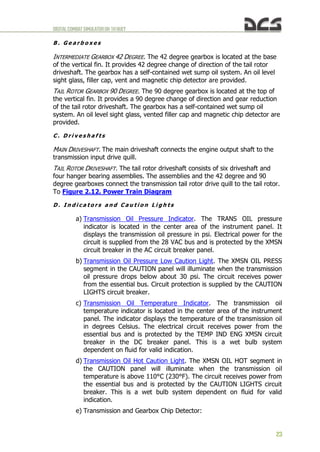
  • 27.
  • 28.
  • 29.
    DIGITALCOMBATSIMULATORUH-1HHUEY 27 Figure 3.2. HelicopterControls 3. HELICOPTERAERODYNAMICS 3.1.1. The Forces That Act On a Helicopter Weight (G) and drag (Q) act on a helicopter as they do on any aircraft; however, lift (Ty) and thrust (Tx) for a helicopter are obtained from the main rotor (Trotor). In a very basic sense, the helicopter's main rotor does what wings and a propeller do for a fixed-wing aircraft. Moreover, by tilting the main rotor, the pilot can make the helicopter fly to either side, forward, or backwards. Figure 3.1. Forces Acting on a Helicopter 3.1.2. Controls The sketch in Figure 3.2 shows the main rotor, cyclic and collectives, anti-torque pedals, and anti-torque rotor. Basically, the cyclic control is a mechanical linkage used to change the pitch of the main rotor blades. Pitch change is accomplished at a specific point in the plane of rotation to tilt the main rotor disc. Most current military helicopters now have hydraulic assistance
  • 30.
    DIGITALCOMBATSIMULATORUH-1HHUEY 28 in addition tothe mechanical linkages. The collective changes the pitch of all the main rotor blades equally and simultaneously. The anti-torque pedals are used to adjust the pitch in the anti-torque rotor blades to compensate for main rotor torque. 3.1.3. Velocity A helicopter's main rotor blades must move through the air at a relatively high speed in order to produce enough lift to raise the helicopter and keep it in the air. When the main rotor reaches required takeoff speed and generates a great deal of torque, the anti-torque rotor can negate fuselage rotation. The helicopter can fly forward, backward, and sideways according to pilot control inputs. It can also remain stationary in the air (hover) with the main rotor blades developing enough lift to hover the helicopter. 3.1.4. Torque The torque problem is related to a helicopter's single-main-rotor design. The reason for this is that the helicopter's main rotor turns in one direction while the fuselage wants to turn in the opposite direction. This effect is based on Newton's third law that states "To every action there is an opposite and equal reaction." The torque problem on single-rotor helicopters is counteracted and controlled by an anti-torque (tail) rotor. On coaxial helicopters, the main rotors turn in opposite directions and thereby eliminate the torque effect. 3.1.5. Anti-torque Rotor Figure 3.3 shows the direction of travel of the main rotor, the direction of torque of the fuselage, and the location of the anti-torque (tail) rotor. An anti-torque rotor located on the end of a tail boom provides torque compensation for single-main-rotor helicopters. The tail rotor, driven by the engine at a constant speed, produces thrust in a horizontal plane opposite to the torque reaction developed by the main rotor. Figure 3.3. Tail rotor and thrust Figure 3.3. Tail Rotor Thrust to Compensate for Torque Direction that the main rotor turns Direction of torque Tail rotor thrust to compensate for torque
  • 31.
    DIGITALCOMBATSIMULATORUH-1HHUEY 29 3.1.6. Gyroscopic Precession Theresult of applying force against a rotating body occurs at 90° in the direction of rotation from where the force is applied. This effect is called gyroscopic precession and it is illustrated in Figure 3.4. For example: if a downward force is applied at the 9 o'clock position in the diagram, then the result appears at the 6 o'clock position as shown. This will result in the 12 o'clock position tilting up an equal amount in the opposite direction. Figure 3.5 illustrates the offset control linkage needed to tilt the main rotor disc in the direction the pilot inputs with the cyclic. If such a linkage were not used, the pilot would have to move the cyclic 90° to the right of the desired direction. The offset control linkage is attached to a lever extending 90° in the direction of rotation from the main rotor blade. Figure 3.5. Offset Control Linkage 3.1.7. Dissymmetry of Lift The area within the circle made by the rotating blade tips of a helicopter is known as the disc area or rotor disc. When hovering in still air, lift generated by the rotor blades is equal within all parts of the disc. Dissymmetry of lift is the difference in lift that exists between the advancing half of the disc and the retreating half; this is created by horizontal flight and/or wind. When a helicopter is hovering in still air, the tip speed of the advancing blade is approximately 600 feet per second (~ 183 m/s) and the tip speed of the retreating blade is the same. Dissymmetry of lift is created by the movement of the helicopter in forward flight. The advancing blade has the combination of blade speed velocity and that of the helicopter's forward airspeed. The retreating blade however loses speed in proportion to the forward speed of the helicopter. Figure 3.6 illustrates dissymmetry of lift and shows the arithmetic involved in calculating the differences between the velocities of the advancing and retreating blades. In the figure, the helicopter is moving forward at a speed of 50 m/s, the velocity of the rotor disc is equal to approximately 180 m/s, and the Figure 3.4. Gyroscopic Precession Force applied here becomes manifest here Direction of rotation 90° ahead in the cycle of rotation of force applied here cyclic pitch change here
  • 32.
    DIGITALCOMBATSIMULATORUH-1HHUEY 30 advancing blade speedis 230 m/s. The speed of the retreating blade is 130 m/s. This speed is obtained by subtracting the speed of the helicopter (50 m/s) from the tip speed of 180 m/s. As can be seen from the difference between the advancing and retreating blade velocities, a large speed and lift variation exists. Cyclic pitch control, a design feature that permits changes in the angle of attack during each revolution of the rotor, compensates for the dissymmetry of lift. As the forward speed of the helicopter is increased, the pilot must apply more and more cyclic to hold a given rotor disc attitude. The mechanical addition of more pitch to the retreating blade and less to the advancing blade is continued throughout the helicopter's range. 3.1.8. Retreating Blade Stall Figure 3.7 illustrates the tendency of a helicopter's retreating blades to stall in forward flight. This is a major factor in limiting a helicopter's maximum forward airspeed. Just as the stall of a fixed wing aircraft wing limits the low-airspeed flight envelope, the stall of a rotor blade limits the high-speed potential of a helicopter. The airspeed of a retreating blade slows down as forward airspeed is increased. The retreating blade must produce an amount of lift equal to that of the advancing blade, as shown in Figure 3.8. As the airspeed of the retreating blade is decreased with forward airspeed, the blade angle of attack must be increased to equalize lift throughout the rotor disc area. As this angle of attack is increased, the blade will eventually stall at some high, forward airspeed as shown in Figure 3.9. Figure 3.6. Dissymmetry of Lift. (ROTATIONAL VELOCITY) ± (HEL FORWARD SPEED) = (AIRSPEED OF BLADE). Retreating blade: 180-50=130 m/sec Advancing blade: 180+50=230 m/sec Helicopter forward speed: 50 m/sec 130 230 50 180 180 Airflow
  • 33.
    DIGITALCOMBATSIMULATORUH-1HHUEY 31 Upon entry intoa retreating blade stall, the first noticeable effect is vibration of the helicopter. This vibration is followed by the helicopter's nose lifting with a rolling tendency. If the cyclic is held forward and the collective is not reduced, the stall will become aggravated and the vibration will increase greatly. Soon thereafter, the helicopter may become uncontrollable. 3.1.9. Settling With Power (Vortex Ring State) Settling with power is a condition of powered flight when the helicopter settles into its own main rotor downwash; this is also known as Vortex Ring State. Conditions conducive to settling with power include a vertical, or nearly vertical, descent of at least 300 feet per minute with low forward airspeed. The rotor system must also be using some of the available engine power (from 20 to 100%) with insufficient power available to retard the sink rate. These conditions occur during approaches with a tailwind or during formation approaches when some aircraft are flying in the downwash of other aircraft. Under the conditions described above, the helicopter may descend at a high rate that exceeds the normal downward induced flow rate of the inner blade Figure 3.7. Hovering Lift Pattern No lift area blade root area Figure 3.8. Normal Cruise Lift Pattern Reverse flow area No lift areas increase with speed The lift of this small area with high angles of attack The lift of this large area with low angles of attack MUST EQUAL Figure 3.9. Lift Pattern at Critical Airspeed 1. Tip stall causes vibration and buffeting at critical airspeeds 2. If blade descends, it causes greater angles of attack and stall spreads inboard 3. Helicopter pitches up and rolls left Correction for stall: - Reduce collective pitch - Neutralize cyclic - Slow airspeed - Increase RPM
  • 34.
    DIGITALCOMBATSIMULATORUH-1HHUEY 32 sections. As aresult, the airflow of the inner blade sections is upward relative to the disk. This produces a secondary vortex ring in addition to the normal tip vortex. The secondary vortex ring is generated at about the point on the blade where airflow changes from up to down. The result is an unsteady turbulent flow over a large area of the disk that causes loss of rotor efficiency, even though power is still applied. This graphic shows induced flow along the blade span during normal hovering flight: The downward velocity is highest at the blade tip where blade airspeed is highest. As blade airspeed decreases towards the center of the disk, downward velocity is less. Figure 3.11 shows the induced airflow velocity pattern along the blade span during a descent conducive to settling with power: The descent is so rapid that induced flow at the inner portion of the blades is upward rather than downward. The upward flow caused by the descent can overcome the downward flow produced by blade rotation. If the helicopter descends under these conditions, with insufficient power to slow or stop the descent, it will enter a vortex ring state: During a vortex ring state, roughness and loss of control is experienced because of the turbulent rotational flow on the blades and the unsteady shifting of the flow along the blade span. Power settling is an unstable condition, and if allowed to continue, the sink rate will reach sufficient proportions for the flow to be entirely up through the rotors. This can result in very high descent rates. Recovery may be initiated during the Figure 3.10. Induced Flow Velocity During Hovering Flight Figure 3.11. Induced Flow Velocity During Vortex Ring State Figure 3.12. Vortex Ring State
  • 35.
    DIGITALCOMBATSIMULATORUH-1HHUEY 33 early stages ofpower settling by putting on a large amount of excess power. This excess power may be sufficient to overcome the upward flow near the center of the rotor disc. If the sink rate reaches a higher rate, power will not be available to break this upward flow and thus alter the vortex ring state of flow. Normal tendency is for pilots to recover from a descent by application of collective pitch and power. If insufficient power is available for recovery, this action may aggravate power settling and result in more turbulence and a higher rate of descent. Recovery can be accomplished by lowering collective pitch and increasing forward speed (pushing the cyclic forward). Both of these methods of recovery require sufficient altitude to be successful. 3.1.10. Hovering A helicopter hovers when it maintains a constant position over a point on the ground, usually a few feet above the ground. To hover, a helicopter's main rotor must supply lift equal to the total weight of the helicopter, including crew, fuel, and if applicable, passengers, cargo, and armaments. The necessary lift is generated by rotating the blades at high velocity and increasing the blade angle of attack. When hovering, the rotor system requires a large volume of air upon which to work. This air must be pulled from the surrounding air mass; this is an expensive maneuver that takes a great deal of engine horsepower. The air delivered through the rotating blades is pulled from above at a relatively high velocity, forcing the rotor system to work in a descending column of air. The main rotor vortex and the recirculation of turbulent air add resistance to the helicopter while hovering. Such an undesirable air supply requires higher blade angles of attack and an expenditure of more engine power and fuel. Additionally, the main rotor is often operating in air filled with abrasive materials that cause heavy wear on helicopter parts while hovering in the ground effect. 3.1.11. Ground Effect Ground effect is a condition of improved performance found when hovering near the ground. The best height is approximately one-half the main rotor diameter. Figure 3.13 shows "out of ground effect" and 3.14 shows "in ground effect". The improved lift and airfoil efficiency while operating in ground effect is due to the following effects: Figure 3.13. Airflow When Out of Ground Effect
  • 36.
    DIGITALCOMBATSIMULATORUH-1HHUEY 34 First, and mostimportantly, the main rotor-tip vortex is reduced. When operating in the ground effect, the downward and outward airflow reduces the vortex. A vortex is an airflow rotating around an axis or center. This makes the outward portion of the main rotor blade more efficient. Reducing the vortex also reduces the turbulence caused by recirculation of the vortex. Second, the airflow angle is reduced as it leaves the airfoil. When the airfoil angle is reduced, the resultant lift is rotated slightly forward; this makes the angle more vertical. Reduction of induced drag permits lower angles of attack for the same amount of lift and it reduces the power required to rotate the blades. 3.1.12. Translational Lift The efficiency of the hovering rotor system is improved by each knot of incoming wind gained by forward motion of the helicopter or by a surface headwind. As the helicopter moves forward, fresh air enters in an amount sufficient to relieve the hovering air-supply problem and improve performance. At approximately 40 km/h, the rotor system receives enough free, undisturbed air to eliminate the air supply problem. At this time, lift noticeably improves. This distinct change is referred to as translational lift. At the instant of translational lift, and as the hovering air supply pattern is broken, dissymmetry of lift is created. As airspeed increases, translational lift continues to improve up to the speed that is used for best climb. In forward flight, air passing through the rear portion of the rotor disc has a higher downwash velocity than the air passing through the forward portion. This is known as transverse flow effect and is illustrated in figure 3.15. This effect, in combination with gyroscopic precession, causes the rotor to tilt Figure 3.14. Airflow When In Ground Effect Increased pressure zone Reduced rotor tip vortex Figure 3.15. Translational lift
  • 37.
    DIGITALCOMBATSIMULATORUH-1HHUEY 35 sideward and resultsin vibration that is most noticeable on entry into effective translation. 3.1.13. Autorotation If engine power fails, or other emergencies occur, autorotation is a means of safely landing a helicopter. The transmission in a helicopter is designed to allow the main rotor to turn freely in its original direction when the engine stops. Figure 3.16 illustrates how the helicopter is allowed to glide to earth and by using the main rotor rpm, make a soft landing. The rotor blade autorotative driving region is the portion of the blade between 25 to 70 percent radius, as shown in Figure 3.17, blade element B. Because this region operates at a comparatively high angle of attack, the result is a slight but important forward inclination of aerodynamic forces. This inclination supplies thrust slightly ahead of the rotating axis and tends to speed up this portion of the blade during autorotation. The blade area outboard of the 70 percent circle is known as the propeller or driven region. Analysis of blade element A: the aerodynamic force inclines slightly behind the rotating axis. This inclination causes a small drag force that tends to slow the tip portion of the blade. Rotor rpm stabilizes, or achieves equilibrium, when autorotative force and antiautorotative force are equal. The blade area inboard of the 25% circle is known as the stall region because it operates above its maximum angle of attack. This region contributes considerable drag that tends to slow the blade. Figure 3.16. Approach to Landing, Power Off 3. COLLECTIVE PITCH CONTROL – Adjust to maintain required autorotational RPM 4. FLARE – Execute flare as necessary to reduce forward speed and land in a near level attitude. 1. COLLECTIVE PITCH CONTROL – Reduce as required to establish autorotational RPM 2. AUTOROTATIVE GLIDE – Establish at an IAS to 120-140 km/h (65-77 knots) for normal rate of descent. Greater IAS up to 170 km/h (95 knots) will extend the gliding distance. Figure 3.17. The Rotor Blade Autorotative Regions Driven region Driving region Stall region
  • 38.
    DIGITALCOMBATSIMULATORUH-1HHUEY 36 All helicopters carryan operator's manual that has an airspeed versus altitude chart similar to the one shown in Figure 3.19. The shaded areas on this chart must be avoided. This area is referred to as the "dead man's curve" and "avoid curve". The proper maneuvers for a safe landing during engine failure cannot be accomplished in these areas. 3.1.14. Summary Weight, lift, thrust, and drag are the four forces acting on a helicopter. The cyclic for directional control, the collective pitch for altitude control, and the anti-torque pedals to compensate for main rotor torque are the three main controls used in a helicopter. Torque is an inherent problem with single-main-rotor helicopters. Gyroscopic precession occurs at approximately 90° in the direction of rotation from the point where the force is applied. Dissymmetry of lift is the difference in lift that exists between the advancing and retreating halves of the rotor disc. Settling with power can occur when the main rotor system is using from 20 to 100 percent of the available engine power, and the horizontal velocity is under 10 knots. At a hover, the rotor system requires a great volume of air upon Figure 3.18. Autorotation Blade Forces Axis of Rotation In driving or autorotative area In driven or propeller area а а VTA VTA Rate of descent Rate of descent Resultant Resultant Autorotative force Anti-autorotative force Figure 3.19. Height-Velocity Diagram Speed [km/h] Height [m] NOTE Avoid continuous operation in indicated areas. however, if the aircraft is operated in the indicated areas, emergency procedures relating to engine failures – low altitude, low airspeed should be observed.
  • 39.
    DIGITALCOMBATSIMULATORUH-1HHUEY 37 which to generatelift. This air must be pulled from the surrounding air mass. This is a costly maneuver that takes a great amount of engine power. Ground effect provides improved performance when hovering near the ground at a height of no more than approximately one-half the main rotor diameter. Translational lift is achieved at approximately 18 knots, and the rotor system receives enough free, undisturbed air to improve performance. At the instant translational lift is in effect and the hovering air-supply pattern is broken, dissymmetry of lift is created. Autorotation is a means of safely landing a helicopter after engine failure or other emergencies. A helicopter transmission is designed to allow the main rotor to turn freely in its original direction if the engine fails.
  • 40.
  • 41.
    DIGITALCOMBATSIMULATORUH-1HHUEY 39 4. FLIGHTCONTROLSYSTEM The flightcontrol system is a hydraulically-assisted positive mechanical type, actuated by conventional helicopter controls. Complete controls are provided for both pilot and copilot. The system includes a cyclic system, collective control system, tail rotor system, force trim system, synchronized elevator, and a stabilizer bar. 4.1. Cyclic Control System The system is operated by movement of the cyclic control stick (Figure 4.1). 1. Force trim switch 2. Radio ICS switch 3. Armament fire control switch 4. Cargo release switch 5. Hoist switch Figure 4.1. Cyclic Control stick. Moving the stick in any direction will produce a corresponding movement of the helicopter which is a result of a change in the plane of rotation of the main rotor. The pilot cyclic contains the force trim switch, radio ICS switch, armament fire control switch, cargo release switch and the hoist switch. Desired operating friction can be induced into the control stick by hand tightening the friction adjuster. A. SYNCHRONIZED ELEVATOR. The synchronized elevator is located on the tail boom. It is connected by control tubes and mechanical linkage to the fore-and- aft cyclic system. Fore-and-aft movement of the cyclic control stick will produce a change in the synchronized elevator attitude. This improves controllability within the center of gravity (cg) range (Figure 4.2..Figure 4.4). Cyclic
  • 42.
    DIGITALCOMBATSIMULATORUH-1HHUEY 40 Figure 4.2. Positionof the synchronized elevator when cyclic is fully forward (angle +5.40 degrees regarding the construction line of helicopter). Figure 4.3. Position of the synchronized elevator when cyclic is neutral (angle -4.70 degrees). Figure 4.4. Position of the synchronized elevator when cyclic is fully back (angle +1.28 degrees). Position of the synchronized elevator with respect to the longitudinal axis of the fuselage: Cyclic Position Angle mm rad degree -163,8 (fully back) 0,0224 1,28 -152,5 0,0174 1,00 -127,0 0,0 0,00 -101,6 - 0,0192 -1,10 -76,2 - 0,0384 -2,20 -50,8 - 0,0541 -3,10 -25,4 -0,069 -3,95 0,0 - 0,0820 -4,70 25,4 - 0,0850 -4,87 50,8 - 0,0803 -4,60 76,2 - 0,0628 -3,60 101,6 -0,03 -1,72 127,0 0,0035 0,20 152,5 0,0593 3,40 163,8 (fully forward) 0,0942 5,40 B. STABILIZER BAR. The stabilizer bar is mounted on the main rotor hub trunnion assembly in a parallel plane, above and at 90 degrees to the main rotor blades (Figure 4.5).
  • 43.
    DIGITALCOMBATSIMULATORUH-1HHUEY 41 Figure 4.5. Stabilizerbar. The gyroscopic and inertial effect of the stabilizer bar will produce a damping force in the rotor rotating control system and thus the rotor. When an angular displacement of the helicopter/mast occurs, the bar tends to remain in its trim plane. The rate at which the bar rotational plane tends to return to a position perpendicular to the mast is controlled by the hydraulic dampers. By adjusting the dampers, positive dynamic stability can be achieved, and still allow the pilot complete responsive control of the helicopter. 4.2. Collective Control System The collective pitch control lever controls vertical flight (Figure 4.6). 1. Searchlight switch 2. Governor RPM switch 3. Throttle friction adjuster 4. Throttle 5. Landing light ON/OFF switch 6. Landing light extend/retract switch 7. Engine idle stop release pushbutton switch Figure 4.6. Collective Control stick. The amount of lever movement determines the angle of attack and lift developed by the main rotor, and results in ascent or descent of the helicopter: When the lever is in the full down position, the main rotor is at minimum pitch. When the lever is in the full up position, the main rotor is at maximum pitch. Desired operating friction can be induced into the control lever by hand- tightening the friction adjuster. A grip-type throttle and a switch box assembly
  • 44.
    DIGITALCOMBATSIMULATORUH-1HHUEY 42 are located onthe upper end of the collective pitch control lever. The pilot switch box contains the starter switch, governor rpm switch, engine idle stop release switch, and landing light/searchlight switches. A collective lever down lock is located on the floor below the collective lever. The copilot collective lever contains only the grip-type throttle, governor rpm switch, and starter switch when installed. The collective pitch control system has built-in breakaway (friction) force to move the stick up from the neutral (center of travel) position of eight to ten pounds with hydraulic boost ON. 4.3. Tail Rotor Control System The tail rotor control system is operated by pilot/copilot anti-torque pedals. Pushing a pedal will change the pitch of the tail rotor blades, resulting in directional control. Pedal adjusters are provided to adjust the pedal distance for individual comfort. A force trim system is connected to the directional controls. Figure 4.7. Anti-torque pedals. 4.4. Force Trim System Force centering devices are incorporated in the cyclic controls and directional pedal controls. These devices are installed between the cyclic stick and the hydraulic servo cylinders, and between the anti-torque pedals and the hydraulic servo cylinder. The devices furnish a force gradient or "feel" to the cyclic control stick and anti-torque pedals. A FORCE TRIM ON/OFF switch is installed on the miscellaneous control panel to turn the system on or off.
  • 45.
    DIGITALCOMBATSIMULATORUH-1HHUEY 43 Figure 4.8. FORCETRIM ON/OFF switch. These forces can be reduced to zero by pressing and holding the force trim push-button switch on the cyclic stick grip (Figure 4.9) or moving the force trim switch to OFF. Figure 4.9. Force trim push-button switch on the cyclic stick grip.
  • 46.
  • 47.
  • 48.
  • 49.
    DIGITALCOMBATSIMULATORUH-1HHUEY 47 Figure 5.1. UH-1Hinstrument panel description. 5.1.1. Master Caution System a) Master Caution Indicator. The master caution indicator light on the instrument panel will illuminate when fault conditions occur. This illumination alerts the pilot and copilot to check the caution panel for the specific fault condition. b) Caution panel. The CAUTION panel is located on the pilot side of the pedestal (Figure 5.2). Worded segments illuminate to identify specific fault conditions. The worded segments are readable only when the light illuminates. When a light illuminates, flickers or full illumination, it indicates a fault condition. Refer to Caution Lights Panel for explanation of the fault conditions. 1. Glareshield 2. Secondary lights 3. Master caution 4. RPM warning light 5. Fire detector test switch 6. Fire warning indicator light 7. Fuel gauge test switch 8. Airspeed indicator 9. Attitude indicator 10. Dual tachometer 11. Altimeter indicator (AAU-31/A) 12. Attitude indicator 13. Radio compass indicator 14. Altimeter indicator (AAU-32/A) 15. Vertical velocity indicator 16. Compass correction card holder 17. Fuel pressure indicator 18. IFF code hold switch 19. IFF code hold light 20. Transmission oil pressure indicator 21. Main generator loadmeter 22. Standby generator loadmeter 23. Engine oil pressure indicator 24. AC voltmeter 25. Compass slaving switch 26. DC voltmeter 27. Transmission oil temperature indicator 28. Engine oil temperature 29. Fuel quantity indicator 30. Exhaust gas temperature indicator 31. Gas producer tachometer indicator 32. Turn and slip indicator 33. Torquemeter indicator 34. Marker beacon volume control 35. Marker beacon Sensing Switch 36. Cargo release armed light 37. Clock 38. Marker beacon light 39. Course deviation indicator 40. Magnetic compass 41. Radio compass indicator 42. Vertical velocity indicator 43. Radar altimeter
  • 50.
    DIGITALCOMBATSIMULATORUH-1HHUEY 48 Figure 5.2. CAUTIONpanel location. c) Electrical Power. Electric power for the master caution system is supplied from the essential bus. Circuit protection is provided by the CAUTION LIGHTS circuit breakers. 5.1.2. RPM High-Low Limit Warning System (4, Figure 5.1) The rpm high-low limit warning system provides the pilot with an immediate warning of high and low rotor or engine rpm. Main components of the system are a detector unit, warning light and audio signal circuit, low RPM AUDIO/OFF switch, and electrical wiring and connectors. The warning light and audio warning signal systems are activated when any one of the following rpm conditions exist: a) Warning light only: (1) For rotor rpm of 329-339 (High Warning). (2) For rotor rpm of 300-310 (Low Warning). (3) For engine rpm of 6100-6300 (Low Warning). (4) Loss of signal (circuit failure) from either rotor tachometer generator or power turbine tachometer generator. b) Warning light and audio warning signal combination:
  • 51.
    DIGITALCOMBATSIMULATORUH-1HHUEY 49 (1) For rotorrpm of 300-310 and engine rpm of 6100-6300 (Low Warning). (2) Loss of signal (circuit failure) from both rotor tachometer generator and power turbine tachometer generator. c) Rotor Tachometer Generator and Power Turbine Tachometer Generator. The rotor tachometer generator and power turbine tachometer generator both send signals to the high-low rpm warning light and audio warning circuits. When only the warning light is energized, determine the cause of indication by checking the torquemeter and cross referencing other engine instruments. A normal indication signifies that the engine is functioning properly and that there is a tachometer generator failure or an open circuit to the warning system rather than an actual engine failure. Electrical power for system operation is supplied by the 28 VDC essential bus. d) High-Low Limit RPM Warning Light. The high-low warning light is located on the instrument panel. This light illuminates to provide a visual warning of low rotor rpm, low engine rpm or high rotor rpm. e) LOW RPM AUDIO/OFF Switch. The LOW RPM AUDIO/OFF switch is on the engine control panel. When in the OFF position, the switch prevents the audio warning signal from functioning during engine starting. Current production helicopters use a spring-loaded switch. When the switch has been manually turned off for engine starting, it will automatically return to the AUDIO position when normal operating range is reached. 5.1.3. Fire Detector Warning System (5, 6, Figure 5.1). A FIRE warning light is located in the upper right section of the instrument panel. The FIRE DETECTOR TEST switch (press to test) is located to the left of the fire warning light. Excessive heat in the engine compartment causes the FIRE light to illuminate. Pressing the press-to-test switch also causes the light to illuminate. Electric power for the circuit is supplied from the 28 VDC essential bus and is protected by the FIRE DET circuit breaker. Back to instrument panel
  • 52.
    DIGITALCOMBATSIMULATORUH-1HHUEY 50 5.1.4. Airspeed indicator(8, Figure 5.1) The pilot and copilot airspeed indicators display indicated airspeed (IAS) in knots. The gauge is graduated from 0 to 150 knots in either 5 or 10 knot increments depending on the airspeed. The indicator is red lined at 124 knots. Note. Indicated airspeeds are unreliable below 20 knots due to rotor downwash 5.1.5. Attitude Indicators (9, 12, Figure 5.1) Figure 5.3. Attitude Indicator (AI) copilot (left) and pilot (right). The Attitude Indicator (AI) provides your primary instrument indication of aircraft pitch, roll and yaw in relation to an artificial horizon represented on a sphere. Back to instrument panel A . C o p i l o t A t t i t u d e I n d i c a t o r The copilot attitude indicator is located in the copilot section of the instrument panel. It is operated by 115 VAC power supplied by the inverter. Circuit protection is provided by the COPILOT ATTD circuit breakers in the AC circuit breaker panel. In a climb or dive exceeding 27 degrees of pitch, the horizontal bar will stop at the top or bottom of the case and the sphere then becomes the
  • 53.
    DIGITALCOMBATSIMULATORUH-1HHUEY 51 reference. The copilotattitude indicator may be caged manually by pulling the PULL TO CAGE knob smoothly away from the face of the instrument to the limit of its travel and then releasing quickly. Note. The copilot attitude indicator shall be caged only in a straight and level attitude. The caging knob shall never be pulled violently. B . P i l o t A t t i t u d e I n d i c a t o r . The pilot attitude indicator is located on the pilot section of the instrument panel. The indicator displays the pitch and roll attitude of the helicopter. An OFF warning flag in the indicator is exposed when electrical power to the system is removed. However, the OFF flag will not indicate internal system failure. The attitude indicator has an electrical trim in the roll axis in addition to the standard pitch trim. The attitude indicator is operated by 115 VAC power, supplied by the inverter. Circuit protection is provided by the PILOT ATTD circuit breakers in the AC circuit breaker panel. 5.1.6. Dual tachometer (10, Figure 5.1) The dual tachometer is located in the center area of the instrument panel and indicates both the engine and main rotor rpm. The tachometer inner scale (2) is marked ROTOR and the outer scale (1) is marked ENGINE. Synchronization of the ENGINE and ROTOR needles indicates normal operation of helicopter. The indicator receives power from the tachometer generators mounted on the engine and transmission. Connection to the helicopter electrical system is not required. Back to instrument panel Back to Engine Instrument and Indicators 11. Revolutions of power turbine (outer scale, x100) 22. Revolutions of main rotor (inner scale, x10)
  • 54.
    DIGITALCOMBATSIMULATORUH-1HHUEY 52 5.1.7. Altimeter Indicator(AAU-31/A)(11, Figure 5.1) A . D e s c r i p t i o n The AAU-31/A pneumatic counter-drum-pointer altimeter is a precision pressure altimeter. Pressure altitude is displayed by a 100-foot drum and a single pointer indicating hundreds of feet on a circular scale, with 50' center markings. Below an altitude of 10,000 feet, a diagonal warning symbol will appear on the 10,000-foot counter. A barometric pressure setting knob is provided to set the desired altimeter setting in inches of Mercury (inHg). A DC powered vibrator operates inside the altimeter whenever aircraft power is on. B . N o r m a l o p e r a t i o n The altimeter indicates pneumatic altitude reference to the barometric pressure level as selected by the pilot. A vibrator, powered by the DC essential bus, is contained in the altimeter and requires a minimum of one minute warmup prior to checking or setting the altimeter. C . A b n o r m a l o p e r a t i o n If the altimeter's internal vibrator becomes inoperative due to internal failure or DC power failure, the pointer and drum may momentarily hang up when passing from "9" through "0" (climbing) or from "0" through "9" (descending). This hang-up will cause lag, the magnitude of which will depend on the vertical velocity of the aircraft and the friction in the altimeter. Pilots should be especially watchful for this type of failure when the minimum approach altitude lies within the "8" – "1" part of the scale (800-1100, 1800-2100, etc.). Back to instrument panel 5.1.8. Radio compass indicator (copilot) (12, Figure 5.1) The copilot's Radio Compass Indicator is a repeater of the pilot's indicator, described below.
  • 55.
    DIGITALCOMBATSIMULATORUH-1HHUEY 53 5.1.9. Radio CompassIndicator (41, Figure 5.1) A . D e s c r i p t i o n A radio magnetic indicator is installed in the pilot instrument panel. A second radio magnetic indicator (not shown) is installed in the copilot's instrument panel. The copilot indicator is a repeater type instrument similar to the pilot indicator except that it has no control knobs. The moving compass card on both indicators displays the gyromagnetic compass heading. The number 1 pointer on the indicators indicate the bearing to the NDB or course to the VOR station. The number 2 pointer indicates the VOR course to the station. B . O p e r a t i o n (1) INV switch – MAIN or STBY. (2) Radio magnetic indicator (pilot only) – Check power failure indicator is not in view. SLAVED GYRO MODE. (3) COMPASS switch – MAG (see 5.1.19). (4) Synchronizing knob – Center (Null) annunciatior. (5) Magnetic heading – Check. FREE GYRO MODE. (6) COMPASS switch – DG (see 5.1.19). (7) Synchronizing knob – Set heading. (8) Annunciator – Center position and then does not change (Annunciator is de-energized in the free gyro (DG) mode). C . I n f l i g h t o p e r a t i o n . Set the COMPASS switch to MAG or DG as desired for magnetically slaved or free gyro mode of operation. Free gyro (DG) mode is recommended when flying in latitudes higher than 70 degrees. Back to instrument panel When operated in the slaved (MAG) mode, the system will remain synchronized during normal flight maneuvers. During violent maneuvers the system may become unsynchronized, as indicated by the annunciator moving off center. The system will slowly remove all errors in synchronization, however, if fast
  • 56.
    DIGITALCOMBATSIMULATORUH-1HHUEY 54 synchronization is desired,turn the synchronizing knob in the direction indicated by the annunciator until the annunciator is centered again. When operating in the free gyro (DG) mode, periodically update the heading to a known reference by rotating the synchronizing knob. Back to instrument panel 5.1.10. Altimeter indicator (AAU-32/A) (14, Figure 5.1) A . D e s c r i p t i o n The AAU-32/A pneumatic counter-drum-pointer altimeter is a self-contained unit which consists of a precision pressure altimeter combined with an altitude encoder. The display indicates and the encoder transmits. Simultaneously, pressure altitude is displayed on the altimeter by a 10,000-foot counter, a 1,000-foot counter and a 100-foot drum. A single pointer indicates hundreds of feet on a circular scale, with 50-foot center markings. Below an altitude of 10,000 feet, a diagonal warning system will appear on the 10,000-foot counter. A barometric pressure setting knob is provided to set the desired altimeter setting in inches of Mercury (inHg). B . N o r m a l O p e r a t i o n The AIMS altimeter circuit breaker should be closed prior to flight. The AAU- 32/A altimeter indicates pneumatic altitude reference to the barometric pressure level as selected by the pilot. At ambient pressure, altimeters should agree with ±70 feet of the field elevation when the proper barometric pressure setting is set in the altimeter. A red flag marked CODE OFF is located in the upper left portion of the altimeters face. In order to supply Mode C information to the IFF transponder, the CODE OFF flag must not be visible. A vibrator, powered by the DC essential bus, is contained in the altimeter and requires a minimum of one minute warm-up prior to checking or setting the altimeter. C . A b n o r m a l O p e r a t i o n If the altimeter's internal vibrator becomes inoperative due to internal failure or DC power failure, the pointer and drum may momentarily hang up when passing from "9" through "0" (climbing) or from "0" through "9" (descending). This hang-up will cause lag, the magnitude of which will depend on the vertical velocity of the aircraft and the friction in the altimeter. Pilots should be
  • 57.
    DIGITALCOMBATSIMULATORUH-1HHUEY 55 especially watchful forthis type failure when the minimum approach altitude lies within the "8" – "1" part of the scale (800-1100, 1800-2100, etc). If the CODE OFF flag is visible, the DC power is not available, the circuit breaker is not in, or there is an internal altimeter encoder failure. It the altimeter indicator does not correspond within 70 feet of the field elevation (with proper local barometric setting) the altimeter needs rezeroing or there has been an internal failure. If the baroset knob binds or sticks, abnormal force should not be used to make the setting as this may cause internal gear failure resulting in altitude errors. Settings can sometimes be made by backing off and turning at a slower rate. Back to instrument panel 5.1.11. Vertical velocity indicator (15, 42, Figure 5.1) The VVI displays rate of climb or descent in increments of feet per minute. The scale is in increments of 1000 feet per min. Back to instrument panel 5.1.12. Fuel Pressure Indicator (17, Figure 5.1) Reading of the instrument: 5 to 35 PSI normal.
  • 58.
    DIGITALCOMBATSIMULATORUH-1HHUEY 56 The Fuel Pressureindicator displays the pounds per square inch (PSI) pressure of the fuel being delivered by the boost pumps from the fuel cells to the engine. The indicator is graduated from 0 to 50 PSI in single PSI increments. The circuit receives power from the 28 VAC bus and is protected by the FUEL PRESSURE circuit breaker in the AC circuit breaker panel. 5.1.13. IFF code hold switch Not implemented in DCS: UH-1H Huey. 5.1.14. IFF code hold light Not implemented in DCS: UH-1H Huey. 5.1.15. Transmission oil pressure (20, Figure 5.1) Reading of the instrument: 30 PSI minimum, 40-60 PSI continuous, 70 PSI maximum. The TRANS OIL pressure indicator is located in the center area of the instrument panel. It displays the transmission oil pressure in pounds per square inch (PSI). Electrical power for the circuit is supplied from the 28 VAC bus and is protected by the XMSN circuit breaker in the AC circuit breaker panel. Back to instrument panel 5.1.16. DC Loadmeters (Main and Standby) (21, 22, Figure 5.1) Two direct current loadmeters are mounted in the lower center area of the instrument panel. The MAIN GEN loadmeter indicates the percentage of main generator rated capacity being used. The STBY GEN loadmeter indicates the
  • 59.
    DIGITALCOMBATSIMULATORUH-1HHUEY 57 percentage of standbygenerator rated capacity being used. The loadmeters will not indicate percentage when the generators are not operating. Reading of the instrument: Main generator 1.0 to 1.25 transient, standby generator 1.0 maximum (red). 5.1.17. Engine oil pressure indicator (23, Figure 5.1) Back to Engine Instrument and Indicators The Engine Oil Pressure indicator is located in the center area of the instrument panel and is marked OIL PRESS. The indicator receives pressure indications from the engine oil pressure transmitter and provides readings in pounds per square inch (PSI). The circuit receives electrical power from the 28 VAC bus and circuit protection is provided by the ENG circuit breaker in the AC circuit breaker panel. Reading of the instrument: 25 PSI minimum – engine idle (red), 80 to 100 PSI normal (green), 100 PSI maximum (red). 5.1.18. AC voltmeter (24, Figure 5.1) Back to instrument panel The AC voltmeter is mounted on the center area of the instrument panel. The AC voltage output from the inverter (main or spare) is indicated on this instrument. The voltage indicated on any of the three selected positions should be 112 to 118 VAC. 5.1.19. Compass slaving switch (25, Figure 5.1) COMPASS switch – DG / MAG: DG – providing Free gyro mode, MAG – providing Slaved gyro mode.
  • 60.
    DIGITALCOMBATSIMULATORUH-1HHUEY 58 5.1.20. DC voltmeter(26, Figure 5.1) The DC voltmeter is located in the center area of the instrument panel and is labeled VOLT DC. Direct current voltage is indicated on the voltmeter as selected by the VM switch in the overhead console. 5.1.21. Transmission oil temperature indicator (27, Figure 5.1) Transmission oil temperature: maximum 110°C. The transmission oil temperature indicator is located in the center area of the instrument panel. The indicator displays the temperature of the transmission oil in degrees Celsius. The electrical circuit receives power from the essential bus and is protected by the TEMP IND ENG & XMSN circuit breaker in the DC circuit breaker panel. This is a wet bulb system dependent on fluid for valid indication. Back to instrument panel (see 5.1.9)
  • 61.
    DIGITALCOMBATSIMULATORUH-1HHUEY 59 5.1.22. Engine oiltemperature (28, Figure 5.1) Back to Engine Instrument and Indicators The Engine Oil Temperature indicator is located in the center area of the instrument panel and is marked ENGINE OIL. The temperature of the engine oil at the engine oil inlet is indicated in degrees Celsius. The maximum temperature is 93°C below 30°C FAT, 100°C at 30°C FAT and above. Power to operate the circuit is supplied from the 28 VDC essential bus. Circuit protection is provided by the TEMP IND ENG & XMSN circuit breaker. 5.1.23. Fuel Quantity Indicator (29, Figure 5.1) The Fuel Quantity indicator is located in the upper center area of the instrument panel. This instrument continuously indicates the quantity of fuel in pounds. The indicator is connected to three fuel transmitters mounted in the fuel cells. Two are mounted in the right forward cell and one in the center aft cell. Indicator readings shall be multiplied by 100 to obtain fuel quantity in pounds. Electrical power for operation is supplied from the 115 VAC system and is protected by circuit breaker FUEL QTY in the AC circuit breaker panel. 5.1.24. Exhaust gas temperature indicator (30, Figure 5.1) Back to instrument panel Back to Engine Instrument and Indicators
  • 62.
    DIGITALCOMBATSIMULATORUH-1HHUEY 60 The exhaust gastemperature indicator is located in the center area of the instrument panel and is marked EXH TEMP. The indicator receives temperature indications from the thermocouple probes mounted in the engine exhaust diffuser section. The temperature indications are in degrees celsius. The system is electrically self-generating. The indicator is marked as follows:  400°C to 610°С Continuous (green)  610°С to 625°С 30 Minutes (red)  625°С maximum 30 Minutes  625°C to 675°С 10 Second Limit for Starting and Acceleration  675°C to 760°C 5 Second Limit for Starting and Acceleration  760°C Maximum gas temperature (red) 5.1.25. Gas Producer Tachometer Indicator (31, Figure 5.1) The maximum rpm of the gas producer turbine speed is 101.5 percent (red). Back to Engine Instrument and Indicators The gas producer indicator is located in the right center area of the instrument panel and is marked RPM GAS PRODUCER. The indicator displays the rpm of the gas producer turbine speed in percent. This system receives power from a tachometer generator which is geared to the engine compressor. A connection to the helicopter electrical system is not required. 5.1.26. Turn and slip indicator (32, Figure 5.1) Back to instrument panel The turn and slip indicator displays the helicopter slip condition, direction of turn and rate of turn. The ball displays the slip condition. The pointer displays the direction and rate of the turn.
  • 63.
    DIGITALCOMBATSIMULATORUH-1HHUEY 61 To maintain coordinatedflight, the pilot uses the pointer to maintain heading, while using the anti-torque pedals to counteract any slip and keep the ball centered. Remember, to maintain coordinated flight, "step on the ball." 5.1.27. Torquemeter Indicator (33, Figure 5.1) Back to Engine Instrument and Indicators The torquemeter indicator is located in the center area of the instrument panel and is marked OIL PRESS. The indicator is connected to a transmitter which is part of the engine oil system. The torquemeter indicates torque in pounds per square inch (PSI) of torque imposed upon the engine output shaft. The indicator is marked with the maximum torque limit for each engine as reflected by the individual engine Data Plate Torque (50 PSI in this case). The torquemeter receives power from the 28 VAC bus and is protected by a circuit breaker marked TORQUE in the AC circuit breaker panel. 5.1.28. Marker beacon volume control Turns the set on/off and adjusts audio signal volume. 5.1.29. Marker beacon sensing switch (35, Figure 5.1) The marker beacon sensing switch controls the sensitivity of the marker beacon receiver between HIGH and LOW settings. 5.1.30. Cargo release armed light (36, Figure 5.1) This light illuminates when the CARGO RELEASE switch is set to ARM. 5.1.31. Clock (37, Figure 5.1) Back to instrument panel Standard clock. The time can be adjusted by left-clicking over the adjust knob to pull it out and rotating the mouse wheel over it to set the time.
  • 64.
    DIGITALCOMBATSIMULATORUH-1HHUEY 62 5.1.32. Marker beaconlight The marker beacon light flashes when the marker beacon receiver is operating and the aircraft is passing over a ground marker transmitter. 5.1.33. Course deviation indicator (39, Figure 5.1) Course pointer Vertical pointer Horizontal pointer Reciprocal pointer Course selector knob A . D e s c r i p t i o n . The Navigation Receiver set provides reception on 200 channels, with 50 kHz spacing between 108.0 and 126.95 MHz. This permits reception of the VHF omnidirectional range (VOR) between 108.0 and 117.95 MHz. The Localizers are received on odd-tenth MHz, between 108.0 and 112.0 MHz and energized as selected. Both VOR and Localizer are received aurally through the interphone system. The VOR is presented visually by the course indicator and the number 2 pointer on the bearing indicator and the localizer is presented visually by the vertical needle on the course deviation indicator (CDI). When the R-1963/ARN Glideslope/Marker Beacon Receiver is installed, the glide slope frequency is selected by tuning an associated localizer frequency on the control panel. B . C o n t r o l s a n d F u n c t i o n s . CONTROL/INDICATOR FUNCTION VOL control Controls receiver audio volume. Power switch Turns primary power to the radio set and to the R- 1963/ARN Marker Beacon/Glideslope Receiver ON or OFF. Allows for accuracy of Course Deviation Indicators and Marker Beacon indicator lamp in the TEST position. Whole megahertz channel selector knob This is the control knob on the left side. It is used to select the whole megahertz number of the desired frequency. Fractional megahertz channel selector knob This is the control knob on the right side. It is used to select the fractional megahertz number of the desired frequency. Back to instrument panel
  • 65.
    DIGITALCOMBATSIMULATORUH-1HHUEY 63 C . Op e r a t i o n . (1) Function switch – PWR. (2) RECEIVERS NAV switch – ON. (3) Frequency – Select. (4) VOL – Adjust. INDICATOR FUNCTION OFF vertical Disappears when FM homing circuits are functioning properly. Remains in view when FM homing circuits are not functioning properly. OFF horizontal flag Disappears when homing circuits are functioning properly. Remains in view when FM homing circuits are not functioning properly. NOTE: Do not use if either OFF flag is in view. Horizontal pointer Indicates strength of FM homing signal being received. Deflects downward as signal strength decreases. Vertical (reciprocal) pointer Indicates when pointer is centered that helicopter is flying directly toward or away from the station. Deflection of the pointer indicates the direction (right or left) to turn to fly to the station. 5.1.34. Standby magnetic compass (40, Figure 5.1) The standby (magnetic) compass is mounted in a bracket at the center right edge of the instrument panel. A deviation in magnetic compass indications will occur when the landing light, searchlights, or pitot heat are turned on. Back to instrument panel
  • 66.
    DIGITALCOMBATSIMULATORUH-1HHUEY 64 5.1.35. Radar Altimeter- AN/APN-209 (43, Figure 5.1. UH-1H instrument panel. 1. LO set bug 2. LO warning lamp 3. LO altitude bug 4. HI warning lamp 5. HI altitude bug 6. OFF flag 7. HI set bug Figure 5.4. AN/APN-209 radar altimeter A . D e s c r i p t i o n . The radar altimeter is a short pulse, terrain tracking and altitude sensing radar system that measures and visually indicates by pointer and digital display actual clearance in feet between the helicopter and terrain over a range from 0 to 1500 feet. The system provides an accurate indication of altitude of the aircraft over all types of terrain surfaces such as foliage, deep snow, water, and land. The indicator provides precise altitude indications with a manually set low-level and high-level warning flag to warn when a predetermined low or high altitude limit has been reached. For altitudes up to 250 feet, theaccuracy of the AN/APN-209 is plus or minus 3 feet plus 3% of true altitude. The AN/APN-209 operates within a frequency range of 4200 MHz to 4400 MHz and will provide reliable operation at all speeds up to 300 knots on the ground over any terrain. Input power requirement is 27.5 volts DC at 2amperes maximum. B . C o n t r o l s a n d F u n c t i o n s . CONTROL/INDICATOR FUNCTION 1. LO SET control knob Turns facility on and off, and sets low limit index. 2. LO level warning flag Indicates LO when altitude pointer indicates below low limit index. 3. Low limit index Indicates low altitude limit index setting. Actuates LO level warning flag when limit is reached. 4. Hi level warning flag Indicates HI when altitude pointer indicates above high limit index. 5. High limit index Indicates high altitude limit index. Actuates HI level warning flag when limit is reached. 6. Altitude pointer Indicates actual altitude in feet from helicopter to terrain ( zero to 1500 feet ). 7. HI SET control knob Sets high altitude limit index and actuates self-test mode.
  • 67.
    DIGITALCOMBATSIMULATORUH-1HHUEY 65 C . Op e r a t i o n . (1) LO SET control knob – TURN the knob clockwise (AN/APN- 209 will be ON). (2) HI SET control knob – PUSH for test. (3) LO and HI SET control knob – SET low and high limit altitude. 5.2. Pedestal Control Panels 5.2.1. Miscellaneous Control Panel HYDRAULIC CONTROL SWITCH. When set to ON, pressure is supplied to the hydraulic servo system. When set to OFF, the solenoid valve is closed and no pressure is supplied to the servo system. FORCE TRIM SWITCH. Turns the force trim system ON/OFF. CABLE CUT SWITCH. Used for emergency release of the hoist cable. CHIP DET (DETECTOR) SWITCH. The switch is labeled BOTH, XMSN, and TAIL ROTOR and is spring-loaded to the BOTH position. When the CHIP DETECTOR segment in the caution panel lights up, position the switch to XMSN, then TAIL ROTOR to determine the trouble area. CHIP DET caution light will remain on when a contaminated component is selected. The light will go out if the non- contaminated component is selected. 5.2.2. Caution Lights Panel The Caution Lights Panel is subsystem of the Master Caution System.
  • 68.
    DIGITALCOMBATSIMULATORUH-1HHUEY 66 ENGINE OIL PRESS Engine oilpressure below 25 psi *ENGINE ICING Engine Icing detected *ENGINE ICE DET Not connected ENGINE CHIP DET Metal particle in engine oil LEFT FUEL BOOST Left fuel boost pump inoperative RIGHT FUEL BOOST Right fuel boost pump inoperative ENG FUEL PUMP Engine fuel pump inoperative 20 MINUTE Fuel quantity about 170 Ibs FUEL FILTER Fuel filter Impending bypass not implemented in DCS: UH-1H *GOV EMER Governor switch in emergency position AUX FUEL LOW Auxiliary fuel tank empty XMSN OIL PRESS Transmission oil pressure below 30 psi XMSN OIL HOT Transmission oil temperature above 110C HYD PRESSURE Hydraulic pressure Low *ENGINE INLET AIR Engine air filter clogged not implemented in DCS: UH-1H INST INVERTER Failure of inverter DC GENERATOR DC Generator failure EXTERNAL POWER External power access door open CHIP DETECTOR Metal particles present in 42° or 90° gearbox or main transmission *IFF IFF System inoperative Back to Engine Instrument and Indicators A. BRIGHT-DIM SWITCH. The BRIGHT-DIM switch on the CAUTION panel permits the pilot to manually select a bright or dimmed condition for all the individual worded segments and the master caution indicator. The dimming switch position will work only when the pilot instrument lights are on. The master caution system lights will be in bright illumination after each initial application of electrical power, when the pilot instrument lights are turned OFF, or a loss of power from the DC essential bus occurs. B. RESET-TEST SWITCH. The RESET-TEST switch on the CAUTION panel enables the pilot to manually reset and test the master caution system. Momentarily placing the switch in the RESET position, extinguishes and resets the master caution indicator light so it will again illuminate should another fault condition occur. Momentarily placing the switch in TEST position will cause the illumination of all the individually worded segments and the master caution indicator. Only the lamp circuitry is tested; the condition circuitry is not. Testing of the system will not change any particular combination of fault indications which might exist prior to testing. The worded segments will remain illuminated as long as fault condition or conditions exist, unless the segment is rotated.
  • 69.
    DIGITALCOMBATSIMULATORUH-1HHUEY 67 5.2.3. Engine ControlPanel MAIN FUEL SWITCH. The switch is protected from accidental operation by a spring-loaded toggle head that must be pulled up before switch movement can be accomplished. When the switch is in the ON position, the fuel valve opens, the electric boost pump(s) are energized and fuel flows to the engine. When the switch is in the OFF position, the fuel valve closes and the electric boost pump(s) are de-energized (see also 6.1.1). Electrical power for circuit operation is supplied by the 28 VDC essential bus and is protected by circuit breakers FUEL VALVES, LH BOOST PUMP and RH BOOST PUMP. LOW RPM AUDIO SWITCH. This switch enables/disables the Low RPM audio warning tone, which operates in conjunction with the Low RPM warning light. When enabled, the audio tone is heard under the following conditions: a) For rotor rpm of 300-310 and engine rpm of 6100-6300 (Low Warning). b) Loss of signal (circuit failure) from both rotor tachometer generator and power turbine tachometer generator. GOV (GOVERNOR) SWITCH. AUTO position permits the overspeed governor to automatically control the engine rpm with the throttle in the full open position. The EMER position permits the pilot or copilot to manually control the rpm (see Engine Fuel Control System). To CAUTION LIGHTS PANEL The governor circuit receives power from the 28 VDC essential bus and is protected by the GOV CONT circuit breaker. ENGINE DE-ICE SWITCH. Engine de-ice is a bleed air system. In the ON position, bleed air is directed through the engine inlet to provide protection. Use of this system will result in reduced available engine power. In the event of DC electrical failure or when the DE-ICE ENG circuit breaker is out, de-ice is automatically ON. System power is provided by the DC essential bus and protected by the ANTI- ICE ENG circuit breaker. INTERNAL FUEL TRANSFER SWITCHES. (NOT IMPLEMENTED IN DCS: UH-1H) Two switches marked INT AUX FUEL LEFT/RIGHT are mounted on the ENGINE control panel. Placing the switches to the forward position energizes the auxiliary fuel system. Fuel is transferred to the main fuel cells. An overfill limit switch is installed in
  • 70.
    DIGITALCOMBATSIMULATORUH-1HHUEY 68 the main fueltank to prevent the auxiliary fuel pumps from overfilling the main fuel cells. Power is supplied by the DC essential bus and protected by the FUEL TRANS PUMP circuit breaker. 5.3. Overhead Console The location of the controls and circuit breakers installed in the overhead console is depicted in Figure 5.5. Figure 5.5. Overhead Console.
  • 71.
  • 72.
  • 73.
    DIGITALCOMBATSIMULATORUH-1HHUEY 71 6. HELICOPTERSYSTEMS 6.1. Helicopterfuel system Figure 6.1. Fuel system schematic. 6.1.1. Controls and Indicators A. FUEL SWITCHES. The fuel system switches consist of a main fuel switch: a) Main Fuel Switch. The FUEL MAIN ON/OFF switch is located on the pedestal-mounted ENGINE panel. The switch is protected from accidental operation by a spring-loaded toggle head that must be pulled up before switch movement can be accomplished. When the switch is in the ON position, the fuel valve opens, the electric boost pump(s) are energized and fuel flows to the engine. When the switch
  • 74.
    DIGITALCOMBATSIMULATORUH-1HHUEY 72 is in theOFF position, the fuel valve closes and the electric boost pump(s) are de-energized. Electrical power for circuit operation is supplied by the 28 VDC essential bus and is protected by circuit breakers FUEL VALVES, LH BOOST PUMP and RH BOOST PUMP. b) Fuel Control. Fuel flow and mode of operation is controlled by switches on the pedestal-mounted engine control panel. The panel contains the MAIN FUEL ON/OFF and GOV AUTO/EMER switch. The switch over to emergency mode is accomplished by retarding the throttle to idle or off position and positioning the GOV AUTO/EMER switch to the EMER position. In the EMER position fuel is manually metered to the engine, with no automatic control features, by rotating the throttle twist grip. B. FUEL QUANTITY INDICATOR. The fuel quantity indicator is located in the upper center area of the instrument panel. This instrument is a transistorized electrical receiver which continuously indicates the quantity of fuel in pounds. The indicator is connected to three fuel transmitters mounted in the fuel cells. Two are mounted in the right forward cell and one in the center aft cell. Indicator readings shall be multiplied by 100 to obtain fuel quantity in pounds. Electrical power for operation is supplied from the 115 VAC system and is protected by circuit breaker FUEL QTY in the AC circuit breaker panel. C. FUEL GAUGE TEST SWITCH. The FUEL GAUGE TEST switch (7, Figure 5.1) is used to test the fuel quantity indicator operation. Pressing the switch will cause the indicator pointer to move from the actual reading to a lesser reading. Releasing the switch will cause the pointer to return to the actual reading. The circuit receives power from the 115 VAC system and is protected by a circuit breaker marked FUEL QTY in the AC circuit breaker panel. D. FUEL PRESSURE INDICATOR. The fuel pressure indicator displays the PSI pressure of the fuel being delivered by the boost pumps from the fuel cells to the engine. The circuit receives power from the 28 VAC bus and is protected by the FUEL PRESSURE circuit breaker in the AC circuit breaker panel. E. FUEL QUANTITY LOW CAUTION LIGHT. The 20 MINUTE FUEL caution light will illuminate when there is approximately 185 (130 to 240) pounds remaining. The illumination of this light does not mean a fixed time period remains before fuel exhaustion, but is an indication that a low fuel condition exists. Electrical power is supplied from the 28 VDC essential bus. The CAUTION LIGHTS circuit breaker protects the circuit. F. FUEL BOOST PUMP CAUTION LIGHTS. The LEFT FUEL BOOST and RIGHT FUEL BOOST caution lights will illuminate when the left/right fuel boost pumps fail to pump fuel. The circuits receive power from the 28 VDC essential bus. Circuit protection is provided by the CAUTION LIGHTS, RH FUEL BOOST PUMP and LH FUEL BOOST PUMP circuit breakers.
  • 75.
    DIGITALCOMBATSIMULATORUH-1HHUEY 73 6.2. Electrical system Figure6.2. Electrical system schematic. 6.2.1. DC and AC Power Distribution Figure 6.2.. Figure 6.4 depicts the general schematic of the DC and AC power distribution system. The DC power is supplied by the battery, main generator, standby starter-generator, or the external power receptacle. The 115 VAC power is supplied by the main or spare inverters. The 28 VAC power is supplied by a transformer which is powered by the inverter.
  • 76.
  • 77.
    DIGITALCOMBATSIMULATORUH-1HHUEY 75 Figure 6.4. DCand AC Power Distribution Diagram. 6.2.2. DC Power Supply System The DC power supply system is a single conductor system with the negative leads of the generator grounded in the helicopter fuselage structure. The main generator voltage will vary from 27 to 28.5 depending on the average ambient temperature. In the event of a generator failure the nonessential bus is
  • 78.
    DIGITALCOMBATSIMULATORUH-1HHUEY 76 automatically de-energized. Thepilot may override the automatic action by positioning the NON-ESS BUS switch on the DC POWER control panel to MANUAL ON. 6.2.3. DC Power Indicators and Controls Figure 6.5. Overhead console AC and DC POWER panel. A. MAIN GENERATOR SWITCH The MAIN GEN switch (Figure 6.5) is on the overhead console DC POWER panel. In the ON position the main generator supplies power to the distribution system. The RESET position is springloaded to the OFF position. Momentarily holding the switch to RESET position will reset the main generator. The OFF position isolates the generator from the system. The circuit is protected by the GEN & BUS RESET in the DC circuit breaker panel. B. BATTERY SWITCH The BAT switch is located on the DC POWER control panel. ON position permits the battery to supply power and also to be charged by the generator. The OFF position isolates the battery from the system. C. STARTER-GENERATOR SWITCH The STARTER GEN switch is located on the DC POWER control panel. The START position permits the starter-generator to function as a starter. The STBY GEN position permits the starter-generator to function as a generator. D. NONESSENTIAL BUS SWITCH. The NON-ESS BUS switch is located on the DC POWER control panel. The NORMAL ON position permits the nonessential bus to receive DC power from the main generator. MANUAL ON position permits the nonessential bus to receive power from the standby generator when the main generator is off line. E. DC VOLTMETER SELECTOR SWITCH The VM switch is located on the DC POWER control panel. The switch permits monitoring of voltage being delivered from any of the following; BAT, MAIN GEN, STBY GEN, ESS BUS, and NON-ESS BUS.
  • 79.
    DIGITALCOMBATSIMULATORUH-1HHUEY 77 F. DC VOLTMETER.The DC voltmeter is located in the center area of the instrument panel and is labeled VOLT DC. Direct current voltage is indicated on the voltmeter as selected by the VM switch in the overhead console. G. DC LOADMETERS-MAIN AND STANDBY. Two direct current loadmeters are mounted in the lower center area of the instrument panel. The MAIN GEN loadmeter indicates the percentage of main generator rated capacity being used. The STBY GEN loadmeter indicates the percentage of standby generator rated capacity being used. The loadmeters will not indicate percentage when the generators are not operating. H. DC CIRCUIT BREAKER PANEL. The DC circuit breaker panel is located in the overhead console. In the "pushed in" position the circuit breakers provide circuit protection for DC equipment. In the "pulled out” position the circuit breakers deenergize the circuit. In the event of an overload the circuit breaker protecting that circuit will "pop out". Each breaker is labeled for the particular circuit it protects. Each applicable breaker is listed in the paragraph descanting the equipment it protects. 6.2.4. AC Power Supply System Alternating current is supplied by two inverters (Figure 6.2). They receive power from the essential bus and are controlled from the AC POWER control panel (Figure 6.5). INVERTERS. Either the main or spare inverter (at the pilots option) will supply the necessary 115 VAC to the distribution system. The inverters also supply 115 VAC to the 28 Volt AC transformer which in turn supplies 28 VAC to the necessary equipment. Circuit protection for the inverters is provided by the MAIN INVTR PWR and SPARE INVTR PWR circuit breakers. 6.2.5. AC Power Indicators and Controls A. INVERTER SWITCH. The INVTR switch is located on the AC POWER control panel in the overhead console. The switch is normally in the MAIN ON position, to energize the main inverter. In the event of a main inverter failure, the switch can be positioned to SPARE ON to energize the spare inverter. Electrical power to the INVTR switch is supplied from the essential bus. Circuit protection is provided by the INVTR CONT circuit breaker. B. AC FAILURE CAUTION LIGHT. The INST INVERTER caution light will illuminate when the inverter in use fails or when the INVTR switch is in the OFF position. C. AC VOLTMETER SELECTOR SWITCH. The AC PHASE VM switch is located on the AC POWER control panel. The switch is used to select any one of the three phases of the 115 VAC three-phase current for monitoring on the AC voltmeter. The three positions on the switch are: AB, AC, and BC. Each position indicates that respective phase of the 115 VAC on the AC voltmeter. D. AC VOLTMETER. The AC voltmeter is mounted on the center area of the instrument panel (Figure 5.1). The AC voltage output from the inverter (main or spare) is indicated on this instrument. The voltage indicated on any of the three selected positions should be 112 to 118 VAC.
  • 80.
    DIGITALCOMBATSIMULATORUH-1HHUEY 78 E. AC CIRCUITBREAKER PANEL. The AC circuit breaker panel is located on the right side of the pedestal panel. The circuit breakers in the "pushed in" position provide circuit protection for the equipment. The breakers in the "pulled out" position de-energize the circuit. The breakers will pop out automatically in the event of a circuit overload. Each breaker is labeled for the particular circuit it protects. Each applicable breaker is listed in the paragraph describing the equipment it protects. 6.3. Hydraulic system DESCRIPTION. The hydraulic system is used to minimize the force required by the pilot to move the cyclic, collective and pedal controls. A hydraulic pump, mounted on and driven by the transmission supplies pressure to the hydraulic servos. The hydraulic servos are connected into the mechanical linkage of the helicopter flight control system. Movement of the controls in any direction causes a valve, in the appropriate system, to open and admit hydraulic pressure which actuates the cylinder, thereby reducing the force-load required for control movement. Irreversible valves are installed on the cyclic and collective hydraulic servo cylinders to prevent main rotor feedback to the cyclic and collective in the event of hydraulic system malfunction. Figure 6.6. Hydraulic system schematic. CONTROL SWITCH. The hydraulic control switch is located on the miscellaneous panel. The switch is a two-position toggle type labeled HYD CONTROL ON/OFF. When the switch is in the ON position, pressure is supplied to the servo system. When the switch is in the OFF position, the solenoid valve is closed and no pressure is supplied to the system. The switch is a fail-safe type. Electrical power is required to turn the switch off. HYDRAULIC PRESSURE CAUTION LIGHT. Low hydraulic system pressure will be indicated by the illumination of HYD PRESSURE segment on the caution panel. Moderate feedback forces will be noticed in the controls when moved.
  • 81.
    DIGITALCOMBATSIMULATORUH-1HHUEY 79 Electrical power forhydraulic system control is supplied by the 28 VDC essential bus. The circuit is protected by the HYD CONT circuit breaker. 6.4. DE-ICE Engine de-ice is a bleed air system activated by the DE-ICE switch on the ENGINE control panel. In the ON position bleed air is directed through the engine inlet to provide the protection. Power losses caused when the system is on (auto increase rpm gas producer at 3..5%). In the event of DC electrical failure or when the DE-ICE ENG circuit breaker is out, de-ice is automatically ON. System power is provided by the DC essential bus and protected by the ANTI-ICE ENG circuit breaker. 6.5. Game autopilot Note. To simplify the use of helicopter-carried weapons when occupying other crew members' positions (copilot, door gunners), helicopter is under control of a virtual pilot. This mode is implemented as an autopilot. The game autopilot has three operation modes: ATTITUDE HOLD, LEVEL FLIGHT, ORBIT. ATTITUDE HOLD – autopilot maintains all flight parameters that have been established right before turning on the autopilot (roll, pitch, direction, without stabilization of altitude and speed); LEVEL FLIGHT – autopilot maintains speed, direction and altitude. If on autopilot start time there was non-zero bank angle, it gets reduced to zero; ORBIT – autopilot maintains constant turns with a roll of 13° at a constant speed without descending. If on autopilot start time there was a greater bank angle – it gets reduced down to 13°. If existing speed does not allow for such turn without descend, then speed gets lowered to the maximum speed at which the helicopter flies without descending. DCS: UH-1H includes a special weapon systems and autopilot status indicator on the right side of the screen to help quickly assess the status of your weapon systems and autopilot modes, as well as get quick hints of the keyboard commands required to operate them. The display can be turned on and off by pressing [LCTRL+LSHIFT+H]. See Figure 6.7, Figure 6.8. Figure 6.7. Location of autopilot and weapon status indicators on screen.
  • 82.
    DIGITALCOMBATSIMULATORUH-1HHUEY 80 Figure 6.8. Autopilotstatus indicator  AUTOPILOT MODE. Displays the currently selected autopilot mode (ATTITUDE HOLD/LEVEL FLIGHT/ORBIT).  AUTOPILOT STATUS. Displays the status of the autopilot (ON/OFF) and the default keyboard command used to change it.  ATTITUDE HOLD hint. Displays the default keyboard commands used to selected ATTITUDE HOLD autopilot mode.  LEVEL FLIGHT hint. Displays the default keyboard commands used to selected LEVEL FLIGHT autopilot mode.  ORBIT hint. Displays the default keyboard commands used to selected ORBIT autopilot mode. When autopilot is ON, a white mark indicates the position of the autopilot's control stick (virtual second pilot), see Figure 6.9. Figure 6.9 Indication of autopilot's control stick position. Autopilot status Autopilot mode Attitude Hold hint Level Flight hint Orbit hint White mark
  • 83.
  • 84.
  • 85.
    DIGITALCOMBATSIMULATORUH-1HHUEY 83 7. RADIO COMMUNICATIONSANDNAVIGATIONEQUIPMENT 7.1. Radio communications equipment The radio communications equipment of the UH-1H includes:  C-1611/AIC Signal Distribution Panel  AN/ARC-51BX UHF Radio Set  AN/ARC-134 VHF Radio Set  AN/ARC-131 FM Radio Set  AN/APX-72 Transponder Set 7.1.1. C-1611/AIC Signal Distribution Panel Figure 7.1.C-1611/AIC Signal Distribution Panel A . D e s c r i p t i o n The Signal Distribution Panel amplifies and controls the distribution of audio signals applied to or from each headset-microphone, to or from communication receivers and transmitters, from navigation receivers, intercommunication between crewmembers, and for monitoring the communication and navigation receivers singly or in combination. In addition the C-1611/AIC panel permits the operator to control four receiver-transmitters. A private interphone line is also provided. When the selector switch is in the PVT (private) position, it provides a hot line (no external switch is used) to any station in the helicopter which also has PVT selected. A HOT MIC switch is also provided on the C-1611/AIC control panel at the medical attendant's station to permit hand-free intercommunications with Transmit-Interphone Selector in any position. Up to four C-1611/AIC units may be installed. One each of the units are installed for the pilot and copilot, and two are installed in the crew/passenger compartment of the crew. All four of the C-1611/AIC units are wired to provide interphone operations for the crew, and full transmit and receive facilities for all communication and navigation equipment. B . O p e r a t i o n (1) Transmit interphone selector switch – as desired. (2) RECEIVERS switches – as desired. Transmit- Interphone Selector switch RECEIVERS switches
  • 86.
    DIGITALCOMBATSIMULATORUH-1HHUEY 84 (3) Microphone switches– as desired. (4) VOL control – Adjust. CONTROL FUNCTION RECEIVERS switches: 1 (FM) – AN/ARC-131 FM radio set 2 (UHF) – AN/ARC-51BX UHF radio set 3 (VHF) – AN/ARC-134 VHF radio set 4 (#2 FM/HF) Turns audio from associated receiver ON or OFF. IN GAME POSITION "2" IS DEFAULT INT switch ON position enables operator to hear audio from the interphone. NAV switch ON position enables operator to monitor audio from the navigation receiver. VOL control Adjusts audio on receivers except NAV receivers. Transmit-interphone selector switch Positions 1 (FM), 2 (UHF), 3 (VHF), 4 (#2 FM/HF) and INT permits INT or selected receiver-transmitter to transmit and receive. The cyclic stick switch or foot switch must be used to transmit. PVT position keys interphone for transmission. 7.1.2. AN/ARC-51BX UHF Radio Set Figure 7.2. UHF Control Panel C-6287/ARC-51BX 1. Preset channel control 2. Mode selector 3. Function select switch 4. 10 Megahertz control 5. 0.05 Megahertz control 6. 1 Megahertz control A . D e s c r i p t i o n The Radio Set provides two way communications in the UHF (225.0 to 399.9 MHz) band. The set located at the left side of the pedestal, tunes in 0.05
  • 87.
    DIGITALCOMBATSIMULATORUH-1HHUEY 85 MHz increments andprovides 3500 channels. The set also permits 20 preset channels and monitoring of the guard channel. Transmission and reception are conducted on the same frequency. B . O p e r a t i o n (1) UHF function select switch – T/R (T/R+G as desired). (2) UHF mode selector switch – PRESET CHAN. (3) RECEIVERS switch No. 2 – ON. (4) Channel – Select. NOTE. An 800-cps audio tone should be heard during channel changing cycle. (5) SQ DISABLE switch – OFF. (6) VOL – Adjust. (7) Transmit-interphone selector switch – No. 2 position. C . E m e r g e n c y O p e r a t i o n (1) UHF mode switch – GD XMIT. (2) UHF function switch – T/R+G. CONTROL/INDICATOR FUNCTION Function select switch Applies power to radio set and selects type of operation as follows: OFF position - Removes operating power from the set. T/R position - Transmitter and main receiver ON. T/R + G position - Transmitter, main receiver and guard receiver ON. ADF position – Energizes the UHF-DF system when installed. VOL control Controls the receiver audio volume. SQ DISABLE switch In the ON position, squelch is disabled. In the OFF position, the squelch is operative. Mode Selector Determines the manner in which the frequencies are selected as follows: PRESET CHAN position – Permits selection of one of 20 preset channels by means of preset channel control. MAN position – Permits frequency selection by means of megacycle controls. GD XMIT position – Receiver-transmitter automatically tunes to guard channel frequency (243.00 MHz). Preset channel control Permits selection of any one of 20 preset channels. Preset channel indicator Indicates the preset channel selected by the preset channel control. Ten Megahertz control Sets the first two digits (or ten-megahertz number). One Megahertz control Sets the third digit (or one-megahertz number). Five-hundredths Megahertz control Sets the fourth and fifth digits (or 0.05 megahertz number).
  • 88.
    DIGITALCOMBATSIMULATORUH-1HHUEY 86 7.1.3. AN/ARC-134 VHFRadio Set Figure 7.3. VHF Control Panel C-7197/ARC-134 1. Frequency indicator 2. Communication test switch 3. Off/power switch 4. Volume control 5. Kilohertz selector 6. Megahertz selector A . D e s c r i p t i o n The AN/ARC-134 VHF radio set transmits and receives on the same frequency. The panel (labeled VHF COMM) is located on the left side of the pedestal. The set provides voice communications in the VHF range of 116.000 through 149.975 MHz on 1360 channels spaced 25 kHz apart. B . O p e r a t i o n (1) OFF/PWR switch – PWR. Allow set to warm up. (2) Frequency – set as desired. (3) RECEIVERS switch No. 3 – ON. (4) Volume – adjust as desired. If signal is not audible with VOL control fully clockwise, press COMM TEST switch to unsquelch circuits. (5) Transmit-interphone selector switch – No. 3 position. (6) OFF/PWR switch – OFF. C . E m e r g e n c y O p e r a t i o n Select guard frequency (121.500 MHz). CONTROL/INDICATOR FUNCTION OFF/PWR switch Turns power to the set ON or OFF. VOL control Controls the receiver audio volume. COMM-TEST switch Turns squelch on or off. Megahertz control Selects the whole number part of the operating frequency. Kilohertz control Selects the decimal number part of the operating frequency.
  • 89.
    DIGITALCOMBATSIMULATORUH-1HHUEY 87 7.1.4. AN/ARC-131 FMRadio Set Figure 7.4. FM Radio Set Control Panel AN/ARC-131 1. Tens megahertz digit frequency selector 2. Frequency indicators 3. Units megahertz digit frequency selector 4. Tenths megahertz digit frequency selector 5. Frequency indicators 6. Hundredths megahertz digit frequency selector 7. Mode control switch A . D e s c r i p t i o n The FM radio set consists of a receiver-transmitter, remote control panel unit, communication antenna and a homing antenna. The radio set provides 920 channels spaced 50 kHz apart within a frequency range of 30.00 to 75.95 MHz. Circuits are included to provide transmission sidetone monitoring. The control panel is located on the pedestal. Homing data is displayed by the course indicator on the instrument panel. A channel changing tone should be heard in the headset while the radio set is tuning. When the tone stops, the radio set is tuned. Operation in DIS position is possible; however flags on the course deviation indicator will be inoperative. When the first FM radio set is in the homing mode, the homing indicator may deflect left or right of on course indication while the second FM radio set is keyed. B . O p e r a t i o n Depending on the settings of the control panel controls, the radio set can be used for the following types of operation: two-way voice communication and homing. TWO WAY VOICE COMMUNICATION. (1) Mode control switch – T/R (allow two minute warm up). (2) Frequency – Select. (3) RECEIVERS No. 1 switch – ON.
  • 90.
    DIGITALCOMBATSIMULATORUH-1HHUEY 88 (4) VOL control– Adjust. (5) SQUELCH control – Set for desired squelch mode. (6) TRANS selector switch – No. 1. HOMING OPERATION. (1) Mode control switch – HOME. (2) Frequency – Adjust to frequency of selected homing station. (3) SQUELCH control may be set to CARR or TONE, however, the carrier squelch is automatically selected by an internal contact arrangement on HOME position. (4) Fly helicopter toward the homing station by heading in direction that causes homing course deviation indicator right- left vertical pointer to position itself in the center of the indicator scale. To ensure that the helicopter is not heading away from the homing station, change the heading slightly and note that the course deviation indicator vertical pointer deflects in direction opposite that of the turn. C . R e t r a n s m i t O p e r a t i o n Start the equipment and proceed as follows for retransmit operation: (1) Mode controls (both control units) – RETRAN. (2) SQUELCH controls (both control units) – Set as required. Do not attempt retransmit operation with SQUELCH controls set to DIS. Both controls must be set to CARR or TONE. To operate satisfactorily, the two radio sets must be tuned to frequencies at least 3 MHz apart. (3) Frequency adjust (both control units) for the desired operation. D . S t o p p i n g P r o c e d u r e Mode control switch – OFF. CONTROL/lNDICATOR FUNCTION Mode control switch (four-position switch) OFF Turns off primary power. T/R (transmit/receive) Radio set operates in normal communication mode (reception). (Aircraft transmit switch must be depressed to transmit.) RETRAN (retransmit) Radio set operates as a two-way relay station. (Two radio sets are required set at least 3 MHz apart.) HOME Radio set operates as a homing facility. (Requires a homing antenna and indicator.) VOL control Adjusts the audio output level of the radio set. SQUELCH switch (three- position rotary switch) DIS (disable) Squelch circuits are disabled. CARR (carrier) Squelch circuits operate normally in presence of any carrier.
  • 91.
    DIGITALCOMBATSIMULATORUH-1HHUEY 89 TONE Squelch opens(unsquelches) only on selected signals (signals containing a 150-cps tone modulation). Frequency indicator Tens megahertz frequency selector Selects the tens megahertz digit of the operating frequency. Units megahertz frequency selector Selects the units megahertz digit of the operating frequency. Tenths megahertz frequency selector Selects the tenths megahertz digit of the operating frequency. Hundredths megahertz frequency selector Selects the hundredths megahertz digit of the operating frequency. Frequency indicator Displays the operating frequency of the radio set. 7.1.5. AN/APX-72 Transponder Set (equipment is installed, but functions are not implemented in DCS: UH-1H) Figure 7.5. AN/APX-72 Transponder Set The AN/APX-72 provides radar identification capability. This system is not modeled in DCS: UH-1H. 7.2. Radio Navigation Equipment The radio navigation equipment of the UH-1H includes:  AN/ARN-82 VHF Navigation Set  AN/ARN-83 ADF Set  ID-998/ASN Radio Magnetic Indicator (RMI)  ID-1347/ARN-82 Course Deviation Indicator (CDI)
  • 92.
    DIGITALCOMBATSIMULATORUH-1HHUEY 90 7.2.1. AN/ARN-82 VHFNavigation Set Figure 7.6. Navigation Control Panel AN/ARN-82 A . D e s c r i p t i o n The Navigation Receiver set provides reception on 200 channels, with 50 kHz spacing between 108.0 and 126.95 MHz. This permits reception of the VHF omnidirectional range (VOR) between 108.0 and 117.95 MHz. The Vocalizers are received on odd-tenth MHz, between 108.0 and 112.0 MHz and energized as selected. Both VOR and localizer are received aurally through the interphone system. The VOR is presented visually by the course indicator and the number 2 pointer on the bearing indicator and the localizer is presented visually by the vertical needle on the CDI. When the R-1963/ARN Glideslope/Marker Beacon Receiver is installed, the glideslope frequency is selected by tuning an associated localizer frequency on the control panel. B . O p e r a t i o n (1) Function switch – PWR. (2) RECEIVERS NAV switch – ON. (3) Frequency – Select. (4) VOL – Adjust. CONTROL/INDICAT OR FUNCTION VOL control Controls receiver audio volume. Power switch Turns primary power to the radio set and to the R- 1963/ARN Marker Beacon/Glideslope Receiver ON or OFF. Allows for accuracy of Course Deviation Indicators and Marker Beacon Indicator lamp in the TEST position. Whole megahertz channel selector knob This is the control knob on the left side. It is used to select the whole megahertz number of the desired frequency. Fractional megahertz channel selector knob This is the control knob on the right side. It is used to select the fractional megahertz number of the desired frequency.
  • 93.
    DIGITALCOMBATSIMULATORUH-1HHUEY 91 7.2.2. AN/ARN-83 ADFSet Figure 7.7. Direction Finder Control Panel ARN-83 1. Loop L/R switch 2. BFO switch 3. Mode selector switch 4. GAIN control 5. Frequency dial 6. Band selector switch 7. TUNE control Tuning meter A . D e s c r i p t i o n The Automatic Direction Finder set provides radio aid to navigation within the 190 to 1750 kHz frequency range. In automatic operation, the set presents continuous bearing information to any selected radio station and simultaneously provides aural reception of the station's transmission. In manual operation, the operator determines the bearing to any selected radio station by controlling the aural null of the directional antenna. The set may also be operated as a receiver. B . O p e r a t i o n a) Automatic Operation. (1) RECEIVERS NAV switch – ON. (2) Mode selector switch – ADF. (3) Frequency – Select. (4) Volume – Adjust. b) Manual Operation. (1) Mode selector switch – LOOP. (2) BFO switch – ON. (3) LOOP L/R switch – Press right or left and rotate loop for null.
  • 94.
    DIGITALCOMBATSIMULATORUH-1HHUEY 92 CONTROL/INDICAT OR FUNCTION Band selector switchSelects the desired frequency band. TUNE control Selects the desired frequency. Tuning meter Facilitates accurate tuning of the receiver. GAIN control Controls receiver audio volume. Mode selector switch Turns set OFF and selects ADF, ANT and LOOP modes of operation. LOOP L/R switch Controls rotation of loop left or right. BFO switch Turns BFO on or off.
  • 95.
  • 96.
    DIGITALCOMBATSIMULATORUH-1HHUEY 94 8. ARMAMENT ANDMISSIONAVIONICS Thearmament systems of the DCS UH-1H include the M23, XM93, and M21 subsystems. This chapter includes the descriptions of these armament subsystems. See also chapter 10 for COMBAT EMPLOYMENT description. 8.1. M23 Armament Subsystem 8.1.1. M23 Armament Subsystem Description The M23 armament subsystem is attached to the external stores hardpoint fittings on both sides of the helicopter (Figure 8.1). The M-60D flexible 7.62 millimeter machine guns are free pointing but limited in traverse, elevation, and depression by cam surfaces and stops on pointless and pintle post assemblies of the two mount assemblies on which the machine guns are mounted. An ejection control bag is latched to the right side of each M60D machine gun to hold the spent cases, unfired rounds and links. Cartridges travel from ammunition box and cover assemblies to M60D machine gun through flexible chute and brace assemblies (machine gun). Figure 8.1. The flexible 7.62 millimeter machine guns M60D on the left board M-60D flexible 7.62 millimeter machine gun Data: Characteristic value Effective range 1100 meters (max) Rate of fire 550-650 rnds per min
  • 97.
    DIGITALCOMBATSIMULATORUH-1HHUEY 95 8.1.2. M23 ArmamentSubsystem Firing Procedures To use the side door M-60D machines guns of the M23 armament subsystem, first press [3] to take the position of the left door gunner or [4] to take the position of the right door gunner. Two aiming modes are available and can be set in the OPTIONS > SPECIAL > UH-1H menu: Camera Aiming ON and Camera Aiming OFF. With Camera Aiming ON, the gun/gunsight is latched to the view camera, allowing you to aim with the mouse. To fire the gun, press the left mouse button or [Space]. You can toggle mouse-look and mouse-click mode by pressing [LAlt+C]. Note that you can use the mouse wheel to zoom the view in and out, as well as adjust the 3D position of the view by holding the mouse wheel down while moving the mouse. With Camera Aiming OFF, the mouse or the keyboard numpad control the camera, while the [;], [,], [.], [/] keys control the gun aim. When you switch to a gunner's position, the currently selected autopilot mode will be engaged to maintain helicopter flight control. The autopilot can be turned on and off manually by pressing [LWIN+A]. 8.2. XM93 Armament Subsystem Somewhat different from the M23 armament subsystem in design, but similar in function, the XM93 armament subsystem is a door pintle mount for the M134 7.62mm "minigun", providing the door gunners the ability to operate the rapid- firing M134 in place of the M23’s M60D machine guns. One XM93 platform can be mounted in either door. Each platform is provided with 3200 rounds of ammunition. Operation of the XM93 armament subsystem is identical to the M23 subsystem as described above in section 8.1.2.
  • 98.
    DIGITALCOMBATSIMULATORUH-1HHUEY 96 8.3. M21 ArmamentSubsystem Description The M21 armament subsystem consists of two M134 6x barrel 7.62mm high rate machine guns and two 7-tube (M158) or 19-tube (M159) 2.75 inch aircraft rocket launchers. Note: M158: 7-tube launcher; M158A1 was identical to LAU-68/A; M159: 19-tube launcher; M159A1 was identical to LAU-61/A. Figure 8.2. Elements of M21 subsystem assembly on the left side of the UH-1. Figure 8.3. M134 (1) and M158 (2) in assembly 8.3.1. High rate of fire M134 7.62 automatic machine guns a) Flexible, using gunner's flexible sighting station. b) Stowed using the XM60 infinity sight and the firing on the cyclic control stick.
  • 99.
    DIGITALCOMBATSIMULATORUH-1HHUEY 97 Figure 8.4. M134 8.3.2.2.75-inch folding fin aerial rockets (FFAR) M158 a) Pair-single rocket from each launcher. b) Ripples of 2, 3, 4, 5, 6, or 7 pairs of rockets. The weapon subsystem functions satisfactorily in all coordinated helicopter positions or attitudes and within helicopter speed range of 0 to 140 knots. Rocket launchers can be jettisoned in case of in-flight emergency. The weapon subsystem has a high degree of accuracy when both guns are boresighted or harmonized to converge at 1000 meters and the rocket launchers are boresighted to converge rocket fires at 1250 meters. The UH-1H can employ a wide variety of 2.75 inch Hydra 70 rockets using either the XM158 seven-tube launchers or XM159 19-tube launchers. The Hydra 70 has evolved into a wide array of air-to-surface aerial rockets. All of the 2.75 inch Folding Fin Aerial Rockets (FFAR) in this simulation use the MK66 rocket motor. FFAR rockets are an area effect weapon and are certainly not a precision attack weapon. Common targets for most of the rocket warheads include un- armored or lightly armored targets and they can be useful as a suppression weapon. Figure 8.2.2 FFAR
  • 100.
    DIGITALCOMBATSIMULATORUH-1HHUEY 98 Figure 8.5. 2.75inch FFAR Warhead Types 2.75 inch rockets that the UH-1H can use include the following warheads:  MK5. High explosive anti-tank warhead.  MK61. Inert warhead practice rocket.  M151. Anti-personnel fragmentation warhead.  M156. White phosphorus smoke warhead.  M274. Training smoke marker.  M257. Parachute-retarded illumination flare. Due to limited accuracy, it is best to ripple fire explosive warhead FFARs, but generally smoke and illumination FFAR are fired as singles. Characteristics of 2.75 inch FFAR Average Length 1.2 m Average Weight 8.4 kg (+ 2.7 kg for HE warhead) Diameter 2.75 inch Average Range 3,400 m Rockets per pod 7 Motor Mk 66 Motor burn range 397 m Motor burn time 1.05 – 1.10 sec Motor average 1,330 – 1,370 lbs
  • 101.
    DIGITALCOMBATSIMULATORUH-1HHUEY 99 thrust Launch velocity 148fps 8.3.3. The weapon subsystem data Characteristic 7.62 automatic guns 2.75-inch FFAR (with M158) Maximum effective range, m 1000 2500 Minimum safe slant range, m 100 300 Maximum range, m 3450 9300 with new motor and 10-pound warhead Ammunition capacity 6400 14 Weight of round, lbs / g 0.053 / 24 Rate of fire normal – 2400 shots per minute (both) 6 pairs per second high - 4000 shots per minute. (one gun at a time) Muzzle velocity, feet per second 2500 90 Weight, lbs / kg 1108.06 / 503 Flexible limits Up +10° – Down -85° – Inboard 12° – Outboard 70° – Length of burst, sec 3 – 8.3.4. M21 armament controls With gun mounts in the stow position, the electric drive assembly motor will only receive enough voltage to drive the gun at a rate of 2400 shots per minute. When moving the mounts through the field of deflection, one mount must stop at its inboard limit. Upon reaching the inboard limit, the gun will cease to fire and the opposite gun will accelerate to 4000 shots per minute; therefore, with both guns operational, the constant rate of fire is 4800 rounds per minute. This rate can be reduced to 2400 rounds per minute by selecting one gun (left or right) with the GUN SELECTOR switch on the control panel.
  • 102.
    DIGITALCOMBATSIMULATORUH-1HHUEY 100 Figure 8.6. M21Armament control panel. Use the rocket PAIR SELECTOR switch for the selection of one to seven pairs of rockets. An electrical JETTISON switch for the rocket launchers. A rocket RESET switch to reset the rack and support assembly firing switches.
  • 103.
    DIGITALCOMBATSIMULATORUH-1HHUEY 101 XM60 INFINITY SIGHT.The pilot uses the XM60 (Figure 8.7) infinity sight to aim the rockets and the stowed automatic guns. When the sight is not in use, it may be stowed near the helicopter's ceiling in front of the pilot. Reflex sight XM60 (reticle pattern) – Figure 8.8. Figure 8.7. XM60 Reflex Sight. Locking Lever Inclinometer (bank/slip indicator) Reticle elevation placard Reticle lamp switch Reticle intensity control Reticle elevation control
  • 104.
    DIGITALCOMBATSIMULATORUH-1HHUEY 102 Figure 8.8. Reflexsight XM60 – reticle pattern. 8.4. M21 Armament Subsystem Procedures 8.4.1. Automatic gun Firing Procedures The gunner (copilot) can fire the 7.62mm subsystem automatic guns from the stow or flexible position, while the pilot can only fire the subsystem from the stow position. A. STOW MODE. The guns may be stowed in a predetermined position and fired as a fixed weapon by the gunner (copilot) or the pilot. This permits straight- ahead firing in an emergency by use of the firing switch on the pilot's or gunner's cyclic stick. To fire the automatic guns in the stow position, the armament selector switch is moved to 7.62 and the OFF-SAFE-ARMED switch to ARMED. (1) Stow fire by the pilot. The pilot uses the XM60 infinity sight for stow fire by turning the elevation depression knob until the sight reticle pipper coincides with the strike of the bullets. (2) Stow fire by gunner (copilot). There is no sight for stow fire at the gunner's station; however, the gunner (copilot) may provide his own reference marks on the windshield. To verify his constant head position, he fires a few rounds and places a line on the windshield that coincides with the observed strike of the bullets. He can place a dot or a circle on the line to coincide with the center of bullet strike. B. FLEXIBLE MODE. For flexible mode operation the gunner's procedure is to: (1) Disengage the sighting station from its stowed position, grasp the control handle, and pull down outboard.
  • 105.
    DIGITALCOMBATSIMULATORUH-1HHUEY 103 (2) Move thereticle lamp switch either forward or aft of the center off position to illuminate the reticle lamp. (3) Turn the rheostat knob to set reticle light intensity at desired level. (4) Depress the actuator bar on the control handle to transfer firing voltage from the cyclic stick firing switches to the control handle trigger switch. Then by moving the sighting station, the gun may be electrically aimed and fired. Note. Whenever the actuator bar is released, control is returned to the stowing potentiometers and mounts are driven immediately to the stowed position. Simultaneously, electrical power is transferred from the control handle trigger to the cyclic stick firing switches. Figure 8.9. Sighting station – reticle pattern Figure 8.10. Sighting station. Demo FLEXIBLE MODE (1 of 2)
  • 106.
    DIGITALCOMBATSIMULATORUH-1HHUEY 104 Figure 8.11. Sightingstation. Demo FLEXIBLE MODE (2 of 2) 8.4.2. Rocket Firing Procedures The 2.75-inch rocket launchers are fixed to the support assembly and can only be fired from the stow position. When the armament selector switch is positioned at 2.75, the primary subsystem mode is rocket firing by means of cyclic stick firing switches. However, automatic gun firing can still be accomplished by using the flexible sighting station. While firing rockets, the automatic gun firing will be interrupted as long as the cyclic stick firing switch is depressed. Rocket firing procedures are as follows: A. BEFORE TAKEOFF. 1. Close the 7.62mm, rocket jettison, and XM60 sight circuit breakers. 2. Position the OFF-SAFE-ARMED switch to SAFE and check to see that the green SAFE indicator light illuminates. 3. Position the armament selector switch to 7.62. This will prevent accidental rocket firing before takeoff. 4. Check to ensure that the rocket PAIR SELECTOR switch is indicating zero pairs. 5. Depress the RESET switch to reset the firing switch on each rack and support assembly. 6. Conduct an operational check of the XM60 infinity sight as follows: a) Depress the locking lever to disengage the sight from the stow indent [LMouse click] or [RShift+M] (see Figure 8.7, Figure 8.12),
  • 107.
    DIGITALCOMBATSIMULATORUH-1HHUEY 105 then swing thesight outboard and down from its stowed position until the locking lever engages the operate indention. Figure 8.12. The locking lever of the XM60 infinity sight. b) Move the reticle lamp switch either forward or aft of the center off position to illuminate the reticle lamp [RCtrl+M]. c) Turn the rheostat knob to set reticle light intensity to desired level: Intensity Decrease – [LAIt + X], Intensity Increase – [LCtrl + X] (or turn mouse wheel). d) Set desired Sight Elevation at the fixed index scale on the sight: Elevation Decrease – [LAIt + S], Elevation Increase – [LCtrl + S] (or turn mouse wheel) (see Figure 8.7, Figure 8.13). Figure 8.13. Reticle elevation control.
  • 108.
    DIGITALCOMBATSIMULATORUH-1HHUEY 106 B. AFTER TAKEOFF. 1.Prepare for firing by setting the armament selector to 2.75 and the rocket PAIR SELECTOR switch to the desired number of rocket pairs to be fired. 2. Position the OFF-SAFE-ARMED switch to ARMED and check to see that the SAFE indicator light goes out and the ARMED indicator light illuminates. 3. Using the sight reticle pipper as a reference aiming point, acquire the target by flying a target collision course, changing the attitude of the helicopter as necessary to align the sight reticle on the target. 4. When the proper sight picture has been developed, fire the rockets by depressing the firing switch on the cyclic control stick. 5. After firing position the ... a) OFF-SAFE-ARMED switch to SAFE. b) Armament selector to 7.62. c) Rocket PAIR SELECTOR to zero pairs. 6. Before helicopter shutdown, position the OFF-SAFE-ARMED switch to OFF and then open all armament circuit breakers. 8.4.3. Rocket Emergency Procedures Jettisoning can be safely accomplished during hovering, climbing, and level flight in the speed range from zero to 100 knots, and during autorotation and descending flight up to 80 knots. To jettison ... a) Lift the red switch guard to break copper safety wire on the launcher jettison switch. b) Push launcher jettison switch forward and check support assemblies to ensure that jettison is complete. 8.5. Flare Dispenser M130 The Flare Dispenser M130 will dispense up to 2x30 decoy flares as a countermeasure to infrared seeking missiles. The externally mounted dispenser is controlled by a DISP CONT control panel on the console and one firing switch. The system is powered by the No. 1 DC bus through the CHAFF circuit breaker on the No. 1 PDP.
  • 109.
    DIGITALCOMBATSIMULATORUH-1HHUEY 107 Figure 8.14. M130control panel. 1. FIRE RIPPLE switch 2. FLARE counters 3. ARM/SAFE switch 4. ARM light 5. CHAFF counters 6. MAN/PRGM switch Although the control panel, dispenser, and circuit breaker are marked CHAFF or have CHAFF (C) selector positions, chaff cannot be dispensed in this installation. 8.5.1. Dispenser Control Panel. The DISP CONT panel is installed in the center console. The panel contains the ARM/SAFE switch, ARM indicator light, RIPPLE FIRE switch, FLARE counter, and counter setting knob. The panel also includes a MAN/PGRM switch and CHAFF counter, which are not used in this installation. 8.5.2. Controls and Function, Flare Dispenser System (M130).  RIPPLE FIRE switch: While held ON, will ripple fire all remaining flare cartridges. To be used in the event of emergency.  ARM/SAFE switch: At SAFE, the system is not powered. At ARM, the system is powered.  ARM light: Lights when the ARM/SAFE switch is moved to the ARM position and the safety flag pin(s) has been removed from the system safety switch(es).  MAN/PGRM switch: Sets manual or programmed chaff release modes. Not functional in this installation as only flares are available for dispensing.  FLARE - CHAFF counters: Indicate amount of flare shots (chaff not available in this installation) remaining. Counter must be set to correspond to the number of flares carried manually prior to takeoff. Note, the counter indicates the number of flares in a single dispenser.
  • 110.
    DIGITALCOMBATSIMULATORUH-1HHUEY 108 Two dispensers arecarried and fire flares simultaneously. As such, the actual number of flares carried is twice the indicated number in the FLARE counter. 8.5.2. Flare Dispense Button. Figure 8.3 M130 Flare Dispense button The FLARE DISPENSE button is used to release flares when the M130 countermeasures system is armed. A single press of the button fires a single flare from each dispenser, of which two are equipped. Holding the button down fires a single flare from each dispenser every 3 seconds. 8.6. Gunner Artificial Intelligence (AI) control The left pilot, left and right door gunners can be set to autonomously engage targets of opportunity. The left pilot engages targets with the M134 miniguns in Flex mode, while the door gunners engage targets using either the M134 door gun or the M60D door gun, depending on the payload profile. Turning on AI gunners requires setting the Rules of Engagement (ROE) mode for the desired gunner. In addition, the firing burst length can be set between Short and Long burst. These and other parameters can be monitored on the CREW STATUS INDICATOR. Figure 8.16 Crew Status Indicator  HEALTH. The HEALTH column indicates the alive (green) or out of action (red) state of each crew member.  ROE. The ROE column indicates the current ROE setting for each gunner. The setting can be cycled between HOLD, RET. FIRE (return fire) and FREE FIRE. To cycle the ROE setting, press [LCtrl + 2], [LCtrl+3], [LCtrl + 4] for the left pilot, left door gunner, and right door gunner, respectively. Additionally, the ROE column indicates which position is currently taken by the player.
  • 111.
    DIGITALCOMBATSIMULATORUH-1HHUEY 109  AMMO. TheAMMO column indicates the amount of rounds remaining in percent for each gunner weapon.  BURST. The BURST column indicates the current burst length setting for each gunner. The setting can be cycled between SHORT and LONG by pressing [LShift + 2], [LShift + 3], [LShift + 4] for the left pilot, left door gunner, and right door gunner, respectively. The gunners’ reaction time and aiming accuracy is determined by the Gunners AI Skill slider in the player-controlled UH-1H Helicopter Group properties menu. Figure 8.17 Gunners AI Skill slider.
  • 112.
  • 113.
    DIGITALCOMBATSIMULATORUH-1HHUEY 111 9. FLIGHTPREPARATIONAND FLIGHT 9.1.Starting Engine AUTO START ENGINE [LWIN+Home]. 9.1.1. Before Starting Engine 1. Overhead switches and circuit breakers – Set as follows: a) DC circuit breakers – IN, except for armament and special equipment. b) DOME LT switch – As required. c) AC POWER switches – Set as follows: (1) PHASE switch – AC [LShift+R]. (2) INVTR switch – OFF [LShift+I]. d) DC POWER switches – Set as follows: (1) MAIN GEN switch – ON and cover down [LShift+Q]. (2) VM selector – ESS BUS [LShift+H]. (3) NON-ESS BUS switch – As required. (4) STARTER GEN switch – START [LShift+X]. (5) BAT switch – ON [LShift+P]. 2. Ground power unit – Connect for GPU start. 3. FIRE warning indicator light – Test [RCtrl+T]. 4. Center pedestal switches – Set as follows: a) Avionics equipment – Off; set as desired. b) External stores jettison handle – Check safe tied. c) DISP CONTROL panel – Check ARM/STBY/SAFE switch is SAFE [RShift+RAlt+L]; check that JETTISON switch [LAlt+J] is down and covered. d) GOV switch – AUTO [G]. e) DE-ICE switch – OFF [I]. f) FUEL switches – Set as follows: (1) MAIN FUEL switch – ON [F]. (2) All other switches – OFF. g) Caution panel lights – TEST [LAlt+R] and RESET [R]. h) HYD CONT switch – ON [LAlt+I]. i) FORCE TRIM switch – ON [LAlt+U]. j) CHIP DET switch – BOTH [LAlt+G].
  • 114.
    DIGITALCOMBATSIMULATORUH-1HHUEY 112 5. Flight controls– Check freedom of movement through full travel: center cyclic and pedals; collective pitch full down. 6. Altimeters – Set to field elevation FOR PILOT: pressure decrease – [RCtrl+B]; pressure increase – [RShift+B]; FOR COPILOT: pressure decrease – [LCtrl+B]; pressure increase – [LShift+B]; 9.1.2. Starting Engine 1. Turn on the Controls Indicator by pressing [RCTRL + ENTER]. 2. Throttle – Set for start. Position the throttle as near as possible (on decrease side) to the engine idle stop position. To do so: a) Roll the throttle fully left (increase) (Figure 9.1) from FULL CLOSE (Figure 9.2, 1) to FULL OPEN position by pressing and holding [PgUp]. b) Roll the throttle back to the right (decrease) by pressing and holding [PgDn] until the idle stop (Figure 9.2, 2) is reached and the throttle cannot rotate further past the detent. c) Press [RWIN + T] to engage the IDLE RELEASE switch on the collective control box. d) Press [PgDn] to roll the throttle just right (decrease) of the idle position. The throttle will now be set as near as possible (on decrease side) to the engine idle stop position as required for engine start. e) Press [RWIN + T] again to release the IDLE RELEASE switch on the collective control box. Figure 9.1. Direction of rotation of the throttle [PgUp] roll left (increase) [PgDn] roll right (decrease) Idle release switch
  • 115.
    DIGITALCOMBATSIMULATORUH-1HHUEY 113 1. FULL CLOSEposition 2. IDLE STOP position Figure 9.2. FULL CLOSE and IDLE STOP position 3. Engine – Start as follows: a) Start switch – press and hold [Home]; note start time. Note. DC voltmeter indication. Battery starts can be made when voltages less than 24 volts are indicated, provided the voltage is not below 14 volts when cranking through 10 percent N1 speed. b) Main rotor – Check that the main rotor is turning as N1 reaches 15 percent. If the rotor is not turning, abort the start. c) Start switch – Release at 40 percent N1 or after 40 seconds, whichever occurs first. d) Throttle − Slowly advance past the engine idle stop ([PgUp]) to the engine idle position. Manually check the engine idle stop by attempting to close the throttle ([PgDwn]). Ensure the throttle is kept in idle power as the engine is being spooled up. Setting the throttle past idle during engine start can result in engine damange or fire! e) N1 68 to 72 percent. Hold a very slight pressure against the engine idle stop during the check. A slight rise in N1 may be anticipated after releasing pressure on throttle. Note. The copilot attitude indicator should be caged and held momentarily as inverter power is applied. 4. INVTR switch − MAIN ON [LShift+U]. 5. Engine and transmission oil pressures − Check. 6. GPU − Disconnect. 9.1.3. Engine Runup 1. Avionics − ON. 2. STARTER GEN switch − STBY GEN [LShift+X].
  • 116.
    DIGITALCOMBATSIMULATORUH-1HHUEY 114 3. Systems −Check as follows: a) FUEL. b) Engine. c) Transmission. d) Electrical. (1) AC − 112 to 118 Volts. (2) DC − 27 to 28.5 Volts. 4. RPM − 6600. As throttle is increased, the low rpm audio and warning light should be off at 6100 to 6300 rpm. 9.2. Take-off and hover 9.2.1. Before Take-off Immediately prior to take-off the following checks shall be accomplished: 1. RPM − 6600. 2. Systems − Check engine, transmission, electrical and fuel systems indications. 3. Avionics − As required. 9.2.2. Takeoff to hover Note. During take-off and at any time the helicopter skids are close to the ground, negative pitch attitudes (nose low) of 10° or more can result in ground contact of the WSPS lower cutter tip. Forward cg, high gross weight, high density altitude, transitional lift setting, and a tailwind increase the probability of ground contact. A . R e q u i r e d a) Pretakeoff check completed prior to beginning maneuver. b) Vertical ascent. c) Constant heading. d) Stabilize at a 3-foot hover. B . R e c o m m e n d a t i o n s f o r a i r c r a f t c o n t r o l d u r i n g t a k e o f f Neutralize the cyclic control stick. Observe the view ahead and outside the cockpit. Use the area about 15-20 feet in front of the helicopter for visual reference, moving your view side to side. Slowly move the collective up until the helicopter lifts off the ground and establish a hover at an altitude of approximately 3 feet. Typically the toes of the skids will lift first, followed by the right skid, and lastly the left skid. One of the more difficult elements of a takeoff is maintaining the takeoff heading and attitude, while minimizing deviation from the takeoff point over the ground and maintaining a vertical ascent. As the collective is raised, the
  • 117.
    DIGITALCOMBATSIMULATORUH-1HHUEY 115 helicopter will experiencechanges in balance, requiring the pilot to be prepared to perform the following control inputs to compensate: a) increased thrust of the main rotor and reduced ground friction on the skids will result in a right yaw tendency, requiring measured input on the LEFT anti-torque pedal (about 1/4 – 1/3 of its movement range) to increase thrust of the tail rotor and balance the yaw tendency to maintain heading; b) increased thrust of the tail rotor and reduced ground friction on the skids will produce a tendency for the helicopter to slide right, requiring measured input of the cyclic to the LEFT (about 1/6 – 1/5 of its movement range) to displace the thrust vector of the main rotor to the left to compensate the increased tail rotor thrust and prevent any side slipping motion of the helicopter; c) in addition to the above, as the helicopter lifts off the ground, it will have a tendency to nose down due to the displacement of the main rotor plane or motion relative to the longitudinal axis of the helicopter, requiring a measured PULL of the cyclic (about 1/6 – 1/5 of its movement range) to displace the thrust vector of the main rotor backward and prevent any nose down and forward movement of the helicopter; d) once free from ground contact and balanced on the main rotor axis in flight, the helicopter will have a tendency to pitch up (nose up), resulting in backward movement of the helicopter and requiring a measured PUSH on the cyclic (approximately back to the neutral position) to displace the thrust vector of the main rotor forward and prevent any backward movement of the helicopter. After liftoff is accomplished, maintain the helicopter heading and attitude in a straight vertical ascent to approximately 3 feet of altitude. Stabilize at this altitude by a slight lowering of the collective (1/10 – 1/20 of its movement range), while at the same time reducing the left pedal input (about 1/6 – 1/8 of its movement range) and the left cyclic input (by about 1/8 – 1/10 of its movement range) (see Figure 9.3..Figure 9.5). Figure 9.3. Control positions for balancing helicopter during hover. Conditions: Sea level, FAT +15°C, empty (7260 lbs). Collective Cyclic Pedals
  • 118.
    DIGITALCOMBATSIMULATORUH-1HHUEY 116 Figure 9.4. Controlpositions for balancing helicopter during hover. Conditions: Sea level, FAT +15°C, weight 9500 lbs. Figure 9.5. Control positions for balancing helicopter during hover. Conditions: Sea level, FAT +40°C, weight 9500 lbs. When attempting a hover, remember that the UH-1H is not equipped with any automated flight control systems. This means that all forward/back and left/right tendencies need to be corrected with measured input of the cyclic, performed in short, smooth, and most importantly – returned movements. To aid with timely control inputs in the initial stages, remember to quickly glance left and right outside the cockpit ahead of the helicopter. To simplify the control problem, minimize movement of the collective, as any collective adjustments require coordinated inputs of the cyclic and pedals to maintain balance in flight. 9.2.3. Hovering turns A . R e q u i r e d a) Altitude at constant 3-foot hover. b) Remain over pivot point. c) Constant rate of turn (maximum rate of turn of 360° in 15 seconds is recommended for training). B . R e c o m m e n d a t i o n s f o r i m p l e m e n t a t i o n Prior to initiating the turn, look toward the side of the turn to ensure the area is free of obstacles to avoid a possible collision. Slightly depress the corresponding pedal (1/10 – 1/8 of its movement range). Attain a desired rate of yaw. Once the desired rate of yaw is attained, lessen the pedal input (return to a position of 1/15 – 1/20 of its movement range). A well executed turn should be performed around or near the main rotor vertical axis.
  • 119.
    DIGITALCOMBATSIMULATORUH-1HHUEY 117 Maintaining the centerpoint of the turn, altitude and yaw rate can be difficult, requiring the pilot to be prepared to perform the following control inputs to compensate for control instability: a) Due to the unbalanced nature of forces and moments during a hovering turn, the helicopter will not turn exactly over the main rotor vertical axis, but with a small radius of turn (30 – 50 feet), requiring cyclic control input in addition to pedal input to control the turn. b) When initiating a LEFT hovering turn, the pilot first adds left pedal, which increases tail rotor thrust and produces a slight bank to the right (1 – 3°) and slip to the right. Slight LEFT cyclic (1/8 – 1/10 of its movement range) is required to compensate for these tendencies and maintain the turning center point near the main rotor vertical axis. In addition, the transfer of power to the tail rotor produces a reduction in main rotor RPM (by 3 – 5 RPM) in the initial moments after input of the left pedal (when left pedal input is significant), leading to a slight loss of altitude (0.5 – 1.5 ft). It may take the engine governor up to 2 – 4 seconds to compensate and return the main rotor RPM to its starting value, at which point the helicopter may experience a slight climb rate (depending on the rate of yaw and available engine power). The climbing tendency occurs due to the increased velocity of the main rotor blades when combined with the helicopter's own rate of yaw relative to the surrounding air. The extent of all of the dynamic tendencies described depends on the aggressiveness of pedal input and the established rate of yaw. c) When initiating a RIGHT hovering turn, the pilot first adds right pedal, which decreases tail rotor thrust and produces a slight bank to the left (1 – 3°) and slip to the left. Slight RIGHT cyclic (1/8 – 1/10 of its movement range) is required to compensate for these tendencies and maintain the turning center point near the main rotor vertical axis. In addition, the transfer of power away from the tail rotor produces an increase in main rotor RPM (by 3 – 5 RPM) in the initial moments after input of the right pedal (when right pedal input is significant), leading to a slight increase of altitude (0.5 – 1.5 ft). It may take the engine governor up to 4 – 5 seconds to compensate and return the main rotor RPM to its starting value, at which point the helicopter may experience a slight sink rate (depending on the rate of yaw and rotor RPM). The sinking tendency occurs due to decreased velocity of the main rotor blades when the helicopter's rate of yaw is subtracted from the combined velocity relative to the surrounding air. The extent of all of the dynamic tendencies described depends on the aggressiveness of pedal input and the established rate of yaw. When performing hovering turns, the pilot has to continuously use measured cyclic control to balance the dynamic tendencies in bank and pitch, making small, but frequent adjustments of approximately 1/5 – 1/2 inch once to twice per second and use measured pedal input to maintain a desired rate of yaw.
  • 120.
    DIGITALCOMBATSIMULATORUH-1HHUEY 118 When performing ahover at maximum takeoff weight, in conditions of high altitude or high temperatures, when the main rotor cannot rise past 314 RPM at an altitude of 3 ft (which indicates the engines are operating at maximum power), a left turn will invariably lead to a loss of altitude, because the added power transferred to the tail rotor will be impossible to compensate to maintain main rotor RPM. On the other hand, a right turn will slightly unload the tail rotor and transfer power to the main rotor, providing an additional 3 – 5 RPM and producing a climb rate. This peculiarity of conventional helicopters is often employed by pilots operating in extreme conditions where performance is very limited, such as the hot and humid climate of Vietnam and mountains of Afghanistan. 9.2.4. Sideward flight A . R e q u i r e d a) Altitude at constant 3-foot hover. b) 90-degree clearing turn in direction of sideward flight. c) Constant rate of movement (not to exceed 5 knots). d) Flightpath perpendicular to heading. B . R e c o m m e n d a t i o n s f o r i m p l e m e n t a t i o n To initiate sideward flight, slightly add cyclic (1/10 – 1/8 of its movement range) in the desired direction. Maintain heading using the pedals, altitude using collective control, and monitor airspeed visually by watching the ground. Maintaining heading and altitude can be difficult, requiring the pilot to be prepared to perform the following control inputs to compensate for control instability: a) The helicopter will tend to weathervane into the direction of flight, requiring measured pedal input in the opposite direction (1/10 – 1/8 of its movement range) to maintain heading. b) The tilt of the main rotor relative to the ground will reduce the vertical lift component, resulting in a loss of altitude and requiring increased collective to maintain altitude. c) To stop the helicopter at a desired point, set the cyclic control to the opposite side (1/8 – 1/6 of its movement range) approximately 4 – 8 ft ahead of the desired stopping point. As speed is reduced, return the cyclic to a near hovering position. When performing sideward flight, the pilot has to continuously use measured cyclic control to balance the dynamic tendencies in bank and pitch, making small, but frequent adjustments of approximately 1/5 – 1/2 inch once to twice per second and use measured pedal input to maintain heading perpendicular to the direction of flight. Aggressive inputs of the cyclic will require similarly aggressive inputs of the collective and pedals to maintain coordinated flight.
  • 121.
    DIGITALCOMBATSIMULATORUH-1HHUEY 119 9.2.5. Rearward flight 1. R e q u i r e d a) Altitude at constant 3-foot hover. b) 90-degree clearing turn in direction of sideward flight. c) Constant rate of movement (not to exceed 5 knots). d) Flightpath of 180° to heading. 2 . R e c o m m e n d a t i o n s f o r i m p l e m e n t a t i o n To initiate rearward flight, increase collective (1/10 – 1/8 of its movement range) and simultaneously slightly pull back the cyclic control (1/10 – 1/8 of its movement range). Use the pedals to maintain heading and the collective to maintain altitude. Monitor speed by looking at the ground and control heading by finding a visual landmark. Maintaining heading and altitude can be difficult, requiring the pilot to be prepared to perform the following control inputs to compensate for control instability: a) the helicopter will tend to weathervane into the direction of flight, resulting in a continual "waving" of the tail up to 10 – 15°, requiring measured and more frequent than normal pedal input (1/10 – 1/8 of its movement range) to prevent the tail from yawing more than ±5°; b) the tilt of the main rotor relative to the ground will reduce the vertical lift component, resulting in a loss of altitude and requiring increased collective to maintain altitude; c) as reverse speed reaches 8 – 10 knots, the nose will begin to rise as a result of the increased airflow over the synchronized elevator pushing the tail down. Compensate for this with a slight adjustment of the cyclic forward; d) to stop the helicopter at a desired point, set the cyclic control to the opposite side (1/8 – 1/6 of its movement range) approximately 6 – 8 ft ahead of the desired stopping point. As speed is reduced, return the cyclic to a near hovering position. When performing rearward flight, the pilot has to continuously use measured cyclic control to compensate the dynamic tendencies in bank and pitch, making small, but frequent adjustments of approximately 1/5 – 1/2 inch once to twice per second and use measured pedal input to maintain heading. 9.2.6. Landing from hover A . R e q u i r e d 1. Constant heading. 2. Vertical descent.
  • 122.
    DIGITALCOMBATSIMULATORUH-1HHUEY 120 B . Re c o m m e n d a t i o n s f o r a i r c r a f t c o n t r o l d u r i n g l a n d i n g To initiate a landing from a hover, slowly reduce collective (1/10 – 1/8 of its movement range) while simultaneously compensating for a left yaw tendency with input of the right pedal. Typically the left skid will make ground contact first, followed by the right skid, and then the skid toes. Maintaining heading, vertical approach path and preventing any slippage can be difficult, requiring the pilot to be prepared to perform the following control inputs to compensate for control instability when lowering the collective and when contacting the ground: a) The helicopter will have a tendency to yaw left due to decreased thrust of the main rotor, requiring a measured input of the RIGHT pedal (1/8 – 1/6 of its movement range) to reduce the tail rotor thrust and compensate the yaw tendency. b) Decreased thrust of the tail rotor will produce a tendency for the helicopter to slide left (due to the left component of the main rotor thrust vector present in a hovering state), requiring measured input of the cyclic to the RIGHT (about 1/6 – 1/5 of its movement range) to reduce the left component of the main rotor thrust vector and compensate the reduced tail rotor thrust to prevent any side slipping motion of the helicopter. c) As the helicopter nears the ground, ground effect will result in a reduced sink rate or a stabilized altitude, requiring an additional slight reduction of the collective control (1/10 – 1/8 of its movement range) to "push through" the ground effect and continue the descent. As before, reduction of the collective requires additional input on the pedals to maintain heading and cyclic to prevent slippage. d) Upon ground contact, the fuselage will take on a ground attitude, which will move the thrust vector of the main rotor forward, resulting in a tendency of the helicopter to slide forward, requiring a measured pull of the cyclic BACK (1/6 – 1/5 of its movement range) to prevent any forward skid. During the approach, the aggressiveness of cyclic and pedal input should be progressively reduced, but the frequency increased (up to 2 – 2.5 inputs per second on the cyclic). After ground contact, continue to operate the controls smoothly until collective control is minimized. When performing a vertical descent from an altitude of 15 ft or higher, ensure a sink rate less than 8.3 ft/sec (500 ft/min). A sink rate greater than 8.3 ft/sec can result in a vortex ring state (VRS), during which the sink rate can rise uncontrollably within 1 – 2 seconds up to 2000 ft/min, which will lead to a hard landing and possible damage or destruction of the helicopter.
  • 123.
    DIGITALCOMBATSIMULATORUH-1HHUEY 121 9.2.7. Normal takeoff Toperform a normal takeoff, first look ahead approximately 100 – 150 feet. Carefully push the cyclic forward by 1/10 – 1/8 of its movement range to set a pitch angle of -4 – -6°. Because of the forward shift of the thrust vector of the main rotor, its vertical component will be reduced, leading to a loss of altitude. To compensate for this, raise the collective by approximately 1 – 1.5°. Transitional maneuvers involving acceleration or deceleration produce balance changes in all axes, which require the pilot to control the pitch and roll using the cyclic, and control yaw and heading using the pedals. Maintaining heading, pitch, and preventing any slippage can be difficult, requiring the pilot to be prepared to perform the following control inputs to compensate for control instability: WHEN SPEED REACHES 15 – 20 KNOTS, THE HELICOPTER WILL DEMONSTRATE THE FOLLOWING TENDENCIES: a) "float" and nose down (due to increasing main rotor thrust as it moves from axial to oblique flow, as well as the increasing aerodynamic force, pointed downward, of the synchronized elevator), requiring a forward push of the cyclic to "nudge" the nose down and maintain a constant pitch angle. b) left roll (due to increasing dissymmetry of lift, which sinks the main rotor cone leftward), requiring a measured right input of the cyclic to prevent any rolling. WHEN SPEED REACHES 25 – 30 KNOTS, THE HELICOPTER WILL DEMONSTRATE THE FOLLOWING TENDENCIES: c) left yaw (due to increasing tail rotor thrust as oblique flow increases, as well as the increasing aerodynamic force, pointed rightward, of the vertical stabilizer), requiring a reduced input of the left pedal by 1/15 – 1/10 of its movement range to maintain heading. The reduced thrust of the tail rotor will unbalance the rolling moments and lead to a slight left roll, requiring measured input of the cyclic to the right to compensate for the roll. WHEN SPEED REACHES 40 KNOTS, THE HELICOPTER WILL DEMONSTRATE THE FOLLOWING TENDENCIES: d) Left roll (due to the continuing increase in the dissymmetry of lift), requiring a measured input of the cyclic to the right by about 1/10 – 1/8 of its movement range. As helicopter airspeed increases, the dissymmetry of lift increases as well (advancing blades on the right side flap upward while retreating blades on the left side flap downward due to reduced lift as a result of lower retreating blade airspeed), producing an increasing leftward drop of the main rotor cone and requiring increasing input of the cyclic to the right to compensate. However, the cyclic input is minimized by the specially-designed vertical stabilizer, which is canted to produce a rightward rolling moment with increasing airspeed.
  • 124.
    DIGITALCOMBATSIMULATORUH-1HHUEY 122 When approaching 120knots (at low altitudes), the dissymmetry of lift begins to approach critical values as the retreating blades on the left side (270 – 300° from the longitudinal axis) begin to approach retreating blade stall conditions, leading to spontaneous left rolling. Such a condition requires a reduction in airspeed by a slight pull of the cyclic back (about 1/10 – 1/8 of its movement range). Note. Maximum Performance. A take-off that demands maximum performance from the helicopter may be necessary because of various combinations of heavy helicopter loads, limited power and restricted performance due to high density altitudes, barriers that must be cleared and other terrain features. The decision to use either of the following take-off techniques must be based on evaluation of the conditions and helicopter performance. The copilot (when available) can assist the pilot in maintaining proper rpm by calling out rpm and torque power changes, thereby allowing the pilot more attention outside the cockpit. A. Coordinated Climb. Align the helicopter with the desired take-off course at a stabilized hover altitude of approximately three feet (skid height). Apply forward cyclic pressure smoothly and gradually, while simultaneously increasing collective pitch to begin coordinated acceleration and climb. Adjust pedal pressure as necessary to maintain the desired heading. Maximum torque available should be applied (without exceeding helicopter limits) as the required attitude is established that will permit safe obstacle clearance. The climb out is continued at that attitude and power setting until the obstacle is cleared. After the obstacle is cleared, adjust helicopter attitude and collective pitch as required to establish a climb at the desired rate of climb and airspeed. Continuous coordinated application of control pressures is necessary to maintain a trimmed heading, flight path, airspeed, and rate of climb. This technique is desirable when OGE hover capability exists. Take-off may be made from the ground by positioning the cyclic control slightly forward of neutral prior to increasing collective pitch. B. Level Acceleration. Align the helicopter with the desired take-off course at a stabilized hover altitude of approximately three feet (skid height). Apply forward cyclic pressure smoothly and gradually while simultaneously increasing collective pitch to begin acceleration at approximately 3 to 5 feet (skid height). Adjust pedal pressure as necessary to maintain the desired heading. Maximum torque available should be applied (without exceeding helicopter limits) prior to accelerating through effective translational lift. Additional forward cyclic pressure will be necessary to allow for level acceleration to the desired climb airspeed. Approximately five knots prior to reaching the desired climb airspeed, gradually release forward cyclic pressure and allow the helicopter to begin a constant airspeed climb to clear any obstacles. Care must be taken not to decrease airspeed during the climb out since this may result in the helicopter descending. After the obstacle is cleared, adjust helicopter attitude and collective pitch as required to establish a climb at the desired rate of climb and airspeed. Continuous coordinated application of control pressures is necessary to maintain a trimmed heading, flight path, airspeed and rate of Climb. Take-off may be made from the ground by positioning the cyclic control slightly forward of neutral prior to increasing collective pitch. C. Comparison of Techniques. Where the two techniques yield the same distance over a fifty-foot obstacle, the coordinated climb technique will give a shorter distance over lower obstacles and the level acceleration technique will give a shorter distance over obstacles higher than fifty feet. The two techniques give approximately the same distance over a fifty-foot obstacle when the helicopter can barely hover OGE. As hover capability is decreased, the level acceleration technique gives increasingly shorter distances than the coordinated climb technique. In addition to the distance comparison, the main advantages of the level acceleration technique are: (1) It requires less or no time in the Avoid area of the height-velocity diagram;
  • 125.
    DIGITALCOMBATSIMULATORUH-1HHUEY 123 (2) Performance ismore repeatable since reference to attitude, which changes with loading and airspeed, is not required; (3) At the higher climb out airspeeds (30 knots or greater), reliable indicated airspeeds are available for accurate airspeed reference from the beginning of the climb out, therefore minimizing the possibility of descent. The main advantage of the coordinated climb technique is that the climb angle is established early in the take-off and more distance and time are available to abort the take-off if the obstacle cannot be cleared. Additionally, large attitude changes are not required to establish climb airspeed. Slingload. The slingload take-off requiring maximum performance (when OGE hover is not possible) is similar to the level acceleration technique, except the take-off is begun and the acceleration made above 15 feet. Obstacle heights include the additional height necessary for a 15-foot sling load. 9.3. Climb After take-off, select the speed necessary to clear obstacles. When obstacles are cleared, adjust the airspeed as desired (60 knots are recommended at sea level) at or above the maximum rate of climb airspeed. Figure 9.6 shows control positions for balancing the helicopter during climb. Figure 9.6. Control positions for balancing helicopter during climb. Conditions: Sea level, FAT +15°C, empty, speed 60 knots, torque max. 9.4. Cruise When the desired cruise altitude is reached, adjust power as necessary to maintain the required airspeed (80 - 90 knots are recommended at sea level). Figure 9.7 shows control positions for balancing the helicopter during level flight. Figure 9.7. Control positions for balancing helicopter during level flight. Conditions: Sea level, FAT +15°C, empty, speed 90 knots. Collective Cyclic Pedals
  • 126.
    DIGITALCOMBATSIMULATORUH-1HHUEY 124 9.5. Descent andlanding When preparing for landing, the approach should be planned so that descent and deceleration is performed against the wind or with a crosswind from the right. D e s c e n t From a starting altitude of 400 – 450 ft, plan for an approach distance of 4500 – 5000 ft to the landing hover point. As experience builds, the approach distance can be reduced to 3500 – 4000 ft. When flying a visual approach pattern, the turn to final should be started when the touchdown point is approximately 15 - 20° off the nose of the helicopter and performed with a bank of 15 - 20° to start (Figure 9.8) the final approach at approximately 80 knots. Figure 9.8. Lining up for final approach. When descending for a landing, the glideslope can be approximated according to the following guidelines: Descent parameters Distance 4500 - 4000 ft (1500 m) 3000 ft (1000 m) 1500 ft (500 m) Speed [knots] 80 60 40..30 Altitude [ft] 500..450 350..300 200..150 Descent [ft/min] 300..500 400..600 200..300 After completing the turn to final approach, set up and control the descent. As the collective is lowered and the rate of descent reaches 500 – 600 ft/min, the airflow dynamics over the elevator will tend to drop the nose down and increase airspeed. To counteract this, pull the cyclic back about 1/8 – 1/6 of its movement range. Figure 9.9 shows control positions for balancing the helicopter during descent.
  • 127.
    DIGITALCOMBATSIMULATORUH-1HHUEY 125 Figure 9.9. Controlpositions for balancing helicopter during descent. Conditions: Sea level, FAT +15°C, empty, speed 80 knots, rate of descent 800 ft/min. Maintain the glideslope by controlling the position of the landing point on the canopy of the cockpit. If the landing point "crawls" upward on the canopy, the glideslope is too steep and the approach will be short of the desired point. To counteract this, raise the collective slightly to reduce the rate of descent. If the landing point "crawls" downward on the canopy, the glideslope is too shallow and the approach will overshoot the landing point. To counteract this, reduce collective slightly to increase the rate of descent, but maintain it under 800 ft/min. If a greater rate of descent is necessary to enter the glideslope, but the distance to the landing point is less than 2500 ft, abort the approach and execute a go-around for a second attempt. S p e c i a l c o n s i d e r a t i o n s f o r d e c e l e r a t i o n s . Set pitch to +2 - +3° with a slight pull of the cyclic, simultaneously lowering the collective to maintain the desired rate of descent. The approximate rate of deceleration is recommended as follows: for every 50 ft of altitude, the airspeed should drop by 7 – 10 knots. Keep in mind however; the rate of deceleration depends on the pitch angle and entry speed. For example, for the same pitch angle, the rate of deceleration from 80 down to 50 knots is considerably lower (approximately 15 seconds) than the rate of deceleration from 50 knots down to 10 – 15 knots (approximately 5 – 7 seconds). This requires a slight adjustment of the cyclic forward (about 1/10 – 1/20 of movement range) with a corresponding increase in collective to prevent a "sinking" of the helicopter. During decelerations, the helicopter will demonstrate the following tendencies: a) From 80 down to 55 – 50 knots, the deceleration is normal and the helicopter flies down the glideslope toward the touchdown point smoothly and predictably, requiring little to no adjustment in power; b) After passing through 55 – 50 knots, the helicopter undergoes a change in dynamics, requiring greater engine power as airspeed is reduced in order to maintain the desired rate of descent. If power is not applied by raising the collective as airspeed is reduced, the helicopter will begin to "sink", increasing the rate of descent to above 1000 ft/min, which can result in an entry into a vortex ring state (VRS) at airspeeds of 10 – 15 knots, leading to a possible crash. Rapid decelerations achieved by a large pull of the cyclic and drop of the collective should be avoided at airspeeds of 60 – 20 knots. Doing so can lead to a rapid increase in rotor RPM due to increased airflow over the main rotor, Collective Cyclic Pedals
  • 128.
    DIGITALCOMBATSIMULATORUH-1HHUEY 126 which can producea number of negative consequences: engine governor reduces engine power to compensate for increased rotor RPM; once airspeed reaches 25 – 20 knots, the helicopter tends to "sink", requiring a rapid increase in collective to prevent an uncontrolled descent; the engine is incapable of providing the power required to maintain rotor RPM at the increased collective setting rapidly enough; the increased collective setting combined with an underpowered regime of the engine results in rotor underspeed (below 314 RPM); the helicopter begins a spontaneous descent the pilot is unable to stop; a right yaw tendency may also appear as torque increases with increased engine RPM and tail rotor effectiveness is reduced with lower rotor RPM. In summary: the pilot has a margin of error when flying a landing approach where he can deviate somewhat from the guidelines described above. However this margin is reduced as the free air temperature (FAT) is raised, helicopter weight is increased, and the pressure altitude of the landing site is increased. L a n d i n g f r o m a H o v e r ( s e e 9 . 2 . 6 ) R u n - o n L a n d i n g A run-on landing may be used during emergency conditions of hydraulic power failure, some flight control malfunctions, and environmental conditions. The approach is shallow and flown at an airspeed that provides safe helicopter control. Airspeed is maintained as for normal approach except that touchdown is made at an airspeed above effective translational lift. After ground contact is made, slowly decrease collective pitch to minimize forward speed. If braking action is necessary, the collective pitch may be lowered as required for quicker stopping. 9.6. Engine Shutdown AUTOSTOP ENGINE: [LWIN+End]. 1. Throttle Engine idle for two minutes ([PgDown] for min position throttle). 2. FORCE TRIM switch ON. 3. STARTER GEN switch START [LShift+X]. 4. Throttle – Off. To rotate the throttle from IDLE to OFF, perform the following steps: 5. Press [RWIN + T] to engage the idle stop release. 6. Press and hold [PgDn] to roll the throttle fully right (decrease) until it reaches the OFF position and fuel flow to the engine is cut off. 7. Center Pedestal switches Off: a) FUEL [F] (in this game, the engine stops). b) Avionics. 8. Overhead switches Off: a) INVTR [LShift+I].
  • 129.
    DIGITALCOMBATSIMULATORUH-1HHUEY 127 b) PITOT HTR[RAlt+P]. c) LTS: Navigation lights [RCtrl+L], Landing light [RCtrl+,], Search light [RAlt+;]. d) MISC (switches of miscellaneous Control Panel). e) INST LTG. 9. BAT [LShift+P]. 9.7. Autorotation. Practical part An autorotation (theory – see 3.1.13) is used to land the helicopter in a variety of situations where normal flight control becomes impossible. Among these may be a malfunction or complete failure of the engine, tail rotor system, tail rotor drive system, or other problems requiring minimizing torque from the main rotor. The UH-1H has excellent autorotation characteristics, which helps perform autorotation landings safely. This is made possible by the low disc loading of the main rotor – from 3.90 lbs/ft² (19 kg/m²) for an empty helicopter up to 5.24 lbs/ft² (25.5 kg/m²) for a fully loaded helicopter1 , as well as a heavy main rotor that carries a lot of inertia and potential energy. Here is how these factors were described by the UH-1 pilot Robert Mason in his book, Chickenhawk: “The heavy, thudding noise of the main rotors – the characteristic wop-wop-wop sound – was caused by their huge size, 48 feet from tip to tip, and a 21-inch chord (width). With ballast weights at each blade tip, the whirling rotor system had tremendous inertia. The IP demonstrated this inertia with a trick that only a Huey could do. On the ground at normal rotor speed (330 rpm) he cut the power, picked the machine up to a four-foot hover, turned completely around, and set it back on the ground. Incredible! Any other helicopter would just sit there, not rising an inch, while the rotors slowed down. These big metal blades with the weights in the tips would serve me well in Vietnam. Their strength and inertia allowed them to chop small tree branches with ease”. Because of these design features, learning to perform autorotation landing on the Huey is considerably easier than on most other helicopter types. A . T r a n s i t i o n i n g t o a u t o r o t a t i o n Typically the need to perform an autorotation arises suddenly while the pilot is focused on flight tasks not directly related to managing the power system. For example these might be: conducting visual scanning, maintaining formation, weapons employment, etc. Experience has shown that it can take from 2 to 5 seconds between a system malfunction and the start of corrective actions by the pilot. A safe autorotation landing begins with a timely recognition of the problem and immediate, appropriate control actions to transition into autorotation. The greatest RPM drop occurs in cases of a complete engine failure during level flight with velocity above 80 knots or climb. A corrective control lag of 2-5 seconds can result in rotor RPM dropping to 280. In such cases, immediately perform the following steps: 1 As a comparison, the disc loading of the AH-64D is 5.95 lbs/ft2 (29 kg/m2 ) for an empty helicopter and 11.61 lbs/ft2 (56.7 kg/m2 ) when fully loaded.
  • 130.
    DIGITALCOMBATSIMULATORUH-1HHUEY 128 a) Restore therotor RPM by lowering the Collective all the way down. If speed is above 70 knots, pull the Cyclic back to increase rotor RPM using the energy of the oncoming airflow, but maintain above 50 knots by adjusting the Cyclic forward as necessary. b) If transitioning from a hover at an altitude of 400 ft or greater, accelerate to 60 – 80 knots. At lower altitudes, make an effort to gain airspeed, but consider that accelerating and decelerating the helicopter will require short and accurate adjustments of the Collective and there is little room for error in control input. c) When reducing airspeed, control heading using the pedals. d) Maintain rotor RPM between 310 - 340 by carefully raising the Collective (1/10 – 1/20 of movement range) to reduce RPM and lowering it to increase RPM. Do not exceed 340 RPM. e) Maintain a glide speed of 60 – 90 knots. f) If in the transition to autorotation there is insufficient Cyclic pull range to affect the required pitch change necessary to maintain rotor RPM, increase Collective by 1/6 – 1/5 of its movement range. This will increase pitch authority. Once the desired glide speed of 60 – 90 knots is reached, the Collective can be reduced again in order to maintain main rotor RPM. B . A u t o r o t a t i o n d e s c e n t Descent parameters (airspeed and rotor RPM) for an autorotation landing are planned based on the desired goals of the pilot as determined before initiating autorotation – either to maintain a minimum rate of descent or maximum glide distance. Figure 9.8 displays control positions for balancing the helicopter during autorotation. MINIMUM RATE OF DESCENT. Minimum rate of descent is achieved using a glide speed of 55 – 65 knots (indicated). The rate of descent at these airspeeds should be 1400 – 1800 ft/min, while the glide distance should be 4.3 – 3.4x altitude. This descent can be used when altitude is greater than 1200 ft, and the pilot will be making an attempt to restart the engine in the air (so long as this is not forbidden), see 12.1.3. MAXIMUM GLIDE DISTANCE. Maximum glide distance is achieved using a glide speed of 80 – 90 knots (indicated). The rate of descent at these airspeeds should be 1600 – 2400 ft/min, while the glide distance should be 5.3 – 3.6x altitude. This descent can be used when the landing point is at a considerable distance from the current position.
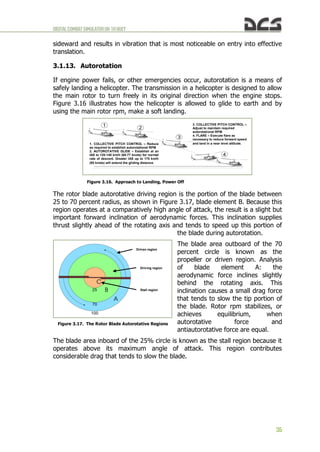
  • 131.
    DIGITALCOMBATSIMULATORUH-1HHUEY 129 Figure 9.10. Controlpositions for balancing helicopter during autorotation. Conditions: Sea level, FAT +15°C, empty, speed 70 knots, 320 RPM. The rate of descent depends primarily on rotor RPM and to a lesser degree on helicopter weight. Rotor RPM, in turn, depend on the position of the Collective. If the Collective is set to minimum (down), rotor RPM will be 320 – 340 and the rate of descent will be close to maximum. With a slightly raised position of the Collective so that rotor RPM is 295 – 320, the rate of descent will be close to minimum. As you can see, the higher rotor RPM correspond to higher rates of descent. With increased helicopter weight, the rate of descent increases slightly: the difference in the rates of descent between an empty and fully loaded helicopter is +200 – 300 ft/min, if all else is equal. C . A u t o r o t a t i o n l a n d i n g Below will be described one of the methods that can be used for an autorotation landing. It is not the only possible method. Choose a landing point that provides 300 – 500 ft of clear glidepath from any obstacles 100 ft or lower. Perform the following steps: a) Maintain 80 – 70 knots and 300 – 320 RPM until reaching an altitude of 200 – 150 ft. The rate of descent should be 2000 – 1700 ft/min. Keep in mind that approximately 12 – 15 seconds will pass between passing through 200 ft and landing; b) (t = 0 sec) from an altitude of 200 – 150 ft slowly (3 – 4 seconds) (Figure 9.11) pull the Cyclic back to set a pitch angle of +15 – 20° while (Figure 9.12): (1) (t = +4 sec) rotor RPM will increase slightly (up to 330 – 340); (2) rate of descent will decrease; (3) the helicopter may slide slightly left due to increased tail rotor lift; (4) any left sliding tendency should be corrected with slight right Cyclic adjustment (1/8 – 1/10 of movement range). Keep in mind that during an autorotation landing, the helicopter will generally be balanced with a slight right bank (Figure 9.13) – the slower the airspeed, the greater right bank (up to 1 – 3°). Pedals Collective Cyclic
  • 132.
    DIGITALCOMBATSIMULATORUH-1HHUEY 130 Figure 9.11. Positionof the cockpit before changing the pitch. Figure 9.12. Position of the cockpit after changing the pitch.
  • 133.
    DIGITALCOMBATSIMULATORUH-1HHUEY 131 Figure 9.13. Bankof the helicopter during speed reduce. c) (t = +6 sec) focus eyes on the landing point; d) (t = +6 – 7 sec) from an altitude of 100..80 ft or when passing through 40 – 35 knots on the airspeed indicator (typically accompanied by a "sinking" of the helicopter), smoothly adjust the Cyclic forward (within about 3 – 4 sec) to set a landing pitch angle (from +15 – 20° to +4 – 6°) while simultaneously increasing Collective for the first time from its lowered position to 1/5 – 1/3 of its movement range within approximately 1 – 1.5 sec while: (1) (t = +9 sec) main and tail rotor RPM will begin to drop, producing a left turning tendency, up to 10°; (2) correct the left turning tendency by increasing right pedal by approximately 1/4 – 1/3 of its movement range, while slightly increasing right Cyclic to compensate for any left slide; e) (t = +10 – 15 sec) as the ground is nearer and based on the rate of descent increase collective once more up to 1/2 – 2/3 of its movement range within 3 – 4 sec. Be careful to prevent the helicopter from nosing over upon touchdown; f) the helicopter will touch down and possibly continue to roll for another 5 – 10 ft before coming to a stop. WARNING! Never "yank" the collective all the way up! This can cause the helicopter to "float" up and enter a short hover at an altitude of 15 – 20 ft, before rotor RPM drops toward 200 and less, resulting in a drop down to the ground with a high sink rate and likely damage. After touchdown, if the forward speed is excessive, pull the Cyclic back approximately 1/3 – 1/2 of its movement range to slow the helicopter using the main rotor. Once the helicopter is stopped, return the Cyclic to neutral and carefully (within 2 – 3 sec) lower the Collective all the way down.
  • 134.
  • 135.
  • 136.
    DIGITALCOMBATSIMULATORUH-1HHUEY 134 10. COMBATEMPLOYMENT This chapterincludes a description of UH-1H combat employment, see also chapter 8 for ARMAMENT description. As described in chapter 8, in addition to the two M60D door gunner machine guns, the UH-1H can be armed with two XM158 rocket pods with 7 70mm unguided rockets each (or XM159 pods with 19 rockets each) and two M134 6- barrel Gatling type Miniguns with 5400 rounds total. Unless noted otherwise, the remainder of the chapter will assume a standard combat load of 2xXM158 + 2xM134. When learning to fly and employ the weapon systems, it is recommended that you enable the WEAPON STATUS indicator in the Options/Special/UH-1H page of the game menu Figure 10.1..Figure 10.3 (remove/display WEAPON STATUS indicator together in hint AUTOPILOT MODE from/on the screen [LShift+LCtrl+H]). Figure 10.1. Location of the WEAPON STATUS indicators. Figure 10.2. Weapon systems status indicator: OFF (not firing), 7.62 (M134 active weapon), 6400 (current balance cartridges), BOTH (fire simultaneously from two guns). Available weapons Master Arm setting Active weapon Fire settings
  • 137.
    DIGITALCOMBATSIMULATORUH-1HHUEY 135 Figure 10.3. Weaponsystems status indicator: ARMED (ready to open fire), 2.75 (XM158 active weapon), 38 (current balance rockets), X2 (two rockets from each launcher when you press the button once). A . F l i g h t c o n t r o l When the helicopter is loaded with the standard combat load, the center of gravity (CG) shifts forward. This results in a greater amount of stick back pressure (pull) required by during takeoff and hover (1/3 – 1/4 of its movement range). Similarly, balanced forward flight is established with approximately 1/3 – 1/4 less forward stick than usual. B . C o c k p i t p r o c e d u r e s Weapon systems are turned on prior to entering the combat area. EMPLOYING THE XM158 (XM159) WEAPON SYSTEM (ROCKETS): a) Select the desired cockpit position (pilot or copilot) – [1], [2]; b) Select "2.75" on the armament control panel – [RALT+[ ]; c) Set the desired number of rocket pairs to be fired on the armament control panel (1 to 7 from each launcher) – [RCTRL+] ] and [RCTRL+[ ]; d) Establish coordinated flight with minimizing descent (climb) and by minimizing sideslip (center the ball), which will maximize accuracy of fire; e) Set the aiming sight – [M] for left pilot’s Flex sight or [RSHIFT+M] for the right pilot’s XM60 Reflex sight. If playing as pilot (right side), you may need to turn on the reticel lamp by pressing [RCTRL+M]. The aiming reticle will appear (Figure 10.4). If playing
  • 138.
    DIGITALCOMBATSIMULATORUH-1HHUEY 136 as copilot (leftside), the flexible sight will move down and the sight reticle will appear (Figure 8.10); f) Turn on the MASTER ARM switch – [RSHIFT+] ] twice. The helicopter is now prepared for rocket employment. Figure 10.4. XM60 Reflex sight reticle turned on. When autopilot is engaged, the “Autopilot: ON” indication is added to the Weapons Status Indicator. When playing as copilot (left side) and Flexible Mode is active, the autopilot is engaged automatically. This is designed to simulate the pilot maintaining the helicopter's attitude while the player operates the weapon system. The autopilot can be manually turned on and off with the [LWIN+A] key. The autopilot engages whenever the following conditions are true: a) Flexible Mode is active; b) The OFF-SAFE-ARMED switch is in the ARMED position. Whenever the autopilot is engaged, the "Autopilot: ON" indication is added to the Weapons Status Indicator.
  • 139.
    DIGITALCOMBATSIMULATORUH-1HHUEY 137 EMPLOYING THE M134WEAPON SYSTEM (MINIGUNS): a) Select the desired cockpit position (pilot or copilot) – [1], [2]; b) Select "7.62" on the armament control panel – [RALT+] ]; c) Set the gun selector on the armament control panel to LEFT, RIGHT, or ALL as desired – [RAlt+RCtrl+] ], [RAlt+RCtrl+[ ]; d) Set the aiming sight – [M] for left pilot’s Flex sight or [RSHIFT+M] for the right pilot’s XM60 Reflex sight. If playing as pilot (right side), you may need to turn on the reticel lamp by pressing [RCTRL+M]. The aiming reticle will appear (Figure 10.4). If playing as copilot (left side), the flexible sight will move down and the sight reticle will appear (Figure 8.10); e) Turn on the MASTER ARM switch – [RSHIFT+ ] ] twice (see above). The helicopter is now prepared for employment of the M134 miniguns. Two aiming modes are available and can be set in the OPTIONS > SPECIAL > UH-1H menu: Camera Aiming ON and Camera Aiming OFF. With Camera Aiming ON, the gun/gunsight is latched to the view camera, allowing you to aim with the mouse. To fire the gun, press the left mouse button or [Space]. You can toggle mouse-look and mouse-click mode by pressing [LAlt+C]. Note that you can use the mouse wheel to zoom the view in and out, as well as adjust the 3D position of the view by holding the mouse wheel down while moving the mouse. With Camera Aiming OFF, the mouse or the keyboard numpad control the camera, while the [;], [,], [.], [/] keys control the gun aim. C . L i n i n g u p , a i m i n g , a n d f i r i n g Attempt to enter the target area undetected by maintaining nap-of-the-earth flight to the target area and avoid known air defense positions. When approaching to within 9000-8000 ft of the target, climb to acquire the target. The climb can be performed either by pulling the cyclic to raise the nose to a pitch angle of 10-15° or by increasing collective to gain altitude while maintaining pitch angles. The latter method is preferable as it maintains the target in view in front of the helicopter, prevents an increase of the helicopter's silhouette for enemy defenses, and minimizes loss of airspeed in the climb. After completing the climb, confirm the target's location and maneuver the helicopter to face the target.
  • 140.
    DIGITALCOMBATSIMULATORUH-1HHUEY 138 When lining upon the target from a horizontal turn, begin leveling out of the turn at an angle to the target approximately equal to the angle of bank in the turn. I.e. when performing a turn with 40° of bank, begin to level out of the turn when the target is approximately 40° off the nose. Further: a) Once leveled out of the turn toward the target, maintain level flight at an airspeed of 80-100 knots and establish coordinated flight by minimizing sideslip (center the ball), which will maximize accuracy of fire; b) When employing rockets, place the aiming reticle over the target at a range of 6000 ft using the cyclic, open fire at a range of 5000-3000 ft. c) When employing the M134 miniguns, place the aiming reticle over the target at a range of 3000 ft, open fire at a range of 2500-1500 ft. When firing the M134 miniguns in STOW mode or 2.75 rockets while continuing to manually fly the helicopter, a slight recoil force (70 kg) will produce a pitching down tendency. For long bursts, anticipate the recoil by aiming 0,5..1 pipper widths ABOVE the target. D . A t t a c k c o m p l e t i o n When weapon fire is complete, perform an aggressive turn away from the target and reduce altitude while accelerating to maximum airspeed (110-120 knots). To minimize the probability of damage from enemy fire, perform defensive maneuvering by alternating left and right turns of approximately 40- 50° for 4-5 seconds until the target is at a range of 3000-4000 ft. Repeat attack passes as required. When the attack is complete, set MASTER ARM to OFF and return to base. E . G u n n e r s a r t i f i c i a l i n t e l l i g e n c e c o n t r o l The left pilot, left and right door gunners can be commanded to autonomously engage targets using the guns. The left pilot employs the M134 ‘miniguns’ in Flex mode, while the door gunners employ either the M60 or M134 guns, depending on the weapons fit (see also chapter 8.6 for ARMAMENT description).
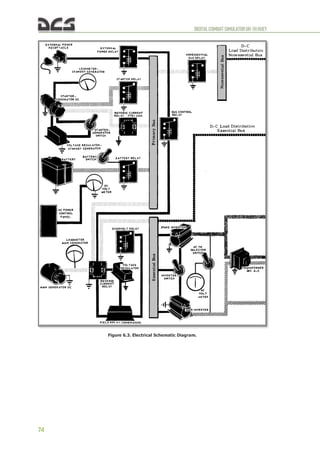
  • 141.
  • 142.
    DIGITALCOMBATSIMULATORUH-1HHUEY 140 11. PERFORM SPECIALTASKS 11.1. Sling load usage The ability to use a Sling Load for carriage of external cargo has been implemented after release of version 1.2.8, see Figure 11.1 Figure 11.1. Fly with sling load 11.1.1. Flight mission preparation for a Sling Load usage To create a mission You’ll need to make following actions (see Figure 11.2): Figure 11.2. General sling load mission creation plan.
  • 143.
    DIGITALCOMBATSIMULATORUH-1HHUEY 141 1. Select staticobjects; 2. Select CATEGORY – "Cargos", TYPE – "Cargo-1": 3. Set this object(s) on the map (left button click); 4. Set the flag CAN BE CARGO (for an ability to select and hook your cargos during the game): 5. Set the required mass of cargo (about 500 kg (1100 lbs) is recommended for beginners); 6. Rename created object(s) (recommended), for example "LOAD-500" or "CARGO-650" for convenient in Game usage. The UH-1H cargo hook maximum capacity is 4,000 pounds (1800kg). 11.1.2. Inflight usage (cargo selection, hooking and unhooking) Let’s review the list of actions needed to select, hook and unhook the cargo. At mission start we have several different weight cargos located in certain area.
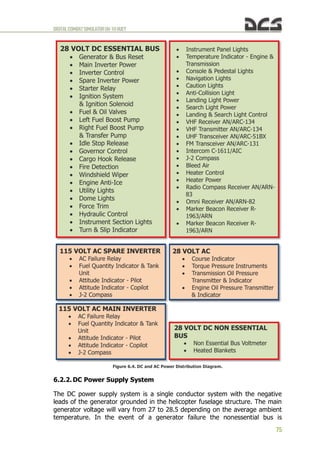
  • 144.
    DIGITALCOMBATSIMULATORUH-1HHUEY 142 It’s needed toselect the one, perform hooking, take off, flight to the designated unhooking area, approach the unhooking point and unhook the cargo. PLAYER’S ACTIONS. S e l e c t i o n o f c a r g o For making the cargo selection possible the “cargo selection zone” was implemented. That zone is connected to and moves with player’s or AI helicopter (marked as a circles around helicopters No.1 and No.2). Thus cargos can be selected by player being inside mentioned zone only – at a distance less than “cargo selection zone” radius (see Figure 11.3, helicopter No.2) Figure 11.3. Cargo selection menu appearance depandant on distance to cargo.. Based on the testing experience, the “cargo selection zone” radius is set to 2,000m (6,562ft). If a helicopter is more than 2,000m away from the cargos, no cargo can be selected (helicopter menu #1). As soon as any cargo gets into the “cargo selection zone”, which moves with the helicopter, a new menu item appears and additional page containing the list of cargos can be activated: [ ] - > [F6] (helicopter menu #2). Now player can select any cargo from a list (see Figure 11.4):
  • 145.
    DIGITALCOMBATSIMULATORUH-1HHUEY 143 Figure 11.4. Menufor select of cargo. 1. Selection key 2. Name of cargo 3. True weight of carg To select a cargo player needs to press one of the keys [F1…F10]. Simultaneously the cargo location will be marked with a smoke (white or red). Smoke marker will be visible only for the player who has selected this cargo (see Figure 11.5): Figure 11.5. Auto designation of cargo smoke marker. H o o k i n g t h e c a r g o After cargo selection the player has two options of picking it up. The first one (automatic) is from hovering above the cargo, the second one (manual, i.e. by player command) – landing near by. When the first option is used, the function
  • 146.
    DIGITALCOMBATSIMULATORUH-1HHUEY 144 of automatic cargohooking is activated (given the hovering is performend in needed manner, see below). If the second option is used, cargo gets hooked by key command when player landed close enough the selected cargo. The cargo selection can be cancelled by the command menu: [ ] -> [F6] -> [F1] . After this, by using [ ] -> [F6] all the cargos within a 2,000m radius will again be available. To help the player to determine the required flight direction towards the cargo and also the helicopter location above the cargo, a cargo display can be activated [LShift+LCtrl+C], which is a virtual camera directed downwards perpendicular to the horizon. The camera does not take into account the roll and pitch deflections. It considers the heading alterations only. Also it has a marker of azimuth cargo position (see Figure 11.6). Figure 11.6. Display cargo position. 1. Smoke marker 2. Cargo position display 3. Marker of cargo position To lift off cargo from the surface the helicopters hovering altitude should be at least 8.96m (radioaltimeter indications must be at least 30 ft). AUTOMATIC ATTACHMENT OF CARGO (CARGO HOOKED) actuates if the actuates if the player meets several conditions, which take into account the rope suspension length (7m or 23ft), the accuracy of the hovering position and the interval necessary for a virtual hookup man to hook the load. Therefore, in order to carry out an automatic attachment of cargo it is necessary to hover within a specified time lapse in a certain area above the cargo with the deviations from the center no more than:
  • 147.
    DIGITALCOMBATSIMULATORUH-1HHUEY 145 (1) relative tothe longitudinal axis – 2m (6ft); (2) relative to the transversal axis – 2m (6ft); (3) relative to the vertical axis (the range of allowable hoverhights above the cargo is from 2.5m to 7m (8..23ft)) and be within the attachment area no less than 5 sec. While within the attachment area (provided that all the conditions are met) the message HOVERING ABOVE CARGO will appear (see Figure 11.7). Figure 11.7. Conditions for Automatic attachment of load at hovering method (1of2). Figure 11.8. Conditions for Automatic attachment of load at hovering method (2of2).
  • 148.
    DIGITALCOMBATSIMULATORUH-1HHUEY 146 In case youare out of the attachment area, the message BEYOND ZONE OF HOVERING will appear. Once the cargo is automatically attached, the message CARGO HOOKED will appear. While hovering above the cargo using the camera it is recommended to use it only by peripheral vision with your attention being focused on the surface before the helicopter in a sweeping glance so as to maintain the hovering position more accurately from displacements relative to the longitudinal and transversal axes. MANUAL ATTACHMENT OF CARGO (CARGO HOOKED) is carried out by player’s command [RShift+RCtrl+L] after landing near the cargo (the distance from the helicopter center is no more than 5m or 16ft), see Figure 11.9. Figure 11.9. Cargo hooked (landing method). As a result of attaching cargo a rope suspension appears. The cargo selection can be cancelled by the command menu: [ ] -> [F6] -> [F1] . After this, by using [ ] -> [F6] all the cargos within a 2,000m radius will again be available. T a k e o f f w i t h a s l i n g l o a d Upon receiving the message CARGO HOOKED, take off vertically with the sling load. Perform the vertical climb up to the height so as the cargo is higher no less than 5m (15ft) than hazards in the runway heading. After the climb without hover locking accelerate to 60 KNOTS and continue the climb to the specified value. F l i g h t t o t h e u n h o o k e d a r e a After the climb put the helicopter over at the speed of 60..100KNOTS. During the flight when the cargo swing occurs, damp out oscillations:  when the roll oscillations occurs – make a small roll movement in the same direction where the cargo is moving or reduce a little the collective pitch at the moment when the cargo is close to one of the end points;
  • 149.
    DIGITALCOMBATSIMULATORUH-1HHUEY 147  when thepitch oscillations occurs – reduce a little the collective pitch at the moment when the cargo is close to one of the end points. A p p r o a c h t o t h e a r e a o f t h e l o a d d e t a c h m e n t , d e t a c h m e n t o f l o a d ( c a r g o u n h o o k ) You should approach the area of the load detachment much smoother than during the usual flight. Mark visually the hovering position and reference points (2..3) at the distance of 10..30m (30..100ft) from the hovering position to make it easier to keep to the hovering position. These reference points must be seen from the cockpit during the hovering. It is recommended to keep in sight the chosen reference points by sweeping motion of the eyes so as you could timely correct even the initial helicopter displacement tendencies. It is necessary to perform SHORT TWOFOLD MOTIONS BY THE CYCLIC CONTROL STICK (amplitude is 0.5..1cm, motion rate is 1.5..2Hz) for more precise piloting. For more comfortable load detachment you can activate the load automatic detachment function [RShift+RCtrl+K]. This will provide for an automatic detachment of the cargo when it touches down the surface. The automatic detachment is accompanied by the message AUTOUNHOOK ACTIVATION. Likewise, the cargo can be unhooked after landing near the cargo (the same key commands). 11.2. Helicopter assault (airlift delivery) WIP
  • 150.
  • 151.
    DIGITALCOMBATSIMULATORUH-1HHUEY 149 12. EMERGENCY PROCEDURES 12.1.1.Definition Of Emergency Terms For the purpose of standardization the following definitions shall apply: a) The term LAND AS SOON AS POSSIBLE is defined as executing a landing to the nearest suitable landing area without delay. The primary consideration is to assure the survival of occupants. b) The term LAND AS SOON AS PRACTICABLE is defined as executing a landing to a suitable airfield, heliport, or other landing area as the situation dictates. c) The term AUTOROTATE is defined as adjusting the flight controls as necessary to establish an autorotational descent (See 3.1.13 and 9.7). (1) COLLECTIVE ADJUST as required to maintain rotor RPM. (2) PEDALS ADJUST as required. (3) THROTTLE ADJUST as required. (4) AIRSPEED ADJUST as required. d) The term EMER SHUTDOWN is defined as engine stoppage without delay. (1) THROTTLE – OFF. (2) FUEL switches – OFF. (3) BAT switch – OFF. CAUTION. The maximum engine torque available for any ambient condition will be reduced by 6 to 8 PSI when the GOV AUTO/EMER switch is placed in the EMER position. e) The term EMER GOV OPNS is defined as manual control of the engine RPM with the GOV AUTO/EMER switch in the EMER position. Because automatic acceleration, deceleration, and overspeed control are not provided with the GOV switch in the EMER position, throttle and collective coordinated control movements must be smooth to prevent compressor stall, overspeed, overtemperature, or engine failure. (1) GOV switch – EMER. (2) Throttle – adjust as necessary to control RPM. (3) Land as soon as possible. 12.1.2. Engine Malfunction – Partial or Complete Power Loss A . I n d i c a t i o n s The indications of an engine malfunction, either a partial or a complete power loss, are: a) change in engine and transmission noise;
  • 152.
    DIGITALCOMBATSIMULATORUH-1HHUEY 150 b) left yaw(up to 10..15°); c) drop in engine rpm, drop in rotor rpm; d) low rpm audio alarm, illumination of the rpm warning light; e) loss of altitude. B . F l i g h t c h a r a c t e r i s t i c s a) Control response with an engine inoperable is similar to a descent with power. b) Airspeed above the minimum rate of descent values will result in greater rates of descent and should only be used as necessary to extend glide distance (see 9.7). c) Airspeeds below minimum rate of descent airspeeds will increase rate of descent and decrease glide distance. d) Should the engine malfunction during a left bank maneuver, right cyclic input to level the aircraft must be made simultaneously with collective pitch adjustment. If the collective pitch is decreased without a corresponding right cyclic input, the helicopter will pitch down and the roll rate will increase rapidly, resulting in a significant loss of altitude. WARNING. Do not close the throttle. Do not respond to the rpm audio and/or warning light illumination without first confirming engine malfunction by one or more of the other indications. Normal indications signify the engine is functioning properly and that there is a tachometer generator failure or an open circuit to the warning system, rather than an actual engine malfunction. C . P a r t i a l p o w e r c o n d i t i o n Under partial power conditions, the engine may operate relatively smoothly at reduced power or it may operate erratically with intermittent surges of power. In instances where a power loss is experienced without accompanying power surging, the helicopter may sometimes be flown at reduced power to a favorable landing area. Under these conditions, the pilot should always be prepared for a complete power loss. In the event a partial power condition is accompanied by erratic engine operation or power surging, and flight is to be continued, the GOV switch may be moved to the EMER position and throttle adjusted in an attempt to correct the surging condition. If flight is not possible, close the throttle completely and complete an autorotational landing. D . C o m p l e t e p o w e r l o s s a) Under a complete power loss condition, delay in recognition of the malfunction, improper technique or excessive maneuvering to reach a suitable landing area reduces the probability of a safe autorotational landing. Flight conducted within the caution area of the height-velocity chart exposes the helicopter to a high probability of damage despite the best efforts of the pilot:
  • 153.
    DIGITALCOMBATSIMULATORUH-1HHUEY 151 (1) in altitude(skid height above ground) 10..430 feet and velocity about 0 knots (hovering); (2) in altitude (skid height above ground) about 100 feet and velocity below 50 knots; (3) in altitude (skid height above ground) below 15 feet and velocity above 60 knots; b) From conditions of low airspeed and low altitude, the deceleration capability is limited, and caution should be used to avoid striking the ground with the tail rotor. Initial collective reduction will vary after an engine malfunction dependent upon the altitude and airspeed at the time of the occurrence. For example, collective pitch may not need to be decreased when an engine failure occurs at a hover in ground effect; whereas, during cruise flight conditions, altitude and airspeed are sufficient for a significant reduction in collective pitch, thereby, allowing rotor rpm to be maintained in the safe operating range during autorotational descent. At high gross weights, the rotor may tend to overspeed and require collective pitch application to maintain the rpm below the upper limit. Collective pitch should never be applied to reduce rpm below normal limits for extending glide distance because of the reduction in rpm available for use during autorotational landing. 12.1.3. Engine Restart – During Flight After an engine failure in flight, resulting from a malfunction of fuel control unit, an engine start may be attempted. Because the exact cause of engine failure cannot be determined in flight, the decision to attempt the start will depend on the altitude and time available, rate of descent, potential landing areas, and crew assistance available. Under ideal conditions approximately one minute is required to regain powered flight from time the attempt start is begun. If the decision is made to attempt an in-flight start: 1. Throttle – OFF. 2. STARTER GEN switch – START. 3. FUEL switches – ON. 4. GOV switch – EMER. 5. Attempt start. (1) Starter switch – Press. (2) Throttle – Open slowly to 6400 to 6600 rpm as N1 passes through 8%. Control rate of throttle application as necessary to prevent exceeding EGT limits. (3) Starter Switch – Release as N1 passes through 40%. After the engine is started and powered flight is reestablished, continue with manual control. Return the STARTER GEN switch to STANDBY.
  • 154.
    DIGITALCOMBATSIMULATORUH-1HHUEY 152 6. Land assoon as possible. 12.1.4. Engine Overspeed Engine overspeed will be indicated by a right yaw, rapid increase in both rotor and engine rpm, rpm warning light illuminated, and an increase in engine noise. An engine overspeed may be caused by a malfunctioning N2 governor or fuel control. Although the initial indications of high N2 rpm and rotor rpm are the same in each case, actions that must be taken to control rpm are distinctly different. If the N2 governor malfunctions, throttle reduction will result in a corresponding decrease in N2 rpm. In the event of a fuel control malfunction, throttle reduction will have no effect on N2 rpm. If an overspeed is experienced: a) Collective – Increase to load the rotor in an attempt to maintain rpm below the maximum operating limit. b) Throttle – Reduce until normal operating rpm is attained. Continue with manual throttle control. If reduction of throttle does not reduce rpm as required: WARNING. Land even if manual throttle corrects the overspeed since there is a chance of an impending engine failure due to the debris generated by the initial N2 failure. c) EMER GOV OPNS 12.1.5. Transmission Oil – Hot or Low Pressure If the transmission oil temperature XMSN OIL HOT caution light illuminates, limits on the transmission oil temperature gauge are exceeded; XMSN OIL PRESS caution light illuminates, or limits on the transmission oil pressure gauge are exceeded (low or high): a) Land as soon as possible. b) EMER SHUTDOWN – After landing. WARNING. Do not close throttle during this emergency procedure. Descent and landing must be made with normal engine operating RPM. Should transmission oil pressure drop to zero psi, a valid cross reference cannot be made with the oil temperature indicators. The oil temperature gauge and transmission oil hot warning lights are dependent on fluid for valid indications. 12.1.6. Tail Rotor Malfunctions Because of the many different malfunctions that can occur, it is not possible to provide a solution for every emergency. The success in coping with the emergency depends on quick analysis of the condition. 12.1.7. Complete Loss of Tail Rotor Thrust This situation involves a break in the drive system, such as a severed driveshaft, wherein the tail rotor stops turning or tail rotor controls fail with zero thrust.
  • 155.
    DIGITALCOMBATSIMULATORUH-1HHUEY 153 A . In d i c a t i o n s . a) In-Flight. (1) Pedal input has no effect on helicopter trim. (2) Nose of the helicopter turns to the right (left sideslip). (3) Roll of fuselage along the longitudinal axis. (4) Nose down tucking will also be present. WARNING. At airspeeds below 30 to 40 knots, the sideslip may become uncontrollable, and the helicopter will begin to revolve on the vertical axis (right or left depending on power, gross weight, etc.). b) Hover. Helicopter heading cannot be controlled with pedals. B . P r o c e d u r e s . a) In-Flight. (1) If aircraft is uncontrollable. (2) If safe landing area is not immediately available and powered flight is possible, continue flight to a suitable landing area at or above minimum rate of descent airspeed. Degree of roll and sideslip may be varied by varying throttle and/or collective. CAUTION. The flare and the abrupt use of collective will cause the nose to rotate left, but do not correct with throttle. Although application of throttle will result in rotation to the right, addition of power is a very strong response measure and is too sensitive for the pilot to manage properly at this time. DO NOT ADD POWER AT THIS TIME. Slight rotation at time of impact at zero ground speed should not cause any real problem. (3) If landing area is suitable, touchdown at a ground speed above effective translational lift utilizing throttle as necessary to maintain directional control. (4) If landing area is not suitable for a run-on landing, a minimum ground run autorotation must be performed: enter autorotation descent (throttle off), start to decelerate at about 75 feet altitude so that forward ground speed is at a minimum when the helicopter reaches 10 to 20 feet, execute the touchdown with a rapid collective pull just prior to touchdown in a level attitude with minimum ground speed. b) Hover. AUTOROTATE. 12.1.8. Loss of Tail Rotor Effectiveness This is a situation involving a loss of effective tail rotor thrust without a break in the drive system. The condition is most likely to occur at a hover or low airspeed as a result of one or more of the following.
  • 156.
    DIGITALCOMBATSIMULATORUH-1HHUEY 154 a) Out-of-ground effecthover. b) High pressure altitude/high temperature. c) Adverse wind conditions. d) Engine/rotor rpm below 6600/324. e) Improperly rigged tail rotor. f) High gross weight. A . I n d i c a t i o n s The first indication of this condition will be a slow starting right turn of the nose of the helicopter which cannot be stopped with full left pedal application. This turn rate will gradually increase until it becomes uncontrollable or, depending upon conditions, the aircraft aligns itself with the wind. B . P r o c e d u r e s Lower collective to regain control and as recovery is effected adjust controls for normal flight. 12.1.9. Main Driveshaft Failure A failure of the main driveshaft will be indicated by a left yaw (this is caused by the drop in torque applied to the main rotor), increase in engine rpm, decrease in rotor rpm, low rpm audio alarm (unmodified system), and illumination of the rpm warning light. This condition will result in complete loss of power to the rotor and a possible engine overspeed. If a failure occurs: a) Autorotate. b) EMER SHUTDOWN. 12.1.10.Fire During Flight If the fire light illuminates and/or fire is observed during flight, prevailing circumstances (such as VFR, IMC, night, altitude, and landing areas available), must be considered in order to determine whether to execute a power-on, or a power-off landing. a) Power-On. (1) Land as soon as possible. (2) EMER SHUTDOWN after landing. b) Power-Off. (1) Autorotate. (2) EMER SHUTDOWN. 12.1.11.Hydraulic Power Failure Hydraulic power failure will be evident when the force required for control movement increases; a moderate feedback in the controls when moved is felt,
  • 157.
    DIGITALCOMBATSIMULATORUH-1HHUEY 155 and/or the HYDPRESSURE caution light illuminates. Control movements will result in normal helicopter response. In the event of hydraulic power failure: a) Airspeed – Adjust as necessary to attain the most comfortable level of control movements. b) HYD CONT circuit breaker – Out. If hydraulic power is not restored: c) HYD CONT circuit breaker – In. d) HYD CONT switch – OFF. e) Land as soon as practicable at an area that will permit a run-on landing with power. Maintain airspeed at or above effective translational lift until touchdown. 12.1.12.Control Stiffness A failure within the irreversible valve may cause extreme stiffness in the collective or two of the four cyclic control quadrants. If the failure is in one of the two cyclic irreversible valves, caution is necessary to avoid over controlling between the failed and operational quadrants. a) HYD CONT switch – OFF then ON. Check for restoration of normal flight control movements. Repeat as necessary. If control response is not restored: b) HYD CONT switch – OFF if normal operation is not restored. c) Land as soon as practicable at an area that will permit a run-on landing with power. Maintain airspeed at or above effective translational lift until touchdown. 12.1.13.Flight Control Servo Hardover a) Cyclic hardover is caused by a sequencing valve failure within the irreversible valve on either or both cyclic servos. Cyclic servo hardover will cause the cyclic to move full right forward, full left rear, full left forward, or full right rear. b) Collective hardover is caused by a sequencing valve failure within the irreversible valve on the collective servo. The collective will move to the full up or full down position. c) A failure of any flight control servo may render the helicopter uncontrollable unless the following action is taken. (1) HYD CONT switch – Select opposite position. (2) LAND AS SOON AS POSSIBLE at an area that will permit a run-on landing with power. Maintain airspeed at or above effective translational lift at touchdown.
  • 158.
    DIGITALCOMBATSIMULATORUH-1HHUEY 156 12.1.14.Flight Control/Main RotorSystem Malfunctions a) Failure of components within the flight control system may be indicated through varying degrees of feedback, binding, resistance, or sloppiness. These malfunctions are normally in isolated controls, i.e. cyclic, cyclic/collective, or anti-torque. These conditions should not be mistaken for hydraulic power failure. b) Imminent failure of main rotor components may be indicated by a sudden increase in main rotor vibration and/or unusual noise. Severe changes in lift characteristics and/or balance condition can occur due to blade strikes, skin separation, shift or loss of balance weights or other material. Malfunctions may result in severe main rotor flapping. In the event of a main rotor system malfunction, proceed as follows: WARNING. Danger exists that the main rotor system could collapse or separate from the aircraft after landing. A decision must be made whether occupant egress occurs before or after the rotor has stopped. (1) Land as soon as possible. (2) EMER SHUTDOWN after landing. 12.1.15.Mast Bumping If mast bumping occurs: a) Reduce severity of maneuver. b) Land as soon as possible. 12.1.16.Electrical System 12.1.17.Main Generator Malfunction A malfunction of the main generator will be indicated by zero indication of the Main Generator Loadmeter and DC GENERATOR caution light illumination. An attempt may be made to put the generator back on line as follows: a) GEN and BUS RESET circuit breaker – IN. b) MAIN GEN switch – RESET then ON. Do not hold the switch in the RESET POSITION. If the main generator is not restored or if it goes off again: c) MAIN GEN switch – OFF. NOTE. Check that the standby generator loadmeter is indicating a load. Flight may be continued using the standby generator. 12.1.18.Landing and Ditching 12.1.19.Landing in Trees A landing in trees should be made when no other landing area is available. Select a landing area containing the least number of trees of minimum height. Decelerate to a zero ground speed at tree-top level and descend into the trees
  • 159.
    DIGITALCOMBATSIMULATORUH-1HHUEY 157 vertically, applying collectivepitch as necessary for minimum rate of descent. Prior to the main rotor blades entering the trees, ensure throttle is OFF and apply all of the remaining collective pitch. 12.1.20.Ditching – Power On If it becomes necessary to ditch the helicopter, accomplish an approach to an approximate 3-foot hover above the water and proceed as follows: 1. Cockpit doors – Jettison at a hover. 2. Cabin doors – Open. 3. Crew (except pilot) and passengers – Exit. 4. Hover a safe distance away from personnel. 5. Throttle – Off and autorotate. Apply full collective pitch prior to the main rotor blades entering the water. Maintain a level attitude as the helicopter sinks and until it begins to roll, then apply cyclic in direction of the roll. 6. Pilot – Exit when the main rotor is stopped. 12.1.21.Ditching – Power Off If ditching is imminent, accomplish engine malfunction emergency procedures. Decelerate to zero forward speed as the helicopter nears the water. Apply all of the collective pitch as the helicopter enters the water. Maintain a level attitude as the helicopter sinks and until it begins to roll, then apply cyclic in the direction of the roll. Exit when the main rotor is stopped. 1. Cockpit doors – Jettison prior to entering water. 2. Cabin Doors – Open prior to entering water. 3. Exit when main rotor has stopped.
  • 160.
  • 161.
    DIGITALCOMBATSIMULATORUH-1HHUEY 159 13. KEYCOMMAND LIST ObjectProcedureKey Command ADF Set Control panel ADF BFO Switch LAIt + LCtrl + 0 ADF Band 190-400 kHz LAIt + LCtrl + 6 ADF Band 400-850 kHz LAIt + LCtrl + 7 ADF Band 850-1750 kHz LAIt + LCtrl + 8 ADF Band Select (rotary) LAIt + LCtrl + 5 ADF Frequency Decrease LAIt + LCtrl + [ ADF Frequency Increase LAIt + LCtrl + ] ADF Gain Decrease LAIt + LCtrl + - ADF Gain Increase LAIt + LCtrl + = ADF Loop Left High LAIt + LCtrl + Z ADF Loop Left Low LAIt + LCtrl + X ADF Loop Right High LAIt + LCtrl + V ADF Loop Right Low LAIt + LCtrl + C ADF Mode ADF LAIt + LCtrl + 2 ADF Mode ANT LAIt + LCtrl + 3 ADF Mode LOOP LAIt + LCtrl + 4 ADF Mode OFF LAIt + LCtrl + 1 ADF Mode Select (rotary) LAIt + LCtrl + ' Armament System Armament Off/Safe/Armed Down RShift + [ Armament Off/Safe/Armed Up RShift + ] Armament Selector Down RAIt + [ Armament Selector Up RAIt + ] Gun Selector Switch Down RAIt + RCtrl + [ Gun Selector Switch Up RAIt + RCtrl + ] Jettison J Jettison Cover LAIt + J Open/Close Left Gunner Door LAIt + 3 Open/Close Right Gunner Door LAIt + 4 Rocket Pair Decrease RCtrl + [ Rocket Pair Increase RCtrl + ] Rocket reset LCtrl + R CHEAT Active Pause LShift + LWin + Pause Auto execute full start procedure LWin + Home Auto execute full stop procedure LWin + End AutoPilot LWin + A Autopilot ATTITUDE HOLD LAIt + LShift + A AutoPilot LEVEL FLIGHT LCtrl + A Autopilot ORBIT LAIt + A Explosion LCtrl + LShift + X
  • 162.
    DIGITALCOMBATSIMULATORUH-1HHUEY 160 Weapon Hints On/OffLCtrl + LShift + H Ciruit Breaker Panel CB ARC-102 HF Static INVTR CB Anticollision light CB Cabin heater (Air valve) CB Cabin heater (Outlet valve) CB Cargo hook release CB Caution lights CB Cockpit lights CB Console lights CB Dome lights CB EXT Store jettison CB Engine anti-ice CB FM 2 Radio CB FM Radio CB FORCE Trim CB Fire detector CB Fuel TRANS CB Fuel valves CB Fuselage lights CB Generator & Bus Reset CB Governor Control CB HF ANT COUPLR CB HF ARC-102 CB HYD Control CB Heated blanket 1 CB Heated blanket 2 CB IDLE Stor relay CB IFF APX 1 CB IFF APX 2 CB INST Panel lights CB INST SEC lights CB Ignition system CB Intercom CPLT CB Intercom PLT CB Inverter CTRL CB CB KY-20 voice security CB LF Nav. (ARN-83) CB LH fuel boost pump CB Landing & Search light cpntrol CB Landing light power CB Main inverter PWR CB Marker beacon CB Navigation lights CB Pitot tube
  • 163.
    DIGITALCOMBATSIMULATORUH-1HHUEY 161 CB Prox. warn. CBRH fuel boost pump CB RPM Warning system CB Rescue hoist CTL CB Rescue hoist PWR CB Rescue hoist cable cutter CB STBY Generator Field CB Search light power CB Spare inverter PWR CB Starter Relay CB TEMP indicator CB Turn & Slip indicator CB UHF Radio CB VHF AM Radio CB VHF Nav. (ARN-82) CB Voltmeter Non Ess Bus CB Wind wiper CPLT CB Wind wiper PLT Radar Altimeter Power RShift + R External Cargo External Cargo Autounhook RCtrl + RShift + K External Cargo Camera On/Off LCtrl + LShift + C External Cargo Hook/Unhook RCtrl + RShift + L Flexible Sight Flexible Sight Backup Lamp RAIt + RCtrl + O Flexible Sight Intensity Decrease RAIt + O Flexible Sight Intensity Increase RCtrl + O Flexible Sight Lamp Off RCtrl + RShift + O Flexible Sight Main Lamp O Flexible Sight On/Off M Flexible Sight Down "." Flexible Sight Left "," Flexible Sight Right "/" Flexible Sight Up ";" Front Dash Altimeter Copilot, Pressure Decrease LCtrl + B Altimeter Copilot, Pressure Increase LShift + B Altimeter Pilot, Pressure Decrease RCtrl + B Altimeter Pilot, Pressure Increase RShift + B Attitude Indicator pilot, Pitch Decrease LCtrl + N Attitude Indicator pilot, Pitch Increase LShift + N Attitude Indicator pilot, Roll Decrease LCtrl + M Attitude Indicator pilot, Roll Increase LShift + M Clock Winding/Adjust RShift + Q Clock Winding/Adjust Decrease RCtrl + 0
  • 164.
    DIGITALCOMBATSIMULATORUH-1HHUEY 162 Clock Winding/Adjust IncreaseRAIt + Q Copilot Gyro Cage RShift + G Copilot Gyro, Pitch Decrease RCtrl + F Copilot Gyro, Pitch Increase RShift + F RadarAltimeter, Hight Altitude Decrease RAIt + RShift + R Radar Altimeter, Hight Altitude Increase RCtrl + RWin + R RadarAltimeter, Low Altitude Decrease RAIt + RWin + R RadarAltimeter, Low Altitude Increase RShift + RWin + R RadarAltimeter, Test RAIt + R General Briefing window LAIt + B Clickable mouse cockpit mode On/Off LAIt + C Debriefing window RShift + ' End mission Esc Frame rate counter - Service info RCtrl + Pause Get New Plane - respawn RCtrl + RShift + Tab Info bar coordinate units toggle LAIt + Y Info bar toggle LCtrl + Y Jump into other aircraft RAIt + J Multiplayer chat - mode All Tab Multiplayer chat - mode Allies LCtrl + Tab Pause Pause Rearming and Refueling Window LAIt + 1 Score window I Screenshot SysRQ Show controls indicator RCtrl + Enter Time accelerate LCtrl + Z Time decelerate LAIt + Z Time normal LShift + Z Gunners Al Panel Al Left Burst Switch LShift + 3 Al Left ROE Iterate LCtrl + 3 Al Operator Burst Switch LShift + 2 Al Operator ROE Iterate LCtrl + 2 Al Panel Show/Hide LWin + H Al Right Burst Switch LShift + 4 Al Right ROE Iterate LCtrl + 4 Ins Collective Stick Collective down Nun - Collective up Num+ Decrease Turbine RPM RCtrl + PageDown Increase Turbine RPM RCtrl + PageUp Landing light Extend RCtrl + / Landing light On/Off RCtrl +. Landing light Retract RWin +/ Landing light Stop RAIt + /
  • 165.
    DIGITALCOMBATSIMULATORUH-1HHUEY 163 Search light Extend8 Search light Left 9 Search light Off RAIt + ; Search light On RCtrl + ; Search light Retract 7 Search light Right 0 Search light Stow RWin + ; Start-up engine Home Throttle Down PageDown Throttle Stop RWin +T Throttle Up PageUp Ins Cyclic Stick Co-pilot's radio trigger ICS LShift + Space Co-pilot's radio trigger RADIO LCtrl + Space Copilot weapon release RAIt + Space Cyclic bank left Left Cyclic bank right Right Cyclic nose down Up Cyclic nose up Down Pilot Trimmer T Pilot weapon release/Machinegun fire Space Pilot's radio trigger ICS RShift + Space Pilot's radio trigger RADIO RAIt + Trimmer reset LCtrl + T Ins Overhead panel Anti Collision Light On/Off RShift+ L Battery ON/OFF LShift + P Copilot Instrument Light Decrease LAIt + LWin + C Copilot Instrument Light Increase LCtrl + LWin + C Dome Light Green RAIt + RShift + L Dome Light Off RAIt + RShift + 0 Dome Light White RAIt + RShift + P Engine Instrument Light Decrease LAIt + LWin + E Engine Instrument Light Increase LCtrl + LWin + E Inverter MAIN ON LShift + U Inverter OFF LShift + 1 Inverter SPARE ON LShift + 0 Inverter switch LShift + Y Main generator ON/OFF LShift + Q Main generator RESET LShift + A Main generator cover LShift + L Nav Lights Dim/Bright RAIt + L Nav Lights Flash RCtrl + RWin + L Nav Lights Off RCtrl + L Nav Lights Steady RAIt + RWin + L Non-Ess Bus NORMAL ON/MANUAL ON LShift + C
  • 166.
    DIGITALCOMBATSIMULATORUH-1HHUEY 164 Overhead Console LightDecrease LAIt + LWin + 0 Overhead Console Light Increase LCtrl + LWin + 0 Pedestal Light Decrease LAIt + LWin + P Pedestal Light Increase LCtrl + LWin + P Pilot Instrument Light Decrease LAIt + LCtrl + LWin + P Pilot Instrument Light Increase LCtrl + LShift + LWin + P Pitot Heater RAIt + P Secondary Instrument Light Decrease LAIt + LWin + S Secondary Instrument Light Increase LCtrl + LWin + S Starter-GeneratorSTARTER/STBY GEN LShift + X Voltmeter AC switch LShift + W Voltmeter AC, AB phase LShift + E Voltmeter AC, AC phase LShift + R Voltmeter AC, BC phase LShift + T Voltmeter DC switch LShift + S Voltmeter DC, BAT LShift + D Voltmeter DC, ESS BUS LShift + H Voltmeter DC, MAIN GEN LShift + F Voltmeter DC, NON-ESS BUS LShift + J Voltmeter DC, STBY GEN LShift + G Windshield Mode Decrease RAIt + , Windshield Mode Increase RAIt + . Wiper Mode Selector Down S Wiper Mode Selector Up W Ins rudder Rudder left Z Rudder right X Intercom Control Panel Intercom Mode 1 RCtrl + RShift + R Intercom Mode 2 RCtrl + RShift + T Intercom Mode 3 RCtrl + RShift + Y Intercom Mode 4 RCtrl + RShift + U Intercom Mode INT RCtrl + RShift + E Intercom Mode PVT RCtrl + RShift + W Intercom Mode Selector (rotary) RCtrl + RShift + Q Intercom Receiver #1 RCtrl + RShift + 1 Intercom Receiver #2 RCtrl + RShift + 2 Intercom Receiver #3 RCtrl + RShift + 3 Intercom Receiver #4 RCtrl + RShift + 4 Intercom Receiver INT RCtrl + RShift + 5 Intercom Receiver NAV RCtrl + RShift + 6 Intercom Volume Decrease RCtrl + RShift + - Intercom Volume Increase RCtrl + RShift + = Kneeboard Kneeboard Next Page ] Kneeboard ON/OFF RShift + K
  • 167.
    DIGITALCOMBATSIMULATORUH-1HHUEY 165 Kneeboard Previous Page[ Kneeboard current position mark point RCtrl + K Kneeboard glance view K Labels Aircraft Labels LShift + F2 All Labels LShift + F10 Missile Labels LShift + F6 Vehicle & Ship Labels LShift + F9 Main panel Fire Detector Test RCtrl + T Fuel IndicatorTest LAIt + LCtrl + LShift + P Pedestal Armed lamp Test Caution Panel Dim Switch Bright LAIt + F Caution Panel Dim Switch Dim LCtrl + F Caution Panel Test/Reset Switch Reset R Caution Panel Test/Reset Switch Test LAIt + R De-Ice On/Off I Flare Dispense LCtrl + C Governor Auto/Emer G Low RPM Warning RCtrl + W MAN/PGRM Mode Main Fuel Switch F Ripple Fire Ripple Fire Cover SAFE/ARMED Switcher Pilot Sight Pilot Sight Armed/Docked RShift + M Pilot Sight Elevation Decrease LAIt + S Pilot Sight Elevation Increase LCtrl + S Pilot Sight Intensity Decrease LAIt + X Pilot Sight Intensity Increase LCtrl + X Pilot Sight On/Off RCtrl + M Radio Communications Attack my target LWin + Q Communication menu Cover me LWin + W Flight - Attack air defenses LWin + D Flight - Attack ground targets LWin + G Flight - Complete mission and RTB LWin + E Join up formation LWin + Y Switch dialog LShift + Sensors Night Vision Goggles RShift + H Night Vision Goggles Gain Down RAIt + RShift + H Night Vision Goggles Gain Up RCtrl + RShift + H
  • 168.
    DIGITALCOMBATSIMULATORUH-1HHUEY 166 Systems Chip detectorTAIL ROTORLWin + B Chip detector XMSN LAIt + T Cockpit door open/dose RCtrl + C Course Indicator OBS Decrease LCtrl + . Course Indicator OBS Increase LCtrl + , Force Trim System On/Off LAIt + U GMC Manual Heading Decrease LCtrl + LShift + . GMC Manual Heading Increase LCtrl + LShift + . GMC Operating Mode Slave/Gyro LAIt + LCtrl + G GMC Pointer #1ADF/V0R LCtrl + G GMC Synchronizing + LAIt + LCtrl + , GMC Synchronizing o LAIt + LCtrl + . Hydraulic control On/Off LAIt + 1 Leave Helicopter (3 times) LCtrl + E Marker Beacon Sensitivity High/Low LShift + V Marker Beacon Volume Decrease LShift + . Marker Beacon Volume Increase LShift + ; UHF Radio Control panel UHF Preset Channel Decrease LCtrl + LShift + A UHF Preset Channel Increase LCtrl + LShift + S UHF Radio 10MHz Decrease LCtrl + LShift + W UHF Radio 10MHz Increase LCtrl + LShift + E UHF Radio 1MHz Decrease LCtrl + LShift + R UHF Radio 1MHz Increase LCtrl + LShift + T UHF Radio 50kHz Decrease LCtrl + LShift + Y UHF Radio 50kHz Increase LCtrl + LShift + U UHF Radio Freq. Mode GD XMIT LCtrl + LShift + 8 UHF Radio Freq. Mode MAN LCtrl + LShift + 7 UHF Radio Freq. Mode PRESET LCtrl + LShift + 6 UHF Radio Freq. Mode Select(rotary) LCtrl + LShift + 5 UHF Radio Mode ADF LCtrl + LShift + 4 UHF Radio Mode OFF LCtrl + LShift + 1 UHF Radio Mode Select(rotary) LCtrl + LShift + ' UHF Radio ModeT/R LCtrl + LShift + 2 UHF Radio ModeT/R+G LCtrl + LShift + 3 UHF Radio Squelch On/Off LCtrl + LShift + Q UHF Radio Volume Decrease LCtrl + LShift + ; UHF Radio Volume Increase LCtrl + LShift + ' VHF AM Radio Control panel VHF AM Radio Freq. MHz Decrease LCtrl + LShift + 0 VHF AM Radio Freq. MHz Increase LCtrl + LShift + P VHF AM Radio Freq. kHz Decrease LCtrl + LShift + [ VHF AM Radio Freq. kHz Increase LCtrl + LShift + ]
  • 169.
    DIGITALCOMBATSIMULATORUH-1HHUEY 167 VHF AM RadioPower ON/OFF LCtrl + LShift + 9 VHF AM Radio Test LCtrl + LShift + I VHF AM Radio Volume Decrease LCtrl + LShift + - VHF AM Radio Volume Increase LCtrl + LShift + = VHF FM Radio Control panel VHF FM Radio 100kHz Decrease RAIt + RCtrl + T VHF FM Radio 100kHz Increase RAIt + RCtrl + Y VHF FM Radio 10MHz Decrease RAIt + RCtrl + 0 VHF FM Radio 10MHz Increase RAIt + RCtrl + W VHF FM Radio 1MHz Decrease RAIt + RCtrl + E VHF FM Radio 1MHz Increase RAIt + RCtrl + R VHF FM Radio 50kHz Decrease RAIt + RCtrl + U VHF FM Radio 50kHz Increase RAIt + RCtrl + I VHF FM Radio Mode HOME RAIt + RCtrl + 4 VHF FM Radio Mode OFF RAIt + RCtrl + 1 VHF FM Radio Mode RETRAN RAIt + RCtrl + 3 VHF FM Radio Mode Select (rotary) RAIt + RCtrl + ' VHF FM Radio ModeTR RAIt + RCtrl + 2 VHF FM Radio Squelch CARR RAIt + RCtrl + 7 VHF FM Radio Squelch DIS RAIt + RCtrl + 6 VHF FM Radio Squelch Select (rotary) RAIt + RCtrl + 5 VHF FM Radio Squelch TONE RAIt + RCtrl + 8 VHF FM Radio Volume Decrease RAIt + RCtrl + - VHF FM Radio Volume Increase RAIt + RCtrl + = VOR/ILS Control panel VOR/ILS Freq. MHz Decrease LAIt + LShift + 0 VOR/ILS Freq. MHz Increase LAIt + LShift + P VOR/ILS Freq. kHz Decrease LAIt + LShift + [ VOR/ILS Freq. kHz Increase LAIt + LShift + ] VOR/ILS Mode Select (rotary) LAIt + LShift + ' VOR/ILS Power OFF LAIt + LShift + 1 VOR/ILS Power PWR LAIt + LShift + 2 VOR/ILS Power TEST LAIt + LShift + 3 VOR/ILS Volume Decrease LAIt + LShift + - VOR/ILS Volume Increase LAIt + LShift + = View Camera view keyboard rate fast LShift + ] Camera view keyboard rate normal LAIt + ] Camera view keyboard rate slow LCtrl + ] Camera view mouse rate fast LShift + [ Camera view mouse rate normal LAIt +[ Camera view mouse rate slow LCtrl + [ CenterView Num5 F1 Cockpit view F1 F1 HUD only view switch LAIt + F1 F1 Natural head movement view LCtrl + F1
  • 170.
    DIGITALCOMBATSIMULATORUH-1HHUEY 168 F10 Jump totheater map view over current point LCtrl + F10 F10 Theater map view F10 F11 Airport free camera F11 F11 Jump to free camera LCtrl + F11 F11 camera moving backward LAIt + Num/ F11 camera moving forward LAIt + Num* F12 Civil traffic view LCtrl + F12 F12 Static object view F12 F12 Trains/cars toggle LShift + F12 F2 Aircraft view F2 F2 Toggle camera position RAIt + F2 F2 Toggle local camera control LAIt + F2 F2 View own aircraft LCtrl + F2 F3 Fly-By jump view LCtrl + F3 F3 Fly-By view F3 F4 Arcade Chase view LShift + F4 F4 Chase view LCtrl + F4 F4 Look back view F4 F5 Ground hostile view LCtrl + F5 F5 Nearest AC view F5 F6 Released weapon view F6 F6 Weapon to target view LCtrl + F6 F7 Ground unit view F7 F8 Player targets/AII targets filter RAIt + F8 F8 Target view F8 F9 Landing signal officer view LAIt + F9 F9 Ship view F9 Object exclude LAIt + Delete Objects all excluded - include LAIt + Insert Objects switching direction forward LCtrl + PageDown Objects switching direction reverse LCtrl + PageUp View Down Left slow Num1 View Down Right slow Num3 View Down slow Num2 View Left slow Num4 View Right slow Num6 View Up Left slow Num7 View Up Right slow Num9 View Up slow Num8 Zoom external in RCtrl + Num* Zoom external normal RCtrl + NumEnter Zoom external out RCtrl + Num / Zoom in slow Num* Zoom normal NumEnter Zoom out slow Num/ View Cockpit
  • 171.
    DIGITALCOMBATSIMULATORUH-1HHUEY 169 Camera transpose mode(press and hold) LShift + F1 Camera view down RCtrl + Num2 Camera view down slow RAIt + Num2 Camera view down-left RCtrl + Numl Camera view down-left slow RAIt + Numl Camera view down-right RCtrl + Num3 Camera view down-right slow RAIt + Num3 Camera view left RCtrl + Num4 Camera view left slow RAIt + Num4 Camera view right RCtrl + Num6 Camera view right slow RAIt + Num6 Camera view up RCtrl + Num8 Camera view up slow RAIt + Num8 Camera view up-left RCtrl + Num7 Camera view up-left slow RAIt + Num7 Camera view up-right RCtrl + Num9 Camera view up-right slow RAIt + Num9 Center camera view RShift + Num5 Cockpit Camera Move Back RCtrl + RShift + Num/; R Cockpit Camera Move Center RCtrl + RShift + Num5 Cockpit Camera Move Down RCtrl + RShift + Num2 Cockpit Camera Move Forward RCtrl + RShift + Num* Cockpit Camera Move Left RCtrl + RShift + Num4 Cockpit Camera Move Right RCtrl + RShift + Num6 Cockpit Camera Move Up RCtrl + RShift + Num8 Cockpit panel view in Num0 Cockpit panel view toggle RCtrl + Num0 Enable visual recon mode Head shift movement on / off LWin + F1 Return camera RCtrl + Num5 Return camera base RAIt + Num5 Save Cockpit Angles RAIt + Num0 Set Left Gunner Seat 3 Set Operator Seat 2 Set Pilot Seat 1 Set Right Gunner Seat 4 Snap View 0 LWin + Num0 Snap View 1 LWin + Num1 Snap View 2 LWin + Num2 Snap View 3 LWin + Num3 Snap View 4 LWin + Num4 Snap View 5 LWin + Num5 Snap View 6 LWin + Num6 Snap View 7 LWin + Num7 Snap View 8 LWin + Num8 Snap View 9 LWin + Num9
  • 172.
    DIGITALCOMBATSIMULATORUH-1HHUEY 170 View down RShift+ Num2 View down left RShift + Num1 View down right RShift + Num3 View left RShift + Num4 View right RShift + Num6 View up RShift + Num8 View up left RShift + Num7 View up right RShift + Num9 Zoom in RShift + Num* Zoom out RShift + Num/ View Extended Camera jiggle toggle LShift + J Keep terrain camera altitude LAIt + К Toggle tracking fire weapon RCtrl + Num+ View all mode RAIt + RCtrl + RShift + A View enemies mode RAIt + RCtrl + RShift + D View friends mode RAIt + RCtrl + RShift + F View Padlock All missiles padlock RShift + Num. Lock terrain view RCtrl + Num. Lock view (cycle padlock) Num. Threat missile padlock RAIt + Num. Unlock view (stop padlock) NumLock
  • 173.
  • 174.
    DIGITALCOMBATSIMULATORUH-1HHUEY 172 14. ABBREVIATIONS ANDTERMS ACAlternating Current ADF Automatic Direction Finder AGL Above Ground Level AI Attack Imminent ALT Alternator ALT Altitude/Altimeter ALTM Altimeter AM Amplitude Modulation AMP Ampere ANT Antenna ATTD Attitude AUTO Automatic AUX Auxiliary AVGAS Aviation Gasoline BAT Battery BDHI Bearing Distance Heading Indicator BFO Beat Frequency Oscillator (to 7.2.2) BL Butt Line BRIL Brilliance BRT Bright C Celsius CARR Carrier CAS Calibrated Airspeed CCW Counter Clockwise CDI Course Deviation Indicator CG Center of Gravity CL Centerline CMPS Compass CNVTR Converter COLL Collision COMM Communication COMPT Compartment CONT Control CONT Continuous CONV Converter CW Clockwise DC Direct Current DCP Dispenser Control Panel DF Direction Finding DECR Decrease DELTA A Incremental Change DET Detector DG Directional Gyro DIS Disable DISP Dispense DSCRM Discriminator ECM Electronic Countermeasures EGT Exhaust Gas Temperature ELEC Electrical EMER Emergency END Endurance ENG Engine ESS Essential EXH Exhaust EXT Extend EXT Exterior F Fahrenheit FAT Free Air Temperature FITG Fitting FCU Fuel Control Unit FM Frequency Modulation FOD Foreign Object Damage FPS Feet Per Second FREQ Frequency
  • 175.
    DIGITALCOMBATSIMULATORUH-1HHUEY 173 FS Fuselage Station FTFoot FT/MIN Feet Per Minute FUS Fuselage FWD Forward ΔF Increment of Equivalent Flat Plate Drag Area G Gravity G Guard GAL Gallon GD Guard GEN Generator GND Ground GOV Governor GPU Ground Power Unit GRWT Gross Weight GW Gross Weight HDG Heading HF High Frequency HIT Health Indicator Test HTR Heater HYD Hydraulic IAS Indicated Airspeed ICS Interphone Control Station IDENT Identification IFF Identification Friend or Foe IGE In Ground Effect IN Inch INCR Increase IND Indication/Indicator INHG Inches of Mercury INOP Inoperative INST Instrument INT Internal INT Interphone INV Inverter INVTR Inverter IR Infrared IRT Indicator Receiver Transmitter ISA International Standard Atmosphere KCAS Knots Calibrated Airspeed kHz Kilohertz KIAS Knots Indicated Airspeed km Kilometer KTAS Knots True Airspeed KN Knots kVA Kilovolt-Ampere kW Kilowatt L Left LB Pounds LDG Landing LH Left Hand LSB Lower Sideband LT Lights LTG Lighting LTS Lights MAG Magnetic MAN Manual MAX Maximum MED Medium MHF Medium-High Frequency MHz Megahertz MIC Microphone MIN Minimum MIN Minute MISC Miscellaneous mm Millimeter MON Monitor MWO Modification Work Order NAV Navigation NET Network
  • 176.
    DIGITALCOMBATSIMULATORUH-1HHUEY 174 NO Number NM NauticalMile NON-ESS Non-Essential NON-SEC Non-Secure NORM Normal NVG Night Vision Goggles NR Gas Turbine Speed N1 Gas Turbine Speed N2 Power Turbine Speed OGE Out of Ground Effect PED Pedestal PLT Pilot PRESS Pressure PRGM Program PSI Pounds Per Square Inch PVT Private PWR Power QTY Quantity %Q Percent Torque R Right RCVR Receiver R/C Rate of Climb R/D Rate of Descent RDR Radar RDS Rounds REL Release REM Remote RETR Retract RETRAN Retransmission RF Radio Frequency RH Right Hand RI Remote Height Indicator RPM Revolutions Per Minute SAM Surface to Air Missile SEC Secondary SEC Secure SEL Select SENS Sensitivity SL Searchlight SOL Solenoid SQ Squelch SSB Single Sideband STA Station STBY Standby SQ FT Square Feet TAS True Airspeed TEMP Temperature TGT Turbine Gas Temperature T/R Transmit-Receive TRANSTransfer TRANSTransformer TRANSTransmitter TRQ Torque UHF Ultra-High Frequency USB Upper Sideband VAC Volts, Alternating Current VDC Volts, Direct Current VHF Very high Frequency VM Volt Meter VOL Volume VOR VHF Omni Directional Range VNE Velocity, Never Exceed (Airspeed Limitation) WL Water line WPN Weapon XCVR Transceiver XMIT Transmit XMTR Transmitter XMSN Transmission
  • 177.
  • 178.
    DIGITALCOMBATSIMULATORUH-1HHUEY 176 15. THEMETRICSYSTEMAND EQUIVALENTS,CONVERSION FACTORS 15.1.1.The Metric System and Equivalents L ine a r M e a s ure 1 centimeter = 10 millimeters = .39 inch 1 decimeter = 10 centimeters = 3.94 inches 1 meter = 10 decimeters = 39.37 inches 1 dekameter = 10 meters = 32.8 feet 1 hectometer = 10 dekameters = 328.08 feet 1 kilometer = 10 hectometers = 3,280.8 feet W e ig ht s 1 centigram = 10 milligrams = .15 grain 1 decigram = 10 centigrams = 1.54 grains 1 gram = 10 decigram = .035 ounce 1 decagram = 10 grams = .35 ounce 1 hectogram = 10 decagrams = 3.52 ounces 1 kilogram = 10 hectograms = 2.2 pounds 1 quintal = 100 kilograms = 220.46 pounds 1 metric ton = 10 quintals = 1.1 short tons L iq uid M e a s ure 1 centiliter = 10 milliters = .34 fl. ounce 1 deciliter = 10 centiliters = 3.38 fl. ounces 1 liter = 10 deciliters = 33.81 fl. ounces 1 dekaliter = 10 liters = 2.64 gallons 1 hectoliter = 10 dekaliters = 26.42 gallons 1 kiloliter = 10 hectoliters = 264.18 gallons S q ua re M e a s ure 1 sq. centimeter = 100 sq. millimeters = .155 sq. inch 1 sq. decimeter = 100 sq. centimeters = 15.5 sq. inches 1 sq. meter (centare) = 100 sq. decimeters = 10.76 sq. feet 1 sq. dekameter (are) = 100 sq. meters = 1,076.4 sq. feet 1 sq. hectometer (hectare) = 100 sq. dekameters = 2.47 acres 1 sq. kilometer = 100 sq. hectometers = .386 sq. mile Cub ic M e a s ure 1 cu. centimeter = 1000 cu. millimeters = .06 cu. inch 1 cu. decimeter = 1000 cu. centimeters = 61.02 cu. inches 1 cu. meter = 1000 cu. decimeters = 35.31 cu. feet
  • 179.
    DIGITALCOMBATSIMULATORUH-1HHUEY 177 15.1.2. Approximate ConversionFactors To c ha ng e (imperial) T o (metric) M ult ip ly b y inches centimeters 2.540 feet meters .305 yards meters .914 miles kilometers 1.609 knots km/h 1.852 square inches square centimeters 6.451 square feet square meters .093 square yards square meters .836 square miles square kilometers 2.590 acres square hectometers .405 cubic feet cubic meters .028 cubic yards cubic meters .765 fluid ounces milliliters 29,573 pints liters .473 quarts liters .946 gallons liters 3.785 ounces grams 28.349 pounds kilograms .454 short tons metric tons .907 pound-feet Newton-meters 1.356 pound-inches Newton-meters .11296 ounce-inches Newton-meters .007062 (metric) (imperial) centimeters inches .394 meters feet 3.280 meters yards 1.094 kilometers miles .621 km/h knots 0.54 square centimeters square inches .155 square meters square feet 10.764 square meters square yards 1.196 square kilometers square miles .386 square hectometers acres 2.471 cubic meters cubic feet 35.315 cubic meters cubic yards 1.308 milliliters fluid ounces .034 liters pints 2.113 liters quarts 1.057 liters gallons .264 grams ounces .035 kilograms pounds 2.205 metric tons short tons 1.102
  • 180.
  • 181.
  • 182.
    DIGITALCOMBATSIMULATORUH-1HHUEY 180 16. DEVELOPERS BELSIMTEK MANAGEMENT Alexander Podvoyskiy Projectand QA Manager, technical documentation PROGRAMMERS Andrey Kovalenko Administration, avionics, weapons, damage model Nikolay Volodin Flight dynamics, damage model Vladimir Mikhailov Engine and related system, game autopilot Boris Silakov Systems of helicopter, game autopilot Alexander Mishkovich Systems of helicopter Evgeny Gribovich Systems of helicopter, avionics, effects Konstantin Kuznetsov "btd" Sound Developer, Music Composer DESIGNERS Evgeny Khigniak 3D-model of helicopter, cockpit, damage model Andrey Reshetko Pilots and gunners Stanislav Kolesnikov Cockpit SCIENCE SUPPORT Sergey "Vladimirovich" Mathematic model of dynamics
  • 183.
    DIGITALCOMBATSIMULATORUH-1HHUEY 181 TESTER STAFF Dmitry "Laivynas"Koshelev Gavin "159th_Viper" Torr Gene "EvilBivol-1" Bivol "graywo1fg" "Frogfoot" "joyride" “HuggyBear” "luckybob" Matt "Wags" Wagner "paulkriii" Peter "Weta43" McAllister Roberto "Vibora" Seoane Penas Norm "SiThSpAwN" Loewen "shadowoweosa" Stephen "Nate--IRL--" Barrett Tyler "Krebs20" Krebs Werner "derelor" Siedenburg "weta43" “Furia” ITAND CUSTOMER SUPPORT MISSION AND CAMPAIGNS Oleg “Dzen” Fedorenko, Dmitry “Laivynas” Koshelev ARTISTS AND SOUND Vibora, graywo1fg, SithSpawn, luckybob, paulkriii, EvilBivol-1, joyride, Wags, derelor, weta43, Curtis Brown, Walter Duccini TRAINING Gene "EvilBivol-1" Bivol Training missions, technical documentation, support Forum
  • 184.
    DIGITALCOMBATSIMULATORUH-1HHUEY 182 THIRD PARTIES Dillon Aero(www.dillonaero.com): UH-1 support (live - video / audio). Dillon designs, develops, manufactures, and supports the M134D Gatling Gun and related products for air, land and sea applications. The company's growing product line includes high-capacity feed systems for the M134D and M240, weapon mounts, and safety and support equipment for the Gatling Gun. American Huey 369 (www.americanhuey369.com): UH-1 support (live - video / audio / Rocket and Minigun systems). American Huey 369 was formed for the purpose of preserving the legendary UH-1 Huey in honor and tribute to all U.S. Military Veterans & Patriots and for educating future generations on the Vietnam War's most iconic aircraft. Anthony Thigpen – UH-1 live audio recording (student - Collins College). Richard Newsome – UH-1 live audio recording (student - Collins College). Valerie Rubio – UH-1 live audio recording (student - Collins College). Rick Fowler – UH-1 live audio recording supervisor (instructor - Collins College). Jon Lemond – coordination (instructor - Collins College). Roger Arias (www.worldatplay.com): Subject Matter Expert (former Army Aviator), Business / Product Development - Game Industry (Licensing – Textron / Bell Helicopter, UH-1 on-site permissions / live access). SPECIAL THANKS TO Tyler "Krebs20" Krebs for a quick and professional assistance with technical issues, photos and videos Werner "derelor" Siedenburg for scrupulous and professional work on editing the flight manual Raul "Furia" Ortiz de Urbina for a dedicated and heartfelt effort in testing the flight model and helping to ensure its high level of quality is achieved Norm "SiThSpAwN" Loewen for improving layout and formatting
  • 185.
  • 186.
    DIGITALCOMBATSIMULATORUH-1HHUEY 184 17. BIBLIOGRAPHYAND SOURCES A mathematical force and moment model of a UH-1H helicopter for flight dynamics simulations. NASA technical memorandum TM-73,254 (Revised 8/30/78). Peter D.Talbot and Lloyd D.Corliss. Ames Research Center NASA and Ames Directorate, USAAMRDL, AVRADCOM Ames Research Center Moffett Field, Calif. 94035. June 1977  Army Field Manual FM 1-203, Fundamentals Of Flight  Chickenhawk. Robert Mason. PENGUIN BOOKS. Copyright © Robert C. Mason, 1983 All rights reserved  Field manual FM 1-100. Army aviation operations. Headquarters Department of the Army, Washington, DC, 21 february 1997  Field Manual FM 1-113. Utility and cargo helicopter operations. Headquarters Department of the Army, Washington, DC, 12 September 1997  TM 55-1520-210-10 (1988_0215+ch19 2002_1231) OPERATOR'S MANUAL. ARMY MODEL UH-1H/V HELICOPTERS. December 1986, including all changes. HEADQUARTERS, DEPARTMENT OF THE ARMY. 15 FEBRUARY 1988  TM 55-1520-210-23-1 (1987_0930+ch47 2005_0920) AVIATION UNIT AND INTERMEDIATE. MAINTENANCE INSTRUCTIONS ARMY MODEL UH- 1H/V/EH-1H/X HELICOPTERS. February 1979, including all changes. HEADQUARTERS, DEPARTMENT OF THE ARMY. 30 SEPTEMBER 1987  UH-1 HUEY in action. By Wayne Mutza. Copyright 1986 squadron/signal publications, inc. 1115 Crowley drive, Carrollton, Texas 75011-5010  US Army Aviation Logistics School: HELICOPTER FUNDAMENTALS  Гессоу А., Мейерс Г. Аэродинамика вертолета. Перевод Бирюлина В. Под редакцией Братухина И. – М.: Государственное издательство оборонной промышленности. 1954.  Загордан А. Элементарная теория вертолета. – М.: Военное Издательство Министерства Обороны Союза ССР. 1955.
  • 187.
  • 188.