Table of Contents
AIRCRAFT DESCRIPTION..........................................................................................................................1
COCKPIT ..................................................................................................................................................2
Main Instruments Panel......................................................................................................................2
Left Instruments Panel........................................................................................................................3
Right Instruments Panel......................................................................................................................4
Rear Panel Left....................................................................................................................................5
Rear Panel Right..................................................................................................................................6
Throttle Quadrant...............................................................................................................................7
Control Stick........................................................................................................................................9
AIRCRAFT SYSTEMS...............................................................................................................................11
General Description ..........................................................................................................................11
Landing System .................................................................................................................................12
Landing Gear.................................................................................................................................12
Nose Wheel Steering (NWS) .........................................................................................................12
Brakes............................................................................................................................................13
Parking Brake ................................................................................................................................13
Anti-Skid........................................................................................................................................13
Lift Improvement Device System (LIDS)........................................................................................13
NORMAL PROCEDURES AND CHECKLISTS.............................................................................................15
Engine Start.......................................................................................................................................15
After Entering Cockpit...................................................................................................................15
Pre-Start........................................................................................................................................16
Starting Engine..............................................................................................................................17
Before Taxiing ...............................................................................................................................17
Taxiing...........................................................................................................................................18
Takeoff ..............................................................................................................................................19
Takeoff Checklist...........................................................................................................................19
Jetborne/Semi-jetborne Takeoffs.................................................................................................21
Vertical Takeoff (VTO)...................................................................................................................21
Rolling Vertical Takeoff (RVTO).....................................................................................................21
Short Takeoff (STO).......................................................................................................................22
Accelerating Transition (AT)..........................................................................................................23
Conventional Takeoff (CTO)..........................................................................................................23
After Takeoff .................................................................................................................................24
Landing..............................................................................................................................................24
Landing Checklist ..........................................................................................................................24
Decelerating Transition to a Hover...............................................................................................25
Vertical Landing (VL) .....................................................................................................................26
Decelerating Transition to a Rolling Vertical Landing...................................................................26
Slow Landing (SL) ..........................................................................................................................27
Conventional Landing (CL) ............................................................................................................28
After Landing.................................................................................................................................29
Air Refueling......................................................................................................................................30
Before Plug-in checklist.................................................................................................................30
Refueling .......................................................................................................................................30
AIRCRAFT LIMITATIONS ........................................................................................................................32
Engine Limits.....................................................................................................................................32
Notes.............................................................................................................................................32
Engine Airstart Envelope...................................................................................................................32
Notes.............................................................................................................................................33
Airspeed Limitations .........................................................................................................................33
AOA Limitations ................................................................................................................................34
Prohibited Maneuvers ......................................................................................................................34
Prohibited Maneuvers (SAAHS OFF).................................................................................................35
Weight Limitations............................................................................................................................35
Acceleration Limitations ...................................................................................................................35
Crosswinds Limitations .....................................................................................................................36
Takeoffs.........................................................................................................................................36
Landings ........................................................................................................................................36
Systems Limitations ..........................................................................................................................36
All Weather Landing System (ALWS) ............................................................................................36
Automatic Flight Controls (AFC)....................................................................................................36
Canopy ..........................................................................................................................................37
Nozzle/Flap Limitations.................................................................................................................37
WARNING/CAUTION/ADVISORY LIGHTS AND TONES...........................................................................38
Master Warning Lights......................................................................................................................38
Master Caution Lights.......................................................................................................................38
Caution/Advisory Lights....................................................................................................................38
Caution Lights................................................................................................................................38
Advisory Lights ..............................................................................................................................39
Threat Warning Lights.......................................................................................................................40
Voice Warnings .................................................................................................................................40
MASTER OPERATIONAL MODES............................................................................................................41
NAV ...................................................................................................................................................41
VSTOL................................................................................................................................................41
A/G....................................................................................................................................................41
A/A ....................................................................................................................................................42
THE HEAD-UP DISPLAY (HUD) ...............................................................................................................43
HUD CONTROL PANEL.......................................................................................................................43
HUD BASIC SYMBOLOGY...................................................................................................................44
NAV ...............................................................................................................................................44
VSTOL............................................................................................................................................45
ATTACK (A/A and A/G)..................................................................................................................46
THE UPFRONT CONTROL (UFC) & OPTION DISPLAY UNIT (ODU) .........................................................47
Special Input Keys .........................................................................................................................48
UFC MODES & FUNCTIONS ...............................................................................................................48
THE MULTI-PURPOSE COLOR DISPLAYS (MPCD)...................................................................................50
Main Menu Options..........................................................................................................................50
FLIGHT INSTRUMENTS ..........................................................................................................................52
NAVIGATION .........................................................................................................................................54
The AN/ASN-139 Inertial Navigation System (INS)...........................................................................54
INS Controls and Indicators...........................................................................................................54
INS Alignment ...............................................................................................................................55
INS Alignment Procedure..............................................................................................................56
INS Operational Modes.................................................................................................................59
INS Special Options .......................................................................................................................59
The AN/ARN-118 TACAN (Tactical Air Navigation) System...............................................................61
TACAN Controls and Indicators.....................................................................................................61
The AN/ARN-128 All Weather Landing System (AWLS)....................................................................62
AWLS Channels. ............................................................................................................................62
AWLS Controls and Indicators.......................................................................................................63
The Electronic Horizontal Situation Display (EHSD)..........................................................................64
Flight Plan..........................................................................................................................................65
Steering Modes.................................................................................................................................66
Waypoint.......................................................................................................................................66
TACAN ...........................................................................................................................................66
AWLS.............................................................................................................................................66
COMMUNICATIONS ..............................................................................................................................67
V/UHF Radios....................................................................................................................................67
Operating Modes ..........................................................................................................................67
V/UHF Controls and Indicators .....................................................................................................68
Emission Control ...............................................................................................................................69
EMCON Controls and Indicators ...................................................................................................69
SENSOR MANAGEMENT........................................................................................................................70
Sensor Select Switch (SSS) ................................................................................................................70
Target Designator Control (TDC).......................................................................................................70
Internal Sensors ................................................................................................................................71
INS.................................................................................................................................................71
Angle Rate Bombing System (ARBS) .............................................................................................71
FLIR................................................................................................................................................76
External Sensors................................................................................................................................78
Litening II Pod (TPOD)...................................................................................................................78
Maverick (IR & CCD)......................................................................................................................78
WEAPONS SYSTEMS..............................................................................................................................79
Weapons Management ....................................................................................................................79
Hands on Throttle and Stick (HOTAS) ...............................................................................................79
Throttle controls ...........................................................................................................................79
Control Stick controls....................................................................................................................80
Stores display....................................................................................................................................80
Armament Control Panel (ACP) ........................................................................................................81
Weapons Programming ....................................................................................................................83
UFC and ODU Weapons Programming .........................................................................................83
ACP Weapons Programming.........................................................................................................84
Multiple Release ...........................................................................................................................84
Weapons Acquisition & Delivery Modes ..........................................................................................86
Air-to-Air .......................................................................................................................................86
Air-to-Ground................................................................................................................................88
Weapons Jettison..............................................................................................................................95
Emergency Jettison.......................................................................................................................95
Selective Jettison...........................................................................................................................95
ELECTRONIC WARFARE.........................................................................................................................98
Radar Warning Receiver (RWR) ........................................................................................................98
RWR Display..................................................................................................................................98
Missile Launch Warning System (MLWS)..........................................................................................99
Counter Measures Dispensers (CMD)...............................................................................................99
Expendables loading. ..................................................................................................................100
Expendables dispensing programming.......................................................................................101
Expendables operation. ..............................................................................................................101
Dispensing...................................................................................................................................101
AN/ALQ-164 RF JAMMER POD (DECM) ..............................................................................................102
Description......................................................................................................................................102
Characteristics.................................................................................................................................102
DECM Operation.............................................................................................................................102
AN/AAQ-28 LITENING II TARGETING POD (TPOD) ..............................................................................103
Description......................................................................................................................................103
Characteristics.................................................................................................................................103
TPOD Video Display.........................................................................................................................104
TPOD Operation..............................................................................................................................104
MPCD Pushbutton Controls. .......................................................................................................105
HOTAS/TDC Controls...................................................................................................................109
TPOD Modes of Operation..........................................................................................................111
TPOD Laser Operations...............................................................................................................112
APPENDICES........................................................................................................................................113
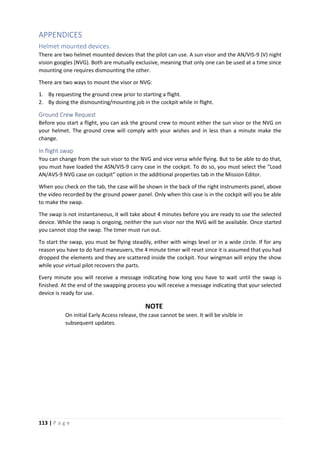
Helmet mounted devices................................................................................................................113
Ground Crew Request.................................................................................................................113
In flight swap...............................................................................................................................113
Default AWLS Channel List..............................................................................................................114
Default COM 1 Channel List............................................................................................................114
Default COM 2 Channel List............................................................................................................114
Aircraft Weapons Loads..................................................................................................................115
Authorized Weapons ..................................................................................................................115
Release Sequence .......................................................................................................................116
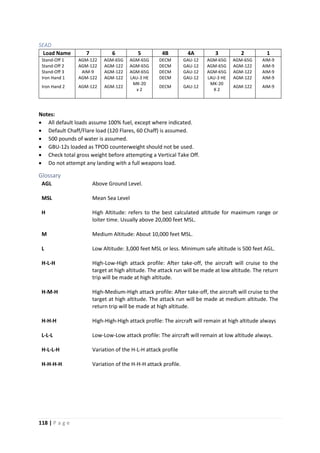
Default Loads ..............................................................................................................................116
Glossary.......................................................................................................................................118
Default Keyboard Binds ..................................................................................................................119
Category: Master Modes ............................................................................................................119
Category: HUD Control................................................................................................................119
Category: VSTOL Controls...........................................................................................................119
Category: Stability Augmentation & Autopilot...........................................................................119
Category: Armament Control Panel............................................................................................119
Category: HOTAS.........................................................................................................................120
Category: Hydraulic & Mechanical..............................................................................................121
Category: Left MPCD...................................................................................................................121
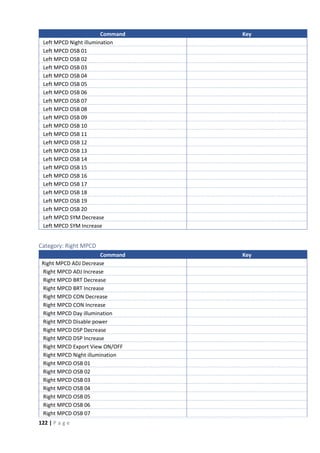
Category: Right MPCD.................................................................................................................122
Category: Up Front Control.........................................................................................................123
Category: Miscellaneous Controls ..............................................................................................124
Category: Engine & Fuel..............................................................................................................124
Category: Exterior Lights.............................................................................................................124
Category: Pilot & Seat Controls...................................................................................................125
1 | P a g e
AIRCRAFT DESCRIPTION
Wing Span 30.33 feet 9.24 m
Length 46.33 feet 14.12 m
Height (top of fin) 11.65 feet 3.55 m
Wing gear spread 17.00 feet 5.18 m
Empty Weight 13,968 lb 6,340 Kg
Loaded Weight 22,295 lb 10,410 Kg
Maximum takeoff weight
Rolling 31,000 lb 14,100 Kg
Vertical 20,755 lb 9,415 Kg
2 | P a g e
COCKPIT
Main Instruments Panel
3 | P a g e
Left Instruments Panel
1. EMERG. BATT HANDLE
2. TRIM PANEL
Rudder Trim Indicator
Aileron Trim Indicator
Landing Light Switch
Rudder Pedal Shaker (RPS) Switch
3. SAAHS PANEL
Altitude Hold Switch
STAB AUG Switches
Q Feel Switch
AFC Switch
4. THROTTLE QUADRANT
Engine Limiters Switch
STO STOP Lever
Nozzle Control Lever
Throttle Lever
Rudder Trim Switch
Manual Fuel Switch
Brake Lock Lever
5. MISC. SWITCH PANEL
Seat Adjustment Switch
External Lights Master Switch
6. FUEL PANEL
Flow Proportioner
L and R Fuel Pumps Switch
L and R Wing Fuel Dump Switch
Air Refueling (A/R) Switch
7. EXTERNAL LIGHTS PANEL
Formation Lights Knob
Position Lights Switch
Anti-Collision Lights Switch
Auxiliary Landing Light Switch
8. PILOT SERVICES PANEL
Water Dump Switch
Oxygen Switch
LIDS Switch
Engine RPM Select Switch
Engine Fuel Control Switch
4 | P a g e
Right Instruments Panel
1. ELECTRICAL PANEL
DC Voltmeter
DC Test Switch
Battery Switch
Generator Switch
Engine Start Switch
APU Switch
2. V/UHF RADIO SET CONTROL
3. ACNIP PANEL
4. INTERIOR LIGHTS PANEL
Console Lights Knob
Instruments Lights Knob
Flood Lights Knob
Compass Light/Lights Test Switch
Warning/Caution Lights Knob
5. ENVIRONMENTAL CONTROL
Temperature Controller
Equipment Bay Cool Switch
RAM Air Switch
DEFOG Switch
6. NVG STOWAGE & VIDEO
RECORDER
5 | P a g e
Rear Panel Left
Description Keybind
1. DECS Switch
2. Fuel Shutoff Lever
3. Fuel Shutoff Lever Lock [Fuel Shutoff Lever lock release]
ATTENTION
The Fuel Shut Off lever locks in position when clicked ON. To click
it OFF, the [Fuel Shutoff Lever lock release] key must be pressed
first.
6 | P a g e
Rear Panel Right
NOTE
Ground Power Control panel is not enabled in initial Early Access release. It
will be enabled on subsequent updates.
7 | P a g e
Throttle Quadrant
Description Keybind
1. Throttle [Throttle UP]
[Throttle DOWN]
Has Axis Control
2. ECM Dispense Switch [ECM Dispense FWD: Flares]
[ECM Dispense AFT: Chaff]
[ECM Dispense Left: Mini Jammer]
[ECM Dispense Right: All]
3. Cage/Uncage Switch [Cage/Uncage]
4. Antenna Elevation Switch NOT OPERATIONAL ON NA
5. Airstart Switch [Engine Airstart]
6. Emergency Flap Retract Switch [Emergency Flap Retraction]
7. Throttle Cutoff Lever [Throttle Cutoff]
8. Short Takeoff Stop [STO STOP UP]
[STO STOP DOWN]
9. Nozzles Control Lever [Nozzle Rotation UP]
[Nozzle Rotation DOWN]
Has Axis Control
8 | P a g e
Description Keybind
10. Parking Brake Lever [Parking Brake ON]
[Parking Brake OFF]
11. Jet Pipe Temperature Limiter Switch
12. EMS Button
13. Hovering Vertical Takeoff Stop
14. Throttle and Nozzle Lever Friction Knobs
15. Manual Fuel Control Switch
16. Rudder Trim Switch [Trim RUDDER LEFT]
[Trim RUDDER RIGHT]
17. Speed Brake Switch [Airbrake ON]
[Airbrake OFF]
[Airbrake TOGGLE]
18. COMM Switch [COMM UP: Select COMM 1]
[COMM DOWN: Select COMM 2]
19. A/A Programming NOT OPERATIONAL ON NA
20. TDC [TDC Forward]
[TDC Aft]
[TDC Left]
[TDC Right]
[TDC Down (Action Position)]
[TDC Action/No Action Toggle]
Has Axis Control
9 | P a g e
Control Stick
Description Keybind
1. Trigger [Trigger: Fire Gun/Launch Sidewinder, Sidearm]
2. Air-To-Ground Bomb Pickle Button [Bomb Pickle: Release Bombs/Launch Rockets,
Mavericks]
3. Trim Switch [Trim Pitch UP]
[Trim Pitch DOWN]
[Trim Bank LEFT]
[Trim Bank RIGHT]
4. Sensor Select Switch [Sensor Select FWD: INS. IRMV/EOMV]
[Sensor Select AFT: DMT: LST/TV]
[Sensor Select LEFT: MAP Center/Decenter]
[Sensor Select RIGHT: FLIR/HUD-BH/WH]
[Sensor Select DOWN: HUD Scene Reject/TPOD]
5. Waypoint Increment [WP Increment]
10 | P a g e
Description Keybind
6. Air-To-Air Weapon Select Switch [A/A Mode FWD: Sidewinder (Boresight)]
[A/A Mode AFT: Sidewinder (SEAM)]
[A/A Mode DOWN: Gun]
7. Undesignate/NSW Steering [AG Target Undesignate/NWS/FOV Toggle]
8. Emergency SAAHS Disengage
Switch
[Emergency SAAHS Disconnect]
11 | P a g e
AIRCRAFT SYSTEMS
General Description
The AV-8B Night Attack aircraft has the following built-in systems:
• Digital Engine Control System DECS.
• Automatic Fuel System.
• Air Refueling System.
• Electrical Power System.
• External Lighting.
• Internal Lighting.
• Hydraulic Power Supply System.
• Flight Control System
o Primary Flight Controls:
▪ Control Stick (Pitch and Roll).
▪ Rudder Control.
▪ Reaction Control System (RCS).
o Secondary Flight Controls:
▪ Flaps.
▪ Ailerons.
▪ Speedbrake.
• Stability Augmentation and Attitude Hold System SAAHS.
• Landing Systems.
• Instruments.
o Digital Instruments.
▪ Head-Up Display HUD.
▪ Upfront Control UFC.
▪ Option Display Unit ODU.
▪ Multipurpose Color Displays MPCD.
o Standby Instruments.
▪ Angle of Attack indicator.
▪ Turn and Slip Indicator.
▪ Clock.
▪ Stopwatch.
▪ Standby Magnetic Compass.
▪ Standby Vertical Velocity Indicator.
▪ Standby Attitude Indicator.
▪ Standby Altimeter.
▪ Standby Airspeed Indicator.
• Mission Systems Computer.
• VREST Computer (for jetborne flight).
• Air Data Computer ADC.
• Environmental Control System ECS.
• On-Board Oxygen Generating System OBOGS.
12 | P a g e
Landing System
The landing systems consist of the landing gear, nosewheel steering, brakes, anti-skid and a lift
improvement device system (LIDS).
Landing Gear
The landing gear system consists of a nose gear, a main gear with twin wheels in tandem with the nose
gear and two single wheel wing gears.
Accidental retraction, when the aircraft is on the ground, is prevented by a weight-on-wheels (WOW)
switch and ground safety locks.
Landing Gear Handle
The landing gear handle is on the lower left main instruments panel. A mechanical downlock stop locks
the landing gear in the down position when the aircraft weight is on the main landing gear.
Landing Gear Position Indicators
The landing gear position indicators are on the lower left main instruments panel. The N (nose gear),
L (left wing gear), R (right wing gear) and M (main gear) green indicators come on when the respective
gear is down and locked. The N, L, R and M amber indicators are in-transit indicators and come one
when the respective gear is not down and locked or up and locked.
Landing Gear Warning Lights and Aural Tone.
The landing gear warning lights consist of the GEAR light on the upper right instrument panel and the
light in the landing gear handle. Both warning lights come on simultaneously.
The warning lights come on steady when any gear position disagrees with the landing gear handle
position.
With the landing gear handle in the up position, both warning lights will flash and a LANDING GEAR,
LANDING GEAR voice warning will sound when the aircraft altitude is below 6000 feet, airspeed is less
than 160 knots and the sink rate is over 250 feet per minute.
Nose Wheel Steering (NWS)
The NWS system is an electro-hydraulic operated system that provides directional control for ground
operations with three modes:
• CASTER: The default mode. Nose wheel is free to swivel, and rudder pedal movement is isolated
from the NWS system.
• LO GAIN Steering: The rudder pedals are connected to the system. Nose wheel has a range of
movement between -140
to +140
degrees.
• HI GAIN Steering: The nose wheel range of movement is increased to +/- 450
degrees. HI GAIN
steering is undesirable above 20 Knots Ground Speed due to poor directional control
characteristics.
A fourth steering mode, centered, is used for gear retraction. When the landing gear handle is placed
in the up position, the nose wheel will automatically steer to the center position at which time the
landing gear retraction will commence.
With the landing gear handle DOWN, the NWS mode is controlled by the anti-skid switch and the [AG
Target Undesignate/NWS/FOV Toggle] button on HOTAS. With anti-skid set to ON, CASTER mode is
selected. With the anti-skid switch set to NWS, LO GAIN steering is selected.
13 | P a g e
Pressing the [AG Target Undesignate/NWS/FOV Toggle] HOTAS button increases the steering mode
by one gain so that from CASTER mode it changes to LO GAIN mode and from LO GAIN mode it changes
to HI GAIN mode.
With the HUD in VSTOL mode, indications provide cues as to steering position and mode. Whenever
the nose wheel is within 30
of neutral, a C will appear inside the slideslip ball. A steering mode
indication is provided in the lower right hand corner of the HUD. The indications are:
CTR Centered
CAST Caster
NWS Lo gain
NWS H Hi gain
A NWS light, on the caution/advisory panel, illuminates to indicate that a steering failure has occurred.
Brakes
The twin-wheel main landing gear is equipped with hydraulic operated carbon disk brakes. An anti-
skid system and parking brake are also incorporated into the brake system. Both brakes operate
simultaneously and progressively as either brake pedal is depressed. There is no differential braking.
Two pressure indicators adjacent to the inboard side of the caution light panel, provide information
on brake accumulator pressure, and applied brake pressure.
Parking Brake
The parking brake handle is located outboard of the throttle. It can only be actuated by the [Parking
Brake ON] and [Parking Brake OFF] key binds. The parking brake can only be set when the throttle is
in idle. When the parking brake is set, the throttle cannot be advanced until the parking brake is
released.
Anti-Skid
The anti-skid system is an electro-hydraulic system that controls hydraulic pressure to the brakes
providing full skid protection above 16 knots. The anti-skid system is selected by the ANTI-SKID switch
located on the landing gear/flaps control panel. The switch is labeled TEST, ON and NWS. The anti-skid
system is not powered when the switch is in the NWS position.
A SKID warning light will turn on when the anti-skid system is OFF or failed.
Lift Improvement Device System (LIDS)
The lift improvement device system (LIDS) is part of the landing gear system. The LIDS, composed of
fixed strakes and a retractable fence, increase lift by 1200 pounds by directing the jet fountain energy
and reducing hot air reingestion in ground effect.
The LIDS fence normally extends and retracts with the landing gear. However, the fence may be
retracted to reduce conventional takeoff drag with the LIDS switch. The LIDS switch is located on the
pilot’s service panel on the left console and is a two-position lever locked switch.
RET Retracts LIDS fence.
NORM LIDS fence operates normally (default position).
A LIDS light on the caution panel indicates that the landing gear handle and the fence position do not
agree. The LIDS fence is down at speeds below 125 knots and automatically retracts above 125 knots.
14 | P a g e
If the air data computer fails, the automatic retraction mechanism disconnects, and the LIDS operate
with the gear.
15 | P a g e
NORMAL PROCEDURES AND CHECKLISTS
Engine Start
After Entering Cockpit
1. DECS enable switch OFF
2. Fuel Shutoff handle OFF
3. Engine RPM switch LO
4. EFC switch POS 1
5. LIDS switch NORM
6. Oxygen Switch OFF
7. H2O Dump switch OFF
8. Exterior Lights AS REQUIRED
9. Exterior Lights Master Switch ON
10. A/R Switch IN
11. Left and Right wing fuel dump switches NORM
12. Left and Right boost pump switches NORM
13. FUEL PROP ON
14. Throttle OFF
15. JPTL Switch ON
16. Manual fuel switch OFF
17. Parking brake ON
18. SAS SET
a. Pitch ON
b. Roll ON
c. Yaw ON
19. Q-feel switch ON
20. Rudder pedal shaker switch ON
21. Landing light switch OFF
22. ANTISKID switch ON
23. Landing Gear handle DOWN
24. LDG GEAR EMER BATT CHECK
25. Flaps Switches OFF
26. Water Switch OFF
27. MASTER ARM OFF
28. Armament Control Panel SAFE/NORM
29. IR Cool Switch OFF
30. MPCD, HUD and COMM AS DESIRED
31. FLIR Switch AS DESIRED
32. VRS Display Switch AS DESIRED
33. DMT Switch AS DESIRED
34. INS mode selector knob OFF
35. DP switch AUTO
36. MC switch AUTO
37. Circuit Breakers (7) IN
38. ECM control panel
a. RWR AS DESIRED
b. EXP (expendables) OFF
c. ECM OFF
39. Battery switch OFF
40. Generator switch GEN
41. V/UHF radio remote control AS DESIRED
42. ACNIP panel AS DESIRED
43. IFF NORM
16 | P a g e
44. Internal lights panel AS DESIRED
45. ECS Panel
a. Temperature controller AUTO
b. Aft bay EQUIP Switch ON
c. DEFOG switch NORM
d. Cabin pressure switch NORM
46. Video Recorder STBY/REMOTE
Pre-Start
1. Battery switch BATT
2. ICS CHECK/SET
3. Warning and Caution lights
TEST
MASTER CAUTION RESET
4. Brakes CHECK
a. Accumulator 1000 PSI MINIMUM
b. Brake pressure
1500 PSI MINIMUM
IF AIRCRAFT NOT SECURED
5. Landing gear indicator 4 GREEN
6. Throttle quadrant CHECK
7. Igniters CHECK
a. Depress airstart button
CHECK IRREGULAR CRACKING
SOUND
IF NO SOUND OR SOUND IS
REGULAR, CHECK HAS FAILED
b. Manual fuel switch
SWITCH ON
CHECK IGNITERS
SWITCH OFF
8. EDP
BIT
(OBSERVE THE FOLLOWING)
a. NOZZLE needle 60º THEN FLUCTUATE
b. OT warning light ON
c. 15 SEC light ON
d. Water flow light ON
e. Lights after BIT complete ALL OFF
9. Fuel Panel
CHECK QUANTITY
BIT
(OBSERVE THE FOLLOWING)
a. Left window 1400 +/- 100
b. Right window 2400 +/- 100
c. TOT window 3800 +/- 200
d. L and R fuel low level lights FLASHING
e. LOAD caution light ON
f. BINGO caution light (if bingo fuel set above 4000
pounds)
ON
g. LEFT and RIGHT full advisory lights FLASHING
h. Lights after BIT complete ALL OUT
10. Canopy caution light switches CHECK
a. Canopy open
CHECK CONTROL HANDLE
FULL FORWARD AND CANOPY
CAUTION LIGHT ON
b. Pull canopy control handle full aft
CHECK CANOPY CAUTION
LIGHT OFF
17 | P a g e
c. Canopy close
CHECK CONTROL HANDLE
FULL FORWARD AND CANOPY
CAUTION LIGHT OFF
IF EXTERNAL POWER IS TO BE USED
11. Battery switch OFF
12. External electrical power CONNECT
13. Battery switch BATT
14. Ground power panel switches
a. AFT EQP ALL
b. COCKPIT ON
c. FWD EQP ON
d. STORES ACP or SMS
IF APU POWER IS TO BE USED
15. Canopy CLOSED
16. APU generator switch ON
17. APU Advisory light ON
18. APU GEN light OUT
19. Canopy AS DESIRED
Starting Engine
1. Canopy CLOSED
2. DECS power CHECK
3. External power DISCONNECT IF APPLICABLE
4. Parking brake ON
5. Throttle OFF
6. Nozzles AFT TO 10º
7. Engine start switch ENG ST
8. Throttle IDLE
(after indication of RPM)
9. Engine start switch CHECK OFF PRIOR TO 15%
10. Idle RPM CHECK
11. JPT CHECK 545ºC MAXIMUM
12. HYD 1 and HYD 2 pressure 3000 +/- 200 PSI
13. Brake accumulator pressure 3000 +/- 200 PSI
14. Brake pressure CHECK
15. Nozzles 10º
16. Warning and Caution lights TEST
17. Landing gear indication 4 GREEN
18. MPCD, HUD, COMM ON / AS DESIRED
19. MPCD SELECT ENG PAGE
20. Canopy AS DESIRED
Before Taxiing
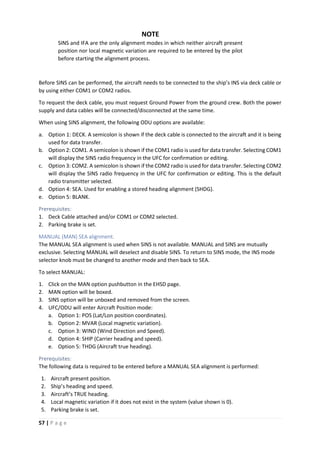
1. INS ALIGNMENT
a. Parking brake SET
b. MPCD (EHSD PAGE)
CHECK A/C LAT/LONG AND
INPUT CORRECT POSITION IF
REQUIRED
18 | P a g e
c. INS switch
GND ALIGN
(MANSEA if on a ship)
d. MPCD (EHSD PAGE)
i. DTX SELECT
ii. TRUE UNBOXED
iii. WAYPOINTS CHECK/ENTER
2. DMT switch ON
3. IFF, TACAN, RADALT ON AND SET
4. FLIR switch ON
5. Boost pumps CHECK
a. Left and Right pump switches OFF PUMPS LIGHTS ON
b. Left and Right pump switches DC PUMPS LIGHTS OFF
c. Left and Right pump switches NORM PUMPS LIGHTS OFF
6. Transformer-rectifier CHECK
a. DC test switch HOLD AT MAIN Voltmeter drops.
STBY TR light illuminates at
24.75 Volts.
b. DC test switch RELEASE Voltmeter returns to above
25.5 Volts
c. DC test switch HOLD AT STBY Voltmeter drops to
approximately 25.5 Volts
7. JPT limiter CHECK
8. Manual fuel switch CHECK
9. Water switch CHECK THEN OFF
10. FUEL PROP CHECK THEN ON
11. Trim CHECK THEN SET
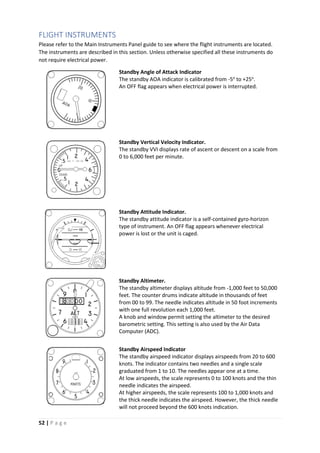
12. Standby instruments CHECK
13. OBOGS System CHECK
14. Flaps BIT
15. Flaps CRUISE
16. Flight controls CHECK
17. MPCD STORES BIT CHECK
18. SAAHS BIT
19. Paddle switch CHECK
20. Display computer CHJECK
21. A/R Probe CYCLE
22. MPCD CHECK PERFORMANCE
23. Displays/NVG ADJUST
24. INS CHECK STATUS PRIOR TO
TAXI
Taxiing
Aircraft directional control during taxi should be via nosewheel steering since no differential braking
is available.
Idle thrust is high and will result in excessive taxi speed unless the brakes are used or nozzles deflected.
The use of nozzle deflection between 45o
and 60o
for control of taxi speed is recommended.
When taxiing with nozzles deflected, it is essential that the stick be held forward 2o
nose down so that
the nose RCS valve will remain closed. This will prevent the nose RCS valve from blowing debris into
the engine intake ducts.
19 | P a g e
When Ready to Taxi:
1. Master Mode VSTOL
2. Nozzles 10o
3. Flaps CRUISE
4. Trim 0o
, 0o
, 4o
5. Anti-skid CHECK
6. Brakes/NWS CHECK
ATTENTION
The NWS is only engaged as long as the [AG Target Undesignate/NWS/FOV
Toggle] HOTAS button remains pressed. The NWS will disengage as soon as
the [AG Target Undesignate/NWS/FOV Toggle] button is released.
Pre-positioning Checks
Pre-positioning checks may be completed in the chocks, while taxiing, or while marshalling.
1. CWAIVER checks
C – Clock SET
W – Weapons PROGRAMMED
A – ARBS BORESIGHT
FLIR SET
I - IFF SET
IR cool switch AS DESIRED
V – VRS AS DESIRED
E – ECM (ALE/ALQ/ALQ) SET
R – RADALT SET
2. Canopy CLOSED/CHECK
3. Seat ARMED
4. Flight and standby instruments CHECK
5. APU AS DESIRED
6. ANTI-SKID ON (LIGHT OUT)
7. Altitude Switch AS DESIRED
8. INS Knob IFA/NAV
9. Approach Light ON
Takeoff
Four methods of takeoff are possible:
• Vertical Takeoff (VTO).
• Rolling Vertical Takeoff (RVTO).
• Short Takeoff (STO).
• Conventional Takeoff (CTO).
Takeoff Checklist
The following checklist is used to configure the aircraft for all four takeoff methods.
NOTE
Each aircraft cockpit contains a takeoff checklist placard. The contents of
these placards vary substantially from the takeoff checklist described in this
manual.
20 | P a g e
The Takeoff Checklist consists of two parts:
Aircraft Configuration Check: Also referred to as One Finger check because it is initiated and
confirmed by signaling with the index finger extended.
Engine, Water System & Flight Control Check: Referred as a Two Finger or Five Finger check
depending whether water is being used or not. In this check the pilot evaluates engine performance,
flap programming and nozzle movement, as well as arming the water system, if required.
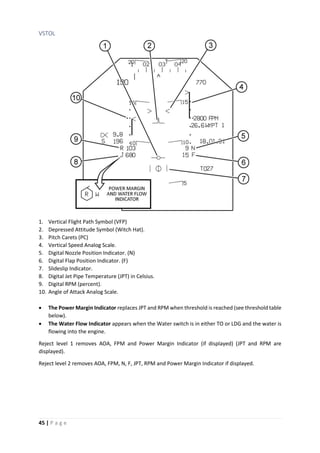
By default, Pitch Carets (PC) are set at 14 for all takeoffs. This places the pitch carets at 6o
elevation
with respect to the horizon bars in VSTOL Master Mode. This position indicates the desired post-
takeoff placement of the Depressed Attitude Symbol (or Witch Hat). This takeoff attitude is the level
equivalent of 14o
AOA.
Trim for both aileron and rudder shall be 0o
. Pitch trim for shore-based takeoffs shall be 2o
Nose Down.
Check the specific takeoff procedures for additional detail.
Aircraft Configuration Check (On Finger Checks)
1. Nozzle Rotation Airspeed (NRAS) AS REQUIRED
2. Pitch Carets (PC) SET
3. STO Stop AS REQUIRED
4. Trim SET
5. Flaps AS REQUIRED
6. Warning/Caution lights OUT
NOTE
To set the NRAS or PC:
• Press the VSTOL Master Mode button.
• For NRAS, select the NRAS option on ODU. Insert NRAS on the UFC. Press
ENTER.
• For PC, select PC on ODU. Insert 14 on UFC. Press ENTER
ATTENTION: NRAS and PC values are fixed for the initial Early Access release version. The pilot
cannot change them.
Engine, Water System & Flight Control Check (Two/Five Finger Checks)
7. Engine CHECK
a. MPCD (Left or Right) Select ENG
b. Accelerate engine from idle to 60%
c. Check acceleration time within limits: 35 to 60%
in 2.4 – 3.1 seconds.
d. IGV’s 10 to 21o
at 60%
8. Water AS REQUIRED
a. Place water switch to TO and note RPM rise.
b. Reset RPM to top end of acceleration band.
9. Nozzle/flaps/duct pressure CHECK
a. Set nozzles momentarily to STO stop (or 50o
if STO stop is not required).
b. Check flaps for proper angle based on flap mode.
c. Check duct pressure approx. 45 PSI.
d. Place nozzles at the takeoff position.
21 | P a g e
Jetborne/Semi-jetborne Takeoffs
All jetborne and semi-jetborne takeoffs being with a takeoff procedure and end with an accelerating
transition to wingborne flight. The transition point between the takeoff procedure and the
accelerating transition procedure begins once the aircraft is off the ground, the wings are level and
the vane is centered. At this point, attitude and AOA can be safely increased and the Accelerating
Transition can begin.
Vertical Takeoff (VTO)
If possible, VTO into the wind. Lateral control during the first few feet of a VTO is critical, do not
hesitate to make immediate, large and rapid control movements to counteract bank angles.
Aircraft Configuration Check (On Finger Checks)
1. Nozzle Rotation Airspeed (NRAS) NOT REQUIRED
2. Pitch Carets (PC) SET
3. STO Stop CLEAR
4. Trim SET
5. Flaps STOL
6. Warning/Caution Lights OUT
Engine, Water System & Flight Control Check (Two/Five Finger Checks)
7. Engine CHECK
8. Water AS REQUIRED
9. Nozzle/Flaps/Duct Pressure CHECK
a. Set nozzles momentarily to approximate 50o
b. Check flaps at approximately 62o
c. Check duct pressure at approximately 45 PSI
d. Place nozzles at the HOVER Stop and check angle.
Initiate Takeoff
10. Throttle FULL
11. Brakes HOLD until airborne
12. Engine CHECK TOP END RPM and
Water Flow (if armed)
13. During liftoff: Ensure wings remain level. Hold heading and adjust attitude to prevent fore/aft
drift.
14. When clear of ground effect (20 – 25 feet), gradually reduce power to establish a hover, or
when passing 50 feet and clear of obstacles, being transition to wingborne flight.
Rolling Vertical Takeoff (RVTO)
The RVTO requires approximately 100 feet of ground roll and should be made as nearly into the
wind as possible.
Aircraft Configuration Check (On Finger Checks)
1. Nozzle Rotation Airspeed (NRAS) NOT REQUIRED
2. Pitch Carets (PC) SET
3. STO Stop SET 70o
4. Trim SET
5. Flaps STOL
6. Warning/Caution Lights OUT
22 | P a g e
Engine, Water System & Flight Control Check (Two/Five Finger Checks)
7. Engine CHECK
8. Water AS REQUIRED
9. Nozzle/Flaps/Duct Pressure CHECK
a. Set nozzles momentarily to STO Stop and check angle
b. Check flaps at approximately 62o
c. Check duct pressure at approximately 45 PSI
d. Place nozzles to 30o
Initiate Takeoff
10. NWS ENGAGE
11. Throttle FULL
12. Brakes RELEASE
13. Nozzles STO STOP AS RPM PASSES
110%
14. Engine CHECK TOP END RPM and
Water Flow (if armed)
15. During liftoff ensure wings remain level and center the slideslip vane.
16. Begin transition to wingborne flight.
Short Takeoff (STO)
The STO can be used for the widest variety of aircraft configuration, weight and runway conditions
provided that crosswinds remain within specified limits.
Aircraft Configuration Check (On Finger Checks)
1. Nozzle Rotation Airspeed (NRAS) SET AS CALCULATED
2. Pitch Carets (PC) SET
3. STO Stop SET AS CALCULATED
4. Trim SET
5. Flaps AS DESIRED (STOL or AUTO)
6. Warning/Caution Lights OUT
Engine, Water System & Flight Control Check (Two/Five Finger Checks)
7. Engine CHECK
8. Water AS REQUIRED
9. Nozzle/Flaps/Duct Pressure CHECK
a. Set nozzles momentarily to STO Stop and check angle
b. Check flaps for proper angle based on flap mode
c. Check duct pressure at approximately 45 PSI
d. Place nozzles to 10o
Initiate Takeoff
10. NWS ENGAGE
11. Throttle FULL
12. Brakes RELEASE
13. Engine CHECK TOP END RPM and
Water Flow (if armed)
23 | P a g e
14. Nozzles STO STOP AT CALCULATED
NRAS
15. During liftoff ensure wings remain level and center the slideslip vane.
16. Begin transition to wingborne flight.
Accelerating Transition (AT)
Accelerating Transition is the term used to describe transition from jetborne/semi-jetborne flight to
wingborne flight. The AT begins when the aircraft is clear of ground effect and at an altitude sufficient
to avoid obstacles and introduction of FOD onto the landing surface.
WARNING
During AT, AOA must not exceed 15o
. Over-rotation or high rotational rates
may result in the AOA rising uncontrollably even with stick full forward.
Uncontrollable pitch ups are most likely to occur at extreme aft CG loadings
and/or with the wing flaps deflected more than 25o
.
1. Throttle FULL
2. Attitude SET WITCH HAT AT THE PITCH CARETS
Continue to maintain wings level and vane centered.
3. Nozzles GRADUALLY ROTATE THE NOZZLES AFT.
Maintain nozzle angle of 25o
or greater while in STOL flaps
Nozzle rotation should enable the aircraft to maintain a slight
climb.
Once wingborne flight is achieved
4. Reduce power to achieve normal lift dry rating or less and stop water flow (if required).
5. Perform After Takeoff Check or enter the landing pattern.
Conventional Takeoff (CTO)
The CTO can be used when configuration or environmental conditions preclude use of any other
takeoff type (i.e. crosswinds or asymmetric loadings). The CTO is restricted to gross weights that will
not cause the wheel/tire limitation speed of 180 KGS (Knots, Ground Speed) to be exceeded on the
takeoff roll.
Aircraft Configuration Check (One Finger Checks)
1. Nozzle Rotation Airspeed (NRAS) SET NSW LIFTOFF SPEED
2. Pitch Carets (PC) SET
3. STO Stop CLEAR
4. Trim SET
5. Flaps AUTO
6. Warning/Caution Lights OUT
Engine, Water System & Flight Control Check (Two/Five Finger Checks)
7. Engine CHECK
8. Water AS REQUIRED
9. Nozzle/Flaps/Duct Pressure CHECK
a. Set nozzles momentarily to approximately 50o
b. Check flaps at approximately 25o
c. Check duct pressure at approximately 45 PSI
24 | P a g e
d. Place nozzles to 10o
Initiate Takeoff
10. NWS ENGAGE
11. Throttle FULL
12. Brakes RELEASE
13. Engine CHECK TOP END RPM and
Water Flow (if armed)
14. At nosewheel liftoff speed – Gradually rotate with aft stick. Guard against overrotation.
15. During liftoff ensure wings remain level and center the slideslip vane.
16. Set attitude – Witch Hat at the pitch carets.
After Takeoff
1. Landing Gear UP
2. Flaps AUTO
Nozzles must be at 25o
3. Nozzles AFT
4. Water switch OFF
5. STO Stop CLEAR
Landing
The break speed is 350 KCAS. The standard break interval is 2 seconds. At the break, apply bank angle,
retard the throttle and extend speed brake. Once below 250 KCAS, complete the Landing Checklist.
Four methods of landing are possible:
• Vertical Landing (VL).
• Rolling Vertical Landing (RVL).
• Slow Landing (SL).
• Conventional Landing (CL).
The method of landing must be predetermined in order to properly configure the aircraft.
A decelerating transition from wingborne flight is used to place the aircraft in position for a VL or RVL.
All other landing types use a standard pattern approach to landing. On all rolling landings (CL, SL, RVL)
the recommended landing attitude is to place the depressed attitude symbol (Witch Hat) on to 2o
above the horizon bar.
Power Nozzle Braking (PNB) is normally used for most roll-on landings; however, the aircraft can be
stopped using wheel brakes alone.
Landing Checklist
The following landing checklist is used to configure the aircraft for all four of the landing methods.
NOTE
Each aircraft cockpit contains a landing checklist placard. The contents of
these placards vary substantially from the takeoff checklist described in this
manual.
1. Gear DOWN
2. Flaps AS REQUIRED
Nozzles must be at 25o
or greater prior to selecting STOL
flap.
25 | P a g e
3. STO Stop CLEAR
4. Duct pressure CHECK
5. Brake pressure CHECK
6. Water AS REQUIRED
If water is to be used
a. Water switch T/O
(check for RPM rise)
b. Throttle FULL
c. Check for green water flow light or W in the HUD, acceleration to short lift wet RPM
and water quantity countdown.
d. Water switch AS REQUIRED
7. Warning and caution lights CHECK
8. Lights AS REQUIRED
Decelerating Transition to a Hover
Decelerating transitions for VLs are started from a key position approximately 0.5 NM from the
touchdown point (preferably downwind) at an altitude of approximately 310 feet AGL. This places the
aircraft on a slightly descending flight path toward a point abeam the intended point of landing at
approximately 150 feet AGL. From, or just prior to arrival at, this abeam position the aircraft then
crosses to hover directly over the intended point of landing.
Approaching 180
1. Nozzles 40 – 60o
2. Flaps Check programming and droop
3. AOA 10 – 12o
Off the 180
4. Adjust flight path with stick
5. Control AOA with throttle or nozzles
At the Key
6. Set attitude WITCH HAT ON THE HORIZON
7. Nozzles HOVER STOP
8. Minimize sideslip, ensure no more than 15o
AOA and strive for 0o
AOB until less than 60
knots. Increase power as required to maintain a shallow glideslope (approx. 3o
) to arrive
abeam the landing site at 150 feet AGL.
At 60 KCAS
9. Check for adequate performance margin. If more than two legs of the power hexagon then
execute a wave off.
10. Approaching landing site. Select ground references and monitor rate of closure. When
closure is under control and below 30 knots, cross over the landing site while remaining at
150 feet AGL minimum until over a prepared surface. Flare slightly to spot or use braking
stop as required, and establish hover over the desired landing point.
The Hover
The hover may be entered from decelerating transition or a VTO. It is an interim period during which
the aircraft is held relatively stationary at an altitude of 50 to 60 feet AGL.
26 | P a g e
1. Control height with small throttle changes.
2. Maintain position with ground references.
3. RPM/JPT WITHIN LIMITS
Vertical Landing (VL)
The VL is commenced from a 50 to 60 feet AGL hover. Landing should be made pointing into the
wind to minimize exhaust reingestion.
1. Start a slow descent with the throttle.
2. Monitor ground references.
3. Maintain heading and adjust attitude and roll as necessary to correct for drift.
4. Maintain positive rate of descent.
When positively down
5. Throttle IDLE
6. Brakes APPLY
7. Nozzles AFT
8. Trim 4o
NOSE DOWN
9. Water OFF (if selected)
Decelerating Transition to a Rolling Vertical Landing.
The RVL should be used when the landing surface isn’t long enough to support a SL, but the landing
area cannot support a VL because it is subject to damage from heating or is a source of FOD.
Decelerating transitions for RVL are started from a key position approximately ¾ NM from the
touchdown point at an altitude of approximately 310 feet AGL. At the key, the aircraft attitude and
estimated nozzle angle are set while a crabbed approach is used to maintain runway centerline. The
aircraft is flown on a slightly descending flight path (approx. 3o
) until the touchdown point reaches the
desired level of depression in the HUD. At this point, flight path can be adjusted to ensure precise
landing on centerline and at the desired point.
Normally a glideslope of three degrees will satisfy to control touchdown point and rollout distance.
However, a steeper glideslope, up to six degrees, may be necessary when approaching over significant
obstacles into short fields.
If FOD is a concern, a ground speed of 60 knots or higher will be required, otherwise groundspeeds
slower than 60 knots can be considered.
Approaching 180
1. Nozzles 40 – 60o
2. Flaps Check programming and droop
3. AOA 10 – 12o
Off the 180
4. Adjust flight path with stick
5. Control AOA with throttle or nozzles
At the Key
6. Set attitude WITCH HAT ON THE HORIZON
7. Nozzles AS REQUIRED
(adjust to maintain desired groundspeed)
27 | P a g e
8. Minimize sideslip, ensure no more than 15o
AOA.
9. Adjust power to intercept desired glideslope to touchdown point.
At touchdown
10. Throttle IDLE
11. Nosewheel steering ENGAGE WHEN ROLLING TRAIGHT
AND PEDALS ARE NEUTRALIZED
12. Nozzles AS SET
13. Brakes APPLY
14. Trim MINIMUM 2o
ND
15. Water OFF
16. Nozzles LESS THAN 60o
WHEN SLOW
Slow Landing (SL)
The SL is used when aircraft gross weight is too high for a VL or RVL or to reduce engine stress. There
are two basic types of Slow Landing:
Fixed Nozzle Slow Landing
The recommended slow landing technique is the Fixed Nozzle Slow Landing using STOL flaps. The use
of AUTO flaps is recommended when crosswinds conditions are heavy or when dealing with high
asymmetric store loadings.
Approaching 180
1. Nozzles 40 – 60o
2. Flaps Check programming and droop
3. AOA 10 – 12o
Off the 180
4. Adjust flight path with stick
5. Control AOA with throttle or nozzles
At 30 – 50 feet AGL
6. Set attitude WITCH HAT ON 2o
ABOVE THE HORIZON
7. Control Rate of Descent with throttle (200 – 400 fpm).
At touchdown
8. Throttle IDLE
9. Nosewheel Steering ENGAGE WHEN ROLLING TRAIGHT AND
PEDALS ARE NEUTRALIZED
10. Nozzles AS REQUIRED
(up to full braking stop)
11. Trim MINIMUM 2o
ND
12. Throttle AS REQUIRED
At 60 Knots
13. Throttle IDLE
14. Nozzles HOVER STOP
15. Brakes APPLY
16. Water OFF
28 | P a g e
17. Nozzles LESS THAN 60o
WHEN SLOW.
Variable Nozzle Slow Landing
The VNSL is used whenever the throttle needs to remain at a relatively constant setting throughout
the approach, for example when the engine reliability is suspect
Approaching 180
1. Nozzles 40 – 60o
2. Throttle 80 – 100%
3. Nozzles AS REQUIRED TO ACHIEVE 8 – 10o
AOA
4. Flaps Check programming and droop
Off the 180
5. Adjust flight path with stick
6. Control AOA with throttle or nozzles
At 30 – 50 feet AGL
7. Set attitude WITCH HAT ON 2o
ABOVE THE HORIZON
8. Control Rate of Descent with throttle (200 – 400 fpm).
At touchdown
9. Throttle IDLE
10. Nosewheel Steering ENGAGE WHEN ROLLING TRAIGHT AND
PEDALS ARE NEUTRALIZED
11. Nozzles AS REQUIRED
(up to full braking stop)
12. Trim MINIMUM 2o
ND
13. Throttle AS REQUIRED
At 60 Knots
14. Throttle IDLE
15. Nozzles HOVER STOP
16. Brakes APPLY
17. Water OFF
18. Nozzles LESS THAN 60o
WHEN SLOW.
Conventional Landing (CL)
The CL requires substantially greater distance to stop than a SL or RVL. Landing distance available is a
critical consideration when performing a CL. The brakes are designed primarily for V/STOL and are
marginal for a CL without Power Nozzle Braking (PNB); therefore, always use PNB when performing a
CL. CLs without using PNB is an emergency procedure only.
Approaching 180
1. Nozzles AFT
2. Flaps Recheck in AUTO
3. AOA 10 – 12o
29 | P a g e
Off the 180
4. Adjust flight path with stick
5. Control AOA with throttle or nozzles
At 30 – 50 feet AGL
6. Set attitude WITCH HAT ON 2o
ABOVE THE HORIZON
7. Control Rate of Descent with throttle.
At touchdown
8. Throttle IDLE
9. Nosewheel Steering ENGAGE WHEN ROLLING TRAIGHT AND
PEDALS ARE NEUTRALIZED
10. Nozzles AS REQUIRED
(up to full braking stop)
11. Trim MINIMUM 2o
ND
12. Throttle AS REQUIRED
(for PNB a maximum of 70%)
At 60 Knots
13. Throttle IDLE
14. Nozzles HOVER STOP
15. Brakes APPLY
16. Water OFF
17. Nozzles LESS THAN 60o
WHEN SLOW.
After Landing
When clear of the active runway
1. Trim 4o
ND
2. Flaps CRUISE FOR TAXI
3. Water OFF
4. IFF HOLD, WAIT FOR 10 SECONDS THEN AS DESIRED
5. Master Arm Switch OFF
6. Ground safety control handle UP
7. Oxygen Switch OFF
8. APU OFF
9. Landing light OFF
When parked
10. Nozzles 0 to 10o
11. Parking brake SET
12. ANTISKID switch ON
13. Flap switches OFF
14. INS update PERFORM / ACCEPT IF APPLICABLE
15. FLIR switch AS DESIRED
16. INS Switch OFF
Engine shutdown
17. Throttle GROUND IDLE
30 | P a g e
18. Throttle cutoff lever LIFT
19. Throttle OFF
After Engine shutdown
20. Fuel boost pump switches NORM
21. DECS enable switch OFF
22. Fuel shutoff handle OFF
(click on the [Fuel Shutoff Lever lock release] before trying to click
the handle to the OFF position)
23. Battery switch OFF
Air Refueling
Aerial refueling operations are authorized with all USN tankers and the KC-10. All tanker limits apply.
Ferry loading CG must be maintained by keeping the maximum water quantity below 250 pounds.
Before Plug-in checklist
1. Master Arm switch OFF
2. A/R switch OUT
(READY light ON)
3. Probe light AS DESIRED
4. Airspeed 190 to 300 KNOTS
5. AOA 13o
MAXIMUM
6. Flaps CRUISE
STOL flaps may be used to maintain AOA below 13o
.
Use of AUTO flaps is prohibited.
7. AFC ENGAGE IF DESIRED
(Reduces workload)
8. Visor DOWN
Refueling
Refueling altitudes and airspeeds are dictat3ed by receiver and/or tanker characteristics and
operational needs. This covers a practical spectrum, from the deck to 35,000 feet and 190 to 300
knots.
Approach
1. Complete the before plug-in checklist.
2. Assume a position 10 to 15 feet in trail of the drogue.
3. Keep the refueling probe in both the horizontal and vertical reference planes.
4. Trim the aircraft to keep this stabilized approach.
5. Select the drogue as the primary reference point on the tanker.
6. Set the power to establish an optimum 3 to 5 knots closure rate on the drogue.
7. Small corrections in the approach phase are acceptable:
a. Small lateral corrections are made with the rudder.
b. Small vertical corrections are made with the stabilator.
c. Avoid corrections in the longitudinal axis. They cause probe displacement in both the lateral
and vertical reference planes.
8. If alignment is off in the final phase abort and do over.
31 | P a g e
Missed Approach
If the receiver probe passes forward of the drogue basket without making contact, a missed
approach should be initiated immediately.
1. Reduce power to establish a separation rate of 3 to 5 knots.
2. Assume a position 10 to 15 feet in trail of the drogue
3. Start a new approach.
Contact
1. READY light goes out
2. Fly a close tail chase formation with the tanker.
3. LEFT and RIGHT advisory lights come on as follows:
a. With no external tanks: Flashing when internal wing tanks are full.
b. With two external tanks: Flashing when the external tanks are full.
c. With four external tanks: Steady when the inboard external tanks are full and flashing when
the outboard external tanks are full.
4. Disengage.
Disengagement
1. Reduce power to establish a separation rate of 3 to 5 knots.
2. Keep the same alignment on the tanker as if approaching.
3. When clear of the drogue place the A/R switch to IN
4. LEFT and RIGHT advisory lights will go out when the probe is fully retracted or if PRESS selected.
32 | P a g e
AIRCRAFT LIMITATIONS
Engine Limits
RATING Notes
LIMITATIONS
MAXIMUM
% RPM
MAXIMUM
0
C JPT
COMBINED TIME LIMITS
SHORT LIFT WET 1 120.0 800
A
B
C
D
E
SHORT LIFT DRY 113.5 780
NORMAL LIFT WET 1, 2 116.0 780
NORMAL LIFT DRY 2 111.0 765
COMBAT 111.0 750
MAXIMUM THRUST 109.0 710
MAXIMUM CONTINUOUS 2 102.0 645 UNLIMITED
IDLE 5 28.4 – 29.0 545 UNLIMITED
STARTING 2, 4 475 MOMENTARILY
1. Do not use water injection below ambient temperatures of -
50
C or at altitude above 10,000 feet.
2. Requires pilot action to maintain limit.
3. Each 2.5 or 10.0 minute period of operation at the lift or
combat ratings respectively must be separated by a
minimum of 1 minute at maximum thrust or below.
4. Slow or abortive starting attempts should be discontinued
without waiting for JPT to reach 4750
C.
5. The minimum allowable sub-idle RPM is 22%
A. 15 Seconds
B. 1.5 Minutes
C. 2.5 Minutes
D. 10.0 Minutes
E. 15.0 Minutes
Notes
• Corrected fan speed is limited to 116.8% (+/- 0.5%) below 10,000 feet MSL and 110.5% (+/- 0.5%)
above 30,000 feet.
• When manual fuel is selected, pilot action is required to maintain all engine limits.
• Maximum overspeed is 122% for 15 seconds or 124.0%
Engine Airstart Envelope
33 | P a g e
Notes
• Blue Region: Airstarts attempts in this region may require in excess of 15 seconds for light-off.
• Green Region: When the aircraft is in this region, there may not be enough time to relight the
engine. Once relight has begun it may require over 30 seconds to reach IDLE rpm.
Airspeed Limitations
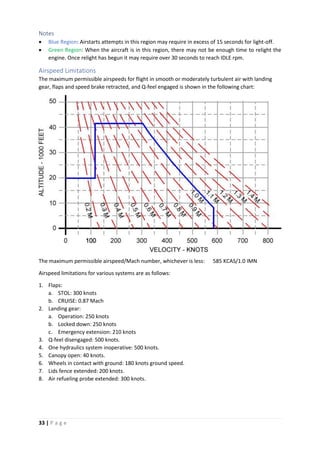
The maximum permissible airspeeds for flight in smooth or moderately turbulent air with landing
gear, flaps and speed brake retracted, and Q-feel engaged is shown in the following chart:
The maximum permissible airspeed/Mach number, whichever is less: 585 KCAS/1.0 IMN
Airspeed limitations for various systems are as follows:
1. Flaps:
a. STOL: 300 knots
b. CRUISE: 0.87 Mach
2. Landing gear:
a. Operation: 250 knots
b. Locked down: 250 knots
c. Emergency extension: 210 knots
3. Q-feel disengaged: 500 knots.
4. One hydraulics system inoperative: 500 knots.
5. Canopy open: 40 knots.
6. Wheels in contact with ground: 180 knots ground speed.
7. Lids fence extended: 200 knots.
8. Air refueling probe extended: 300 knots.
34 | P a g e
AOA Limitations
AOA limits versus Mach number when flaps are in AUTO, SAAHS is OFF and Nozzles are at 00
are in the
following graphic:
Prohibited Maneuvers
1. VTO with asymmetric load/stores greater than 45,000 inch-pounds.
2. STO with asymmetric load/stores greater than 85,000 inch-pounds.
3. CTO with asymmetric load/stores greater than 100,000 inch-pounds.
4. AUTO Flaps SL with asymmetric load/stores greater than 148,000 inch-pounds.
5. STOL Flaps SL with asymmetric load/stores greater than 85,000 inch-pounds.
6. VL with asymmetric load/stores greater than 80,000 inch-pounds.
7. Takeoff with less than 100
nozzles until wingborne.
8. Spin
9. Under 1g for more than 15 seconds.
10. Overriding aileron high speed stop.
11. Roll over 3600
.
12. In accelerating or decelerating transition:
a. Over 150
AOA above 50 knots with landing gear down.
b. Between 30 to 100 knots, slideslip requiring more than ½ lateral stick or with RPS on.
13. Rearward or sideward translation above 30 knots.
14. Thrust Vector Control (TVC) above 30,000 feet at AOA above onset of stall warning/maneuvering
tone or at less than 0g.
15. Flight above onset of stall warning/maneuvering tone with more than 60,000 inch-pounds
asymmetry.
16. Abrupt simultaneous stabilator, rudder or aileron inputs with more than 90,000 inch-pounds
asymmetry.
17. Wingborne flight at any speed with more than 148,000 inch-pounds asymmetry.
18. Flight above 0.88 Mach with more than 90,000 inch-pounds asymmetry. (see note)
19. Departure above 250 knots.
20. Rudder deflection above 0.80 Mach.
35 | P a g e
ATTENTION
For asymmetries above 90,000 inch-pounds, maneuvering limit is
5g, 100
AOA or stall warning, whichever occurs first.
Prohibited Maneuvers (SAAHS OFF)
1. Departure or stall.
2. Roll over 1800
above 80
AOA.
3. Abrupt input of more the ½ rudder.
4. More than ½ lateral stick beyond onset of stall warning or with flap switch in CRUISE.
Weight Limitations
Maximum gross weight for taxi and takeoff is 32,000 pounds. Avoid abrupt maneuvering and hard
braking at taxi gross weights above 29,750 pounds. Maximum gross weight for landing is 26,000
pounds.
Acceleration Limitations
1. The maximum permissible acceleration in the takeoff and landing configuration is 0.0g to 2.0g’s.
2. The maximum permissible acceleration in smooth air with flaps in AUTO or CRUISE for an aircraft
with empty pylons on only an air-to-air load is shown:
36 | P a g e
NOTE
Air-to-air load is two AIM-9 Sidewinders on pylons 1 and 7 and
the GAU-12 gunpod.
Crosswinds Limitations
Paved runway (minimum width 100 feet).
Takeoffs
1. CTO (day or night): 20 knots
2. STO > 120 knots (day or night): 15 knots.
3. STO ≤ 120 knots (day or night): 10 knots.
4. RVTO
a. Day: 10 knots.
b. Night: 5 Knots.
5. VTO (day or night): 10 knots.
Landings
1. Approach speeds ≥ 140 knots.
a. Day: 20 knots.
b. Night: 15 knots.
2. Approach speeds < 140 knots.
a. Day: 15 knots.
b. Night: 10 knots.
3. Gross weight > 19,550 pounds, all approach speeds (day or night): 10 knots.
Systems Limitations
All Weather Landing System (ALWS)
Use of AWLS is limited to weather minimum of 400 foot ceiling and 1 nm visibility.
Automatic Flight Controls (AFC)
1. Use of basic attitude hold mode above 0.85 Mach is prohibited.
2. Use of altitude hold (ALT) below 500 feet AGL is prohibited.
3. Use of control stick steering in pitch with ALT engaged is prohibited.
37 | P a g e
Canopy
1. Canopy open with wind over 40 knots is prohibited.
2. Canopy open with RPM over 70% is prohibited.
Nozzle/Flap Limitations
During normal in-flight operations, with the exception of air refueling, use of STOL flaps is limited to
nozzle positions greater than 250
.
38 | P a g e
WARNING/CAUTION/ADVISORY LIGHTS AND TONES
The warning/caution/advisory lights and displays system provides visual indications of normal aircraft
operation and system malfunctions affecting safe operation of the aircraft. The lights are on various
system instruments and control panel in the cockpit.
Master Warning Lights
The Master Warning lights consist of eleven green warning lights located to the right of the UFC panel
and below the red MASTER WARNING light. They indicate a hazardous condition that requires
immediate action:
• FIRE: Fire in the engine compartment.
• LAW: Low Altitude Warning: Below the minimum set altitude.
• FLAPS: Flap system failure.
• L TANK: Left fuel tank system overpressure or overtemperature.
• R TANK: Right fuel tank system overpressure or overtemperature.
• HYD: Both HYD1 and HYD2 systems have failed.
• GEAR: Landing Gear Unsafe/Fails to Extend.
• OT: (Overtemp) Engine JPT limits exceeded.
• JPTL: JPTL control inoperative. (Computer engine temperature control is malfunctioning).
• EFC: All Engine digital control boxes (DECU 1 and DECU 2) have failed. (Engine and fuel
control reverts to manual mode).
• GEN: AC generator is offline.
Master Caution Lights
The Master Caution Lights consist of six green priority caution lights located to the left of the UFC
panel and below the yellow MASTER CAUTION light. They indicate the existence of an impending
dangerous condition requiring attention but not necessarily immediate action. Illumination of a
priority caution light may require immediate corrective action in certain flight conditions.
• L FUEL: Left fuel system level is low.
o Steady light: fuel level is less than 750 pounds.
o Flashing lights: fuel level is less than 250 pounds.
• R FUEL: Right fuel system level is low
o Steady light: fuel level is less than 750 pounds.
o Flashing lights: fuel level is less than 250 pounds.
• 15 SEC: JPT above normal lift rating (flashes after 15 seconds).
• MFS: Manual fuel system on.
• BINGO: Fuel below bingo setting.
• H20: Less than 15 seconds water remaining.
Caution/Advisory Lights
The green caution and advisory lights are located on the caution/advisory lights panel located in front
of the right instruments panel.
Caution Lights
All caution lights indicate the existence of impending dangerous conditions that require attention but
no necessarily immediate action.
• AFC: AFC malfunction or AFC deselected.
• AFT BAY: Aft avionics bay ECS failed.
• APU GEN: APU selected and emergency generator failed.
39 | P a g e
• AUT FLP: Auto flap mode or ADC failed.
• CANOPY: Canopy not closed and locked.
• CASTER: Not used on Night Attack. Illuminates on light test only.
• C•AUT: Computed delivery mode (AUTO and CCIP) not available.
• CMBT: Combat thrust activated. Flashes after 2 ½ minutes.
• CS COOL: Cockpit avionics cooling fan failed.
• CW NOGO: Jammer Failure. Cannot jam CW radars.
• DC: Main transformer-rectifier failed.
• DEP RES: Departure resistance reduced.
• EFC: DECU 1 or DECU 2 has failed.
• ENG EXC: Engine overspeed, overtemperature or over g was detected.
• FLAPS 1: Flaps 1 channel failed.
• FLAPS 2: Flaps 2 channel failed.
• GPS: GPS not valid.
• H2O SEL: Over 250 knots and water switch not OFF.
• HYD 1: HYD 1 pressure ≤ 1400 psi.
• HYD 2: HYD 2 pressure ≤ 1400 psi.
• IFF: Mod 4 off, not zeroized or not responding.
• INS: INS aligning or failed.
• JMR HOT: Jammer pod overtemp.
• LIDS: LIDS not in correct position
• LOAD: Fuel asymmetry over VL limit
• NWS: Nosewheel Steering malfunction.
• OIL: Oil pressure low.
• OXY: OBOGS malfunction.
• PITCH: Pitch stab aug off or failed.
• P NOGO: Jammer Failure. Cannot jam Pulse-Doppler radars.
• PROP: Fuel proportioner off or failed.
• L PUMP: Left fuel boost pump pressure low.
• R PUMP: Right fuel boost pump pressure low.
• ROLL: Roll stab aug off or failed.
• SKID: Anti-Skid System Malfunction.
• STBY TRU: Standby TRU inoperative or off line.
• L TRANS: Low air pressure to the left feeder tank.
• R TRANS: Low air pressure to the right feeder tank.
• WSHLD: Windshield hot.
• YAW: Yaw stab aug off or failed.
Advisory Lights
The green advisory lights indicate safe or normal configuration, condition or performance, operation
of essential equipment or information for routine purposes. They are located on the caution/advisory
lights panel and on various other panels throughout the cockpit.
• NAV: NAV HUD master mode selected.
• VSTOL: VSTOL HUD master mode selected
• A/G: Air-to-Ground HUD master mode selected
• APU: APU operating
• CW JAM: Jammer Pod Active: Jamming CW radar signals.
• DROOP: Ailerons dropped
40 | P a g e
• P JAM: Jammer Pod Active: Jamming Pulse-Doppler radar signals.
• REPLY: IFF responding to Mode 4 interrogation.
• SEL: Combat thrust limiter selected.
• SPD BRK: Gear up and speed brake extended. Gear down and speed brake not 250
.
• STO: Flap switch in STOL.
Threat Warning Lights
Threat warning lights indicate when the aircraft is under threat from enemy radars.
• AAA: Anti Aircraft Artillery gun radar is locked on aircraft.
• AI: Air Intercept radar is locked on aircraft. Flashes if launch detected.
• CW: Ground Tracking (Continuous Wave) radar is locked on aircraft.
• SAM: SAM launch detected.
Voice Warnings
Voice warnings, a.k.a. Bitching Betty, are provided in conjunction with certain warning/caution lights
instead of special tones. All voice warning are presented twice: e.g. the voice warning associated with
the FIRE warning light will be presented as ENGINE FIRE, ENGINE FIRE.
In the case of multiple voice warnings, the highest priority voice warning is sounded first. Before
sounding the next voice warning, the priority list is checked to see if any higher priority warnings have
become active.
VOICE WARNING AND ASSOCIATED WARNING/CAUTION LIGHTS
VOICE WARNING
PRIORITY
NUMBER
WARNING
LIGHT
CAUTION
LIGHT
ENGINE FIRE 1 FIRE
OVERTEMP 2 OT
HYDRAULICS 3 HYD
FUEL CONTROL 4 EFC
FLAP FAILURE 5 FLAPS
LANDING GEAR 6 GEAR
ALTITUDE 7 LAW
LEFT TANK 8 LTANK
RIGHT TANK 8 RTANK
FIFTEEN SECONDS 9 15 SEC
BINGO 10 BINGO
LIMITER OFF 11 JTPL
OBSTACLE 12
WATER 13 H2O
FUEL LOW LEFT 14 L FUEL
FUEL LOW RIGHT 14 R FUEL
GENERATOR 15 GEN
MANUAL FUEL 16 MFS
CAUTION 17 MASTER
CAUTION
ACNIP GO
ACNIP FAIL
Voice warnings are not available on initial Early Release. They will be enabled on subsequent updates.
41 | P a g e
MASTER OPERATIONAL MODES
The AV-8B Night Attack weapons system is built around four master operational modes: navigation
(NAV), vertical and short takeoff and landing (VSTOL), air-to-ground (A/G) and air-to-air (A/A). The
master mode configures the aircraft avionics for navigation, landing and takeoff, or attack.
The NAV, VSTOL and A/G master modes can be selected by pressing the appropriate pushbutton in
the MASTER MODE panel. The pushbutton illuminates when selected. The A/A mode is can only be
selected by actuating the three-position A/A weapon select switch on the control stick.
The master modes are mutually exclusive with the last selected mode being the current mode of
operations. At power up, the system initializes to the V/STOL mode. Master modes are deselected by
selecting another master mode.
NAV
The NAV master mode is used for aircraft navigation. The NAV mode can be selected by clicking on
the NAV pushbutton in the MASTER MODE panel.
In the navigation mode, primary flight information is presented on the HUD and aircraft horizontal
situation is provided in the EHSD display in the MPCD.
Three navigation steering modes are provided and selectable from the EHSD display:
1. Waypoint, mark or waypoint/mark offset steering. It provides great circle steering to a selected
waypoint, mark or waypoint/mark offset.
2. TACAN or TACAN offset steering. It provides great circle steering to a selected TACAN station or
TACAN offset.
3. AWLS steering. It provides localizer and glideslope steering to a selected AWLS/ILS ground station.
VSTOL
The VSTOL master mode is a special mode used for takeoffs and landings. The VSTOL mode can be
selected by clicking on the VSTOL pushbutton in the MASTER MODE panel.
With VSTOL selected, two options are displayed on the ODU: NRAS (nozzle rotation airspeed) and PC
(pitch carets).
All basic navigation symbology is present in the HUD along with additional symbology including:
• Nozzle position (degrees)
• Flaps position (degrees)
• Engine RPM (percent)
• Engine Jet Pipe Temperature (degrees Celsius)
A/G
The A/G master mode is used to configure the aircraft for air-to-ground attack mode. The A/G mode
can be selected by:
• Clicking on the A/G pushbutton in the MASTER MODE panel.
• Selecting waypoint overfly (WOF) or target-of-opportunity (TOO) modes in the UFC.
Activation of the A/G master mode initializes the selected weapon and weapon program for delivery
and provides attack symbology on the HUD.
42 | P a g e
A/A
The A/A/ master mode is automatically entered by selecting an air-to-air weapon via the A/A weapon
select switch on the control switch. The following are the A/A weapons selection available:
• Switch Forward: Sidewinder in Boresight mode
• Switch Aft: Sidewinder in expanded acquisition mode (SEAM)
• Switch Down: Sets the GAU-12 to air-to-air mode. Subsequent actuations toggle between long and
short range gunsight.
Selection of any of these weapons activates the weapon’s associated A/A aiming symbology on the
HUD.
43 | P a g e
THE HEAD-UP DISPLAY (HUD)
The head-up display (HUD) is on the top of the main instruments panel. The HUD is the primary flight
control, weapon status and weapon delivery display for the aircraft under all selected conditions. The
HUD receives attack, navigation, situation and steering control information and projects symbology
on the combining glass for head-up viewing. Symbology is unique to the master mode selected.
HUD symbology can also be presented head-down on the MPCDs by clicking on the HUD menu option
(PB5) when the MPCD main menu is displayed.
The HUD can display FLIR video in all master modes provided that the HUD symbology brightness
selector switch is in the NIGHT position.
The controls for the HUD are below the UFC.
HUD CONTROL PANEL
1. HUD Symbology Reject Switch.
This three-position switch controls the amount of symbology provided for all HUD displays. See
HUD Basic Symbology for more information on reject modes.
2. HUD Symbology Brightness Control.
This knob is used to turn on the HUD and the varies the symbology display intensity.
3. HUD Symbology Brightness Selector Switch.
This switch in conjunction with the HUD symbology brightness control selects symbol brightness.
The NIGHT position must be selected to have FLIR video on the HUD.
4. FLIR Video Controls.
These knobs control FLIR video brightness and contrast on the HUD. The BRT control has a
pushbutton feature that allows that swaps the displays on the MPCD when clicked.
5. Altitude Switch.
This is a two-position toggle switch. This switch is used to select either radar altitude(RDR) or
barometric altitude (BARO) for display on the HUD.
NOTE
The following controls are not available on initial Early Access release: HUD
Symbology Brightness, FLIR Video Controls, MPCD display swap. These
controls will be available on subsequent updates.
44 | P a g e
HUD BASIC SYMBOLOGY
NAV
1. Velocity Vector Marker (VVM)
2. Heading Scale
3. True Heading Marker (only visible when true heading is selected).
4. Pitch Ladder
5. Indicated Altitude (Barometric selected)
6. Vertical Velocity in feet per minute (FPM)
7. Clock (Zulu time selected).
8. Current waypoint data: Distance (NM) + Waypoint number.
9. Auxiliary heading indicator (T is shown when True heading is used).
10. Max Gs attained.
11. Ground Speed (Knots)
12. Current Gs.
13. Mach number.
14. Angle of Attack (AOA)
15. Indicated Speed (Knots)
16. Bearing to Waypoint.
Reject level 1 removes AOA, FPM. Adds AOA and FPM analog scales.
Reject level 2 removes AOA, FPM, Mach, Current Gs and Ground Speed. Adds AOA and FPM analog
scales.
45 | P a g e
VSTOL
1. Vertical Flight Path Symbol (VFP)
2. Depressed Attitude Symbol (Witch Hat).
3. Pitch Carets (PC)
4. Vertical Speed Analog Scale.
5. Digital Nozzle Position Indicator. (N)
6. Digital Flap Position Indicator. (F)
7. Slideslip Indicator.
8. Digital Jet Pipe Temperature (JPT) in Celsius.
9. Digital RPM (percent).
10. Angle of Attack Analog Scale.
• The Power Margin Indicator replaces JPT and RPM when threshold is reached (see threshold table
below).
• The Water Flow Indicator appears when the Water switch is in either TO or LDG and the water is
flowing into the engine.
Reject level 1 removes AOA, FPM and Power Margin Indicator (if displayed) (JPT and RPM are
displayed).
Reject level 2 removes AOA, FPM, N, F, JPT, RPM and Power Margin Indicator if displayed.
46 | P a g e
Power Margins for F402-RR-408 Engine
RPM - % JPT – oC
DRY WET DRY WET
107.0 113.5 715 735
108.0 114.5 725 745
109.0 115.5 735 755
110.0 116.5 745 765
111.0 117.5 755 775
112.0 118.5 765 785
113.0 119.5 775 795
113.5 120.0 780 800
The threshold reached first determines whether R or J power margin is displayed. If RPM or JPT is still
increasing after completing the hexagon, the last leg of the hexagon continues in a straight line. The
length of the line is proportional to the increase in RPM or JPT.
ATTACK (A/A and A/G)
For HUD attack symbology please refer to the Weapons Acquisition & Delivery Modes section.
NOTE
In A/G Attack mode the HUD will display True Airspeed instead of Indicated
Airspeed. True Airspeed is displayed because it is the speed used by the
targeting system for weapons delivery computations.
47 | P a g e
THE UPFRONT CONTROL (UFC) & OPTION DISPLAY UNIT (ODU)
The Upfront Control (UFC)’s pushbuttons and indicators are used for entering (ENT) or clearing (CLR)
data. It is also the main communications controller.
The UFC consists of a LCD screen, which works both as a display and as a scratchpad when entering
data, function mode keys that are used to determine operational mode, special input keys and a
numeric keyboard.
The Option Display Unit (ODU) consists of 5 LCD screens with a pushbutton on each (OB1 to OB5). The
ODU is used to display and select the data options (one option per screen) available for a specific UFC
function mode. Selecting an option either enables/disables it or sets the UFC for data entry.
To enter/edit a UFC value, you first have to select it by using the respective ODU pushbutton. The
selected value will be displayed in the UFC scratchpad. To change it, all you have to do is enter the
new value by clicking on the numeric keyboard and then clicking either enter (ENT) to save the new
value or clear (CLR) if the value is erroneous.
48 | P a g e
Special Input Keys
Editing Keys
ENTER: It validates entered values and saves them.
CLEAR: Clears all entered values without validating nor saving them.
SAVE: Not used in this aircraft.
Action Keys
ON/OFF Toggle: Used to activate/deactivate the selected function and/or
device.
Identification-of-Position: Used by the IFF to send an ID pulse when in
modes 1, 2 and 3/A.
FUNCTIONALITY NOT MODELLED.
Data Modifiers Keys
Decimal Point: Used to enter a decimal point. Any value entered after this
key has been pressed will be considered a decimal.
Negative: Used to convert entered values into their negative. If the value is
positive, it is converted into a negative; and vice versa.
UFC MODES & FUNCTIONS
The UFC has several modes allowing to interact with all the aircraft’s functions.
The UFC modes can be selected either by clicking on the function mode key in the UFC or by
interacting with the Master Mode pushbuttons or the MPCD pushbuttons on certain pages.
IFF: Sets the UFC for configuring the Identification Friend or Foe system.
(See IDENTIFICATION for a description of this mode).
TACAN: Sets the UFC for configuring the TACAN. Receiver.
(See NAVIGATION for a description of this mode).
All Weather Landing System: Sets the UFC for configuring Instruments
only landing system (AWL/ILS).
(See NAVIGATION for a description of this mode).
WEAPONS: Sets the UFC for weapons delivery programming.
(See WEAPONS MANAGEMENT for a description of this mode).
49 | P a g e
Waypoint Over Fly: Used for INS position update.
(See NAVIGATION for a description of this function).
RADAR Beacon: Activates/Deactivates the RADAR beacon identification
system.
(See IDENTIFICATION for a description of this function).
Altimeter: Sets the UFC to configure the aircraft’s altimeters.
(See WEAPONS MANAGEMENT for a description of this mode).
Emission Control: Activates/Deactivate the Emission Control system.
(See COMMUNICATIONS for a description of this function).
Timer: Sets the UFC for configuring all systems clocks.
(See WEAPONS MANAGEMENT for a description of this mode).
Target-Of-Opportunity: Sets a specific spot on the ground as a target.
(See WEAPONS MANAGEMENT for a description of this function).
V/STOL: Sets the UFC for configuring Takeoff and Landing parameters. The
UFC enters in this mode when the VSTOL master mode button is clicked.
LASER Code: Sets the UFC for configuring the Code for the Laser Spot
Tracker and the Laser Spot Designator (if the TPOD is loaded). The UFC
enters in this mode when the option is selected in either the STRS or DMT
page in the MPCD.
COM1 & COM2: Sets the UFC for configuring radio communications. The
UFC enters this mode when the Radio Channel Selector is either turned or
pressed. The selected radio depends on which selector is actuated. COM1
for Radio 1 and COM2 for Radio 2.
ATTENTION
Once a function mode is selected the UFC will wait for 30 seconds for any
keyboard input. If no input is detected it will deselect the function and go into
standby mode by clearing both the UFC and ODU’s displays.
NOTE
On initial Early Access release, only the following UFC functions/modes are
available: TCN, AWL, V/STOL, LASER Code, COM1 & COM2. The remaining
functions/modes will be activated in subsequent updates.
50 | P a g e
THE MULTI-PURPOSE COLOR DISPLAYS (MPCD)
The multipurpose color display (MPCD) on either side of the main instrument panel are the primary
aircraft head down display. They consist of a 5 by 5 inch CRT display surrounded by 20 multi-function
buttons (PB1 thru PB20). MPCD mode selection is accomplished either automatically, as determined
by the mission computer, or manually as selected by the pilot on the MPCD or by HOTAS.
The following buttons have the same functionality on all pages:
Button 15: Displays the EW page. The only exception is on the TPOD page, where it is used to toggle
the LITENING POD to/from standby mode.
Button 18: Always returns to the Main Menu. The only exception is in the Main Menu, where it is
used to display the Emergency Checklist cards.
The MPCD can be turned ON/OFF by clicking on the OFF/BRT knob. Brightness control is not
available on Early Access.
Main Menu Options
The displays options are the following (in button order):
1. FLIR: It displays the NAVFLIR image on the screen.
2. EHSD: Electronic Horizontal Situation Display
3. DMT: Dual Mode Tracker. It displays the DMT video on the screen.
4. STRS: Stores Page. It displays the aircraft’s stores load. It allows weapons selection.
5. HUD: HUD repeater. It displays the HUD symbology. It can also display NAVFLIR video.
51 | P a g e
6. BIT: Built-In Test page for all aircraft’s systems.
7. Blank
8. VRST: VSTOL – REST calculator page.
9. Blank
10. Blank
11. ENG: Engine Parameters page.
12. CONF: Software Configuration page.
13. TPOD: LITENING II Pod Page. This option is blank if the TPOD is not loaded.
14. IFF: IFF Data page.
15. EW: Electronic Countermeasures/Warfare page. It displays the RWR.
16. CARD: Pre-programmed kneeboard card display page.
17. CAS: Close Air Support page.
18. EMER: Emergency Checklist Cards page.
19. SDAT: System Data page.
20. COMM: Communication data page.
NOTE
In the initial Early Release version only the following pages are available: FLIR,
EHSD, DMT, STRS, ENG, TPOD and EW. All other pages will become available
on subsequent updates.
52 | P a g e
FLIGHT INSTRUMENTS
Please refer to the Main Instruments Panel guide to see where the flight instruments are located.
The instruments are described in this section. Unless otherwise specified all these instruments do
not require electrical power.
Standby Angle of Attack Indicator
The standby AOA indicator is calibrated from -5o
to +25o
.
An OFF flag appears when electrical power is interrupted.
Standby Vertical Velocity Indicator.
The standby VVI displays rate of ascent or descent on a scale from
0 to 6,000 feet per minute.
Standby Attitude Indicator.
The standby attitude indicator is a self-contained gyro-horizon
type of instrument. An OFF flag appears whenever electrical
power is lost or the unit is caged.
Standby Altimeter.
The standby altimeter displays altitude from -1,000 feet to 50,000
feet. The counter drums indicate altitude in thousands of feet
from 00 to 99. The needle indicates altitude in 50 foot increments
with one full revolution each 1,000 feet.
A knob and window permit setting the altimeter to the desired
barometric setting. This setting is also used by the Air Data
Computer (ADC).
Standby Airspeed Indicator
The standby airspeed indicator displays airspeeds from 20 to 600
knots. The indicator contains two needles and a single scale
graduated from 1 to 10. The needles appear one at a time.
At low airspeeds, the scale represents 0 to 100 knots and the thin
needle indicates the airspeed.
At higher airspeeds, the scale represents 100 to 1,000 knots and
the thick needle indicates the airspeed. However, the thick needle
will not proceed beyond the 600 knots indication.
53 | P a g e
Turn and Slip Indicator
The turn and slip indicator consists of a scale, turn pointer, power
warning flag and inclinometer ball.
A 2-minute turn is indicated with the needle over the index to the
left and right of center.
A 4-minute turn is indicated with the needle fall way between the
center and the right or left index.
The OFF flag is visible when the instrument loses power.
Standby Magnetic Compass
A conventional aircraft magnetic compass is installed on the
canopy left frame.
54 | P a g e
NAVIGATION
The AN/ASN-139 Inertial Navigation System (INS)
The AN/ASN-139 inertial navigation system (INS) is a self-contained, fully automatic dead reckoning
navigation system. It consists of an Inertial Measurement Unit (IMU), a signal data converter (SDC)
and a power supply. The IMU consists of three ring laser gyros (RLG), three accelerometers and a signal
data converter (SDC).
The RLGs, one mounted in each aircraft reference frame, detect motion in their sensitive axis. They
provide pitch, roll and yaw outputs
The accelerometers, one mounted in each aircraft reference frame, detect acceleration in their
sensitive axis. They provide delta acceleration outputs
Both he RLGs and accelerometers outputs are used for aircraft stabilization.
The SDC provides acceleration, velocity, present position, pitch, roll and true heading outputs to
related systems.
INS Controls and Indicators
The controls and indicators for the INS include the ODU, UFC, MPCD and Miscellaneous switch panel.
The miscellaneous switch panel contains the INS mode selector switch which selects the following
modes of INS operation:
OFF Power is removed from the INS.
SEA Selects INS sea align mode. It connects with a ship inertial navigation
system SINS to perform an INS alignment. It provides a sea alignment
display on the MPCD provided the parking brake is on.
55 | P a g e
GND Selects INS ground align mode. It performs a ground alignment and
provides an alignment display on the MPCD provided the parking brake is
on.
NAV Selects INS navigation mode and provides navigation steering information.
IFA It initiates an IN-FLIGHT ALIGNMENT and causes the INS to be coupled with
the GPS.
GYRO Emergency mode. On the ground or aboard a ship it provides attitude and
true heading. In flight, it only provides attitude.
GB Not used
TEST Selects the test mode. INS can be commanded to initiate a BIT.
INS Alignment
The ASN-139 has four alignment modes:
a. SEA: Can only be performed aboard a carrier.
b. GND: Can only be performed with the aircraft on land.
c. IFA (GPS): Can be performed everywhere.
d. GYRO: Degraded mode. Can be performed everywhere.
There are three alignment sub-modes:
a. Stored heading align (SHDG): Available for GND and SEA.
b. Manual SEA align: Available for SEA.
c. GPS airborne align: Available for IFA.
The main alignment sequence is the same for all modes and sub-modes, times for each sequence is in
parenthesis:
a. Cage (3 seconds): The INS is aligned with the aircraft fuselage.
b. Warm-Up (time depends on ambient temperature): Gyros and accelerometers are heated to
their operational temperature of 170o
F (76.67o
C) at a rate of 2.5o
F per second.
c. Spin (13 seconds): Gyros are spun up to 22,500 rpm.
d. Level (9 seconds): INS platform is leveled with respect of local vertical.
e. Wide Angle Gyrocompass (WAG) (time depends on alignment mode/sub-mode): INS determines
True North to within about 2o
.
The approximate time for WAG depends on alignment time:
• GND: 66 seconds.
• SEA (SINS): 80 seconds.
• SEA (manual): 240 seconds
• IFA (Not moving): 80 seconds.
At this step the IMU is ready and a QAL number will be shown in the MPCD along with the
word HDG.
56 | P a g e
f. Small Angle Alignment (SAA) (20 seconds): INS computes heading, tilts, and gyro mini-biases to
the fine degree necessary. The beginning of SAA is indicated by the HDG legend displayed across
from the QUAL digits on the MPCD.
Considerations during alignment:
Initial Present Position (IPP):
IPP cannot be changed before the QUAL number has started counting down.
Taxi during alignment:
The aircraft should not be moved before the INS displays OK. If it is necessary to do so, the INS will go
into “align hold” when the IMU is ready (HDG is shown). Alignment time will be increased by 20
seconds to dampen out any error generated during the taxi.
Never taxi before the IMU is ready (ATT NOT OK is displayed on the MPCD). Alignment will be restarted
after the parking brake is set. IPP will be deemed invalid and must be reentered.
For all modes except IFA, the parking brake must always be engaged.
The only exception to this rule is the GPS (IFA) alignment.
INS Alignment Procedure
All modes
1. Make sure that the INS mode selector is in the OFF position.
2. Select EHSD o the MPCD (either left or right).
3. Select DATA on the MPCD.
4. Select AC (aircraft data) on the MPCD.
a. Aircraft present position will be shown.
b. UFC/ODU will enter Aircraft Position mode.
c. The following ODU options are available:
i. Option 1: POS (Lat/Lon position coordinates).
ii. Option 2: MVAR (Local magnetic variation).
iii. Option 3: WIND (Wind Direction and Speed).
iv. Option 4: SHIP (Carrier heading and speed).
v. Option 5: THDG (Aircraft true heading).
5. Enter AC initial present position (IPP) latitude and longitude.
6. Enter local magnetic variation (MVAR) if the value shown is 0.
7. Place the INS mode selector knob in the selected alignment mode: SEA< GND, IFA or GYRO. The
alignment process will start immediately if the required data has been entered.
8. When the alignment is finished place the INS mode selector knob either in NAV (for degraded
mode navigation) or IFA (for GPS coupled navigation).
SEA Alignment
SEA alignments can only be performed aboard a carrier. To perform SEA alignment, the INS mode
selector knob must be set to the SEA position. SEA alignment mode has two sub-modes:
Ship Inertial Navigation System (SINS) alignment
SINS is the main SEA alignment mode and the one selected by default every time the INS mode knob
is set to the SEA position. In this mode the aircraft connects to the carrier’s inertial navigation system
and use it to achieve INS precision.
57 | P a g e
NOTE
SINS and IFA are the only alignment modes in which neither aircraft present
position nor local magnetic variation are required to be entered by the pilot
before starting the alignment process.
Before SINS can be performed, the aircraft needs to be connected to the ship’s INS via deck cable or
by using either COM1 or COM2 radios.
To request the deck cable, you must request Ground Power from the ground crew. Both the power
supply and data cables will be connected/disconnected at the same time.
When using SINS alignment, the following ODU options are available:
a. Option 1: DECK. A semicolon is shown if the deck cable is connected to the aircraft and it is being
used for data transfer.
b. Option 2: COM1. A semicolon is shown if the COM1 radio is used for data transfer. Selecting COM1
will display the SINS radio frequency in the UFC for confirmation or editing.
c. Option 3: COM2. A semicolon is shown if the COM2 radio is used for data transfer. Selecting COM2
will display the SINS radio frequency in the UFC for confirmation or editing. This is the default
radio transmitter selected.
d. Option 4: SEA. Used for enabling a stored heading alignment (SHDG).
e. Option 5: BLANK.
Prerequisites:
1. Deck Cable attached and/or COM1 or COM2 selected.
2. Parking brake is set.
MANUAL (MAN) SEA alignment.
The MANUAL SEA alignment is used when SINS is not available. MANUAL and SINS are mutually
exclusive. Selecting MANUAL will deselect and disable SINS. To return to SINS mode, the INS mode
selector knob must be changed to another mode and then back to SEA.
To select MANUAL:
1. Click on the MAN option pushbutton in the EHSD page.
2. MAN option will be boxed.
3. SINS option will be unboxed and removed from the screen.
4. UFC/ODU will enter Aircraft Position mode:
a. Option 1: POS (Lat/Lon position coordinates).
b. Option 2: MVAR (Local magnetic variation).
c. Option 3: WIND (Wind Direction and Speed).
d. Option 4: SHIP (Carrier heading and speed).
e. Option 5: THDG (Aircraft true heading).
Prerequisites:
The following data is required to be entered before a MANUAL SEA alignment is performed:
1. Aircraft present position.
2. Ship’s heading and speed.
3. Aircraft’s TRUE heading.
4. Local magnetic variation if it does not exist in the system (value shown is 0).
5. Parking brake is set.
58 | P a g e
MANUAL SEA alignment will start as soon as all the prerequisites are met.
Ground (GND) Alignment
Ground (GND) alignment can only be performed with the aircraft on land. To select a ground
alignment, the INS mode selector knob must be set to the GND position.
The UFC/ODU will enter Aircraft Position mode when using INS ground alignment:
a. Option 1: POS (Lat/Lon position coordinates).
b. Option 2: MVAR (Local magnetic variation).
c. Option 3: WIND (Wind Direction and Speed).
d. Option 4: SHIP (Carrier heading and speed). Not used.
e. Option 5: THDG (Aircraft true heading). Not used.
Prerequisites:
The following data is required to be entered before a GND alignment is performed:
1. Aircraft present position.
2. Local magnetic variation if it does not exist in the system (value shown is 0).
3. Parking brake is set.
Stored Heading Alignment (SHDG)
The SHDG purpose is to reduce total align time by bypassing the Wide Angle Gyrocompass step.
The procedure can be performed when:
1. The aircraft is parked, and the parking brake is set.
2. A complete GND or SEA alignment has been previously performed.
3. The INS was turned off as soon as the alignment was completed (NAV not selected).
4. The aircraft has not moved since the alignment.
Stored heading alignment availability is indicated by the presence of the SHDG pushbutton on the
upper left corner of the ground align display, or by the presence of the SEA option in the ODU when
performing a SEA SINS align.
To select Stored Heading alignment mode do the following:
1. For GND alignments: click on the SHDG pushbutton, the option will be boxed.
2. For SEA SINS alignments: click on the SEA ODU option. A semicolon will be shown.
NOTE
Both the SHDG pushbutton and the SEA ODU option will be removed when
the alignment process enters Wide Angle Gyrocompass sequence. At this
point the stored heading will be deleted from the system.
In Flight Alignment (IFA)
IFA mode uses the aircraft’s built-in GPS to continuously update the INS.
If IFA is selected without an aligned INS, the GPS data will be used to align the INS. This is the only
mode that allows INS alignment while the aircraft is moving. Aircraft present position is not required
to be entered by the pilot since it is provided by the GPS.
The alignment process will enter in hold mode when:
1. Aircraft roll exceeds 30 degrees, or
2. Aircraft pitch is greater than 15 or less than -5 degrees.
59 | P a g e
If the aircraft is moving, INS alignment can take as much as 10 minutes.
The INS will automatically enter coupled navigation mode as soon as the IFA alignment process ends.
GYRO Alignment
This mode provides a quick 33 seconds alignment process. If used aboard a ship it can take 45 seconds.
Present position data is not available in GYRO.
INS Operational Modes
The INS main operational modes are NAV, IFA and GYRO
NAV Mode
Selecting NAV mode places the INS in free inertial navigation. During free inertial navigation the INS
does not use any reference data and is subject to INS drift. In this mode the INS is not automatically
updated by the GPS and manual position updates are required to limit navigation errors.
IFA Mode
Selecting IFA mode places the INS into a coupled mode with the GPS. This means that the INS position
is always updated by the GPS. In this mode the INS does not require position updates (the option is
not available) and is not subject to INS drift.
GYRO Mode
Selection of GYRO while in flight will cause the INS to revert o an acceleration – leveled Attitude
Heading Reference System (AHRS), when the INS is operating as an AHRS, present position data is
not available.
AHRS mode of operation is susceptible to precession during maneuvering flight and the attitude
display should be cross checked frequently. If a large error (greater than 5o
) is observed in the HUD
attitude display, the aircraft should be flown straight and level and ERECT pressed, so the INS
platform is leveled.
It is not possible to regain full inertial navigation mode without first performing an IFA 10 minute
alignment.
NOTE
NAV mode is considered a DEGRADED navigation mode, and should only be
used if the GPS is not available
IFA mode is the default mode to be used at all times.
GYRO degraded mode is not available in this version.
INS Special Options
The DCS: AV-8B N/A has two Special Options that affect how the INS behave:
1. INS default alignment: Selects the default INS status when the aircraft is loaded cold and dark.
There are three options:
a. UNALIGNED: The INS requires alignment. All required data must be entered before
performing the alignment.
b. SAVED HEADING ONLY: The INS requires alignment. Saved Heading alignment is available.
All required data is saved in the INS, so there is no need to enter it.
c. PRE-ALIGNED: The INS does not require alignment.
60 | P a g e
2. GYRO does not disable inertial navigation: If selected returning from GYRO to IFA or NAV does
not require a 10 minute IFA alignment.
61 | P a g e
The AN/ARN-118 TACAN (Tactical Air Navigation) System
The TACAN system gives precise bearing and/or slant range distance to a TACAN ground station or
suitable equipped aircraft. The TACAN system is limited to line-of-sight (LOS) range which depends
upon aircraft altitude. The maximum operating range is 390 nautical miles (NM) when the selected
TACAN station is a s surface beacon and 200 NM when the selected station is an airborne beacon.
TACAN Controls and Indicators
The controls and indicators for TACAN operation are on the UFC, ODU and MPCD.
UFC and ODU in TACAN Mode
UFC
The pushbuttons and indicators that are used for TACAN operation and display are the TCN button,
ON/OFF button, EMCON button, Numeric Keyboard and Scratchpad.
• TCN Button: Clicking on this button enables or disables the TACAN options in the UFC. When
enabled the scratchpad will display current TACAN channel on the right side. On the left side, the
ON label will be displayed if the TACAN system is active.
To change a TACAN channel click on the numeric pad and then click ENTER (ENT). In case you
made a mistake, click the CLEAR (CLR) button and try again. The Decimal Point and Dash buttons
will be ignored.
• ON/OFF Button: Clicking on this button activate/deactivate the TACAN system. The ON message
will be displayed on the left side of the scratchpad when the system is active
• EMCON Button: Clicking on this button puts the TACAN system in a receive-only mode. Options
1 thru 5 are blanked in the ODU and then Option 1 displays :EMCN. The colon indicates that
emission control is active. Clicking again on the EMCON button return to previous operating
mode.
ODU
• Option 1: Selecting T/R option commands the TACAN receiver-transmitter to operate in that
mode. A colon (:) is displayed to the left of the T/R legend (:T/R) to indicate that the mode has
62 | P a g e
been selected. In T/R mode range and bearing to the selected TACAN ground station is provided
to the EHSD and HUD.
• Option 2: Selecting the RCV option commands the TACAN receiver-transmitter to operate in air-
to-ground receive mode. In RCV mode only bearing (not range) is provided by the ground station.
The T/R and RCV are mutually exclusive. A colon (:) is displayed to the left of the RCV (:RCV) to
indicate that the mode has been selected.
• Option 3: Selecting the A/A option commands the TACAN receiver-transmitter to operate in the
air-to-air mode. In A/A mode bearing and range to a suitable equipped cooperating aircraft is
displayed on the EHSD and HUD. Also, in A/A mode the TACAN transmits a distance replay to an
interrogating aircraft. Deselecting A/A causes the TACAN to operate in air-to-ground mode.
• Option 4: Clicking this button selects either X or Y channel for TACAN operation. Successive
clicking on the button alternates between the X and Y channels.
• Option 5: Clicking on the TONE button allows the TACAN identification tone to be turned on or
off. A colon (:) appears on the left side of the option display window when the tone is enabled.
MPCD
The MPCD uses the EHSD main page to display TACAN data. If not selected then press PB18 to call
the main menu and the select the EHSD (PB2) option.
Please refer to the Electronic Horizontal Situation Display (EHSD) for more information on the data
displayed.
The AN/ARN-128 All Weather Landing System (AWLS)
The AWLS provides the aircraft with steering information to fly a selected glideslope and localizer.
AWLS steering provides situation steering display on the HUD, representing aircraft position to
maintain the localizer and selected glideslope. AWLS steering bars are displayed when azimuth and
elevation signals are valid. The elevation steering bar will be displayed only when both elevation and
azimuth signals are valid. DME range is displayed when valid TACAN signals are present.
AWLS can only be engaged in the NAV and VSTOL master modes.
AWLS Channels.
The AWLS only works with preset information stored in a channel. The system can store up to 20
channels at a time. These must be set before the flight as there is no option allowing the pilot the
ability to edit a given channel frequency.
The information stored for a given channel is the following:
Field Name Field Data Type
Name Text: The name of the airport or FOB
Runway Text: The number of the associated runway
ILS_freq Numeric: The station radio frequency in MHz
Tacan_ch Numeric: The associated TACAN station channel (if it exists). 0 if it does not
Tacan_xymod Numeric: 0 if the TACAN station uses X mode. 1 if it uses Y mode.
Ils_gs Numeric: The glideslope used by the station. (default is 3.0)
Ils_az_os Numeric: Runway +/- azimuth offset (in feet) to the station
Ils_el_os Numeric: Runway +/- elevation offset (in feet) to the station
The presets are stored in the AN_ARN128_config.lua file, which can be found in the “<DCS main
folder>ModsaircraftAV8BNACockpitScriptsRadioNav” folder.
63 | P a g e
AWLS Controls and Indicators.
The controls and indicators for the AWLS include: UFC, ODU, MPCD and HUD.
UFC and ODU in AWLS mode.
UFC
The pushbuttons and indicators that are used for AWLS operation and display are the AWL button,
ON/OFF button, Numeric Keyboard and Scratchpad.
• AWL Button: Clicking on this button enables/disables the AWLS and displays the associated
option in the ODU. The UFC will display the previously entered channel on the scratchpad.
• ON/OFF Button: Clicking on this button turns the AWLS on or off. Selection of the AWLS option
in the EHSDI main page on the MPCD also turns on the system.
ODU
• Option 1: Displays the current AWLS channel (CH1 thru 20). If CH00 is displayed it means that no
channel has been selected. Clicking on this option enables the UFC to display the channel number
in the scratchpad and the UFC keyboard can be used to change the channel number.
• Option 2: Displays the letters GS. Clicking on this option displays the current glideslope on the
UFC’s scratchpad and allows the UFC’s keyboard to be used for changing it. Glideslope value limits
are from 2.0o
to 6.0o
with a resolution of 0.1o
• Option3: Displays the letters AZ (azimuth). When the AZ option is selected, the UFC scratchpad
displays the current runway azimuth offset for editing. Azimuth offsets up to +/- 310 foot in 1
foot increment can be entered. Negative numbers mean that the runway centerline is to the left
of the ALWS station. Positive numbers mean that the centerline is to the right.
• Option 4: Displays the letter TCNX or TCNY. Clicking on this option toggles between these two
values. The UFC scratchpad displays the associated TACAN channel for edition.
• Option 5: Displays the letters EL (elevation). Clicking on this option displays the runway elevation
offset (in feet) on the UFC scratchpad for edition. Elevation offsets up to +/- 31 feet in 1 foot
increments can be entered.
64 | P a g e
NOTE
Zero is a valid azimuth/elevation offset value. All offsets are automatically
zeroed to their default values when a AWLS channel is changed.
MPCD
The MPCD uses the EHSD main page to display AWLS data. If not selected then press PB18 to call the
main menu and the select the EHSD (PB2) option.
Please refer to the Electronic Horizontal Situation Display (EHSD) for more information on the data
displayed.
On the EHSD display click on the AWLS button (PB4). The AWLS option will be boxed and the UFC/ODU
will be set in AWLS mode. The AWLS will be turned on if it was off. Selection of AWLS also turns on the
TACAN.
NOTE
The ALWS uses its own independent TACAN channel. When AWLS steering is
activated, the AWLS will override the current TACAN channel. This TACAN
channel is restored when AWLS steering is deselected.
HUD
When the AWLS beam is acquired, a vertical azimuth steering bar and a horizontal elevation steering
bar are displayed. Both bars are referenced to the velocity vector in NAV mode and to the vertical
flightpath in the VSTOL mode.
The azimuth bar represents aircraft azimuth angle from the localizer and the horizontal bar represents
aircraft elevation angle from the glideslope. Full deflection of the steering bars on the HUD represent
+/- 2o
for elevation and +/- 6o
for azimuth. Azimuth steering reference marks are provided adjacent to
the velocity vector/vertical flightpath symbol when the AWLS steering mode is selected. The reference
markers denote 3o
and 6o
steering deviation (left and right.
Glideslopes angles of less than 2o
or more than 6o
should not be used. The pilot must keep the
elevation bar centered on the velocity vector to fly the selected glideslope.
The Electronic Horizontal Situation Display (EHSD)
The HESD is selected by clicking on the MPCD Button 2. It displays aircraft current position in relation
to waypoints and radio navigation stations like TACAN or ALWS. It also displays data about waypoint
and TACAN stations and a digital map.
It is the main navigation display and can be used for target designation and weapons selection when
the system is in A/G mode.
65 | P a g e
EHSD Main Page (Typical NAV/VSTOL mode)
1. Waypoint Data: Bearing (degrees), Distance (NM), Time-to-Go to waypoint (minutes:seconds).
2. Waypoint Polar Position relative to aircraft (range and bearing). Only displayed if within range
scale.
3. Aircraft Data: Ground Track (degrees), Ground Speed (Knots).
4. Selected Course.
5. TACAN Bearing Pointer.
6. EHSD Map Scale.
7. TACAN Polar Position relative to aircraft (range and bearing). Only displayed if within range scale.
8. TACAN Data: Bearing(degrees), Distance (NM) and Time-to-Go to TACAN station
(minutes:seconds).
9. Waypoint Bearing Pointer.
10. Aircraft Ground Track Pointer.
Flight Plan
The INS can store one flight plan at a time consisting of up to 25 waypoints, their associated offset
points and 3 mark (MK) points.
NOTE
In the Early Release version, the pilot can only navigate through a flight plan
created in the Mission Editor. The ability to create and modify flight plans in-
cockpit will be introduced in subsequent updates.
MK navigation is not enabled until future updates.
66 | P a g e
Steering Modes
The INS provides three main steering modes. Waypoint, TACAN and ALWS. To select any steering
mode the pilot must click on the respective MPCD pushbutton on the EHSD main page. The selected
steering mode will be boxed.
All steering modes are modes are mutually exclusive with the last selected mode being the current
steering mode. At power up, the system initializes to the WAYPOINT steering mode. Steering modes
are deselected by selecting another steering mode.
Waypoint
Waypoint steering allows the pilot to follow the stored flight plan. To select Waypoint steering click
on the WYPT button (PB11) in the EHSD Main Page. The WYPT option is boxed, indicating that the
Waypoint steering mode is engaged.
The pilot can change the current waypoint by clicking on the UP (PB12) or DOWN (PB13) arrows. The
number between the arrows indicate current waypoint and will change accordingly.
NOTE
It is not possible to select the starting point (Waypoint 0). To fly a route back
to the starting point, it must be included as a waypoint in the flight plan.
TACAN
TACAN steering allows the pilot to fly a selected course to or from a TACAN station. To select TACAN
steering click on the TCN button (PB5) in the EHSD Main Page. The TCN option is boxed, indicating
that the TACAN steering mode is engaged.
Clicking on the TCN button also turns on the TACAN system if not on.
Please refer to the TACAN system chapter for more information on the TACAN.
AWLS
AWLS steering allows the pilot to fly a localizer and glideslope path to the selected runway. To select
AWLS steering click on the AWLS button (PB4) in the EHSD Main Page. The AWLS option is boxed,
indicating that the AWLS steering mode is engaged.
Certain options in the EHSD main page will be disabled while in AWLS steering mode.
Clicking on the AWLS button also turns on both the AWLS and the TACAN if they were off.
AWLS steering can only be selected while the aircraft is in either NAV or VSTOL master mode.
Please refer to the AWLS chapter for more information on the AWLS.
67 | P a g e
COMMUNICATIONS
V/UHF Radios
The V/UHF communication system provides air-to-air and air-to-ground communication over dual
UHF/VHF radios. The system utilizes two ARC-210 radio transmitters/receivers.
NOTE
The real aircraft also provides for secure voice communications by using a
TSEC/KY-58 secure voice encoder. It is not possible to simulate such device in
DCS and thus the DCS AV-8B NA does not have this system enabled.
The ARC-210 radio provides transmission and reception of amplitude and frequency modulated (AM
and FM) signals on frequencies spaced 25 kHz apart. The frequency range is 30 to 399.975 MHz.
Band
Frequency Range
(MHz)
Modulation
GUARD Channel
(MHz)
CAS 30.000 to 87.975 FM 243.00
NAV 108.000 to 155.975 AM 121.50
ATC 118.000 to 136.975 FM 243.00
LAND 137.000 to 155.975 FM 243.00
SEA 156.000 to 173.975 FM 243.00
UHF 225.000 to 399.975 AM or FM 243.00
• CAS Band: Used to contact ground units during close air support missions.
• NAV Band (reception only): These frequencies are used by navigation beacons like TACAN,
VORTACS, etc.
• ATC Band: This frequency range is used by airports and air traffic controllers.
• LAND Band: Used to communicate with portable land based radios.
• SEA Band: Marine VHF.
• UHF Band: Tactical band.
Both radios (COM1 and COM2) utilize 26 preset channels, a manual (M) channel and an emergency
(E) channel. The preset channels and manual channel frequencies are pilot entered. The emergency
channel automatically selects a frequency of 243.000 MHz (GUARD).
NOTE
The preset channels can be modified via MISSION EDITOR before the flight
start. On initial Early Access release only EASY COMMS option is enabled for
radio use. Capability to manually change radio frequencies will be enabled on
subsequent updates.
Operating Modes
There are two radio control operating modes: Upfront Control (UFC) and Manual (MAN). They are
selected by the MODE switch on the ACNIP.
UFC Mode
In the UFC mode, the radios are controlled by the UFC and ODU. This is the main and default mode
for controlling the radios.
68 | P a g e
MAN Mode
In the MAN mode, the radios are controlled by the V/UHF Radio Set Control (RCS) and ACNIP. The
manual mode is primarily used as an emergency mode for in-flight failures of the UFC and for ground
alert operation when the aircraft does not have AC power.
NOTE
On initial Early Access release only the UFC mode is available. MAN mode will
be enabled on subsequent upgrades.
V/UHF Controls and Indicators
The COM1 and COM2 radios controls and indicators are in the UFC, ODU, RSC, ACNIP and the HOTAS
COM switch.
UFC and ODU in COMMUNICATIONS mode
UFC
The pushbuttons and indicators that are used for radio operation and display are the Power/Volume
Control, Channel display and Channel Selector. There is one set of them for each radio.
• Power/Volume Control: The VOL control on the UFC turns the selected radio on/off and adjust
the volume for all operating mode: UFC and MAN. Each radio is independently turned on by
rotating the VOL knob clockwise. This rotation also increases the volume.
• Channel Display: Indicates the currently selected preset (1 to 26), Manual (M) or Emergency (E)
channel. When the display is dark, it indicates that the corresponding radio is off. A colon to the
left of the display indicates which radio is the active transmitter. A colon to the right indicates
which radio is receiving the current transmission.
• Channel Selector: Rotating the channel selector knob selects one of the 26 preset channels,
manual (M) or emergency (E) channels for the corresponding radio. The channel selector knob is
rotatable continuously CW or CCW to the desired station. The stations are consecutive 1 – 26 – M
– E and repeat the sequence at the beginning or end of the same.
Either pressing the channel selector knob or rotating it enables the UFC to display the radio options
available to the selected transmitter/receiver. Each radio option is independent.
69 | P a g e
ODU
• Option 1: Clicking on the Option 1 button (OB1) toggles between T/R (transmit/receive), TR+G
(transmit-receive + guard) or G (guard). If guard is selected, the radio channel is overridden.
• Option 2: This option is only available when the selected frequency is between 225.000 to
400.000 MHz. It toggles between AM or FM modulation. Otherwise it is blank.
• Option3: Clicking on this option toggles squelch on/off. A colon (:) is shown on the left side when
squelch is active.
• Option 4: This option toggles between cipher modes: PLN (plain), CIPH (cipher) and DLY (delay).
PLN is the default mode and it is the only working mode since DCS does not have communications
encryption. The other two modes are for realism completion
• Option 5: It selects which cipher code index to use when not in PLN mode. If PLN is selected this
option remains blank. The cipher code index 1 thru 6 is changed via UFC keyboard. This option
does not have any effect on communications since DCS does not have communications
encryption.
V/UHF Radio Set Control (RCS)
This control is not available on initial Early Access release. Its description and functionality will be
detailed on subsequent updates.
Emission Control
Emission Control is a special mode in which all the aircraft active transmitters: Radios, TACAN (if in
T/R or A/A modes), RADAR Beacon and Radar Altimeter are placed in standby in order to enforce
radio emissions silence.
EMCON Controls and Indicators
The EMCON control and indicator is the UFC.
UFC
The pushbuttons and indicators that are used for EMCON operation and display are the EMCON and
ON/OFF buttons and the scratchpad.
• EMCON button: Sets the UFC for EMCON control mode. The scratchpad will display EMCON on
the left side and the word ON will appear if the aircraft is in EMCON mode.
• ON/OFF button: Activates/Deactivate the aircraft’s EMCON mode. Clicking on this button will
toggle between on and off.
NOTE
The Radar Altimeter (RADALT) will be placed on standby when the aircraft is
in EMCON, but under certain tactical considerations it will automatically be
turned on in order to update current AGL altitude and immediately put back
in standby, without pilot intervention.
NOTE
EMCON mode is not available on initial Early Access release. It will be made
operational in subsequent updates.
70 | P a g e
SENSOR MANAGEMENT
The AV-8B Night Attack has three built-in sensors: The INS, Angle Rate Bombing System (ARBS) and
the FLIR. Of these three, the INS and the ARBS are used for target selection and ordnance delivery
computations.
Sensor Select Switch (SSS)
The sensor select switch is a six-position switch (center off). It uses five momentary positions: forward,
aft, left, right and down. The forward and aft selections are mutually exclusive but do not affect the
selections made with the left or right actuations.
• SSS Forward selects the INS sensor mode and in A/G, NAV or VSTOL master mode assigns the TDC
to the HUD. To provide a cue that the TDC is assigned to the HUD a dot is displayed in the middle
of the velocity vector.
If an IR or CCD Maverick missile is the selected weapon, this will activate the missiles seeker as the
aircraft’s targeting sensor. Subsequent actuations will toggle between INS and MAV sensor
modes.
• SSS Aft selects the ARBS sensor mode and in A/G, NAV or VSTOL master mode assigns the TDC to
the DMT. The first actuation sets the ARBS in Laser Spot Tracking mode (LST), the next actuation
sets the ARBS in TV mode. Subsequent actuations will toggle between LST and TV modes.
• SSS Left If no EHSD page is displayed in either MPCD, the first actuation will select the EHSD main
page in the Left MPCD. Subsequent actuations toggle between the EHSD center and decenter
modes.
• SSS Right If no FLIR display is selected in either MPCD, the initial actuation selects the FLIR display
in the right MPCD. Subsequent actuations toggle between FLIR white hot/black hot polarity.
• SSS Down Also known as the HUD scene reject. If the HUD brightness selector switch is in the
NIGHT position displays/reject FLIR video on the HUD. If the TPOD is loaded, it assigns the TDC to
the TPOD. Please refer to the LITENING II chapter for more information on the TPOD TDC
assignment.
Please refer to the control stick illustration to locate the Sensor Select Switch and its keybinds.
Target Designator Control (TDC)
The TDC is a switch with lateral displacements in all directions. It is located in the throttle for thumb
operation and incorporates both action and no action slewing in combination with fast and slow slew
rates. It is used for sensor designation slewing and commanding MAP, FLIR, INS or ARBS/TV sensor
designation.
TDC designates a target by clicking on the [TDC Down (Action Position)] key. Target designation occurs
upon key release.
Please refer to the throttle illustration to locate the TDC and its keybinds.
NOTE
TDC Action/No Action modes along with TDC axis command are not available
in the initial Early Release version. They will be made operational in
subsequent releases.
71 | P a g e
Internal Sensors
INS
The INS is a self-contained, fully automatic dead reckoning navigation system that detects aircraft
motion and provides acceleration, velocity, present position, pitch, roll and true heading to related
systems. When the INS is coupled with the GPS (IFA mode) the need for present position updates is
eliminated.
INS Target Designation
The INS can be used for target designation. The INS mode uses either coordinate position (waypoint,
waypoint offset, mark, mark offset positions) or HUD symbol LOS angles, inertial velocities and either
barometric or radar altitude to determine the release solution.
Angle Rate Bombing System (ARBS)
The ARBS is a passive system that provides day and night attack capability by using either reflected
light images (TV mode) or reflected laser energy (LST mode).
The angle rate concept allows for a simple system that substitutes mathematical sophistication for
hardware complexity.
The ARBS utilizes rate of change of the Line of Sight (LOS) between the aircraft and target to compute
slant range. Once this value has been computed, the system will provide the solution for an automatic
weapons release to impact the designated target.
The ARBS consists of the following components:
• Dual Mode Tracker (DMT).
• Air Data Computer (ADC).
• INS
• Stores management system (SMS)
These components supply inputs to the mission computer which processes the information to
calculate weapon’s delivery parameters
Dual Mode Tracker (DMT)
The DMT is the heart of the ARBS. It is located in the nose of the aircraft and is capable of tracking
both TV (contrast) and laser designated targets. It affords the pilot with a 6x magnified image of the
target.
The DMT receiver/processor contains a TV vidicon and laser detection circuitry. Both devices share
the same optics system. It also incorporates sun shutters, to protect the TV vidicon form being
damaged by direct sunlight, and two filters used for high and low ambient light conditions.
The DMT TV vidicon is a daylight only device. It has no night vision capability whatsoever.
The DMT LST also provides target video once the system is tracking a laser spot.
DMT Controls and Indicators
The DMT controls and indicators are: DMT power switch, Sensor Select switch and either MPCD.
• DMT power switch: The DMT power switch is a two-position switch located on the miscellaneous
control panel. The up position (DMT) applies power to the DMT unit. The down position (OFF)
removes power. When the switch is in the off position, the DMT gimbals are not caged and instead
relies on balance and soft stops for sensor protection. It is desirable to keep the DMT on during
aircraft operation for better sensor protection although it is nor a requirement.
• Sensor Select Switch: Please refer to the SSS notes in this chapter.
72 | P a g e
• MPCD: DMT video is displayed on either left or right MPCD. If DMT video was not available in any
MPCD, when the SSS requests DMT vide, the right MPCD will immediately change to DMT mode.
DMT switch in the Miscellaneous Control Panel
DMT Display
The DMT display can be called in two ways: By clicking on the DMT button (PB3) in the MPCD main
menu or by selecting the ARBS Sensor mode by clicking the [Sensor Select AFT: DMT: LST/TV] Key.
The DMT display has two modes:
• DMT without Video, and
• DMT with Video
DMT without video:
DMT without video is a special display in which the ARBS temporarily sets the INS as the main sensor
when for any reason the DMT TV camera cannot track a designated target, such as:
• When the ARBS is in LST mode and is trying to detect the laser spot.
• When the DMT TV/LST has reached its gimbal limits when tracking a designated target.
• When the DMT sun shutters have been activated to protect the lenses.
When DMT without video display is active, the DMT displays a page very similar to the EHSD main
page.
73 | P a g e
DMT without Video display
The options and data displayed depends on the ARBS status at the time the DMT without video is
displayed:
ARBS/DMT Options:
CODE: When selected (boxed) enables the UFC for laser code input.
LST Scan pattern: Wide (WIDE), narrow (NAR) and HUD (HUD). This is the scan pattern used by the LST
to seek for a laser spot. (Default is WIDE).
NITE: The NITE option when selected (boxed) disables the DMT TV vide and shows only the DMT
without video display. It is used to prevent the ARBS vide from temporarily blinding the pilot during
night conditions.
Data:
The data displayed depends on whether a target has been designated or not. With a designated
target, the information provided is: Bearing to target, distance to target (NM) and Time-To-Go
(minutes:seconds). A small square will be shown in the page indicating the target position in relation
to the aircraft. If no target has been designated the information provide is related to the current
waypoint. Waypoint selection is enabled so the pilot can change current waypoint at will.
74 | P a g e
DMT with video:
DMT with video shows a video image from the DMT TV camera with 6X magnification. The
magnification is fixed and cannot be changed by the pilot. It can be used to visually designate/track a
target.
DMT with Video display
When no target has been designated the cross hairs will be open and a fixed aircraft symbol will be
shown on the center of the video. Also, a horizon bar will be displayed to show aircraft attitude.
When a target is designated the crosshairs are closed and the target is boxed. Both the aircraft and
attitude symbols are removed from the screen.
ARBS/DMT Options:
CODE: When selected (boxed) enables the UFC for laser code input.
LST Scan pattern: Wide (WIDE), narrow (NAR) and HUD (HUD). This is the scan pattern used by the LST
to seek for a laser spot. (Default is WIDE).
NITE: The NITE option when selected (boxed) disables the DMT TV vide and shows only the DMT
without video display. It is used to prevent the ARBS vide from temporarily blinding the pilot during
night conditions.
75 | P a g e
FLTR: The FLTR option selects which TV filter is used: yellow or red. Yellow filter for low light conditions
while Red filter is for normal light conditions. When Yellow filter is selected the FLTR legend will be
boxed.
Selected Sensor Status
In both DMT without video and DMT with video displays the selected sensor status is shown in the
upper left corner of the active display. The selected sensor status are:
• INS: When the selected sensor is the INS.
• LST: When the selected sensor is the ARBS in LST mode.
• TV: When the selected sensor is the ARBS in TV mode.
• MAV: When the selected sensor is IR or CCD Maverick missiles.
NOTE
All AV-8B NA video displays use green, not grey. Due to a DCS limitation we
have been forced to use greyscale. The video output will be changed to green
as soon as the texture is available in DCS.
ARBS Target Designation
When there is no designated target the ARBS/DMT sensors will be slaved to the Velocity Vector. The
recommended procedure to select and designate a target is to place the VVM on the selected target
and click on the [TDC Down (Action Position)] key.
LST Mode
Initially place the aircraft VVM in the general area where the laser spot is, the LST will soon move
towards the spot and lock it.
Once the spot has been locked the DMT with Video page will be displayed allowing the pilot to
visually track the target.
TV Mode
Either using the VVM in the HUD or the TV display, place the VV over the selected target and click [TDC
Down (Action Position)] key. Afterwards you can use the TDC to “sweeten” the target designation.
NOTE
Currently the ARBS/DMT TV Mode cannot lock to moving targets. This is still
under review. This option may or may not be available in the future
depending on available documentation.
NOTE
The ARBS/DMT sensor mode will be subject to modifications/upgrades after
the initial Early Release. Such changes will be informed in due time.
NOTE
INS designated targets can be transferred to the ARBS and vice versa. All you
have to do is change the selected sensor after the target has been designated.
76 | P a g e
FLIR
The AV-8B Night Attack has a built in FLIR system that is mainly used for navigation called NAVFLIR.
The NAVFLIR system consists of two main units: The sensor head and the electronics unit.
The NAVFLIR sensor head is mounted directly to a boresight adaptor tray in the upper portion of the
nose cone in front of the windscreen and is responsible for the distinctive fairing on the aircraft’s nose.
The electronics unit is located directly beneath the sensor head.
The NAVFLIR sensor head field-of-view (FOV) is fixed at the aircraft waterline and is 2o
above the
horizon in level flight. Its coverage is 13.4o
in elevation and 200
in azimuth. The sensor head detects IR
signals which is then converted to electrical signals in order to provide an analog representation of
the IR scene.
In order to detect the IR energy the sensor head must be cooled. Instead of using a liquid nitrogen like
the Sidewinder seeker head, the system uses a cooling engine that is powered by the aircraft. This
system provides slower cool down times (between three and five minutes depending on ambient
temperature) than the Sidewinder system.
NOTE
NAVFLIR cool down time is not enabled in initial Early Access release. The
system will be enabled in subsequent updates.
NAVFLIR Polarity
NAVFLIR polarity can be switched from White Hot to Black Hot and vice versa.
NAVFLIR Controls and Indicators
The NAVFLIR controls and indicators are: FLIR power switch, Sensor Select switch, HUD control panel
and either MPCD.
• FLIR power switch: The FLIR power switch is a two-position switch located on the NAVFLIR power
panel. The up position (FLIR) applies power to the NAVFLIR sensor and electronics unit. The down
position (OFF) removes power. When the switch is clicked to the FLIR position the NAVFLIR cool
down process is initiated. The NAVFLIR is operational in less than 5 minutes. Until then, with the
FLIR display selected on either MPCD a NOT RDY legend will be shown.
• Sensor Select Switch: Clicking on [Sensor Select RIGHT: FLIR: Video On/WH/BH] will select FLIR
video on the right MPCD, if FLIR video was not available before. Subsequent actuations will
alternate between white hot and black hot polarity.
Clicking on [Sensor Select DOWN: HUD Scene Reject/TPOD] will display FLIR video on the HUD, if
the HUD brightness selector is in the NIGHT position. Subsequent actuations of [Sensor Select
DOWN: HUD Scene Reject/TPOD] will toggle the FLIR video on the HUD between off and on.
77 | P a g e
FLIR power switch
• HUD Control Panel: HUD FLIR video display and controls are provided by controls and switches on
the HUD control panel.
o Brightness selector (DAY/NIGHT/AUTO): This switch is in the middle of the panel. It must be
moved to the NIGHT position to enable FLIR video to be displayed on the HUD.
o Video Brightness Control (BRT): Adjusts the brightness of the HUD FLIR video. Clicking on the
BRT control swaps the display on the two MPCDs.
o Video Contrast (CONT): Adjusts the contrast of the HUD FLIR video.
HUD Control Panel FLIR video controls
NOTE
The Brightness function of the Brightness Selector switch, Video Brightness
Control and Video Contrast functions are not enabled in the initial Early
Access Release. They will be enabled in subsequent updates.
NAVFLIR Hotspot Detector
The NAVFLIR can be used as a target detector device thanks to its hotspot detector. The hotspot
detector as it name implies detects all high temperature differentials in the terrain in front of the
NAVFLIR sensor. These differentials are then displayed in the FLIR video with a “V” symbol. The pilot
can determine how many target cues he wants displayed by selecting the LIM option in the FLIR video
display on the MPCD. There are three selections: LIM/0 (no cues are displayed), LIM/4 (four cues max.)
and LIM/8 (eight cues max.).
The hotspot detector helps the pilot concentrate on possible target locations and select one for
attention. Once he has selected a target, it must be designated so targeting information for weapons
release is available.
78 | P a g e
Hotspot cues are not available in the VSTOL master mode.
NOTE
The real NAVFLIR hotspot detector has more features and options that cannot
be simulated on DCS. One of these features is sensibility. The real NAVFLIR
hotspot detector will detect ALL temperature differentials which creates
many false readings. Unfortunately, it is not possible to simulate such
sensibility in DCS, so the hotspot detector is limited to detection of active
vehicles (AI or player controlled vehicles). The hotspot detector in DCS will
not mark buildings or scenery objects.
NOTE
NAVFLIR Hotspot Detector is not available on initial Early Access release. The
system will be enabled in subsequent updates.
NAVFLIR Target Designation
The NAVFLIR does not have any target designation capability. To designate a target marked by the
hotspot detector, the pilot must use either the INS, ARBS or TPOD sensors.
External Sensors
Supplementing the inboard sensors, the AV-8B Night Attack can also carry and interface with external
sensors carried in the aircraft’s pylons as either sensor pods or some weapons seeker heads.
Litening II Pod (TPOD)
The AN/AAQ-28 Litening II targeting Pod (TPOD) is a multi-sensor targeting system developed to
provide the AV-8B with precision strike capability against surface targets.
For more information on the TPOD please refer to the LITENING II TARGETING POD (TPOD) chapter.
Maverick (IR & CCD)
The AGM-65D (IR), AGM-65G (IR), AGM-65H (CCD) and AGM-65K (CCD) seeker heads have video
capability and as such they can be used as supplemental sensors in the aircraft.
For more information on using Mavericks please refer to the AGM-65 MAVERICK section in the
WEAPONS MANAGEMENT chapter.
79 | P a g e
WEAPONS SYSTEMS
The AV-8B Night Attack is designed to provide close air support by combining the speed and firepower
of a jet attack aircraft with a unique basing flexibility. The aircraft incorporates an integrated weapons
system which uses inputs from various sensors to provide enhanced target acquisition and accurate
weapon delivery.
The AV-8B Night Attack provides this capability during the day and at night thanks to passive sensors
like a digital moving map, a navigational forward looking infrared system (NAVFLIR) and night vision
goggles (NVG).
Weapons Management
The AV-8B stores management system consists of the following elements:
• Stores Management Computer (SMC): A digital computer that stores the aircraft weapons
loadout, supplies the stored weapons ballistic coefficients for delivery calculations and also stores
weapon delivery programs.
• Stores Station Controllers (SSC): One on each pylon for a total of seven. The SCC controls jettison
and release functions with a mechanical backup in case of system failure.
• Armament Control Panel (ACP): The ACP, located on the lower left main instrument panel,
contains the controls and indicators for the SMC. The panel has display windows that indicate the
weapons program that can be set by the pilot via the adjacent switches or the UFC and ODU.
Please refer to the Weapons Programming section for a more detailed description of the ACP.
• Hands on Throttle and Stick (HOTAS): Please refer to the HOTAS section for a more detailed
description of HOTAS weapons functions.
Hands on Throttle and Stick (HOTAS)
Throttle controls
1. Target Designator Control (TDC)
The TDC is a switch that moves in all direction and provides output for the display cursor (TD
diamond) and/or sensor control. The TDC incorporates both action and no-action slewing:
• Action slewing (TDC pressed): is used primarily for target acquisition and designation.
• No-action slewing (TDC not pressed): is used primarily for sensor control and “sweetening”
of target track after a target has been designated.
• Target designation (TDC press with or without slewing): is used to select the target under
the display cursor and/or sensor cursor as the aircraft’s designated target. Target
designation happens after the TDC is released.
2. Cage/Uncage Button
The cage/uncage button is a momentary pushbutton switch. Its functionality depends on aircraft
master mode and selected weapon.
• A/A Master Mode:
o GAU-12 Gun pod: Toggles between the long and the short range gunsight.
o Sidewinders: Clears any missile lock.
• A/G Master Mode:
o Bombs: Alternates between CCIP and AUTO (CCRP) delivery modes.
o Rockets: Toggles between CCIP and fixed sight.
o GAU-12 Gun pod: Toggles between CCIP and fixed gunsight.
80 | P a g e
o Mavericks: Uncages the missile seeker head to start scan. If the missile is an IR or CCD
variant it displays seeker head video in the left MPCD. Refer to the AGM-65 Maverick
section for more information.
Control Stick controls
1. Trigger switch
The trigger switch fires the GAU-12 gun or Sidewinder missiles when in A/A master mode. In
A/G master mode it is used to fire the GAU-12 gun and to launch AGM-122 Sidearm missiles.
2. Bomb Pickle Button.
This switch is only active in the A/G master mode. It is used for release of bombs, rockets, flares
and to launch Maverick missiles.
3. A/A Weapon Select Switch.
This is a three-position momentary switch that automatically selects the A/A master mode
when an A/A weapon selection is made.
• Aft: Selects Sidewinder in expanded acquisition mode (SEAM). Please refer to the AIM-9M
Sidewinder section for more information on SEAM.
• Forward: Selects Sidewinder in boresight mode (SW).
• Down: Selects the GAU-12 Gun pod.
Stores display
The stores display is called by clicking on the STRS (PB4) on the MPCD main menu. It displays the type,
number and status of all weapons loaded in the aircraft. It also presents the selected weapon delivery
program data.
MPCD Stores page
81 | P a g e
1. Weapons available for selection. (Selected weapon is boxed)
2. Centerline load: Gun ammo (if gun pod is present) and centerline pod (if loaded).
3. Wing form display.
4. Loaded weapons and quantity available (per station).
5. Selected weapons (boxed).
6. Selected weapon delivery program.
7. Priority Station marker.
8. Master Arm Status (ARM/SAFE).
Armament Control Panel (ACP)
The ACP contains controls and indicators for interacting with the stores management computer
(SMC).
1. Delivery Mode Control: The delivery mode control is a three-position switch with two momentary
UP and DOWN positions and a center OFF position. The control selects the weapon delivery mode:
a. AUT (Automatic)
b. CIP (CCIP)
c. DSL (depressed sight line)
d. DIR (direct)
The window above the switch displays the selected delivery mode. The delivery mode is selected
by clicking the switch either UP or DOWN.
Only mode selections applicable to the selected weapon are available.
Whenever an air-to-ground missile, like the Maverick or the Sidearm, has been selected, the ACP
will automatically select AGM mode. This mode cannot be selected by the pilot.
DIR mode is automatically selected in case of SMC failure.
2. Fuzing Control: The fuzing control is a three-position switch similar to the Mode Control. This
control selects the weapon fuzing option. Like the Mode control only the fuzing options applicable
to the selected weapon are available. For some weapons, there are no pilot-configured fuzing
options. In these cases, a dash (-) will be shown in the option windows
82 | P a g e
3. Quantity Control: The quantity control consists of two three-position switches. The switches
select the quantity of weapons to be released during a delivery sequence. The two windows
display the selected quantity.
A quantity greater than the number of selected weapons aboard cannot be selected.
4. Multiple Control: The multiple control is a three-position switch. It selects the number of stations
that will simultaneously release their weapons during a delivery sequence. The window displays
the selected multiple.
The multiple control cannot be set to a number greater than the number of stations carrying the
selected weapon.
Please refer to the MULTIPLE RELEASE section for more information.
5. Interval Control: The interval control consists of three three-position switches. This control sets
the release interval for a multiple release sequence. The interval selected represents the ground
impact spacing in feet.
Please refer to the MULTIPLE RELEASE section for more information.
6. Manual Control: The manual control knob places the SMC in the DSL (manual) delivery mode and
selects backup (mechanical) arming. The options are:
• NORM: Normal (default mode).
• N/T: Nose and tail fuzing.
• N: Nose fuzing.
• T: Tail fuzing.
Placing the knob in N/T, N or T position will cause the SMC to enter into manual mode and will
override computed release modes. Weapons programming is disregarded.
Please refer to the MANUAL RELEASE section for more information.
7. IR Cool Switch: The IR cool switch is a two-position switch. It enables the pilot to manually apply
IR detector cooling to the sidewinder seekers for pre-flight operation or as a backup mode in case
of SMC failure.
Clicking the switch to the IR COOL applies cooling to all sidewinder station that has a sidewinder
or sidearm loaded. Clicking the switch to the OFF position deselects IR cooling.
The IR COOL switch must be in the OFF position prior to flight.
Please refer to the AGM-122 SIDEARM section for more information.
8. Station Select Buttons: The station select buttons are located at the bottom of the ACP. There are
seven buttons, one for each armament station. An indicator window above the button will indicate
station selection (SEL) an deselection ( – ). The buttons enable the pilot to select weapons for
release in all modes.
With the MANUAL CONTROL knob in NORM and when the selected delivery mode is AUT, CIP or
DSL, selecting a station will select the weapon type, meaning all stations carrying the same
weapon will be selected. Station priority for weapon release will be determined by the SMC.
Selecting a station carrying another weapon type will deselect all the previous selected stations
and select all the stations carrying the new selected type.
83 | P a g e
Selecting a station that carries the currently selected weapon type will deselect all stations
carrying the same type.
With MANUAL CONTROL knob in N/T, N or T or if the selected delivery mode is DIR, selecting a
station will only select/deselect that specific station, the other station status will not change. The
SMC will not set priority release. The pilot is responsible for ensuring that all selected stations
carry the same weapon type.
9. Selective Jettison Control: The selective jettison control consists of a rotary knob and a
pushbutton. The knob selects the jettison mode and the pushbutton initiates the jettison
procedure.
When the rotary knob is not in the SAFE position, weapons release is inhibited. Please refer to the
SELECTIVE JETTISON section for more information.
NOTE
MANUAL delivery mode is not enabled in initial Early Access release. It will
be enabled in subsequent releases.
NOTE
All Delayed detonation fuzing options have the D word in the code. In DCS
these delays are exaggerated. In real life, the delay is in microseconds to
allow for weapon penetration. Other fuzing options do not have any
effect on weapons performance since they are not simulated by DCS.
Weapons Programming
Weapons programming is the procedure by which the pilot configures the SMC with the delivery
options for a selected weapon. One delivery program for each weapon type can be entered and stored
in the SMC (plus the GAU-12 gun pod). The stored delivery program is recalled when the weapon is
selected for delivery.
Only A/G weapons delivery can be programmed (including the gun pod).
The available delivery programming options per weapon type are:
WEAPON QTY MULT INTV FUZ
MAX/MIN
Range cue
Bomb X X X X
Rocket X X X
Dispensers X X X X
AGM X X
GUN X
Weapons Programming can be performed either by using the ACP or the UFC and ODU.
UFC and ODU Weapons Programming
The UFC and ODU are available for weapons programming by clicking on the WPN function button on
the UFC. The WPN button is functional only when a weapon is selected and only in the A/G, NAV and
VSTOL master modes.
When WPN is clicked, the allowable programming options are displayed on the ODU.
84 | P a g e
NOTE
UFC and ODU weapons programming is not available in the initial Early
Access release. It will be enabled in subsequent releases.
ACP Weapons Programming
Programming options available on the ACP are: Delivery Mode (MODE), Fuzing (FUZ), Quantity (QTY),
Multiple (MULT) and Interval (INTV). Only the allowable options for the selected weapon will appear
in the associated display window. Options are changed by using the switches below the display
windows.
Multiple Release
Multiple weapons release is a function of two factors: The Release Quantity and the Multiple.
Release quantity is the number of weapons to be release on a single delivery sequence. Minimum
number is 1 and maximum number is total amount of weapon type onboard the aircraft. The value of
quantity indicates the number of release pulses that will be made on each delivery sequence.
Multiple is the number of stations that will simultaneously release a weapon during a single delivery
sequence. Minimum number is 1 and maximum number the total count of stations that have the
selected weapon type.
The SMC has override capability if the selected quantity + multiple release is not possible.
A delivery sequence is started the moment the pilot clicks on the Bomb Pickle button.
The multiple release works as follows:
Case 1:
Sample weapons load:
STA 1 STA 2 STA 3 STA 4 STA 5 STA 6 STA 7
MK-82 MK-82 x 3 MK-82 x 3 MK-82 x 3 MK-82 x 3 MK-82
QTY = 2 and MULT = 1. Total weapons to be delivered: 2
RELEASE
PULSE
STA 1 STA 2 STA 3 STA 4 STA 5 STA 6 STA 7
1st MK-82
2nd MK-82
Final
Count
MK-82 x 3 MK-82 x 3 MK-82 x 3 MK-82 x 3
85 | P a g e
Case 2:
Sample weapons load:
STA 1 STA 2 STA 3 STA 4 STA 5 STA 6 STA 7
MK-82 MK-82 x 3 MK-82 x 3 MK-82 x 3 MK-82 x 3 MK-82
QTY = 2 and MULT = 2. Total weapons to be delivered: 4
RELEASE
PULSE
STA 1 STA 2 STA 3 STA 4 STA 5 STA 6 STA 7
1st MK-82 MK-82
2nd MK-82 MK-82
Final
Count
MK-82 x 2 MK-82 x 3 MK-82 x 3 MK-82 x 2
Case 3:
Sample weapons load:
STA 1 STA 2 STA 3 STA 4 STA 5 STA 6 STA 7
MK-82 MK-82 x 3 MK-82 x 3 MK-82 x 3 MK-82 x 3 MK-82
QTY = 1 and MULT = 4. Total weapons to be delivered: 4
RELEASE
PULSE
STA 1 STA 2 STA 3 STA 4 STA 5 STA 6 STA 7
1st
MK-82 MK-82 MK-82 MK-82
Final
Count
MK-82 x 2 MK-82 x 3 MK-82 x 3 MK-82 x 2
Case 4:
Sample weapons load:
STA 1 STA 2 STA 3 STA 4 STA 5 STA 6 STA 7
MK-82 MK-82 x 3 MK-82 x 3 MK-82 x 3 MK-82 x 3 MK-82
QTY = 2 and MULT = 4. Total weapons to be delivered: 8
RELEASE
PULSE
STA 1 STA 2 STA 3 STA 4 STA 5 STA 6 STA 7
1st MK-82 MK-82 MK-82 MK-82
2nd MK-82 MK-82 MK-82 MK-82
Final
Count
MK-82 x 1 MK-82 x 2 MK-82 x 2 MK-82 x 1
86 | P a g e
Weapons Acquisition & Delivery Modes
Air-to-Air
AIM-9M Sidewinder
The AIM-9M Sidewinder has two acquisition modes:
• Boresight (BST): The sidewinder acquisition circle is in a fixed position on the HUD and represents
the approximate sidewinder seeker field of view. Targets must be placed inside the circle to obtain
target detection and seeker lock on.
• Sidewinder Expanded Acquisition Mode (SEAM): In this mode, the sidewinder seeker head
rotates around its center in order to expand its field of view. The sidewinder acquisition circle will
rotate on the HUD to represent this expanded field of view. Targets must be placed within the
circular scan area to obtain target detection and seeker lock on.
NOTE
Sidewinder SEAM mode is not available in initial Early Access release. It will
be enabled on subsequent updates.
Sidewinder HUD Symbology
1. Sidewinder Acquisition Circle
2. Weapons code and count.
3. Seeker Uncaged Symbol (not shown when Sidewinder seeker is caged).
GAU-12 Gun pod
The GAU-12 Equalizer gun pod can be used in air-to-air combat. There are two reticles provided: a
long range and a short range. Either reticle may be selected by the pilot with the cage/uncage HOTAS
button.
87 | P a g e
Probably becaOn initial A/A gun selection the long range reticle is enabled. It is a small winged dashed
circle that is optimized for a range of 2.400 feet.
The short range reticle is larger than the long range reticle. It is a large winged continuous circle that
is optimized for a range of 1,200 feet.
A fixed position gun cross is provided. It is displayed at the gun boresight position which is 2 degrees
below the waterline.
A/A Gun HUD Symbology
1. Long Range Gunsight (Not shown Short Range Gunsight)
2. Gun Boresight Cross
3. Gun Ammunition Count and Selected Weapon Code.
88 | P a g e
Air-to-Ground
The A/G delivery modes are: automatic (AUTO), loft (LOFT), continuously computed impact point
(CCIP), air-to-ground missile (AGM), depressed sight line (DSL), direct (DIR) and DSL(1) a manual
mode. Loft is a submode of the automatic delivery mode, DSL, DIR and DSL(1) are backup delivery
modes.
STORE
DELIVERY MODE
AUTOMATIC
CCIP DSL AGM
AUTO LOFT
Bombs X X X X
Rockets X X
Gun X X
Dispensers
(illumination flares)
X X
Air-to-Ground
Missiles
X
AUTO Delivery Mode:
This mode works exactly as CCRP (Computer Controlled Release Point). It provides fully computed
automatic release of bombs. It requires that the target be designated either via INS, ARBS or TPOD,
in order to provide steering commands to the release point.
Steps:
1. Designate Target.
a. Azimuth Steering Line (ASL), Time-To-Go (TTG) and release cue (if in range) are displayed if
target is in the HUD FOV.
b. A steering arrow slaved to the VVM is displayed if the target is outside the HUD FOV. ASL, TTG
and release cue are removed from the HUD.
2. Follow the steering commands by executing appropriate delivery maneuvers.
3. When the release cue appears, press the [Bomb Pickle] until bomb release.
4. Bomb(s) will be automatically released.
LOFT Delivery Mode
This mode is not available in initial Early Access release. It will be enabled in subsequent updates.
CCIP Delivery Mode:
The Continuously Computed Impact Point (CCIP) delivery mode is a computed visual delivery mode
with manually initiated weapon release. It is selectable by the pilot for bomb deliveries. It is
automatically enabled by the ACP when rockets or the gun have been selected.
Bombs:
In CCIP mode, the ground impact point is continuously computed and displayed as a cross on the HUD.
The pilot’s task is to maneuver the aircraft so the CCIP cross is on the target, at which time the pilot
press the [Bomb Pickle] to release bomb
Rockets and Gun
In CCIP mode the aiming reticle is positioned over the computed impact point. The impact point is a
function of altitude and computed range to target. The pilot only has to maneuver the aircraft so the
89 | P a g e
target is inside the aiming reticle and press the [Trigger} for the gun or the [Bomb Pickle] for the
rockets.
DSL Delivery Mode
The DSL mode provides a weapons delivery capability should the avionics fail or the pilot feels that a
manual delivery is necessary. The DSL mode is only selectable on the ACP. On selection, the roll
stabilized reticle is displayed on the HUD.
DIR Delivery Mode
The DIR delivery mode provides a backup weapons delivery capability for limited weapons
employment. The system reverts to DIR when the SMC fails.
DIR mode can also be manually selected by deselecting all weapons, selectin A/G master mode and
then selecting DIR on the ACP. All weapons programing revert to a default state: FUZ to SAFE, QTY
and MULT to 1 and INTV to 0.
This mode uses the roll stabilized reticle on the HUD.
DSL(1) Delivery Mode
The DSL(1) (manual) mode is a backup delivery capability used when both the SMC and the ACP fail.
DSL(1) mode is selected by clicking the Manual Control to N,T or N/T. No weapons programming is
possible in this mode. This is the only mode in which different weapons type can be selected and
released.
This mode uses the roll stabilized reticle on the HUD.
NOTE
DSL(1) (manual) delivery mode is not enabled in initial Early Access release.
It will be enabled in subsequent releases.
AGM Delivery Mode
AGM Delivery mode is automatically selected by the ACP when an air-to-ground missile (AGM-65
Maverick or AGM-122 Sidearm). In this mode, the only weapons programming options available is
fuzing (for mavericks only).
Individual employment instructions for each missile are detailed in the next section
AGM-65E/TGM-65E Laser Maverick
This missile is not available on initial Early Access release. It will be enabled in subsequent releases.
AGM-65D/G and TGM-65D/G IR Maverick.
The AGM-65D/G IR Maverick (IRMV) is an imaging infrared guided, rocket propelled, air-to-ground
missile similar to the AGM-65E Laser Maverick (LMAV). The major difference between IRMV and LMAV
is in the seeker, or guidance control section.
The IRMV seeker tracks infrared (IR) significant targets and provides the pilot with a composite video
image of the target on the cockpit display. IRMV is capable of being slaved to a target designated by
the DMT or to the HUD with an INS designation.
IRMV is a fire and forget missile; however, IR targets must be identified by the pilot and IRMV manually
locked onto the target prior to launch.
90 | P a g e
Stores Page with IR Maverick selected
Seeker Cool Down
Like all other infrared seekers, IR Maverick seeker must go through a 3 minute cool down process. The
cool down process can only be carried out once the aircraft is airborne (weight-off-wheels).
1. Select the STRS page in the MPCD.
2. Select the IRMV weapon in the top row.
3. All IR Mavericks will be powered and will start the cool down process.
4. The missiles status will be indicated above Button 20: STBY for cool down in process or RDY for
missiles ready.
5. Once the cool down process has ended the pilot can either select IR Video or deselect the weapons
(the missiles will remain in READY mode for an hour).
ATTENTION
IR Video is not available until the missiles are in READY mode.
IRMV Video Display
IRMV video is only available after the seeker cool down process has finalized (RDY appears on the
MPCD). IR Video is always displayed on the LEFT MPCD in place of the STRS display. To select IRMV
Video the pilot must press the [Cage/Uncage] HOTAS button. Subsequent activations of the
[Cage/Uncage] button will toggle the video on/off.
NOTE
91 | P a g e
IRMV Video appears on the stores (STRS) page of the LEFT MPCD with each
initial [Cage/Uncage] command. If another display is selected while IRMV
video is displayed (by pressing the MENU button), select MENU/STRS to
return to IRMV Video.
IRMV video cannot be displayed on the RIGHT MPCD.
IRMV Track Polarity (PLTY)
The track polarity function sets the missile seeker to track hot targets on a cold background (hot track)
or cold targets on a hot background (cold track). The appropriate track polarity must be selected prior
to commanding lock-on. When in hot track, the missile crosshairs are white, while in cold track the
crosshairs are black. IRMV initializes on hot track.
Clicking on the PLTY button in the MPCD will toggle between Hot and Cold Track.
IRMV Target Designation and Lock-on
When ready to engage a target, the IRMV should be selected and RDY.
1. Press the [Cage/Uncage] HOTAS Button to activate IRMV Video in the LEFT MPCD.
2. The missile seeker will be slaved to the HUD’s VVM. The VVM will show a second circle to indicate
that the IRMV seeker is slaved.
3. On the HUD the Missile Type legend will show the letter U, for uncaged.
4. Press the [Sensor Select FWD: INS. IRMV/EOMV] HOTAS Button to select the IRMV seeker as the
selected sensor. IRMV label will appear on the IRMV video page.
5. The pilot can designate a target by two methods:
a. By placing the HUD’s VVM on top of the target. In the IRMV Video page, the target will be in
the center of the crosshairs. To command lock press the [TDC Down (Action Position)] HOTAS
Button. The seeker will attempt lock as soon as the button is released.
b. By slewing the seeker by using the TDC button/axis. The seeker will attempt lock as soon as
the button/axis is released.
6. The seeker can be slewed after a target lock is achieved. In which case the lock is cleared and a
new lock is attempted.
NOTE
If the IR Maverick seeker fails to achieve lock or the lock is lost, the
crosshairs will retract to the edges of the IRMV video display. They will
remain there until the seeker is reset by either pressing the [AG Target
Undesignate/NWS/FOV Toggle] HOTAS button or by slewing the seeker
with the TDC buttons.
AGM-65H/K and TGM-65H/K EO Maverick.
The AGM-65H/K Electro Optical Maverick (EOMV) is an imaging guided, rocket propelled, air-to-
ground missile similar to the AGM-65D/G IR Maverick (IRMV). The major difference between EOMV
and IRMAV is in the seeker, or guidance control section.
The EOMV seeker tracks shadow contrast in a video image and provides the pilot with a video image
of the target on the cockpit display. EOMV is capable of being slaved to a target designated by the
DMT or to the HUD with an INS designation.
EOMV is a fire and forget missile; however, video targets must be identified by the pilot and EOMV
manually locked onto the target prior to launch.
92 | P a g e
Seeker Alignment
The EO seeker will start a boresight alignment when the missile is selected and the aircraft is airborne
(weight-off-wheels). This process takes a few seconds before the missile is RDY.
EOMV Video Display
EOMV video is only available after the boresight alignment process has finalized (RDY appears on the
MPCD). EO Video is always displayed on the LEFT MPCD in place of the STRS display. To select EOMV
Video the pilot must press the [Cage/Uncage] HOTAS button. Subsequent activations of the
[Cage/Uncage] button will toggle the video on/off.
NOTE
EOMV Video appears on the stores (STRS) page of the LEFT MPCD with
each initial [Cage/Uncage] command. If another display is selected while
IRMV video is displayed (by pressing the MENU button), select MENU/STRS
to return to IRMV Video.
EOMV video cannot be displayed on the RIGHT MPCD.
EOMV Target Designation and Lock-on
When ready to engage a target, the EOMV should be selected and RDY.
1. Press the [Cage/Uncage] HOTAS Button to activate EOMV Video in the LEFT MPCD.
2. The missile seeker will be slaved to the HUD’s VVM. The VVM will show a second circle to indicate
that the IRMV seeker is slaved.
3. On the HUD the Missile Type legend will show the letter U, for uncaged.
4. Press the [Sensor Select FWD: INS. IRMV/EOMV] HOTAS Button to select the EOMV seeker as the
selected sensor. IRMV label will appear on the EOMV video page.
5. The pilot can designate a target by two methods:
a. By placing the HUD’s VVM on top of the target. In the IRMV Video page, the target will be in
the center of the crosshairs. To command lock press the [TDC Down (Action Position)] HOTAS
Button. The seeker will attempt lock as soon as the button is released.
b. By slewing the seeker by using the TDC button/axis. The seeker will attempt lock as soon as
the button/axis is released.
6. The seeker can be slewed after a target lock is achieved. In which case the lock is cleared and a
new lock is attempted.
NOTE
If the EO Maverick seeker fails to achieve lock or the lock is lost, the
crosshairs will retract to the edges of the IRMV video display. They will
remain there until the seeker is reset by either pressing the [AG Target
Undesignate/NWS/FOV Toggle] HOTAS button or by slewing the seeker
with the TDC buttons.
93 | P a g e
IR and EO Maverick HUD and MPCD Displays
IRMAV and EOMAV HUD Symbology
1. Maverick Seeker slaved to VVM Symbol (No weapons lock)
2. Weapon Code and Count
3. Seeker Uncaged Symbol (not shown when seeker is caged). Indicates that IRMV or EOMV video is
displayed.
4. Locked Target
5. IRMV or EOMV Sensor Box. Indicates that the Maverick Seeker is the selected sensor and missile
lock is available.
IRMAV Video on LEFT MPCD
94 | P a g e
AGM-122A Sidearm
The AGM-122A Sidearm is an air-launched, air-to-ground, anti-radiation missiles whose mission is to
detect, home-on and destroy or disable enemy radars.
The Sidearm is similar to the AIM-9 Sidewinder and with the exception of the guidance and control
section, the other weapon components are functionally the same as those used on the Sidewinder.
Sidearm Selection
The Sidearm is selected from either the MPCD or ACP. The Sidearm is displayed on the HUD and
MPCD by using the symbol SA.
On the MPCD, the Sidearm uses the same button (PB10) as the GUN legend. To select the Sidearm in
the MPCD, the pilot must click repeatedly on the PB10 until the SA legend appears. Further clicks on
the button will select the GUN.
HUD Sidearm Symbology
1. Sidearm Aiming Reticle.
2. Weapon Code and Count.
Sidearm Operation
The Sidearm is a stand alone weapon and is not connected to the RWR. To use the missile, the pilot
must maneuver the aircraft until the missile’s seeker is pointing towards the threat.
When selected a tone will be heard indicating that the missile is in search mode. The tone will change
frequency when a signal is captured. The tone will change again when the seeker has locked on the
target. The Sidearm sight will move towards the seeker’s target bearing.
The missile will attempt to lock on the strongest radar signal it can detect, which is a function of range,
azimuth and elevation. The pilot has no control on which target the missile locks nor has any mean to
determine its range. He is the one who must determine if the missile will be fired or not. The pilot can
95 | P a g e
break lock by pressing the [AG Target Undesignate/NWS/FOV Toggle] HOTAS button, but there is no
guarantee that the missile will not attempt lock on the same target again.
NOTE
After a Sidearm launch, the next missile may attempt lock on the same
target. To prevent that, deselect Sidearms and reselect again to clear the
seeker.
ATTENTION
The AGM-122A Sidearm is a short range weapon. Its maximum range is
16.5 Km (8.9 Nautical Miles). You will be inside the launch envelope of
many enemy SAMs systems when using the missile, so plan accordingly.
NOTE
The AGM-122A Sidearm is still under development and at initial Early
Release has a low hit probability. The missile reliability will be upgraded in
subsequent upgrades.
Weapons Jettison
Jettison is accomplished via the emergency jettison button or the selective jettison button on the ACP.
Emergency Jettison
Jettison all stores on all stations, including their suspension equipment. AIM-9s on Station 1 and
Station 7 are retained.
Interlocks
Landing Gear UP OR Aircraft is airborne (Weight Off Wheels).
Jettison Control
Emergency Jettison Button (see instruments panel guide).
Jettison Procedure
Click on the Emergency Jettison Button.
Selective Jettison
To activate selective jettison click the Selective Jettison Knob to the appropriate mode. All weapons
selection will be cleared and weapons selection on the MPCD and weapons delivery is inhibited.
FUEL
Allows selection of Stations 2, 3, 5 and 6 (wet stations) if they are carrying fuel tanks. Fuel tanks are
dropped in pairs: 2 and 6, then 3 and 5.
Interlocks
Landing Gear UP AND Aircraft is airborne (Weight Off Wheels).
Jettison Control
Selective Jettison Knob and Selective Jettison Pushbutton.
Jettison Procedure
1. Click the Selective Jettison Knob until it is pointing at the FUEL position.
2. All weapons selection will be cleared and all fuel tank carrying stations will be preselected.
3. Select the stations you want to jettison by clicking on their pushbuttons in the ACP.
96 | P a g e
4. Click on the Selective Jettison Pushbutton to initiate jettison.
5. Selective Jettison Knob returns to the OFF position when all selected stations have been
jettisoned.
COMBAT
Jettison all stores on all stations, including their suspension equipment. AIM-9s on Station 1 and
Station 7 are retained.
Interlocks
Landing Gear UP AND Aircraft is airborne (Weight Off Wheels).
Jettison Control
Selective Jettison Knob and Selective Jettison Pushbutton.
Jettison Procedure
1. Click the Selective Jettison Knob until it is pointing at the CMBT position.
2. All weapons selection will be cleared and all stations (except Stations 1 and 7 if they are carrying
Sidewinders) will be preselected.
3. Station selection is not possible in this mode.
4. Click on the Selective Jettison Pushbutton to initiate jettison.
5. Selective Jettison Knob returns to the OFF position when all selected stations have been
jettisoned.
STORES
Jettison only selected stations. Automatic station selection based on weapon type. All stations can be
selected. Suspension equipment is retained. AIM-9s on Station 1 and Station 7 are retained.
Interlocks
Landing Gear UP AND Aircraft is airborne (Weight Off Wheels).
Jettison Control
Selective Jettison Knob, Station Select Buttons and Selective Jettison Pushbutton.
Jettison Procedure
1. Click the Selective Jettison Knob until it is pointing at the STOR position.
2. All weapons selection will be cleared.
3. Select the station you want to jettison by clicking on its Station Select Button. All stations that
carry the same weapon type will be selected/deselected.
4. Click on the Selective Jettison Pushbutton to initiate jettison.
5. Selective Jettison Knob returns to the OFF position when all selected stations have been
jettisoned.
97 | P a g e
STATION
Jettison selected stations, including the suspension equipment. AIM-9s on Station 1 and Station 7 are
retained.
Interlocks
Landing Gear UP AND Aircraft is airborne (Weight Off Wheels).
Jettison Control
Selective Jettison Knob, Station Select Buttons and Selective Jettison Pushbutton.
Jettison Procedure
1. Click the Selective Jettison Knob until it is pointing at the STA position.
2. All weapons selection will be cleared.
3. Select the station you want to jettison by clicking on its Station Select Button.
4. Click on the Selective Jettison Pushbutton to initiate jettison.
5. Selective Jettison Knob returns to the OFF position when all selected stations have been
jettisoned.
NOTE
DCS does not allow the jettison of special pods like the LITENING II. Be
prepared for Asymmetrical flying. ED will solve this problem in the future,
at which time special pod jettison will be available.
98 | P a g e
ELECTRONIC WARFARE
Radar Warning Receiver (RWR)
The AV-8B comes equipped with the AN/ALR-67 (V)2 Radar Warning Receiver. The ALR-67 consists of
electronic boxes located in the Avionics Bay in the aircraft tail, four sensors (one on each wing and
two on the tail) that provide 3600
coverage and a control panel to the right of the RIGHT MPCD in the
Main Instruments Panel (see illustration in the COCKPIT Section).
There is no dedicated RWR display. Instead the RWR display can be selected on either MPCD by clicking
on the ECM button (PB15) when the option is available.
NOTE
ECM option is available on all MPCD pages, except the TPOD page.
RWR Sensor coverage
RWR Display
The RWR display consists of 4 concentric circles at predetermined intervals. The circles do not
represent range but signal strength and priority. High Priority signals, like radar locks or launch
warnings, will be placed closer to the center. Low priority signals will be placed further from the center.
99 | P a g e
Each detected signal displayed consists of two parts: an alphanumeric code that identifies signal type,
and a symbol that indicates emitter platform and priority.
RWR Display on the RIGHT MPCD, Control Panel and Threat Lights
Missile Launch Warning System (MLWS)
The AV-8B NA does not have a Missile Launch Warning System.
Counter Measures Dispensers (CMD)
The AV-8B Night Attack has six dispensers, two below and four on top of the aft fuselage, that provide
the aircraft with the capability to carry and dispense 180 expendables.
The available expendable types are:
1. Chaff: A metallic strip that provides a false radar reading for a short period of time.
2. Flares: a high temperature flare used to mask the engine heat signature.
3. Jammers: small radio devices used to confuse enemy radar receivers.
100 | P a g e
NOTE
DCS does not have an expendable jammer. The option is available only for
realism purposes. Expendable jammers cannot be used.
Expendables loading.
Each dispenser module carries 30 units of the selected expendable type. The composition and
number of expendables to be carried is tailored to the mission to be flown.
Expendable load screen
To load the expendables, DO NOT USE the Mission Editor Chaff and Flare controls. Instead go to the
flight options panel and select the load for each dispensing module.
NOTE
Default expendables loadout is: 120 Flares and 60 Chaff, distributed as
follows: 60 Chaff on the 1st. row of top dispensers, 60 flares on the 2nd.
Row of top dispensers and 60 flares on the bottom dispensers.
101 | P a g e
Expendables dispensing programming.
This option is not available on initial Early Access release. It will be enabled in subsequent updates.
Expendables operation.
Expendables selected are controlled via the EXP switch on the ECM control panel (please refer to the
instruments panel description). The EXP switch is a five-position switch with the following options:
1. OFF: Power is removed from the system. No expendable can be dispensed.
2. AUT: The system selects the dispenser based on aircraft altitude and velocity vector.
3. UP: The dispensers on top of the aft fuselage will be used first. Only after they are empty, the
lower dispensers will be used.
4. DWN: The dispensers on the bottom aft fuselage will be used first. Only after they are empty, the
top dispensers will be used.
5. RWR: Option not available.
NOTE
On UP and DWN modes, if the selected expendable is not available on the
priority dispenser, the lower priority dispensers will be used.
Dispensing
Actual expendable dispensing is controlled via HOTAS buttons.
[ECM Dispense FWD: Flares]: Initiates dispensing of flares as programmed.
[ECM Dispense AFT: Chaff]: Initiates dispensing of chaff as programmed.
[ECM Dispense Left: Mini Jammer]: Initiates dispensing of jammers programmed. NOT
OPERATIONAL.
[ECM Dispense Right: All]: Initiates dispensing of ALL expendables (chaff, flares and jammers) as
programmed
Flare Salvo
Clicking on the FLR SAL button on the armament master switch panel initiates continuous flare
dispensing. This button overrides operational mode selection. All flare containing dispensers are used.
The release of flares will continue for as long as the FLR SAL button remains pressed.
Chaff and Jammers cannot be dispensed while the FLR SAL button is pressed.
102 | P a g e
AN/ALQ-164 RF JAMMER POD (DECM)
Description
The AN/ALQ-164 RF Jammer Pod (DECM) is an external pod mounted, active deception jammer. The
DECM uses the ALQ-126B Charger Blue to counter pulse threats and the ALQ-162 Compass Sail to
counter CW threats.
The ALQ-126B Charger Blue provides deceptive jamming against pulse-doppler threats in the E-J bands
(2-18 GHz range) with a total output of approximately 1kW/band in a 60 degree beam width. AN/ALQ-
126B modes include main lobe blanking, inverse con-scan, range-gate pull-off and swept square wave
which make it particularly potent against established Soviet conically scanning systems such as the SA-
6/Straight Flush tracking/illuminating radar or the ZSU-23-4P/Gun Dish fire control radar.
Because the ALQ-126B has no capability against CW threats, the AN/ALQ-164 pairs it with the ALQ-
162 Compass Sail to counter pulse-doppler and continuous wave (CW) threats in the H-J bands (6-20
GHz range) in a 120 degree beam width. It can be operated autonomously or integrated with a radar
warning receiver.
Characteristics
Type: Sensor Pod (RF Jammer)
Length: 215.9 cm (85 in.)
Diameter: 40.64 cm (16 in.)
Weight: 143.79 Kg (317 lbs)
STRS Code: DECM.
Installation: Center line pylon (Station 4).
DECM Operation.
The DECM pod is controlled by the ECM control panel, located to the right of the Right MPCD.
103 | P a g e
The ECM control knob has five positions:
• OFF: Removes power to the DECM pod.
• STBY: Powers the DECM pod but does not emit
any signal.
• BIT: Starts the DECM pod Built-in Test.
• RCV: Smart Standby. Pod remains on standby
until RWR detects a radar signal. It will
start the corresponding jammer
depending on signal type.
• RPT: Pod emit continuous jamming signals.
DECM Pod status can be checked with the
Warning/Caution/Advisory Light Panel.
JAMMER HOT: DECM pod is overheating. Turn it off.
CW NO GO: DECM ALQ-162 Compass Sail continuous
wave jammer is nonfunctional.
P NO GO: DECM ALQ-126B Charger Blue pulse jammer
is nonfunctional.
P JAM: DECM ALQ-126B Charger Blue pulse jammer is
active and emitting.
CW JAM: DECM ALQ-162 Compass Sail continuous
wave jammer is active and emitting.
If you try to turn on the DECM pod when it is not
loaded on the aircraft, both the CW NOGO and P
NOGO lights will turn on.
AN/AAQ-28 LITENING II TARGETING POD (TPOD)
Description
The AN/AAQ-28 Litening II Targeting Pod (TPOD) is a multi-sensor targeting system developed to
provide the AV-8B Night Attack with precision strike capability against surface targets. The TPOD is
equipped with a Charged Coupled Device (CCD) TV and FLIR thermal imager to generate video on
either MPCD.
Target designation is achieved by using a laser designator/range finder or an IR laser marker. The TPOD
also includes a laser spot tracker capable of detecting and tracking laser energy.
Characteristics
Type: Sensor Pod (Targeting Pod)
Length: 220.98 cm (87 in.)
Diameter: 40.64 cm (16 in.)
Weight: 201.84 Kg (445 lbs)
104 | P a g e
STRS Code: TPOD.
Installation: Center line pylon (Station 4), Station 3 and Station 5.
TPOD Video Display.
The TPOD video display is entered from normal aircraft MPCD displays by pressing the TPOD menu
option (PB 13) on either MPCD. The selected MPCD is then used for the primary TPOD control and
display. The TPOD provides three MPCD screen levels: primary, data and VCR display pages. These
pages provide the pilot with the following:
e. Pod video image.
f. Pod status indication and messages
g. Pod operation using MPCD pushbuttons
h. Indication of pod operation using HOTAS controls
NOTE
The TPOD VCR page can be selected but all its VCR operation pushbuttons are not
functional.
TPOD Operation.
The TPOD operating envelope is 0-585 KCAS/1.0 Mach, and -3.0 to +7.0gs.
The TPOD has three main body sections:
d. The Forward Section:
The forward section houses all sensors in a stabilized sensor payload. It also includes the servo
control devices used to drive and control the inner and outer gimbals.
e. The Rear Section:
The rear section consists of the wired rear section and electronic units of the TPOD, including the
CCD camera control assembly, FLIR electronics, video control, computer processor, IMU
controller, EO tracker, and VCR.
105 | P a g e
f. The Environmental Control Uni (ECU):
The ECU provides temperature control for the internal space of the TPOD. The ECU is attached to
the external rear of the pod. Its two main functions are:
• Control of the temperature inside the pod.
• Control of the pressure and humidity in the forward section.
NOTE
Although the pod will operate above 40,000 feet, the laser is unable to fire if the
sensor head pressurization cannot be maintained between 9 PSI and sea level.
The TPOD is controlled by or responds to MPCD pushbutton commands and HOTAS commands.
MPCD Pushbutton Controls.
The TPOD provides legends for each MPCD pushbutton except for PB10 and PB18. These two
pushbuttons are controlled by the MC, and when pressed, deselect the TPOD display page and return
to the aircraft BIT display and main menu display page respectively.
The following table describes the MPCD pushbutton menu available on the TPOD page depending on
display page. If a pushbutton has two rows, the second row menu is only available when the TPOD is
in standby (STBY).
PB
CCD FLIR
VCR
PRIMARY DATA PRIMARY DATA
1 WD/NR VCR WD/NR VCR VCR
2 DATA DATA DATA DATA DATA
3 ZM+ SYM+ ZM+ SYM+
4 ZM- SYM- ZM- SYM-
5 CCD CCD FLIR FLIR UNTRD
6
SAFE
ARM
SAFE
ARM
SAFE
ARM
SAFE
ARM
SAFE
ARM
7 LRNG LRNG LRNG LRNG LRNG
8 FIRE FIRE FIRE FIRE FIRE
9
TRNL
MRKR
LASR
TRNL
MRKR
LASR
TRNL
MRKR
LASR
TRNL
MRKR
LASR
TRNL
MRKR
LASR
10
11 WH/BH MT/VD
12
GN - FCS+
CAL
106 | P a g e
PB
CCD FLIR
VCR
PRIMARY DATA PRIMARY DATA
13
GN +
HINT
CINT
<blank>
SCAL
LCAL
14
TDC
TDC
HTS
TNK
ORD
TDC
TDC
HTS
TNK
ORD
GRAY
15 STBY STBY STBY STBY REC
16 SLAVE NAV SLAVE NAV FF
17 LSS BIT LSS BIT PLAY
18 MENU MENU MENU MENU MENU
19
INR INR FRST STOP
SRVC SRVC
20 AR/PT DPFL AR/PT DPFL REW
WD/NR
Toggles between wide and narrow FOV. The current FOV is underlined. The selected FOV remains
unchanged when toggling between FLIR and CCD sensors.
The default is WD following pod power-up, after running BIT, or going from NAV to AG mode.
When in LSS, PB 1 toggles between wide and narrow search pattern.
VCR
The VCR button, which is only available on a data page, selects the VCR page and underlines the VCR
legend. Selection of an underlined VCR legend returns to the previous data page.
The VCR page remains selected until DATA or VCR legends are selected.
If the pilot deselects the TPOD display page in the MPCD the system resets to the primary page for the
selected sensor CCD or FLIR.
DATA
This PB selects the data page and underlines the DATA legend.
Selection of the underlined DATA legend will return to the primary page of the selected sensor.
ZM+/ZM-
Increase/decrease the video zoom setting. The zoom setting ranges from 0 to 9 and it is displayed
between PB 3 and PB 4.
107 | P a g e
The TPOD resets the zoom setting when changing to and from track and slave modes, and when
changing FOVs. The zoom setting does not change when toggling between FLIR and CCD sensors.
These options are unavailable when the TPOD is in standby mode.
SYM+/SYM-
Increase/Decrease symbology intensity.
CCD/FLIR
Toggles between FLIR and CCD sensor operation. The legend indicates which sensor is in use. Changing
sensor does not change display settings.
CCD is the default sensor.
UNTRD
Unthreads the videotape for cassette removal (non-functional).
SAFE/ARM
Clicking on this PB toggles the laser arming state between SAFE and ARM for the Training Laser (TRNL),
Laser Marker (MRKR) or Laser Designator (LASR). The displayed legend indicates current laser arming
state. With SAFE displayed, clicking on this PB arms the selected laser (ARM) provided that all laser
safety interlocks have been met. If any safety interlock is not met, the arming state remains SAFE. The
default is SAFE.
LRNG
This option is only available when LASR or MRKR is selected and armed (ARM). This option is disabled
when the TRNL is the selected laser. When selected, the TPOD performs a short duration laser range
measurement of less than 3 seconds. If MRKR is selected when LRNG is initiated, TPOD automatically
switches to LASR, perform range measurement and switches back to MRKR. This option is ignored if
LASR is already firing or when selected in the VCR page.
FIRE
This option with the FIRE legend displayed, is only available when the selected laser is armed (ARM).
When selected, the laser fires (training laser dry fires), and the FIRE legend is underlined. When
selected again, the selected laser stops firing and the FIRE underline is removed.
In the VCR page, the FIRE option only stops the selected laser firing. Initiating laser fire from the VCR
page is prohibited.
TRNL/MRKR/LASR
The TPOD toggles through the three available laser types. The default laser following power-up is
TRNL. The order of selection is TRNL, MRKR and LASR. Laser type cannot be changed when the selected
laser is firing, with the FIRE legend displayed.
WH/BH
Only available on the FLIR primary page. It toggles between white hot and black hot (WH/BH) polarity.
Current state of polarity is underlined. WH is the default.
FCS-/FCS+
Only available on the FLIR data page. Increases and decreases image focus setting from 0 to 99. The
focus setting is displayed between PB11 and PB 12. The default factory setting is set to 55,
MT/VD
Only available on the VCR page. It selects recording type, either metry or video. VD is the default
setting. (non-functional).
108 | P a g e
GN-/GN+
Only available on the FLIR primary page and when the TPOD is in operational status. It increases and
decreases the IR gain to a value between 1 to 8. The gain setting is displayed between PB12 and PB13.
CAL
Only available on the FLIR primary page and when the TPOD is in standby mode (STBY). Pressing B12
toggles the legend for PB13 between <blank>, SCAL and LCAL calibration modes.
<blank>/SCAL/LCAL
Only available on the FLIR primary page and when the TPOD is in standby mode (STBY). Clicking on
this button when the legends SCAL or LCAL are displayed will start the selected calibration run. The PB
is non-functional when the legend is <blank>.
If SCAL or LCAL are displayed and the PB is not clicked within 5 seconds, the TPOD blanks the legend.
HINT/CINT
Only available on the FLIR data page. This option toggles between FLIR image processing integration
time. HINT is the default setting.
REJ
Only available on the VCR page. Clicking on this PB will declutter the TPOD video displays on all modes.
The following items are removed from the display: UTC time, target location data, pod-to-target-
bearing and range and aircraft command LOS offset values.
TDC/TDC/HTS
Available on FLIR and CCD primary video pages. This PB indicates the selected TPOD TDC control mode.
Clicking on this PB will toggle between TDC and TDC. HTS can only be selected via HOTAS. Please refer
to HOTAS/TDC Controls for more information.
TNK/ORD
Available on FLIR and CCD data pages. This PB toggles the laser mask setting for the aircraft between
flue tank mode (TNK) and ordnance mode (ORD).
GRAY
Available on the VCR page. This PB toggles the display of the gray scale in the video screen. The gray
scale is automatically removed when leaving the VCR page.
STBY
Cycles between standby (STBY) and operate (STBY) modes.
SLAVE
In STBY, NAV and BIT modes this PB legend is blank and non-functional.
In AG and AA modes, clicking on this PB commands TPOD to slave sensor head to aircraft selected
target (A/C CMD LOS) and underlines SLAVE (SLAVE). If a CMD LOS does not exist, TPOD cages the
sensor head to pod boresight: depressed 2º.
NAV
Pressing this PB commands the TPOD to NAV operating mode, it displays the FLIR primary display page
and cages the pod sensor head to boresight. The NAV PB legend is removed and the button becomes
non-functional. Selection of DATA goes to NAV data display page and restores and underlines the NAV
legend. Selection of NAV returns the pod to current master mode.
109 | P a g e
LSS
Clicking on this PB commands the TPOD to LSS operating mode and underlines the legend to LSS. The
TPOD automatically transitions to LST mode upon detecting a laser energy spot, at which time the LSS
legend is removed. If in LST mode and the laser energy spot is lost, the TPOD reverts to LSS mode for
10 seconds. If LST is not reestablished, the TPOD switches to SLAVE mode.
This legend is blank when the laser is firing.
BIT
Clicking on this PB when the aircraft is weight-on-wheels (WOW), commands a self-test for the TPOD.
Upon completion of the test, the TPOD returns to STBY mode. This legend is only available when the
aircraft is WOW.
INR
Clicking on this PB sets the TPOD into Inertial Navigation Reference Track mode (INR). The pod displays
the appropriate symbology and underlines INR. This PB is non-functional when INR is displayed.
FRST
Clicking on this PB will reset the FLIR focus to the factory setting.
SRVC
Only available on standby mode (STBY) and with the aircraft in WOW. When selected the pod sensor
head unstows for maintenance access. (non-functional).
AR/PT
Displays EO track mode options: Area and Point (AR/PT). Selecting this PB from SLAVE or INR track
modes causes the TPOD to engage the underlined track mode. Selecting this PB while in track mode
causes the TPOD to cycle to the next track mode. The default track mode is AR.
DPFL
This PB commands the TPOD to display all faults detected by the TPOD BIT cycle.
REC/FF/PLAY/STOP/REW
These options are only available on the VCR page and are non-functional since they relate to the video
recorder.
HOTAS/TDC Controls
The TPOD has three TDC control modes. The current state of TPOD TDC control is displayed on the
selected sensor primary display page next to PB14.
The TPOD TDC control modes are:
1. Aircraft HOTAS Control Mode (TDC)
This TDC control mode, which is the default mode, is available when the TPOD is displayed on
either MPCD. In this mode TDC control is assigned to the aircraft’s sensors (INS/DMT and IRMV)
and not to the TPOD. The TPOD is slaved to the aircraft’s command LOS ( A/C CMD LOS), the
aircraft’s selected target point. If no A/C CMD LOS exists, the TPOD sensor head is caged to the
boresight position (depressed 2º in elevation). Otherwise the TPOD is locked on the aircraft’s
target.
Any TDC command will be ignored by the TPOD and instead will be obeyed by the selected aircraft
sensor. TPOD sensor head will not move from its caged position until an aircraft target has been
designated.
The TPOD is using this control mode when the legend next to PB14 displays TDC.
110 | P a g e
2. TPOD Slew Control Mode (TDC)
This mode can be selected by clicking on the PB14 when the TPOD primary display page is
displayed. The TDC legend is underlined (TDC) to indicate that this is the operational TPOD TDC
control mode. Clicking on TDC will return to the default mode (Aircraft HOTAS Control Mode) and
remove the underline.
In this mode the TPOD captures all TDC commands. If the TPOD was in SLAVE mode, it will
automatically select AR track mode. When the TPOD designates a target, this target becomes the
aircraft’s selected target (A/C CMD LOS) and all aircraft sensors are automatically locked to it.
3. TPOD HOTAS Control Mode (HTS)
This mode can only be selected by double clicking the [Sensor Select DOWN: HUD Scene
Reject/TPOD] HOTAS button in less than 0.8 seconds. The PB14 legend displays HTS to indicate
that this is the TPOD TDC control mode. To exit this mode, either double click on [Sensor Select
DOWN: HUD Scene Reject/TPOD] HOTAS button or click on the PB14 to select any of the other
two modes: TDC or TDC.
In HTS mode, the aircraft TDC and Sensor Select Switch are controlled by the TPOD. The TPOD
obeys all TDC commands and can be controlled by the SSS HOTAS switch, but any TPOD target
designation is not considered an aircraft target designation and thus cannot be used for an attack
run.
The aircraft HOTAS controls are changed as follows
HOTAS Action Result
[Sensor Select DOWN: HUD
Scene Reject/TPOD]
Double clicked in less than
0.8 seconds.
Selects/Deselects TPOD
HOTAS Control Mode.
Held for more than 0.8
seconds.
HUD scene reject
[Sensor Select AFT: DMT:
LST/TV]
Clicked in less than 0.8
seconds.
Toggles between area and
point track modes (AR/PT).
Held for more than 0.8
seconds.
Selects INR track mode.
[Sensor Select LEFT: MAP
Center/Decenter]
Clicked in less than 0.8
seconds.
Toggles between wide and
narrow FOV (WD/NR).
Held for more than 0.8
seconds.
Enters LSS mode.
[Sensor Select RIGHT:
FLIR/HUD-BH/WH]
Clicked in less than 0.8
seconds.
Toggles between white hot
and black hot (WH/BH) FLIR
polarity.
Held for more than 0.8
seconds.
Toggles between CCD and
FLIR sensors.
111 | P a g e
HOTAS Action Result
[Sensor Select FWD: INS.
IRMV/EOMV]
Clicked Deselects TPOD video on the
MPCD and return to normal
aircraft HOTAS mode.
[AG Target
Undesignate/NWS/FOV
Toggle]
Clicked Enters SLAVE mode.
TPOD Modes of Operation
The Litening II system is used in different operational modes of the aircraft, each of them demanding
different pod functions and behaviors. Consequently, operation of the TPOD is divided into various
modes, which operate interactively with the aircraft modes. The TPOD provides six main operating
modes. The TPOD provides six main operating modes: power-up initialization, standby, air-to-ground,
navigation, air-to-air, and BIT. The aircraft master modes, along with MPCD pushbutton selection,
control the TPOD operating modes.
NOTE
The TPOD is automatically powered as soon as the aircraft generators are online. In
real life, the TPOD is turned on by the ground crew by engaging the ON/OFF power
switch in the umbilical connector. The pilot does not have any means to turn the TPOD
ON or OFF from inside the cockpit.
Initialization Mode
With power on, the TPOD perform initialization sequences and sets the default mode settings as
specified in the following table:
PARAMETER DEFAULT DISPLAY
Display Page Primary
Sensor CCD CCD (PB 5)
Laser State Laser safe SAFE (PB 6)
Laser Mode Training Laser TRNL (PB 9)
Sensor Tracking Control Aircraft HOTAS Control Mode TDC (PB 14)
The initialization display, which is displayed for 15 seconds after initial pod power-up or selection of
standby mode, includes the following:
a. Software version
b. Laser Mask Version.
c. Laser Code Table Version.
d. Software Checksum.
e. Aircraft Type.
The initialization, which includes alignment of the pod’s Inertial Measurement Unit (IMU), takes
approximately 3 minutes. After initialization, the pod starts FLIR cooling. FLIR cooling takes
approximately 6 to 8 minutes. The TPOD will display a FLIR not ready (F-NOTRDY) indication, to the
right of the legend PB 5 legend, centered on the MPCD screen
112 | P a g e
Air-to-Ground (A/G) Mode
Navigation (NAV) Mode
Air-to-Air (A/A) Mode
VCR Display Page
TPOD Laser Operations
113 | P a g e
APPENDICES
Helmet mounted devices.
There are two helmet mounted devices that the pilot can use. A sun visor and the AN/VIS-9 (V) night
vision googles (NVG). Both are mutually exclusive, meaning that only one can be used at a time since
mounting one requires dismounting the other.
There are two ways to mount the visor or NVG:
1. By requesting the ground crew prior to starting a flight.
2. By doing the dismounting/mounting job in the cockpit while in flight.
Ground Crew Request
Before you start a flight, you can ask the ground crew to mount either the sun visor or the NVG on
your helmet. The ground crew will comply with your wishes and in less than a minute make the
change.
In flight swap
You can change from the sun visor to the NVG and vice versa while flying. But to be able to do that,
you must have loaded the ASN/VIS-9 carry case in the cockpit. To do so, you must select the “Load
AN/AVS-9 NVG case on cockpit” option in the additional properties tab in the Mission Editor.
When you check on the tab, the case will be shown in the back of the right instruments panel, above
the video recorded by the ground power panel. Only when this case is in the cockpit will you be able
to make the swap.
The swap is not instantaneous, it will take about 4 minutes before you are ready to use the selected
device. While the swap is ongoing, neither the sun visor nor the NVG will be available. Once started
you cannot stop the swap. The timer must run out.
To start the swap, you must be flying steadily, either with wings level or in a wide circle. If for any
reason you have to do hard maneuvers, the 4 minute timer will reset since it is assumed that you had
dropped the elements and they are scattered inside the cockpit. Your wingman will enjoy the show
while your virtual pilot recovers the parts.
Every minute you will receive a message indicating how long you have to wait until the swap is
finished. At the end of the swapping process you will receive a message indicating that your selected
device is ready for use.
NOTE
On initial Early Access release, the case cannot be seen. It will be visible in
subsequent updates.
114 | P a g e
Default AWLS Channel List
CHNL Airport/Airbase RWY TACAN GS
01 Kobuleti 07 67X 3.0
02 Vaziani 14-32 22X 3.0
03 Kutaisi-Kopitnari 08 44X 3.0
04 Senaki-Kolkhi 09 31X 3.0
05 Batumi 13 16X 3.0
06 Tbilisi-Lochini 13R N/A 3.0
07 Tbilisi-Lochini 31L N/A 3.0
08 Mineralnye Vody 12 N/A 3.0
09 Mineralnye Vody 30 N/A 3.0
10 Nalchik 24 N/A 3.0
11 Beslan 10 N/A 3.0
12 Sochi - Adler 06 N/A 3.0
13 Nellis AFB 21 12X 3.0
14 Creech AFB 8 87X 3.0
15 Groom Lake AFB 32 18X 3.0
16 Tonopah Test Range Airfield 32 77X 3.0
17 Tonopah Test Range Airfield 14 77X 3.0
18 McCarran International 25 116X 3.0
19
20
Default COM 1 Channel List
Default COM 2 Channel List
115 | P a g e
Aircraft Weapons Loads
Authorized Weapons
Weapon 7 6 5 4B 4A 3 2 1
Air-To-Air
AIM-9 1 1 1 1
Air-To-Ground
MK-81 LD 1 3 3 3 3 1
MK-82 LD 1 3 3 3 3 1
MK-83 LD 1 3 3 1
MK-20 1 2 3 3 2 1
GBU-12 1 3 3 3 3 1
GBU-16 1 3 3 1
Mavericks 1 1 1 1
LAU-10 2 3 3 2
LAU-3 1 1 1 1
LAU-68 2 1 1 2
SUU-25 3 2 2 3
MK-81SE (HD) 1 3 2 2 3 1
MK-82SE (HD) 1 3 2 2 3 1
GBU-38 1 3 2 2 3 1
AGM-122A 1 1 1 1
Pods
GAU-12A 1
AN/AAQ-28 Litening II 1 1 1
AN/ALQ-164 DECM 1
Fuel tanks 1 1 1 1
Notes:
• Number represents maximum weapons load for the selected station.
• Aircraft can only load 2 different types of Air-to-Ground weapons. Any other weapon type will
be ignored.
116 | P a g e
• AGM-122As are not considered Air-to-Ground weapons. Instead they are considered as an AIM-
9 variant.
• Some of these loads will exceed maximum takeoff weight.
• Standard procedure when loading an AN/AAQ-28 into a wing station is to counter its weight with
a GBU-12 on the opposite station. This bomb should not be used.
• Some weapons are not available on initial Early Access release.
Release Sequence
No. ITERS ABOARD 7 6 5 4B 4A 3 2 1
None 2 4 6 5 3 1
Two 2 4 6 5 3 1
8 7
10 9
Two 2 4 6 5 3 1
8 7
10 9
Four 2 6 4 3 5 1
8 10 7 9
13 11 14 12
Notes:
• Weapons are released in the sequence beneath the station number. The next weapon location
in the sequence will be skipped if there is no selected weapon in that station.
• Release pulses are inhibited for Station 4A & Station 4B. Any unauthorized weapon loaded in
those station will not be usable.
Default Loads
AFAC
Load Name 7 6 5 4B 4A 3 2 1
AFAC-1 AIM-9 SUU-25
LAU-68 x
3
WP
TPOD
LAU-68 x
3
WP
SUU-25 AIM-9
AFAC-2 AIM-9 SUU-25
LAU-68 x
3
WP
GAU-12
LAU-68 x
3
WP
SUU-25 AIM-9
AFAC-3 AGM-122 SUU-25
LAU-68 x
3
WP
DECM
LAU-68 x
3
WP
SUU-25 AIM-9
Anti-ship Strike
Load Name 7 6 5 4B 4A 3 2 1
AS-1 AGM-122 GBU-16 TPOD DECM GAU-12 GBU-12* GUB-16 AIM-9
AS-2 AGM-122 AGM-65G TPOD DECM GAU-12 GBU-12* AGM-65G AIM-9
* GBU-12 is loaded as counterweight for the TPOD.
117 | P a g e
CAS
Load Name 7 6 5 4B 4A 3 2 1
H-L-H 1 MK-82SE MK-82SE MK-82SE GAU-12 MK-82SE MK-82SE MK-82SE
H-L-H 2
MK-82SE
x 3
MK-82SE
x 3
GAU-12
MK-82SE
x 3
MK-82SE
x 3
H-M-H 1 MK-82 MK-82 MK-82 GAU-12 MK-82 MK-82 MK-82
H-M-H 2 MK-82 x 3 MK-82 x 3 GAU-12 MK-82 x 3 MK-82 x 3
H-M-H 3 MK-82 MK-82 x 3 TANK TANK MK-82 x 3 MK-82
L-L-L MK-82SE
MK-82SE
x 2
MK-82SE
x 2
DECM GAU-12
MK-82SE
x 2
MK-82SE
x 2
MK-82SE
Area
Suppression
MK-20
MK-20
x 2
MK-20
X 2
GAU-12
MK-20
X 2
MK-20
X 2
MK-20
Rockets 1
LAU-10
(4 HE)
LAU-3
(19 HEAT)
GAU-12
LAU-3
(19 HEAT)
LAU-10
(4 HE)
Escort
Load Name 7 6 5 4B 4A 3 2 1
Helo Escort 1 AIM-9 AIM-9 DECM GAU-12 AIM-9 AIM-9
Helo Escort 2 AIM-9 AIM-9 TANK DECM GAU-12 TANK AIM-9 AIM-9
Ground Attack
Load Name 7 6 5 4B 4A 3 2 1
Interdiction 1
(H-H-H-H)
AIM-9 MK-83
MK-83
x 2
DECM GAU-12
MK-83
x 2
MK-83 AIM-9
Interdiction 2
(H-H-H-H)
AIM-9 TANK
MK-83
x 2
DECM GAU-12
MK-83
x 2
TANK AIM-9
Interdiction 3
(H-L-L-H)
AIM-9 MK-82SE MK-82SE DECM GAU-12 MK-82SE MK-82SE AIM-9
Pinpoint Strike
Load Name 7 6 5 4B 4A 3 2 1
PGM 1 (1)(2)
(H-H-H-H)
AIM-9
GBU-12
X 3
TPOD DECM GAU-12 GBU-12*
GBU-12
X 3
AIM-9
PGM 2 (1)(3)
(H-H-H-H)
AIM-9 TANK
GBU-12
X 2
DECM GAU-12
GBU-12
X 2
TANK AIM-9
PGM 3 (1)
(H-H-H-H)
AIM-9 GBU-16 GBU-16 TPOD GAU-12 GBU-16 GBU-16 AIM-9
Anti-Armor AIM-9 AGM-65G AGM-65G GAU-12 AGM-65G AGM-65G AIM-9
Notes:
1. For all PGM profiles, fuel load is 80% of total capacity.
2. GBU-12 on station 3 is loaded as counterweight for the TPOD.
3. Requires buddy lasing.
Runway Attack
Load Name 7 6 5 4B 4A 3 2 1
RA-1
(H-H-H-H)
AGM-122 MK-83
MK-83
x 2
DECM GAU-12
MK-83
x 2
MK-83 AIM-9
118 | P a g e
SEAD
Load Name 7 6 5 4B 4A 3 2 1
Stand-Off 1 AGM-122 AGM-65G AGM-65G DECM GAU-12 AGM-65G AGM-65G AIM-9
Stand-Off 2 AGM-122 AGM-122 AGM-65G DECM GAU-12 AGM-65G AGM-122 AIM-9
Stand-Off 3 AIM-9 AGM-122 AGM-65G DECM GAU-12 AGM-65G AGM-122 AIM-9
Iron Hand 1 AGM-122 AGM-122 LAU-3 HE DECM GAU-12 LAU-3 HE AGM-122 AIM-9
Iron Hand 2 AGM-122 AGM-122
MK-20
x 2
DECM GAU-12
MK-20
X 2
AGM-122 AIM-9
Notes:
• All default loads assume 100% fuel, except where indicated.
• Default Chaff/Flare load (120 Flares, 60 Chaff) is assumed.
• 500 pounds of water is assumed.
• GBU-12s loaded as TPOD counterweight should not be used.
• Check total gross weight before attempting a Vertical Take Off.
• Do not attempt any landing with a full weapons load.
Glossary
AGL Above Ground Level.
MSL Mean Sea Level
H High Altitude: refers to the best calculated altitude for maximum range or
loiter time. Usually above 20,000 feet MSL.
M Medium Altitude: About 10,000 feet MSL.
L Low Altitude: 3,000 feet MSL or less. Minimum safe altitude is 500 feet AGL.
H-L-H High-Low-High attack profile: After take-off, the aircraft will cruise to the
target at high altitude. The attack run will be made at low altitude. The return
trip will be made at high altitude.
H-M-H High-Medium-High attack profile: After take-off, the aircraft will cruise to the
target at high altitude. The attack run will be made at medium altitude. The
return trip will be made at high altitude.
H-H-H High-High-High attack profile: The aircraft will remain at high altitude always
L-L-L Low-Low-Low attack profile: The aircraft will remain at low altitude always.
H-L-L-H Variation of the H-L-H attack profile
H-H-H-H Variation of the H-H-H attack profile.
119 | P a g e
Default Keyboard Binds
Category: Master Modes
Command Key
Master Mode AG "LAlt - 3"
Master Mode NAV "LAlt - 1"
Master Mode VSTOL "LAlt - 2"
Category: HUD Control
Command Key
HUD Altimeter Selector "LCtrl - LWin - Num4"
HUD Brightness Decrease - Off
HUD Display Mode "LCtrl - LWin - Num3"
HUD On - Brightness Increase
HUD Reject Mode Down (NORM - REJ1 - REJ2 "LCtrl - LWin - Num1"
HUD Reject Mode Up (REJ2 - REJ1 - NORM "LCtrl - LWin - Num2"
Category: VSTOL Controls
Command Key
Flaps Mode Down (CRUISE - AUTO - STOL) "LCtrl - 2"
Flaps Mode Up (STOL - AUTO - CRUISE) "LCtrl - 1"
Flaps Power Left (OFF - ON - RESET) "LCtrl - 3"
Flaps Power Right (RESET - ON - OFF) "LCtrl - 4"
Water Mode Down (TO - OFF - LDG) "LCtrl - 6"
Water Mode Up (LDG - OFF - TO) "LCtrl - 5"
Category: Stability Augmentation & Autopilot
Command Key
Automatic Flight Control On/Off Toggle “A”
Altitude Hold On/Off Toggle “H”
Q Feel On/Off Toggle "RWin - Q"
Stability Augmentation - Pitch "RWin - P"
Stability Augmentation - Yaw "RWin - Y"
Stability Augmentation - Roll "RWin - R"
Category: Armament Control Panel
Command Key
Armament Mode Control Down
Armament Mode Control Up
Emergency Jettison Pushbutton
IR Cooling control
Jettison Pushbutton
Launch Flare Salvo "LCtrl - F"
Manual Release Control Left
Manual Release Control Right
120 | P a g e
Command Key
Master Arm Switch "LCtrl - M"
Multiple Release Control Down
Multiple Release Control Up
Release Interval (100s) Control Down
Release Interval (100s) Control Up
Release Interval (10s) Control Down
Release Interval (10s) Control Up
Release Interval (1s) Control Down
Release Interval (1s) Control Up
Release Quantity (10s) Control Down
Release Quantity (10s) Control Up
Release Quantity (1s) Control Down
Release Quantity (1s) Control Up
Selective Jettison Selector Left
Selective Jettison Selector Right
Station 1 Pushbutton
Station 2 Pushbutton
Station 3 Pushbutton
Station 4 Pushbutton
Station 5 Pushbutton
Station 6 Pushbutton
Station 7 Pushbutton
Weapons Fuze Control Down
Weapons Fuze Control Up
Category: HOTAS
Command Key
A/A Mode AFT: Sidewinder (SEAM) "LShift - D"
A/A Mode DOWN: Gun "C"
A/A Mode FWD: Sidewinder (Boresight) "D"
AG Target Undesignate / NWS / FOV Toggle "RWin - N"
Airbrake OFF "LCtrl - B"
Airbrake ON "LShift - B"
Airbrake TOGGLE "B"
Bomb Pickle: Release Bombs/Launch Rockets, Mavericks "RAlt - Space"
Cage/Uncage "LWin - C"
COMM AFT: Select COMM 2 "LCtrl - Num+"
COMM FWD: Select COMM 1 "LCtrl - Num-"
ECM Dispense AFT: Chaff "8"
ECM Dispense FWD: Flares "7"
ECM Dispense LEFT: Mini Jammer "9"
ECM Dispense RIGHT: All "0"
Emergency Flap Retraction
Emergency SAAHS Disconnect
Engine Air Start
121 | P a g e
Command Key
Sensor Select AFT: DMT: LST/TV "LWin - J"
Sensor Select DOWN: HUD Scene Reject/TGP "LWin - N"
Sensor Select FWD: INS, IRMV/EOMV "LWin - U"
Sensor Select LEFT: MAP Center/Decenter "LWin - H"
Sensor Select RIGHT: FLIR/HUD-BH/WH "LWin - K"
TDC Action/No Action Toggle
TDC Aft "J"
TDC Down (Action Position) "N"
TDC Forward "U"
TDC Left "H"
TDC Right "K"
Throttle Cutoff "RWin - T"
Trigger: Fire Gun/Launch Sidewinder, Sidearm "Space"
Trim Bank LEFT "RCtrl - Left"
Trim Bank RIGHT "RCtrl - Right"
Trim Pitch DOWN "RCtrl - Up"
Trim Pitch UP "RCtrl - Down"
WP Increment "RWin - W"
Category: Hydraulic & Mechanical
Command Key
Canopy Open/Close "LCtrl - C"
Landing Gear DOWN "LShift - G"
Landing Gear TOGGLE "G"
Landing Gear UP "LCtrl - G"
Parking Brake OFF
Parking Brake ON
Wheel Brake LEFT "LShift - W"
Wheel Brake RIGHT "LAlt - W"
Wheel Brakes "W"
Category: Left MPCD
Command Key
Left MPCD ADJ Decrease
Left MPCD ADJ Increase
Left MPCD BRT Decrease
Left MPCD BRT Increase
Left MPCD CON Decrease
Left MPCD CON Increase
Left MPCD Day illumination
Left MPCD Disable power
Left MPCD DSP Decrease
Left MPCD DSP Increase
Left MPCD Export View ON/OFF
122 | P a g e
Command Key
Left MPCD Night illumination
Left MPCD OSB 01
Left MPCD OSB 02
Left MPCD OSB 03
Left MPCD OSB 04
Left MPCD OSB 05
Left MPCD OSB 06
Left MPCD OSB 07
Left MPCD OSB 08
Left MPCD OSB 09
Left MPCD OSB 10
Left MPCD OSB 11
Left MPCD OSB 12
Left MPCD OSB 13
Left MPCD OSB 14
Left MPCD OSB 15
Left MPCD OSB 16
Left MPCD OSB 17
Left MPCD OSB 18
Left MPCD OSB 19
Left MPCD OSB 20
Left MPCD SYM Decrease
Left MPCD SYM Increase
Category: Right MPCD
Command Key
Right MPCD ADJ Decrease
Right MPCD ADJ Increase
Right MPCD BRT Decrease
Right MPCD BRT Increase
Right MPCD CON Decrease
Right MPCD CON Increase
Right MPCD Day illumination
Right MPCD Disable power
Right MPCD DSP Decrease
Right MPCD DSP Increase
Right MPCD Export View ON/OFF
Right MPCD Night illumination
Right MPCD OSB 01
Right MPCD OSB 02
Right MPCD OSB 03
Right MPCD OSB 04
Right MPCD OSB 05
Right MPCD OSB 06
Right MPCD OSB 07
123 | P a g e
Command Key
Right MPCD OSB 08
Right MPCD OSB 09
Right MPCD OSB 10
Right MPCD OSB 11
Right MPCD OSB 12
Right MPCD OSB 13
Right MPCD OSB 14
Right MPCD OSB 15
Right MPCD OSB 16
Right MPCD OSB 17
Right MPCD OSB 18
Right MPCD OSB 19
Right MPCD OSB 20
Right MPCD SYM Decrease
Right MPCD SYM Increase
Category: Up Front Control
Command Key
ODU Option 1
ODU Option 2
ODU Option 3
ODU Option 4
ODU Option 5
UFC - Button
UFC . Button
UFC 0 Button
UFC 1 Button
UFC 2/N Button
UFC 3 Button
UFC 4/W Button
UFC 5 Button
UFC 6/E Button
UFC 7 Button
UFC 8/S Button
UFC 9 Button
UFC Altimeter Function Button
UFC AWLS Function Button
UFC Clear Button
UFC EMCON Toggle Button
UFC Enter Button
UFC I/P Button
UFC IFF Function Button
UFC ON/OFF Toggle Button
UFC RDR Beacon Function Button
UFC Save Button
124 | P a g e
Command Key
UFC TACAN Function Button
UFC Target-Of-Opportunity Function Button
UFC Timer Function Button
UFC Weapons Function Button
UFC Wpt Over Fly Function Button
Category: Miscellaneous Controls
Command Key
DMT On/Off Toggle "RWin - D"
FLIR On/Off Toggle "RWin - F"
INS Mode Left (NAV - ALIGN - OFF) "RWin - ,"
INS Mode Right (OFF - ALIGN - NAV) "RWin - ."
Mission Computer Mode Down (OVRD - AUTO - OFF)
Mission Computer Mode Up (OFF - AUTO - OVRD)
Category: Engine & Fuel
Command Key
Air Refueling Probe Toggle IN/OUT "LWin - A"
Engines START "RShift - Home"
Engines STOP "RShift - End"
Fuel Shutoff Lever lock release "LWin - F"
Category: Exterior Lights
Command Key
Air Refueling Probe Light Toggle
Anti-Collision Lights Toggle
Auxiliary (Taxi) Light Toggle
Exterior Lights Master Switch NORM-NVG-OFF
Exterior Lights Master Switch OFF-NVG-NORM
Exterior Lights Toggle
Formation Lights Knob Brightness Increase
Landing Light Switch APP-HVR-OFF
Landing Light Switch OFF-HVR-APP
Position Lights Switch BRT-DIM-OFF
Position Lights Switch OFF-DIM-BRT
125 | P a g e
Category: Pilot & Seat Controls
Command Key
Eject (3 times) "LCtrl - E"
Hide/Show Control Stick "RCtrl - RWin - S"
Hide/Show Pilot Body "RCtrl - RWin - P"
Hide/Show Throttle "RCtrl - RWin - T"
Mirrors TOGGLE "LShift - M"
Helmet Visor/NVG Toggle "LShift - N"
Switch the Helmet Visor for NVG and viceversa

AV8BNA Pocket Guide.pdf

  • 2.
    Table of Contents AIRCRAFTDESCRIPTION..........................................................................................................................1 COCKPIT ..................................................................................................................................................2 Main Instruments Panel......................................................................................................................2 Left Instruments Panel........................................................................................................................3 Right Instruments Panel......................................................................................................................4 Rear Panel Left....................................................................................................................................5 Rear Panel Right..................................................................................................................................6 Throttle Quadrant...............................................................................................................................7 Control Stick........................................................................................................................................9 AIRCRAFT SYSTEMS...............................................................................................................................11 General Description ..........................................................................................................................11 Landing System .................................................................................................................................12 Landing Gear.................................................................................................................................12 Nose Wheel Steering (NWS) .........................................................................................................12 Brakes............................................................................................................................................13 Parking Brake ................................................................................................................................13 Anti-Skid........................................................................................................................................13 Lift Improvement Device System (LIDS)........................................................................................13 NORMAL PROCEDURES AND CHECKLISTS.............................................................................................15 Engine Start.......................................................................................................................................15 After Entering Cockpit...................................................................................................................15 Pre-Start........................................................................................................................................16 Starting Engine..............................................................................................................................17 Before Taxiing ...............................................................................................................................17 Taxiing...........................................................................................................................................18 Takeoff ..............................................................................................................................................19 Takeoff Checklist...........................................................................................................................19 Jetborne/Semi-jetborne Takeoffs.................................................................................................21 Vertical Takeoff (VTO)...................................................................................................................21 Rolling Vertical Takeoff (RVTO).....................................................................................................21 Short Takeoff (STO).......................................................................................................................22 Accelerating Transition (AT)..........................................................................................................23 Conventional Takeoff (CTO)..........................................................................................................23 After Takeoff .................................................................................................................................24 Landing..............................................................................................................................................24 Landing Checklist ..........................................................................................................................24
  • 3.
    Decelerating Transition toa Hover...............................................................................................25 Vertical Landing (VL) .....................................................................................................................26 Decelerating Transition to a Rolling Vertical Landing...................................................................26 Slow Landing (SL) ..........................................................................................................................27 Conventional Landing (CL) ............................................................................................................28 After Landing.................................................................................................................................29 Air Refueling......................................................................................................................................30 Before Plug-in checklist.................................................................................................................30 Refueling .......................................................................................................................................30 AIRCRAFT LIMITATIONS ........................................................................................................................32 Engine Limits.....................................................................................................................................32 Notes.............................................................................................................................................32 Engine Airstart Envelope...................................................................................................................32 Notes.............................................................................................................................................33 Airspeed Limitations .........................................................................................................................33 AOA Limitations ................................................................................................................................34 Prohibited Maneuvers ......................................................................................................................34 Prohibited Maneuvers (SAAHS OFF).................................................................................................35 Weight Limitations............................................................................................................................35 Acceleration Limitations ...................................................................................................................35 Crosswinds Limitations .....................................................................................................................36 Takeoffs.........................................................................................................................................36 Landings ........................................................................................................................................36 Systems Limitations ..........................................................................................................................36 All Weather Landing System (ALWS) ............................................................................................36 Automatic Flight Controls (AFC)....................................................................................................36 Canopy ..........................................................................................................................................37 Nozzle/Flap Limitations.................................................................................................................37 WARNING/CAUTION/ADVISORY LIGHTS AND TONES...........................................................................38 Master Warning Lights......................................................................................................................38 Master Caution Lights.......................................................................................................................38 Caution/Advisory Lights....................................................................................................................38 Caution Lights................................................................................................................................38 Advisory Lights ..............................................................................................................................39 Threat Warning Lights.......................................................................................................................40 Voice Warnings .................................................................................................................................40 MASTER OPERATIONAL MODES............................................................................................................41
  • 4.
    NAV ...................................................................................................................................................41 VSTOL................................................................................................................................................41 A/G....................................................................................................................................................41 A/A ....................................................................................................................................................42 THEHEAD-UP DISPLAY (HUD) ...............................................................................................................43 HUD CONTROL PANEL.......................................................................................................................43 HUD BASIC SYMBOLOGY...................................................................................................................44 NAV ...............................................................................................................................................44 VSTOL............................................................................................................................................45 ATTACK (A/A and A/G)..................................................................................................................46 THE UPFRONT CONTROL (UFC) & OPTION DISPLAY UNIT (ODU) .........................................................47 Special Input Keys .........................................................................................................................48 UFC MODES & FUNCTIONS ...............................................................................................................48 THE MULTI-PURPOSE COLOR DISPLAYS (MPCD)...................................................................................50 Main Menu Options..........................................................................................................................50 FLIGHT INSTRUMENTS ..........................................................................................................................52 NAVIGATION .........................................................................................................................................54 The AN/ASN-139 Inertial Navigation System (INS)...........................................................................54 INS Controls and Indicators...........................................................................................................54 INS Alignment ...............................................................................................................................55 INS Alignment Procedure..............................................................................................................56 INS Operational Modes.................................................................................................................59 INS Special Options .......................................................................................................................59 The AN/ARN-118 TACAN (Tactical Air Navigation) System...............................................................61 TACAN Controls and Indicators.....................................................................................................61 The AN/ARN-128 All Weather Landing System (AWLS)....................................................................62 AWLS Channels. ............................................................................................................................62 AWLS Controls and Indicators.......................................................................................................63 The Electronic Horizontal Situation Display (EHSD)..........................................................................64 Flight Plan..........................................................................................................................................65 Steering Modes.................................................................................................................................66 Waypoint.......................................................................................................................................66 TACAN ...........................................................................................................................................66 AWLS.............................................................................................................................................66 COMMUNICATIONS ..............................................................................................................................67 V/UHF Radios....................................................................................................................................67 Operating Modes ..........................................................................................................................67
  • 5.
    V/UHF Controls andIndicators .....................................................................................................68 Emission Control ...............................................................................................................................69 EMCON Controls and Indicators ...................................................................................................69 SENSOR MANAGEMENT........................................................................................................................70 Sensor Select Switch (SSS) ................................................................................................................70 Target Designator Control (TDC).......................................................................................................70 Internal Sensors ................................................................................................................................71 INS.................................................................................................................................................71 Angle Rate Bombing System (ARBS) .............................................................................................71 FLIR................................................................................................................................................76 External Sensors................................................................................................................................78 Litening II Pod (TPOD)...................................................................................................................78 Maverick (IR & CCD)......................................................................................................................78 WEAPONS SYSTEMS..............................................................................................................................79 Weapons Management ....................................................................................................................79 Hands on Throttle and Stick (HOTAS) ...............................................................................................79 Throttle controls ...........................................................................................................................79 Control Stick controls....................................................................................................................80 Stores display....................................................................................................................................80 Armament Control Panel (ACP) ........................................................................................................81 Weapons Programming ....................................................................................................................83 UFC and ODU Weapons Programming .........................................................................................83 ACP Weapons Programming.........................................................................................................84 Multiple Release ...........................................................................................................................84 Weapons Acquisition & Delivery Modes ..........................................................................................86 Air-to-Air .......................................................................................................................................86 Air-to-Ground................................................................................................................................88 Weapons Jettison..............................................................................................................................95 Emergency Jettison.......................................................................................................................95 Selective Jettison...........................................................................................................................95 ELECTRONIC WARFARE.........................................................................................................................98 Radar Warning Receiver (RWR) ........................................................................................................98 RWR Display..................................................................................................................................98 Missile Launch Warning System (MLWS)..........................................................................................99 Counter Measures Dispensers (CMD)...............................................................................................99 Expendables loading. ..................................................................................................................100 Expendables dispensing programming.......................................................................................101
  • 6.
    Expendables operation. ..............................................................................................................101 Dispensing...................................................................................................................................101 AN/ALQ-164RF JAMMER POD (DECM) ..............................................................................................102 Description......................................................................................................................................102 Characteristics.................................................................................................................................102 DECM Operation.............................................................................................................................102 AN/AAQ-28 LITENING II TARGETING POD (TPOD) ..............................................................................103 Description......................................................................................................................................103 Characteristics.................................................................................................................................103 TPOD Video Display.........................................................................................................................104 TPOD Operation..............................................................................................................................104 MPCD Pushbutton Controls. .......................................................................................................105 HOTAS/TDC Controls...................................................................................................................109 TPOD Modes of Operation..........................................................................................................111 TPOD Laser Operations...............................................................................................................112 APPENDICES........................................................................................................................................113 Helmet mounted devices................................................................................................................113 Ground Crew Request.................................................................................................................113 In flight swap...............................................................................................................................113 Default AWLS Channel List..............................................................................................................114 Default COM 1 Channel List............................................................................................................114 Default COM 2 Channel List............................................................................................................114 Aircraft Weapons Loads..................................................................................................................115 Authorized Weapons ..................................................................................................................115 Release Sequence .......................................................................................................................116 Default Loads ..............................................................................................................................116 Glossary.......................................................................................................................................118 Default Keyboard Binds ..................................................................................................................119 Category: Master Modes ............................................................................................................119 Category: HUD Control................................................................................................................119 Category: VSTOL Controls...........................................................................................................119 Category: Stability Augmentation & Autopilot...........................................................................119 Category: Armament Control Panel............................................................................................119 Category: HOTAS.........................................................................................................................120 Category: Hydraulic & Mechanical..............................................................................................121 Category: Left MPCD...................................................................................................................121 Category: Right MPCD.................................................................................................................122
  • 7.
    Category: Up FrontControl.........................................................................................................123 Category: Miscellaneous Controls ..............................................................................................124 Category: Engine & Fuel..............................................................................................................124 Category: Exterior Lights.............................................................................................................124 Category: Pilot & Seat Controls...................................................................................................125
  • 8.
    1 | Pa g e AIRCRAFT DESCRIPTION Wing Span 30.33 feet 9.24 m Length 46.33 feet 14.12 m Height (top of fin) 11.65 feet 3.55 m Wing gear spread 17.00 feet 5.18 m Empty Weight 13,968 lb 6,340 Kg Loaded Weight 22,295 lb 10,410 Kg Maximum takeoff weight Rolling 31,000 lb 14,100 Kg Vertical 20,755 lb 9,415 Kg
  • 9.
    2 | Pa g e COCKPIT Main Instruments Panel
  • 10.
    3 | Pa g e Left Instruments Panel 1. EMERG. BATT HANDLE 2. TRIM PANEL Rudder Trim Indicator Aileron Trim Indicator Landing Light Switch Rudder Pedal Shaker (RPS) Switch 3. SAAHS PANEL Altitude Hold Switch STAB AUG Switches Q Feel Switch AFC Switch 4. THROTTLE QUADRANT Engine Limiters Switch STO STOP Lever Nozzle Control Lever Throttle Lever Rudder Trim Switch Manual Fuel Switch Brake Lock Lever 5. MISC. SWITCH PANEL Seat Adjustment Switch External Lights Master Switch 6. FUEL PANEL Flow Proportioner L and R Fuel Pumps Switch L and R Wing Fuel Dump Switch Air Refueling (A/R) Switch 7. EXTERNAL LIGHTS PANEL Formation Lights Knob Position Lights Switch Anti-Collision Lights Switch Auxiliary Landing Light Switch 8. PILOT SERVICES PANEL Water Dump Switch Oxygen Switch LIDS Switch Engine RPM Select Switch Engine Fuel Control Switch
  • 11.
    4 | Pa g e Right Instruments Panel 1. ELECTRICAL PANEL DC Voltmeter DC Test Switch Battery Switch Generator Switch Engine Start Switch APU Switch 2. V/UHF RADIO SET CONTROL 3. ACNIP PANEL 4. INTERIOR LIGHTS PANEL Console Lights Knob Instruments Lights Knob Flood Lights Knob Compass Light/Lights Test Switch Warning/Caution Lights Knob 5. ENVIRONMENTAL CONTROL Temperature Controller Equipment Bay Cool Switch RAM Air Switch DEFOG Switch 6. NVG STOWAGE & VIDEO RECORDER
  • 12.
    5 | Pa g e Rear Panel Left Description Keybind 1. DECS Switch 2. Fuel Shutoff Lever 3. Fuel Shutoff Lever Lock [Fuel Shutoff Lever lock release] ATTENTION The Fuel Shut Off lever locks in position when clicked ON. To click it OFF, the [Fuel Shutoff Lever lock release] key must be pressed first.
  • 13.
    6 | Pa g e Rear Panel Right NOTE Ground Power Control panel is not enabled in initial Early Access release. It will be enabled on subsequent updates.
  • 14.
    7 | Pa g e Throttle Quadrant Description Keybind 1. Throttle [Throttle UP] [Throttle DOWN] Has Axis Control 2. ECM Dispense Switch [ECM Dispense FWD: Flares] [ECM Dispense AFT: Chaff] [ECM Dispense Left: Mini Jammer] [ECM Dispense Right: All] 3. Cage/Uncage Switch [Cage/Uncage] 4. Antenna Elevation Switch NOT OPERATIONAL ON NA 5. Airstart Switch [Engine Airstart] 6. Emergency Flap Retract Switch [Emergency Flap Retraction] 7. Throttle Cutoff Lever [Throttle Cutoff] 8. Short Takeoff Stop [STO STOP UP] [STO STOP DOWN] 9. Nozzles Control Lever [Nozzle Rotation UP] [Nozzle Rotation DOWN] Has Axis Control
  • 15.
    8 | Pa g e Description Keybind 10. Parking Brake Lever [Parking Brake ON] [Parking Brake OFF] 11. Jet Pipe Temperature Limiter Switch 12. EMS Button 13. Hovering Vertical Takeoff Stop 14. Throttle and Nozzle Lever Friction Knobs 15. Manual Fuel Control Switch 16. Rudder Trim Switch [Trim RUDDER LEFT] [Trim RUDDER RIGHT] 17. Speed Brake Switch [Airbrake ON] [Airbrake OFF] [Airbrake TOGGLE] 18. COMM Switch [COMM UP: Select COMM 1] [COMM DOWN: Select COMM 2] 19. A/A Programming NOT OPERATIONAL ON NA 20. TDC [TDC Forward] [TDC Aft] [TDC Left] [TDC Right] [TDC Down (Action Position)] [TDC Action/No Action Toggle] Has Axis Control
  • 16.
    9 | Pa g e Control Stick Description Keybind 1. Trigger [Trigger: Fire Gun/Launch Sidewinder, Sidearm] 2. Air-To-Ground Bomb Pickle Button [Bomb Pickle: Release Bombs/Launch Rockets, Mavericks] 3. Trim Switch [Trim Pitch UP] [Trim Pitch DOWN] [Trim Bank LEFT] [Trim Bank RIGHT] 4. Sensor Select Switch [Sensor Select FWD: INS. IRMV/EOMV] [Sensor Select AFT: DMT: LST/TV] [Sensor Select LEFT: MAP Center/Decenter] [Sensor Select RIGHT: FLIR/HUD-BH/WH] [Sensor Select DOWN: HUD Scene Reject/TPOD] 5. Waypoint Increment [WP Increment]
  • 17.
    10 | Pa g e Description Keybind 6. Air-To-Air Weapon Select Switch [A/A Mode FWD: Sidewinder (Boresight)] [A/A Mode AFT: Sidewinder (SEAM)] [A/A Mode DOWN: Gun] 7. Undesignate/NSW Steering [AG Target Undesignate/NWS/FOV Toggle] 8. Emergency SAAHS Disengage Switch [Emergency SAAHS Disconnect]
  • 18.
    11 | Pa g e AIRCRAFT SYSTEMS General Description The AV-8B Night Attack aircraft has the following built-in systems: • Digital Engine Control System DECS. • Automatic Fuel System. • Air Refueling System. • Electrical Power System. • External Lighting. • Internal Lighting. • Hydraulic Power Supply System. • Flight Control System o Primary Flight Controls: ▪ Control Stick (Pitch and Roll). ▪ Rudder Control. ▪ Reaction Control System (RCS). o Secondary Flight Controls: ▪ Flaps. ▪ Ailerons. ▪ Speedbrake. • Stability Augmentation and Attitude Hold System SAAHS. • Landing Systems. • Instruments. o Digital Instruments. ▪ Head-Up Display HUD. ▪ Upfront Control UFC. ▪ Option Display Unit ODU. ▪ Multipurpose Color Displays MPCD. o Standby Instruments. ▪ Angle of Attack indicator. ▪ Turn and Slip Indicator. ▪ Clock. ▪ Stopwatch. ▪ Standby Magnetic Compass. ▪ Standby Vertical Velocity Indicator. ▪ Standby Attitude Indicator. ▪ Standby Altimeter. ▪ Standby Airspeed Indicator. • Mission Systems Computer. • VREST Computer (for jetborne flight). • Air Data Computer ADC. • Environmental Control System ECS. • On-Board Oxygen Generating System OBOGS.
  • 19.
    12 | Pa g e Landing System The landing systems consist of the landing gear, nosewheel steering, brakes, anti-skid and a lift improvement device system (LIDS). Landing Gear The landing gear system consists of a nose gear, a main gear with twin wheels in tandem with the nose gear and two single wheel wing gears. Accidental retraction, when the aircraft is on the ground, is prevented by a weight-on-wheels (WOW) switch and ground safety locks. Landing Gear Handle The landing gear handle is on the lower left main instruments panel. A mechanical downlock stop locks the landing gear in the down position when the aircraft weight is on the main landing gear. Landing Gear Position Indicators The landing gear position indicators are on the lower left main instruments panel. The N (nose gear), L (left wing gear), R (right wing gear) and M (main gear) green indicators come on when the respective gear is down and locked. The N, L, R and M amber indicators are in-transit indicators and come one when the respective gear is not down and locked or up and locked. Landing Gear Warning Lights and Aural Tone. The landing gear warning lights consist of the GEAR light on the upper right instrument panel and the light in the landing gear handle. Both warning lights come on simultaneously. The warning lights come on steady when any gear position disagrees with the landing gear handle position. With the landing gear handle in the up position, both warning lights will flash and a LANDING GEAR, LANDING GEAR voice warning will sound when the aircraft altitude is below 6000 feet, airspeed is less than 160 knots and the sink rate is over 250 feet per minute. Nose Wheel Steering (NWS) The NWS system is an electro-hydraulic operated system that provides directional control for ground operations with three modes: • CASTER: The default mode. Nose wheel is free to swivel, and rudder pedal movement is isolated from the NWS system. • LO GAIN Steering: The rudder pedals are connected to the system. Nose wheel has a range of movement between -140 to +140 degrees. • HI GAIN Steering: The nose wheel range of movement is increased to +/- 450 degrees. HI GAIN steering is undesirable above 20 Knots Ground Speed due to poor directional control characteristics. A fourth steering mode, centered, is used for gear retraction. When the landing gear handle is placed in the up position, the nose wheel will automatically steer to the center position at which time the landing gear retraction will commence. With the landing gear handle DOWN, the NWS mode is controlled by the anti-skid switch and the [AG Target Undesignate/NWS/FOV Toggle] button on HOTAS. With anti-skid set to ON, CASTER mode is selected. With the anti-skid switch set to NWS, LO GAIN steering is selected.
  • 20.
    13 | Pa g e Pressing the [AG Target Undesignate/NWS/FOV Toggle] HOTAS button increases the steering mode by one gain so that from CASTER mode it changes to LO GAIN mode and from LO GAIN mode it changes to HI GAIN mode. With the HUD in VSTOL mode, indications provide cues as to steering position and mode. Whenever the nose wheel is within 30 of neutral, a C will appear inside the slideslip ball. A steering mode indication is provided in the lower right hand corner of the HUD. The indications are: CTR Centered CAST Caster NWS Lo gain NWS H Hi gain A NWS light, on the caution/advisory panel, illuminates to indicate that a steering failure has occurred. Brakes The twin-wheel main landing gear is equipped with hydraulic operated carbon disk brakes. An anti- skid system and parking brake are also incorporated into the brake system. Both brakes operate simultaneously and progressively as either brake pedal is depressed. There is no differential braking. Two pressure indicators adjacent to the inboard side of the caution light panel, provide information on brake accumulator pressure, and applied brake pressure. Parking Brake The parking brake handle is located outboard of the throttle. It can only be actuated by the [Parking Brake ON] and [Parking Brake OFF] key binds. The parking brake can only be set when the throttle is in idle. When the parking brake is set, the throttle cannot be advanced until the parking brake is released. Anti-Skid The anti-skid system is an electro-hydraulic system that controls hydraulic pressure to the brakes providing full skid protection above 16 knots. The anti-skid system is selected by the ANTI-SKID switch located on the landing gear/flaps control panel. The switch is labeled TEST, ON and NWS. The anti-skid system is not powered when the switch is in the NWS position. A SKID warning light will turn on when the anti-skid system is OFF or failed. Lift Improvement Device System (LIDS) The lift improvement device system (LIDS) is part of the landing gear system. The LIDS, composed of fixed strakes and a retractable fence, increase lift by 1200 pounds by directing the jet fountain energy and reducing hot air reingestion in ground effect. The LIDS fence normally extends and retracts with the landing gear. However, the fence may be retracted to reduce conventional takeoff drag with the LIDS switch. The LIDS switch is located on the pilot’s service panel on the left console and is a two-position lever locked switch. RET Retracts LIDS fence. NORM LIDS fence operates normally (default position). A LIDS light on the caution panel indicates that the landing gear handle and the fence position do not agree. The LIDS fence is down at speeds below 125 knots and automatically retracts above 125 knots.
  • 21.
    14 | Pa g e If the air data computer fails, the automatic retraction mechanism disconnects, and the LIDS operate with the gear.
  • 22.
    15 | Pa g e NORMAL PROCEDURES AND CHECKLISTS Engine Start After Entering Cockpit 1. DECS enable switch OFF 2. Fuel Shutoff handle OFF 3. Engine RPM switch LO 4. EFC switch POS 1 5. LIDS switch NORM 6. Oxygen Switch OFF 7. H2O Dump switch OFF 8. Exterior Lights AS REQUIRED 9. Exterior Lights Master Switch ON 10. A/R Switch IN 11. Left and Right wing fuel dump switches NORM 12. Left and Right boost pump switches NORM 13. FUEL PROP ON 14. Throttle OFF 15. JPTL Switch ON 16. Manual fuel switch OFF 17. Parking brake ON 18. SAS SET a. Pitch ON b. Roll ON c. Yaw ON 19. Q-feel switch ON 20. Rudder pedal shaker switch ON 21. Landing light switch OFF 22. ANTISKID switch ON 23. Landing Gear handle DOWN 24. LDG GEAR EMER BATT CHECK 25. Flaps Switches OFF 26. Water Switch OFF 27. MASTER ARM OFF 28. Armament Control Panel SAFE/NORM 29. IR Cool Switch OFF 30. MPCD, HUD and COMM AS DESIRED 31. FLIR Switch AS DESIRED 32. VRS Display Switch AS DESIRED 33. DMT Switch AS DESIRED 34. INS mode selector knob OFF 35. DP switch AUTO 36. MC switch AUTO 37. Circuit Breakers (7) IN 38. ECM control panel a. RWR AS DESIRED b. EXP (expendables) OFF c. ECM OFF 39. Battery switch OFF 40. Generator switch GEN 41. V/UHF radio remote control AS DESIRED 42. ACNIP panel AS DESIRED 43. IFF NORM
  • 23.
    16 | Pa g e 44. Internal lights panel AS DESIRED 45. ECS Panel a. Temperature controller AUTO b. Aft bay EQUIP Switch ON c. DEFOG switch NORM d. Cabin pressure switch NORM 46. Video Recorder STBY/REMOTE Pre-Start 1. Battery switch BATT 2. ICS CHECK/SET 3. Warning and Caution lights TEST MASTER CAUTION RESET 4. Brakes CHECK a. Accumulator 1000 PSI MINIMUM b. Brake pressure 1500 PSI MINIMUM IF AIRCRAFT NOT SECURED 5. Landing gear indicator 4 GREEN 6. Throttle quadrant CHECK 7. Igniters CHECK a. Depress airstart button CHECK IRREGULAR CRACKING SOUND IF NO SOUND OR SOUND IS REGULAR, CHECK HAS FAILED b. Manual fuel switch SWITCH ON CHECK IGNITERS SWITCH OFF 8. EDP BIT (OBSERVE THE FOLLOWING) a. NOZZLE needle 60º THEN FLUCTUATE b. OT warning light ON c. 15 SEC light ON d. Water flow light ON e. Lights after BIT complete ALL OFF 9. Fuel Panel CHECK QUANTITY BIT (OBSERVE THE FOLLOWING) a. Left window 1400 +/- 100 b. Right window 2400 +/- 100 c. TOT window 3800 +/- 200 d. L and R fuel low level lights FLASHING e. LOAD caution light ON f. BINGO caution light (if bingo fuel set above 4000 pounds) ON g. LEFT and RIGHT full advisory lights FLASHING h. Lights after BIT complete ALL OUT 10. Canopy caution light switches CHECK a. Canopy open CHECK CONTROL HANDLE FULL FORWARD AND CANOPY CAUTION LIGHT ON b. Pull canopy control handle full aft CHECK CANOPY CAUTION LIGHT OFF
  • 24.
    17 | Pa g e c. Canopy close CHECK CONTROL HANDLE FULL FORWARD AND CANOPY CAUTION LIGHT OFF IF EXTERNAL POWER IS TO BE USED 11. Battery switch OFF 12. External electrical power CONNECT 13. Battery switch BATT 14. Ground power panel switches a. AFT EQP ALL b. COCKPIT ON c. FWD EQP ON d. STORES ACP or SMS IF APU POWER IS TO BE USED 15. Canopy CLOSED 16. APU generator switch ON 17. APU Advisory light ON 18. APU GEN light OUT 19. Canopy AS DESIRED Starting Engine 1. Canopy CLOSED 2. DECS power CHECK 3. External power DISCONNECT IF APPLICABLE 4. Parking brake ON 5. Throttle OFF 6. Nozzles AFT TO 10º 7. Engine start switch ENG ST 8. Throttle IDLE (after indication of RPM) 9. Engine start switch CHECK OFF PRIOR TO 15% 10. Idle RPM CHECK 11. JPT CHECK 545ºC MAXIMUM 12. HYD 1 and HYD 2 pressure 3000 +/- 200 PSI 13. Brake accumulator pressure 3000 +/- 200 PSI 14. Brake pressure CHECK 15. Nozzles 10º 16. Warning and Caution lights TEST 17. Landing gear indication 4 GREEN 18. MPCD, HUD, COMM ON / AS DESIRED 19. MPCD SELECT ENG PAGE 20. Canopy AS DESIRED Before Taxiing 1. INS ALIGNMENT a. Parking brake SET b. MPCD (EHSD PAGE) CHECK A/C LAT/LONG AND INPUT CORRECT POSITION IF REQUIRED
  • 25.
    18 | Pa g e c. INS switch GND ALIGN (MANSEA if on a ship) d. MPCD (EHSD PAGE) i. DTX SELECT ii. TRUE UNBOXED iii. WAYPOINTS CHECK/ENTER 2. DMT switch ON 3. IFF, TACAN, RADALT ON AND SET 4. FLIR switch ON 5. Boost pumps CHECK a. Left and Right pump switches OFF PUMPS LIGHTS ON b. Left and Right pump switches DC PUMPS LIGHTS OFF c. Left and Right pump switches NORM PUMPS LIGHTS OFF 6. Transformer-rectifier CHECK a. DC test switch HOLD AT MAIN Voltmeter drops. STBY TR light illuminates at 24.75 Volts. b. DC test switch RELEASE Voltmeter returns to above 25.5 Volts c. DC test switch HOLD AT STBY Voltmeter drops to approximately 25.5 Volts 7. JPT limiter CHECK 8. Manual fuel switch CHECK 9. Water switch CHECK THEN OFF 10. FUEL PROP CHECK THEN ON 11. Trim CHECK THEN SET 12. Standby instruments CHECK 13. OBOGS System CHECK 14. Flaps BIT 15. Flaps CRUISE 16. Flight controls CHECK 17. MPCD STORES BIT CHECK 18. SAAHS BIT 19. Paddle switch CHECK 20. Display computer CHJECK 21. A/R Probe CYCLE 22. MPCD CHECK PERFORMANCE 23. Displays/NVG ADJUST 24. INS CHECK STATUS PRIOR TO TAXI Taxiing Aircraft directional control during taxi should be via nosewheel steering since no differential braking is available. Idle thrust is high and will result in excessive taxi speed unless the brakes are used or nozzles deflected. The use of nozzle deflection between 45o and 60o for control of taxi speed is recommended. When taxiing with nozzles deflected, it is essential that the stick be held forward 2o nose down so that the nose RCS valve will remain closed. This will prevent the nose RCS valve from blowing debris into the engine intake ducts.
  • 26.
    19 | Pa g e When Ready to Taxi: 1. Master Mode VSTOL 2. Nozzles 10o 3. Flaps CRUISE 4. Trim 0o , 0o , 4o 5. Anti-skid CHECK 6. Brakes/NWS CHECK ATTENTION The NWS is only engaged as long as the [AG Target Undesignate/NWS/FOV Toggle] HOTAS button remains pressed. The NWS will disengage as soon as the [AG Target Undesignate/NWS/FOV Toggle] button is released. Pre-positioning Checks Pre-positioning checks may be completed in the chocks, while taxiing, or while marshalling. 1. CWAIVER checks C – Clock SET W – Weapons PROGRAMMED A – ARBS BORESIGHT FLIR SET I - IFF SET IR cool switch AS DESIRED V – VRS AS DESIRED E – ECM (ALE/ALQ/ALQ) SET R – RADALT SET 2. Canopy CLOSED/CHECK 3. Seat ARMED 4. Flight and standby instruments CHECK 5. APU AS DESIRED 6. ANTI-SKID ON (LIGHT OUT) 7. Altitude Switch AS DESIRED 8. INS Knob IFA/NAV 9. Approach Light ON Takeoff Four methods of takeoff are possible: • Vertical Takeoff (VTO). • Rolling Vertical Takeoff (RVTO). • Short Takeoff (STO). • Conventional Takeoff (CTO). Takeoff Checklist The following checklist is used to configure the aircraft for all four takeoff methods. NOTE Each aircraft cockpit contains a takeoff checklist placard. The contents of these placards vary substantially from the takeoff checklist described in this manual.
  • 27.
    20 | Pa g e The Takeoff Checklist consists of two parts: Aircraft Configuration Check: Also referred to as One Finger check because it is initiated and confirmed by signaling with the index finger extended. Engine, Water System & Flight Control Check: Referred as a Two Finger or Five Finger check depending whether water is being used or not. In this check the pilot evaluates engine performance, flap programming and nozzle movement, as well as arming the water system, if required. By default, Pitch Carets (PC) are set at 14 for all takeoffs. This places the pitch carets at 6o elevation with respect to the horizon bars in VSTOL Master Mode. This position indicates the desired post- takeoff placement of the Depressed Attitude Symbol (or Witch Hat). This takeoff attitude is the level equivalent of 14o AOA. Trim for both aileron and rudder shall be 0o . Pitch trim for shore-based takeoffs shall be 2o Nose Down. Check the specific takeoff procedures for additional detail. Aircraft Configuration Check (On Finger Checks) 1. Nozzle Rotation Airspeed (NRAS) AS REQUIRED 2. Pitch Carets (PC) SET 3. STO Stop AS REQUIRED 4. Trim SET 5. Flaps AS REQUIRED 6. Warning/Caution lights OUT NOTE To set the NRAS or PC: • Press the VSTOL Master Mode button. • For NRAS, select the NRAS option on ODU. Insert NRAS on the UFC. Press ENTER. • For PC, select PC on ODU. Insert 14 on UFC. Press ENTER ATTENTION: NRAS and PC values are fixed for the initial Early Access release version. The pilot cannot change them. Engine, Water System & Flight Control Check (Two/Five Finger Checks) 7. Engine CHECK a. MPCD (Left or Right) Select ENG b. Accelerate engine from idle to 60% c. Check acceleration time within limits: 35 to 60% in 2.4 – 3.1 seconds. d. IGV’s 10 to 21o at 60% 8. Water AS REQUIRED a. Place water switch to TO and note RPM rise. b. Reset RPM to top end of acceleration band. 9. Nozzle/flaps/duct pressure CHECK a. Set nozzles momentarily to STO stop (or 50o if STO stop is not required). b. Check flaps for proper angle based on flap mode. c. Check duct pressure approx. 45 PSI. d. Place nozzles at the takeoff position.
  • 28.
    21 | Pa g e Jetborne/Semi-jetborne Takeoffs All jetborne and semi-jetborne takeoffs being with a takeoff procedure and end with an accelerating transition to wingborne flight. The transition point between the takeoff procedure and the accelerating transition procedure begins once the aircraft is off the ground, the wings are level and the vane is centered. At this point, attitude and AOA can be safely increased and the Accelerating Transition can begin. Vertical Takeoff (VTO) If possible, VTO into the wind. Lateral control during the first few feet of a VTO is critical, do not hesitate to make immediate, large and rapid control movements to counteract bank angles. Aircraft Configuration Check (On Finger Checks) 1. Nozzle Rotation Airspeed (NRAS) NOT REQUIRED 2. Pitch Carets (PC) SET 3. STO Stop CLEAR 4. Trim SET 5. Flaps STOL 6. Warning/Caution Lights OUT Engine, Water System & Flight Control Check (Two/Five Finger Checks) 7. Engine CHECK 8. Water AS REQUIRED 9. Nozzle/Flaps/Duct Pressure CHECK a. Set nozzles momentarily to approximate 50o b. Check flaps at approximately 62o c. Check duct pressure at approximately 45 PSI d. Place nozzles at the HOVER Stop and check angle. Initiate Takeoff 10. Throttle FULL 11. Brakes HOLD until airborne 12. Engine CHECK TOP END RPM and Water Flow (if armed) 13. During liftoff: Ensure wings remain level. Hold heading and adjust attitude to prevent fore/aft drift. 14. When clear of ground effect (20 – 25 feet), gradually reduce power to establish a hover, or when passing 50 feet and clear of obstacles, being transition to wingborne flight. Rolling Vertical Takeoff (RVTO) The RVTO requires approximately 100 feet of ground roll and should be made as nearly into the wind as possible. Aircraft Configuration Check (On Finger Checks) 1. Nozzle Rotation Airspeed (NRAS) NOT REQUIRED 2. Pitch Carets (PC) SET 3. STO Stop SET 70o 4. Trim SET 5. Flaps STOL 6. Warning/Caution Lights OUT
  • 29.
    22 | Pa g e Engine, Water System & Flight Control Check (Two/Five Finger Checks) 7. Engine CHECK 8. Water AS REQUIRED 9. Nozzle/Flaps/Duct Pressure CHECK a. Set nozzles momentarily to STO Stop and check angle b. Check flaps at approximately 62o c. Check duct pressure at approximately 45 PSI d. Place nozzles to 30o Initiate Takeoff 10. NWS ENGAGE 11. Throttle FULL 12. Brakes RELEASE 13. Nozzles STO STOP AS RPM PASSES 110% 14. Engine CHECK TOP END RPM and Water Flow (if armed) 15. During liftoff ensure wings remain level and center the slideslip vane. 16. Begin transition to wingborne flight. Short Takeoff (STO) The STO can be used for the widest variety of aircraft configuration, weight and runway conditions provided that crosswinds remain within specified limits. Aircraft Configuration Check (On Finger Checks) 1. Nozzle Rotation Airspeed (NRAS) SET AS CALCULATED 2. Pitch Carets (PC) SET 3. STO Stop SET AS CALCULATED 4. Trim SET 5. Flaps AS DESIRED (STOL or AUTO) 6. Warning/Caution Lights OUT Engine, Water System & Flight Control Check (Two/Five Finger Checks) 7. Engine CHECK 8. Water AS REQUIRED 9. Nozzle/Flaps/Duct Pressure CHECK a. Set nozzles momentarily to STO Stop and check angle b. Check flaps for proper angle based on flap mode c. Check duct pressure at approximately 45 PSI d. Place nozzles to 10o Initiate Takeoff 10. NWS ENGAGE 11. Throttle FULL 12. Brakes RELEASE 13. Engine CHECK TOP END RPM and Water Flow (if armed)
  • 30.
    23 | Pa g e 14. Nozzles STO STOP AT CALCULATED NRAS 15. During liftoff ensure wings remain level and center the slideslip vane. 16. Begin transition to wingborne flight. Accelerating Transition (AT) Accelerating Transition is the term used to describe transition from jetborne/semi-jetborne flight to wingborne flight. The AT begins when the aircraft is clear of ground effect and at an altitude sufficient to avoid obstacles and introduction of FOD onto the landing surface. WARNING During AT, AOA must not exceed 15o . Over-rotation or high rotational rates may result in the AOA rising uncontrollably even with stick full forward. Uncontrollable pitch ups are most likely to occur at extreme aft CG loadings and/or with the wing flaps deflected more than 25o . 1. Throttle FULL 2. Attitude SET WITCH HAT AT THE PITCH CARETS Continue to maintain wings level and vane centered. 3. Nozzles GRADUALLY ROTATE THE NOZZLES AFT. Maintain nozzle angle of 25o or greater while in STOL flaps Nozzle rotation should enable the aircraft to maintain a slight climb. Once wingborne flight is achieved 4. Reduce power to achieve normal lift dry rating or less and stop water flow (if required). 5. Perform After Takeoff Check or enter the landing pattern. Conventional Takeoff (CTO) The CTO can be used when configuration or environmental conditions preclude use of any other takeoff type (i.e. crosswinds or asymmetric loadings). The CTO is restricted to gross weights that will not cause the wheel/tire limitation speed of 180 KGS (Knots, Ground Speed) to be exceeded on the takeoff roll. Aircraft Configuration Check (One Finger Checks) 1. Nozzle Rotation Airspeed (NRAS) SET NSW LIFTOFF SPEED 2. Pitch Carets (PC) SET 3. STO Stop CLEAR 4. Trim SET 5. Flaps AUTO 6. Warning/Caution Lights OUT Engine, Water System & Flight Control Check (Two/Five Finger Checks) 7. Engine CHECK 8. Water AS REQUIRED 9. Nozzle/Flaps/Duct Pressure CHECK a. Set nozzles momentarily to approximately 50o b. Check flaps at approximately 25o c. Check duct pressure at approximately 45 PSI
  • 31.
    24 | Pa g e d. Place nozzles to 10o Initiate Takeoff 10. NWS ENGAGE 11. Throttle FULL 12. Brakes RELEASE 13. Engine CHECK TOP END RPM and Water Flow (if armed) 14. At nosewheel liftoff speed – Gradually rotate with aft stick. Guard against overrotation. 15. During liftoff ensure wings remain level and center the slideslip vane. 16. Set attitude – Witch Hat at the pitch carets. After Takeoff 1. Landing Gear UP 2. Flaps AUTO Nozzles must be at 25o 3. Nozzles AFT 4. Water switch OFF 5. STO Stop CLEAR Landing The break speed is 350 KCAS. The standard break interval is 2 seconds. At the break, apply bank angle, retard the throttle and extend speed brake. Once below 250 KCAS, complete the Landing Checklist. Four methods of landing are possible: • Vertical Landing (VL). • Rolling Vertical Landing (RVL). • Slow Landing (SL). • Conventional Landing (CL). The method of landing must be predetermined in order to properly configure the aircraft. A decelerating transition from wingborne flight is used to place the aircraft in position for a VL or RVL. All other landing types use a standard pattern approach to landing. On all rolling landings (CL, SL, RVL) the recommended landing attitude is to place the depressed attitude symbol (Witch Hat) on to 2o above the horizon bar. Power Nozzle Braking (PNB) is normally used for most roll-on landings; however, the aircraft can be stopped using wheel brakes alone. Landing Checklist The following landing checklist is used to configure the aircraft for all four of the landing methods. NOTE Each aircraft cockpit contains a landing checklist placard. The contents of these placards vary substantially from the takeoff checklist described in this manual. 1. Gear DOWN 2. Flaps AS REQUIRED Nozzles must be at 25o or greater prior to selecting STOL flap.
  • 32.
    25 | Pa g e 3. STO Stop CLEAR 4. Duct pressure CHECK 5. Brake pressure CHECK 6. Water AS REQUIRED If water is to be used a. Water switch T/O (check for RPM rise) b. Throttle FULL c. Check for green water flow light or W in the HUD, acceleration to short lift wet RPM and water quantity countdown. d. Water switch AS REQUIRED 7. Warning and caution lights CHECK 8. Lights AS REQUIRED Decelerating Transition to a Hover Decelerating transitions for VLs are started from a key position approximately 0.5 NM from the touchdown point (preferably downwind) at an altitude of approximately 310 feet AGL. This places the aircraft on a slightly descending flight path toward a point abeam the intended point of landing at approximately 150 feet AGL. From, or just prior to arrival at, this abeam position the aircraft then crosses to hover directly over the intended point of landing. Approaching 180 1. Nozzles 40 – 60o 2. Flaps Check programming and droop 3. AOA 10 – 12o Off the 180 4. Adjust flight path with stick 5. Control AOA with throttle or nozzles At the Key 6. Set attitude WITCH HAT ON THE HORIZON 7. Nozzles HOVER STOP 8. Minimize sideslip, ensure no more than 15o AOA and strive for 0o AOB until less than 60 knots. Increase power as required to maintain a shallow glideslope (approx. 3o ) to arrive abeam the landing site at 150 feet AGL. At 60 KCAS 9. Check for adequate performance margin. If more than two legs of the power hexagon then execute a wave off. 10. Approaching landing site. Select ground references and monitor rate of closure. When closure is under control and below 30 knots, cross over the landing site while remaining at 150 feet AGL minimum until over a prepared surface. Flare slightly to spot or use braking stop as required, and establish hover over the desired landing point. The Hover The hover may be entered from decelerating transition or a VTO. It is an interim period during which the aircraft is held relatively stationary at an altitude of 50 to 60 feet AGL.
  • 33.
    26 | Pa g e 1. Control height with small throttle changes. 2. Maintain position with ground references. 3. RPM/JPT WITHIN LIMITS Vertical Landing (VL) The VL is commenced from a 50 to 60 feet AGL hover. Landing should be made pointing into the wind to minimize exhaust reingestion. 1. Start a slow descent with the throttle. 2. Monitor ground references. 3. Maintain heading and adjust attitude and roll as necessary to correct for drift. 4. Maintain positive rate of descent. When positively down 5. Throttle IDLE 6. Brakes APPLY 7. Nozzles AFT 8. Trim 4o NOSE DOWN 9. Water OFF (if selected) Decelerating Transition to a Rolling Vertical Landing. The RVL should be used when the landing surface isn’t long enough to support a SL, but the landing area cannot support a VL because it is subject to damage from heating or is a source of FOD. Decelerating transitions for RVL are started from a key position approximately ¾ NM from the touchdown point at an altitude of approximately 310 feet AGL. At the key, the aircraft attitude and estimated nozzle angle are set while a crabbed approach is used to maintain runway centerline. The aircraft is flown on a slightly descending flight path (approx. 3o ) until the touchdown point reaches the desired level of depression in the HUD. At this point, flight path can be adjusted to ensure precise landing on centerline and at the desired point. Normally a glideslope of three degrees will satisfy to control touchdown point and rollout distance. However, a steeper glideslope, up to six degrees, may be necessary when approaching over significant obstacles into short fields. If FOD is a concern, a ground speed of 60 knots or higher will be required, otherwise groundspeeds slower than 60 knots can be considered. Approaching 180 1. Nozzles 40 – 60o 2. Flaps Check programming and droop 3. AOA 10 – 12o Off the 180 4. Adjust flight path with stick 5. Control AOA with throttle or nozzles At the Key 6. Set attitude WITCH HAT ON THE HORIZON 7. Nozzles AS REQUIRED (adjust to maintain desired groundspeed)
  • 34.
    27 | Pa g e 8. Minimize sideslip, ensure no more than 15o AOA. 9. Adjust power to intercept desired glideslope to touchdown point. At touchdown 10. Throttle IDLE 11. Nosewheel steering ENGAGE WHEN ROLLING TRAIGHT AND PEDALS ARE NEUTRALIZED 12. Nozzles AS SET 13. Brakes APPLY 14. Trim MINIMUM 2o ND 15. Water OFF 16. Nozzles LESS THAN 60o WHEN SLOW Slow Landing (SL) The SL is used when aircraft gross weight is too high for a VL or RVL or to reduce engine stress. There are two basic types of Slow Landing: Fixed Nozzle Slow Landing The recommended slow landing technique is the Fixed Nozzle Slow Landing using STOL flaps. The use of AUTO flaps is recommended when crosswinds conditions are heavy or when dealing with high asymmetric store loadings. Approaching 180 1. Nozzles 40 – 60o 2. Flaps Check programming and droop 3. AOA 10 – 12o Off the 180 4. Adjust flight path with stick 5. Control AOA with throttle or nozzles At 30 – 50 feet AGL 6. Set attitude WITCH HAT ON 2o ABOVE THE HORIZON 7. Control Rate of Descent with throttle (200 – 400 fpm). At touchdown 8. Throttle IDLE 9. Nosewheel Steering ENGAGE WHEN ROLLING TRAIGHT AND PEDALS ARE NEUTRALIZED 10. Nozzles AS REQUIRED (up to full braking stop) 11. Trim MINIMUM 2o ND 12. Throttle AS REQUIRED At 60 Knots 13. Throttle IDLE 14. Nozzles HOVER STOP 15. Brakes APPLY 16. Water OFF
  • 35.
    28 | Pa g e 17. Nozzles LESS THAN 60o WHEN SLOW. Variable Nozzle Slow Landing The VNSL is used whenever the throttle needs to remain at a relatively constant setting throughout the approach, for example when the engine reliability is suspect Approaching 180 1. Nozzles 40 – 60o 2. Throttle 80 – 100% 3. Nozzles AS REQUIRED TO ACHIEVE 8 – 10o AOA 4. Flaps Check programming and droop Off the 180 5. Adjust flight path with stick 6. Control AOA with throttle or nozzles At 30 – 50 feet AGL 7. Set attitude WITCH HAT ON 2o ABOVE THE HORIZON 8. Control Rate of Descent with throttle (200 – 400 fpm). At touchdown 9. Throttle IDLE 10. Nosewheel Steering ENGAGE WHEN ROLLING TRAIGHT AND PEDALS ARE NEUTRALIZED 11. Nozzles AS REQUIRED (up to full braking stop) 12. Trim MINIMUM 2o ND 13. Throttle AS REQUIRED At 60 Knots 14. Throttle IDLE 15. Nozzles HOVER STOP 16. Brakes APPLY 17. Water OFF 18. Nozzles LESS THAN 60o WHEN SLOW. Conventional Landing (CL) The CL requires substantially greater distance to stop than a SL or RVL. Landing distance available is a critical consideration when performing a CL. The brakes are designed primarily for V/STOL and are marginal for a CL without Power Nozzle Braking (PNB); therefore, always use PNB when performing a CL. CLs without using PNB is an emergency procedure only. Approaching 180 1. Nozzles AFT 2. Flaps Recheck in AUTO 3. AOA 10 – 12o
  • 36.
    29 | Pa g e Off the 180 4. Adjust flight path with stick 5. Control AOA with throttle or nozzles At 30 – 50 feet AGL 6. Set attitude WITCH HAT ON 2o ABOVE THE HORIZON 7. Control Rate of Descent with throttle. At touchdown 8. Throttle IDLE 9. Nosewheel Steering ENGAGE WHEN ROLLING TRAIGHT AND PEDALS ARE NEUTRALIZED 10. Nozzles AS REQUIRED (up to full braking stop) 11. Trim MINIMUM 2o ND 12. Throttle AS REQUIRED (for PNB a maximum of 70%) At 60 Knots 13. Throttle IDLE 14. Nozzles HOVER STOP 15. Brakes APPLY 16. Water OFF 17. Nozzles LESS THAN 60o WHEN SLOW. After Landing When clear of the active runway 1. Trim 4o ND 2. Flaps CRUISE FOR TAXI 3. Water OFF 4. IFF HOLD, WAIT FOR 10 SECONDS THEN AS DESIRED 5. Master Arm Switch OFF 6. Ground safety control handle UP 7. Oxygen Switch OFF 8. APU OFF 9. Landing light OFF When parked 10. Nozzles 0 to 10o 11. Parking brake SET 12. ANTISKID switch ON 13. Flap switches OFF 14. INS update PERFORM / ACCEPT IF APPLICABLE 15. FLIR switch AS DESIRED 16. INS Switch OFF Engine shutdown 17. Throttle GROUND IDLE
  • 37.
    30 | Pa g e 18. Throttle cutoff lever LIFT 19. Throttle OFF After Engine shutdown 20. Fuel boost pump switches NORM 21. DECS enable switch OFF 22. Fuel shutoff handle OFF (click on the [Fuel Shutoff Lever lock release] before trying to click the handle to the OFF position) 23. Battery switch OFF Air Refueling Aerial refueling operations are authorized with all USN tankers and the KC-10. All tanker limits apply. Ferry loading CG must be maintained by keeping the maximum water quantity below 250 pounds. Before Plug-in checklist 1. Master Arm switch OFF 2. A/R switch OUT (READY light ON) 3. Probe light AS DESIRED 4. Airspeed 190 to 300 KNOTS 5. AOA 13o MAXIMUM 6. Flaps CRUISE STOL flaps may be used to maintain AOA below 13o . Use of AUTO flaps is prohibited. 7. AFC ENGAGE IF DESIRED (Reduces workload) 8. Visor DOWN Refueling Refueling altitudes and airspeeds are dictat3ed by receiver and/or tanker characteristics and operational needs. This covers a practical spectrum, from the deck to 35,000 feet and 190 to 300 knots. Approach 1. Complete the before plug-in checklist. 2. Assume a position 10 to 15 feet in trail of the drogue. 3. Keep the refueling probe in both the horizontal and vertical reference planes. 4. Trim the aircraft to keep this stabilized approach. 5. Select the drogue as the primary reference point on the tanker. 6. Set the power to establish an optimum 3 to 5 knots closure rate on the drogue. 7. Small corrections in the approach phase are acceptable: a. Small lateral corrections are made with the rudder. b. Small vertical corrections are made with the stabilator. c. Avoid corrections in the longitudinal axis. They cause probe displacement in both the lateral and vertical reference planes. 8. If alignment is off in the final phase abort and do over.
  • 38.
    31 | Pa g e Missed Approach If the receiver probe passes forward of the drogue basket without making contact, a missed approach should be initiated immediately. 1. Reduce power to establish a separation rate of 3 to 5 knots. 2. Assume a position 10 to 15 feet in trail of the drogue 3. Start a new approach. Contact 1. READY light goes out 2. Fly a close tail chase formation with the tanker. 3. LEFT and RIGHT advisory lights come on as follows: a. With no external tanks: Flashing when internal wing tanks are full. b. With two external tanks: Flashing when the external tanks are full. c. With four external tanks: Steady when the inboard external tanks are full and flashing when the outboard external tanks are full. 4. Disengage. Disengagement 1. Reduce power to establish a separation rate of 3 to 5 knots. 2. Keep the same alignment on the tanker as if approaching. 3. When clear of the drogue place the A/R switch to IN 4. LEFT and RIGHT advisory lights will go out when the probe is fully retracted or if PRESS selected.
  • 39.
    32 | Pa g e AIRCRAFT LIMITATIONS Engine Limits RATING Notes LIMITATIONS MAXIMUM % RPM MAXIMUM 0 C JPT COMBINED TIME LIMITS SHORT LIFT WET 1 120.0 800 A B C D E SHORT LIFT DRY 113.5 780 NORMAL LIFT WET 1, 2 116.0 780 NORMAL LIFT DRY 2 111.0 765 COMBAT 111.0 750 MAXIMUM THRUST 109.0 710 MAXIMUM CONTINUOUS 2 102.0 645 UNLIMITED IDLE 5 28.4 – 29.0 545 UNLIMITED STARTING 2, 4 475 MOMENTARILY 1. Do not use water injection below ambient temperatures of - 50 C or at altitude above 10,000 feet. 2. Requires pilot action to maintain limit. 3. Each 2.5 or 10.0 minute period of operation at the lift or combat ratings respectively must be separated by a minimum of 1 minute at maximum thrust or below. 4. Slow or abortive starting attempts should be discontinued without waiting for JPT to reach 4750 C. 5. The minimum allowable sub-idle RPM is 22% A. 15 Seconds B. 1.5 Minutes C. 2.5 Minutes D. 10.0 Minutes E. 15.0 Minutes Notes • Corrected fan speed is limited to 116.8% (+/- 0.5%) below 10,000 feet MSL and 110.5% (+/- 0.5%) above 30,000 feet. • When manual fuel is selected, pilot action is required to maintain all engine limits. • Maximum overspeed is 122% for 15 seconds or 124.0% Engine Airstart Envelope
  • 40.
    33 | Pa g e Notes • Blue Region: Airstarts attempts in this region may require in excess of 15 seconds for light-off. • Green Region: When the aircraft is in this region, there may not be enough time to relight the engine. Once relight has begun it may require over 30 seconds to reach IDLE rpm. Airspeed Limitations The maximum permissible airspeeds for flight in smooth or moderately turbulent air with landing gear, flaps and speed brake retracted, and Q-feel engaged is shown in the following chart: The maximum permissible airspeed/Mach number, whichever is less: 585 KCAS/1.0 IMN Airspeed limitations for various systems are as follows: 1. Flaps: a. STOL: 300 knots b. CRUISE: 0.87 Mach 2. Landing gear: a. Operation: 250 knots b. Locked down: 250 knots c. Emergency extension: 210 knots 3. Q-feel disengaged: 500 knots. 4. One hydraulics system inoperative: 500 knots. 5. Canopy open: 40 knots. 6. Wheels in contact with ground: 180 knots ground speed. 7. Lids fence extended: 200 knots. 8. Air refueling probe extended: 300 knots.
  • 41.
    34 | Pa g e AOA Limitations AOA limits versus Mach number when flaps are in AUTO, SAAHS is OFF and Nozzles are at 00 are in the following graphic: Prohibited Maneuvers 1. VTO with asymmetric load/stores greater than 45,000 inch-pounds. 2. STO with asymmetric load/stores greater than 85,000 inch-pounds. 3. CTO with asymmetric load/stores greater than 100,000 inch-pounds. 4. AUTO Flaps SL with asymmetric load/stores greater than 148,000 inch-pounds. 5. STOL Flaps SL with asymmetric load/stores greater than 85,000 inch-pounds. 6. VL with asymmetric load/stores greater than 80,000 inch-pounds. 7. Takeoff with less than 100 nozzles until wingborne. 8. Spin 9. Under 1g for more than 15 seconds. 10. Overriding aileron high speed stop. 11. Roll over 3600 . 12. In accelerating or decelerating transition: a. Over 150 AOA above 50 knots with landing gear down. b. Between 30 to 100 knots, slideslip requiring more than ½ lateral stick or with RPS on. 13. Rearward or sideward translation above 30 knots. 14. Thrust Vector Control (TVC) above 30,000 feet at AOA above onset of stall warning/maneuvering tone or at less than 0g. 15. Flight above onset of stall warning/maneuvering tone with more than 60,000 inch-pounds asymmetry. 16. Abrupt simultaneous stabilator, rudder or aileron inputs with more than 90,000 inch-pounds asymmetry. 17. Wingborne flight at any speed with more than 148,000 inch-pounds asymmetry. 18. Flight above 0.88 Mach with more than 90,000 inch-pounds asymmetry. (see note) 19. Departure above 250 knots. 20. Rudder deflection above 0.80 Mach.
  • 42.
    35 | Pa g e ATTENTION For asymmetries above 90,000 inch-pounds, maneuvering limit is 5g, 100 AOA or stall warning, whichever occurs first. Prohibited Maneuvers (SAAHS OFF) 1. Departure or stall. 2. Roll over 1800 above 80 AOA. 3. Abrupt input of more the ½ rudder. 4. More than ½ lateral stick beyond onset of stall warning or with flap switch in CRUISE. Weight Limitations Maximum gross weight for taxi and takeoff is 32,000 pounds. Avoid abrupt maneuvering and hard braking at taxi gross weights above 29,750 pounds. Maximum gross weight for landing is 26,000 pounds. Acceleration Limitations 1. The maximum permissible acceleration in the takeoff and landing configuration is 0.0g to 2.0g’s. 2. The maximum permissible acceleration in smooth air with flaps in AUTO or CRUISE for an aircraft with empty pylons on only an air-to-air load is shown:
  • 43.
    36 | Pa g e NOTE Air-to-air load is two AIM-9 Sidewinders on pylons 1 and 7 and the GAU-12 gunpod. Crosswinds Limitations Paved runway (minimum width 100 feet). Takeoffs 1. CTO (day or night): 20 knots 2. STO > 120 knots (day or night): 15 knots. 3. STO ≤ 120 knots (day or night): 10 knots. 4. RVTO a. Day: 10 knots. b. Night: 5 Knots. 5. VTO (day or night): 10 knots. Landings 1. Approach speeds ≥ 140 knots. a. Day: 20 knots. b. Night: 15 knots. 2. Approach speeds < 140 knots. a. Day: 15 knots. b. Night: 10 knots. 3. Gross weight > 19,550 pounds, all approach speeds (day or night): 10 knots. Systems Limitations All Weather Landing System (ALWS) Use of AWLS is limited to weather minimum of 400 foot ceiling and 1 nm visibility. Automatic Flight Controls (AFC) 1. Use of basic attitude hold mode above 0.85 Mach is prohibited. 2. Use of altitude hold (ALT) below 500 feet AGL is prohibited. 3. Use of control stick steering in pitch with ALT engaged is prohibited.
  • 44.
    37 | Pa g e Canopy 1. Canopy open with wind over 40 knots is prohibited. 2. Canopy open with RPM over 70% is prohibited. Nozzle/Flap Limitations During normal in-flight operations, with the exception of air refueling, use of STOL flaps is limited to nozzle positions greater than 250 .
  • 45.
    38 | Pa g e WARNING/CAUTION/ADVISORY LIGHTS AND TONES The warning/caution/advisory lights and displays system provides visual indications of normal aircraft operation and system malfunctions affecting safe operation of the aircraft. The lights are on various system instruments and control panel in the cockpit. Master Warning Lights The Master Warning lights consist of eleven green warning lights located to the right of the UFC panel and below the red MASTER WARNING light. They indicate a hazardous condition that requires immediate action: • FIRE: Fire in the engine compartment. • LAW: Low Altitude Warning: Below the minimum set altitude. • FLAPS: Flap system failure. • L TANK: Left fuel tank system overpressure or overtemperature. • R TANK: Right fuel tank system overpressure or overtemperature. • HYD: Both HYD1 and HYD2 systems have failed. • GEAR: Landing Gear Unsafe/Fails to Extend. • OT: (Overtemp) Engine JPT limits exceeded. • JPTL: JPTL control inoperative. (Computer engine temperature control is malfunctioning). • EFC: All Engine digital control boxes (DECU 1 and DECU 2) have failed. (Engine and fuel control reverts to manual mode). • GEN: AC generator is offline. Master Caution Lights The Master Caution Lights consist of six green priority caution lights located to the left of the UFC panel and below the yellow MASTER CAUTION light. They indicate the existence of an impending dangerous condition requiring attention but not necessarily immediate action. Illumination of a priority caution light may require immediate corrective action in certain flight conditions. • L FUEL: Left fuel system level is low. o Steady light: fuel level is less than 750 pounds. o Flashing lights: fuel level is less than 250 pounds. • R FUEL: Right fuel system level is low o Steady light: fuel level is less than 750 pounds. o Flashing lights: fuel level is less than 250 pounds. • 15 SEC: JPT above normal lift rating (flashes after 15 seconds). • MFS: Manual fuel system on. • BINGO: Fuel below bingo setting. • H20: Less than 15 seconds water remaining. Caution/Advisory Lights The green caution and advisory lights are located on the caution/advisory lights panel located in front of the right instruments panel. Caution Lights All caution lights indicate the existence of impending dangerous conditions that require attention but no necessarily immediate action. • AFC: AFC malfunction or AFC deselected. • AFT BAY: Aft avionics bay ECS failed. • APU GEN: APU selected and emergency generator failed.
  • 46.
    39 | Pa g e • AUT FLP: Auto flap mode or ADC failed. • CANOPY: Canopy not closed and locked. • CASTER: Not used on Night Attack. Illuminates on light test only. • C•AUT: Computed delivery mode (AUTO and CCIP) not available. • CMBT: Combat thrust activated. Flashes after 2 ½ minutes. • CS COOL: Cockpit avionics cooling fan failed. • CW NOGO: Jammer Failure. Cannot jam CW radars. • DC: Main transformer-rectifier failed. • DEP RES: Departure resistance reduced. • EFC: DECU 1 or DECU 2 has failed. • ENG EXC: Engine overspeed, overtemperature or over g was detected. • FLAPS 1: Flaps 1 channel failed. • FLAPS 2: Flaps 2 channel failed. • GPS: GPS not valid. • H2O SEL: Over 250 knots and water switch not OFF. • HYD 1: HYD 1 pressure ≤ 1400 psi. • HYD 2: HYD 2 pressure ≤ 1400 psi. • IFF: Mod 4 off, not zeroized or not responding. • INS: INS aligning or failed. • JMR HOT: Jammer pod overtemp. • LIDS: LIDS not in correct position • LOAD: Fuel asymmetry over VL limit • NWS: Nosewheel Steering malfunction. • OIL: Oil pressure low. • OXY: OBOGS malfunction. • PITCH: Pitch stab aug off or failed. • P NOGO: Jammer Failure. Cannot jam Pulse-Doppler radars. • PROP: Fuel proportioner off or failed. • L PUMP: Left fuel boost pump pressure low. • R PUMP: Right fuel boost pump pressure low. • ROLL: Roll stab aug off or failed. • SKID: Anti-Skid System Malfunction. • STBY TRU: Standby TRU inoperative or off line. • L TRANS: Low air pressure to the left feeder tank. • R TRANS: Low air pressure to the right feeder tank. • WSHLD: Windshield hot. • YAW: Yaw stab aug off or failed. Advisory Lights The green advisory lights indicate safe or normal configuration, condition or performance, operation of essential equipment or information for routine purposes. They are located on the caution/advisory lights panel and on various other panels throughout the cockpit. • NAV: NAV HUD master mode selected. • VSTOL: VSTOL HUD master mode selected • A/G: Air-to-Ground HUD master mode selected • APU: APU operating • CW JAM: Jammer Pod Active: Jamming CW radar signals. • DROOP: Ailerons dropped
  • 47.
    40 | Pa g e • P JAM: Jammer Pod Active: Jamming Pulse-Doppler radar signals. • REPLY: IFF responding to Mode 4 interrogation. • SEL: Combat thrust limiter selected. • SPD BRK: Gear up and speed brake extended. Gear down and speed brake not 250 . • STO: Flap switch in STOL. Threat Warning Lights Threat warning lights indicate when the aircraft is under threat from enemy radars. • AAA: Anti Aircraft Artillery gun radar is locked on aircraft. • AI: Air Intercept radar is locked on aircraft. Flashes if launch detected. • CW: Ground Tracking (Continuous Wave) radar is locked on aircraft. • SAM: SAM launch detected. Voice Warnings Voice warnings, a.k.a. Bitching Betty, are provided in conjunction with certain warning/caution lights instead of special tones. All voice warning are presented twice: e.g. the voice warning associated with the FIRE warning light will be presented as ENGINE FIRE, ENGINE FIRE. In the case of multiple voice warnings, the highest priority voice warning is sounded first. Before sounding the next voice warning, the priority list is checked to see if any higher priority warnings have become active. VOICE WARNING AND ASSOCIATED WARNING/CAUTION LIGHTS VOICE WARNING PRIORITY NUMBER WARNING LIGHT CAUTION LIGHT ENGINE FIRE 1 FIRE OVERTEMP 2 OT HYDRAULICS 3 HYD FUEL CONTROL 4 EFC FLAP FAILURE 5 FLAPS LANDING GEAR 6 GEAR ALTITUDE 7 LAW LEFT TANK 8 LTANK RIGHT TANK 8 RTANK FIFTEEN SECONDS 9 15 SEC BINGO 10 BINGO LIMITER OFF 11 JTPL OBSTACLE 12 WATER 13 H2O FUEL LOW LEFT 14 L FUEL FUEL LOW RIGHT 14 R FUEL GENERATOR 15 GEN MANUAL FUEL 16 MFS CAUTION 17 MASTER CAUTION ACNIP GO ACNIP FAIL Voice warnings are not available on initial Early Release. They will be enabled on subsequent updates.
  • 48.
    41 | Pa g e MASTER OPERATIONAL MODES The AV-8B Night Attack weapons system is built around four master operational modes: navigation (NAV), vertical and short takeoff and landing (VSTOL), air-to-ground (A/G) and air-to-air (A/A). The master mode configures the aircraft avionics for navigation, landing and takeoff, or attack. The NAV, VSTOL and A/G master modes can be selected by pressing the appropriate pushbutton in the MASTER MODE panel. The pushbutton illuminates when selected. The A/A mode is can only be selected by actuating the three-position A/A weapon select switch on the control stick. The master modes are mutually exclusive with the last selected mode being the current mode of operations. At power up, the system initializes to the V/STOL mode. Master modes are deselected by selecting another master mode. NAV The NAV master mode is used for aircraft navigation. The NAV mode can be selected by clicking on the NAV pushbutton in the MASTER MODE panel. In the navigation mode, primary flight information is presented on the HUD and aircraft horizontal situation is provided in the EHSD display in the MPCD. Three navigation steering modes are provided and selectable from the EHSD display: 1. Waypoint, mark or waypoint/mark offset steering. It provides great circle steering to a selected waypoint, mark or waypoint/mark offset. 2. TACAN or TACAN offset steering. It provides great circle steering to a selected TACAN station or TACAN offset. 3. AWLS steering. It provides localizer and glideslope steering to a selected AWLS/ILS ground station. VSTOL The VSTOL master mode is a special mode used for takeoffs and landings. The VSTOL mode can be selected by clicking on the VSTOL pushbutton in the MASTER MODE panel. With VSTOL selected, two options are displayed on the ODU: NRAS (nozzle rotation airspeed) and PC (pitch carets). All basic navigation symbology is present in the HUD along with additional symbology including: • Nozzle position (degrees) • Flaps position (degrees) • Engine RPM (percent) • Engine Jet Pipe Temperature (degrees Celsius) A/G The A/G master mode is used to configure the aircraft for air-to-ground attack mode. The A/G mode can be selected by: • Clicking on the A/G pushbutton in the MASTER MODE panel. • Selecting waypoint overfly (WOF) or target-of-opportunity (TOO) modes in the UFC. Activation of the A/G master mode initializes the selected weapon and weapon program for delivery and provides attack symbology on the HUD.
  • 49.
    42 | Pa g e A/A The A/A/ master mode is automatically entered by selecting an air-to-air weapon via the A/A weapon select switch on the control switch. The following are the A/A weapons selection available: • Switch Forward: Sidewinder in Boresight mode • Switch Aft: Sidewinder in expanded acquisition mode (SEAM) • Switch Down: Sets the GAU-12 to air-to-air mode. Subsequent actuations toggle between long and short range gunsight. Selection of any of these weapons activates the weapon’s associated A/A aiming symbology on the HUD.
  • 50.
    43 | Pa g e THE HEAD-UP DISPLAY (HUD) The head-up display (HUD) is on the top of the main instruments panel. The HUD is the primary flight control, weapon status and weapon delivery display for the aircraft under all selected conditions. The HUD receives attack, navigation, situation and steering control information and projects symbology on the combining glass for head-up viewing. Symbology is unique to the master mode selected. HUD symbology can also be presented head-down on the MPCDs by clicking on the HUD menu option (PB5) when the MPCD main menu is displayed. The HUD can display FLIR video in all master modes provided that the HUD symbology brightness selector switch is in the NIGHT position. The controls for the HUD are below the UFC. HUD CONTROL PANEL 1. HUD Symbology Reject Switch. This three-position switch controls the amount of symbology provided for all HUD displays. See HUD Basic Symbology for more information on reject modes. 2. HUD Symbology Brightness Control. This knob is used to turn on the HUD and the varies the symbology display intensity. 3. HUD Symbology Brightness Selector Switch. This switch in conjunction with the HUD symbology brightness control selects symbol brightness. The NIGHT position must be selected to have FLIR video on the HUD. 4. FLIR Video Controls. These knobs control FLIR video brightness and contrast on the HUD. The BRT control has a pushbutton feature that allows that swaps the displays on the MPCD when clicked. 5. Altitude Switch. This is a two-position toggle switch. This switch is used to select either radar altitude(RDR) or barometric altitude (BARO) for display on the HUD. NOTE The following controls are not available on initial Early Access release: HUD Symbology Brightness, FLIR Video Controls, MPCD display swap. These controls will be available on subsequent updates.
  • 51.
    44 | Pa g e HUD BASIC SYMBOLOGY NAV 1. Velocity Vector Marker (VVM) 2. Heading Scale 3. True Heading Marker (only visible when true heading is selected). 4. Pitch Ladder 5. Indicated Altitude (Barometric selected) 6. Vertical Velocity in feet per minute (FPM) 7. Clock (Zulu time selected). 8. Current waypoint data: Distance (NM) + Waypoint number. 9. Auxiliary heading indicator (T is shown when True heading is used). 10. Max Gs attained. 11. Ground Speed (Knots) 12. Current Gs. 13. Mach number. 14. Angle of Attack (AOA) 15. Indicated Speed (Knots) 16. Bearing to Waypoint. Reject level 1 removes AOA, FPM. Adds AOA and FPM analog scales. Reject level 2 removes AOA, FPM, Mach, Current Gs and Ground Speed. Adds AOA and FPM analog scales.
  • 52.
    45 | Pa g e VSTOL 1. Vertical Flight Path Symbol (VFP) 2. Depressed Attitude Symbol (Witch Hat). 3. Pitch Carets (PC) 4. Vertical Speed Analog Scale. 5. Digital Nozzle Position Indicator. (N) 6. Digital Flap Position Indicator. (F) 7. Slideslip Indicator. 8. Digital Jet Pipe Temperature (JPT) in Celsius. 9. Digital RPM (percent). 10. Angle of Attack Analog Scale. • The Power Margin Indicator replaces JPT and RPM when threshold is reached (see threshold table below). • The Water Flow Indicator appears when the Water switch is in either TO or LDG and the water is flowing into the engine. Reject level 1 removes AOA, FPM and Power Margin Indicator (if displayed) (JPT and RPM are displayed). Reject level 2 removes AOA, FPM, N, F, JPT, RPM and Power Margin Indicator if displayed.
  • 53.
    46 | Pa g e Power Margins for F402-RR-408 Engine RPM - % JPT – oC DRY WET DRY WET 107.0 113.5 715 735 108.0 114.5 725 745 109.0 115.5 735 755 110.0 116.5 745 765 111.0 117.5 755 775 112.0 118.5 765 785 113.0 119.5 775 795 113.5 120.0 780 800 The threshold reached first determines whether R or J power margin is displayed. If RPM or JPT is still increasing after completing the hexagon, the last leg of the hexagon continues in a straight line. The length of the line is proportional to the increase in RPM or JPT. ATTACK (A/A and A/G) For HUD attack symbology please refer to the Weapons Acquisition & Delivery Modes section. NOTE In A/G Attack mode the HUD will display True Airspeed instead of Indicated Airspeed. True Airspeed is displayed because it is the speed used by the targeting system for weapons delivery computations.
  • 54.
    47 | Pa g e THE UPFRONT CONTROL (UFC) & OPTION DISPLAY UNIT (ODU) The Upfront Control (UFC)’s pushbuttons and indicators are used for entering (ENT) or clearing (CLR) data. It is also the main communications controller. The UFC consists of a LCD screen, which works both as a display and as a scratchpad when entering data, function mode keys that are used to determine operational mode, special input keys and a numeric keyboard. The Option Display Unit (ODU) consists of 5 LCD screens with a pushbutton on each (OB1 to OB5). The ODU is used to display and select the data options (one option per screen) available for a specific UFC function mode. Selecting an option either enables/disables it or sets the UFC for data entry. To enter/edit a UFC value, you first have to select it by using the respective ODU pushbutton. The selected value will be displayed in the UFC scratchpad. To change it, all you have to do is enter the new value by clicking on the numeric keyboard and then clicking either enter (ENT) to save the new value or clear (CLR) if the value is erroneous.
  • 55.
    48 | Pa g e Special Input Keys Editing Keys ENTER: It validates entered values and saves them. CLEAR: Clears all entered values without validating nor saving them. SAVE: Not used in this aircraft. Action Keys ON/OFF Toggle: Used to activate/deactivate the selected function and/or device. Identification-of-Position: Used by the IFF to send an ID pulse when in modes 1, 2 and 3/A. FUNCTIONALITY NOT MODELLED. Data Modifiers Keys Decimal Point: Used to enter a decimal point. Any value entered after this key has been pressed will be considered a decimal. Negative: Used to convert entered values into their negative. If the value is positive, it is converted into a negative; and vice versa. UFC MODES & FUNCTIONS The UFC has several modes allowing to interact with all the aircraft’s functions. The UFC modes can be selected either by clicking on the function mode key in the UFC or by interacting with the Master Mode pushbuttons or the MPCD pushbuttons on certain pages. IFF: Sets the UFC for configuring the Identification Friend or Foe system. (See IDENTIFICATION for a description of this mode). TACAN: Sets the UFC for configuring the TACAN. Receiver. (See NAVIGATION for a description of this mode). All Weather Landing System: Sets the UFC for configuring Instruments only landing system (AWL/ILS). (See NAVIGATION for a description of this mode). WEAPONS: Sets the UFC for weapons delivery programming. (See WEAPONS MANAGEMENT for a description of this mode).
  • 56.
    49 | Pa g e Waypoint Over Fly: Used for INS position update. (See NAVIGATION for a description of this function). RADAR Beacon: Activates/Deactivates the RADAR beacon identification system. (See IDENTIFICATION for a description of this function). Altimeter: Sets the UFC to configure the aircraft’s altimeters. (See WEAPONS MANAGEMENT for a description of this mode). Emission Control: Activates/Deactivate the Emission Control system. (See COMMUNICATIONS for a description of this function). Timer: Sets the UFC for configuring all systems clocks. (See WEAPONS MANAGEMENT for a description of this mode). Target-Of-Opportunity: Sets a specific spot on the ground as a target. (See WEAPONS MANAGEMENT for a description of this function). V/STOL: Sets the UFC for configuring Takeoff and Landing parameters. The UFC enters in this mode when the VSTOL master mode button is clicked. LASER Code: Sets the UFC for configuring the Code for the Laser Spot Tracker and the Laser Spot Designator (if the TPOD is loaded). The UFC enters in this mode when the option is selected in either the STRS or DMT page in the MPCD. COM1 & COM2: Sets the UFC for configuring radio communications. The UFC enters this mode when the Radio Channel Selector is either turned or pressed. The selected radio depends on which selector is actuated. COM1 for Radio 1 and COM2 for Radio 2. ATTENTION Once a function mode is selected the UFC will wait for 30 seconds for any keyboard input. If no input is detected it will deselect the function and go into standby mode by clearing both the UFC and ODU’s displays. NOTE On initial Early Access release, only the following UFC functions/modes are available: TCN, AWL, V/STOL, LASER Code, COM1 & COM2. The remaining functions/modes will be activated in subsequent updates.
  • 57.
    50 | Pa g e THE MULTI-PURPOSE COLOR DISPLAYS (MPCD) The multipurpose color display (MPCD) on either side of the main instrument panel are the primary aircraft head down display. They consist of a 5 by 5 inch CRT display surrounded by 20 multi-function buttons (PB1 thru PB20). MPCD mode selection is accomplished either automatically, as determined by the mission computer, or manually as selected by the pilot on the MPCD or by HOTAS. The following buttons have the same functionality on all pages: Button 15: Displays the EW page. The only exception is on the TPOD page, where it is used to toggle the LITENING POD to/from standby mode. Button 18: Always returns to the Main Menu. The only exception is in the Main Menu, where it is used to display the Emergency Checklist cards. The MPCD can be turned ON/OFF by clicking on the OFF/BRT knob. Brightness control is not available on Early Access. Main Menu Options The displays options are the following (in button order): 1. FLIR: It displays the NAVFLIR image on the screen. 2. EHSD: Electronic Horizontal Situation Display 3. DMT: Dual Mode Tracker. It displays the DMT video on the screen. 4. STRS: Stores Page. It displays the aircraft’s stores load. It allows weapons selection. 5. HUD: HUD repeater. It displays the HUD symbology. It can also display NAVFLIR video.
  • 58.
    51 | Pa g e 6. BIT: Built-In Test page for all aircraft’s systems. 7. Blank 8. VRST: VSTOL – REST calculator page. 9. Blank 10. Blank 11. ENG: Engine Parameters page. 12. CONF: Software Configuration page. 13. TPOD: LITENING II Pod Page. This option is blank if the TPOD is not loaded. 14. IFF: IFF Data page. 15. EW: Electronic Countermeasures/Warfare page. It displays the RWR. 16. CARD: Pre-programmed kneeboard card display page. 17. CAS: Close Air Support page. 18. EMER: Emergency Checklist Cards page. 19. SDAT: System Data page. 20. COMM: Communication data page. NOTE In the initial Early Release version only the following pages are available: FLIR, EHSD, DMT, STRS, ENG, TPOD and EW. All other pages will become available on subsequent updates.
  • 59.
    52 | Pa g e FLIGHT INSTRUMENTS Please refer to the Main Instruments Panel guide to see where the flight instruments are located. The instruments are described in this section. Unless otherwise specified all these instruments do not require electrical power. Standby Angle of Attack Indicator The standby AOA indicator is calibrated from -5o to +25o . An OFF flag appears when electrical power is interrupted. Standby Vertical Velocity Indicator. The standby VVI displays rate of ascent or descent on a scale from 0 to 6,000 feet per minute. Standby Attitude Indicator. The standby attitude indicator is a self-contained gyro-horizon type of instrument. An OFF flag appears whenever electrical power is lost or the unit is caged. Standby Altimeter. The standby altimeter displays altitude from -1,000 feet to 50,000 feet. The counter drums indicate altitude in thousands of feet from 00 to 99. The needle indicates altitude in 50 foot increments with one full revolution each 1,000 feet. A knob and window permit setting the altimeter to the desired barometric setting. This setting is also used by the Air Data Computer (ADC). Standby Airspeed Indicator The standby airspeed indicator displays airspeeds from 20 to 600 knots. The indicator contains two needles and a single scale graduated from 1 to 10. The needles appear one at a time. At low airspeeds, the scale represents 0 to 100 knots and the thin needle indicates the airspeed. At higher airspeeds, the scale represents 100 to 1,000 knots and the thick needle indicates the airspeed. However, the thick needle will not proceed beyond the 600 knots indication.
  • 60.
    53 | Pa g e Turn and Slip Indicator The turn and slip indicator consists of a scale, turn pointer, power warning flag and inclinometer ball. A 2-minute turn is indicated with the needle over the index to the left and right of center. A 4-minute turn is indicated with the needle fall way between the center and the right or left index. The OFF flag is visible when the instrument loses power. Standby Magnetic Compass A conventional aircraft magnetic compass is installed on the canopy left frame.
  • 61.
    54 | Pa g e NAVIGATION The AN/ASN-139 Inertial Navigation System (INS) The AN/ASN-139 inertial navigation system (INS) is a self-contained, fully automatic dead reckoning navigation system. It consists of an Inertial Measurement Unit (IMU), a signal data converter (SDC) and a power supply. The IMU consists of three ring laser gyros (RLG), three accelerometers and a signal data converter (SDC). The RLGs, one mounted in each aircraft reference frame, detect motion in their sensitive axis. They provide pitch, roll and yaw outputs The accelerometers, one mounted in each aircraft reference frame, detect acceleration in their sensitive axis. They provide delta acceleration outputs Both he RLGs and accelerometers outputs are used for aircraft stabilization. The SDC provides acceleration, velocity, present position, pitch, roll and true heading outputs to related systems. INS Controls and Indicators The controls and indicators for the INS include the ODU, UFC, MPCD and Miscellaneous switch panel. The miscellaneous switch panel contains the INS mode selector switch which selects the following modes of INS operation: OFF Power is removed from the INS. SEA Selects INS sea align mode. It connects with a ship inertial navigation system SINS to perform an INS alignment. It provides a sea alignment display on the MPCD provided the parking brake is on.
  • 62.
    55 | Pa g e GND Selects INS ground align mode. It performs a ground alignment and provides an alignment display on the MPCD provided the parking brake is on. NAV Selects INS navigation mode and provides navigation steering information. IFA It initiates an IN-FLIGHT ALIGNMENT and causes the INS to be coupled with the GPS. GYRO Emergency mode. On the ground or aboard a ship it provides attitude and true heading. In flight, it only provides attitude. GB Not used TEST Selects the test mode. INS can be commanded to initiate a BIT. INS Alignment The ASN-139 has four alignment modes: a. SEA: Can only be performed aboard a carrier. b. GND: Can only be performed with the aircraft on land. c. IFA (GPS): Can be performed everywhere. d. GYRO: Degraded mode. Can be performed everywhere. There are three alignment sub-modes: a. Stored heading align (SHDG): Available for GND and SEA. b. Manual SEA align: Available for SEA. c. GPS airborne align: Available for IFA. The main alignment sequence is the same for all modes and sub-modes, times for each sequence is in parenthesis: a. Cage (3 seconds): The INS is aligned with the aircraft fuselage. b. Warm-Up (time depends on ambient temperature): Gyros and accelerometers are heated to their operational temperature of 170o F (76.67o C) at a rate of 2.5o F per second. c. Spin (13 seconds): Gyros are spun up to 22,500 rpm. d. Level (9 seconds): INS platform is leveled with respect of local vertical. e. Wide Angle Gyrocompass (WAG) (time depends on alignment mode/sub-mode): INS determines True North to within about 2o . The approximate time for WAG depends on alignment time: • GND: 66 seconds. • SEA (SINS): 80 seconds. • SEA (manual): 240 seconds • IFA (Not moving): 80 seconds. At this step the IMU is ready and a QAL number will be shown in the MPCD along with the word HDG.
  • 63.
    56 | Pa g e f. Small Angle Alignment (SAA) (20 seconds): INS computes heading, tilts, and gyro mini-biases to the fine degree necessary. The beginning of SAA is indicated by the HDG legend displayed across from the QUAL digits on the MPCD. Considerations during alignment: Initial Present Position (IPP): IPP cannot be changed before the QUAL number has started counting down. Taxi during alignment: The aircraft should not be moved before the INS displays OK. If it is necessary to do so, the INS will go into “align hold” when the IMU is ready (HDG is shown). Alignment time will be increased by 20 seconds to dampen out any error generated during the taxi. Never taxi before the IMU is ready (ATT NOT OK is displayed on the MPCD). Alignment will be restarted after the parking brake is set. IPP will be deemed invalid and must be reentered. For all modes except IFA, the parking brake must always be engaged. The only exception to this rule is the GPS (IFA) alignment. INS Alignment Procedure All modes 1. Make sure that the INS mode selector is in the OFF position. 2. Select EHSD o the MPCD (either left or right). 3. Select DATA on the MPCD. 4. Select AC (aircraft data) on the MPCD. a. Aircraft present position will be shown. b. UFC/ODU will enter Aircraft Position mode. c. The following ODU options are available: i. Option 1: POS (Lat/Lon position coordinates). ii. Option 2: MVAR (Local magnetic variation). iii. Option 3: WIND (Wind Direction and Speed). iv. Option 4: SHIP (Carrier heading and speed). v. Option 5: THDG (Aircraft true heading). 5. Enter AC initial present position (IPP) latitude and longitude. 6. Enter local magnetic variation (MVAR) if the value shown is 0. 7. Place the INS mode selector knob in the selected alignment mode: SEA< GND, IFA or GYRO. The alignment process will start immediately if the required data has been entered. 8. When the alignment is finished place the INS mode selector knob either in NAV (for degraded mode navigation) or IFA (for GPS coupled navigation). SEA Alignment SEA alignments can only be performed aboard a carrier. To perform SEA alignment, the INS mode selector knob must be set to the SEA position. SEA alignment mode has two sub-modes: Ship Inertial Navigation System (SINS) alignment SINS is the main SEA alignment mode and the one selected by default every time the INS mode knob is set to the SEA position. In this mode the aircraft connects to the carrier’s inertial navigation system and use it to achieve INS precision.
  • 64.
    57 | Pa g e NOTE SINS and IFA are the only alignment modes in which neither aircraft present position nor local magnetic variation are required to be entered by the pilot before starting the alignment process. Before SINS can be performed, the aircraft needs to be connected to the ship’s INS via deck cable or by using either COM1 or COM2 radios. To request the deck cable, you must request Ground Power from the ground crew. Both the power supply and data cables will be connected/disconnected at the same time. When using SINS alignment, the following ODU options are available: a. Option 1: DECK. A semicolon is shown if the deck cable is connected to the aircraft and it is being used for data transfer. b. Option 2: COM1. A semicolon is shown if the COM1 radio is used for data transfer. Selecting COM1 will display the SINS radio frequency in the UFC for confirmation or editing. c. Option 3: COM2. A semicolon is shown if the COM2 radio is used for data transfer. Selecting COM2 will display the SINS radio frequency in the UFC for confirmation or editing. This is the default radio transmitter selected. d. Option 4: SEA. Used for enabling a stored heading alignment (SHDG). e. Option 5: BLANK. Prerequisites: 1. Deck Cable attached and/or COM1 or COM2 selected. 2. Parking brake is set. MANUAL (MAN) SEA alignment. The MANUAL SEA alignment is used when SINS is not available. MANUAL and SINS are mutually exclusive. Selecting MANUAL will deselect and disable SINS. To return to SINS mode, the INS mode selector knob must be changed to another mode and then back to SEA. To select MANUAL: 1. Click on the MAN option pushbutton in the EHSD page. 2. MAN option will be boxed. 3. SINS option will be unboxed and removed from the screen. 4. UFC/ODU will enter Aircraft Position mode: a. Option 1: POS (Lat/Lon position coordinates). b. Option 2: MVAR (Local magnetic variation). c. Option 3: WIND (Wind Direction and Speed). d. Option 4: SHIP (Carrier heading and speed). e. Option 5: THDG (Aircraft true heading). Prerequisites: The following data is required to be entered before a MANUAL SEA alignment is performed: 1. Aircraft present position. 2. Ship’s heading and speed. 3. Aircraft’s TRUE heading. 4. Local magnetic variation if it does not exist in the system (value shown is 0). 5. Parking brake is set.
  • 65.
    58 | Pa g e MANUAL SEA alignment will start as soon as all the prerequisites are met. Ground (GND) Alignment Ground (GND) alignment can only be performed with the aircraft on land. To select a ground alignment, the INS mode selector knob must be set to the GND position. The UFC/ODU will enter Aircraft Position mode when using INS ground alignment: a. Option 1: POS (Lat/Lon position coordinates). b. Option 2: MVAR (Local magnetic variation). c. Option 3: WIND (Wind Direction and Speed). d. Option 4: SHIP (Carrier heading and speed). Not used. e. Option 5: THDG (Aircraft true heading). Not used. Prerequisites: The following data is required to be entered before a GND alignment is performed: 1. Aircraft present position. 2. Local magnetic variation if it does not exist in the system (value shown is 0). 3. Parking brake is set. Stored Heading Alignment (SHDG) The SHDG purpose is to reduce total align time by bypassing the Wide Angle Gyrocompass step. The procedure can be performed when: 1. The aircraft is parked, and the parking brake is set. 2. A complete GND or SEA alignment has been previously performed. 3. The INS was turned off as soon as the alignment was completed (NAV not selected). 4. The aircraft has not moved since the alignment. Stored heading alignment availability is indicated by the presence of the SHDG pushbutton on the upper left corner of the ground align display, or by the presence of the SEA option in the ODU when performing a SEA SINS align. To select Stored Heading alignment mode do the following: 1. For GND alignments: click on the SHDG pushbutton, the option will be boxed. 2. For SEA SINS alignments: click on the SEA ODU option. A semicolon will be shown. NOTE Both the SHDG pushbutton and the SEA ODU option will be removed when the alignment process enters Wide Angle Gyrocompass sequence. At this point the stored heading will be deleted from the system. In Flight Alignment (IFA) IFA mode uses the aircraft’s built-in GPS to continuously update the INS. If IFA is selected without an aligned INS, the GPS data will be used to align the INS. This is the only mode that allows INS alignment while the aircraft is moving. Aircraft present position is not required to be entered by the pilot since it is provided by the GPS. The alignment process will enter in hold mode when: 1. Aircraft roll exceeds 30 degrees, or 2. Aircraft pitch is greater than 15 or less than -5 degrees.
  • 66.
    59 | Pa g e If the aircraft is moving, INS alignment can take as much as 10 minutes. The INS will automatically enter coupled navigation mode as soon as the IFA alignment process ends. GYRO Alignment This mode provides a quick 33 seconds alignment process. If used aboard a ship it can take 45 seconds. Present position data is not available in GYRO. INS Operational Modes The INS main operational modes are NAV, IFA and GYRO NAV Mode Selecting NAV mode places the INS in free inertial navigation. During free inertial navigation the INS does not use any reference data and is subject to INS drift. In this mode the INS is not automatically updated by the GPS and manual position updates are required to limit navigation errors. IFA Mode Selecting IFA mode places the INS into a coupled mode with the GPS. This means that the INS position is always updated by the GPS. In this mode the INS does not require position updates (the option is not available) and is not subject to INS drift. GYRO Mode Selection of GYRO while in flight will cause the INS to revert o an acceleration – leveled Attitude Heading Reference System (AHRS), when the INS is operating as an AHRS, present position data is not available. AHRS mode of operation is susceptible to precession during maneuvering flight and the attitude display should be cross checked frequently. If a large error (greater than 5o ) is observed in the HUD attitude display, the aircraft should be flown straight and level and ERECT pressed, so the INS platform is leveled. It is not possible to regain full inertial navigation mode without first performing an IFA 10 minute alignment. NOTE NAV mode is considered a DEGRADED navigation mode, and should only be used if the GPS is not available IFA mode is the default mode to be used at all times. GYRO degraded mode is not available in this version. INS Special Options The DCS: AV-8B N/A has two Special Options that affect how the INS behave: 1. INS default alignment: Selects the default INS status when the aircraft is loaded cold and dark. There are three options: a. UNALIGNED: The INS requires alignment. All required data must be entered before performing the alignment. b. SAVED HEADING ONLY: The INS requires alignment. Saved Heading alignment is available. All required data is saved in the INS, so there is no need to enter it. c. PRE-ALIGNED: The INS does not require alignment.
  • 67.
    60 | Pa g e 2. GYRO does not disable inertial navigation: If selected returning from GYRO to IFA or NAV does not require a 10 minute IFA alignment.
  • 68.
    61 | Pa g e The AN/ARN-118 TACAN (Tactical Air Navigation) System The TACAN system gives precise bearing and/or slant range distance to a TACAN ground station or suitable equipped aircraft. The TACAN system is limited to line-of-sight (LOS) range which depends upon aircraft altitude. The maximum operating range is 390 nautical miles (NM) when the selected TACAN station is a s surface beacon and 200 NM when the selected station is an airborne beacon. TACAN Controls and Indicators The controls and indicators for TACAN operation are on the UFC, ODU and MPCD. UFC and ODU in TACAN Mode UFC The pushbuttons and indicators that are used for TACAN operation and display are the TCN button, ON/OFF button, EMCON button, Numeric Keyboard and Scratchpad. • TCN Button: Clicking on this button enables or disables the TACAN options in the UFC. When enabled the scratchpad will display current TACAN channel on the right side. On the left side, the ON label will be displayed if the TACAN system is active. To change a TACAN channel click on the numeric pad and then click ENTER (ENT). In case you made a mistake, click the CLEAR (CLR) button and try again. The Decimal Point and Dash buttons will be ignored. • ON/OFF Button: Clicking on this button activate/deactivate the TACAN system. The ON message will be displayed on the left side of the scratchpad when the system is active • EMCON Button: Clicking on this button puts the TACAN system in a receive-only mode. Options 1 thru 5 are blanked in the ODU and then Option 1 displays :EMCN. The colon indicates that emission control is active. Clicking again on the EMCON button return to previous operating mode. ODU • Option 1: Selecting T/R option commands the TACAN receiver-transmitter to operate in that mode. A colon (:) is displayed to the left of the T/R legend (:T/R) to indicate that the mode has
  • 69.
    62 | Pa g e been selected. In T/R mode range and bearing to the selected TACAN ground station is provided to the EHSD and HUD. • Option 2: Selecting the RCV option commands the TACAN receiver-transmitter to operate in air- to-ground receive mode. In RCV mode only bearing (not range) is provided by the ground station. The T/R and RCV are mutually exclusive. A colon (:) is displayed to the left of the RCV (:RCV) to indicate that the mode has been selected. • Option 3: Selecting the A/A option commands the TACAN receiver-transmitter to operate in the air-to-air mode. In A/A mode bearing and range to a suitable equipped cooperating aircraft is displayed on the EHSD and HUD. Also, in A/A mode the TACAN transmits a distance replay to an interrogating aircraft. Deselecting A/A causes the TACAN to operate in air-to-ground mode. • Option 4: Clicking this button selects either X or Y channel for TACAN operation. Successive clicking on the button alternates between the X and Y channels. • Option 5: Clicking on the TONE button allows the TACAN identification tone to be turned on or off. A colon (:) appears on the left side of the option display window when the tone is enabled. MPCD The MPCD uses the EHSD main page to display TACAN data. If not selected then press PB18 to call the main menu and the select the EHSD (PB2) option. Please refer to the Electronic Horizontal Situation Display (EHSD) for more information on the data displayed. The AN/ARN-128 All Weather Landing System (AWLS) The AWLS provides the aircraft with steering information to fly a selected glideslope and localizer. AWLS steering provides situation steering display on the HUD, representing aircraft position to maintain the localizer and selected glideslope. AWLS steering bars are displayed when azimuth and elevation signals are valid. The elevation steering bar will be displayed only when both elevation and azimuth signals are valid. DME range is displayed when valid TACAN signals are present. AWLS can only be engaged in the NAV and VSTOL master modes. AWLS Channels. The AWLS only works with preset information stored in a channel. The system can store up to 20 channels at a time. These must be set before the flight as there is no option allowing the pilot the ability to edit a given channel frequency. The information stored for a given channel is the following: Field Name Field Data Type Name Text: The name of the airport or FOB Runway Text: The number of the associated runway ILS_freq Numeric: The station radio frequency in MHz Tacan_ch Numeric: The associated TACAN station channel (if it exists). 0 if it does not Tacan_xymod Numeric: 0 if the TACAN station uses X mode. 1 if it uses Y mode. Ils_gs Numeric: The glideslope used by the station. (default is 3.0) Ils_az_os Numeric: Runway +/- azimuth offset (in feet) to the station Ils_el_os Numeric: Runway +/- elevation offset (in feet) to the station The presets are stored in the AN_ARN128_config.lua file, which can be found in the “<DCS main folder>ModsaircraftAV8BNACockpitScriptsRadioNav” folder.
  • 70.
    63 | Pa g e AWLS Controls and Indicators. The controls and indicators for the AWLS include: UFC, ODU, MPCD and HUD. UFC and ODU in AWLS mode. UFC The pushbuttons and indicators that are used for AWLS operation and display are the AWL button, ON/OFF button, Numeric Keyboard and Scratchpad. • AWL Button: Clicking on this button enables/disables the AWLS and displays the associated option in the ODU. The UFC will display the previously entered channel on the scratchpad. • ON/OFF Button: Clicking on this button turns the AWLS on or off. Selection of the AWLS option in the EHSDI main page on the MPCD also turns on the system. ODU • Option 1: Displays the current AWLS channel (CH1 thru 20). If CH00 is displayed it means that no channel has been selected. Clicking on this option enables the UFC to display the channel number in the scratchpad and the UFC keyboard can be used to change the channel number. • Option 2: Displays the letters GS. Clicking on this option displays the current glideslope on the UFC’s scratchpad and allows the UFC’s keyboard to be used for changing it. Glideslope value limits are from 2.0o to 6.0o with a resolution of 0.1o • Option3: Displays the letters AZ (azimuth). When the AZ option is selected, the UFC scratchpad displays the current runway azimuth offset for editing. Azimuth offsets up to +/- 310 foot in 1 foot increment can be entered. Negative numbers mean that the runway centerline is to the left of the ALWS station. Positive numbers mean that the centerline is to the right. • Option 4: Displays the letter TCNX or TCNY. Clicking on this option toggles between these two values. The UFC scratchpad displays the associated TACAN channel for edition. • Option 5: Displays the letters EL (elevation). Clicking on this option displays the runway elevation offset (in feet) on the UFC scratchpad for edition. Elevation offsets up to +/- 31 feet in 1 foot increments can be entered.
  • 71.
    64 | Pa g e NOTE Zero is a valid azimuth/elevation offset value. All offsets are automatically zeroed to their default values when a AWLS channel is changed. MPCD The MPCD uses the EHSD main page to display AWLS data. If not selected then press PB18 to call the main menu and the select the EHSD (PB2) option. Please refer to the Electronic Horizontal Situation Display (EHSD) for more information on the data displayed. On the EHSD display click on the AWLS button (PB4). The AWLS option will be boxed and the UFC/ODU will be set in AWLS mode. The AWLS will be turned on if it was off. Selection of AWLS also turns on the TACAN. NOTE The ALWS uses its own independent TACAN channel. When AWLS steering is activated, the AWLS will override the current TACAN channel. This TACAN channel is restored when AWLS steering is deselected. HUD When the AWLS beam is acquired, a vertical azimuth steering bar and a horizontal elevation steering bar are displayed. Both bars are referenced to the velocity vector in NAV mode and to the vertical flightpath in the VSTOL mode. The azimuth bar represents aircraft azimuth angle from the localizer and the horizontal bar represents aircraft elevation angle from the glideslope. Full deflection of the steering bars on the HUD represent +/- 2o for elevation and +/- 6o for azimuth. Azimuth steering reference marks are provided adjacent to the velocity vector/vertical flightpath symbol when the AWLS steering mode is selected. The reference markers denote 3o and 6o steering deviation (left and right. Glideslopes angles of less than 2o or more than 6o should not be used. The pilot must keep the elevation bar centered on the velocity vector to fly the selected glideslope. The Electronic Horizontal Situation Display (EHSD) The HESD is selected by clicking on the MPCD Button 2. It displays aircraft current position in relation to waypoints and radio navigation stations like TACAN or ALWS. It also displays data about waypoint and TACAN stations and a digital map. It is the main navigation display and can be used for target designation and weapons selection when the system is in A/G mode.
  • 72.
    65 | Pa g e EHSD Main Page (Typical NAV/VSTOL mode) 1. Waypoint Data: Bearing (degrees), Distance (NM), Time-to-Go to waypoint (minutes:seconds). 2. Waypoint Polar Position relative to aircraft (range and bearing). Only displayed if within range scale. 3. Aircraft Data: Ground Track (degrees), Ground Speed (Knots). 4. Selected Course. 5. TACAN Bearing Pointer. 6. EHSD Map Scale. 7. TACAN Polar Position relative to aircraft (range and bearing). Only displayed if within range scale. 8. TACAN Data: Bearing(degrees), Distance (NM) and Time-to-Go to TACAN station (minutes:seconds). 9. Waypoint Bearing Pointer. 10. Aircraft Ground Track Pointer. Flight Plan The INS can store one flight plan at a time consisting of up to 25 waypoints, their associated offset points and 3 mark (MK) points. NOTE In the Early Release version, the pilot can only navigate through a flight plan created in the Mission Editor. The ability to create and modify flight plans in- cockpit will be introduced in subsequent updates. MK navigation is not enabled until future updates.
  • 73.
    66 | Pa g e Steering Modes The INS provides three main steering modes. Waypoint, TACAN and ALWS. To select any steering mode the pilot must click on the respective MPCD pushbutton on the EHSD main page. The selected steering mode will be boxed. All steering modes are modes are mutually exclusive with the last selected mode being the current steering mode. At power up, the system initializes to the WAYPOINT steering mode. Steering modes are deselected by selecting another steering mode. Waypoint Waypoint steering allows the pilot to follow the stored flight plan. To select Waypoint steering click on the WYPT button (PB11) in the EHSD Main Page. The WYPT option is boxed, indicating that the Waypoint steering mode is engaged. The pilot can change the current waypoint by clicking on the UP (PB12) or DOWN (PB13) arrows. The number between the arrows indicate current waypoint and will change accordingly. NOTE It is not possible to select the starting point (Waypoint 0). To fly a route back to the starting point, it must be included as a waypoint in the flight plan. TACAN TACAN steering allows the pilot to fly a selected course to or from a TACAN station. To select TACAN steering click on the TCN button (PB5) in the EHSD Main Page. The TCN option is boxed, indicating that the TACAN steering mode is engaged. Clicking on the TCN button also turns on the TACAN system if not on. Please refer to the TACAN system chapter for more information on the TACAN. AWLS AWLS steering allows the pilot to fly a localizer and glideslope path to the selected runway. To select AWLS steering click on the AWLS button (PB4) in the EHSD Main Page. The AWLS option is boxed, indicating that the AWLS steering mode is engaged. Certain options in the EHSD main page will be disabled while in AWLS steering mode. Clicking on the AWLS button also turns on both the AWLS and the TACAN if they were off. AWLS steering can only be selected while the aircraft is in either NAV or VSTOL master mode. Please refer to the AWLS chapter for more information on the AWLS.
  • 74.
    67 | Pa g e COMMUNICATIONS V/UHF Radios The V/UHF communication system provides air-to-air and air-to-ground communication over dual UHF/VHF radios. The system utilizes two ARC-210 radio transmitters/receivers. NOTE The real aircraft also provides for secure voice communications by using a TSEC/KY-58 secure voice encoder. It is not possible to simulate such device in DCS and thus the DCS AV-8B NA does not have this system enabled. The ARC-210 radio provides transmission and reception of amplitude and frequency modulated (AM and FM) signals on frequencies spaced 25 kHz apart. The frequency range is 30 to 399.975 MHz. Band Frequency Range (MHz) Modulation GUARD Channel (MHz) CAS 30.000 to 87.975 FM 243.00 NAV 108.000 to 155.975 AM 121.50 ATC 118.000 to 136.975 FM 243.00 LAND 137.000 to 155.975 FM 243.00 SEA 156.000 to 173.975 FM 243.00 UHF 225.000 to 399.975 AM or FM 243.00 • CAS Band: Used to contact ground units during close air support missions. • NAV Band (reception only): These frequencies are used by navigation beacons like TACAN, VORTACS, etc. • ATC Band: This frequency range is used by airports and air traffic controllers. • LAND Band: Used to communicate with portable land based radios. • SEA Band: Marine VHF. • UHF Band: Tactical band. Both radios (COM1 and COM2) utilize 26 preset channels, a manual (M) channel and an emergency (E) channel. The preset channels and manual channel frequencies are pilot entered. The emergency channel automatically selects a frequency of 243.000 MHz (GUARD). NOTE The preset channels can be modified via MISSION EDITOR before the flight start. On initial Early Access release only EASY COMMS option is enabled for radio use. Capability to manually change radio frequencies will be enabled on subsequent updates. Operating Modes There are two radio control operating modes: Upfront Control (UFC) and Manual (MAN). They are selected by the MODE switch on the ACNIP. UFC Mode In the UFC mode, the radios are controlled by the UFC and ODU. This is the main and default mode for controlling the radios.
  • 75.
    68 | Pa g e MAN Mode In the MAN mode, the radios are controlled by the V/UHF Radio Set Control (RCS) and ACNIP. The manual mode is primarily used as an emergency mode for in-flight failures of the UFC and for ground alert operation when the aircraft does not have AC power. NOTE On initial Early Access release only the UFC mode is available. MAN mode will be enabled on subsequent upgrades. V/UHF Controls and Indicators The COM1 and COM2 radios controls and indicators are in the UFC, ODU, RSC, ACNIP and the HOTAS COM switch. UFC and ODU in COMMUNICATIONS mode UFC The pushbuttons and indicators that are used for radio operation and display are the Power/Volume Control, Channel display and Channel Selector. There is one set of them for each radio. • Power/Volume Control: The VOL control on the UFC turns the selected radio on/off and adjust the volume for all operating mode: UFC and MAN. Each radio is independently turned on by rotating the VOL knob clockwise. This rotation also increases the volume. • Channel Display: Indicates the currently selected preset (1 to 26), Manual (M) or Emergency (E) channel. When the display is dark, it indicates that the corresponding radio is off. A colon to the left of the display indicates which radio is the active transmitter. A colon to the right indicates which radio is receiving the current transmission. • Channel Selector: Rotating the channel selector knob selects one of the 26 preset channels, manual (M) or emergency (E) channels for the corresponding radio. The channel selector knob is rotatable continuously CW or CCW to the desired station. The stations are consecutive 1 – 26 – M – E and repeat the sequence at the beginning or end of the same. Either pressing the channel selector knob or rotating it enables the UFC to display the radio options available to the selected transmitter/receiver. Each radio option is independent.
  • 76.
    69 | Pa g e ODU • Option 1: Clicking on the Option 1 button (OB1) toggles between T/R (transmit/receive), TR+G (transmit-receive + guard) or G (guard). If guard is selected, the radio channel is overridden. • Option 2: This option is only available when the selected frequency is between 225.000 to 400.000 MHz. It toggles between AM or FM modulation. Otherwise it is blank. • Option3: Clicking on this option toggles squelch on/off. A colon (:) is shown on the left side when squelch is active. • Option 4: This option toggles between cipher modes: PLN (plain), CIPH (cipher) and DLY (delay). PLN is the default mode and it is the only working mode since DCS does not have communications encryption. The other two modes are for realism completion • Option 5: It selects which cipher code index to use when not in PLN mode. If PLN is selected this option remains blank. The cipher code index 1 thru 6 is changed via UFC keyboard. This option does not have any effect on communications since DCS does not have communications encryption. V/UHF Radio Set Control (RCS) This control is not available on initial Early Access release. Its description and functionality will be detailed on subsequent updates. Emission Control Emission Control is a special mode in which all the aircraft active transmitters: Radios, TACAN (if in T/R or A/A modes), RADAR Beacon and Radar Altimeter are placed in standby in order to enforce radio emissions silence. EMCON Controls and Indicators The EMCON control and indicator is the UFC. UFC The pushbuttons and indicators that are used for EMCON operation and display are the EMCON and ON/OFF buttons and the scratchpad. • EMCON button: Sets the UFC for EMCON control mode. The scratchpad will display EMCON on the left side and the word ON will appear if the aircraft is in EMCON mode. • ON/OFF button: Activates/Deactivate the aircraft’s EMCON mode. Clicking on this button will toggle between on and off. NOTE The Radar Altimeter (RADALT) will be placed on standby when the aircraft is in EMCON, but under certain tactical considerations it will automatically be turned on in order to update current AGL altitude and immediately put back in standby, without pilot intervention. NOTE EMCON mode is not available on initial Early Access release. It will be made operational in subsequent updates.
  • 77.
    70 | Pa g e SENSOR MANAGEMENT The AV-8B Night Attack has three built-in sensors: The INS, Angle Rate Bombing System (ARBS) and the FLIR. Of these three, the INS and the ARBS are used for target selection and ordnance delivery computations. Sensor Select Switch (SSS) The sensor select switch is a six-position switch (center off). It uses five momentary positions: forward, aft, left, right and down. The forward and aft selections are mutually exclusive but do not affect the selections made with the left or right actuations. • SSS Forward selects the INS sensor mode and in A/G, NAV or VSTOL master mode assigns the TDC to the HUD. To provide a cue that the TDC is assigned to the HUD a dot is displayed in the middle of the velocity vector. If an IR or CCD Maverick missile is the selected weapon, this will activate the missiles seeker as the aircraft’s targeting sensor. Subsequent actuations will toggle between INS and MAV sensor modes. • SSS Aft selects the ARBS sensor mode and in A/G, NAV or VSTOL master mode assigns the TDC to the DMT. The first actuation sets the ARBS in Laser Spot Tracking mode (LST), the next actuation sets the ARBS in TV mode. Subsequent actuations will toggle between LST and TV modes. • SSS Left If no EHSD page is displayed in either MPCD, the first actuation will select the EHSD main page in the Left MPCD. Subsequent actuations toggle between the EHSD center and decenter modes. • SSS Right If no FLIR display is selected in either MPCD, the initial actuation selects the FLIR display in the right MPCD. Subsequent actuations toggle between FLIR white hot/black hot polarity. • SSS Down Also known as the HUD scene reject. If the HUD brightness selector switch is in the NIGHT position displays/reject FLIR video on the HUD. If the TPOD is loaded, it assigns the TDC to the TPOD. Please refer to the LITENING II chapter for more information on the TPOD TDC assignment. Please refer to the control stick illustration to locate the Sensor Select Switch and its keybinds. Target Designator Control (TDC) The TDC is a switch with lateral displacements in all directions. It is located in the throttle for thumb operation and incorporates both action and no action slewing in combination with fast and slow slew rates. It is used for sensor designation slewing and commanding MAP, FLIR, INS or ARBS/TV sensor designation. TDC designates a target by clicking on the [TDC Down (Action Position)] key. Target designation occurs upon key release. Please refer to the throttle illustration to locate the TDC and its keybinds. NOTE TDC Action/No Action modes along with TDC axis command are not available in the initial Early Release version. They will be made operational in subsequent releases.
  • 78.
    71 | Pa g e Internal Sensors INS The INS is a self-contained, fully automatic dead reckoning navigation system that detects aircraft motion and provides acceleration, velocity, present position, pitch, roll and true heading to related systems. When the INS is coupled with the GPS (IFA mode) the need for present position updates is eliminated. INS Target Designation The INS can be used for target designation. The INS mode uses either coordinate position (waypoint, waypoint offset, mark, mark offset positions) or HUD symbol LOS angles, inertial velocities and either barometric or radar altitude to determine the release solution. Angle Rate Bombing System (ARBS) The ARBS is a passive system that provides day and night attack capability by using either reflected light images (TV mode) or reflected laser energy (LST mode). The angle rate concept allows for a simple system that substitutes mathematical sophistication for hardware complexity. The ARBS utilizes rate of change of the Line of Sight (LOS) between the aircraft and target to compute slant range. Once this value has been computed, the system will provide the solution for an automatic weapons release to impact the designated target. The ARBS consists of the following components: • Dual Mode Tracker (DMT). • Air Data Computer (ADC). • INS • Stores management system (SMS) These components supply inputs to the mission computer which processes the information to calculate weapon’s delivery parameters Dual Mode Tracker (DMT) The DMT is the heart of the ARBS. It is located in the nose of the aircraft and is capable of tracking both TV (contrast) and laser designated targets. It affords the pilot with a 6x magnified image of the target. The DMT receiver/processor contains a TV vidicon and laser detection circuitry. Both devices share the same optics system. It also incorporates sun shutters, to protect the TV vidicon form being damaged by direct sunlight, and two filters used for high and low ambient light conditions. The DMT TV vidicon is a daylight only device. It has no night vision capability whatsoever. The DMT LST also provides target video once the system is tracking a laser spot. DMT Controls and Indicators The DMT controls and indicators are: DMT power switch, Sensor Select switch and either MPCD. • DMT power switch: The DMT power switch is a two-position switch located on the miscellaneous control panel. The up position (DMT) applies power to the DMT unit. The down position (OFF) removes power. When the switch is in the off position, the DMT gimbals are not caged and instead relies on balance and soft stops for sensor protection. It is desirable to keep the DMT on during aircraft operation for better sensor protection although it is nor a requirement. • Sensor Select Switch: Please refer to the SSS notes in this chapter.
  • 79.
    72 | Pa g e • MPCD: DMT video is displayed on either left or right MPCD. If DMT video was not available in any MPCD, when the SSS requests DMT vide, the right MPCD will immediately change to DMT mode. DMT switch in the Miscellaneous Control Panel DMT Display The DMT display can be called in two ways: By clicking on the DMT button (PB3) in the MPCD main menu or by selecting the ARBS Sensor mode by clicking the [Sensor Select AFT: DMT: LST/TV] Key. The DMT display has two modes: • DMT without Video, and • DMT with Video DMT without video: DMT without video is a special display in which the ARBS temporarily sets the INS as the main sensor when for any reason the DMT TV camera cannot track a designated target, such as: • When the ARBS is in LST mode and is trying to detect the laser spot. • When the DMT TV/LST has reached its gimbal limits when tracking a designated target. • When the DMT sun shutters have been activated to protect the lenses. When DMT without video display is active, the DMT displays a page very similar to the EHSD main page.
  • 80.
    73 | Pa g e DMT without Video display The options and data displayed depends on the ARBS status at the time the DMT without video is displayed: ARBS/DMT Options: CODE: When selected (boxed) enables the UFC for laser code input. LST Scan pattern: Wide (WIDE), narrow (NAR) and HUD (HUD). This is the scan pattern used by the LST to seek for a laser spot. (Default is WIDE). NITE: The NITE option when selected (boxed) disables the DMT TV vide and shows only the DMT without video display. It is used to prevent the ARBS vide from temporarily blinding the pilot during night conditions. Data: The data displayed depends on whether a target has been designated or not. With a designated target, the information provided is: Bearing to target, distance to target (NM) and Time-To-Go (minutes:seconds). A small square will be shown in the page indicating the target position in relation to the aircraft. If no target has been designated the information provide is related to the current waypoint. Waypoint selection is enabled so the pilot can change current waypoint at will.
  • 81.
    74 | Pa g e DMT with video: DMT with video shows a video image from the DMT TV camera with 6X magnification. The magnification is fixed and cannot be changed by the pilot. It can be used to visually designate/track a target. DMT with Video display When no target has been designated the cross hairs will be open and a fixed aircraft symbol will be shown on the center of the video. Also, a horizon bar will be displayed to show aircraft attitude. When a target is designated the crosshairs are closed and the target is boxed. Both the aircraft and attitude symbols are removed from the screen. ARBS/DMT Options: CODE: When selected (boxed) enables the UFC for laser code input. LST Scan pattern: Wide (WIDE), narrow (NAR) and HUD (HUD). This is the scan pattern used by the LST to seek for a laser spot. (Default is WIDE). NITE: The NITE option when selected (boxed) disables the DMT TV vide and shows only the DMT without video display. It is used to prevent the ARBS vide from temporarily blinding the pilot during night conditions.
  • 82.
    75 | Pa g e FLTR: The FLTR option selects which TV filter is used: yellow or red. Yellow filter for low light conditions while Red filter is for normal light conditions. When Yellow filter is selected the FLTR legend will be boxed. Selected Sensor Status In both DMT without video and DMT with video displays the selected sensor status is shown in the upper left corner of the active display. The selected sensor status are: • INS: When the selected sensor is the INS. • LST: When the selected sensor is the ARBS in LST mode. • TV: When the selected sensor is the ARBS in TV mode. • MAV: When the selected sensor is IR or CCD Maverick missiles. NOTE All AV-8B NA video displays use green, not grey. Due to a DCS limitation we have been forced to use greyscale. The video output will be changed to green as soon as the texture is available in DCS. ARBS Target Designation When there is no designated target the ARBS/DMT sensors will be slaved to the Velocity Vector. The recommended procedure to select and designate a target is to place the VVM on the selected target and click on the [TDC Down (Action Position)] key. LST Mode Initially place the aircraft VVM in the general area where the laser spot is, the LST will soon move towards the spot and lock it. Once the spot has been locked the DMT with Video page will be displayed allowing the pilot to visually track the target. TV Mode Either using the VVM in the HUD or the TV display, place the VV over the selected target and click [TDC Down (Action Position)] key. Afterwards you can use the TDC to “sweeten” the target designation. NOTE Currently the ARBS/DMT TV Mode cannot lock to moving targets. This is still under review. This option may or may not be available in the future depending on available documentation. NOTE The ARBS/DMT sensor mode will be subject to modifications/upgrades after the initial Early Release. Such changes will be informed in due time. NOTE INS designated targets can be transferred to the ARBS and vice versa. All you have to do is change the selected sensor after the target has been designated.
  • 83.
    76 | Pa g e FLIR The AV-8B Night Attack has a built in FLIR system that is mainly used for navigation called NAVFLIR. The NAVFLIR system consists of two main units: The sensor head and the electronics unit. The NAVFLIR sensor head is mounted directly to a boresight adaptor tray in the upper portion of the nose cone in front of the windscreen and is responsible for the distinctive fairing on the aircraft’s nose. The electronics unit is located directly beneath the sensor head. The NAVFLIR sensor head field-of-view (FOV) is fixed at the aircraft waterline and is 2o above the horizon in level flight. Its coverage is 13.4o in elevation and 200 in azimuth. The sensor head detects IR signals which is then converted to electrical signals in order to provide an analog representation of the IR scene. In order to detect the IR energy the sensor head must be cooled. Instead of using a liquid nitrogen like the Sidewinder seeker head, the system uses a cooling engine that is powered by the aircraft. This system provides slower cool down times (between three and five minutes depending on ambient temperature) than the Sidewinder system. NOTE NAVFLIR cool down time is not enabled in initial Early Access release. The system will be enabled in subsequent updates. NAVFLIR Polarity NAVFLIR polarity can be switched from White Hot to Black Hot and vice versa. NAVFLIR Controls and Indicators The NAVFLIR controls and indicators are: FLIR power switch, Sensor Select switch, HUD control panel and either MPCD. • FLIR power switch: The FLIR power switch is a two-position switch located on the NAVFLIR power panel. The up position (FLIR) applies power to the NAVFLIR sensor and electronics unit. The down position (OFF) removes power. When the switch is clicked to the FLIR position the NAVFLIR cool down process is initiated. The NAVFLIR is operational in less than 5 minutes. Until then, with the FLIR display selected on either MPCD a NOT RDY legend will be shown. • Sensor Select Switch: Clicking on [Sensor Select RIGHT: FLIR: Video On/WH/BH] will select FLIR video on the right MPCD, if FLIR video was not available before. Subsequent actuations will alternate between white hot and black hot polarity. Clicking on [Sensor Select DOWN: HUD Scene Reject/TPOD] will display FLIR video on the HUD, if the HUD brightness selector is in the NIGHT position. Subsequent actuations of [Sensor Select DOWN: HUD Scene Reject/TPOD] will toggle the FLIR video on the HUD between off and on.
  • 84.
    77 | Pa g e FLIR power switch • HUD Control Panel: HUD FLIR video display and controls are provided by controls and switches on the HUD control panel. o Brightness selector (DAY/NIGHT/AUTO): This switch is in the middle of the panel. It must be moved to the NIGHT position to enable FLIR video to be displayed on the HUD. o Video Brightness Control (BRT): Adjusts the brightness of the HUD FLIR video. Clicking on the BRT control swaps the display on the two MPCDs. o Video Contrast (CONT): Adjusts the contrast of the HUD FLIR video. HUD Control Panel FLIR video controls NOTE The Brightness function of the Brightness Selector switch, Video Brightness Control and Video Contrast functions are not enabled in the initial Early Access Release. They will be enabled in subsequent updates. NAVFLIR Hotspot Detector The NAVFLIR can be used as a target detector device thanks to its hotspot detector. The hotspot detector as it name implies detects all high temperature differentials in the terrain in front of the NAVFLIR sensor. These differentials are then displayed in the FLIR video with a “V” symbol. The pilot can determine how many target cues he wants displayed by selecting the LIM option in the FLIR video display on the MPCD. There are three selections: LIM/0 (no cues are displayed), LIM/4 (four cues max.) and LIM/8 (eight cues max.). The hotspot detector helps the pilot concentrate on possible target locations and select one for attention. Once he has selected a target, it must be designated so targeting information for weapons release is available.
  • 85.
    78 | Pa g e Hotspot cues are not available in the VSTOL master mode. NOTE The real NAVFLIR hotspot detector has more features and options that cannot be simulated on DCS. One of these features is sensibility. The real NAVFLIR hotspot detector will detect ALL temperature differentials which creates many false readings. Unfortunately, it is not possible to simulate such sensibility in DCS, so the hotspot detector is limited to detection of active vehicles (AI or player controlled vehicles). The hotspot detector in DCS will not mark buildings or scenery objects. NOTE NAVFLIR Hotspot Detector is not available on initial Early Access release. The system will be enabled in subsequent updates. NAVFLIR Target Designation The NAVFLIR does not have any target designation capability. To designate a target marked by the hotspot detector, the pilot must use either the INS, ARBS or TPOD sensors. External Sensors Supplementing the inboard sensors, the AV-8B Night Attack can also carry and interface with external sensors carried in the aircraft’s pylons as either sensor pods or some weapons seeker heads. Litening II Pod (TPOD) The AN/AAQ-28 Litening II targeting Pod (TPOD) is a multi-sensor targeting system developed to provide the AV-8B with precision strike capability against surface targets. For more information on the TPOD please refer to the LITENING II TARGETING POD (TPOD) chapter. Maverick (IR & CCD) The AGM-65D (IR), AGM-65G (IR), AGM-65H (CCD) and AGM-65K (CCD) seeker heads have video capability and as such they can be used as supplemental sensors in the aircraft. For more information on using Mavericks please refer to the AGM-65 MAVERICK section in the WEAPONS MANAGEMENT chapter.
  • 86.
    79 | Pa g e WEAPONS SYSTEMS The AV-8B Night Attack is designed to provide close air support by combining the speed and firepower of a jet attack aircraft with a unique basing flexibility. The aircraft incorporates an integrated weapons system which uses inputs from various sensors to provide enhanced target acquisition and accurate weapon delivery. The AV-8B Night Attack provides this capability during the day and at night thanks to passive sensors like a digital moving map, a navigational forward looking infrared system (NAVFLIR) and night vision goggles (NVG). Weapons Management The AV-8B stores management system consists of the following elements: • Stores Management Computer (SMC): A digital computer that stores the aircraft weapons loadout, supplies the stored weapons ballistic coefficients for delivery calculations and also stores weapon delivery programs. • Stores Station Controllers (SSC): One on each pylon for a total of seven. The SCC controls jettison and release functions with a mechanical backup in case of system failure. • Armament Control Panel (ACP): The ACP, located on the lower left main instrument panel, contains the controls and indicators for the SMC. The panel has display windows that indicate the weapons program that can be set by the pilot via the adjacent switches or the UFC and ODU. Please refer to the Weapons Programming section for a more detailed description of the ACP. • Hands on Throttle and Stick (HOTAS): Please refer to the HOTAS section for a more detailed description of HOTAS weapons functions. Hands on Throttle and Stick (HOTAS) Throttle controls 1. Target Designator Control (TDC) The TDC is a switch that moves in all direction and provides output for the display cursor (TD diamond) and/or sensor control. The TDC incorporates both action and no-action slewing: • Action slewing (TDC pressed): is used primarily for target acquisition and designation. • No-action slewing (TDC not pressed): is used primarily for sensor control and “sweetening” of target track after a target has been designated. • Target designation (TDC press with or without slewing): is used to select the target under the display cursor and/or sensor cursor as the aircraft’s designated target. Target designation happens after the TDC is released. 2. Cage/Uncage Button The cage/uncage button is a momentary pushbutton switch. Its functionality depends on aircraft master mode and selected weapon. • A/A Master Mode: o GAU-12 Gun pod: Toggles between the long and the short range gunsight. o Sidewinders: Clears any missile lock. • A/G Master Mode: o Bombs: Alternates between CCIP and AUTO (CCRP) delivery modes. o Rockets: Toggles between CCIP and fixed sight. o GAU-12 Gun pod: Toggles between CCIP and fixed gunsight.
  • 87.
    80 | Pa g e o Mavericks: Uncages the missile seeker head to start scan. If the missile is an IR or CCD variant it displays seeker head video in the left MPCD. Refer to the AGM-65 Maverick section for more information. Control Stick controls 1. Trigger switch The trigger switch fires the GAU-12 gun or Sidewinder missiles when in A/A master mode. In A/G master mode it is used to fire the GAU-12 gun and to launch AGM-122 Sidearm missiles. 2. Bomb Pickle Button. This switch is only active in the A/G master mode. It is used for release of bombs, rockets, flares and to launch Maverick missiles. 3. A/A Weapon Select Switch. This is a three-position momentary switch that automatically selects the A/A master mode when an A/A weapon selection is made. • Aft: Selects Sidewinder in expanded acquisition mode (SEAM). Please refer to the AIM-9M Sidewinder section for more information on SEAM. • Forward: Selects Sidewinder in boresight mode (SW). • Down: Selects the GAU-12 Gun pod. Stores display The stores display is called by clicking on the STRS (PB4) on the MPCD main menu. It displays the type, number and status of all weapons loaded in the aircraft. It also presents the selected weapon delivery program data. MPCD Stores page
  • 88.
    81 | Pa g e 1. Weapons available for selection. (Selected weapon is boxed) 2. Centerline load: Gun ammo (if gun pod is present) and centerline pod (if loaded). 3. Wing form display. 4. Loaded weapons and quantity available (per station). 5. Selected weapons (boxed). 6. Selected weapon delivery program. 7. Priority Station marker. 8. Master Arm Status (ARM/SAFE). Armament Control Panel (ACP) The ACP contains controls and indicators for interacting with the stores management computer (SMC). 1. Delivery Mode Control: The delivery mode control is a three-position switch with two momentary UP and DOWN positions and a center OFF position. The control selects the weapon delivery mode: a. AUT (Automatic) b. CIP (CCIP) c. DSL (depressed sight line) d. DIR (direct) The window above the switch displays the selected delivery mode. The delivery mode is selected by clicking the switch either UP or DOWN. Only mode selections applicable to the selected weapon are available. Whenever an air-to-ground missile, like the Maverick or the Sidearm, has been selected, the ACP will automatically select AGM mode. This mode cannot be selected by the pilot. DIR mode is automatically selected in case of SMC failure. 2. Fuzing Control: The fuzing control is a three-position switch similar to the Mode Control. This control selects the weapon fuzing option. Like the Mode control only the fuzing options applicable to the selected weapon are available. For some weapons, there are no pilot-configured fuzing options. In these cases, a dash (-) will be shown in the option windows
  • 89.
    82 | Pa g e 3. Quantity Control: The quantity control consists of two three-position switches. The switches select the quantity of weapons to be released during a delivery sequence. The two windows display the selected quantity. A quantity greater than the number of selected weapons aboard cannot be selected. 4. Multiple Control: The multiple control is a three-position switch. It selects the number of stations that will simultaneously release their weapons during a delivery sequence. The window displays the selected multiple. The multiple control cannot be set to a number greater than the number of stations carrying the selected weapon. Please refer to the MULTIPLE RELEASE section for more information. 5. Interval Control: The interval control consists of three three-position switches. This control sets the release interval for a multiple release sequence. The interval selected represents the ground impact spacing in feet. Please refer to the MULTIPLE RELEASE section for more information. 6. Manual Control: The manual control knob places the SMC in the DSL (manual) delivery mode and selects backup (mechanical) arming. The options are: • NORM: Normal (default mode). • N/T: Nose and tail fuzing. • N: Nose fuzing. • T: Tail fuzing. Placing the knob in N/T, N or T position will cause the SMC to enter into manual mode and will override computed release modes. Weapons programming is disregarded. Please refer to the MANUAL RELEASE section for more information. 7. IR Cool Switch: The IR cool switch is a two-position switch. It enables the pilot to manually apply IR detector cooling to the sidewinder seekers for pre-flight operation or as a backup mode in case of SMC failure. Clicking the switch to the IR COOL applies cooling to all sidewinder station that has a sidewinder or sidearm loaded. Clicking the switch to the OFF position deselects IR cooling. The IR COOL switch must be in the OFF position prior to flight. Please refer to the AGM-122 SIDEARM section for more information. 8. Station Select Buttons: The station select buttons are located at the bottom of the ACP. There are seven buttons, one for each armament station. An indicator window above the button will indicate station selection (SEL) an deselection ( – ). The buttons enable the pilot to select weapons for release in all modes. With the MANUAL CONTROL knob in NORM and when the selected delivery mode is AUT, CIP or DSL, selecting a station will select the weapon type, meaning all stations carrying the same weapon will be selected. Station priority for weapon release will be determined by the SMC. Selecting a station carrying another weapon type will deselect all the previous selected stations and select all the stations carrying the new selected type.
  • 90.
    83 | Pa g e Selecting a station that carries the currently selected weapon type will deselect all stations carrying the same type. With MANUAL CONTROL knob in N/T, N or T or if the selected delivery mode is DIR, selecting a station will only select/deselect that specific station, the other station status will not change. The SMC will not set priority release. The pilot is responsible for ensuring that all selected stations carry the same weapon type. 9. Selective Jettison Control: The selective jettison control consists of a rotary knob and a pushbutton. The knob selects the jettison mode and the pushbutton initiates the jettison procedure. When the rotary knob is not in the SAFE position, weapons release is inhibited. Please refer to the SELECTIVE JETTISON section for more information. NOTE MANUAL delivery mode is not enabled in initial Early Access release. It will be enabled in subsequent releases. NOTE All Delayed detonation fuzing options have the D word in the code. In DCS these delays are exaggerated. In real life, the delay is in microseconds to allow for weapon penetration. Other fuzing options do not have any effect on weapons performance since they are not simulated by DCS. Weapons Programming Weapons programming is the procedure by which the pilot configures the SMC with the delivery options for a selected weapon. One delivery program for each weapon type can be entered and stored in the SMC (plus the GAU-12 gun pod). The stored delivery program is recalled when the weapon is selected for delivery. Only A/G weapons delivery can be programmed (including the gun pod). The available delivery programming options per weapon type are: WEAPON QTY MULT INTV FUZ MAX/MIN Range cue Bomb X X X X Rocket X X X Dispensers X X X X AGM X X GUN X Weapons Programming can be performed either by using the ACP or the UFC and ODU. UFC and ODU Weapons Programming The UFC and ODU are available for weapons programming by clicking on the WPN function button on the UFC. The WPN button is functional only when a weapon is selected and only in the A/G, NAV and VSTOL master modes. When WPN is clicked, the allowable programming options are displayed on the ODU.
  • 91.
    84 | Pa g e NOTE UFC and ODU weapons programming is not available in the initial Early Access release. It will be enabled in subsequent releases. ACP Weapons Programming Programming options available on the ACP are: Delivery Mode (MODE), Fuzing (FUZ), Quantity (QTY), Multiple (MULT) and Interval (INTV). Only the allowable options for the selected weapon will appear in the associated display window. Options are changed by using the switches below the display windows. Multiple Release Multiple weapons release is a function of two factors: The Release Quantity and the Multiple. Release quantity is the number of weapons to be release on a single delivery sequence. Minimum number is 1 and maximum number is total amount of weapon type onboard the aircraft. The value of quantity indicates the number of release pulses that will be made on each delivery sequence. Multiple is the number of stations that will simultaneously release a weapon during a single delivery sequence. Minimum number is 1 and maximum number the total count of stations that have the selected weapon type. The SMC has override capability if the selected quantity + multiple release is not possible. A delivery sequence is started the moment the pilot clicks on the Bomb Pickle button. The multiple release works as follows: Case 1: Sample weapons load: STA 1 STA 2 STA 3 STA 4 STA 5 STA 6 STA 7 MK-82 MK-82 x 3 MK-82 x 3 MK-82 x 3 MK-82 x 3 MK-82 QTY = 2 and MULT = 1. Total weapons to be delivered: 2 RELEASE PULSE STA 1 STA 2 STA 3 STA 4 STA 5 STA 6 STA 7 1st MK-82 2nd MK-82 Final Count MK-82 x 3 MK-82 x 3 MK-82 x 3 MK-82 x 3
  • 92.
    85 | Pa g e Case 2: Sample weapons load: STA 1 STA 2 STA 3 STA 4 STA 5 STA 6 STA 7 MK-82 MK-82 x 3 MK-82 x 3 MK-82 x 3 MK-82 x 3 MK-82 QTY = 2 and MULT = 2. Total weapons to be delivered: 4 RELEASE PULSE STA 1 STA 2 STA 3 STA 4 STA 5 STA 6 STA 7 1st MK-82 MK-82 2nd MK-82 MK-82 Final Count MK-82 x 2 MK-82 x 3 MK-82 x 3 MK-82 x 2 Case 3: Sample weapons load: STA 1 STA 2 STA 3 STA 4 STA 5 STA 6 STA 7 MK-82 MK-82 x 3 MK-82 x 3 MK-82 x 3 MK-82 x 3 MK-82 QTY = 1 and MULT = 4. Total weapons to be delivered: 4 RELEASE PULSE STA 1 STA 2 STA 3 STA 4 STA 5 STA 6 STA 7 1st MK-82 MK-82 MK-82 MK-82 Final Count MK-82 x 2 MK-82 x 3 MK-82 x 3 MK-82 x 2 Case 4: Sample weapons load: STA 1 STA 2 STA 3 STA 4 STA 5 STA 6 STA 7 MK-82 MK-82 x 3 MK-82 x 3 MK-82 x 3 MK-82 x 3 MK-82 QTY = 2 and MULT = 4. Total weapons to be delivered: 8 RELEASE PULSE STA 1 STA 2 STA 3 STA 4 STA 5 STA 6 STA 7 1st MK-82 MK-82 MK-82 MK-82 2nd MK-82 MK-82 MK-82 MK-82 Final Count MK-82 x 1 MK-82 x 2 MK-82 x 2 MK-82 x 1
  • 93.
    86 | Pa g e Weapons Acquisition & Delivery Modes Air-to-Air AIM-9M Sidewinder The AIM-9M Sidewinder has two acquisition modes: • Boresight (BST): The sidewinder acquisition circle is in a fixed position on the HUD and represents the approximate sidewinder seeker field of view. Targets must be placed inside the circle to obtain target detection and seeker lock on. • Sidewinder Expanded Acquisition Mode (SEAM): In this mode, the sidewinder seeker head rotates around its center in order to expand its field of view. The sidewinder acquisition circle will rotate on the HUD to represent this expanded field of view. Targets must be placed within the circular scan area to obtain target detection and seeker lock on. NOTE Sidewinder SEAM mode is not available in initial Early Access release. It will be enabled on subsequent updates. Sidewinder HUD Symbology 1. Sidewinder Acquisition Circle 2. Weapons code and count. 3. Seeker Uncaged Symbol (not shown when Sidewinder seeker is caged). GAU-12 Gun pod The GAU-12 Equalizer gun pod can be used in air-to-air combat. There are two reticles provided: a long range and a short range. Either reticle may be selected by the pilot with the cage/uncage HOTAS button.
  • 94.
    87 | Pa g e Probably becaOn initial A/A gun selection the long range reticle is enabled. It is a small winged dashed circle that is optimized for a range of 2.400 feet. The short range reticle is larger than the long range reticle. It is a large winged continuous circle that is optimized for a range of 1,200 feet. A fixed position gun cross is provided. It is displayed at the gun boresight position which is 2 degrees below the waterline. A/A Gun HUD Symbology 1. Long Range Gunsight (Not shown Short Range Gunsight) 2. Gun Boresight Cross 3. Gun Ammunition Count and Selected Weapon Code.
  • 95.
    88 | Pa g e Air-to-Ground The A/G delivery modes are: automatic (AUTO), loft (LOFT), continuously computed impact point (CCIP), air-to-ground missile (AGM), depressed sight line (DSL), direct (DIR) and DSL(1) a manual mode. Loft is a submode of the automatic delivery mode, DSL, DIR and DSL(1) are backup delivery modes. STORE DELIVERY MODE AUTOMATIC CCIP DSL AGM AUTO LOFT Bombs X X X X Rockets X X Gun X X Dispensers (illumination flares) X X Air-to-Ground Missiles X AUTO Delivery Mode: This mode works exactly as CCRP (Computer Controlled Release Point). It provides fully computed automatic release of bombs. It requires that the target be designated either via INS, ARBS or TPOD, in order to provide steering commands to the release point. Steps: 1. Designate Target. a. Azimuth Steering Line (ASL), Time-To-Go (TTG) and release cue (if in range) are displayed if target is in the HUD FOV. b. A steering arrow slaved to the VVM is displayed if the target is outside the HUD FOV. ASL, TTG and release cue are removed from the HUD. 2. Follow the steering commands by executing appropriate delivery maneuvers. 3. When the release cue appears, press the [Bomb Pickle] until bomb release. 4. Bomb(s) will be automatically released. LOFT Delivery Mode This mode is not available in initial Early Access release. It will be enabled in subsequent updates. CCIP Delivery Mode: The Continuously Computed Impact Point (CCIP) delivery mode is a computed visual delivery mode with manually initiated weapon release. It is selectable by the pilot for bomb deliveries. It is automatically enabled by the ACP when rockets or the gun have been selected. Bombs: In CCIP mode, the ground impact point is continuously computed and displayed as a cross on the HUD. The pilot’s task is to maneuver the aircraft so the CCIP cross is on the target, at which time the pilot press the [Bomb Pickle] to release bomb Rockets and Gun In CCIP mode the aiming reticle is positioned over the computed impact point. The impact point is a function of altitude and computed range to target. The pilot only has to maneuver the aircraft so the
  • 96.
    89 | Pa g e target is inside the aiming reticle and press the [Trigger} for the gun or the [Bomb Pickle] for the rockets. DSL Delivery Mode The DSL mode provides a weapons delivery capability should the avionics fail or the pilot feels that a manual delivery is necessary. The DSL mode is only selectable on the ACP. On selection, the roll stabilized reticle is displayed on the HUD. DIR Delivery Mode The DIR delivery mode provides a backup weapons delivery capability for limited weapons employment. The system reverts to DIR when the SMC fails. DIR mode can also be manually selected by deselecting all weapons, selectin A/G master mode and then selecting DIR on the ACP. All weapons programing revert to a default state: FUZ to SAFE, QTY and MULT to 1 and INTV to 0. This mode uses the roll stabilized reticle on the HUD. DSL(1) Delivery Mode The DSL(1) (manual) mode is a backup delivery capability used when both the SMC and the ACP fail. DSL(1) mode is selected by clicking the Manual Control to N,T or N/T. No weapons programming is possible in this mode. This is the only mode in which different weapons type can be selected and released. This mode uses the roll stabilized reticle on the HUD. NOTE DSL(1) (manual) delivery mode is not enabled in initial Early Access release. It will be enabled in subsequent releases. AGM Delivery Mode AGM Delivery mode is automatically selected by the ACP when an air-to-ground missile (AGM-65 Maverick or AGM-122 Sidearm). In this mode, the only weapons programming options available is fuzing (for mavericks only). Individual employment instructions for each missile are detailed in the next section AGM-65E/TGM-65E Laser Maverick This missile is not available on initial Early Access release. It will be enabled in subsequent releases. AGM-65D/G and TGM-65D/G IR Maverick. The AGM-65D/G IR Maverick (IRMV) is an imaging infrared guided, rocket propelled, air-to-ground missile similar to the AGM-65E Laser Maverick (LMAV). The major difference between IRMV and LMAV is in the seeker, or guidance control section. The IRMV seeker tracks infrared (IR) significant targets and provides the pilot with a composite video image of the target on the cockpit display. IRMV is capable of being slaved to a target designated by the DMT or to the HUD with an INS designation. IRMV is a fire and forget missile; however, IR targets must be identified by the pilot and IRMV manually locked onto the target prior to launch.
  • 97.
    90 | Pa g e Stores Page with IR Maverick selected Seeker Cool Down Like all other infrared seekers, IR Maverick seeker must go through a 3 minute cool down process. The cool down process can only be carried out once the aircraft is airborne (weight-off-wheels). 1. Select the STRS page in the MPCD. 2. Select the IRMV weapon in the top row. 3. All IR Mavericks will be powered and will start the cool down process. 4. The missiles status will be indicated above Button 20: STBY for cool down in process or RDY for missiles ready. 5. Once the cool down process has ended the pilot can either select IR Video or deselect the weapons (the missiles will remain in READY mode for an hour). ATTENTION IR Video is not available until the missiles are in READY mode. IRMV Video Display IRMV video is only available after the seeker cool down process has finalized (RDY appears on the MPCD). IR Video is always displayed on the LEFT MPCD in place of the STRS display. To select IRMV Video the pilot must press the [Cage/Uncage] HOTAS button. Subsequent activations of the [Cage/Uncage] button will toggle the video on/off. NOTE
  • 98.
    91 | Pa g e IRMV Video appears on the stores (STRS) page of the LEFT MPCD with each initial [Cage/Uncage] command. If another display is selected while IRMV video is displayed (by pressing the MENU button), select MENU/STRS to return to IRMV Video. IRMV video cannot be displayed on the RIGHT MPCD. IRMV Track Polarity (PLTY) The track polarity function sets the missile seeker to track hot targets on a cold background (hot track) or cold targets on a hot background (cold track). The appropriate track polarity must be selected prior to commanding lock-on. When in hot track, the missile crosshairs are white, while in cold track the crosshairs are black. IRMV initializes on hot track. Clicking on the PLTY button in the MPCD will toggle between Hot and Cold Track. IRMV Target Designation and Lock-on When ready to engage a target, the IRMV should be selected and RDY. 1. Press the [Cage/Uncage] HOTAS Button to activate IRMV Video in the LEFT MPCD. 2. The missile seeker will be slaved to the HUD’s VVM. The VVM will show a second circle to indicate that the IRMV seeker is slaved. 3. On the HUD the Missile Type legend will show the letter U, for uncaged. 4. Press the [Sensor Select FWD: INS. IRMV/EOMV] HOTAS Button to select the IRMV seeker as the selected sensor. IRMV label will appear on the IRMV video page. 5. The pilot can designate a target by two methods: a. By placing the HUD’s VVM on top of the target. In the IRMV Video page, the target will be in the center of the crosshairs. To command lock press the [TDC Down (Action Position)] HOTAS Button. The seeker will attempt lock as soon as the button is released. b. By slewing the seeker by using the TDC button/axis. The seeker will attempt lock as soon as the button/axis is released. 6. The seeker can be slewed after a target lock is achieved. In which case the lock is cleared and a new lock is attempted. NOTE If the IR Maverick seeker fails to achieve lock or the lock is lost, the crosshairs will retract to the edges of the IRMV video display. They will remain there until the seeker is reset by either pressing the [AG Target Undesignate/NWS/FOV Toggle] HOTAS button or by slewing the seeker with the TDC buttons. AGM-65H/K and TGM-65H/K EO Maverick. The AGM-65H/K Electro Optical Maverick (EOMV) is an imaging guided, rocket propelled, air-to- ground missile similar to the AGM-65D/G IR Maverick (IRMV). The major difference between EOMV and IRMAV is in the seeker, or guidance control section. The EOMV seeker tracks shadow contrast in a video image and provides the pilot with a video image of the target on the cockpit display. EOMV is capable of being slaved to a target designated by the DMT or to the HUD with an INS designation. EOMV is a fire and forget missile; however, video targets must be identified by the pilot and EOMV manually locked onto the target prior to launch.
  • 99.
    92 | Pa g e Seeker Alignment The EO seeker will start a boresight alignment when the missile is selected and the aircraft is airborne (weight-off-wheels). This process takes a few seconds before the missile is RDY. EOMV Video Display EOMV video is only available after the boresight alignment process has finalized (RDY appears on the MPCD). EO Video is always displayed on the LEFT MPCD in place of the STRS display. To select EOMV Video the pilot must press the [Cage/Uncage] HOTAS button. Subsequent activations of the [Cage/Uncage] button will toggle the video on/off. NOTE EOMV Video appears on the stores (STRS) page of the LEFT MPCD with each initial [Cage/Uncage] command. If another display is selected while IRMV video is displayed (by pressing the MENU button), select MENU/STRS to return to IRMV Video. EOMV video cannot be displayed on the RIGHT MPCD. EOMV Target Designation and Lock-on When ready to engage a target, the EOMV should be selected and RDY. 1. Press the [Cage/Uncage] HOTAS Button to activate EOMV Video in the LEFT MPCD. 2. The missile seeker will be slaved to the HUD’s VVM. The VVM will show a second circle to indicate that the IRMV seeker is slaved. 3. On the HUD the Missile Type legend will show the letter U, for uncaged. 4. Press the [Sensor Select FWD: INS. IRMV/EOMV] HOTAS Button to select the EOMV seeker as the selected sensor. IRMV label will appear on the EOMV video page. 5. The pilot can designate a target by two methods: a. By placing the HUD’s VVM on top of the target. In the IRMV Video page, the target will be in the center of the crosshairs. To command lock press the [TDC Down (Action Position)] HOTAS Button. The seeker will attempt lock as soon as the button is released. b. By slewing the seeker by using the TDC button/axis. The seeker will attempt lock as soon as the button/axis is released. 6. The seeker can be slewed after a target lock is achieved. In which case the lock is cleared and a new lock is attempted. NOTE If the EO Maverick seeker fails to achieve lock or the lock is lost, the crosshairs will retract to the edges of the IRMV video display. They will remain there until the seeker is reset by either pressing the [AG Target Undesignate/NWS/FOV Toggle] HOTAS button or by slewing the seeker with the TDC buttons.
  • 100.
    93 | Pa g e IR and EO Maverick HUD and MPCD Displays IRMAV and EOMAV HUD Symbology 1. Maverick Seeker slaved to VVM Symbol (No weapons lock) 2. Weapon Code and Count 3. Seeker Uncaged Symbol (not shown when seeker is caged). Indicates that IRMV or EOMV video is displayed. 4. Locked Target 5. IRMV or EOMV Sensor Box. Indicates that the Maverick Seeker is the selected sensor and missile lock is available. IRMAV Video on LEFT MPCD
  • 101.
    94 | Pa g e AGM-122A Sidearm The AGM-122A Sidearm is an air-launched, air-to-ground, anti-radiation missiles whose mission is to detect, home-on and destroy or disable enemy radars. The Sidearm is similar to the AIM-9 Sidewinder and with the exception of the guidance and control section, the other weapon components are functionally the same as those used on the Sidewinder. Sidearm Selection The Sidearm is selected from either the MPCD or ACP. The Sidearm is displayed on the HUD and MPCD by using the symbol SA. On the MPCD, the Sidearm uses the same button (PB10) as the GUN legend. To select the Sidearm in the MPCD, the pilot must click repeatedly on the PB10 until the SA legend appears. Further clicks on the button will select the GUN. HUD Sidearm Symbology 1. Sidearm Aiming Reticle. 2. Weapon Code and Count. Sidearm Operation The Sidearm is a stand alone weapon and is not connected to the RWR. To use the missile, the pilot must maneuver the aircraft until the missile’s seeker is pointing towards the threat. When selected a tone will be heard indicating that the missile is in search mode. The tone will change frequency when a signal is captured. The tone will change again when the seeker has locked on the target. The Sidearm sight will move towards the seeker’s target bearing. The missile will attempt to lock on the strongest radar signal it can detect, which is a function of range, azimuth and elevation. The pilot has no control on which target the missile locks nor has any mean to determine its range. He is the one who must determine if the missile will be fired or not. The pilot can
  • 102.
    95 | Pa g e break lock by pressing the [AG Target Undesignate/NWS/FOV Toggle] HOTAS button, but there is no guarantee that the missile will not attempt lock on the same target again. NOTE After a Sidearm launch, the next missile may attempt lock on the same target. To prevent that, deselect Sidearms and reselect again to clear the seeker. ATTENTION The AGM-122A Sidearm is a short range weapon. Its maximum range is 16.5 Km (8.9 Nautical Miles). You will be inside the launch envelope of many enemy SAMs systems when using the missile, so plan accordingly. NOTE The AGM-122A Sidearm is still under development and at initial Early Release has a low hit probability. The missile reliability will be upgraded in subsequent upgrades. Weapons Jettison Jettison is accomplished via the emergency jettison button or the selective jettison button on the ACP. Emergency Jettison Jettison all stores on all stations, including their suspension equipment. AIM-9s on Station 1 and Station 7 are retained. Interlocks Landing Gear UP OR Aircraft is airborne (Weight Off Wheels). Jettison Control Emergency Jettison Button (see instruments panel guide). Jettison Procedure Click on the Emergency Jettison Button. Selective Jettison To activate selective jettison click the Selective Jettison Knob to the appropriate mode. All weapons selection will be cleared and weapons selection on the MPCD and weapons delivery is inhibited. FUEL Allows selection of Stations 2, 3, 5 and 6 (wet stations) if they are carrying fuel tanks. Fuel tanks are dropped in pairs: 2 and 6, then 3 and 5. Interlocks Landing Gear UP AND Aircraft is airborne (Weight Off Wheels). Jettison Control Selective Jettison Knob and Selective Jettison Pushbutton. Jettison Procedure 1. Click the Selective Jettison Knob until it is pointing at the FUEL position. 2. All weapons selection will be cleared and all fuel tank carrying stations will be preselected. 3. Select the stations you want to jettison by clicking on their pushbuttons in the ACP.
  • 103.
    96 | Pa g e 4. Click on the Selective Jettison Pushbutton to initiate jettison. 5. Selective Jettison Knob returns to the OFF position when all selected stations have been jettisoned. COMBAT Jettison all stores on all stations, including their suspension equipment. AIM-9s on Station 1 and Station 7 are retained. Interlocks Landing Gear UP AND Aircraft is airborne (Weight Off Wheels). Jettison Control Selective Jettison Knob and Selective Jettison Pushbutton. Jettison Procedure 1. Click the Selective Jettison Knob until it is pointing at the CMBT position. 2. All weapons selection will be cleared and all stations (except Stations 1 and 7 if they are carrying Sidewinders) will be preselected. 3. Station selection is not possible in this mode. 4. Click on the Selective Jettison Pushbutton to initiate jettison. 5. Selective Jettison Knob returns to the OFF position when all selected stations have been jettisoned. STORES Jettison only selected stations. Automatic station selection based on weapon type. All stations can be selected. Suspension equipment is retained. AIM-9s on Station 1 and Station 7 are retained. Interlocks Landing Gear UP AND Aircraft is airborne (Weight Off Wheels). Jettison Control Selective Jettison Knob, Station Select Buttons and Selective Jettison Pushbutton. Jettison Procedure 1. Click the Selective Jettison Knob until it is pointing at the STOR position. 2. All weapons selection will be cleared. 3. Select the station you want to jettison by clicking on its Station Select Button. All stations that carry the same weapon type will be selected/deselected. 4. Click on the Selective Jettison Pushbutton to initiate jettison. 5. Selective Jettison Knob returns to the OFF position when all selected stations have been jettisoned.
  • 104.
    97 | Pa g e STATION Jettison selected stations, including the suspension equipment. AIM-9s on Station 1 and Station 7 are retained. Interlocks Landing Gear UP AND Aircraft is airborne (Weight Off Wheels). Jettison Control Selective Jettison Knob, Station Select Buttons and Selective Jettison Pushbutton. Jettison Procedure 1. Click the Selective Jettison Knob until it is pointing at the STA position. 2. All weapons selection will be cleared. 3. Select the station you want to jettison by clicking on its Station Select Button. 4. Click on the Selective Jettison Pushbutton to initiate jettison. 5. Selective Jettison Knob returns to the OFF position when all selected stations have been jettisoned. NOTE DCS does not allow the jettison of special pods like the LITENING II. Be prepared for Asymmetrical flying. ED will solve this problem in the future, at which time special pod jettison will be available.
  • 105.
    98 | Pa g e ELECTRONIC WARFARE Radar Warning Receiver (RWR) The AV-8B comes equipped with the AN/ALR-67 (V)2 Radar Warning Receiver. The ALR-67 consists of electronic boxes located in the Avionics Bay in the aircraft tail, four sensors (one on each wing and two on the tail) that provide 3600 coverage and a control panel to the right of the RIGHT MPCD in the Main Instruments Panel (see illustration in the COCKPIT Section). There is no dedicated RWR display. Instead the RWR display can be selected on either MPCD by clicking on the ECM button (PB15) when the option is available. NOTE ECM option is available on all MPCD pages, except the TPOD page. RWR Sensor coverage RWR Display The RWR display consists of 4 concentric circles at predetermined intervals. The circles do not represent range but signal strength and priority. High Priority signals, like radar locks or launch warnings, will be placed closer to the center. Low priority signals will be placed further from the center.
  • 106.
    99 | Pa g e Each detected signal displayed consists of two parts: an alphanumeric code that identifies signal type, and a symbol that indicates emitter platform and priority. RWR Display on the RIGHT MPCD, Control Panel and Threat Lights Missile Launch Warning System (MLWS) The AV-8B NA does not have a Missile Launch Warning System. Counter Measures Dispensers (CMD) The AV-8B Night Attack has six dispensers, two below and four on top of the aft fuselage, that provide the aircraft with the capability to carry and dispense 180 expendables. The available expendable types are: 1. Chaff: A metallic strip that provides a false radar reading for a short period of time. 2. Flares: a high temperature flare used to mask the engine heat signature. 3. Jammers: small radio devices used to confuse enemy radar receivers.
  • 107.
    100 | Pa g e NOTE DCS does not have an expendable jammer. The option is available only for realism purposes. Expendable jammers cannot be used. Expendables loading. Each dispenser module carries 30 units of the selected expendable type. The composition and number of expendables to be carried is tailored to the mission to be flown. Expendable load screen To load the expendables, DO NOT USE the Mission Editor Chaff and Flare controls. Instead go to the flight options panel and select the load for each dispensing module. NOTE Default expendables loadout is: 120 Flares and 60 Chaff, distributed as follows: 60 Chaff on the 1st. row of top dispensers, 60 flares on the 2nd. Row of top dispensers and 60 flares on the bottom dispensers.
  • 108.
    101 | Pa g e Expendables dispensing programming. This option is not available on initial Early Access release. It will be enabled in subsequent updates. Expendables operation. Expendables selected are controlled via the EXP switch on the ECM control panel (please refer to the instruments panel description). The EXP switch is a five-position switch with the following options: 1. OFF: Power is removed from the system. No expendable can be dispensed. 2. AUT: The system selects the dispenser based on aircraft altitude and velocity vector. 3. UP: The dispensers on top of the aft fuselage will be used first. Only after they are empty, the lower dispensers will be used. 4. DWN: The dispensers on the bottom aft fuselage will be used first. Only after they are empty, the top dispensers will be used. 5. RWR: Option not available. NOTE On UP and DWN modes, if the selected expendable is not available on the priority dispenser, the lower priority dispensers will be used. Dispensing Actual expendable dispensing is controlled via HOTAS buttons. [ECM Dispense FWD: Flares]: Initiates dispensing of flares as programmed. [ECM Dispense AFT: Chaff]: Initiates dispensing of chaff as programmed. [ECM Dispense Left: Mini Jammer]: Initiates dispensing of jammers programmed. NOT OPERATIONAL. [ECM Dispense Right: All]: Initiates dispensing of ALL expendables (chaff, flares and jammers) as programmed Flare Salvo Clicking on the FLR SAL button on the armament master switch panel initiates continuous flare dispensing. This button overrides operational mode selection. All flare containing dispensers are used. The release of flares will continue for as long as the FLR SAL button remains pressed. Chaff and Jammers cannot be dispensed while the FLR SAL button is pressed.
  • 109.
    102 | Pa g e AN/ALQ-164 RF JAMMER POD (DECM) Description The AN/ALQ-164 RF Jammer Pod (DECM) is an external pod mounted, active deception jammer. The DECM uses the ALQ-126B Charger Blue to counter pulse threats and the ALQ-162 Compass Sail to counter CW threats. The ALQ-126B Charger Blue provides deceptive jamming against pulse-doppler threats in the E-J bands (2-18 GHz range) with a total output of approximately 1kW/band in a 60 degree beam width. AN/ALQ- 126B modes include main lobe blanking, inverse con-scan, range-gate pull-off and swept square wave which make it particularly potent against established Soviet conically scanning systems such as the SA- 6/Straight Flush tracking/illuminating radar or the ZSU-23-4P/Gun Dish fire control radar. Because the ALQ-126B has no capability against CW threats, the AN/ALQ-164 pairs it with the ALQ- 162 Compass Sail to counter pulse-doppler and continuous wave (CW) threats in the H-J bands (6-20 GHz range) in a 120 degree beam width. It can be operated autonomously or integrated with a radar warning receiver. Characteristics Type: Sensor Pod (RF Jammer) Length: 215.9 cm (85 in.) Diameter: 40.64 cm (16 in.) Weight: 143.79 Kg (317 lbs) STRS Code: DECM. Installation: Center line pylon (Station 4). DECM Operation. The DECM pod is controlled by the ECM control panel, located to the right of the Right MPCD.
  • 110.
    103 | Pa g e The ECM control knob has five positions: • OFF: Removes power to the DECM pod. • STBY: Powers the DECM pod but does not emit any signal. • BIT: Starts the DECM pod Built-in Test. • RCV: Smart Standby. Pod remains on standby until RWR detects a radar signal. It will start the corresponding jammer depending on signal type. • RPT: Pod emit continuous jamming signals. DECM Pod status can be checked with the Warning/Caution/Advisory Light Panel. JAMMER HOT: DECM pod is overheating. Turn it off. CW NO GO: DECM ALQ-162 Compass Sail continuous wave jammer is nonfunctional. P NO GO: DECM ALQ-126B Charger Blue pulse jammer is nonfunctional. P JAM: DECM ALQ-126B Charger Blue pulse jammer is active and emitting. CW JAM: DECM ALQ-162 Compass Sail continuous wave jammer is active and emitting. If you try to turn on the DECM pod when it is not loaded on the aircraft, both the CW NOGO and P NOGO lights will turn on. AN/AAQ-28 LITENING II TARGETING POD (TPOD) Description The AN/AAQ-28 Litening II Targeting Pod (TPOD) is a multi-sensor targeting system developed to provide the AV-8B Night Attack with precision strike capability against surface targets. The TPOD is equipped with a Charged Coupled Device (CCD) TV and FLIR thermal imager to generate video on either MPCD. Target designation is achieved by using a laser designator/range finder or an IR laser marker. The TPOD also includes a laser spot tracker capable of detecting and tracking laser energy. Characteristics Type: Sensor Pod (Targeting Pod) Length: 220.98 cm (87 in.) Diameter: 40.64 cm (16 in.) Weight: 201.84 Kg (445 lbs)
  • 111.
    104 | Pa g e STRS Code: TPOD. Installation: Center line pylon (Station 4), Station 3 and Station 5. TPOD Video Display. The TPOD video display is entered from normal aircraft MPCD displays by pressing the TPOD menu option (PB 13) on either MPCD. The selected MPCD is then used for the primary TPOD control and display. The TPOD provides three MPCD screen levels: primary, data and VCR display pages. These pages provide the pilot with the following: e. Pod video image. f. Pod status indication and messages g. Pod operation using MPCD pushbuttons h. Indication of pod operation using HOTAS controls NOTE The TPOD VCR page can be selected but all its VCR operation pushbuttons are not functional. TPOD Operation. The TPOD operating envelope is 0-585 KCAS/1.0 Mach, and -3.0 to +7.0gs. The TPOD has three main body sections: d. The Forward Section: The forward section houses all sensors in a stabilized sensor payload. It also includes the servo control devices used to drive and control the inner and outer gimbals. e. The Rear Section: The rear section consists of the wired rear section and electronic units of the TPOD, including the CCD camera control assembly, FLIR electronics, video control, computer processor, IMU controller, EO tracker, and VCR.
  • 112.
    105 | Pa g e f. The Environmental Control Uni (ECU): The ECU provides temperature control for the internal space of the TPOD. The ECU is attached to the external rear of the pod. Its two main functions are: • Control of the temperature inside the pod. • Control of the pressure and humidity in the forward section. NOTE Although the pod will operate above 40,000 feet, the laser is unable to fire if the sensor head pressurization cannot be maintained between 9 PSI and sea level. The TPOD is controlled by or responds to MPCD pushbutton commands and HOTAS commands. MPCD Pushbutton Controls. The TPOD provides legends for each MPCD pushbutton except for PB10 and PB18. These two pushbuttons are controlled by the MC, and when pressed, deselect the TPOD display page and return to the aircraft BIT display and main menu display page respectively. The following table describes the MPCD pushbutton menu available on the TPOD page depending on display page. If a pushbutton has two rows, the second row menu is only available when the TPOD is in standby (STBY). PB CCD FLIR VCR PRIMARY DATA PRIMARY DATA 1 WD/NR VCR WD/NR VCR VCR 2 DATA DATA DATA DATA DATA 3 ZM+ SYM+ ZM+ SYM+ 4 ZM- SYM- ZM- SYM- 5 CCD CCD FLIR FLIR UNTRD 6 SAFE ARM SAFE ARM SAFE ARM SAFE ARM SAFE ARM 7 LRNG LRNG LRNG LRNG LRNG 8 FIRE FIRE FIRE FIRE FIRE 9 TRNL MRKR LASR TRNL MRKR LASR TRNL MRKR LASR TRNL MRKR LASR TRNL MRKR LASR 10 11 WH/BH MT/VD 12 GN - FCS+ CAL
  • 113.
    106 | Pa g e PB CCD FLIR VCR PRIMARY DATA PRIMARY DATA 13 GN + HINT CINT <blank> SCAL LCAL 14 TDC TDC HTS TNK ORD TDC TDC HTS TNK ORD GRAY 15 STBY STBY STBY STBY REC 16 SLAVE NAV SLAVE NAV FF 17 LSS BIT LSS BIT PLAY 18 MENU MENU MENU MENU MENU 19 INR INR FRST STOP SRVC SRVC 20 AR/PT DPFL AR/PT DPFL REW WD/NR Toggles between wide and narrow FOV. The current FOV is underlined. The selected FOV remains unchanged when toggling between FLIR and CCD sensors. The default is WD following pod power-up, after running BIT, or going from NAV to AG mode. When in LSS, PB 1 toggles between wide and narrow search pattern. VCR The VCR button, which is only available on a data page, selects the VCR page and underlines the VCR legend. Selection of an underlined VCR legend returns to the previous data page. The VCR page remains selected until DATA or VCR legends are selected. If the pilot deselects the TPOD display page in the MPCD the system resets to the primary page for the selected sensor CCD or FLIR. DATA This PB selects the data page and underlines the DATA legend. Selection of the underlined DATA legend will return to the primary page of the selected sensor. ZM+/ZM- Increase/decrease the video zoom setting. The zoom setting ranges from 0 to 9 and it is displayed between PB 3 and PB 4.
  • 114.
    107 | Pa g e The TPOD resets the zoom setting when changing to and from track and slave modes, and when changing FOVs. The zoom setting does not change when toggling between FLIR and CCD sensors. These options are unavailable when the TPOD is in standby mode. SYM+/SYM- Increase/Decrease symbology intensity. CCD/FLIR Toggles between FLIR and CCD sensor operation. The legend indicates which sensor is in use. Changing sensor does not change display settings. CCD is the default sensor. UNTRD Unthreads the videotape for cassette removal (non-functional). SAFE/ARM Clicking on this PB toggles the laser arming state between SAFE and ARM for the Training Laser (TRNL), Laser Marker (MRKR) or Laser Designator (LASR). The displayed legend indicates current laser arming state. With SAFE displayed, clicking on this PB arms the selected laser (ARM) provided that all laser safety interlocks have been met. If any safety interlock is not met, the arming state remains SAFE. The default is SAFE. LRNG This option is only available when LASR or MRKR is selected and armed (ARM). This option is disabled when the TRNL is the selected laser. When selected, the TPOD performs a short duration laser range measurement of less than 3 seconds. If MRKR is selected when LRNG is initiated, TPOD automatically switches to LASR, perform range measurement and switches back to MRKR. This option is ignored if LASR is already firing or when selected in the VCR page. FIRE This option with the FIRE legend displayed, is only available when the selected laser is armed (ARM). When selected, the laser fires (training laser dry fires), and the FIRE legend is underlined. When selected again, the selected laser stops firing and the FIRE underline is removed. In the VCR page, the FIRE option only stops the selected laser firing. Initiating laser fire from the VCR page is prohibited. TRNL/MRKR/LASR The TPOD toggles through the three available laser types. The default laser following power-up is TRNL. The order of selection is TRNL, MRKR and LASR. Laser type cannot be changed when the selected laser is firing, with the FIRE legend displayed. WH/BH Only available on the FLIR primary page. It toggles between white hot and black hot (WH/BH) polarity. Current state of polarity is underlined. WH is the default. FCS-/FCS+ Only available on the FLIR data page. Increases and decreases image focus setting from 0 to 99. The focus setting is displayed between PB11 and PB 12. The default factory setting is set to 55, MT/VD Only available on the VCR page. It selects recording type, either metry or video. VD is the default setting. (non-functional).
  • 115.
    108 | Pa g e GN-/GN+ Only available on the FLIR primary page and when the TPOD is in operational status. It increases and decreases the IR gain to a value between 1 to 8. The gain setting is displayed between PB12 and PB13. CAL Only available on the FLIR primary page and when the TPOD is in standby mode (STBY). Pressing B12 toggles the legend for PB13 between <blank>, SCAL and LCAL calibration modes. <blank>/SCAL/LCAL Only available on the FLIR primary page and when the TPOD is in standby mode (STBY). Clicking on this button when the legends SCAL or LCAL are displayed will start the selected calibration run. The PB is non-functional when the legend is <blank>. If SCAL or LCAL are displayed and the PB is not clicked within 5 seconds, the TPOD blanks the legend. HINT/CINT Only available on the FLIR data page. This option toggles between FLIR image processing integration time. HINT is the default setting. REJ Only available on the VCR page. Clicking on this PB will declutter the TPOD video displays on all modes. The following items are removed from the display: UTC time, target location data, pod-to-target- bearing and range and aircraft command LOS offset values. TDC/TDC/HTS Available on FLIR and CCD primary video pages. This PB indicates the selected TPOD TDC control mode. Clicking on this PB will toggle between TDC and TDC. HTS can only be selected via HOTAS. Please refer to HOTAS/TDC Controls for more information. TNK/ORD Available on FLIR and CCD data pages. This PB toggles the laser mask setting for the aircraft between flue tank mode (TNK) and ordnance mode (ORD). GRAY Available on the VCR page. This PB toggles the display of the gray scale in the video screen. The gray scale is automatically removed when leaving the VCR page. STBY Cycles between standby (STBY) and operate (STBY) modes. SLAVE In STBY, NAV and BIT modes this PB legend is blank and non-functional. In AG and AA modes, clicking on this PB commands TPOD to slave sensor head to aircraft selected target (A/C CMD LOS) and underlines SLAVE (SLAVE). If a CMD LOS does not exist, TPOD cages the sensor head to pod boresight: depressed 2º. NAV Pressing this PB commands the TPOD to NAV operating mode, it displays the FLIR primary display page and cages the pod sensor head to boresight. The NAV PB legend is removed and the button becomes non-functional. Selection of DATA goes to NAV data display page and restores and underlines the NAV legend. Selection of NAV returns the pod to current master mode.
  • 116.
    109 | Pa g e LSS Clicking on this PB commands the TPOD to LSS operating mode and underlines the legend to LSS. The TPOD automatically transitions to LST mode upon detecting a laser energy spot, at which time the LSS legend is removed. If in LST mode and the laser energy spot is lost, the TPOD reverts to LSS mode for 10 seconds. If LST is not reestablished, the TPOD switches to SLAVE mode. This legend is blank when the laser is firing. BIT Clicking on this PB when the aircraft is weight-on-wheels (WOW), commands a self-test for the TPOD. Upon completion of the test, the TPOD returns to STBY mode. This legend is only available when the aircraft is WOW. INR Clicking on this PB sets the TPOD into Inertial Navigation Reference Track mode (INR). The pod displays the appropriate symbology and underlines INR. This PB is non-functional when INR is displayed. FRST Clicking on this PB will reset the FLIR focus to the factory setting. SRVC Only available on standby mode (STBY) and with the aircraft in WOW. When selected the pod sensor head unstows for maintenance access. (non-functional). AR/PT Displays EO track mode options: Area and Point (AR/PT). Selecting this PB from SLAVE or INR track modes causes the TPOD to engage the underlined track mode. Selecting this PB while in track mode causes the TPOD to cycle to the next track mode. The default track mode is AR. DPFL This PB commands the TPOD to display all faults detected by the TPOD BIT cycle. REC/FF/PLAY/STOP/REW These options are only available on the VCR page and are non-functional since they relate to the video recorder. HOTAS/TDC Controls The TPOD has three TDC control modes. The current state of TPOD TDC control is displayed on the selected sensor primary display page next to PB14. The TPOD TDC control modes are: 1. Aircraft HOTAS Control Mode (TDC) This TDC control mode, which is the default mode, is available when the TPOD is displayed on either MPCD. In this mode TDC control is assigned to the aircraft’s sensors (INS/DMT and IRMV) and not to the TPOD. The TPOD is slaved to the aircraft’s command LOS ( A/C CMD LOS), the aircraft’s selected target point. If no A/C CMD LOS exists, the TPOD sensor head is caged to the boresight position (depressed 2º in elevation). Otherwise the TPOD is locked on the aircraft’s target. Any TDC command will be ignored by the TPOD and instead will be obeyed by the selected aircraft sensor. TPOD sensor head will not move from its caged position until an aircraft target has been designated. The TPOD is using this control mode when the legend next to PB14 displays TDC.
  • 117.
    110 | Pa g e 2. TPOD Slew Control Mode (TDC) This mode can be selected by clicking on the PB14 when the TPOD primary display page is displayed. The TDC legend is underlined (TDC) to indicate that this is the operational TPOD TDC control mode. Clicking on TDC will return to the default mode (Aircraft HOTAS Control Mode) and remove the underline. In this mode the TPOD captures all TDC commands. If the TPOD was in SLAVE mode, it will automatically select AR track mode. When the TPOD designates a target, this target becomes the aircraft’s selected target (A/C CMD LOS) and all aircraft sensors are automatically locked to it. 3. TPOD HOTAS Control Mode (HTS) This mode can only be selected by double clicking the [Sensor Select DOWN: HUD Scene Reject/TPOD] HOTAS button in less than 0.8 seconds. The PB14 legend displays HTS to indicate that this is the TPOD TDC control mode. To exit this mode, either double click on [Sensor Select DOWN: HUD Scene Reject/TPOD] HOTAS button or click on the PB14 to select any of the other two modes: TDC or TDC. In HTS mode, the aircraft TDC and Sensor Select Switch are controlled by the TPOD. The TPOD obeys all TDC commands and can be controlled by the SSS HOTAS switch, but any TPOD target designation is not considered an aircraft target designation and thus cannot be used for an attack run. The aircraft HOTAS controls are changed as follows HOTAS Action Result [Sensor Select DOWN: HUD Scene Reject/TPOD] Double clicked in less than 0.8 seconds. Selects/Deselects TPOD HOTAS Control Mode. Held for more than 0.8 seconds. HUD scene reject [Sensor Select AFT: DMT: LST/TV] Clicked in less than 0.8 seconds. Toggles between area and point track modes (AR/PT). Held for more than 0.8 seconds. Selects INR track mode. [Sensor Select LEFT: MAP Center/Decenter] Clicked in less than 0.8 seconds. Toggles between wide and narrow FOV (WD/NR). Held for more than 0.8 seconds. Enters LSS mode. [Sensor Select RIGHT: FLIR/HUD-BH/WH] Clicked in less than 0.8 seconds. Toggles between white hot and black hot (WH/BH) FLIR polarity. Held for more than 0.8 seconds. Toggles between CCD and FLIR sensors.
  • 118.
    111 | Pa g e HOTAS Action Result [Sensor Select FWD: INS. IRMV/EOMV] Clicked Deselects TPOD video on the MPCD and return to normal aircraft HOTAS mode. [AG Target Undesignate/NWS/FOV Toggle] Clicked Enters SLAVE mode. TPOD Modes of Operation The Litening II system is used in different operational modes of the aircraft, each of them demanding different pod functions and behaviors. Consequently, operation of the TPOD is divided into various modes, which operate interactively with the aircraft modes. The TPOD provides six main operating modes. The TPOD provides six main operating modes: power-up initialization, standby, air-to-ground, navigation, air-to-air, and BIT. The aircraft master modes, along with MPCD pushbutton selection, control the TPOD operating modes. NOTE The TPOD is automatically powered as soon as the aircraft generators are online. In real life, the TPOD is turned on by the ground crew by engaging the ON/OFF power switch in the umbilical connector. The pilot does not have any means to turn the TPOD ON or OFF from inside the cockpit. Initialization Mode With power on, the TPOD perform initialization sequences and sets the default mode settings as specified in the following table: PARAMETER DEFAULT DISPLAY Display Page Primary Sensor CCD CCD (PB 5) Laser State Laser safe SAFE (PB 6) Laser Mode Training Laser TRNL (PB 9) Sensor Tracking Control Aircraft HOTAS Control Mode TDC (PB 14) The initialization display, which is displayed for 15 seconds after initial pod power-up or selection of standby mode, includes the following: a. Software version b. Laser Mask Version. c. Laser Code Table Version. d. Software Checksum. e. Aircraft Type. The initialization, which includes alignment of the pod’s Inertial Measurement Unit (IMU), takes approximately 3 minutes. After initialization, the pod starts FLIR cooling. FLIR cooling takes approximately 6 to 8 minutes. The TPOD will display a FLIR not ready (F-NOTRDY) indication, to the right of the legend PB 5 legend, centered on the MPCD screen
  • 119.
    112 | Pa g e Air-to-Ground (A/G) Mode Navigation (NAV) Mode Air-to-Air (A/A) Mode VCR Display Page TPOD Laser Operations
  • 120.
    113 | Pa g e APPENDICES Helmet mounted devices. There are two helmet mounted devices that the pilot can use. A sun visor and the AN/VIS-9 (V) night vision googles (NVG). Both are mutually exclusive, meaning that only one can be used at a time since mounting one requires dismounting the other. There are two ways to mount the visor or NVG: 1. By requesting the ground crew prior to starting a flight. 2. By doing the dismounting/mounting job in the cockpit while in flight. Ground Crew Request Before you start a flight, you can ask the ground crew to mount either the sun visor or the NVG on your helmet. The ground crew will comply with your wishes and in less than a minute make the change. In flight swap You can change from the sun visor to the NVG and vice versa while flying. But to be able to do that, you must have loaded the ASN/VIS-9 carry case in the cockpit. To do so, you must select the “Load AN/AVS-9 NVG case on cockpit” option in the additional properties tab in the Mission Editor. When you check on the tab, the case will be shown in the back of the right instruments panel, above the video recorded by the ground power panel. Only when this case is in the cockpit will you be able to make the swap. The swap is not instantaneous, it will take about 4 minutes before you are ready to use the selected device. While the swap is ongoing, neither the sun visor nor the NVG will be available. Once started you cannot stop the swap. The timer must run out. To start the swap, you must be flying steadily, either with wings level or in a wide circle. If for any reason you have to do hard maneuvers, the 4 minute timer will reset since it is assumed that you had dropped the elements and they are scattered inside the cockpit. Your wingman will enjoy the show while your virtual pilot recovers the parts. Every minute you will receive a message indicating how long you have to wait until the swap is finished. At the end of the swapping process you will receive a message indicating that your selected device is ready for use. NOTE On initial Early Access release, the case cannot be seen. It will be visible in subsequent updates.
  • 121.
    114 | Pa g e Default AWLS Channel List CHNL Airport/Airbase RWY TACAN GS 01 Kobuleti 07 67X 3.0 02 Vaziani 14-32 22X 3.0 03 Kutaisi-Kopitnari 08 44X 3.0 04 Senaki-Kolkhi 09 31X 3.0 05 Batumi 13 16X 3.0 06 Tbilisi-Lochini 13R N/A 3.0 07 Tbilisi-Lochini 31L N/A 3.0 08 Mineralnye Vody 12 N/A 3.0 09 Mineralnye Vody 30 N/A 3.0 10 Nalchik 24 N/A 3.0 11 Beslan 10 N/A 3.0 12 Sochi - Adler 06 N/A 3.0 13 Nellis AFB 21 12X 3.0 14 Creech AFB 8 87X 3.0 15 Groom Lake AFB 32 18X 3.0 16 Tonopah Test Range Airfield 32 77X 3.0 17 Tonopah Test Range Airfield 14 77X 3.0 18 McCarran International 25 116X 3.0 19 20 Default COM 1 Channel List Default COM 2 Channel List
  • 122.
    115 | Pa g e Aircraft Weapons Loads Authorized Weapons Weapon 7 6 5 4B 4A 3 2 1 Air-To-Air AIM-9 1 1 1 1 Air-To-Ground MK-81 LD 1 3 3 3 3 1 MK-82 LD 1 3 3 3 3 1 MK-83 LD 1 3 3 1 MK-20 1 2 3 3 2 1 GBU-12 1 3 3 3 3 1 GBU-16 1 3 3 1 Mavericks 1 1 1 1 LAU-10 2 3 3 2 LAU-3 1 1 1 1 LAU-68 2 1 1 2 SUU-25 3 2 2 3 MK-81SE (HD) 1 3 2 2 3 1 MK-82SE (HD) 1 3 2 2 3 1 GBU-38 1 3 2 2 3 1 AGM-122A 1 1 1 1 Pods GAU-12A 1 AN/AAQ-28 Litening II 1 1 1 AN/ALQ-164 DECM 1 Fuel tanks 1 1 1 1 Notes: • Number represents maximum weapons load for the selected station. • Aircraft can only load 2 different types of Air-to-Ground weapons. Any other weapon type will be ignored.
  • 123.
    116 | Pa g e • AGM-122As are not considered Air-to-Ground weapons. Instead they are considered as an AIM- 9 variant. • Some of these loads will exceed maximum takeoff weight. • Standard procedure when loading an AN/AAQ-28 into a wing station is to counter its weight with a GBU-12 on the opposite station. This bomb should not be used. • Some weapons are not available on initial Early Access release. Release Sequence No. ITERS ABOARD 7 6 5 4B 4A 3 2 1 None 2 4 6 5 3 1 Two 2 4 6 5 3 1 8 7 10 9 Two 2 4 6 5 3 1 8 7 10 9 Four 2 6 4 3 5 1 8 10 7 9 13 11 14 12 Notes: • Weapons are released in the sequence beneath the station number. The next weapon location in the sequence will be skipped if there is no selected weapon in that station. • Release pulses are inhibited for Station 4A & Station 4B. Any unauthorized weapon loaded in those station will not be usable. Default Loads AFAC Load Name 7 6 5 4B 4A 3 2 1 AFAC-1 AIM-9 SUU-25 LAU-68 x 3 WP TPOD LAU-68 x 3 WP SUU-25 AIM-9 AFAC-2 AIM-9 SUU-25 LAU-68 x 3 WP GAU-12 LAU-68 x 3 WP SUU-25 AIM-9 AFAC-3 AGM-122 SUU-25 LAU-68 x 3 WP DECM LAU-68 x 3 WP SUU-25 AIM-9 Anti-ship Strike Load Name 7 6 5 4B 4A 3 2 1 AS-1 AGM-122 GBU-16 TPOD DECM GAU-12 GBU-12* GUB-16 AIM-9 AS-2 AGM-122 AGM-65G TPOD DECM GAU-12 GBU-12* AGM-65G AIM-9 * GBU-12 is loaded as counterweight for the TPOD.
  • 124.
    117 | Pa g e CAS Load Name 7 6 5 4B 4A 3 2 1 H-L-H 1 MK-82SE MK-82SE MK-82SE GAU-12 MK-82SE MK-82SE MK-82SE H-L-H 2 MK-82SE x 3 MK-82SE x 3 GAU-12 MK-82SE x 3 MK-82SE x 3 H-M-H 1 MK-82 MK-82 MK-82 GAU-12 MK-82 MK-82 MK-82 H-M-H 2 MK-82 x 3 MK-82 x 3 GAU-12 MK-82 x 3 MK-82 x 3 H-M-H 3 MK-82 MK-82 x 3 TANK TANK MK-82 x 3 MK-82 L-L-L MK-82SE MK-82SE x 2 MK-82SE x 2 DECM GAU-12 MK-82SE x 2 MK-82SE x 2 MK-82SE Area Suppression MK-20 MK-20 x 2 MK-20 X 2 GAU-12 MK-20 X 2 MK-20 X 2 MK-20 Rockets 1 LAU-10 (4 HE) LAU-3 (19 HEAT) GAU-12 LAU-3 (19 HEAT) LAU-10 (4 HE) Escort Load Name 7 6 5 4B 4A 3 2 1 Helo Escort 1 AIM-9 AIM-9 DECM GAU-12 AIM-9 AIM-9 Helo Escort 2 AIM-9 AIM-9 TANK DECM GAU-12 TANK AIM-9 AIM-9 Ground Attack Load Name 7 6 5 4B 4A 3 2 1 Interdiction 1 (H-H-H-H) AIM-9 MK-83 MK-83 x 2 DECM GAU-12 MK-83 x 2 MK-83 AIM-9 Interdiction 2 (H-H-H-H) AIM-9 TANK MK-83 x 2 DECM GAU-12 MK-83 x 2 TANK AIM-9 Interdiction 3 (H-L-L-H) AIM-9 MK-82SE MK-82SE DECM GAU-12 MK-82SE MK-82SE AIM-9 Pinpoint Strike Load Name 7 6 5 4B 4A 3 2 1 PGM 1 (1)(2) (H-H-H-H) AIM-9 GBU-12 X 3 TPOD DECM GAU-12 GBU-12* GBU-12 X 3 AIM-9 PGM 2 (1)(3) (H-H-H-H) AIM-9 TANK GBU-12 X 2 DECM GAU-12 GBU-12 X 2 TANK AIM-9 PGM 3 (1) (H-H-H-H) AIM-9 GBU-16 GBU-16 TPOD GAU-12 GBU-16 GBU-16 AIM-9 Anti-Armor AIM-9 AGM-65G AGM-65G GAU-12 AGM-65G AGM-65G AIM-9 Notes: 1. For all PGM profiles, fuel load is 80% of total capacity. 2. GBU-12 on station 3 is loaded as counterweight for the TPOD. 3. Requires buddy lasing. Runway Attack Load Name 7 6 5 4B 4A 3 2 1 RA-1 (H-H-H-H) AGM-122 MK-83 MK-83 x 2 DECM GAU-12 MK-83 x 2 MK-83 AIM-9
  • 125.
    118 | Pa g e SEAD Load Name 7 6 5 4B 4A 3 2 1 Stand-Off 1 AGM-122 AGM-65G AGM-65G DECM GAU-12 AGM-65G AGM-65G AIM-9 Stand-Off 2 AGM-122 AGM-122 AGM-65G DECM GAU-12 AGM-65G AGM-122 AIM-9 Stand-Off 3 AIM-9 AGM-122 AGM-65G DECM GAU-12 AGM-65G AGM-122 AIM-9 Iron Hand 1 AGM-122 AGM-122 LAU-3 HE DECM GAU-12 LAU-3 HE AGM-122 AIM-9 Iron Hand 2 AGM-122 AGM-122 MK-20 x 2 DECM GAU-12 MK-20 X 2 AGM-122 AIM-9 Notes: • All default loads assume 100% fuel, except where indicated. • Default Chaff/Flare load (120 Flares, 60 Chaff) is assumed. • 500 pounds of water is assumed. • GBU-12s loaded as TPOD counterweight should not be used. • Check total gross weight before attempting a Vertical Take Off. • Do not attempt any landing with a full weapons load. Glossary AGL Above Ground Level. MSL Mean Sea Level H High Altitude: refers to the best calculated altitude for maximum range or loiter time. Usually above 20,000 feet MSL. M Medium Altitude: About 10,000 feet MSL. L Low Altitude: 3,000 feet MSL or less. Minimum safe altitude is 500 feet AGL. H-L-H High-Low-High attack profile: After take-off, the aircraft will cruise to the target at high altitude. The attack run will be made at low altitude. The return trip will be made at high altitude. H-M-H High-Medium-High attack profile: After take-off, the aircraft will cruise to the target at high altitude. The attack run will be made at medium altitude. The return trip will be made at high altitude. H-H-H High-High-High attack profile: The aircraft will remain at high altitude always L-L-L Low-Low-Low attack profile: The aircraft will remain at low altitude always. H-L-L-H Variation of the H-L-H attack profile H-H-H-H Variation of the H-H-H attack profile.
  • 126.
    119 | Pa g e Default Keyboard Binds Category: Master Modes Command Key Master Mode AG "LAlt - 3" Master Mode NAV "LAlt - 1" Master Mode VSTOL "LAlt - 2" Category: HUD Control Command Key HUD Altimeter Selector "LCtrl - LWin - Num4" HUD Brightness Decrease - Off HUD Display Mode "LCtrl - LWin - Num3" HUD On - Brightness Increase HUD Reject Mode Down (NORM - REJ1 - REJ2 "LCtrl - LWin - Num1" HUD Reject Mode Up (REJ2 - REJ1 - NORM "LCtrl - LWin - Num2" Category: VSTOL Controls Command Key Flaps Mode Down (CRUISE - AUTO - STOL) "LCtrl - 2" Flaps Mode Up (STOL - AUTO - CRUISE) "LCtrl - 1" Flaps Power Left (OFF - ON - RESET) "LCtrl - 3" Flaps Power Right (RESET - ON - OFF) "LCtrl - 4" Water Mode Down (TO - OFF - LDG) "LCtrl - 6" Water Mode Up (LDG - OFF - TO) "LCtrl - 5" Category: Stability Augmentation & Autopilot Command Key Automatic Flight Control On/Off Toggle “A” Altitude Hold On/Off Toggle “H” Q Feel On/Off Toggle "RWin - Q" Stability Augmentation - Pitch "RWin - P" Stability Augmentation - Yaw "RWin - Y" Stability Augmentation - Roll "RWin - R" Category: Armament Control Panel Command Key Armament Mode Control Down Armament Mode Control Up Emergency Jettison Pushbutton IR Cooling control Jettison Pushbutton Launch Flare Salvo "LCtrl - F" Manual Release Control Left Manual Release Control Right
  • 127.
    120 | Pa g e Command Key Master Arm Switch "LCtrl - M" Multiple Release Control Down Multiple Release Control Up Release Interval (100s) Control Down Release Interval (100s) Control Up Release Interval (10s) Control Down Release Interval (10s) Control Up Release Interval (1s) Control Down Release Interval (1s) Control Up Release Quantity (10s) Control Down Release Quantity (10s) Control Up Release Quantity (1s) Control Down Release Quantity (1s) Control Up Selective Jettison Selector Left Selective Jettison Selector Right Station 1 Pushbutton Station 2 Pushbutton Station 3 Pushbutton Station 4 Pushbutton Station 5 Pushbutton Station 6 Pushbutton Station 7 Pushbutton Weapons Fuze Control Down Weapons Fuze Control Up Category: HOTAS Command Key A/A Mode AFT: Sidewinder (SEAM) "LShift - D" A/A Mode DOWN: Gun "C" A/A Mode FWD: Sidewinder (Boresight) "D" AG Target Undesignate / NWS / FOV Toggle "RWin - N" Airbrake OFF "LCtrl - B" Airbrake ON "LShift - B" Airbrake TOGGLE "B" Bomb Pickle: Release Bombs/Launch Rockets, Mavericks "RAlt - Space" Cage/Uncage "LWin - C" COMM AFT: Select COMM 2 "LCtrl - Num+" COMM FWD: Select COMM 1 "LCtrl - Num-" ECM Dispense AFT: Chaff "8" ECM Dispense FWD: Flares "7" ECM Dispense LEFT: Mini Jammer "9" ECM Dispense RIGHT: All "0" Emergency Flap Retraction Emergency SAAHS Disconnect Engine Air Start
  • 128.
    121 | Pa g e Command Key Sensor Select AFT: DMT: LST/TV "LWin - J" Sensor Select DOWN: HUD Scene Reject/TGP "LWin - N" Sensor Select FWD: INS, IRMV/EOMV "LWin - U" Sensor Select LEFT: MAP Center/Decenter "LWin - H" Sensor Select RIGHT: FLIR/HUD-BH/WH "LWin - K" TDC Action/No Action Toggle TDC Aft "J" TDC Down (Action Position) "N" TDC Forward "U" TDC Left "H" TDC Right "K" Throttle Cutoff "RWin - T" Trigger: Fire Gun/Launch Sidewinder, Sidearm "Space" Trim Bank LEFT "RCtrl - Left" Trim Bank RIGHT "RCtrl - Right" Trim Pitch DOWN "RCtrl - Up" Trim Pitch UP "RCtrl - Down" WP Increment "RWin - W" Category: Hydraulic & Mechanical Command Key Canopy Open/Close "LCtrl - C" Landing Gear DOWN "LShift - G" Landing Gear TOGGLE "G" Landing Gear UP "LCtrl - G" Parking Brake OFF Parking Brake ON Wheel Brake LEFT "LShift - W" Wheel Brake RIGHT "LAlt - W" Wheel Brakes "W" Category: Left MPCD Command Key Left MPCD ADJ Decrease Left MPCD ADJ Increase Left MPCD BRT Decrease Left MPCD BRT Increase Left MPCD CON Decrease Left MPCD CON Increase Left MPCD Day illumination Left MPCD Disable power Left MPCD DSP Decrease Left MPCD DSP Increase Left MPCD Export View ON/OFF
  • 129.
    122 | Pa g e Command Key Left MPCD Night illumination Left MPCD OSB 01 Left MPCD OSB 02 Left MPCD OSB 03 Left MPCD OSB 04 Left MPCD OSB 05 Left MPCD OSB 06 Left MPCD OSB 07 Left MPCD OSB 08 Left MPCD OSB 09 Left MPCD OSB 10 Left MPCD OSB 11 Left MPCD OSB 12 Left MPCD OSB 13 Left MPCD OSB 14 Left MPCD OSB 15 Left MPCD OSB 16 Left MPCD OSB 17 Left MPCD OSB 18 Left MPCD OSB 19 Left MPCD OSB 20 Left MPCD SYM Decrease Left MPCD SYM Increase Category: Right MPCD Command Key Right MPCD ADJ Decrease Right MPCD ADJ Increase Right MPCD BRT Decrease Right MPCD BRT Increase Right MPCD CON Decrease Right MPCD CON Increase Right MPCD Day illumination Right MPCD Disable power Right MPCD DSP Decrease Right MPCD DSP Increase Right MPCD Export View ON/OFF Right MPCD Night illumination Right MPCD OSB 01 Right MPCD OSB 02 Right MPCD OSB 03 Right MPCD OSB 04 Right MPCD OSB 05 Right MPCD OSB 06 Right MPCD OSB 07
  • 130.
    123 | Pa g e Command Key Right MPCD OSB 08 Right MPCD OSB 09 Right MPCD OSB 10 Right MPCD OSB 11 Right MPCD OSB 12 Right MPCD OSB 13 Right MPCD OSB 14 Right MPCD OSB 15 Right MPCD OSB 16 Right MPCD OSB 17 Right MPCD OSB 18 Right MPCD OSB 19 Right MPCD OSB 20 Right MPCD SYM Decrease Right MPCD SYM Increase Category: Up Front Control Command Key ODU Option 1 ODU Option 2 ODU Option 3 ODU Option 4 ODU Option 5 UFC - Button UFC . Button UFC 0 Button UFC 1 Button UFC 2/N Button UFC 3 Button UFC 4/W Button UFC 5 Button UFC 6/E Button UFC 7 Button UFC 8/S Button UFC 9 Button UFC Altimeter Function Button UFC AWLS Function Button UFC Clear Button UFC EMCON Toggle Button UFC Enter Button UFC I/P Button UFC IFF Function Button UFC ON/OFF Toggle Button UFC RDR Beacon Function Button UFC Save Button
  • 131.
    124 | Pa g e Command Key UFC TACAN Function Button UFC Target-Of-Opportunity Function Button UFC Timer Function Button UFC Weapons Function Button UFC Wpt Over Fly Function Button Category: Miscellaneous Controls Command Key DMT On/Off Toggle "RWin - D" FLIR On/Off Toggle "RWin - F" INS Mode Left (NAV - ALIGN - OFF) "RWin - ," INS Mode Right (OFF - ALIGN - NAV) "RWin - ." Mission Computer Mode Down (OVRD - AUTO - OFF) Mission Computer Mode Up (OFF - AUTO - OVRD) Category: Engine & Fuel Command Key Air Refueling Probe Toggle IN/OUT "LWin - A" Engines START "RShift - Home" Engines STOP "RShift - End" Fuel Shutoff Lever lock release "LWin - F" Category: Exterior Lights Command Key Air Refueling Probe Light Toggle Anti-Collision Lights Toggle Auxiliary (Taxi) Light Toggle Exterior Lights Master Switch NORM-NVG-OFF Exterior Lights Master Switch OFF-NVG-NORM Exterior Lights Toggle Formation Lights Knob Brightness Increase Formation Lights Knob Brightness Increase Landing Light Switch APP-HVR-OFF Landing Light Switch OFF-HVR-APP Position Lights Switch BRT-DIM-OFF Position Lights Switch OFF-DIM-BRT
  • 132.
    125 | Pa g e Category: Pilot & Seat Controls Command Key Eject (3 times) "LCtrl - E" Hide/Show Control Stick "RCtrl - RWin - S" Hide/Show Pilot Body "RCtrl - RWin - P" Hide/Show Throttle "RCtrl - RWin - T" Mirrors TOGGLE "LShift - M" Helmet Visor/NVG Toggle "LShift - N" Switch the Helmet Visor for NVG and viceversa