Toufique Ahmed Chandio
BE MUET, ME MUET
Email: tofiqueahmed700@yahoo.com
Index
• What is data communication
• Digital data communication concept
• Data communication Model
• Mode of data communication
• Introduction Network
• Types Of Networks (By Size, Connectivity)
Data Communication
• The Exchange of data from one point to
another point (may be human or computer)
through medium(Channel wireless/wire).
This exchange of data is simply called data
communication.
FIRST DIGITAL COMMUNICATION
One of the first applications of the electricity was to extend
communication range. The first communication system, i.e.
the telegraph, was digital in nature. The messages were sent
by turning electrical signals on and off. This system later on
evolved into telephone system, where the electrical signals
are varied at audio rates. However these are the examples of
wired communication.
TELECOMMUNICATION
The next development was to make the communication wireless that
is to extend the range of communication further. For the first time the
wireless or radio communication system was designed for ships at
seas. These older short distance radio links have been modernized
to have global connectivity with the evolution of mobile
communications. And such significant advancements have
resulted into a whole branch of electronics i.e. Telecommunication.
WHAT IS TELECOMMUNICATION
The term telecommunication is actually composed of two
words; the prefix Tele- means “over a distance”, and
Communication means process of sending and receiving
of information.
Where as telecommunication is referred to as, the branch of
electronics concerned with the information exchange by
electrical means.
Communication Model
• The fundamental purpose of a communications
system is the exchange of data between two
parties.
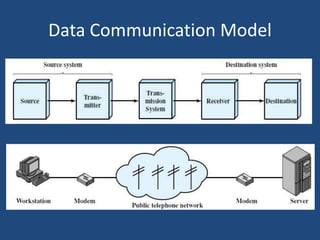
• On the next slide Given figures presents one
particular example, which is communication
between a workstation and a server over a public
telephone network.
• Another example is the exchange of voice signals
between two telephones over the same network
Data Communication Model
Source: This device generates the data to be transmitted;
examples are telephones and personal computers.
Transmitter: A transmitter transforms and encodes the
information in such a way as to produce electromagnetic
signals that can be transmitted across some sort of
transmission system.
Transmission system: This can be a single transmission line
or a complex network connecting source and destination.
Receiver: The receiver accepts the signal from the
transmission system and converts it into a form that can be
handled by the destination device.
Destination: Takes the incoming data from the receiver.
Data Flow
• Data communication between devices has
categorized into three types:
Simplex
Half-Duplex
Full-Duplex
Simplex:
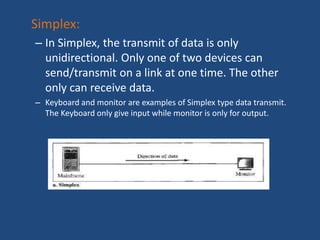
– In Simplex, the transmit of data is only
unidirectional. Only one of two devices can
send/transmit on a link at one time. The other
only can receive data.
– Keyboard and monitor are examples of Simplex type data transmit.
The Keyboard only give input while monitor is only for output.
Half-Duplex
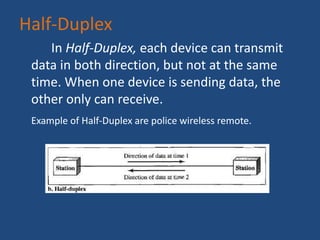
In Half-Duplex, each device can transmit
data in both direction, but not at the same
time. When one device is sending data, the
other only can receive.
Example of Half-Duplex are police wireless remote.
Full Duplex
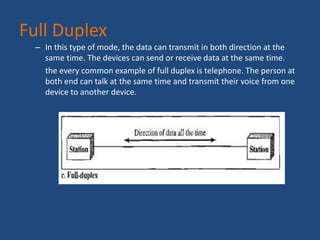
– In this type of mode, the data can transmit in both direction at the
same time. The devices can send or receive data at the same time.
the every common example of full duplex is telephone. The person at
both end can talk at the same time and transmit their voice from one
device to another device.
What Is Network
• A Network typically known as more than one
devices connected in such manner through a
mutual link that can share data with each
other.
• Basically Network means to join more than
one device in a single link to save time, share
data and work efficiently.
Basically we have so many types of Networks,
but few of them that are every common are
as:
Types of Networks
PAN (Personal Area Network)
LAN (Local Area Network)
WLAN (Wireless Local Area Network )
CAN (Campus Area Network)
MAN (Metropolitan Area Network)
WAN (Wide Area Network)
And so many other networks that will be
categorized by their specs
PAN
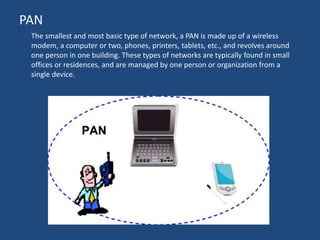
The smallest and most basic type of network, a PAN is made up of a wireless
modem, a computer or two, phones, printers, tablets, etc., and revolves around
one person in one building. These types of networks are typically found in small
offices or residences, and are managed by one person or organization from a
single device.
LAN
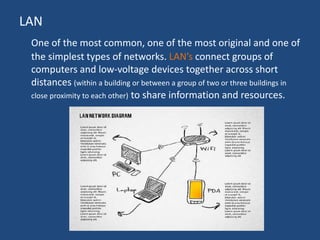
One of the most common, one of the most original and one of
the simplest types of networks. LAN’s connect groups of
computers and low-voltage devices together across short
distances (within a building or between a group of two or three buildings in
close proximity to each other) to share information and resources.
WLAN
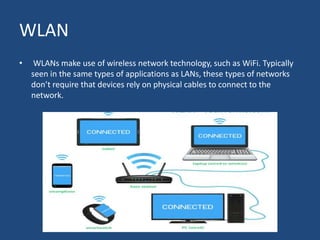
• WLANs make use of wireless network technology, such as WiFi. Typically
seen in the same types of applications as LANs, these types of networks
don’t require that devices rely on physical cables to connect to the
network.
CAN
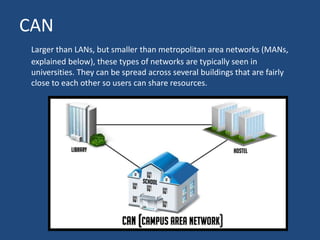
Larger than LANs, but smaller than metropolitan area networks (MANs,
explained below), these types of networks are typically seen in
universities. They can be spread across several buildings that are fairly
close to each other so users can share resources.
MAN
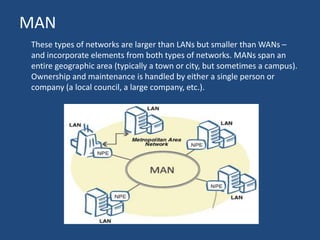
These types of networks are larger than LANs but smaller than WANs –
and incorporate elements from both types of networks. MANs span an
entire geographic area (typically a town or city, but sometimes a campus).
Ownership and maintenance is handled by either a single person or
company (a local council, a large company, etc.).
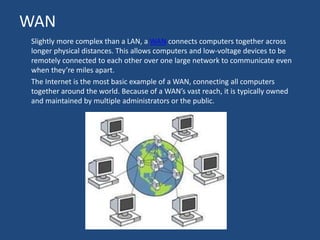
WAN
Slightly more complex than a LAN, a WAN connects computers together across
longer physical distances. This allows computers and low-voltage devices to be
remotely connected to each other over one large network to communicate even
when they’re miles apart.
The Internet is the most basic example of a WAN, connecting all computers
together around the world. Because of a WAN’s vast reach, it is typically owned
and maintained by multiple administrators or the public.
Let’s understand the basic types of network connectivity
 Broadband: It allows companies to access the Internet from a fixed
location. Broadband is the successor to the old dial-up method of
connecting networks
 Mobile Internet: Mobile Internet is used to access networks from
anywhere via wireless connections. The cellular networks and
communication protocols (such as 4G) make connectivity possible
between the networks. For mobile internet, the higher the protocol, the
higher the speed and connectivity.
 Virtual Private Network (VPN): VPNs are used to create a private
network to exchange data securely over a public network. The transferring
of data is usually secured by a method called ‘tunneling’. Typically, large
companies create VPNs to allow employees and clients communicate
safely.
 Dial-Up Connections: Dial-up networks enable TCP/IP communication
over ordinary telephone lines. They use analog modems that call specific
telephone numbers to make connections.
Concept of data communication and  Network Types

Concept of data communication and Network Types

  • 1.
    Toufique Ahmed Chandio BEMUET, ME MUET Email: tofiqueahmed700@yahoo.com
  • 2.
    Index • What isdata communication • Digital data communication concept • Data communication Model • Mode of data communication • Introduction Network • Types Of Networks (By Size, Connectivity)
  • 3.
    Data Communication • TheExchange of data from one point to another point (may be human or computer) through medium(Channel wireless/wire). This exchange of data is simply called data communication.
  • 4.
    FIRST DIGITAL COMMUNICATION Oneof the first applications of the electricity was to extend communication range. The first communication system, i.e. the telegraph, was digital in nature. The messages were sent by turning electrical signals on and off. This system later on evolved into telephone system, where the electrical signals are varied at audio rates. However these are the examples of wired communication.
  • 5.
    TELECOMMUNICATION The next developmentwas to make the communication wireless that is to extend the range of communication further. For the first time the wireless or radio communication system was designed for ships at seas. These older short distance radio links have been modernized to have global connectivity with the evolution of mobile communications. And such significant advancements have resulted into a whole branch of electronics i.e. Telecommunication.
  • 6.
    WHAT IS TELECOMMUNICATION Theterm telecommunication is actually composed of two words; the prefix Tele- means “over a distance”, and Communication means process of sending and receiving of information. Where as telecommunication is referred to as, the branch of electronics concerned with the information exchange by electrical means.
  • 7.
    Communication Model • Thefundamental purpose of a communications system is the exchange of data between two parties. • On the next slide Given figures presents one particular example, which is communication between a workstation and a server over a public telephone network. • Another example is the exchange of voice signals between two telephones over the same network
  • 8.
  • 9.
    Source: This devicegenerates the data to be transmitted; examples are telephones and personal computers. Transmitter: A transmitter transforms and encodes the information in such a way as to produce electromagnetic signals that can be transmitted across some sort of transmission system. Transmission system: This can be a single transmission line or a complex network connecting source and destination. Receiver: The receiver accepts the signal from the transmission system and converts it into a form that can be handled by the destination device. Destination: Takes the incoming data from the receiver.
  • 10.
    Data Flow • Datacommunication between devices has categorized into three types: Simplex Half-Duplex Full-Duplex
  • 11.
    Simplex: – In Simplex,the transmit of data is only unidirectional. Only one of two devices can send/transmit on a link at one time. The other only can receive data. – Keyboard and monitor are examples of Simplex type data transmit. The Keyboard only give input while monitor is only for output.
  • 12.
    Half-Duplex In Half-Duplex, eachdevice can transmit data in both direction, but not at the same time. When one device is sending data, the other only can receive. Example of Half-Duplex are police wireless remote.
  • 13.
    Full Duplex – Inthis type of mode, the data can transmit in both direction at the same time. The devices can send or receive data at the same time. the every common example of full duplex is telephone. The person at both end can talk at the same time and transmit their voice from one device to another device.
  • 14.
    What Is Network •A Network typically known as more than one devices connected in such manner through a mutual link that can share data with each other. • Basically Network means to join more than one device in a single link to save time, share data and work efficiently. Basically we have so many types of Networks, but few of them that are every common are as:
  • 15.
    Types of Networks PAN(Personal Area Network) LAN (Local Area Network) WLAN (Wireless Local Area Network ) CAN (Campus Area Network) MAN (Metropolitan Area Network) WAN (Wide Area Network) And so many other networks that will be categorized by their specs
  • 16.
    PAN The smallest andmost basic type of network, a PAN is made up of a wireless modem, a computer or two, phones, printers, tablets, etc., and revolves around one person in one building. These types of networks are typically found in small offices or residences, and are managed by one person or organization from a single device.
  • 17.
    LAN One of themost common, one of the most original and one of the simplest types of networks. LAN’s connect groups of computers and low-voltage devices together across short distances (within a building or between a group of two or three buildings in close proximity to each other) to share information and resources.
  • 18.
    WLAN • WLANs makeuse of wireless network technology, such as WiFi. Typically seen in the same types of applications as LANs, these types of networks don’t require that devices rely on physical cables to connect to the network.
  • 19.
    CAN Larger than LANs,but smaller than metropolitan area networks (MANs, explained below), these types of networks are typically seen in universities. They can be spread across several buildings that are fairly close to each other so users can share resources.
  • 20.
    MAN These types ofnetworks are larger than LANs but smaller than WANs – and incorporate elements from both types of networks. MANs span an entire geographic area (typically a town or city, but sometimes a campus). Ownership and maintenance is handled by either a single person or company (a local council, a large company, etc.).
  • 21.
    WAN Slightly more complexthan a LAN, a WAN connects computers together across longer physical distances. This allows computers and low-voltage devices to be remotely connected to each other over one large network to communicate even when they’re miles apart. The Internet is the most basic example of a WAN, connecting all computers together around the world. Because of a WAN’s vast reach, it is typically owned and maintained by multiple administrators or the public.
  • 22.
    Let’s understand thebasic types of network connectivity  Broadband: It allows companies to access the Internet from a fixed location. Broadband is the successor to the old dial-up method of connecting networks  Mobile Internet: Mobile Internet is used to access networks from anywhere via wireless connections. The cellular networks and communication protocols (such as 4G) make connectivity possible between the networks. For mobile internet, the higher the protocol, the higher the speed and connectivity.  Virtual Private Network (VPN): VPNs are used to create a private network to exchange data securely over a public network. The transferring of data is usually secured by a method called ‘tunneling’. Typically, large companies create VPNs to allow employees and clients communicate safely.  Dial-Up Connections: Dial-up networks enable TCP/IP communication over ordinary telephone lines. They use analog modems that call specific telephone numbers to make connections.