Database
Technologies
Historic perspective and upcoming trends
Alliander IT CIO Office
Michel de Goede
The early days
• 1959 Conference on Data Systems Languages (CODASYL) formed with as main
result the COBOL programming language
• 1965 the List Processing Task Force formed to create COBOL extensions for Data
Processing
• 1966 IBM IMS designed for the Apollo program to contain Bill of Materials
• 1968 first ‘IMS ready’ prompt
• 1968 List Processing Task Force first report on COBOL extensions to handle
Databases
• 1969 same group produces first specifications for a Network Database Model and
defines a Data Definition Language and a Data Manipulation Language
• 1970 Edgar F. Codd’s paper ‘A Relational Model of Data for Large Shared Data
Banks’ is published.
• During the seventies quite a few vendors adopted the Task Force network database
model to implement their own datastores: Cullinane Database Systems IDMS, Digital
Equipment Corporation DBMS 32, Honeywell IDS and others.
• 1974 IBM system R (Relational) is the first SQL implementation (lead to DB2 and
Oracle)
• 1977 Ingres by UBC follows as second SQL implementation (lead to Sybase and MS
SQL Server)
• Many SQL implementations follow and also Network based or Hierarchichal
databases continue to be used while more database types develop
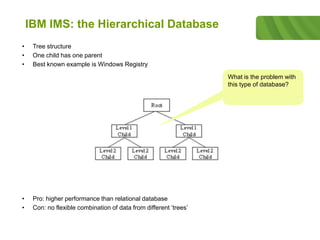
IBM IMS: the Hierarchical Database
• Tree structure
• One child has one parent
• Best known example is Windows Registry
• Pro: higher performance than relational database
• Con: no flexible combination of data from different ‘trees’
What is the problem with
this type of database?
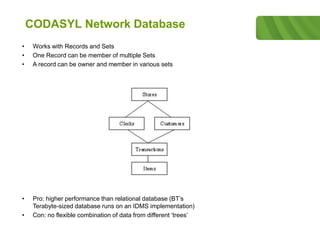
CODASYL Network Database
• Works with Records and Sets
• One Record can be member of multiple Sets
• A record can be owner and member in various sets
• Pro: higher performance than relational database (BT’s
Terabyte-sized database runs on an IDMS implementation)
• Con: no flexible combination of data from different ‘trees’
Codd Relational Database
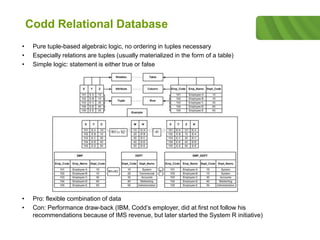
• Pure tuple-based algebraic logic, no ordering in tuples necessary
• Especially relations are tuples (usually materialized in the form of a table)
• Simple logic: statement is either true or false
• Pro: flexible combination of data
• Con: Performance draw-back (IBM, Codd’s employer, did at first not follow his
recommendations because of IMS revenue, but later started the System R initiative)
Relational Database implementations
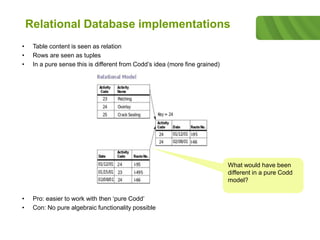
• Table content is seen as relation
• Rows are seen as tuples
• In a pure sense this is different from Codd’s idea (more fine grained)
• Pro: easier to work with then ‘pure Codd’
• Con: No pure algebraic functionality possible
What would have been
different in a pure Codd
model?
Navigational Database
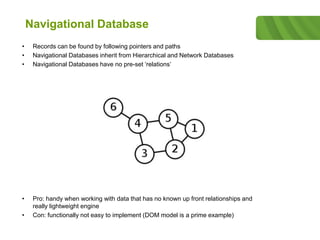
• Records can be found by following pointers and paths
• Navigational Databases inherit from Hierarchical and Network Databases
• Navigational Databases have no pre-set ‘relations’
• Pro: handy when working with data that has no known up front relationships and
really lightweight engine
• Con: functionally not easy to implement (DOM model is a prime example)
Multi value database
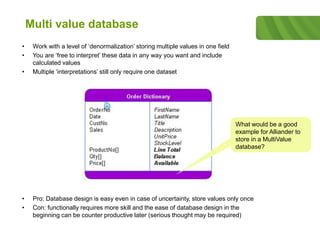
• Work with a level of ‘denormalization’ storing multiple values in one field
• You are ‘free to interpret’ these data in any way you want and include
calculated values
• Multiple ‘interpretations’ still only require one dataset
• Pro: Database design is easy even in case of uncertainty, store values only once
• Con: functionally requires more skill and the ease of database design in the
beginning can be counter productive later (serious thought may be required)
What would be a good
example for Alliander to
store in a MultiValue
database?
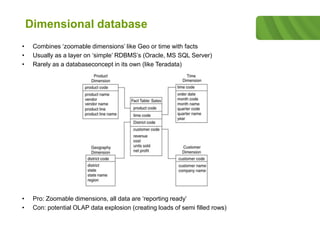
Dimensional database
• Combines ‘zoomable dimensions’ like Geo or time with facts
• Usually as a layer on ‘simple’ RDBMS’s (Oracle, MS SQL Server)
• Rarely as a databaseconcept in its own (like Teradata)
• Pro: Zoomable dimensions, all data are ‘reporting ready’
• Con: potential OLAP data explosion (creating loads of semi filled rows)
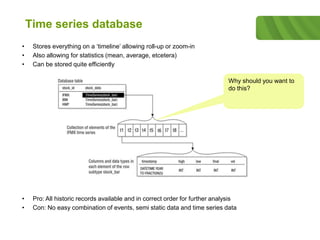
Time series database
• Stores everything on a ‘timeline’ allowing roll-up or zoom-in
• Also allowing for statistics (mean, average, etcetera)
• Can be stored quite efficiently
• Pro: All historic records available and in correct order for further analysis
• Con: No easy combination of events, semi static data and time series data
Why should you want to
do this?
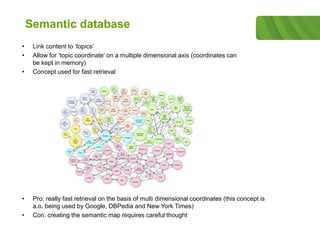
Semantic database
• Link content to ‘topics’
• Allow for ‘topic coordinate’ on a multiple dimensional axis (coordinates can
be kept in memory)
• Concept used for fast retrieval
• Pro: really fast retrieval on the basis of multi dimensional coordinates (this concept is
a.o. being used by Google, DBPedia and New York Times)
• Con: creating the semantic map requires careful thought
NO SQL
Means ‘Not Only SQL’, it does not mean: NO SQL
One of the first NO SQL database types were the multi-value databases. As a result of
internet, the vast amounts of data, the combination between data and content, the required
uptime for online business and the wish for fast modelling, some of the design principles of
the more ‘traditional’ database types have been dropped.
NO SQL databases often combine content and data, are designed for continuous uptime
and for fast data or content retrieval. Hence combining concepts from multivalue databases
with semantic databases while the required uptime asked for different implementation
concepts regarding data consistency and parallellism.
The differences in needs have led to a variety of database types considered to be NO SQL:
• Column store;
• Document store;
• Key / Value;
• Graph;
• Multidimensional;
• Multimodel;
• Multivalue;
• Object;
• XML.
Key Value store
• Stores values that are indexed by a key usually built on a hash or tree data-
structure
• No predefined schema needed
• Often used for in-memory quick lookup
• Pro: no or minimal overhead of RDBMS necessary, great for unstructured or semi-
structured data related to one single object (shopping cart, social media) examples:
Berkeley DB (Oracle), open LDAP
• Con: limited functionality
void Put(string key, byte[] data); byte[] Get(string key); void Remove(string key);
Simple API can hide very
complex implementation.
Why?
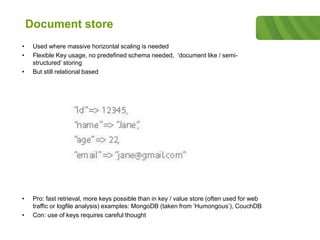
Document store
• Used where massive horizontal scaling is needed
• Flexible Key usage, no predefined schema needed, ‘document like / semi-
structured’ storing
• But still relational based
• Pro: fast retrieval, more keys possible than in key / value store (often used for web
traffic or logfile analysis) examples: MongoDB (taken from ‘Humongous’), CouchDB
• Con: use of keys requires careful thought
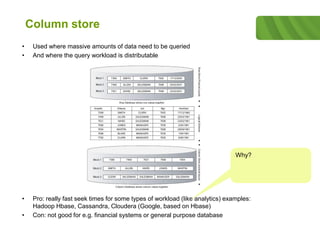
Column store
• Used where massive amounts of data need to be queried
• And where the query workload is distributable
• Pro: really fast seek times for some types of workload (like analytics) examples:
Hadoop Hbase, Cassandra, Cloudera (Google, based on Hbase)
• Con: not good for e.g. financial systems or general purpose database
Why?
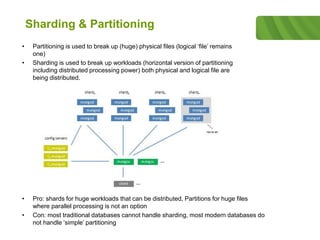
Sharding & Partitioning
• Partitioning is used to break up (huge) physical files (logical ‘file’ remains
one)
• Sharding is used to break up workloads (horizontal version of partitioning
including distributed processing power) both physical and logical file are
being distributed.
• Pro: shards for huge workloads that can be distributed, Partitions for huge files
where parallel processing is not an option
• Con: most traditional databases cannot handle sharding, most modern databases do
not handle ‘simple’ partitioning
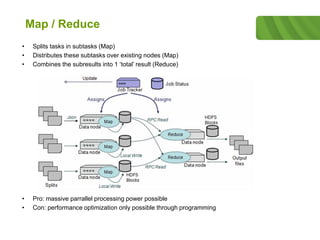
Map / Reduce
• Splits tasks in subtasks (Map)
• Distributes these subtasks over existing nodes (Map)
• Combines the subresults into 1 ‘total’ result (Reduce)
• Pro: massive parrallel processing power possible
• Con: performance optimization only possible through programming
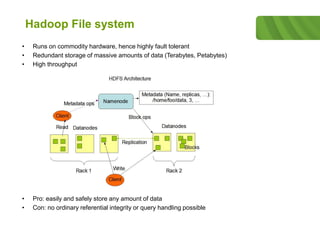
Hadoop File system
• Runs on commodity hardware, hence highly fault tolerant
• Redundant storage of massive amounts of data (Terabytes, Petabytes)
• High throughput
• Pro: easily and safely store any amount of data
• Con: no ordinary referential integrity or query handling possible
Transaction Mechanisms
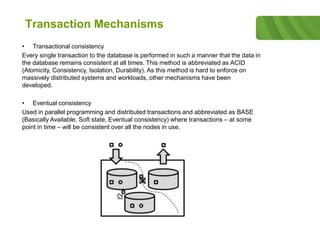
• Transactional consistency
Every single transaction to the database is performed in such a manner that the data in
the database remains consistent at all times. This method is abbreviated as ACID
(Atomicity, Consistency, Isolation, Durability). As this method is hard to enforce on
massively distributed systems and workloads, other mechanisms have been
developed.
• Eventual consistency
Used in parallel programming and distributed transactions and abbreviated as BASE
(Basically Available, Soft state, Eventual consistency) where transactions – at some
point in time – will be consistent over all the nodes in use.
Transaction Mechanisms
• MSSQL row versioning
No transaction overhead necessary, just insert in the order the transactions come in. It
also allows for distributed transactions and in this mode provides for eventual
consistency. More I/O when modifying or inserting data as a result of TempDB usage,
but fewer locks and deadlocks. Can be slow if versioning gets old.
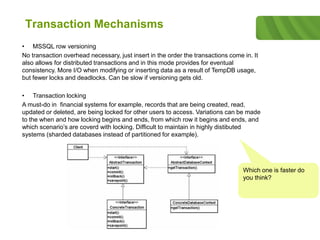
• Transaction locking
A must-do in financial systems for example, records that are being created, read,
updated or deleted, are being locked for other users to access. Variations can be made
to the when and how locking begins and ends, from which row it begins and ends, and
which scenario’s are coverd with locking. Difficult to maintain in highly distibuted
systems (sharded databases instead of partitioned for example).
Which one is faster do
you think?
Thank you!
Questions?
Alliander IT CIO Office
Michel de Goede

Database Technologies

  • 1.
    Database Technologies Historic perspective andupcoming trends Alliander IT CIO Office Michel de Goede
  • 2.
    The early days •1959 Conference on Data Systems Languages (CODASYL) formed with as main result the COBOL programming language • 1965 the List Processing Task Force formed to create COBOL extensions for Data Processing • 1966 IBM IMS designed for the Apollo program to contain Bill of Materials • 1968 first ‘IMS ready’ prompt • 1968 List Processing Task Force first report on COBOL extensions to handle Databases • 1969 same group produces first specifications for a Network Database Model and defines a Data Definition Language and a Data Manipulation Language • 1970 Edgar F. Codd’s paper ‘A Relational Model of Data for Large Shared Data Banks’ is published. • During the seventies quite a few vendors adopted the Task Force network database model to implement their own datastores: Cullinane Database Systems IDMS, Digital Equipment Corporation DBMS 32, Honeywell IDS and others. • 1974 IBM system R (Relational) is the first SQL implementation (lead to DB2 and Oracle) • 1977 Ingres by UBC follows as second SQL implementation (lead to Sybase and MS SQL Server) • Many SQL implementations follow and also Network based or Hierarchichal databases continue to be used while more database types develop
  • 3.
    IBM IMS: theHierarchical Database • Tree structure • One child has one parent • Best known example is Windows Registry • Pro: higher performance than relational database • Con: no flexible combination of data from different ‘trees’ What is the problem with this type of database?
  • 4.
    CODASYL Network Database •Works with Records and Sets • One Record can be member of multiple Sets • A record can be owner and member in various sets • Pro: higher performance than relational database (BT’s Terabyte-sized database runs on an IDMS implementation) • Con: no flexible combination of data from different ‘trees’
  • 5.
    Codd Relational Database •Pure tuple-based algebraic logic, no ordering in tuples necessary • Especially relations are tuples (usually materialized in the form of a table) • Simple logic: statement is either true or false • Pro: flexible combination of data • Con: Performance draw-back (IBM, Codd’s employer, did at first not follow his recommendations because of IMS revenue, but later started the System R initiative)
  • 6.
    Relational Database implementations •Table content is seen as relation • Rows are seen as tuples • In a pure sense this is different from Codd’s idea (more fine grained) • Pro: easier to work with then ‘pure Codd’ • Con: No pure algebraic functionality possible What would have been different in a pure Codd model?
  • 7.
    Navigational Database • Recordscan be found by following pointers and paths • Navigational Databases inherit from Hierarchical and Network Databases • Navigational Databases have no pre-set ‘relations’ • Pro: handy when working with data that has no known up front relationships and really lightweight engine • Con: functionally not easy to implement (DOM model is a prime example)
  • 8.
    Multi value database •Work with a level of ‘denormalization’ storing multiple values in one field • You are ‘free to interpret’ these data in any way you want and include calculated values • Multiple ‘interpretations’ still only require one dataset • Pro: Database design is easy even in case of uncertainty, store values only once • Con: functionally requires more skill and the ease of database design in the beginning can be counter productive later (serious thought may be required) What would be a good example for Alliander to store in a MultiValue database?
  • 9.
    Dimensional database • Combines‘zoomable dimensions’ like Geo or time with facts • Usually as a layer on ‘simple’ RDBMS’s (Oracle, MS SQL Server) • Rarely as a databaseconcept in its own (like Teradata) • Pro: Zoomable dimensions, all data are ‘reporting ready’ • Con: potential OLAP data explosion (creating loads of semi filled rows)
  • 10.
    Time series database •Stores everything on a ‘timeline’ allowing roll-up or zoom-in • Also allowing for statistics (mean, average, etcetera) • Can be stored quite efficiently • Pro: All historic records available and in correct order for further analysis • Con: No easy combination of events, semi static data and time series data Why should you want to do this?
  • 11.
    Semantic database • Linkcontent to ‘topics’ • Allow for ‘topic coordinate’ on a multiple dimensional axis (coordinates can be kept in memory) • Concept used for fast retrieval • Pro: really fast retrieval on the basis of multi dimensional coordinates (this concept is a.o. being used by Google, DBPedia and New York Times) • Con: creating the semantic map requires careful thought
  • 12.
    NO SQL Means ‘NotOnly SQL’, it does not mean: NO SQL One of the first NO SQL database types were the multi-value databases. As a result of internet, the vast amounts of data, the combination between data and content, the required uptime for online business and the wish for fast modelling, some of the design principles of the more ‘traditional’ database types have been dropped. NO SQL databases often combine content and data, are designed for continuous uptime and for fast data or content retrieval. Hence combining concepts from multivalue databases with semantic databases while the required uptime asked for different implementation concepts regarding data consistency and parallellism. The differences in needs have led to a variety of database types considered to be NO SQL: • Column store; • Document store; • Key / Value; • Graph; • Multidimensional; • Multimodel; • Multivalue; • Object; • XML.
  • 13.
    Key Value store •Stores values that are indexed by a key usually built on a hash or tree data- structure • No predefined schema needed • Often used for in-memory quick lookup • Pro: no or minimal overhead of RDBMS necessary, great for unstructured or semi- structured data related to one single object (shopping cart, social media) examples: Berkeley DB (Oracle), open LDAP • Con: limited functionality void Put(string key, byte[] data); byte[] Get(string key); void Remove(string key); Simple API can hide very complex implementation. Why?
  • 14.
    Document store • Usedwhere massive horizontal scaling is needed • Flexible Key usage, no predefined schema needed, ‘document like / semi- structured’ storing • But still relational based • Pro: fast retrieval, more keys possible than in key / value store (often used for web traffic or logfile analysis) examples: MongoDB (taken from ‘Humongous’), CouchDB • Con: use of keys requires careful thought
  • 15.
    Column store • Usedwhere massive amounts of data need to be queried • And where the query workload is distributable • Pro: really fast seek times for some types of workload (like analytics) examples: Hadoop Hbase, Cassandra, Cloudera (Google, based on Hbase) • Con: not good for e.g. financial systems or general purpose database Why?
  • 16.
    Sharding & Partitioning •Partitioning is used to break up (huge) physical files (logical ‘file’ remains one) • Sharding is used to break up workloads (horizontal version of partitioning including distributed processing power) both physical and logical file are being distributed. • Pro: shards for huge workloads that can be distributed, Partitions for huge files where parallel processing is not an option • Con: most traditional databases cannot handle sharding, most modern databases do not handle ‘simple’ partitioning
  • 17.
    Map / Reduce •Splits tasks in subtasks (Map) • Distributes these subtasks over existing nodes (Map) • Combines the subresults into 1 ‘total’ result (Reduce) • Pro: massive parrallel processing power possible • Con: performance optimization only possible through programming
  • 18.
    Hadoop File system •Runs on commodity hardware, hence highly fault tolerant • Redundant storage of massive amounts of data (Terabytes, Petabytes) • High throughput • Pro: easily and safely store any amount of data • Con: no ordinary referential integrity or query handling possible
  • 19.
    Transaction Mechanisms • Transactionalconsistency Every single transaction to the database is performed in such a manner that the data in the database remains consistent at all times. This method is abbreviated as ACID (Atomicity, Consistency, Isolation, Durability). As this method is hard to enforce on massively distributed systems and workloads, other mechanisms have been developed. • Eventual consistency Used in parallel programming and distributed transactions and abbreviated as BASE (Basically Available, Soft state, Eventual consistency) where transactions – at some point in time – will be consistent over all the nodes in use.
  • 20.
    Transaction Mechanisms • MSSQLrow versioning No transaction overhead necessary, just insert in the order the transactions come in. It also allows for distributed transactions and in this mode provides for eventual consistency. More I/O when modifying or inserting data as a result of TempDB usage, but fewer locks and deadlocks. Can be slow if versioning gets old. • Transaction locking A must-do in financial systems for example, records that are being created, read, updated or deleted, are being locked for other users to access. Variations can be made to the when and how locking begins and ends, from which row it begins and ends, and which scenario’s are coverd with locking. Difficult to maintain in highly distibuted systems (sharded databases instead of partitioned for example). Which one is faster do you think?
  • 21.
    Thank you! Questions? Alliander ITCIO Office Michel de Goede