Data base Users and
Administrator
• The people who are accessing or working with the
database are called database users and
administrators.
• We know that the primary aim of the DBMS is to
store the data or information and retrieve whenever
it is needed by the database users.
Database Users and Administrators
• Database Users
• The database users also can be categorized
again into five groups according to how they
interact with the database. They are:
• Native Users
• Application Programmers
• Sophisticated Users
• Specialized Users
• Stand-alone User
Naive / Parametric End Users
• Naive / Parametric End Users : Parametric End Users
are the unsophisticated who don’t have any DBMS
knowledge but they frequently use the database
applications in their daily life to get the desired
results.
• For examples, Railway’s ticket booking users are
naive users.
• Clerks in any bank is a naive user because they don’t
have any DBMS knowledge but they still use the
database and perform their given task.
Application Programmers
• Application Programmers : Application Programmers also
referred as System Analysts or simply Software Engineers,
are the back-end programmers who writes the code for the
application programs. They are the computer
professionals.
• These programs could be written in Programming
languages such as Visual Basic, Developer, C, FORTRAN,
COBOL etc.
• Application programmers design, debug, test, and maintain
set of programs called “canned transactions” for the Naive
(parametric) users in order to interact with database.
Sophisticated Users
• Sophisticated Users :They are database developers, who
write SQL queries to select/insert/delete/update data.
• They do not use any application or programs to request
the database. They directly interact with the database by
means of a query language like SQL.
• These users will be scientists, engineers, analysts who
thoroughly study SQL and DBMS to apply the concepts in
their requirements.
• In short, we can say this category includes designers and
developers of DBMS and SQL.
Specialized users
• Specialized users : These are also
sophisticated users, but they write special
database application programs.
• They are the developers who develop the
complex programs to the requirement.
5. Stand-alone Users
• 5. Stand-alone Users
• These users will have a stand-alone database
for their personal use.
• These kinds of the database will have
readymade database packages which will have
menus and graphical interfaces.
Database Administrator (DBA)
• DBAs are responsible for the management, maintenance,
and optimization of the database environment. Their roles
typically include:
• Installation and Configuration
• Setting up database software, configuring parameters, and
optimizing system resources for performance.
• Backup and Recovery
• Ensuring data integrity by scheduling regular backups and
implementing recovery plans in case of failure or corruption.
• Performance Monitoring and Tuning
• Monitoring database performance, diagnosing bottlenecks,
and tuning the system for efficiency.
Database Administrator (DBA)
• Security Management
• Defining user roles, managing permissions, and safeguarding
sensitive data from unauthorized access.
• Database Design and Implementation
• Designing schemas, indexing strategies, and storage plans to meet
application needs.
• Troubleshooting and Maintenance
• Identifying and resolving database issues, including hardware
failures, software bugs, and configuration errors.
• Upgrades and Patching
• Applying patches and upgrading database software to maintain
compatibility and improve functionality.
DBA
• Database Administrator (DBA) is a person/team who
defines the schema and also controls the 3 levels of
database.
• The DBA will then create a new account id and password
for the user if he/she need to access the database.
• DBA is also responsible for providing security to the
database and he allows only the authorized users to
access/modify the data base.
• DBA is responsible for the problems such as security
breaches and poor system response time.
Database Administrator (DBA)
• DBA also monitors the recovery and backup and
provide technical support.
• The DBA has a DBA account in the DBMS which called
a system or superuser account.
• DBA repairs damage caused due to hardware and/or
software failures.
• DBA is the one having privileges to perform DCL (Data
Control Language) operations such as GRANT and
REVOKE, to allow/restrict a particular user from
accessing the database.
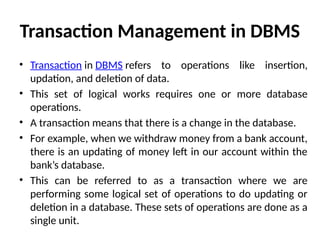
Transaction Management in DBMS
• Transaction in DBMS refers to operations like insertion,
updation, and deletion of data.
• This set of logical works requires one or more database
operations.
• A transaction means that there is a change in the database.
• For example, when we withdraw money from a bank account,
there is an updating of money left in our account within the
bank’s database.
• This can be referred to as a transaction where we are
performing some logical set of operations to do updating or
deletion in a database. These sets of operations are done as a
single unit.
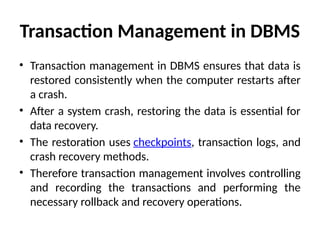
Transaction Management in DBMS
• Transaction management in DBMS ensures that data is
restored consistently when the computer restarts after
a crash.
• After a system crash, restoring the data is essential for
data recovery.
• The restoration uses checkpoints, transaction logs, and
crash recovery methods.
• Therefore transaction management involves controlling
and recording the transactions and performing the
necessary rollback and recovery operations.
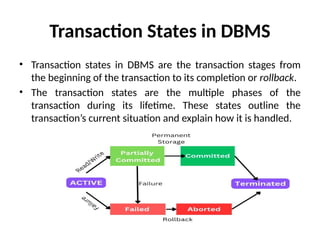
Transaction States in DBMS
• Transaction states in DBMS are the transaction stages from
the beginning of the transaction to its completion or rollback.
• The transaction states are the multiple phases of the
transaction during its lifetime. These states outline the
transaction’s current situation and explain how it is handled.
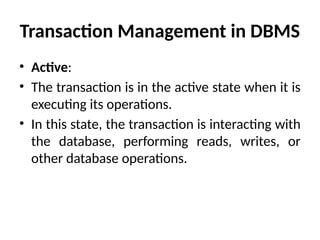
Transaction Management in DBMS
• Active:
• The transaction is in the active state when it is
executing its operations.
• In this state, the transaction is interacting with
the database, performing reads, writes, or
other database operations.
Transaction Management in DBMS
• Partially Committed (or Prepared):
• After the transaction has completed its operations
successfully, it enters the partially committed state.
• In this state, the transaction has executed all its
operations and is awaiting confirmation to make its
changes permanent in the database.
• Before transitioning to the committed state, the
database ensures that all constraints are satisfied and
resources are available to make the changes
permanent.
Transaction Management in DBMS
• Committed:
• Once the transaction has been successfully validated
and all changes have been made permanent in the
database, it enters the committed state.
• In this state, the changes made by the transaction are
visible to other transactions and are considered
durable.
• The committed state indicates that the transaction has
successfully completed its operations and its effects
are now permanent.
Transaction Management in DBMS
• Failed:
• If an error occurs during the execution of a
transaction, it enters the failed state.
• This can happen due to various reasons such as a
constraint violation, deadlock, or system failure.
• In the failed state, the transaction cannot
proceed further, and its changes are rolled back
to maintain data consistency.
Transaction Management in DBMS
• Aborted (or Rolled Back):
• When a transaction fails, it must be rolled back to
undo its changes and restore the database to a
consistent state.
• The aborted state represents the transaction
after it has been rolled back.
• In this state, the changes made by the transaction
are discarded, and the database is reverted to its
state before the transaction began.
Transaction Management in DBMS
• Terminated State
• This state represents the end of a transaction's
lifecycle.
• It can be reached after a successful commit or after an
unsuccessful transaction that has been rolled back.
• This is the final stage of a transaction's life cycle.
• The transaction finally enters the terminated state
when its life cycle is completed after having been in
the committed or aborted stage.

Data base Users and Administrator pptx

  • 1.
    Data base Usersand Administrator • The people who are accessing or working with the database are called database users and administrators. • We know that the primary aim of the DBMS is to store the data or information and retrieve whenever it is needed by the database users.
  • 2.
    Database Users andAdministrators • Database Users • The database users also can be categorized again into five groups according to how they interact with the database. They are: • Native Users • Application Programmers • Sophisticated Users • Specialized Users • Stand-alone User
  • 3.
    Naive / ParametricEnd Users • Naive / Parametric End Users : Parametric End Users are the unsophisticated who don’t have any DBMS knowledge but they frequently use the database applications in their daily life to get the desired results. • For examples, Railway’s ticket booking users are naive users. • Clerks in any bank is a naive user because they don’t have any DBMS knowledge but they still use the database and perform their given task.
  • 4.
    Application Programmers • ApplicationProgrammers : Application Programmers also referred as System Analysts or simply Software Engineers, are the back-end programmers who writes the code for the application programs. They are the computer professionals. • These programs could be written in Programming languages such as Visual Basic, Developer, C, FORTRAN, COBOL etc. • Application programmers design, debug, test, and maintain set of programs called “canned transactions” for the Naive (parametric) users in order to interact with database.
  • 5.
    Sophisticated Users • SophisticatedUsers :They are database developers, who write SQL queries to select/insert/delete/update data. • They do not use any application or programs to request the database. They directly interact with the database by means of a query language like SQL. • These users will be scientists, engineers, analysts who thoroughly study SQL and DBMS to apply the concepts in their requirements. • In short, we can say this category includes designers and developers of DBMS and SQL.
  • 6.
    Specialized users • Specializedusers : These are also sophisticated users, but they write special database application programs. • They are the developers who develop the complex programs to the requirement.
  • 7.
    5. Stand-alone Users •5. Stand-alone Users • These users will have a stand-alone database for their personal use. • These kinds of the database will have readymade database packages which will have menus and graphical interfaces.
  • 8.
    Database Administrator (DBA) •DBAs are responsible for the management, maintenance, and optimization of the database environment. Their roles typically include: • Installation and Configuration • Setting up database software, configuring parameters, and optimizing system resources for performance. • Backup and Recovery • Ensuring data integrity by scheduling regular backups and implementing recovery plans in case of failure or corruption. • Performance Monitoring and Tuning • Monitoring database performance, diagnosing bottlenecks, and tuning the system for efficiency.
  • 9.
    Database Administrator (DBA) •Security Management • Defining user roles, managing permissions, and safeguarding sensitive data from unauthorized access. • Database Design and Implementation • Designing schemas, indexing strategies, and storage plans to meet application needs. • Troubleshooting and Maintenance • Identifying and resolving database issues, including hardware failures, software bugs, and configuration errors. • Upgrades and Patching • Applying patches and upgrading database software to maintain compatibility and improve functionality.
  • 10.
    DBA • Database Administrator(DBA) is a person/team who defines the schema and also controls the 3 levels of database. • The DBA will then create a new account id and password for the user if he/she need to access the database. • DBA is also responsible for providing security to the database and he allows only the authorized users to access/modify the data base. • DBA is responsible for the problems such as security breaches and poor system response time.
  • 11.
    Database Administrator (DBA) •DBA also monitors the recovery and backup and provide technical support. • The DBA has a DBA account in the DBMS which called a system or superuser account. • DBA repairs damage caused due to hardware and/or software failures. • DBA is the one having privileges to perform DCL (Data Control Language) operations such as GRANT and REVOKE, to allow/restrict a particular user from accessing the database.
  • 12.
    Transaction Management inDBMS • Transaction in DBMS refers to operations like insertion, updation, and deletion of data. • This set of logical works requires one or more database operations. • A transaction means that there is a change in the database. • For example, when we withdraw money from a bank account, there is an updating of money left in our account within the bank’s database. • This can be referred to as a transaction where we are performing some logical set of operations to do updating or deletion in a database. These sets of operations are done as a single unit.
  • 13.
    Transaction Management inDBMS • Transaction management in DBMS ensures that data is restored consistently when the computer restarts after a crash. • After a system crash, restoring the data is essential for data recovery. • The restoration uses checkpoints, transaction logs, and crash recovery methods. • Therefore transaction management involves controlling and recording the transactions and performing the necessary rollback and recovery operations.
  • 14.
    Transaction States inDBMS • Transaction states in DBMS are the transaction stages from the beginning of the transaction to its completion or rollback. • The transaction states are the multiple phases of the transaction during its lifetime. These states outline the transaction’s current situation and explain how it is handled.
  • 15.
    Transaction Management inDBMS • Active: • The transaction is in the active state when it is executing its operations. • In this state, the transaction is interacting with the database, performing reads, writes, or other database operations.
  • 16.
    Transaction Management inDBMS • Partially Committed (or Prepared): • After the transaction has completed its operations successfully, it enters the partially committed state. • In this state, the transaction has executed all its operations and is awaiting confirmation to make its changes permanent in the database. • Before transitioning to the committed state, the database ensures that all constraints are satisfied and resources are available to make the changes permanent.
  • 17.
    Transaction Management inDBMS • Committed: • Once the transaction has been successfully validated and all changes have been made permanent in the database, it enters the committed state. • In this state, the changes made by the transaction are visible to other transactions and are considered durable. • The committed state indicates that the transaction has successfully completed its operations and its effects are now permanent.
  • 18.
    Transaction Management inDBMS • Failed: • If an error occurs during the execution of a transaction, it enters the failed state. • This can happen due to various reasons such as a constraint violation, deadlock, or system failure. • In the failed state, the transaction cannot proceed further, and its changes are rolled back to maintain data consistency.
  • 19.
    Transaction Management inDBMS • Aborted (or Rolled Back): • When a transaction fails, it must be rolled back to undo its changes and restore the database to a consistent state. • The aborted state represents the transaction after it has been rolled back. • In this state, the changes made by the transaction are discarded, and the database is reverted to its state before the transaction began.
  • 20.
    Transaction Management inDBMS • Terminated State • This state represents the end of a transaction's lifecycle. • It can be reached after a successful commit or after an unsuccessful transaction that has been rolled back. • This is the final stage of a transaction's life cycle. • The transaction finally enters the terminated state when its life cycle is completed after having been in the committed or aborted stage.