ATLA RELIGION
DATABASE WITH
SERIALS
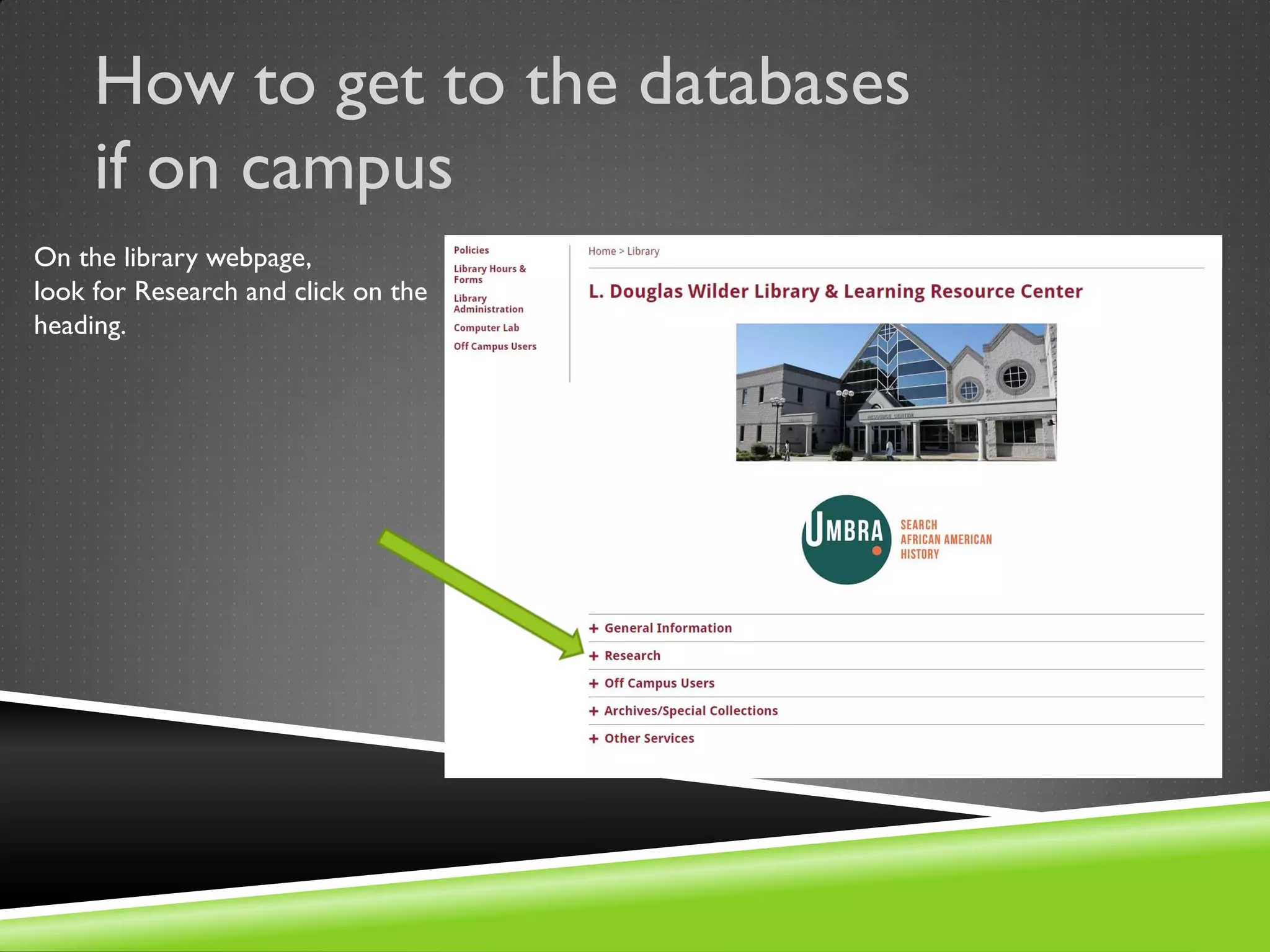
How to get to the databases
if on campus
On the library webpage,
look for Research and click on the
heading.
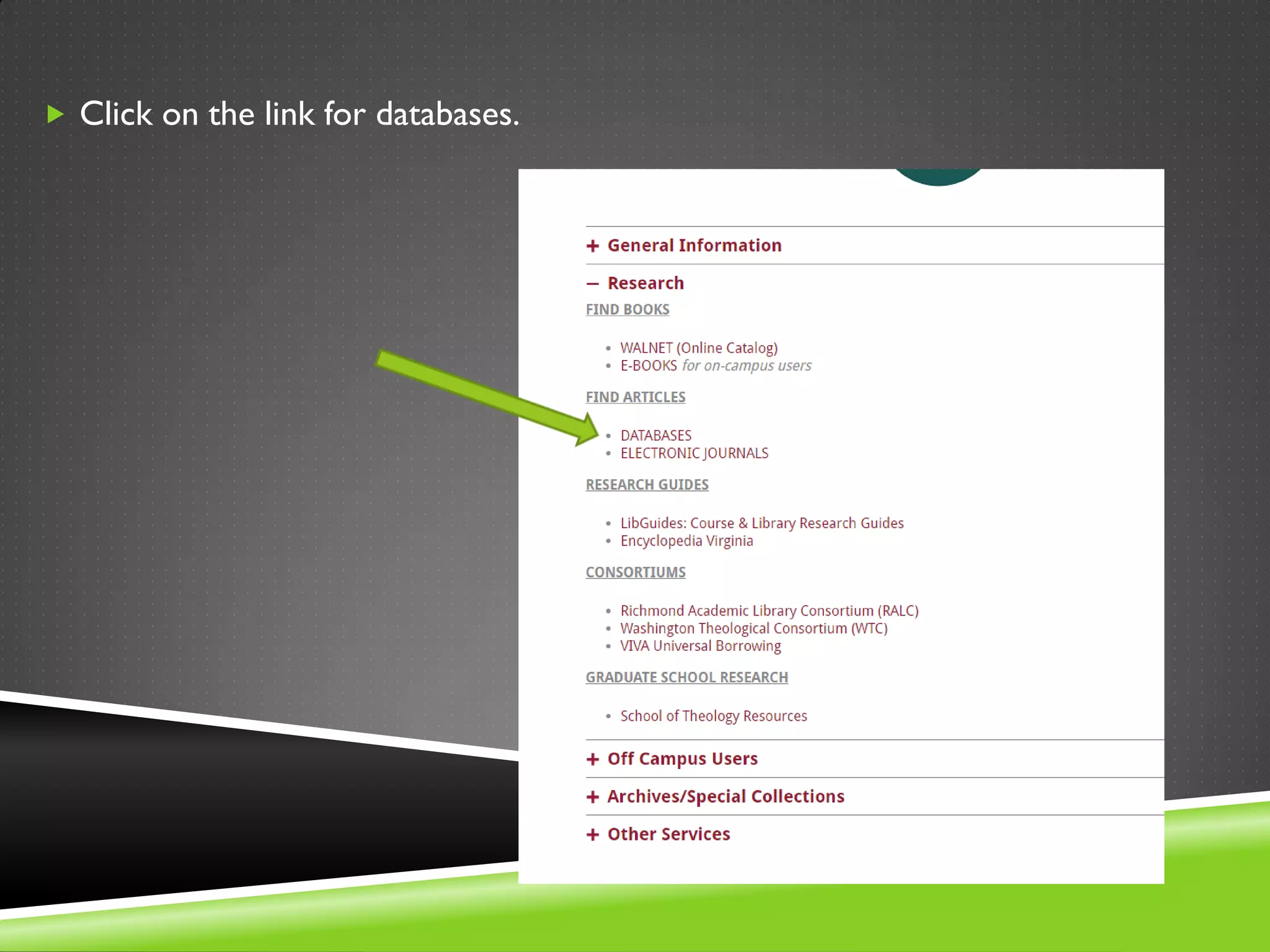
 Click on the link for databases.
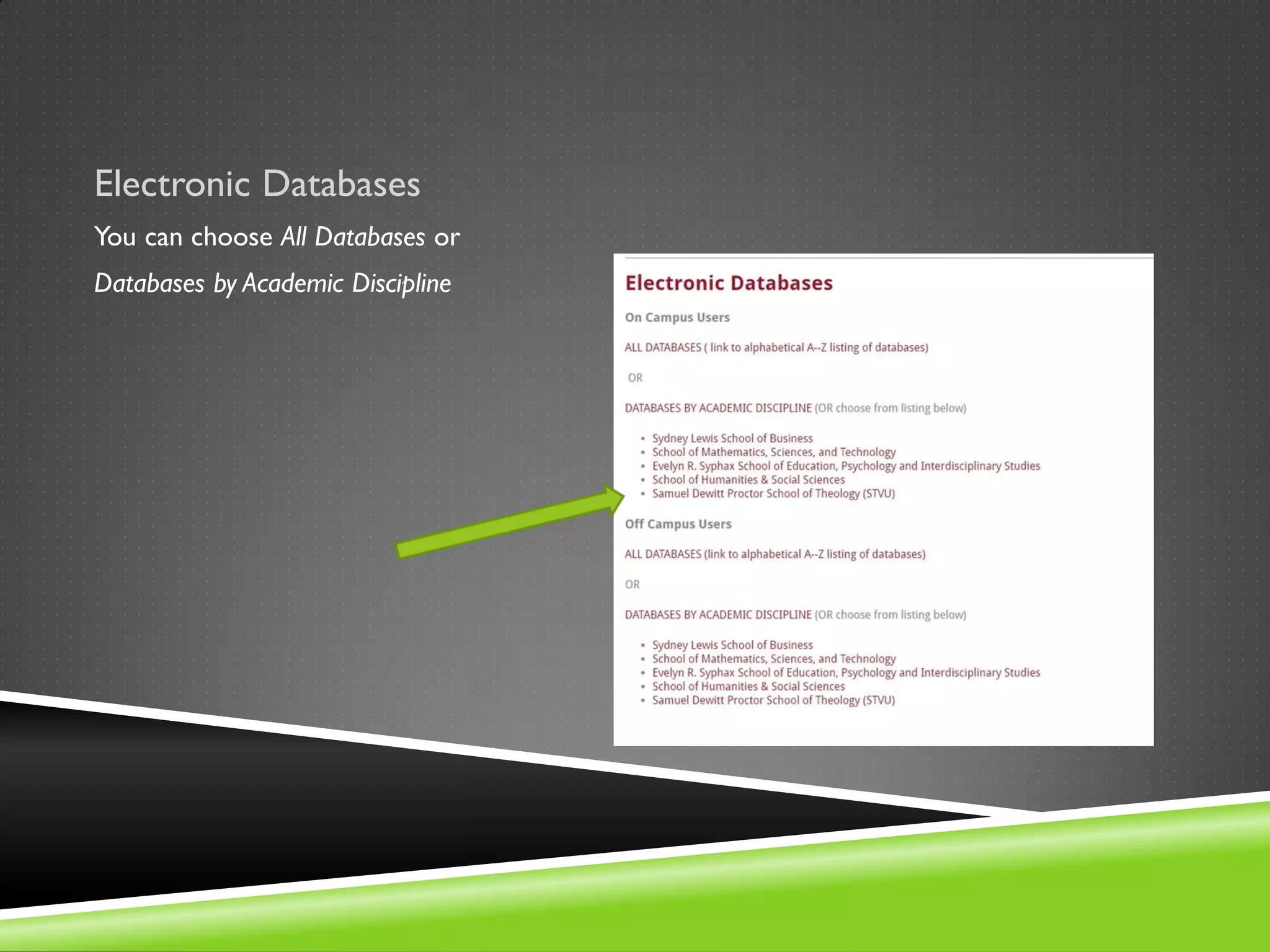
Electronic Databases
You can choose All Databases or
Databases by Academic Discipline
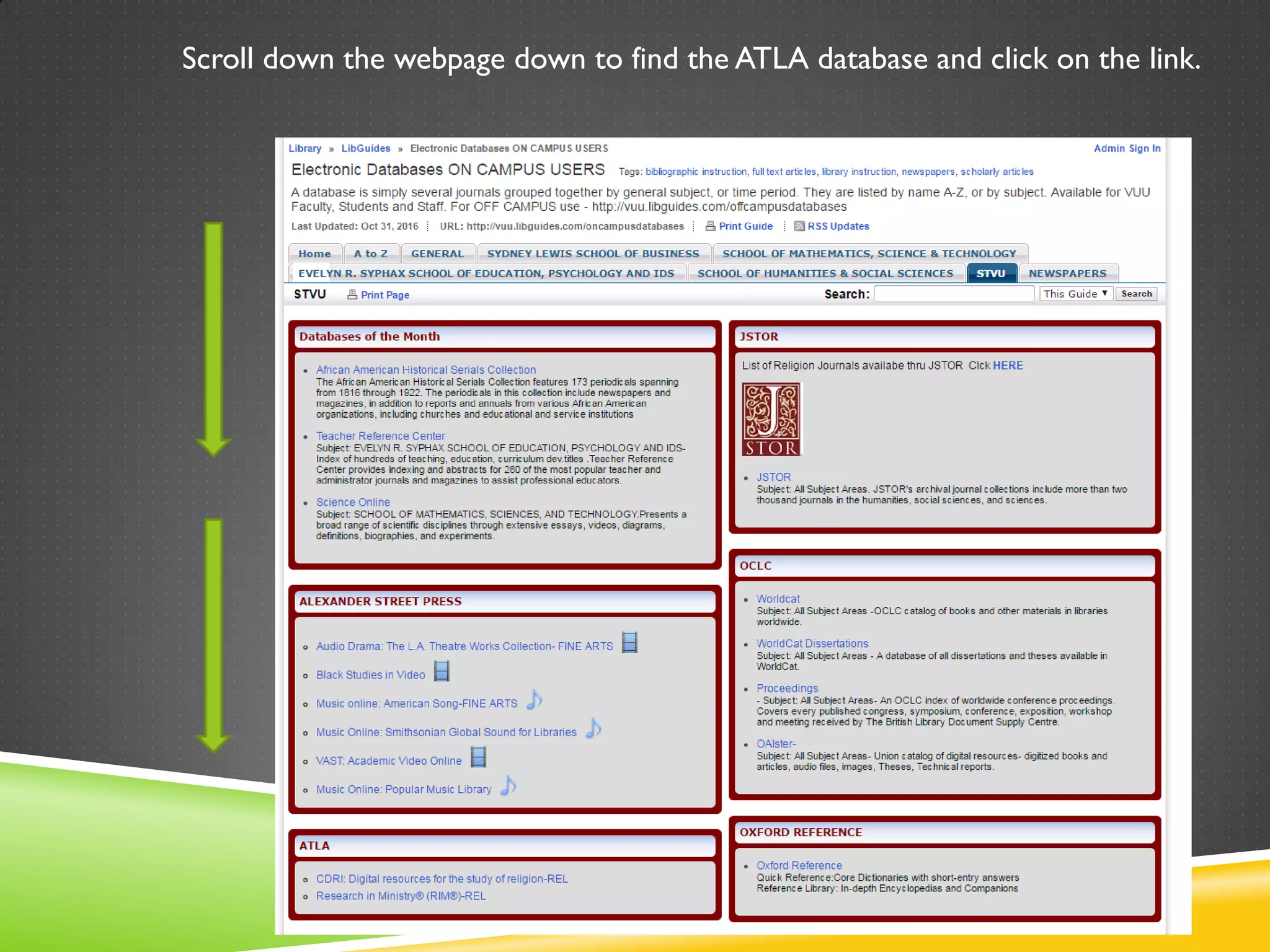
Scroll down the webpage down to find the ATLA database and click on the link.
How to get to the databases if OFF
CAMPUS
From the library
homepage: Look
for Off Campus
Users on the left
side menu and
click on the
heading.
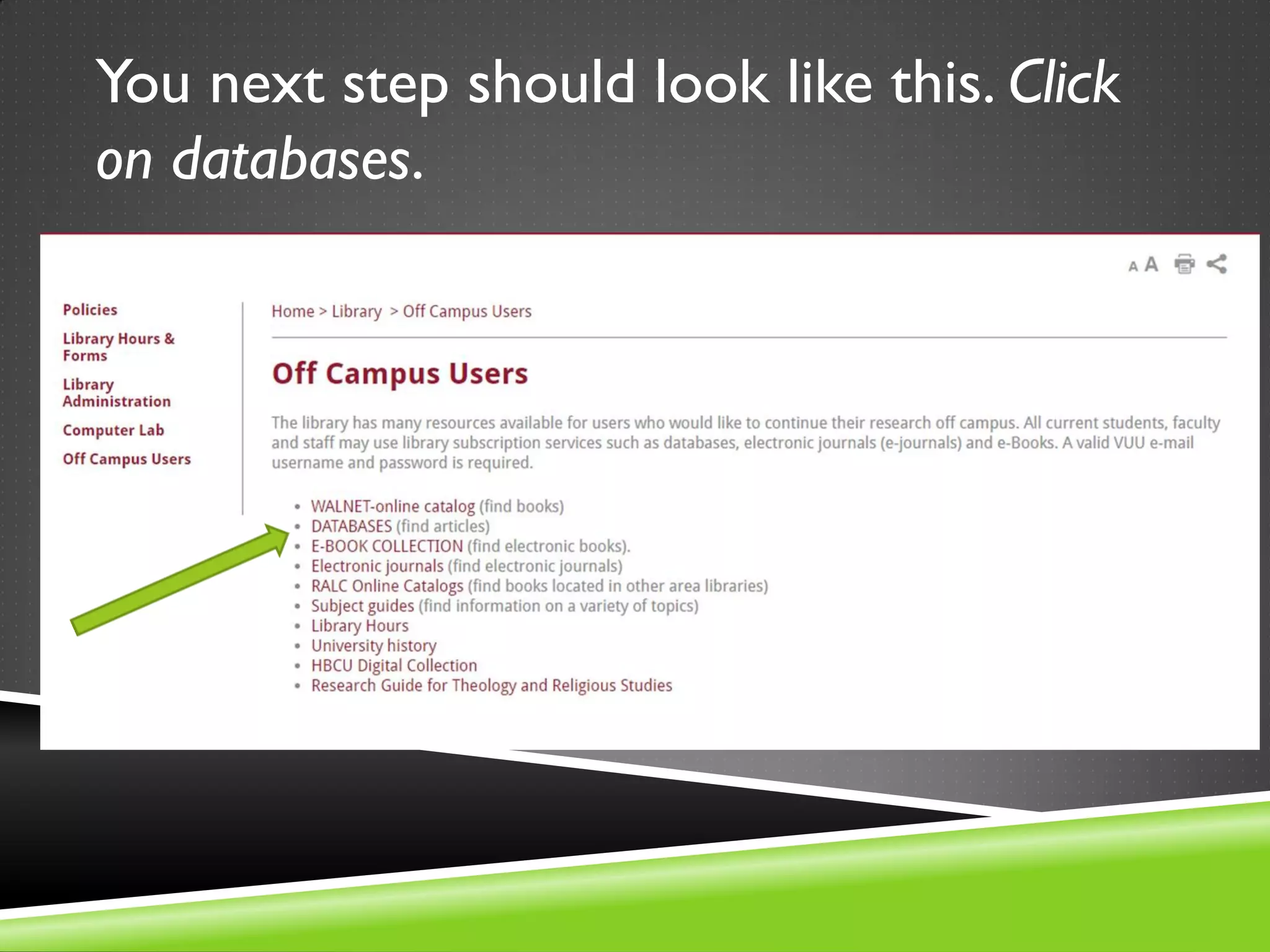
You next step should look like this. Click
on databases.
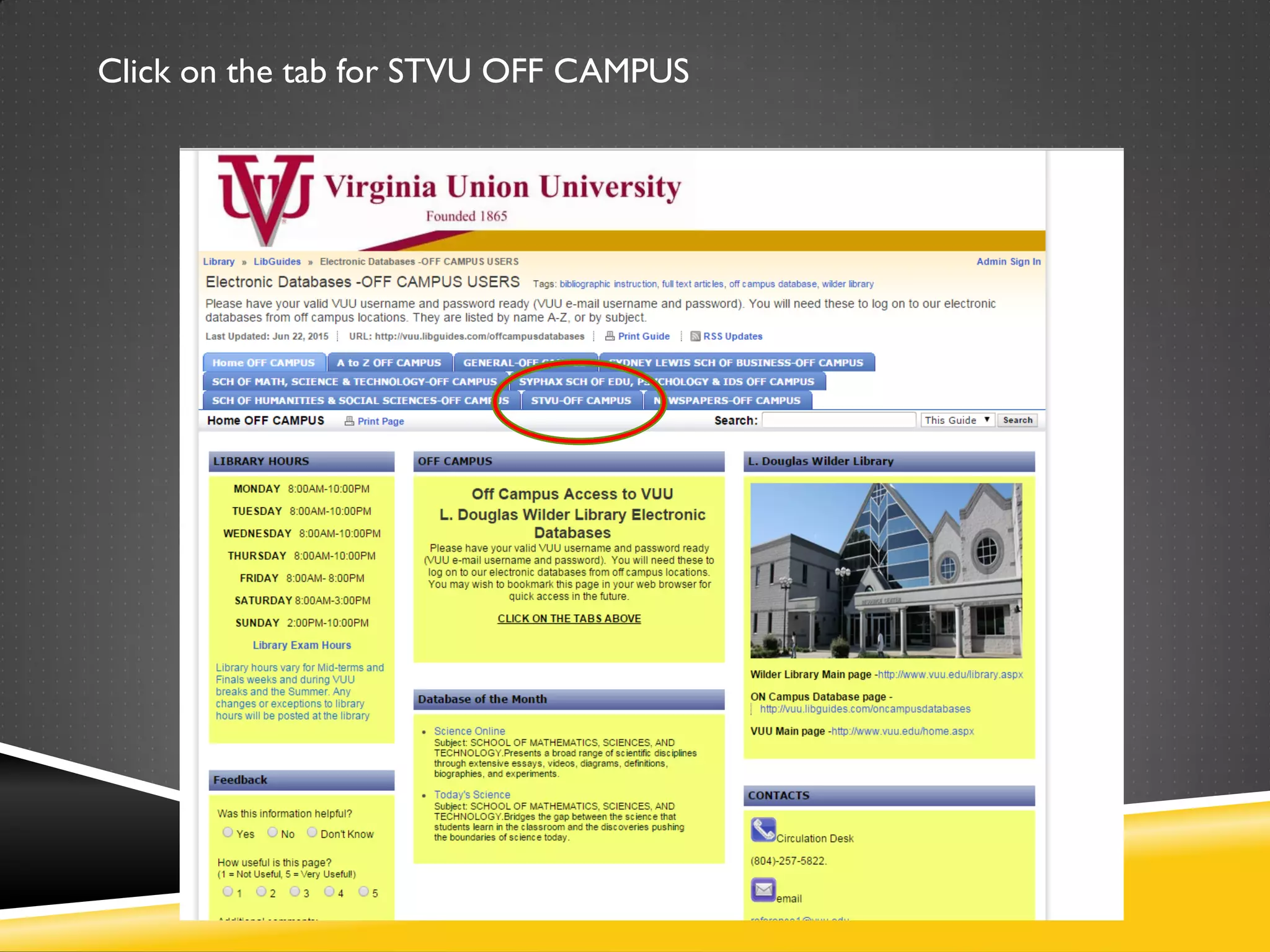
Click on the tab for STVU OFF CAMPUS
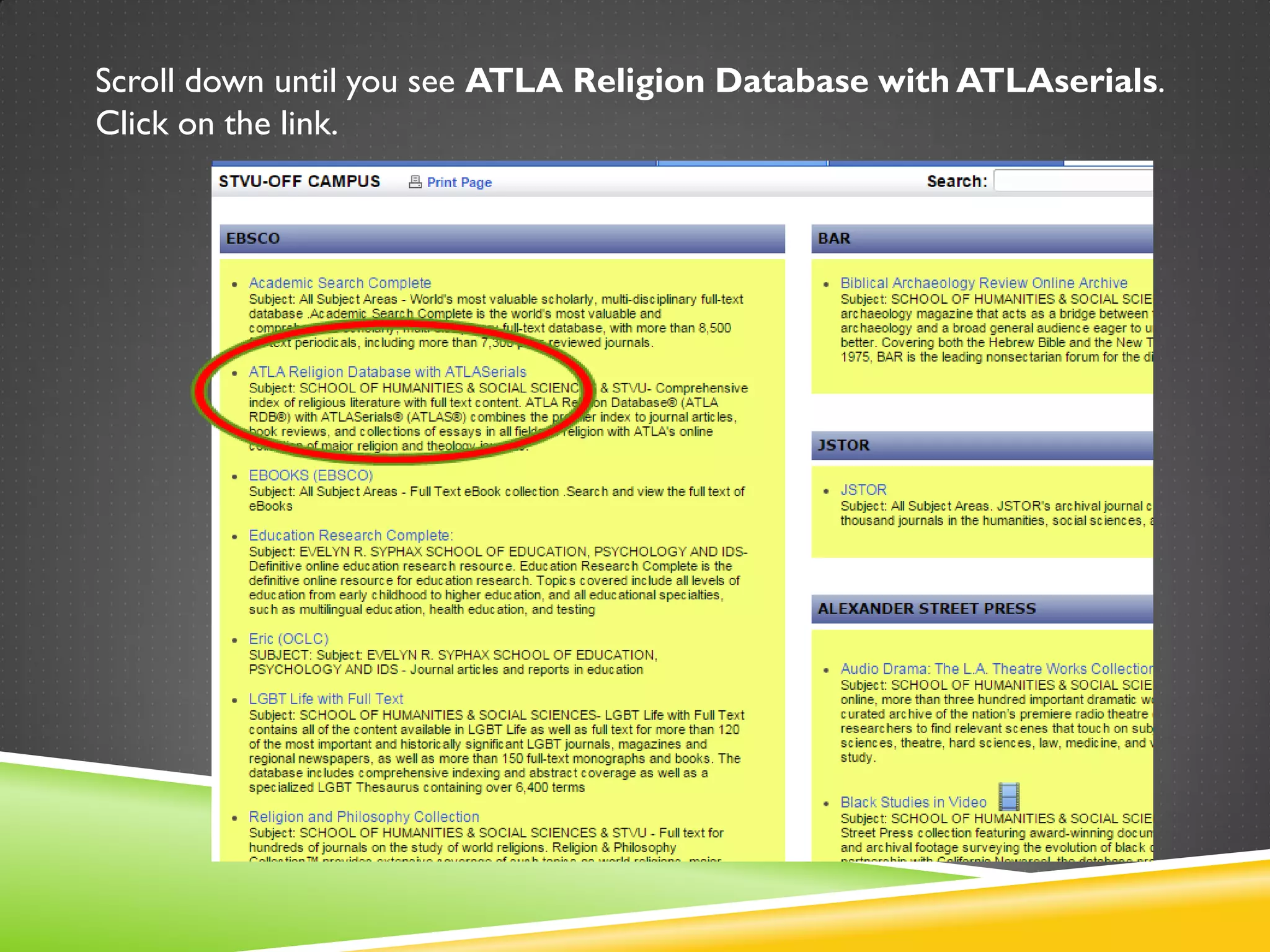
Scroll down until you see ATLA Religion Database with ATLAserials.
Click on the link.
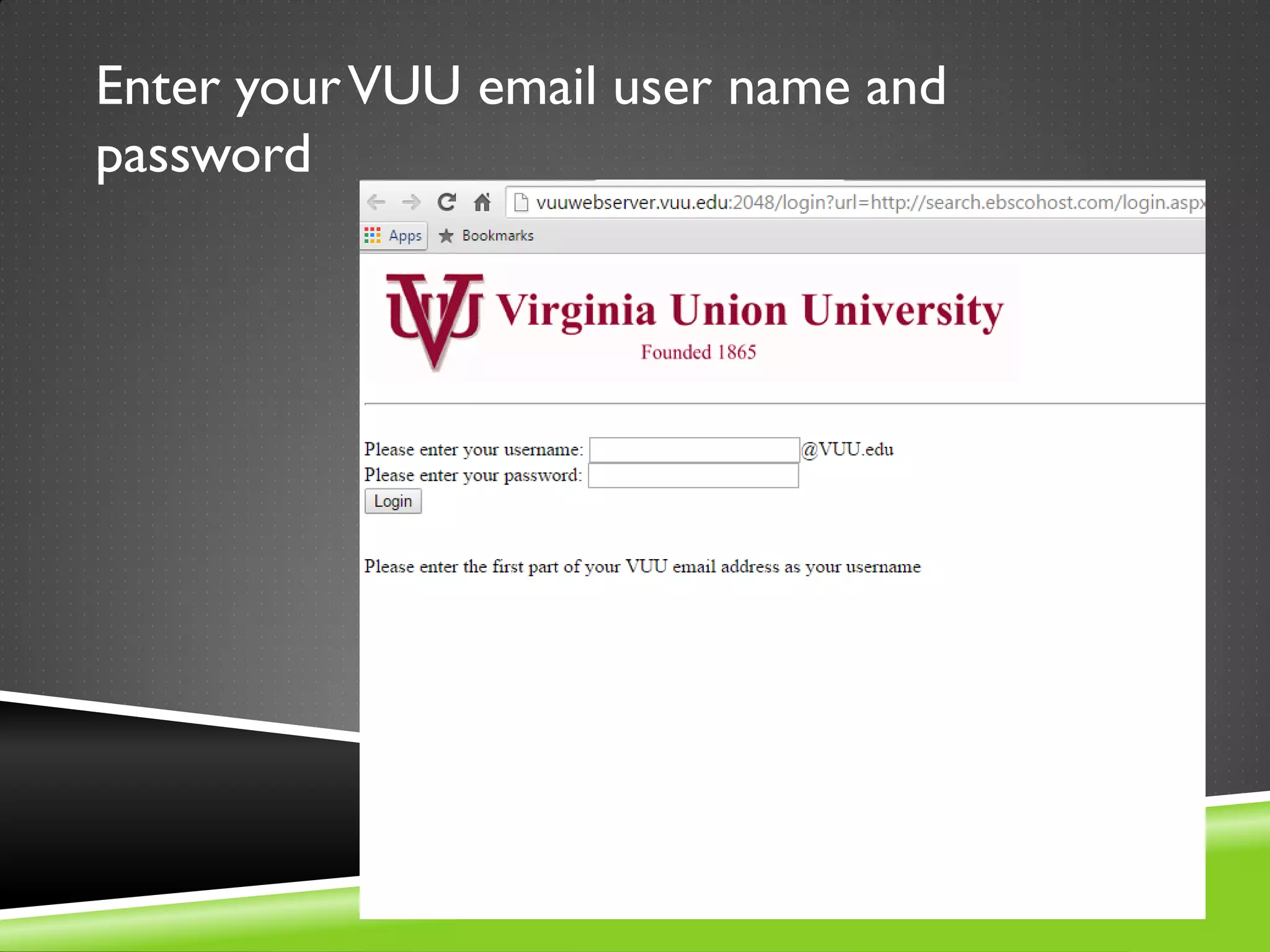
Enter yourVUU email user name and
password
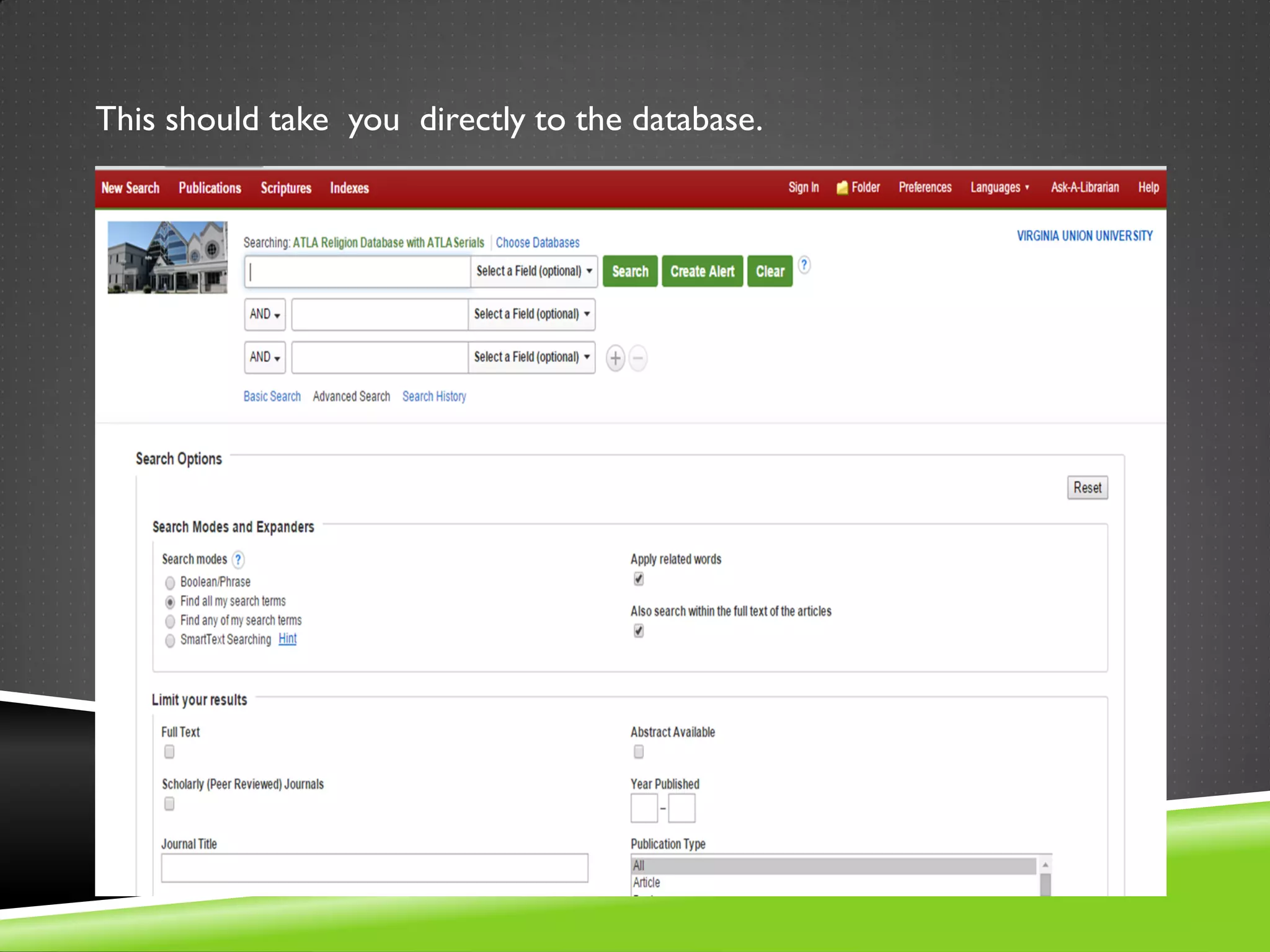
This should take you directly to the database.
Best practices
 Identifying key words in your thesis statement/research question is the first step in formulating a
search strategy in a database.
 Example: Research question/thesis: How effective is the use of technology in the Christian education
of adolescents with Asperger’s Syndrome?
 Keywords:
Technology
Classroom
Adolescents
Asperger’s Syndrome
 These are the words you put in the search box. Not the entire research question.
 Identify alternative terms, synonyms, and variations to those keywords
Technology—computer(s)-pc’s-laptop(s)—tablet(s)
Classroom—school—educational setting—teaching space
Adolescent(s)--juvenile(s)- -young adult--teenager(s)
Asperger’s Syndrome—Autism—High-functioning autism—Autism Spectrum Disorder
Tips for database searching
 Databases are literal. If you ask it to search “baby” itWILL NOT search
for infant, child, babies, or newborn.
 Truncation: use an asterisk*
For example, type comput* to find the words computer or computing.
 Wildcard: Use a question mark?
when you don’t know the exact spelling. Sm?th for Smith or Smyth
 Phrase searching: use double quotation marks to keep words together.
“Croatian politics”
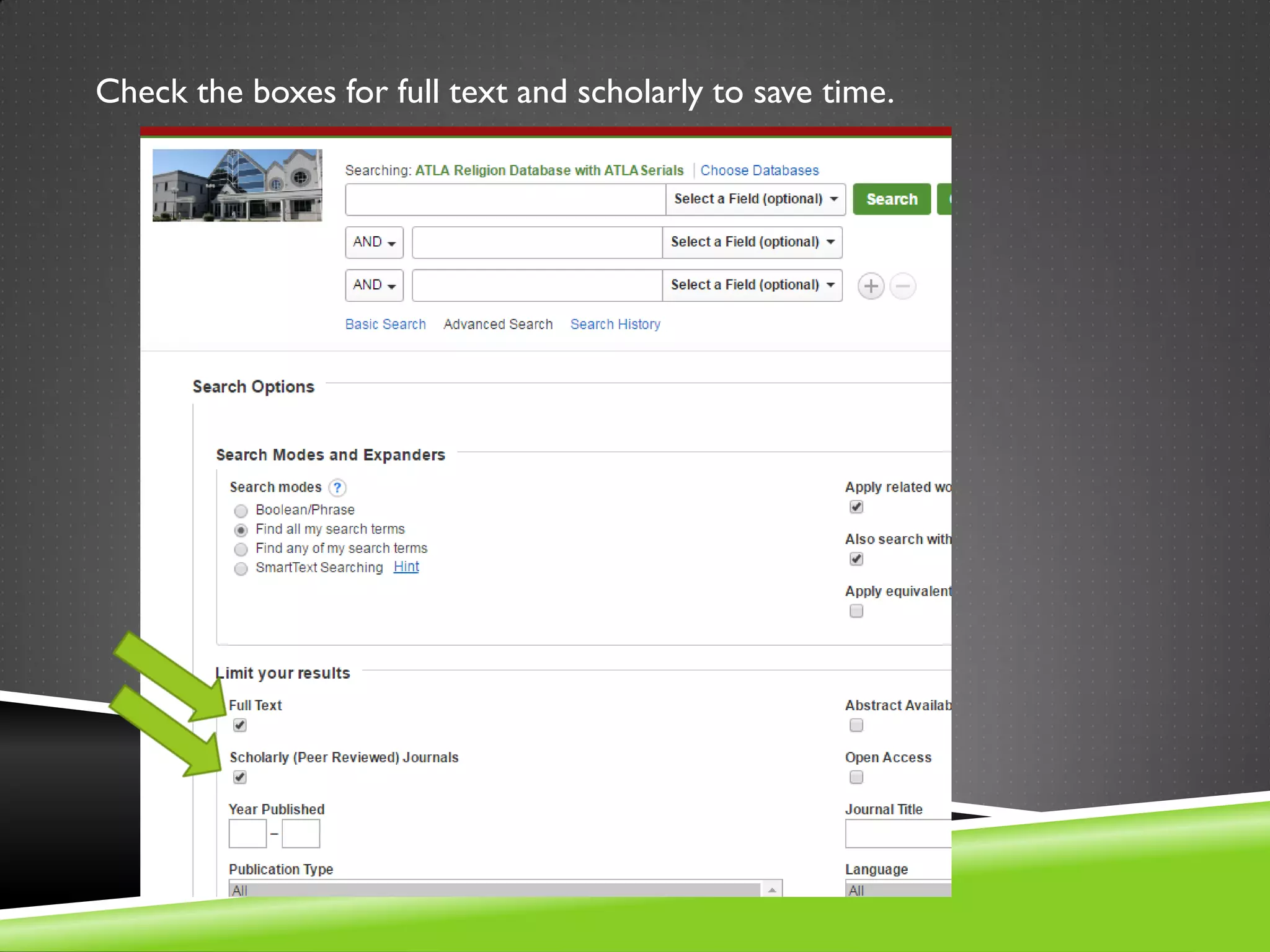
Check the boxes for full text and scholarly to save time.
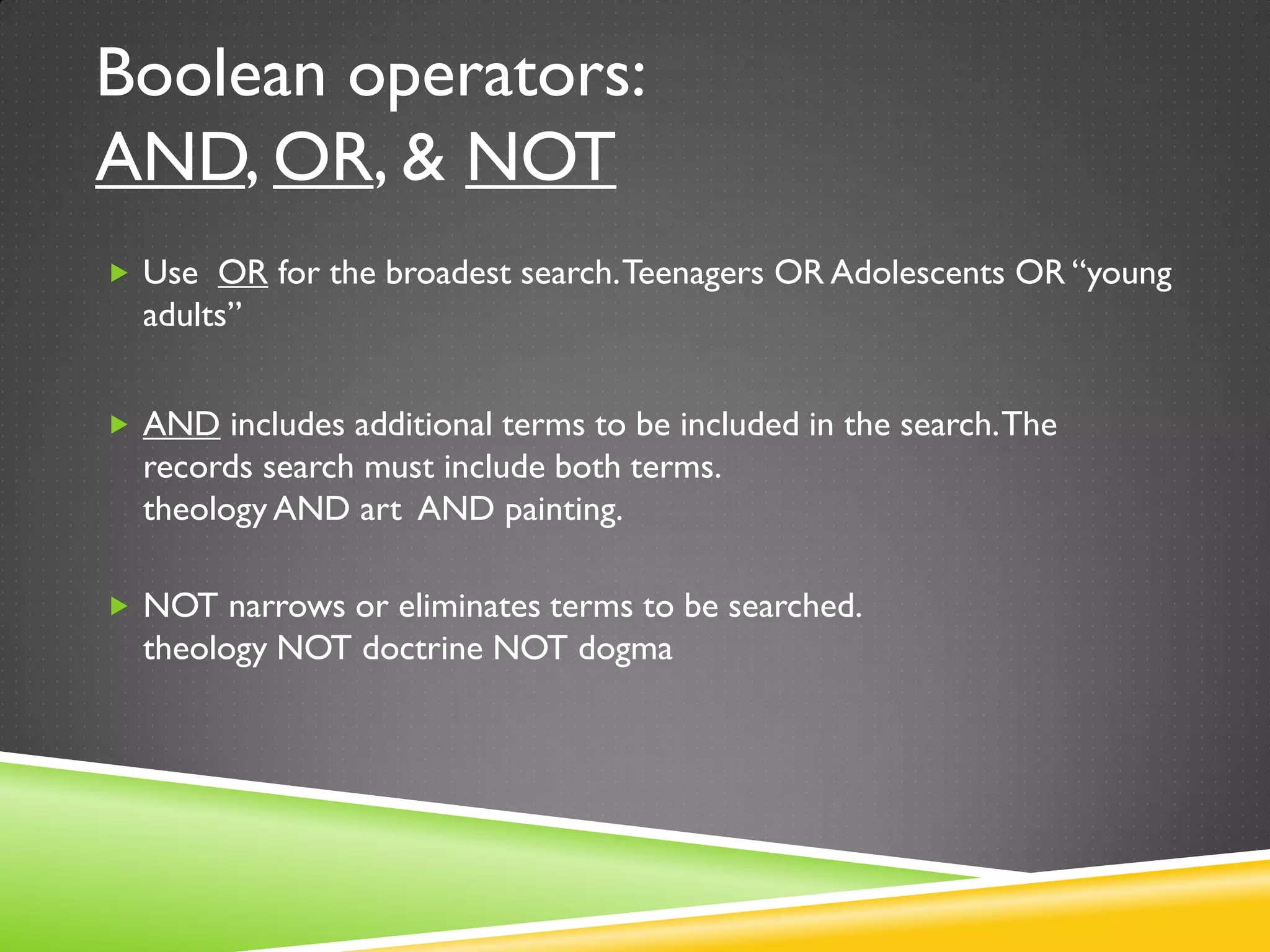
Boolean operators:
AND, OR, & NOT
 Use OR for the broadest search.Teenagers OR Adolescents OR “young
adults”
 AND includes additional terms to be included in the search.The
records search must include both terms.
theology AND art AND painting.
 NOT narrows or eliminates terms to be searched.
theology NOT doctrine NOT dogma
Use OR for the broadest search.Teenagers OR Adolescents OR “young adults”
AND includes additional terms to be included in the search.
The records search must include both terms: theology AND art AND
painting.
NOT narrows or eliminates terms to be searched.
theology NOT doctrine NOT dogma
When you click on an article, you will be taken to a record like this.The full
text link is on the left.
Searching for specific scriptures
When using the scripture
search function, remember that
to reach a specific chapter and
verse to click on “expand”
instead of the chapter.
The next three slides show you
the process for looking for
articles on Genesis Chapter
one, verse one.
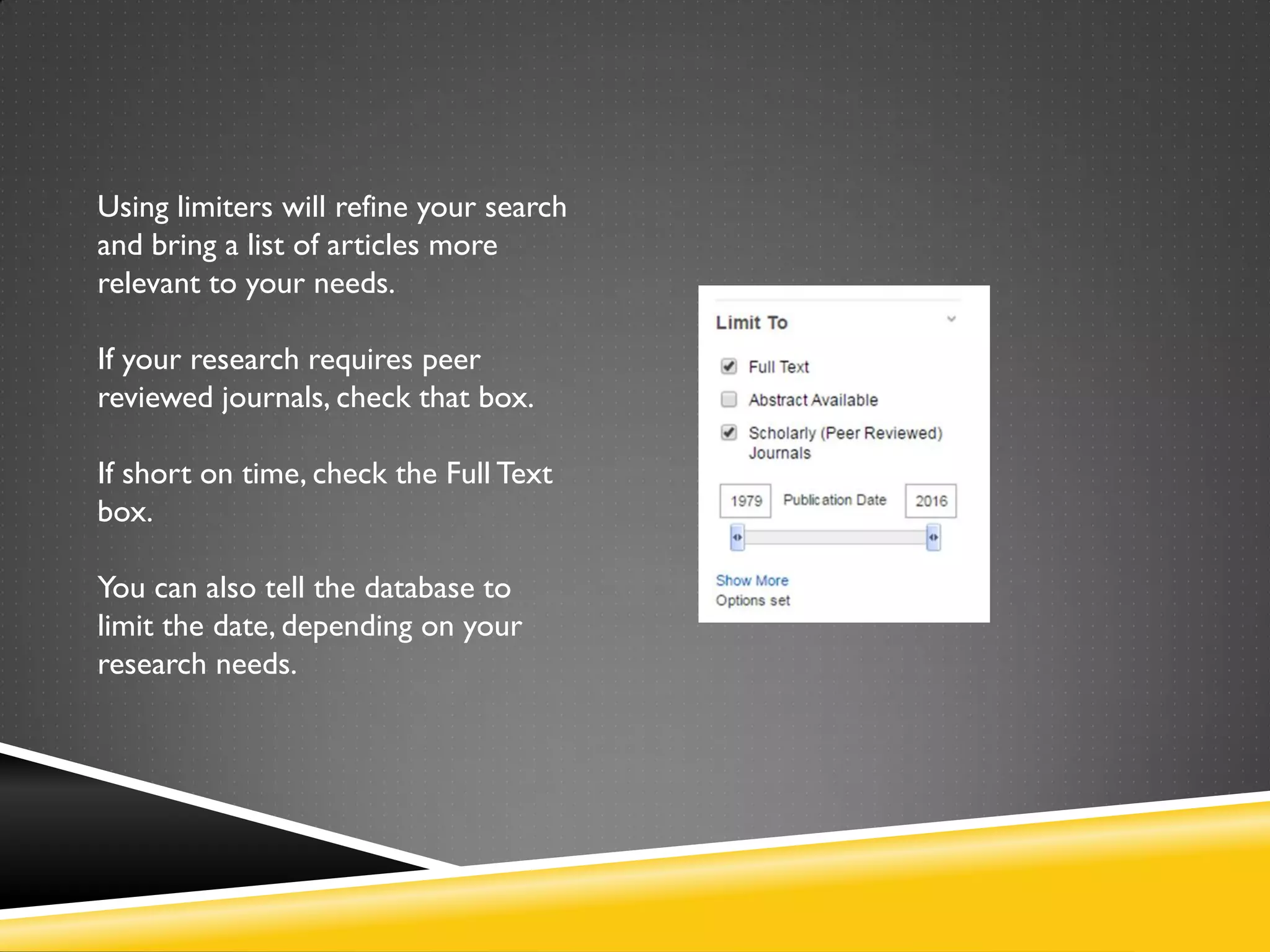
Using limiters will refine your search
and bring a list of articles more
relevant to your needs.
If your research requires peer
reviewed journals, check that box.
If short on time, check the Full Text
box.
You can also tell the database to
limit the date, depending on your
research needs.
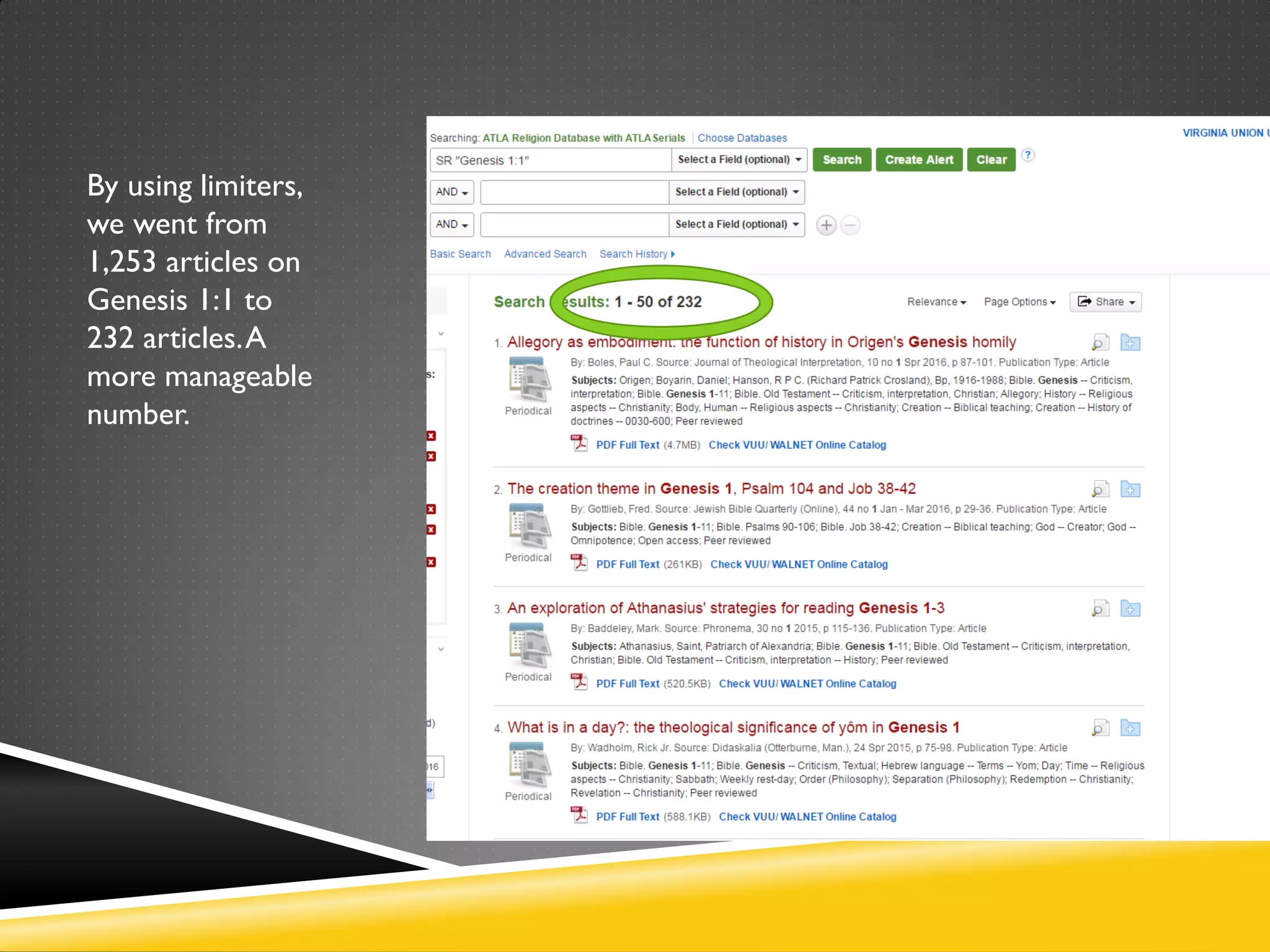
By using limiters,
we went from
1,253 articles on
Genesis 1:1 to
232 articles.A
more manageable
number.
Additional useful tools in the ATLA database
 Folder
 Citation tool
 Add other EBSCO databases to your searches
 App
The ATLA database allows you to create a temporary folder into you can put articles
that you are interested in. Click on the folder icon by each article you want to place in
the folder.
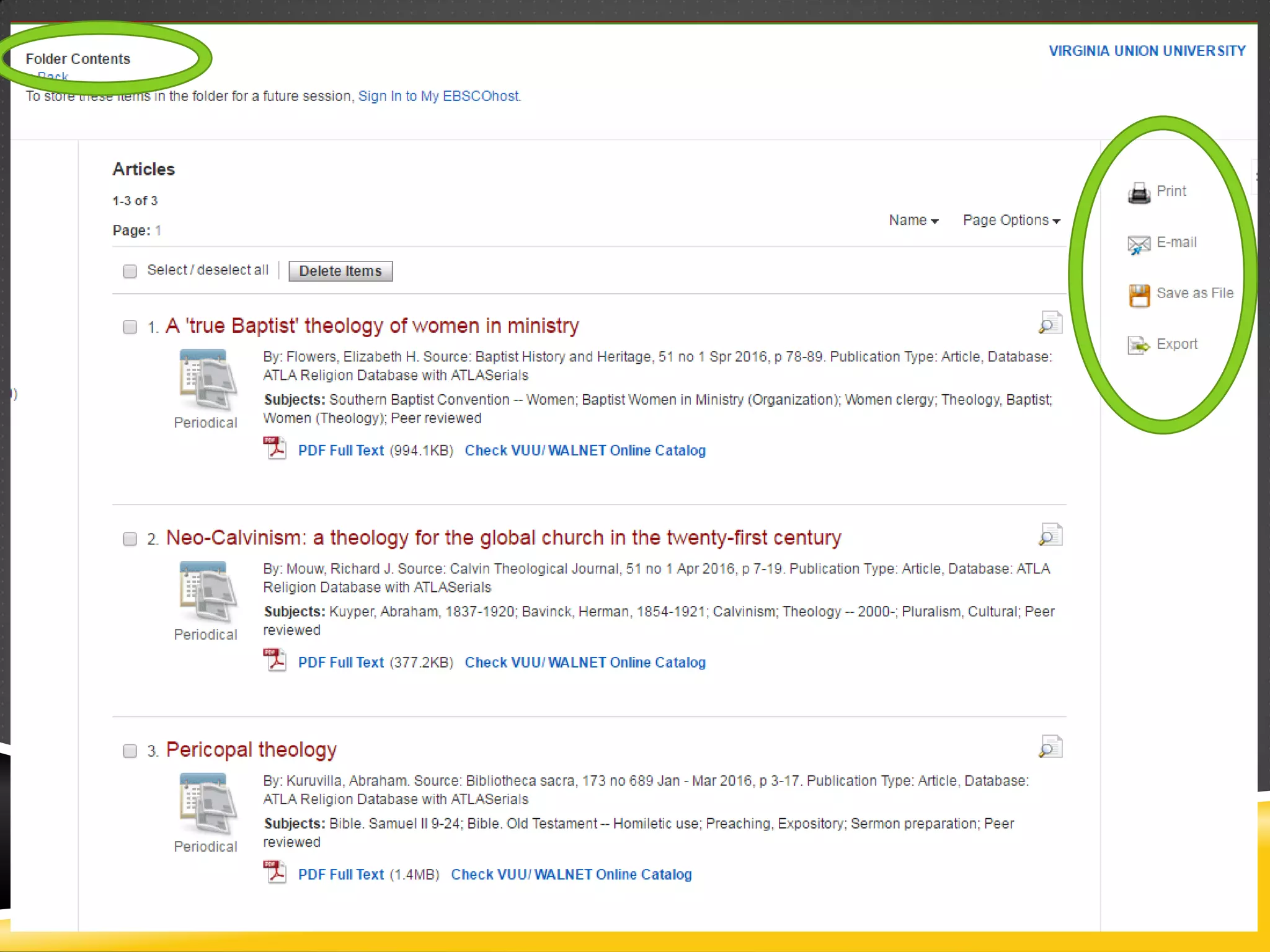
After choosing and saving the articles to the folder, click on the folder at
the top of the database page.You will see the folder contents and a list of
options will be listed on the right.
When you click on an article, there are several tools listed on the right.
One of these is a citation tool.
A box will pop up with the citation for the article in a variety of styles.
You can also add
additional databases
to your search. Click
on the link
Choose Databases.
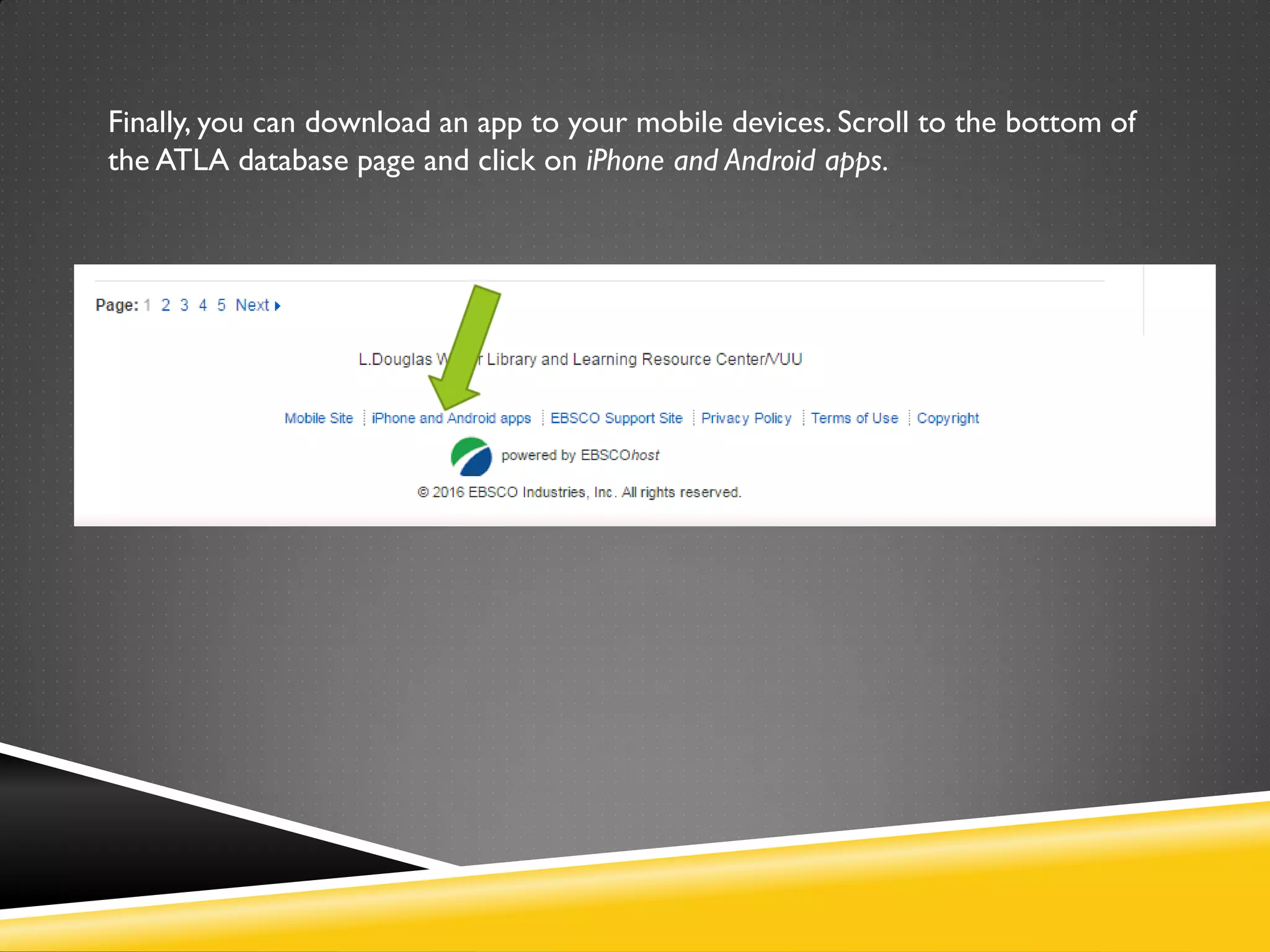
Finally, you can download an app to your mobile devices. Scroll to the bottom of
the ATLA database page and click on iPhone and Android apps.
Any questions? Feel free to contact me or for assistance.
Kay Darling
Theological Librarian
L. DouglasWilder Library
Virginia Union University
804-257-5723
svdarling@vuu.edu

New website ATLA religion database with serials

  • 1.
  • 2.
    How to getto the databases if on campus On the library webpage, look for Research and click on the heading.
  • 3.
     Click onthe link for databases.
  • 4.
    Electronic Databases You canchoose All Databases or Databases by Academic Discipline
  • 5.
    Scroll down thewebpage down to find the ATLA database and click on the link.
  • 6.
    How to getto the databases if OFF CAMPUS From the library homepage: Look for Off Campus Users on the left side menu and click on the heading.
  • 7.
    You next stepshould look like this. Click on databases.
  • 8.
    Click on thetab for STVU OFF CAMPUS
  • 9.
    Scroll down untilyou see ATLA Religion Database with ATLAserials. Click on the link.
  • 10.
    Enter yourVUU emailuser name and password
  • 11.
    This should takeyou directly to the database.
  • 12.
    Best practices  Identifyingkey words in your thesis statement/research question is the first step in formulating a search strategy in a database.  Example: Research question/thesis: How effective is the use of technology in the Christian education of adolescents with Asperger’s Syndrome?  Keywords: Technology Classroom Adolescents Asperger’s Syndrome  These are the words you put in the search box. Not the entire research question.  Identify alternative terms, synonyms, and variations to those keywords Technology—computer(s)-pc’s-laptop(s)—tablet(s) Classroom—school—educational setting—teaching space Adolescent(s)--juvenile(s)- -young adult--teenager(s) Asperger’s Syndrome—Autism—High-functioning autism—Autism Spectrum Disorder
  • 13.
    Tips for databasesearching  Databases are literal. If you ask it to search “baby” itWILL NOT search for infant, child, babies, or newborn.  Truncation: use an asterisk* For example, type comput* to find the words computer or computing.  Wildcard: Use a question mark? when you don’t know the exact spelling. Sm?th for Smith or Smyth  Phrase searching: use double quotation marks to keep words together. “Croatian politics”
  • 14.
    Check the boxesfor full text and scholarly to save time.
  • 15.
    Boolean operators: AND, OR,& NOT  Use OR for the broadest search.Teenagers OR Adolescents OR “young adults”  AND includes additional terms to be included in the search.The records search must include both terms. theology AND art AND painting.  NOT narrows or eliminates terms to be searched. theology NOT doctrine NOT dogma
  • 16.
    Use OR forthe broadest search.Teenagers OR Adolescents OR “young adults”
  • 17.
    AND includes additionalterms to be included in the search. The records search must include both terms: theology AND art AND painting.
  • 18.
    NOT narrows oreliminates terms to be searched. theology NOT doctrine NOT dogma
  • 19.
    When you clickon an article, you will be taken to a record like this.The full text link is on the left.
  • 20.
  • 21.
    When using thescripture search function, remember that to reach a specific chapter and verse to click on “expand” instead of the chapter. The next three slides show you the process for looking for articles on Genesis Chapter one, verse one.
  • 25.
    Using limiters willrefine your search and bring a list of articles more relevant to your needs. If your research requires peer reviewed journals, check that box. If short on time, check the Full Text box. You can also tell the database to limit the date, depending on your research needs.
  • 26.
    By using limiters, wewent from 1,253 articles on Genesis 1:1 to 232 articles.A more manageable number.
  • 27.
    Additional useful toolsin the ATLA database  Folder  Citation tool  Add other EBSCO databases to your searches  App
  • 28.
    The ATLA databaseallows you to create a temporary folder into you can put articles that you are interested in. Click on the folder icon by each article you want to place in the folder.
  • 29.
    After choosing andsaving the articles to the folder, click on the folder at the top of the database page.You will see the folder contents and a list of options will be listed on the right.
  • 31.
    When you clickon an article, there are several tools listed on the right. One of these is a citation tool.
  • 32.
    A box willpop up with the citation for the article in a variety of styles.
  • 33.
    You can alsoadd additional databases to your search. Click on the link Choose Databases.
  • 35.
    Finally, you candownload an app to your mobile devices. Scroll to the bottom of the ATLA database page and click on iPhone and Android apps.
  • 37.
    Any questions? Feelfree to contact me or for assistance. Kay Darling Theological Librarian L. DouglasWilder Library Virginia Union University 804-257-5723 svdarling@vuu.edu