Assistant Professor Nandini Patil
Godutai Engg. College,kalaburagi
Data Visualization
Introduction
 Data Visualization is theart and science of making
data easy to understand and consume for the end
user.
 Shows right amount of the data, in the right order,
in the right visual form, to convey the high priority
information .
 Requirement- understanding
 consumer need
 nature of data
 Avaiable tools & technique to represent data
 Last step in the data life cycle
Excellence in Visualization
 Data can be presented in the form of rectangular tables or
in the colourfull graphs of various types.
 Tables – Small, non-comparative, highly-labeled data sets.
 Graphs – Amount of graph grows, big data, which will
helps to give shape to data.
 Objectives:
 Shows, and Even Reveal, the data
 Induce the viewer to think of the substances of the data.
 Avoid Distoring what the data have to say
 Make Large Datasets Coherent
 Encourage the eyes to compare different pieces of data
 Reveal the data at several levels of details
 Serve a reasonably clear purpose
 Closely integrate with the statistical and verbal descriptions of
the datasets
Types of Charts
Many kinds of data so there are many types of graphs,
popular chart are as follows
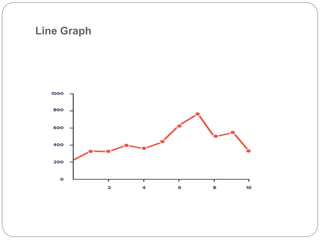
1. Line Graph
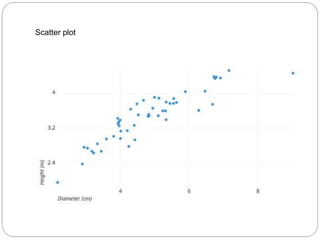
2. Scatter plot
3. Bar Graph
4. Stacked Bar graphs
5. Histograms
6. Pie charts
7. Box charts
8. Bubble Graph
9. Dial
10. Geographical data maps
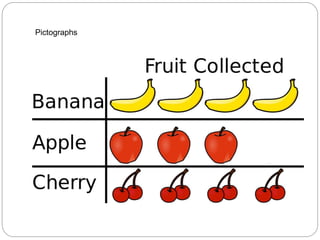
11. Pictographs
Line Graph
Scatter plot
Bar Graph
Stacked Bar graphs
Histograms
Pie charts
Box charts
Bubble Graph
Dial
Geographical data maps
Pictographs
Visualization Example
conti
conti
Conti
Conti
Tips for data visualization
 Fetch appropriate and correct data for analysis
 Sort the data in the most appropriate manner
 Choose appropriate method to present the data
 The dataset could be pruned
 The visualization could show additional
dimension for reference
 The numericaldata may need to be binned into
few categories
 High-level visualization could be backed by more
detailed analysis
 Need to present additional textual information

Data visualization of Big Data analytics

  • 1.
    Assistant Professor NandiniPatil Godutai Engg. College,kalaburagi Data Visualization
  • 2.
    Introduction  Data Visualizationis theart and science of making data easy to understand and consume for the end user.  Shows right amount of the data, in the right order, in the right visual form, to convey the high priority information .  Requirement- understanding  consumer need  nature of data  Avaiable tools & technique to represent data  Last step in the data life cycle
  • 3.
    Excellence in Visualization Data can be presented in the form of rectangular tables or in the colourfull graphs of various types.  Tables – Small, non-comparative, highly-labeled data sets.  Graphs – Amount of graph grows, big data, which will helps to give shape to data.  Objectives:  Shows, and Even Reveal, the data  Induce the viewer to think of the substances of the data.  Avoid Distoring what the data have to say  Make Large Datasets Coherent  Encourage the eyes to compare different pieces of data  Reveal the data at several levels of details  Serve a reasonably clear purpose  Closely integrate with the statistical and verbal descriptions of the datasets
  • 4.
    Types of Charts Manykinds of data so there are many types of graphs, popular chart are as follows 1. Line Graph 2. Scatter plot 3. Bar Graph 4. Stacked Bar graphs 5. Histograms 6. Pie charts 7. Box charts 8. Bubble Graph 9. Dial 10. Geographical data maps 11. Pictographs
  • 5.
  • 6.
  • 7.
  • 8.
  • 9.
  • 10.
  • 11.
  • 12.
  • 13.
  • 14.
  • 15.
  • 16.
  • 17.
  • 18.
  • 19.
  • 20.
  • 21.
    Tips for datavisualization  Fetch appropriate and correct data for analysis  Sort the data in the most appropriate manner  Choose appropriate method to present the data  The dataset could be pruned  The visualization could show additional dimension for reference  The numericaldata may need to be binned into few categories  High-level visualization could be backed by more detailed analysis  Need to present additional textual information